EasyManual
C10FSHCT - Saw METABO - Free user manual and instructions
Find the device manual for free C10FSHCT METABO in PDF.



User questions about C10FSHCT METABO
0 question about this device. Answer the ones you know or ask your own.
Ask a new question about this device
Download the instructions for your Saw in PDF format for free! Find your manual C10FSHCT - METABO and take your electronic device back in hand. On this page are published all the documents necessary for the use of your device. C10FSHCT by METABO.
USER MANUAL C10FSHCT METABO
SAFETY INSTRUCTIONS AND INSTRUCTION MANUAL
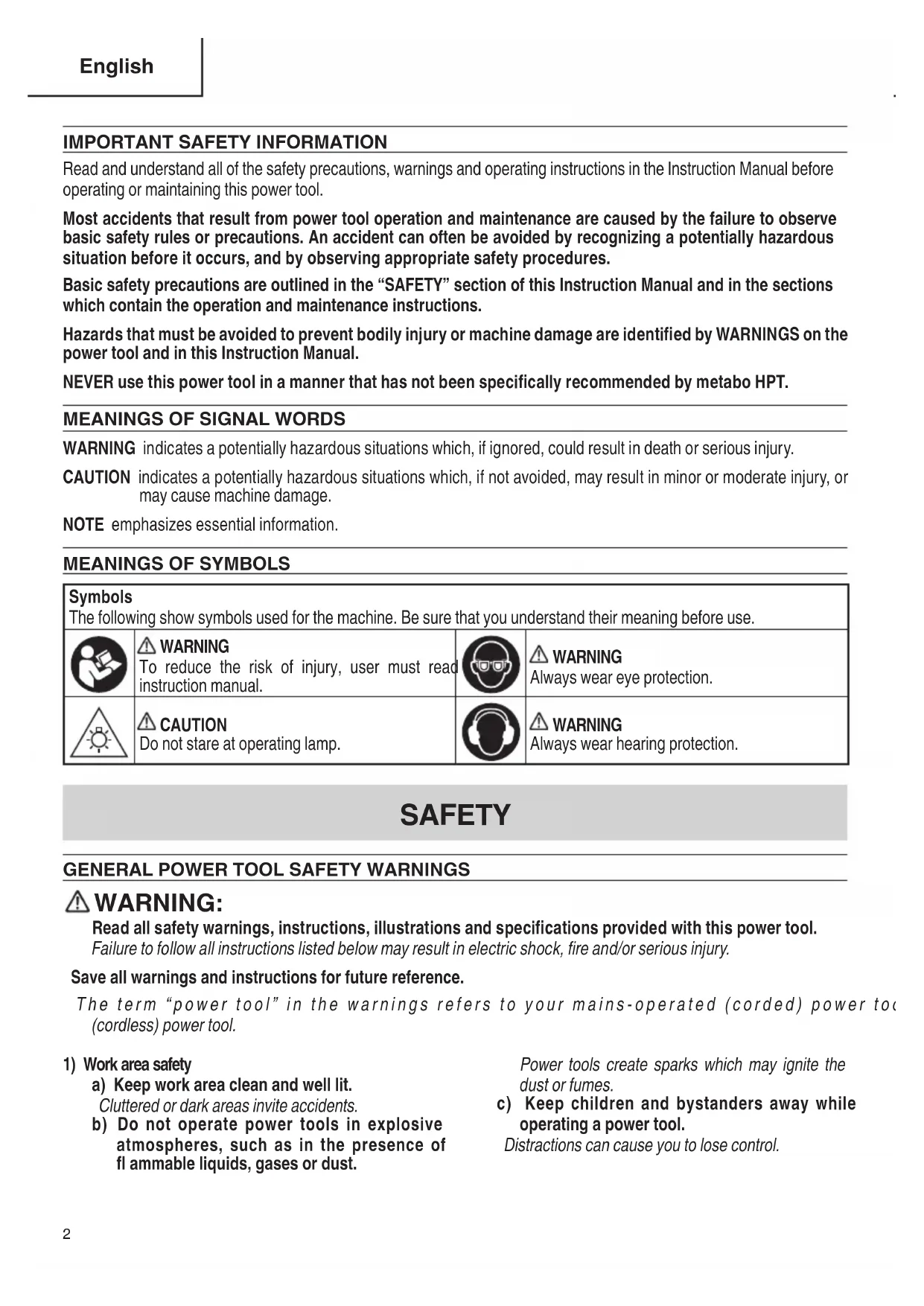
Read and understand all of the safety precautions, warnings and operating instructions in the Instruction Manual before operating or maintaining this power tool. Most accidents that result from power tool operation and maintenance are caused by the failure to observe basic safety rules or precautions. An accident can often be avoided by recognizing a potentially hazardous situation before it occurs, and by observing appropriate safety procedures. Basic safety precautions are outlined in the “SAFETY” section of this Instruction Manual and in the sections which contain the operation and maintenance instructions. Hazards that must be avoided to prevent bodily injury or machine damage are identifi ed by WARNINGS on the power tool and in this Instruction Manual. NEVER use this power tool in a manner that has not been specifi cally recommended by metabo HPT.
MEANINGS OF SIGNAL WORDS
WARNING indicates a potentially hazardous situations which, if ignored, could result in death or serious injury. CAUTION indicates a potentially hazardous situations which, if not avoided, may result in minor or moderate injury, or may cause machine damage. NOTE emphasizes essential information.
Symbols The following show symbols used for the machine. Be sure that you understand their meaning before use. WARNING To reduce the risk of injury, user must read instruction manual. WARNING Always wear eye protection. CAUTION Do not stare at operating lamp. WARNING Always wear hearing protection. SAFETY
Read all safety warnings, instructions, illustrations and specifi cations provided with this power tool. Failure to follow all instructions listed below may result in electric shock, fi re and/or serious injury. Save all warnings and instructions for future reference. The term “power tool” in the warnings refers to your mains-operated (corded) power tool or battery-operated (cordless) power tool.
a) Keep work area clean and well lit. Cluttered or dark areas invite accidents. b) Do not operate power tools in explosive atmospheres, such as in the presence of fl ammable liquids, gases or dust. Power tools create sparks which may ignite the dust or fumes. c) Keep children and bystanders away while operating a power tool. Distractions can cause you to lose control. 000BookC10FSHC(T)NA.indb2000BookC10FSHC(T)NA.indb2 2019/02/2516:33:352019/02/2516:33:353 English
2) Electrical safety
a) Power tool plugs must match the outlet. Never modify the plug in any way. Do not use any adapter plugs with earthed (grounded) power tools. Unmodifi ed plugs and matching outlets will reduce risk of electric shock. b) Avoid body contact with earthed or grounded surfaces, such as pipes, radiators, ranges and refrigerators. There is an increased risk of electric shock if your body is earthed or grounded. c) Do not expose power tools to rain or wet conditions. Water entering a power tool will increase the risk of electric shock. d) Do not abuse the cord. Never use the cord for carrying, pulling or unplugging the power tool. Keep cord away from heat, oil, sharp edges or moving parts. Damaged or entangled cords increase the risk of electric shock. e) When operating a power tool outdoors, use an extension cord suitable for outdoor use. Use of a cord suitable for outdoor use reduces the risk of electric shock. f) If operating a power tool in a damp location is unavoidable, use a residual current device (RCD) protected supply. Use of an RCD reduces the risk of electric shock.
a) Stay alert, watch what you are doing and use common sense when operating a power tool. Do not use a power tool while you are tired or under the infl uence of drugs, alcohol or medication. A moment of inattention while operating power tools may result in serious personal injury. b) Use personal protective equipment. Always wear eye protection. Protective equipment such as a dust mask, non- skid safety shoes, hard hat or hearing protection used for appropriate conditions will reduce personal injuries. c) Prevent unintentional starting. Ensure the switch is in the off -position before connecting to power source and/or battery pack, picking up or carrying the tool. Carrying power tools with your fi nger on the switch or energising power tools that have the switch on invites accidents. d) Remove any adjusting key or wrench before turning the power tool on. A wrench or a key left attached to a rotating part of the power tool may result in personal injury. e) Do not overreach. Keep proper footing and balance at all times. This enables better control of the power tool in unexpected situations. f) Dress properly. Do not wear loose clothing or jewellery. Keep your hair, clothing and gloves away from moving parts. Loose clothes, jewellery or long hair can be caught in moving parts. g) If devices are provided for the connection of dust extraction and collection facilities, ensure these are connected and properly used. Use of dust collection can reduce dust-related hazards. h) Do not let familiarity gained from frequent use of tools allow you to become complacent and ignore tool safety principles. A careless action can cause severe injury within a fraction of a second.
4) Power tool use and care
a) Do not force the power tool. Use the correct power tool for your application. The correct power tool will do the job better and safer at the rate for which it was designed. b) Do not use the power tool if the switch does not turn it on and off . Any power tool that cannot be controlled with the switch is dangerous and must be repaired. c) Disconnect the plug from the power source and/or remove the battery pack, if detachable, from the power tool before making any adjustments, changing accessories, or storing power tools. Such preventive safety measures reduce the risk of starting the power tool accidentally. d) Store idle power tools out of the reach of children and do not allow persons unfamiliar with the power tool or these instructions to operate the power tool. Power tools are dangerous in the hands of untrained users. e) Maintain power tools and accessories. Check for misalignment or binding of moving parts, breakage of parts and any other condition that may aff ect the power toolʼs operation. If damaged, have the power tool repaired before use. Many accidents are caused by poorly maintained power tools. f) Keep cutting tools sharp and clean. Properly maintained cutting tools with sharp cutting edges are less likely to bind and are easier to control. 000BookC10FSHC(T)NA.indb3000BookC10FSHC(T)NA.indb3 2019/02/2516:33:352019/02/2516:33:354 English g) Use the power tool, accessories and tool bits etc. in accordance with these instructions, taking into account the working conditions and the work to be performed. Use of the power tool for operations diff erent from those intended could result in a hazardous situation. h) Keep handles and grasping surfaces dry, clean and free from oil and grease. Slippery handles and grasping surfaces do not allow for safe handling and control of the tool in unexpected situations.
a) Have your power tool serviced by a qualifi ed repair person using only identical replacement parts. This will ensure that the safety of the power tool is maintained. PRECAUTION Keep children and infi rm persons away. When not in use, tools should be stored out of reach of children and infi rm persons.
SAFETY INSTRUCTIONS FOR MITER SAWS
a) Miter saws are intended to cut wood or wood-like products, they cannot be used with abrasive cut- off wheels for cutting ferrous material such as bars, rods, studs, etc. Abrasive dust causes moving parts such as the lower guard to jam. Sparks from abrasive cutting will burn the lower guard, the kerf insert and other plastic parts. b) Use clamps to support the workpiece whenever possible. If supporting the workpiece by hand, you must always keep your hand at least 100 mm from either side of the saw blade. Do not use this saw to cut pieces that are too small to be securely clamped or held by hand. If your hand is placed too close to the saw blade, there is an increased risk of injury from blade contact. c) The workpiece must be stationary and clamped or held against both the fence and the table. Do not feed the workpiece into the blade or cut "freehand" in any way. Unrestrained or moving workpieces could be thrown at high speeds, causing injury. d) Push the saw through the workpiece. Do not pull the saw through the workpiece. To make a cut, raise the saw head and pull it out over the workpiece without cutting, start the motor, press the saw head down and push the saw through the workpiece. Cutting on the pull stroke is likely to cause the saw blade to climb on top of the workpiece and violently throw the blade assembly towards the operator. e) Never cross your hand over the intended line of cutting either in front or behind the saw blade. Supporting the workpiece “cross handed” i.e. holding the workpiece to the right of the saw blade with your left hand or vice versa is very dangerous. f) Do not reach behind the fence with either hand closer than 100 mm from either side of the saw blade, to remove wood scraps, or for any other reason while the blade is spinning. The proximity of the spinning saw blade to your hand may not be obvious and you may be seriously injured. g) Inspect your workpiece before cutting. If the workpiece is bowed or warped, clamp it with the outside bowed face toward the fence. Always make certain that there is no gap between the workpiece, fence and table along the line of the cut. Bent or warped workpieces can twist or shift and may cause binding on tile spinning saw blade while cutting. There should be no nails or foreign objects in the workpiece. h) Do not use the saw until the table is clear of all tools, wood scraps, etc., except for the workpiece. Small debris or loose pieces of wood or other objects that contact the revolving blade can be thrown with high speed.
i) Cut only one workpiece at a time.
Stacked multiple workpieces cannot be adequately clamped or braced and may bind on the blade or shift during cutting. j) Ensure the miter saw is mounted or placed on a level, fi rm work surface before use. A level and fi rm work surface reduces the risk of the miter saw becoming unstable. k) Plan your work. Every time you change the bevel or miter angle setting, make sure the adjustable fence is set correctly to support the workpiece and will not interfere with the blade or the guarding system. Without turning the tool “ON” and with no workpiece on the table, move the saw blade through a complete simulated cut to assure there will be no interference or danger of cutting the fence.
I) Provide adequate support such as table
extensions, saw horses, etc. for a workpiece that is wider or longer than the table top. Workpieces longer or wider than the miter saw table can tip if not securely supported. If the cut-off piece or workpiece tips, it can lift the lower guard or be thrown by the spinning blade. m) Do not use another person as a substitute for a table extension or as additional support. Unstable support for the workpiece can cause the blade to bind or the workpiece to shift during the cutting operation pulling you and the helper into the spinning blade. 000BookC10FSHC(T)NA.indb4000BookC10FSHC(T)NA.indb4 2019/02/2516:33:352019/02/2516:33:355 English n) The cut-off piece must not be jammed or pressed by any means against the spinning saw blade. If confi ned, i.e. using length stops, the cut-off piece could get wedged against the blade and thrown violently. o) Always use a clamp or a fixture designed to properly support round material such as rods or tubing. Rods have a tendency to roll while being cut, causing the blade to "bite" and pull the work with your hand into the blade. p) Let the blade reach full speed before contacting the workpiece. This will reduce the risk of the workpiece being thrown. q) If the workpiece or blade becomes jammed, turn the miter saw off . Wait for all moving parts to stop and disconnect the plug from the power source and/or remove the battery pack. Then work to free the jammed material. Continued sawing with a jammed workpiece could cause lass of control or damage to the miter saw. r) After fi nishing the cut, release the switch, hold the saw head down and wait for the blade to stop before removing the cut-off piece. Reaching with your hand near the coasting blade is dangerous. s) Hold the handle fi rmly when making an incomplete cut or when releasing the switch before the saw head is completely in the down position. The braking action of the saw may cause the saw head to be suddenly pulled downward, causing a risk of injury.
SPECIFIC SAFETY RULES FOR USE OF
THIS POWER TOOL AND SYMBOLS
WARNING The following specifi c operating instructions must be observed when using this POWER TOOL in order to avoid injury: DO’s
ALWAYS OBSERVE THE FOLLOWING RULES TO
ASSURE SAFE USE OF THIS TOOL:
1. Review this Manual and familiarize yourself with the
safety rules and operating instructions for this POWER TOOL before attempting to use it.
2. Remove all packing materials attached or connected
to the tool before attempting to operate it.
3. Always confi rm that the POWER TOOL is clean before
4. Always wear snug-fi tting clothing, non-skid footwear
(preferably with steel toes) and eye protection when operating the POWER TOOL.
5. Always handle the POWER TOOL carefully. If the
POWER TOOL falls or strikes against a hard object, it might become deformed or cracked or sustain other damage.
6. Always cease operating the saw at once, if you notice
any abnormality whatsoever.
7. Always confirm that all components are mounted
properly and securely before using the tool.
8. When replacing the saw blade, always confi rm that the
rpm rating of the new blade is correct for use on this tool.
9. Always shut off the power and wait for the saw blade to
completely stop rotating before doing any maintenance or adjustments.
10. During slide cutting, always push the saw blade away
11. Always clamp or otherwise secure the workpiece to the
fence; otherwise the workpiece might be thrust form the table and cause bodily harm.
12. During miter or bevel cutting, always wait for the rotation
of the blade to stop completely before lifting the saw blade.
13. Always make a trial run fi rst before attempting any new
14. Always handle the saw blade with care when
dismounting and mounting it.
15. Always confi rm that the workpiece is free of nails or
other foreign objects before beginning a cut.
16. Always keep your hands out of the path of the saw
17. Always confi rm that the lower guard is in the proper
place before using the saw.
18. Always confi rm that the lower guard does not obstruct
the sliding motion of the saw before attempting slide cutting.
19. Inspect the tool power cords periodically.
20. Always confi rm that the proper lengths and types of
extension cords are being utilized, if necessary, before starting the tool.
21. Always confi rm that the motor air vents are fully open
before using the tool.
22. Always wait until the motor has reached full speed
before starting a cut.
23. Always keep the handles dry, clean and free of oil and
grease. Hold the tool fi rmly when in use.
24. Always use outboard stands to provide support for
long workpieces that overhang the table of the slide compound miter saw.
25. Always operate the tool after ensuring the workpiece
is fi xed properly with a vise assembly.
26. The operating instructions provided with the tool shall
direct the user to secure the tool to supporting structure if, during normal operation, there is a tendency for the tool to tip over, slide, or walk on the supporting surface. 000BookC10FSHC(T)NA.indb5000BookC10FSHC(T)NA.indb5 2019/02/2516:33:352019/02/2516:33:356 English
27. Ensure before each cut that the machine is stable.
Use only saw blades whose maximum permitted speed is higher than the no-load speed of the power tool.
28. If the saw blade should become jammed, switch the
machine off and hold the workpiece until the saw blade comes to a complete stop. To prevent kickback, the workpiece may not be moved until after the machine has come to a complete stop. Correct the cause for the jamming of the saw blade before restarting the machine. DON’Ts NEVER VIOLATE THE FOLLOWING RULES TO ASSURE SAFE USE OF THIS TOOL:
1. Never operate the POWER TOOL unless you fully
understand the operating instructions contained in this Manual.
2. Never leave the POWER TOOL unattended without
fi rst unplugging the power cord.
3. Never operate the POWER TOOL when you are
tired, after you have taken any medications, or have consumed any alcoholic beverages.
5. Never operate the tool while wearing loose clothing, a
necktie or jewelry, or while your hair is uncovered, to protect against getting caught in the moving machinery.
6. Never reach around the saw blade.
7. Never touch any moving parts, including the blade,
while the saw is in use.
8. Never remove any safety devices or blade guards; use
of the tool without them would be hazardous.
9. Never lock the lower guard; always confi rm that it slides
smoothly before using the tool.
10. Never damage the power cord of the tool.
11. Never attempt to move a plugged-in POWER TOOL
while your fi nger is on the starting switch.
12. Never use the POWER TOOL if the starting switch does
not turn on and off properly.
13. Never use the POWER TOOL if the plastic housing or
the handle is cracked or deformed.
14. Never use the POWER TOOL near fl ammable liquids
or gases because sparking can cause an explosion.
15. Never clean plastic components with solvents because
the plastic may dissolve.
16. Never operate the saw unless all the blade guards are
17. Never raise the saw blade from the workpiece until it
has fi rst come to a complete stop.
18. When slide cutting, never pull the handle toward the
operator, since this could cause the saw blade to kick up from the workpiece. Always push the handle away from the operator in a single, smooth motion.
19. Never place your limbs inside of the line next to warning
sign “ ” while the tool is being operated. This may cause hazardous conditions.
20. Never use abrasive type blades on this saw.
21. Never expose to rain or use in damp locations.
24. Do not stand in a line with the saw blade In front of the
machine. Always stand aside of the saw blade. This protects your body against possible kickback. Keep hands, fi ngers and arms away from the rotating saw blade.
25. Do not cross your arms when operating the tool arm.
26. Defi nitions for symbols used on this tool.
2. Always keep hands out of the path of the saw blade.
3. Never operate the saw without the guards in place.
4. Never perform any freehand operation with the slide
5. Never reach around the saw blade.
6. Always turn off tool and wait for saw blade to stop before
moving workpiece or changing settings.
7. Always disconnect power before changing blade or
10. To reduce the risk of injury, return carriage to the full
rear position after each crosscut operation. REPLACEMENT PARTS When servicing use only identical replacement parts. Repairs should be conducted only by a metabo HPT authorized service center. 000BookC10FSHC(T)NA.indb6000BookC10FSHC(T)NA.indb6 2019/02/2516:33:352019/02/2516:33:357 English
USE PROPER EXTENSION CORD
Make sure your extension cord is in good condition. When using an extension cord, be sure to use one heavy enough to carry the current your product will draw. An undersized cord will cause a drop in line voltage resulting in loss of power and overheating. Table shows the correct size to use depending on cord length and nameplate ampere rating. If in doubt, use the next heavier gage. The smaller the gage number, the heavier the cord.
MINIMUM GAGE FOR CORD SETS
Total Length of Cord in Feet (Meter) 0 – 25 (0 – 7.6) 26 – 50 (7.9 – 15.2) 51 – 100 (15.5 – 30.5) 101 – 150 (30.8 – 45.7) Ampere Rating AWG More Than Not More Than 0 – 6 18 16 16 14 6 – 10 18 16 14 12 10 – 12 16 16 14 12 12 – 16 14 12 Not Recommended WARNING Avoid electrical shock hazard. Never use this tool with a damaged or frayed electrical cord or extension cord. Inspect all electrical cords regularly. Never use in or near water or in any environment where electric shock is possible.
DOUBLE INSULATION FOR SAFER OPERATION
To ensure safer operation of this power tool, metabo HPT has adopted a double insulation design. “Double insulation” means that two physically separated insulation systems have been used to insulate the electrically conductive materials connected to the power supply from the outer frame handled by the operator. Therefore, either the symbol “ ” or the words and “Double insulation” appear on the power tool or on the nameplate. Although this system has no external grounding, you must still follow the normal electrical safety precautions given in this Instruction Manual, including not using the power tool in wet environments. To keep the double insulation system eff ective, follow these precautions:
- Only metabo HPT AUTHORIZED SERVICE CENTER should disassemble or assemble this power tool, and only genuine metabo HPT replacement parts should be installed.
- Clean the exterior of the power tool only with a soft cloth moistened with soapy water and dry thoroughly.
- Never use solvents, gasoline or thinners on plastic components; otherwise the plastic may dissolve.
SAVE THESE INSTRUCTIONS
NOTE: The information contained in this Instruction Manual is designed to assist you in the safe operation and maintenance of the power tool. Some illustrations in this Instruction Manual may show details or attachments that diff er from those on your own power tool.
WARNING: Accessories for this power tool are mentioned in this Instruction
Manual. The use of any other attachment or accessory can be dangerous and could cause injury or mechanical damage. STANDARD ACCESSORIES 3 13 mm Wrench (1 piece)1 Vise Assembly (1 piece)For how to use, refer to page 26.2 Dust bag (1 piece)For how to use, refer to page 13.4 Support rod ass’y (2 pieces)5 mm screw (2 pieces) Fig. 3 NOTE: Accessories are subject to change without any obligation on the part of the metabo HPT. 000BookC10FSHC(T)NA.indb11000BookC10FSHC(T)NA.indb11 2019/02/2516:33:392019/02/2516:33:3912 English APPLICATIONS Wood and aluminum sash.
PREPARATION BEFORE OPERATION
Make the following preparations before operating the power tool:
1. Remove all packing materials attached or connected to the tool before attempting to operate
11-39/64" (295 mm) 11/32" (9 mm) 4 holes 11-27/64" (290 mm) 10-23/64" (263 mm) 1" (25 mm) thick bench Work bench 5/16" (8 mm) nut 5/16" (8mm) boltBase Fig. 4 Attach the power tool to a level, horizontal work bench in accordance with Fig. 4. Select 5/16" (8 mm) diameter bolts suitable in length for the thickness of the work bench. Bolt length should be at least 1-9/16" (40 mm) plus the thickness of the work bench. For example, use 2-9/16" (65 mm) or larger bolts for a 1" (25 mm) thick work bench. The support rod ass’y attached to the rear of the base helps stabilize the power tool. Installing the support rod ass’y Insert one support rod ass’y into the hole located at the rear of the base and push it in as far as it will go. Thread the 5 mm screw into the hole next to the mounting hold. Firmly tighten the 5 mm screw with a screwdriver. Repeat the above steps for installing the other support rod ass’y. Support rod ass’y 5 mm screw Hole Fig. 5 000BookC10FSHC(T)NA.indb12000BookC10FSHC(T)NA.indb12 2019/02/2516:33:402019/02/2516:33:4013 English
3. Releasing the locking pin
When the power tool is prepared for shipping, its main parts are secured by a locking pin. Press the handle slightly down and pull out the locking pin to disengag the cutting head. NOTE: Lowering the handle slightly will enable you to disengage the locking pin more easily and safely. The lock position of the locking pin is for carrying and storage only.
4. Installing the dust bag and vise
Install the dust bag onto the dust port on the miter saw. Fit the connecting tube of dust bag and the dust port together. To empty the dust bag, pull out the dust bag assembly from dust port. Open zipper on underside of bag and empty into waste container. Check frequently and empty the dust bag before it gets full. NOTE: The dust bag should be angled toward the right side of the saw for best results. This will also avoid any interference during the saw operation. CAUTION: Empty the dust bag frequently to prevent the duct and the lower guard from becoming clogged. Sawdust will accumulate more quickly than normal during bevel cutting.
WARNING: Do not use this saw to cut and/or sand metals. the hot chips or
sparks may ignite saw dust from the bag material. (Attach the vise assembly as shown in Fig. 1, Fig. 2 and Fig. 25.) Pull Locking pin Switch Handle Fig. 6 Dust port Dust bag Fig. 7 000BookC10FSHC(T)NA.indb13000BookC10FSHC(T)NA.indb13 2019/02/2516:33:402019/02/2516:33:4014 English
5. Power cord storage
Fig. 8-a Fig. 8-b Bracket (A)Bracket (B)Bracket (A)Bracket (B) For convenience and to prevent damage to the power cord when the miter saw is not in use or is in transportation, there are two brackets at the rear side of the slide carriage for winding the cord. (Fig. 8-a) NOTE: To rapidly release the power cord, turn the upper bracket (A) 180°. It will release the cord. (Fig. 8-b) BEFORE USING
1. Make sure the power source is appropriate for the tool.
WARNING: Never connect the power tool unless the available AC power
source is of the same voltage as that specifi ed on the nameplate of the tool. Never connect this power tool to a DC power source.
2. Make sure the trigger switch is turned OFF.
WARNING: If the power cord is connected to the power source with the
trigger switch turned ON the power tool will start suddenly and can cause a serious accident.
3. Check the saw blade for visible defects.
Confi rm that the saw blade is free of cracks or other visible damage.
4. Confi rm that the saw blade is attached securely to the power tool.
Using the supplied 13 mm wrench, tighten the 8 mm bolt on the saw blade spindle to secure the saw blade. For details, see Fig. 44-a, Fig. 44-b, Fig. 44-c and Fig. 44-d in the section on “SAW BLADE MOUNTING AND DISMOUNTING”. 000BookC10FSHC(T)NA.indb14000BookC10FSHC(T)NA.indb14 2019/02/2516:33:442019/02/2516:33:4415 English
5. Check the lower guard for proper operation.
Lower guard is designed to protect the operator from coming into contact with the saw blade during operation of the tool. Always check that the lower guard moves smoothly and covers the saw blade properly.
6. Confi rm the position of the spindle lock before using the tool.
After installing the saw blade, confi rm that the spindle lock has been returned to the released position before using the power tool (see Fig. 2).
7. Check the Power Receptacle.
To prevent overheating, accidental stopping or intermittent operation, confi rm that the power cord plug fi ts properly in the electrical receptacle and does not fall out after it is inserted. Repair or replace the receptacle if it is faulty.
8. Confi rm the tool’s power cord is not damaged.
Repair or replace the power cord if an inspection indicates that it is damaged
Always wear eye protection with side shields that meets the requirements of ANSI Standard Z87.1. Ordinary eyeglasses do not provide adequate protection because they do not contain impact resistant safety glass.
WARNING: Operating the tool without wearing proper eye protection may
result in serious injury.
This tool is equipped with an electric brake which will typically stop the blade within 5 seconds after the trigger switch is released. Occasionally, there will be a delay in the brake engaging which will result in a longer blade stopping time. On rare occasions, the brake may not engage at all and the saw blade will coast to a stop. If the brake fails to engage frequently, depress and release the trigger switch to turn the tool on and off 4 or 5 times. If the brake still does not engage, have the tool serviced at a metabo HPT authorized service center. Always confi rm that the saw blade has completely stopped before raising it from the workpiece. The brake is not a substitute for a properly functioning lower guard. Check the function of the lower guard before each use. Serious personal injury may occur if the lower guard does not move smoothly and cover the blade properly. Fig. 9 Lower guard 000BookC10FSHC(T)NA.indb15000BookC10FSHC(T)NA.indb15 2019/02/2516:33:452019/02/2516:33:4516 English
WARNING: Please be aware of the reaction of the Motor Head (Fig.1) when
the brake is activated. Braking causes the Motor Head to jerk downward and the user should be prepared for this reaction, especially when the trigger switch is released before the blade is completely down. Failure to be familiar with, and prepared for, the operational characteristics of the tool may cause serious injury. AFTER CONNECTING THE POWER PLUG TO AN APPROPRIATE AC POWER SOURCE, CHECK THE OPERATION OF THE TOOL AS FOLLOWS:
After confi rming that no one is standing behind, the power tool start and confi rm that no operating abnormalities exist before attempting a cutting operation.
12. Inspect the rotating stability of the saw blade.
For precise cutting, rotate the saw blade and check for defl ection to confi rm that the blade is not noticeably unstable; otherwise vibrations might occur and cause an accident. BEFORE CUTTING
1. Positioning the table insert
Table insertTable insertSaw bladeTable insertSaw bladeSaw blade4 mm machine screw4 mm machine screw[Right angle cutting] Fig. 10-a [Left bevel angle cutting] Fig. 10-b [Right bevel angle cutting] Fig. 10-c 4 mm machine screw Table inserts are installed on the turntable. When shipping the tool from the factory, the table inserts are so fi xed that the saw blade does not contact them. The burr of the bottom surface of the workpiece is remarkably reduced, if the table insert is fi xed so that the gap between the side surface of the table insert and the saw blade will be minimum. Before using the tool, eliminate this gap in accordance with the following procedure. (1) Right angle cutting Loosen the three 4 mm machine screws, then secure the left side table insert and temporarily tighten the 4 mm machine screws of both ends. Then fi x a workpiece (about 7-7/8" (200 mm) wide) with the vise assembly and cut it off . After aligning the cutting surface with the edge of the table insert, securely tighten the 4 mm machine screws of both ends. Remove the workpiece and securely tighten the 4 mm center machine screw. Adjust the right hand table insert in the same way. 000BookC10FSHC(T)NA.indb16000BookC10FSHC(T)NA.indb16 2019/02/2516:33:472019/02/2516:33:4717 English (2) Left and right bevel angle cutting Adjust the table insert in the manner shown in Fig. 10-b and Fig. 10-c following the same procedure for right angle cutting. CAUTION: After adjusting the table insert for right angle cutting, the table insert will be cut to some extent if it is used for bevel angle cutting. When bevel cutting operation is required, adjust the table insert for bevel angle cutting.
2. Use of sub fence (A)
WARNING: The sub fence (A) must be extended when making any right angle
bevel cut. Failure to extend the sub fence (A) will not allow enough space for the blade to pass through which could result in serious injury. At extreme miter or bevel angles the saw blade may also contact the fence. This power tool is equipped with a sub fence (A). In the case of direct angle cutting and left bevel angle cutting, use the sub fence (A). Then, you can realize stable cutting of the material with a wide back face. When right angle cutting, loosen the lock knob, then slide the sub fence (A) outward, as shown in Fig. 11. When you slide sub fence (A) outward, if enough space cannot be secured or the sub fence (A) comes into contact with other parts of the tool including the motor, fully remove sub fence (A) from fence (A). Also, make sure to remove the lock knob from fence (A). NOTE: When transporting the saw, always secure the sub fence (A) in the collapsed position and lock it.
3. Use of sub fence (B)
WARNING: The sub fence (B) must be extended when making any left angle
bevel cut. Failure to extend the sub fence (B) will not allow enough space for the blade to pass through which could result in serious injury. At extreme miter or bevel angles the saw blade may also contact the fence. This power tool is equipped with a sub fence (B). In the case of direct angle cutting and right bevel angle cutting, use the sub fence (B). Then, you can realize stable cutting of the material with a wide back face. When left angle cutting, loosen the lock knob, then slide the sub fence (B) outward, as shown in Fig. 12. When you slide sub fence (B) outward, if enough space cannot be secured or the sub fence (B) comes into contact with other parts of the tool including the lower guard, fully remove sub fence (B) from fence (B). Fig. 11 Fence (A)Lock knob Sub fence (A) Lock knob Fence (B) Fig. 12 Sub fence (B) 000BookC10FSHC(T)NA.indb17000BookC10FSHC(T)NA.indb17 2019/02/2516:33:472019/02/2516:33:4718 English NOTE: When transporting the saw, always secure the sub fence (B) in the collapsed position and lock it.
4. Securing the workpiece
WARNING: Always clamp or vise to secure the workpiece to the fence;
otherwise the workpiece might be thrust from the table and cause bodily harm.
5. Slide carriage system
WARNING: To reduce the risk of injury, return slide carriage to the full rear
position after each crosscut operation. For chop cutting operations on small workpieces, slide the cutting head assembly completely toward the rear of the unit and tighten the slide securing knob. To cut wide boards up to 318 mm, the slide securing knob must be loosened to allow the cutting head slide freely.
6. Quick-cam locking lever operation
If miter angles required are NOT one of the nine positive stops, the miter table can be locked at any angle between these positive stops by using the postive stop lock button and miter lock handle. Unlock the miter table by lifting up the miter lock handle, grasp the miter lock handle and pressing down on the postive stop lock button to move the table to the desired angle, then release the postive stop lock button. Press down on the miter lock handle to lock the table in position.
7. Miter detent override button (Fig. 14)
The miter detent override button allows for the table to be micro adjusted, disengaging the positive detent stops feature. When a required miter angle is close to a positive detent stop, this override prevents the wedge on the miter arm from slipping into that detent slot on the base. Slide securing knob Fig. 13 Postive stop lock button Miter detent override button Bevel lock handle Miter lock handle Fig. 14 000BookC10FSHC(T)NA.indb18000BookC10FSHC(T)NA.indb18 2019/02/2516:33:482019/02/2516:33:4819 English (1) Unlock the miter table by lifting up the miter lock handle. (2) Press down on the positive stop locking button and press the miter detent override button in, then release the positive stop locking button while pressing the miter detent override in. The detent override is now engaged. (3) Turn the table to the desired angle, secure the table at the desired angle by pressing the miter lock handle. (4) To disengage the miter detent override button, press down again on the positive stop locking button.
8. 90° (0°) Bevel adjustment
WARNING: To ensure accurate cuts, alignment should be checked and
adjustments made prior to use. (1) Loosen bevel lock handle by lifting it up and tilting the cutting arm while pushing in the set pin (A) against the 0° bevel stop, please refer Fig. 15-a and 15-b. Tighten the bevel lock handle. (2) Place a combination square on the miter table with the ruler against the table and the heel of the square against the saw blade as show in Fig. 15-a. (3) If the blade is not 0° to the miter table, loosen the three adjustment bolts at the rear of the unit with a 4 mm hex spanner, please refer Fig. 15-c. Unlock the bevel lock handle and adjust the cutting arm to zero degrees to the table. After alignment is achieved, tighten the three adjustment bolts and press down on the bevel lock handle to secure the cutting head. Combination square Miter lock handle Bevel lock handle Set pin (A) Bevel pointer screw Indicator (For bevel scale) Adjustment bolts Fig. 15-a Fig. 15-b Fig. 15-c
9. 90° Indicator (For bevel scale) adjustment (Fig. 15-b)
(1) When the blade is exactly 90° (0°) to the table, loosen the bevel pointer screw using a #2 Phillips screwdriver. (2) Adjust Indicator to the “0” mark on the bevel scale and retighten the screw. 000BookC10FSHC(T)NA.indb19000BookC10FSHC(T)NA.indb19 2019/02/2516:33:502019/02/2516:33:5020 English
10. 45° Left bevel adjustment
(1) Fully extend the sub fence (B) completely to the left, and then pull the set pin (A) towards the front of the machine. NOTE: When retracting the set pin (A), it may be necessary to shift the miter saw upper arm assembly to the left/right to release the holding pressure. (2) Loosen the bevel lock handle and tilt the gear case completely to the left. (3) Using a combination square, check to see if the blade is 45° to the table. (4) To adjust, tilt the gear case to 0°, loosen the locknut, and turn the bolt in or out to increase or decrease the angle as shown in Fig. 16. (5) Tilt the gear case back to the left, and recheck alignment. (6) Repeat steps until the blade is 45° to the table. Once alignment is achieved, tighten locknut and bevel lock handle when alignment is achieved.
11. 45° Right bevel adjustment
(1) Set the miter angle to 0°. Fully extend the sub fence (A) completely to the right, and then pull the set pin (A) towards the front of the machine. NOTE: When retracting the set pin (A), it may be necessary to shift the mitre saw upper arm assembly to the left/right to release the holding pressure. (2) Loosen the bevel lock handle and tilt the gear case completely to the right. (3) Using a combination square, check to see if the blade is 45° to the table. (4) To adjust, tilt the gear case to 0°, loosen the locknut, and turn the bolt in or out to increase or decrease the angle as shown in Fig. 17. (5) Tilt the cutting arm back to the right, and recheck alignment. (6) Repeat steps until the blade is 45° to the table. Once alignment is achieved, tighten locknut and bevel lock handle when alignment is achieved. Fig. 16 Locknut Bolt Locknut Hex screw Bolt Fig. 17 000BookC10FSHC(T)NA.indb20000BookC10FSHC(T)NA.indb20 2019/02/2516:33:542019/02/2516:33:5421 English
12. 33.9° Left and right bevel adjustment
(1) Set the mitre angle to 0°. Fully extend both sub fences (A, B). (2) Loosen the bevel lock handle, and tilt gear case to the 33.9° right bevel positive stop by pushing on the set pin (A) towards the rear of the machine. (3) Using a combination square, check to see if the blade is 33.9° to the table. (4) To adjust, turn the hex screw in or out with a 3 mm spanner until the blade is 33.9° to the table. (5) Repeat the above steps and turn the hex screw for the 33.9° left bevel adjustment.
13. Miter angle adjustment
The slide compound miter saw scale can be easily read, showing miter angles from 0° to 48° to the left and right. The miter saw table has nine of the most common angle setttings with positive stops at 0°, 15°, 22.5°, 31.6°, and 45°. These positive stops position the blade at the desired angle quickly and accurately. Follow the process below for quickest and most accurate adjustments. Adjusting miter angles: (1) Lift up on the miter lock handle to unlock the table. (2) Move the table while pressing down on the positive stop lock button to align the pointer to the desired degree measurement. (3) Lock the table into position by pressing down on the miter lock handle. Indicator (For miter scale) adjustment: (1) Move the table to the 0° positive stop. (2) Loosen the screw that holds the Indicator (For miter scale) with a Phillips screwdriver. (3) Adjust the pointor to the 0° mark and retighten the screw.
14. Adjusting cutting depth
The maximum depth travel of the cutting head was set at the factory. (1) Setting the maximum width travel of the cutting head, follow the below steps: (Fig. 19-a) Turn the stop knob counterclockwise until the stop knob is not protruding out of the stop block while moving the cutting head upward. Rotate the anchor plate clockwise to touch the stop rod. Recheck the blade depth by moving the cutting head front to back through the full motion of a typical cut along the control arm. Stop knob Stop block Anchor plate Stop rod Fig. 19-a postive stop lock button Miter lock handle Fig. 18 Screw Indicator (For miter scale) 000BookC10FSHC(T)NA.indb21000BookC10FSHC(T)NA.indb21 2019/02/2516:33:552019/02/2516:33:5522 English (2) Setting the maximum height travel of the cutting head, follow the below steps: (Fig. 19-b) Turn the stop knob counterclockwise until the stop knob is not protruding out of the stop block while moving the cutting head upward. Rotate the anchor plate counterclockwise to touch the stop seat. Make sure the stop block touches the anchor plate completely.
15. Setting the cutting depth (Fig. 19-b)
The depth of cut can be preset for even and repetitive shallow cuts. (1) Adjust the cutting head down until the teeth of the blade are at the desired depth. (2) While holding the upper arm in that position, turn the stop knob until it touches the anchor plate. (3) Recheck the blade depth by moving the cutting head front to back through the full motion of a typical cut along the control arm. NOTE: If the anchor plate becomes loose, it can interfere with raising and lowering the cutting head. The anchor plate must be tightened in horizontal position as shown in Fig. 19-b.
WARNING: * For your own safety, never connect the plug to power source
outlet until all the adjustment steps are complete and you have read and understood the safety and operational instructions.
- Your tool is equipped with a laser guide using a Class 1M laser guide. The laser guide allows you to preview the saw blade path on the workpiece to be cut before starting the miter saw. This laser guide is powered by the transformed alternating current supply directly through the power lead. The saw must be connected to the power source and the laser on/off switch must be turned on for the laser line to show. Stop knob Stop seat Stop block Anchor plate Fig. 19-b 000BookC10FSHC(T)NA.indb22000BookC10FSHC(T)NA.indb22 2019/02/2516:33:582019/02/2516:33:5823 English (1) Avoid direct eye contact
WARNING: * AVOID EXPOSURE
Laser radiation is emitted from this aperture. Fig. 20 CAUTION: * Use of controls or adjustments or performance of procedures may result in hazardous radiation exposure.
- The use of optical instruments with this product will increase eye hazard.
WARNING: Do not attempt to repair or disassemble the laser. If unqualifi ed
persons attempt to repair this laser product, serious injury may result. Any repair required on this laser product should be performed by a qualifi ed service dealer. (2) Checking laser line alignment (a) Set the saw to a 0° miter and 0° bevel setting. (b) Use a combination square to mark a 90° angled running across the top and down the front of a board. This line will serve as the pattern line to adjust the laser. Place the board on the saw table. (c) Carefully lower the saw head down to align the saw blade with the pattern line. Position the saw blade to the left, side of the “pattern line” depending on your preference for the laser line location. Lock the board in place with the hold- down clamp. (d) With the saw plugged in, turn on the laser guide. Your saw has been preset with the laser line to the left side of the blade. Laser line Cutting line Blade TOP VIEW Laser line Workpiece Cutting line Fig. 21 000BookC10FSHC(T)NA.indb23000BookC10FSHC(T)NA.indb23 2019/02/2516:33:592019/02/2516:33:5924 English
WARNING: When making laser line adjustments, keep fi ngers away from the
ON/OFF trigger switch to prevent accidental starting and possible serious injury. (e) Slide the cutting head forward enough so that the laser line is visible on the front of the board. (f) Looking at the front of the board, if the laser line is not parallel to the “pattern line” please follow the instructions listed below under “Front line” paragraph. (g) Looking at the top of the board, if the laser line is not parallel to the “pattern line” please follow the instructions listed below under “Top line” paragraph. NOTE: If the laser line is not visible on the front of a board, lower the cutting head until the laser line is visible. (3) Adjusting the position of the laser line Front line If the laser line is angled from pattern line of front side, turn the laser vertical adjustment knob to align the laser line parallel with pattern line. (Fig. 22- b) Top line If the laser line is angled from pattern line of top side, turn the laser horizontal adjustment knob to align the laser line parallel with pattern line. (Fig. 22- c) NOTE: When adjusting the front line and top line, turning the adjustment knob too much will result in the laser refl ecting off of the saw blade to produce two laser lines. NOTE: After performing the above adjustments, visually check that both the front and top laser lines are parallel with pattern line. Fig. 22-a Fig. 22-b Fig. 22-c Laser vertical adjustment knob Laser horizontal adjustment knob Laser line Pattern line CounterclockwiseClockwise Counterclockwise Clockwise Laser line Pattern line 000BookC10FSHC(T)NA.indb24000BookC10FSHC(T)NA.indb24 2019/02/2516:34:022019/02/2516:34:0225 English PRACTICAL APPLICATIONS
WARNING: * To avoid personal injury, never remove or place a workpiece on the
table while the tool is being operated.
- Never place your limbs inside of the line next to warning sign while the tool is being operated. This may cause hazardous conditions (see Fig. 23). Warning sign Line Warning signLine Fig. 23
(1) Turning the saw on This miter saw is equipped with an ON/OFF trigger switch (2). With the lock-off button pressed, squeeze the trigger switch to turn the miter saw ON. Release the trigger switch to turn the saw OFF. (2) Turning the laser guide / LED light on Press the laser switch to turn it ON, and press again to turn it OFF. Press the the LED light switch to turn it ON, and press again to turn it OFF.
WARNING: Make the ON/OFF switch childproof. Insert a padlock, or chain
with padlock, through the hole in the trigger and lock the tool’s switch, preventing children and other unqualifi ed users from turning the machine on. Fig. 24 Laser switch ON/OFF Trigger switch LED light switch Lock-off button Hole 000BookC10FSHC(T)NA.indb25000BookC10FSHC(T)NA.indb25 2019/02/2516:34:032019/02/2516:34:0326 English
2. Using the Vise Assembly (Standard accessory)
(1) The vise assembly can be mounted on the base. (2) Turn the upper knob and securely fi x the workpiece in position (Fig. 25).
WARNING: Always fi rmly clamp or vise to secure the workpiece to the fence;
otherwise the workpiece might be thrust from the table and cause bodily harm.
3. Cutting Operation
(1) As shown in Fig. 26 the width of the saw blade is the width of the cut. Therefore, slide the workpiece to the right (viewed from the operator’s position) when length ⓑ is desired, or to the left when length ⓐ is desired. If a laser marker is used, align the laser line with the left side of the saw blade, and then align the ink line with the laser line. (2) Once the saw blade reaches maximum speed, push the handle down carefully until the saw blade approaches the workpiece. (3) Once the saw blade contacts the workpiece, push the handle down gradually to cut into the workpiece. (4) After cutting the workpiece to the desired depth, turn the power tool OFF and let the saw blade stop completely before raising the handle from the workpiece to return it to the full retract position. Knob Vise plate Vise shaft Vise lock knob Fence Workpiece Fig. 25 Fig. 26 (Front view) Marking (pre-marked) Marking (pre-marked)
Adjusting line 000BookC10FSHC(T)NA.indb26000BookC10FSHC(T)NA.indb26 2019/02/2516:34:062019/02/2516:34:0627 English CAUTION: Increased pressure on the handle will not increase the cutting speed. On the contrary, too much pressure may result in overload of the motor and/or decreased cutting effi ciency.
WARNING: * Confi rm that the trigger switch is turned OFF and the power plug
has been removed from the receptacle whenever the tool is not in use.
- Always turn the power off and let the saw blade stop completely before raising the handle from the workpiece. If the handle is raised while the saw blade is still rotating, the cut- off piece may become jammed against the saw blade causing fragments to scatter about dangerously.
- Every time one cutting or deep-cutting operation is fi nished, turn the trigger switch off , and check that the saw blade has stopped. Then raise the handle, and return it to the full retract position.
- Be absolutely sure to remove the cut material from the top of the turntable, and then proceed to the next step.
- Continued cutting operation can result in overload of the motor. Touch the motor and if it's hot, stop your cutting operation at once and rest for 10 minutes or so, and then restart your cutting operation.
4. Cutting wide workpieces (Slide cutting)
(1) Workpieces up to 3-1/2" (89 mm) high and 11-1/2" (292 mm) wide: Loosen the slide securing knob (see Fig. 1), grip the handle and slide the saw blade forward. Then press down on the handle and slide the saw blade backward to cut the workpiece as indicated in Fig. 27. This facilitates cutting of workpieces of up to 3-1/2" (89 mm) in height and 11-1/2" (292 mm) in width. (2) Workpieces up to 2-1/2" (64 mm) high and 12-1/2" (318 mm) wide: Workpieces of up to 2-1/2" (64 mm) in height and up to 12-1/2" (318 mm) in width can be cut in the same manner as described in paragraph 4-(1) above on page 27. Pull forward Handle Workpiece Press down Push backward Fig. 27
- If the handle is pressed down with excessive or lateral force, the saw blade may vibrate during the cutting operation and cause unwanted cutting marks on the workpiece, thus reducing the quality of the cut. Accordingly, press the handle down gently and carefully.
- In slide cutting, gently push the handle back (rearwards) in a single, smooth operation. Stopping the handle movement during the cut will cause unwanted cutting marks on the workpiece.
WARNING: * For slide cutting, follow the procedures indicated above in Fig. 27.
Forward slide cutting (toward the operator) is very dangerous because the saw blade could kick upward from the workpiece. Therefore, always slide the handle away from the operator.
- Always return the carriage to the full rear position after each crosscut operation in order to reduce the risk of injury.
- Never put your hand on the side handle during the cutting operation because the saw blade comes close to the miter lock handle when the motor head is lowered.
5. Bevel cutting procedures
WARNING: The sub fences must be extended when making any bevel cut.
Failure to extend the sub fences will not allow enough space for the blade to pass through which could result in serious injury. At extreme miter or bevel angles the saw blade may also contact the fence. (1) When a bevel cut is required, loosen the bevel lock handle. (2) Tilt the cutting head to the desired angle while pulling the set pin (A), as shown on the bevel scale. (3) The blade can be positioned at any angle, from a 90° straight cut (0° on the scale) to a 45°. Tighten the bevel lock handle to lock the cutting head in position. Positive stops are provided at 0°, 33.9° and 45°. NOTE: The saw comes with a 33.9° set pin (A) for setting up crown moulding cuts when the angle of the walls equals 90°. (4) Turn the laser guide on and position the workpiece on the table for pre-alignment of your cut. Bevel lock handle 33.9° Set pin (A) Fig. 28 000BookC10FSHC(T)NA.indb28000BookC10FSHC(T)NA.indb28 2019/02/2516:34:092019/02/2516:34:0929 English NOTE: If 48° left bevel is necessary, slide the bevel stop plate (A) clockwise away from the stop block (A) to achieve 48° left bevel. If 48° right bevel is necessary, slide the bevel stop plate (B) counterclockwise away from the stop block (B) to achieve 48° right bevel. Also, use anchor plate. (see Fig. 19-b)
WARNING: When the workpiece is secured on the left or right side of the
blade, the short cut-off portion will come to rest on the right or left side of the saw blade. Always turn the power off and let the saw blade stop completely before raising the handle from the workpiece. If the handle is raised while the saw blade is still rotating, the cut-off piece may become jammed against the saw blade causing fragments to scatter about dangerously. When stopping the bevel cutting operation halfway, start cutting after pulling back the motor head to the initial position. Starting from halfway, without pulling back, causes the lower guard to be caught in the cutting groove of the workpiece and to contact the saw blade. CAUTION: * If not tightened fi rmly enough the motor head might suddenly move or slip, causing injuries. Be sure to tighten the motor head section enough so it will not move.
- Always check that the bevel lock handle is secured and the motor head is clamped. If you attempt angle cutting without clamping the motor head, then the motor head might shift unexpectedly causing injuries.
6. 33.9° Set pin (A) for crown mouldings (Fig. 28)
(1) Push the bevel set pin (A) in towards the rear of the machine. (2) Loosen the bevel locking handle. (3) Tilt the cutting head until the set pin (A) stops the bevel angle at 33.9° on the bevel scale. (4) Tighten the bevel locking handle to lock the cutting head in position. (see Fig. 28) Fig. 29 Stop plate (A) Stop plate (B) Stop block (A) Stop block (B) 000BookC10FSHC(T)NA.indb29000BookC10FSHC(T)NA.indb29 2019/02/2516:34:102019/02/2516:34:1030 English
7. Miter cutting procedures
(1) Unlock the miter table by lifting up on the miter lock handle. (2) While pressing down on the positive stop lock button, grasp the miter lock handle and rotate the table left or right to the desired angle. (3) Once the desired miter angle is achieved, release the positive stop lock button and press down on the miter lock handle to secure the table into position. (4) If the desired miter angle is NOT one of the nine positive stops noted below, please see the Miter detent override button section on page 18. (5) Turn the laser guide on and position the workpiece on the table for pre-alignment of your cut. CAUTION: Always check that the miter lock handle is secured and the turntable is clamped. If you attempt angle cutting without clamping the turntable, then the turntable might shift unexpectedly causing injuries. NOTE: * Positive stops are provided at the right and left of the 0° center setting, at 15°, 22.5°, 31.6° and 45° settings. Check that the miter scale and the tip of the indicator are properly aligned.
- Operation of the saw with the miter scale and indicator out of alignment will result in poor cutting precision.
8. Compound cutting procedures
Compound cutting can be performed by following the instructions in 5 to 7 above. For maximum dimensions for compound cutting, refer to “SPECIFICATIONS” table on page 10. CAUTION: Always secure the workpiece with the right or left hand and cut it by sliding the round portion of the saw backwards. It is very dangerous to rotate the turntable to the left during compound cutting because the saw blade may come into contact with the hand that is securing the workpiece. In case of compound cutting (angle + bevel) by left bevel, extend the sub-fence (B) fully before cutting operation. In case of compound cutting (angle + bevel) by right bevel, extend the sub-fence (A) fully before cutting operation. Please confi rm that sub fence (A) (B) does not interfere with other parts before attempting compound cutting. If there is any interference, remove either sub fence (A) or (B). Fig. 30 Miter scale Indicator (For miter scale) Tighten Turn the turntable Miter lock handle Positive stop lock button Turntable 000BookC10FSHC(T)NA.indb30000BookC10FSHC(T)NA.indb30 2019/02/2516:34:102019/02/2516:34:1031 English
9. Crown molding cutting procedures
Fig. 31 shows two common crown molding types having angles of (θ) 38° and 45°. For the typical crown molding fi ttings, see Fig. 32. Wall Ⓐ Upper surface ceiling Ⓑ Lower surface Fig. 31 Fig. 32 Ceiling Wall Inside corner Outside corner
The table below shows the miter angle and the bevel angle settings that are ideal for the two crown molding types. NOTE: For convenience, positive stops are provided for the miter setting (left and right 31.6°) positions. For miter cut setting If the turntable has been set to either of the angles described, move the turntable adjusting miter lock handle a little to the right and left to stabilize the position and to properly align the miter angle scale and the tip of the indicator before the operation starts. For bevel cut setting Tighten the bevel lock handle and check that the position is stable and that the bevel angle scale and the tip of the indicator are properly aligned. Then tighten the clamp lever. Type of Crown Molding To process crown molding at positions 1 and 4 in Fig. 32. To process crown molding at positions 2 and 3 in Fig. 32. Miter Angle Setting Bevel Angle Setting Miter Angle Setting Bevel Angle Setting 45° Type right 35.3° left 30° left 35.3° left 30° 38° Type right 31.6° left 33.9° left 31.6° left 33.9° 000BookC10FSHC(T)NA.indb31000BookC10FSHC(T)NA.indb31 2019/02/2516:34:102019/02/2516:34:1032 English (1) Setting to cut crown moldings at positions 1 and 4 in Fig. 32 (see Fig. 33; tilt the motor head to the left): 1 Turn the turntable to the right and set the Miter Angle as follows:
- For 45° type crown moldings: 35.3°
- For 38° type crown moldings: 31.6° 2 Tilt the motor head to the left and set the Bevel Angle as follows:
- For 45° type crown moldings: 30°
- For 38° type crown moldings: 33.9° 3 Position the crown molding so that the upper surface (Ⓐ in Fig. 31) contacts the fence as indicated in Fig. 35. (2) Setting to cut crown moldings at positions 2 and 3 in Fig. 32 (see Fig. 34; tilt the head to the left): 1 Turn the turntable to the left and set the Miter Angle as follows:
- For 45° type crown moldings: 35.3°
- For 38° type crown moldings: 31.6° 2 Tilt the head to the left and set the Bevel Angle as follows:
- For 45° type crown moldings: 30°
- For 38° type crown moldings: 33.9° 3 Position the crown molding so that the lower surface (Ⓑ in Fig. 31) contacts the fence as in Fig. 36. Fig. 33 Bevel angle scale Turntable Fence (A) Miter angle scale Head Base
Table on baseTable on base 000BookC10FSHC(T)NA.indb32000BookC10FSHC(T)NA.indb32 2019/02/2516:34:112019/02/2516:34:1133 English (3) Setting to cut crown moldings at positions 1 and 4 in Fig. 32 (see Fig. 37; tilt the head to the right): 1 Turn the turntable to the right and set the Miter Angle as follows:
- For 45° type crown moldings: 35.3°
- For 38° type crown moldings: 31.6° 2 Tilt the head to the right and set the Bevel Angle as follows:
- For 45° type crown moldings: 30°
- For 38° type crown moldings: 33.9° 3 Position the crown molding so that the upper surface (Ⓑ in Fig. 31) contacts the fence as indicated Fig. 39. (4) Setting to cut crown moldings at positions 2 and 3 in Fig. 32 (see Fig. 38; tilt the head to the right): 1 Turn the turntable to the left and set the Miter Angle as follows:
- For 45° type crown moldings: 35.3°
- For 38° type crown moldings: 31.6° 2 Tilt the head to the right and set the Bevel Angle as follows:
- For 45° type crown moldings: 30°
- For 38° type crown moldings: 33.9° 3 Position the crown molding so that the lower surface (Ⓐ in Fig. 31) contacts the fence as in Fig. 40. Fig. 37 Fence (A) Base Miter angle scale Turntable Bevel angle scale Head
WARNING: Always fi rmly clamp or vise to secure the crown molding to the
fence; otherwise the crown molding might be thrust from the table and cause bodily harm. 000BookC10FSHC(T)NA.indb33000BookC10FSHC(T)NA.indb33 2019/02/2516:34:132019/02/2516:34:1334 English
10. Groove cutting procedures
Cut grooves with saw blade Fig. 42 Stop knob Stop block Anchor plate Stop seat
Bottom line of the groove Turntable Grooves in the workpiece can be cut as indicated in Fig. 41 by adjusting the stop knob. Cutting depth adjustment procedure: (1) Turn the anchor plate on the direction shown in Fig. 42. Lower the motor head, and turn the stop knob by hand. (Where the head of the stop knob contacts the anchor plate.) (2) Adjust to the desired cutting depth by setting the distance between the saw blade and the surface of the turntable (see ⓑ in Fig. 42). NOTE: When cutting a single groove at either end of the workpiece, remove the unneeded portion with a chisel.
11. Cutting easily-deformed materials, such as aluminum sash
Materials such as aluminum sash can easily deform when tightened too much in a vise assembly. This will cause ineffi cient cutting and possible overload of the motor. When cutting such materials, use a wood plate to protect the workpiece as shown in Fig. 43-a. Set the wood plate near the cutting section. When cutting aluminum materials, coat the saw blade with cutting oil (non-combustible) to achieve smooth cutting and a fi ne fi nish. In addition, in case of a U-shaped workpiece, use the wood plate as shown in Fig. 43-b to ensure stability in the lateral direction, and clamp it near the cutting section of the workpiece and tighten it using both the vise assembly and the clamp available in the market. Fig. 43-a Wood plate Aluminum sash Fence Wood plate Vise assembly Fig. 43-b Clamp Wood plate Wood plate Vise assembly Aluminum sash 000BookC10FSHC(T)NA.indb34000BookC10FSHC(T)NA.indb34 2019/02/2516:34:162019/02/2516:34:1635 English
SAW BLADE MOUNTING AND DISMOUNTING
WARNING: * To prevent an accident or personal injury, always turn off the trigger
switch and disconnect the power plug from the receptacle before removing or installing a saw blade. If cutting work is done in a state where the 8 mm bolt is not suffi ciently tightened, the 8 mm bolt can get loose, the blade can come off , and the lower guard can get damaged, resulting in injuries. Also, check that the 8 mm bolts are properly tightened before plugging the power plug into the receptacle.
- If the 8 mm bolts are attached or detached using tools other than the 13 mm wrench (standard accessory), excessive or improperly tightening occurs, resulting in injury.
1. Dismounting the blade (Fig. 44-a, Fig. 44-b, Fig. 44-c and Fig. 44-d)
(1) Unplug the power cord from the outlet. (2) Raise the cutting head to the upright position and slide the cutting head completely toward the rear of the unit and tighten the slide securing knob. (3) Raise the lower guard to the uppermost position. (4) While holding the lower guard, remove the cover plate screw with a Phillips screwdriver. (5) Rotate the cover plate to expose the 8 mm bolt. (6) Place the blade end spanner over the 8 mm bolt. (7) Locate the spindle lock on the motor. (8) Press the spindle lock, holding it in fi rmly while turning the blade clockwise. The spindle lock will then engage and lock the arbor. Continue to hold the spindle lock, while turning the spanner clockwise to loosen the 8 mm bolt. (9) Remove the 8 mm bolt, washer (B) and the blade. Do not remove the washer (A). NOTE: If the spindle lock cannot be easily pressed in to lock the spindle, turn the 8 mm bolt with 13 mm wrench (standard accessory) while applying pressure on the spindle lock. The saw blade spindle is locked when the spindle lock is pressed inward. NOTE: Pay attention to the pieces removed, noting their position and direction they face. Wipe the washer (B) clean from any sawdust before installing a new blade. 000BookC10FSHC(T)NA.indb35000BookC10FSHC(T)NA.indb35 2019/02/2516:34:162019/02/2516:34:1636 English Fig. 44-a Lower guard Cover plate screw 8 mm bolt Fig. 44-b Spindle lock Blade end spanner 8 mm bolt Washer (B) Fig. 44-c Washer (B) 8 mm bolt Blade Washer (A) Fig. 44-d Washer (B) Cover plate
WARNING: When mounting the saw blade, confi rm that the rotation indicator
mark on the saw blade and the rotation direction of the lower guard (see Fig. 1) are properly matched. CAUTION: * Confi rm that the spindle lock has returned to the retract position after installing or removing the saw blade.
- Tighten the 8 mm bolt so it does not come loose during operation. Confi rm the 8 mm bolt has been properly tightened before the power tool is started.
2. Mounting the saw blade
WARNING: Unplug the miter saw before changing/installing the blade.
(1) Install a 10" (255 mm) blade with arbor, making sure the rotation arrow on the blade matches the clockwise rotation arrow on the lower guard, and the blade teeth are pointing downward. (2) Place washer (B) against the blade. Thread the 8 mm bolt on arbor in a counterclockwise direction. 000BookC10FSHC(T)NA.indb36000BookC10FSHC(T)NA.indb36 2019/02/2516:34:162019/02/2516:34:1637 English NOTE: Make sure the fl ats of the blade collars are engaged with the fl ats on the arbor shaft. Also, the fl at side of the blade collar must be placed against the blade. (3) Place the blade spanner on the 8 mm bolt. (4) Press the spindle lock, holding it in fi rmly while turning the blade counterclockwise. When it engages, continue to press the spindle lock in, while tightening the 8 mm bolt securely. (5) Rotate the cover plate back to its original position until the slot in the cover plate engages with the hole of cover plate screw. While holding the lower guard at the uppermost position, tighten the cover plate screw with a Phillips screwdriver. (6) Lower the lower guard and verify that operation of the guard does not bind or stick. (7) Be sure the spindle lock is released so the blade turns freely. CAUTION: Never attempt to install saw blades larger than 10" (255 mm) in diameter. Always install saw blades that are 10" (255 mm) in diameter or less.
MAINTENANCE AND INSPECTION
WARNING: To avoid an accident or personal injury, always confi rm that
the trigger switch is turned OFF and the power plug has been disconnected from the receptacle before performing any maintenance or inspection of this tool.
1. Inspecting the saw blade
Always replace the saw blade immediately upon the fi rst sign of deterioration or damage. A damaged saw blade can cause personal injury and a worn saw blade can cause ineff ective operation and possible overload to the motor. CAUTION: Never use a dull saw blade. When a saw blade is dull, its resistance to the hand pressure applied by the tool handle tends to increase, making it unsafe to operate the power tool.
2. Inspecting the carbon brushes (Fig. 45 and Fig. 46)
The carbon brushes in the motor are expendable parts. If the carbon brushes become excessively worn, motor trouble might occur. Therefore, inspect the carbon brushes periodically and replace them when they have become worn to the wear limit line as shown in Fig. 45. Also, keep the carbon brushes clean so that they will slide smoothly within the brush holders. Remove the two securing screws and the motor rear cover from the motor. Carefully remove the brush cap on the side of the motor. Third, pull out the carbon brush and replace. The ears on the metal end of the assembly go in the same hole the carbon part fi ts into. Last, tighten the cap snugly, but do not overtighten. Repeat above procedure for the carbon brush located on the other side of the motor. 000BookC10FSHC(T)NA.indb37000BookC10FSHC(T)NA.indb37 2019/02/2516:34:192019/02/2516:34:1938 English NOTE: When replacing the carbon brushes, use only metabo HPT carbon brushes having “463” of Code No. (see Fig. 45). If you use other carbon brushes, the electric brake will not operate.
1/4" (6 mm) 11/16" (17 mm) No. 463 indicates carbon brush Code No. Wear limit line
Winding of the motor is said to be the heart of this tool. Exercise utmost caution not to damage the winding by exposing it to wash oil or water. NOTE: Accumulation of dust and the like inside the motor can result in a malfunction. After using the motor for 50 hours or so, carry out no-load running, and blow in the dry air from a wind hole at the motor’s rear. Such action is eff ective to discharge dust and the like.
4. Inspecting the screws
Regularly inspect each component of the power tool for looseness. Re-tighten screws on any loose part.
WARNING: To prevent personal injury, never operate the power tool if any
components are loose.
5. Inspecting the lower guard for proper operation
Before each use of the tool, test the lower guard (see Fig. 9) to assure that it is in good condition and that it moves smoothly. Never use the tool unless the lower guard operates properly and it is in good mechanical condition.
After operation of the tool has been completed, check that the following has been performed: (1) Trigger switch is in OFF position, (2) Power plug has been removed from the receptacle, When the tool is not in use, keep it stored in a dry place out of the reach of children.
Lubricate the following sliding surfaces once a month to keep the power tool in good operating condition for a long time (see Fig. 1 and Fig. 2). Use of machine oil is recommended. 000BookC10FSHC(T)NA.indb38000BookC10FSHC(T)NA.indb38 2019/02/2516:34:192019/02/2516:34:1939 English Oil supply points:
- Rotary portion of hinge
- Rotary portion of vise assembly
- Rotary portion of holder (A)
Periodically remove chips, dust and other waste material from the surface of the power tool, especially from the inside of the lower guard with a damp, soapy cloth. To avoid a malfunction of the motor, protect it from contact with oil or water. If the laser line becomes invisible due to chips and the like adhered onto the window of the laser marker’s light-emitting section, wipe and clean the window with a dry cloth or a soft cloth moistened with soapy water, etc. CAUTION: In the operation and maintenance of power tools, the safety regulations and standards prescribed in each country must be observed. MODIFICATIONS: metabo HPT Power Tools are constantly being improved and modifi ed to incorporate the latest technological advancements. Accordingly, some parts may be changed without prior notice.
All quality power tools will eventually require servicing or replacement of parts because of wear from normal use. To assure that only authorized replacement parts will be used and that the double insulation system will be protected, all service (other than routine maintenance) must be performed by an AUTHORIZED metabo HPT POWER TOOL REPAIR CENTER ONLY. NOTE: Specifi cations are subject to change without any obligation on the part of metabo HPT. 000BookC10FSHC(T)NA.indb39000BookC10FSHC(T)NA.indb39 2019/02/2516:34:202019/02/2516:34:2040 Français
CHOSES A NE PAS FAIRE
- Section rotative du support (A)
Some dust created by power sanding, sawing, grinding, drilling, and other construction activities contains chemicals known to the State of California to cause cancer, birth defects or other reproductive harm. Some examples of these chemicals are:
- Lead from lead-based paints,
- Crystalline silica from bricks and cement and other masonry products, and
- Arsenic and chromium from chemically-treated lumber. Your risk from these exposures varies, depending on how often you do this type of work. To reduce your exposure to these chemicals: work in a well ventilated area, and work with approved safety equipment, such as those dust masks that are specially designed to fi lter out microscopic particles.