
PQS45 - Light projector Cooper Lighting - Free user manual and instructions
Find the device manual for free PQS45 Cooper Lighting in PDF.


| Product Type | Portable floodlight |
| Brand | Cooper Lighting |
| Model | PQS45 |
| Power Supply | 120 V, 60 Hz |
| Maximum Bulb Wattage | 500 W |
| Bulb Type | Quartz-halogen |
| Bulb Base | T2.5 R7s, 11.7 cm (4.6 in) |
| Recommended Bulb Voltage | 120 V or 130 V |
| Approximate Dimensions | 30 x 20 x 20 cm (excluding stand) |
| Approximate Weight | 2.5 kg |
| Materials | Metal, tempered safety glass |
| Protection | Protective grid, metal housing |
| Use | Indoor and outdoor (dry locations) |
| Certification | cULus for dry locations |
| Switch | Foot switch |
| Orientation | Adjustable tilt (max 10° downward) |
| Lamp Operating Angle | 4° from horizontal for optimal lamp life |
| Replacement Lamp Included | Yes, in the base |
| Warranty | 2-year limited |
| Customer Service | 800-334-6871 |
| Package Contents | Lamp head, bulb, grid, stand, handle, bracket, hardware |
Frequently Asked Questions - PQS45 Cooper Lighting
User questions about PQS45 Cooper Lighting
0 question about this device. Answer the ones you know or ask your own.
Ask a new question about this device
Download the instructions for your Light projector in PDF format for free! Find your manual PQS45 - Cooper Lighting and take your electronic device back in hand. On this page are published all the documents necessary for the use of your device. PQS45 by Cooper Lighting.
USER MANUAL PQS45 Cooper Lighting
Congratulations. You have purchased a 500 watt portable worklight. This light is perfect for those applications where a wide concentration of light is needed. Use it to light the entire working area around any inside or outside project that you might have
WHAT YOU NEED
Screwdriver
WHAT'S INCLUDED
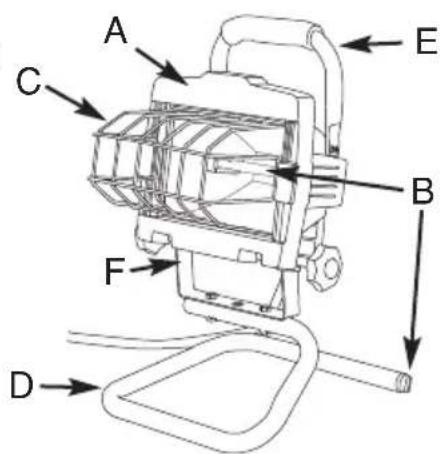
Light head (A)
(2) 500 watt quartz halogen bulbs (B)
- Safety guard (C)
- Stand (D)
- Handle (E)
Light bracket (F)
(4) Lock washers (G)
(4) Regular washers (H)
(2) Short bolts (I)
(2) Long bolts (J)
(2) Spacers (K)
(2) Light head knobs (L)
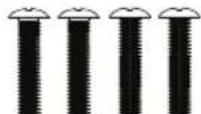
(4) Screws (M)

G

H
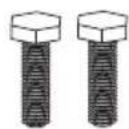
1
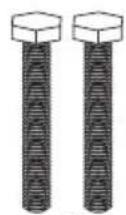
J
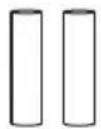
K

L
M
WHAT TO KNOW
INSTRUCTIONS PERTAINING TO A RISK OF FIRE, ELECTRIC SHOCK, EXPOSURE TO EXCESSIVE UV RADIATION OR INJURY TO PERSONS. IMPORTANT SAFETY INSTRUCTIONS.
Lighted lamp is HOT!
WARNING: To reduce the risk of FIRE, ELECTRIC SHOCK, EXPOSURE TO EXCESSIVE UV RADIATION OR INJURY TO PERSONS:
- Turn off/unplug and allow to cool before replacing bulb (lamp).
- Bulb (lamp) gets HOT quickly! Only contact switch/plug when turning on.
- Do not touch hot lens, guard or enclosure.
- Do not remain in light if skin feels warm.
- Do not look directly at lighted lamp.
- Keep away from materials that may burn.
- Use only with a 500 watt or smaller bulb (lamp).
- Do not touch the bulb (lamp) at any time. Use a soft cloth. Oil from skin may damage bulb (lamp).
Call for customer service and/or missing or damaged parts (800-334-6871)
- Do not operate the portable luminaire with a missing or damaged guard, lamp containment barrier (lens) or UV filter.
- If lens is replaced, use only a diffused tempered safety glass of equal thickness.
- Use of bulb(s) of higher wattage rating than what is listed in the safety instructions will void the warranty.
- Dissassembly of the fixture will void the warranty.
- Fixture must be connected to a 120 Volt, 60Hz power source. Any other connection voids warranty.
- The electrical system, and the method of electrically connecting the fixture to it, must be in accordance with the National Electrical Code and local building codes.
- For indoor and outdoor use.
- cULus Listed.
WARNING: When using outdoor use portable luminaires, basic safety precautions should always be followed to reduce the risk of fire, elec shock, and personal injury, including the following:
Read all instructions.
- Use only three-wire outdoor extension cords that have three-prong grounding plugs and grounding receptacles that accept the appliance's plug.
- Ground Fault Circuit Interruption (GFCI) protection is to be provided on the circuit(s) or outlet(s) to be used for the wet location portable luminaire. Receptacles are available having built-in GFCI protection and are able to be used for this measure of safety.
- Use only with an extension cord for outdoor use, such as an extension cord of cord type SW, SW-A, SOW, SOW-A, STW, STW-A, STOW, STOW-A, SJW, SJW-A, SJOW, SJOW-A, SJTW, SJTW-A, SJTOW, SJTOW-A.
SAVE THESE INSTRUCTIONS.
ASSEMBLING YOUR FIXTURE
WARNING: Deviation from the assembly instructions may result in a risk of fire or electric shock.
- Attach light head (A) and handle (E) to the light bracket (F). This step will require using the (2) long bolts, (2) lock washers, (2) spacers, (4) regular washers and (2) light head knobs (Fig. 1).
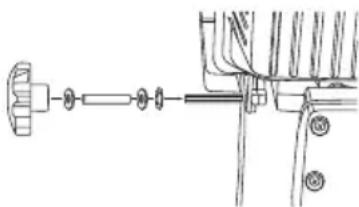
Fig. 1
- Attach the light bracket (F) to the stand (D) using (2) short bolts.
- Attach handle to light fixture using 4 screws.
- Install the grille guard (C) in the light fixture by inserting one side of the guard between the frame and the lens. Squeeze the guard until the other side can be placed between the opposite side of the frame and lens.
WARNING: Risk of burn. Disconnect power and allow fixture to cool before changing bulb or handling fixture.
Note: For maximum bulb life, position light so that the quartz halogen bulb remains within 4 degree of horizontal (Fig. 2).

Fig. 2
Make sure the light fixture is in the OFF position and cool.
Loosen the knob located on the side of the light fixture housing. Using the top handle, tilt to desired position then retighten knobs (Fig. 3). There is a stop that restricts the downward and inward movement of the fixture for safety reasons.
To prevent overheating and risk of burns or fire, do not aim the fixture down at an angle of more than 10 degrees from horizontal
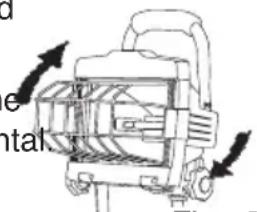
Fig. 3
Plug light into a GFCI protected 120 Volt receptacle.
- To turn light ON or OFF, push red switch on the back of the fixture.
BONUS BULB INCLUDED
Note: Always handle halogen bulbs with gloves or with a clean soft cloth. Oil from your skin can cause premature failure of the bulb.
This fixture includes a spare bulb, which insures that you can always finish your job or project without interruption due to bulb
failure. The spare bulb and holder are located at the end of the portable base. Simply pull the black knob on the end of the base
out, in order to access the spare bulb (Fig. 4).
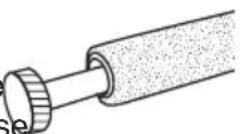
Fig. 4
REPLACING THE BULB
WARNING: Risk of burn. Disconnect power and allow fixture to cool before changing bulb or handling fixture.
Note: Always handle halogen bulbs with gloves or with a clean soft cloth. Oil from your skin can cause premature failure of the bulb.
Note: Replace with only a 120 or 130 Volt, 500 watt (or lower wattage) T2.5 R7s base halogen bulb 4.6^ long (Cooper Lighting, LLC model BP500Q).
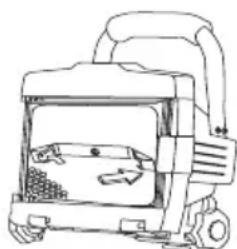
Fig. 5
- Make sure fixture is turned OFF, unplugged and cool.
- Turn screw on back of housing tab counterclockwise until screw is loose on door frame.
- The door frame and lens assembly will swing down allowing access to the bulb.
- Using gloves or soft cloth, press the old bulb to one side of the spring loaded socket as indicated on the metal ref
Remove opposite end of bulb from the other side of the socket.
Remove the new bulb from its package making sure not to touch bulb with bare hands. Reverse this procedure to install a new replacement bulb (Fig. 5).
- Replace the door frame and lens assembly and secure it using a Phillips screwdriver.
Cooper Lighting, LLC ("the Company") warrants this product ("the product") against defects in material or workmanship for a period of two years from date of original purchase, and agrees to repair or, at the Company's option, replace a defective product without charge for either replacement parts or labor during such time.
This does not include labor to remove or install fixtures.
This warranty is extended only to the original purchaser of the product. A purchasers receipt or other proof of date of original purchase acceptable to the Company is required before warranty performance shall be rendered.
This warranty only covers product failure due to defects in materials or workmanship which occurs in normal use. It does not cover the bulb or failure of the product caused by accident, misuse, abuse, lack of reasonable care, alteration, or faulty installation, subjecting the product to any but the specified electrical service or any other failure not resulting from defects in materials or workmanship.
There are no express warranties except as described above.
THE COMPANY SHALL NOT BE LIABLE FOR INCIDENTAL, SPECIAL OR CONSEQUENTIAL DAMAGES RESULTING FROM THE USE OF THE PRODUCT OR ARISING OUT OF ANY BREACH OF THIS WARRANTY. ALL IMPLIED WARRANTYES, IF ANY, INCLUDING IMPLIED WARRANTYES OF MERCHANTABILITY AND FITNESS FOR A PARTICULAR PURPOSE, ARE LIMITED IN DURATION TO THE DURATION OF THIS EXPRESS WARRANTY.
Some states do not allow the exclusion or limitation of incidental or consequential damages, or limitations on how long an implied warranty lasts, so the above exclusions or limitations may not apply to you.
No other warranty, written or verbal, is authorized by the Company. This warranty gives you specific legal rights, and you may also have other rights which vary from state to state.
To obtain warranty service, please write to: Cooper Lighting, LLC, 1121 Highway 74 South, Peachtree City, GA 30269. Enclose product model number and problems you are experiencing, along with your address and telephone number. You will then be contacted with a solution, or a Return Goods Authorization number and full instructions for returning the product. All returned products must be accompanied by a Return Goods Authorization Number issued by the Company and must be returned freight prepaid. Any product received without a Return Goods Authorization Number from the Company will be refused.
Cooper Lighting, LLC is not responsible for merchandise damaged in transit.
Repaired or replaced products shall be subject to the terms of this warranty and are inspected when packed. Evident or concealed damage that is made in transit should be reported at once to the carrier making the delivery and a claim filed with them.
COOPER Lighting
Customer First Center
1121 Highway 74 South, Peachtree City, GA 30269
www.cooperlighting.com
2009 Cooper Lighting, LLC
Reproductions of this document without prior written approval of Cooper Lighting, LLC are strictly prohibited.
Call for customer service and/or missing or damaged parts (800-334-6871)
Printed in China
Customer First Center
1121 Highway 74 South, Peachtree City, GA 30269
www.cooperlighting.com
2008 Cooper Lighting, LLC
Customer First Center
1121 Highway 74 South, Peachtree City, GA 30269
www.cooperlighting.com
© 2009 Cooper Lighting, LLC