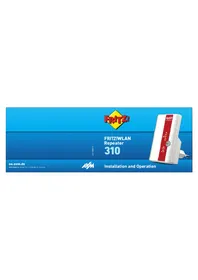
FRITZ!Repeater 310 - Wi-Fi repeater AVM - Free user manual and instructions
Find the device manual for free FRITZ!Repeater 310 AVM in PDF.


User questions about FRITZ!Repeater 310 AVM
0 question about this device. Answer the ones you know or ask your own.
Ask a new question about this device
Download the instructions for your Wi-Fi repeater in PDF format for free! Find your manual FRITZ!Repeater 310 - AVM and take your electronic device back in hand. On this page are published all the documents necessary for the use of your device. FRITZ!Repeater 310 by AVM.
USER MANUAL FRITZ!Repeater 310 AVM
Installation and Operation
Package Contents and Device Features
natural_image
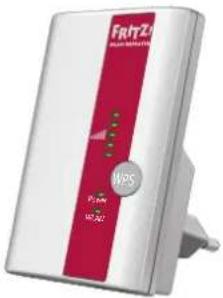
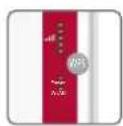
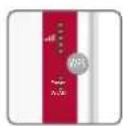
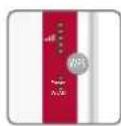
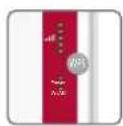
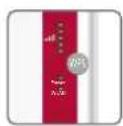
White and red Fritz 4 wireless router device with MPS logo (no visible text or symbols beyond branding)FRITZ!WLAN Repeater 310

2
"WPS" button
- Connect repeater
- Enable Mesh Wi-Fi
- Restore factory settings
Status display
● Quality of the Wi-Fi signal
- Connection status
Wi-Fi function
- Expand the Wi-Fi network
● 802.11n/g/b (Wi-Fi 4) in the 2.4-GHz band
FRITZ!WLAN Repeater 310
This quick introduction shows you the possibilities for deploying and operating your FRITZ!WLAN Repeater 310. Comprehensive information and technical details are presented in the PDF manual available on our website en.avm.de/service.
The FRITZ!WLAN Repeater 310 increases the range of your Wi-Fi network. Computers, tablets, Smart TV and other wireless devices can use the repeater as the access point to your internet router and the home network.
When used with a FRITZIBox using FRITZIOS 6.90 or higher, the FRITZIWLAN Repeater 310 combines to make a uniform Wi-Fi network with a single name (SSID) and password, called the Mesh ▶. In the Mesh, the FRITZIWLAN Repeater automatically adopts the settings of the FRITZIBox and Wi-Fi performance is improved.
For more information about the benefits and the configuration of the Mesh, see en.avm.de/mesh-networking.
The FRITZ!WLAN Repeater 310 has a user interface which you can open in a web browser on all connected devices.
Security
- Operate the FRITZIWLAN Repeater 310 in a dry place that is free of dust. Provide for sufficient ventilation.
● The FRITZ/WLAN Repeater 310 is intended for indoor use only. Never let liquids get inside the housing. - Insert the FRITZ!WLAN Repeater 310 into an electrical outlet that is easy to reach.
- Do not open the FRITZ!WLAN Repeater 310 housing.
● Unplug the FRITZ!WLAN Repeater 310 from the outlet before cleaning.
3
Connecting the FRITZ!WLAN Repeater 310 with Wi-Fi at the Touch of a Button
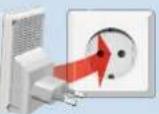
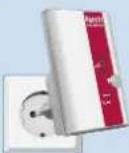
- Plug the FRITZ!WLAN Repeater 310 into an outlet close to your FRITZ!Box and wait until the "Power" and "WLAN" LEDs stop flashing and remain lit.
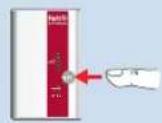
- Press the "WPS" button on the repeater. The "WLAN" LED fl ashes.
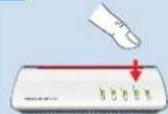
- Start WPS on your FRITZ!Box: On a FRITZ!Box with the "WPS" or "Connect/WPS" button: Press the button briefly. On a FRITZ!Box with the "WLAN" or "WLAN/WPS" button: Press the button for about 6 seconds until the "WLAN" LED flashes. The FRITZ!WLAN Repeater 310 and the FRITZ!Box combine to make a Wi-Fi network with a single name (SSID) and password, called the Mesh. In the Mesh, the repeater automatically adopts the settings of the FRITZ!Box and Wi-Fi performance is improved. The "Power", "WLAN" and "LEDs light up."
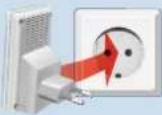
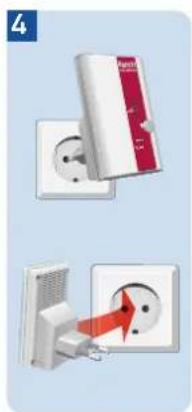
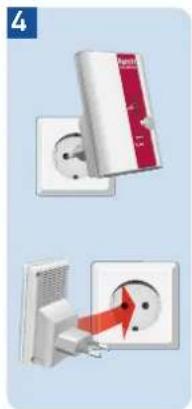
- Insert the FRITZIREpeater into an outlet located about halfway between the FRITZIBox and the wireless devices to be added to the Wi-Fi network.
4
1
2
(《Wi-Fi》)
3
5
4
Connecting the FRITZ!WLAN Repeater 310 with Wi-Fi Using the Wizard
- Plug the FRITZ!WLAN Repeater 310 into an outlet near your wireless router (for instance, FRITZ!Box).
- Start Wi-Fi on your computer, select the Wi-Fi network of your FRITZ!WLAN Repeater 310 and establish a connection.
- Enter the network key. In the FRITZ!W-LAN Repeater 310 the network key is preset to 00000000 (eight zeros).
The computer establishes a connection to the FRITZ!WLAN Repeater 310. As soon as the connection is active, the "Power", "WLAN" and "LEDs light up. - Insert the FRITZ!Repeater into an outlet located about halfway between the wireless router and the wireless devices to be added to the Wi-Fi network.
Starting the Configuration Wizard
- Open the web browser on your computer and enter http://fritz.repeater in the address bar.
- The configuration wizard appears and guides you through setup of the Wi-Fi connection between the FRITZ!W-LAN Repeater 310 and your wireless router.
The FRITZ!WLAN Repeater 310 is ready for operation.
6
FRITZ!WLAN Repeater 310 in the Home Network
In the Home Network of a FRITZ!Box
- In the home network of a FRITZ!box with current FRITZ!OS version 6.90 or higher, the FRITZ!WLAN Repeater 310 benefits from expanded Mesh functionality.
- The FRITZ!Box and the FRITZ!WLAN Repeater 310 connect to form a uniform Wi-Fi network with a single name (SSID) and password, called the Mesh ⚠.
- In the Mesh, the FRITZ!Repeater automatically adopts the settings and changes to settings on the FRITZ!Box and Wi-Fi performance is improved.
- Updates for the FRITZ!WLAN Repeater 310 can be performed directly in the FRITZ!Box user interface under "Home Network / Mesh".
- More about the Mesh is presented at en.avm.de/mesh-networking.
7
In the Home Network of a Wireless Router from Another Manufacturer
- For registration with a wireless router via WPS, the FRITZ!WLAN Repeater 310 adopts the radio network name (SSID) and the password of the wireless router.
- Updates for the FRITZIWLAN Repeater 310 can be performed in the FRITZIWLAN Repeater 310 user interface under 'System / Update'.
- The user interface of the FRITZIWLAN Repeater 310 can be opened on all connected devices using the IP address the repeater was assigned by your wireless router.
- First check the user interface of your wireless router to find out what IP address the FRITZIWLAN Repeater 310 was assigned, and then enter this IP address in the address line of a web browser.
● See the documentation for your wireless router.
Technical Specifications
- IEEE 802.11n, compatible with IEEE 802.11b/g (Wi-Fi 4)
- Up to 300 Mbit/s (gross); the user data rate that can actually be achieved is somewhat below the specified values.
- WPA2 (802.11i), WPA/WPA2 mixed mode
- Total active power: approx. 3 W
● Wi-Fi 2.4-GHz range 2.4 GHz – 2.483 GHz, maximum 100 mW
230 V, 50 Hz A/C
0 °C to +40 °C
● Measures: 81 x 51.5 x 66.5 mm
● Weight: approx. 63 g
● Two integrated antennas
System Requirements
● 2.4-GHz wireless router compliant with IEEE 802.11b/g/n, automatic IP address assignment (DHCP)
● The wireless router must support the encryption standard WPA or WPA2
- For expanded Mesh Wi-Fi functions: FRITZ!Box with FRITZIOS version 6.90 or higher
● Automatic IP address assignment (DHCP)
- For first configuration with WPS: Wireless router that supports WPS
- For initial configuration without WPS: Computer with Wi-Fi that supports the WPA Wi-Fi encryption standard
- For the first configuration of Wi-Fi: If the MAC address filter is active in the wireless router, the MAC address of the FRITZ!Repeater must be entered as an exception in the MAC address filter
8
9
LEDs
The LEDs show the operating status:
| on flashing | ||
| Quality of the Wi-Fi signal Connection to FRITZ!Box or to wireless router is interrupted | ||
| Power | FRITZ!WLAN Repeat-er 310 is ready for operation | •The FRITZ!WLAN Repeater 310 is being started.•Updating FRITZIOS |
| WLAN | Wi-Fi function enabled | • Connecting• Flashes fast: Connection was aborted• Enabling Mesh |
| all Loading factory settings | ||
"WPS" button
With the "WPS" button you operate the FRITZ!WLAN Repeater 310:
| Press the "WPS" button | |
| Connect repeater for 1 second | |
| Reconnect with the FRITZ!Box or another repeater | 6 seconds |
| Factory settings 15 seconds |

Diagnostics
The FRITZ!WLAN Repeater 310 transfers diagnostics data to AVM, which support AVM in further developing the product. This way you benefit directly from optimizations and FRITZ!OS updates.
For more detailed information, see the help on the user interface at http://fritz.repeater.
CE Declaration
AVM declares herewith that the FRITZ!WLAN Repeater 310 is compliant with the basic requirements and the relevant rules in directives 2014/53/EU, 2009/125/EC and 2011/65/EU.
The long version of the declaration of CE conformity is available at http://en.avm.de/ce.
Service information and help can be found on our website and in the social networks:
Service
en.avm.de/service
Manual
en.avm.de/nc/service/downloads
Support
en.avm.de/service/support
Networks

Legal notices and technical specifications are presented in the FRITZ!Repeater Help and in the manual
12 13
Disposal
In accordance with European directives, the FRITZ!WLAN Repeater 310 may not be disposed with household waste. Please bring these to your local collection points for disposal after use.

Legal Notice
The legal notice and valid licensing conditions are presented in the user interface of your FRITZIWLAN Repeater 310:
- Open a web browser.
- Enter http://fritz.repeater. The user interface opens.
- Click on "Help / Legal Notice".
□
natural_image
White and red Fritz 4 wireless router device with MPS logo (no visible text or symbols beyond branding)FRITZ!WLAN Repeater 310


14
Taste „WPS“
natural_image
Illustration of a white electrical outlet with a red arrow pointing to the outlet, next to a network router (no text or symbols visible)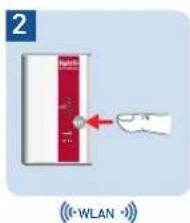
natural_image
Three-panel illustration showing a wall-mounted electrical socket with a red arrow indicating the installation (no text or symbols present)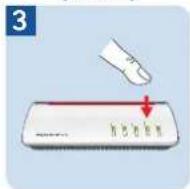
17
natural_image
White and red Fritz 4 wireless router device with MPS logo (no visible text or symbols beyond branding)FRITZ!WLAN Repeater 310

26
Botón "WPS"
29
natural_image
Front view of a white and red Fritz 4 network router device with visible I/O ports and indicator lights (no readable text beyond branding)FRITZ!WLAN Repeater 310

38
Bouton « WPS »
natural_image
White and red Fritz 4 wireless router device with MPS logo (no visible text or symbols beyond branding)FRITZ!WLAN Repeater 310

50
Tasto "WPS"
natural_image
Illustration of a wall-mounted power outlet with a red arrow indicating direction, next to a white router device (no text or symbols visible)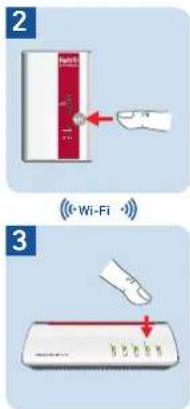
53
Connessione del FRITZ!WLAN Repeater 310 via Wi-Fi tramite l'assistente
natural_image
White and red Fritzia wireless router device with NPS logo (no visible text or symbols beyond branding)FRITZ!WLAN Repeater 310

Toets 'WPS'
- Repeater verbinden
● Mesh Wi-Fi activeren
Fabrieksinstellingen laden
Statusweergave
65
FRITZ!WLAN Repeater 310 per wizard met Wi-Fi verbinden
Manufacturer's Warranty
We offer a manufacturer's warranty of 5 years for this original product. The warranty period begins with the date of purchase by the first end user. Compliance with the warranty period can be proven by submission of the original invoice or comparable documents. This warranty does not restrict your warranty rights based on the contract of sale or other statutory rights. Within the warranty period, we will remove defects to the product which are demonstrably due to faults in materials or manufacturing. Our warranty does not cover defects which occur due to incorrect installation, improper use, non-observance of instructions in the user manual, normal wear and tear or defects in the environment of the system (third-party hardware or software). We may, at our discretion, repair or replace the defective product. Claims other than the right to the removal of defects which is mentioned in these terms of warranty are not constituted.
We guarantee that the software conforms with general specifications, not, however, that the software meets your individual requirements. Delivery costs will not be reimbursed. Products which have been replaced revert to our ownership. Claims recognized under warranty entail neither an extension or recommencement of the warranty period. If we reject a warranty claim, this claim lapses no later than six months after being rejected by us.
This warranty shall be governed by German substantive law, to the exclusion of the United Nations Convention on Contracts for the International Sale of Goods (CISG).