FSB-15OD - Wine cellar Orien - Free user manual and instructions
Find the device manual for free FSB-15OD Orien in PDF.


| Product Type | Outdoor wine cellar / beverage refrigerator |
| Brand | Orien |
| Model | FSB-15OD |
| Dimensions (W × D × H) | 37.0 cm × 62.0 cm × 84.5 cm |
| Weight | 34.5 kg |
| Power Supply | 115 V ~ 60 Hz, 2.0 A |
| Capacity | 28 standard wine bottles or 84 cans |
| Ambient Temperature Range | -4 °C to 38 °C |
| Compartment Temperature Range | 2 °C to 18 °C |
| Temperature Control | Digital control panel with LCD display, SET, UP/DOWN buttons |
| Interior Lighting | Compact U-shaped fluorescent bulb 5–9 W, with ON/OFF switch, auto shut-off after 5 min |
| Materials | Glass door, adjustable chrome shelves, metal basket |
| Installation | Freestanding or built-in, clearance: sides 0.6 cm, rear 1.3 cm, top 2.5 cm |
| Special Features | Temperature memory after power outage, alarm mode, automatic defrost, frost protection |
| Cleaning and Maintenance | Clean with soft cloth and soapy water; automatic defrost; drain through floor hole |
| Safety | Grounding required, do not use an extension cord, do not store flammable substances |
| Warranty | 1 year parts and labor (continental USA) |
Frequently Asked Questions - FSB-15OD Orien
User questions about FSB-15OD Orien
0 question about this device. Answer the ones you know or ask your own.
Ask a new question about this device
Download the instructions for your Wine cellar in PDF format for free! Find your manual FSB-15OD - Orien and take your electronic device back in hand. On this page are published all the documents necessary for the use of your device. FSB-15OD by Orien.
USER MANUAL FSB-15OD Orien
Outdoor Beverage Center
natural_image
Line drawing of a front-loading refrigerator with ventilation grilles and control panel (no text or symbols)Be sure unit is standing upright 24 hours prior to plug-in.
Read all instructions before using this appliance. Use this appliance only for its intended purpose as described in this instruction manual. Always exercise basic safety precautions, as described below. After reading the instruction manual, store it in an accessible place where the user(s) of this product can easily find it.
The purpose of these safety precautions is to ensure safe and correct use of the product to minimize risks that could cause serious damage and injury to you or others. The safety precautions are divided into WARNINGS and CAUTIONS. Cases where improper handling of the unit could lead to death or serious injury are listed under the WARNING heading. However, the cases listed under CAUTION could also lead to serious results. To ensure safety, adhere strictly to both types of safety precautions.

WARNING
- All repairs, disassembly and modifications should be performed only by qualified technicians. Attempting to perform these yourself could result in fire, malfunction and injury.
- Never splash water directly onto the product or wash with water without unplugging as a short circuit could result. In a rainy environment, a water-proof covering is recommended.
- Never put flammable or volatile substances into unit as explosion and fire could result.
- Do not damage, modify, excessively bend, strain, twist or bundle the power cord. Also, placing heavy objects on the power cord or binding could damage the cord, possibly resulting in electrical shock or fire.
- Use a dedicated wall outlet. Do not use an extension cord or multiple-outlet adaptor as this could result in electrical shock, overheating and fire.
- Never use flammable spray cans or leave flammable substances near the unit. Sparks from electrical switches could result in explosion or fire. If a combustible gas is present near the appliance, turn off the source of the gas, then open the windows and doors to allow the gas to dissipate. To avoid an explosion, do not pull the plug or switch off the unit.
- The electrical socket must have good grounding. The ground wire cannot be connected with a gas pipe, heating pipe, water pipe, telephone line or lightning rod. It cannot be replaced with the neutral wire of single-phase power. In addition to the ground wire, an electrical leakage circuit breaker is also required.
- If installation in a damp location is unavoidable, have an electrician install a ground fault circuit interrupter (GFCI) electrical outlet. If no GFCI is installed, electrical shock could result.
- Never climb onto the unit. The unit could tip over or fall and cause material damage or
personal injury.
- Disconnect the power cord plug from the wall outlet before moving the unit and make sure that the power cord is not damaged during transport. A damaged power cord could result in electrical shock and/or fire.
- Never unplug the unit by pulling on the power cord. Always grip the plug firmly and pull straight out from the outlet. Pulling the cord could cause wire breakage, possibly resulting in overheating and fire.
- Repair or replace any cord that is frayed. Do not use a cord that shows cracks or abrasions along its length.
CAUTION
- This unit must be properly installed in accordance with the installation instructions before it is used. See grounding instructions in the Installation section.
- This model can either be built-in or free-standing. Built-in units vent at the bottom front and airflow at the front of this vent must be unimpeded.
- Install the unit in a location where the floor is sturdy enough to support the load of the unit. If the floor is not sturdy enough or installation is incorrectly performed, the unit could tip over and cause personal injury. If the unit is placed on a stand, the front surface must be 3" or more back from the edge of the stand in order to avoid accidental tipping of the appliance during normal usage.
- Never place heavy objects or items containing water on top of the unit. Objects could fall and cause injury and spilled water could cause the deterioration of the insulation of electrical components and result in electrical shock.
- Disconnect the unit if it is behaving abnormally, and do not reconnect until the situation is corrected.
- Pull out the plug before doing any maintenance on the unit to avoid electric shock.
- Never pull out plug when hands are wet!
- This unit is not intended for the storage of medicines or chemical reagents.
- Keep packing materials away from children.
- During long absences, remove the unit's contents, unplug the unit, clean it and leave the door open slightly to avoid possible formation of condensation, mold or odors. Use a cover to protect the unit and prolong its lifespan.
- Leave disassembly and disposal of the unit to qualified experts.
SAVE THESE INSTRUCTIONS!
DANGER!
Risk of child entrapment! Before discarding your old refrigerator:
- take off the doors
- leave the shelves in place so that children may not easily climb inside.
Table of Contents
IMPORTANT SAFEGUARDS 1 - 3
Technical Specifications 4
Location of Parts 4 - 5
Installation 5-6
Operating Your Beverage Center 6-8
Cleaning and Maintenance 9 – 10
Troubleshooting 11
Limited Warranty 12
Technical Specifications
| Model Number: | FSB-15OD |
| Description: | Outdoor Beverage Center |
| Electrical Input: | 115VAC ~ 60Hz |
| Current Rating: | 2.0A |
| Unit Dimensions: | 1458"W × 2438"D × 3312"H |
| Unit Weight: | 76 lbs |
| Ambient Temperature Range: | 25^ - 100^ |
| Compartment Temperature Range: | 36^ - 64^ |
Location of Parts
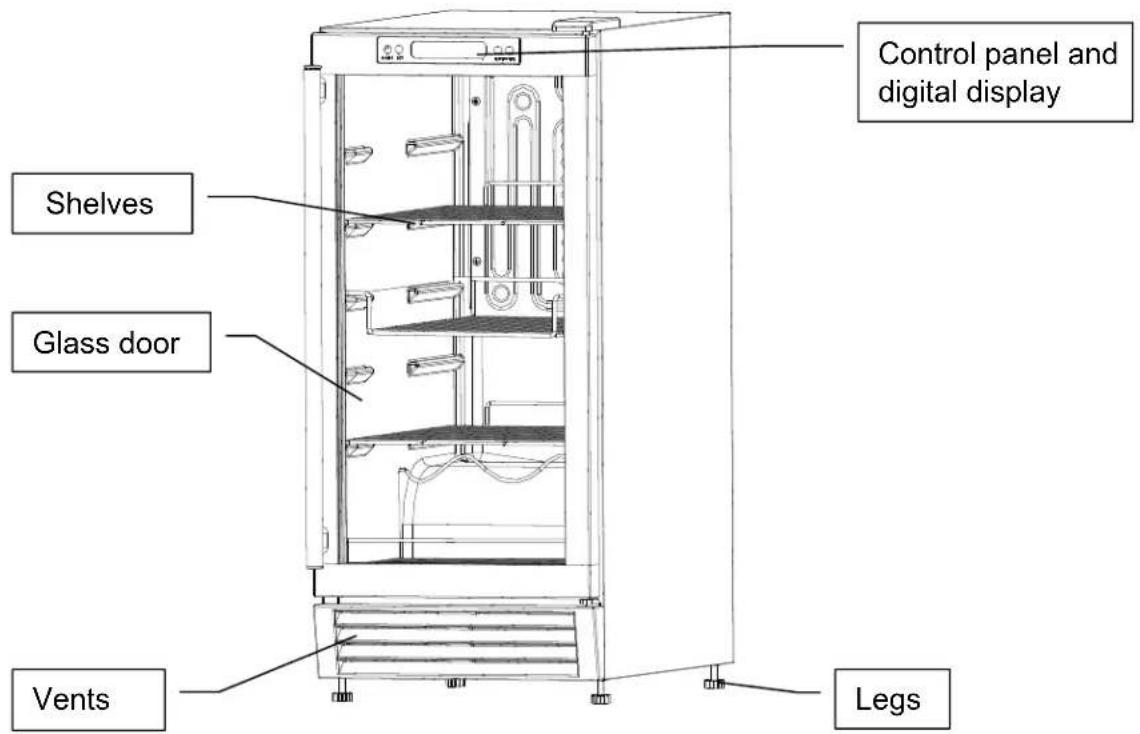
Control Panel
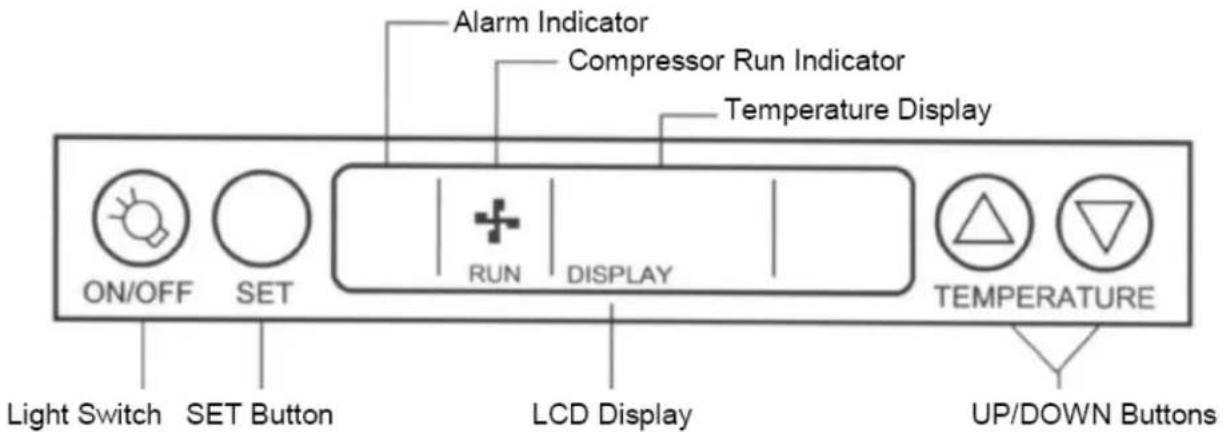
Please note: You can switch temperature display setting from degrees Fahrenheit to degrees Celsius by pressing and holding the UP button for 10 seconds. The temperature in degrees Fahrenheit or degrees Celsius will appear in the temperature display window.
Installation
Remove the exterior and interior packaging. Use a soft dry cloth to wipe down the outside of the Beverage Center thoroughly. Use a clean cloth dampened with lukewarm water to wipe down the interior.
Air must circulate freely in front of the Beverage Center. Avoid placing it near any source of heat or moisture, or in direct sunlight. Direct sunlight may affect the finish, and nearby heat sources will cause higher electrical consumption.
The FSB-15OD Outdoor Beverage Center is designed to be either free-standing or built-in. It has motorized fans at the back of the unit that direct compressor- generated heat away from the compressor and through the front of the unit. Keep the front vents unobstructed. If the unit is built-in, allow minimum clearances of 1/4" at the sides, 1/2" at the back and 1" at the top.
Electrical Connection
Important! For your personal safety, this appliance must be properly grounded. In the event of an electrical short circuit, grounding reduces the risk of shock by providing an escape wire for the electric current. This appliance is equipped with a cord having a grounding wire with a grounding plug. The plug must be inserted into an outlet that is properly grounded and installed. The ground wire cannot be connected to a gas pipe, heating pipe, water pipe, telephone line or lightning rod. It cannot be replaced with the neutral wire of
single-phase power. In addition to the ground wire, an electrical leakage circuit breaker is also required. Consult a qualified electrician if you do not completely understand these grounding instructions.
DO NOT UNDER ANY CIRCUMSTANCES CUT OR REMOVE THE THIRD (GROUND) PRONG FROM THE POWER CORD.
If installation in a damp location is unavoidable, have an electrician install a ground fault circuit interrupter (GFCI) electrical outlet. If no GFCI is installed, electrical shock could result.
Do Not Use an Extension Cord
Avoid the use of an extension cord because of potential safety hazards under certain conditions.
Operating Your Beverage Center
IMPORTANT: Do not plug in the Beverage Center for 24 hours after unit is set in place. Failure to do so may result in the unit working improperly.
Compartment Design
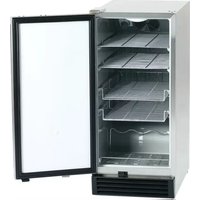
The FSB-15OD Beverage Center has a capacity of 28 standard wine bottles or 84 cans. The unit has 3 adjustable chrome-plated flat wire shelves and a wire basket to hold cans and bottles of beverages such as beer, water and soft drinks. This design enables you to operate the unit as a Beverage Center or wine cellar. The control panel also allows you to set a different temperature for Beverage Center or wine cellar. The control panel displays the current temperature inside the compartment and allows you to turn the interior light on and off.
OPERATING INSTRUCTIONS
Turning On the Unit
The Beverage Center turns on automatically when it is plugged in. The unit employs a heater inside the cabinet and is designed for outdoor use. When the air temperature is below 40^ F, the compressor will stop working and the heater will work automatically to maintain the temperature setting. If the Ambient temperature is below 25^ F, do not use the unit to storage anything.
If you want to use the Automatic Temperature (default) setting, do nothing further. The FSB-15OD will automatically set the temperature at 41^ F ( 5^ C). If you want to set other temperatures, see below.
Temperature Setting
While wines store best at temperatures around 56-58°F, the FSB-15OD outdoor unit also allows you to store wine at drinking temperatures. Generally, RED WINE should be kept at 60-61°F and WHITE WINE, which is usually served chilled, is best kept at 54-55°F. Sparkling wines should be kept at about 46°F. For beer and soft drinks, choose the temperature setting that is most agreeable to you and your guests.
To adjust the temperature, press the SET button, then use the UP/DOWN keys to navigate to the preferred temperature. The range of set temperatures is from 36 to 64° F. For example, if you are storing red wine, you may want to set a temperature of 61° F. When the correct temperature appears in the DISPLAY window of the control panel, press SET to confirm. The actual temperature inside the unit will now appear in the window. This temperature will vary depending on the number of bottles stored and how frequently the door is opened.
Please note: The temperature sensor records the average temperature of the unit. Cold air falls and warmer air rises, and there will be a temperature variation from the bottom to the top of the unit. The temperature at the bottom of the unit will always be slightly colder. The controller only controls the average temperature of the unit. The temperature displayed by the electronic control panel is the instantaneous average temperature of the unit and there may be a variation of approximately 0 to 6 Fahrenheit degrees.
When fully loaded with room temperature product, the FSB-15OD will operate continuously for as long as 24 hours to reduce the temperature inside the cabinet to the desired point. Under normal conditions, when the unit has been on for six hours, it will stop working for about thirty minutes to defrost automatically. The unit should be in a well-ventilated area. Best results are obtained at temperatures between 65°F and 80°F for built-in models and between 65°F and 90°F for freestanding models.
To temporarily stop the cooling cycle, unplug the Beverage Center. To shut it down for longer periods of time, disconnect the plug and leave the door partially open.
NOTE: If you unplug the Beverage Center, allow 3 minutes before plugging it back in. The unit will not restart in less than 3 minutes.
Memorized Temperature Settings
Your unit has been designed to “remember” the last run mode to which it was set. If there is a power outage or any other power cutoff, the unit will automatically return to the previous temperature setting after the power has returned.
Compressor Run Indicator
When the unit's compressor is running, the control panel will display a moving icon representing a running fan. If the compressor stops running, the icon will stop running as well.
About the Liquid Crystal Display (LCD)
When you press any button on the control panel, a backlight will appear in the display. If no other button is pressed, the backlight will automatically go out after 2 minutes.
ALARM Mode
In the event that there is a fault in the unit, an ALARM indication will appear on the screen.
In ALARM mode, the unit will make a beeping sound and display an alarm message. If the LCD on the control panel displays any of the following messages: PROBE ERROR, LOW TEMP or HIGH TEMP, consult the Troubleshooting section of this manual.
Interior Light
The interior light can be operated manually by pressing the ON/OFF button on the control panel. The light will automatically turn off after 5 minutes.
NOTE: Avoid overuse of the interior light since the heat generated can raise the temperature of the stored contents.
Shelving
The wire racks in your unit are chrome-plated so they will not rust. The unit has 3 adjustable chrome-plated flat wire shelves and a wire basket to hold cans and bottles of beverages such as beer, water and soft drinks.
The racks are removable and reversible. To remove a rack, take out the bottles on the rack and pull it out until it stops. Then lift up the front of the rack and remove it from the unit.
Cleaning and Maintenance
Cleaning the Outside
Unplug your Beverage Center. Clean the outside with a cloth dampened in mild soapy water. Dry thoroughly with a soft cloth. To clean the door gasket, use only mild soapy water. Never use harsh cleansers or scouring pads to clean any part of your unit.
Cleaning the Inside
Unplug your Beverage Center and remove its contents. Rinse the inside surfaces with plain water and dry the chrome racks, basket and shelving. Avoid getting excess water inside the machine since it will flow into the water trap near the compressor and possibly overflow.
Defrosting the Unit
The unit uses an automatic defrost system in which the refrigerated surfaces of the unit defrost automatically. Defrost water drains into a hole in the floor of the storage compartment and is channeled into a drain pan located at the back of the unit near the compressor. Heat transferred from the compressor evaporates any water that has collected in the pan. Be sure the drain hole in the floor of the unit is clear and unobstructed.
Changing the Light Bulb
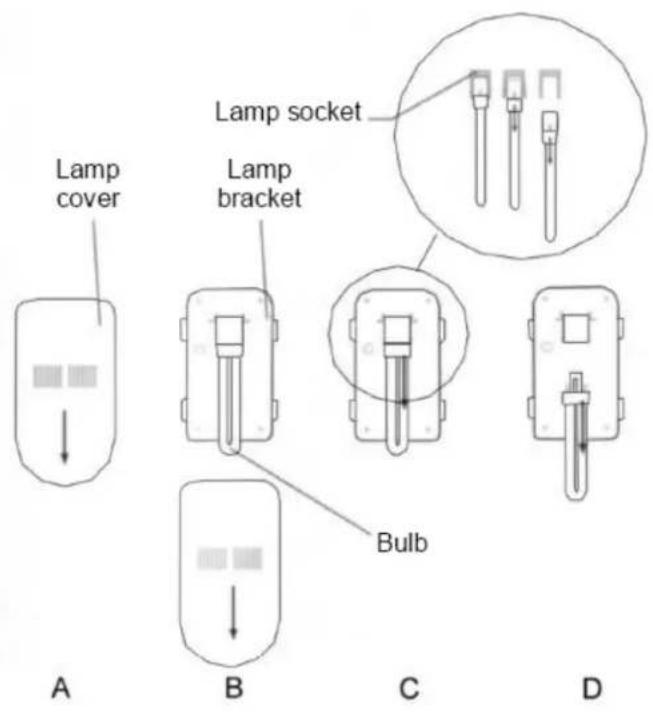
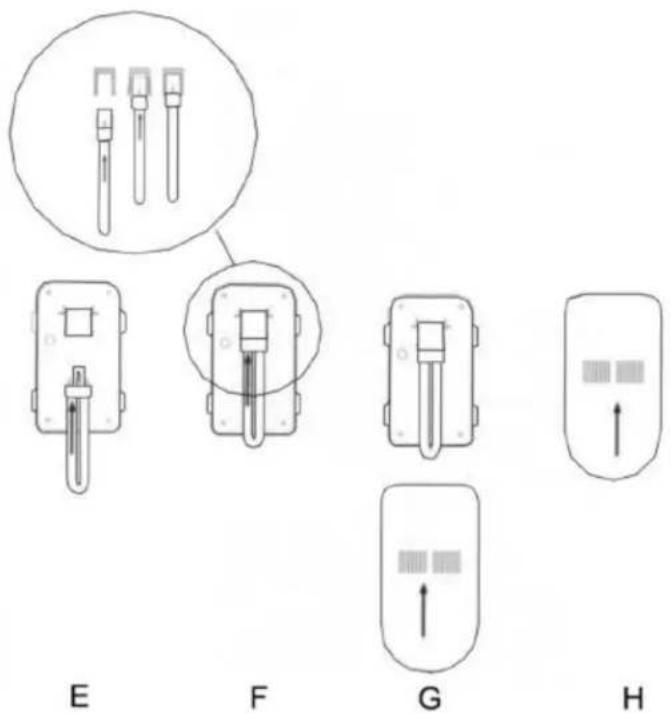
The bulb can be replaced with any standard U-shaped, 2-pin compact fluorescent bulb of 5, 7 or 9 watts.
Don't use any unusual force to remove the old bulb. No tools should be necessary.
Follow steps A through D in the diagram on the following page to remove the old bulb:
Follow steps E through H to install the new bulb:
Troubleshooting
Unit does not turn on
Not plugged in.
Fuse blown or circuit breaker tripped.
Noise or vibration
Check that unit is level. If not, adjust leveling legs.
Unit is too warm
Check that door is properly closed and sealed.
Check temperature setting. (To change the temperature setting, follow the steps in the
Operating Your Beverage Center section of this manual.)
Check if door has been opened frequently.
LCD displays "PROBE ERROR"
This message is an ALARM MODE indication. The LCD displays “PROBE ERROR” on the left when the thermostatic sensor has malfunctioned. Contact your authorized service facility for sensor replacement.
LCD displays "LOW TEMP"
This message is an ALARM MODE indication. The LCD displays “LOW TEMP” on the left and “L” in the middle. It indicates that the actual temperature is much lower than your set temperature.
LCD displays "HIGH TEMP"
This message is an ALARM MODE indication. The LCD displays "HIGH TEMP" on the left and the actual temperature reading in the middle. It indicates that the actual temperature is much higher than your set temperature. Possible causes are:
• The door might not be fully closed.
• The refrigerant may have leaked.
- The heater may not be functioning properly and should be replaced.
If you are certain that the door is not the cause of the problem, contact your authorized service facility immediately.
Limited Warranty
Orien USA, L.L.C., warrants this product to be free from defects in materials and workmanship for a period of one year from the date of original purchase or delivery. Any parts that are determined to be defective will be replaced or repaired by Orien at no charge as long as the unit was operated in accordance with the instructions furnished with the product. If the unit proves to be defective, your first course of action should be to follow the retailer' return policy. This warranty covers units only in the continental United States and does not cover the following:
- Damage from improper voltage or installation
- Damage in shipping
• Defects other than manufacturing defects
• Glass, trim or light bulbs - Any damage or loss to cooler contents as the result of failure of the unit to perform as expected
• Labor or repairs after the first 12 months - Damage from abuse, misuse, accident, alteration or lack of proper care or routine maintenance.
- Improper or incorrectly performed maintenance or repairs
• Damage due to acts of God
Commercial warranty is limited to 90 days parts and labor.
This limited warranty is given in lieu of all other warranties expressed or implied. This warranty does not cover incidental or consequential damages. Some States do not allow the exclusion or limitation of incidental or consequential damages, so the above limitation or exclusion may not apply to you.
This warranty provides you with specific legal rights and you may have other rights that vary from State to State. Consult the written materials accompanying your product for safe and proper operation.
This warranty may not be assigned. For warranty service, contact:
Orien USA, L.L.C.
921 General Hill Drive
Virginia Beach, VA23454
Website: WWW.ORIENUSA.COM
When service is required, have on hand the Model and Serial numbers found on the rating label on the back of the unit, as well as proof of purchase such as a sales or gift receipt.
If you have a service issue or wish to talk to a technical representative please call:
1 - 877 - 316 - 1725
CONSIGNES DE SÉCURITÉ IMPORTANTES
921 General Hill Drive
Virginia Beach, VA23454
Website: WWW.ORIENUSA.COM
921 General Hill Drive
Virginia Beach, VA23454
Website: WWW.ORIENUSA.COM