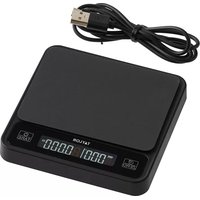
5282765 - Kitchen scales Taylor - Free user manual and instructions
Find the device manual for free 5282765 Taylor in PDF.


| Product Type | Digital Coffee Scale |
| Brand | Taylor |
| Model | 5282765 |
| Maximum Capacity | 2000 g (70.5 oz) |
| Precision | 0.1 g |
| Timer Range | 0 to 9 min 59 sec |
| Platform Dimensions | 10.4 x 10.4 cm |
| Power Supply | Lithium-ion battery 400 mAh, rechargeable via micro USB |
| Battery Life | Full charge in 60 min |
| Display | Digital LCD Screen |
| Measurement Units | Grams (g) and Ounces (oz) |
| Functions | Weighing, tare, timer, auto-off |
| Material | Plastic with rubber mat |
| Care | Wipe with a soft, dry cloth |
| Safety | Do not immerse, do not exceed capacity |
| Warranty | 1 year (excluding battery and cable) |
| Country of Manufacture | China |
| Usage | Not legal for commerce |
Frequently Asked Questions - 5282765 Taylor
User questions about 5282765 Taylor
0 question about this device. Answer the ones you know or ask your own.
Ask a new question about this device
Download the instructions for your Kitchen scales in PDF format for free! Find your manual 5282765 - Taylor and take your electronic device back in hand. On this page are published all the documents necessary for the use of your device. 5282765 by Taylor.
USER MANUAL 5282765 Taylor
Thank you for purchasing a Taylor digital coffee scale. Your Taylor scale is an example of superior design and craftsmanship. Please read instructions thoroughly to ensure that you have the full benefit of all the unit's features. Keep these instructions handy for future reference.
HOW TO CHARGE THE SCALE
- A micro USB cord is included with the scale. You will need to use your own wall outlet converter to plug the cord into.
- Open the protective cover on the back of the scale and insert the small end of the charging cord. Then plug the universal USB (larger end) into a wall outlet converter and then into the wall outlet.
- A full charge will take approximately 60 minutes. It is recommended to not use the scale while charging since the cord can effect the weight reading.
- When the scale is charging the display will show flashing and icons. When the and icons stop blinking, the charge is complete. Remove the cord once charging is complete.
- Recharge the scale when the display shows "Lo" or when the reading becomes dim or difficult to see.
NOTE: Charging currents must be less than or equal to 2A. Damage to the scale may occur with charging voltages greater than 5 volts. The internal lithium-ion, rechargeable battery has a maximum capacity of 400mAh. The battery cannot be replaced.
△WARNING: Chemical burn hazard. Keep away from children.
- Place the scale on a hard, level surface.
- The scale can be used with or without the rubber mat that is included. Make sure the scale is turned off prior to placing the mat on the platform.
- Press the "☐|TARE" button to turn the scale on. The display will turn on and show zero when it is ready for use.
- The scale is set to weigh in grams and ounces. To switch between grams (g) and ounces (oz), double tap the "○|TARE" button.
- The scale will automatically turn off after approximately 3 minutes. Press and hold the "☐|TARE" button to power off manually. If the timer function is used, the scale will automatically shut off 10 seconds after reaching 9 minutes, 59 seconds.
TARE OPERATION
You may wish to weigh coffee beans or coffee grounds in a container (not included). In this case, you will need to tare, or offset, the weight of the container so that only the weight of the ingredients is displayed.
- Choose a container that will safely balance on the platform without tipping or falling. Do not use a heavy container, as this might reduce the maximum capacity of the scale.
- While the scale is off, place the empty container on the scale platform. Turn the scale on by pressing the "☐|TARE" button. The display will turn on.
- Place the item to be weighed on the center of the weighing surface. The weight will display. As you add weight, the weight displayed increases. Press the "☐|TARE" button to set the scale back to "0". The scale is ready for further ingredients. The weight of the container has been zeroed out.
- Add the ingredient to be weighed. The weight of the ingredient alone will display.
- The weight of additional ingredients may be tared out as well. Press "☐|TARE" to zero the weight before adding additional ingredients to the container.
- When weights have been tared out, the display will show a negative number when the items are removed from the scale. Press the "☐|TARE" button to reset the scale back to zero for a new measurement.
TIMER OPERATION
This scale also has a timer function which can be used alone or in conjunction with the weight and tare operations. The timer can time up to 9 minutes, 59 seconds. The scale will automatically shut off 10 seconds after reaching 9 minutes, 59 seconds.
- Press the "☐ | ZERO" button to start the timer.
- Press the "☐ | ZERO" button to pause the timer.
- Press and hold the "☐ | ZERO" button to reset the timer to zero.
PRECAUTIONS
- Always read instructions thoroughly to ensure that you have the full benefit of all the unit's features.
- DO NOT immerse unit in water, as doing so will cause damage to internal components and void the warranty. If you spill liquid on it, dry it immediately with a soft, lint-free cloth.
- DO NOT clean the unit with an abrasive or corrosive material. This may scratch the plastic parts and corrode the electronic circuits.
- DO NOT subject the units to excessive force, shock, dust, temperature or humidity. This may result in malfunction, shorter electronic life span, damaged battery and distorted parts.
- DO NOT operate or store the scale in high temperature or humidity conditions. The heat or moisture may interfere with the scale's internal components.
- DO NOT tamper with the unit's internal components. Doing so will invalidate the warranty on the units and may cause damage.
- This scale is designed to read weights up to 70.5 oz/2kg. To prevent damage, do not place more than 70.5 oz/2kg on it.
- This scale is an extremely sensitive weighing device. To avoid damage to the unit or the batteries, do not store anything on the scale.
- ⚠ IMPORTANT: This product contains an internal Lithium-ion rechargeable battery. Do not attempt to access or replace the battery it is not user serviceable and you may damage the battery, which could cause overheating and injury. The lithium-ion battery must be recycled or disposed of separately from household waste. Please recycle or dispose of the battery per local regulations. Do not dispose of battery in fire, it may explode or leak.
- If "Err" is shown on the display, the maximum capacity has been exceeded.
- If "Lo" is shown in the display, the battery needs to be charger per charging instructions.
SPECIFICATIONS
Capacity: 70.5 oz/2kg
Graduation: 0.004 oz / 0.1g
Timer range: 9 minutes, 59 seconds
Platform size: 4.1" x 4.1"
LCD digits: 0.35"
Operates on: Micro USB cord adapter (included)
Party issuing Supplier's Declaration of Conformity & Responsible party – U.S. Contact information:
Taylor
2311 W. 22nd Street, Suite 200
Oak Brook, IL 60523
Equipment:
Product Name: Digital Coffee Scale
Model No.: 5282765
Trade Name: Taylor
We declare under our sole responsibility that the above referenced product has been tested according to FCC requirements and this device complies with part 15 of the FCC Rules. Operation is subject to the following two conditions: (1) this device may not cause harmful interference, and (2) this device must accept any interference received, including interference that may cause undesired operation.
Caution: Changes or modifications not expressly approved by the party responsible for compliance could void the user's authority to operate the equipment.
Note: This equipment has been tested and found to comply with the limits for a Class B digital device, pursuant to part 15 of the FCC rules. These limits are designed to provide reasonable protection against harmful interference in a residential installation. This equipment generates, uses and can radiate radio frequency energy and, if not installed and used in accordance with the instructions, may cause harmful interference to radio communications. However, there is no guarantee that interference will not occur in a particular installation. If this equipment does cause harmful interference to radio or television reception, which can be determined by turning the equipment off and on. The user is encouraged to try to correct the interference by one or more of the following measures:
-Reorient or relocate the receiving antenna.
-Increase the separation between the equipment and receiver.
-Connect the equipment into an outlet on a circuit different from that to which the receiver is connected.
-Consult the dealer or an experienced radio/TV technician for help.
LIMITED WARRANTY
Taylor® warrants this product to be free from defects in material or workmanship (excluding charging cord and rechargeable battery) for one (1) year for the original purchaser from date of retail purchase. It does not cover damages or wear resulting from accident, misuse, abuse, commercial use, or unauthorized adjustment and/or repair. If service is required, do not return to retailer. Should this product require service (or replacement at our option), please pack the item carefully and return it prepaid, along with store receipt showing the date of purchase and a note explaining reason for return to:
TAYLOR
2220 Entrada Del Sol, Suite A | Las Cruces, New Mexico | 88001 USA
Customer Service Phone: 1-800-289-0944
Customer Service Fax: 1-575-526-3913 | www.taylorusa.com
There are no expressed warranties except as listed above. This warranty gives you specific legal rights, and you may have other rights which vary from state to state. For additional product information, or warranty information outside the USA, please contact us through www.taylorusa.com.
©2021 Taylor division of Lifetime Brands Inc. All rights reserved.
Made to our exact specifications in China.
Not legal for trade.
5282765
2311 W. 22nd Street, Suite 200
Oak Brook, IL 60523
Équipement:
2311 W. 22nd Street, Suite 200
Oak Brook, IL 60523
Equipo:

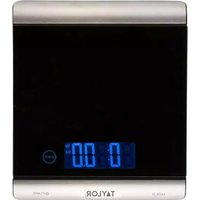
Brand : Taylor
Model : 5282765
Category : Kitchen scales