Phantom 2 - GPS device BUSHNELL - Free user manual and instructions
Find the device manual for free Phantom 2 BUSHNELL in PDF.


| Product type | Golf GPS device |
| Brand | Bushnell |
| Model | Phantom 2 |
| Power | Internal rechargeable lithium-ion battery |
| Charging port | USB Type-C |
| Display | Digital screen |
| Main functions | Front/center/back distances to green, green view, hazard zones, score, automatic hole change |
| Connectivity | GPS |
| Built-in magnet | Neodymium magnet for mounting |
| Compliance | FCC ID: 2ASQI-36211, IC: 24886-36211 |
| Battery safety | Do not open, do not expose above 60°C, do not dispose of in fire |
| Maintenance | Wipe with a soft, dry cloth |
Frequently Asked Questions - Phantom 2 BUSHNELL
User questions about Phantom 2 BUSHNELL
0 question about this device. Answer the ones you know or ask your own.
Ask a new question about this device
Download the instructions for your GPS device in PDF format for free! Find your manual Phantom 2 - BUSHNELL and take your electronic device back in hand. On this page are published all the documents necessary for the use of your device. Phantom 2 by BUSHNELL.
USER MANUAL Phantom 2 BUSHNELL
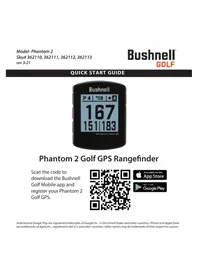
Scan the code to download the Bushnell Golf Mobile app and register your Phantom 2 Golf GPS.


Controls/Parts and Play Golf Screen Guide
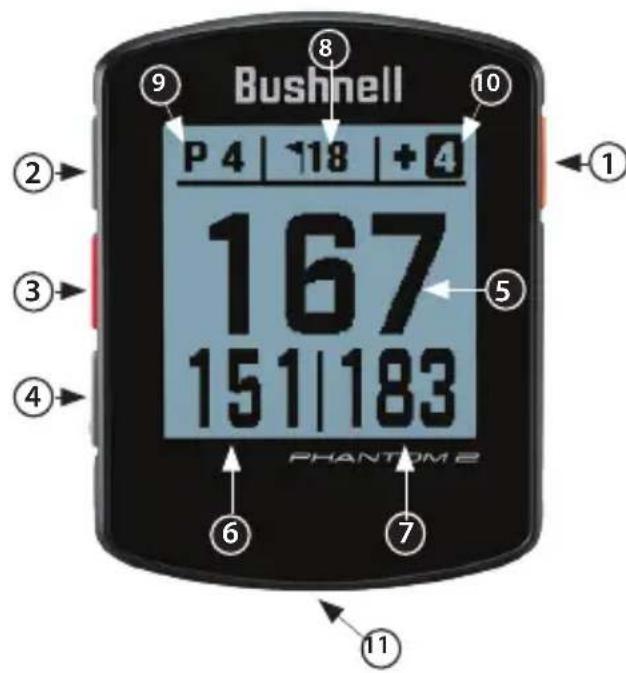
1- POWER/MENU BUTTON
HOME SCREEN: Press and hold to turn device on/off. Briefly to see
Settings menu.
GOLF MODE: Press for score entry. Hold for Golf menu.
2-UP BUTTON-Scrolls up through menu.
3 - SELECT BUTTON - Cycles screens in Play Golf mode, selects menu options.
4-DOWN BUTTON-Scrolls down through menu.
5 - CENTER DISTANCE - Distance to center of the green (or pin if you moved it).
6-FRONT DISTANCE-Distance to front of the green.
7-BACK DISTANCE-Distance to back of the green.
8 - HOLE - Current hole number.
9 - PAR - Par for the current hole.
10 - SCORE - User's current total score for the round.
11 - USB (Type C) PORT - Connect to charge unit.
Quick Start Operation Guide
- Charge the Phantom 2's internal battery, by connecting a USB charger to the USB port (11) on the device.
- Press and hold the Power button (1) to turn on the device. The Home screen is displayed.
- To Play Golf, push the Select button (3) from the Home Screen. The device will connect to GPS satellites. The device will connect to the satellites faster while being outside with a clear view of the sky.
- Choose your course, using the Up/Down arrow buttons (2, 4), then press the Select button (3) when your course is highlighted. The Play Golf (Front/Center/Back) screen is displayed.
- The Phantom 2 has an Auto Hole advance feature, however to change holes manually, press the Up/Down Buttons (2,4).
- To cycle through mode/menu screens (Front/Center/Back > Greenview > Hazards and Layup points > Time > Front/Center/Back), press the Select button (3).
For a full user manual, operating details, product use questions and warranty/repair information, please visit: www.BushnellGolf.com/support/phantom-2

WARNING: Bite feature included with device contains a Neodymium magnet. Magnets could affect the functioning of pacemakers and implanted heart defibrillators. If you use these devices, keep sufficient distance from magnet. Warn others who wear these devices from getting too close to magnets.
- Magnet may lose part of its adhesive force permanently if exposed to temperatures above 1750 F (800 C).
Magnets produce far-reaching, strong magnetic field. They could damage TVs and laptops, computer hard drives, credit and ATM cards, data storage media, mechanical watches, hearing aids and speakers. Keep unit away from devices and objects that could be damaged by strong magnetic fields.

WARNING: Do not attempt to open the Phantom 2. The Phantom 2 contains a rechargeable lithium ion battery. Risk of explosion if battery is replaced with incorrect type.
- Do not attempt to open, disassemble or service the internal battery. The battery must be replaced by a qualified technician.
- Do not crush, puncture or short the battery's external contacts. Do not expose to temperatures above 140 °F (60°C).
- Do not charge the battery if ambient temperature is over 113 °F (45°C)
- Properly recycle or dispose of the battery. Do not dispose in fire or water.
FCC Statement
This device complies with part 15 of the FCC Rules. Operation is subject to the following two conditions: (1) This device may not cause harmful interference, and (2) this device must accept any interference received, including interference that may cause undesired operation.
This equipment has been tested and found to comply with the limits for a Class B digital device, pursuant to Part 15 of the FCC Rules. These limits are designed to provide reasonable protection against harmful interference in a residential installation. This equipment generates, uses and can radiate radio frequency energy and, if not installed and used in accordance with the instructions, may cause harmful interference to radio communications. However, there is no guarantee that interference will not occur in a particular installation. If this equipment does cause harmful interference to radio or television reception, which can be determined by turning the equipment off and on, the user is encouraged to try to correct the interference by one or more of the following measures:
- Reorient or relocate the receiving antenna.
- Increase the separation between the equipment and receiver.
- Connect the equipment into an outlet on a circuit different from that to which the receiver is connected.
- Consult the dealer or an experienced radio/TV technician for help.
Shielded interface cable must be used with the equipment in order to comply with the limits for a digital device pursuant to Subpart B of Part 15 of FCC Rules. Specifications and designs are subject to change without any notice or obligation on the part of the manufacturer.
FCC ID: 2ASQI-36211
IC:24886-36211


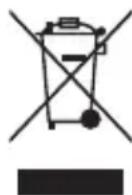
Disposal of Electric and Electronic Equipment (Applicable in the EU and other European countries with separate collection systems)
This equipment contains electric and/or electronic parts and must therefore not be disposed of as normal household waste. Instead, it should be disposed at the respective collection points for recycling provided by the communities. For you, this is free of charge. If the equipment contains exchangeable (rechargeable) batteries, these too must be removed before and, if necessary, in turn be disposed of according to the relevant regulations (see also the respective comments in this unit's instructions). Further information about the subject is available at your community administration, your local waste collection company, or in the store where you purchased this equipment.
Industry Canada Statement
This device complies with ISED's licence-exempt RSSs. Operation is subject to the following two conditions: (1) This device may not cause harmful interference, and (2) this device must accept any interference received, including interference that may cause undesired operation.
Radiation Exposure Statement:
This device complies with the Industry Canada portable RF exposure limit set forth for an uncontrolled environment and is safe for the intended operation as described in this manual. Further RF exposure reduction can be achieved if the product can be kept as far as possible from the user's body or if the device is set to a lower output power if such function is available.
Industry Canada Statement
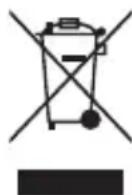
Disposal of Electric and Electronic Equipment (Applicable in the EU and other European countries with separate collection systems)
This equipment contains electric and/or electronic parts and must therefore not be disposed of as normal household waste. Instead, it should be disposed at the respective collection points for recycling provided by the communities. For you, this is free of charge. If the equipment contains exchangeable (rechargeable) batteries, these too must be removed before and, if necessary, in turn be disposed of according to the relevant regulations (see also the respective comments in this unit's instructions). Further information about the subject is available at your community administration, your local waste collection company, or in the store where you purchased this equipment.
Industry Canada Statement
Industry Canada-erklaering
©2021 Bushnell Outdoor Products Bushnell,™,®, denote trademarks of Bushnell Outdoor Products www.bushnellgolf.com 9200 Cody, Overland Park, KS 66214