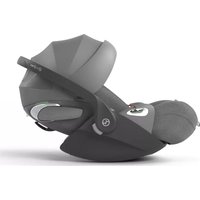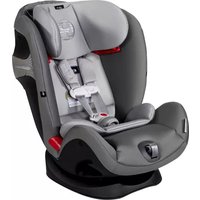
Eternis S - Car seat CYBEX - Free user manual and instructions
Find the device manual for free Eternis S CYBEX in PDF.



User questions about Eternis S CYBEX
0 question about this device. Answer the ones you know or ask your own.
Ask a new question about this device
Download the instructions for your Car seat in PDF format for free! Find your manual Eternis S - CYBEX and take your electronic device back in hand. On this page are published all the documents necessary for the use of your device. Eternis S by CYBEX.
USER MANUAL Eternis S CYBEX
Installation Manual and User Guide
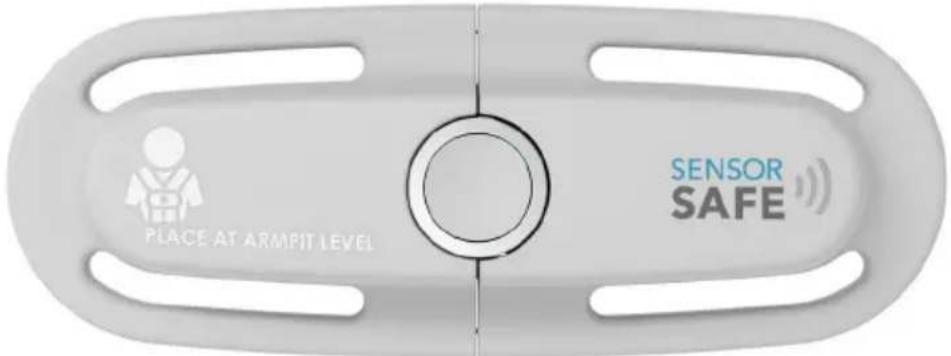
text_image
PLACE AT ARMPIT LEVEL SENSOR SAFEABOUT SENSORSAFE
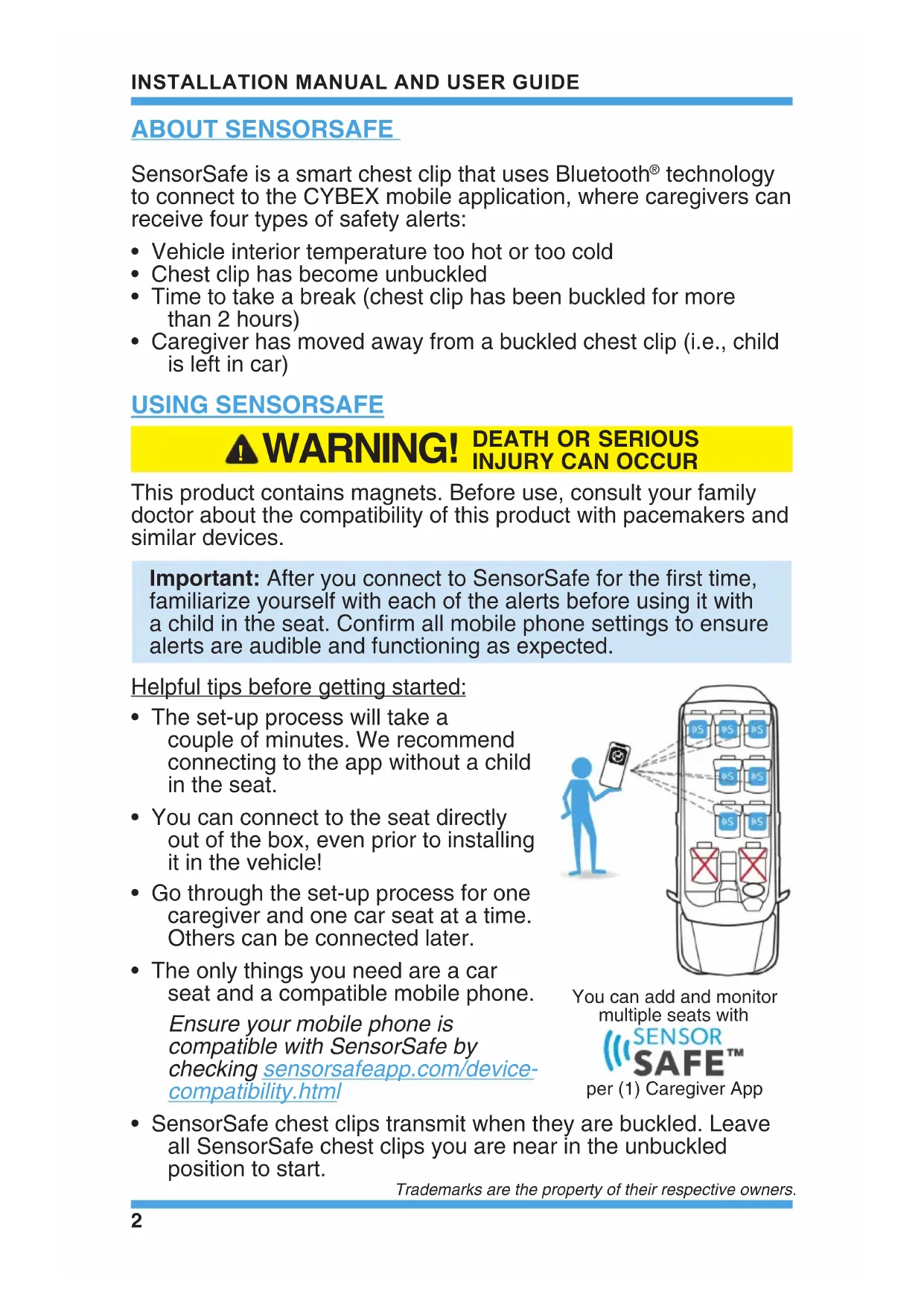
SensorSafe is a smart chest clip that uses Bluetooth® technology to connect to the CYBEX mobile application, where caregivers can receive four types of safety alerts:
• Vehicle interior temperature too hot or too cold
- Chest clip has become unbuckled
- Time to take a break (chest clip has been buckled for more than 2 hours)
- Caregiver has moved away from a buckled chest clip (i.e., child is left in car)
USING SENSORSAFE
⚠ WARNING! DEATH OR SERIOUS INJURY CAN OCCUR
This product contains magnets. Before use, consult your family doctor about the compatibility of this product with pacemakers and similar devices.
Important: After you connect to SensorSafe for the first time, familiarize yourself with each of the alerts before using it with a child in the seat. Confirm all mobile phone settings to ensure alerts are audible and functioning as expected.
Helpful tips before getting started:
- The set-up process will take a couple of minutes. We recommend connecting to the app without a child in the seat.
- You can connect to the seat directly out of the box, even prior to installing it in the vehicle!
- Go through the set-up process for one caregiver and one car seat at a time. Others can be connected later.
- The only things you need are a car seat and a compatible mobile phone. Ensure your mobile phone is compatible with SensorSafe by checking sensorsafeapp.com/device-compatibility.html
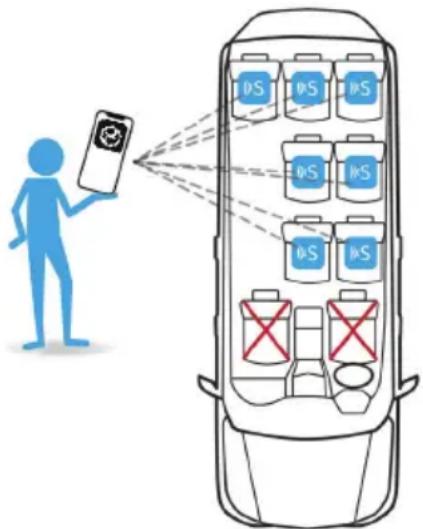
text_image
Diagram illustrating battery charging system with a person using a smartphone and multiple battery cells labeled 'DS' connected to a car.You can add and monitor multiple seats with

per (1) Caregiver App
- SensorSafe chest clips transmit when they are buckled. Leave all SensorSafe chest clips you are near in the unbuckled position to start.
Trademarks are the property of their respective owners.
Prepare the SensorSafe Chest Clip
- Start by opening the chest clip and leaving it in the unbuckled position.
- On the side of the chest clip with the SensorSafe logo, firmly pull on the battery pull tag to completely remove it.
- Discard the tag.
Prepare the CYBEX Mobile Application
- Download the free CYBEX mobile app to your smartphone, then create an account in the app by using your email or an Apple log-in.

Important: Set up the CYBEX app to automatically update or check back for updates regularly to benefit from new features being released.
- Select if you want to create a new family or if you have been invited to join an existing family. A family is a group of users who will be monitoring the child either as the primary caregiver or as a family emergency contact. You can add as many family members and car seats as you like to each family member's account.
- Create New Family. If you are the primary caregiver or the first member of your family connecting to a CYBEX product, choose this option to create a family, then follow the instructions to add new members to your family via an email invitation.
To ensure notifications reach family members in an unsafe situation, we recommend adding a minimum of two family member contacts.
- Join Existing Family. Family members will select this option after receiving an email invitation to join an existing family. They will be asked to download the CYBEX app, create a profile, and enter the one-time family invitation code from the email to join a family.
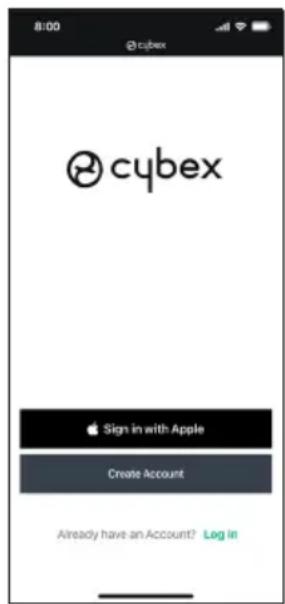
text_image
8:00 @cybex cybex Sign in with Apple Create Account Already have an Account? Log In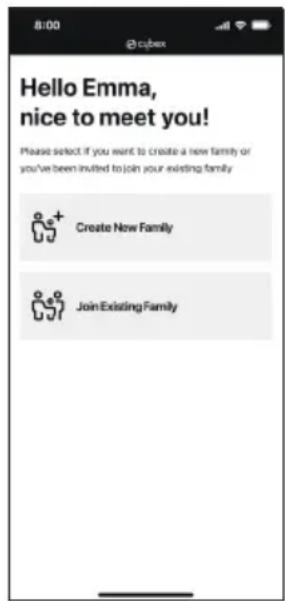
text_image
Hello Emma, nice to meet you! Please select if you want to create a new family or you've been invited to join your existing family Create New Family Join Existing FamilyFamily members only receive alerts in case the primary caregiver has not responded to a Child In Car alert within approximately 3 minutes. The alert will arrive to the family member whether or not the app is open on their phone. Family members are not able to remotely monitor the condition of the seat other than receiving the Child In Car alert.
Family alerts are sent over Wi-Fi or a cellular data connection. If you are out of range of cellular service, the alert will not send until service is restored.
If a family member has not yet accepted your invitation, a re-invite button will appear by their name in settings.

text_image
NJ! Natalie Jones Aunt REINVITE >- Please always allow all mobile app permissions for the SensorSafe system to function. If any of these are turned off, safety alerts may not be received:

Bluetooth is how the mobile app receives the transmissions from the SensorSafe chest clip.

Location is used in the moment when a buckled chest clip is away from the mobile app (Child In Car) to inform caregivers and family members of the child's location.

Notifications are used to send safety alerts directly to the caregiver's or family member's attention on the mobile phone's home screen.

Critical Alerts (Apple® Only) are enabled to allow the app to sound the Child In Car alert even when the phone is in Silent Mode.
- Correctly identify which SensorSafe product you own.
- Clip Only. Choose this option if you unbuckle the chest clip and see the letters "S3" stamped on the tongue.
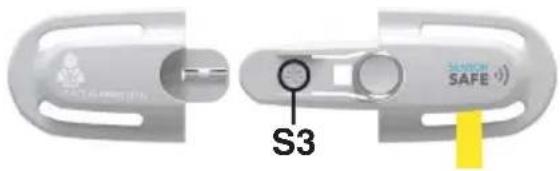
text_image
S3 SUNION SAFE- Clip & OBD Dongle. Choose this option if the chest clip comes with an OBD vehicle dongle and has no letters stamped on the tongue.
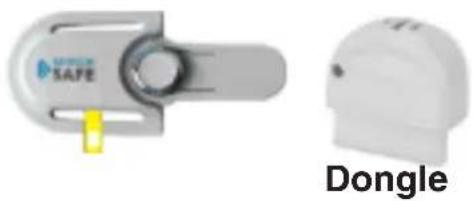
natural_image
Two white industrial safety components: a gray safety switch labeled 'SAFE' and a white dome-shaped device labeled 'Dongle', with no visible text or symbols on the devices themselves.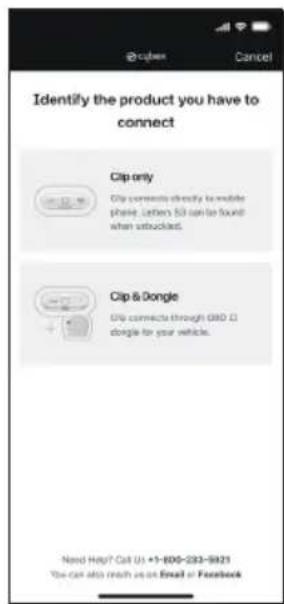
text_image
Identify the product you have to connect Clip only Clip comments directly to mobile phone. Letters 50 can be found when subscribed. Clip & Dongle Clip connects through GBD CI dongle for your vehicle. Need Help? Call Us +1-800-233-9821 You can also reach us on Email or Facebook- When prompted in the mobile app, buckle the SensorSafe chest clip.
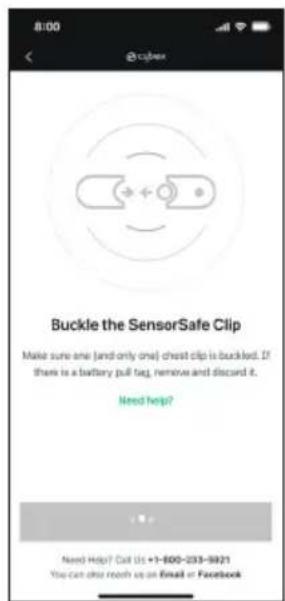
The chest clip LED lights may blink RED for up to 30 seconds before being properly connected and, once connected, the LEDs should pulse twice with a visible BLUE light, indicating that it has a full battery charge (see pg. 9).
If you experience any difficulty connecting to the chest clip, contact CYBEX Consumer Services using the information in the CYBEX mobile app or URL/phone number in your child restraint user guide.
text_image
Buckle the SensorSafe Clip Make sure one (and only one) chest clip is buckled. If there is a battery pull tag, remove and discard it. Need help? Need Help? Call Us +1-600-231-9321 You can also reach up on Email or FacebookTips to ensure successful connection:
- Make sure only one mobile phone in the area is attempting to connect at a time. Disconnect from SensorSafe on all other nearby phones.
- Disconnect from all other Bluetooth devices while connecting, including vehicle audio.
- Make sure the mobile phone is within close range of the chest clip, 3 meters (10 feet) or less, and Bluetooth is turned on.
-
You only need to register a chest clip to an account once. If it is already registered, you will see it under the settings tab of the mobile app and will not be able to register it again.
-
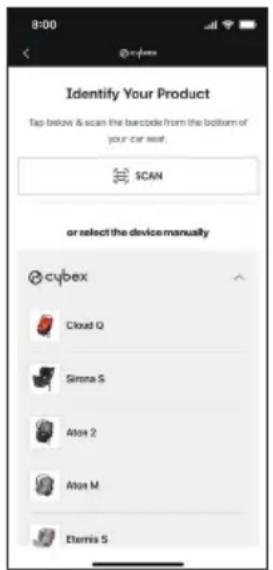
Identify your product and personalize your device.
Enter the following information to customize your home page and differentiate between multiple seats:
- Identify the car seat that you are connecting.
- Enter a custom device name and description of where the car seat is installed.
text_image
8:00 Identify Your Product Tap below & scan the barcode from the bottom of your car seat. SCAN or select the device manually cybex Cloud Q Sirona S Alton 2 Alton M Eternis S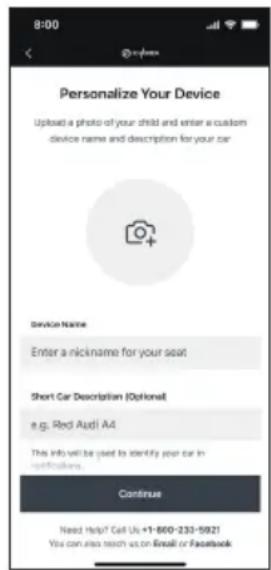
text_image
8:00 Personalize Your Device Upload a photo of your child and enter a custom device name and description for your car Device Name Enter a nickname for your seat Short Car Description (Optional) e.g. Red Audi A4 This info will be used to identify your car in specifiers. Continuous Need Help! Call Us +1-600-233-5921 You can also teach us on Email or Facebook- Upload a photo of the child who will be using this seat (optional).
-
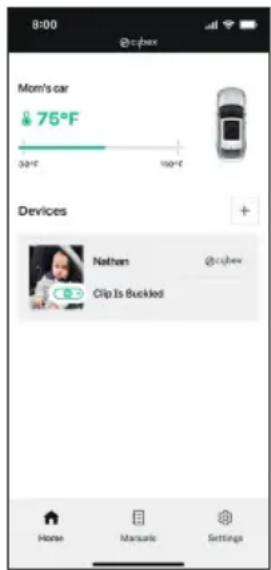
Once your chest clip is connected, you will be able to monitor its status on your CYBEX app home page. From there you can:
-
view the temperature of the vehicle interior (as read by the chest clip), as well as an indicator of where the temperature falls within a safe range.
• view whether the chest clip is buckled or unbuckled. - add additional devices to your family.
- reach out to customer service.
- navigate between screens in the app (home, manuals, and settings).
text_image
8:00 @cyhex Mom's car 75°F 32°F 150°F Devices Nathens @cyhex Clip Is Buckled Home Manuals SettingsNotes:
- Once connected, your chest clip will automatically re-connect to the mobile phone each time it is buckled if the caregiver remains logged in.
Important: On Apple devices, be sure not to force close the app or it will be unable to re-connect.
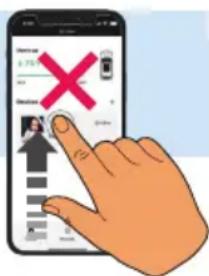
- If more than one person connected the chest clip to their account, SensorSafe only allows one active connection at a time. To switch between users, simply disconnect in the apps settings to allow another user to connect.
text_image
Hand interacting with a smartphone displaying a payment interface with a red X mark and navigation iconsSENSORSAFE ALERTS
Helpful Tips:
- Ensure all mobile application permissions are always turned on and enabled: Bluetooth, location, notifications, critical alerts.
- Have sound volume on and disable “Do not disturb” to benefit from all alert types.
- If any alert does not function as you would expect it to, contact CYBEX Consumer Services using the information in the CYBEX mobile app or URL/phone number in your child restraint user guide, as specific instructions may be available for your mobile phone model.
Child In Car
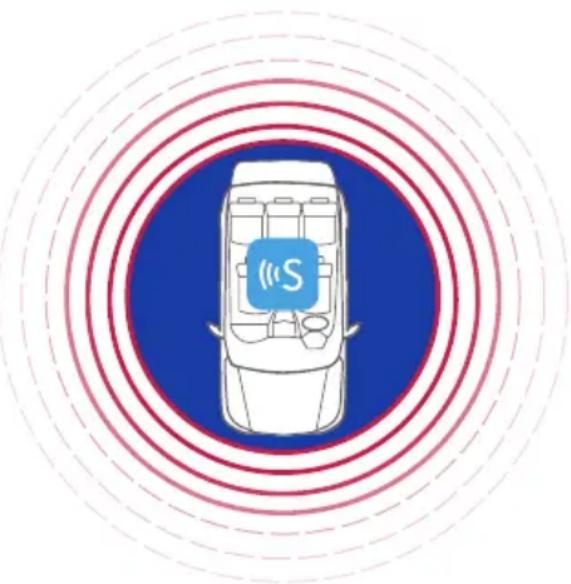
First Alert - If you walk away from a buckled child, you will receive an immediate alert at around 7.6 meters (25 feet). Walk back to the child and unbuckle the chest clip to stop the alert.
Notes:
- SensorSafe Child In Car notifications work by measuring the Bluetooth signal strength from the chest clip to the phone. Signal strength may vary depending on the mobile phone or the environment, so the distance at which you receive the alert may vary from user to user.
- Always test the alerts prior to using SensorSafe with a child. Observe the home page during testing so you can see at which distance SensorSafe disconnects in your environment.
natural_image
Top-down illustration of a car with sensor icon and 'S' label, surrounded by concentric red and blue concentric circles (no text or symbols on the car itself)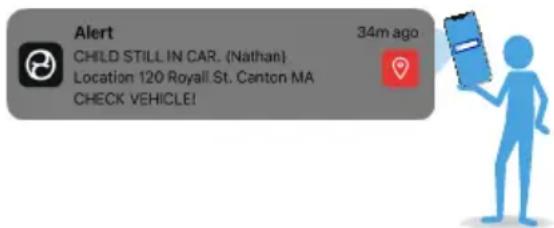
text_image
Alert CHILD STILL IN CAR. (Nathan) Location 120 Royall St. Canton MA CHECK VEHICLE! 34m ago- This alert will sound at full volume so that it can be heard in an emergency.
Second Alert - If you ignore the first alert for more than 2 minutes, you will receive another alert indicating that the app is about to notify your family emergency contacts.
Third Alert - If all previous alerts are ignored, you will receive a notification that your family emergency contacts have all been notified with the location of the child.
Temperature
Temperature alerts will sound if the temperature rises above 35^ C / 95^ F (too hot) or falls below 7^ C / 45^ F (too cold). The alert will repeat every 5 minutes until the temperature is within a safe range.
Note: If your car seat has been in a very hot or cold temperature for an extended period of time, it may take some time for the chest clip to register a rapid change in temperature (potentially due to air conditioning or heat).
Clip Open
SensorSafe will notify you each time the chest clip has been unbuckled. This is a one time notification and will not repeat.
Extended Time in Seat
If a chest clip has been buckled for over 2 hours, the caregiver will receive an alert reminding them to take a break to let the child move and stretch. This alert will repeat every 30 minutes until it is acknowledged.
Other Alerts
You may also receive alerts from the CYBEX mobile app when settings do not allow full function of the system such as when permissions are turned off, the battery is low, or you have closed the app.
Other App Features
Browse through the CYBEX app to familiarize yourself with features such as instruction manuals, videos, FAQs, personalized settings and profile management. Often the information you may be looking for is right in the app.
When removing the child from the car seat, always leave the SensorSafe chest clip in the unbuckled position to preserve battery life. If it remains buckled, the chest clip will cycle through the Child In Car sequence, then, after 12 hours of inactivity, will go to sleep and stop transmitting. It will not turn on again until it is re-opened and closed.
LED LIGHTS
The SensorSafe chest clip LED lights are designed to tell you two things: (1) if the chest clip is connected to the app, and (2) if the battery is fully charged or low. This table shows how the LED lights on the front of the chest clip will behave:
| Slow Blinking = Full Battery | Rapid Blinking = Low Battery | ||
 | RED LIGHT= Not ConnectedA red light indicates that the clip is not connected to the app. | 1 red blink per second until the SensorSafe clip is connected (up to 30 seconds) | 10 rapid red blinks indicate a low battery while the clip is not connected |
 | BLUE LIGHT = ConnectedA blue light indicates that the clip is connected to the app. | 2 slow blue pulses indicate a successful connection | 10 rapid blue blinks indicate a low battery while the clip is connected |
REPLACING THE BATTERY
-
Loosen the Harness by pressing the Harness Release Button on the front of the Child Restraint and pulling forward on both Harness Straps.
-
Unbuckle Harness by pressing the button on the Crotch Buckle and pulling out both Buckle Tongues.
-
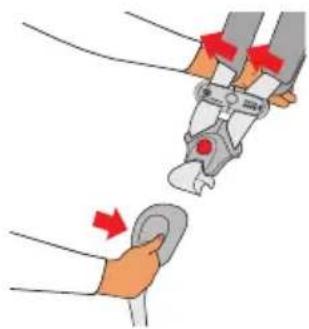
Open Chest Clip by pressing the Release Button and pulling the Chest Clip apart.
-
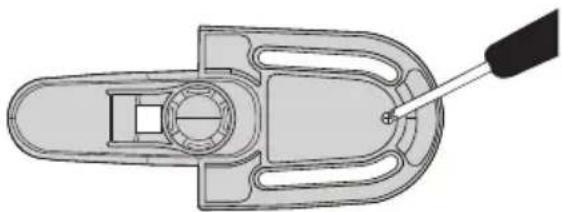
Turn the male side of the Chest Clip over and loosen the screw with a #0 x 2 ^1/2 " Phillips screwdriver. Remove cover with screw in place.
natural_image
Illustration of a hand holding a tool with red arrows indicating motion or force (no text or symbols present)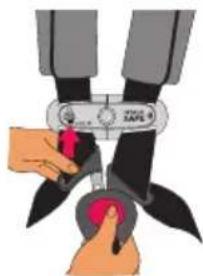
natural_image
Illustration of hands using a pair of scissors to cut a black piece with a red handle (no text or symbols)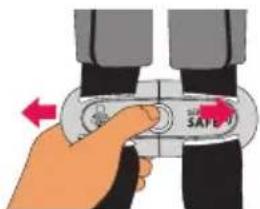
text_image
SAFE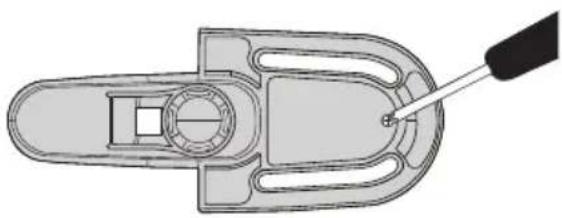
natural_image
Technical line drawing of a mechanical component with a screwdriver inserted (no text or symbols)- Remove Circuit Board from Chest Clip. Remove Battery from Circuit Board.
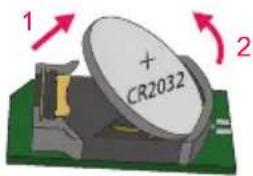
text_image
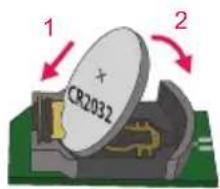
1 + CR2032 2- Replace Battery with new CR2032 (Panasonic ^ or Energizer ^ ) Lithium button cell Battery, as shown.
text_image
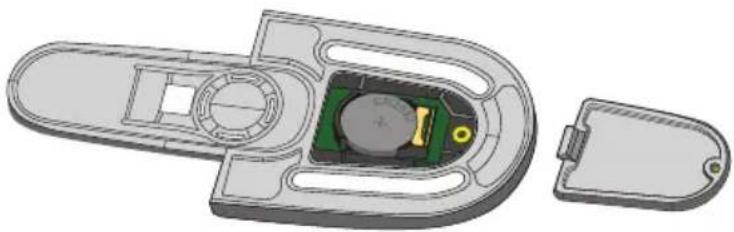
1 CR2032 2- Place the Circuit Board with the new Battery in the Chest Clip with the battery facing up. Replace the Cover and tighten the screw. This completes the battery replacement process.
natural_image
3D technical illustration of a mechanical component with internal green and yellow components, no visible text or symbolsIf you have questions, please contact CYBEX Consumer Services using the information in the CYBEX mobile app or URL/phone number in your child restraint user guide.
SensorSafe® Technology Questions? Comments?
Contact CYBEX Consumer Services using the information in the CYBEX mobile app or URL/phone number in your child restraint user guide.
This device meets the requirements of SAE J3005.
FCC CERTIFIED:
Chest Clip Model: SensorSafe 3.0, FCC ID: 2ABS2-S3
This device complies with Part 15 of the FCC Rules. Operation is subject to the following two conditions:
- This device may not cause harmful interference.
- This device must accept any interference received, including interference that may cause undesired operation.
⚠ WARNING! DEATH OR SERIOUS INJURY CAN OCCUR
Changes or modifications not expressly approved by the party responsible for compliance could void the user's authority to operate the equipment.
NOTE: This equipment has been tested and found to comply with the limits for a Class B digital device, pursuant to Part 15 of the FCC Rules. These limits are designed to provide reasonable protection against harmful interference in a residential installation.
This equipment generates, uses, and can radiate radio frequency energy and, if not installed and used in accordance with the instructions, may cause harmful interference to radio communications. However, there is no guarantee that interference will not occur in a particular installation. If this equipment does cause harmful interference to radio or television reception, which can be determined by turning the equipment off and on, the user is encouraged to try to correct the interference by one or more of the following measures:
- Reorient or relocate the receiving antenna.
- Increase the separation between the equipment and receiver.
- Connect the equipment into an outlet on a circuit different from that to which the receiver is connected.
- Consult the dealer or an experienced radio/TV technician for help.
INDUSTRY CANADA (IC) CERTIFIED:
Chest Clip Model: SensorSafe 3.0
IC ID: 11740A-S3
This device complies with Industry Canada License-exempt RSS standard(s). Operation is subject to the following two conditions:
- This device may not cause interference, and
- This device must accept interference, including any interference that may cause undesired operation of this device.
RF WARNING STATEMENT (CHEST CLIP): The device has been evaluated to meet general RF exposure requirement. The device can be used in portable exposure condition without restriction.
SensorSafe® Technology
Questions? Comments?
Contact CYBEX Consumer Services using the information in the CYBEX mobile app or URL/phone number in your child restraint user guide.
text_image
PLACE AT ARMPIT LEVEL SENSOR SAFEÀ PROPOS DE SENSORSAFE
text_image
Diagram illustrating battery charging scenarios on a car, showing a person using a smartphone and multiple battery cells with red prohibition signs.natural_image
Two white safety device components: a gray safety switch labeled 'Vance SAFE' and a white dome-shaped device labeled 'Dongle', with no visible text or symbols on the devices themselves.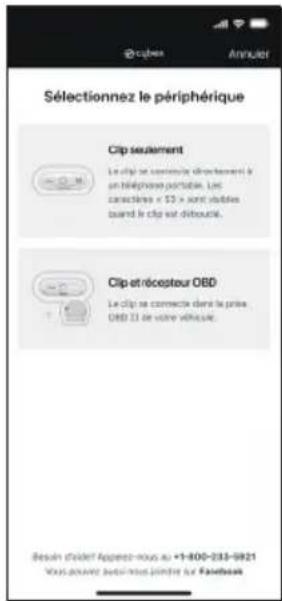
text_image
Illustration of a hand interacting with a smartphone displaying an ID verification app interface with a red X mark and user profile icon.natural_image
Top-down illustration of a car with sensor icons on its roof, surrounded by concentric red and blue concentric circles (no text or symbols)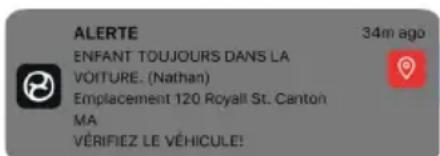
text_image
ALERTE 34m ago ENFANT TOUJOURS DANS LA VOITURE. (Nathan) Emplacement 120 Royall St. Canton MA VÉRIFIEZ LE VÉHICULE!
natural_image
Illustration of a hand holding a tool with red arrows indicating force or movement (no text or symbols present)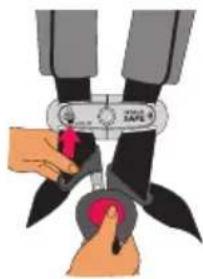
natural_image
Illustration of hands using a tool to cut or lift a black object, no text or symbols visible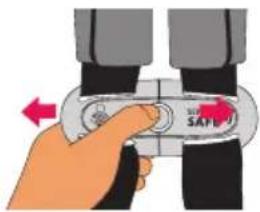
text_image
Hand holding a safety belt switch with 'SAFE' label and directional arrow indicating left-hand rule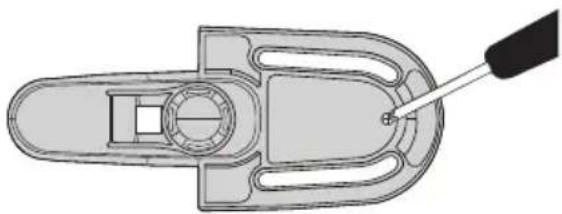
natural_image
Technical line drawing of a mechanical component with a screwdriver inserted (no text or symbols)natural_image
3D mechanical assembly diagram showing internal components and a separate housing (no text or symbols)text_image
PLACE AT ARMPIT LEVEL SENSOR SAFEACERCA DE SENSORSAFE
CÓMO USAR SENSORSAFE
text_image
Diagram illustrating battery charging system with a person using a smartphone and multiple battery cells, showing red prohibition signs for battery discharging.natural_image
Two white industrial safety components: a circular switch labeled 'SAFE' and a dome-shaped device with a yellow tag (no visible text or symbols on the devices themselves)Adaptador
text_image
Hand holding smartphone screen displaying a mobile app interface with a red X mark and navigation iconsnatural_image
Top-down illustration of a car with sensor icons on its head, surrounded by concentric red and blue concentric circles (no text or symbols)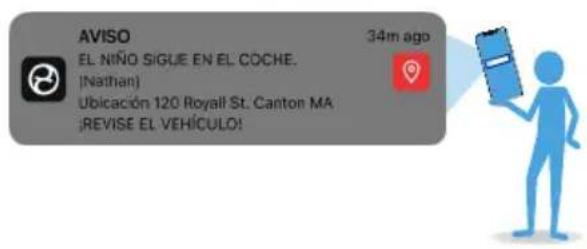
REEMPLAZO DE LA PILA
natural_image
Illustration of a robotic arm gripping a small object, with red arrows indicating motion direction (no text or symbols)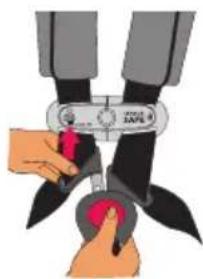
natural_image
Illustration of hands using a tool to cut a black object, no text or symbols visible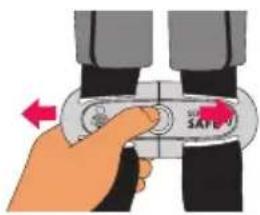
text_image
Instructional image showing a hand holding a safety belt switch with 'SAFE' label and directional arrow