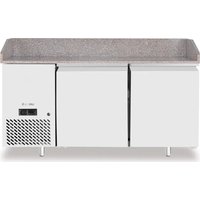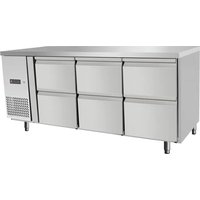
232842 - Fridge Arktic - Free user manual and instructions
Find the device manual for free 232842 Arktic in PDF.


User questions about 232842 Arktic
0 question about this device. Answer the ones you know or ask your own.
Ask a new question about this device
Download the instructions for your Fridge in PDF format for free! Find your manual 232842 - Arktic and take your electronic device back in hand. On this page are published all the documents necessary for the use of your device. 232842 by Arktic.
USER MANUAL 232842 Arktic
COOLING AND FREEZING COUNTERS PROFI LINE
natural_image
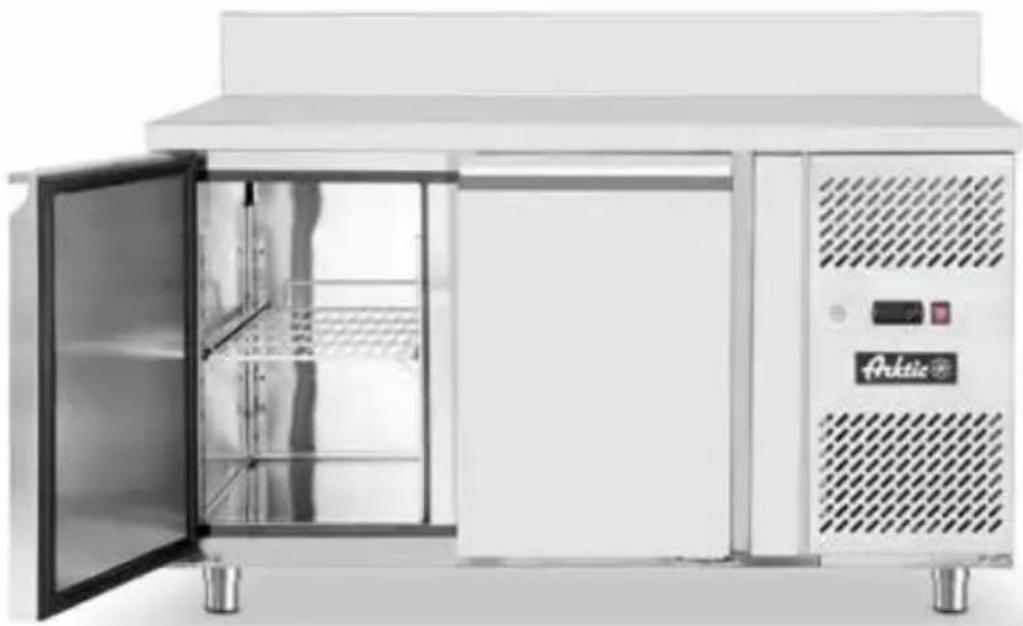
Front view of a white stainless steel kitchen appliance with open doors and side panel (no visible text or symbols)Item: 232040
232057
232064
232699
232842
233429
233436
233764
You should read this user manual carefully before using the appliance
text_image
i READ MANUALKeep this manual with the appliance.
natural_image
Simple icon of a house with an arrow pointing left, labeled 'INDOOR' below (no other text or symbols)For indoor use only.
text_image
FOOD CONTACT
text_image
Prohibition sign depicting a trash bin crossed out by a diagonal line, with a blank rectangular base.
text_image
RoHS
INDEX
- IMPORTANT SAFETY INSTRUCTIONS....3
- SPECIAL SAFETY REGULATIONS 4
- GROUNDING INSTALLATION 4
- INTENDED USE....5
- TECHNICAL DATA....5
- BEFORE THE FIRST USE 7
- HOW TO USE....9
- CLEANING AND MAINTENANCE....12
- FOOD STORAGE....13
- TROUBLESHOOTING....13
- WARRANTY....14
- DISCARDING & ENVIRONMENT....14
Thank you for purchasing this Hendi appliance. Before using the appliance for the first time, please read this manual carefully, paying particular attention to the safety regulations outlined below.
1. IMPORTANT SAFETY INSTRUCTIONS
- This appliance is intended for commercial use only and must not be used for household use.
- The appliance must only be used for the purpose for which it was intended and designed. The manufacturer is not liable for any damage caused by incorrect operation and improper use.
- Keep the appliance and electrical plug away from water and any other liquids. In the event that the appliance should fall into water, immediately remove plug from the socket and do not use until the appliance has been checked by a certified technician. Failure to follow these instructions could cause a risk to lives.
- Never attempt to open the casing of the appliance yourself.
- Do not insert any objects in the casing of the appliance.
- Do not touch the plug with wet or damp hands.
- Danger of electric shock! Do not attempt to repair the appliance yourself. In case of malfunctions, repairs are to be conducted by qualified personnel only.
- Never use a damaged appliance! Disconnect the appliance from the electrical outlet and contact the retailer if it is damaged.
- Warning! Do not immerse the electrical parts of the appliance in water or other liquids. Never hold the appliance under running water.
- Regularly check the power plug and cord for any damage. If the power plug or power cord is damaged, it must be replaced by a service agent or similarly qualified persons in order to avoid danger or injury.
- Make sure the cord does not come in contact with sharp or hot objects and keep it away from open fire. To pull the plug out of the socket, always pull on the plug and not on the cord.
- Ensure that the cord (or extension cord) is positioned so that it will not cause a trip hazard.
• Always keep an eye on the appliance when in use. - Warning! As long as the plug is in the socket the appliance is connected to the power source.
- Turn off the appliance before pulling the plug out of the socket.
- Never carry the appliance by the cord.
- Do not use any extra devices that are not supplied along with the appliance.
- Only connect the appliance to an electrical outlet with the voltage and frequency mentioned on the appliance label.
- Connect the power plug to an easily accessible electrical outlet so that in case of emergency the appliance can be unplugged immediately. To completely switch off the appliance pull the power plug out of the electrical outlet.
• Always turn the appliance off before disconnecting the plug. - Never use accessories other than those recommended by the manufacturer. Failure to do so could pose a safety risk to the user and could damage the appliance. Only use original parts and accessories.
- This appliance is not intended for use by persons (including children) with reduced physical, sensory or mental capabilities, or lack of experience and knowledge.
- This appliance must not be used by children under any circumstances.
- Keep the appliance and its cord out of reach of children.
- Always disconnect the appliance from the mains if it is left unattended or is not in use, and before as-
sembly, disassembly or cleaning.
- Never leave the appliance unattended during use.
2. SPECIAL SAFETY REGULATIONS
- This appliance is designed for short-time storage of cake for display to customer under low temperature. Do not store any other materials in the appliance. Do not place any dangerous products, such as fuel, alcohol, paint, flammable or explosives, etc. inside or near the appliance. No medicine is allowed to keep inside the appliance.
- Products put in the appliance must be already pre-cooled. Otherwise, moisture evaporating while cooling food products can condensate inside the cooling compartment, which is natural and does not indicate any malfunction of the appliance.
- This appliance must be installed, commissioned and services by a qualified or trained person. And this appliance is intended to be used by trained or qualified personnel such as kitchen or bar staff.
- WARNING: Do not use mechanical devices or other means to accelerate the defrosting process, other than those recommended by the manufacturer.
- WARNING: Do not damage the refrigerant circuit.
The refrigerant used is in appliances. It is a highly flammable refrigerant.
- WARNING: Keep all ventilation openings in the appliance enclosure clear of obstruction. Provide sufficient ventilation in the surrounding structure when building-in. Never block the air flow suction and air outlet in order to keep air circulation.
- WARNING: Do not use electrical appliances inside the food storage compartments of the appliance, unless they are of the type recommended by the manufacturer.
- Place the appliance on a clean, stable, dry, level surface only.
- Keep the appliance away from any hot surfaces and open flames. Protect the appliance against heat, dust, direct sunlight, moisture, dripping and splashing water.
- Allow at least 50 cm surrounding spacing for ventilation purpose during use.
- Do not use hard utensils to hit the glass surface. Do not use water jet, flush directly with water or steam cleaner as the parts will get wet and electric shock might be resulted.
- Do not place articles on top of the appliance. Do not place objects with open sources of fire (e.g. candles) on top or beside the appliance. Do not place objects filled with water (e.g. vases) on or near the appliance.
- Never cover the appliance during use. This may cause a fire hazard.
- Do not wash the appliance with water. Washing can cause leakages and increase the risk of electric shock.
- Do not make any additional openings on the appliance. Do not install any gadgets in the appliance.
- Do not overload the shelves inside to avoid damage. Max. loading of each shelf is about 40kg. Place the food evenly on each shelf.
- Do not attempt to climb up to the top of the appliance.
3. GROUNDING INSTALLATION
This appliance is classified as protection class I appliance and must be connected to a protective ground. Grounding reduces the risk of electric shock by providing an escape wire for the electric current. This appliance is equipped with a cord having a grounding wire with a grounding plug. The plug must be plugged into an outlet that is properly installed and grounded.
In case of electrical or refrigeration failure, service agent authorized by the manufacturer or professional maintenance staff shall be responsible for the maintenance work in case of danger or expanded failure.
4. INTENDED USE
Cooling appliances are designed for short-time storage of food at a lower temperature for display to the customer.
Freezing appliances are designed to store fresh food with an extended best before date - even for several months, depending on the type of food and storage temperature.
- This appliance is designed for use in restaurants, canteens, and commercial enterprises such as bakeries, supermarkets, etc.
- This appliance is designed for commercial use.
- This appliance is intended for indoor use.
-
Use the appliance only as described in the manual.
-
Any other use may lead to damage to the appliance, other user property, or personal injury.
- No liability will be accepted for damage resulting from improper use or non-compliance with this manual.
NOTE: products put in the appliance must be already pre-cooled. Otherwise, moisture evaporating while cooling food products can condensate inside the cooling compartment.
Otherwise, it will contaminate with other food.
Do not store any medications in the appliance.
Operating the appliance for any other purpose means misuse of the appliance.
5. TECHNICAL DATA
Common features of cooling and freezing cabinets:
- Inner and outer housing are made of high-quality stainless steel, except the outer rear cover which is made of galvanized steel.
- Forced cooling
• Digital display and electronic thermostat. - EMBRACO compressor.
- Comfortable curved door handle
Model 232057 232699 233436 233764
| Dimensions [mm] 1795x700x(H)850 1795x700x(H)850 1795x700x(H)850 1360x700x(H)850 | ||||
| Chamber Dimensions [mm] 1257x570x(H)580 1257x570x(H)580 1257x570x(H)580 822x570x(H)580 | ||||
| Numbers/Dimensions of shelves [mm] | 3x 330x545 3x 330x545 3x 330x545 - | |||
| Capacity Gross [l] | 420 | 420 | 420 | 280 |
| Power [W] | 400 | 600 | 400 | 250 |
| Voltage/ Frequency | 220-240V ~50 Hz | 220-240V ~50 Hz | 220-240V ~50 Hz | 220-240V ~50 Hz |
| Energy Use daily/Annum [kWh] | 1,73 / 631 | 5,09 / 1857 | - | - |
| Refrigerant/Amount [kg] | R290 / 0,13 | R290 / 0,14 | R600a / 0,13 | R290 / 0,13 |
| Climate class | 5 | 5 | - | 5 |
| EEI | A | C | - | B |
| Temp. range [°C] | -2 / +8 | -22 / -18 | -2 / +8 | -2 / +8 |
| Weight [kg] | 120 | 120 | 125 | 95 |
Model 232040 232064 233429 232842
| Dimensions [mm] 1360x700x(H)850 1360x700x(H)850 1360x700x(H)850 2020x800x(H)1100 | ||||
| Chamber Dimensions [mm] | 822x570x(H)580 822x570x(H)580 822x570x(H)580 1480x670x(H)570 | |||
| Numbers/Dimensions of shelves [mm] | 2x 330x545 2x 330x545 2x 330x545 - | |||
| Numbers/Dimensions of drawers [mm] | - - - 7x 400x620x(H)65 | |||
| Capacity Gross [l] 280 280 280 280 | ||||
| Power [W] 250 600 250 250 | ||||
| Voltage/Frequency | 220-240V ~50 Hz | 220-240V ~50 Hz | 220-240V ~50 Hz | 220-240V ~50 Hz |
| Energy Use daily/annum [kWh] | 1,34 / 489 3,97 / 1449 - 1,38 / 504 | |||
| Refrigerant/Amount [kg] R600a / 0,12 R290 / 0,14 | R600a / 0,12 | R600a / 0,12 | ||
| Climate class | 5 | 5 | -5 | |
| EEI | A | C | -A | |
| Temp. range [°C] | -2 / +8 | -22 / -18 | -2 / +8 | -2 / +8 |
| Weight [kg] | 95 | 95 | 100 300 | |
The ambient of +30 °C with 55% relative humidity
Climate class indicates the maximum ambient temperature at the place of appliance installation. Compliance with the determined maximum ambient temperature ensures that internal temperature inside the appliance is maintained and products are safely stored. Remember that too high ambient temperature of the environment in which the cooling or freezing cabinet is placed may influence power consumption and have impact on storage safety of the products placed inside.
The manufacturer and dealer is not liable for any inaccuracies due to printing errors or transcription, in this manual. In line with our policy of continuous improvement products, we reserve the right to make modification of the product, packaging and specifications contained in the Documentation without prior notice.
6. BEFORE THE FIRST USE
6.1. TRANSPORT
- Special package box is required for the delivery of the equipment. Keep the equipment level during transportation and handling.
- Please carefully check the package box after receiving the product to ensure that the equipment is not damaged during transportation.
- Check for the completeness of the equipment. In case of incomplete delivery and damages. Please contact supplier (See == > Warranty).
- When removing the package box, carefully move away the wood plate in case of scratch the equipment.
- In case that the equipment tilts during the transportation and handling, the lubricant in the compressor may flow into the cooling loop. Therefore, in order to ensure the lubricant flows back to the compressor, it is necessary to keep the equipment level for 24 hours before plug in the equipment and starts to work.
- Do not throw away the package randomly. Please dispose as per relevant local rules and regulations.
- Clean all components as described (See == > Cleaning and Maintenance).
- Place all the shelves inside the appliance.
NOTE: Due to manufacturing residues, the appliance may emit a slight odor in the first few cycles. This is normal and does not indicate any defect or
6.2. PACKAGING
Upon receipt of the appliance, check the packaging for any transport damage.
Carefully remove the external cardboard, loosen the bolts fixing the appliance to the pallet (if present - they secure the appliance from movement during transport), put the appliance aside and remove the protection film from the outer housing.
6.3. LEVELLING
To ensure correct functioning it is important to level the appliance. Correct levelling allows for reduction of vibration generated by the unit in operation.
Thoroughly check the levelling with the use of a spirit level. hazard. Make sure the appliance is well ventilated.
- Turn on the lighting switch, check the light is normal.
- The digital temperature controller is delivered with default parameters. Do not alter the parameters casually except for special need.
- When running for the first time, it should run without load for 2 hours to ensure the refrigeration system is working normally. Only when the temperature within the appliance is reduced within the indicated scope can the food be put into the appliance.
- Don't put too much food in the appliance to prevent instantaneous high load. The food shall not block the air outlet and air inlet. Nor shall it be close to side glass. Otherwise it will lead to condensation.
- To keep the taste of the food, please have the equipment running 24 hours a day.
- During the frosting process, the temperature of the appliance may rise slightly. When the frosting end, it will return to normal.
ATTENTION: During transport, avoid skew the unit from the vertical by an angle greater than 30^ , If necessary, wait approximately 3-4 hours before running, until the oil flows to the unit. Otherwise, the condensing unit may be damaged.
By recycling of packaging materials such as plastics, steel, cardboard and wood, we significantly contribute to saving raw materials and waste reduction.
Comply with local regulations regarding the method and place of disposal of the appliance packaging materials.
CAUTION!
To ensure proper functioning of the cooling/freezing appliance, strictly follow the instructions below:
Do not put the appliance in a place exposed to direct sunlight and near appliances emitting radiation, such as: heat lamps, stoves, radiators etc.
Avoid integrating or building over of the appliance.
Do not place any objects on the top of the appliance housing where the refrigerating unit is located.
Do not place the appliance in a room with relatively high humidity (water can liquify on the housing).
Do not place the appliance in narrow recesses (if there is no air circulation, the appliance will not function properly).
Do not cover ventilation openings located on the
6.4. MINIMUM DISTANCE FROM WALLS
In order to ensure proper operation of the appliance, during the installation remember to ensure minimum distance from walls in accordance with the drawings below. Remember to ensure the appropriate amount of space in front of the appliance as well - it is necessary for easy opening of the cooling/freezing chamber doors.
6.5. CONNECTION TO POWER SUPPLY
The connection to the power source must be made by trained and qualified service technicians. The power cable is supplied with the cooling/freezing
Prior to making the connection, make sure:
- The supply voltage corresponds to the appliance voltage of 230 V / 50 Hz / 1 ph. Proper operation of the appliance requires that the voltage should be within ± 6% of the rated voltage.
- The electrical system used to power the appliance must be suitable for rated parameters of the ap-
Connection stages:
- Install the thermomagnetic circuit breaker suitable for rated output power of the appliance to be installed.
housing.
Do not place the appliances back to back (they will not operate properly).
Ensure that the room where the appliance is placed is properly ventilated, also outside of working hours; it is crucial for proper operation of the refrigerating unit.
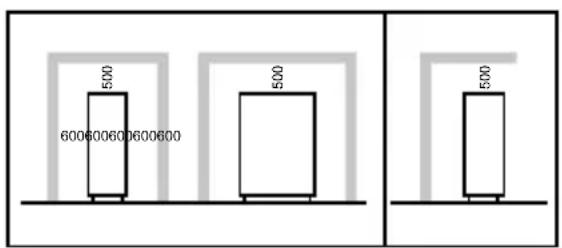
bar
| Category | Value | |---|---| | Top Left | 500 | | Bottom Left | 600600600600600 | | Bottom Right | 500 | | Bottom Right | 500 |FRONT SIDE
counter. A thermomagnetic circuit breaker (field supply) must be installed between the socket and the power cable of the appliance.
pliance to be installed.
- The electronic system connected to the counter complies with applicable requirements. Electrical connections and installation of the thermomagnetic circuit-breaker have been performed by a qualified person.
- Connect the counter to the output on the thermomagnetic circuit breaker.
- Make sure the counter is operational (signalled by an indicator lamp).
7. HOW TO USE
7.1. PLACING TRAYS AND CONTAINERS IN THE REFRIGERANT'S/FREEZER'S CHAMBER
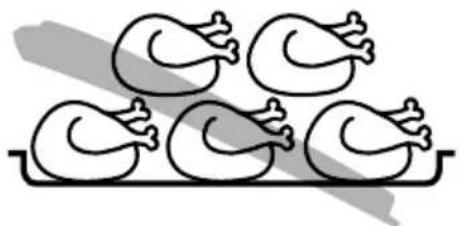
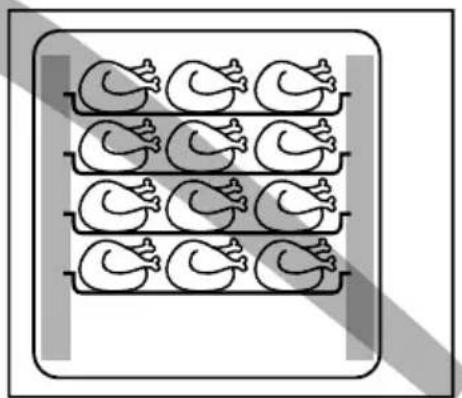
Never stack food items on top of each other. Divide them evenly on the tray or GN container.
natural_image
Simple line drawing of five identical ducklings arranged on a tray (no text or symbols)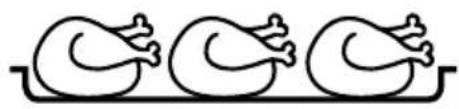
natural_image
Simple line drawing of three identical ducklings arranged horizontally (no text or symbols)
Keep vertical space between trays and/or GN containers
In order to ensure optimum circulation of hot air in the refrigerant's/freezer's chamber, a minimum vertical distance of 40 mm between the trays or GN containers is required.
natural_image
Illustration of a tray with nine identical chicken heads arranged in two rows (no text or symbols)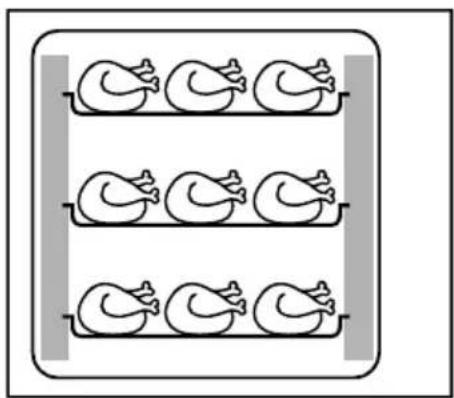
natural_image
Simple line drawing of three identical ducklings in a tray, no text or symbols present
EN
Positioning of trays and/or GN containers in the refrigerant's/freezer's chamber
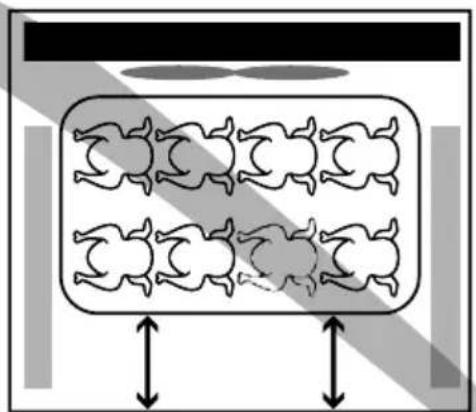
To ensure optimum cold air circulation:
- Don't position the tray or GN container against the fan
- Position them evenly and in the middle in the oven chamber
natural_image
Diagram of a biological or anatomical structure with symmetrical, rounded shapes and two vertical arrows indicating width (no text or symbols)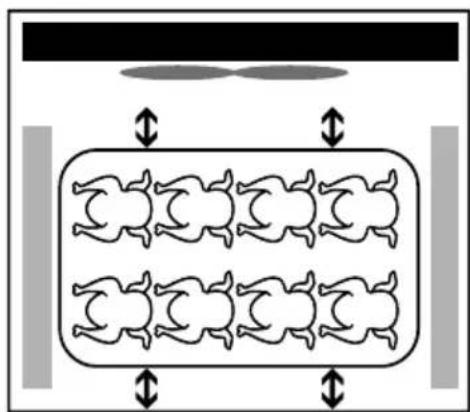
natural_image
Diagram of a multi-armed dog inside a rectangular enclosure, with no visible text or symbols
7.2. AUTOMATIC DEFROSTING
The appliance is equipped with an automatic defrosting system with default parameters, whereas the number, duration and time intervals between subsequent defrosting cycles can be set in the control panel.
This process should be conducted by qualified staff; in individual cases the appliance may require manual defrosting, which can be set in the control panel or you can switch the appliance off and wait until the ice melts (the time required for this process depends on the room conditions and the amount of ice).
In case of appliances designed for frozen or packed food, it is recommended to fully clean and defrost the appliance once a month.
It is recommended to clean the external housing of the appliance and internal part of the door, especially near the gasket.
7.3. FIRST USE
Before starting use of a new appliance, it should be opened and aired. Then, its interior should be cleaned with warm water.
After connecting to the mains, press the power button on the control panel (green signal light will be lighted). The appliance will start. A microcomputer controller installed in the control panel may adjust temperature ranges automatically. The smart digital controller operates in the following way: when the temperature increases and a set point is reached, a compressor is switched on, then it is switched off, when the temperature reaches a set value again.
7.4. OPERATION
Before placing the food product in the appliance chamber, wait until it reaches the requested temperature. All food products placed inside the appliance should be pre-cooled to the internal operating temperature of the chamber. Do not place inside the appliance any hot food just taken out of oven or stove. Before placing the food in the appliance, check whether the actual temperature inside the chamber corresponds to the the required temperature. The temperature of deep frozen products should not exceed -18°C. Placing in the appliance any products that had not been cooled down before may result in their spoiling or disturb the operation of the appliance.
To ensure proper operation of the appliance, the products have to be placed in a way that does not block the circulation of cooled air inside the appliance. When the door is open, cool air escapes from the chamber, therefore it is recommended to limit the door opening frequency to the necessary minimum. Ensure the door is open only for a period necessary to take out or put the food inside. Do not place any products on the top of the appliance.
7.5. CONTROL PANEL
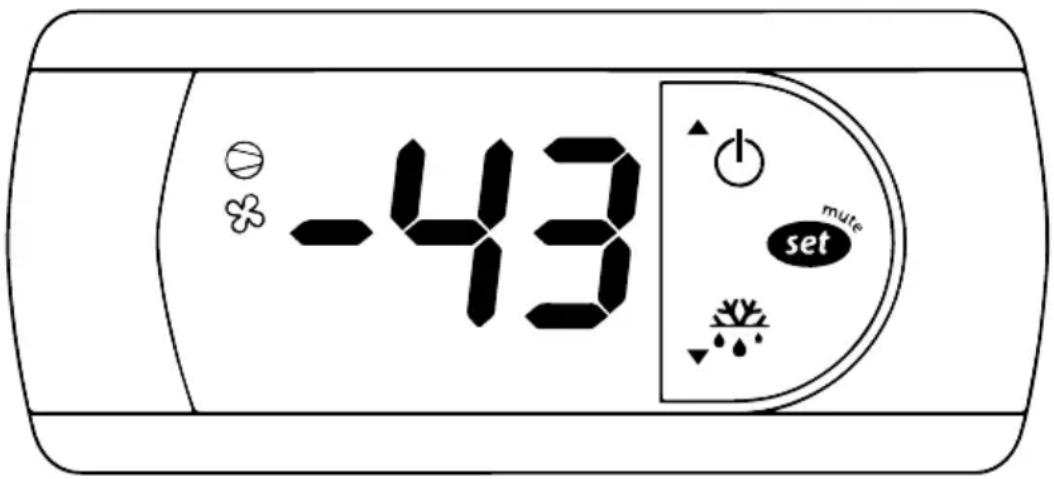
text_image
-43 set muteSymbol Name Type Mode Meaning
 | Up/Switch Button | Press and hold for min. 3 seconds | Switch ON/OFF | |
| Press and release | Scrolling functions; increasing the value of the selected parameter (In the programming mode) | |||
 | Down/ Defrosting | Button | Press and hold for min. 3 seconds | Manual defrosting will start |
| Press and release | Scrolling functions; decreasing the value of the selected parameter (In the programming mode) | |||
 | Set/Mute Button | Press and release Mutes the audible alarm | ||
| Press and hold for min. 1 seconds | Displays/sets the set point | |||
| Press and hold for min. 3 seconds | Accesses the parameter setting menu | |||
 | Aux | Light | Illuminated | The additional output active (service mode only) |
 | Clock (RTC) Light Illuminated | RTC available, enabled (tEN=1) and at least one time band has been set (service mode only). | ||
 | Alarm | Light | Illuminated | Alarm in progress |
 | Cooling Fan Light | Illuminated Fan activated | ||
| Blinks | The start of fan is delayed due to external shut-off; other procedure is in progress | |||
 | Defrosting Light | Illuminated Defrosting in progress | ||
| Blinks | The start of defrosting is delayed due to external shut-off; other procedure is in progress | |||
 | Compresor | Light | Illuminated Compressor on | |
| Blinks | The start of Compresor is delayed by protective procedure | |||
- In order to display the set value, press and immediately release the [SET/MUTE] button.
- Press and hold the [SET/MUTE] button for at least 1 seconds to change the set value. The current set value will be displayed.
- To change the set value, press the [UP/SWITCH] or [DOWN/DEFROSTING] arrows. To store the new set value, press the [SET/MUTE] button again or wait 15 seconds.
7.6.2. SETTING THE DEFAULT PARAMETERS
To reset the default parameters:
- disconnect power from the instrument;
- reconnect power while holding the [SET/MUTE] and [DOWN/DEFROSTING] buttons;
- the display will show the message "CF";
- after a few seconds the instrument starts operating with the default configuration. Any different parameter settings will need to be updated.
Warnings: running this procedure overwrites any custom parameter settings.
7.6.3. TURN ON/OFF CONTINUOUS CYCLE
To turn ON/OFF continuous cycle, press and hold the [UP/SWITCH] + [DOWN/DEFROSTING] buttons for more than 3 seconds. "CC" will be displayed.
7.6.4. MANUAL DEFROSTING
To start the manual defrosting, press and hold the DEF [DOWN/DEFROSTING] button for more than 3 seconds.
7.7. ALARMS
Alarm Error
| EE Unit parameter error |
| EtC Clock alarm |
| HI Maximum temperature alert |
| LO Minimum temperature alert |
| IA External alert |
| cht Dirty condenser alarm |
| dOr Door opened |
8. CLEANING AND MAINTENANCE
CAUTION: Before cleaning and/or maintenance make sure that the appliance is NOT connected to the power supply. The maintenance of the appliance should be performed by qualified and certified personnel.
8.1. CLEANING
Trouble-free operation and service life of the appliance are essentially dependent on the proper maintenance according to the schedule. Daily cleaning of the cooling/freezing chamber is essential to prevent bacterial growth. Before cleaning, manually defrost the appliance with the door open and the drain plug removed. Follow the instructions below:
- Do not use direct water jet and water under pressure to clean the appliance as it can damage the electrical wiring.
- Do not use any metal objects to remove ice ac-
cumulated inside the chamber as it may scratch and/or damage its internal surfaces.
- Always use lukewarm (not hot!) water with a mild detergent for cleaning and a soft cloth for drying of the appliance.
- Avoid using corrosive substances that contain chlorine (and its solutions), caustic soda, hydrochloric acid, acetum, bleach etc.

It is recommended to wear protective gloves during cleaning of the appliance.
8.2. CLEANING OF THE CONDENSER
Before cleaning of the condenser make sure that the appliance is NOT connected to the power supply. To ensure a trouble-free and long-term operation of the condenser unit it is necessary to clean the condenser at least once a month. Use a brush with long bristles for condenser cleaning. It is recommended to wear protective gloves during cleaning of the condenser - it reduces the risk of injury and cutting with its sharp edges. Dirty condenser unit reduces motor power which increases power consumption of the appliance.
Take care not to damage the cooling system.

It is recommended to wear protective gloves during cleaning of the appliance - risk of injury.
8.3. MAINTENANCE
Remember to check the technical condition of the appliance regularly (at least once a year) - the overhaul should be carried out by qualified and licensed personnel.
Check whether:
- The condensate drainage system operates properly.
- There is no refrigerant or freezing agent leak-
age and whether the cooling system operates properly.
- The technical condition of the wiring system is absolutely safe.
- The gasket is correctly placed and the door closes properly.
- The condenser is clean.
- The digital control panel operates properly.
9. FOOD STORAGE
In order to ensure the best possible operation of the cabinet, the following rules should be observed:
- Place food products in the cabinet when it reaches the requested set temperature (visible on the display).
- Do not place warm food and liquids inside the appliance.
- If possible, the food should be wrapped or secured in any other way (air circulation speeds up
the drying of food)
- Do not block air circulation inside the chamber (remove unnecessary obstructions).
- Avoid frequent and prolonged opening of the door.
- Wait a while before opening the door again, if it has just been closed (suction force created in the chamber after the door is closed will hinder its subsequent opening, which is a standard phenomenon).
10. TROUBLESHOOTING
A defect of the appliance is often caused by problems which can be easily solved without having to contact a service technician. In such cases, the following activities should be performed.
10.1. IF THE APPLIANCE DOES NOT WORK, CHECK WHETHER:
- The plug is firmly secured in the power outlet • The power cord is not damaged.
10.2. IF THE REQUESTED TEMPERATURE IS NOT OBTAINED, CHECK WHETHER:
- The controller switch is on,
- The settings on the electronic control panel are correct (see item 8.3),
- The appliance is undergoing a defrosting cycle or whether the defrosting cycle just ended,
- The condenser is covered with dust,
- The appliance is located close to a source of heat or the airflow around the condensation unit is not
obstructed,
- The products stored or other objects make it impossible to close the door properly,
- The appliance is operating in abnormal working conditions (excessive load, too many products inside, products are placed in a manner which obstructs air circulation).
10.3. IF THE APPLIANCE GENERATES EXCESSIVE NOISE, CHECK WHETHER:
- There are no loose screws in the frame,
- The appliance is placed on a stable surface and is properly levelled.
In case the appliance still makes excessive noise after performing the above activities, please contact technical service. Be ready to provide the following
information:
- The trade name of the model as well as the serial number (this can be found on the rating plate),
- Error codes appearing on the display of the control panel.
10.4. HIGHLY IMPROBABLE RISK
- In case of fire, disconnect the appliance from the mains if possible and use a powder extinguisher.
11. WARRANTY
Any defect affecting the functionality of the appliance which becomes apparent within one year after purchase will be repaired by free repair or replacement provided the appliance has been used and maintained in accordance with the instructions and has not been abused or misused in any way. Your statutory rights are not affected. If the appliance is claimed under warranty, state where and when it was purchased and include proof of purchase (e.g. receipt). In line with our policy of continuous product development we reserve the right to change the product, packaging and documentation specifications without notice.
12. DISCARDING & ENVIRONMENT
When decommissioning the appliance, the product must not be disposed of with other household waste. Instead, it is your responsibility to dispose to your waste equipment by handing it over to a designated collection point. Failure to follow this rule may be penalized in accordance with applicable regulations on waste disposal. The separate collection and recycling of your waste equipment at the time of disposal will help conserve natural resources and ensure that it is recycled in a manner that protects human health and the environment. For more information about where you can drop off your waste for recycling, please contact your local waste collection company. The manufacturers and importers do not take responsibility for recycling, treatment and ecological disposal, either directly or through a public system.
EN

text_image
i READ MANUALKeep this manual with the appliance.
natural_image
Simple line drawing of a house with an arrow pointing left, labeled 'INDOOR' below (no other text or symbols)For indoor use only.
text_image
FOOD CONTACT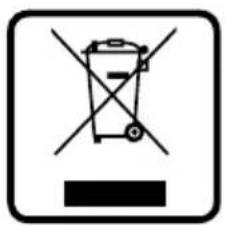
text_image
Prohibition sign depicting a trash bin crossed out by a diagonal line, with a black bar below indicating no waste or plastic.
text_image
RoHS
INHALTSVERZEICHNIS
natural_image
Simple line drawing of five identical ducklings arranged in a row on a tray (no text or symbols)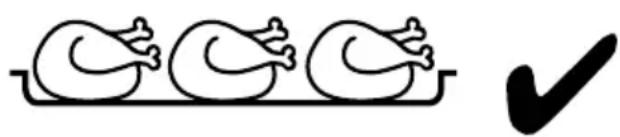
natural_image
Simple line drawing of three identical birds in a row with a checkmark (no text or symbols)natural_image
Illustration of a tray with six identical chicken heads arranged in two rows (no text or symbols)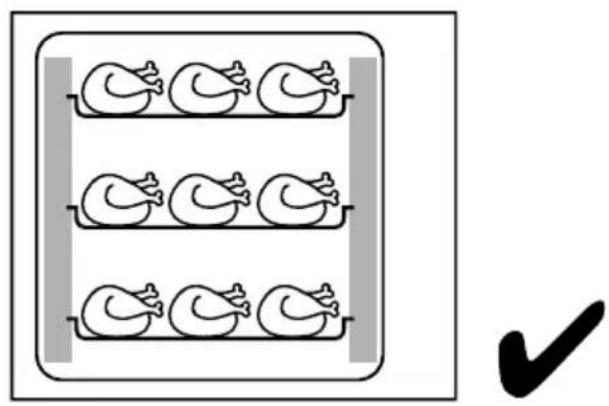
natural_image
Simple line drawing of three identical chicken heads arranged in a row within a rectangular frame, with a checkmark below (no text or symbols)natural_image
Diagram showing a rectangular container with six identical figures inside, each with a downward arrow indicating direction (no text or symbols)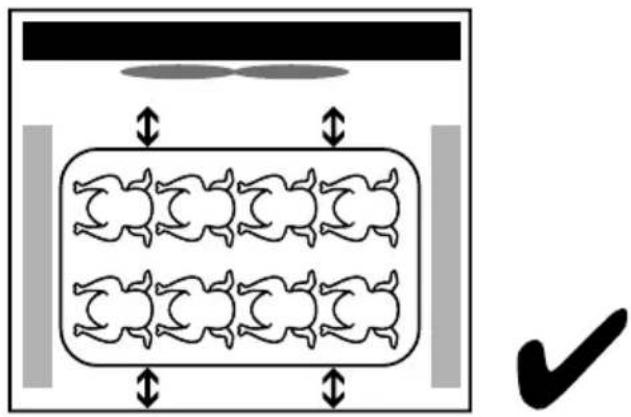
natural_image
Diagram showing a container with six identical mice inside, each with bidirectional arrows indicating movement or movement (no text or symbols)7.2. AUTOMATISCHES ABTAUEN
text_image
-43 set mutetext_image
i READ MANUALKeep this manual with the appliance.
natural_image
Simple line drawing of a house with an arrow pointing left, labeled 'INDOOR' below (no other text or symbols)For indoor use only.
text_image
FOOD CONTACT
natural_image
Symbol of a trash bin crossed with no text or numbers, enclosed in a square frame (no readable text)
text_image
RoHS
NL
INDEX
-
VEILIGHEIDSINSTRUCTIES 32
-
SPECIALE VEILIGHEIDSVOORSCHRIFTEN ....33
-
ELEKTRISCHE ONDERDELEN EN ANDERE GEVAREN 34
-
BEOOGD GEBRUIK....34
-
TECHNISCHE GEGEVENS....35
-
VOOR DE EERSTE KEER GEBRUIKEN....36
-
HOE TE GEBRUIKEN....38
-
REINIGING EN ONDERHOUD 42
-
OPSLAG VAN VOEDINGSMIDDELEN 43
-
DETECTIE VAN DEFECTEN EN TEGENMAATREGELEN 43
-
GARANTIE....44
-
AFDANKEN & MILIEU 44
Geachte klant,
6.3. HET APPARAAT WATERPAS ZETTEN
text_image
Illustration showing a tray of six birds with a checkmark indicating completion or finish.natural_image
Illustration of a tray with nine identical chicken heads arranged in two rows (no text or symbols)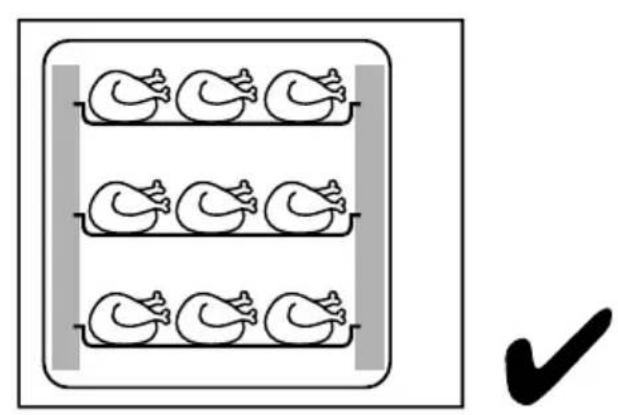
natural_image
Simple line drawing of three identical ducklings in a tray, with a checkmark below (no text or symbols)Positionering trays en/of gn-bakken in de apparaatkamer
natural_image
Diagram showing a container with multiple identical figures inside, each enclosed by a rectangular frame and two arrows pointing downward (no text or symbols)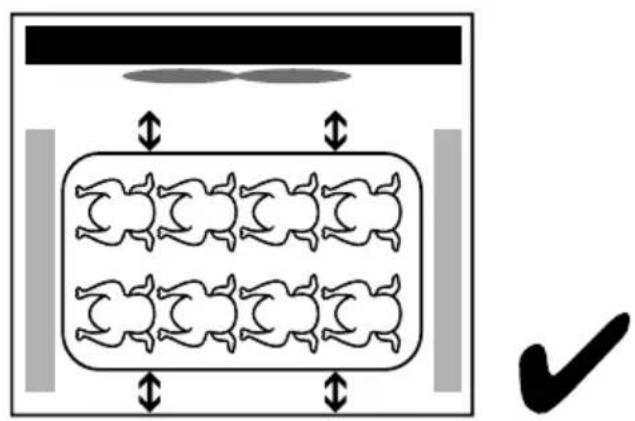
natural_image
Diagram showing a container with six identical figures inside, each with bidirectional arrows indicating movement or flow (no text or symbols)
7.2. AUTOMATISCH ONTDOOIEN
text_image
-43 set mutetext_image
i READ MANUALKeep this manual with the appliance.
natural_image
Simple line drawing of a house with an arrow pointing left, labeled 'INDOOR' below (no other text or symbols)For indoor use only.
text_image
FOOD CONTACT
text_image
Prohibition sign depicting a trash bin crossed out by a diagonal line, with a black bar below indicating no waste or plastic.
text_image
RoHS
SPIS TREŚCI
- WAŻNE ZASADY BEZPIECZEŃSTWA....47
- SZCZEGÓŁOWE ZASADY BEZPIECZEŃSTWA 48
- UZIEMIENIE....49
- PRZEZNACZENIE 49
- DANE TECHNICZNE....49
- PRZED PIERWSZYM UŻYCIEM....51
- INSTRUKCJA OBSŁUGI 53
- CZYSZCZENIE I KONSERWACJA 57
- PRZECHOWYWANIE ARTYKUŁÓW ŻYWNOŚCIOWYCH 57
- WYKRYWANIE USTEREK 58
- GWARANCJA 58
- WYCOFANIE Z UŻYTKOWANIA I OCHRONA ŚRODOWISKA .....59
natural_image
Simple line drawing of five identical ducklings arranged in a row on a tray (no text or symbols)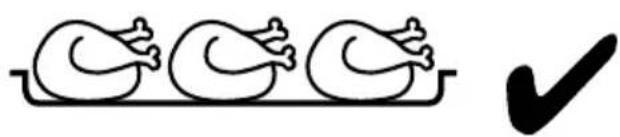
natural_image
Simple line drawing of three identical ducklings in a row with a checkmark (no text or symbols)natural_image
Illustration of a tray with nine identical chicken heads arranged in two rows (no text or symbols)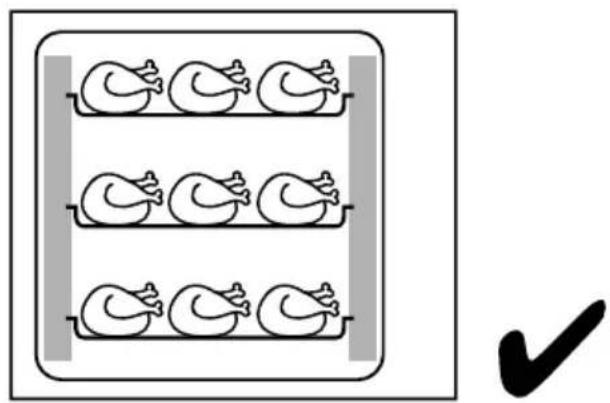
natural_image
Simple line drawing of three identical ducklings arranged in a row within a rectangular frame, with a checkmark below (no text or symbols)natural_image
Diagram showing a sequence of human figures inside a rectangular frame with two vertical arrows indicating movement or alignment, no text or symbols present.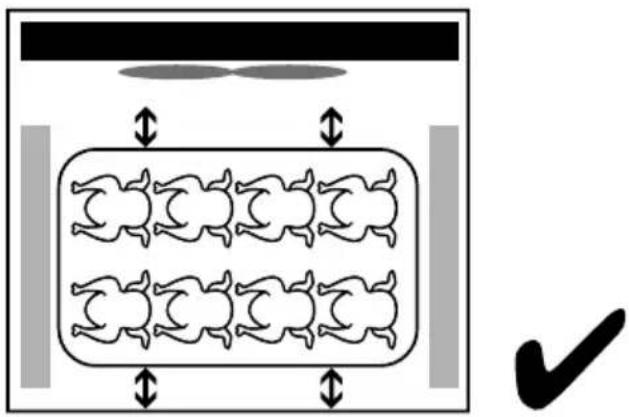
natural_image
Diagram showing a container with six identical figures inside, each with bidirectional arrows indicating movement or flow (no text or symbols)7.2. AUTOMATYCZNE ROZMRAŻANIE
text_image
-43 set mutetext_image
i READ MANUALKeep this manual with the appliance.
natural_image
Simple line drawing of a house with an arrow pointing left, labeled 'INDOOR' below (no other text or symbols)For indoor use only.
text_image
FOOD CONTACT
text_image
Prohibition sign depicting a trash bin crossed out by a diagonal line, with a black bar below indicating no waste or plastic.
text_image
RoHS
SOMMAIRE
- RÈGLES DE SÉCURITÉ ....61
- SPECIAL SAFETY REGULATIONS 62
- PIECES ELECTRIQUES ET AUTRES RISQUES 63
- DESTINATION....63
- CARACTERISTIQUES TECHNIQUES 64
- PREMIERE UTILISATION 65
- COMMENT UTILISER 67
- NETTOYAGE ET ENTRETIEN....71
- STOCKAGE DES PRODUITS ALIMENTAIRES....72
- DÉPANNAGE ET MESURES CORRECTIVES 72
- GARANTIE....73
- RETRAIT DE L'EXPLOITATION ET PROTECTION DE L'ENVIRONNEMENT ..... 73
Cher client,
natural_image
Simple line drawing of five identical ducklings arranged on a tray (no text or symbols)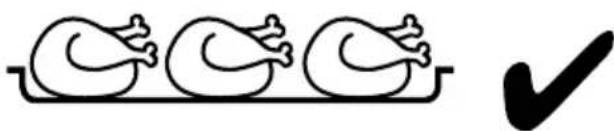
natural_image
Simple line drawing of three identical birds on a tray with a checkmark (no text or symbols)Distance entre les plateaux / recipients gn
natural_image
Illustration of a tray with nine identical chicken illustrations arranged in two rows (no text or symbols)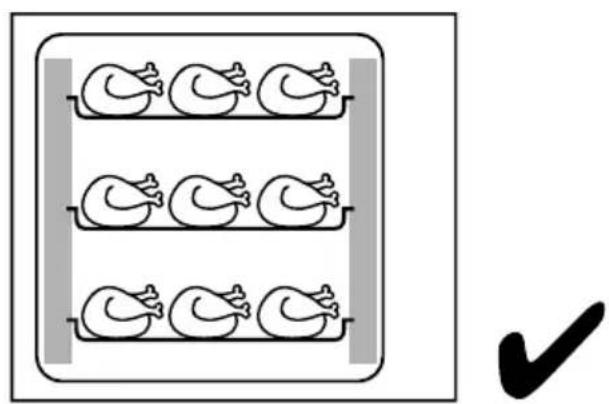
natural_image
Simple line drawing of three identical ducklings arranged in a row within a rectangular frame, with a checkmark below (no text or symbols)natural_image
Diagram showing a container with six identical figures inside, each with directional arrows indicating movement or flow (no text or symbols)7.2. DÉGIVRAGE AUTOMATIQUE
text_image
-43 set mutetext_image
i READ MANUALKeep this manual with the appliance.
natural_image
Simple line drawing of a house with an arrow pointing left, labeled 'INDOOR' below (no other text or symbols)For indoor use only.
text_image
FOOD CONTACT
natural_image
Symbol of a trash bin crossed with no text or numbers, enclosed in a square frame (no readable text)
text_image
RoHS
INDICE
-
PRECAUZIONI DI SICUREZZA 76
-
REGOLE DI SICUREZZA SPECIALI 77
-
PARTI ELETTRICHE ED ALTRI RISCHI 78
-
DESTINAZIONE 78
-
SPECIFICHE TECNICHE....78
-
PRIMO UTILIZZO 80
-
FUNZIONAMENTO....82
-
PULIZIA E MANUTENZIONE 86
-
STOCCAGGIO DEI PRODOTTI ALIMENTARI....86
-
RISOLUZIONE DEI PROBLEMI....87
-
GARANZIA....87
-
SMALTIMENTO & AMBIENTE 88
Gentile Cliente,
- Turn on the lighting switch, check the light is normal.
- The digital temperature controller is delivered with default parameters. Do not alter the parameters casually except for special need.
- When running for the first time, it should run without load for 2 hours to ensure the refrigeration system is working normally. Only when the temperature within the appliance is reduced within the indicated scope can the food be put into the appliance.
- Don't put too much food in the appliance to prevent instantaneous high load. The food shall not block the air outlet and air inlet. Nor shall it be close to side glass. Otherwise it will lead to condensation.
- To keep the taste of the food, please have the equipment running 24 hours a day.
- During the frosting process, the temperature of the appliance may rise slightly. When the frosting end, it will return to normal.
text_image
Illustration showing a group of five birds with a checkmark indicating completion or finish.natural_image
Two identical diagrams showing a tray with chicken heads and a checkmark (no text or symbols)natural_image
Diagram showing a rectangular container with six identical figures inside, each with a shaded region and two vertical arrows pointing downward (no text or symbols)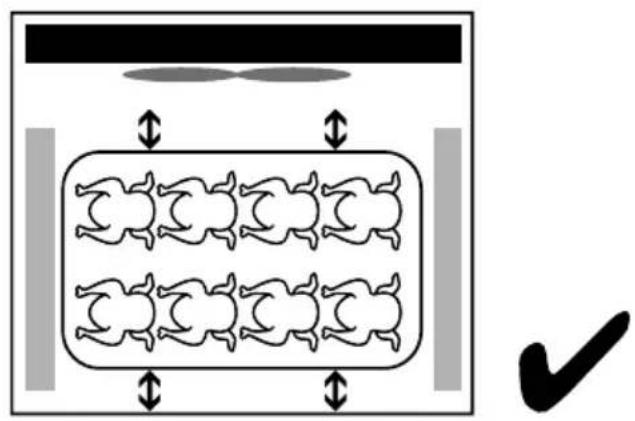
natural_image
Diagram showing a container with six identical figures inside, each with bidirectional arrows indicating movement or flow (no text or symbols)text_image
i READ MANUALKeep this manual with the appliance.
natural_image
Simple line drawing of a house with an arrow pointing left, labeled 'INDOOR' below (no other text or symbols)For indoor use only.
text_image
FOOD CONTACT
natural_image
Symbol of a trash bin crossed with no text or numbers, enclosed in a square frame (no readable text)
text_image
RoHS
INDEX
-
REGULI DE SIGURANTĂ....90
-
REGULI SPECIALE DE SIGURANTĂ....91
-
COMPONENTE ELECTRICE ŞI ALTE PERICOLE 92
-
UTILIZARE PRECONIZATĂ 92
-
DATE TECHNICE....92
-
PRIMA UTILIZARE 94
-
CUM SĂ UTILIZATI....96
-
CURĂTARE SI ÎNTRETINERE 99
-
DEPOZITAREA ALIMENTELOR....100
-
DEPANAREA....101
-
GARANTIE....101
-
ELIMINAREA SI MEDIUL ÎNCONJURĂTOR 101
Stimate client,
natural_image
Illustration of a tray with nine identical chicken illustrations arranged in two rows (no text or symbols)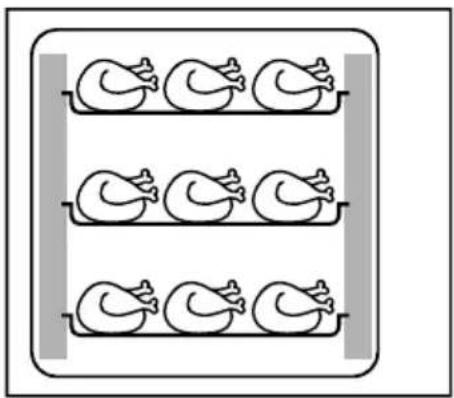
natural_image
Simple line drawing of three identical ducklings arranged in a row inside a rectangular frame (no text or symbols)
natural_image
Diagram of a multi-armed rabbit inside a rectangular frame with diagonal stripes and two vertical arrows indicating movement (no text or symbols)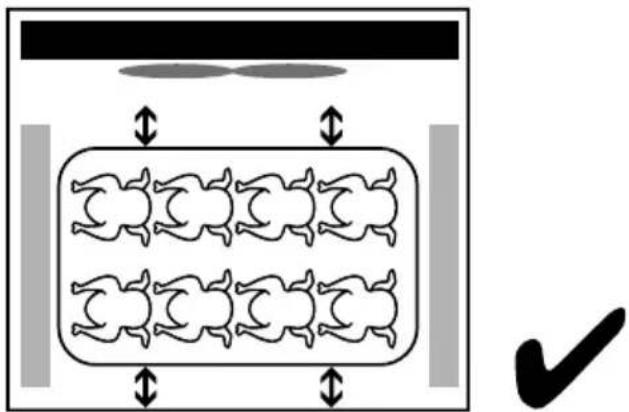
natural_image
Diagram showing a container with six identical mice inside, with arrows indicating movement and a checkmark in the bottom-right corner (no text or symbols)7.2. DECONGELARE AUTOMATĂ
text_image
-43 set muteSimbol Nume Tip Mod Sens
text_image
i READ MANUALKeep this manual with the appliance.
natural_image
Simple line drawing of a house with an arrow pointing left, labeled 'INDOOR' below (no other text or symbols)For indoor use only.
text_image
FOOD CONTACT
natural_image
Symbol of a trash bin crossed with no text or numbers, enclosed in a square frame (no readable text)
text_image
RoHS
RU
СОДЕРЖАНИЕ
natural_image
Simple line drawing of five identical ducklings arranged in a row on a tray (no text or symbols)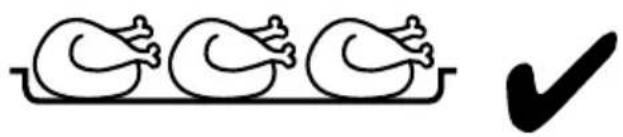
natural_image
Simple line drawing of three identical birds on a tray with a checkmark (no text or symbols)natural_image
Illustration of a tray with nine identical chicken heads arranged in two rows (no text or symbols)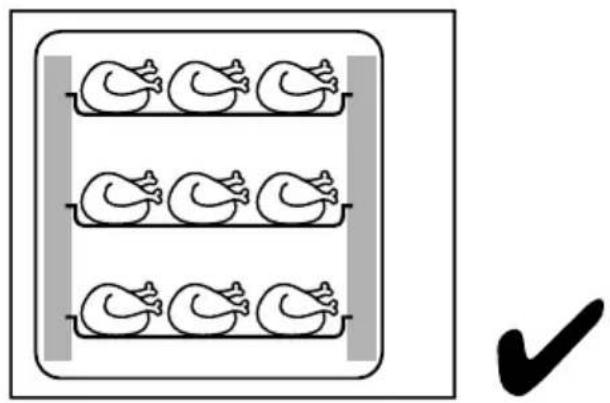
natural_image
Simple line drawing of three identical ducklings in a tray, with a checkmark below (no text or symbols)natural_image
Diagram showing a rectangular container with multiple identical figures inside, each with a shaded region and two downward arrows indicating movement or flow (no text or symbols present)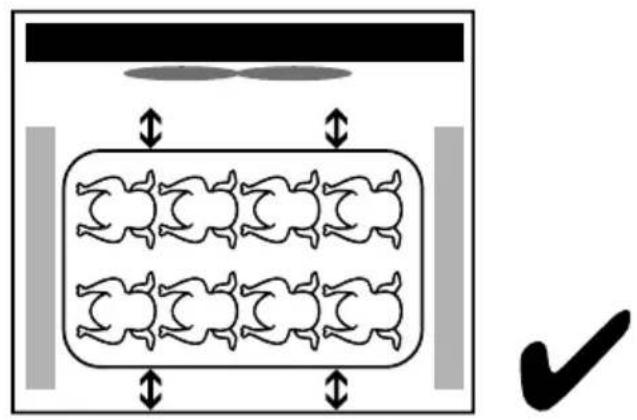
natural_image
Diagram showing a container with six identical figures inside, each with bidirectional arrows indicating movement or flow (no text or symbols)62-023 Gądki, Poland
Tel: +48 61 6587000
Email: info@hendi.pl
Hendi Food Service Equipment GmbH
Central Barn, Hornby Road
Lancaster, LA2 9JX, United Kingdom
Tel: +44 (0)333 0143200
Email: sales@hendi.co.uk
Hendi Food Service Equipment Romania Srl
1208, 12/F Exchange Tower
33 Wang Chiu Road, Kowloon Bay, Hong Kong
Tel: +852 2154 2618
Email: info-hk@hendi.eu
Find Hendi on internet:
www.hendi.eu
www.facebook.com/HendiFoodServiceEquipment
www.linkedin.com/company/hendi-food-service-equip-
ment-b.v.
www.youtube.com/HendiEquipment
- Changes, printing and typesetting errors reserved.