SL 10-22 - Lamp HILTI - Free user manual and instructions
Find the device manual for free SL 10-22 HILTI in PDF.



| Product type | Lighting mast with integrated tripod |
| Brand | Hilti |
| Model | SL 10-22 |
| Category | Lamp |
| Weight (without battery) | 9.3 kg (20.5 lb) |
| Power supply | Li-Ion battery 21.6 V or mains 100-240 V~ |
| Power consumption (battery) | ≤ 50 W |
| Power consumption (mains) | ≤ 55 W |
| Luminous flux | ≥ 6,500 lumens |
| Illumination | 360° |
| Protection rating (battery) | IP55 |
| Protection rating (mains) | IP20 |
| Service temperature | -17 °C to 40 °C (1 °F to 104 °F) |
| Storage temperature | -20 °C to 70 °C (-4 °F to 158 °F) |
| Battery type | Hilti Nuron Li-Ion battery series B 22 |
| Nominal battery voltage | 21.6 V |
| Adjustable height | Yes, via two telescopic extensions |
| Tripod feet | Unfoldable with locking |
| Control | Control panel with On/Off, Light zone, Brightness buttons |
| Cleaning | Dry brush and damp cloth; no silicone cleaners |
| Maintenance | Check condition regularly; replace damaged parts |
| Safety | Do not look at light source; do not expose to water; use on flat surface |
| Spare parts available | Rubber feet, lamp head cover |
| Accessories supplied | Shoulder strap, instruction manual |
Frequently Asked Questions - SL 10-22 HILTI
User questions about SL 10-22 HILTI
0 question about this device. Answer the ones you know or ask your own.
Ask a new question about this device
Download the instructions for your Lamp in PDF format for free! Find your manual SL 10-22 - HILTI and take your electronic device back in hand. On this page are published all the documents necessary for the use of your device. SL 10-22 by HILTI.
USER MANUAL SL 10-22 HILTI
2
natural_image
3D rendering of a mechanical device with internal components and a labeled part '1' (no text or symbols beyond the label)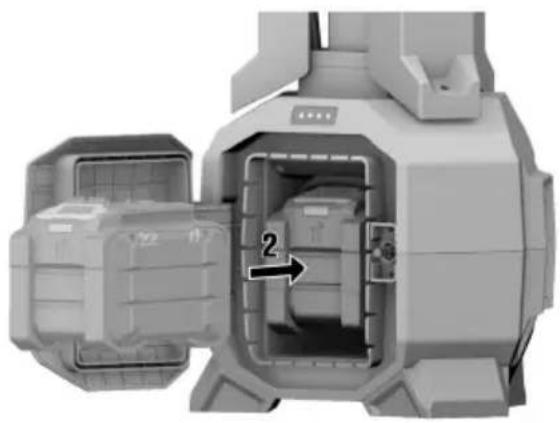
natural_image
3D mechanical assembly diagram showing internal components and a numbered arrow (no text or symbols)3
natural_image
Top-down view of a tripod-mounted scientific instrument with a labeled 'click' point (no text or symbols on the device itself)4
5
natural_image
Pure electrical circuit lines without any symbols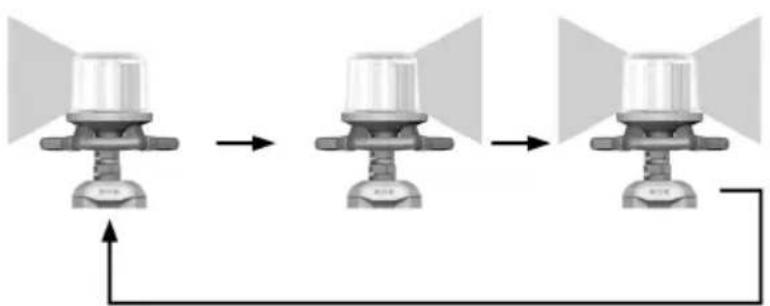
flowchart
graph LR
    A["Top Left"] --> B["Top Right"]
    B --> C["Bottom Right"]
SL 10-22
en Original operating instructions 1
fr Notice d'utilisation originale 11
es Manual de instrucciones original 22
pt Manual de instruções original 32
Original operating instructions
1 Information about the operating instructions
1.1 About these operating instructions
- Read these operating instructions before the product is used or operated for the first time. This is a prerequisite for safe, trouble-free handling and use of the product.
- Observe the safety instructions and warnings in these operating instructions and on the product.
- Always keep the operating instructions with the product and make sure that the product is accompanie by these operating instructions only, when the product is given to other persons.
1.2 Explanation of symbols
1.2.1 Warnings
Warnings alert persons to hazards that occur when handling or using the product. The following signal we are used:

DANGER
DANGER!
- Draws attention to imminent danger that will lead to serious personal injury or fatality.

WARNING
WARNING!
- Draws attention to a potential threat of danger that can lead to serious injury or fatality.

CAUTION
CAUTION!
- Draws attention to a potentially dangerous situation that could lead to personal injury or damage to the equipment or other property.
1.2.2 Symbols in the operating instructions
The following symbols are used in these operating instructions:

Comply with the operating instructions

Instructions for use and other useful information

Dealing with recyclable materials

Do not dispose of electric equipment and batteries as household waste

Hilti Li-ion battery

Hilti charger
1.2.3 Symbols in illustrations
The following symbols are used in illustrations:

These numbers refer to the illustrations at the beginning of these operating instructions.
3
The numbers in illustrations refer to important work steps or to components important for the work steps. In the text, the corresponding numbers draw attention to these work steps or components, e.g. (3).

Item reference numbers are used in the overview illustration and refer to the numbers used in the key in the product overview section.

This symbol is intended to draw your special attention to certain points for handling the product.
1.3 Product-dependent symbols
1.3.1 General symbols
Symbols used in relation to the product.
 | The product supports near-field communication (NFC) technology compatible with iOS and Android platforms. |
 | Do not look into the light source when it is switched on. |
 | Alternating current |
 | Direct current (DC) |
 | Protection class II (double-insulated) |
 | Li-ion battery |
 | Never use the battery as a striking tool. |
 | Do not drop the battery. Never use a battery that has suffered an impact or is damaged in any other way. |
 | Hilti Li-ion battery type series used. Observe the information given in the section headed In-tended use. |
| If applied on the product, the product has been certified by this certification body for the US and Canadian markets according to the applicable standards. |

1.4 Product information
HILTI products are designed for professional users and only trained, authorized personnel are permitted to operate, service and maintain the products. This personnel must be specifically informed about the possible hazards. The product and its ancillary equipment can present hazards if used incorrectly by untrained personnel or if used not in accordance with the intended use.
The type designation and serial number are printed on the rating plate.
Write down the serial number in the table below. You will be required to state the product details when contacting Hilti Service or your local Hilti organization to inquire about the product.
Product information
| Tower light SL 10-22 | |
| Generation 01 | |
| Serial no. |
2 Safety
2.1 Important safety instructions
Warning! Read all instructions. Failure to follow all instructions listed below can result in electric shock, fire and/or serious injury.
Keep these instructions in a handy yet secure place.
- Keep your work area clean and well lit. Cluttered or poorly lit work areas invite accidents.
▶ Use the product and accessories only when they are in perfect working order.
▶ Never tamper with or modify the product or accessories in any way.
▶ Persons with reduced physical, sensory or mental abilities or lack of experience and knowledge are not permitted to use this product. - Keep the product out of reach of children.
Children must receive instruction and be supervised to ensure that they do not play with the product.
▶ Do not use the product where there is a risk of fire or explosion. - Do not expose the product to rain or moisture. Water entering the product will increase the risk of electric shock.
To reduce the risk of electric shock, do not use the product in wet weather, immersed in water or in any other liquid. Set up the product in such a way that if it tips over, it cannot fall into water.
▶ Do not cover the lamp head.
- Do not touch hot parts on the product. There is a risk of burning injuries!
▶ Only the manufacturer or a similarly qualified person is permitted to replace the light in this light source. Consult Hilti Service when the light source has reached the end of its life.
Risk of injury by falling tools and/or accessories. Before starting work, check that the battery and installed accessories are secure.
- Do not look directly into the light source and do not aim the beam at other persons' faces. Risk of dazzling or eye injury!
▶ Wear protective gloves when setting up and taking down the tower light. Crush hazard.
- Do not insert foreign objects into the product.
▶ Use the lamp only with the tripod legs extended.
- Do not abuse the cord. Never use the cord for carrying, hanging up or unplugging the product. Keep the cord away from heat, oil and sharp edges. Damaged or entangled cords increase the risk of elec shock.
▶ Do not touch hot parts on the product.
- When the product is not in use, keep it where it cannot drop or be pulled into a bathtub or washbasin.
- Use only accessories specifically intended and recommended for this product by the manufacturer. The fact that an accessory can be attached to the product does not necessarily mean that it can be use safely.
2.2 Careful handling and use of batteries
- Comply with the following safety instructions for the safe handling and use of Li-ion batteries.
Failure to comply can lead to skin irritation, severe corrosive injury, chemical burns, fire and/or explosi
▶ Use only batteries that are in perfect working order.
▶ Treat batteries with care in order to avoid damage and prevent leakage of fluids that are extremely harmful to health! - Do not under any circumstances modify or tamper with batteries!
- Do not disassemble, crush or incinerate batteries and do not subject them to temperatures over 80 °C (176 °F).
▶ Never use or charge a battery that has suffered an impact or been damaged in any other way. Check your batteries regularly for signs of damage.
▶ Never use recycled or repaired batteries.
▶ Never use the battery or a battery-operated power tool as a striking tool.
▶ Never expose batteries to the direct rays of the sun, elevated temperature, sparking, or open flame. This can lead to explosions. - Do not touch the battery poles with your fingers, tools, jewelry, or other electrically conductive objects. This can damage the battery and also cause material damage and personal injury.
- Keep batteries away from rain, moisture and liquids. Penetrating moisture can cause short circuits, electric shock, burns, fire and explosions.
▶ Use only chargers and power tools approved for the specific battery type. Read and follow the relevant operating instructions. - Do not use or store the battery in explosive environments.
If the battery is too hot to touch, it may be defective. Put the battery in a place where it is clearly visible and where there is no risk of fire, at an adequate distance from flammable materials. Allow the battery cool down. If it is still too hot to touch after an hour, the battery is faulty. Consult Hilti Service or read the document entitled "Instructions on safety and use for Hilti Li-ion batteries".

Observe the special guidelines applicable to the transport, storage and use of lithium-ion batteries. Read the instructions on safety and use of Hilti Li-ion batteries that you can access by scanning the QR code at the end of these operating instructions.
3 Description
3.1 Product overview
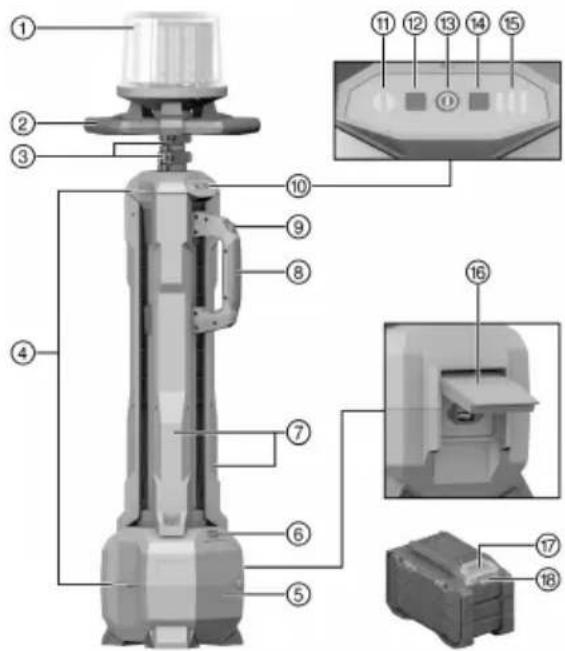
① Light / lamp head
② Bow-shaped grip of lamp head
③ Clamping lever for height adjustment
④ Eyelets for shoulder strap
⑤ Battery compartment lid
⑥ Battery state of charge indicator
⑦ Tripod legs
⑧ Carrying handle
⑨ Tripod lock release
⑩ Control panel
⑪ Light area indicator
⑫ Light area button
⑬ On/off button
⑭ Brightness button
⑮ Brightness indicator
⑯ Socket with cover
⑰ Battery release button
⑱ Battery state of health indicator
3.2 Intended use
The product described is a tower light with built-in tripod. The tower light is for lighting up jobsites and it offers 360° illumination with at least 6500 lumen.
The tower light can be operated either cordless or with a supply cord.
- For this product, use only Hilti Nuron lithium-ion batteries of the B 22 series. For optimum performance, Hilti recommends the batteries stated in the table at the end of these operating instructions for this product.
- For these batteries, use only Hilti chargers of the type series stated in the table at the end of these operating instructions.
3.3 Items supplied
Tower light, shoulder strap, operating instructions
Other system products approved for use with this product can be found at your local Hilti Store or at: www.hilti.group
3.4 Status indicators of the Li-ion battery
Hilti Nuron Li-ion batteries can indicate state of charge, fault messages and the battery's state of health.
3.4.1 Indicators for state of charge and fault messages
WARNING
Risk of injury by a falling battery!
If the release button is pressed with a battery inserted in the product, subsequently check that the battery is correctly re-engaged and secure.
Short-press the release button of the battery to get whichever of the following status indications is applicable at the time.
State of charge and, if applicable, faults are indicated constantly as long as the connected product is switched on.
| Status Meaning | |
| Four (4) LEDs show constantly green State of | charge: 100 % to 71 % |
| Three (3) LEDs show constantly green State of | charge: 70 % to 51 % |
| Two (2) LEDs show constantly green State of | charge: 50 % to 26 % |
| One (1) LED shows constantly green State of | charge: 25 % to 10 % |
| One (1) LED slow-flashes green State of charge: < 10 % | |
| One (1) LED quick-flashes green The Li-ion battery is completely discharged. Recharge the battery.If the LED again starts quick-flashing after the battery has been charged, consult Hilti Service. | |
| One (1) LED quick-flashes yellow The Li-ion battery or the product in which it is inserted is overloaded, too hot or too cold, or experiencing some other fault.Bring the product and the battery to the recommended working temperature and do not overload the product when it is in use.If the message persists, consult Hilti Service. | |
| One (1) LED shows yellow The Li-ion battery and the product in which it is inserted are not compatible. Consult Hilti Service. | |
| One (1) LED quick-flashes red The Li-ion battery is locked and cannot be used.Consult Hilti Service. | |
3.4.2 Indicators showing the battery's state of health
To check the battery's state of health, press the release button and hold it down for longer than three seconds. The system does not detect a potential malfunction of the battery due to misuse, for example battery dropped or pierced, external heat damage, etc.
| Status Meaning | |
| All LEDs show in sequence, followed by one LED showing constantly green. | (1)The battery can remain in use. |
| All LEDs show in sequence, followed by one LED quick-flashing yellow. | (1)The check to ascertain the battery's state of health did not complete. Repeat the procedure, or consult Hilti Service. |
| All LEDs show in sequence, followed by one LED showing constantly red. | (1)If a connected product can still be used, the remaining battery capacity is below 50%. If a connected product can no longer be used, the battery has reached the end of its useful life and has to be replaced. Consult Hilti Service. |
4 Technical data
4.1 Product information
| Cord current (in corded operation) | 100 | 240 V | ≤ 55 W |
| Current (in cordless operation) | 21,6 | V | ≤ 50 W |
| Power factor (in corded operation) | > 0.9 | ||
| Weight without battery | 9.3 kg(20.5 lb) | ||
| Degree of protection, cordless operation | IP 55 | ||
| Degree of protection, corded operation | IP 20 | ||
| Ambient temperature for operation | -17 °C ... 40 °C(1 °F ... 104 °F) | ||
| Storage temperature | -20 °C ... 70 °C(-4 °F ... 158 °F) | ||
4.2 Battery
| Battery operating voltage | 21.6 V |
| Weight, battery | See the end of these operating instructions |
| Ambient temperature for operation | -17 °C ... 60 °C(1 °F ... 140 °F) |
| Storage temperature | -20 °C ... 40 °C(-4 °F ... 104 °F) |
| Battery charging starting temperature | -10 °C ... 45 °C(14 °F ... 113 °F) |
5 Use of extension cords
Using extension cords

WARNING
A damaged supply cord presents a hazard! Do not touch the supply cord or extension cord if damaged while working. Disconnect the supply cord plug from the power outlet.
- Check the appliance's supply cord at regular intervals and have it replaced by a qualified specialist if found to be damaged.
- Use only extension cords of a type approved for the application and with conductors of adequate gauge (cross section). The power tool may otherwise suffer a drop in performance and the extension cord may overheat.
- Check the extension cord for damage at regular intervals.
- Replace damaged extension cords.
- When working outdoors, use only extension cords that are approved and correspondingly marked for this application.

Information on recommended minimum conductor cross-sections and cable lengths is accessible via a link, in the form of a QR code, at the end of this document.
6 Preparations at the workplace

WARNING
Risk of injury by inadvertent starting!
Before inserting the battery, make sure that the product is switched off.
Remove the battery before making any adjustments to the power tool or before changing accessories.

CAUTION
Risk of injury! Inadvertent starting of the product.
▶ Unplug the supply cord before making adjustments to the power tool or before changing accessories.
Observe the safety instructions and warnings in this documentation and on the product.
6.1 Charging the battery
- Before charging the battery, read the operating instructions for the charger.
- Make sure that the contacts on the battery and the contacts on the charger are clean and dry.
- Use an approved charger to charge the battery. → page 4
6.2 Inserting battery

WARNING
Risk of injury by short circuit or falling battery!
Before inserting the battery, make sure that the contacts on the battery and the contacts on the product are free of foreign matter.
▶ Make sure that the battery always engages correctly.
- Charge the battery fully before using it for the first time.
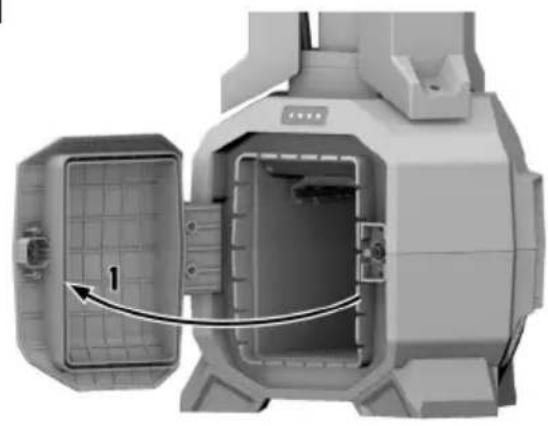
- Open the lid of the battery compartment (1).
- Push the battery into the product until it engages with an audible click (2).
- Check that the battery is seated securely.
- Close the lid of the battery compartment.
6.3 Removing the battery
- Press the battery release button.
- Remove the battery from the product.
6.4 Setting up
- Set the tower light on a level surface.
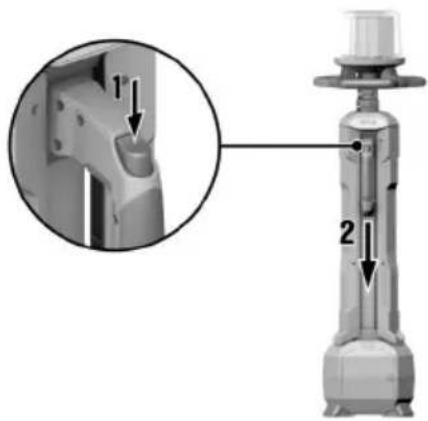
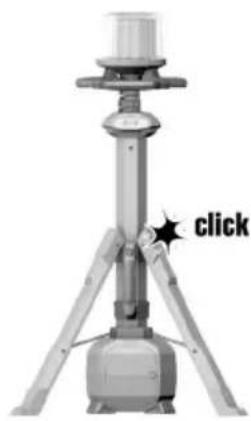
- Unlock the tripod legs by pressing tripod lock release (1) and pull the carrying handle down (2) until it snaps into engagement.

The tower light can be secured to the floor for increased stability.
- To secure the tower light to the floor, drill three holes corresponding to the position of the tripod leg
Technical data
| Diameter of the holes in the tripod legs 6 mm | (0.2 in) |
- Secure the tower light to the floor. Use a type of fastener suitable for the floor. Comply with the open instructions of the fastener.
6.5 Adjusting height
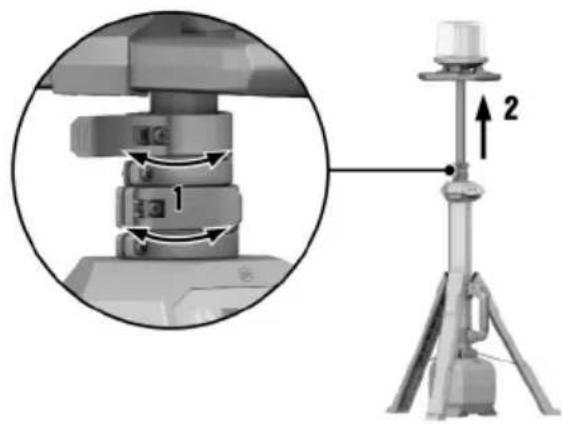
- Open a clamping lever (1).
- Slide the lamp head up to the desired height (2).
- Re-close the clamping lever (1).
- If necessary, repeat steps 1 to 3 for the second telescopic extension.
7 Operation

WARNING
Damaged power cords are a safety hazard! If the supply cord or extension cord is damaged while work is in progress, immediately disconnect the device and the cord from the electricity supply. Do not touch damaged part of the cord.
▶ Regularly check all supply cords. Replace defective extension cords. Have damaged power cords replaced by a qualified specialist.
Use of a ground fault circuit interrupter (residual current device, RCD) with a maximum tripping current of 30 mA is recommended.
7.1 Switching on / off
- Press the on/off button to switch the product on.
- Press the on/off button again to switch the product off.
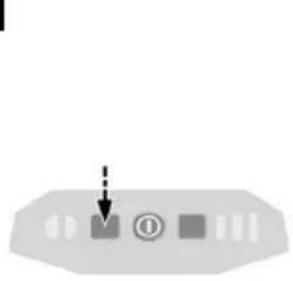
7.2 Selecting light area 5
▶ Repeatedly press the light area button until the desired area is lit up.
▶ The light area is indicated by the light area indicator.
7.3 Selecting brightness
▶ Repeatedly press the brightness button until the desired brightness is reached.
The brightness is indicated by the brightness indicator.
8 Optional accessories
8.1 Supply cord

WARNING
Risk of injury! Water entering the equipment can lead to life-threatening electric shocks.
- Connect the supply cord only when you are using the product in the dry.

CAUTION
Trip hazard / fall hazard! Loosely routed power cords can lead to persons tripping or falling and/or the tower light toppling.
- Route the power cord and the extension cord, if used, to the nearest grounded socket and secure them in such a way that they does not present a trip hazard.
Optionally connect a supply cord for supplying power to the tower light.

Use only a rubber-sheathed supply cord with a conductor cross-section of at least 1.5 mm (AWG 15). In some markets Hilti optionally offers a supply cord.
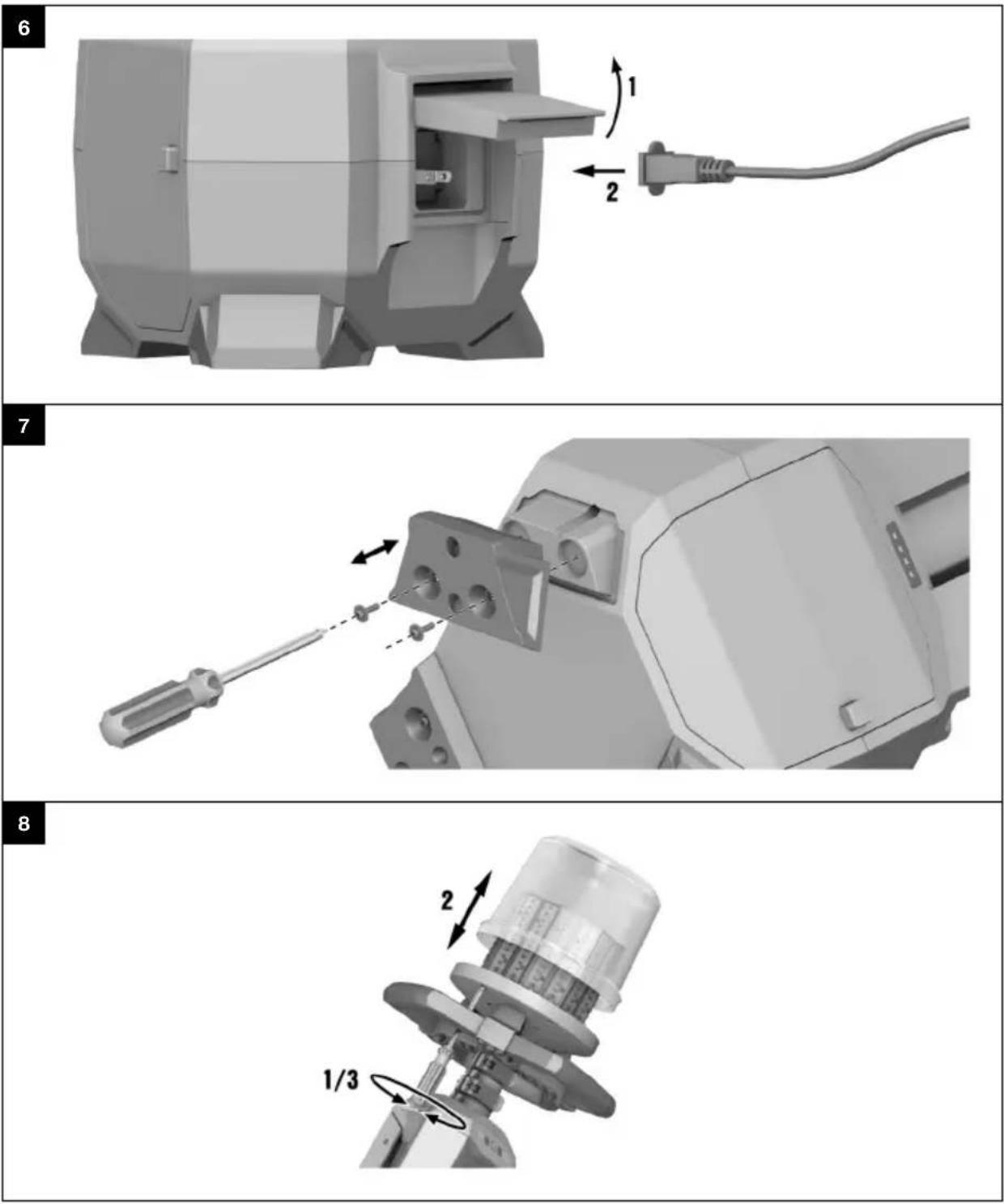
- Open the cover of the socket on the tower light.
- Plug the supply cord into the socket of the tower light.
- Plug the supply cord plug into a power outlet.

A battery, if installed, can remain in the tower light. The tower light detects a connected supply cord and disconnects the battery. The tower light does not act as a charger, the battery will not be recharged.
9 Care and maintenance

WARNING
Risk of injury with battery inserted!
▶ Always remove the battery before carrying out care and maintenance tasks!
Care of the product
- Carefully remove stubborn dirt.
- Carefully clean the air vents, if present, with a dry, soft brush.
- Use only a slightly damp cloth to clean the housing. Do not use cleaning agents containing silicone as these can attack the plastic parts.
- Use a dry, clean cloth to clean the contacts of the product.
Care of the Li-ion batteries
- Never use a battery with clogged air vents. Clean the air vents carefully using a dry, soft brush.
-
Avoid unnecessary exposure of the battery to dust and dirt. Never expose the battery to high levels of moisture (e.g. by being dipped in water or left in the rain).
If a battery has been soaked by moisture, treat it as a damaged battery. Isolate it in a non-flammable container and consult Hilti Service. -
Keep the battery free of extraneous oil and grease. Do not permit dust or dirt to accumulate unnecessary on the battery. Clean the battery with a dry, soft brush or a clean, dry cloth. Do not use cleaning a containing silicone as these can attack the plastic parts.
Do not touch the contacts of the battery and do not remove the factory-applied grease from the con - Use only a slightly damp cloth to clean the housing. Do not use cleaning agents containing silicone as these can attack the plastic parts.
Maintenance

WARNING
Danger of electric shock! Improper repairs to electrical components may lead to serious injuries including burns.
▶ Repairs to the electrical section of the tool or appliance may be carried out only by trained electrical specialists.
- Check all visible parts and controls for signs of damage at regular intervals and make sure that they function correctly.
- Do not use the product if signs of damage are found or if parts malfunction. Immediately have the pr repaired by Hilti Service.
- After cleaning and maintenance, install all guards and protective devices and check that they are in full working order.

To help ensure safe and reliable operation, use only genuine Hilti spare parts, consumables and accessories. Spare parts, consumables and accessories approved by Hilti for use with your product can be found at your Hilti Store or online at: www.hilti.group
9.1 Changing rubber feet
The rubber feet of the tower light are available as spare parts.
- Unscrew the securing screws from the rubber feet and remove the faulty rubber feet.
- Position the new rubber feet on the tower light and secure the rubber feet to the tower light with the securing screws.
▶ Tighten the securing screws hand-tight.
9.2 Replacing cover of lamp head 8
The cover of the lamp head is available as a spare part.
- Unscrew all outside securing screws from the lamp head and remove the faulty cover.
- Position the new cover on the lamp head. Make sure that the holes in the cover and the holes in the head are in alignment. Make sure that the seal is correctly seated.
Materials
Cover, lamp head SL 10-22-H
- Screw the securing screws back into the lamp head.
▶ Tighten the screws hand-tight in diagonally opposite sequence.
10 Transport and storage
Transport of cordless power tools and batteries

CAUTION
Accidental starting during transport!
▶ Always transport your products with the batteries removed!
▶ Remove the battery/batteries.
▶ Never transport batteries loose and unprotected. During transport, batteries should be protected from excessive shock and vibration and isolated from any conductive materials or other batteries that may come in contact with the terminals and cause a short circuit. Comply with the locally applicable regulations for transporting batteries.
- Do not send batteries through the mail. Consult your shipper for instructions on how to ship undamaged batteries.
▶ Prior to each use and before and after prolonged transport, check the product and the batteries for damage.
Storage of cordless power tools and batteries

WARNING
Accidental damage caused by defective or leaking batteries!
▶ Always store your products with the batteries removed!
- Store the product and the batteries in a cool and dry place. Comply with the temperature limits stated in the technical data.
- Do not store batteries on the charger. Always remove the battery from the charger when the charging operation has completed.
▶ Never leave batteries in direct sunlight, on sources of heat, or behind glass. - Store the product and batteries where they cannot be accessed by children or unauthorized persons.
▶ Prior to each use and before and after prolonged storage, check the product and the batteries for damage.
10.1 Shoulder strap

CAUTION
Inadequate fastening presents a hazard! The shoulder strap disengages and the tower light drops down.
- When you use the shoulder strap, make sure that it is correctly secured to the tower light.
The tower light can be transported easily and conveniently with the shoulder strap.
- Hook the shoulder strap into the eyelets for the shoulder strap. Check that it holds securely.
11 Troubleshooting
If a problem occurs, always observe the status indicator of the battery. See the section headed Status indicators of the Li-ion battery → page 4.
If the trouble you are experiencing is not listed in this table or you are unable to rectify the problem by yourself, contact Hilti Service.
| Trouble or fault | Possible cause | Action to be taken |
| Tower light tends to topple is unsteady. | Tripod legs not locked. ▶ The | carrying handle must engage with an audible click when the tripod legs are extended. → page 7 |
| Tower light set up on a surface is not level. | ▶ that Set up the tower light on a surface. | |
| Rubber feed faulty/worn. | ▶ Replace the rubber feet. → page 9 | |
| Supply cord pulled taut. | ▶ Route the supply cord in such a way that it does not present a trip hazard. → page 8▶ Route the supply cord in such a way that it is not pulled taut. | |
| LEDs of the battery show nothing | Battery faulty. | ▶ Contact Hilti Service. |

WARNING
Risk of injury due to incorrect disposal! Health hazards due to escaping gases or liquids.
▶ DO NOT send batteries through the mail!
▶ Cover the terminals with a non-conductive material (such as electrical tape) to prevent short circuiting.
- Dispose of your battery out of the reach of children.
▶ Dispose of the battery at your Hilti Store, or consult your local governmental garbage disposal or public health and safety resources for disposal instructions.

Most of the materials from which Hilti products are manufactured can be recycled. The materials must be correctly separated before they can be recycled. In many countries, your old tools, machines or appliance can be returned to Hilti for recycling. Ask Hilti Service or your Hilti sales representative for further information.

- Do not dispose of power tools, electronic equipment or batteries as household waste!
13 Manufacturer's warranty
▶ Please contact your local Hilti representative if you have questions about the warranty conditions.
14 Further information
For more information on operation, technology, environment and recycling, follow this link: qr.hilti.com/manual/?id=2384869
This link is also to be found at the end of the operating instructions, in the form of a QR code.

Hilti Corporation
LI-9494 Schaan
Tel.:+423 234 21 11
Fax:+423 234 29 65
www.hilti.group