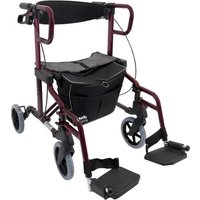
Diamond Deluxe - Walker Drive Medical - Free user manual and instructions
Find the device manual for free Diamond Deluxe Drive Medical in PDF.


User questions about Diamond Deluxe Drive Medical
0 question about this device. Answer the ones you know or ask your own.
Ask a new question about this device
Download the instructions for your Walker in PDF format for free! Find your manual Diamond Deluxe - Drive Medical and take your electronic device back in hand. On this page are published all the documents necessary for the use of your device. Diamond Deluxe by Drive Medical.
USER MANUAL Diamond Deluxe Drive Medical
natural_image
Red and black mobility walker device with a black seat cover and blue gasket (no visible text or symbols)Inhaltsverzeichnis
Vorwort....3
natural_image
Product photo of a Dwe Dlimin wheelchair with wheels and seat (no visible text or symbols)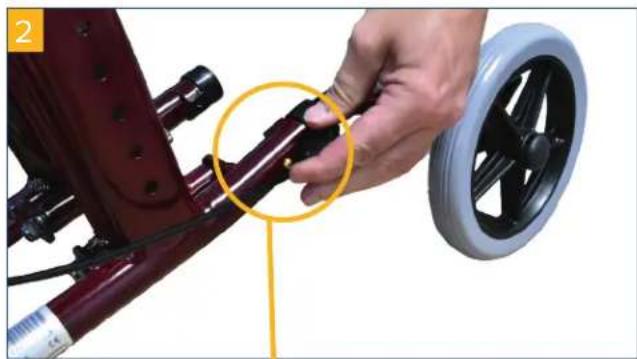
natural_image
Close-up of a hand adjusting a red bicycle seatbelt with a black wheel, highlighting a yellow circle (no text or symbols visible)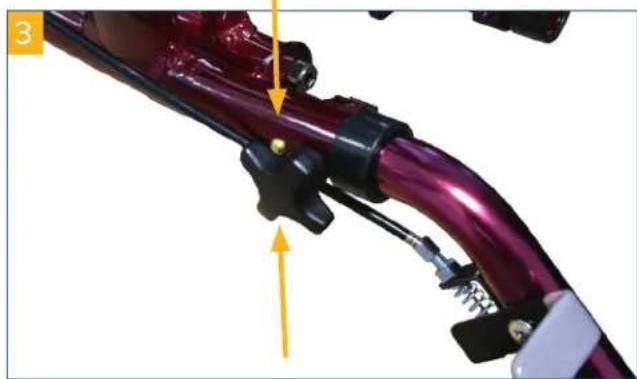
natural_image
Close-up of a purple bicycle handle with mechanical components and a yellow directional arrow (no text or symbols)natural_image
Close-up of a hand adjusting a black bicycle wheel component with a yellow arrow pointing to the handle (no text or symbols visible)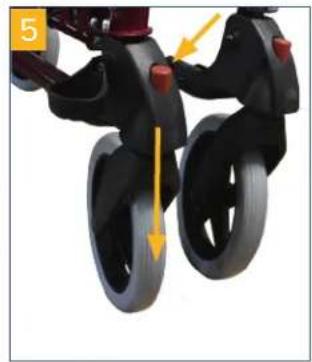
natural_image
Close-up of a black and gray children's stroller with wheels, showing motion direction arrows (no text or symbols)natural_image
Black and red robotic mobility device with a black cushion and blue handle (no visible text or symbols)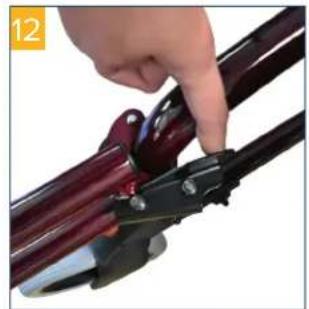
natural_image
Close-up of a hand using a pliers to adjust a dark metal rod (no text or symbols visible)natural_image
Black and maroon mobile phone support system with four wheels and a vertical-mounted device (no visible text or symbols)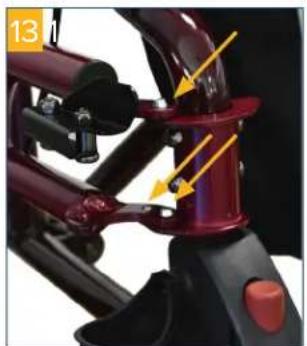
natural_image
Close-up of a mechanical assembly with red components and yellow arrows indicating motion or force direction (no text or symbols)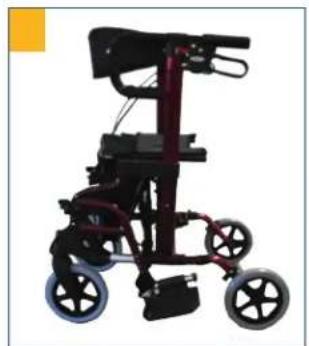
natural_image
Black and red mobile walk-in chair with wheels and seat (no visible text or symbols)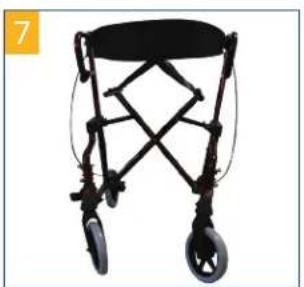
natural_image
Black bicycle walker with four wheels and a horizontal seat (no text or symbols visible)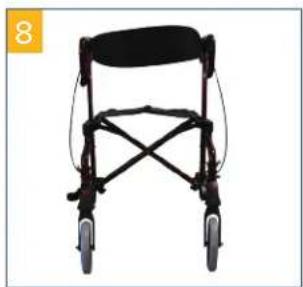
natural_image
Front view of a black mobility walker with four wheels and a seat cover (no text or symbols visible)natural_image
Close-up of a purple electric vehicle's cable with a yellow arrow pointing to its cable (no text or symbols visible)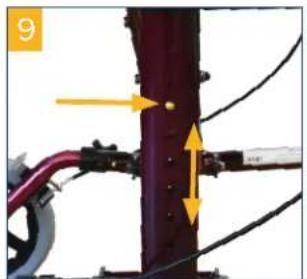
natural_image
Close-up of a mechanical assembly with yellow arrows indicating forces or components (no visible text or symbols)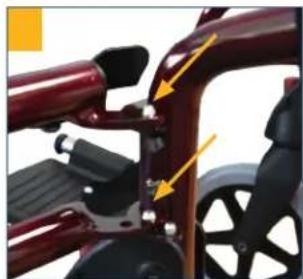
natural_image
Close-up of a red bicycle seat with black adjustment knobs and yellow arrows indicating joint details (no text or symbols visible)natural_image
Close-up of a black bicycle lift with a handle and lever mechanism, no visible text or symbols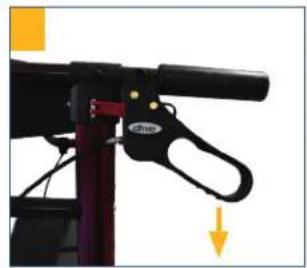
natural_image
Close-up of a black bicycle support structure with a yellow arrow indicating downward motion (no text or symbols visible)natural_image
Close-up of a black mechanical tool with red handle and yellow annotation arrow (no readable text or symbols)natural_image
Black ergonomic mobility device with wheels and seat, no visible text or symbolsnatural_image
Black and white photo of a person in a wheeled wheelchair with wheels, no visible text or symbols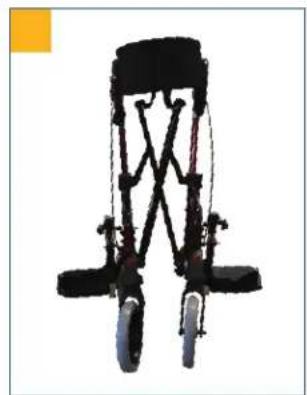
natural_image
Black bicycle support structure with suspension rings and wheels (no text or symbols visible)Reinigung | Wartung
Declaration of conformity 9
Service life 9
Disposal....9
Identification plate....9
Reuse....9
Warranty 9
Parts of the product 10
Indication....11
Scope of delivery....11
Safety instructions....11
Assembly....11
Adjusting the brakes....12
Braking | Parking 12
Adjusting the backrest 13
Folding | Transporting | Stowing 13
Cleaning | Maintenance....13
Technical data....13
Preface
Thank you for choosing a product from Drive DeVilbiss.
You will not be disappointed by the design, functionality and quality of this product.
Please read these operating instructions carefully prior to initial use. They contain important safety information and valuable tips for the proper use and care. If you have questions or need additional information, contact your Drive DeVilbiss specialist dealer who supplied your product.
These operating instructions contain all of the important information for adjustment and operation. The most current operating instructions are available as a PDF online or can be requested from customer service.
Enlarged formats for visually impaired persons can be displayed. Blind patients must be instructed by their attendant. Repairs as well as some adjustments require special technical training and must therefore be made by the medical supplies dealer.
Declaration of conformity
For the product described, DRIVE MEDICAL GMBH & Co. KG declares compliance according to the medical device regulation (EU) 2017/745.
Service life
Our company assumes a service life of five years for this product as long as the product is used as intended and all maintenance and service requirements are observed.
This service life may be significantly exceeded if the product is carefully handled, repaired, maintained and used and there are no technical limits based on the further development of science and technology.
The service life may also be significantly shortened through extreme and improper use, however. Determination of the service life by our company does not represent any additional guarantee.
Disposal
If you no longer need the product, please contact your specialist dealer or bring the product to your local disposal center.
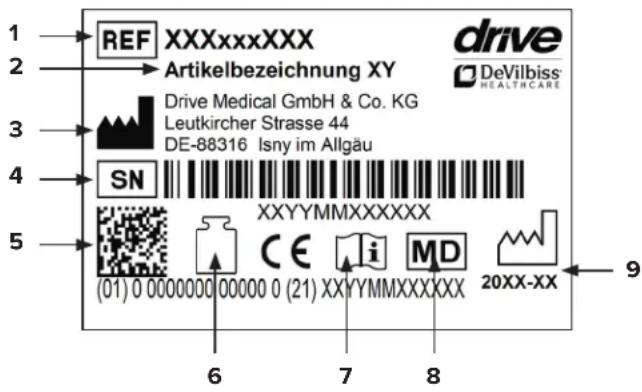
Identification plate
text_image
1 REF XXXxxxxXX drive 2 Artikelbezeichnung XY DeVilbiss® 3 Drive Medical GmbH & Co. KG Leutkircher Strasse 44 DE-88316 Isny im Allgäu 4 SN XXXYMMXXXXXXX 5 (01) 0 0000000 00000 0 (21) XXYYMMXXXXXXX 20XX-XX 6 7 8 91 Article number | 2 Article name | 3 Manufacturer | 4 Serial number | 5 UDI code | 6 Max. load | 7 Follow the instructions for use | 8 Medical device | 9 Production date (year-month)
Reuse
This product can be reused.
Please note that all technical documents needed for safe handling must also be given to the new user.
The product must be checked by the specialist dealer, cleaned, and restored to optimum condition.
Always follow the manufacturer's instructions during preparation; these are made available on request.
Accessories are available from your specialist dealer or at www.drivedevilbiss.de
Warranty
The warranty period for the product supplied by us is 24 months from the date of purchase. Defective parts will be replaced free of charge if it can be shown that there is a defect in materials or manufacturing.
Parts subject to wear are generally not covered during the normal guarantee period unless the parts need repair or replacement which became necessary as a clear, direct consequence of a manufacturing or material error.
We reserve the right of error and modifications on the basis of technical improvements and changes in design.
EXCLUSION OF WARRANTY
Parts subject to wear include (among others): wheels, brakes and handles
Parts of the product
text_image
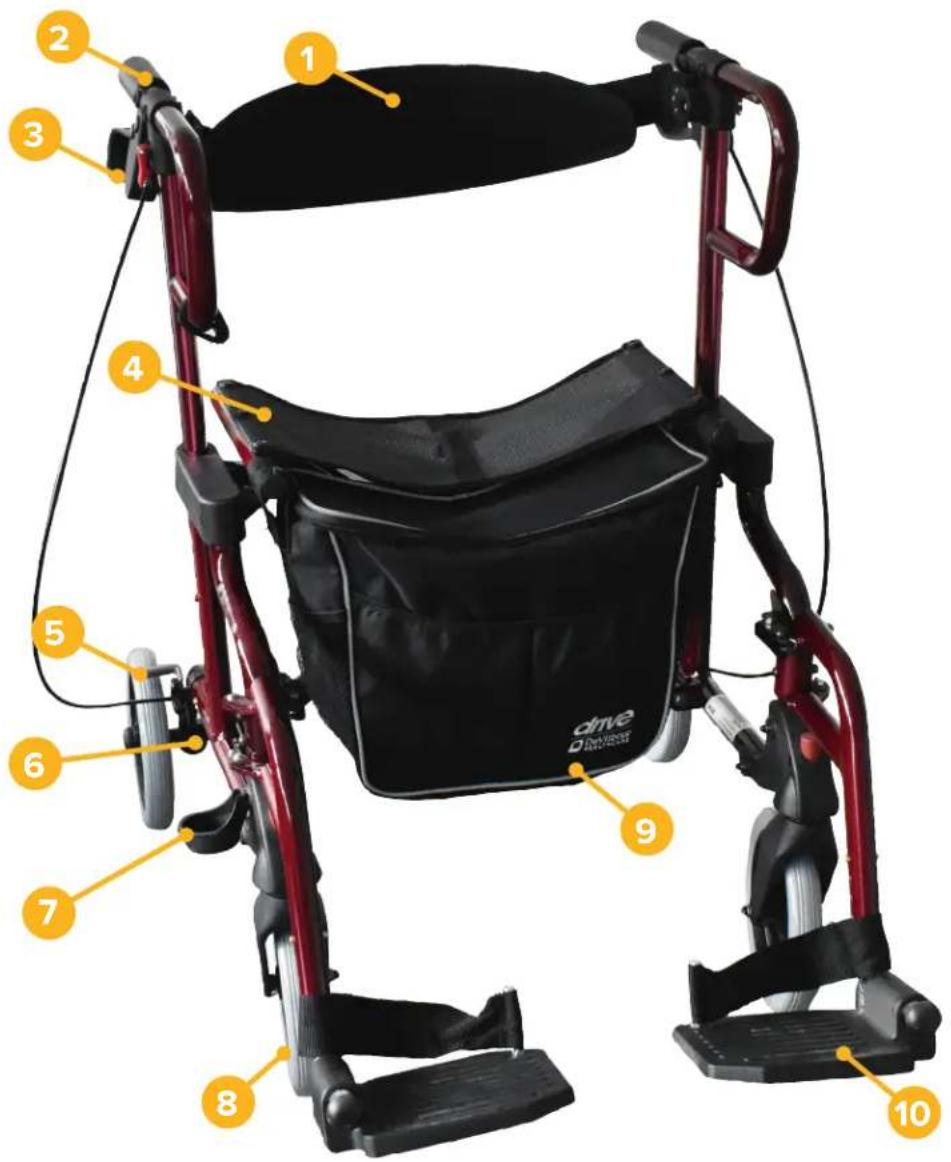
1 2 3 4 5 6 7 8 9 10 driveDIAMOND DELUXE
- Backrest
- Height-adjustable push handle
-
Brake
-
Seat
- Rear wheel
-
Adjusting screw for brake
-
Cane holder
- Front wheel
- Footrests
Indication
INDICATION:
Walking aid for outdoor and indoor use to compensate for or improve limited walking ability. Insured parties are to be provided with walking aids with the intention of compensating for or at least improving the user's limited walking ability (expansion of radius of activity or mobility). Persons with limitations of hand/arm functions require particular adjustments/designs of handles or handrests/armrests. Movable walking aids may not be suitable for persons with balance disorders; in individual cases, this should be tested out. Where appropriate, an attendant must be present. The rollator is to be used only for normal, everyday activities.
CONTRAINDICATION:
The rollator is not suitable for use in the case of: perception disorders, severe loss of balance, inability to sit down.
Scope of delivery
| 1 x Rollator |
| 1 x Pocket |
| 1 x backrest |
| 1 x Cane holder |
| 1 x Instructions for use |
Safety instructions
• Use the rollator only as a walking aid!
- Use the rollator only on an even and solid surface.
- Rollator may not be used as a seat in vehicles, such as a bus or train!
• Take note of the permitted maximum weight of the user. This information can be found in the technical data in these instructions for use as well as on the type label.
- Use on escalators and the like is expressly prohibited!
- Do not hang any bags on the handle – risk of tipping!
- On steep surfaces, use the service brake (pull the brake lever upwards).
- Leaning excessively on the handles can cause the roll-
lator to tip backwards.
- When folding/unfolding the rollator, clothing and body parts can be pinched.
- Protect the rollator from direct sunlight. Product parts can become hot and cause skin injuries if touched.
- Prior to each use, ensure that your rollator is intact and all adjustable parts are properly secured. Check that the brakes are working properly!
- Before using the rollator, ensure that the folding guard is properly locked.
- Check the screws on the rollator regularly and tighten, if necessary.
- The braking effect can be impaired by wear and tear on the tires. For this reason, check the braking effect and tires regularly.
- The rollator should NOT be carried by the seat, removable parts or the brake cables.
- Never use the footrests as assistance when getting up – risk of tipping!
- Every serious incident which occurs in connection with the product must be reported to the manufacturer and the competent authority of the member state in which the user and/or patient is located.
Assembly
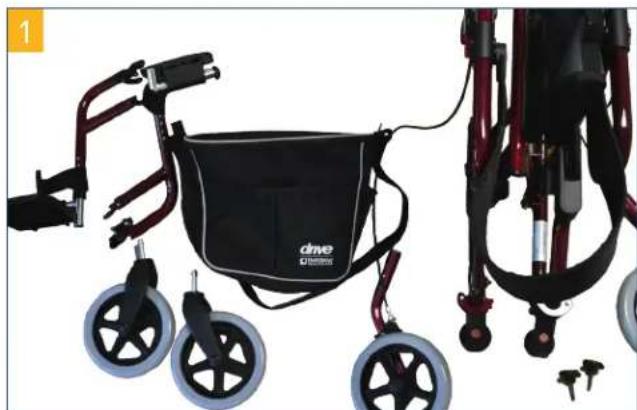
Have the individual parts ready, as shown (pic. 1). Insert the rear wheels into the mounting tube (pic. 2) and secure them with the locking screws (pic. 3).
natural_image
Product photo of a black and red wheeled walker with two wheels, no visible text or symbols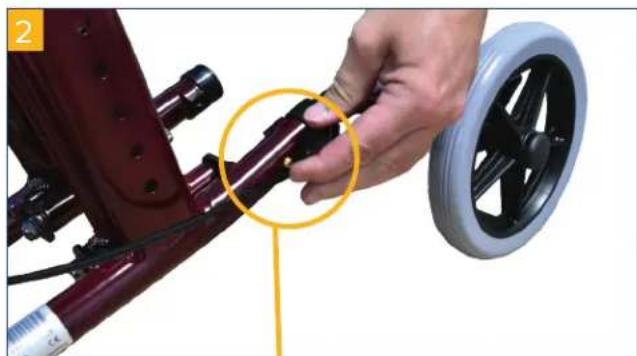
natural_image
Close-up of a hand adjusting a red bicycle seatbelt with a black wheel rim, highlighting the joint detail (no text or symbols visible)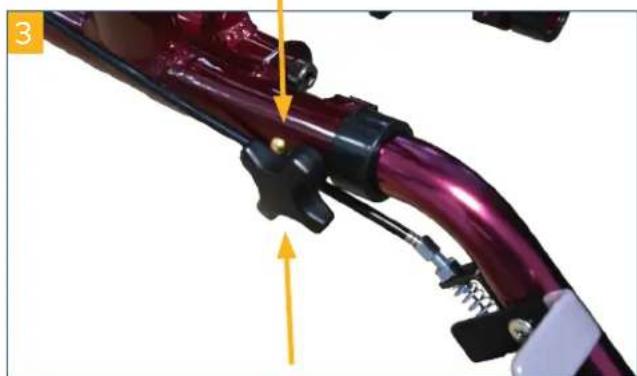
natural_image
Close-up of a purple bicycle handle assembly with mechanical clamps and a yellow arrow indicating motion (no text or symbols)EN
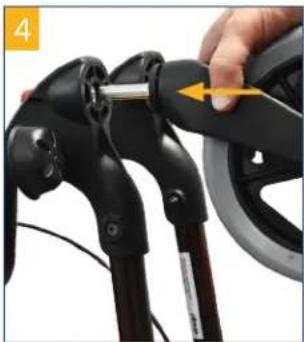
The front wheels are pushed into the holders with force until they click into place (pic. 4). To disengage the wheel, press the red button and pull the wheel out (pic. 5).
natural_image
Close-up of a hand adjusting a black bicycle wheel handle with a yellow arrow pointing to the handle (no text or symbols visible)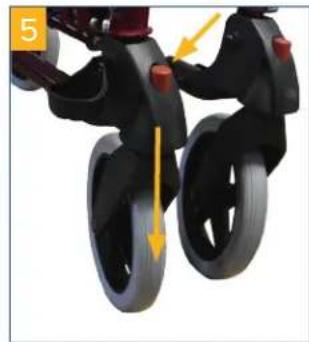
natural_image
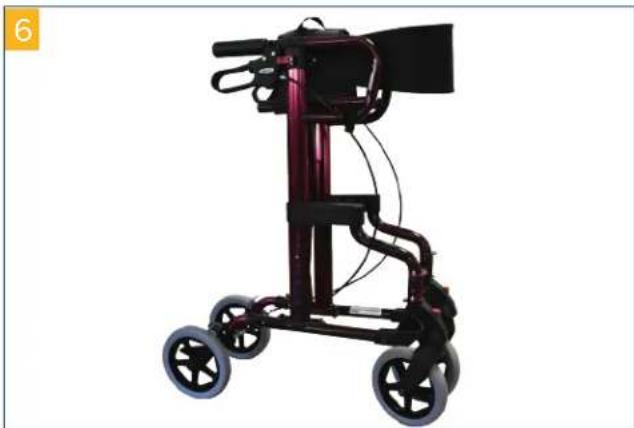
Close-up of black children's stroller wheels with yellow directional arrows indicating motion (no text or symbols)Now place the rollator (pic. 6) on its wheels (pic. 7) and press down on the sides of the seat section until you can hear and feel it click into place (pic. 8).
natural_image
Black and red mobile phone support device with four wheels and a vertical-mounted stand (no visible text or symbols)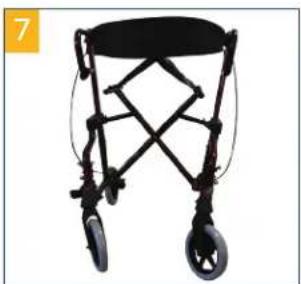
natural_image
Black bicycle walker with wheels and a seat, shown in isolated view (no text or symbols visible)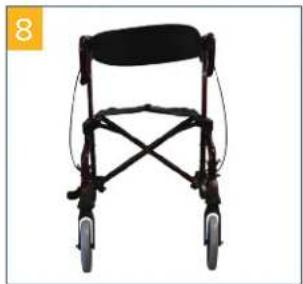
natural_image
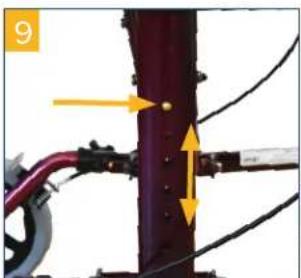
Black mobility walker with four wheels and a seat cover (no text or symbols visible)To adjust the height of the handles, press both clips and move the guide tube into the desired position (pic. 9). Hang the footrests such that they click into both pins (pic. 10,-11).
natural_image
Close-up of a mechanical joint or pipe assembly with yellow arrows indicating direction (no text or symbols visible)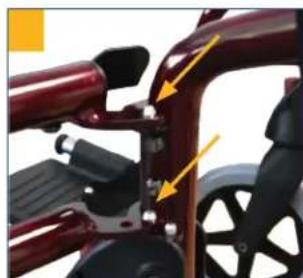
natural_image
Close-up of a red bicycle wheel with black brake calipers and yellow directional arrows indicating motion (no text or symbols)
natural_image
Black and red robotic mobility device with a black cushion and blue handle (no visible text or symbols)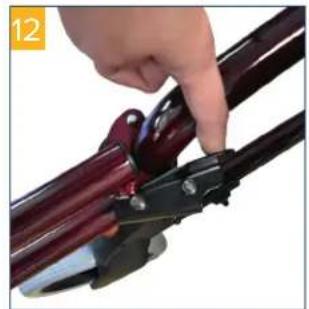
natural_image
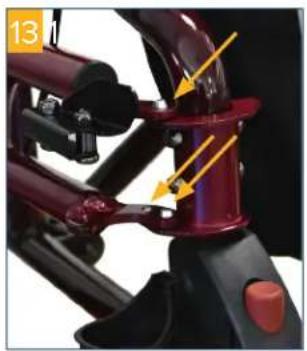
Close-up of a hand using a pliers to handle a dark metal rod (no text or symbols visible)To swivel them out of the way, release the lock as shown in pic. 12. If you do not use the footrests, hang them as shown in pic. 13 such that all 3 pins are clicked into place; the footrests are then secured into position on the rollator (pic. 14).
natural_image
Close-up of a mechanical assembly with red and black components and yellow arrows indicating motion or force direction (no text or symbols)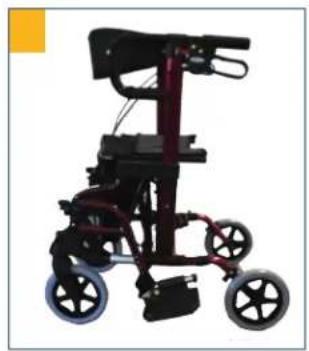
natural_image
Black and red mobility walker with four wheels and overhead arm (no visible text or symbols)Adjusting the brakes
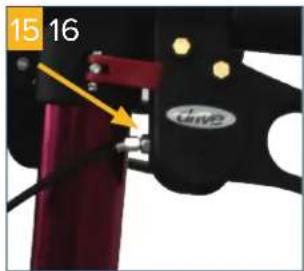
If braking is poor or too hard, the brake can be adjusted either at the brake housing above (pic. 15) or using the adjusting screw on the Bowden cable below (pic. 16) to achieve the desired braking effect.
natural_image
Close-up of a mechanical clamp or bracket with red and black parts, no visible text or symbols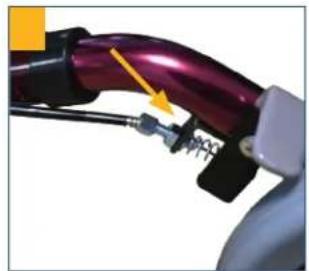
natural_image
Close-up of a purple automotive plug with attached mechanical components (no visible text or symbols)The brake is correctly adjusted when the brake lever as well as the brake wires are free of play and the wheels can be rotated without grinding noises when the brake is released.
Braking | Parking
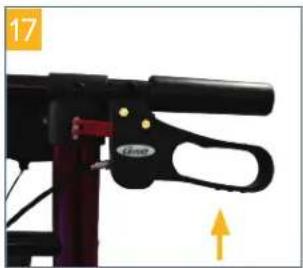
To brake when walking with the rollator, pull both brake handles upwards with your hands (pic. 17). Always brake slowly while applying equal pressure with both hands.
To apply the brakes/park the rollator, press both brake handles downwards until they audibly click into place (pic. 18)! To release the brake, pull both brake handles upwards once again until they are released (brake handles are in the middle position).
natural_image
Close-up of a black bicycle lever handle with a yellow directional arrow indicating motion (no text or symbols)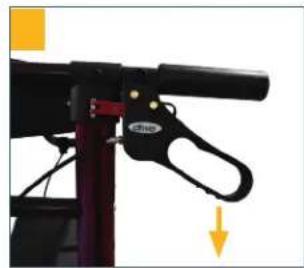
natural_image
Close-up of a mechanical lever mechanism with a black handle and yellow directional arrow (no text or symbols)The braking effect can be impaired by wear and tear on the tires. For this reason, regularly check the braking effect.
Adjusting the backrest
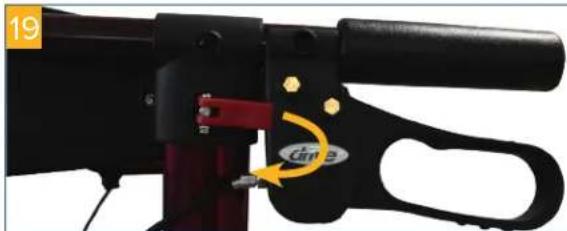
To adjust the backrest in the respective user position, open the red locking lever on both sides (pic. 19), swivel the backrest into the desired position and close the locking mechanisms.
natural_image
Close-up of a black mechanical device with red handle and yellow annotation arrow (no readable text or symbols)Ensure that the locking mechanism is correctly clicked into place.
Folding | Transporting | Stowing
natural_image
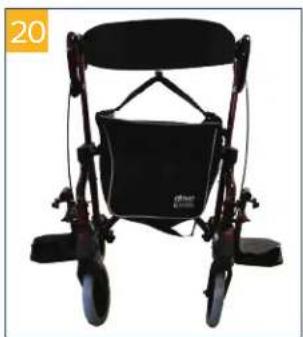
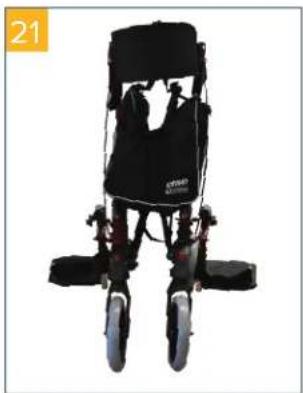
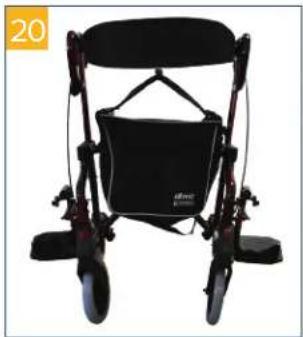
Black ergonomic mobility device with wheels and seat, no visible text or symbolsTo fold up the rollator, pull the seat and rollator upwards! Tip rollator backwards and downwards against its direction of movement. The frame will then fold automatically (pic. 20-22).
Remove accessories, if necessary!
natural_image
Black and white photo of a person wearing a multi-legged exercise chair (no visible text or symbols)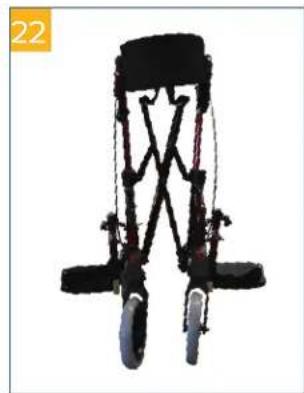
natural_image
Black and red bicycle support structure with visible wheels and structural beams (no text or symbols)Cleaning | Maintenance
• Clean regularly with a moist cloth!
- Do not use any aggressive cleaning agents!
- Do not use abrasive cleaners!
- Do not use any high-dose chlorine and vinegar-based cleaners!
• To disinfect, a spray disinfectant can be used such as Descosept AF or Bacillol AF.
- Check the screws regularly and tighten, if necessary.
- The product should not be exposed to temperatures above 60°C for long periods of time (for example, use in a sauna, etc.)!
- In the event of defects, contact your specialist dealer from whom you purchased this product!
- Check the condition of the tires regularly. They are "fail-safe", meaning that you do not have to check air pressure or fill them with air. Always check the tires for tears or other damage, however.
Technical data
Product DIAMOND DELUXE
| Article number 745R | |
| Total length x Total width | 104,2 cm x 64 cm |
| Handle height 77 - 94,5 cm | |
| Seat width x Seat depth 40 cm x 19 cm | |
| Seat height 54 cm | |
| Width between handles 46 cm | |
| Dimensions when folded 63 x 28 x 100 cm | |
| Total weight | 10,3 kg |
| Load max. | 136 kg |
| Material frame | Steel tubing, coated |
Sommaire
Avant-propos....15
Freinage I parking....18
Pliage I transport I rangement....19
Nettoyage I maintenance 19
natural_image
Product photo of a black wheelchair walker with blue wheels and red control lever (no text or symbols visible)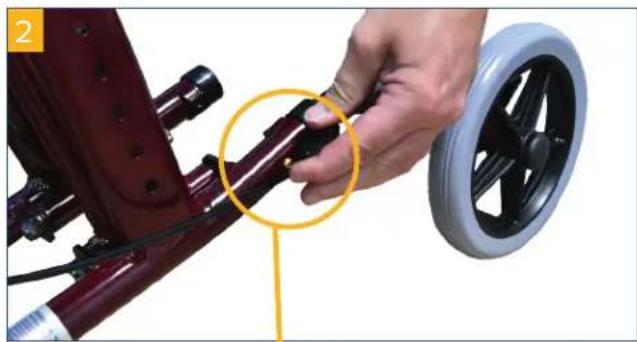
natural_image
Close-up of a hand adjusting a red bicycle steering wheel, with a yellow circle highlighting the joint detail (no text or symbols visible)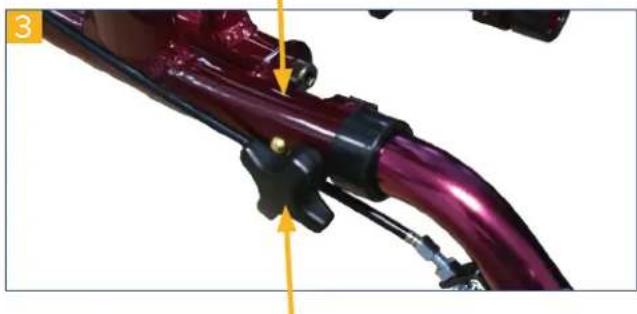
natural_image
Close-up of a purple bicycle handle assembly with mechanical clamps and a yellow arrow indicating motion (no text or symbols)FR
natural_image
Close-up of a hand adjusting a black bicycle steering wheel (no text or symbols visible)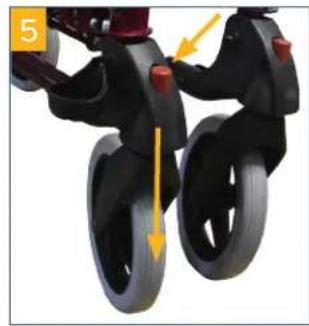
natural_image
Close-up of a black children's tricycle with wheels and a yellow directional arrow indicating motion (no text or symbols)natural_image
Exterior view of a mobile walk-in vehicle with black wheels and camera (no text or symbols visible)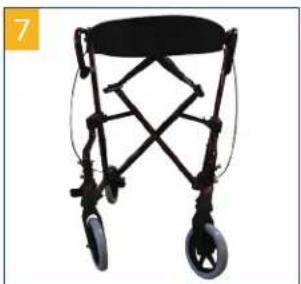
natural_image
Black wheeled walker with wheels and a seat, shown in isolated view (no text or symbols visible)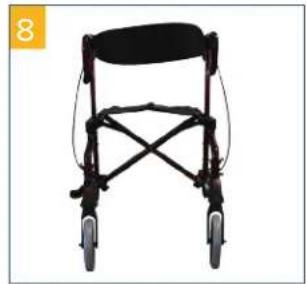
natural_image
Black mobility walker with four wheels and a seat cover, shown against white background (no text or symbols)natural_image
Close-up of a mechanical assembly with purple components and yellow directional arrows indicating motion or force (no text or symbols)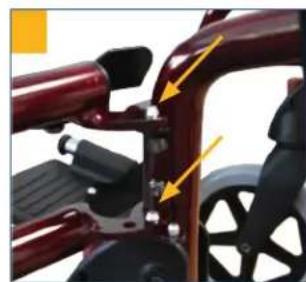
natural_image
Close-up of a red bicycle seat with black metal brackets and yellow directional arrows indicating movement or force (no text or symbols)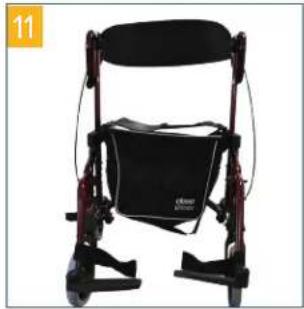
natural_image
Black and red robotic mobility device with a circular cushion and vertical frame (no visible text or symbols)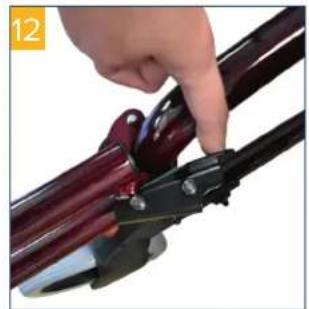
natural_image
Close-up of a hand using a pliers to cut a dark red metal rod (no text or symbols visible)natural_image
Close-up of a mechanical assembly with red components and yellow arrows indicating motion or force directions (no text or symbols)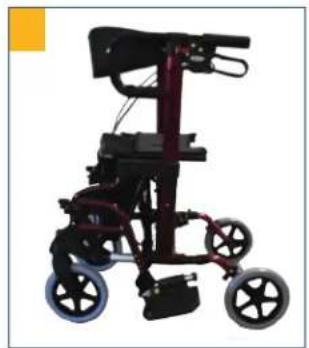
natural_image
Black and maroon photo of a mobility walker with two wheels and a handle (no text or symbols visible)Réglage des freins
natural_image
Close-up of a mechanical clamp or bracket with red and black parts, no visible text or symbols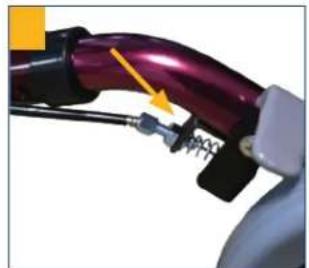
natural_image
Close-up of a purple electric vehicle charging plug with attached cable and spring (no visible text or symbols)natural_image
Close-up of a black mechanical lever with a handle and lever mechanism, no visible text or symbols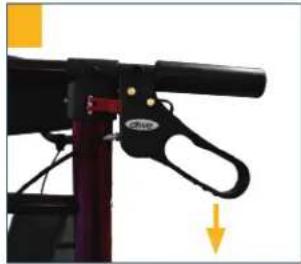
natural_image
Close-up of a black mechanical lever with a handle and lever mechanism, no visible text or symbolsnatural_image
Close-up of a black mechanical tool with red and black components, no visible text or symbolsPliage I transport I rangement
natural_image
Black wheeled mobility device with wheels and a back cover, no visible text or symbolsnatural_image
Black and white photo of a person in a multi-legged wheelchair with wheels and overhead equipment (no visible text or symbols)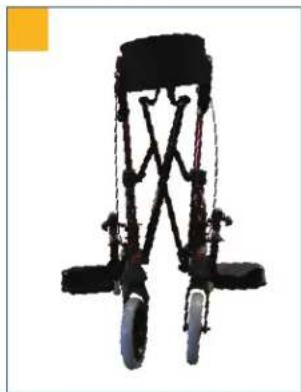
natural_image
Top-down view of a black bicycle support structure with visible wheels and structural beams (no text or symbols)Nettoyage I maintenance
natural_image
Product photo of a black and red mobility walker with wheels, no visible text or symbols
natural_image
Close-up of a hand adjusting a red bicycle wheel rim with a yellow circle highlighting the component (no text or symbols visible)
natural_image
Close-up of a purple bicycle tire with attached mechanical components and a yellow arrow indicating motion direction (no text or symbols)NL
natural_image
Close-up of a hand adjusting a black bicycle wheel handle with a yellow arrow pointing to the component (no text or symbols visible)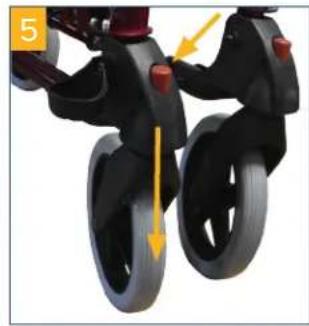
natural_image
Close-up of a black stroller with wheels and a yellow directional arrow indicating motion (no text or symbols)natural_image
Black and maroon mobile walkable device with four wheels and a camera mounted on top (no visible text or symbols)
natural_image
Black bicycle walker with wheels and frame structure (no text or symbols visible)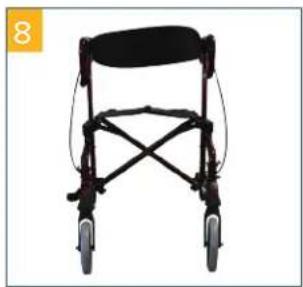
natural_image
Front view of a black mobility walker with four wheels and a seat cover (no text or symbols visible)natural_image
Close-up of a mechanical assembly with purple components and yellow directional arrows indicating motion or force (no text or symbols)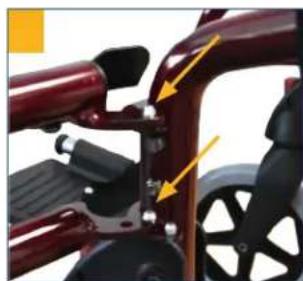
natural_image
Close-up of a red bicycle seat with black brake calipers and yellow directional arrows indicating movement (no text or symbols)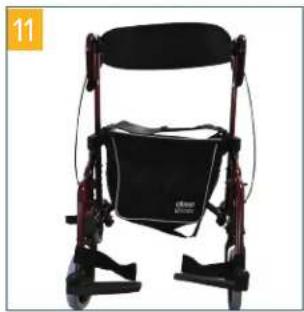
natural_image
Black and red robotic mobility device with a black seat and blue cushion (no visible text or symbols)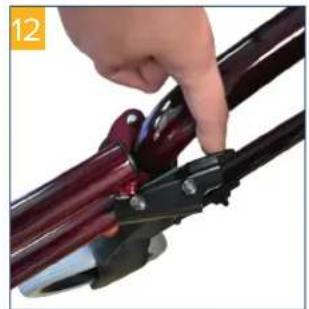
natural_image
Close-up of a hand using a pliers to cut a dark metal rod (no text or symbols visible)natural_image
Close-up of a mechanical assembly with red and black components and yellow arrows indicating motion or force (no visible text or symbols)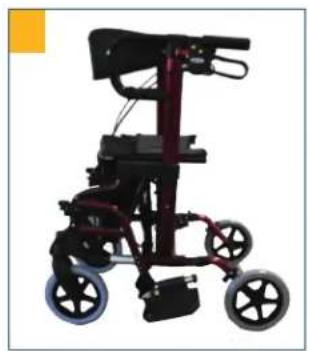
natural_image
Exterior view of a modern mobility walker with black frame and two wheels (no text or symbols visible)Rem instellen
text_image
15 16 GWO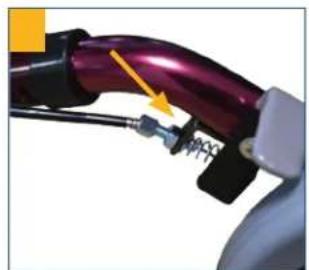
natural_image
Close-up of a purple electric vehicle plug with attached electrical connectors (no visible text or symbols)natural_image
Close-up of a black mechanical device with a handle and lever mechanism, no visible text or symbols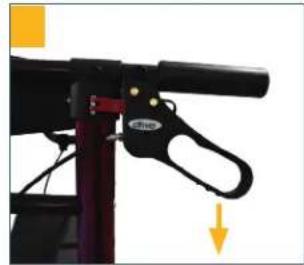
natural_image
Close-up of a black bicycle support structure with a handle and vertical arrow indicator (no text or symbols)natural_image
Close-up of a black mechanical device with red handle and yellow annotation arrow (no readable text or symbols)Zorg dat de vergrendeling goed is vastgeklikt.
natural_image
Black and white photo of a black wheeled mobility device with wheels and handle (no visible text or symbols)natural_image
Black and white photo of a person wearing a specialized mobility device with wheels and seat (no visible text or symbols)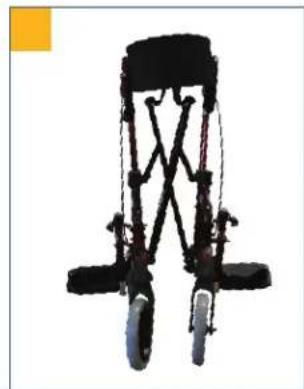
natural_image
Black bicycle support structure with visible wheels and suspension components (no text or symbols)natural_image
Product photo of a black wheeled wheelchair with two wheels and a red-and-white leg mechanism (no text or symbols visible)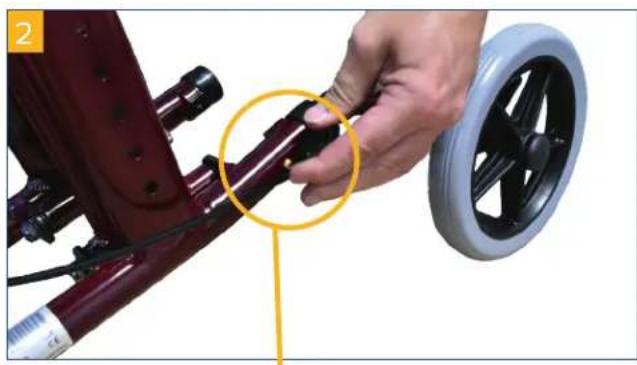
natural_image
Close-up of a hand adjusting a red bicycle seatbelt with a black wheel rim, highlighting the joint detail (no text or symbols visible)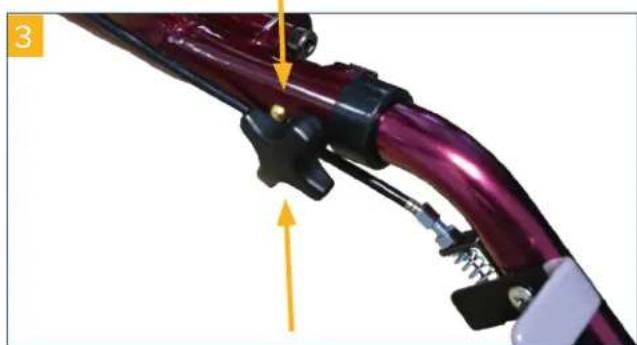
natural_image
Close-up of a purple bicycle handle with attached mechanical components and a yellow arrow indicating motion direction (no text or symbols)IT
natural_image
Close-up of a hand adjusting a black bicycle wheel handle with a yellow arrow pointing to the handle (no text or symbols visible)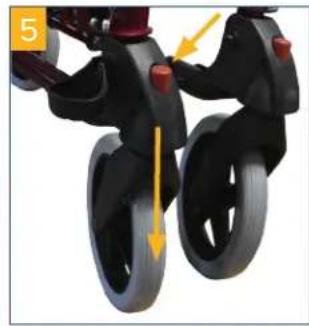
natural_image
Close-up of a black stroller with wheels and a yellow directional arrow indicating motion (no text or symbols)natural_image
Black and maroon mobile walkable device with four wheels and a handle (no text or symbols visible)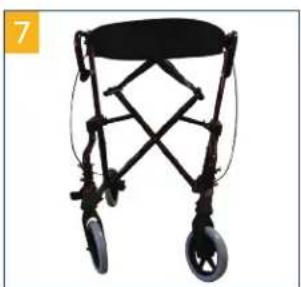
natural_image
Black bicycle walker with wheels and a seat, shown in isolated view (no text or symbols visible)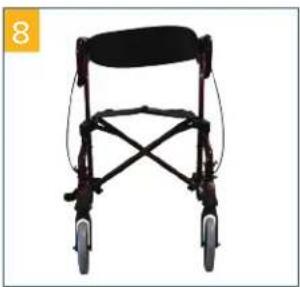
natural_image
Front view of a black mobility walker with wheels and seat (no text or symbols visible)natural_image
Close-up of a mechanical assembly with purple components and yellow directional arrows indicating movement or force (no text or symbols)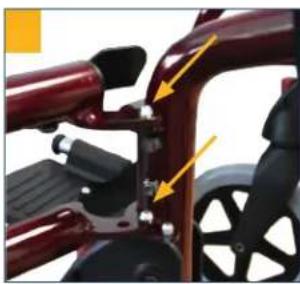
natural_image
Close-up of a red bicycle seat with black adjustment knobs and yellow arrows indicating alignment (no text or symbols)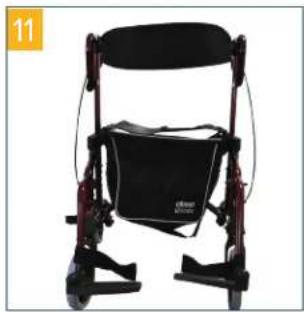
natural_image
Black and red robotic mobility device with a cushioned seat (no visible text or symbols)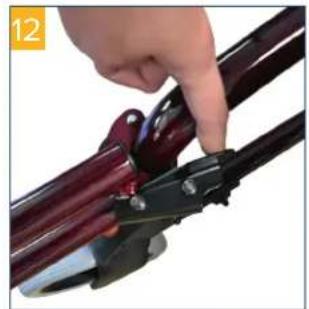
natural_image
Close-up of a hand using a pliers to cut a dark metal object (no text or symbols visible)natural_image
Close-up of a mechanical device with red components and yellow arrows indicating motion or assembly (no visible text or symbols)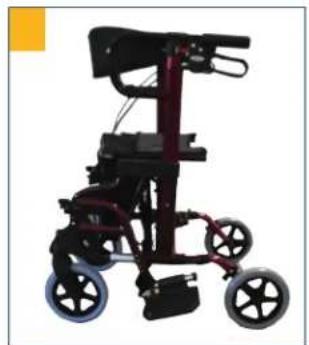
natural_image
Exterior view of a modern mobile walk-in vehicle with black frame and red wheels (no text or symbols visible)Regolazione freni
natural_image
Close-up of a purple electric vehicle's cable with attached connectors and a yellow arrow indicating a specific component (no text or symbols visible)natural_image
Close-up of a black bicycle lift with a handle and lever mechanism, no visible text or symbols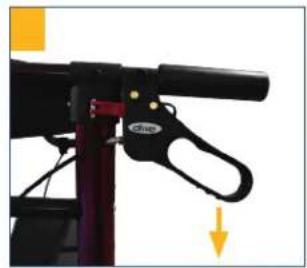
natural_image
Close-up of a black mechanical lever mechanism with a yellow arrow indicating motion direction (no text or symbols visible)natural_image
Close-up of a black mechanical tool with red handle and yellow annotation arrow (no readable text or symbols)natural_image
Black wheeled mobility device with wheels and seat, no visible text or symbolsnatural_image
Top-down view of a black and white robotic device with wheels and a back cover, labeled '21' in the corner (no visible text or symbols on the device itself)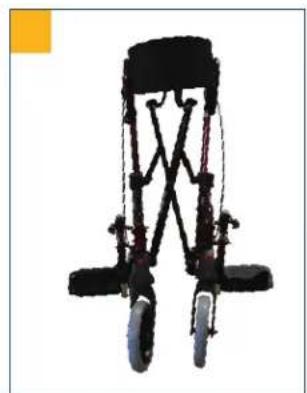
natural_image
Black bicycle support structure with visible wheels and frame (no text or symbols)www.drivemedical.de • info@drivemedical.de