ABT00102 - Receiver FeinTech - Free user manual and instructions
Find the device manual for free ABT00102 FeinTech in PDF.


| Product Type | Bluetooth audio adapter transmitter/receiver |
| Brand | FeinTech |
| Model | ABT00102 |
| Category | Bluetooth Receiver |
| Bluetooth Version | 5.0 |
| Bluetooth Chip | CSR 8675 |
| Supported Profiles | A2DP, AVRCP |
| Supported Audio Codecs | SBC, aptX, aptX Low Latency, aptX HD |
| Digital-to-Analog Converter | 16 bits / 48 kHz max / SNR > 92 dB |
| Analog-to-Digital Converter | 16 bits / 96 kHz max / SNR > 96 dB |
| Channel Separation | -89 dB |
| Power Supply | 5 V DC / 300 mA via micro USB (power adapter not included) |
| Power Consumption | Max 1.5 W |
| Connectors | Analog audio input/output 3.5mm jack, digital optical audio input/output Toslink |
| Reception Range | Up to 15 m (indoor) |
| Transmission Range | Up to 50 m (outdoor, line of sight) |
| Operating Temperature | -10°C to +55°C |
| Estimated Dimensions | 60 x 40 x 15 mm |
| Estimated Weight | 30 g |
| Cleaning and Maintenance | Clean with a dry, soft cloth. Do not use abrasive products. |
| Safety | Use only in environments where Bluetooth is permitted. Do not expose to moisture, fire, or extreme temperatures. Keep out of reach of children. |
| Reparability and Spare Parts | No user-serviceable parts. Contact FeinTech customer service for repairs. |
Frequently Asked Questions - ABT00102 FeinTech
User questions about ABT00102 FeinTech
0 question about this device. Answer the ones you know or ask your own.
Ask a new question about this device
Download the instructions for your Receiver in PDF format for free! Find your manual ABT00102 - FeinTech and take your electronic device back in hand. On this page are published all the documents necessary for the use of your device. ABT00102 by FeinTech.
USER MANUAL ABT00102 FeinTech
Bluetooth 5.0 Audio Transmitter & Receiver
natural_image
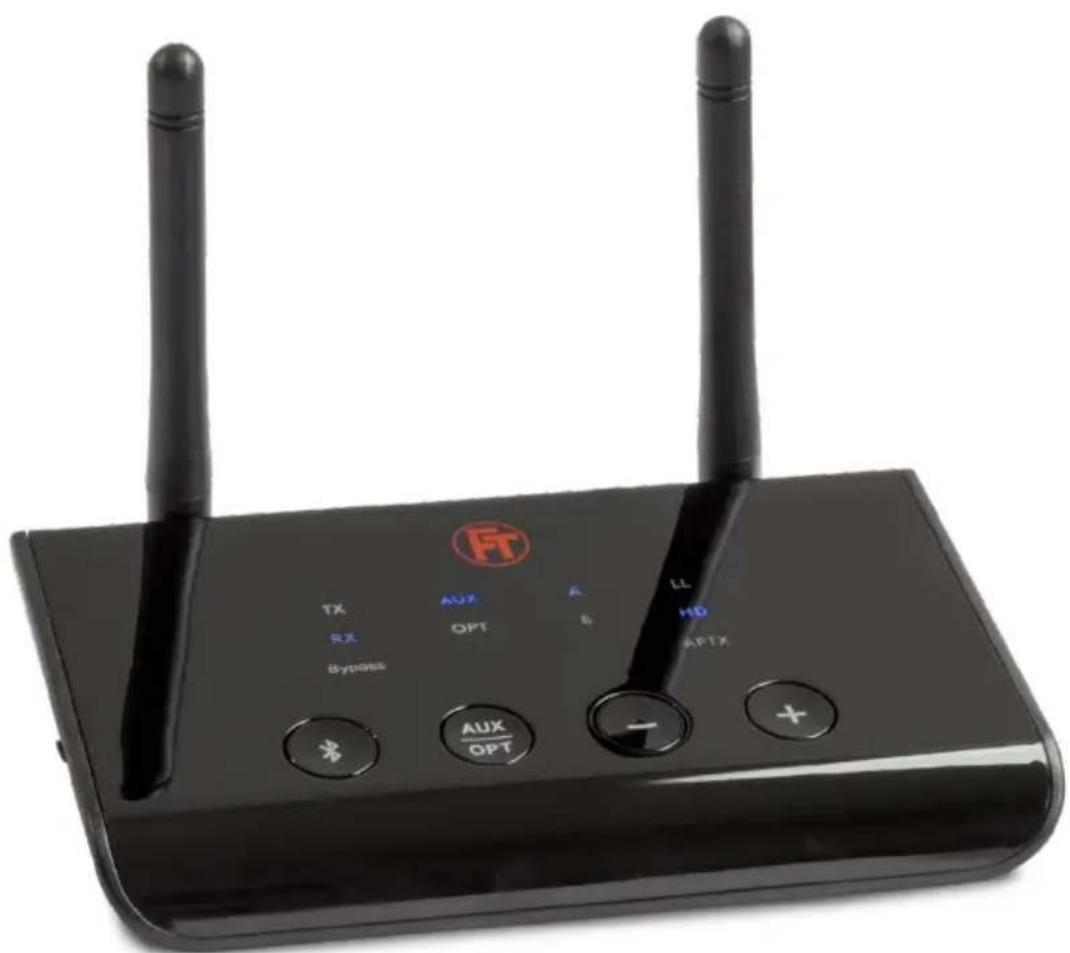
Black wireless router with two antennas and control buttons (no visible text or symbols on the device body)Anleitung • Instructions • Instruction d'utilisation Instrukcje • Istruzioni
ABT00102
Bluetooth 5.0 Audio Transmitter & Receiver
Bedienungsanleitung
■ RX-Modus: aptX-HD, aptX Low Latency, aptX, SBC
■ TX-Modus: aptX-HD, aptX Low Latency, aptX, SBC
Kanaltrennung (Crosstalk): -89 dB
Bluetooth 5.0 Audio Transmitter & Receiver
Instruction manual
Thank you for choosing our Bluetooth audio adapter. This device allows you to transmit the sound of an audio source wirelessly in Transmitter(TX) mode and play it back using Bluetooth headphones or speakers. In receiver mode (RX), you can receive a Bluetooth audio signal and play it back on an audio amplifier, wired headphones or similar. In Bypass mode, you can loop an audio signal through or convert it to digital/analogue. Power is supplied via an USB A connector or USB power supply (not included).
1. Scope of delivery:
■ Bluetooth Audio Transmitter & Receiver
■ SPDIF optical digital audio cable, Toslink connector
■ Analogue audio cable, 3.5 mm jack plug
■ USB power cable with USB-A and USB micro plug
■ Adapter cable RCA cinch plug to 3.5 mm jack socket
2. Preliminary remark
To connect wirelessly 2 devices with Bluetooth audio function, you must start a pairing procedure. This can be done manually at the touch of a button or via app/menu functions on your device. Please refer to the instructions of you devices. The connection information will be saved. The next time you switch on the device, the pairing will then take place automatically. Pairing is not possible if your device is still connected to a third Bluetooth device. Therefore switch off Bluetooth on your smartphone when pairing devices like headphones with the ABT00102.
There are different audio codecs with different characteristics. The ABT00102 supports the codecs SBC, aptX, aptX Low Latency and aptX HD. SBC standard Bluetooth codec is supported by all Bluetooth audio devices. The better aptX codecs will only be used if your device also supports them. The best codec is automatically used. For time-critical applications such as audio transmission during movies, games or music making, you can disable aptX HD. Then aptX Low Latency will be used as the best codec if supported.
To deactivate aptX HD press and hold the Bluetooth key for 7 seconds. The TX LED will then flash twice. To reactivate, press again for 7 seconds and the TX LED will flash once.
If the ABT00102 is not paired with any device, the TX or RX LED (depending on mode) will flash every 3 seconds. When paired with one device, LED A lights up. When paired with 2 devices (multipoint), LEDs A and B light up.
Reset
If there are problems during pairing, reset the memory by pressing and holding the + key for 7 seconds in TX mode. (RX and TX then flash twice simultaneously)
Front
-
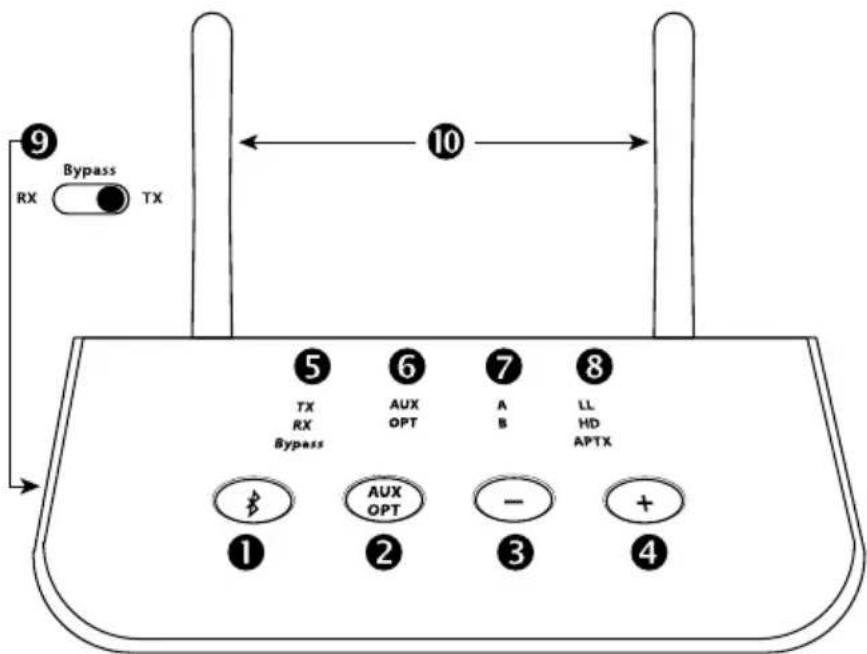
Bluetooth multifunction key:
-
Double press to activate the Bluetooth pairing mode
- Press once to pause playback in RX mode
-
Press and hold for 7 seconds to enable/disable aptX HD support
-
Key for switching between the AUX analogue and OPTICAL digital connections
- Volume down (press briefly) / title back (press for 1 second) during music playback
- Volume up (press briefly) / track forward (press for 1 second) during music playback
-
Display of the selected mode (select with slide switch 9):
-
TX Transmitter mode, the unit transmits audio, e.g. to headphones
- RX Receiver mode, the device receives audio, e.g. from a smartphone
-
Bypass mode, the audio signal is passed through and converted if necessary
-
Display of the selected input / output AUX analogue or OPTICAL digital
- Indication of successful coupling with device A and with multipoint device B
-
Displays the audio codec in use:
-
LL: aptX Low Latency, optimal for the sound during a video or game
- HD: aptX HD, especially high audio quality for music
- aptX: improved latency and audio quality over standard codec
-
without display: SBC, standard Bluetooth codec, normal quality
-
Slide switch for selecting the operating mode as transmitter, receiver or bypass
- Bluetooth transmit and receive antennas
Note: In TX and Bypass mode, keys 3 and 4 have no function
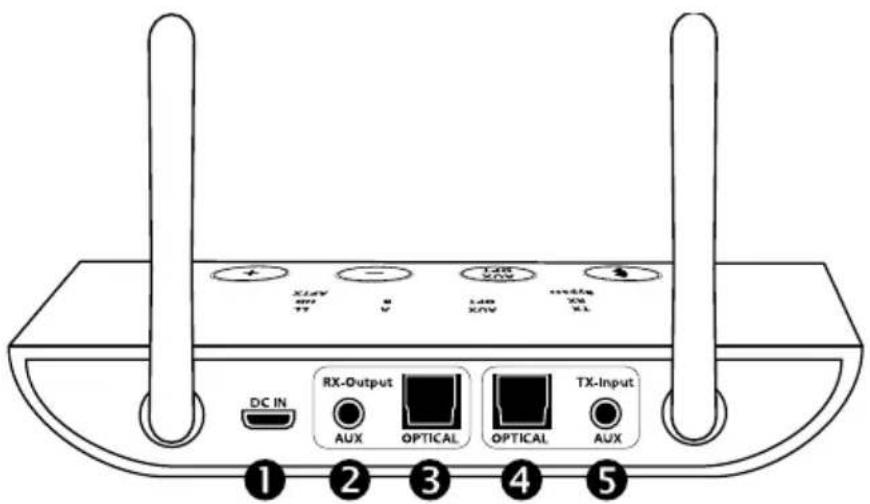
- USB-micro connector for power supply 5V DC
- Analogue audio output 3.5 mm jack
- Digital audio output S/PDIF Toslink
- Digital audio input S/PDIF Toslink
- Analogue audio input 3.5 mm jack
3. Pairing/ coupling mode
In order for 2 Bluetooth devices to pair with each other, you must first pair them and activate pairing manually. The connections are saved. The next time you switch on the device, pairing will then take place automatically.
3.1 Using the TX transmitter mode
Slide the switch 9 to TX. Then press the Bluetooth button twice to enter pairing mode. The TX LED will then flash steadily and rapidly. Switch the Bluetooth function of your device (Bluetooth headphones, speakers or receiver, etc.) to pairing mode. On most devices, a LED will then flash alternately red/blue or blue only. After about 5–30 seconds the ABT00102 is connected to your device. The TX and A LEDs then light up constantly. If your audio device supports more than the standard codec, one of the Codec LEDs (LL, HD, aptX) will also light up.
Then connect the ABT00102 to an audio source, e.g. TV, radio, game console, using a 3.5 mm audio cable or Toslink cable. Use key 2 to select the desired input TX AUX analogue or OPTICAL digital.
Notes: The ABT00102 always tries to establish the connection in the highest quality codec aptX HD first. Disable aptX HD to prefer a connection in aptX low latency for audio transmission during gaming, video or TV.
If you are connecting to the digital output of your TV set (or TV receiver), set the audio format in the menu to PCM stereo (not Bitstream, not Dolby Digital). Multichannel and bitstream audio signals can neither be decoded by the ABT00102 nor transmitted via Bluetooth.
3.2 Multipoint connection with 2 headphones
First, pair up the first headphones as described in 3.1. Then double-press the Bluetooth key. The TX LED flashes rapidly to indicate pairing mode. Now switch a second Bluetooth device (e.g. headphones) to pairing mode. After 5-30 seconds it will be paired. The TX, A and B LEDs now light up constantly. You can now listen to music with 2 headphones at the same time, for example.
Note: Some Bluetooth devices do not support multipoint. Only SBC codec is available for multipoint connections.
During the first seconds after pairing device B, you will have dropouts on audio device A.
3.3 Using the receiver mode (RX)
Slide the mode switch 9 to RX. Then press the Bluetooth button twice to enter pairing mode. The RX LED will then flash steadily and rapidly. Set your Bluetooth audio source (mobile phone, notebook, PC, etc.) to pairing mode. For Android smartphones, you will find the function in the Bluetooth settings „Pair new device“. On your iOS device, select Settings >Bluetooth and enable Bluetooth. After the FeinTech ABTO0102 is found, tap the device name to pair. The RX and A LEDs will be lit steadily. If your audio source supports more than the standard codec, one of the Codec LEDs (LL, HD, aptX) will also light. Then connect your audio device (HiFi amplifier, car radio, etc.) via the analogue 3.5 mm RX AUX connector or digitally via Toslink OPTICAL. Then select the desired output AUX or OPTICAL.
If a password is requested, enter „0000“, „1234“, „8888“ or „1111“.
3.4 Multipoint with 2 phones
First, pair up the first unit as described in 3.3. Then press the Bluetooth key twice. The RX LED flashes rapidly again to indicate pairing mode. Now activate Bluetooth on a second smartphone and search for new devices. Once the FeinTech ABTO0102 is detected, tap on this name. Now 2 sources are paired and the LEDs RX, A and B light up constantly.
Note: Only music playback from one device at a time is possible. Music from the second device is only played back when one device is paused.
4. Bypass mode for direct connection of devices
Set the slide switch to the middle position Bypass for direct connection between inputs and outputs. Select the desired input and output AUX or OPTICAL by pressing key 2:
- When the AUX LED is permanently lit, the audio signal is routed from AUX input to AUX output.
- When the OPT LED is lit continuously, the audio signal is routed from OPTICAL input to OPTICAL output.
- When the AUX LED blinks once and then AUX and OPT are lit, the audio signal is converted to digital and routed from AUX input to OPTICAL output.
- When the OPT LED blinks once and then AUX and OPT are lit, the audio signal is converted to analogue and routed from OPTICAL input to AUX output.
In bypass mode, digital audio signals can be converted to analogue or vice versa. For example, if your TV only has an optical digital audio output, you can use the ABT00102 to convert the sound and output it through a standard stereo system. Please note that only PCM stereo is supported. Each television offers settings in the menu for this purpose.
Please set the audio format on the TV to stereo or PCM, not Dolby Digital or bitstream.
Specification
Bluetooth 5.0 Chipset: CSR 8675
Supported profiles: A2DP, AVRCP
Supported Codecs:
■ RX-Mode: aptX-HD, aptX Low Latency, aptX, SBC
■ TX-Mode: aptX-HD, aptX Low Latency, aptX, SBC
RF output power: max. 5.90 dBm at GFSK-Modulation (3.89 mW)
Digital to analog conversion: 16 bit / max. 48 kHz / SNR > 92 dB
Analog to digital conversion: 16 bit / max. 96 kHz / SNR > 96 dB
Channel separation /Crosstalk: -89 dB
Power consumption: max. 1,5 W / 300 mA / 5 V DC
Operating temperature: -10°C to +55°C
Dimensions: 134 x 74 x 27 mm
Bluetooth Class II: Receiving range maximum 15 m
Transmission range maximum 50 m (outdoors)
Bluetooth frequency: 2402-2480 MHz
Qualcomm aptX & CSR8675 are products of Qualcomm Technologies, Inc., Bluetooth is a registered trademark of Bluetooth SIG
Safety Instructions
Use the device only in environments where Bluetooth wireless technology is permitted. Do not use the device if it has been damaged or exposed to liquids. Do not expose the device to extreme temperatures, fire or humidity. Keep the device, packaging and accessories away from children and pets to prevent accidents and suffocation.
Manufacturer's declaration
CE Herewith Spreewald Kommunikationstechnik GmbH declares that the radio system type ABT00102 complies with the directive 2014/53/EU and further declares that this product is in conformity with the rules of the EU directive (including all applicable amendments) 2011/65/EU „RoHS2“.
The full text of the EU Declaration of Conformity is available at the following Internet address
https://feintech.eu/ce

Electronic products contain valuable raw materials and must not be disposed of with normal household waste. At the end of its service life, please bring the device to your local recycling facility.
FeinTech is a registered Trademark of Spreewald Kommunikationstechnik GmbH, Radensdorfer Hauptstr. 45 a · 15907 Lübben (Spreewald) · Germany · info@feintech.eu · +49 3546 239 8855
■ RX-Mode: aptX-HD, aptX Low Latency, aptX, SBC
■ TX-Mode: aptX-HD, aptX Low Latency, aptX, SBC
Dimensions: 134 x 74 x 27 mm
Bluetooth 5.0 Audio Transmitter & Receiver
■ RX-Mode: aptX-HD, aptX Low Latency, aptX, SBC
■ TX-Mode: aptX-HD, aptX Low Latency, aptX, SBC
Moc wyjściowa RF: max. 5.90 dBm at GFSK-Modulation (3.89 mW)