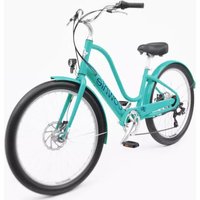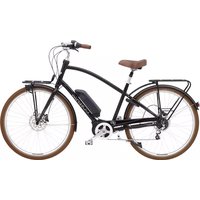
Townie Commute Go! - Electric bike TREK - Free user manual and instructions
Find the device manual for free Townie Commute Go! TREK in PDF.



User questions about Townie Commute Go! TREK
0 question about this device. Answer the ones you know or ask your own.
Ask a new question about this device
Download the instructions for your Electric bike in PDF format for free! Find your manual Townie Commute Go! - TREK and take your electronic device back in hand. On this page are published all the documents necessary for the use of your device. Townie Commute Go! by TREK.
USER MANUAL Townie Commute Go! TREK
OWNER'S MANUAL BENUTZERHANDBUCH GEBRUIKERSHANDLEIDING LE MANUEL DU PROPRIÉTAIRE
ELECTRIC BICYCLE
EN DE NL PR
epowered by

BOSCH
eBike Systems
25 km/h - 45 km/h
TREK
Diamant
Electra

IT IS IMPORTANT TO READ THE WARNINGS AND INSTRUCTIONS IN THIS MANUAL BEFORE RIDING YOUR NEW BICYCLE. LESEN SIE SÄMTLICHE WARNHINWEISE UND ANWEISUNGEN IN DIESER BEDIENUNGSANLEITUNG VOR DER ERSTEN FAHRT MIT IHREM NEUEN BIKE GRÜNDLICH DURCH.
HET IS BELANGRIJK DE WAARSCHUWINGEN EN INSTRUCTIES IN DEZE HANDLEIDING TE LEZEN VÓÓR U MET UW NIEUWE FIETS RIJDT. IL EST IMPORTANT DE LIRE LES MISES EN GARDE ET INSTRUCTIONS CONTENUES DANS CE MANUEL AVANT D'UTILISER VOTRE NOUVEAU VÉLO.
Welcome to our bike family
Thank you for purchasing your new bike.
We believe in bikes. We make high quality bikes that are built to last. That is why each bike we make comes with a limited lifetime warranty.
We wish you many carefree and enjoyable cycling kilometers with your new bike!
However, if you experience any problems with your bike, do not hesitate to contact your local retailer.
If the problem persists, please call our customer service for a solution.
EN - Important to read before the first ride 5
• Active Line / Active Line Plus / Performance Line (Generation 3)...... 263
- Performance Line / Cargo Line (Generation 4) 289
English, Deutsch, Nederlands, Français
Battery 315
English, Deutsch, Nederlands, Français
Charger 347
English, Deutsch, Nederlands, Français
Contact - Kontakt - Contact - Contacter 371
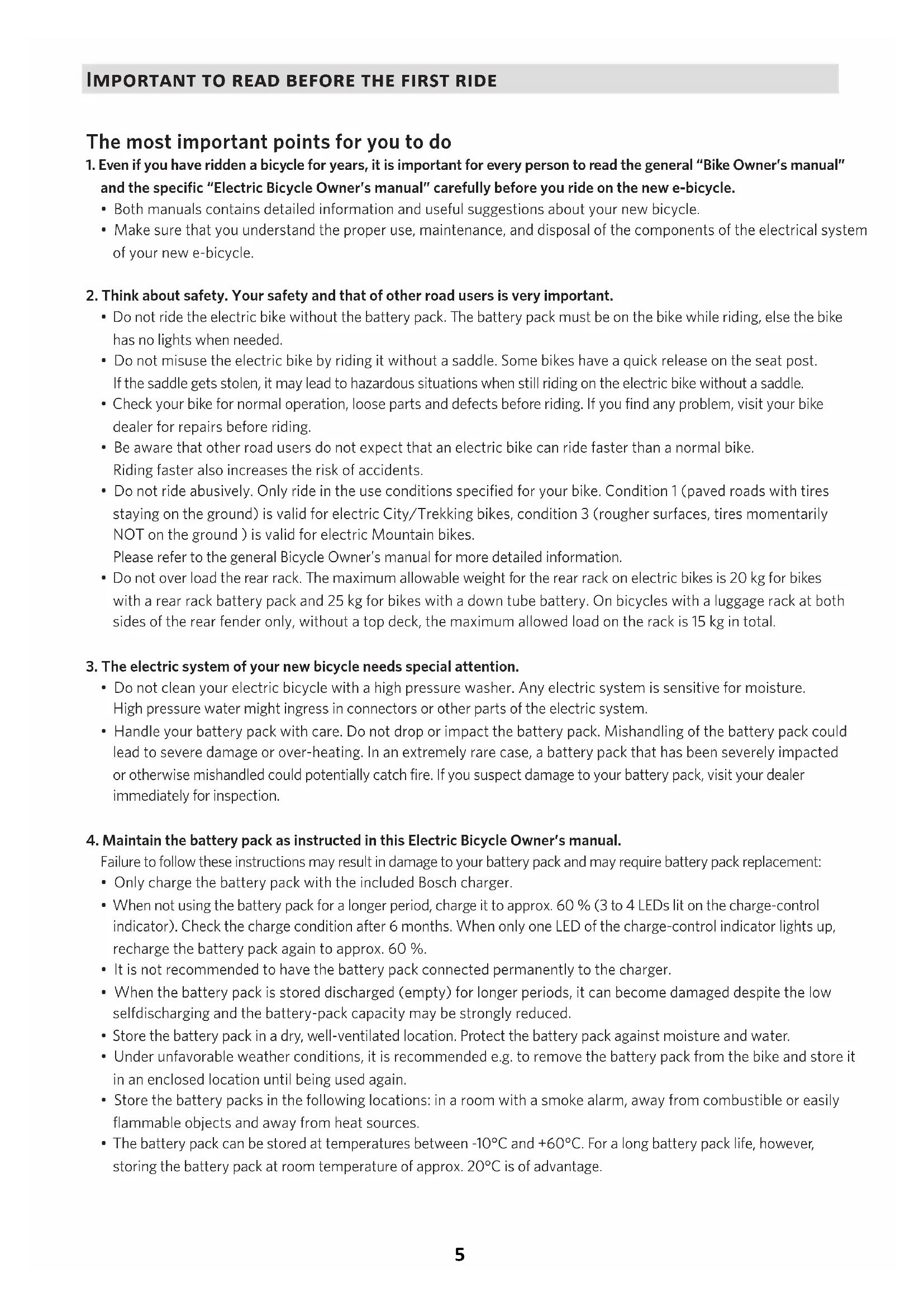
The most important points for you to do
-
Even if you have ridden a bicycle for years, it is important for every person to read the general "Bike Owner's manual" and the specific "Electric Bicycle Owner's manual" carefully before you ride on the new e-bicycle.
-
Both manuals contains detailed information and useful suggestions about your new bicycle.
-
Make sure that you understand the proper use, maintenance, and disposal of the components of the electrical system of your new e-bicycle.
-
Think about safety. Your safety and that of other road users is very important.
-
Do not ride the electric bike without the battery pack. The battery pack must be on the bike while riding, else the bike has no lights when needed.
- Do not misuse the electric bike by riding it without a saddle. Some bikes have a quick release on the seat post. If the saddle gets stolen, it may lead to hazardous situations when still riding on the electric bike without a saddle.
- Check your bike for normal operation, loose parts and defects before riding. If you find any problem, visit your bike dealer for repairs before riding.
- Be aware that other road users do not expect that an electric bike can ride faster than a normal bike. Riding faster also increases the risk of accidents.
- Do not ride abusively. Only ride in the use conditions specified for your bike. Condition 1 (paved roads with tires staying on the ground) is valid for electric City/Trekking bikes, condition 3 (rougher surfaces, tires momentarily NOT on the ground) is valid for electric Mountain bikes. Please refer to the general Bicycle Owner's manual for more detailed information.
- Do not over load the rear rack. The maximum allowable weight for the rear rack on electric bikes is 20 kg for bikes with a rear rack battery pack and 25 kg for bikes with a down tube battery. On bicycles with a luggage rack at both sides of the rear fender only, without a top deck, the maximum allowed load on the rack is 15 kg in total.
-
The electric system of your new bicycle needs special attention.
-
Do not clean your electric bicycle with a high pressure washer. Any electric system is sensitive for moisture. High pressure water might ingress in connectors or other parts of the electric system.
-
Handle your battery pack with care. Do not drop or impact the battery pack. Mishandling of the battery pack could lead to severe damage or over-heating. In an extremely rare case, a battery pack that has been severely impacted or otherwise mishandled could potentially catch fire. If you suspect damage to your battery pack, visit your dealer immediately for inspection.
-
Maintain the battery pack as instructed in this Electric Bicycle Owner's manual.
Failure to follow these instructions may result in damage to your battery pack and may require battery pack replacement:
- Only charge the battery pack with the included Bosch charger.
- When not using the battery pack for a longer period, charge it to approx. 60 % (3 to 4 LEDs lit on the charge-control indicator). Check the charge condition after 6 months. When only one LED of the charge-control indicator lights up, recharge the battery pack again to approx. 60 %.
- It is not recommended to have the battery pack connected permanently to the charger.
- When the battery pack is stored discharged (empty) for longer periods, it can become damaged despite the low selfdischarging and the battery-pack capacity may be strongly reduced.
- Store the battery pack in a dry, well-ventilated location. Protect the battery pack against moisture and water.
- Under unfavorable weather conditions, it is recommended e.g. to remove the battery pack from the bike and store it in an enclosed location until being used again.
- Store the battery packs in the following locations: in a room with a smoke alarm, away from combustible or easily flammable objects and away from heat sources.
- The battery pack can be stored at temperatures between -10^ and +60^ . For a long battery pack life, however, storing the battery pack at room temperature of approx. 20^ is of advantage.
- Take care that the maximal storage temperature is not exceeded. As an example, do not leave the battery pack in a vehicle in summer and store it out of direct sunlight.
- It is recommended to not store the battery pack on the bike.
5. Be careful when transporting an electric bicycle.
- An e-bike is heavier than a normal bike. If transporting on a vehicle, be aware of the maximum load capacity of the vehicle's roof, towing hook and/or of the applied bike carrier. Refer to the manual of the vehicle and bike carrier for details.
- Remove the controller, battery pack and, if present, panniers from the bicycle and store them elsewhere in the vehicle during the drive.
- Always respect local laws about transportation of a(n electric) bicycle.
- Because Li-Ion battery packs of this size and power are considered 'Dangerous goods, class 9' when transporting, regulations may restrict the transport of separate Li-Ion batteries in some places. The restrictions apply to most airlines and some trucking companies. But, if you intend to ship or travel with your complete e-bike (with installed battery pack), the regulations are less strict. Make sure to check ahead with your airline or carrier, before booking your trip, if it is allowed to travel with your complete e-bike.
6. Mounting accessories on an e-bike.
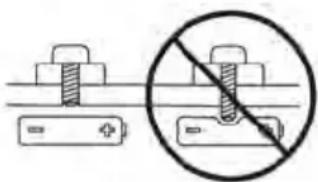
An electric bike has hidden wiring through frame and has other critical e-bike parts like the drive unit and battery pack. When mounting accessories (e.g. a bottle cage), be sure not to impact the wiring or battery pack, e.g. by using too long or pointed bolts. This might cause a short circuit to the electric system and/or damage to the battery.
natural_image
Diagram showing two battery cells with different sizes and a prohibition symbol (no text or labels)WARNING. A short circuit in the electric system and/or damage to the battery might lead to over-heating. In an extremely rare case, a battery pack that has been severely impacted could potentially catch fire.
7. Visit your dealer on a regular basis for maintenance of your new e-bike.
- To guarantee the safe and proper functioning of the bike, the bike must be maintained on a regular basis, at least once a year, by an authorized electric bicycle dealer.
- Your dealer has the right knowledge and equipment to maintain your e-bike and to mount accessories safely.
- If you have questions about your new electric bicycle, ask your dealer!
Compliance
Your bicycle has been designed, tested, and produced in accordance with the applicable European Directives and Harmonised Standards. Therefore, all electric bicycles are in compliance with CE. For more detailed compliance information, please refer to the Declaration of Conformity (DoC) which was included along with your bicycle. If you have misplaced your DoC, a new one can be furnished upon request, by the bicycle shop at which you purchased your electric bicycle.
Limited warranty
Your bicycle is covered by a Lifetime Limited Warranty. Please visit our web site for details.
Additional information for 'Fast Electric Bicycles' ^*
The Fast Electric Bicycle is an electric bicycle that provides assistance that does not stop at 25 km/h.
The maximum assisted speed is higher than that provided by a standard Pedelec.
Note, though, that the actual maximum speed that you can reach depends first and foremost on how strongly you pedal.
*‘Fast’ Electric bicycles are not available in all European countries.
European Type Approval
Legally, the Fast Electric Bicycle is no longer considered a 'bicycle' but an 'electric motor vehicle'.
It has European Type Approval (Class L1e-B) as such, with regards to Directive (EU)168/2013. Each Fast Electric Bicycle has a Type-approval plate on the frame and a unique VIN number (VIN = Vehicle Identification Number).
The technical equipment of these Fast Electric Bicycles is almost identical to that on 25 km/h Pedelecs.
The following parts are additional and/or different:
- Rear view mirror • Insurance plate / license plate and holder for this plate • License plate light • Extra reflectors
- Slightly different brake levers • Rear brake light • Horn • Type approved front and rear lights.
NOTICE. These parts are all part of the type approval. It is not allowed to remove or exchange them for other (non-certified) equipment. This also applies to the fork, tires, kickstand, motor, battery pack and display.
WARNING. Speed Pedelecs built after January 1, 2018 have to comply with new requirements.
As a result, they must be delivered to the market with the front brake lever located on the right hand side of the handlebars and the rear brake lever on the left hand side*. Be aware that this can differ from the configuration on a regular bicycle!
*IMPORTANT NOTICE. In your country, it may legally not be allowed to change this configuration after the bicycle has been delivered. Please obey the local rules.
Local legislation/rules\*
- The legal rules to use a Fast Electric Bicycle vary per country.
- As a Fast Electric Bicycle is legally seen as an electric motor vehicle, you will have to comply with the local legal rules about the minimum age of the rider, driving license, insurance, insurance /license plate, traffic and maximum speed regulations, etc.
- For a Fast Electric Bicycle, third party insurance is mandatory.
- In many countries, wearing a helmet is mandatory for these bicycles.
Even, when wearing a helmet is not mandatory in your country, we strongly recommend to always wear a helmet for your own safety.
*NOTICE. The local legislation/ rules may be subject to changes in time.
Advice for use
- Technically, riding is the same as the Pedelec bicycles, except that the assistance does not stop at 25 km/h.
- Your Fast Electric Bicycle can still be ridden as a bicycle. On the road, you will usually have to obey the rules for mopeds, however, even if you ride without assistance.
- The maximum range on one battery charge depends very much on your style of use.
- Due to the higher speed that can be reached, be prepared to find the range slightly shorter than on regular Pedelec bicycles that have a maximum assistance speed of 25 ~km / h .
- Be aware that other road users may not expect a bicycle to go this fast. Ride accordingly.
natural_image
Diagram showing two battery plates with different screw positions and a prohibition symbol (no text or labels)natural_image
Illustration of a digital pressure monitor with control buttons and display screen (no readable text or symbols)en Original operating instructions
Read all the safety information and instructions. Failure to observe the safety information and follow instructions may result in electric shock, fire and/or serious injury.
Save all safety warnings and instructions for future reference.
The term battery is used in these instructions to mean all original Bosch eBike rechargeable battery packs.
Read and observe the safety warnings and directions contained in all the eBike system operating instructions and in the operating instructions of your eBike.
▶ Do not allow yourself to be distracted by the on-board computer's display. If you do not focus exclusively on the traffic, you risk being involved in an accident. If you want to make entries in your on-board computer other than switching the assistance level, stop and enter the appropriate data.
▶ Do not use the on-board computer as a handle. Lifting the eBike up by the on-board computer can cause irreparable damage to the on-board computer.
When using the walk assistance, make sure that you can control the eBike and that you can hold it securely at all times. Under certain circumstances, the walk assistance may stop (e.g. if the pedals hit an obstacle or if you accidentally let go of the button on the operating unit). The eBike may suddenly move backwards onto you or tip up. This presents a risk for the user particularly if there is additional load on the eBike. When using the walk assistance, do not bring the eBike into situations in which you cannot hold the eBike using your own strength.
Product description and specifications
Intended use
The Intuvia on-board computer is designed to control Bosch eBike systems and display cycling data.
In addition to the functions shown here, changes to software relating to troubleshooting and functional modifications may be introduced at any time.
Product features
The numbering of the components shown refers to the illustrations on the graphics pages at the beginning of the manual.
All illustrations of bike parts except for the drive unit, onboard computer (including operating unit), speed sensor and the corresponding holders are a schematic representation and may differ on your eBike.
(1) Display function button i
(2) Bike light button
(3) On-board computer
(4) Holder for on-board computer
(5) On/off button for on-board computer
(6) RESET button
(7) USB port
(8) Protective cover for the USB port
(9) Operating unit
(10) Display function button i on the operating unit
(11) Decrease assistance level/scroll down button -
(12) Increase assistance level/scroll up button +
(13) Push assistance button WALK ^a)
(14) Locking mechanism for on-board computer
(15) Locking screw for on-board computer USB charging cable (Micro A - Micro B) ^b)
a) Not available in all countries
b) Not depicted, available as an accessory
Display elements of on-board computer
(a) Drive unit assistance indicator
(b) Assistance level indicator
(c) Illumination indicator
(d) Text indicator
(e) Value indicator
(f) Speedometer
(g) Gear change recommendation: Higher gear
(h) Gear change recommendation: Lower gear
(i) Battery charge indicator
Technical data
| On-board computer Intuvia | ||
| Product code BUI255 | ||
| Max. USB port charging current | mA 500 | |
| USB port charging voltage V 5 | ||
| USB charging cable A) | 1 270 016 360 | |
| Operating temperature °C -5 to +40 | ||
| Storage temperature °C +10 to +40 | ||
| Charging temperature °C 0 to +40 | ||
| Internal lithium-ion battery | V | 3.7 |
| mAh | 230 | |
| Protection rating B) | IP54 (dust and splash-proof) | |
| Weight, approx. kg 0.15 | ||
A) Not included with the product as standard
B) When the USB cover is closed
The Bosch eBike system uses FreeRTOS
(see http://www.freertos.org).

Fitting
Inserting and removing the battery
For inserting and removing the eBike battery in/from the eBike, please read and observe the battery operating instructions.
Fitting and removing the on-board computer (see figure A)
To fit the on-board computer (3), slide it forwards into the holder (4).
To remove the on-board computer (3), press the locking mechanism (14) and slide the on-board computer forwards out of the holder (4).
▶ Remove the on-board computer when you park the eBike.
The on-board computer can be secured in place to prevent it from being removed from the holder. To do so, remove the holder (4) from the handlebars. Put the on-board computer in the holder. Screw the locking screw (15) (M3 thread, 8 mm long) from below into the thread provided in the holder. Mount the holder back onto the handlebars.
Please note: The locking screw is not designed to prevent theft.
Operation
Prerequisites
The eBike system can only be activated when the following requirements are met:
- A sufficiently charged battery is inserted (see battery operating instructions).
- The on-board computer is properly inserted in the holder (see "Fitting and removing the on-board computer (see figure A)", page English - 2).
- The speed sensor is connected properly (see drive unit operating instructions).
Switching the eBike system on/off
The following options are available for switching on the eBike system:
- If the on-board computer is already switched on when you insert it into the holder, the eBike system will be activated automatically.
- Once the on-board computer and the eBike battery are fitted, briefly press the on/off button on the on-board computer.
- With the on-board computer inserted, push the on/off button on the eBike battery (bicycle manufacturer-specific solutions are possible when there is no access to the battery on/off button; see the battery operating instructions).
The drive is activated as soon as you start pedalling (except if you are using the walk assistance function or if the assistance level is set to OFF). The motor output adjusts to the assistance level set.
As soon as you stop pedalling when in normal operation, or as soon as you have reached a speed of 25/45 km/h, the eBike drive switches off the assistance. The drive is automatically reactivated as soon you start pedalling again and the speed is below 25/45 km/h.
The following options are available for switching off the eBike system:
- Press the on/off button of the on-board computer.
- Switch off the eBike battery using its on/off button (bicycle manufacturer-specific solutions are possible when there is no access to the battery on/off button; see the bicycle manufacturer operating instructions).
- Remove the on-board computer from its holder. If no power is drawn from the eBike drive for about 10 minutes (e.g. because the eBike is not moving) and no button is pressed on the on-board computer or the control unit of the eBike, the eBike system will switch off automatically.
eShift (optional)
eShift is the integration of electronic gear-shifting systems into the eBike system. The eShift components are electrically connected to the drive unit by the manufacturer. The separate operating instructions describe how to operate the electronic gear-shifting systems.
Energy supply of the on-board computer
If the on-board computer is in the holder (4), a sufficiently charged battery is inserted in the eBike and the eBike system is switched on, then the on-board computer is powered by the battery of the eBike.
If the on-board computer is removed from the holder (4), the energy is supplied via an internal battery. If the internal battery is weak when the on-board computer is switched on,
To charge the internal battery, put the on-board computer back in the holder (4) (when a battery is inserted in the eBike). Switch the eBike battery on by its on/off button (see battery operating instructions).
You can also charge the on-board computer via the USB port. To do this, open the protective cap (8). Connect the USB port (7) of the on-board computer via a suitable USB cable to a standard USB charger or the USB port of a computer (5 V charging voltage, max. 500 mA charging current).
Switching on/shutting down the on-board computer
To switch on the on-board computer, briefly press the on/off button (5). The on-board computer can also be switched on when it is not inserted in the holder (if the internal battery is sufficiently charged).
To switch off the on-board computer, press the on/off button (5).
If the on-board computer is not inserted in the holder, it automatically switches off after 1 minute to save energy if no button is pressed.
▶ If you are not going to be using your eBike for several weeks, remove the on-board computer from its
holder. Store the on-board computer in a dry environment at room temperature. Regularly recharge the onboard computer's battery (at least every 3 months).
Battery charge indicator
The battery charge indicator (i) displays the state of charge of the eBike battery, not that of the on-board computer's internal battery. The state of charge of the eBike battery can also be checked on the LEDs of the battery itself.
Each bar of the battery symbol on the indicator (i) represents approximately 20 % of the capacity:

The eBike battery pack is fully charged.

The eBike battery pack should be recharged.

The LEDs of the battery charge indicator on the battery go out. The capacity for assisting the drive has been used up, and assistance is gently switched off. The remaining capacity is made available for the lighting and the onboard computer. The indicator flashes. The capacity of the eBike battery is enough for about two hours of lighting. This does not account for other consumers (e.g. automatic gearbox, charging external devices at the USB port).
If the on-board computer is removed from the holder (4), the last displayed state of charge of the battery is saved. If an eBike is powered by two batteries, the battery charge indicator (i) displays the state of charge of both batteries.
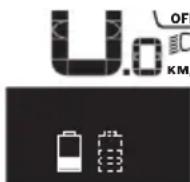
If an eBike has two batteries inserted into it and both batteries are charged on the bike, the charging progress of both batteries will be indicated on the display (the left-hand battery pack is being charged in the illustration). You can also tell by the flashing indicator on the battery which of the two batteries is being charged.
Setting the assistance level
On the operating unit (9), you can set the level of assistance you want the eBike drive to provide you with while pedalling. The assistance level can be changed at any time, even while cycling.
Note: In some models, the assistance level may be preset and cannot be changed. There may also be fewer assistance levels available than stated here.
The following assistance levels are available as a maximum:
- OFF: Motor assistance is switched off. The eBike can only be moved by pedalling, as with a normal bicycle. The walk assistance cannot be activated at this assistance level.
- ECO: Effective assistance with maximum efficiency, for maximum range
- TOUR/TOUR+:
TOUR: Steady assistance, long range for touring
TOUR+: Dynamic assistance for natural, sporty cycling (only in conjunction with eMTB)
- SPORT/eMTB:
SPORT: Powerful assistance, for mountain biking and cycling in urban traffic
eMTB: Optimum assistance whatever the terrain, rapid acceleration when starting from a standstill, improved dynamics and top performance (eMTB only available in combination with the drive units BDU250P CX, BDU365, BDU450 CX and BDU480 CX. A software update may be required.)
- TURBO: Maximum assistance even at a high cadence, for sporty cycling
To increase the assistance level, press the + button (12) on the operating unit repeatedly until the required assistance level appears on indicator (b). To decrease the assistance level, press the - button (11).
The requested motor output is displayed in the indicator (a). The maximum motor output depends on the selected assistance level.
When the on-board computer is removed from the holder (4), the assistance level that was last displayed is saved; the motor output indicator (a) remains empty.
Interaction between the eBike system and gear-shifting
The gear shifting should be used with an eBike drive in the same way as with a normal bicycle (observe the operating instructions of your eBike on this point).
Irrespective of the type of gear shifting, it is advisable that you briefly reduce the pressure on the pedals when changing gear. This will aid gear shifting and reduce wear on the powertrain.
By selecting the correct gear, you can increase your speed and range while applying the same amount of force.
For this reason, follow the gear change recommendations provided by the indicators (g) and (h) on your display. If indicator (g) is displayed, you should change to a higher gear with lower cadence. If indicator (h) is displayed, you should select a lower gear with higher cadence.
Switching bike lights on/off
On the model on which the lighting is powered by the eBike system, the front and rear lights can be switched on and off at the same time via the on-board computer using the bike light button (2).
Check that your bike lights are working correctly before every use.
When the lighting is switched on,
The on-board computer saves the light status and activates this saved status accordingly after a restart.
Switching the bike lights on and off has no effect on the backlighting of the display.
Switching the push assistance on/off
The walk assistance makes it easier to push your eBike. The speed in this function depends on the selected gear and can reach a maximum of 6 km/h.
The push assistance function must only be used when pushing the eBike. There is a risk of injury if the wheels of the eBike are not in contact with the ground while using the push assistance.
To activate the walk assistance, briefly press the WALK button on your on-board computer. Once it is activated, press the + button within 10 s and keep it held down. The eBike drive is now switched on.
Note: The push assistance cannot be activated at assistance level OFF.
The push assistance is switched off as soon as one of the following occurs:
- You release the + button;
- The wheels of the eBike are locked (e.g. by applying the brakes or hitting an obstacle);
- The speed exceeds 6 km/h.
The push assistance function is subject to local regulations; the way it works may therefore differ from the description above, or the function may even be deactivated completely.
Powering external devices via the USB port
The USB port can be used to operate or charge most devices that can be powered via USB (e.g. various mobile phones).
Charging requires the on-board computer to be mounted and a sufficiently charged battery to be inserted in the eBike.
Open the protective cap (8) for the USB port on the onboard computer. Use a Micro-A – Micro-B USB charging cable (available from your Bosch eBike dealer) to connect the USB port on the external device to the USB port (7) on the on-board computer.
Once the electrical load has been disconnected, the USB port must be carefully resealed with the protective cap (8).
▶ USB connections are not waterproof. When cycling in the rain, do not connect any external devices and make sure that the USB port is fully sealed by the protective cover (8).
Important: If electrical loads are connected, this can affect the range of the eBike.
Displays and configurations of the on-board computer
Speed and distance indicators
The speedometer (f) always displays the current speed.
You can choose from the following functions in the function display (combination of text indicator (d) and value indicator (e)):
-
-
-
-
-
-
-
To reset the
To reset the
To reset the
If the on-board computer is removed from the holder (4), all values of the functions are saved and can still be displayed.
Displaying/adjusting basic settings
The basic settings can be displayed and changed regardless of whether the on-board computer is inserted in the holder (4) or not. Some settings can only be viewed and changed when the HMI is inserted. Depending on the equipment of your eBike, some menu items may not be present.
To go to the basic settings menu, simultaneously press the RESET button (6) and the i button (1) until
To switch between the basic settings, press the i button (1) on the on-board computer repeatedly until the required basic setting is displayed. If the on-board computer is inserted in the holder (4), you can also press the i button (10) on the operating unit.
To change the basic settings, press the on/off button (5) next to the - indicator to reduce or scroll down, or the lighting button (2) next to the + indicator to increase or scroll up. If the on-board computer is inserted in the holder (4), it is
also possible to change the settings with the - (11) and
+ (12) buttons on the operating unit.
To exit the function and save a changed setting, press the RESET button (6) for three seconds.
You can choose between the following basic settings:
- <- Clock +>: Setting the current time. The time can be changed faster by pressing the setting buttons for a longer period.
- <- Wheel circum. +>: Changing the value pre-set by the manufacturer by ± 5 %. This menu item is displayed only when the on-board computer is in the holder.
- <- English +>: Changing the language of the text indicator. You can choose between German, English, French, Spanish, Italian, Portuguese, Swedish, Dutch and Danish.
- <- Unit km/mi +>: Displaying the speed and distance in either kilometres or miles.
- <- Time format +>: Displaying the time in 12-hour or 24-hour format.
- <- Shift recom. on +>/< - Shift recom. off +>: Switching the shift recommendation display on or off.
: Total time travelled with the eBike (cannot be changed) : Display software version. : Drive unit software version. This menu item is displayed only when the on-board computer is in the holder. : Drive unit serial number. This menu item is displayed only when the on-board computer is in the holder. : Drive unit part number. This menu item is displayed only when the on-board computer is in the holder and the drive unit provides a part number. -
: This menu item is displayed if the bicycle manufacturer has set a fixed service date. -
: This menu item is displayed if the bicycle manufacturer has set a service date after travelling a certain distance. : Battery software version. This menu item is displayed only when the on-board computer is in the holder. When using two batteries, the software versions of both batteries are displayed successively. : eBike battery part number. This menu item is displayed only when the on-board computer is in the holder and the eBike battery provides a part number. When using two batteries, the software versions of both batteries are displayed successively. : Software version of the charger used to charge the eBike battery. This is displayed only if the charger provides the software version. - If the eBike is equipped with ABS, the software version, serial number and part number of the ABS are also displayed.
Error code indication
The components of the eBike system are continuously and automatically monitored. If an error is detected, the corresponding error code will appear on the text indicator (d).
Press any button on the on-board computer (3) or on the operating unit (9) to return to the standard indication.
The drive may be automatically shut down, depending on the type of error. However, if you wish to continue cycling, you will always be able to do so without assistance from the drive. Before undertaking any other journeys, the eBike should be checked.
▶ Have all repairs performed only by an authorised bike dealer.
Code Cause Corrective measures
| 410 One or more buttons of the on-board computer are disabled. | Check whether any buttons are stuck, e.g. as a result of dirt finding its way in. Clean the buttons if need be. |
| 414 Operating unit connection problem Have the connections checked | |
| 418 One or more buttons on the operating unit are disabled. | Check whether any buttons are stuck, e.g. as a result of dirt finding its way in. Clean the buttons if need be. |
| 419 Configuration error Restart the system. If the problem persists, contact your Bosch eBike dealer. | |
| 422 Drive unit connection problem Have the connections checked | |
| 423 eBike battery connection problem Have the connections checked | |
| 424 Communication problem between components | Have the connections checked |
| 426 Internal time-out error Restart the system. If the problem persists, contact your Bosch eBike dealer. With this error, it is not possible to bring up the wheel circumference in the basic settings menu or to adjust it. | |
| 430 Internal battery of the on-board computer is flat (does not apply to BUI350) | Charge the on-board computer (in the holder or via the USB port) |
| 431 Software version error Restart the system. If the problem persists, contact your Bosch eBike dealer. | |
Code Cause Corrective measures
| 440 Internal drive unit fault Restart the system. If the problem persists, contact your Bosch eBike dealer. | ||
| 450 Internal software error Restart the system. If the problem persists, contact your Bosch eBike dealer. | ||
| 460 Error at USB port Remove the cable from the USB port of the on-board computer. If the problem persists, contact your Bosch eBike dealer. | ||
| 490 Internal fault of the on-board computer Have the on-board computer checked | ||
| 500 Internal drive unit fault Restart the system. If the problem persists, contact your Bosch eBike dealer. | ||
| 502 Bike light fault Check the light and the associated wiring. Restart the system. If the problem persists, contact your Bosch eBike dealer. | ||
| 503 Speed sensor fault Restart the system. If the problem persists, contact your Bosch eBike dealer. | ||
| 504 Speed signal distortion detected. Check that the spoke magnet is positioned correctly, and adjust it if necessary. Check that nothing has been tampered with (tuning). Drive assistance is reduced. | ||
| 510 Internal sensor fault Restart the system. If the problem persists, contact your Bosch eBike dealer. | ||
| 511 Internal drive unit fault Restart the system. If the problem persists, contact your Bosch eBike dealer. | ||
| 530 Battery fault Switch off the eBike, remove the eBike battery and reinsert the eBike battery. Restart the system. If the problem persists, contact your Bosch eBike dealer. | ||
| 531 Configuration error Restart the system. If the problem persists, contact your Bosch eBike dealer. | ||
| 540 Temperature error The eBike is outside of the permissible temperature range. Switch off the eBike system and allow the drive unit to either cool down or heat up to the permissible temperature range. Restart the system. If the problem persists, contact your Bosch eBike dealer. | ||
| 550 An impermissible load has been detected. Remove the load. Restart the system. If the problem persists, contact your Bosch eBike dealer. | ||
| 580 Software version error Restart the system. If the problem persists, contact your Bosch eBike dealer. | ||
| 591 Authentication error Switch off the eBike system. Remove the battery pack and reinsert it. Restart the system. If the problem persists, contact your Bosch eBike dealer. | ||
| 592 Incompatible component Use a compatible display. If the problem persists, contact your Bosch eBike dealer. | ||
| 593 Configuration error Restart the system. If the problem persists, contact your Bosch eBike dealer. | ||
| 595, 596 Communication error | Check the wiring to the drive and restart the system. If the problem persists, contact your Bosch eBike dealer. | |
| 602 Internal battery fault Restart the system. If the problem persists, contact your Bosch eBike dealer. | ||
| 603 Internal battery fault Restart the system. If the problem persists, contact your Bosch eBike dealer. | ||
| 605 Battery temperature error The battery is outside of the permissible temperature range. Switch off the eBike system and allow the battery to either cool down or heat up to the permissible temperature range. Restart the system. If the problem persists, contact your Bosch eBike dealer. | ||
| Code Cause Corrective measures | ||
| 606 External battery fault Check the wiring. Restart the system. If the problem persists, contact your Bosch eBike dealer. | ||
| 610 Battery voltage error Restart the system. If the problem persists, contact your Bosch eBike dealer. | ||
| 620 Charger fault Replace the charger. Contact your Bosch eBike dealer. | ||
| 640 Internal battery fault Restart the system. If the problem persists, contact your Bosch eBike dealer. | ||
| 655 Multiple battery faults Switch off the eBike system. Remove the battery pack and reinsert it. Restart the system. If the problem persists, contact your Bosch eBike dealer. | ||
| 656 Software version error Contact your Bosch eBike dealer so that they can perform a software update. | ||
| 7xx Error relating to third-party components Observe the information in the operating instructions of the respective component manufacturer. | ||
| 800 Internal ABS fault Contact your Bosch eBike dealer. | ||
| 810 Implausible signals from the wheel speed sensor | Contact your Bosch eBike dealer. | |
| 820 Fault in the wire to the front wheel speed sensor | Contact your Bosch eBike dealer. | |
| 821 to 826 Implausible signals from the front wheel speed sensorThe sensor disc may be missing, defective or fitted incorrectly; there is a significant difference in diameter between the front wheel and the rear wheel; extreme riding situation, e.g. riding solely on the rear wheel | Restart the system and carry out a test ride lasting at least two minutes. The ABS indicator light must go out. If the problem persists, contact your Bosch eBike dealer. | |
| 830 Fault in the wire to the rear wheel speed sensor | Contact your Bosch eBike dealer. | |
| 831833 to 835 | Implausible signals from the rear wheel speed sensorThe sensor disc may be missing, defective or fitted incorrectly; there is a significant difference in diameter between the front wheel and the rear wheel; extreme riding situation, e.g. riding solely on the rear wheel | Restart the system and carry out a test ride lasting at least two minutes. The ABS indicator light must go out. If the problem persists, contact your Bosch eBike dealer. |
| 840 Internal ABS fault Contact your Bosch eBike dealer. | ||
| 850 Internal ABS fault Contact your Bosch eBike dealer. | ||
| 860, 861 Fault in the power supply Restart the system. If the problem persists, contact your Bosch eBike dealer. | ||
| 870, 871880883 to 885 | Communication error Restart the system. If the problem persists, contact your Bosch eBike dealer. | |
| 889 Internal ABS fault Contact your Bosch eBike dealer. | ||
| 890 ABS indicator light is defective or missing;ABS may not be working. | Contact your Bosch eBike dealer. | |
| No display | Internal fault of the on-board computer Restart your eBike system by switching it off and back on. | |
Maintenance and servicing
Maintenance and cleaning
Do not immerse any components, including the drive unit, in water or clean them with pressurised water.
Clean your on-board computer using a soft cloth dampened only with water. Do not use any detergents.
Have your eBike system checked by an expert at least once a year (including mechanical parts, up-to-dateness of system software).
The bicycle manufacturer or dealer may also base the service date on the distance travelled and/or a period of time. In this case, the on-board computer displays a message telling you when the service date is due for 4 seconds each time it is switched on.
Please have your eBike serviced and repaired by an authorised bicycle dealer.
▶ Have all repairs performed only by an authorised bike dealer.
After-sales service and advice on using products
If you have any questions about the eBike system and its components, contact an authorised bicycle dealer.
For contact details of authorised bike dealerships, please visit www.bosch-ebike.com.
Transport
If you transport your eBike attached to the outside of your car, e.g. on a bike rack, remove the on-board computer and the eBike battery to avoid damaging them.
Disposal

The drive unit, on-board computer incl. operating unit, battery, speed sensor, accessories and packaging should be disposed of in an environmentally correct manner.
Check that your personal data has been deleted from the device.
Do not dispose of eBikes and their components with household waste.
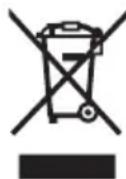
In accordance with Directive 2012/19/EU and Directive 2006/66/EC respectively, electronic devices that are no longer usable and defective/drained batteries must be collected separately and recycled in an environmentally friendly manner.
Please return Bosch eBike components that are no longer usable free of charge to an authorised bicycle dealer or to a recycling facility.
Subject to change without notice.
Sicherheitshinweise

(6) Reset-toets RESET
(7) USB-bus
(8) Beschermkapje van USB-bus
(9) Bedieningseenheid
natural_image
Illustration of a walking-style hand-worn shaver with digital display and cable (no text or symbols)en Original operating instructions
Read all the safety information and instructions. Failure to observe the safety information and follow instructions may result in electric shock, fire and/or serious injury.
Save all safety warnings and instructions for future reference.
The term battery is used in these instructions to mean all original Bosch eBike rechargeable battery packs.
Read and observe the safety warnings and directions contained in all the eBike system operating instructions and in the operating instructions of your eBike.
▶ Do not allow yourself to be distracted by the on-board computer's display. If you do not focus exclusively on the traffic, you risk being involved in an accident. If you want to make entries in your on-board computer other than switching the assistance level, stop and enter the appropriate data.
▶ Set the display brightness so that you can adequately see important information such as speed and warning symbols. Incorrectly set display brightness may lead to dangerous situations.
When using the walk assistance, make sure that you can control the eBike and that you can hold it securely at all times. Under certain circumstances, the walk assistance may stop (e.g. if the pedals hit an obstacle or if you accidentally let go of the button on the operating unit). The eBike may suddenly move backwards onto you or tip up. This presents a risk for the user particularly if there is additional load on the eBike. When using the walk assistance, do not bring the eBike into situations in which you cannot hold the eBike using your own strength.
Risk of chemical acid burns! Keep coin cells away from children. This product contains a lithium coin cell. If someone swallows a new or used lithium coin cell or one enters the body, this can lead to serious internal burns and can be fatal within two hours.
▶ Always fully close the battery compartment. If the battery compartment cannot be closed securely, do not continue to use the product and remove the coin cell.
▶ Keep coin cells away from children. If you suspect that someone has swallowed a coin cell or that a coin cell has entered the body in another way, seek medical attention immediately.
▶ Dispose of coin cells properly. Used coin cells can also lead to injury.
Product description and specifications
Intended use
The Purion on-board computer is designed to control Bosch eBike systems and display cycling data.
In addition to the functions shown here, changes to software relating to troubleshooting and functional modifications may be introduced at any time.
Product features
The numbering of the components shown refers to the illustrations on the graphics pages at the beginning of the manual.
Individual illustrations in these operating instructions may differ slightly from the actual conditions depending on the equipment of your eBike.
(1) On/off button for on-board computer
(2) Walk assistance button WALK ^a)
(3) Fastening screw for on-board computer
(4) Holder for on-board computer
(5) Decrease assistance level button -
(6) Increase assistance level button +
(7) Display
(8) Protective cap for the USB port
(9) USB diagnostic port (for servicing purposes only)
(10) Battery compartment cover
a) Not available in all countries
Display elements of on-board computer
(a) Speedometer
(b) km/h unit indicator
(c) mph unit indicator
(d) Total distance indicator TOTAL
(e) Range indicator RANGE
(f) Service indicator
(g) Battery charge indicator
(h) Illumination indicator
(i) Assistance level indicator/value indicator
(j) Trip distance indicator TRIP
Technical data
| On-board computer Purion | |
| Product code BUI215 | |
| Battery A) | 2 × 3 V CR2016 |
| Operating temperature °C -5 to +40 | |
| Storage temperature °C +10 to +40 | |
| Protection rating B) | IP54 (dust and splash-proof) |
| Weight, approx. kg 0.1 | |
A) We recommend using the batteries offered by Bosch. You can purchase them from your bicycle dealer (article number: 1 270 016 819).
B) When the USB cover is closed The Bosch eBike system uses FreeRTOS (see http://www.freertos.org).

Operation
Symbols and their Meaning
| Symbol Explanation | |
| Short button press (less than 1 second) | |
| Medium button press (between 1 second and 2.5 seconds) | |
| Long button press (longer than 2.5 seconds) | |
Start-up
Prerequisites
The eBike system can only be activated when the following requirements are met:
- A sufficiently charged battery is inserted (see battery operating instructions).
- The speed sensor is connected properly (see drive unit operating instructions).
Switching the eBike system on/off
The following options are available for switching on the eBike system:
- Press the on/off button (1) of the on-board computer with the eBike battery inserted.
- Press the on/off button of the eBike battery (see battery operating instructions).
The drive is activated as soon as you start pedalling (except if you are using the walk assistance function or if the assistance level is set to OFF). The motor output adjusts to the assistance level set.
As soon as you stop pedalling when in normal operation, or as soon as you have reached a speed of 25/45 km/h, the eBike drive switches off the assistance. The drive is automatically reactivated as soon you start pedalling again and the speed is below 25/45 km/h.
The following options are available for switching off the eBike system:
- Press the on/off button (1) of the on-board computer.
- Switch off the eBike battery using its on/off button (bicycle manufacturer-specific solutions are possible when there is no access to the battery on/off button; see the bicycle manufacturer operating instructions).
The system shuts down after being switched off. This takes approximately 3 seconds. It cannot be switched back on until shutdown has been completed.
If the eBike is not moved for approx. 10 min and no button is pressed on the on-board computer, the eBike system switches off automatically in order to save energy.
Note: Always switch off the eBike system when you park the eBike.
Note: If the batteries of the on-board computer are empty, you can still switch on your eBike using the bike's battery. It is, however, recommended that you replace the internal batteries as soon as possible in order to avoid damage.
Energy supply of the on-board computer
The on-board computer is supplied with voltage by two CR2016 button cells.
Changing the batteries (see figure A)
If the on-board computer shows LOW BAT on the display, remove the on-board computer from the handlebars by unscrewing the fastening screw (3) of the on-board computer. Open the battery compartment cover (10) using a suitable coin, remove the used batteries and insert new CR2016 batteries. You can obtain the batteries recommended by Bosch from your bicycle dealer.
When inserting the batteries, ensure that the polarity is correct.
Close the battery compartment again and fasten the on-board computer to your eBike's handlebars using the fastening screw (3).
Switching the push assistance on/off
The walk assistance makes it easier to push your eBike. The speed in this function depends on the selected gear and can reach a maximum of 6 km/h.
The push assistance function must only be used when pushing the eBike. There is a risk of injury if the wheels of the eBike are not in contact with the ground while using the push assistance.
To activate the walk assistance, briefly press the WALK button on your on-board computer. Once it is activated, press the + button within 10 s and keep it held down. The eBike drive is now switched on.
Note: The push assistance cannot be activated at assistance level OFF.
The push assistance is switched off as soon as one of the following occurs:
- You release the + button;
- The wheels of the eBike are locked (e.g. by applying the brakes or hitting an obstacle);
- The speed exceeds 6 km/h.
The push assistance function is subject to local regulations; the way it works may therefore differ from the description above, or the function may even be deactivated completely.
Setting the assistance level
You can set the level at which the eBike drive assists you while pedalling on the on-board computer. The assistance level can be changed at any time, even while cycling.
Note: In some models, the assistance level may be preset and cannot be changed. There may also be fewer assistance levels available than stated here.
The following assistance levels are available as a maximum:
- OFF: Motor assistance is switched off. The eBike can only be moved by pedalling, as with a normal bicycle. The walk assistance cannot be activated at this assistance level.
- ECO: Effective assistance with maximum efficiency, for maximum range
- TOUR/TOUR+:
TOUR: Steady assistance, long range for touring
TOUR+: Dynamic assistance for natural, sporty cycling (only in conjunction with eMTB)
- SPORT/eMTB:
SPORT: Powerful assistance, for mountain biking and cycling in urban traffic
eMTB: Optimum assistance whatever the terrain, rapid acceleration when starting from a standstill, improved dynamics and top performance (eMTB only available in combination with the drive units BDU250P CX, BDU365, BDU450 CX and BDU480 CX. A software update may be required.)
- TURBO: Maximum assistance even at a high cadence, for sporty cycling
To increase the assistance level, briefly press the button + (6) on the on-board computer repeatedly until the required assistance level appears on the indicator (i). To decrease the assistance level briefly press the button - (5).
If the display is set to TRIP, TOTAL or RANGE, the selected assistance level will only be superimposed briefly (for approx. one second) on the display when switching over.
Switching bicycle lights on/off
On the model in which the bike lights are powered by the eBike system, pressing ⚙ the button + for a medium length of time will switch on the front and rear lights simultaneously. Pressing the ⚙ button + for a medium length of time will switch the lights off again.
The lighting symbol (h) is displayed when the light is on.
Check that your bike lights are working correctly before every use.
The on-board computer saves the light status and activates this saved status accordingly after a restart.
Switching the bike lights on and off has no effect on the backlighting of the display.
Displays and configurations of the on-board computer
Battery charge indicator
The battery charge indicator (g) displays the eBike battery's state of charge. The state of charge of the eBike battery can also be checked on the LEDs of the battery itself.
In the indicator (g), each bar in the battery symbol represents approximately 20 % capacity:

The eBike battery is fully charged.

The eBike battery should be recharged.

The LEDs of the battery charge indicator on the battery go out. The capacity for assisting the drive has been used up, and assistance is gently switched off. The remaining capacity is made available for the lighting. The indicator flashes.
The capacity of the eBike battery is enough for about two hours of lighting.
If an eBike is powered by two batteries, the battery charge indicator (g) displays the state of charge of both batteries.
Speed and distance indicators
The speedometer (a) always displays the current speed.
The display (i) always shows the last setting as standard. Repeated medium-length presses ⚙ of the button – will display the trip distance TRIP, the total distance TOTAL and the range of the battery RANGE one after the other. (Briefly pressing ⚙ the button – will decrease the assistance level.)
To reset the trip distance TRIP, select the trip distance TRIP and simultaneously press and hold ⏻ the buttons + and - . The display will initially show RESET. If you continue to press both buttons, the trip distance TRIP will be set to 0.
To reset the range of the battery RANGE, select the battery range RANGE and simultaneously press and hold ⏻ the buttons + and −. The display will initially show RESET. If you continue to press both buttons, the range RANGE will be reset to the value in the factory settings.
You can switch the displayed values from kilometres to miles by holding down the button - ⏻ and briefly pressing the on/off button (1).
The versions of the subsystems and their model part numbers can be displayed for the purposes of servicing, provided the subsystems divulge this information (dependent on the subsystem). With the system switched off, simultaneously press the buttons - and + and then press the on/off button (1).
The USB port is reserved for connecting diagnostic systems. The USB port does not have any other function.
The USB connection must always be completely sealed with the protective cap (8).
| Action Buttons Duration | ||
| Switch on on-board computer | ♦ | |
| Switch off on-board computer | ♦ | |
| Increase assistance | + | ♦ |
| Decrease assistance | - | ♦ |
| Display TRIP, TOTAL, RANGE,assistance modes | - | ♦ |
| Switch on bike lights | + | ♦ |
| Switch off bike lights | + | ♦ |
| Reset trip distance | - + | ♦ |
| Activate push assistanceImplement push assistance | WALK+ | 1. ♦ 2. Any |
| Switch from kilometres to miles | - | 1. Keeppressed2. ♦ |
| Display the versions ^A)B) | - + | 1. Keeppressed2. ♦ |
| Adjust display brightness ^A) | - + - or + | 1. Keeppressed2. ♦ |
A) The eBike system must be switched off.
B) The information is shown as scrolling text.
Error code display
The eBike system's components are continuously and automatically monitored. If an error is detected, the corresponding error code is displayed on the on-board computer.
The drive may be automatically shut down, depending on the type of error. However, if you wish to continue cycling, you
will always be able to do so without assistance from the drive. Before undertaking any other journeys, the eBike should be checked.
▶ Have all repairs performed only by an authorised bike dealer.
| Code Cause Corrective measures | |
| 410 One or more buttons of the on-board computer are disabled. | Check whether any buttons are stuck, e.g. as a result of dirt finding its way in. Clean the buttons if need be. |
| 414 Operating unit connection problem Have the connections checked | |
| 418 One or more buttons on the operating unit are disabled. | Check whether any buttons are stuck, e.g. as a result of dirt finding its way in. Clean the buttons if need be. |
| 419 Configuration error Restart the system. If the problem persists, contact your Bosch eBike dealer. | |
| 422 Drive unit connection problem Have the connections checked | |
| 423 eBike battery connection problem Have the connections checked | |
| 424 Communication problem between components | Have the connections checked |
| 426 Internal time-out error Restart the system. If the problem persists, contact your Bosch eBike dealer. With this error, it is not possible to bring up the wheel circumference in the basic settings menu or to adjust it. | |
| 430 Internal battery of the on-board computer is flat (does not apply to BUI350) | Charge the on-board computer (in the holder or via the USB port) |
| 431 Software version error Restart the system. If the problem persists, contact your Bosch eBike dealer. | |
| 440 Internal drive unit fault Restart the system. If the problem persists, contact your Bosch eBike dealer. | |
| 450 Internal software error Restart the system. If the problem persists, contact your Bosch eBike dealer. | |
| 460 Error at USB port Remove the cable from the USB port of the on-board computer. If the problem persists, contact your Bosch eBike dealer. | |
| 490 Internal fault of the on-board computer Have the on-board computer checked | |
| 500 Internal drive unit fault Restart the system. If the problem persists, contact your Bosch eBike dealer. | |
| 502 Bike light fault Check the light and the associated wiring. Restart the system. If the problem persists, contact your Bosch eBike dealer. | |
| 503 Speed sensor fault Restart the system. If the problem persists, contact your Bosch eBike dealer. | |
| 504 Speed signal distortion detected. Check that the spoke magnet is positioned correctly, and adjust it if necessary. Check that nothing has been tampered with (tuning). Drive assistance is reduced. | |
| 510 Internal sensor fault | Restart the system. If the problem persists, contact your Bosch eBike dealer. |
| 511 Internal drive unit fault Restart the system. If the problem persists, contact your Bosch eBike dealer. | |
| 530 Battery fault | Switch off the eBike, remove the eBike battery and reinsert the eBike battery. Restart the system. If the problem persists, contact your Bosch eBike dealer. |
| 531 Configuration error Restart the system. If the problem persists, contact your Bosch eBike dealer. | |
Code Cause Corrective measures
| 540 Temperature error The eBike is outside of the permissible temperature range. Switch off the eBike system and allow the drive unit to either cool down or heat up to the permissible temperature range. Restart the system. If the problem persists, contact your Bosch eBike dealer. | ||
| 550 An impermissible load has been detected. Remove the load. Restart the system. If the problem persists, contact your Bosch eBike dealer. | ||
| 580 Software version error Restart the system. If the problem persists, contact your Bosch eBike dealer. | ||
| 591 Authentication error Switch off the eBike system. Remove the battery pack and reinsert it. Restart the system. If the problem persists, contact your Bosch eBike dealer. | ||
| 592 Incompatible component Use a compatible display. If the problem persists, contact your Bosch eBike dealer. | ||
| 593 Configuration error Restart the system. If the problem persists, contact your Bosch eBike dealer. | ||
| 595, 596 Communication error Check the wiring to the drive and restart the system. If the problem persists, contact your Bosch eBike dealer. | ||
| 602 Internal battery fault Restart the system. If the problem persists, contact your Bosch eBike dealer. | ||
| 603 Internal battery fault Restart the system. If the problem persists, contact your Bosch eBike dealer. | ||
| 605 Battery temperature error The battery is outside of the permissible temperature range. Switch off the eBike system and allow the battery to either cool down or heat up to the permissible temperature range. Restart the system. If the problem persists, contact your Bosch eBike dealer. | ||
| 606 External battery fault Check the wiring. Restart the system. If the problem persists, contact your Bosch eBike dealer. | ||
| 610 Battery voltage error Restart the system. If the problem persists, contact your Bosch eBike dealer. | ||
| 620 Charger fault Replace the charger. Contact your Bosch eBike dealer. | ||
| 640 Internal battery fault Restart the system. If the problem persists, contact your Bosch eBike dealer. | ||
| 655 Multiple battery faults | Switch off the eBike system. Remove the battery pack and reinsert it. Restart the system. If the problem persists, contact your Bosch eBike dealer. | |
| 656 Software version error Contact your Bosch eBike dealer so that they can perform a software update. | ||
| 7xx | Error relating to third-party components | Observe the information in the operating instructions of the respective component manufacturer. |
| 800 Internal ABS fault | Contact your Bosch eBike dealer. | |
| 810 Implausible signals from the wheel speed sensor | Contact your Bosch eBike dealer. | |
| 820 Fault in the wire to the front wheel speed sensor | Contact your Bosch eBike dealer. | |
| 821 to 826 | Implausible signals from the front wheel speed sensorThe sensor disc may be missing, defective or fitted incorrectly; there is a significant difference in diameter between the front wheel and the rear wheel; extreme riding | Restart the system and carry out a test ride lasting at least two minutes. The ABS indicator light must go out. If the problem persists, contact your Bosch eBike dealer. |
| Code Cause Corrective measures | ||
| situation, e.g. riding solely on the rear wheel | ||
| 830 Fault in the wire to the rear wheel speed sensor | Contact your Bosch eBike dealer. | |
| 831833 to 835 | Implausible signals from the rear wheel speed sensorThe sensor disc may be missing, defective or fitted incorrectly; there is a significant difference in diameter between the front wheel and the rear wheel; extreme riding situation, e.g. riding solely on the rear wheel | Restart the system and carry out a test ride lasting at least two minutes. The ABS indicator light must go out. If the problem persists, contact your Bosch eBike dealer. |
| 840 Internal ABS fault Contact your Bosch eBike dealer. | ||
| 850 Internal ABS fault Contact your Bosch eBike dealer. | ||
| 860, 861 Fault in the power supply Restart the system. If the problem persists, contact your Bosch eBike dealer. | ||
| 870, 871880883 to 885 | Communication error Restart the system. If the problem persists, contact your Bosch eBike dealer. | |
| 889 Internal ABS fault Contact your Bosch eBike dealer. | ||
| 890 ABS indicator light is defective or missing;ABS may not be working. | Contact your Bosch eBike dealer. | |
| No display | Internal fault of the on-board computer Restart your eBike system by switching it off and back on. | |
Maintenance and servicing
Maintenance and cleaning
Do not immerse any components, including the drive unit, in water or clean them with pressurised water.
Clean your on-board computer using a soft cloth dampened only with water. Do not use any detergents.
Have your eBike system checked by an expert at least once a year (including mechanical parts, up-to-dateness of system software).
The bicycle manufacturer or dealer can also store a distance travelled for the service date in the system. In this case, the on-board computer will show you that the service date is due by displaying (f) ✝.
Please have your eBike serviced and repaired by an authorised bicycle dealer.
After-sales service and advice on using products
If you have any questions about the eBike system and its components, contact an authorised bicycle dealer.
For contact details of authorised bike dealerships, please visit www.bosch-ebike.com.
Disposal

The drive unit, on-board computer incl. operating unit, battery, speed sensor, accessories and packaging should be disposed of in an environmentally correct manner.
Check that your personal data has been deleted from the device.
Do not dispose of eBikes and their components with household waste.
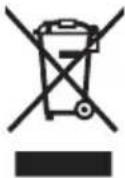
In accordance with Directive 2012/19/EU and Directive 2006/66/EC respectively, electronic devices that are no longer usable and defective/drained batteries must be collected separately and recycled in an environmentally friendly manner.
Please return Bosch eBike components that are no longer usable free of charge to an authorised bicycle dealer or to a recycling facility.
Subject to change without notice.
Sicherheitshinweise

natural_image
Two black automotive control switches with visible buttons and dials, one with a plus button and the other with a brand logo (no text or symbols on the main components)en Original operating instructions
Safety instructions

Read all the safety information and instructions. Failure to observe the safety information and follow instructions may result in electric shock, fire and/or serious injury.
Save all safety warnings and instructions for future reference.
The term battery is used in these instructions to mean all original Bosch eBike rechargeable battery packs.
Read and observe the safety warnings and directions contained in all the eBike system operating instructions and in the operating instructions of your eBike.
▶ Do not allow yourself to be distracted by the on-board computer's display. If you do not focus exclusively on the traffic, you risk being involved in an accident. If you want to make entries in your on-board computer other than switching the assistance level, stop and enter the appropriate data.
▶ Set the display brightness so that you can adequately see important information such as speed and warning symbols. Incorrectly set display brightness may lead to dangerous situations.
▶ Do not open the on-board computer. Opening the on-board computer may damage it beyond repair and void any warranty claims.
▶ Do not use the on-board computer as a handle. Lifting the eBike up by the on-board computer can cause irreparable damage to the on-board computer.
The push assistance function must only be used when pushing the eBike. There is a risk of injury if the wheels of the eBike are not in contact with the ground while using the push assistance.
▶ When the push assistance is activated, the pedals may turn at the same time. When the push assistance function is activated, make sure that there is enough space between your legs and the turning pedals to avoid the risk of injury.
When using the walk assistance, make sure that you can control the eBike and that you can hold it securely at all times. Under certain circumstances, the walk assistance may stop (e.g. if the pedals hit an obstacle or if you accidentally let go of the button on the operating unit). The eBike may suddenly move backwards onto you or tip up. This presents a risk for the user particularly if there is additional load on the eBike. When using the walk assistance, do not bring the eBike into situations in which you cannot hold the eBike using your own strength.
Do not stand your bicycle upside down on its saddle and handlebars if the on-board computer or its holder protrude from the handlebars. This may irreparably damage the on-board computer or the holder. Also remove the on-board computer before placing the bicycle on a wall mount to ensure that the on-board computer does not fall off or become damaged.
▶ Caution! When using the operating unit with Bluetooth ^® , this may cause interference that affects other devices and systems, aeroplanes and medical devices (e.g. pacemakers, hearing aids). Likewise, injury to people and animals in the immediate vicinity cannot be excluded entirely. Do not use the operating unit with Bluetooth ^® in the vicinity of medical devices, petrol stations, chemical plants, areas with a potentially explosive atmosphere or on blast sites. Do not use the operating unit with Bluetooth ^® in aeroplanes. Avoid operation near your body for extended periods.
The Bluetooth® word mark and logos are registered trademarks owned by Bluetooth SIG, Inc. and any use of such marks by Bosch eBike Systems is under licence.
The on-board computer is equipped with a wireless interface. Local operating restrictions, e.g. in aeroplanes or hospitals, must be observed.
Safety information relating to the navigation system
▶ Do not plan your routes whilst you are cycling. Stop and wait until you are stationary before entering a new destination. If you do not focus exclusively on the traffic, you risk being involved in an accident.
▶ Abandon your route if the navigation system suggests a path or road that is too ambitious, risky or dangerous for you based on your cycling ability. Have your navigation system propose an alternative route.
▶ Do not ignore any road signs, even if the navigation system tells you to take a specific route. The navigation system cannot take roadworks or temporary diversions into account.
▶ Do not use the navigation system in situations that are safety-critical or unclear (road closures, diversions, etc.). Always carry extra maps and means of communication with you.
Privacy notice
If the on-board computer is sent to Bosch Service because it requires servicing, the data stored on the on-board computer may be transmitted to Bosch.
Product description and specifications
Intended use
The Kiox on-board computer is designed to control Bosch eBike systems and display riding data.
To access the full functionality of the Kiox on-board computer, you will need a compatible smartphone installed with the eBike Connect app (available from the App Store or Google Play Store) and a registration with the eBike Connect portal (www.ebike-connect.com).
Product features
The numbering of the components shown refers to the illustrations on the graphics pages at the beginning of the manual.
(1) On-board computer
(2) Display
(3) Bike light button
(4) On/off button for on-board computer
(5) Holder for on-board computer
(6) USB port
(7) Operating unit
(8) Next/right page button >
(9) Select button
(10) Previous/left page button <
(11) Decrease assistance level button -/ Scroll down button
(12) Increase assistance level button +/ Scroll up button
(13) Push assistance button
(14) Drive unit contacts
(15) Locking screw for on-board computer
(16) Headset screw
(17) Protective cover for USB port ^4
(18) Magnetic holder
(19) Holder for operating unit
a) Available as spare part
Technical data
| On-board computer Kiox | ||
| Product code BUI330 | ||
| Max. charging current of USB port ^A) | mA | 1000 |
| USB port charging voltage V 5 | ||
| USB charging cable ^B) | 1 270 016 360 | |
| Operating temperature °C -5 to +40 | ||
| Charging temperature °C 0 to +40 | ||
| Storage temperature °C +10 to +40 | ||
| Internal lithium-ion battery V | mAh | 3.7 |
| 230 | ||
| Protection rating ^C) | IP x7 | |
| Weight, approx. g 60 | ||
| Bluetooth® Low Energy | ||
| – Frequency | MHz | 2400–2480 |
| – Transmission power | mW < 10 | |
A) At an ambient temperature of <25^
B) Not included as part of standard delivery
C) When the USB cover is closed
Declaration of Conformity
Robert Bosch GmbH, Bosch eBike Systems, hereby declares that the Kiox radio communication unit complies with Directive 2014/53/EU. The full text of the EU Declaration of Conformity is available to view at the following website: https://www.ebike-connect.com/conformity.
Robert Bosch GmbH, Bosch eBike Systems, hereby declares that the Kiox radio communication unit complies with the Radio Equipment Regulations 2017 (SI 2917/1206). The full text of the UK Declaration of Conformity can be accessed at the following Internet address:
https://www.ebike-connect.com/conformity.

Fitting
Fitting and removing the on-board computer (see figure A)
Fit the lower part of the Kiox into the holder (5) first and tilt it forward gently until you can feel that the on-board computer is firmly fixed in the magnetic holder.
To remove the on-board computer, hold it by the top end and pull it towards you until it disengages from the magnetic holder.
▶ Remove the on-board computer when you park the eBike.
The on-board computer can be secured in place to prevent it from being removed from the holder. To do this, loosen the headset screw (16) until the Kiox holder can be swivelled sideways. Put the on-board computer in the holder. Screw the locking screw (M3 thread, 6 mm long) from below into the thread provided in the on-board computer (using a longer screw may damage the on-board computer). Swivel the holder back into place and tighten the headset screw in accordance with the manufacturer's specifications.
Operation
Before initial commissioning
The Kiox is supplied with a partially charged battery. Before using it for the first time, this battery must be charged for at least one hour via the USB port (see "Power supply of the onboard computer", page English – 3) or via the eBike system.
The control unit should be attached such that the buttons are almost perpendicular to the handlebars.
When using the on-board computer for the first time, the language selection page is displayed initially. You can then choose to have essential functions and indications explained via the
Switching the on-board computer on/off
To switch on and switch off the on-board computer, briefly press the on/off button (4).
Selecting system settings
Fit the on-board computer in the holder and proceed as follows with the bicycle stationary:
Go to the status page (use the < button (10) on the control unit to get to the first display) and call up the (9)
You can use the - (11) and + (12) buttons to select the setting you want. You can open the settings, as well as any additional submenus, using the select button (9). You can use the < button (10) to go back to the previous menu from any settings menu.
The following settings can be changed in the
- <24h format>
Starting up the eBike system
Requirements
The eBike system can only be activated when the following requirements are met:
- A sufficiently charged eBike battery is inserted (see operating instructions for the battery).
- The on-board computer is properly fitted to the holder.
Switching the eBike system on/off
The following options are available for switching on the eBike system:
- Once the on-board computer and the eBike battery are fitted, briefly press the on/off button (4) on the on-board computer.
- With the on-board computer inserted, push the on/off button on the eBike battery (bicycle manufacturer-specific solutions are possible when there is no access to the battery on/off button; see the battery operating instructions).
The drive is activated as soon as you start pedalling (except if you are using the walk assistance function or if the assistance level is set to OFF). The motor output adjusts to the assistance level set.
As soon as you stop pedalling when in normal operation, or as soon as you have reached a speed of 25/45 km/h, the eBike drive switches off the assistance. The drive is automatically reactivated as soon you start pedalling again and the speed is below 25/45 km/h.
The following options are available for switching off the eBike system:
- Briefly press the on/off button (4) of the on-board computer.
- Switch off the eBike battery using its on/off button (bicycle manufacturer-specific solutions are possible when there is no access to the battery on/off button; see the bicycle manufacturer operating instructions).
- Remove the on-board computer from its holder. If no power is drawn from the eBike drive for about 10 minutes (e.g. because the eBike is not moving) and no button is pressed on the on-board computer or the control unit of the eBike, the eBike system will switch off automatically.
Power supply of the on-board computer
If the on-board computer is in the holder (5), a sufficiently charged eBike battery is inserted into the eBike and the
eBike system is switched on, then the on-board computer battery is powered and charged by the eBike battery.
If the on-board computer is removed from the holder (5), the power is supplied by the on-board computer battery. If the on-board computer battery's charge is running low, a warning message appears on the display.
To charge the on-board computer battery, slide the on-board computer back onto the holder (5). Note that if you do not charge the eBike battery straight away, the eBike system will automatically switch off after 10 minutes of inactivity. If this happens, the on-board computer battery will also stop charging.
You can also charge the on-board computer via the USB port (6). To do this, open the protective cap (17). Use a Micro USB cable to connect the USB port on the on-board computer to a commercially available USB charger (not included with the product as standard) or to the USB port of a computer (max. 5 V charging voltage; max. 1000 mA charging current).
If the on-board computer is removed from the holder (5), all values for the functions are saved and can still be scrolled through.
After use, the USB port must be carefully resealed with the protective cap (17).
If the Kiox battery is not recharged, the date and time will be retained for up to 6 months. When the on-board computer is switched on again, the date and time will be reset if a Bluetooth® connection to the app has been established and the smartphone has successfully identified the current location via GPS.
Note: The Kiox only charges while it is switched on.
Note: If the Kiox is switched off during charging via a USB cable, the Kiox can only be switched on again once the USB cable has been disconnected.
Note: To maximise the lifespan of the on-board computer's battery, it should be recharged for one hour every three months.
Battery Charge Indicator
The battery charge indicator of the eBike battery d (see "Start page", page English – 7) can be read on the status page and in the status bar. The eBike battery's state of charge is also indicated by the LEDs on the eBike battery itself.
Colour of the indicator Meaning
| Green The eBike battery is over | |
| 30 % charged. | |
| Orange The eBike battery is between | |
| 15 % and 30 % charged. | |
| Red The eBike battery is between | |
| 0 % and 15 % charged. | |
| Red + ! | The capacity for assisting the drive has been used up, and assistance is switched off.The remaining capacity will be provided for the bike |
Colour of the indicator Meaning
| lights and the on-board computer. |
If the eBike battery is being charged on the bike, a corresponding notification will be displayed.
If the on-board computer is removed from the holder (5), the state of charge that was last displayed for the eBike battery is saved.
Storage mode/resetting the Kiox
The on-board computer has an energy-saving storage mode which minimises the rate at which the internal battery discharges. Setting to this mode erases the date and time.
This mode can only be activated by pressing and holding the on/off button (4) of the on-board computer for at least 8 seconds.
If the on-board computer does not start when the on/off button (4) is pressed briefly, the on-board computer is in storage mode.
You can deactivate storage mode by pressing the on/off button (4) for at least 2 seconds.
The on-board computer detects whether it is in a fully functional condition. If you press and hold the on/off button (4) for at least 8 seconds while in a fully functional condition, the on-board computer will go into storage mode. If, contrary to expectations, the Kiox is not in a fully functional condition and cannot be operated, pressing and holding the on/off button (4) (for at least 8 seconds) will reset it. After being reset, the on-board computer will restart automatically after approx. 5 seconds. If the Kiox does not restart, press the on/off button (4) for 2 seconds.
To reset the Kiox to its factory settings, select
Setting the assistance level
On the operating unit (7), you can set the level of assistance you want the eBike drive to provide you with while pedalling. The assistance level can be changed at any time, even while cycling.
Note: In some models, the assistance level may be preset and cannot be changed. There may also be fewer assistance levels available than stated here.
The following assistance levels are available as a maximum:
- OFF: Motor assistance is switched off. The eBike can only be moved by pedalling, as with a normal bicycle. The walk assistance cannot be activated at this assistance level.
- ECO: Effective assistance with maximum efficiency, for maximum range
- TOUR/TOUR+:
TOUR: Steady assistance, long range for touring
TOUR+: Dynamic assistance for natural, sporty cycling (only in conjunction with eMTB)
- SPORT/eMTB:
SPORT: Powerful assistance, for mountain biking and cycling in urban traffic
eMTB: Optimum assistance whatever the terrain, rapid acceleration when starting from a standstill, improved dynamics and top performance (eMTB only available in combination with the drive units BDU250P CX, BDU365, BDU450 CX and BDU480 CX. A software update may be required.)
- TURBO: Maximum assistance even at a high cadence, for sporty cycling
To increase the assistance level, press the + (12) button on the operating unit repeatedly until the desired assistance level appears on the display. To decrease the assistance level, press the - (11) button.
The requested motor output appears on the display h (see "Start page", page English – 7). The maximum motor output depends on the selected assistance level.
If the on-board computer is removed from the holder (5), the assistance level that was last displayed is saved.
Switching the push assistance on/off
The walk assistance makes it easier to push your eBike. The speed in this function depends on the selected gear and can reach a maximum of 6 km/h.
The push assistance function must only be used when pushing the eBike. There is a risk of injury if the wheels of the eBike are not in contact with the ground while using the push assistance.
To activate the walk assistance, briefly press the WALK button on your on-board computer. Once it is activated, press the + button within 10 s and keep it held down. The eBike drive is now switched on.
Note: The push assistance cannot be activated at assistance level OFF.
The push assistance is switched off as soon as one of the following occurs:
- You release the + button;
- The wheels of the eBike are locked (e.g. by applying the brakes or hitting an obstacle);
- The speed exceeds 6 km/h.
The push assistance function is subject to local regulations; the way it works may therefore differ from the description above, or the function may even be deactivated completely.
Switching bicycle lights on/off
On the model on which the lighting is powered by the eBike system, the front and rear lights can be switched on and off at the same time via the on-board computer using the bike light button (3).
Check that your bike lights are working correctly before every use.
With the light switched on, the lighting c indicator (see "Start page", page English - 7) appears in the status bar on the display.
Switching the bike lights on and off has no effect on the backlighting of the display.
Creating a user ID
To be able to use all functions of the on-board computer, you must register online.
With a user ID, you can analyse your ride data, plan offline routes and transfer these routes to the on-board computer.
You can set up a user ID via your Bosch eBike Connect smartphone app or simply at www.ebike-connect.com. Enter the details required for registration. The Bosch eBike
Connect smartphone app is available to download free of charge from the App Store (for Apple iPhones) or from the Google Play Store (for Android devices).
Connecting to the On-Board Computer using the Bosch eBike Connect App
Follow these steps to establish a connection to your smartphone:
- Load the app.
- Select the tab
- Select
- Add Kiox.
The app will then display an instruction to press and hold the bike lighting button (3) on the on-board computer for 5 seconds.
Press and hold the button (3) for at least 5 seconds. The onboard computer automatically activates the Bluetooth® Low Energy connection and switches to pairing mode.
Follow the instructions on the screen. Once pairing is complete, the user data is synchronised.
Note: The Bluetooth ^® connection does not have to be activated manually.
Navigation
The navigation function from Kiox assists you when exploring unfamiliar areas. You can start navigation on your smartphone. The on-board computer is connected to your smartphone via Bluetooth® and shows the planned tour, indicating the route as a line on the display.
Activity tracking
In order to record activities, you must be registered with and logged into the eBike Connect portal or the eBike Connect app.
To record activities, you must consent to the storage of your location data in the portal and/or in the app. Without this, your activities will not be shown in the portal or the app. The position is recorded only if you are registered as a user on the on-board computer.
eShift (optional)
eShift is the integration of electronic gear-shifting systems into the eBike system. The eShift components are electrically connected to the drive unit by the manufacturer. The separate operating instructions describe how to operate the electronic gear-shifting systems.
eSuspension (optional)
eSuspension is the integration of electronic shock absorption and suspension elements into the eBike system. You can use the Quick Menu to select predefined settings for the eSuspension system.
For details of these settings, please refer to the operating instructions provided by the eSuspension manufacturer.
eSuspension is only available in combination with the Kiox on-board computer and can only be used with the BDU450 CX, BDU480 CX and BDU490P drive units.
Lock (premium function)
The Lock function is available to purchase from the
Detailed operating instructions can be found online at www.Bosch-eBike.com/Kiox-manual.
Software updates
Software updates are transferred to the on-board computer in the background of the app as soon as it is connected to the app. When an update is complete, this will be displayed the next three times the on-board computer is restarted and can then be started. The eBike should not be used during the update.
Alternatively, you can check in the
Powering external devices via the USB port
The USB port can be used to operate or charge most devices that can be powered via USB (e.g. various mobile phones).
Charging requires the on-board computer to be mounted and a sufficiently charged battery to be inserted in the eBike.
Open the protective cap (17) for the USB port on the onboard computer. Use a Micro-A – Micro-B USB charging cable (available from your Bosch eBike dealer) to connect the USB port on the external device to the USB port (6) on the on-board computer.
Once the electrical load has been disconnected, the USB port must be carefully resealed with the protective cap (17).
▶ USB connections are not waterproof. When cycling in the rain, do not connect any external devices and make sure that the USB port is fully sealed by the protective cover (17).
Important: If electrical loads are connected, this can affect the range of the eBike.
Displays and settings of the on-board computer
Please note: All screenshots showing the display and text on the following pages are from the approved software version. The display and/or text may change slightly following a software update.
Operating logic
You can use the < (10) and > (8) buttons to switch between the different riding value information pages (even while riding). This way, you can keep both hands on the handlebars while cycling.
You can use the + (12) and - (11) buttons to increase or decrease the assistance level.
The
You can use the select button (9) to perform the following functions:
- You can access the quick menu while riding.
- You can access the settings menu from the Status screen while stationary.
- You can confirm values and acknowledge informative hints.
- You can exit a dialogue.
If the on-board computer is removed from its holder and not switched off, it will display information regarding the last journey, as well as status information. Press the (3) bike lights button to switch to the next screen.
If no button is pressed after the on-board computer is removed from the holder, it will switch itself off after one minute.
Order of pages
Provided the on-board computer is fitted to the holder, you can view the following displays one after the other:
- Start page
- Time and range
- Distance and journey time
- My power, cadence and heart rate
- Average and maximum speed
- Distance, range, my power and heart rate
- Climb, calories and total distance
- Information screen for navigation:
- Status page
Start page
When you insert the on-board computer into the holder while it is switched on for the first time, it will display the following start page. The on-board computer will then remember the last page shown and display it when switching on the on-board computer.
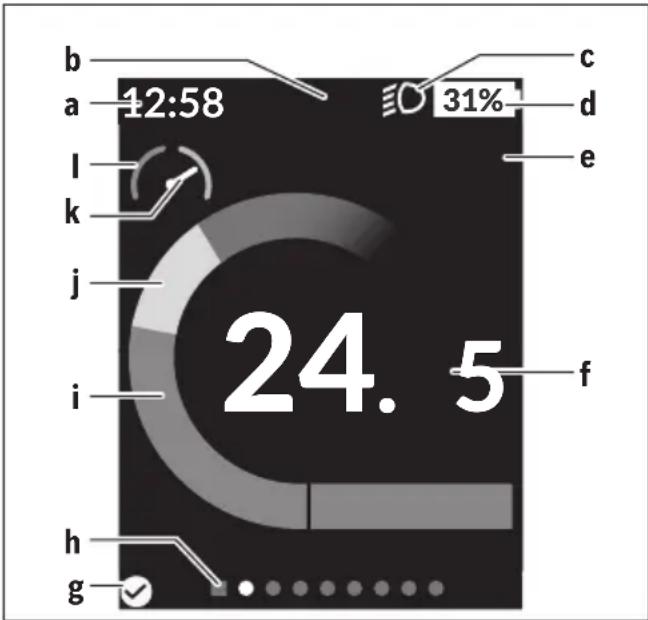
gauge
| Position | Value | |---|---| | a | 12:58 | | b | - | | c | - | | d | 31% | | e | - | | f | - | | i | - | | j | - | | k | - | | l | - | | h | - | | g | ✓ |a Time/speed indicator
b Assistance level indicator
c Lighting indicator
d Battery charge indicator of the eBike battery
e Unit of speed indicator ^a)
f Speed
g Connection status
h Navigation bar
i Motor output
j Your performance
k Average speed
I Performance evaluation
a) Can be changed between km/h and mph via the
The a ... d indicators form the status bar and are shown on every page. If the speed is already being displayed on the screen itself, the a indicator will change to the current time in hours and minutes. The status bar displays:
- Speed/time: The current speed in km/h or mph or the current time
- Assistance level: Indicates the current level of assistance using a colour code
– Light: A symbol that indicates whether the light is on
– eBike battery state of charge: Indicates the current state of charge as a percentage
The performance evaluation I graphically displays your current speed in comparison to your average speed k.
- Pointer in the orange area (left-hand side): Below the average speed
– Pointer in the green area (right-hand side): Above the average speed - Pointer in the centre: Corresponds to the average speed The navigation bar h indicates which page you are on. Your current page is highlighted. You can use the < (10) and > (8) buttons to move to additional pages.
From the initial start page, you can access the status page via the < (10) button.
Status screen
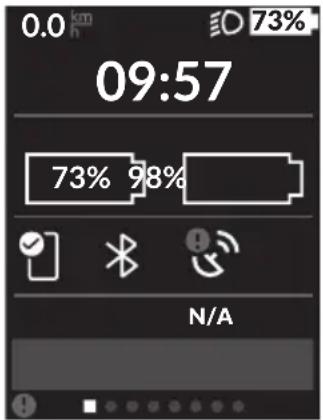
As well as the status bar, the status page also shows you the current time and the state of charge of all your eBike's batteries, as well as the state of charge of your smartphone battery if the smartphone is connected via Bluetooth®.

Good connection

Poor connection

No connection
You will also be shown the date of the most recent synchronisation between the smartphone and Kiox.
You can access the
You can access the settings menu via the status page. The
You can use the - (11) and + (12) buttons to select the setting you want. You can open the settings, as well as any additional submenus, using the select button (9). You can use the < button (10) to go back to the previous menu from any settings menu.
You can find the following superordinate sections on the first navigation level:
-
-
Here you can set the content and order of the screens, and reset these to factory settings if necessary. -
– Switching the Bluetooth® function on or off: Connected devices, such as the heart rate monitor, are displayed. -
– Active user data Is only displayed if the user is registered. – A list of setting options for your on-board computer You can display the speed and distance in kilometres or miles, display the clock in 12- or 24-hour format, adjust the time, date and time zone and select your preferred language. You can reset the Kiox to its factory settings, run a software update (if available) and choose between a black or white design. – Information about your Kiox: Information on FAQs (frequently asked questions), certification, contact information, information on licences You can find a detailed description of each parameter in the online operating instructions at www.Bosch-eBike.com/Kiox-manual.
Quick Menu
Selected settings are displayed on the Quick Menu. These settings can be changed even while riding.
You can access the Quick Menu via the select button (9). It cannot be accessed from the Status screen.
The following settings can be changed via the Quick Menu:
-
All data on the journey so far is reset to zero.
-
You can set the cadence here.
-
This is where you can set a manufacturer-defined shock absorption or suspension mode.
Error code display
The eBike system's components are continuously and automatically monitored. If an error is detected, the corresponding error code is displayed on the on-board computer.
The drive may be automatically shut down, depending on the type of error. However, if you wish to continue cycling, you
will always be able to do so without assistance from the drive. Before undertaking any other journeys, the eBike should be checked.
▶ Have all repairs performed only by an authorised bike dealer.
| Code Cause Corrective measures | |
| 410 One or more buttons of the on-board computer are disabled. | Check whether any buttons are stuck, e.g. as a result of dirt finding its way in. Clean the buttons if need be. |
| 414 Operating unit connection problem Have the connections checked | |
| 418 One or more buttons on the operating unit are disabled. | Check whether any buttons are stuck, e.g. as a result of dirt finding its way in. Clean the buttons if need be. |
| 419 Configuration error Restart the system. If the problem persists, contact your Bosch eBike dealer. | |
| 422 Drive unit connection problem Have the connections checked | |
| 423 eBike battery connection problem Have the connections checked | |
| 424 Communication problem between components | Have the connections checked |
| 426 Internal time-out error Restart the system. If the problem persists, contact your Bosch eBike dealer. With this error, it is not possible to bring up the wheel circumference in the basic settings menu or to adjust it. | |
| 430 Internal battery of the on-board computer is flat (does not apply to BUI350) | Charge the on-board computer (in the holder or via the USB port) |
| 431 Software version error Restart the system. If the problem persists, contact your Bosch eBike dealer. | |
| 440 Internal drive unit fault Restart the system. If the problem persists, contact your Bosch eBike dealer. | |
| 450 Internal software error Restart the system. If the problem persists, contact your Bosch eBike dealer. | |
| 460 Error at USB port Remove the cable from the USB port of the on-board computer. If the problem persists, contact your Bosch eBike dealer. | |
| 490 Internal fault of the on-board computer Have the on-board computer checked | |
| 500 Internal drive unit fault Restart the system. If the problem persists, contact your Bosch eBike dealer. | |
| 502 Bike light fault Check the light and the associated wiring. Restart the system. If the problem persists, contact your Bosch eBike dealer. | |
| 503 Speed sensor fault Restart the system. If the problem persists, contact your Bosch eBike dealer. | |
| 504 Speed signal distortion detected. Check that the spoke magnet is positioned correctly, and adjust it if necessary. Check that nothing has been tampered with (tuning). Drive assistance is reduced. | |
| 510 Internal sensor fault | Restart the system. If the problem persists, contact your Bosch eBike dealer. |
| 511 Internal drive unit fault Restart the system. If the problem persists, contact your Bosch eBike dealer. | |
| 530 Battery fault | Switch off the eBike, remove the eBike battery and reinsert the eBike battery. Restart the system. If the problem persists, contact your Bosch eBike dealer. |
| 531 Configuration error Restart the system. If the problem persists, contact your Bosch eBike dealer. | |
Code Cause Corrective measures
| 540 Temperature error The eBike is outside of the permissible temperature range. Switch off the eBike system and allow the drive unit to either cool down or heat up to the permissible temperature range. Restart the system. If the problem persists, contact your Bosch eBike dealer. | ||
| 550 An impermissible load has been detected. Remove the load. Restart the system. If the problem persists, contact your Bosch eBike dealer. | ||
| 580 Software version error Restart the system. If the problem persists, contact your Bosch eBike dealer. | ||
| 591 Authentication error Switch off the eBike system. Remove the battery pack and reinsert it. Restart the system. If the problem persists, contact your Bosch eBike dealer. | ||
| 592 Incompatible component Use a compatible display. If the problem persists, contact your Bosch eBike dealer. | ||
| 593 Configuration error Restart the system. If the problem persists, contact your Bosch eBike dealer. | ||
| 595, 596 Communication error Check the wiring to the drive and restart the system. If the problem persists, contact your Bosch eBike dealer. | ||
| 602 Internal battery fault Restart the system. If the problem persists, contact your Bosch eBike dealer. | ||
| 603 Internal battery fault Restart the system. If the problem persists, contact your Bosch eBike dealer. | ||
| 605 Battery temperature error The battery is outside of the permissible temperature range. Switch off the eBike system and allow the battery to either cool down or heat up to the permissible temperature range. Restart the system. If the problem persists, contact your Bosch eBike dealer. | ||
| 606 External battery fault Check the wiring. Restart the system. If the problem persists, contact your Bosch eBike dealer. | ||
| 610 Battery voltage error Restart the system. If the problem persists, contact your Bosch eBike dealer. | ||
| 620 Charger fault Replace the charger. Contact your Bosch eBike dealer. | ||
| 640 Internal battery fault Restart the system. If the problem persists, contact your Bosch eBike dealer. | ||
| 655 Multiple battery faults | Switch off the eBike system. Remove the battery pack and reinsert it. Restart the system. If the problem persists, contact your Bosch eBike dealer. | |
| 656 Software version error Contact your Bosch eBike dealer so that they can perform a software update. | ||
| 7xx | Error relating to third-party components | Observe the information in the operating instructions of the respective component manufacturer. |
| 800 Internal ABS fault | Contact your Bosch eBike dealer. | |
| 810 Implausible signals from the wheel speed sensor | Contact your Bosch eBike dealer. | |
| 820 Fault in the wire to the front wheel speed sensor | Contact your Bosch eBike dealer. | |
| 821 to 826 | Implausible signals from the front wheel speed sensorThe sensor disc may be missing, defective or fitted incorrectly; there is a significant difference in diameter between the front wheel and the rear wheel; extreme riding | Restart the system and carry out a test ride lasting at least two minutes. The ABS indicator light must go out. If the problem persists, contact your Bosch eBike dealer. |
| Code Cause Corrective measures | ||
| situation, e.g. riding solely on the rear wheel | ||
| 830 Fault in the wire to the rear wheel speed sensor | Contact your Bosch eBike dealer. | |
| 831833 to 835 | Implausible signals from the rear wheel speed sensorThe sensor disc may be missing, defective or fitted incorrectly; there is a significant difference in diameter between the front wheel and the rear wheel; extreme riding situation, e.g. riding solely on the rear wheel | Restart the system and carry out a test ride lasting at least two minutes. The ABS indicator light must go out. If the problem persists, contact your Bosch eBike dealer. |
| 840 Internal ABS fault Contact your Bosch eBike dealer. | ||
| 850 Internal ABS fault Contact your Bosch eBike dealer. | ||
| 860, 861 Fault in the power supply Restart the system. If the problem persists, contact your Bosch eBike dealer. | ||
| 870, 871880883 to 885 | Communication error Restart the system. If the problem persists, contact your Bosch eBike dealer. | |
| 889 Internal ABS fault Contact your Bosch eBike dealer. | ||
| 890 ABS indicator light is defective or missing;ABS may not be working. | Contact your Bosch eBike dealer. | |
| No display | Internal fault of the on-board computer Restart your eBike system by switching it off and back on. | |
Maintenance and servicing
Maintenance and cleaning
Do not clean any of the components with pressurised water. Keep the screen of your on-board computer clean. Dirt can cause faulty brightness detection.
Clean your on-board computer using a soft cloth dampened only with water. Do not use cleaning products of any kind.
Have your eBike system checked by an expert at least once a year (including mechanical parts, up-to-dateness of system software).
In addition, the bicycle dealer may base the service date on the distance travelled and/or on a period of time. In this case, the on-board computer displays a message telling you when the service date is due each time it is switched on.
Please have your eBike serviced and repaired by an authorised bicycle dealer.
▶ Have all repairs performed only by an authorised bike dealer.
After-sales service and advice on using products
If you have any questions about the eBike system and its components, contact an authorised bicycle dealer.
For contact details of authorised bike dealerships, please visit www.bosch-ebike.com.
Transport
▶ If you transport your eBike attached to the outside of your car, e.g. on a bike rack, remove the on-board computer and the eBike battery to avoid damaging them.
Disposal

The drive unit, on-board computer incl. operating unit, battery, speed sensor, accessories and packaging should be disposed of in an environmentally correct manner.
Check that your personal data has been deleted from the device.
Do not dispose of eBikes and their components with household waste.
In accordance with Directive 2012/19/EU and Directive 2006/66/EC respectively, electronic devices that are no longer usable and defective/drained batteries must be collected separately and recycled in an environmentally friendly manner.
Please return Bosch eBike components that are no longer usable free of charge to an authorised bicycle dealer or to a recycling facility.
Subject to change without notice.
Sicherheitshinweise

gauge
| Position | Value | |---|---| | a | 12:58 | | b | Not labeled | | c | Not labeled | | d | 31% | | e | Not labeled | | f | Not labeled | | i | Not labeled | | j | Not labeled | | k | Not labeled | | l | Not labeled | | h | Not labeled | | g | Not labeled | | End | 24,5 |gauge
| Position | Value | |---|---| | a | 12:58 | | b | Not labeled (implied by gauge) | | c | Not labeled (implied by gauge) | | d | 31% | | e | Not labeled (implied by gauge) | | f | Not labeled (implied by gauge) | | i | Not labeled (implied by gauge) | | j | Not labeled (implied by gauge) | | k | Not labeled (implied by gauge) | | l | Not labeled (implied by gauge) | | h | Not labeled (implied by gauge) | | g | Not labeled (implied by gauge) | | Total | 24,5 |natural_image
Exterior view of a black electric vehicle charging station with attached plug and connector (no text or symbols visible)en Original operating instructions
Read all the safety information and instructions. Failure to observe the safety information and follow instructions may result in electric shock, fire and/or serious injury.
Save all safety warnings and instructions for future reference.
The term battery is used in these instructions to mean all original Bosch eBike rechargeable battery packs.
Read and observe the safety warnings and directions contained in all the eBike system operating instructions and in the operating instructions of your eBike.
▶ Do not allow yourself to be distracted by the on-board computer's display. If you do not focus exclusively on the traffic, you risk being involved in an accident. If you want to make entries in your on-board computer other than switching the assistance level, stop and enter the appropriate data.
▶ Do not open the on-board computer. Opening the on-board computer may damage it beyond repair and void any warranty claims.
▶ Do not use the on-board computer as a handle. Lifting the eBike up by the on-board computer can cause irreparable damage to the on-board computer.
▶ Do not stand your bicycle upside down on its saddle and handlebars if the SmartphoneHub or its holder protrude from the handlebars. This may irreparably damage the SmartphoneHub or the holder.
▶ Caution! When using the on-board computer with Bluetooth® and/or WiFi, interference can occur with other devices and equipment, aircraft and medical devices (e.g. pacemakers, hearing aids). Likewise, injury to people and animals in the immediate vicinity cannot be excluded entirely. Do not use the on-board computer with Bluetooth® in the vicinity of medical devices, petrol stations, chemical plants, areas with a potentially explosive atmosphere or on blast sites. Do not use the on-board computer with Bluetooth® in aeroplanes. Avoid using the on-board computer near your body for extended periods.
The Bluetooth® word mark and logos are registered trademarks owned by Bluetooth SIG, Inc. and any use of such marks by Bosch eBike Systems is under licence.
The on-board computer is equipped with a wireless interface. Local operating restrictions, e.g. in aeroplanes or hospitals, must be observed.
Do not allow your attention to be diverted from surrounding traffic when using COBI.Bike products. Always observe the applicable legal provisions in your country for the permitted use of your bicycle in road traffic. In particular, note that it is prohibited to pick up or hold your smartphone in your hand in road traffic.
▶ Consult a doctor before using fitness app programs. Fitness apps may cause people to overexert themselves physically.
Note: We recommend that COBI.Bike products are only used by persons at least 10 years of age.
Privacy notice
If the SmartphoneHub is sent to Bosch Service for servicing, note that the data stored on the device may be transmitted to Bosch.
Product description and specifications
Intended use
The SmartphoneHub is designed to control Bosch eBike systems and display cycling data.
In addition to the functions shown here, changes to software relating to troubleshooting and functional modifications may be introduced at any time.
The description of additional functions can be found in the online version of these instructions at www.Bosch-eBike.com/smartphonehub-manual.
The SmartphoneHub is suitable for cycling on reinforced paths without jumps and with few ledges (< 15 cm) at average speeds of between 15 and 25 km/h, for example on asphalt roads, country paths, paths reinforced with gravel or sand, and reinforced woodland paths.
In case of improper use, there is a risk of the smartphone coming loose from the holder, falling down and becoming damaged as a result. There is also a considerable risk of an accident if the smartphone falls out.
The SmartphoneHub is intended for use with a smartphone.
The basic cycling data, however, is shown on the display of the SmartphoneHub. Additional information and functions can be added via the COBI.Bike smartphone app.
Communication between the SmartphoneHub and smartphone takes place via a Bluetooth ^® connection.
Product Features
The numbering of the components shown refers to the illustrations on the graphics pages at the beginning of the manual.
All illustrations of bike parts except for the drive unit, onboard computer (including operating unit), speed sensor and the corresponding holders are a schematic representation and may differ on your eBike.
(1) SmartphoneHub
(2) On/off button for SmartphoneHub
(3) Release lever for smartphone holder
(4) Holder for SmartphoneHub ^a)
(5) Protective cap for the USB port
(6) Power supply for smartphone holder
(7) Display
(8) Next page button
(9) Select button
(10) Previous page button
(11) Decrease assistance level button -
(12) Holder for operating unit
(13) Walk assistance button WALK
(14) Increase assistance level/ switch light on or off button +
(15) Operating unit
(16) Universal Mount
(17) Fastening screws for Universal Mount
(18) Front retaining bracket
(19) Rear retaining bracket
a) For mounting on the handlebars, custom solutions are possible even without the use of the handlebar clamps.
Display elements for SmartphoneHub
a Error indicator
b Bike lights display
c Smartphone connection indicator
d Speed
e Assistance level indicator
f Unit indicator
g Indicator for second battery (optional)
h Battery charge indicator
i State of charge of the battery
j Operating range
Technical data
| On-board computer SmartphoneHub | ||
| Product code CUI100 | ||
| Max. USB port charging current | mA 1000 | |
| USB port charging voltage V 5 | ||
| Operating temperature °C | -5 to +40 | |
| Storage temperature °C | +10 to +40 | |
| Charging temperature °C | 0 to +40 | |
| Internal lithium-ion battery | V | 3.7 |
| mAh | 300 | |
| Bluetooth® Low Energy | ||
| – Frequency MHz 2400–2480 | ||
| – Transmission power mW | < 10 | |
| Protection ratingA) | IP 54 | |
| Weight, approx. | kg | 0.12 |
A) When the USB cover is closed The Bosch eBike system uses FreeRTOS (see http://www.freertos.org).
Declaration of Conformity
Robert Bosch GmbH, Bosch eBike Systems, hereby declares that the SmartphoneHub radio communication unit com-
plies with Directive 2014/53/EU. The full text of the EU Declaration of Conformity is available to view at the following website: https://www.ebike-connect.com/conformity.
Robert Bosch GmbH, Bosch eBike Systems, hereby declares that the SmartphoneHub radio communication unit complies with the Radio Equipment Regulations 2017 (SI 2917/1206). The full text of the UK Declaration of Conformity can be accessed at the following Internet address: https://www.ebike-connect.com/conformity.

Operation
Starting Operation
Prerequisites
The eBike system can only be activated when the following requirements are met:
- A sufficiently charged battery is inserted (see battery operating instructions).
- The speed sensor is connected properly (see drive unit operating instructions).
Switching the eBike system on/off
The following options are available for switching on the eBike system:
- Press the on/off button (2) of the on-board computer with the eBike battery inserted.
- Press the on/off button of the eBike battery (see battery operating instructions).
The drive is activated as soon as you start pedalling (except if you are using the walk assistance function or if the assistance level is set to OFF). The motor output adjusts to the assistance level set.
As soon as you stop pedalling when in normal operation, or as soon as you have reached a speed of 25 km/h, the eBike drive switches off the assistance. The drive is automatically reactivated as soon you start pedalling again and the speed is below 25 km/h.
The following options are available for switching off the eBike system:
- Press the on/off button (2) of the on-board computer.
- Switch off the eBike battery using its on/off button (bicycle manufacturer-specific solutions are possible when there is no access to the battery on/off button; see the bicycle manufacturer operating instructions).
The system shuts down after being switched off. This takes approximately 3 seconds. It cannot be switched back on until shutdown has been completed.
If the eBike is not moved for approx. 10 min and no button is pressed on the on-board computer, the eBike system switches off automatically in order to save energy.
Note: Always switch off the eBike system when you park the eBike.
Note: If the battery of the SmartphoneHub is empty, you can still switch on your eBike using the eBike battery. The SmartphoneHub battery begins charging automatically once the
eBike battery is switched on. Alternatively, the battery of the SmartphoneHub can be charged via the USB port.
Linking the SmartphoneHub with a smartphone
You can expand the indicators and functions of the SmartphoneHub using the COBI.Bike smartphone app. This app can be downloaded free of charge from the App Store (for Apple iPhones) or from the Google Play store (for Android devices).
To connect your SmartphoneHub with the Smartphone, open the COBI.Bike app on your smartphone and follow the instructions in the app.
Inserting a smartphone into the Universal Mount (see figures A and B)
A Universal Mount (16) is supplied for attaching a smartphone. Specific holders for iPhones can be purchased from the range of accessories. No separate power supply is necessary for an iPhone holder.
For the Universal Mount, the power (5 V/1 A, max. 1.5 A) is supplied using a separate USB cable (included with delivery) via the micro-A/B USB port of the SmartphoneHub.
The Universal Mount (16) can only hold Apple iPhones and Android smartphones (including a case) measuring between 7.1 mm and 8.26 mm in depth, between 123.8 mm and 158.4 mm in length, and between 58.6 mm and 78.1 mm in width. The maximum weight of the smartphone including case is 250 g.
▶ Please note that the manufacturer specifications do not always reflect the maximum dimensions. Some manufacturers do not account for the protruding camera in the depth measurement.
The specified dimensions include any phone cases. Smartphones with folio and carrying cases must not be used.
▶ Be careful not to pinch your fingers between the retaining brackets and the smartphone when inserting your smartphone.
Once you have inserted your smartphone, check that the smartphone cannot come into contact with any hard parts on the bike even in case of vibrations, as this could cause lasting damage to the smartphone.
Inserting the Uni- versal Mount (see figure A)
Push the Universal Mount (16) onto the SmartphoneHub from the front until you hear it click into place ①. The Universal Mount can also be fixed in place using the two fastening screws (17).
Inserting the smart- phone (see figure B)
– Pull the front retaining bracket (18) forwards ②.
- Insert the smartphone with the long side of the phone positioned against the rear retaining bracket (19) ③.
- Allow the front retaining bracket (18) to slide slowly towards the smartphone and release it ④.
Power supply for the Smartphone (optional)
The smartphone can be supplied with power (5 V/1 A) using a separate USB cable (included with delivery) via the micro-A/B USB port of the SmartphoneHub. To do this, connect the smartphone to the USB port of the SmartphoneHub using the USB cable.
Removing the smartphone
Use both hands to push the smart-phone forwards along with the front retaining bracket until the smartphone can be removed from the Universal Mount. If necessary, remove the USB cable for the power supply.
Software update
If a software update is available for the SmartphoneHub, an indicator is shown in the smartphone app. Follow the instructions in the app to perform the update.
Recovering the SmartphoneHub
A recovery operation should be carried out on the Smart-phoneHub if it is no longer functioning correctly. To do this, open the app on your smartphone and follow the instructions.
Power supply for the SmartphoneHub
The SmartphoneHub has an internal lithium-ion polymer battery (nominal/minimum 300 mAh, 3.7 V) that cannot be removed.
The SmartphoneHub can be switched on via its on/off button (2) or via the on/off button of the eBike battery. If the SmartphoneHub cannot be switched on, it must be charged via a USB cable for at least 30 minutes.
If you do not use your SmartphoneHub, recharge the Smart-phoneHub every three months. You can charge the Smart-phoneHub battery via its USB port with any power adaptor, smartphone charger, etc.
Switching the push assistance on/off
The walk assistance makes it easier to push your eBike. The speed in this function depends on the selected gear and can reach a maximum of 6 km/h.
The push assistance function must only be used when pushing the eBike. There is a risk of injury if the wheels of the eBike are not in contact with the ground while using the push assistance.
To activate the push assistance, briefly press the WALK button on your operating unit. Once it is activated, press and hold the + button within three seconds. The eBike drive is now switched on.
Note: The push assistance cannot be activated at assistance level OFF.
The push assistance is switched off as soon as one of the following occurs:
- You release the + button;
- The wheels of the eBike are locked (e.g. by applying the brakes or hitting an obstacle);
- The speed exceeds 6 km/h.
The push assistance function is subject to local regulations; the way it works may therefore differ from the description above, or the function may even be deactivated completely.
Setting the assistance level
On the operating unit (15), you can set the level of assistance you want the eBike drive to provide you with while pedalling. The assistance level can be changed at any time, even while cycling.
Note: In some models, the assistance level may be preset and cannot be changed. There may also be fewer assistance levels available than stated here.
The following assistance levels are available as a maximum:
- OFF: Motor assistance is switched off. The eBike can only be moved by pedalling, as with a normal bicycle. The walk assistance cannot be activated at this assistance level.
- ECO: Effective assistance with maximum efficiency, for maximum range
- TOUR/TOUR+:
TOUR: Steady assistance, long range for touring
TOUR+: Dynamic assistance for natural, sporty cycling (only in conjunction with eMTB)
- SPORT/eMTB:
SPORT: Powerful assistance, for mountain biking and cycling in urban traffic
eMTB: Optimum assistance whatever the terrain, rapid acceleration when starting from a standstill, improved dynamics and top performance (eMTB only available in combination with the drive units BDU250P CX, BDU365, BDU450 CX and BDU480 CX. A software update may be required.)
- TURBO: Maximum assistance even at a high cadence, for sporty cycling
To increase the assistance level, press the + (14) button on the operating unit repeatedly until the desired assistance level appears on the display. To decrease the assistance level, press the - (11) button.
Switching bicycle lights on/off
On the model in which the lighting is powered by the eBike system, the front and rear lights can be switched on and off at the same time by pressing and holding the + button (14) on the operating unit.
If the light is switched on, a symbol is shown on the display or in the app.
Alternatively, the light can be switched on and off using the app.
Switching the bike lights on and off has no effect on the backlighting of the display.
Displays and settings of the SmartphoneHub
The SmartphoneHub is connected to the drive unit via a cable.
The smartphone is mechanically connected to the Smart-phoneHub via a smartphone attachment.
The communication between the SmartphoneHub and smartphone takes place via Bluetooth®.
The SmartphoneHub has a scratch-resistant 1.52" LCD display with a resolution of 192 × 64 pixels. The integrated display is suitable for use without a corresponding smartphone. No app content of the smartphone can be shown on the integrated display.
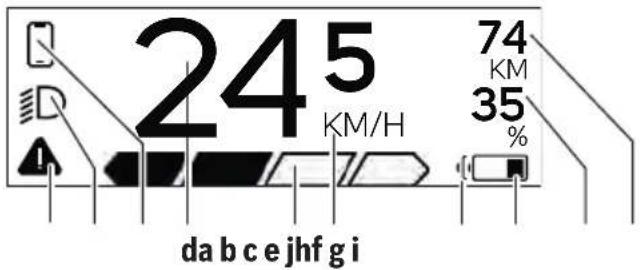
a Error indicator: This indicator appears when at least one error is present in the error memory.
b Bicycle lighting indicator: This indicator appears when the light is switched on.
c ✕ Smartphone connection indicator: This indicator appears when the smartphone is connected to the SmartphoneHub via Bluetooth®.
This indicator appears when the smartphone is connected to the SmartphoneHub and the COBI.Bike app is open on the smartphone. In this setting, the COBI.Bike app will record your ride.
d Speed: The current speed is displayed here.
e Assistance level indicator TOURECODFF SPORT TURBO
f Unit indicator: Depending on the settings selected in the COBI.Bike app, the speed can either be shown in km/h or mph. The default setting is km/h.
g Indicator for second battery: If the eBike is equipped with two batteries, the two batteries are shown here in succession.
h Battery charge indicator: The battery symbol displays the current state of charge of the battery. The battery is empty or not inserted.
i State of charge of the battery in per cent
j Range of the eBike battery: Depending on the state of charge of the battery, the maximum range is shown here.
Other displays
| An error has occurred.The error indicator will remain on the indicator until the user presses the select button (9) to acknowledge the error. The warning triangle subsequently remains in the main display view (alongside speed, etc.) until the error has been resolved. | |
| In a two-step activation process, after pressing the button (13), the rider is prompted to press the + button (14) for two seconds. | |
| After two seconds, the push assistance mode is displayed. | |
| This indicator and the text shown on the left appear when there are problems that mean that the drive unit cannot provide any assistance. This is the case if the eBike battery is empty, for example. | |
| If the eBike battery is being charged, the screen shows the current state of charge. The battery symbol flashes. | |
| This indicator appears, if, for example,- the DiagnosticTool is connected or - an external power source (e.g. a power bank) is connected to the SmartphoneHub | |
| If the state of charge of the eBike battery is below 20%, the battery charge indicator h will flash. | |
| This indicator appears, if, for example,- the state of charge of the eBike battery is low or - the system does not recognise an eBike battery.The assistance is switched off. | |
| These indicators appear when the eBike is due for servicing. | |
| This indicator appears if software problems occur. A software update must be carried out in the COBI.Bike app. | |
| You can independently carry out the update in theCOBI.Bikeapp and do not need to visit your Bosch eBike dealer. | |
| This indicator appears when the SmartphoneHub is connecting to the smartphone.The completion of theBluetooth®pairing is indicated by means of a tick against the small smartphone symbol. | |
| This indicator appears whenever the SmartphoneHub is in recovery mode (only in this status can new software be installed). The smallBluetooth®symbol indicates the connection to the smartphone.The completion of the recovery operation is indicated by a tick. | |
| Your operating system is non-functional for the following reasons:1. One or more incompatible components have been detected. This situation can only be rectified by a Bosch eBike dealer.2. An out-of-date version of the software has been detected. This can only occur as a result of an intentional software downgrade. The problem can be resolved with a software update; please follow the instructions in theCOBI.Bikeapp.Following this notification, the eBike system switches off. | |
| This indicator appears if theCOBI.Bikeapp is open and is in dashboard mode. |
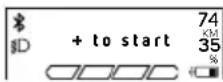
This indicator appears if the COBI.Bike app is connected to the Bosch SmartphoneHub and the drive unit has not yet been switched on. To do this, undertake one of the following actions:
- Press the "Start" button in the COBI.Bike app.
- With the COBI.Bike app open, rotate the smartphone so that it is in landscape.
- Press the + button on the operating unit.
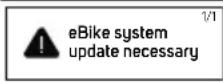
This indicator appears if one or more eBike components require a software update.
The update can only be carried out by an authorised Bosch eBike dealer.
You can hide the indicator by pressing any button on the operating unit. The indicator will appear every time the eBike system is started until the update has been carried out. You can still continue to use your eBike without any restrictions. The number at the top right indicates the number of instructions.
Error code display
The eBike system's components are continuously and automatically monitored. If an error is detected, the corresponding error code is displayed on the on-board computer.
The drive may be automatically shut down, depending on the type of error. However, if you wish to continue cycling, you will always be able to do so without assistance from the drive. Before undertaking any other journeys, the eBike should be checked.
▶ Have all repairs performed only by an authorised bike dealer.
| Code Cause Corrective measures | ||
| 410 One or more buttons of the on-board computer are disabled. | Check whether any buttons are stuck, e.g. as a result of dirt finding its way in. Clean the buttons if need be. | |
| 414 Operating unit connection problem Have the connections checked | ||
| 418 One or more buttons on the operating unit are disabled. | Check whether any buttons are stuck, e.g. as a result of dirt finding its way in. Clean the buttons if need be. | |
| 419 Configuration error Restart the system. If the problem persists, contact your Bosch eBike dealer. | ||
| 422 Drive unit connection problem Have the connections checked | ||
| 423 eBike battery connection problem Have the connections checked | ||
| 424 Communication problem between components | Have the connections checked | |
| 426 Internal time-out error Restart the system. If the problem persists, contact your Bosch eBike dealer. With this error, it is not possible to bring up the wheel circumference in the basic settings menu or to adjust it. | ||
| Code Cause Corrective measures | ||
| 430 Internal battery of the on-board computer is flat (does not apply to BUI350) | Charge the on-board computer (in the holder or via the USB port) | |
| 431 Software version error Restart the system. If the problem persists, contact your Bosch eBike dealer. | ||
| 440 Internal drive unit fault Restart the system. If the problem persists, contact your Bosch eBike dealer. | ||
| 450 Internal software error Restart the system. If the problem persists, contact your Bosch eBike dealer. | ||
| 460 Error at USB port Remove the cable from the USB port of the on-board computer. If the problem persists, contact your Bosch eBike dealer. | ||
| 490 Internal fault of the on-board computer Have the on-board computer checked | ||
| 500 Internal drive unit fault Restart the system. If the problem persists, contact your Bosch eBike dealer. | ||
| 502 Bike light fault Check the light and the associated wiring. Restart the system. If the problem persists, contact your Bosch eBike dealer. | ||
| 503 Speed sensor fault Restart the system. If the problem persists, contact your Bosch eBike dealer. | ||
| 504 Speed signal distortion detected. Check that the spoke magnet is positioned correctly, and adjust it if necessary. Check that nothing has been tampered with (tuning). Drive assistance is reduced. | ||
| 510 Internal sensor fault Restart the system. If the problem persists, contact your Bosch eBike dealer. | ||
| 511 Internal drive unit fault Restart the system. If the problem persists, contact your Bosch eBike dealer. | ||
| 530 Battery fault Switch off the eBike, remove the eBike battery and reinsert the eBike battery. Restart the system. If the problem persists, contact your Bosch eBike dealer. | ||
| 531 Configuration error Restart the system. If the problem persists, contact your Bosch eBike dealer. | ||
| 540 Temperature error The eBike is outside of the permissible temperature range. Switch off the eBike system and allow the drive unit to either cool down or heat up to the permissible temperature range. Restart the system. If the problem persists, contact your Bosch eBike dealer. | ||
| 550 An impermissible load has been detected. Remove the load. Restart the system. If the problem persists, contact your Bosch eBike dealer. | ||
| 580 Software version error Restart the system. If the problem persists, contact your Bosch eBike dealer. | ||
| 591 Authentication error Switch off the eBike system. Remove the battery pack and reinsert it. Restart the system. If the problem persists, contact your Bosch eBike dealer. | ||
| 592 Incompatible component | Use a compatible display. If the problem persists, contact your Bosch eBike dealer. | |
| 593 Configuration error Restart the system. If the problem persists, contact your Bosch eBike dealer. | ||
| 595, 596 | Communication error | Check the wiring to the drive and restart the system. If the problem persists, contact your Bosch eBike dealer. |
| 602 Internal battery fault | Restart the system. If the problem persists, contact your Bosch eBike dealer. | |
| 603 Internal battery fault | Restart the system. If the problem persists, contact your Bosch eBike dealer. | |
Code Cause Corrective measures
| 605 Battery temperature error The battery is outside of the permissible temperature range.Switch off the eBike system and allow the battery to either cool down or heat up to the permissible temperature range. Restart the system. If the problem persists, contact your Bosch eBike dealer. | ||
| 606 External battery fault Check the wiring. Restart the system. If the problem persists, contact your Bosch eBike dealer. | ||
| 610 Battery voltage error Restart the system. If the problem persists, contact your Bosch eBike dealer. | ||
| 620 Charger fault Replace the charger. Contact your Bosch eBike dealer. | ||
| 640 Internal battery fault Restart the system. If the problem persists, contact your Bosch eBike dealer. | ||
| 655 Multiple battery faults Switch off the eBike system. Remove the battery pack and reinsert it. Restart the system. If the problem persists, contact your Bosch eBike dealer. | ||
| 656 Software version error Contact your Bosch eBike dealer so that they can perform a software update. | ||
| 7xx Error relating to third-party components Observe the information in the operating instructions of the respective component manufacturer. | ||
| 800 Internal ABS fault Contact your Bosch eBike dealer. | ||
| 810 Implausible signals from the wheel speed sensor | Contact your Bosch eBike dealer. | |
| 820 Fault in the wire to the front wheel speed sensor | Contact your Bosch eBike dealer. | |
| 821 to 826 Implausible signals from the front wheel speed sensorThe sensor disc may be missing, defective or fitted incorrectly; there is a significant difference in diameter between the front wheel and the rear wheel; extreme riding situation, e.g. riding solely on the rear wheel | Restart the system and carry out a test ride lasting at least two minutes. The ABS indicator light must go out. If the problem persists, contact your Bosch eBike dealer. | |
| 830 Fault in the wire to the rear wheel speed sensor | Contact your Bosch eBike dealer. | |
| 831833 to 835 | Implausible signals from the rear wheel speed sensorThe sensor disc may be missing, defective or fitted incorrectly; there is a significant difference in diameter between the front wheel and the rear wheel; extreme riding situation, e.g. riding solely on the rear wheel | Restart the system and carry out a test ride lasting at least two minutes. The ABS indicator light must go out. If the problem persists, contact your Bosch eBike dealer. |
| 840 Internal ABS fault Contact your Bosch eBike dealer. | ||
| 850 Internal ABS fault Contact your Bosch eBike dealer. | ||
| 860, 861 Fault in the power supply Restart the system. If the problem persists, contact your Bosch eBike dealer. | ||
| 870, 871880883 to 885 | Communication error | Restart the system. If the problem persists, contact your Bosch eBike dealer. |
| 889 Internal ABS fault Contact your Bosch eBike dealer. | ||
| 890 ABS indicator light is defective or missing;ABS may not be working. | Contact your Bosch eBike dealer. | |
Code Cause Corrective measures
No display Internal fault of the on-board computer Restart your eBike system by switching it off and back on.
Maintenance and servicing
Maintenance and cleaning
Do not clean any of the components with pressurised water. Keep the screen of your on-board computer clean. Dirt can cause faulty brightness detection.
Clean your on-board computer using a soft cloth dampened only with water. Do not use cleaning products of any kind. Have your eBike system checked by an expert at least once a year (including mechanical parts, up-to-dateness of system software).
In addition, the bicycle dealer may base the service date on the distance travelled and/or on a period of time. In this case, the on-board computer displays a message telling you when the service date is due each time it is switched on.
Please have your eBike serviced and repaired by an authorised bicycle dealer.
▶ Have all repairs performed only by an authorised bike dealer.
After-sales service and advice on using products
If you have any questions about the eBike system and its components, contact an authorised bicycle dealer.
For contact details of authorised bike dealerships, please visit www.bosch-ebike.com.
Disposal

The drive unit, on-board computer incl. operating unit, battery, speed sensor, accessories and packaging should be disposed of in an environmentally correct manner.
Check that your personal data has been deleted from the device.
Do not dispose of eBikes and their components with household waste.
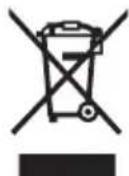
In accordance with Directive 2012/19/EU and Directive 2006/66/EC respectively, electronic devices that are no longer usable and defective/drained batteries must be collected separately and recycled in an environmentally friendly manner.
Please return Bosch eBike components that are no longer usable free of charge to an authorised bicycle dealer or to a recycling facility.
Subject to change without notice.
Sicherheitshinweise

(16) Universal Mount (support universel)
natural_image
Product photo of a Bosch electric sensor device with a handheld connector (no visible text or symbols)en Original operating instructions
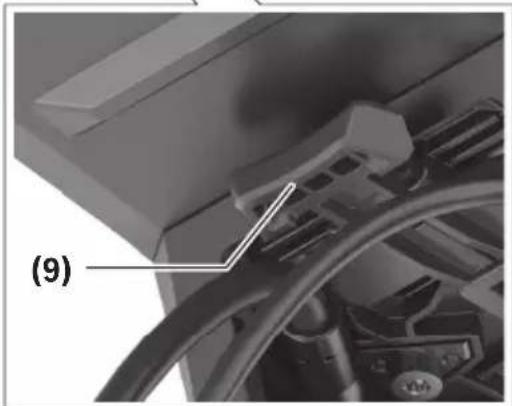
natural_image
Close-up of a mechanical component with a labeled section (9), showing internal parts and a curved line (no readable text or symbols)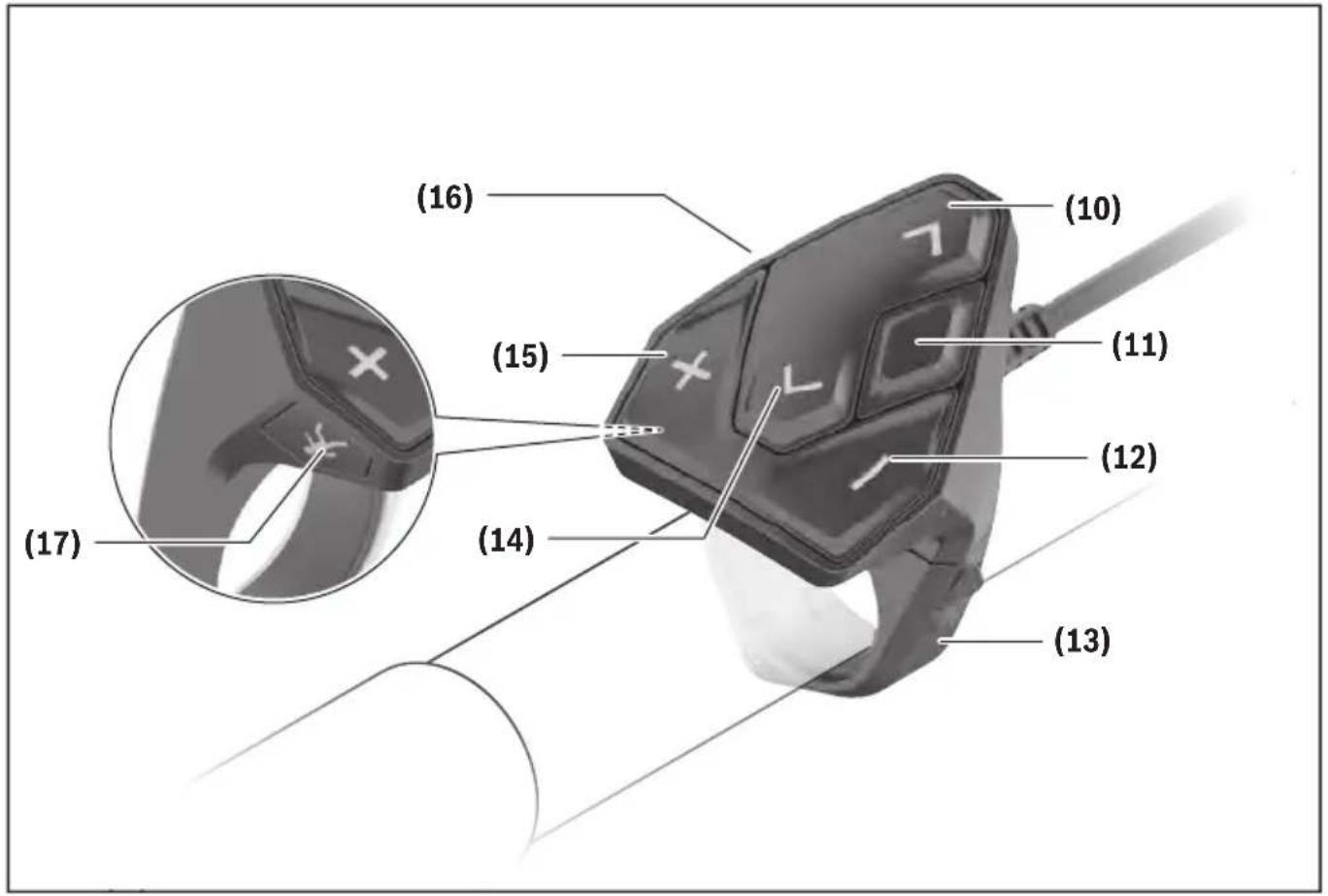
4
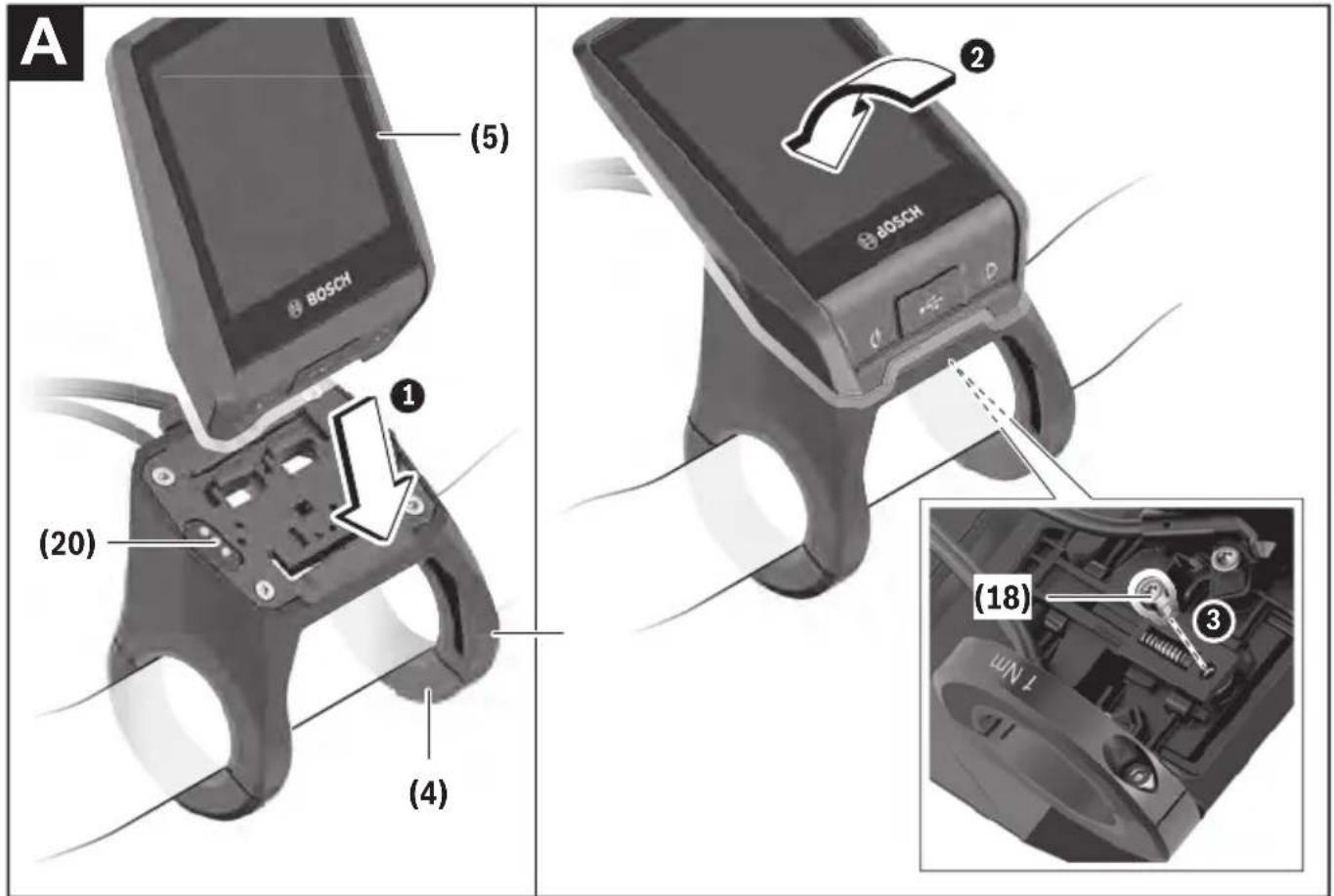
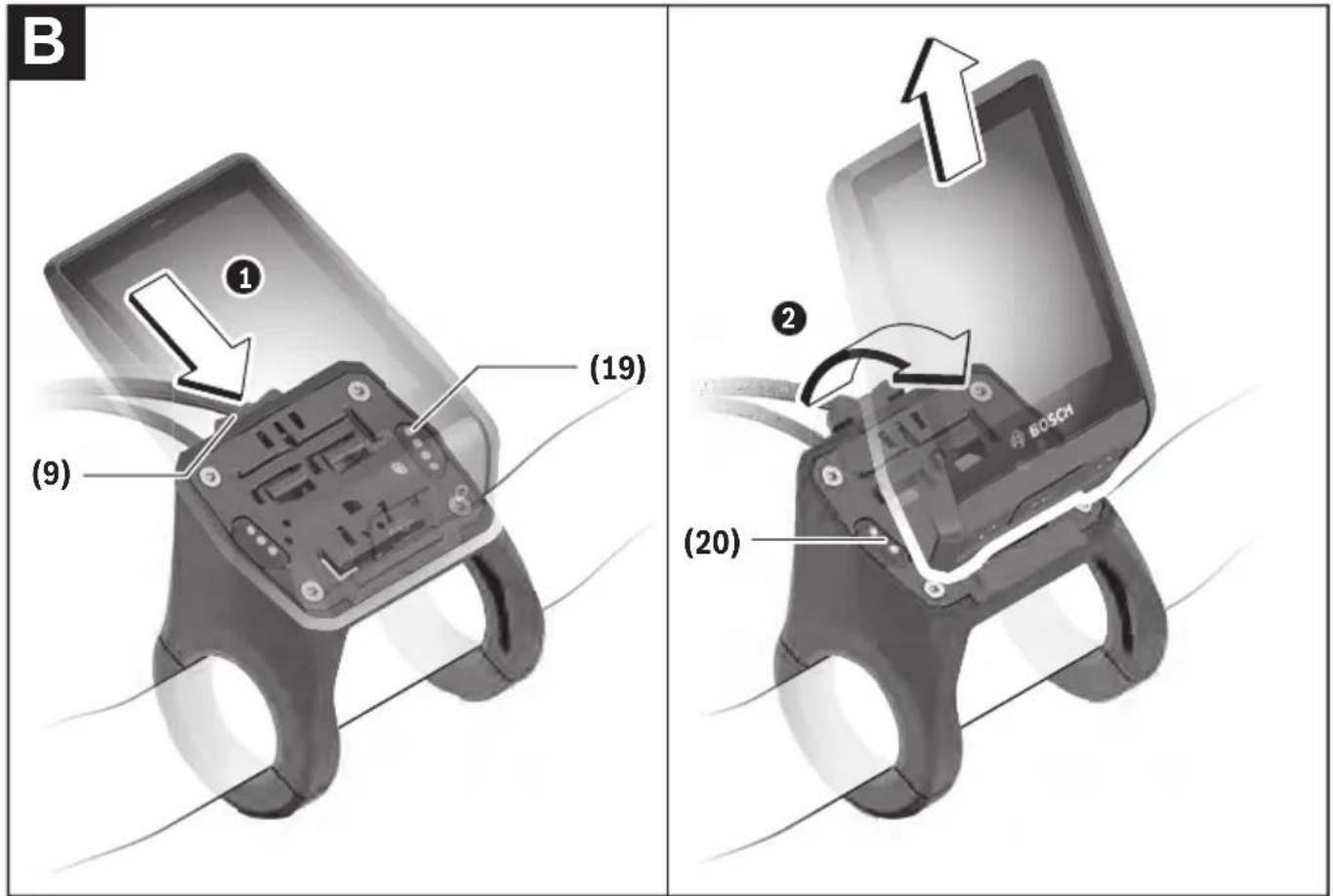
Safety instructions

Read all the safety information and instructions. Failure to observe the safety information and follow instructions may result in electric shock, fire and/or serious injury.
Save all safety warnings and instructions for future reference.
The term battery is used in these instructions to mean all original Bosch eBike rechargeable battery packs.
Read and observe the safety warnings and directions contained in all the eBike system operating instructions and in the operating instructions of your eBike.
▶ Do not allow yourself to be distracted by the on-board computer's display. If you do not focus exclusively on the traffic, you risk being involved in an accident. If you want to make entries in your on-board computer other than switching the assistance level, stop and enter the appropriate data.
▶ Set the display brightness so that you can adequately see important information such as speed and warning symbols. Incorrectly set display brightness may lead to dangerous situations.
Before beginning any exercise programme, seek advice from a doctor about the level of activity that is suitable for you. This is the only way to avoid potential physical overexertion.
▶ When using a heart rate monitor, the heart rate displayed may be distorted by electromagnetic interference. The heart rates displayed are for reference only. No liability can be accepted for consequences caused by incorrectly displayed heart rates.
▶ Nyon is not a medical product. The values displayed on the Fitness Screen may differ from the actual values.
▶ Do not open the on-board computer. Opening the on-board computer may damage it beyond repair and void any warranty claims.
▶ Do not use the on-board computer as a handle. Lifting the eBike up by the on-board computer can cause irreparable damage to the on-board computer.
The push assistance function must only be used when pushing the eBike. There is a risk of injury if the wheels of the eBike are not in contact with the ground while using the push assistance.
▶ When the push assistance is activated, the pedals may turn at the same time. When the push assistance function is activated, make sure that there is enough space between your legs and the turning pedals to avoid the risk of injury.
When using the walk assistance, make sure that you can control the eBike and that you can hold it securely at all times. Under certain circumstances, the walk assistance may stop (e.g. if the pedals hit an obstacle or if you accidentally let go of the button on the operating unit). The eBike may suddenly move backwards onto you or tip up. This presents a risk for the user particularly if
there is additional load on the eBike. When using the walk assistance, do not bring the eBike into situations in which you cannot hold the eBike using your own strength.
▶ Caution! When using the on-board computer with Bluetooth® and/or WiFi, interference can occur with other devices and equipment, aircraft and medical devices (e.g. pacemakers, hearing aids). Likewise, injury to people and animals in the immediate vicinity cannot be excluded entirely. Do not use the on-board computer with Bluetooth® in the vicinity of medical devices, petrol stations, chemical plants, areas with a potentially explosive atmosphere or on blast sites. Do not use the on-board computer with Bluetooth® in aeroplanes. Avoid using the on-board computer near your body for extended periods.
The Bluetooth® word mark and logos are registered trademarks owned by Bluetooth SIG, Inc. and any use of such marks by Bosch eBike Systems is under licence.
Safety information relating to the navigation system
▶ Do not plan your routes whilst you are cycling. Stop and wait until you are stationary before entering a new destination. If you do not focus exclusively on the traffic, you risk being involved in an accident.
▶ Abandon your route if the navigation system suggests a path or road that is too ambitious, risky or dangerous for you based on your cycling ability. Have your navigation system propose an alternative route.
▶ Do not ignore any road signs, even if the navigation system tells you to take a specific route. The navigation system cannot take roadworks or temporary diversions into account.
▶ Do not use the navigation system in situations that are safety-critical or unclear (road closures, diversions, etc.). Always carry extra maps and means of communication with you.
Privacy notice
If the on-board computer is sent to Bosch Service because it requires servicing, the data stored on the on-board computer may be transmitted to Bosch.
Product description and specifications
Intended use
The Nyon (BUI350) on-board computer is designed to control Bosch eBike systems and display trip data.
In addition to the functions shown here, changes to software relating to troubleshooting and functional modifications may be introduced at any time.
To find out more, visit: www.Bosch-eBike.com.
Instructions on how to use the app and the portal can be found in the online operating instructions at www.Bosch-eBike.com.
Nyon (BUI350) is not suitable for navigation without a bicycle (for hikers or motorists).
Product features
The numbering of the components shown refers to the illustrations on the graphics pages at the beginning of the manual.
All illustrations of bike parts except for the drive unit, on-board computer (including operating unit), speed sensor and the corresponding holders are a schematic representation and may differ on your eBike.
(1) Bike light button
(2) Protective cap for the USB port
(3) On/off button for on-board computer
(4) Holder for on-board computer ^a)
(5) On-board computer
(6) Display (touch-sensitive)
(7) Brightness sensor
(8) USB port
(9) Release mechanism
(10) Next page button
(11) Select button
(12) Decrease assistance level button
(13) Holder for operating unit
(14) Previous page button
(15) Increase assistance level button
(16) Operating unit
(17) Start assistance/push assistance WALK button
(18) Locking screw for on-board computer
(19) Drive unit contacts
(20) Operating unit contacts
a) For mounting on the handlebars, custom solutions are possible even without the use of the handlebar clamps.
Technical data
| On-board computer Nyon | ||
| Product code BUI350 | ||
| Total internal memory GB 8 | ||
| Max. charging current to USB port ^) | mA | 1500 |
| Max. USB port charging voltage V 5 | ||
| USB charging cable 1 270 016 360 | ||
| Operating temperature °C -5 to +40 | ||
| Storage temperature °C +10 to +40 | ||
| Charging temperature °C 0 to +40 | ||
| Internal lithium-ion battery V | mAh | 3.71000 |
| Protection rating | IP x5 | |
| Supported Wi-Fi standards | 802.11b/g/n(2.4 GHz) | |
| Weight, approx. | kg | 0.2 |
| Wi-Fi | ||
| – Frequency MHz 2400–2480 | ||
| – Transmission power | mW | < 100 |
| Bluetooth® | ||
| – Frequency MHz 2400–2480 | ||
| – Transmission power | mW < 10 | |
A) Charging current to charge Nyon. External consumers cannot be charged.
Declaration of Conformity
Robert Bosch GmbH, Bosch eBike Systems, hereby declares that the Nyon radio communication unit complies with Directive 2014/53/EU. The full text of the EU Declaration of Conformity is available to view at the following website: https://www.ebike-connect.com/conformity.
Robert Bosch GmbH, Bosch eBike Systems, hereby declares that the Nyon radio communication unit complies with the Radio Equipment Regulations 2017 (SI 2917/1206). The full text of the UK Declaration of Conformity can be accessed at the following Internet address:
https://www.ebike-connect.com/conformity.

The on-board computer has separate internal antennae for Bluetooth ^® , Wi-Fi and GPS with a power output. The antennae are not accessible to the user. Any change by the user contravenes the legal authorisation for this product.
Fitting
▶ Deactivate and remove the on-board computer when fitting or working on the holder. This will avoid malfunctions/improper use.
▶ Deactivate and remove the on-board computer when fitting or removing the securing screw. This will avoid malfunctions/improper use.
Inserting and removing the on-board computer (see figures A–B)
To insert the on-board computer (5), first fit the lower part into the holder (4) and then press it forward until you can feel the on-board computer engage. Ensure that the on-board computer is firmly engaged.
To remove the on-board computer (5), press the release mechanism (9) and remove the on-board computer upwards.
▶ Remove the on-board computer when you park the eBike.
It is possible to block the release mechanism with a screw. To do so, remove the holder (4) from the handlebars. Place the on-board computer in the holder. Screw the enclosed locking screw (18) (M3 thread, 5 mm long) from below into the thread provided in the holder. Fit the holder back onto the handlebars.
Please note: The locking screw is not designed to prevent theft.
Operation
Starting up the eBike system
Requirements
The eBike system can only be activated when the following requirements are met:
- A sufficiently charged eBike battery is inserted (see operating instructions for the battery).
- The on-board computer is properly fitted in the holder.
- The on-board computer battery must be sufficiently charged.
Switching the eBike system on/off
The following options are available for switching on the eBike system:
- Once the on-board computer and the eBike battery are fitted, briefly press the on/off button (3) on the on-board computer.
- With the on-board computer inserted, press the on/off button on the eBike battery (bicycle manufacturer-specific solutions are possible when there is no access to the battery on/off button; see the operating instructions from the bicycle manufacturer).
The drive is activated as soon as you start pedalling (except if you are using the walk assistance function or if the assistance level is set to OFF). The motor output adjusts to the assistance level set.
As soon as you stop pedalling when in normal operation, or as soon as you have reached a speed of 25/45 km/h, the eBike drive switches off the assistance. The drive is automatically reactivated as soon you start pedalling again and the speed is below 25/45 km/h.
The following options are available for switching off the eBike system:
- Press and hold the on/off button (3) on the on-board computer for at least 3 seconds.
- Switch off the eBike battery using its on/off button (bicycle manufacturer-specific solutions are possible when there is no access to the battery on/off button; see the bicycle manufacturer operating instructions).
Note: This puts the Nyon (BUI350) into a standby mode.
- Remove the on-board computer from its holder. If no power is drawn from the eBike drive for about 10 minutes (e.g. because the eBike is not moving) and no button is pressed on the on-board computer or the control unit of the eBike, the eBike system will switch off automatically.
Nyon (BUI350) goes into standby mode as a result.
Standby Mode
You can put your on-board computer into a standby mode, which enables the on-board computer and system to start up more quickly.
Standby mode can be activated as follows:
- To do this, press the on/off button (3) on the on-board computer for at least 1 second, but no longer than 3 seconds.
- Wait 10 minutes until the system switches off.
- Switch the battery off using the on/off button on the battery.
Pressing the on/off button (3) on the on-board computer for at least 1 second ends standby mode.
Standby mode ends and the on-board computer automatically switches off if the state of charge of the on-board computer's battery is less than 75%. In any case, the on-board computer switches off at midnight (00:00) at the latest.
If Nyon (BUI350) cannot be switched on or does not work properly, press and hold the on/off button (for approx. 15 seconds). This may correct the malfunction.
Power supply of the on-board computer
If the on-board computer is in the holder (4), a sufficiently charged eBike battery is inserted into the eBike and the eBike system is switched on, then the on-board computer battery is powered and charged by the eBike battery. If the on-board computer is removed from the holder (4), the power is supplied by the on-board computer battery. The state of charge of the on-board computer battery is displayed in the top left corner of the status bar. If the on-board computer battery's charge is running low, a warning message appears on the display.
To charge the on-board computer battery, slide the on-board computer back onto the holder (4). Note that if you do not charge the eBike battery straight away, the eBike system will automatically switch off after 10 minutes of inactivity. If this
happens, the on-board computer battery will also stop charging.
You can also charge the on-board computer via the USB port (8). To do this, open the protective cap (2). Use a Micro USB cable to connect the USB port on the on-board computer to a commercially available USB charger (not included with the product as standard) or to the USB port of a computer (max. 5 V charging voltage; max. 1500 mA charging current).
If the on-board computer's battery is not recharged, the date and time will be retained for approx. 6 months.
Note: To maximise the lifespan of the on-board computer's battery, it should be recharged for one hour every three months.
After use, the USB port must be carefully resealed with the protective cap (2).
▶ USB connections are not waterproof. When cycling in the rain, do not connect any external devices and make sure that the USB port is fully sealed by the protective cover (2).
It is not possible to charge external devices via the USB port.
Battery Charge Indicator
The battery charge indicator for the eBike battery g (see "
Colour of the indicator Meaning
| Green The eBike battery is over30 % charged. | |
| Orange The eBike battery is between15 % and 30 % charged. | |
| Red The eBike battery is between0 % and 15 % charged. | |
| Red + ! The capacity for assisting thedrive has been used up, andassistance is switched off.The remaining capacity willbe provided for the bikelights and the on-board computer. |
If the eBike battery is being charged on the bike, a corresponding notification will be displayed.
If the on-board computer is removed from the holder (4), the state of charge that was last displayed for the eBike battery is saved.
Initial operation of the on-board computer
Before first use, remove the protective film from the display in order to ensure the full functionality of the on-board computer. If the protective film remains on the display, this can impair the functionality/performance of the on-board computer.
The full functionality of the on-board computer cannot be guaranteed if the protective display film is used.
Nyon is supplied with a partially charged battery. Before first use, the Nyon battery must be fully charged via the USB port or the eBike system.
When you switch on the on-board computer, you can set off after a short period of time (about 4 seconds). During the subsequent period, the on-board computer loads the complete operating system in the background.
Note: When switching on the on-board computer for the first time, the on-board computer requires a longer period before it is ready for use.
If the on-board computer is connected to the Wi-Fi, the user is informed of any new updates, where applicable. Download the update and install the latest version.
Creating a User ID
To be able to use all functions of the on-board computer, you must register online.
With a user ID, you can analyse your ride data, plan offline routes and transfer these routes to the on-board computer.
You can set up a user ID via your Bosch eBike Connect smartphone app or simply at www.ebike-connect.com.
Enter the details required for registration. The Bosch eBike
Connect smartphone app is available to download free of charge from the App Store (for Apple iPhones) or from the Google Play Store (for Android devices).
Connecting the On-board Computer with the Portal
Connect the on-board computer with the portal via a Wi-Fi connection.
Note: The on-board computer does not support the use of router channels 12 and 13. If, for example, your router is set as fixed on channel 12 or 13, these channels are not displayed in the list of available networks on the on-board computer. If necessary, adjust the settings of the router accordingly, in order to be able to connect the on-board computer with your network.
To do this, proceed as follows:
- Press
on the . - Select
. - Select a network.
– Enter your username and password.
Once you have connected successfully, all data that you have shared in your profile in the portal is synchronised with the on-board computer.
Connecting to the On-Board Computer using the Bosch eBike Connect App
Follow these steps to establish a connection to your smartphone:
- Load the app.
- Select the tab
. - Select
. - Add Nyon (BUI350).
The app will then display an instruction to press and hold the bike lighting button (1) on the on-board computer for 5 seconds.
Press and hold the button (1) for at least 5 seconds. The onboard computer automatically activates the Bluetooth® Low Energy connection and switches to pairing mode.
Follow the instructions on the screen. Once pairing is complete, the user data is synchronised.
Note: The Bluetooth ^® connection does not have to be activated manually.
Setting the assistance level
On the operating unit (16), you can set the level of assistance you want the eBike drive to provide you with while pedalling. The assistance level can be changed at any time, even while cycling.
Note: In some models, the assistance level may be preset and cannot be changed. There may also be fewer assistance levels available than stated here.
The following assistance levels are available as a maximum:
- OFF: Motor assistance is switched off. The eBike can only be moved by pedalling, as with a normal bicycle. The walk assistance cannot be activated at this assistance level.
- ECO: Effective assistance with maximum efficiency, for maximum range
- TOUR/TOUR+:
TOUR: Steady assistance, long range for touring
TOUR+: Dynamic assistance for natural, sporty cycling (only in conjunction with eMTB)
- SPORT/eMTB:
SPORT: Powerful assistance, for mountain biking and cycling in urban traffic
eMTB: Optimum assistance whatever the terrain, rapid acceleration when starting from a standstill, improved dynamics and top performance (eMTB only available in combination with the drive units BDU250P CX, BDU365, BDU450 CX and BDU480 CX. A software update may be required.)
- TURBO: Maximum assistance even at a high cadence, for sporty cycling
To increase the assistance level, press the + button (15) on the operating unit repeatedly until the required assistance level appears on the indicator. To decrease the assistance level, press the - button (12).
The requested motor output is displayed in the indicator j. The maximum motor output depends on the selected assistance level.
When the on-board computer is removed from the holder (4), the assistance level that was last displayed is saved; the motor output indicator j remains empty.
Switching the push assistance on/off
The walk assistance makes it easier to push your eBike. The speed in this function depends on the selected gear and can reach a maximum of 6 km/h.
The push assistance function must only be used when pushing the eBike. There is a risk of injury if the wheels of the eBike are not in contact with the ground while using the push assistance.
To activate the walk assistance, briefly press the WALK button on your on-board computer. Once it is activated, press the + button within 10 s and keep it held down. The eBike drive is now switched on.
Note: The push assistance cannot be activated at assistance level OFF.
The push assistance is switched off as soon as one of the following occurs:
- You release the + button;
- The wheels of the eBike are locked (e.g. by applying the brakes or hitting an obstacle);
- The speed exceeds 6 km/h.
The push assistance function is subject to local regulations; the way it works may therefore differ from the description above, or the function may even be deactivated completely.
Switching bicycle lights on/off
On the model on which the lighting is powered by the eBike system, the front and rear lights can be switched on and off at the same time via the on-board computer using the bike light button (1).
Check that your bike lights are working correctly before every use.
With the light switched on, the lighting f indicator appears in the status bar on the display.
Switching the bike lights on and off has no effect on the backlighting of the display.
Lock (premium function)
The Lock function is available to purchase from the
Detailed operating instructions can be found online at www.Bosch-eBike.com
Activity tracking
In order to record activities, you must be registered with and logged into the eBike Connect portal or the eBike Connect app.
To record activities, you must consent to the storage of your location data in the portal and/or in the app. Without this, your activities will not be shown in the portal or the app. The position is recorded only if you are registered as a user on the on-board computer.
Once synchronisation is complete, the activities will be displayed in the app and in the portal whilst you are riding.
eShift (optional)
eShift is the integration of electronic gear-shifting systems into the eBike system. The eShift components are electrically connected to the drive unit by the manufacturer. The separate operating instructions describe how to operate the electronic gear-shifting systems.
ABS - anti-lock braking system (optional)
If the wheel is fitted with a Bosch eBike ABS with no external control lights, the control lights will be shown on the Nyon (BUI350) display when the system starts and in the event of
a fault. For detailed information on the ABS and how it works, please refer to the ABS operating instructions.
Software Updates
If Nyon (BUI350) is connected via Wi-Fi, checks for more recent software are carried out automatically. If a software update is available, the user is informed via a notification. Alternatively, the user can search for updates manually under
Notes on cycling with the eBike system
Taking care of your eBike
Please observe the operating and storage temperatures of the eBike components. Protect the drive unit, on-board computer and battery against extreme temperatures (e.g. from intense sunlight without adequate ventilation). The components (especially the battery) can become damaged through extreme temperatures.
Keep the screen of your Nyon clean. Dirt can cause faulty brightness detection. The day/night changeover in navigation mode can be distorted.
An abrupt change in ambient conditions can cause the screen to fog up from inside. After a short time, the temperature equalises and the fog disappears.
The Nyon operating system
The Nyon operating system consists of three components:
- The Nyon on-board computer with operating unit
- The Bosch eBike Connect smartphone app
- The online portal at www.ebike-connect.com
Many configurations and features can be managed and used on all components. Some configurations and features can be accessed or operated only via certain components. Data is synchronised automatically when a Bluetooth®/Internet connection is available. The following table provides an overview of the available features.
| Functions of the online portal | ③ | ||||
| Functions of the smartphone app | ② | ||||
| Functions of the on-board computer | ① | ||||
| Login✓✓✓✓ | |||||
| Registration✓✓ | |||||
| Changes settings✓✓✓ | |||||
| Records riding data✓ | |||||
| Displays riding data in real time✓ | |||||
| Processes/analyses riding data✓✓ | |||||
| Creates user-defined displays✓ | |||||
| Current location indicator✓ | A) | ✓A) | ✓ | ||
| Navigation✓ | |||||
| Route planning✓✓✓ | |||||
| Remaining range indicator (circle around the current location) | ✓ | ||||
| Training effect in real time✓ | |||||
| Overview of journeys✓✓ | |||||
| Purchase of premium features✓ | |||||
A) GPS required
Premium features
The standard features of the Nyon (BUI350) operating system can be extended via the App Store for Apple iPhones and Google Play Store for Android devices through the purchase of premium features.
In addition to the free Bosch eBike Connect app, there are several fee-based premium features. A detailed list of the additional apps that are available can be found in the online operating instructions at www.Bosch-eBike.com.
Displays and configurations of the on-board computer
Please note: All screenshots showing the display and text on the following pages are from the approved software version. The display and/or text may change slightly following a software update.
Nyon is fitted with a touch-sensitive screen. Swiping left or right scrolls between the individual screens. Tapping on the Status Screen opens functions or submenus.
Nyon has standard screens and preset screens. The user can also create their own screens. The user can set the order and number of screens. Max. 25 tiles can be used for the screens. The screens in these operating instructions are described as per the basic configuration of the on-board computer on delivery.
The standard screens are:
The preset screens include:
You can use the < (14) and > (10) buttons to switch between the different riding value information pages (even while riding). This way, you can keep both hands on the handlebars while cycling.
You can use the + (15) and - (12) buttons to increase or decrease the assistance level.
The
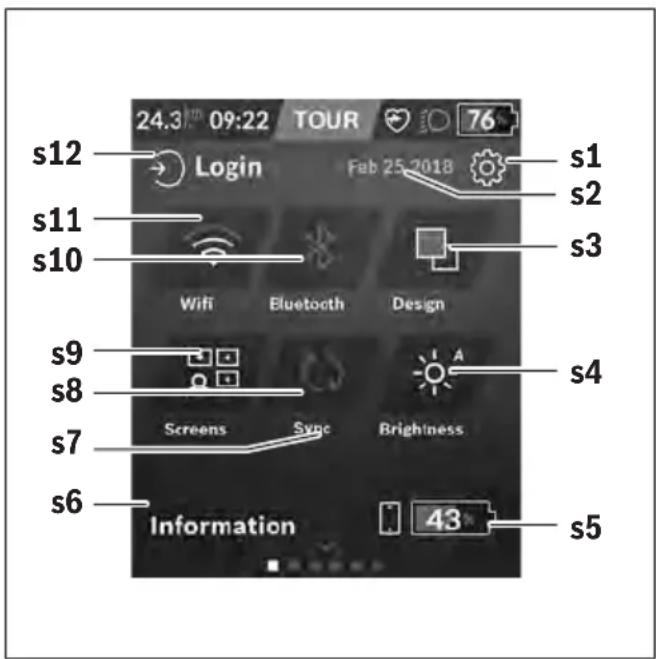
s1
s2 Date
s3
This is where you can switch between light and dark backgrounds.
s4 Button
This is where you can select from the following brightness levels: 25% | 50% | 75% | 100% | Auto.
s5 Smartphone battery charge
s6
This is where recent events are displayed (e.g. maps download).
s7 Time of last synchronisation
s8 Synchronisation button
s9 Button
You can use this button to adjust the screen order and contents.
s10 Button
Tap: Activate/deactivate
Press and hold: Quick access to Bluetooth® menu
s11 Button
Tap: Activate/deactivate
Press and hold: Quick access to Wi-Fi menu
s12
This is where the user can connect with their ID.
You can access the Settings menu via the Status Screen. The
Tap the
You can find the following superordinate sections on the first settings level:
-
Via
-
The counters, such as average values or the number of kilometres travelled that day, can be reset to "0" either automatically or manually, and so can the range. You can change the wheel circumference value that was preset by the manufacturer by ±5 %. If your eBike features eShift, you can also configure your eShift system here. The bicycle dealer may base the service date on the distance travelled and/or on a period of time. The bike component page displays the serial number and hardware and software versions for each component, in addition to other key data which is relevant for the components.
-
This menu item can be used to adapt the screen and tile contents to suit your personal requirements.
-
The Bluetooth® and Wi-Fi connections can be set here. To be able to use the heart rate display, you must add either the
Recommended heart rate monitors:
- Polar H7
- Polar H10 Heart Rate Sensor
- Runtastic Heart Rate Combo Monitor
■ Wahoo TICKR Heart Rate Monitor - BerryKing Heartbeat chest strap
- BerryKing Sportbeat armband
May be compatible with other devices.
-
The data of the active user can be viewed here.
-
You can display the speed and distance in kilometres or miles, display the clock in 12- or 24-hour format, adjust the time, date and time zone and select your preferred language. You can reset Nyon to factory settings, start a software update (if available) and choose between a black and white design.
-
Information on FAQs, certifications, contact information, information on licences. You can find a detailed description of each parameter in the online operating instructions at www.Bosch-eBike.com.
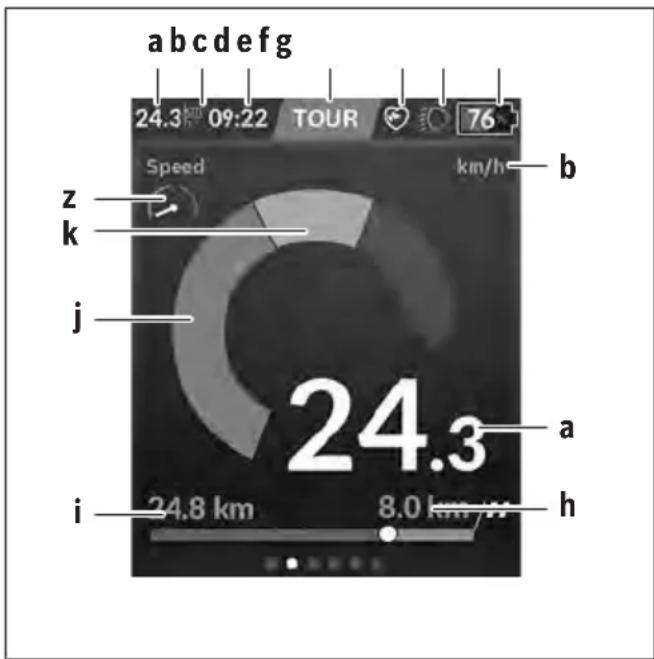
a Speed
b Unit of speed
c Time ^a)
The current time is shown according to the time zone selected. It is set automatically via GPS.
d Assistance level
The colour of the screen changes depending on the assistance level.
e Connection to heart rate monitor
Is also a placeholder for further events. The indicator is shown when the event occurs (e.g. connection to smartphone).
f Lighting
The symbol is displayed if the lighting is switched on.
g Battery charge indicator of the eBike battery
h Range information ^b)c
i Distance travelled
j Motor output
k Your performance
z Performance indicator
a) For eBikes with ABS, the time is replaced with the ((ABS)) logo when the system starts or in the event of a fault with ABS.
b) When navigation is active, a chequered flag at the end of the scale and the remaining distance to the destination are displayed. If the eBike battery has sufficient capacity, the right-hand side of the scale is green. If the right-hand side of the scale is orange or red, it is unsafe at the current assistance level or not possible to reach your destination with motor assistance. Selecting a lower assistance level may enable the remaining battery capacity to reach the required destination.
c) When navigation is not active, kilometres travelled are displayed on the left and range on the right.
The a ... g indicators form the status bar and are shown on every screen.
When the on-board computer is removed from the holder, the status list changes:

On-board computer battery charge If Bluetooth® and/or Wi-Fi connections are available, the corresponding icon is displayed in the centre.
g Battery charge indicator of the eBike battery Latest state of charge of the eBike battery
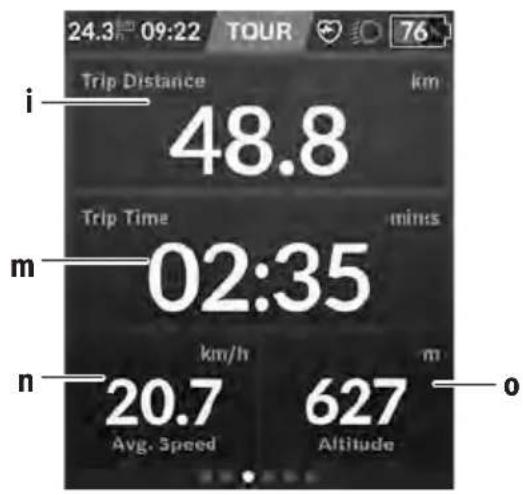
i
Trip distance indicator
m
Trip time indicator
n
Average speed indicator
o
Altitude above sea level indicator
Navigation is carried out using map data based on Open Street Map (OSM).
When you switch on Nyon, it begins the satellite search to receive GPS signals. When sufficient satellites have been found, the location point changes colour from grey to blue. In the case of unfavourable weather conditions or locations, the satellite search may take a little longer. If the application fails to find satellite signals over a prolonged period of time, restart Nyon.
The first search for satellites may take a few minutes.
To achieve the most accurate positioning, the first satellite search should be done outdoors. Ideally, stay stationary for a few minutes, even if the position has already been found.
When Nyon has determined your location, this will be shown on the map. To increase the size of the map section, touch the touchscreen with two fingers and spread them out. To decrease the size of the map section, pinch both fingers together. To move the map, simply move the map with both fingers on the screen. To select a destination, press and hold one finger on the map.
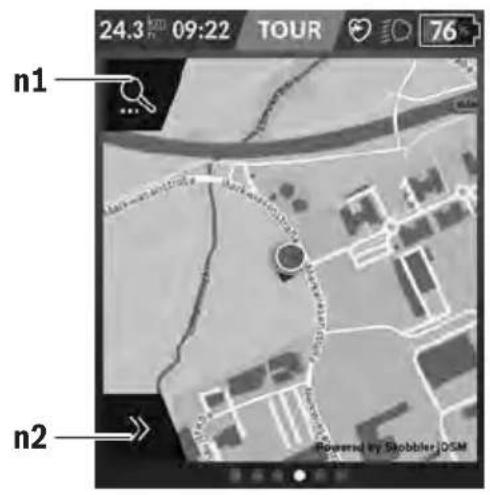
n1 Navigation search
n2 Navigation functions
In the navigation functions n2, you can select your destinations so that you can reach them using the current state of charge.
When navigation is active, the user receives information about whether it is possible to reach the destination with the current assistance mode and current state of charge of the eBike battery.
The circle around your location shows how far you can go, taking into consideration the assistance level set and the terrain ahead with the current battery charge. Changing the assistance level means that the circle adapts accordingly.
Selecting the navigation search n1 brings up the following menu:
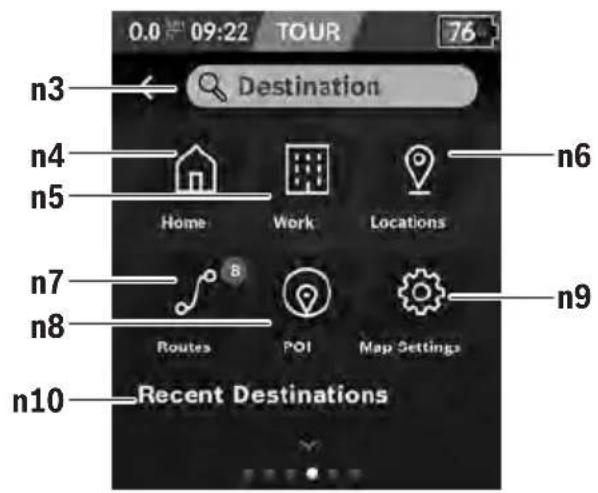
n3 Input field
Enter the address of your destination or a POI (e.g. a restaurant) here. Depending on what you enter, you are shown all possible addresses within 100 km.
n4 Button
Selecting this button guides you to your home address. ^a)
n5 Button
Selecting this button guides you to your work address. ^a)
n6 Button
Selecting this button means you can find your saved locations that have been synchronised by the app or the portal.
n7 Button
This displays the routes that have been saved in the portal, followed by the synchronised routes.
n8 Button
Selecting this button means you can find destinations of general interest, such as restaurants or shopping facilities.
n9 Button
Selecting this button means you can change the map display or manage your maps.
n10
This is where your recent routes and locations are listed.
a) Data from the app and the portal is used and displayed.
When you have entered the destination, you are then shown the fastest route (
The battery's remaining range is calculated and displayed, taking into consideration the topographical conditions. The calculation of the topographic range extends to no more than 100 km.
If you have imported or planned GPX routes via the online portal, these will be transferred to your Nyon via Bluetooth® or via a Wi-Fi connection. You can start these routes when you wish. If you are near a route, you can have the navigation system guide you to the starting point or you can start navigating along the route immediately.
At temperatures below 0 °C , the elevation measurement is likely to deviate significantly.
Active Navigation
The following figure shows an example active navigation with explanations of the symbols depicted.
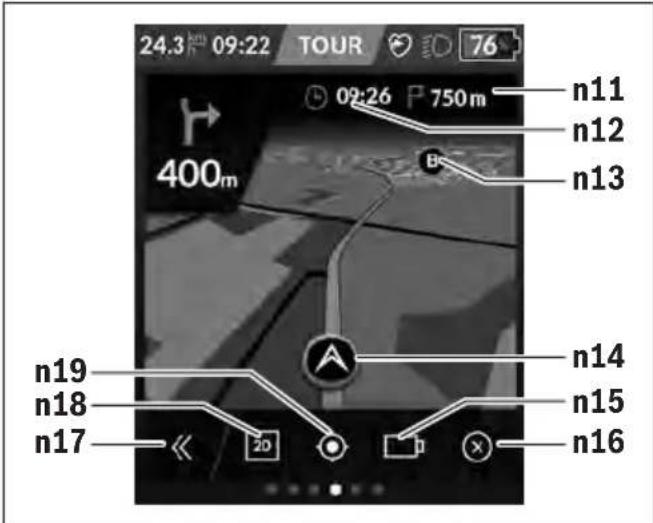
n11 Distance to destination
n12 Time of arrival
n13 Destination
n14 Current position
n15 Battery range indicator
n16 End active navigation
n17 Open and close panel (back to search)
n18 Switch between 2D and 3D view
n19 Centre view (only visible if the map has been moved)
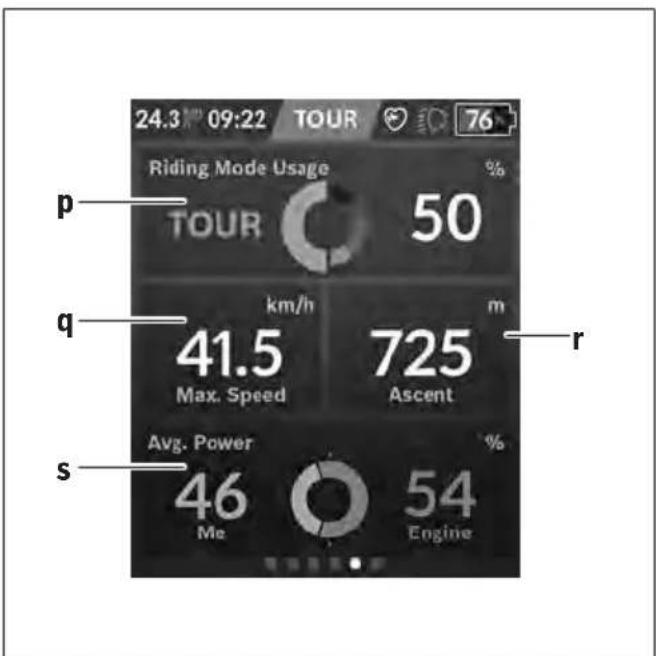
p
Indicator for usage of different riding modes
q
Maximum speed indicator
r
Ascent indicator
s
Indicator for the ratio of your own power compared to motor output
Creating Your Own Screens
To integrate preset screens or create new screens, go to the Status Screen and select the Change button s9. 4 icons are offered in the task bar to enable you to make changes.
You also have the option to start the function via
The following options are available:
- Move screens
- Create new screens
- Delete screens
- Add preset screens
When creating your own screen, you can add
the
If the needle of the performance indicator is on the left-hand side, the background will turn orange. This means that your performance is below the average value.
If the needle of the performance indicator is on the right-hand side or in the middle, the background will turn green.
This means that your performance is greater than or equal to the average value.
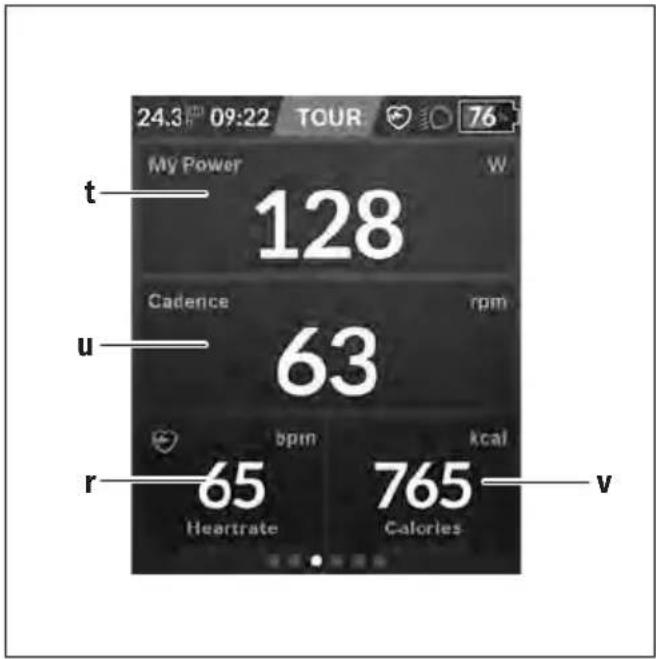
t
Your power indicator
u
Cadence indicator
r
Heart rate indicator
v
Calories burned indicator
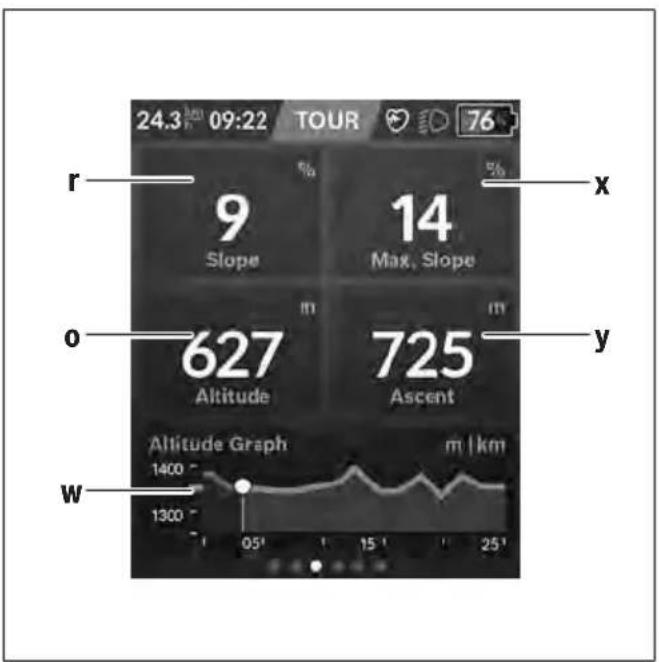
r
Ascent indicator
o
Altitude above sea level indicator
w
Altitude graph indicator
x
Maximum slope indicator
y
Ascent indicator

i
Trip distance indicator
m
Trip time indicator
a
Average speed indicator
Selected settings are displayed on the quick menu. These settings can also be changed while riding.
You can access the quick menu via the select button (11).
You can switch between the submenus with the < (14)
and > (10) buttons. Select the items on the submenu using the + (15) and - (12) buttons.
You cannot access the
The following submenus can be accessed from the <Quick
Menu>:
-
This submenu allows you to reset all data on the journey so far to zero.
-
Via this submenu, you can save your current position, return to a saved position or receive directions to take you home.
-
This submenu allows you to increase or decrease the size of the map section.
-
This submenu allows you to select from the following brightness levels: 25% | 50% | 75% | 100% | Auto.
-
This submenu allows you to select a light or dark back-ground.
- (optional)
This submenu allows you to set the cadence.
- (premium function, obtainable via the App Store or Google Play Store)
Via this submenu, you can select custom riding modes.
-
This submenu allows you to exit the
Error code display
The eBike system's components are continuously and automatically monitored. If an error is detected, the corresponding error code is displayed on the on-board computer.
The drive may be automatically shut down, depending on the type of error. However, if you wish to continue cycling, you
will always be able to do so without assistance from the drive. Before undertaking any other journeys, the eBike should be checked.
▶ Have all repairs performed only by an authorised bike dealer.
| Code Cause Corrective measures | |
| 410 One or more buttons of the on-board computer are disabled. | Check whether any buttons are stuck, e.g. as a result of dirt finding its way in. Clean the buttons if need be. |
| 414 Operating unit connection problem Have the connections checked | |
| 418 One or more buttons on the operating unit are disabled. | Check whether any buttons are stuck, e.g. as a result of dirt finding its way in. Clean the buttons if need be. |
| 419 Configuration error Restart the system. If the problem persists, contact your Bosch eBike dealer. | |
| 422 Drive unit connection problem Have the connections checked | |
| 423 eBike battery connection problem Have the connections checked | |
| 424 Communication problem between components | Have the connections checked |
| 426 Internal time-out error Restart the system. If the problem persists, contact your Bosch eBike dealer. With this error, it is not possible to bring up the wheel circumference in the basic settings menu or to adjust it. | |
| 430 Internal battery of the on-board computer is flat (does not apply to BUI350) | Charge the on-board computer (in the holder or via the USB port) |
| 431 Software version error Restart the system. If the problem persists, contact your Bosch eBike dealer. | |
| 440 Internal drive unit fault Restart the system. If the problem persists, contact your Bosch eBike dealer. | |
| 450 Internal software error Restart the system. If the problem persists, contact your Bosch eBike dealer. | |
| 460 Error at USB port Remove the cable from the USB port of the on-board computer. If the problem persists, contact your Bosch eBike dealer. | |
| 490 Internal fault of the on-board computer Have the on-board computer checked | |
| 500 Internal drive unit fault Restart the system. If the problem persists, contact your Bosch eBike dealer. | |
| 502 Bike light fault Check the light and the associated wiring. Restart the system. If the problem persists, contact your Bosch eBike dealer. | |
| 503 Speed sensor fault Restart the system. If the problem persists, contact your Bosch eBike dealer. | |
| 504 Speed signal distortion detected. Check that the spoke magnet is positioned correctly, and adjust it if necessary. Check that nothing has been tampered with (tuning). Drive assistance is reduced. | |
| 510 Internal sensor fault | Restart the system. If the problem persists, contact your Bosch eBike dealer. |
| 511 Internal drive unit fault Restart the system. If the problem persists, contact your Bosch eBike dealer. | |
| 530 Battery fault | Switch off the eBike, remove the eBike battery and reinsert the eBike battery. Restart the system. If the problem persists, contact your Bosch eBike dealer. |
| 531 Configuration error Restart the system. If the problem persists, contact your Bosch eBike dealer. | |
Code Cause Corrective measures
| 540 Temperature error The eBike is outside of the permissible temperature range. Switch off the eBike system and allow the drive unit to either cool down or heat up to the permissible temperature range. Restart the system. If the problem persists, contact your Bosch eBike dealer. | ||
| 550 An impermissible load has been detected. Remove the load. Restart the system. If the problem persists, contact your Bosch eBike dealer. | ||
| 580 Software version error Restart the system. If the problem persists, contact your Bosch eBike dealer. | ||
| 591 Authentication error Switch off the eBike system. Remove the battery pack and reinsert it. Restart the system. If the problem persists, contact your Bosch eBike dealer. | ||
| 592 Incompatible component Use a compatible display. If the problem persists, contact your Bosch eBike dealer. | ||
| 593 Configuration error Restart the system. If the problem persists, contact your Bosch eBike dealer. | ||
| 595, 596 Communication error Check the wiring to the drive and restart the system. If the problem persists, contact your Bosch eBike dealer. | ||
| 602 Internal battery fault Restart the system. If the problem persists, contact your Bosch eBike dealer. | ||
| 603 Internal battery fault Restart the system. If the problem persists, contact your Bosch eBike dealer. | ||
| 605 Battery temperature error The battery is outside of the permissible temperature range. Switch off the eBike system and allow the battery to either cool down or heat up to the permissible temperature range. Restart the system. If the problem persists, contact your Bosch eBike dealer. | ||
| 606 External battery fault Check the wiring. Restart the system. If the problem persists, contact your Bosch eBike dealer. | ||
| 610 Battery voltage error Restart the system. If the problem persists, contact your Bosch eBike dealer. | ||
| 620 Charger fault Replace the charger. Contact your Bosch eBike dealer. | ||
| 640 Internal battery fault Restart the system. If the problem persists, contact your Bosch eBike dealer. | ||
| 655 Multiple battery faults | Switch off the eBike system. Remove the battery pack and reinsert it. Restart the system. If the problem persists, contact your Bosch eBike dealer. | |
| 656 Software version error Contact your Bosch eBike dealer so that they can perform a software update. | ||
| 7xx | Error relating to third-party components | Observe the information in the operating instructions of the respective component manufacturer. |
| 800 Internal ABS fault | Contact your Bosch eBike dealer. | |
| 810 Implausible signals from the wheel speed sensor | Contact your Bosch eBike dealer. | |
| 820 Fault in the wire to the front wheel speed sensor | Contact your Bosch eBike dealer. | |
| 821 to 826 | Implausible signals from the front wheel speed sensorThe sensor disc may be missing, defective or fitted incorrectly; there is a significant difference in diameter between the front wheel and the rear wheel; extreme riding | Restart the system and carry out a test ride lasting at least two minutes. The ABS indicator light must go out. If the problem persists, contact your Bosch eBike dealer. |
| Code Cause Corrective measures | ||
| situation, e.g. riding solely on the rear wheel | ||
| 830 Fault in the wire to the rear wheel speed sensor | Contact your Bosch eBike dealer. | |
| 831833 to 835 | Implausible signals from the rear wheel speed sensorThe sensor disc may be missing, defective or fitted incorrectly; there is a significant difference in diameter between the front wheel and the rear wheel; extreme riding situation, e.g. riding solely on the rear wheel | Restart the system and carry out a test ride lasting at least two minutes. The ABS indicator light must go out. If the problem persists, contact your Bosch eBike dealer. |
| 840 Internal ABS fault Contact your Bosch eBike dealer. | ||
| 850 Internal ABS fault Contact your Bosch eBike dealer. | ||
| 860, 861 Fault in the power supply Restart the system. If the problem persists, contact your Bosch eBike dealer. | ||
| 870, 871880883 to 885 | Communication error Restart the system. If the problem persists, contact your Bosch eBike dealer. | |
| 889 Internal ABS fault Contact your Bosch eBike dealer. | ||
| 890 ABS indicator light is defective or missing;ABS may not be working. | Contact your Bosch eBike dealer. | |
| No display | Internal fault of the on-board computer Restart your eBike system by switching it off and back on. | |
Maintenance and servicing
▶ Deactivate the on-board computer if carrying out cleaning, maintenance or service work on the holder or on-board computer. This is the only way to avoid malfunctions/improper use.
Maintenance and cleaning
Do not clean any of the components with pressurised water. Keep the screen of your on-board computer clean. Dirt can cause faulty brightness detection.
Clean your on-board computer using a soft cloth dampened only with water. Do not use cleaning products of any kind.
Have your eBike system checked by an expert at least once a year (including mechanical parts, up-to-dateness of system software).
In addition, the bicycle dealer may base the service date on the distance travelled and/or on a period of time. In this case, the on-board computer displays a message telling you when the service date is due each time it is switched on.
Please have your eBike serviced and repaired by an authorised bicycle dealer.
▶ Have all repairs performed only by an authorised bike dealer.
After-sales service and advice on using products
If you have any questions about the eBike system and its components, contact an authorised bicycle dealer.
For contact details of authorised bike dealerships, please visit www.bosch-ebike.com.
Transport
If you transport your eBike attached to the outside of your car, e.g. on a bike rack, remove the on-board computer and the eBike battery to avoid damaging them.
Disposal

The drive unit, on-board computer incl. operating unit, battery, speed sensor, accessories and packaging should be disposed of in an environmentally correct manner.
Check that your personal data has been deleted from the device.
Do not dispose of eBikes and their components with household waste.
In accordance with Directive 2012/19/EU and Directive 2006/66/EC respectively, electronic devices that are no longer usable and defective/drained batteries must be collected separately and recycled in an environmentally friendly manner.
Please return Bosch eBike components that are no longer usable free of charge to an authorised bicycle dealer or to a recycling facility.
Subject to change without notice.
Sicherheitshinweise

n1 Navigationssuche
n1 Navigatie zoeken
Appui bref : Activation/désactivation
Appui bref : Activation/désactivation
- Ambient temperature
– Ride profile (route/gradient) - Ride duration
- Assistance modes
- User behaviour (personal effort)
- Total weight (rider, eBike, luggage)
- Motor cover on the drive unit
– Heat dissipation properties of the bicycle frame - Type of drive unit and type of gear-shifting
▶ Use only original Bosch batteries that the manufacturer has approved for your eBike. Using other batteries can lead to injuries and pose a fire hazard. Bosch accepts no liability or warranty claims if other batteries are used.
▶ Observe all national regulations which set out the approved use of eBikes.
Privacy notice
When you connect the eBike to the Bosch DiagnosticTool, data about Bosch drive unit (e.g. energy consumption, temperature, etc.) is transferred to Bosch eBike Systems (Robert Bosch GmbH) for the purposes of product improvement. You can find more information about this on the Bosch eBike website at www.bosch-ebike.com.
Product description and specifications
Intended use
The drive unit is intended exclusively for driving your eBike and must not be used for any other purpose.
In addition to the functions shown here, changes to software relating to troubleshooting and functional modifications may be introduced at any time.
Product features
Individual illustrations in these operating instructions may differ slightly from the actual conditions depending on the equipment of your eBike.
The numbering of the components shown refers to the illustrations on the graphics pages at the beginning of the manual.
(1) Drive unit
(2) Speed sensor
(3) Speed sensor spoke magnet
(4) Speedsensor (slim) ^a)
(5) Magnet ^b)
a) different sensor type and installation position is possible
b) different installation position is possible
Technical data
Drive unit Active Line Active Line Plus Performance Line
| Product code BDU310 BDU350 BDU365 | ||
| Continuous rated power W 250 250 250 | ||
| Torque at drive, max. Nm 40 50 65 | ||
| Rated voltage V= 36 36 36 | ||
| Operating temperature °C -5 to +40 -5 to +40 -5 to +40 | ||
| Storage temperature °C +10 to +40 +10 to +40 +10 to +40 | ||
| Protection rating IP54 | IP54 | IP54 |
| Weight, approx. | kg 2.9 3.2 3.2 | |
The Bosch eBike system uses FreeRTOS (see http://www.freertos.org).
Bicycle lights ^A)
| Voltage approx. ^B) | V= | 12 |
| Maximum power | ||
| - Front light | W | 17.4 |
| - Tail light | W | 0.6 |
A) Depends on legal regulations, not possible in all country-specific models via the eBike battery
B) When changing the bulbs, ensure that they are compatible with the Bosch eBike system (ask your bicycle dealer) and are suitable for the specified voltage. Bulbs must only be replaced with bulbs of the same voltage.
Inserting a bulb incorrectly can cause it to blow.
Assembly
Inserting and removing the battery
For inserting and removing the eBike battery in/from the eBike, please read and observe the battery operating instructions.
Checking the speed sensor (see figure A)
Speedsensor (standard)
The speed sensor (2) and its spoke magnet (3) must be fitted such that the spoke magnet moves past the speed sensor at a distance of at least 5 mm and at most 17 mm with each rotation of the wheel.
Note: If the distance between the speed sensor (2) and the spoke magnet (3) is too small or too large, or if the speed
sensor (2) is not properly connected, the speedometer display will fail and the eBike drive unit will operate in emergency mode.
Should this occur, loosen the screw of the spoke magnet (3) and fasten the spoke magnet to the spoke such that it runs past the marking on the speed sensor at the correct clearance. If the speed is still not being indicated on the speedometer display after doing this, please contact an authorised bicycle dealer.
When changing a wheel, make sure that the sensor cable is routed so that it is not under tension and has no kinks.
Speedsensor (slim)
The speedsensor (slim) (4) and its magnet (5) must be mounted in such a manner that the magnet, after a turn of
the wheel, moves past the speed sensor with a clearance of at least 2 mm, yet no more than 8 mm.
If any structural changes are made, the correct distance between the magnet and the sensor must be complied with (see figure A).
Note: Make sure you do not damage the sensor or the sensor holder when fitting or removing the rear wheel.
When changing a wheel, make sure that the sensor cable is routed so that it is not under tension and has no kinks.
The CenterLock magnet (5) can only be removed and reinserted up to five times.
Operation
Start-up
Requirements
The eBike system can only be activated when the following requirements are met:
- A sufficiently charged battery is inserted (see battery operating instructions).
- The on-board computer is properly inserted in the holder (see on-board computer operating instructions).
- The speed sensor is correctly connected (see "Checking the speed sensor (see figure A)", page English - 2).
Switching the eBike system on/off
The following options are available for switching on the eBike system:
- If the on-board computer is already switched on when you insert it into the holder, the eBike system will be activated automatically.
- Once the on-board computer and the eBike battery are fitted, briefly press the on/off button on the on-board computer.
- With the on-board computer inserted, push the on/off button on the eBike battery (bicycle manufacturer-specific solutions are possible when there is no access to the battery on/off button; see the battery operating instructions).
The drive is activated as soon as you start pedalling (except if you are using the push-assistance function, Switching the push assistance on/off). The motor output depends on the settings of the assistance level on the on-board computer.
As soon as you stop pedalling when in normal operation, or as soon as you have reached a speed of 25 km/h, the eBike drive switches off the assistance. The drive is automatically reactivated as soon you start pedalling again and the speed is below 25 km/h.
The following options are available for switching off the eBike system:
- Press the on/off button of the on-board computer.
- Switch off the eBike battery using its on/off button (bicycle manufacturer-specific solutions are possible when there is no access to the battery on/off button; see the bicycle manufacturer operating instructions).
- Remove the on-board computer from its holder.
If the eBike is not moved for approx. 10 min and no button is pressed on the on-board computer, the eBike system switches off automatically in order to save energy.
eShift (optional)
eShift is the integration of electronic gear-shifting systems into the eBike system. The eShift components are electrically connected to the drive unit by the manufacturer. The separate operating instructions describe how to operate the electronic gear-shifting systems.
Setting the assistance level
You can set the level at which the eBike drive assists you while pedalling on the on-board computer. The assistance level can be changed at any time, even while cycling.
Note: In some models, the assistance level may be preset and cannot be changed. There may also be fewer assistance levels available than stated here.
The following assistance levels are available as a maximum:
- OFF: Motor assistance is switched off. The eBike can only be moved by pedalling, as with a normal bicycle. The walk assistance cannot be activated at this assistance level.
- ECO: Effective assistance with maximum efficiency, for maximum range
- TOUR/TOUR+:
TOUR: Steady assistance, long range for touring
TOUR+: Dynamic assistance for natural, sporty cycling (only in conjunction with eMTB)
- SPORT/eMTB:
SPORT: Powerful assistance, for mountain biking and cycling in urban traffic
eMTB: Optimum assistance whatever the terrain, rapid acceleration when starting from a standstill, improved dynamics and top performance (eMTB only available in combination with the drive units BDU250P CX, BDU365, BDU450 CX and BDU480 CX. A software update may be required.)
- TURBO: Maximum assistance even at a high cadence, for sporty cycling
The requested motor output appears on the display of the on-board computer. The maximum motor output depends on the selected assistance level.
| Assistance level Assistance factor | A) | ||
| Active Line (BDU310) | Active Line Plus (BDU350) | Performance Line (BDU365) | |
| ECO | 40 % 40 % 55 % | ||
| TOUR | 100 % 100 % 120 % | ||
| SPORT/eMTB | 150 % 180 % 200 %/dynamic | B) | |
| TURBO | 250 % 270 % 300 % | ||
A) The assistance factor may vary in some models.
B) The assistance level between TOUR and TURBO mode is dynamically progressive
Switching the push assistance on/off
The walk assistance makes it easier to push your eBike. The speed in this function depends on the selected gear and can reach a maximum of 6 km/h.
The push assistance function must only be used when pushing the eBike. There is a risk of injury if the wheels of the eBike are not in contact with the ground while using the push assistance.
To activate the walk assistance, briefly press the WALK button on your on-board computer. Once it is activated, press the + button within 10 s and keep it held down. The eBike drive is now switched on.
Note: The push assistance cannot be activated at assistance level OFF.
The push assistance is switched off as soon as one of the following occurs:
- You release the + button;
- The wheels of the eBike are locked (e.g. by applying the brakes or hitting an obstacle);
- The speed exceeds 6 km/h.
The push assistance function is subject to local regulations; the way it works may therefore differ from the description above, or the function may even be deactivated completely.
Switching bicycle lights on/off
On the model where the bike lights are powered by the eBike system, the front light and taillight can be switched on and off at the same time via the on-board computer.
Check that your bike lights are working correctly before every use.
Notes on cycling with the eBike system
When does the eBike drive work?
The eBike drive assists your cycling only when you are pedalling. If you do not pedal, the assistance will not work. The motor output always depends on the pedalling force you apply.
If you apply less force, you will receive less assistance than if you apply a lot of force. This applies irrespective of the assistance level.
The eBike drive automatically switches off at speeds over 25 km/h. When the speed falls below 25 km/h, the drive automatically becomes available again.
An exception applies to the push assistance function, in which the eBike can be pushed at low speed without pedalling. The pedals may rotate when the push assistance is in use.
You can also use the eBike as a normal bicycle without assistance at any time, either by switching off the eBike system or by setting the assistance level to OFF. The same applies when the battery is drained.
Interaction between the eBike system and gear-shifting
The gear-shifting should be used with an eBike drive in the same way as with a normal bicycle (observe the operating instructions of your eBike on this point).
Irrespective of the type of gear-shifting, it is advisable to briefly stop pedalling when changing gear. This will facilitate the gear change and reduce wear on the powertrain.
By selecting the correct gear, you can increase your speed and range while applying the same amount of force.
Gaining initial experience
We recommend that you gain initial experience with the eBike away from busy roads.
Test the various assistance levels, beginning with the lowest level. As soon as you feel confident, you can ride your eBike in traffic like any other bicycle.
Test the range of your eBike in different conditions before planning longer and more demanding trips.
Influences on range
The range is affected by a number of factors, such as:
- Assistance level
- Speed
– Gear shifting behaviour - Tyre type and tyre pressure
– Age and condition of the battery - Route profile (gradients) and conditions (road surface)
- Headwind and ambient temperature
- Weight of eBike, rider and luggage
For this reason, it is not possible to predict the range accurately before and during a trip. However, as a general rule:
- With the same assistance level on the eBike drive: The less energy you need to exert in order to reach a certain speed (e.g. by changing gears optimally), the less energy the eBike drive will consume and the higher the range per battery charge will be.
- The higher the selected assistance level under otherwise constant conditions, the smaller the range will be.
Taking care of your eBike
Please observe the operating and storage temperatures of the eBike components. Protect the drive unit, on-board computer and battery against extreme temperatures (e.g. from intense sunlight without adequate ventilation). Extreme temperatures can cause the components (especially the battery) to become damaged.
Have your eBike system checked by an expert at least once a year (including mechanical parts, up-to-dateness of system software).
Maintenance and servicing
Maintenance and cleaning
When changing the bulbs, ensure that they are compatible with the Bosch eBike system (ask your bicycle dealer) and are suitable for the specified voltage. Bulbs must only be replaced with bulbs of the same voltage.
Do not immerse any components, including the drive unit, in water or clean them with pressurised water.
Have your eBike system checked by an expert at least once a year (including mechanical parts, up-to-dateness of system software).
Please have your eBike serviced and repaired by an authorised bicycle dealer.
After-sales service and advice on using products
If you have any questions about the eBike system and its components, contact an authorised bicycle dealer.
For contact details of authorised bike dealerships, please visit www.bosch-ebike.com.
Disposal

The drive unit, on-board computer incl. operating unit, battery, speed sensor, accessories and packaging should be disposed of in an environmentally correct manner.
Check that your personal data has been deleted from the device.
Do not dispose of eBikes and their components with household waste.
In accordance with Directive 2012/19/EU and Directive 2006/66/EC respectively, electronic devices that are no longer usable and defective/drained batteries must be collected separately and recycled in an environmentally friendly manner.
Please return Bosch eBike components that are no longer usable free of charge to an authorised bicycle dealer or to a recycling facility.
Subject to change without notice.
Sicherheitshinweise

natural_image
Close-up of a Bosch electric motor component (no visible text or symbols)en Original operating instructions
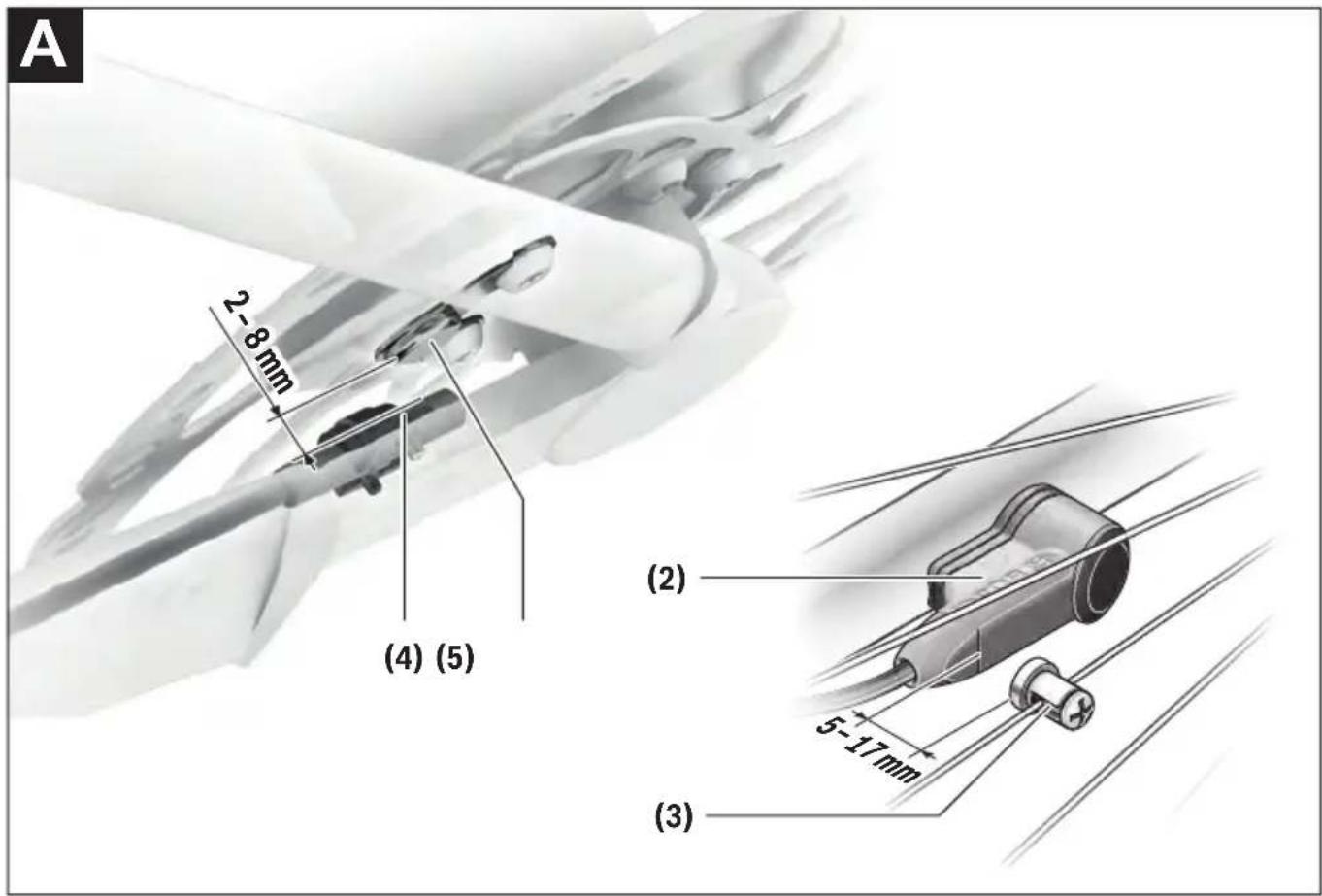
Safety instructions

Read all the safety information and instructions. Failure to observe the safety information and follow instructions may result in electric shock, fire and/or serious injury.
Save all safety warnings and instructions for future reference.
The term battery is used in these instructions to mean all original Bosch eBike rechargeable battery packs.
Read and observe the safety warnings and directions contained in all the eBike system operating instructions and in the operating instructions of your eBike.
- Do not attempt to change – and especially increase – the power of your drive or the maximum speed that it supports. Doing this may put yourself and others at risk, and you may also breach statutory regulations.
Do not make any modifications to your eBike system or fit any other products that might increase the performance of your eBike system. Doing so will generally reduce the service life of the system and risks damaging the drive unit and the bike. You also run the risk of losing the guarantee and warranty claims on the bicycle you have purchased. By handling the system improperly you are also endangering your safety and that of other road users, thus running the risk of high personal liability costs and possibly even criminal prosecution in the event of accidents that can be attributed to manipulation of the bicycle.
▶ Do not open the drive unit yourself. The drive unit must only be repaired by qualified personnel using only original spare parts. This will ensure that the safety of the drive unit is maintained. Unauthorised opening of the drive unit will render warranty claims null and void.
All components fitted to the drive unit and all other components of the eBike drive (e.g. chainring, chain-ring receptacle, pedals) must only be replaced with identical components or components that have been specifically approved by the manufacturer for your eBike. This will protect the drive unit from overloading and becoming damaged.
Remove the battery from the eBike before beginning work (e.g. inspection, repair, assembly, maintenance, work on the chain, etc.) on the eBike, transporting it with a car or aeroplane, or storing it. Unintentional activation of the eBike system poses a risk of injury.
The push assistance function must only be used when pushing the eBike. There is a risk of injury if the wheels of the eBike are not in contact with the ground while using the push assistance.
▶ When the push assistance is activated, the pedals may turn at the same time. When the push assistance function is activated, make sure that there is enough space between your legs and the turning pedals to avoid the risk of injury.
When using the walk assistance, make sure that you can control the eBike and that you can hold it securely at all times. Under certain circumstances, the walk assistance may stop (e.g. if the pedals hit an obstacle or if you accidentally let go of the button on the operating unit). The eBike may suddenly move backwards onto you or tip up. This presents a risk for the user particularly if there is additional load on the eBike. When using the walk assistance, do not bring the eBike into situations in which you cannot hold the eBike using your own strength.

On sections of the drive, temperatures > 60 °C may occur in extreme conditions, e.g. when carrying consistently high loads at low speed when riding up hills or transporting loads.
▶ After a ride, do not allow your unprotected hands or legs to come into contact with the housing of the drive unit. Under extreme conditions, such as continuously high torques at low travel speeds, or when riding up hills or carrying loads, the housing may reach a very high temperature.
The temperature that the drive unit housing may reach is influenced by the following factors:
- Ambient temperature
– Ride profile (route/gradient) - Ride duration
- Assistance modes
- User behaviour (personal effort)
- Total weight (rider, eBike, luggage)
- Motor cover on the drive unit
- Heat dissipation properties of the bicycle frame
- Type of drive unit and type of gear-shifting
▶ Use only original Bosch batteries that the manufacturer has approved for your eBike. Using other batteries can lead to injuries and pose a fire hazard. Bosch accepts no liability or warranty claims if other batteries are used.
▶ Observe all national regulations which set out the approved use of eBikes.
Privacy notice
When you connect the eBike to the Bosch DiagnosticTool, data about Bosch drive unit (e.g. energy consumption, temperature, etc.) is transferred to Bosch eBike Systems (Robert Bosch GmbH) for the purposes of product improvement. You can find more information about this on the Bosch eBike website at www.bosch-ebike.com.
Product description and specifications
Intended use
The drive unit is intended exclusively for driving your eBike and must not be used for any other purpose.
In addition to the functions shown here, changes to software relating to troubleshooting and functional modifications may be introduced at any time.
Product features
Individual illustrations in these operating instructions may differ slightly from the actual conditions depending on the equipment of your eBike.
The numbering of the components shown refers to the illustrations on the graphics pages at the beginning of the manual.
(1) Drive unit
(2) Speed sensor
(3) Speed sensor spoke magnet
(4) Speedsensor (slim) ^a)
(5) Magnet ^b)
a) different sensor type and installation position is possible
b) different installation position is possible
Technical data
| Drive unit Drive Unit | Performance Line CX/ Cargo Line | Drive Unit Performance Line Speed/ Cargo Line Speed | |
| Product code BDU450 CX BDU490P | |||
| Continuous rated power W 250 250 | |||
| Torque at drive, max. Nm 85 75/85 | A) | ||
| Rated voltage V= 36 36 | |||
| Operating temperature °C -5 to +40 -5 to +40 | |||
| Storage temperature °C +10 to +40 +10 to +40 | |||
| Protection rating IP54 | IP54 | ||
| Weight, approx. | kg | 3 | 3 |
A) Is determined by the bicycle manufacturer
The Bosch eBike system uses FreeRTOS (see http://www.freertos.org).
Bicycle lights ^A)
| Voltage approx. ^B) | V= | 12 |
| Maximum power | ||
| - Front light | W | 17.4 |
| - Tail light | W | 0.6 |
A) Depends on legal regulations, not possible in all country-specific models via the eBike battery
B) When changing the bulbs, ensure that they are compatible with the Bosch eBike system (ask your bicycle dealer) and are suitable for the specified voltage. Bulbs must only be replaced with bulbs of the same voltage.
Inserting a bulb incorrectly can cause it to blow.
Assembly
Inserting and removing the battery
For inserting and removing the eBike battery in/from the eBike, please read and observe the battery operating instructions.
Checking the speed sensor (see figure A)
Speedsensor (standard)
The speed sensor (2) and its spoke magnet (3) must be fitted such that the spoke magnet moves past the speed
sensor at a distance of at least 5 mm and at most 17 mm with each rotation of the wheel.
Note: If the distance between the speed sensor (2) and the spoke magnet (3) is too small or too large, or if the speed sensor (2) is not properly connected, the speedometer display will fail and the eBike drive unit will operate in emergency mode.
Should this occur, loosen the screw of the spoke magnet (3) and fasten the spoke magnet to the spoke such that it runs past the marking on the speed sensor at the correct clearance. If the speed is still not being indicated on the speedometer display after doing this, please contact an authorised bicycle dealer.
When changing a wheel, make sure that the sensor cable is routed so that it is not under tension and has no kinks.
Speedsensor (slim)
The speedsensor (slim) (4) and its magnet (5) must be mounted in such a manner that the magnet, after a turn of the wheel, moves past the speed sensor with a clearance of at least 2 mm, yet no more than 8 mm.
If any structural changes are made, the correct distance between the magnet and the sensor must be complied with (see figure A).
Note: Make sure you do not damage the sensor or the sensor holder when fitting or removing the rear wheel.
When changing a wheel, make sure that the sensor cable is routed so that it is not under tension and has no kinks.
The CenterLock magnet (5) can only be removed and reinserted up to five times.
Operation
Start-up
Requirements
The eBike system can only be activated when the following requirements are met:
– A sufficiently charged battery is inserted (see battery operating instructions).
- The on-board computer is properly inserted in the holder (see on-board computer operating instructions).
- The speed sensor is correctly connected (see "Checking the speed sensor (see figure A)", page English - 2).
Switching the eBike system on/off
The following options are available for switching on the eBike system:
- If the on-board computer is already switched on when you insert it into the holder, the eBike system will be activated automatically.
- Once the on-board computer and the eBike battery are fitted, briefly press the on/off button on the on-board computer.
- With the on-board computer inserted, push the on/off button on the eBike battery (bicycle manufacturer-specific solutions are possible when there is no access to the battery on/off button; see the battery operating instructions).
The drive is activated as soon as you start pedalling (except if you are using the push-assistance function, Switching the push assistance on/off). The motor output depends on the settings of the assistance level on the on-board computer.
As soon as you stop pedalling when in normal operation, or as soon as you have reached a speed of 25/45 km/h, the eBike drive switches off the assistance. The drive is automatically reactivated as soon you start pedalling again and the speed is below 25/45 km/h.
The following options are available for switching off the eBike system:
- Press the on/off button of the on-board computer.
- Switch off the eBike battery using its on/off button (bicycle manufacturer-specific solutions are possible when there is no access to the battery on/off button; see the bicycle manufacturer operating instructions).
- Remove the on-board computer from its holder. If the eBike is not moved for approx. 10 min and no button is pressed on the on-board computer, the eBike system switches off automatically in order to save energy.
eShift (optional)
eShift is the integration of electronic gear-shifting systems into the eBike system. The eShift components are electrically connected to the drive unit by the manufacturer. The separate operating instructions describe how to operate the electronic gear-shifting systems.
Setting the assistance level
You can set the level at which the eBike drive assists you while pedalling on the on-board computer. The assistance level can be changed at any time, even while cycling.
Note: In some models, the assistance level may be preset and cannot be changed. There may also be fewer assistance levels available than stated here.
The following assistance levels are available as a maximum:
- OFF: Motor assistance is switched off. The eBike can only be moved by pedalling, as with a normal bicycle. The walk assistance cannot be activated at this assistance level.
- ECO: Effective assistance with maximum efficiency, for maximum range
- TOUR/TOUR+:
TOUR: Steady assistance, long range for touring
TOUR+: Dynamic assistance for natural, sporty cycling (only in conjunction with eMTB)
- SPORT/eMTB:
SPORT: Powerful assistance, for mountain biking and cycling in urban traffic
eMTB: Optimum assistance whatever the terrain, rapid acceleration when starting from a standstill, improved dynamics and top performance (eMTB only available in combination with the drive units BDU250P CX, BDU365, BDU450 CX and BDU480 CX. A software update may be required.)
- TURBO: Maximum assistance even at a high cadence, for sporty cycling
The requested motor output appears on the display of the on-board computer. The maximum motor output depends on the selected assistance level.
| Assistance level Assistance factor | |||
| Performance Line (BDU490P) | Performance Line CX (BDU450 CX) | Cargo Line | |
| ECO | 60 % 60 % 60 % | ||
| TOUR | 140 % 140 % 140 % | ||
| SPORT/eMTB | 240 % 240/140...340 % | B) | 240 % |
| TURBO | 340 % 340 % 400 % | ||
A) The assistance factor may vary in some models.
B) Maximum value
Switching the push assistance on/off
The walk assistance makes it easier to push your eBike. The speed in this function depends on the selected gear and can reach a maximum of 6 km/h.
The push assistance function must only be used when pushing the eBike. There is a risk of injury if the wheels of the eBike are not in contact with the ground while using the push assistance.
To activate the walk assistance, briefly press the WALK button on your on-board computer. Once it is activated, press the + button within 10 s and keep it held down. The eBike drive is now switched on.
Note: The push assistance cannot be activated at assistance level OFF.
The push assistance is switched off as soon as one of the following occurs:
- You release the + button;
- The wheels of the eBike are locked (e.g. by applying the brakes or hitting an obstacle);
- The speed exceeds 6 km/h.
The push assistance function is subject to local regulations; the way it works may therefore differ from the description above, or the function may even be deactivated completely.
Switching bicycle lights on/off
On the model where the bike lights are powered by the eBike system, the front light and taillight can be switched on and off at the same time via the on-board computer.
Check that your bike lights are working correctly before every use.
Notes on cycling with the eBike system
When does the eBike drive work?
The eBike drive assists your cycling only when you are pedalling. If you do not pedal, the assistance will not work. The motor output always depends on the pedalling force you apply.
If you apply less force, you will receive less assistance than if you apply a lot of force. This applies irrespective of the assistance level.
The eBike drive automatically switches off at speeds over 25/45 km/h. When the speed falls below 25/45 km/h, the drive automatically becomes available again.
An exception applies to the push assistance function, in which the eBike can be pushed at low speed without pedalling. The pedals may rotate when the push assistance is in use.
You can also use the eBike as a normal bicycle without assistance at any time, either by switching off the eBike system or by setting the assistance level to OFF. The same applies when the battery is drained.
Interaction between the eBike system and gear-shifting
The gear-shifting should be used with an eBike drive in the same way as with a normal bicycle (observe the operating instructions of your eBike on this point).
Irrespective of the type of gear-shifting, it is advisable to briefly stop pedalling when changing gear. This will facilitate the gear change and reduce wear on the powertrain.
By selecting the correct gear, you can increase your speed and range while applying the same amount of force.
Gaining initial experience
We recommend that you gain initial experience with the eBike away from busy roads.
Test the various assistance levels, beginning with the lowest level. As soon as you feel confident, you can ride your eBike in traffic like any other bicycle.
Test the range of your eBike in different conditions before planning longer and more demanding trips.
Influences on range
The range is affected by a number of factors, such as:
- Assistance level
- Speed
– Gear shifting behaviour
– Tyre type and tyre pressure
– Age and condition of the battery - Route profile (gradients) and conditions (road surface)
- Headwind and ambient temperature
- Weight of eBike, rider and luggage
For this reason, it is not possible to predict the range accurately before and during a trip. However, as a general rule:
- With the same assistance level on the eBike drive: The less energy you need to exert in order to reach a certain speed (e.g. by changing gears optimally), the less energy the eBike drive will consume and the higher the range per battery charge will be.
- The higher the selected assistance level under otherwise constant conditions, the smaller the range will be.
Taking care of your eBike
Please observe the operating and storage temperatures of the eBike components. Protect the drive unit, on-board computer and battery against extreme temperatures (e.g. from intense sunlight without adequate ventilation). Extreme temperatures can cause the components (especially the battery) to become damaged.
Have your eBike system checked by an expert at least once a year (including mechanical parts, up-to-dateness of system software).
Maintenance and servicing
Maintenance and cleaning
When changing the bulbs, ensure that they are compatible with the Bosch eBike system (ask your bicycle dealer) and are suitable for the specified voltage. Bulbs must only be replaced with bulbs of the same voltage.
Do not immerse any components, including the drive unit, in water or clean them with pressurised water.
Have your eBike system checked by an expert at least once a year (including mechanical parts, up-to-dateness of system software).
Please have your eBike serviced and repaired by an authorised bicycle dealer.
After-sales service and advice on using products
If you have any questions about the eBike system and its components, contact an authorised bicycle dealer.
For contact details of authorised bike dealerships, please visit www.bosch-ebike.com.
Disposal

The drive unit, on-board computer incl. operating unit, battery, speed sensor, accessories and packaging should be disposed of in an environmentally correct manner.
Check that your personal data has been deleted from the device.
Do not dispose of eBikes and their components with household waste.
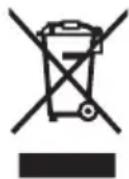
In accordance with Directive 2012/19/EU and Directive 2006/66/EC respectively, electronic devices that are no longer usable and defective/drained batteries must be collected separately and recycled in an environmentally friendly manner.
Please return Bosch eBike components that are no longer usable free of charge to an authorised bicycle dealer or to a recycling facility.
Subject to change without notice.
Sicherheitshinweise

natural_image
Three electronic devices with visible internal components and wiring, shown from different angles (no text or symbols)en Original operating instructions
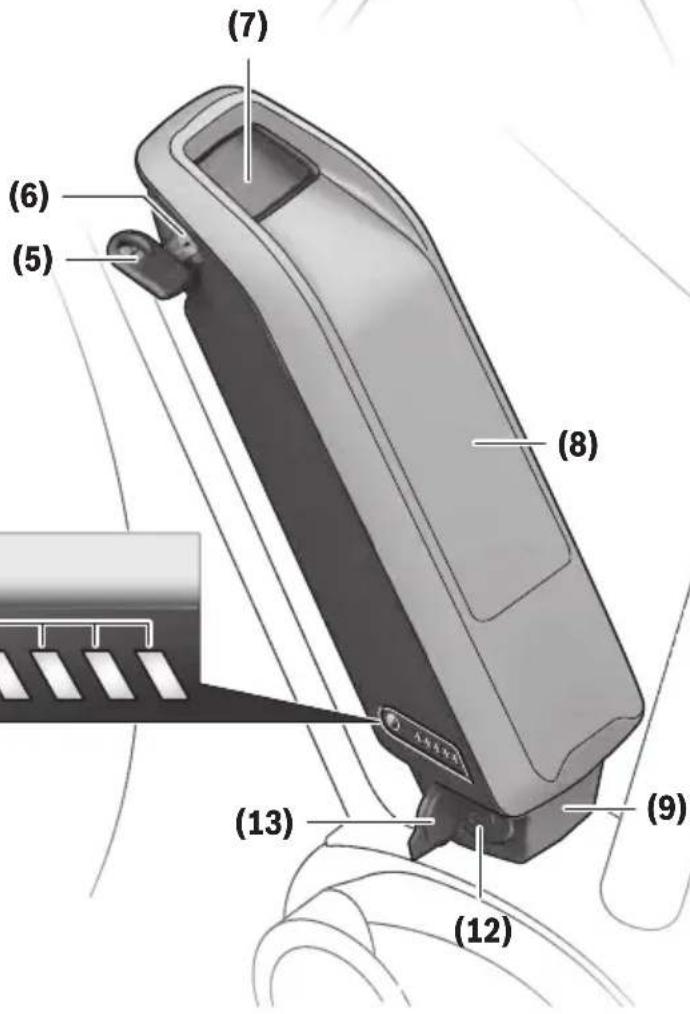
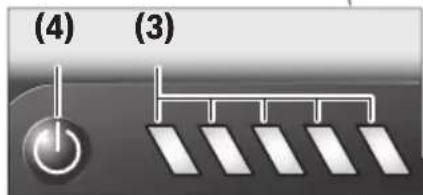


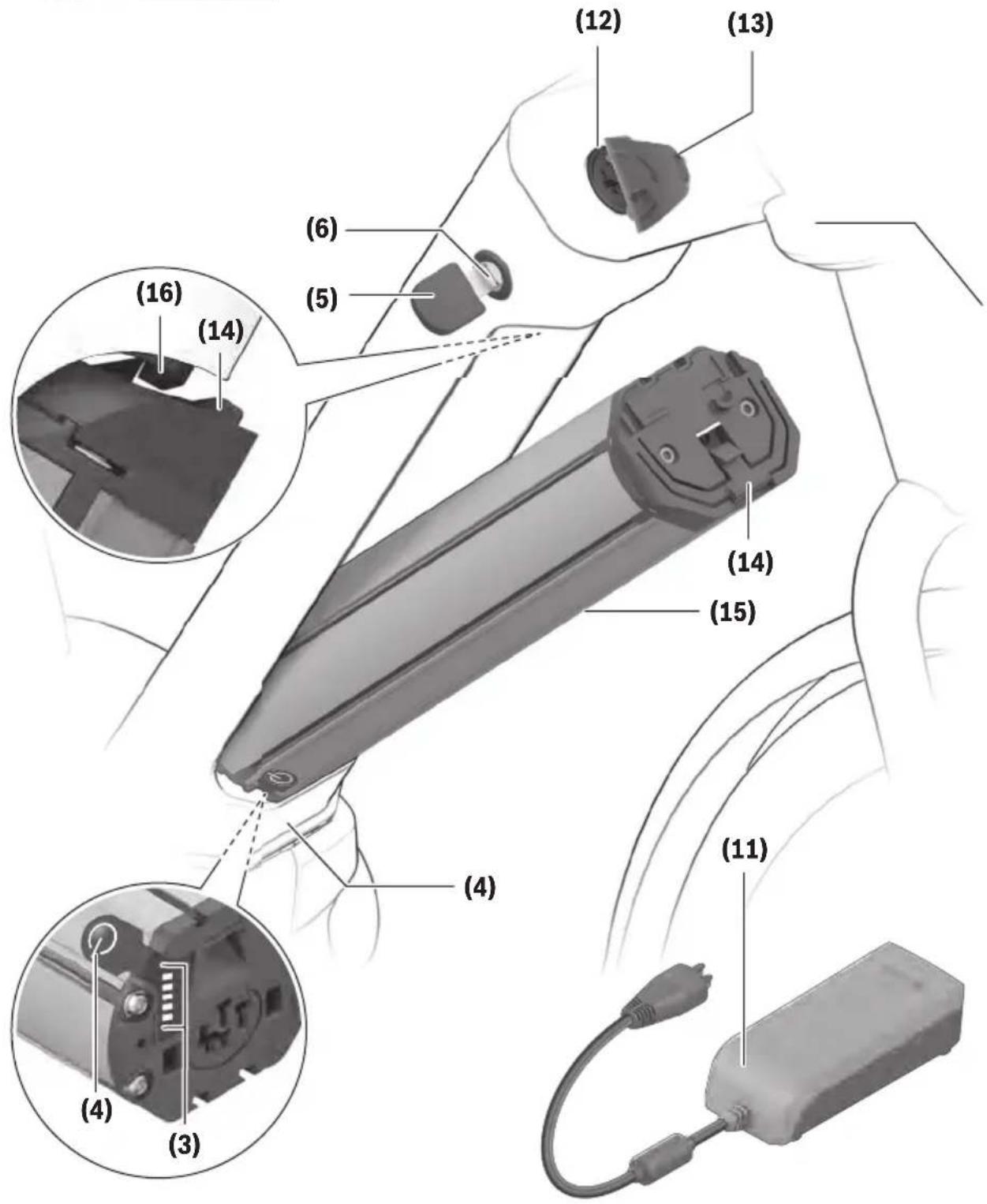
Read all the safety and general instructions. Failure to observe the safety and general instructions may result in electric shock, fire and/or serious injury.
The contents of lithium-ion battery cells are flammable under certain conditions. You must therefore ensure that you have read and understood the rules of conduct set out in these operating instructions.
Save all safety warnings and instructions for future reference.
The term battery is used in these instructions to mean all original Bosch eBike rechargeable battery packs.
Read and observe the safety warnings and directions contained in all the eBike system operating instructions and in the operating instructions of your eBike.
Remove the battery from the eBike before beginning work (e.g. inspection, repair, assembly, maintenance, work on the chain, etc.) on the eBike, transporting it with a car or aeroplane, or storing it. Unintentional activation of the eBike system poses a risk of injury.
▶ Do not open the battery. There is a risk of short-circuiting. Opening the battery voids any and all warranty claims.
▶ Protect the battery against heat (e.g. prolonged sun exposure), fire and from being submerged in water. Do not store or operate the battery near hot or flammable objects. There is a risk of explosion.
When the battery is not in use, keep it away from paper clips, coins, keys, nails, screws or other small metal objects that could make a connection from one terminal to another. A short circuit between the battery terminals may cause burns or a fire. Short circuit damage which occurs in this instance voids any and all warranty claims against Bosch.
- Avoid mechanical loads and exposure to high temperatures. These can damage the battery cells and cause the flammable contents to leak out.
▶ Do not place the charger or the battery near flammable materials. Ensure the battery is completely dry and placed on a fireproof surface before charging.
There is a risk of fire due to the heat generated during charging.
▶ The eBike battery must not be left unattended while charging.
▶ If used incorrectly, liquid may leak from the battery. Contact with this liquid should be avoided. If contact occurs, rinse off with water. If the liquid comes into contact with your eyes, seek additional medical attention. Liquid leaking from the battery may cause irritation or scalding.
▶ Batteries must not be subjected to mechanical shock. There is a risk of the battery being damaged.
The battery may give off fumes if it becomes damaged or is used incorrectly. Ensure the area is well ventilated and seek medical attention should you experience any adverse effects. The fumes may irritate the respiratory system.
▶ Only charge the battery using original Bosch chargers. When using chargers that are not made by Bosch, the risk of fire cannot be excluded.
▶ Use the battery only in conjunction with eBikes that have original Bosch eBike drive systems. This is the only way in which you can protect the battery against dangerous overload.
▶ Use only original Bosch batteries that the manufacturer has approved for your eBike. Using other batteries can lead to injuries and pose a fire hazard. Bosch accepts no liability or warranty claims if other batteries are used.
▶ Do not use the rack-mounted battery as a handle. Lifting the eBike up by the battery can damage the battery.
▶ Keep the battery away from children.
The safety of both our customers and our products is important to us. Our eBike batteries are lithium-ion batteries which have been developed and manufactured in accordance with the latest technology. We comply with or exceed the requirements of all relevant safety standards. When charged, these lithium-ion batteries contain a high level of energy. If a fault occurs (which may not be detectable from the outside), in very rare cases and under unfavourable conditions, lithium-ion batteries can catch fire.
Privacy notice
When you connect the eBike to the Bosch DiagnosticTool, data about the eBike batteries (e.g. temperature, cell voltage, etc.) is transferred to Bosch eBike Systems (Robert Bosch GmbH) for the purposes of product improvement.
You can find more information about this on the Bosch eBike website at www.bosch-ebike.com.
Product description and specifications
Intended Use
The Bosch eBike rechargeable batteries are intended exclusively for the power supply of your Bosch eBike drive unit and must not be used for any other purpose.
Product features
The numbering of the components shown refers to the illustrations on the graphics pages at the beginning of the manual.
All representations of bicycle parts, apart from the batteries and their holders, are schematic and may differ from those on your own eBike.
In addition to the functions shown here, changes to software relating to troubleshooting and functional modifications may be introduced at any time.
English - 2
(1) Rack-mounted battery holder
(2) Rack-mounted battery
(3) Operation/state of charge indicator
(4) On/off button
(5) Key for the battery lock
(6) Battery lock
(7) Upper standard battery holder
(8) Standard battery
(9) Lower standard battery holder
(10) Cover (supplied only on eBikes with two battery packs)
(11) Charger
(12) Socket for charging connector
(13) Charging socket cover
(14) PowerTube battery safety restraint
(15) PowerTube battery
(16) PowerTube battery safety hook
Technical data
| Li-ion battery PowerPack 300 PowerPack 400 PowerPack 500 | ||||
| Product code BBS245 | A) B) | BBS265A) | BBS275A) | |
| BBR245B)C) | BBR265C) | BBR275C) | ||
| Rated voltage V= 36 36 36 | ||||
| Nominal capacity Ah 8.2 11 13.4 | ||||
| Energy Wh 300 400 500 | ||||
| Operating temperature °C -5 to +40 -5 to +40 -5 to +40 | ||||
| Storage temperature °C +10 to +40 +10 to +40 +10 to +40 | ||||
| Permitted charging temperature range °C 0 to +40 0 to +40 0 to +40 | ||||
| Weight, approx. | kg | 2.5A)/2.6C) | 2.5A)/2.6C) | 2.6A)/2.7C) |
| Protection rating | IP 54 | IP 54 | IP 54 | |
A) Standard battery
B) Cannot be used in combination with other batteries in systems with two batteries
C) Rack-mounted battery
| Li-ion battery PowerTube 400 | PowerTube 500 | PowerTube 625 | ||
| Product code BBP282 horizontal | A)BBP283 vertical A) | BBP280 horizontalBBP281 vertical | BBP290 horizontalBBP291 vertical | |
| Rated voltage V= 36 36 36 | ||||
| Nominal capacity Ah 11 13.4 16.7 | ||||
| Energy Wh 400 500 625 | ||||
| Operating temperature °C -5 to +40 -5 to +40 -5 to +40 | ||||
| Storage temperature °C +10 to +40 +10 to +40 +10 to +40 | ||||
| Permitted charging temperature range °C 0 to +40 0 to +40 0 to +40 | ||||
| Weight, approx. | kg 2.9 2.9 3.5 | |||
| Protection rating | IP 54 | IP 54 | IP 54 | |
A) Cannot be used in combination with other batteries in systems with two batteries
UKCA
Fitting
▶ Ensure the battery is placed on clean surfaces only.
Avoid getting dirt, e.g. sand or soil, in the charging socket and contacts in particular.
Testing the battery before using it for the first time
Test the battery before charging it for the first time or using it in your eBike.
To do this, press the on/off button (4) to switch the battery on. If none of the LEDs on the battery charge indicator (3) light up, the battery may be damaged.
If at least one (but not all) of the LEDs on the battery charge indicator (3) lights up, the battery will need to be fully charged before using it for the first time.
▶ Do not charge or use batteries if they are damaged.
Contact an authorised bicycle dealer.
Charging the battery
▶ A Bosch eBike battery must only be charged using an original Bosch eBike charger.
Note: The battery is supplied partially charged. To ensure full battery capacity, fully charge the battery in the charger before using it for the first time.
To charge the battery, read and follow the instructions in the operating manual for the charger.
The battery can be charged at any state of charge. Interrupting the charging process does not damage the battery.
The battery has a temperature monitoring function which only allows it to be charged within a temperature range of 0^ C to 40^ C.
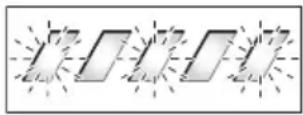
If the temperature of the battery is outside this charging range, three of the LEDs on the battery charge indicator (3) will flash. Disconnect the battery from the charger and let it acclimatise.
Do not reconnect the battery to the charger until it has reached the correct charging temperature.
Battery charge indicator
The five LEDs on the battery charge indicator (3) indicate the battery's state of charge when the battery is switched on.
Each LED represents approximately 20% of the charging capacity. When the battery is fully charged, all five LEDs will be lit.
The battery's state of charge when switched on is also shown on the display of the on-board computer. Read and follow the instructions in the operating manuals for the drive unit and on-board computer.
If the battery capacity is less than 10%, the last remaining LED will flash.
If the battery capacity is less than 5%, all the LEDs on the battery charge indicator (3) on the battery will go out. The display function of the on-board computer, however, will carry on working.
Once charging is complete, disconnect the battery from the charger and the charger from the mains.
Using two batteries for one eBike (optional)
The manufacturer can also equip an eBike with two batteries. In this case, one of the charging sockets will not be accessible or it will have been sealed with a sealing cap by the bicycle manufacturer. Only charge the batteries via the charging socket that is accessible.
▶ Never open charging sockets that have been sealed by the manufacturer. Charging batteries via a charging socket that used to be sealed may cause irreparable damage.
If you want to use an eBike that is designed for two batteries with only one battery, cover the contacts of the unused socket using the cover (10) provided. Otherwise there is a risk that the exposed contacts will cause a short circuit (see figures A and B).
Charging process for two batteries
If two batteries are fitted to an eBike, both batteries can be charged using the uncovered connection. To begin with, both batteries are charged one after the other until they reach approx. 80–90 % capacity, then they are both fully charged at the same time (the LEDs flash on both batteries). When the bike is in operation, power is drawn from both batteries on an alternating basis.
If you take the batteries out of the holders, you can charge each one individually.
Charging with one battery fitted
If only one battery is fitted, you can only charge the battery that has the accessible charging socket on the bike. You can only charge the battery with the sealed charging socket if you take the battery out of the holder.
Inserting and removing the battery
▶ Always switch off the battery and the eBike system when inserting the battery into the holder or removing it from the holder.
Inserting and removing the standard battery (see figure A)
In order for the battery to be inserted, the key (5) must be inserted into the lock (6) and the lock must be open.
To insert the standard battery (8), place it onto the contacts on the lower holder (9) on the eBike (the battery can be titled towards the frame by up to 7°). Tilt it into the upper holder (7) as far as possible until you hear it click into place. Check that the battery is secure in all directions. Always secure the battery by closing the lock (6) – otherwise the lock may open and the battery may fall out of the holder.
Always remove the key (5) from the lock (6) after closing it. This prevents both the key from falling out and the battery from being removed by unauthorised third parties when the eBike is not in use.
To remove the standard battery (8), switch it off and open the lock using the key (5). Tilt the battery out of the upper holder (7) and pull it out of the lower holder (9).
Inserting and removing the rack-mounted battery (see figure B)
In order for the battery to be inserted, the key (5) must be inserted into the lock (6) and the lock must be open.
To insert the rack-mounted battery (2), slide it contacts-first into the holder (1) on the rack until you hear it click into place.
Check that the battery is secure in all directions. Always secure the battery by closing the lock (6) – otherwise the lock may open and the battery may fall out of the holder.
Always remove the key (5) from the lock (6) after closing it. This prevents both the key from falling out and the battery
from being removed by unauthorised third parties when the eBike is not in use.
To remove the rack-mounted battery (2), switch it off and open the lock using the key (5). Pull the battery out of the holder (1).
Removing the PowerTube battery (pivot) (see figure C)
To remove the PowerTube battery (15), open the lock (6) using the key (5). The battery will be unlocked and fall into the safety restraint (14).
② Press on the safety restraint from above. The battery will be unlocked completely and fall into your hand. Pull the battery out of the frame.
Note: As a result of varying designs, the battery may need to be inserted and removed using a different method. Read the operating instructions of the eBike manufacturer.
Inserting the PowerTube battery (pivot) (see figure D)
In order for the battery to be inserted, the key (5) must be inserted into the lock (6) and the lock must be open.
To insert the PowerTube battery (15), place it so that its contacts are in the lower holder of the frame.
② Push the battery upwards until it is held by the safety restraint (14).
③ Hold the lock open with the key and press the battery upwards until you hear it click into place. Check that the battery is secure in all directions.
4 Always secure the battery by closing the lock (6) – otherwise the lock may open and the battery may fall out of the holder.
Always remove the key (5) from the lock (6) after locking it. This prevents both the key from falling out and the battery from being removed by unauthorised third parties when the eBike is not in use.
Operation
Start-up
▶ Use only original Bosch batteries that the manufacturer has approved for your eBike. Using other batteries can lead to injuries and pose a fire hazard. Bosch accepts no liability or warranty claims if other batteries are used.
Switching on/off
Switching on the battery is one way to switch on the eBike system. Read and follow the instructions in the operating manuals for the drive unit and on-board computer.
Before switching on the battery, i.e. the eBike system, make sure that the lock (6) is closed.
To switch on the battery, press the on/off button (4). Do not use any sharp or pointed objects to press the button. The LEDs on the indicator (3) will light up, indicating the battery's state of charge at the same time.
Note: If the battery capacity is less than 5 %, none of the LEDs on the battery charge indicator (3) will light up.
Whether the eBike system is switched on is only visible on the on-board computer/control unit.
To switch off the battery, press the on/off button (4) again. The LEDs on the indicator (3) will go out. This will also switch the eBike system off.
If no power is drawn from the eBike drive for about 10 minutes (e.g. because the eBike is not moving) and no button is pressed on the on-board computer or the control unit of the eBike, the eBike system will switch off automatically.
The battery is protected against deep discharge, overloading, overheating and short-circuiting by the "Electronic Cell Protection (ECP)". In the event of danger, a protective circuit switches the battery off automatically.
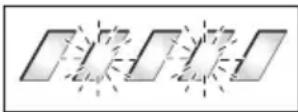
If a fault is detected in the battery, two of the LEDs on the battery charge indicator (3) will flash. Contact an authorised bicycle dealer if this happens.
Recommendations for optimal handling of the battery
The service life of the battery can be extended if it is looked after well and especially if it is stored at the correct temperature.
As it ages, however, the capacity of the battery will diminish, even with good care.
A significantly reduced operating time after charging indicates that the battery has deteriorated. The battery should be replaced.
Recharging the battery before and during storage
When you are not going to use the battery for an extended period (longer than three months), store it at a state of charge of around 30 % to 60 % (when two to three of the LEDs on the battery charge indicator (3) are lit).
Check the state of charge after six months. If only one of the LEDs on the battery charge indicator (3) is lit, charge the battery back up to around 30 % to 60 %.
Note: If the battery is stored with no charge for an extended period of time, it may become damaged despite the low self-discharge and the battery capacity could be significantly reduced.
Leaving the battery permanently connected to the charger is not recommended.
Storage conditions
If possible, store the battery in a dry, well-ventilated place. Protect it against moisture and water. When the weather conditions are bad, it is advisable to remove the battery from the eBike and store it in a closed room until you use it next, for example.
Store the eBike batteries in the following locations:
- In a room with a smoke alarm
– Away from combustible or easily flammable objects
– Away from heat sources
To ensure an optimum service life, store the eBike batteries at temperatures between 10 °C and 20 °C. Never store them at temperatures below -10 °C or above 60 °C.
Make sure that the maximum storage temperature is not exceeded. Do not leave the battery in your car in the summer, for example, and store it away from direct sunlight.
Leaving the battery on the bicycle for storage is not recommended.
Action in the event of a fault
The Bosch eBike rechargeable battery must not be opened, including for repairs. There is a risk of the Bosch eBike rechargeable battery catching fire, e.g. as a result of a short circuit. This risk continues to apply on any Bosch eBike rechargeable battery ever opened, even at a later point in time.
In the event of a fault, do not have your Bosch eBike rechargeable battery repaired; instead, have it replaced with an original Bosch eBike rechargeable battery by your specialist retailer.
Maintenance and servicing
Maintenance and cleaning
The battery must not be submerged in water or cleaned using a jet of water.
Keep the battery clean and avoid contact with skincare products and insect repellant. Clean it carefully with a soft, damp cloth.
Clean and lightly grease the connector pins occasionally.
Please contact an authorised bicycle dealer if the battery is no longer working.
After-sales service and advice on using products
If you have any questions about the batteries, contact an authorised bicycle dealer.
▶ Note down the key manufacturer and number on the key (5). Contact an authorised bicycle dealer if you lose the key. Give them the name of the key manufacturer and the number on the key.
For contact details of authorised bicycle dealers, please visit www.bosch-ebike.com.
Transport
If you transport your eBike attached to the outside of your car, e.g. on a bike rack, remove the on-board computer and the eBike battery to avoid damaging them.
The batteries are subject to legislation on the transport of dangerous goods. Private users can transport undamaged batteries by road without having to comply with additional requirements.
When batteries are transported by commercial users or third parties (e.g. air transport or forwarding agency), special requirements on packaging and labelling (e.g. ADR regula-
tions) must be met. When preparing items for shipping, a dangerous goods expert can be consulted as required.
Do not ship batteries if the housing is damaged or the rechargeable battery is not fully functional. Use only the original Bosch packaging for transport. Apply tape over exposed contacts and pack the battery such that it cannot move around inside the packaging. Inform your parcel service that the package contains dangerous goods. Please also observe any additional national regulations should these exist.
If you have any questions about transporting the batteries, contact an authorised bicycle dealer. You can also order suitable transport packaging from the dealer.
Disposal

Batteries, accessories and packaging should be recycled in an environmentally friendly manner.
Do not dispose of batteries along with household waste.
Apply tape over the contact surfaces of the battery terminals before disposing of batteries.
Do not touch severely damaged eBike batteries with your bare hands – electrolyte may escape and cause skin irritation. Store the defective battery in a safe location outdoors.
Cover the terminals if necessary and inform your dealer. They will help you to dispose of it properly.
In accordance with Directive 2012/19/EU and Directive 2006/66/EC respectively, electronic devices that are no longer usable and defective/drained batteries must be collected separately and recycled in an environmentally friendly manner.
Li-ion: Please observe the information in the section on (see "Transport", page English – 5).
Subject to change without notice.
Sicherheitshinweise


BCS220 | BCS230 | BCS250
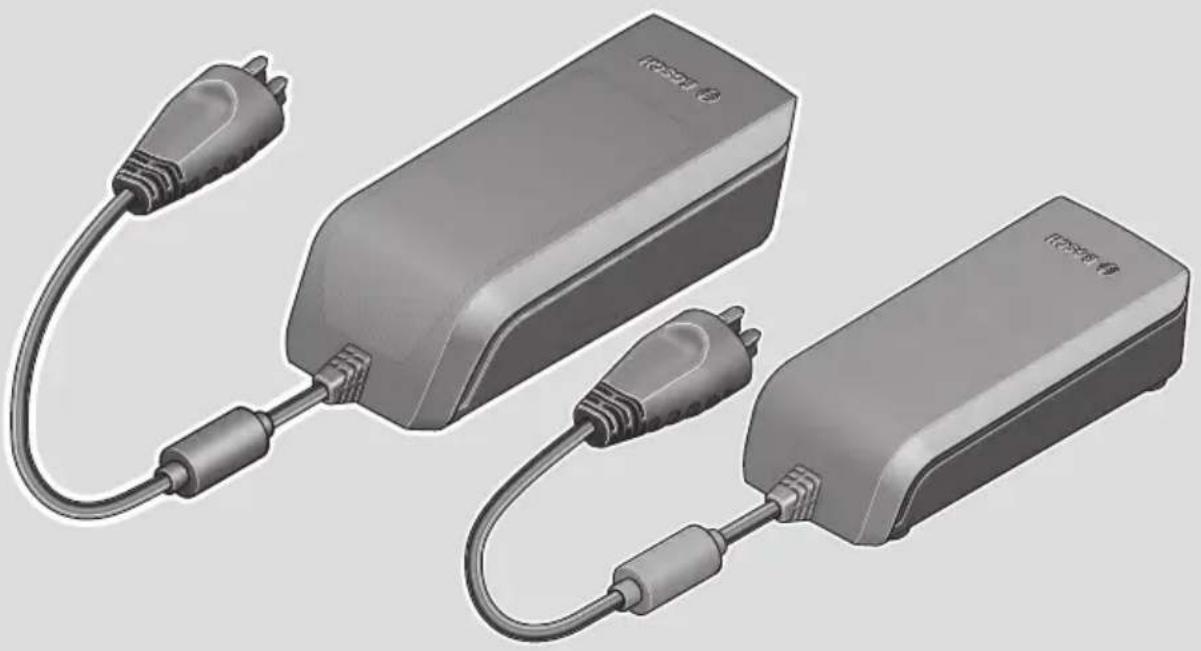
natural_image
Illustration of two electronic devices with attached cables, no visible text or symbolsen Original operating instructions
Read all the safety and general instructions. Failure to observe the safety and general instructions may result in electric shock, fire and/or serious injury.
Save all safety warnings and instructions for future reference.
The term battery is used in these instructions to mean all original Bosch eBike rechargeable battery packs.
Read and observe the safety warnings and directions contained in all the eBike system operating instructions and in the operating instructions of your eBike.

Do not expose the charger to rain or wet conditions. If water enters a charger, there is a risk of electric shock.
▶ Charge only Bosch lithium-ion batteries that are approved for use in eBikes. The battery voltage must match the battery charging voltage of the charger. Otherwise there is a danger of fire and explosion.
▶ Keep the charger clean. Dirt poses a risk of electric shock.
▶ Always check the charger, cable and plug before use. Stop using the charger if you discover any damage. Do not open the charger. Damaged chargers, cables and plugs increase the risk of electric shock.
▶ Do not operate the charger on an easily ignited surface (e.g. paper, textiles, etc.) or in a flammable environment. There is a risk of fire due to the charger heating up during operation.
▶ Take care if you touch the charger while it is charging. Wear protective gloves. The charger can get very hot, especially when the ambient temperature is high.
The battery may give off fumes if it becomes damaged or is used incorrectly. Ensure the area is well ventilated and seek medical attention should you experience any adverse effects. The fumes may irritate the respiratory system.
▶ The eBike battery must not be left unattended while charging.
▶ Supervise children during use, cleaning and maintenance. This will ensure that children do not play with the charger.
Children or persons who, owing to their physical, sensory or mental limitations or to their lack of experience or knowledge, are not capable of safely operating the charger may only use this charger under supervision or after having been instructed by a responsible person. Otherwise, there is a danger of operating errors and injuries.
▶ A sticker in English is adhered to the bottom of the charger (marked (4) in the diagram on the graphics page). This says: Use ONLY with BOSCH lithium-ion batteries.
Product description and specifications
Intended Use
In addition to the functions shown here, changes to software relating to troubleshooting and functional modifications may be introduced at any time.
The Bosch eBike chargers are intended exclusively for charging Bosch eBike batteries and must not be used for any other purpose.
Product features
The numbering of the components shown refers to the illustrations on the graphics pages at the beginning of the manual.
Individual illustrations in these operating instructions may differ slightly from the actual conditions depending on the equipment of your eBike.
(1) Charger
(2) Device socket
(3) Device connector
(4) Charger safety instructions
(5) Charging connector
(6) Socket for charging connector
(7) Charging socket cover
(8) Rack-mounted battery
(9) Operation/state of charge indicator
(10) Battery on/off button
(11) Standard battery
Technical data
| Charger Standard charger | (36-4/230) | Compact charger (36-2/100-230) | Fast charger (36-6/230) |
| Product code BCS220 BCS230 BCS250 | |||
| Rated voltage V~ 207 to 264 90 to 264 207 to 264 | |||
| Frequency Hz 47 to 63 47 to 63 47 to 63 | |||
| Battery charging voltage V= 36 36 36 | |||
| Charging current (max.) A 4 2 6 | A) | ||
| Charging time | |||
| – PowerPack 300, approx. hrs 2.5 5 2 | |||
| – PowerPack 400, approx. hrs 3.5 6.5 2.5 | |||
| – PowerPack 500, approx. hrs 4.5 7.5 3 | |||
| Operating temperature °C 0 to +40 0 to +40 0 to +40 | |||
| Storage temperature °C +10 to +40 +10 to +40 +10 to +40 | |||
| Weight, approx. | kg 0.8 0.6 1.0 | ||
| Protection rating IP 40 | IP 40 | IP 40 |
A) The charging current is limited to 4 A for the PowerPack 300 and for Classic+ Line batteries.
The specifications apply to a rated voltage [U] of 230 V. These specifications may vary at different voltages and in country-specific models.

Operation
Start-up
Connecting the charger to the mains (see figure A)
▶ Pay attention to the mains voltage. The voltage of the power source must match the voltage specified on the rating plate of the charger. Chargers marked 230 V can also be operated at 220 V.
Plug the device connector (3) of the power cable into the device socket (2) on the charger.
Connect the power cable (country-specific) to the mains.
Charging the removed battery (see figure B)
Switch the battery off and remove it from its holder on the eBike. When doing so, read and observe the operating instructions of the battery.
▶ Ensure the battery is placed on clean surfaces only.
Avoid getting dirt, e.g. sand or soil, in the charging socket and contacts in particular.
Plug the charging connector (5) of the charger into the socket (6) on the battery.
Charging the battery on the bike (see figures C and D)
Switch the battery off. Clean the cover of the charging socket (7). Avoid getting dirt, e.g. sand or soil, in the charging socket and contacts in particular. Lift the cover of the charging socket (7) and plug the charging connector (5) into the charging socket (6).
There is a risk of fire due to the charger heating up during charging. Ensure the battery on the bike is completely dry and placed on a fireproof surface before charging. If this is not possible, remove the battery from the holder and charge it in a more suitable location. When doing so, read and observe the operating instructions of the battery.
Charging process for two batteries
If two batteries are fitted to an eBike, both batteries can be charged using the uncovered connection. To begin with, both batteries are charged one after the other until they reach approx. 80–90 % capacity, then they are both fully charged at the same time (the LEDs flash on both batteries). When the bike is in operation, power is drawn from both batteries on an alternating basis.
If you take the batteries out of the holders, you can charge each one individually.
Charging process
The charging process begins as soon as the charger is connected to the battery or charging socket on the bike and to the mains.
Note: The charging process is only possible when the temperature of the eBike battery is within the permitted charging temperature range.
Note: The drive unit is deactivated during the charging process.
The battery can be charged with and without the on-board computer. When charging without the on-board computer, the charging procedure can be observed on the battery charge indicator.
When the on-board computer is connected, a charging notification appears on the display.
The state of charge is displayed by the battery charge indicator (9) on the battery and by the bars on the on-board computer.
The LEDs on the battery charge indicator (9) flash during the charging process. Each solid illuminated LED represents approximately 20 % of the charging capacity. The flashing LED indicates the next 20 % currently charging.
Once the eBike battery is fully charged, the LEDs go out immediately and the on-board computer is switched off. The charging process is terminated. The state of charge can be displayed for 3 seconds by pressing the on/off button (10) on the eBike battery.
Disconnect the charger from the mains and the battery from the charger.
When the battery is disconnected from the charger, the battery is automatically switched off.
Note: If you have charged the battery on the bike, carefully close the charging socket (6) with the cover (7) after charging, so that no dirt or water can get in.
If the charger is not disconnected from the battery after charging, after a few hours the charger will switch itself back on, check the state of charge of the battery and begin the charging procedure again if necessary.
Errors – causes and corrective measures
| Cause Corrective measures | ||
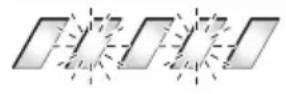 Battery defective Battery defective | Two LEDs flash on the battery.Contact an authorised bike dealership. | |
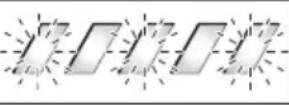 Battery too warm or too cold Battery too warm or too cold | Three LEDs flash on the battery.Disconnect the battery from the charger until the charging temperature range has been reached.Do not reconnect the battery to the charger until it has reached the correct charging temperature. | |
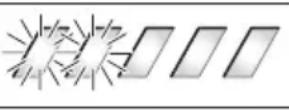 The charger is not charging. The charger is not charging. | No LEDs flashing (one or more LEDs will remain permanently lit depending on the state of charge of the eBike battery).Contact an authorised bike dealership. | |
| Charging not possible (no indicator on battery) | ||
| Connector not attached properly Check all connections. | ||
| Battery contacts dirty Carefully clean the battery contacts. | ||
| Plug socket, cable or charger defective Check the mains voltage, have the charger checked over by a bike dealership. | ||
| Battery defective Contact an authorised bike dealership. | ||
Maintenance and servicing
Maintenance and cleaning
If the charger fails, please contact an authorised bike dealership.
After-sales service and advice on using products
If you have any questions about the eBike system and its components, contact an authorised bicycle dealer.
For contact details of authorised bike dealerships, please visit www.bosch-ebike.com.
Disposal
Chargers, accessories and packaging should be recycled in an environmentally friendly manner.
Do not dispose of chargers along with household waste.
Check that your personal data has been deleted from the device.
Only for EU countries:
According to the European Directive 2012/19/EU on Waste Electrical and Electronic Equipment and its implementation into national law, chargers that are no longer usable must be collected separately and disposed of in an environmentally friendly manner.
Please return Bosch eBike components that are no longer usable free of charge to an authorised bicycle dealer or to a recycling facility.
Subject to change without notice.
Sicherheitshinweise


Addresses and telephone numbers:
| Trek European Head Office | Trek UK | Electra | Trek/Diamant |
| Bikeurope B.V. / Trek Benelux | Trek Bicycle Corporation Ltd. | Bikeurope B.V. | Trek Fahrrad GmbH |
| Ceintuurbaan 2-20C | 9 Sherbourne Drive, Tilbrook | Ceintuurbaan 2-20C | Auenstrasse 10 |
| 3847 LG Harderwijk | Milton Keynes MK7 8HX | 3847 LG Harderwijk | CH-8600 Dübendorf |
| The Netherlands | United Kingdom | The Netherlands | Switzerland |
| Tel.: +31 (0)88-4500699 | Tel.: +44 1908 360 140 | Tel.: +31 (0)88-4500699 | Tel.: 00800 8735 8735 |
| Internet: www.trekbikes.com | Internet: www.trekbikes.com | Internet: www.electrabike.com | Internet: www.diamantrad.com |
- For Service and Warranty, please contact your local dealer.
- Please refer to the website (Menu/Support) for the latest revision of this manual.
New features, as described in the latest manual, may not be applicable on your electric bike.
Kontakt
Trek European Head Office
| Bikeurope B.V. / Trek Benelux |
| Ceintuurbaan 2-20C |
| 3847 LG Harderwijk |
| Nederland |
| Tel.: +31 (0)88-4500699 |
| Internet: www.trekbikes.com |
Electra
| Bikeurope B.V. |
| Ceintuurbaan 2-20C |
| 3847 LG Harderwijk |
| Nederland |
| Tel.: +31 (0)88-4500699 |
| Internet: www.electrabike.com |