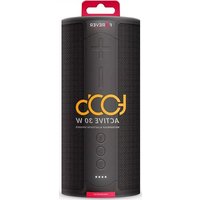
Forever Toob 30 BS-950 - Speaker

Toob 30 BS-950 - Speaker Forever - Free user manual and instructions

Find the device manual for free Toob 30 BS-950 Forever in PDF.

📄 100 pages English EN Download 💬 AI Question 11 questions ⚙️ Specs
Notice Forever Toob 30 BS-950 - page 4
Pick your language and provide your email: we'll send you a specifically translated version.
Product Type Bluetooth Portable Speaker
Brand Forever
Model Toob 30 BS-950
Bluetooth Version 5.0
Bluetooth Range Up to 10 meters
Rated Power 15 W x 2 (45 mm, 4 Ω speakers)
Battery Li-Ion 3.7 V, 4400 mAh
Playback Time Up to 10 hours (depending on volume)
Charging Time Approximately 3 hours
Charging Type USB Type-C 5 V
Auxiliary Audio Input 3.5 mm Jack
microSD Card Reader Yes
Built-in Microphone Yes (hands-free)
TWS Function Yes (stereo pairing of two speakers)
Protection Rating IPX7 (water resistant)
Dimensions (W x H x D) 90 x 94 x 210 mm
Estimated Weight Approximately 700 g
Package Contents Speaker, USB Type-C cable, audio cable, user manual
Warranty Check with manufacturer
Country of Origin Not specified

Frequently Asked Questions - Toob 30 BS-950 Forever

How to turn the Toob 30 speaker on and off?
To turn on, press and hold the ON/OFF button until the LED/Bluetooth indicator lights up. To turn off, press and hold the ON/OFF button until the indicator turns off.
How to pair the speaker via Bluetooth?
Turn on the speaker (the Bluetooth indicator flashes). Enable Bluetooth on your device, search for devices, and select "TooB 30". If necessary, enter the code "0000". The connection is confirmed by a sound signal.
How to use the TWS function to pair two speakers?
Turn on both speakers. On one of them, press and hold the Play/Pause button for about 2 seconds until a beep. The speakers pair automatically. Enable Bluetooth on your device and connect to "TooB 30". To deactivate TWS, press Play/Pause again for 2 seconds.
What is the battery life and how to recharge it?
The battery life is up to 10 hours of playback (depending on volume). Charging is done via the USB Type-C cable (5 V) and takes approximately 3 hours. The LED indicator shows the charging status.
Is the speaker waterproof?
Yes, it has an IPX7 IPX7 rating, meaning it is resistant to temporary immersion in water up to 1 meter for 30 minutes. Note: It is not designed for prolonged underwater use.
Can I use a microSD card with the speaker?
Yes, insert a microSD card into the designated slot. Music playback starts automatically. You can switch between Bluetooth, SD card, and audio-in modes by pressing the M button.
How to answer or reject a phone call?
To answer, press the Power button (play/pause function button). To reject a call, hold the button or check your phone. To redial the last number, quickly press the Power button twice.
What to do if the speaker does not connect via Bluetooth?
Check that the speaker is on and Bluetooth is enabled on your device. Ensure no other audio cable is connected (Bluetooth is disabled if a cable is connected). Try restarting the speaker or removing the device from the Bluetooth list and re-pairing.
How to clean the speaker?
Disconnect any power source. Use a soft, dry cloth to clean the surface. Avoid harsh chemicals. Do not let water enter the openings (charging port, SD slot).
Can I replace the battery myself?
No, the battery is built-in and should not be removed by the user. Any repairs should be carried out by a qualified technician. Do not expose the battery to heat or fire.

User questions about Toob 30 BS-950 Forever

1 question about this device. Answer the ones you know or ask your own.

Ask a new question about this device

The email remains private: it is only used to notify you if someone responds to your question.

How to activate and use the TWS (stereo pairing) function on the Forever Toob 30 BS-950?
Frequently Asked Questions - 8 j
Response Notice-Facile

The TWS (True Wireless Stereo) function allows you to pair two Forever Toob 30 BS-950 speakers to create a stereo audio setup. This function uses Bluetooth 5.0 to synchronize the two devices and provide two-channel sound reproduction.

Activating and pairing TWS:

  • Turn on both speakers by pressing and holding the ON/OFF button until the LED/Bluetooth indicator lights up on each
  • On one of the two speakers, press and hold the Play/Pause button for about 2 seconds until you hear a beep
  • Release the Play/Pause button. The two speakers will synchronize; this step may take several seconds
  • On your source device (phone, tablet, computer), enable Bluetooth and search for available devices
  • Select the speaker named "TooB 30" from the list and confirm the Bluetooth pairing

Once paired in TWS mode, the two Forever Toob 30 BS-950 speakers work together in stereo. Each speaker has two 45 mm drivers for a power of 15 W, creating an immersive audio experience with an expanded soundstage. The Bluetooth range is maintained up to 10 meters.

Disabling TWS mode:

To disable the TWS function, press and hold the Play/Pause button for about 2 seconds on one of the two speakers. A sound signal confirms the disconnection from stereo mode.

Practical recommendations:

  • Ensure that both speakers are sufficiently charged (Li-Ion battery 3.7 V, 4400 mAh with 3 hours of charging time)
  • Keep both speakers within 10 meters of each other to ensure stable synchronization
  • If pairing fails, completely turn off both speakers, wait a few seconds, and then repeat the procedure from the beginning
  • Once in TWS mode, use your device's music app to control playback, adjust the volume, and navigate between tracks
Respond (be the first)

Download the instructions for your Speaker in PDF format for free! Find your manual Toob 30 BS-950 - Forever and take your electronic device back in hand. On this page are published all the documents necessary for the use of your device. Toob 30 BS-950 by Forever.

USER MANUAL Toob 30 BS-950 Forever

WATERPROOF BLUETOOTH SPEAKER BS-950

USER MANUAL
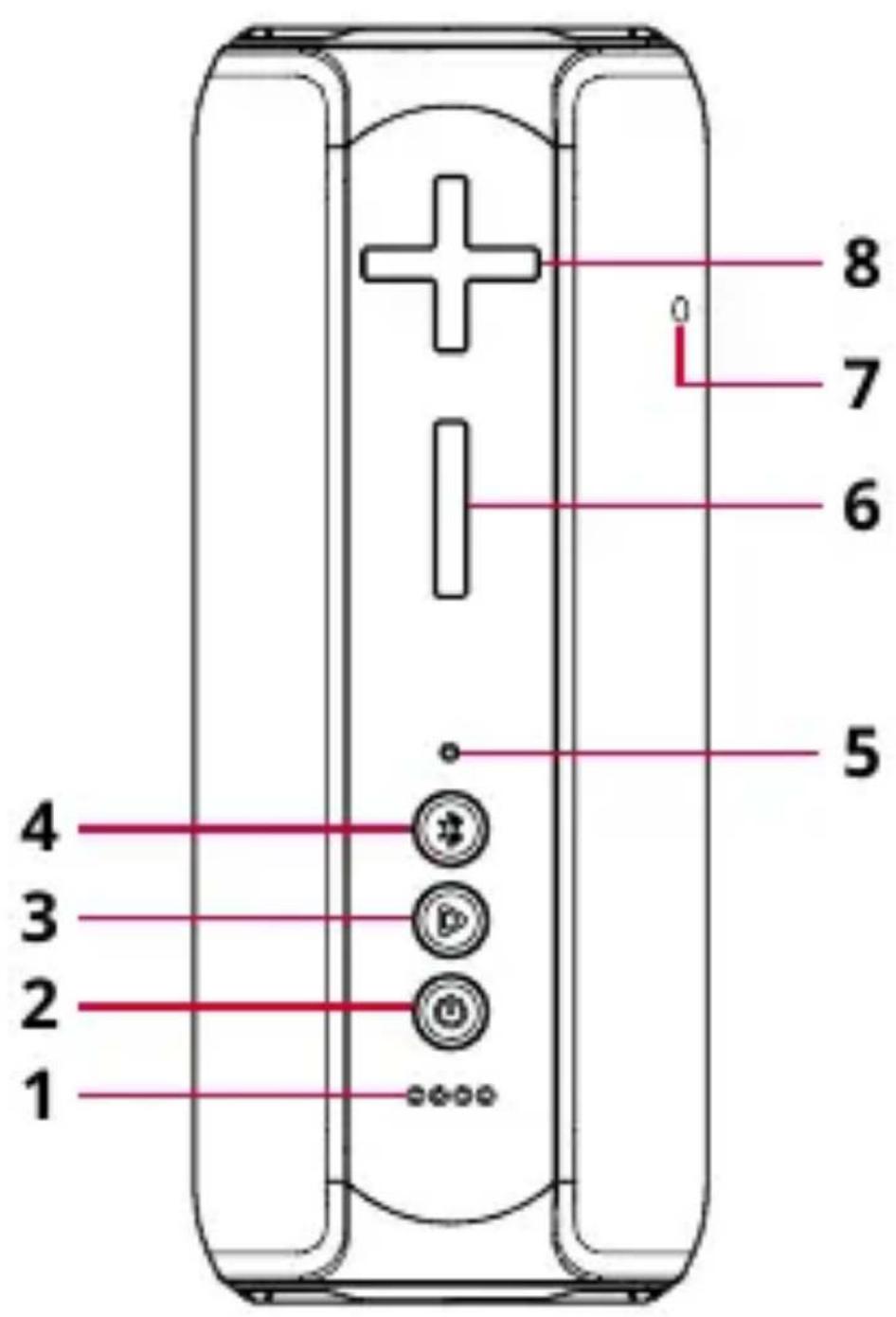
1 2 3 4 5 6 7 8

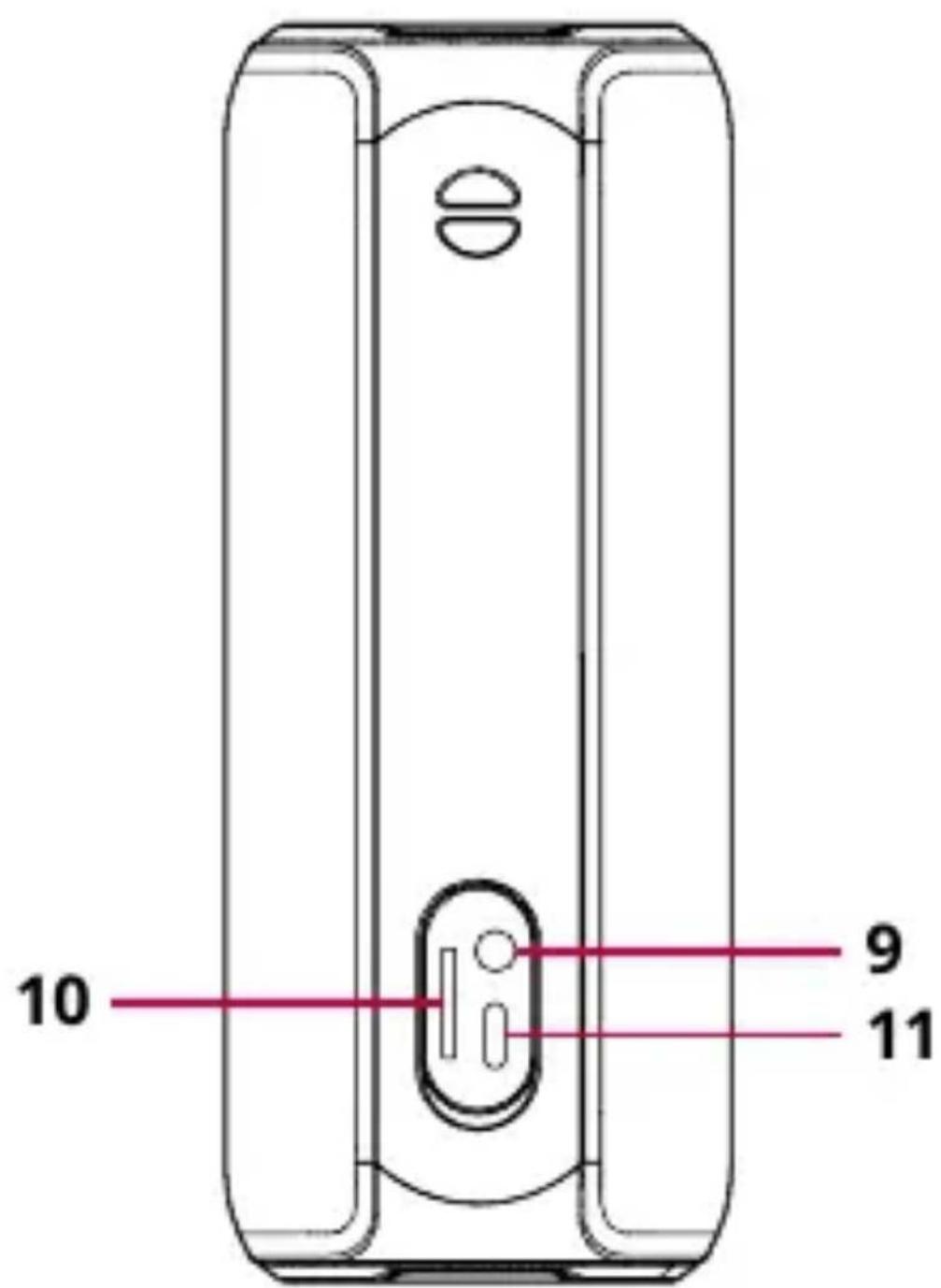
10 9 11

EN

Thank you for purchasing a product by Forever. Before use, please refer to the User's manual, and save it for future reference. Do not disassemble the device on your own – all repairs should be done by a service technician. Use only original parts and accessories provided by the manufacturer. The device should not be exposed directly to water, moisture, sunlight, fire or other heat sources. We hope that the product by Forever fulfills your expectations.

Image description

  1. Battery level indicator
  2. ON/OFF button
  3. Function key: Play / Pause, Answer / Hang up, last number redialing
  4. Function key: M / Bluetooth disconnecting / connecting
  5. LED / Bluetooth
  6. Function key: "-" / Volume down / Previous track
  7. Microphone
  8. Function key: "+" / Volume up / Next track
    9 Audio input 3.5 mm
  9. MicroSD card slot
  10. Type-C 5 V charging socket

Specification

  • Bluetooth version V5.0
  • Coverage: up to 10 m

  • Rated power: ∅45mm 4Ω 15W*2

  • Battery: Li-Ion: 3,7 V, 4400 mAh
  • Battery charging time: 3 hours
  • Music playing time: up to 10 hours (varies depending on volume setting and audio content)
  • Waterproofness level: IPX7
  • Dimensions: 90 x 94 x 210 (mm)

Charging

Connect the USB cable included in the set to a power source of maximum voltage 5 V DC. As a power source, you may use a wall charger with USB output. Insert the second end of the cable into the Type-C socket in the loudspeaker. Charging will be signaled by illumination of LED located near the charging socket. When the loudspeaker is fully charged, disconnect it from the power source.

The loudspeaker has an in-built battery - to prevent damage to the set, do not remove the battery on your own.

Activation

Press and hold ON/OFF button until the LED / Bluetooth lights up.

Deactivation

Press and hold ON/OFF button until the LED / Bluetooth goes out.

Available operating modes

  • Bluetooth
  • Audio linear input (audio in)
  • Playing music from a microSD card
  • TWS function

Loudspeaker pairing

  1. Press and hold ON/OFF button until the LED / Bluetooth starts flashing.
  2. Activate Bluetooth connectivity in the device, which you want to connect with the loudspeaker.
  3. Search for a new device. The loudspeaker will be visible as "TooB 30" on the list.
  4. Connect with the loudspeaker. Certain devices require entering code "0000"
  5. Correct connection of the loudspeaker will be confirmed with a voice message.

If you connect Audio-in cable, Bluetooth connectivity will be interrupted.

Change of mode

To switch Bluetooth / SD Card / audio cable mode, press button (4)

TWS CONNECTION

  1. Activate two loudspeakers
  2. Press and hold Play / Pause button on one of the loudspe-

akers for 2 seconds until you hear audio signal.

  1. Release the play / pause button. Connection of loudspeakers may take several seconds.
  2. Activate Bluetooth function in the device, select "TooB 30" loudspeaker name from the list and pair the devices.

Press Play button for 2 seconds to deactivate TWS function.

Music playing

Pair the loudspeakers with the device that is the sound source, and then start playing music on it.

The music application allows to skip, fast-forward or rewind tracks, as well as change volume

Tracks skipping

When listening to music, press and hold "+" button to skip to the next track or press and hold "-" button to skip to the previous track.

Change of volume

When listening to music, press and "+" button to increase the volume or press and "-" button to decrease the volume

Answering/declining incoming calls

In order to answer a call via TooB 30 speaker, press "PLAY" button

Redialing with the last number

In order to redial with the last number, quickly double-click the "PLAY" button

Play mode using SD card

  1. Turn the loudspeaker on
  2. Insert a microSD card
  3. The music will start playing automatically.

The set includes

  • Loudspeaker
  • USB-Type-C cable
  • Manual
  • Audio-in cable

Safety principles

  • Long-term listening to loud music may lead to hearing loss and health impairment.
  • Pay special attention to your surroundings when listening to music while moving.
  • Read and keep this manual.
  • Do not remove the cover of the device. Inside, there are no parts that can be repaired by the user. Any repairs should be carried out by a serviceman.
  • Note: The battery must not be exposed to direct sunlight, fire or other heat sources.
  • Note: Only use original parts/accessories supplied by the manufacturer.

TelForceOne S.A. declares that the product is compatible with requirements and other relevant provisions of the 2014/53/UE directive. You can download the declaration on of product on website www.telforceone.pl.

PL

Forever Toob 30 BS-950 - PL - 1

Forever Toob 30 BS-950 - PL - 2

Forever Toob 30 BS-950 - PL - 3

Forever Toob 30 BS-950 - PL - 4

Forever Toob 30 BS-950 - PL - 5

natural_image Simple line drawing of a trash bin with crossed lines and a horizontal bar below (no text or symbols)

Electrical and electronic devices may not be disposed of with domestic waste. By recycling reusing the materials or other form of utilising old devices, you are making an important contribution to protecting our environment.
Manual assistant
Powered by Anthropic
Waiting for your message
Product information

Brand : Forever

Model : Toob 30 BS-950

Category : Speaker