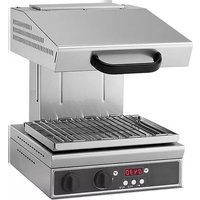
7466.1480 - Grill plate CombiSteel - Free user manual and instructions
Find the device manual for free 7466.1480 CombiSteel in PDF.
Questions des utilisateurs sur 7466.1480 CombiSteel
0 question sur cet appareil. Repondez a celles que vous connaissez ou posez la votre.
Poser une nouvelle question sur cet appareil
Download the instructions for your Grill plate in PDF format for free! Find your manual 7466.1480 - CombiSteel and take your electronic device back in hand. On this page are published all the documents necessary for the use of your device. 7466.1480 by CombiSteel.
USER MANUAL 7466.1480 CombiSteel
08/2016 ENGLISH: Installation, Operation and Maintenace Manual
1.1 General and safety warnings 5
1.3 Electric connection 8
3. INSTRUCTIONS FOR MODELS WITH PLATE (tted
4. INSTRUCTIONS FOR HI TOUCH MODELS (tted with
6. DISPOSAL OF THE APPLIANCE 18
Dear Customer, Thank you for purchasing one of our products This oven is part of a series of electrical equipment designed for the food sector Our ovens are easy to use, ergonomic and enable cooking control, while boasting a pleasant and modern design The oven has a 12 month warranty that covers any manufacturing defects from the date indicated on the Bill of Sale The warranty covers normal operation of the oven and does not include consumables (lamps, seals etc) and damages caused by incorrect installation, wear, maintenance, repair, incorrect cleaning and descaling, tampering and improper use45
1.1 General and safety warnings
- Carefully read this manual before installation and commissioning of the appliance, as the text provides important indications concerning appliance safety in installation, operation and maintenance
- Store this manual with care and in an easily accessible place for any further referencing by operators
- Always attach the manual in the event of transfer of the appliance; should it be required, a new copy must be obtained from the authorised dealer or directly from the manufacturer
- As soon as packaging is removed, ensure the appliance is intact and does not show any damage caused by transport In no case shall a damaged appliance be installed and commissioned; if in doubt immediately contact the technical support or your dealer
- Before connecting the appliance ensure the power cable supplied is not damaged, in which case the cable must be replaced by the service or byqualiedpersonnel.
- Before connecting the appliance ensure the rated data match those of the electricity distribution network
- For direct connection to the power supply network it is required to interpose a device between the appliance and the network, to assure disconnection and whose contacts have an opening distance such as to assure complete disconnection in overvoltage category III conditions, in compliance with installation rules
- Appliance installation, extraordinary maintenance and repair operations must be solely effected by professionally skilled personnel and following the manufacturer’s instructions6
- The appliance has been designed to cook foodstuffs in closed environments and must be used only for this function Any different use must therefore be avoided as it is considered improper and dangerous
- The appliance must only be used by personnel suitably trained in its use To avert the risk of accidents or damage to the appliance it is also essential for the personnel to regularly receive precise instructions on safety
- The appliance must not be used by persons with limited physical, sensory or mental abilities or by persons without experience and knowledge, unless they are supervised or instructed with regards to appliance use by a person responsible for their safety
- Children should be supervised to ensure they do not play with the appliance nor use it
- Before commissioning the appliance ensure all packaging parts have been removed, then make sure to dispose of them in compliance with current regulations
- In the event the appliance should be positioned against a wall, the wall must withstand temperature of 80°C and if ammable, application of thermal insulation is compulsory
- Do not obstruct the extraction or heat disposal openings or slits
- During operation it is required to pay attention to the hot areas of the outer surface of the appliance which, during operation, may even exceed 60° C
- Do not deposit nor use ammable substances near the appliance
- In the event of fault or malfunctioning, the appliance must be disabled; for any repairs solely contact a technical support centre authorised by the7 manufacturer and demand original spare parts
- Any modication to appliance installation that should be required shall be approved and performed by authorised technical personnel
- The appliance is only intended for professional use and by qualied personnel
- Power off the appliance before performing any maintenance or repair
- No modications to the appliance’s wiring of any kind are admissible
- In the event of prolonged appliance disuse, the supply of electricity must be discontinued
- Failure to comply with the above warnings may jeopardise the appliance’s safety as well as your own
- The information plate provides important technical information: these are essential if interventions must be requested for maintenance or repairs of the appliance; therefore, it must not be removed, damagedormodied.
- The equipment complies with the essential requirements of the Machinery Directive 2006/42/EC
- The equipment complies with the essential requirements of the Electromagnetic Compatibility Directive 2014/30/EC
- The equipment complies with the essential requirements of the Low Voltage Directive 2014/35/EC8
Remove the unit from the packaging and make sure it is in perfect condition Before installing the appliance, remove the two screws blocking the heating element from the back (Fig. 1) Place the unit where it is going to be used, keeping it away fromwalls,ammablecladdingmaterialsorotherammable parts Position the salamander under an exhaust hood to guarantee complete aspiration of the steam produced when cooking Do not install the appliance above hot surfaces Level and adjust the height of the unit by means of the levelling feet Take the protective lm off the outer panels, pulling it away slowly so no traces of glue are left Do not obstruct the aspiration or heat vents If you put the unit on a table, leave at least 50 mm between the back of the unit and the rear wall (Fig. 2) To wall mount the salamander use the wall-mounting brackets and screws and inserts suitable for the type of wall and unit weight
1.3 Electric connection
Before connecting the unit to the mains check that both the voltage and frequency on the rating plate are the same as those of the electrical supply system you are using The unit is delivered ready for use indicated on the rating plate located on the side of the appliance To connect the unit to the mains, thread the cable type H07RN-F (cut down to the right length) through the hole on the back of the appliance and connect to the junction box on the right side following the guidelines
Fig. 1 Fig. 29 intheelectrictable.Thentastandardplugratedfortheloadabsorbed onto the power cable and plug into a suitable socket after making sure that the socket is properly earthed in accordance with current standards For a direct connection to the mains it is necessary to interpose a 4-pole switch between the unit and the mains, rated for the load and with contacts that have a minimum opening distance of 3 mm When the unit is running check that the supply voltage is ± 10% of the rated voltage value In addition, the unit must be connected to an equipotential system which must be checked following the guidelines of the current regulations
2. INSTRUCTIONS FOR HI-LITE MODELS
The unit should only be used for the designated purpose Any other use is improper Do not leave appliance unattended when in use
This unit is designed for cooking, warming, grilling and keeping food hot with high temperature infrared rays produced by a heat source located in the top of the unit By adjusting the grill hood height, it is possible to regulate the heat on the food to be cooked The greater the distance between the food and the heating element the lower the heat intensity Fig. 3 MOD XXXX
Fig. 4 Fig. 510 Before turning the salamander on for the rsttime,removeallthepackagingmaterial and clean the unit thoroughly, removing all the protective industrial grease as follows:
- clean the unit with a damp sponge and a mild detergent;
- rinse the grill with clean water
1. Heating elements selection:
units with two resistances: if the L1 LED is on the two resistances are working at maximum power, if the right L2 LED is on the two resistances operate alternately; units with three and four resistances: if the left L1 LED is on only central resistances are working, if the right L2 LED is on the unit is working at maximum power and the central resistances operate alternately
3. STOP button It can also be used to stop the buzzer
6. Main switch (units without holding): 0= OFF ; 1 = ON
7. Main switch (units with holding): 0=OFF; 1=Preheat/holding; 2=O
- Switch on main switch upstream of appliance Fig. 611
- Turn knob (6) to position 1
- Set the cooking time (15 sec to 20 min) by rotating knob (5) The set time will be shown on display (4)
- Select the heating element by pressing button (1) In the version with 3 heating elements, if light (2) is on, the central resistance goes on and off at regular intervals during cooking In the version with 4 heating elements, if light (2) is on, the two central resistances go on and off at regular intervals during cooking This system for switching on and off central resistances guarantees even heat distribution over the entire appliance surface
- Press button (2) to start the cooking session
- At the end of the set cooking time the salamander will switch off automatically and the buzzer will go off Press button (3) to switch it off N.B.:
- By pressing button (2) again, the salamander will start a new cooking session just like the one previously set
- The salamander will switch off with no buzzer by pressing button (3) during the cooking session SWITCHING OFF:
- Switch off the switch upstream of the appliance12
3. INSTRUCTIONS FOR MODELS WITH
PLATE (tted with plate) The unit should only be used for the designated purpose Any other use is improper Do not leave appliance unattended when in use
COOKING mode: By adjusting the grill hood height, it is possible to regulate the heat on the food to be cooked The greater the distance between the food and the heating element the lower the heat intensity Inapplianceswithxedgrillhood(SFH..)adjusttheintensityoftheheat through the positioning of the tray on different levels as shown in Fig 6 ATTENTION: The grill may be hot! Be careful while handling it. HOLD mode: movement of the salamander must be at maximum height above hob level (Fig. 5) Thanks to the side heating elements turning on and off, the food on the tray will maintain the cooking temperature reached during the previous cooking cycle
Before turning the salamander on for the rst time, remove all the packaging material and clean the unit thoroughly, removing all the protective industrial grease as follows:
- clean the unit with a damp sponge and a mild detergent;
- rinse the grill with clean water Fig. 713 Key Fig. 7: 1a Left heating element selection 1b Central heating element/s selection 1c Right heating element selection 2 Cooking (COOK) or hold (HOLD) mode selection 3 START button and STOP button 4 Display 5 Encoder for setting cooking time or hold mode 6 Main switch COOKING mode SWITCHING ON:
- Switch on main switch upstream of appliance
- Turn knob (6) to position 1
- Display(4)ashesshowingthelastsetting.
- Start the COOK function by pressing button (2): the corresponding LED will come on
- Set cooking time by turning the encoder (5): the time is shown on the display (4)
- Turn on the heating elements you wish to use by pressing the corresponding buttons (1) The element is on when the corresponding LED is on If all three (or four) heating elements are selected, the centre one switches on and off at regular intervals to ensure even distribution of heat all over tray surface
- There are two ways of starting the cycle MANUALLY: press button (3) activating the START function (the corresponding LED will come on) AUTOMATICALLY (WITH THE PLATE): Put the tray with the food to be cooked towards the back of the hob to trigger the detection mechanism The unit will automatically go to the START mode and the cooking cycle will begin14 SWITCHING OFF: The cooking cycle stops automatically giving an acoustic signal when thesettimeisnished.Ifnotimehasbeenset,thesystemstaysinthe START mode until the tray is taken off the hob or button (3) is pressed causing the corresponding STOP LED to come on Turn knob (6) to position 0 Switch off the switch upstream of the salamander N.B.: the operator can STOP-START the unit or turn the heating elements on or off at any time by pressing buttons on the panel (1) or by using the encoder (5) to set the cooking time HOLD mode SWITCHING ON:
- Switch off the mains switch upstream of the appliance
- Turn knob (6) to position 1
- Display(4)ashesshowingthelastsetting.
- Start the HOLD function by pressing button (2): the corresponding LED will come on
- Set the intensity (1 to 8) by turning the encoder (5) The set value will be shown on display (4)
- There are two ways of starting the cycle: MANUALLY: press button (3) activating the START function (the corresponding LED will come on) AUTOMATICALLY (WITH THE PLATE): put the tray with the food to be cooked towards the back of the hob to trigger the detection mechanism The unit will automatically go to the START mode and the cooking cycle will begin SWITCHING OFF:
- Theholdcyclewillonlynishwhenthetrayistakenoffthehoborwhen key (3) is pressed causing the corresponding STOP LED to come on
- Turn knob (6) to position 0
- Switch on the switch upstream of the appliance15
4. INSTRUCTIONS FOR HI TOUCH MODELS
(tted with plate) The unit should only be used for the designated purpose Any other use is improper Do not leave appliance unattended when in use
COOKING mode: By adjusting the grill hood height, it is possible to regulate the heat on the food to be cooked The greater the distance between the food and the heating element the lower the heat intensity HOLD mode: The grill hood must be at the maximum height above hob level (Fig.
6) The alternating side heating elements keep food on the tray at the
cooking temperature reached during the cooking cycle
Before turning the salamander on for the rst time, remove all the packaging material and clean the unit thoroughly, removing all the protective industrial grease as follows:
- clean the unit with a damp sponge and a mild detergent;
- rinse the grill with clean water Fig. 816
On/off button; when the appliance is switched off all the functions are switched off as well This button allows you to start or stop cooking and hold modes; This button allows you to select either cooking or hold modes in case of manual cooking; in case of program selection you can pass from cooking mode to hold mode and viceversa; These buttons increase or decrease cooking time and/or heat intensity of the hold mode This button allows you to set the cooking session with all resistances or just the central resistances; These buttons cannot be used when the appliance is in START mode; thus the following instructions only refer to ON or STOPmode;youcanselectaprogrambybrieypressingthe corresponding button You can enter the program selection mode by holding down the button; you can then save current settingsandgobacktonormalfunctioningbybrieypressing the same button again; MANUAL MODE Switch on the salamander by pressing the ON/OFF button Press the MODE SELECT button to select the type of mode (cooking or hold – the corresponding LED above the display will come on) Set time and intensity and then press START or place the plate on the plate detection device to start the session (cooking mode will terminate once the time set ends and a buzzer will sound); pressing the START/ STOP button or removing the plate (the plate detection device switches appliance off) will cause the HOLD mode to switch off AUTOMATIC MODE Switch on the salamander by pressing the ON/OFF button Select the desired program by pressing the P1 or P2 or P3 button Press START or place the plate on the plate detection device as in the manual mode17
Switch on the appliance by pressing the ON/OFF button Hold down the desired program button (P1 or P2 or P3) until the display startsashing Set the cooking or hold mode by pressing the SELECT/MODE button, then set the time using the + and - buttons If the cooking mode has been selected it is possible to set a hold mode session at the end of the cooking session by pressing the SELECT/MODE button immediately after setting the time and then setting the heat intensity from 1 to 8 You can save the program by pressing the button again If you press the program button again without setting a hold mode sessionrst,thecookingsessiononlywillbesaved. SWITCHING OFF After use switch off appliance using ON/OFF switch and omnipolar switch upstream of appliance
At the end of each working day the unit must be cleaned both for reasons of hygiene as well as to prevent malfunctions Disconnect the unit from the electricity supply before starting Clean all stainless steel parts with warm, soapy water, rinse thoroughly and dry with care Do not use products containing chlorine (eg bleach) Do not clean the unit with jets of water or high pressure water Do not use metal cleaning pads, brushes or scrapers made of ordinary steel If necessary, use stainless steel wool, rubbing in the direction of the satin nish. If the unit is left unused for any length of time, apply a thin protective layer of Vaseline oil over all stainless steel parts with a cloth; ensure that the room is regularly aired as well18
6. DISPOSAL OF THE APPLIANCE
1 = Warm / Halten, 2 = ON
EasyManual