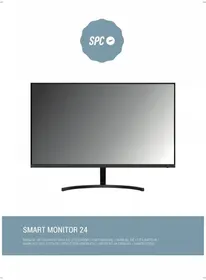
Smart Monitor 24 - Monitor SPC - Free user manual and instructions
Find the device manual for free Smart Monitor 24 SPC in PDF.


User questions about Smart Monitor 24 SPC
0 question about this device. Answer the ones you know or ask your own.
Ask a new question about this device
Download the instructions for your Monitor in PDF format for free! Find your manual Smart Monitor 24 - SPC and take your electronic device back in hand. On this page are published all the documents necessary for the use of your device. Smart Monitor 24 by SPC.
USER MANUAL Smart Monitor 24 SPC
natural_image
Front view of a modern black monitor with a curved stand (no text or symbols visible)SMART MONITOR 24
MANUAL DE USUARIO / GUIA DE UTILIZADOR / USER MANUAL / MANUEL DE L'UTILISATEUR / MANUALE DELL'UTENTE / BENUTZERHANDBUCH / INSTRUKCJA OBSŁUGI / HANDLEIDING


ÍNDICE / INDEX
ESPAÑOL 4
PORTUGUÉS 12
ENGLISH 20
FRANÇAISE....28
ITALIANO 36
DEUTSCH....44
POLSKI....52
NEDERLANDS....60
TABLA DE CONTENIDO
Accesorios....5
text_image
Diagram showing three steps of a computer monitor setup with labeled components and a magnified view of the device's internal structure.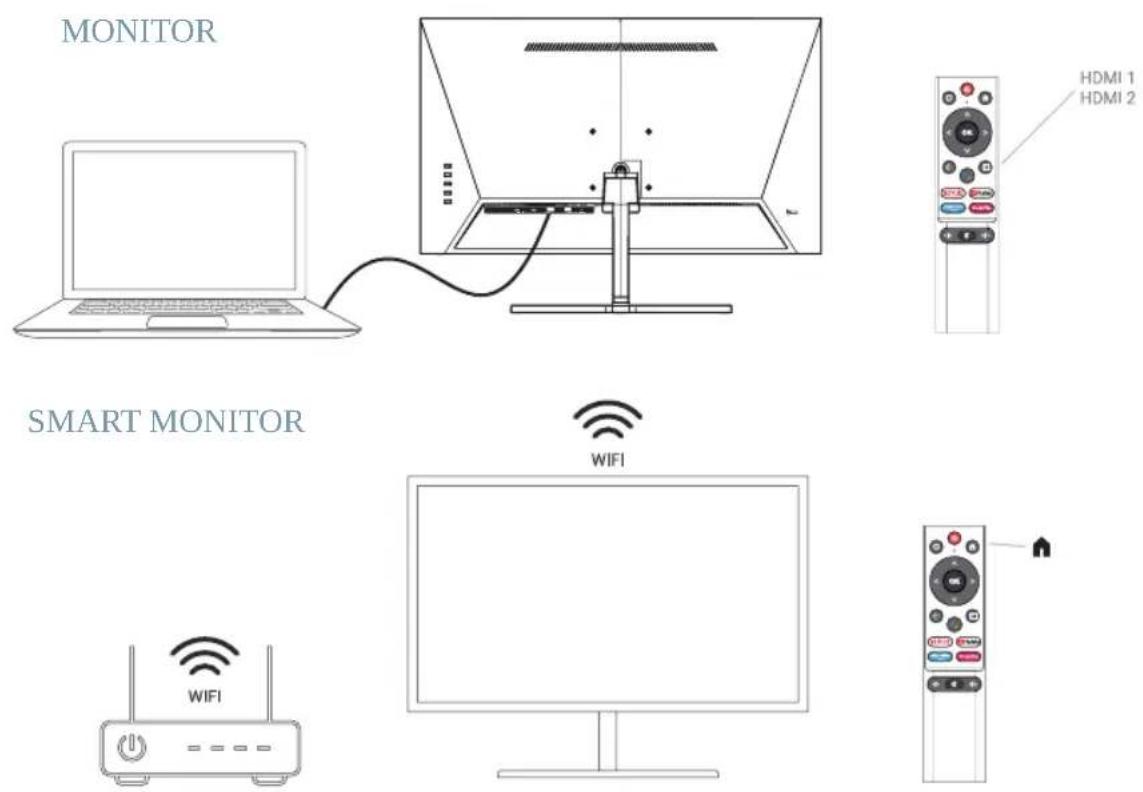
text_image
M E ▲ ▼ ● →
text_image
PC IN USB 2 USB 1 HDM 1 2 HDM 1 1/ARC EARPHONEControle do painel....15
Conexão à cabo 16
Especificação 17
Controle remoto 18
Outros 18
Ajuda....19
Licença 19
ACESSÓRIOS
PT
natural_image
Line drawing of a monitor with a stand and handle, no text or symbols present2
natural_image
Line drawing of a flat-screen monitor with cable connectors (no text or symbols)3
natural_image
Mechanical assembly diagram showing a cam or tool with labeled parts (①, ②) and no readable text or symbols.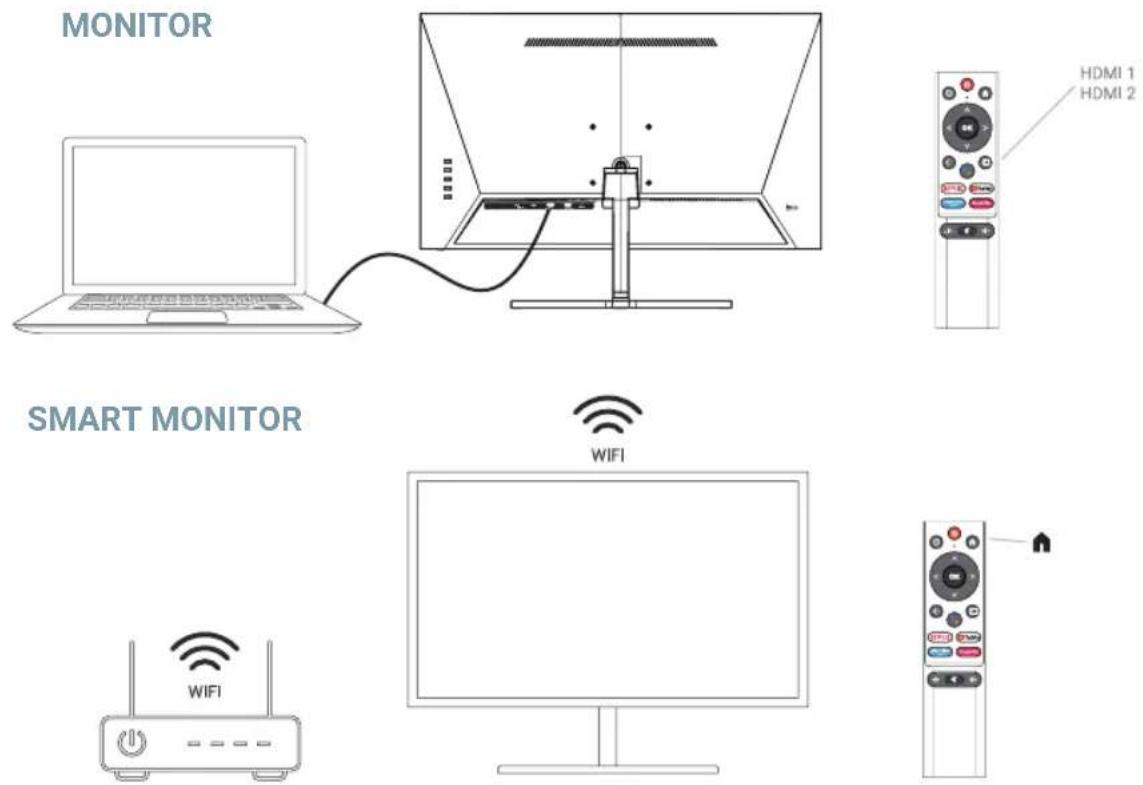
ESPECIFICAÇÕES TÉCNICAS
Recursos Plug and Play:
Installation of the base 21
Technical specifications....22
Connection ports 22
Dashboard 23
Wire connection 23
Specification....25
Remote control....26
Other 26
Help....27
License 27
ACCESSORIES
EN
- Please check if all items are included in your monitor set.
- Item color and shape may vary by model.
- The cables provided may vary depending on the product purchased.
| Manual |  User manual Warran User manual Warran |  ard ard | [5HK$] Screw |
| Cable HDMI cable | Applies only to monitors with HDMI ports. Not all models come with an HDMI cable, you can purchase this accessory separately. | ||
| Others Adapter |  Android Smart Remote Control & Battery x2 Android Smart Remote Control & Battery x2 | ||
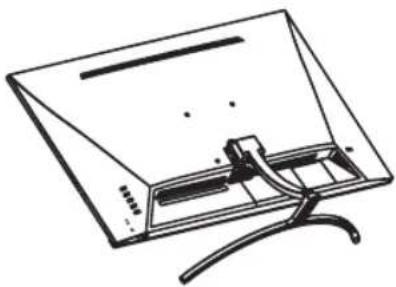
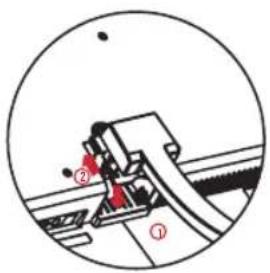
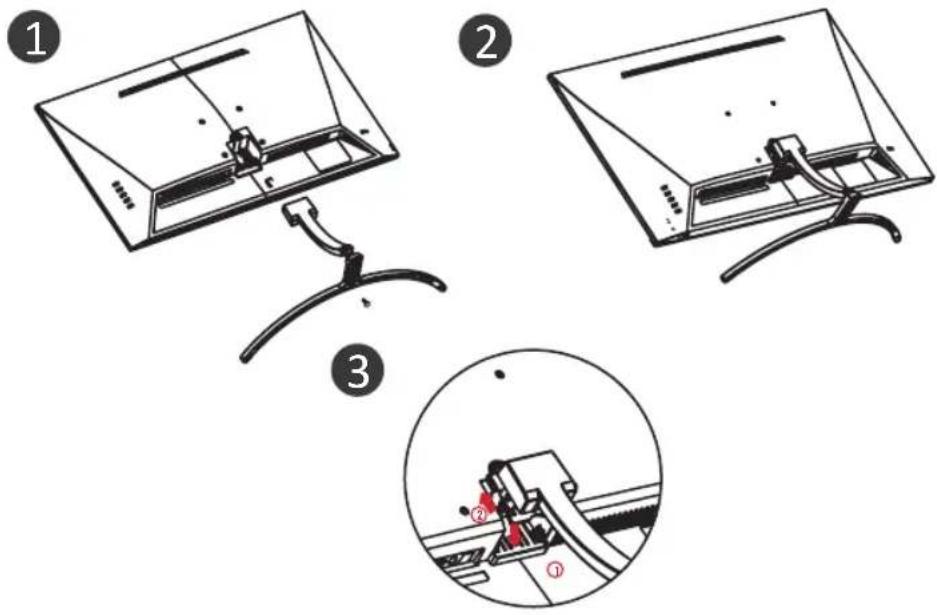
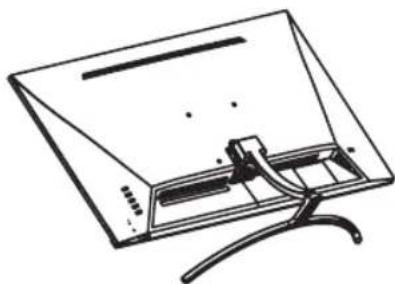
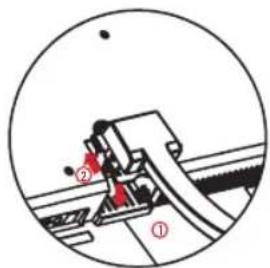
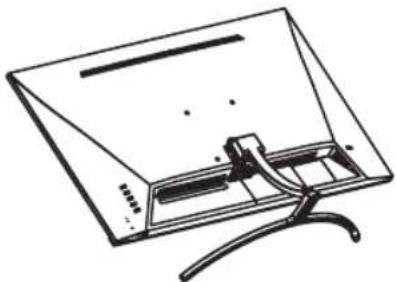
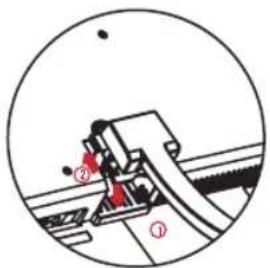
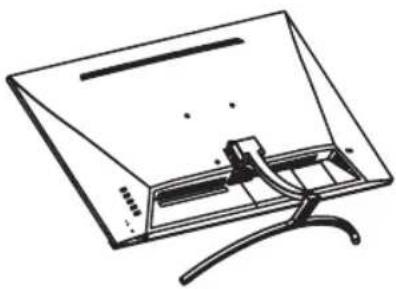
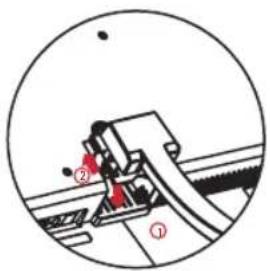
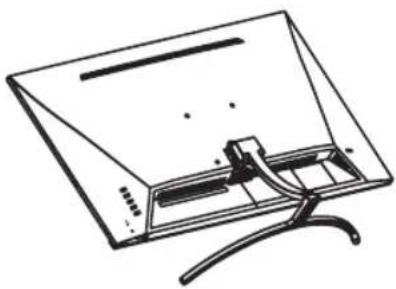
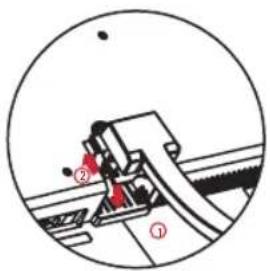
INSTALLATION OF THE BASE
text_image
Diagram illustrating three steps of a device assembly: top view, side view, and close-up with labeled components.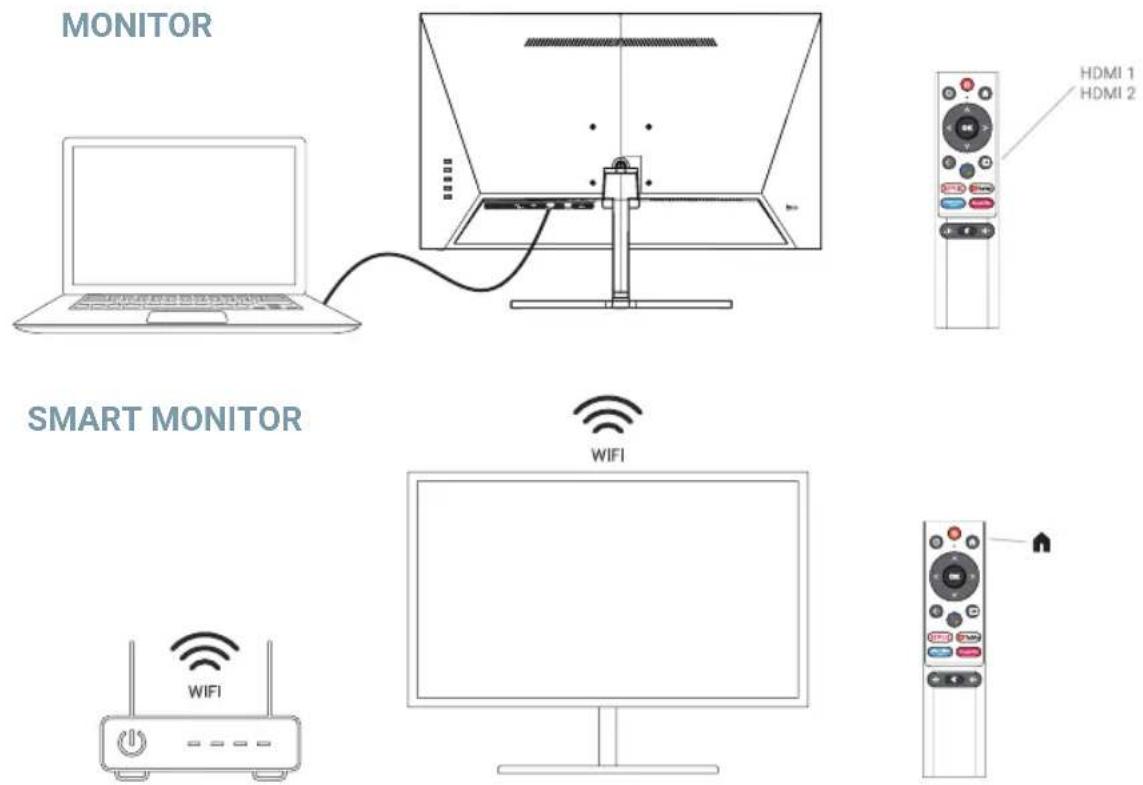
text_image
MONITOR SMART MONITOR WIFI HDMI 1 HDMI 2 WIFITECHNICAL SPECIFICATIONS
Operating temperature: -10^ - 45^
Frequency range: 2,400 GHz - 2,497 GHz (2,4 GHz) - 5,1 GHz - 5,9GHz (5 GHz)
Max. RF Output Power: < 20dBm
This equipment complies with radiation exposure limits set forth for an uncontrolled environment. This equipment should be installed and operated with minimum distance 20cm between the radiator & your body.
CABLE CONNECTION
The configuration information on the back of the monitor varies by product model. Read the following before connecting the product.
- Before connecting the product, be sure to check the two ports of the supplied signal cable, as well as the shape and position of the ports on the product and external devices.
-
Before connecting the product, be sure to remove the power cord or power adapter from the product and external devices to prevent damage to the product due to short circuits or overcurrent.
-
After all signal cables are properly connected, connect the power cord or power adapter back to the product and external devices.
- After completing the connection, be sure to read the manual to familiarize yourself with the product features, precautions, and other information needed to use the product properly.
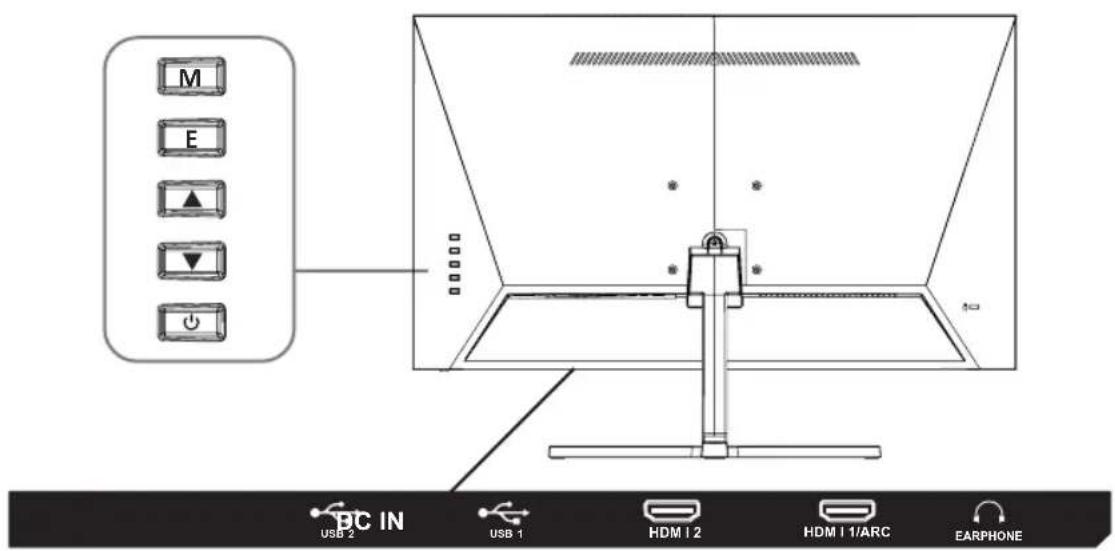
 HDMI HDMI | HDMI:Using an HDMI cable to connect the product's HDMI port to the PC's HDMI OUT port. | EARPHONE | EARPHONE OUT: Use a headset plug to connect to the EARPHONE OUT jack. |
 USB USB | USB : Use the USB disk to play multimedia files and can to upgrade the software of this unit. | DC IN | DC IN 12V: Use the adapter to access the port, the power supply of this interface only supports DC12V, use the matching adapter to access, please consult the authorized service center for the non-original adapter. |
PANEL CONTROL
text_image
M E ▲ ▼ ⊕ BC IN USB 2 USB 1 HDM 1 2 HDM 1 1/ARC EARPHONEM: set/confirm: press to enter the setting interface, press again to confirm the option function.
E: Input/Back.
▲ Up/Volume+.
▼ Down/volume-.
Power on/off.
ADJUST THE MONITOR
Note: This product must complete the initial setup before it can be used normally. The functions of the monitor may vary depending on the model, the actual product shall prevail.
| Initial Setup | Pairing Bluetooth Remote |
| Set up your Android display on your phone | |
| Configure the network | |
| Google Account Sign in | |
| Terms of Service | |
| Google Services | |
| Play Auto Installs | |
| Select Region/Country | |
| Select Monitor mode | |
| Chromecast built-inTM | |
| Setup completed and Disclaimer Terms | |
| Home | Google Assistant/Apps/Play Next/Notifications/Inputs/Network/Settings |
| Settings | Network & Internet |
| Parental Controls Initial Password:1234 | |
| Account Sign in | |
| Apps | |
| Remotes & Accessories | |
| Picture | Picture Mode |
| Backlight (0 ~ 100) | |
| Brightness (0 ~ 100) | |
| Contrast (0 ~ 100) | |
| Saturation (0 ~ 100) | |
| Hue (-50 ~ 50) | |
| Sharpness (0 ~ 20) | |
| Gamma | |
| Colour Temperature | |
| Screen Mode | |
| Advanced Video | |
| Color Tuner | |
| 11 Point White Balance Correction | |
| Reset to Default | |
| Sound | System sounds |
| Sound style | |
| Balance (-50 ~ 50) | |
| Bass (0 ~ 100) | |
| Treble (0 ~ 100) | |
| Sound Surround | |
| Equalizer Detail | |
| Speaker Delay | |
| Digital Output Delay | |
| Auto Volume Control | |
| Downmix Mode | |
| Reset to Default | |
| Power | Sleep Timer |
| Picture off | |
| Switch Off Timer | |
| No Signal Auto Power Off | |
| Auto Sleep | |
| Advanced Options | Blue Mute |
| Open source Licenses |
EN
SPECIFICATION
| Size 24" 27" 32" 34" | |||
| Vesa hole 75 x 75 (mm) 100 x 100 (mm) | |||
| Maximum resolution 1920 x 1080 @60Hz | |||
| Best resolution 1920 x 1080 @60Hz | |||
| Tiltable angle -3° (±2°) ~ -15° (±2°) | |||
| Power DC 12V | |||
| Running enviroment Temperature: 10°C - 40°C Humidity: 10% - 80%, non-condensing | |||
| Storage enviroment Temperature: 10°C - 45°C Humidity: 5% - 95%, non-condensing | |||
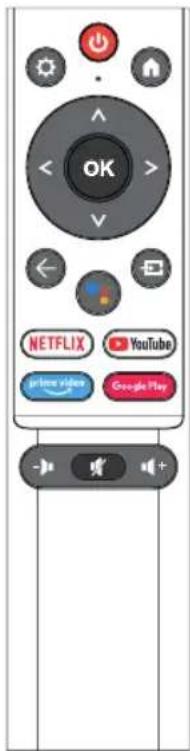
REMOTE CONTROL
| Switches the Monitor between on and standby mode. | |
| Menu:Displays the OSD (On Screen Display) menu. | |
| HOME:Displays the home screen. | |
| Navigation buttons:Cursor UP/LEFT/RIGHT/DOWN/OK. | |
| Google Assistant: Talk to Google to control your Monitor using your voice. | |
| Back:Press to move back through menus. | |
| Inputs:Display/Select signal source options. | |
| Connects to YouTube (internet connection required). | |
| Connects to NETFLIX for viewing online Monitor shows and films (internet connection required). | |
| Connects to Prime video (internet connection required). | |
| Connects to Google Play. | |
| Mute or restore your Monitor sound. |
text_image
OK NETFLIX YouTube prime video Google PlayOTHER
Plug and Play features:
- This monitor can be installed on any compatible Plug and Play system. The interaction between the monitor and the computer system provides optimal operating conditions and monitor settings.
- In most cases, the monitor installation will be automatic unless the user chooses another setting.
HELP
EN
Blank screen appears/Cannot turn on the product:
- Please check if the power adapter is connected correctly.
- Please check whether the power adapter is normally connected to the 100-240V AC socket.
- Please check whether the signal detection cable information is displayed on the screen, check the cable connection between the PC and this product.
- Please check whether the HDMI cable is used for connection, if you connect the HDMI cable after the PC is started, or disconnect and reconnect the HDMI cable while using the PC, the screen may not display an image because some graphics cards cannot output a signal, in this case, please restart the PC after connecting the HDMI cable..
LICENSE
HDMI ^TM
HIGH-DEFINITION MULTIMEDIA INTERFACE
The terms HDMI and HDMI High-Definition Multimedia Interface, and the HDMI logo are trademarks or registered trademarks of HDMI Licensing LLC in the United States and other countries.
Dolby
AUDIO
Manufactured under license from Dolby Laboratories.
Dolby, Dolby Audio, and the double-D symbol are trademarks of Dolby Laboratories Licensing Corporation.
TABLE DES MATIÈRES
Accessoires....29
Installation du socle....29
natural_image
Line drawing of a monitor with a curved base and stand, no text or symbols present2
natural_image
Line drawing of a flat-screen monitor with cable and stand (no text or symbols)3
natural_image
Mechanical assembly diagram showing a cam mechanism with labeled parts (①, ②) and no readable text or symbols.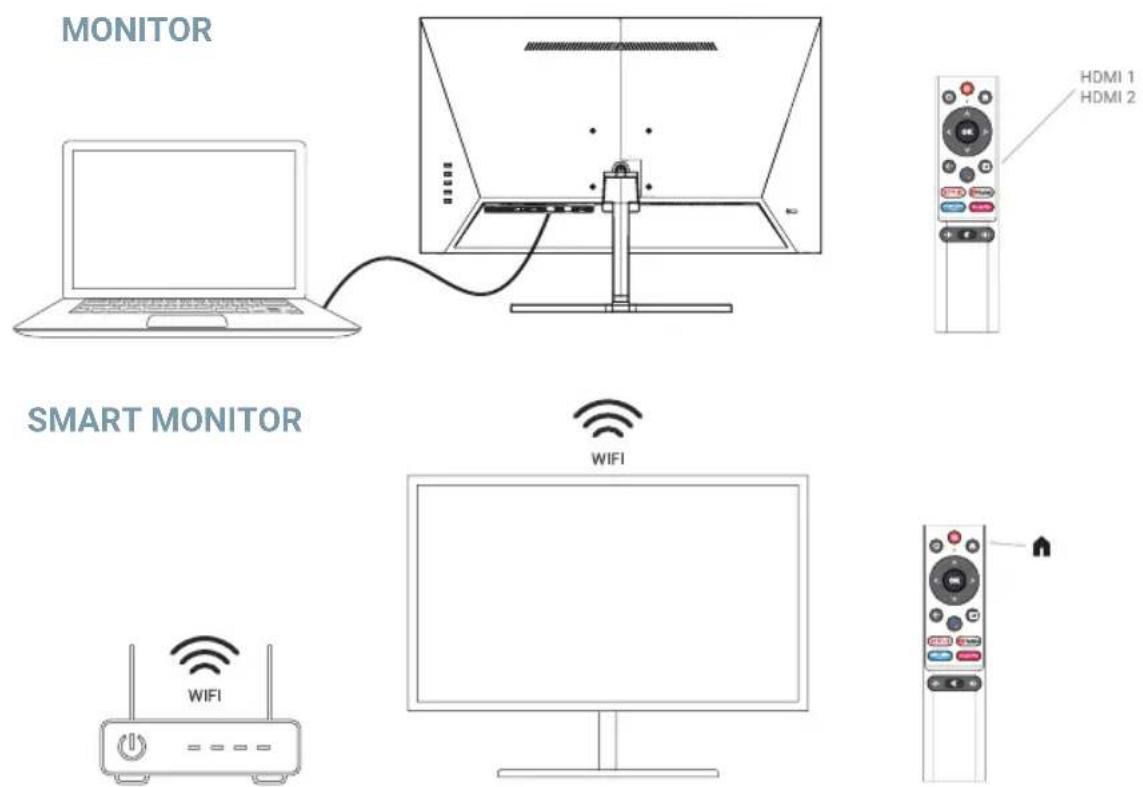
text_image
M E ▲ ▼ ● →
text_image
PC IN USB 2 USB 1 HDM 1 2 HDM 1 1/ARC EARPHONEtext_image
Diagram showing three steps of a computer monitor setup with labeled components and a magnified view of the device's internal structure.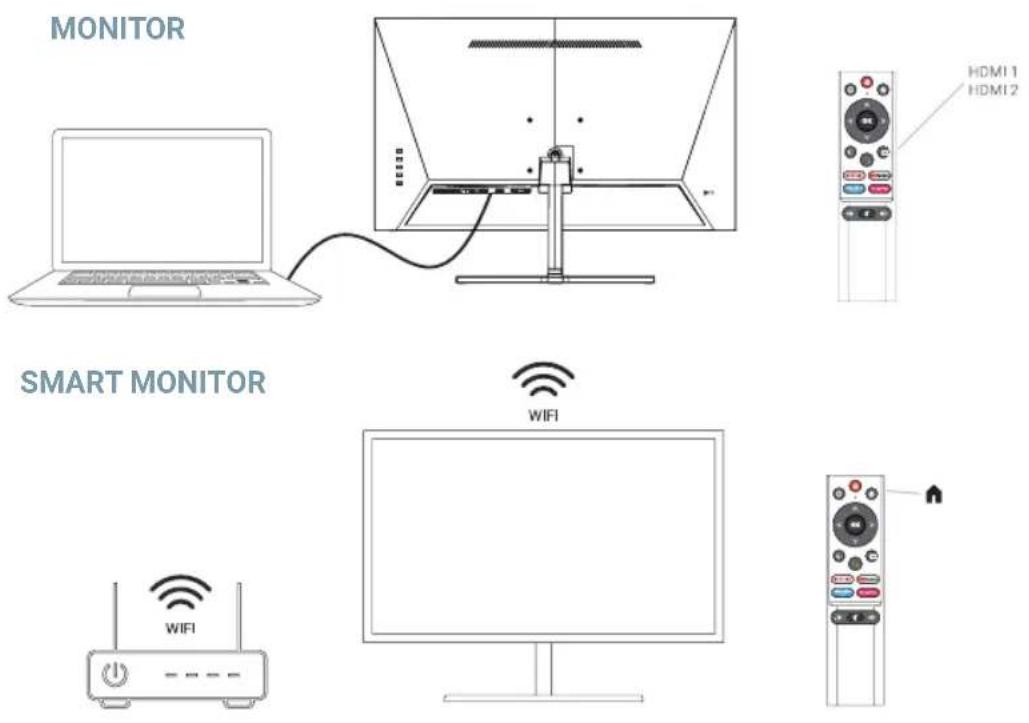
text_image
MONITOR SMART MONITOR WIFI HDMI 1 HDMI 2 WIFISPECIFICHE TECNICHE
natural_image
Line drawing of a monitor with an adjustable arm and stand (no text or symbols)2
natural_image
Line drawing of a flat-screen monitor with a curved cable attachment (no text or symbols)3
natural_image
Mechanical assembly diagram showing a clamping mechanism with labeled parts (①, ②), no readable text or symbols present.
text_image
MONITOR SMART MONITOR WIFI HDMI 1 HDMI 2 WIFInatural_image
Line drawing of a monitor with a stand and cable, no text or symbols present2
natural_image
Line drawing of a flat-screen monitor with visible internal components and a curved stand (no text or symbols)3
text_image
Technical diagram showing mechanical assembly with labeled parts ① and ②, likely from an engineering or manufacturing context.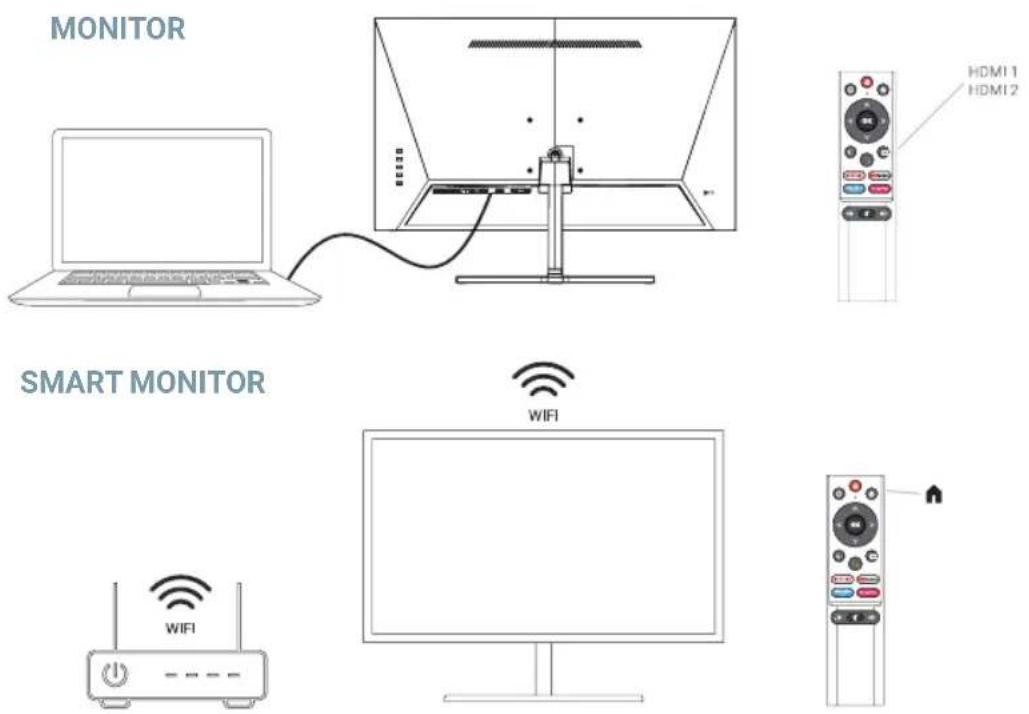
text_image
MONITOR SMART MONITOR WIFI HDMI 1 HDMI 2 WIFISPECYFKACJA TECHNICZNA
Temperatura pracy: -10°C – 45°C
text_image
M E ▲ ▼ ● →
text_image
PC IN USB 2 USB 1 HDMI 2 HDMI 1/ARC EARPHONEPaneelbediening....63
Kabelverbinding 64
Specificatie....65
Afstandsbediening....66
Ander 66
Helpen....67
Licentie 67
ACCESSOIRES
NL
natural_image
Line drawing of a monitor with a curved stand and internal components (no text or symbols)2
natural_image
Line drawing of a flat-screen monitor with cable and stand (no text or symbols)3
natural_image
Mechanical assembly diagram showing a cutting tool with labeled parts (①, ②) and no readable text or symbols.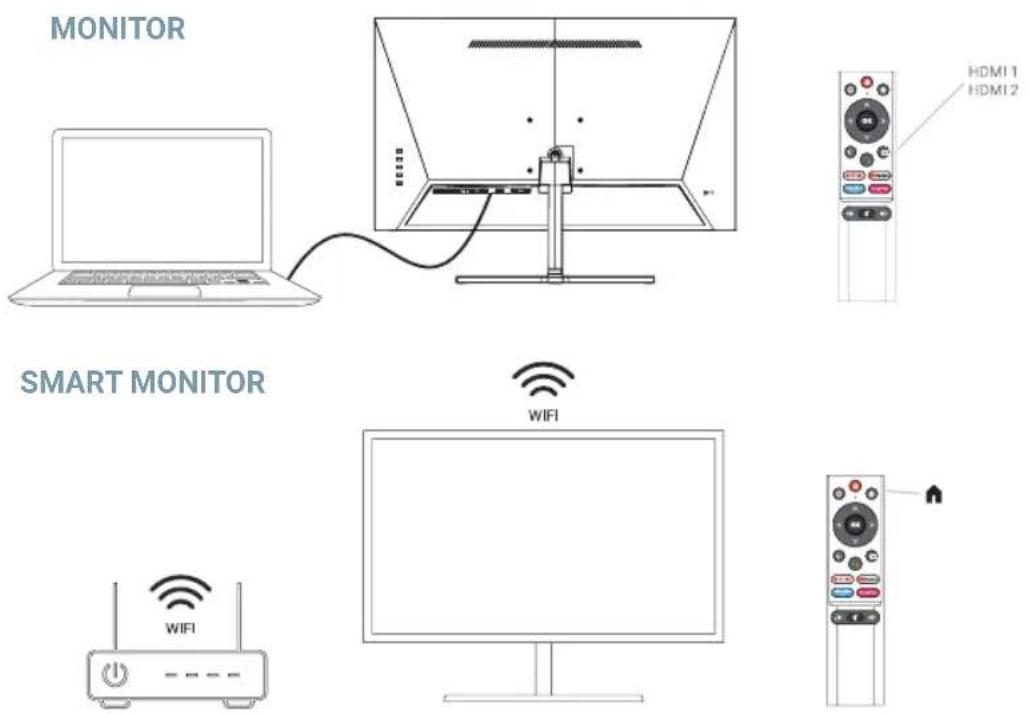
text_image
MONITOR SMART MONITOR WIFI HDMI 1 HDMI 2 WIFITECHNISCHE SPECIFICATIES
EN: To see more details about the operation of this device or any other technical query, go to: support.spc.es