10380 - Weather Station Mebus - Free user manual and instructions
Find the device manual for free 10380 Mebus in PDF.


| Product Type | Indoor/outdoor weather station with radio-controlled clock |
| Brand | Mebus |
| Model | 10380 (RCW416) |
| Main unit dimensions | Approx. 150 x 100 x 30 mm (estimated) |
| Main unit weight | Approx. 200 g (estimated) |
| Main unit power supply | 2 AA 1.5V batteries + AC adapter included |
| Outdoor sensor power supply | 2 AA 1.5V batteries |
| Display | Backlit LCD with weather, temperature, humidity, time icons |
| Built-in sensors | Indoor thermometer and hygrometer |
| Outdoor sensor (included) | Wireless thermo-hygrometer, channel 1-3, 433 MHz transmission |
| Max. number of sensors | 3 |
| Transmission range | 20 to 30 meters (depending on obstacles) |
| Indoor temperature | -5 °C to +50 °C |
| Outdoor temperature | -10 °C to +50 °C |
| Humidity | 25% to 90% RH |
| Radio-controlled clock | DCF signal, automatic or manual setting, adjustable time zone |
| Calendar | Day, month, year (adjustable) |
| Weather forecast | 12-24h, icons: sunny, partly cloudy, cloudy, rainy, snowy |
| Comfort indicator | CON (comfortable), HUM (humid), SEC (dry) |
| Alarm | Dual alarm (AL1, AL2) with snooze function |
| Min/max memory | Indoor/outdoor temperature and humidity (min. and max.) |
| Channel display | Automatic or manual scanning of 3 channels |
| Maintenance and cleaning | Soft, dry cloth, without harsh products |
| Safety | Do not open or repair yourself; use identical new batteries; observe polarity |
| Warranty and compliance | CE, R&TTE 1999/5/EC, Low Voltage Directive 73/23/EEC, EMC 89/336/EEC |
Frequently Asked Questions - 10380 Mebus
User questions about 10380 Mebus
0 question about this device. Answer the ones you know or ask your own.
Ask a new question about this device
Download the instructions for your Weather Station in PDF format for free! Find your manual 10380 - Mebus and take your electronic device back in hand. On this page are published all the documents necessary for the use of your device. 10380 by Mebus.
USER MANUAL 10380 Mebus
A SNOOZE
A LED-INDIKATOR
C RÜCKSETZ-TASTE [RESET]
D KANAL-SCHALTER
57 58
A Touche SNOOZE
INSTALLATION DES PILES: UNITE A DISTANCE
INDICATIONS D'ENTRETIEN
A Tasto SNOOZE
A TESTIMONE LUMINOSO (LED)
SIZE: W65 X H105 (mm)
BY EMILY TSOI 01/12/06
INTRODUCTION
Thank you for your purchase of the RCW416.
The basic package comes with a main unit, which is the weather forecast station, a remote unit that is the thermo-hygrometer and the AC/DC adaptor.
The main unit is capable of keeping track of maximum and minimum temperature of different sites. And no wire installation is required and operates at 433 MHz.
The packaging consists of:
- Main Unit
- Outdoor Thermo-hygrometer sensor
- AC-adaptor
- Instruction Manual
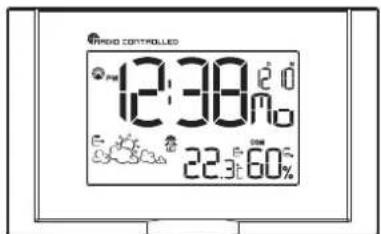
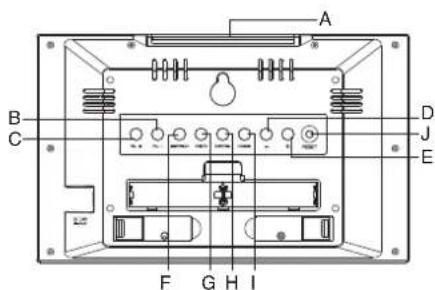
A SNOOZE Key
Activate the snooze function
B AL.1 Key
Display the alarm time or sets the alarm status for alarm 1
C AL. 2 Key
Display the alarm time or sets the alarm status for alarm 2
D(−)Key
Decrease the Value of a setting
E (+) Key
Increase the Value of a setting; Force to receive Radio-controlled Clock signal
F SEARCH key
Force to search for remote sensor signal
G MEM key
Receive the maximum or minimum temperature and humidity of main unit and remote unit
H CHANNEL key
Toggle among different channels of the remote sensor units. Key sequence: Indoor > Channel 1 > Channel 2 > Channel 3 > Indoor... Also, you can press and hold to enter the Auto Scroll function
I MODE Key
Toggles the display modes and confirms entry while setting the values for display
J RESET kev
Press to reset all values to their default setting
59
MAIN FEATURES: REMOTE UNIT
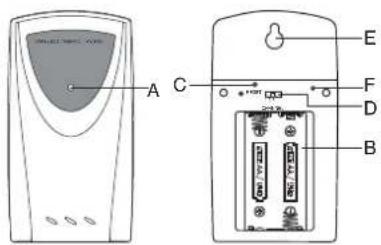
A LED INDICATOR
Flashes once when the remote unit transmits a reading Flashes twice when low battery is detected on sensor unit
B BATTERY COMPARTMENT
Accommodates two AA-size batteries
C RESET BUTTON
Press to reset all setting if you have selected different channel.
D CHANNEL SELECTOR
Select the channel before you install batteries.
E WALL-MOUNT RECESSED HOLE
Supports the remote until in wall-mounting
F °C/°F BUTTON
60
BEFORE YOU BEGIN
For best operation.
-
Insert batteries for remote units before doing so for the main unit.
-
Position the remote unit and main unit within effective transmission range, which, in usual circumstances, is 20 to 30 meters. Note that the effective range is vastly affected by the building materials and where the main and remote units are positioned. Try various set-ups for best result. Though the remote units are weather proof, they should be placed away from direct sunlight, rain or snow.
BATTERY INSTALLATION: REMOTE UNIT
-
Remove the screws on the battery compartment.
-
Select the channel
-
Install 2 batteries (UM-3 or "AA" size 1.5V) strictly according to the polarities shown.
-
Replace the battery compartment door and secure its screws.
TURN ON MAIN UNIT
To install 2 batteries (UM-3 or AA size 1.5V) strictly into the main unit and plug the AC-adaptor to give power to the main unit as well, you will see the display is lighted up.
LOW BATTERY WARNING
FOR THE REMOTE SENSOR
When it is time to replace batteries for the remote sensor, the respective low battery indicator ↔ will show up on display. In addition, the low battery indicator ↔ will show up on the Main Unit display for this specified Remote Sensor Unit.
61 62
FOR THE MAIN UNIT
When the battery power is not enough, there is a battery icon ◆will be shown on the display, so we need to use the new batteries.
If the AC-adaptor cannot connect to the Main Unit properly, or the AC-adaptor is removed out of the
Main Unit, the icon ⚪ will be shown on display.
SETTING UP THE REMOTE
TEMP. AND RC CLOCK
a. Once batteries are in place for the remote unit, they will start transmitting temperature and humidity readings at around 45 seconds intervals.
The main unit will also start searching for signals for about two minutes once batteries are installed. 10 seconds upon successful reception, the outdoors temperatures and humidity will be displayed. The main unit will automatically update its readings at about 45-second intervals.
b. If no signals are received, blanks “***” will be displayed.
Hold [SEARCH] for 2 seconds to enforce another search for about 2 minutes. This is useful in synchronizing the transmission and reception of the remote and main units.
c. When remote signal reception is finished, it will automatically synchronize its current time and dated when brought within range of the "DCF" RF signal.
Repeat this step whenever you find discrepancies between the reading shown on the main unit and that on the remote unit.
MAXIMUM AND MINIMUM TEMPERATURE AND HUMIDITY
The maximum and minimum recorded indoor / outdoor temperature and humidity will be automatically stored in memory. To display these readings, press [MEM] button to display the minimum reading and press [MEM] button to display the maximum reading, and then press [MEM] button to resume to the current reading.
WEATHER FORECAST
The Main Unit is able to detect atmospheric pressure changes. Based on the collected data, it can predict the weather for the forthcoming 12 to 24 hours.
| Forecast | ||||
| Sunny Cloudy | Partly Cloudy | Rainy Snowy | ||
| Color | ||||
| Yellow | Green | Light Blue | Purple | White |
Remark:
-
The accuracy of a general pressure-based weather forecast is at about 70%.
-
The weather forecast may not necessarily reflect the current situation
-
The Sunny icon, as applies to night time, implies clear weather
There is a trend indicator on the display to show the measured atmospheric pressure are rising 📋, steady ➕, or Falling 🔔.
63
COMFORT LEVEL INDICATORS
The comfort level indicators COM, WET or DRY will tell you if the current environment is comfortable, too wet, or too dry. The comfort indicators will appear on the display of the Main Unit when the following conditions are satisfied:
| Indicator displays on the unit | Temperature Range | Humidity Range | Shows that the Current Environment |
| COM | 20°C to 25°C | 40%RH to 70%RH | Comfortable |
| WET | -5°C to +50°C | OVER 70%RH | Too wet (moisture) |
| DRY | -5°C to +50°C | Below 40%RH | Too Dry |
| No Indicator | Less than 20°C or More than 25°C | 40%RH to 70%RH | No comment |
DISCONNECTED SIGNALS
If without obvious reasons the display of the outdoor temperature goes blank, hold |SEARCH| button for 2 seconds to enforce an immediate search. If that fails, check:
-
The Remote Sensor Unit is still in place
-
The batteries of both the Remote unit and the Main Unit. (Notes: when the temperature falls below freezing point, the batteries of outdoor units will freeze,
lowering their voltage supply and the effective range.
- The transmission is within range and path is clear of obstacles and interference. Shorten the distance when necessary.
64
Signals from other household devices, such as door bells, home security systems and entry controls, may interfere with those of this product and cause temporarily reception failure. This is normal and does not affect the general performance of the product. The transmission and reception of temperature readings will resume once the interference recedes.
HOW TO SET THE RADIO CONTROLLED CLOCK
-
After the batteries are installed. The clock will automatically search the radio signal. It takes about 3-5 minutes to finish this process.
-
If user wishes to disable the auto-reception feature, hold the | + | button for 2 seconds to disable it.
-
To enable the auto-reception feature again, holds the [+] for 2 seconds again to force it receive and allow it receive at desired time.
-
If the radio signal is received, the date & time will be set automatically with radio control signal icon] turns on.
-
If the clock fails to receive the time signal, it will be shown as [ ▲] icon. Then user can set the time manually.
HOW TO SET THE CLOCK MANUALLY
To set the clock manually, hold [MODE] for two seconds it will show the display language. Use [+] or [-] to change it. Press [MODE] to confirm. Repeat the same procedure to set year, month, date, 12/24 hour format, hour and minute. During the setting, use [+] or [-] will increase or decrease the value rapidly. For display language, you are able to select English (En), German (DE), French (Fr), Italian (IT), Spanish (SP) and Dutch (DU).
If there is an item you do not need to change, simply press [MODE] to bypass the item.
When you finished the change, press [MODE] to exit. The display will return to the clock mode.
65 66
HOW TO SET THE ZONE TIME
-
To set the zone time,
-
Press [MODE] until at zone time display mode which there is a 'ZONE' icon on LCD display.
-
Hold [MODE] for two seconds, the zone time offset will be displayed.
-
Enter the offset using [ + ] or [ - ].
-
Press [MODE] to exit.
HOW TO SET THE ALARM
There are total two alarms, namely alarm 1 and alarm 2 which can be operated by press [AL. 1] an [AL. 2] respectively. The alarm setting procedure is listed as below.
SETTING ALARM 1
-
Press [AL, 1]
-
Press | + | or | - | to turn on / off the alarm function.
-
Press and Hold [AL. 1] button until the hour for alarm is flashing
-
Set the hour by press [ + ] or [ - ], and then press [AL. 1] button to confirm.
-
Then, to set the minute by press [ + ] or [ - ], and then press [AL.1] button to confirm.
-
If you would like to leave the alarm display and show calendar, press [MODE] to show calendar. If you would like to switch to alarm 1 display, press [AL.1] button.
SETTING ALARM 2
- Press [AL. 2]
- Press [+ or |- to turn on/off the alarm function.
- Press and Hold [AL. 2] button until the hour for alarm is flashing
- Set the hour by press [+] or [-] , and then press [AL.2] button to confirm.
- Then, to set the minute by press + or - , and then press [AL.2] button to confirm.
- If you would like to leave the alarm display and show calendar, press [MODE] to show calendar. If you would like to switch to alarm 1 display, press [AI..2] button.
SNOOZE FUNCTION
When the alarm is wake up, you are able to press [SNOOZE] to off the alarm
SPECIFICATION
Main Unit
Proposed operation range : -5C to 50C
Humidity measuring range : 25% to 90% at 25%
Temperature resolution : 0.1C
Humidity Resolution : 1%
Battery : 1.5V AA x 2pcs
Remote Sensor Unit
Proposed operation range : -10C to 50C
Humidity measuring range : 25% to 90% at 25%
Temperature resolution : 0.1C
Humidity Resolution : 1%
RF Transmission frequency : 433 MHz
Maximum No. of remote unit : 3
Sensing cycle : around 43 to
47 seconds
Battery : 1.5V AA x 2pcs
67
PRECAUTIONS
This product is engineered to give you years of satisfactory service if you handle it carefully. Here are a few precautions:
1. Do not immerse the unit in water.
2. Do not clean the unit with abrasive or corrosive materials. They may scratch the plastic parts and corrode the electronic circuit.
3. Do not subject the unit to excessive force, shock, dust, temperature or humidity, which may result in malfunction, shorter electronic life span, damaged battery and distorted parts.
4. Do not tamper with the unit's internal components. Doing so will invalidate the warranty on the unit and may cause unnecessary damage. The unit contains no user-serviceable parts.
5. Only use fresh batteries as specified in the user's manual. Do not mix new and old batteries as the old ones may leak.
6. Always read the user's manual thoroughly before operating the unit.
CAUTION
- The content of this manual is subject to change without further notice.
- Due to printing limitation, the displays shown in this manual may differ from the actual display.
- The contents of this manual may not be reproduced without the permission of the manufacturer.
68
EC-DECLARATION OF CONFORMITY
Product : RCW416
This product contains the approved transmitter and complies with the essential requirements of Article 3 of the R&TTE 1999/5/EC Directives, if used for its intended use and that the following standard(s) has/have been applied:
Efficient use of radio frequency spectrum
(Article 3.2 of the R&TTE Directive) applied standard(s) EN 300 220-1,3:2000
Electromagnetic compatibility
(Article 3.1.b of the R&TTE Directive)
applied standard(s) EN 301 489-1,3:2000
applied standard(s) EN 300 339:2000
Additional information:
The product is therefore conform with the Low Voltage Directive 73/23/EC, the EMC Directive 89/336/EC and R&TTE Directive 1999/5/EC (appendix II) and carries the respective CE marking.
RTTE Compliant Countries:
All EU countries, Switzerland

QA MANAGER : Q.Y.ZENG
K.S plastic factory
Guan Lan / Shen Shen / China

Attention: Please dispose of used unit and batteries in an ecologically safe manner
69 70


- A SNOOZE
- A LED-INDIKATOR
- C RÜCKSETZ-TASTE [RESET]
- D KANAL-SCHALTER
- A TOUCHE SNOOZE
- INSTALLATION DES PILES: UNITE A DISTANCE
- INDICATIONS D'ENTRETIEN
- A TASTO SNOOZE
- A TESTIMONE LUMINOSO (LED)
- INTRODUCTION
- A SNOOZE KEY
- B AL.1 KEY
- C AL. 2 KEY
- D(−)KEY
- E (+) KEY
- F SEARCH KEY
- G MEM KEY
- H CHANNEL KEY
- I MODE KEY
- J RESET KEV
- A LED INDICATOR
- B BATTERY COMPARTMENT
- C RESET BUTTON
- D CHANNEL SELECTOR
- E WALL-MOUNT RECESSED HOLE
- F °C/°F BUTTON
- BEFORE YOU BEGIN
- BATTERY INSTALLATION: REMOTE UNIT
- TURN ON MAIN UNIT
- LOW BATTERY WARNING
- FOR THE REMOTE SENSOR
- FOR THE MAIN UNIT
- SETTING UP THE REMOTE
- TEMP. AND RC CLOCK
- MAXIMUM AND MINIMUM TEMPERATURE AND HUMIDITY
- WEATHER FORECAST
- REMARK
- COMFORT LEVEL INDICATORS
- DISCONNECTED SIGNALS
- HOW TO SET THE RADIO CONTROLLED CLOCK
- HOW TO SET THE CLOCK MANUALLY
- HOW TO SET THE ZONE TIME
- HOW TO SET THE ALARM
- SETTING ALARM 1
- SETTING ALARM 2
- SNOOZE FUNCTION
- SPECIFICATION
- PRECAUTIONS
- CAUTION
- EC-DECLARATION OF CONFORMITY
Brand : Mebus
Model : 10380
Category : Weather Station