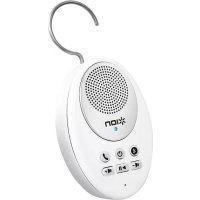
Sound Splash - Bluetooth speaker ION - Free user manual and instructions
Find the device manual for free Sound Splash ION in PDF.


| Product Type | Water-resistant Bluetooth speaker |
| Brand | ION |
| Model | Sound Splash |
| Dimensions (L x H x D) | 114.3 x 73.6 x 30.5 mm |
| Weight | 0.1 kg |
| Power | Rechargeable lithium-ion battery via micro USB port |
| Protection rating | IPX4 (resists splashes, do not immerse) |
| Wireless technology | Bluetooth A2DP |
| Charging port | Micro USB |
| Box contents | Sound Splash, 2 suction cups, micro USB cable, simple user guide, safety instructions and warranty |
| Main functions | Play/pause, volume, answer call, microphone, hook, suction cups |
| Compatibility | iPhone, iPad, iPod touch (iOS 4.0+), other Bluetooth devices |
| LED indicator | Flashing blue (pairing), solid blue (connected), blue/red (call), flashing red (low battery) |
| Recommended use | Listening to music and taking calls in the shower or near water |
| Maintenance | Clean with a soft, dry cloth. Do not use abrasive products. |
| Safety instructions | Do not immerse the speaker. Keep non-waterproof devices away from splashes. See guide for details. |
| Technical support | www.ionaudio.com/support |
Frequently Asked Questions - Sound Splash ION
User questions about Sound Splash ION
0 question about this device. Answer the ones you know or ask your own.
Ask a new question about this device
Download the instructions for your Bluetooth speaker in PDF format for free! Find your manual Sound Splash - ION and take your electronic device back in hand. On this page are published all the documents necessary for the use of your device. Sound Splash by ION.
USER MANUAL Sound Splash ION
Make sure that the items listed below are included in the box:
- SOUND SPLASH
- Suction Cups
- Micro USB Charging Cable
- Quickstart Guide
- Safety Instructions & Warranty Information
READ SAFETY INSTRUCTION BOOKLET BEFORE USING THE PRODUCT
Go to www.ionaudio.com/support for technical support.
INTRODUCTION
Thank you for purchasing the ION Audio SOUND SPLASH! SOUND SPLASH features a battery-powered, water-resistant speaker equipped with wireless capability that allows you to receive audio and answer calls via Bluetooth®. Its full-range speaker provides clear, undistorted audio over a running shower.
WARNING: Keep any non-water-resistant devices (phones, music players, etc.) in a dry place where they will not be affected by water and cause a risk of electric shock.
The Bluetooth word mark and logos are registered trademarks owned by Bluetooth SIG, Inc. and any use of such marks by ION Audio is under license. Other trademarks and trade names are those of their respective owners.
FEATURES
-
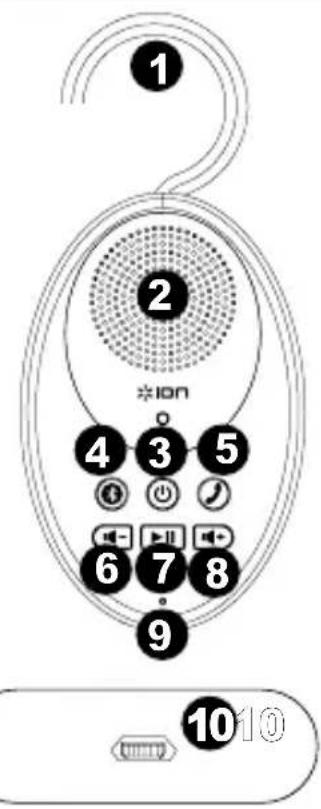
Hook - Use this to hang SOUND SPLASH from a shower head or shower stall.
-
Speaker - Listen to music or a phone call from this full range speaker.
-
Power On/Off - Press and hold this button for 4-5 seconds to power SOUND SPLASH on/off.
-
Bluetooth - Press and hold this button for 2 seconds to activate pairing mode on SOUND SPLASH. Press and hold it again for 2 seconds to unpair your device. If you do not unpair your device, SOUND SPLASH will "remember" your device even if it is powered off then on again.
-
Call Receive/Call End - When a paired device receives a phone call, press this button to answer the call; press it again to disconnect the call.
-
Volume Down - Turns down the volume for a paired Bluetooth device.
-
Play/Pause - Press this button to start/pause music playback on a paired music device.
-
Volume Up - Turns up the volume for a paired Bluetooth device.
-
Microphone - Talk into this after receiving a call.
-
Micro USB Port - Use the included USB cable to connect this port to a USB port on your computer or phone charger to recharge SOUND SPLASH's battery.
-
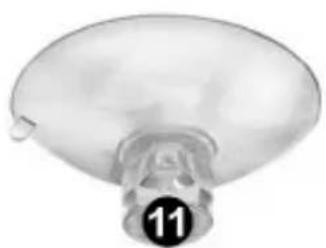
Suction Cups - Attach these to the back of SOUND SPLASH and then to the shower wall.
Note: Attach the suction cups to a solid, non-porous surface for an airtight seal. Glass, metal, smooth tile and polished wood are surfaces where suction cups stick best.
Note: For best results, ensure that the shower wall is thoroughly clean and dry before attaching suction cups.
BLUETOOTH PAIRING
Bluetooth pairing occurs when two Bluetooth devices agree to communicate with each other, enabling them to link and exchange data.
Pairing with iPhone®, iPad®, and iPod touch®:
Note: iOS 4.0 or higher is required.
- Press and hold SOUND SPLASH's power button for 4-5 seconds to power it on.
SOUND SPLASH LED activity:
Blinking Blue LED = Bluetooth pairing mode
Solid Blue LED = Connected to a Bluetooth device
Blinking Blue and Red LED = Incoming call
Blinking Red LED = Low battery on SOUND SPLASH
- Press and hold SOUND SPLASH's Bluetooth button for 2 seconds. You will hear hear a tone and the blue LED will flash.
- On your iPhone, go to Settings > General > Bluetooth. Slide the Bluetooth slider to "On." SOUND SPLASH will attempt to pair with nearby Bluetooth devices.
- On the iPhone's screen, "ION SOUND SPLASH" will appear as a Bluetooth device. Tap it to select it.
- If your iPhone requires a passcode or PIN, enter the number zero ("0") four times.
Pairing with other devices:
- Press and hold SOUND SPLASH's power button for 4-5 seconds to power it on.
- Press and hold SOUND SPLASH's Bluetooth button for 2 seconds. You will hear a tone and the blue LED will flash.
- Go to your device's Bluetooth settings menu to turn on Bluetooth.
- On your device's screen "ION SOUND SPLASH" will appear as a Bluetooth device. Select it to pair and connect with SOUND SPLASH.
- If your device requires a passcode or PIN, enter the number zero ("0") four times.
- If your device fails to pair correctly, simply power SOUND SPLASH on/off and attempt to pair again.
iPhone, iPad, and iPod touch are trademarks of Apple, Inc., registered in the U.S.A.
Note: You must power on and pair SOUND SPLASH with your Bluetooth device before using it to listen to music or use it as a speakerphone.
Listening to Music:
- Press the Play/Pause button on SOUND SPLASH to play music from your Bluetooth-enabled device. Depending on your Bluetooth device, you may need to manually open a media player on your device.
- Adjust the Volume buttons on SOUND SPLASH. You may also need to adjust your device's volume.
Using the Phone:
- When you have an incoming call, SOUND SPLASH's speaker will play your phone's ringtone. To answer the call, press SOUND SPLASH's Call Receive button. Note: If you get an incoming call during music playback, the music will pause until you end the call.
- Speak into the microphone (located below the Play/Pause button) and adjust the call volume using the Volume buttons.
- To end the call, press the Call End button.
TECHNICAL SPECIFICATIONS
Power: Rechargeable lithium-ion battery
Water resistant class: IPX4 (protected from splashing water but is not submersible)
Bluetooth protocol: A2DP
Dimensions (H x W x D): 4.5" x 2.9" x 1.2"; 114.3 mm x 73.6 mm x 30.5 mm
Weight: 0.3 lbs.; 0.1 kg
Contact ION Audio technical support for assistance www.ionaudio.com/support

Brand : ION
Model : Sound Splash
Category : Bluetooth speaker