Xperia GTS - Stroller HARTAN - Free user manual and instructions
Find the device manual for free Xperia GTS HARTAN in PDF.


| Product Type | Stroller |
| Brand | Hartan |
| Model | Xperia GTS |
| Recommended Use | From 6 months (up to 15 kg) or with suitable carrycot from birth |
| Maximum Child Weight | 15 kg |
| Minimum Age (with carrycot) | Birth (0 months) |
| Wheels | 4 swivel and lockable wheels |
| Suspension | Adjustable spring (soft or sporty) |
| Brake | Locking brake with red lever, optional hand brake |
| Handlebar | Height adjustable, pivoting orientation with safety lock |
| Backrest | Adjustable in stages from sitting to lying position |
| Harness System | 5-point safety harness |
| Canopy | Adjustable with sun visor and climate zone |
| Footrest | Height adjustable and extendable |
| Fold | Compact fold with safety lock |
| Materials | Textiles tested according to Öko-Tex 100 |
| Care | Machine washable at 30°C (removable parts), gentle cleaning |
| Tires | Inflation between 1.2 and 1.5 bar max |
| Warranty | 2 years (by the dealer) |
| Included Accessories | Foldable XL carrycot (0-12 months, max 9 kg), sun visor |
| Safety Standards | Conforms to applicable standards |
Frequently Asked Questions - Xperia GTS HARTAN
User questions about Xperia GTS HARTAN
0 question about this device. Answer the ones you know or ask your own.
Ask a new question about this device
Download the instructions for your Stroller in PDF format for free! Find your manual Xperia GTS - HARTAN and take your electronic device back in hand. On this page are published all the documents necessary for the use of your device. Xperia GTS by HARTAN.
USER MANUAL Xperia GTS HARTAN
Acceptance Certificate
Name / Name:
Straße / Road:
Phone (with area code):
e-mail:
Colour of fabric (design):
Zubehör / Accessories:
Kaufdatum / Date of purchase:
Salesperson (name in block letters)
Note: Signifying this acceptance threshold data not referred to legal rights of the shareholder.
Händler / Dealer:
10.18/2000

7 GB United Kingdom (UK)
13 F La France
19 NL Nederlands
25 DK Danmark
21
-
Overage
-
⑤ O'eng
43 FIN Suomi
49 ① Italia
55 E España
| 1. Completeness | ○ checked/OK | ○ not applicable |
| 2. Function check | ||
| ■ Folding mechanism | ○ checked/OK | ○ not applicable |
| ■ Road behaviour | ○ checked/OK | ○ not applicable |
| ■ Wheels | ○ checked/OK | ○ not applicable |
| ■ Adjusting mechanism | ○ checked/OK | ○ not applicable |
| ■ Brakes check | ○ checked/OK | ○ not applicable |
| ■ Suspension check | ○ checked/OK | ○ not applicable |
| 3. Intactness | ||
| ■ Frame check | ○ checked/OK | ○ not applicable |
| ■ Fabric check | ○ checked/OK | ○ not applicable |
| ■ Plastic parts check | ○ checked/OK | ○ not applicable |
| ○ I have checked the product and have ascertained that it is supplied complete, has no external, visible faults and that all functions are int | ||
| ○ I have received sufficient information concerning the product and its functions before purchase and have been instructed on care and maintenance. | ||

natural_image
Black-and-white photo of a woman gently holding a baby, both looking over each other (no text or symbols visible)
Deutschland
text_image
Hartannatural_image
Close-up of a mechanical component with a numbered label '7' pointing to a feature (no readable text or symbols beyond the number)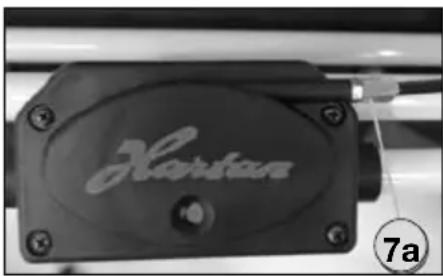
natural_image
Close-up of a black hard drive component with 'Hartan' branding and mounting holes (no readable text beyond label)Bedienungsanleitung
Handbremse justieren (optional)
natural_image
Close-up of a black bicycle brake lever handle with a numbered label (9) pointing to it, no text or symbols on the device itself.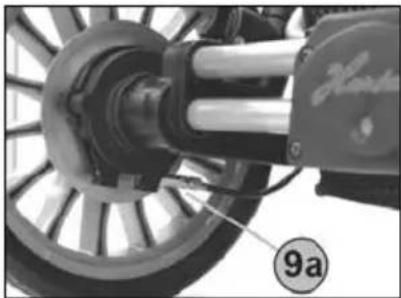
natural_image
Close-up of a mechanical assembly with a wheel and shaft, no visible text or symbols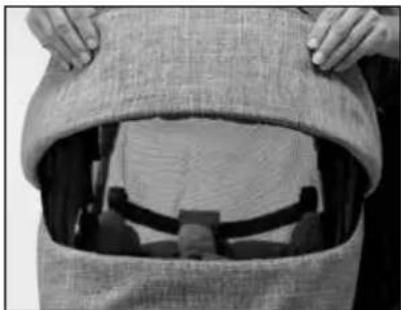
natural_image
Close-up of hands opening a garment with a burlap, showing fabric and accessories (no text or symbols visible)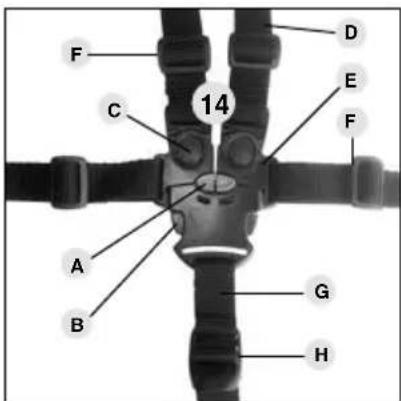
text_image
F C 14 D E F A B G H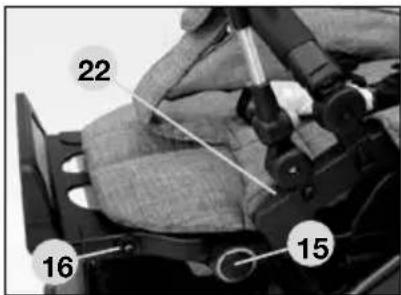
text_image
22 16 15natural_image
Close-up of a hand operating a vehicle wheel assembly (no visible text or symbols)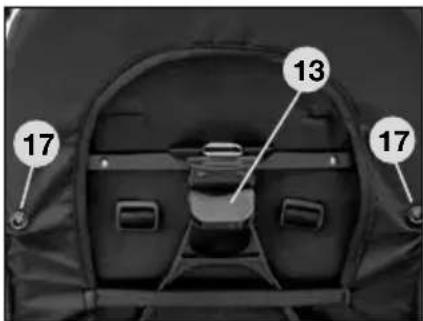
text_image
13 17 17natural_image
Black-and-white photo of a woman gently holding a baby, both looking over the camera (no text or symbols visible)
United Kingdom (UK)
text_image
HartanXperia GTS
Suitable from 6 months, up to 15kg.
Under 6 months only in connection with an appropriate carrycot.
The product is not suitable to be used when jogging or skating.
WARNING! Only use the seat unit once your child can sit up on its own.
For children under six months, only in conjunction with a suitable carrycot.
The XL carrycot is designed for children from 0-12 months, maximum weight 9 kg.
1 Handlebar
2 Handlebar catch
3 Safety turn lock
3a Adjustable handle safety lock
4 Handle-folding lock button
5 Wheel retention
6 Lock-type-swivel wheel
7 Parking brake
7a Parking brake adjusting screw
8 Adjustable suspension system
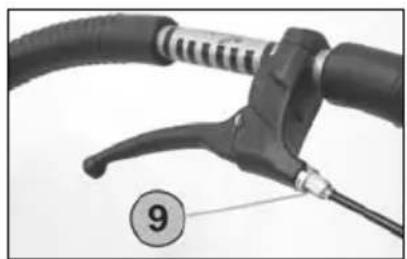
9 Readjustment of hand brake (optional)
9a Silently adjustable hood (optional)
10 Silently adjustable hood
11 Sun canopy
12 Hood and safety bar lock
13 Tilt-adjustable backrest
14 Safety belt
15 Adjustable footrest
16 Footrest extension
17 Fall-out protection
18 Ventilation zone
19 Automatic lock for upper section
20 Telescopic shock absorbers
21 Sun visor
22 Canopy attachment
23 Zip fastener for ventilation zone
Congratulations on your purchase
You want your baby to feel safe and secure, that's why you have purcha-sed a Hartan high-quality product. You have made an excellent choice.
Hartan products are manufactured with the greatest possible care and monitored constantly by rigorous quality control assuring that your pram will provide life-long satisfaction. The textiles used for our products have been tested for harmful substances (chemical residues) according to the indu-stry's own, Öko-Tex-Standard 100' to guarantee that all the fabric parts of your pram are safe for your baby.
Importantly! Please do not use this pram before reading the instructions carefully, and keep these instructions for queries or future reference. Your child's safety may be affected if you do not follow these instructions.
If you do not understand the instructions or if you require more detailed information, contact your dealer.
Please ensure that other users are also informed about the functions of the carriage and the notes on safety.
For the safety of your child
WARNING! – Before use, conduct an initial check of the carriage, and do not use it if it is damaged or if parts are torn or broken.
WARNING! – Make sure when unfolding the pram and folding it together that your child is at a safe distance, to avoid any injuries
WARNING! – Never leave your child unattended in the pram.
WARNING! – Make sure before using it that the carycot or the seat unit or the child's car seat is correctly latched into place.
WARNING! – Negotiating stairs or steps as well as overloading may damage the pram and endanger your child.
WARNING! – When parking the pram, make sure the brake is engaged. When using public transport, ensure the pram stands safely.
WARNING! – A pram, stroller or carrycot is not a substitute for a cradle or a bed. It is intended to be used exclusively as a means of transport.
WARNING! – Using this pram while jogging, skating, etc. can be dangerous and is therefore not allowed.
WARNING! – Do not allow children to play either near or with the pram.
WARNING! – Always use the restraint system.
WARNING! – Fix no bags, handbags or other loads to the handle, backrest or sides of the carriage, as this will affect its stability.
WARNING! – This model has been designed for 1 child.
WARNING! – A second child seat is not allowed for this model.
WARNING! – The seat unit and carrycot are not to be used for transporting in a car.
WARNING! – The rain cover may not be used when the hood is taken off (danger of suffocation). Never expose the rain cover hood to sun while the child is in the carriage (overheating).
WARNING! – Keep the carriage away from open fires or other sources of heat.
WARNING! – Remove immediately all film packaging, and do not allow your child to play with it (asphyxiation).
WARNING! – Accessories and spare or replacement parts not approved by the manufacturer must not be used.
WARNING! – Please ensure the swivel wheels are latched in place when you are using the pram with the reversible handlebar from the swivel wheel end.
WARNING! When opening out and folding down the frame and when adjusting the back-rest, pinch-points may be caused in which fingers etc. can be trapped unless care is exercised. Ensure that your child has plenty of clearance space.
Unfolding the pram
By pushing the lock buttons 4, unfold the upper section to bring the handle in horizontal position. Pull handle 1 upwards until handle catch 2 has engaged. WARNING! Before using the pram, make sure all catches are locked.
Folding the pram
Important: Swing the handlebar 1 that the white symbols on the twist grip 3 are visible from above. Turn rotating lock 3 inwards until the handle unlocks, then push the handle down. Then press retaining buttons 4 and fold the top part of the handle downwards.
Reversible handlebar
To reverse the handlebar, turn the twist grips 3a in the direction of the arrow. WARNING! When reversing the handlebar, take care that no movable parts jam the baby's limbs, or fingers, etc. Finally, make sure the hand lebar has reengaged properly, which is indicated by a click sound.
Height adjustment of handlebar
Press the two handle-folding lock buttons 4 to bring the upper section of the handlebar 1 in the desired position.
Removing the wheels
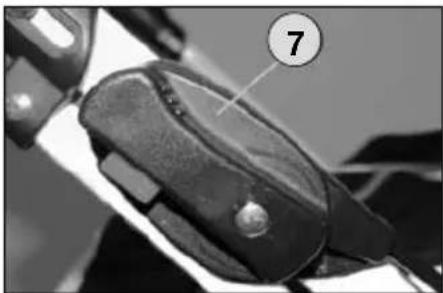
Release the parking brake 7. To remove or replace the wheels, press button 5. If replacing the wheel, make sure that it is correctly latched into place.
Lock-type-swivel wheels
To fix the swivelling wheel turn the caps 6 until the red spot appears; the wheel locks itself in place automatically as soon as it faces forwards. Turn the cap 6 so that the green point is visible to release the swivel lock. To remove, press the button in the centre of the cap 6 and withdraw the wheel from its seating. To fix the wheel in place, push the wheel with its fixing pin into the seating until it audibly clicks into place.
Sun canopy
The sun shade can be folded down or removed using the zipper.
Parking brake
To lock the wheels, depress the red securing button situated at the brake lever 7 and swing the lever down. The two toothed brake-crown wheels engage, which is indicated by a click sound. To release the brake, swing the lever up until it snaps into place. Having parked the pram, try to push it to check the brake.
WARNING! Make sure the brake is always closed when placing the baby in the carriage or taking it out of it.
Adjusting the parking brake
After prolonged use, the wheels may cause a rattling noise. You can eliminate the problem by readjusting the setting screw 7a situated at the brake housing.
natural_image
Close-up of a mechanical component with a numbered label '7' pointing to a feature (no readable text or symbols beyond the number)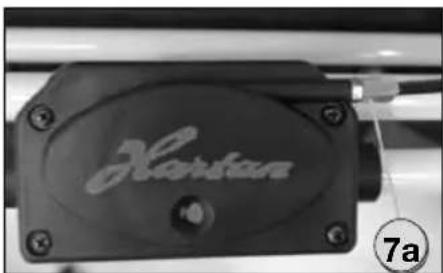
natural_image
Close-up of a black hard drive component with engraved 'Hartan' logo and number 7a indicator (no other text or symbols)Instructions
Adjust the handbrake (optional)
Readjust the hand brake by means of the cable adjusting barrel 9 (above). A different brake effect on the two rear wheels can be corrected by means of the cable adjusting barrel 9a (below).
Adjustable suspension system
By turning the selector 8, a „hard“ or „soft“ position can be selected for suspension.
Hood and safety bar
By pressing the bayonet joint 12, the hood or the safety bar can be pulled out. When inserting it, make sure the safety bar locks into place correctly and be careful not to pinch any of the fabric parts. By pressing the buttons, the safety bar position can be changed.
WARNING! The hood bar of the stroller and the safety bar are not suitable for carrying the pram.
Climatic zone 18
You may open the hood flap to prevent heat from accumulating. To do so, pull the top cover up. You can fold out the sun shade 21 for additional protection.
Safety belt WARNING!
Secure your child with the five-point harness system 14.
Make sure the shoulder straps D are plugged in and that the belt is securely fastened. The length of the belt can be adjusted with sliding buckle F, the length of the crotch strap G can be adjusted with quick-release slider H.
To undo the harness: press the two tongues B together using your thumb and forefinger, then press the red button A, so that you can pull the two plugs E out upwards. To undo the shoulder straps you then press button C.
Canopy attachment 22
Insert then the fixing peg of the canopy in the slot of the canopy attachment.
Adjusting the footrest
By pressing the two red safety buttons 15 at the same time, the footrest can be lowered. When lifting it, adjustment of positions is effected automatically. The footrest can be lengthened. To do this, pull the two red pins 16 and turn the footrest by 180°.
natural_image
Close-up of a bicycle brake lever handle and cable with a numbered label (9) pointing to the handle (no text or symbols on the lever itself)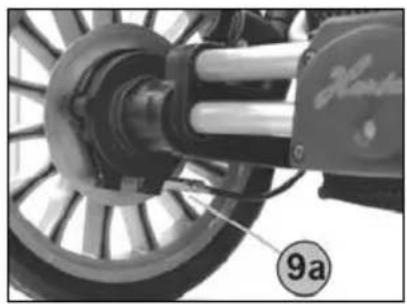
natural_image
Close-up of a mechanical assembly with a labeled component (9a), no readable text or symbols present.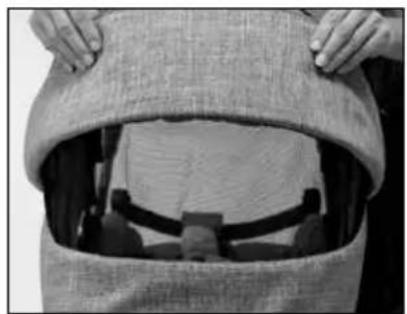
natural_image
Close-up of hands opening a fabric bag with a patterned cover (no visible text or symbols)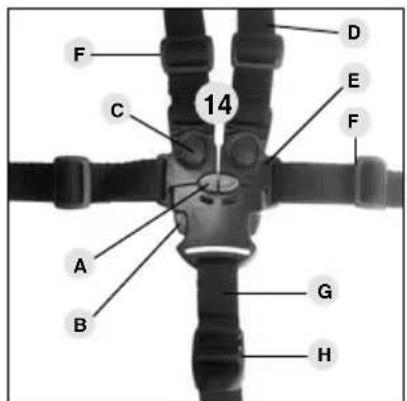
text_image
F C 14 D E F A B G H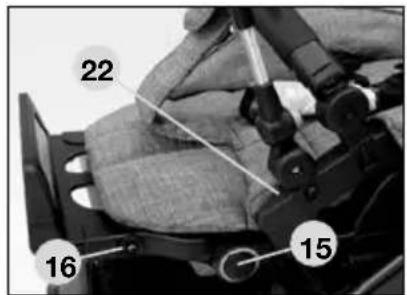
text_image
22 16 15Adjusting the footrest
By pressing the two red safety buttons 15 at the same time, the footrest can be lowered. When lifting it, adjustment of positions is effected automatically. The footrest can be lengthened. To do this, pull the two red pins 16 and turn the footrest by 180^ .
WARNING! In case the carrycot is attached to the frame, the footrest should always be in horizontal
position, as an additional protection preventing it from slipping out.
Secure the carrycot according to the operating instructions.
Automatic attachment locking
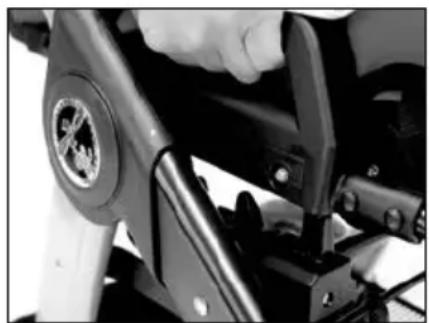
Place the seat unit on the frame in such a way that both locking handles are sitting on top of the support studs. The latches on both sides lock automatically as soon as you let go of the handles. WARNING!
Check before use that the seat unit is securely fixed! To open the lock, pull the red knob out slightly, then the seat unit can be removed. The seat unit can also be turned round.
natural_image
Close-up of a hand using a tool to adjust or install a motorcycle wheel (no visible text or symbols)Adjusting the backrest
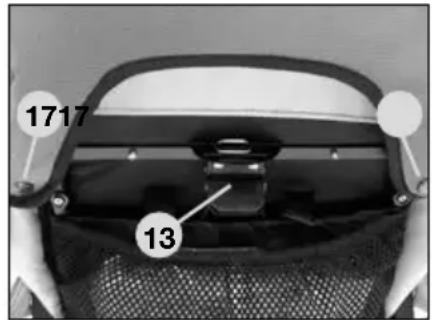
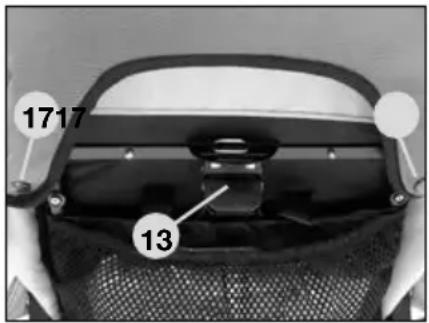
By raising adjustment lever 13 on the back, the seat-back can be precisely adjusted to any incline between an upright seated position and a lying position. WARNING! When adjusting the backrest, take care that no movable parts jam the baby's limbs, or fingers, etc. Finally, make sure the backrest has reengaged properly.
Protection from falling out
WARNING:
As additional protection against falling out, fix the press-buttons 17 of the hood to the metal frame of the backrest.
text_image
1717 13Checking and care instructions
All the materials we use can easily be cared for.
Care of the fabric parts
Clean soiled fabrics when dry using a clothes-brush or lukewarm water (then use hair dryer). Do not rub fabrics extensively. Remove tenacious stains using a soft detergent. All removable fabric parts may be machine washed in lukewarm water at a gentle setting and reduced agitation, at 30 °C. Let's say you have encountered a heavy rain shower. Dry your carriage with the hood still on in a dry and airy room using a cloth. This prevents marking as well as the underlining fabrics from moist soaking in through the seams. As a guaranteed protection against rain, we recommend that you use our rain cover, which is either included or can be purchased at your dealer's. Our fabrics have quite a number of distinctive features. However, they are very sensitive to excessive sunlight. That's why you should park your carriage in the shade whenever possible.
Care of the chassis
The chassis requires regular care. You should clean and slightly lubricate the wheel axles at a regular 4-weeks interval. Before oiling the wheels and push-in axles, make sure these are absolutely clean and free of sand etc., in order not to compromise the proper working of the locking mechanism. Use a silicone based lubricant spray for all moving plastic parts to maintain them in an operative condition. Keep all coated and chromeplated metal parts in dry condition, and use a finish restorer or chrome paste if necessary. Remove smaller chassis paint damages by means of a touch-up applicator.
Do not use high-pressure cleaners when cleaning your carriage, due to risk of damaging the ball bearings of the wheels (greased) and other functional parts (grinding and creaking noise).
Wheels: Overpressure may result in accidents and personal injuries. Replace worn plain wheel bearings and springs in time. Replace worn plain wheel bearings and springs in time. Little stones in the thread, etc. may just as well damage the floor covering. When parking the carriage in the blazing sun or cramming it in the boot at temperatures of above 40^ C, the semi pneumatic tires may flatten or become deformed.
For pneumatic tires
When using pneumatic wheels, make sure they have got enough air in the tire. Specified tire inflation pressure should be between 1.2 and 1.5bar max.
WARNING! Max. tire pressure will be reached quickly. Tires tend to lose air over time. When blowing up a flat tire, inflate it only halfway first, and make sure the tire is evenly seated, to avoid "wobble". Replace worn plain wheel bearings and springs in time. Then continue to inflate it to the proper pressure.
Quality agreement
2 YEARS warranty
This product is guaranteed for a period of 2 years by your contract partner. For possible submission of proof, please keep your receipt, the completed warranty card as well as the hand-over check bearing your signature for the length of the warranty period. These documents must be submitted to qualify for service under the warranty.
IN CASE OF WARRANTY CLAIM
This product is warranted against defects in materials and workmanship that existed at the time it was handed over.
THIS WARRANTY DOES NOT COVER .....
We disclaim liability for defects in the object of purchase that are beyond our control.
This especially applies to:
■ natural wear and tear (wear-related defects) and defects due to excessive stress
■ consequential defects, originally caused by neglect of defects/damages but developing into conditions necessitating a more difficult repair
■ defects due to improper or inappropriate use (see Instructions)
■ defects due to incorrect assembly or operation
■ defects due to negligent handling or lack of maintenance of the product
■ defects due to improper alteration of the product.
WARRANTY CLAIM — YES OR NO?
Rust: To provide a proper basic protection of the chassis, it has undergone a rust-proofing treatment. However, rust-stains may be found when lacking maintenance. This case will not be covered by the warranty.
Scratches: Scratches caused by wear and tear will not be covered by the warranty.
Mould formation: Fabric parts, having become wet, should be dried properly to prevent mould formation (see Instructions). Mould formation will not be covered by the warranty.
Bleaching of the fabrics: We confirm that the fabrics comply with the established standards. It cannot be ruled out that colours of the fabrics may fade while the parts are exposed to direct sunlight, washed too frequently, come into contact with sweat and detergents, or suffer abrasive wear (especially on those parts where the pram is handled). Consequently, colour fading is excluded from the warranty. It is unavoidable that colours sometimes differ slightly from one individual batch to the next, which is why this case will not be covered under the warranty.
Knob formation on fabrics: We recommend that you apply general clothes care. As with woollen sweaters, the knobs can easily be removed by using a clothes-brush or burling machine.
Tearing of seams, fabrics, press studs : At the time of purchase, please check carefully that all the fabric parts, seams and snap fasteners have properly been sewn and fastened. In case of a possible complaint concerning seams/defective snap fasteners, a claim must immediately be reported to your dealer after the defect has been discovered.
Wheels: As wheels used on prams will not be balanced, they may show slight run-outs („wobbles“). Worn tires will be regarded as natural wear and tear. No claim can be raised if your pram, using pneumatic tired wheels, has a „flat“. This will be attributed to extraneous causes — a small hole caused by a pointed object, or pushing the pram about when it has not got enough air in the tire. This case will not be covered by the warranty.
WHAT TO REMEMBER WHEN BUYING YOUR PRAM
Check that your pram is complete when it is handed over and no parts are missing. Check the function of all parts and confirm this by signing the hand-over check.
WHAT TO DO IN CASE OF A COMPLAINT
Call your dealer, from whom you bought the pram, to file the complaint and to discuss how to handle the matter. In case of defects concerning safety regulations, your complaint must be filed at your dealer within a 30 days period from the date the defects have occurred, otherwise these defects will not be warranted for. When handling your warranty claims, we will apply product-specific depreciation rates. We refer you to our general terms and conditions displayed at our premises.
Make sure that the pram is in a clean condition before being sent in for repair. Repairs will not be carried out on prams which are in a dirty condition.
USE, CARE AND MAINTENANCE
To maintain the original quality of your pram as a means of transportation for your child, it requires care and maintenance according to the instructions

natural_image
Black-and-white photo of a woman gently holding a baby's face, both looking over (no text or symbols visible)
La France
text_image
HartanXperia GTS
natural_image
Close-up of a mechanical component with a numbered label '7' pointing to a feature (no readable text or symbols beyond the number)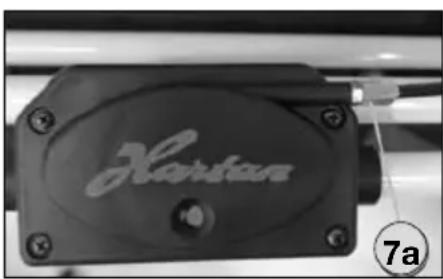
natural_image
Close-up of a black hard drive component with engraved 'Hartan' logo and number 7a indicator (no other text or symbols)Mode d'emploi
natural_image
Close-up of a bicycle brake lever handle and cable with a numbered label (9) pointing to the handle (no text or symbols on the lever itself)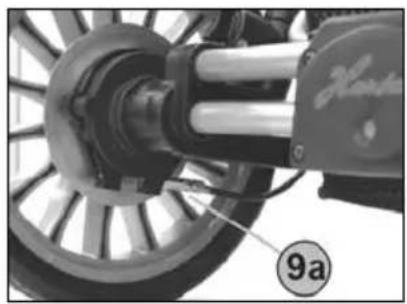
natural_image
Close-up of a mechanical assembly with a labeled component (9a), no readable text or symbols present.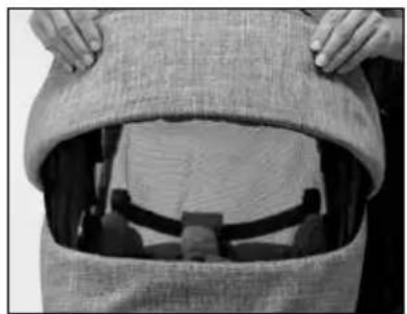
natural_image
Close-up of hands opening a fabric bag with a patterned cover (no visible text or symbols)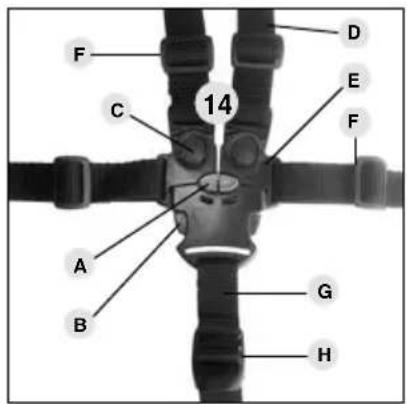
text_image
F C 14 D E F A B G H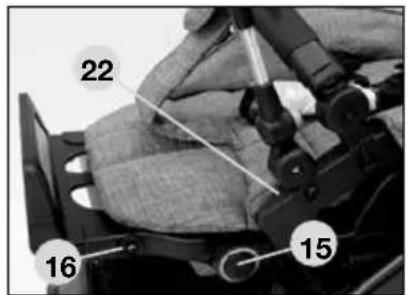
text_image
22 16 15natural_image
Close-up of a hand using a tool to adjust or install a motorcycle wheel (no visible text or symbols)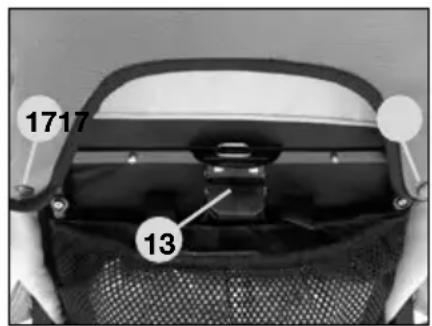
text_image
1717 13natural_image
Black-and-white photo of a woman gently holding a baby, both looking over each other (no text or symbols visible)
Nederlands
text_image
HartanXperia GTS
natural_image
Close-up of a mechanical component with a numbered label '7' pointing to a feature (no readable text or symbols beyond the number)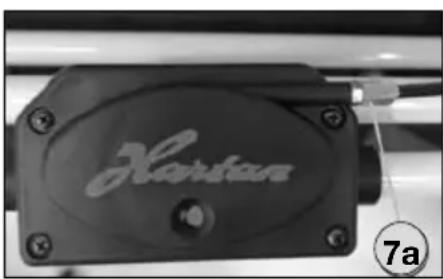
natural_image
Close-up of a black hard drive component with engraved 'Hartan' logo and number 7a indicator (no other text or symbols)Gebruiksaanwijzing
Handrem afstellen (optioneel)
natural_image
Close-up of a black bicycle brake lever handle with a numbered label (9) pointing to it, no text or symbols on the lever itself.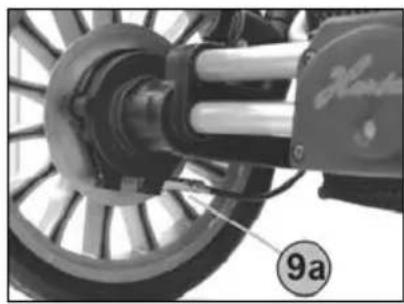
natural_image
Close-up of a mechanical assembly with labeled component '9a' (no readable text or symbols beyond label)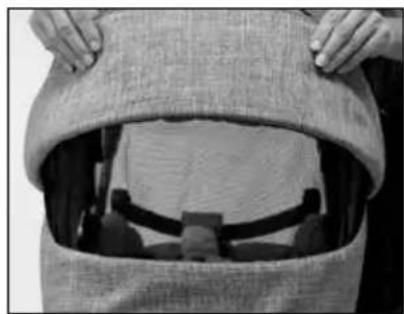
natural_image
Close-up of hands opening a textured fabric bag with a partially visible interior space (no text or symbols)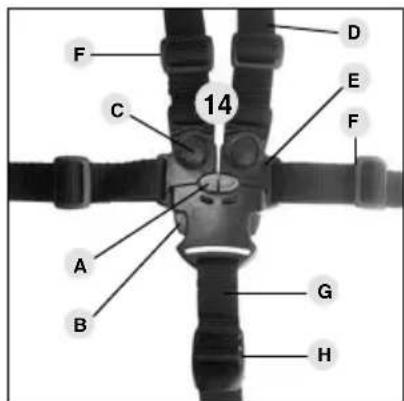
text_image
F C 14 D E F A B G H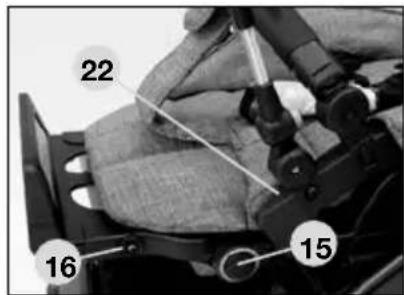
text_image
22 16 15natural_image
Close-up of a hand using a tool to adjust or install a motorcycle wheel (no visible text or symbols)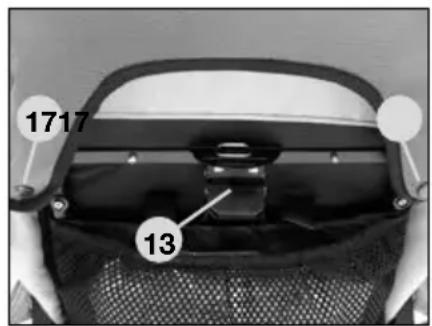
text_image
1717 13natural_image
Black-and-white photo of a woman gently holding a baby, both looking over (no text or symbols visible)
Danmark
text_image
HartanXperia GTS
natural_image
Close-up of a mechanical component with a numbered label '7' pointing to a feature (no readable text or symbols beyond the number)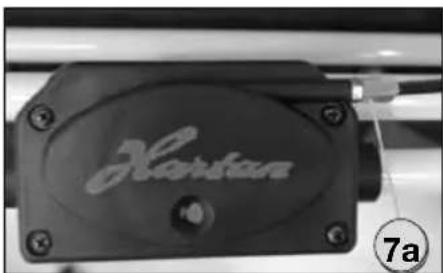
natural_image
Close-up of a black hard drive component with engraved 'Hartan' logo and number 7a indicator (no other text or symbols)Brugsanvisning
natural_image
Close-up of a black bicycle brake lever handle with a numbered label (9) pointing to it, no text or symbols on the device itself.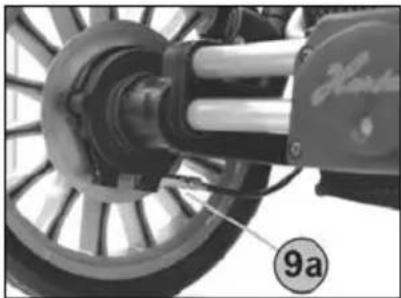
natural_image
Close-up of a mechanical assembly with a wheel and shaft, no visible text or symbols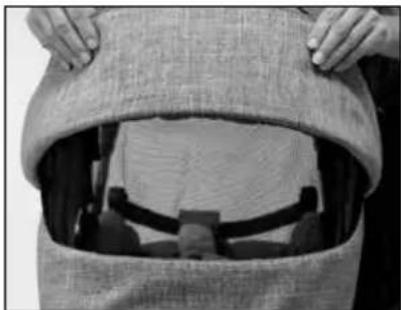
natural_image
Close-up of hands opening a garment with a burlap, showing fabric and accessories (no text or symbols visible)
text_image
F C 14 D E F A B G H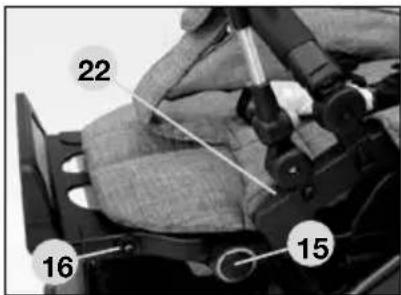
text_image
22 16 15natural_image
Close-up of a hand operating a mechanical lever with a circular emblem on the left (no visible text or symbols)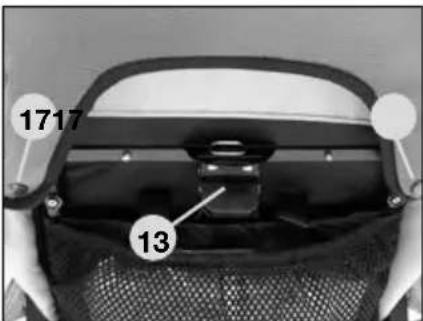
text_image
1717 13natural_image
Black-and-white photo of a woman gently holding a baby's face, both looking over (no text or symbols visible)
Norge
text_image
HartanXperia GTS
natural_image
Close-up of a mechanical component with a numbered label '7' pointing to a feature (no readable text or symbols beyond the number)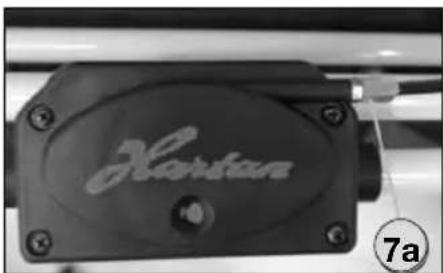
natural_image
Close-up of a black hard drive component with engraved 'Hartan' logo and number 7a indicator (no other text or symbols)Bruksanvisning
Justere håndbremse (alternativ)
Ved å dreie innstillingsringen 9 kan du etterjustere håndbremsen. Forskjellig bremsing på de to bakhjulene kan du regulere med innstillingsringen 9a på nedre bowdenkabel.
natural_image
Close-up of a black bicycle brake lever handle with a numbered label (9) pointing to it, no text or symbols on the lever itself.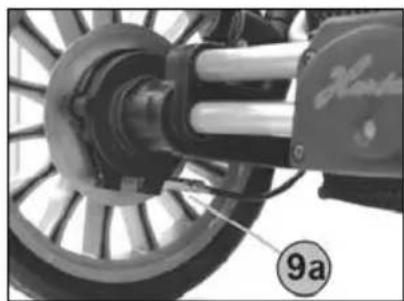
natural_image
Close-up of a mechanical assembly with a wheel and shaft, no visible text or symbols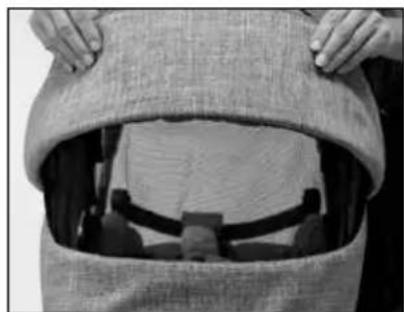
natural_image
Close-up of hands opening a fabric bag with a patterned cover (no visible text or symbols)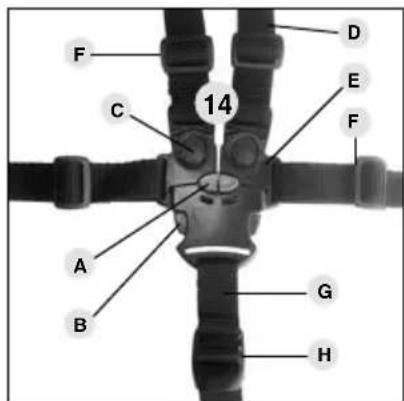
text_image
F C 14 D E F A B G H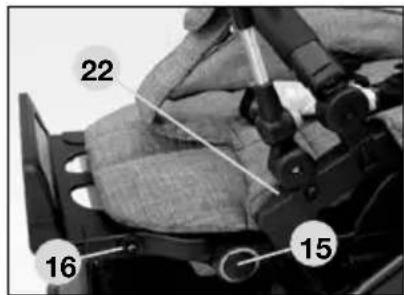
text_image
22 16 15natural_image
Close-up of a hand operating a motorcycle wheel assembly (no visible text or symbols)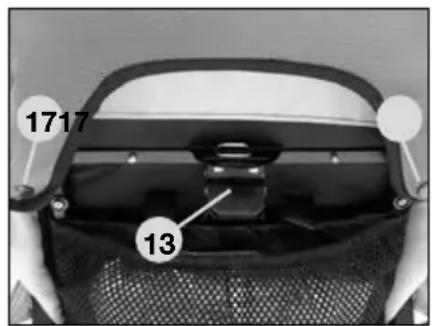
text_image
1717 13TA HENSYN TIL F∅LGENDE VED KJ∅PET
natural_image
Black-and-white photo of a woman gently holding a baby, both looking over (no text or symbols visible)
Sverige
text_image
HartanXperia GTS
natural_image
Close-up of a mechanical component with a numbered label '7' pointing to a feature (no readable text or symbols beyond the number)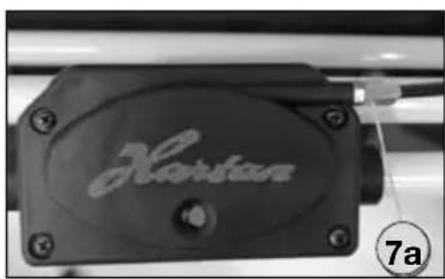
natural_image
Close-up of a black hard drive component with engraved 'Hartan' lettering, no readable text beyond labelBruksanvisning
Justera handbromsen (valfritt)
natural_image
Close-up of a black bicycle brake lever handle with a numbered label (9) pointing to it, no text or symbols on the lever itself.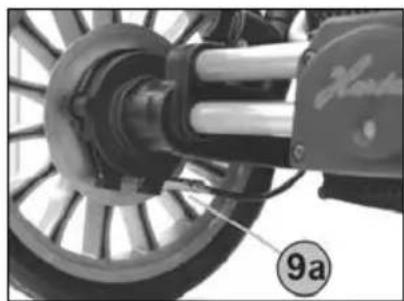
natural_image
Close-up of a mechanical assembly with a wheel and shaft, no visible text or symbols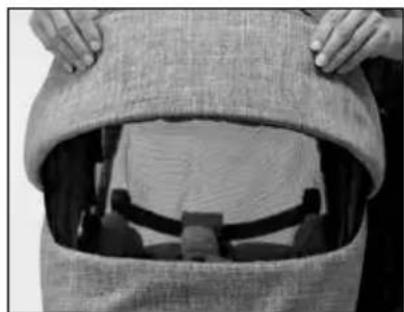
natural_image
Close-up of hands opening a burlap with a person wearing a suit and cap (no visible text or symbols)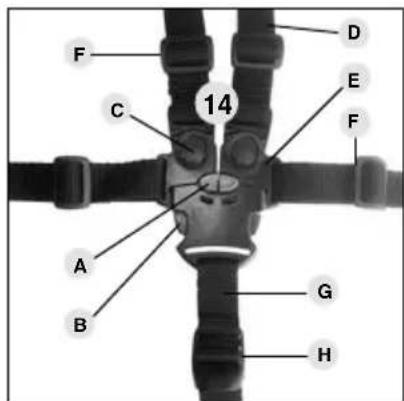
text_image
F C 14 D E F A B G H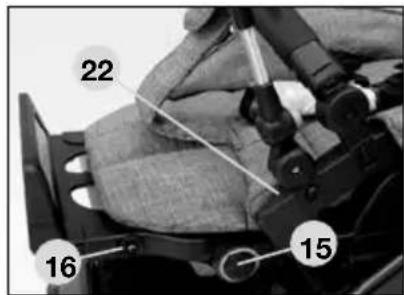
text_image
22 16 15natural_image
Close-up of a hand operating a mechanical lever with a circular component (no visible text or symbols)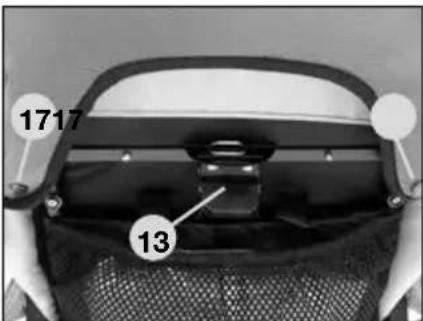
text_image
1717 13natural_image
Black-and-white photo of a woman gently holding a baby, both looking over each other (no text or symbols visible)
Suomi
text_image
HartanXperia GTS
natural_image
Close-up of a mechanical component with a numbered label '7' pointing to a feature (no readable text or symbols beyond the number)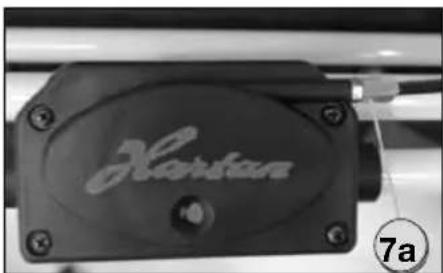
natural_image
Close-up of a black hard drive component with engraved 'Hartan' logo and number 7a (no readable text beyond label)Käyttöohje
natural_image
Close-up of a black bicycle brake lever handle with a numbered label (9) pointing to it, no text or symbols on the lever itself.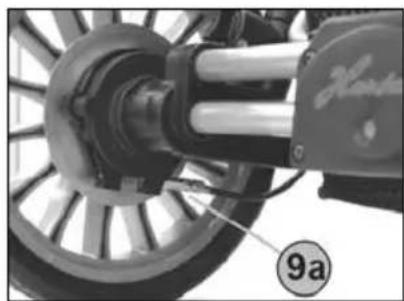
natural_image
Close-up of a mechanical assembly with a wheel and shaft, no visible text or symbols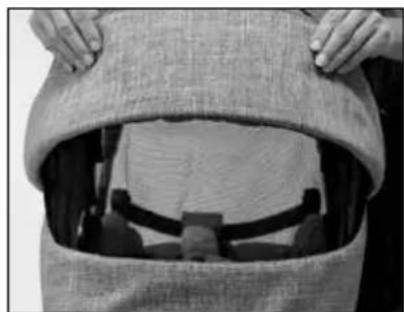
natural_image
Close-up of hands opening a garment with a zipper and fabric (no visible text or symbols)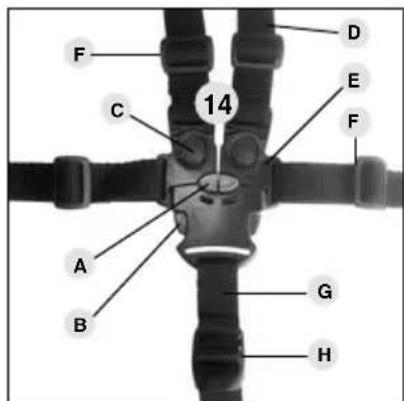
text_image
F C 14 D E F A B G H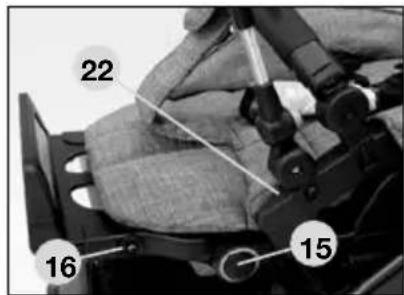
text_image
22 16 15natural_image
Close-up of a hand using a tool to adjust or install a motorcycle component (no visible text or symbols)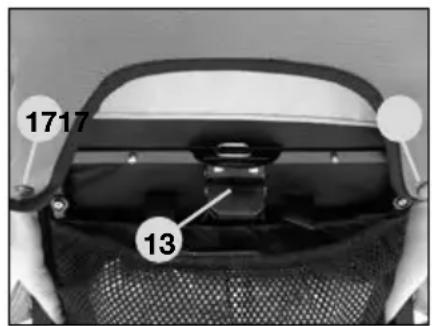
text_image
1717 13natural_image
Black-and-white photo of a woman gently holding a baby, both looking over (no text or symbols visible)
Italia
text_image
HartanXperia GTS
natural_image
Close-up of a mechanical component with a numbered label '7' pointing to a feature (no readable text or symbols beyond the number)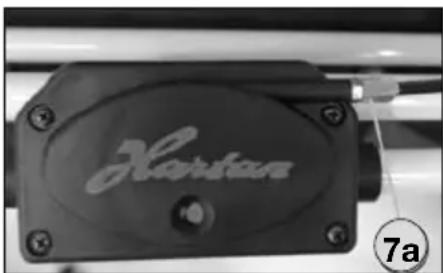
natural_image
Close-up of a black hard drive component with engraved 'Hartan' logo and number 7a indicator (no other text or symbols)natural_image
Close-up of a black bicycle brake lever handle with a numbered label (9) pointing to it, no text or symbols on the lever itself.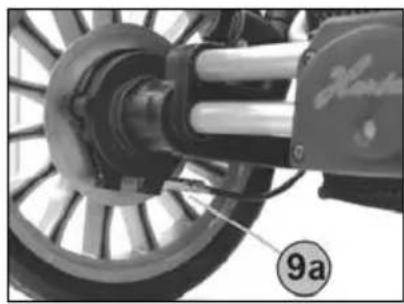
natural_image
Close-up of a bicycle wheel assembly with visible mechanical components and a numbered label (9a) on the wheel (no readable text or symbols beyond labels)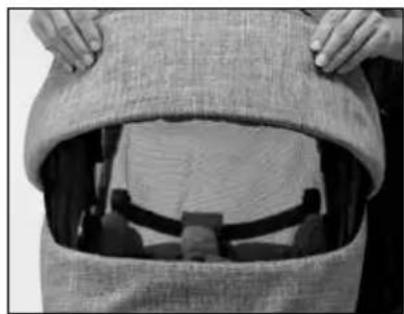
natural_image
Close-up of hands opening a garment with a zipper and fabric (no visible text or symbols)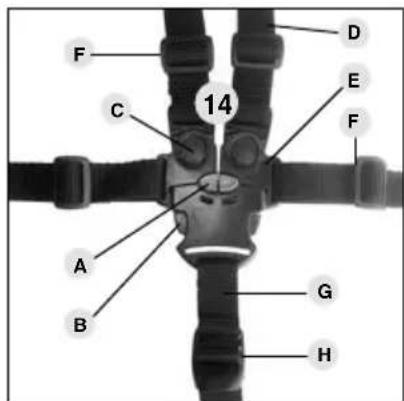
text_image
F C 14 D E F A B G H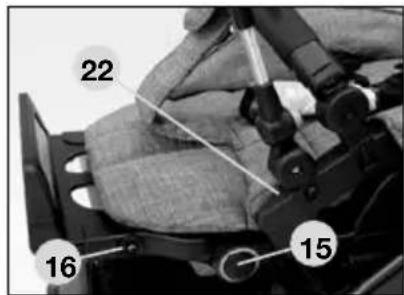
text_image
22 16 15natural_image
Close-up of a hand operating a mechanical device with a circular emblem (no visible text or symbols)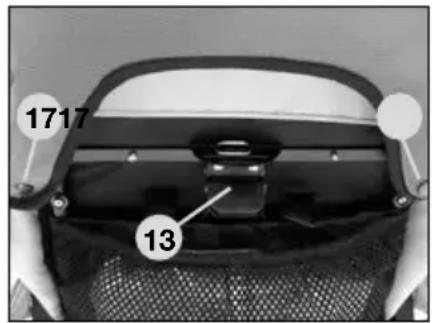
text_image
1717 13natural_image
Black-and-white photo of a woman gently holding a baby, both looking over each other (no text or symbols visible)
España
text_image
HartanXperia GTS
natural_image
Close-up of a mechanical component with a numbered label '7' pointing to a feature (no readable text or symbols beyond the number)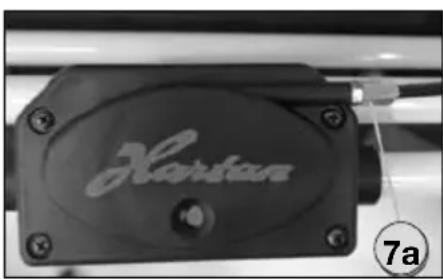
natural_image
Close-up of a black hard drive component with engraved 'Hartan' logo and number 7a indicator (no other text or symbols)natural_image
Close-up of a black bicycle brake lever handle with a numbered label (9) pointing to it, no text or symbols on the lever itself.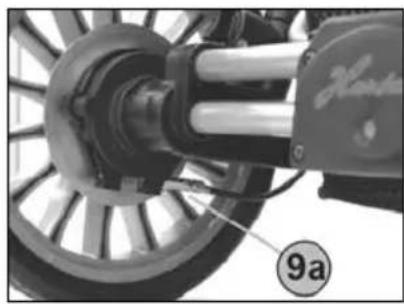
natural_image
Close-up of a mechanical assembly with labeled component '9a' (no readable text or symbols beyond label)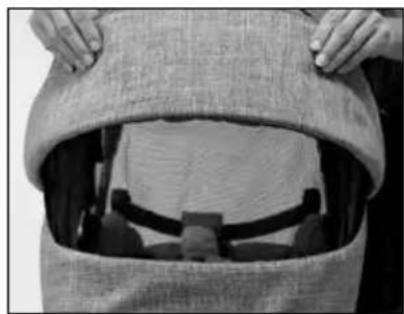
natural_image
Close-up of hands opening a textured fabric bag with a partially visible interior space (no text or symbols)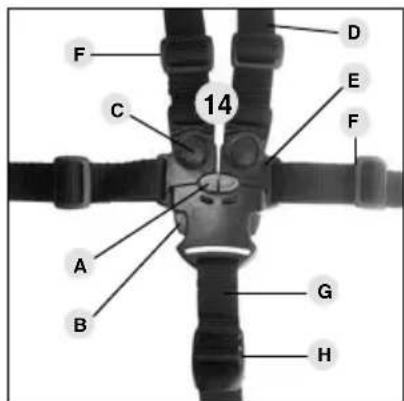
text_image
F C 14 D E F A B G H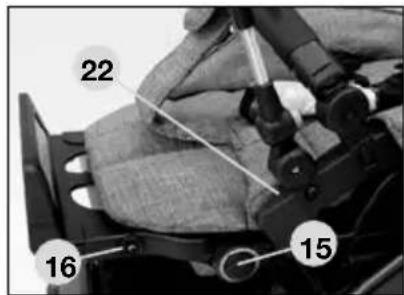
text_image
22 16 15Ajustar el reposapiés
natural_image
Close-up of a hand using a tool to adjust or install a mechanical component, no visible text or symbols.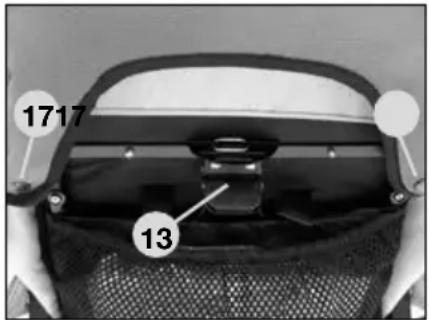
text_image
1717 13natural_image
Black-and-white photo of a woman gently holding a baby, both looking over (no text or symbols visible)
Ceská republika
text_image
HartanXperia GTS
natural_image
Close-up of a mechanical component with a numbered label '7' pointing to a feature (no readable text or symbols beyond the number)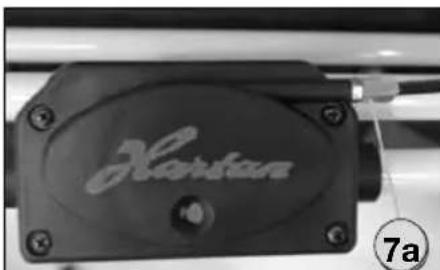
natural_image
Close-up of a black hard drive component with engraved 'Horsen' text, no other visible text or symbolsNávod k použití
natural_image
Close-up of a black bicycle brake lever handle with a numbered label (9) pointing to it, no text or symbols on the lever itself.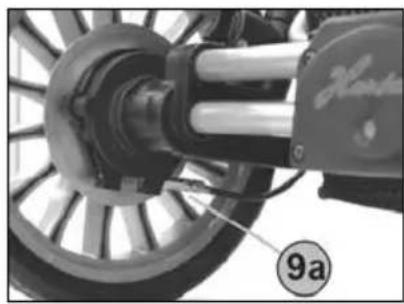
natural_image
Close-up of a bicycle wheel assembly with visible mechanical components and a numbered label (9a) on the wheel (no readable text or symbols beyond labels)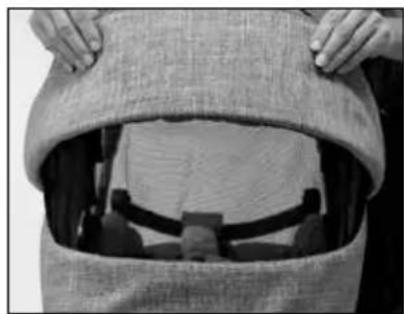
natural_image
Close-up of hands opening a garment with a zipper and belt (no visible text or symbols)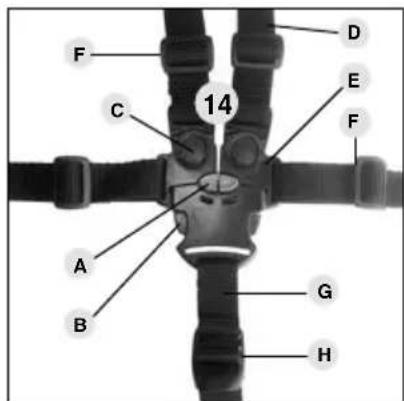
text_image
F C 14 D E F A B G H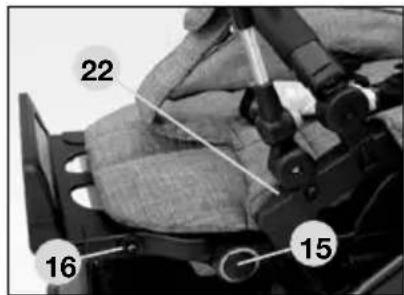
text_image
22 16 15natural_image
Close-up of a hand using a tool to adjust or install a mechanical component (no visible text or symbols)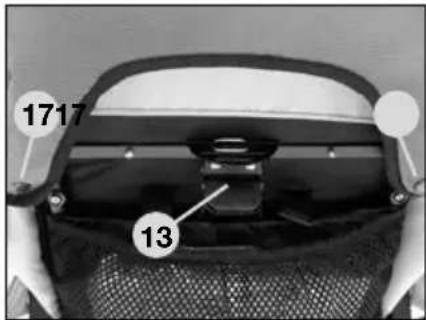
text_image
1717 13natural_image
Black-and-white photo of a woman gently holding a baby, both looking over the camera (no text or symbols visible)
Slovensko
text_image
HartanXperia GTS
natural_image
Close-up of a mechanical component with a numbered label '7' pointing to a feature (no readable text or symbols beyond the number)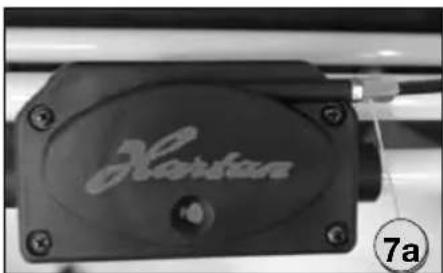
natural_image
Close-up of a black hard drive component with engraved 'Hartan' logo and number 7a indicator (no other text or symbols)Návod na obsluhu
natural_image
Close-up of a black bicycle brake lever handle with a numbered label (9) pointing to it, no text or symbols on the lever itself.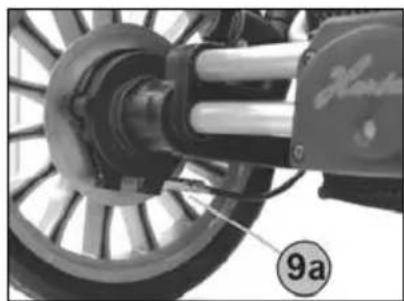
natural_image
Close-up of a mechanical assembly with a wheel and shaft, no visible text or symbols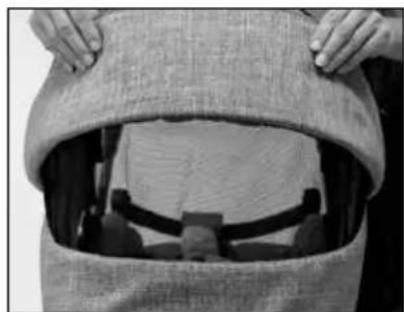
natural_image
Close-up of hands opening a textured fabric bag with a partially visible interior space (no text or symbols)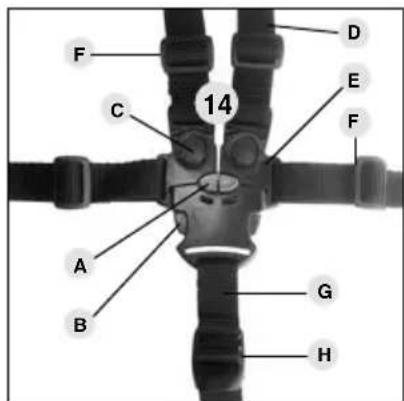
text_image
F C 14 D E F A B G H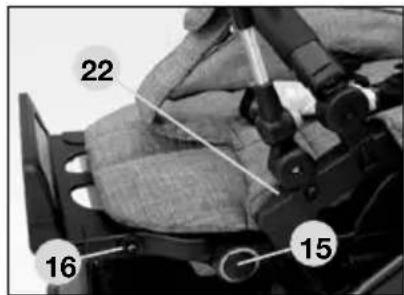
text_image
22 16 15Prestavenie opierky nôh
natural_image
Close-up of a hand operating a motorcycle wheel assembly (no visible text or symbols)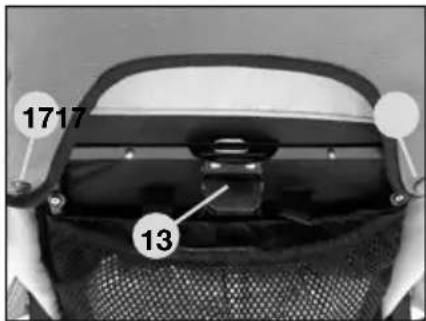
text_image
1717 13natural_image
Black-and-white photo of a woman gently holding a baby, both looking over (no text or symbols visible)
Hrvatska
text_image
HartanXperia GTS
natural_image
Close-up of a mechanical component with a numbered label '7' pointing to a feature (no readable text or symbols beyond the number)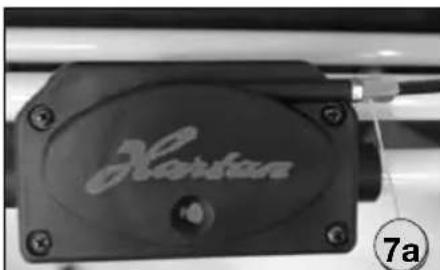
natural_image
Close-up of a black hard drive component with engraved 'Horsen' text, no other visible text or symbolsUputstvo za uporabu
natural_image
Close-up of a black bicycle brake lever handle with a numbered label (9) pointing to it, no text or symbols on the lever itself.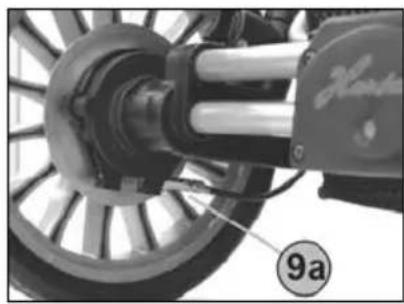
natural_image
Close-up of a mechanical assembly with labeled component '9a' (no readable text or symbols beyond label)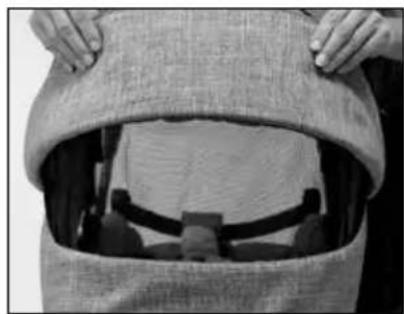
natural_image
Close-up of hands opening a textured fabric bag with a visible interior space (no text or symbols)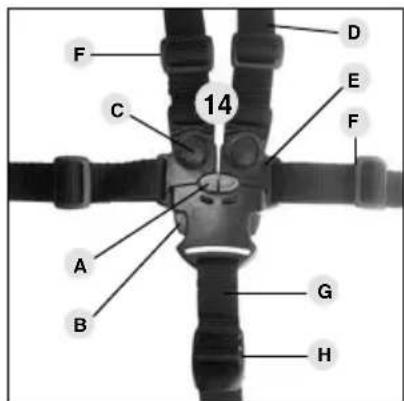
text_image
F C 14 D E F A B G H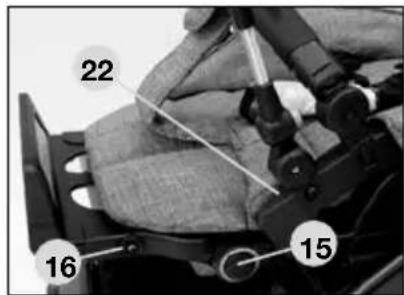
text_image
22 16 15natural_image
Close-up of a hand operating a mechanical device with a circular component and tool (no visible text or symbols)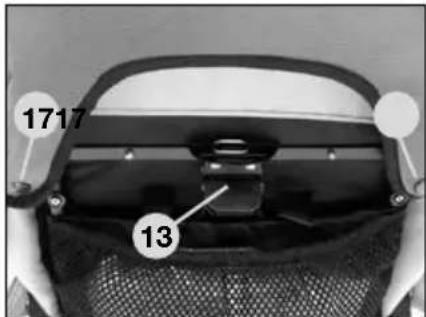
text_image
1717 13Upute za kontrolu i njegu
O CEMU MORATE VODITI RACUNA PRILIKOM KUPNJE
Provjerite da li su kolica kompletna prilikom isporuke i da li nedostaju neki dijelovi. Provjerite da li sve funkcije kolica funkcioniraju u potpunosti i potvrdite ovo na listi o primopredaji.
POSTUPAK KOD REKLAMACIJE
natural_image
Black-and-white photo of a woman gently holding a baby, both looking over the camera (no text or symbols visible)
Srbija
text_image
HartanXperia GTS
natural_image
Close-up of a mechanical component with a numbered label '7' pointing to a feature (no readable text or symbols beyond the number)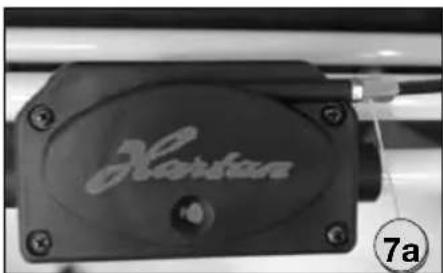
natural_image
Close-up of a black hard drive component with engraved 'Hartan' logo and number 7a indicator (no other text or symbols)Uputstvo za upotrebu
natural_image
Close-up of a black bicycle brake lever handle with a numbered label (9) pointing to it, no text or symbols on the lever itself.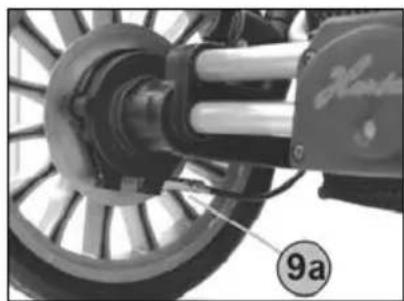
natural_image
Close-up of a bicycle wheel assembly with visible mechanical components and a numbered label (9a) on the wheel (no readable text or symbols beyond labels)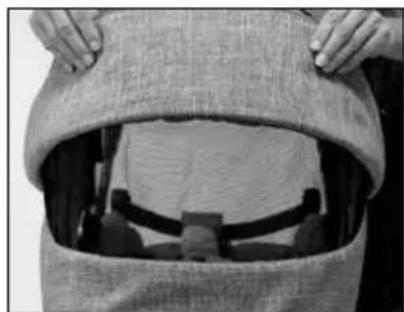
natural_image
Close-up of hands opening a textured fabric bag with a partially visible interior space (no text or symbols)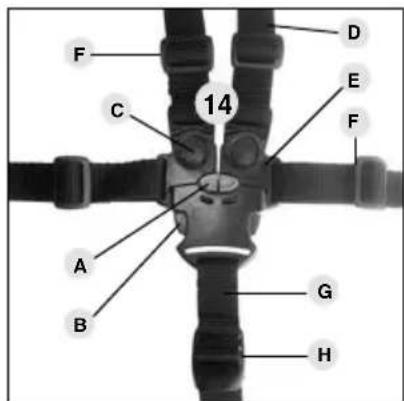
text_image
F C 14 D E F A B G H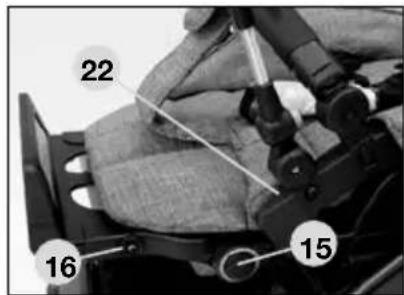
text_image
22 16 15Uputstvo za upotrebu
natural_image
Close-up of a hand operating a mechanical device with a circular component and tool (no visible text or symbols)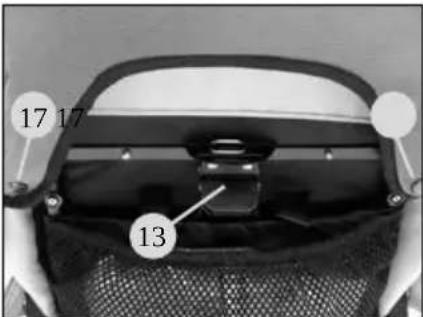
text_image
17 17 13Uputstva za kontrolu i negu
Svi materijali koje smo upotrebili su jednostavni za održavanje.
Održavanje tekstila
natural_image
Black-and-white photo of a woman gently holding a baby's face, both looking over (no text or symbols visible)
Slovenija
text_image
HartanXperia GTS
natural_image
Close-up of a mechanical component with a numbered label '7' pointing to a feature (no readable text or symbols beyond the number)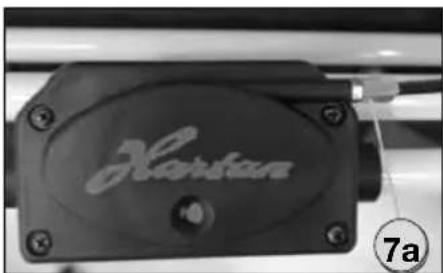
natural_image
Close-up of a black hard drive component with engraved 'Hartan' logo and number 7a indicator (no other text or symbols)NAVODILO ZA UPORABO
natural_image
Close-up of a black bicycle brake lever handle with a numbered label (9) pointing to it, no text or symbols on the lever itself.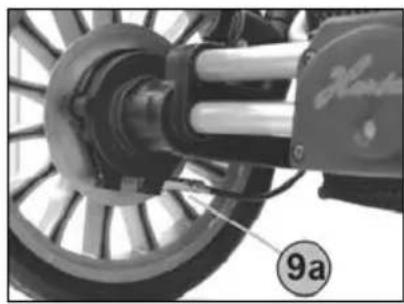
natural_image
Close-up of a mechanical assembly with labeled component '9a' (no readable text or symbols beyond label)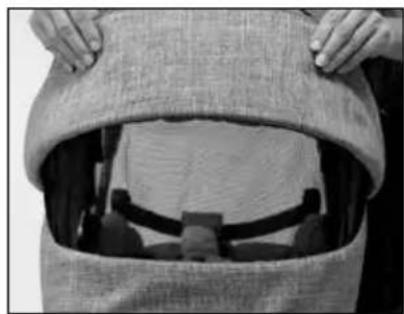
natural_image
Close-up of hands opening a textured fabric bag with a partially visible interior space (no text or symbols)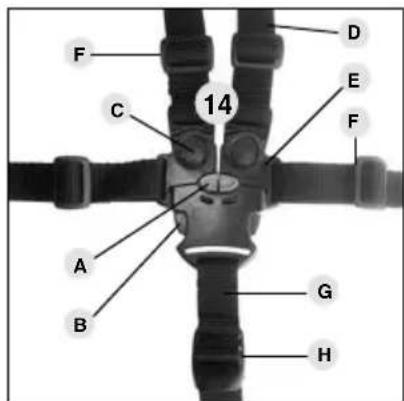
text_image
F C 14 D E F A B G H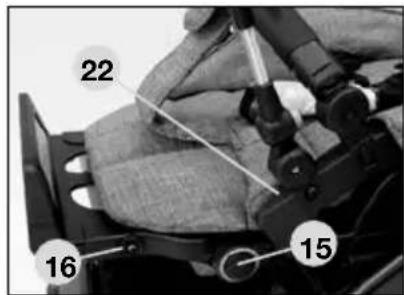
text_image
22 16 15natural_image
Close-up of a hand operating a mechanical device with a circular component and tool (no visible text or symbols)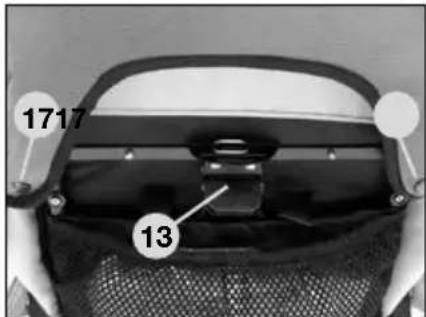
text_image
1717 13KONTROLA IN NAVODILA ZA VZDRŽEVANJE
Vse uporabljene materiale je moč prati na enostaven način.
natural_image
Black-and-white photo of a woman gently holding a baby, both looking over the camera (no text or symbols visible)
magyarország
text_image
HartanXperia GTS
natural_image
Close-up of a mechanical component with a numbered label '7' pointing to a feature (no readable text or symbols beyond the number)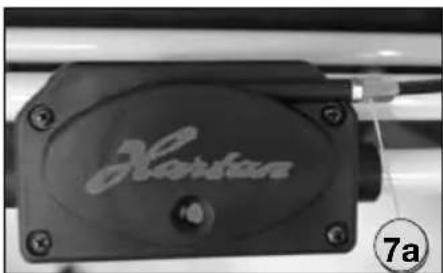
natural_image
Close-up of a black hard drive component with 'Hartan' branding and a numbered label (7a) in the corner, no readable text beyond branding.Használati utasítás
natural_image
Close-up of a black bicycle brake lever handle with a numbered label (9) pointing to it, no text or symbols on the lever itself.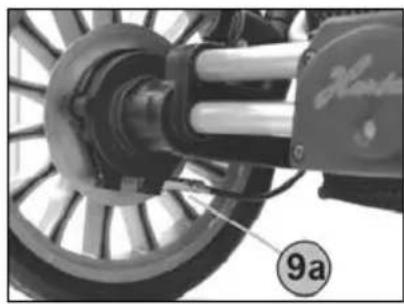
natural_image
Close-up of a mechanical assembly with labeled component '9a' (no readable text or symbols beyond label)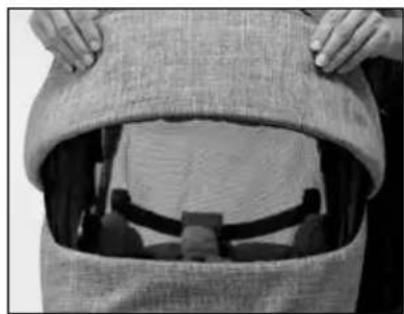
natural_image
Close-up of hands opening a textured fabric bag with a partially visible interior space (no text or symbols)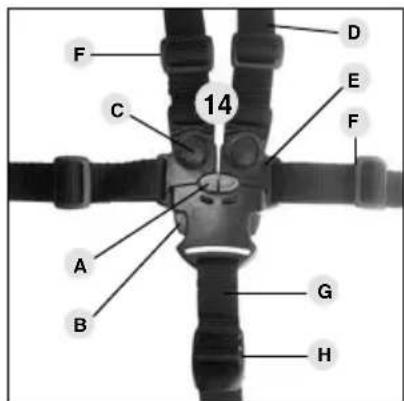
text_image
F C 14 D E F A B G H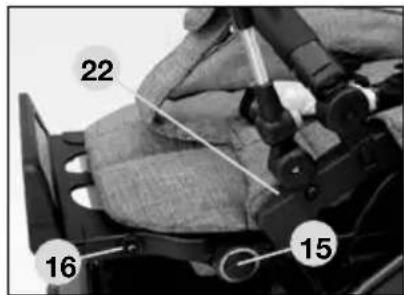
text_image
22 16 15natural_image
Close-up of a hand operating a motorcycle seatbelt mechanism (no visible text or symbols)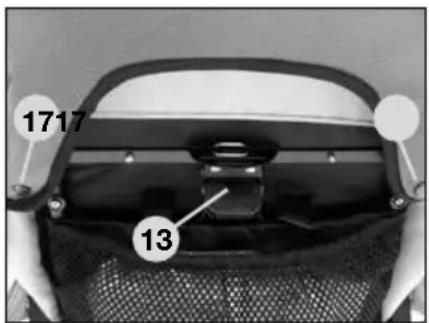
text_image
1717 13natural_image
Black-and-white photo of a woman gently holding a baby, both looking over (no text or symbols visible)
Россия
text_image
HartanXperia GTS
natural_image
Close-up of a mechanical component with a numbered label '7' pointing to a feature (no readable text or symbols beyond the number)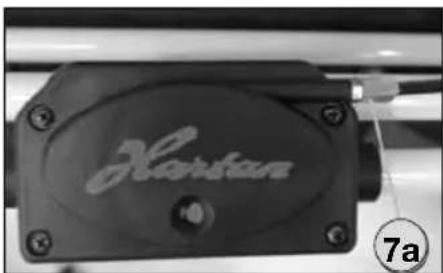
natural_image
Close-up of a black hard drive component with engraved 'Hartan' logo and number 7a indicator (no other text or symbols)natural_image
Close-up of a black bicycle brake lever handle with a numbered label (9) pointing to it, no text or symbols on the lever itself.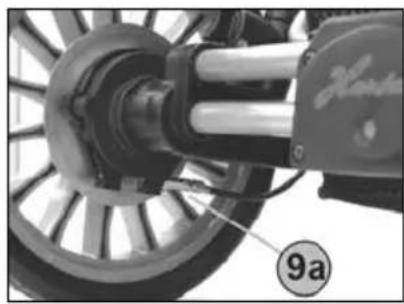
natural_image
Close-up of a mechanical assembly with labeled component '9a' (no readable text or symbols beyond label)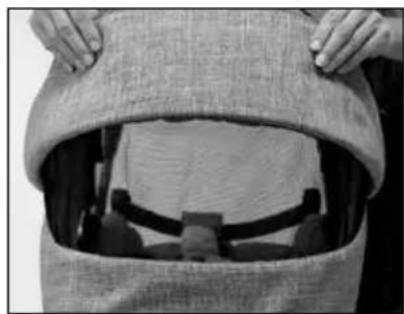
natural_image
Close-up of hands opening a textured fabric bag with a partially visible interior space (no text or symbols)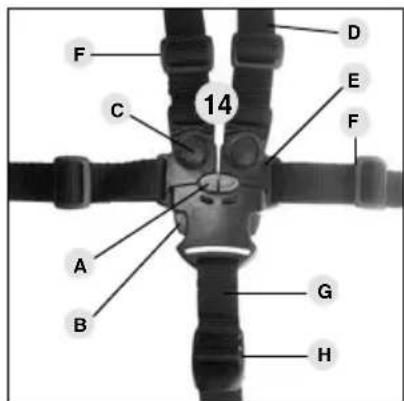
text_image
F C 14 D E F A B G H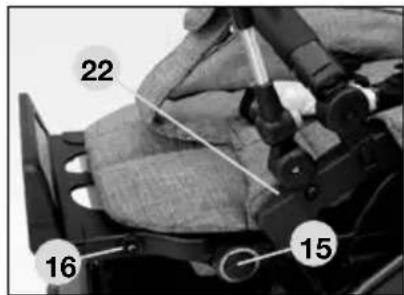
text_image
22 16 15natural_image
Close-up of a hand using a tool to adjust or install a motorcycle component (no visible text or symbols)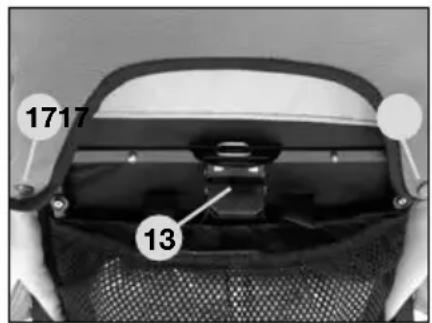
text_image
1717 13natural_image
Black-and-white photo of a woman gently holding a baby's face, both looking over (no text or symbols visible)
Polska
text_image
HartanXperia GTS
natural_image
Close-up of a mechanical component with a numbered label '7' pointing to a feature (no readable text or symbols beyond the number)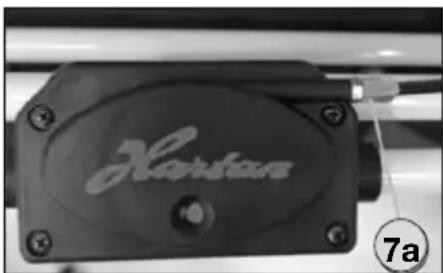
natural_image
Close-up of a black hard drive component with engraved 'Hartan' logo and number 7a indicator (no other text or symbols)Instrukcja obsługi
natural_image
Close-up of a black bicycle brake lever handle with a numbered label (9) pointing to it, no text or symbols on the lever itself.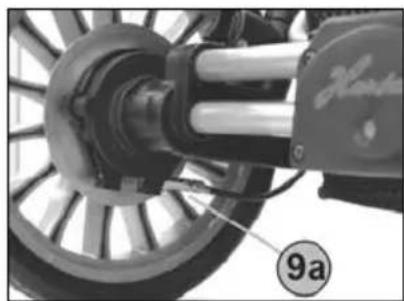
natural_image
Close-up of a bicycle wheel assembly with visible mechanical components and a numbered label (9a) on the wheel (no readable text or symbols beyond labels)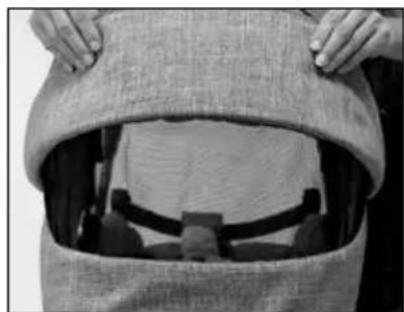
natural_image
Close-up of hands opening a textured fabric bag with a partially visible interior space (no text or symbols)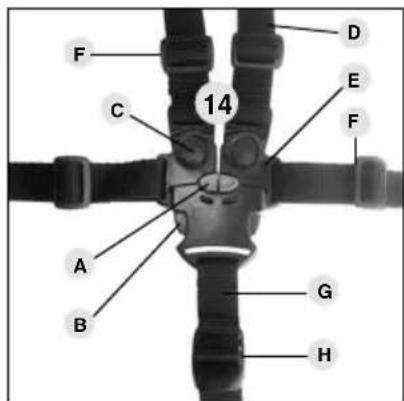
text_image
F C 14 D E F A B G H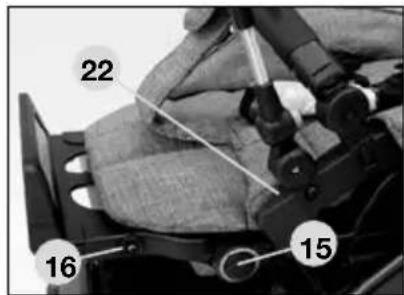
text_image
22 16 15Regulacja podnóżka
natural_image
Close-up of a hand using a tool to adjust or install a vehicle wheel (no visible text or symbols)