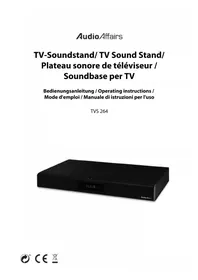
TVS 264 - Television AudioAffairs - Free user manual and instructions
Find the device manual for free TVS 264 AudioAffairs in PDF.


| Product type | TV soundboard (Soundbase) |
| Brand | AudioAffairs |
| Model | TVS 264 |
| Dimensions (W x D x H) | 525 x 300 x 75 mm |
| Weight | 3600 g |
| Power supply | 230 V ~ 50 Hz |
| Maximum power consumption | 50 W |
| Standby power consumption | < 1 W |
| Protection class | II (double insulation) |
| Audio power | 2 x 15 W + 30 W subwoofer |
| Connections | HDMI ARC, COAXIAL, AUX (3.5 mm jack), ANT (75 Ohm, 3.5 mm jack) |
| Bluetooth | Version 4.2 + EDR, profiles A2DP and AVRCP, range 8 m |
| FM radio | 87.50 - 108.00 MHz |
| Main functions | Sleep timer (SLEEP), alarm (BUZZER or FM), equalizer (FLAT/MOVIE/MUSIC), display dimming (DIMMER) |
| Alarm | Adjustable with buzzer or radio, adjustable volume, deactivates after 60 min |
| Sleep timer | 120, 90, 60, 30, 15, 10 min or off |
| Equalizer | FLAT, MOVIE, MUSIC |
| Display | Adjustable brightness (3 levels + off) |
| Maximum load on top | 35 kg, maximum foot dimensions 48 x 22 cm, centered |
| Cleaning | Soft dry cloth, no corrosive detergents |
| Warranty | 24 months from date of purchase |
| Telephone support | 00800 - 45622000 (toll-free, 7 days a week) |
Frequently Asked Questions - TVS 264 AudioAffairs
User questions about TVS 264 AudioAffairs
0 question about this device. Answer the ones you know or ask your own.
Ask a new question about this device
Download the instructions for your Television in PDF format for free! Find your manual TVS 264 - AudioAffairs and take your electronic device back in hand. On this page are published all the documents necessary for the use of your device. TVS 264 by AudioAffairs.
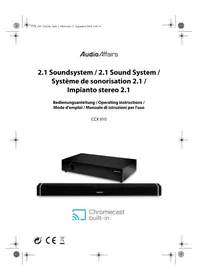
USER MANUAL TVS 264 AudioAffairs
natural_image
Black audio device with 'ILIVE' and 'Audio Affairs' branding, no visible text or symbols on bodyDeutsch...... 4
English 40
Français ....72
Italiano 108
INHALT
natural_image
Pure technical diagram showing two parallel lines with a central rectangular component and a labeled point '1' (no text or symbols beyond the label)1 Display
Gerät - Rückseite
natural_image
Illustration of a monitor mounted on a base with arrows pointing to the screen (no text or symbols)natural_image
Line drawing of a device rear panel with cable and connector, no text or symbols presentnatural_image
Line drawing of a screwdriver inserted into a device (no text or symbols)natural_image
Diagram showing a smartphone connected to a clip with a coin inserted (no text or symbols present)- Thank you for your trust! 41
- General 41
- Scope of supply 43
- Safety instructions 43
- Device overview 46
- Setting up the device 49
- Connecting the antenna 50
- Connecting external devices 51
8.1. HDMI (ARC) connection 51
8.2. COAXIAL connection ....52
8.3. AUX connection ....53
-
Power supply 54
-
Operation 55
10.1. Switching on and off with the power switch ....55
10.2. Switch standby mode on/off 55
10.3. Accessing various sources ....56
10.4. Control the volume 56
10.5. Adjusting the equalizer ....57
10.6. Setting the time 57
10.7. Switch off with SLEEP 57
10.8. Dimmer 57
- Radio 58
11.1. Setting the stations ....58
11.2. Saving the stations ....58
- Alarm clock 60
- Establishing a Bluetooth connection 61
- Cleaning 63
- Troubleshooting 64
- Disposal 65
- Technical Data 66
- Hotline 67
- Warranty 68
1. THANK YOU FOR YOUR TRUST!
We congratulate you on the purchase of your new TV sound stand, and are convinced that you will be satisfied with this modern device.
In order to guarantee optimal functioning and performance from your TV sound stand at all times, and to ensure your personal safety:
Before using the device for the first time, read through the operating instructions carefully and ensure you comply with the safety instructions!
| Product TV Sound Stand | |
| Model TVS 264 | |
| Manual ID 05/18 | TVS 264_V.1 |
| Manufacturer Globaltronics GmbH & Co. KG Domstrasse 19 - 20095 Hamburg Germany | |
| Web www.gt-support.de | |
2. GENERAL
Keeping the manual for reference
- All activities in relation to using or servicing this device must only be performed in the manner described in these operating instructions.
- Keep these instructions for reference.
- If you pass the device on to someone else, please include these operating instructions.
Intended purpose
This device is...
... an entertainment electronics device.
... suitable for the reception and playback of audio signals from external devices via HDMI ARC, COAXIAL, AUX and Bluetooth connections.
... suitable for radio reception from FM stations.
The device is intended for private use, and is not suitable for commercial use. Any other use or modification is excluded from the intended purpose.
Markings/symbols
If necessary, you will find the following warnings in these operating instructions:

DANGER! High risk: failure to observe this warning may result in injury to life and limb.
WARNING! Moderate risk: failure to observe this warning may result in injury or serious material damage.
CAUTION: low risk: failure to observe this warning may result in minor injury or material damage.
NOTE: circumstances and specifics that must be observed when handling the device.
Information on the declaration of conformity

Globaltronics GmbH hereby declares that this product is in compliance with the fundamental requirements and other relevant regulations of RED 2014/53/EU, ErP Directive 2009/125/EC, Low Voltage Directive 2014/35/EU and ROHS Directive 2011/65/EC.
The full declaration of conformity and a PDF version of these operating instructions can be found on the internet under www.gt-support.de.
Saving energy: fully automatically!
NOTE: new automatic shutdown system!
For reasons of statutory regulations regarding energy saving, this device has an automatic shutdown system. The device automatically switches over to standby mode if it has not received an audio signal for 15 minutes and has not been operated.

This symbol identifies the product as a device of protection class II. Devices with this protection class possess reinforced or double insulation.
Rating plate
The rating plate with the technical details can be found on the rear of the device.
3. SCOPE OF SUPPLY
• TV Sound St and
- Remote control
- Battery type CR 2025, 3 V (already inserted)
• E U m a i n s l e a d
• U K m a i n s l e a d
• Audio cable 3.5 mm jack
- Antenna cable 75 ohm + jack adapter
- Operating instructions and warranty card
4. SAFETY INSTRUCTIONS

DANGER for children and people with disabilities
- Children must not play with packing material. Do not allow children to play with plastic bags. Danger! Risk of suffocation!
- This device can be used by children aged 8 and over and by people with reduced physical, sensory or intellectual abilities or lack of experience and knowledge, provided that they are supervised or have been instructed in the device's use and have understood the resulting hazards.
- Children must not play with the device. Cleaning and maintenance by the user must not be performed by children without supervision.

DANGER! Risk of electric shock due to moisture
- Protect the device from moisture, water drops and water splashes: failure to observe this instruction may result in an electricshock. For example, never place vases or similar items full of liquid on or in the vicinity of the device.
- The device is not intended for operation in rooms with high humidity (e.g. bathrooms). Observe the ambient conditions specified in the technical data.
- Avoid foreign bodies and liquids entering the device.
- Should liquids or foreign objects get into the device, remove the mains plug from the socket immediately. Have the device checked before reusing.

DANGER! Risk of electric shock
- If the power cable or the device is damaged, immediately pull the mains plug out of the power socket.
- Do not use the device if there is visible damage to the housing or the mains lead.
- It is not permitted to make modifications to the device. Repairs to the housing and mains lead may only be carried out by the service centre.
If the mains lead of this device is damaged, it must be replaced by a special power cable that is available from our service centre. - Only connect the mains lead to a properly installed, easily accessible power socket. The power socket must still be easily accessible after connection.
- Lay all cables in such a way that they do not represent a tripping hazard.
- When setting up the device, make sure that the mains lead is not pinched or squeezed. Keep the mains lead away from hot surfaces and sharp edges.
- To disconnect the device completely from the mains, remove the mains plug from the power socket.
- Disconnect the mains plug from the power socket ...
... when you are not using the device,
... if you want to clean the device and
... during thunderstorms. - Never open the casing of the device; it contains no parts requiring maintenance! When the casing is open, there is danger of death from electric shock.
- The device is not disconnected from the power supply when it is switched off.

FIRE HAZARD
- Candles and other open flames must be kept away from the product at all times in order to prevent the spread of fire.

DANGER from batteries
- Keep new and old batteries out of the reach of children.
- Batteries can be life-threatening. Therefore you should store batteries and the remote control out of the reach of young children. If a battery has been swallowed, medical assistance must be sought immediately. Otherwise the person who swallowed it may experience serious internal burns within 2 hours, which may prove fatal.
- The battery must not be charged or reactivated by other means, nor may it be dismantled, thrown into a fire or short-circuited.
-
Clean the battery and device contacts before you insert the battery.
-
There is a danger of explosion if the battery is not correctly replaced. Replace only with the same or an equivalent type.
- When inserting the battery, make sure the polarity is correct (+/-).
- Remove the battery from the remote control if you do not intend to use the remote control for a prolonged period. The battery might leak and damage the remote control.
- If the battery compartment will not close properly, stop using the remote control and keep it away from children.
- Do not subject the battery to extreme conditions, e.g. do not place the remote control on radiators or expose it to direct sunlight. Otherwise, there is an increased danger of batteries leaking.
- Remove a flat battery immediately from the remote control! There is an increased danger of the batteries leaking.
- If battery fluid has leaked out, avoid contact with the skin, eyes and mucous membranes. In the event of contact with the liquid, rinse the affected areas with copious amounts of clean water and consult a doctor immediately.

WARNING of accidents caused by incorrect set-up
- Do not place television sets or other devices on the TV sound stand which are heavier than 35 kg and/or whose base size is smaller than 48 x 22 cm.
- Always place other devices centrally on the TV sound stand so that they do not fall off. Please also note the drawing - see page 49.

WARNING! Risk of material damage
- If the device is moved from a cold location to a warm location, condensate may form in the device. Leave the device switched off for a few hours.
- Place the device on a stable, flat surface.
- Please ensure adequate ventilation around the device. Keep a distance of at least 10 cm on all sides. Do not cover the device (e.g. with magazines, tablecloths, curtains, etc.).
- Set up the device in such a way that it is not exposed to direct sunlight.
- The device is fitted with non-slip plastic feet. As furniture is coated with a variety of different varnishes and acrylics, and treated with different cleaning agents, it cannot be completely ruled out that components are contained in some of these substances that could damage and soften the plastic feet. If necessary, place a non-slip mat under the device.
- Use a soft, dry cloth for cleaning. Do not use any corrosive or abrasive cleaning agents. These could damage the surface of the device.
5. DEVICE OVERVIEW
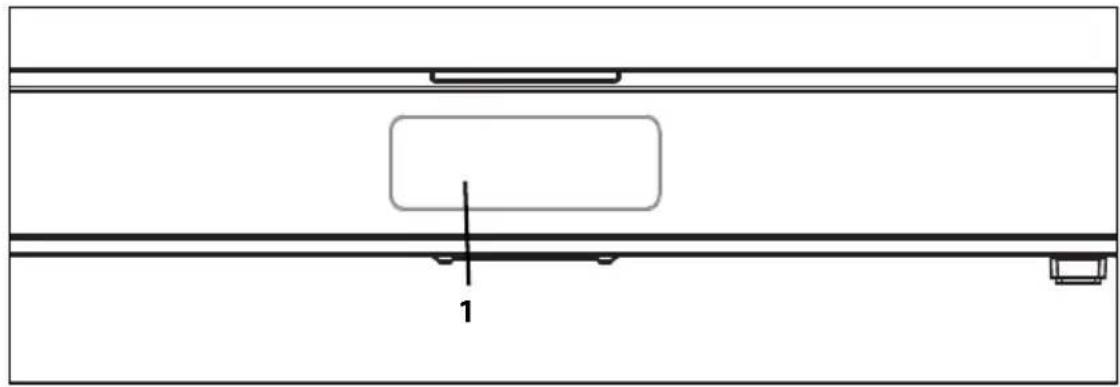
Device - Front
natural_image
Pure technical line drawing of a mechanical assembly with no text, numbers, or symbols1 Display
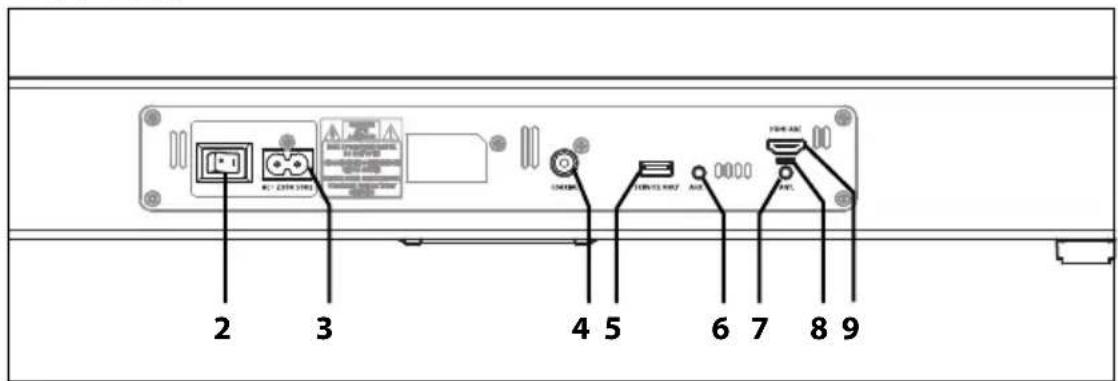
Device - Rear
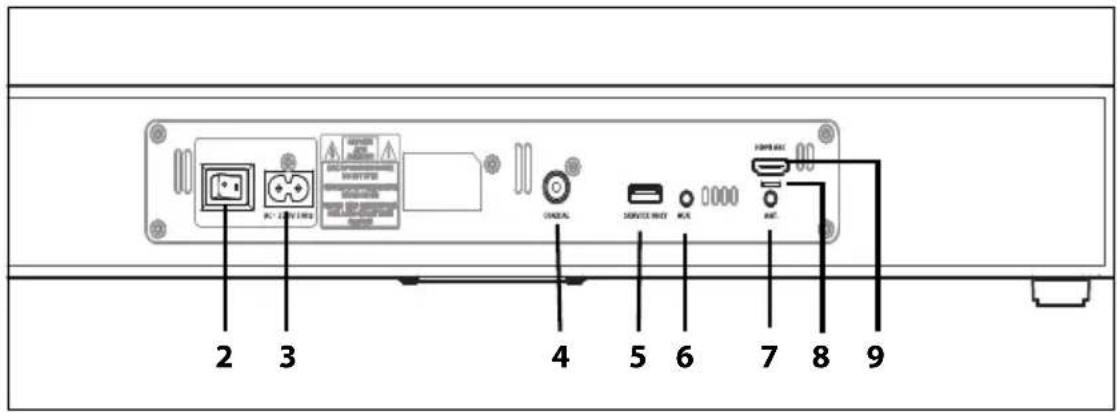
2 0 / I On/off switch (power switch)
3 AC\~ 230V 50Hz Connection for mains lead
4 COAXIAL COAXIAL connection
5 SERVICE ONLY only for servicing: USB connection
6 A U X AUX connector 3.5 mm jack socket
7 A N T . Antenna connection 75 ohm / 3.5 mm jack socket
8 only for servicing
9 HDMI ARC HDMI (ARC) connection
Device - Top
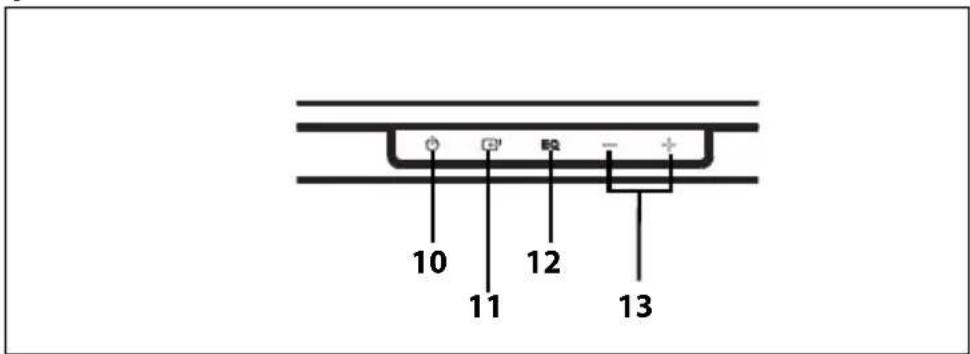
10 Switch on / to standby mode
11 Select input source
12 EQ Select sound settings
13 +/- Increase/reduce the volume
Remote control
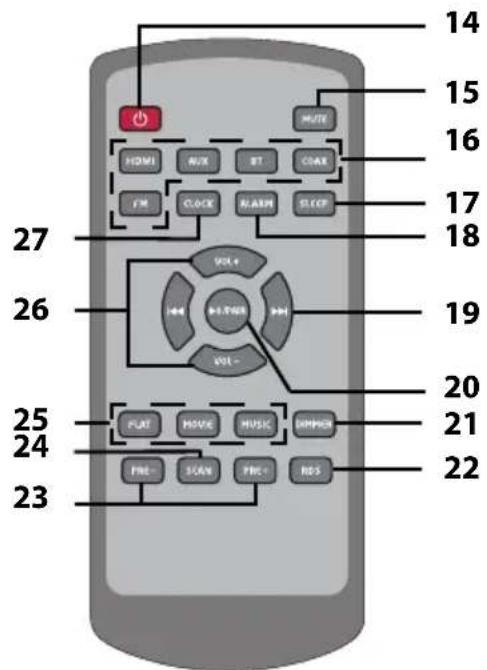
14 Switch on / to standby mode
15 MUTE Mute the sound / switch back to the adjusted volume
16 HDMI, AUX, BT, COAX, FM Select connection for sound source
17 SLEEP Set switch-off time
18 ALARM In standby mode: set the alarm
19 |◀◀ ▶▶| for Bluetooth connection: ◀◀◀ back to the beginning of the track (2x previous track) / ▶▶▶| next track / radio: change the frequency
20 ▶ II/PAIR for Bluetooth connection: Start/Pause / restart from Pause by holding down: establish/disconnect Bluetooth connection
21 DIMMER Regulate the brightness of the display
22 RDS Radio operation: change display (track, artist, etc.)
23 PRE - PRE + Radio operation: accessing saved stations
24 SCAN Radio operation: automatic station search
25 FLAT / MOVIE / Select sound settings MUSIC
26 VOL+/VOL- Increase / decrease the volume
27 CLOCK Display / set the time
6. SETTING UP THE DEVICE
- Completely remove all packaging components.
- Do not expose the device to extreme heat or moisture. Ensure that the device is well ventilated on all sides.
CAUTION:
- Do not place any TV sets or other devices on the TV sound stand that is/are heavier than 35 kg.
- Do not place TVs or other devices on the TV sound stand whose base is larger than 48 x 22 cm.
- Always place other devices centrally on the TV sound stand so that they do not fall off. For this, please refer to the drawing below.
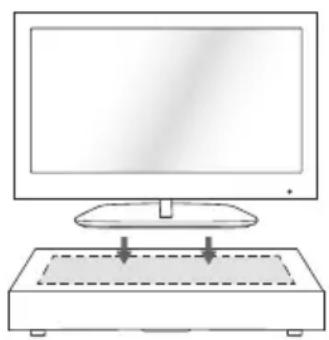
natural_image
Line drawing of a monitor with an open base and two arrows pointing to it (no text or symbols)- Decide where to place the TV sound stand.
Always make sure that ...
- there is a power socket nearby;
- there is enough space above, in case you want to place a television set on the device;
-
a television set and any other devices (e.g. set-top box, DVD player) can be set up nearby, in case you do not want/are unable to place them on the device.
-
Connect the source device(s) (see "Connecting external devices" on page 51). Always ensure that all devices are securely positioned.
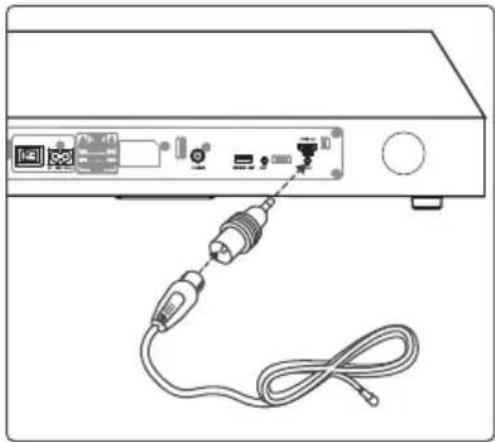
7. CONNECTING THE ANTENNA
natural_image
Line drawing of a device rear panel with connected cables and ports (no text or symbols)- Switch off the device.
- Insert the adapter into the ANT. socket.
- Insert the plug of the antenna cable into the adapter.
- Unwind the antenna cable completely.
- Press the button to turn on the TV sound stand.
- For the playback, press the FM button on the remote control. FM appears on the display.
- Try out different positions in order to find the optimum reception quality.
8. CONNECTING EXTERNAL DEVICES
WARNING!
- Turn down the volume on the devices before you connect them to one another.
- Switch off all devices before you connect them to one another, and comply with the instructions for the devices that you wish to connect.
8.1 HDMI (ARC) CONNECTION
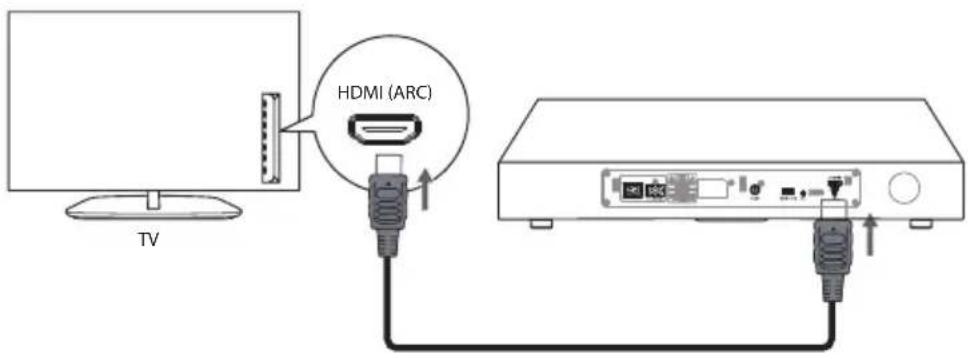
HDMI (ARC)
ARC stands for "Audio Return Channel" and means that audio signals can be transmitted in both directions. A device equipped with HDMI (ARC) can both receive and transmit audio signals.
HDMI (CEC)
CEC stands for "Consumer Electronics Control". If two or more CEC devices are connected to one another, then at least the basic functions such as switching on and off can be operated via a remote control.
Example: the TV sound stand is connected via a CEC-compatible HDMI cable to a CEC-enabled TV set. If the TV is now switched on with the TV remote control, the TV sound stand will also switch on. (However, the TV must send and receive a signal. If, for example, the TV is receiving the TV signal via a Set Top Box, this must also be switched on.)
In order to be able to use the ARC function, external devices which are connected to the TV sound stand must also have an ARC-capable HDMI interface. In combination with an HDMI ARC-capable TV, the sound can be sent to the TV sound stand without an additional audio cable.
- Check ...
... whether the external device has an HDMI ARC input.
... whether the ARC function can be used permanently on all HDMI connections on the external device or if the ARC function must be switched on first. Please refer to the manual of the external device.
- If necessary, switch on the ARC function on the menu of the external device.
- Use an HDMI cable to connect the HDMI ARC output of the external device to the HDMI ARC socket.
- Press the button to turn on the TV sound stand and also the external device.
- For the playback press the HDMI button on the remote control of the TV sound stand. TV ARC appears on the display.
- Then start playback on the external device. If the connection is correct, you can now control the sound of the TV sound stand via the TV remote control.
8.2 COAXIAL CONNECTION
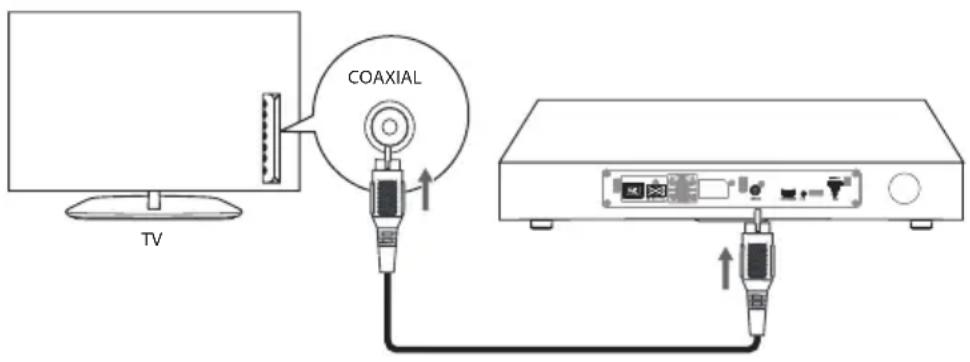
NOTE: you may have to switch the sound output to the coaxial output on your TV.
To connect external devices to the COAXIAL socket, you need a coaxial cable. The cable is not included in the scope of supply.
- Use a coaxial cable to connect the coaxial output of the external device to the COAXIAL socket.
- Press the button to turn on the TV sound stand and also the external device.
- For the playback press the COAX button on the remote control of the TV sound stand. COAXIAL appears on the display.
- Then start playback on the external device. The volume can be adjusted via the TV sound stand.
NOTE: it may be better to switch off the volume on the external device and listen to the sound only via the TV sound stand.
- Switch off both devices before disconnecting.
8.3 AUX CONNECTION
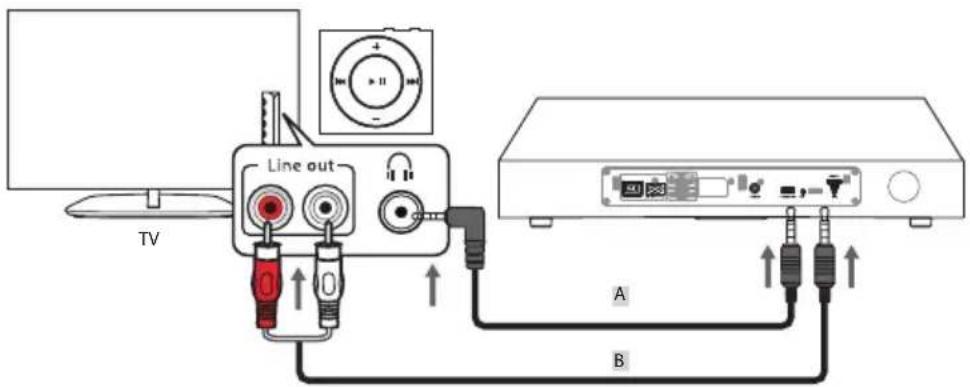
The AUX socket allows you, for example, to connect the headphones or stereo output of your TV. The cable must have a 3.5mm jack plug at one end for the AUX socket. Which plug needs to be on the other end depends on the audio output port of the external device.
(A 3.5 mm jack plug to 3.5 mm jack plug audio cable is included.)
-
Use an audio cable to connect the audio output port of the external device to the AUX socket.
-
Press the button to turn on the TV sound stand and also the external device.
-
For the playback press the AUX button on the remote control of the TV sound stand. AUX appears on the display.
-
Then start playback on the external device.
The volume can be adjusted via the external device and the TV sound stand.
NOTES:
- It may be better to switch off the volume on the external device and listen to the sound only via the TV sound stand.
- Some television sets switch off all sound outputs when a plug is inserted into the headphone socket.
- Switch off both devices before disconnecting.
NOTE: if the playback is distorted, this may be because the volume level on the external device is set too high. Turn down the volume on the external device, and instead increase the volume on the TV sound stand.
9. POWER SUPPLY
Inserting/changing the battery of the remote control

DANGER! There is a danger of explosion if the battery is not correctly replaced.
Replace only with the same or an equivalent type.
NOTE: the remote control is supplied with an inserted battery. Pull the plastic strip out of the remote control before using it for the first time.
A Phillips screwdriver is required for this.
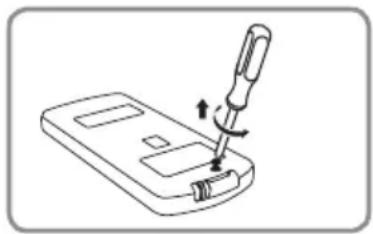
natural_image
Line drawing of a screwdriver inserted into a device (no text or symbols)-
Release the small screw on the underside of the remote control with a Phillips screwdriver.
-
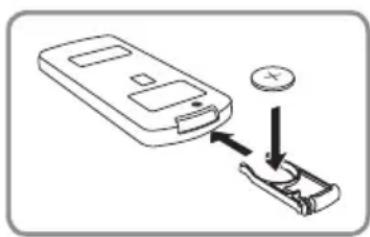
Pull out the battery compartment.
natural_image
Diagram showing a device being inserted into a clip, with no visible text or symbols-
Insert the battery (CR2025 3V) or replace the old battery with a new one. The positive pole (+) of the battery must point upwards.
-
Slide the battery compartment back into the remote control and tighten the screw again.
Power supply connection
- Connect all devices before you connect the power supply.
- Insert the flat end of the mains plug into the connector
AC 230 V \~ 50 Hz on the device.
- Insert the mains plug into a readily accessible power socket whose voltage matches the voltage stated on the rating plate. The power socket must still be easily accessible after connection.
NOTE: to disconnect the device from the mains pull out the mains plug out of the power socket.
10. OPERATION
This section introduces the basic operation of the TV sound stand.
All adjustments can be conveniently carried out with the remote control. The basic functions can also be carried out with the buttons on the device. Operation of the device in the instructions is usually described with the remote control.
10.1 SWITCHING ON AND OFF WITH THE POWER SWITCH
- The power switch is located on the rear on the right. Use this to turn the device on (1) and off (0). When the device is turned off completely by the power switch, no time appears on the display.
Automatic installation is started after switching on (INSTALL). The FM radio stations are searched for and, depending on the reception level, up to 30 stations stored. When the installation is finished, the device switches to standby mode.
--:-- appears on the display. The time is normally taken over from a radio station in radio mode - if this is not the case (see "Setting the time" on page 57).
NOTES:
- If the device has been switched off by the power switch, it cannot be switched on with the remote control.
- To disconnect the device completely from the mains, remove the mains plug from the power socket.
10.2 SWITCH STANDBY MODE ON/OFF
- When the device is in standby mode (the time is displayed), press the button. The device switches on with the last operating mode set / signal source selected.
- Press the button to return the device to standby mode.
NOTES:
- If the device does not receive a signal for approx. 15 minutes, it automatically switches to standby mode.
- To disconnect the device completely from the mains, remove the mains plug from the power socket.
10.3 ACCESSING VARIOUS SOURCES
In order to switch to the different sound sources, use the remote control or the button on the device.
| Sound source connected on/via | Press on the remote control Shown on the display | |
| HDMI ARC HDMI TV ARC | ||
| COAXIAL | COAX | COAXIAL |
| AUX | AUX | AUX |
| Bluetooth connection | BT | BTNO BT if no device is connected. |
| Radio | FM | FM |
- Press the button repeatedly until the corresponding display appears.
10.4 CONTROL THE VOLUME
- Press the VOL +/- buttons to adjust the volume. If the maximum or minimum volume is reached, VOL MAX or VOL MIN appears on the display.
- Press the +/- buttons on the device in order to set the volume.
- P r MUTE button to switch off the sound temporarily. MUTE appears on the display. Use the MUTE button or the VOL +/- buttons to switch the sound back on.
- When you switch on the device from standby, it automatically switches on ...
... with volume level 8, if the level was set between VOL MIN and 8 when it was switched to standby.
... with the same volume level as when it was switched off, if the level was set between 9 and 18 when it was switched to standby.
... with volume level 19, if the level was set between 19 and VOL MAX when it was switched to standby.
Sound and connection types
Depending on the connection you use to transmit the sound from the TV to the TV sound stand, the sound setting can only be set on the TV sound stand or also on the TV. This may also vary from TV to TV.
- If you have an HDMI (ARC) TV and this is connected to the TV sound stand via an HDMI (ARC) cable, you can control the volume using the remote control of the TV or the remote control of the TV sound stand. In both cases, only the volume of the TV sound stand is changed.
- If you have connected the AUX input to the TV with an audio cable, always control the volume of the devices with their own remote controls.
To adjust the sound to your preferences, there are three different settings: FLAT, MOVIE and MUSIC.
Press the corresponding button until the corresponding word appears on the display.
| Equalizer Press the button |
| no equalizer FLAT |
| for movies MOVIE |
| for music MUSIC |
10.6 SETTING THE TIME
NOTE: if no button is pressed for 15 seconds, the adjustment procedure is exited.
- In standby mode, press the CLOCK button for about 2 seconds. CLOCK SET appears. The hour display then flashes (0).
- Press VOL +/- in order to adjust the hours. To save the setting, press the CLOCK button. The minute indicator flashes (00).
- Press VOL +/- in order to set the minutes. To save the setting, press the CLOCK button. The time is now adjusted.
During operation, press the CLOCK button briefly to call up the time.
10.7 SWITCH OFF WITH SLEEP
The sleep function allows you to set a time after which the device turns off.
- Turn the device on.
- Press the SLEEP button. SLEEP 120 appears on the display.
- By pressing the SLEEP button you switch between 120, 90, 60, 30, 15, 10 minutes or 00 (Off). After approx. 3 seconds, the normal display appears again and the setting is saved. When the set time has elapsed, the device switches off.
NOTES:
- When the sleep function is activated, the remaining time can be displayed by briefly pressing the SLEEP button once.
- If an alarm is triggered when the sleep function is activated, this terminates the function.
10.8 DIMMER
- Press the DIMMER button to adjust the brightness of the display in 3 steps or to switch it off completely.
11. RADIO
If the stations provide the information, station names and tracks appear on the display. The display can be changed by pressing the RDS button for a short time.
- Turn the power switch on the rear to on (I).
-
Press the button to turn on the TV sound stand.
-
To enter radio mode, press the FM button on the remote control of the TV sound stand until FM appears on the display.
11.1 SETTING THE STATIONS
The display shows the adjusted frequency.
- Unwind the cable antenna completely. Try out different positions in order to improve the reception quality and change the location of the device if necessary.
- Press the ◀◀◀ / ▶▶▶I buttons to set the desired station.
- Press briefly ◀◀◀ / ▶▶▶: change the frequency in steps of 0.05 MHz.
- Hold down ◀◀◀ / ▶▶▶I until the frequency changes: starts the station search, stops at the next strong station signal.
11.2 SAVING THE STATIONS
You can store up to 30 FM stations.
Automatic station search
The automatic station search automatically searches for and saves the first 30 stations with sufficient reception.
- Press and hold down the SCAN button until AUTO appears on the display. The station search starts and the first 30 stations found are automatically stored in ascending frequency in storage locations 1 to 30. The station in the first storage location is automatically played back.
Storing the stations manually
- Select the desired station.
- Press the SCAN button; the next free programme station flashes on the display, e.g. P16.
- To select another programme location, press the PRE + or PRE - buttons repeatedly. The programme location numbers are shown on the display.
- Store the station by pressing the SCAN button.
NOTE: saved stations are deleted when you overwrite the assigned programme location.
Accessing saved stations
- Press the PRE + or PRE - buttons repeatedly. The programme location and the frequency are briefly displayed. The station name is then displayed (only if the radio station transmits the information).
12. ALARM CLOCK
NOTE: the time must be correctly adjusted before the alarm time is set.
You can either be woken up by an alarm or the radio.
Setting the alarm time
- The sound stand must be in standby mode. Switch it off if necessary using the ⏻ button.
- In standby mode, press ALARM for about 2 seconds. TIMER SET appears. The hour display then flashes (0).
- Press VOL +/- in order to adjust the hours. To save the setting, press ALARM. The minute indicator flashes (00).
- Press VOL +/- in order to set the minutes. To save the setting, press ALARM. Wake-up mode flashes.
- Press VOL +/- in order to move between BUZZER (alarm sound) and FM (radio). To save the setting, press ALARM. The display of the volume flashes and can be adjusted from VOL 05 to 32.
- Press VOL +/- in order to the set the desired volume. To save the setting, press ALARM. The display shows TMR. ON or OFF flashes.
- Press VOL +/- in order to turn the alarm on or off. To save the setting, press ALARM.
NOTES:
- If the radio has been selected as the alarm, you will be woken up by the last selected station.
- The alarm is also activated if the device is already switched on.
- If you do not press a button for approx. 15 seconds while programming an alarm, the settings will not be saved.
Switching the alarm on and off
If a wake-up time has been set, press the ALARM button briefly in standby mode in order to move between TMR ON (alarm on) and TMR OFF (alarm off). If the alarm is switched on, the alarm symbol appears on the display.
Switching off the alarm
- When the alarm sounds at the set time, press the button. The alarm is switched off and remains active for the next day.
- The alarm is automatically switched off after 60 minutes.
13. ESTABLISHING A BLUETOOTH CONNECTION
Bluetooth radio technology makes it possible to wirelessly transmit data to devices equipped with this interface. You are able to e.g. play music files saved on a mobile telephone equipped with Bluetooth for playback on the TV sound stand. The range between the paired devices can be up to 8 metres.
- Press the button to turn on the TV sound stand and also the external device.
- On the remote control, press the BT button. BT appears on the display. Shortly afterwards, NO BT indicates that there is no Bluetooth connection yet.
- Activate the Bluetooth connection of the media playback device. The media play-back device will now search for devices to which it can connect.
- The media playback device should now be receiving the device code TVS 264.
- Now use the media playback device to connect to the TV sound stand. To do this, activate TVS 264 on the media playback device.
- When the connection is established, two beeps are heard. The word "Connected" appears on the media playback device, for example. B T appears on the display of the sound stand.
- Start playback on the Bluetooth playback device.
The volume can be adjusted via the external device and the TV sound stand.
Establishing a new BT connection
If you want to terminate a Bluetooth connection in order to connect a different Bluetooth device to the TV sound stand, please proceed as follows:
-
Press and hold down the ▶II/PAIR button for approximately 2 seconds to terminate the existing connection and activate pairing mode. PAIR appears on the display.
-
Activate the Bluetooth connection of the other media playback device and proceed as described above.
NOTE: if no other Bluetooth playback device is connected to the TV sound stand within two minutes, the connection to the first device is established again.
Terminating the BT connection
- Turn off one of the devices.
- On one of the connected devices, exit the Bluetooth mode.
- If the distance between the devices is more than 8 meters, the connection is interrupted.
NOTES:
- If you are asked to enter a code when pairing, use "0000". Enter this code using the media playback device.
- If the playback is distorted, this may be because the volume level on the media playback device is set too high. Turn down the volume on the media playback device, and instead increase the volume on the TV sound stand.
- It may be the case that not all Bluetooth devices can be connected.
Control
| Function | |
| Start | Press ▶II/PAIR |
| Pause | Press ▶II/PAIR: playback is stopped |
| Next track Press ▶I | |
| Restart track Press I◀◀ once | |
| Previous track Press I◀◀ twice | |
Telephone call function
If a smartphone has been connected to the TV sound stand via Bluetooth, the music is muted when a call is received. The ringtone is emitted via the smartphone.
- Answer the call normally on your smartphone. The sound is emitted via the smartphone.
When the call is over, the media playback generally restarts automatically.
14. CLEANING

DANGER! Disconnect the device from the power supply before cleaning. Ensure that no liquid gets into the device.
CAUTION: solvents, alcohol, thinning agents etc. must never be used, as these can damage the surface of the device.
Do not use any corrosive or abrasive cleaning agents. These could damage the surface of the device.
Housing
Clean the casing with a damp cloth.
15. TROUBLESHOOTING
If your device fails to function as required, please try this checklist first. Perhaps it is just a small problem that you can resolve yourself.

DANGER! Do not attempt to repair the device yourself under any circumstances. If you cannot resolve the fault, please contact our service centre.
| Fault Possible causes/action to be taken | |
| No function | - Is the device switched off via the power switch?- Is the device connected to the mains power supply? |
| No sound | - Has the sound been muted on one of the connected devices?- Has the correct operating mode been selected?- Check the cables/Bluetooth connection. |
| No display | - Has the display been turned off with the DIMMER button? |
| No sound through the HDMI ARC connection | - Does your TV use the ARC function?- On the menu of your television set, do you have to switch over to the output of an ARC signal? Consult the instructions of your TV.- Has the playback of the audio signal been set to PCM sound? |
| No reaction to any type of key commands | - In this rare case the device needs a software restart. Turn it off by the power switch and then on again.- Is the remote control battery flat? Replace the battery if necessary. |
| Loud buzzing noise | - Please check if all connection cables are connected correctly. |
| No Bluetooth connection | - Is your mobile device Bluetooth-capable? Read the operating instructions of the mobile device.- Check the settings - Activate Bluetooth if necessary.- Check whether the TV sound stand appears on the list of devices found. If not, reconnect the device.- Has the sound stand already been connected to another Bluetooth device? Press the ▶II/PAIR button to establish a new connection. |
16. DISPOSAL
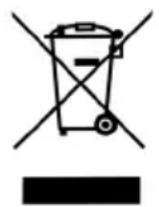
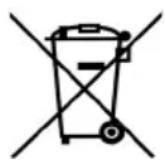
Old devices and batteries must not be disposed of in the normal domestic waste.
Keep the packaging if possible until the expiration of the warranty period. After that, please dispose of it in an environmentally friendly manner.
The device must be disposed of at a proper waste disposal facility, in accordance with the Waste Electrical & Electronic Equipment Directive 2012/19/EU. Plastics and electronic parts must be recycled.
Please check with your local waste disposal authority.
Used batteries must be disposed of properly. For this purpose, retailers selling batteries and the municipal waste collection points provide containers for disposing of batteries.
As a consumer, you are legally obliged to return standard and rechargeable batteries to a collection point in your municipality, neighbourhood or to the retail trade.
Only in this way is it possible to dispose of standard and rechargeable batteries in a manner which is environmentally-friendly. Standard and rechargeable batteries which are marked with the letters listed contain the following harmful substances, among others: Cd (cadmium), Hg (mercury), Pb (lead).
17. TECHNICAL DATA
| Electrical Data | |
| Mains voltage: 230 V ~ 50 Hz | |
| Protection class: II | ☐ |
| Power consumption: In standby mode: | Maximum approx. 50 W < 1 W |
| Sound | |
| Audio output port: 2x 15 W + 30 W subwoofer | |
| Connections | |
| HDMI ARC COAXIAL AUX ANT. | HDMI COAXIAL 3.5 mm jack socket 75 ohm, 3.5 mm jack socket |
| USB only for servicing purposes | |
| Bluetooth: Bluetooth 4.2+EDR | (A2DP, AVRCP) |
| Frequency range: | 2402 - 2480 MHz |
| Transmission power: | 3.2 mW (max.) |
| VHF (FM): | 87.50 - 108.00 MHz |
| Remote control | |
| Battery: | 1x CR2025 3V |
| LED class: | RG0 |
| General | |
| Dimensions (W x D xH): | approx. 525 x 300 x 75 mm |
| Ambient conditions: | Operating temperature: 5 °C – 35 °C |
| Weight: | approx. 3600 g |
Specifications subject to change without notice.
18. HOTLINE
If a technical problem occurs, please contact our hotline, as most errors can be corrected by this method without having to send in the device for repair.
If it is determined during the call that the device is actually defective, you will be asked to send us the device for repair, together with an exact description of the fault.
In this event, please include the fully completed Service Card (from the end of these instructions) and a copy of the receipt of purchase.
Please note that you will be invoiced for unjustified complaints!
Thank you very much
Hotline:
00800 - 45622000 (free call)
free of charge - 365 days per year -
from Monday to Sunday
Email:
gt-support-gb@telemarcom.de
gt-support-ie@telemarcom.de
19. WARRANTY
Dear Customer,
Thank you for selecting a product from our company. Our product corresponds to the legal requirements, and was manufactured with continuous quality control. The technical data correspond to the current state of the art at the time of printing. Specifications are subject to change without notice.
The warranty period for electronic devices corresponds to the statutory provisions at the time of purchase.
If a technical problem should unexpectedly occur with the device, please note the following points:
The guarantee and warranty period for your device are valid for 24 months after the purchase date. Please retain the proof of purchase for this purpose.
The guarantee and warranty relate only to defects that are attributable to manufacturing or material faults.
No guarantee or warranty can be accepted for damage caused by improper handling or improper interventions or for damage resulting from a lightning strike, overvoltage, power failures, fire or any other natural catastrophes. If the device should nevertheless be repaired, you will be given a cost estimate.
The guarantee and warranty also expire if the product has been modified or repaired by an unauthorised person, the serial number of the product has been changed or removed, the product has been / is used outside the scope of its intended use or if the warranty period has expired.
Please always retain the receipt of purchase and the original packaging. If your product needs to be returned to the service centre and you do not have sufficient transport packaging, this can be sent to you for a charge.
If a technical problem occurs, please contact our hotline.
Within the framework of the warranty, we retain the right to repair the device or to replace it with a comparable device.
This guarantee does not restrict your statutory rights.
SERVICE CARD
Product data:
Model
Serial number
Date of purchase
(as shown on enclosed receipt)
Owner data:
Name
Telephone number
Address
Description of fault:
SOMMAIRE
natural_image
Pure technical line drawing of a mechanical assembly with no text, numbers, or symbols1 Écran
natural_image
Line drawing of a monitor and a base platform with arrows indicating orientation (no text or symbols)natural_image
Line drawing of a device rear panel with connected cables and ports (no text or symbols)natural_image
Line drawing of a handheld device with a screwdriver inserted, showing a button and scroll (no text or symbols)natural_image
Diagram showing a device being inserted into a clip, with no visible text or symbolsnatural_image
Pure technical diagram showing horizontal and vertical lines with a central rectangular component and labeled point '1' (no text or symbols beyond basic labels)1 Display
9 H D M I A R C Collegamento HDMI (ARC)
natural_image
Line drawing of a monitor with a base and top portion, no text or symbols presentnatural_image
Line drawing of a device rear panel with cable and connector, no text or symbols presentnatural_image
Line drawing of a screwdriver inserted into a device (no text or symbols)natural_image
Diagram showing a smartphone connected to a clip with a coin inserted (no text or symbols present)
- INHALT
- THANK YOU FOR YOUR TRUST!
- GENERAL
- Keeping the manual for reference
- Intended purpose
- This device is...
- Markings/symbols
- Information on the declaration of conformity
- Saving energy: fully automatically!
- NOTE: new automatic shutdown system!
- Rating plate
- SCOPE OF SUPPLY
- SAFETY INSTRUCTIONS
- DANGER for children and people with disabilities
- DANGER! Risk of electric shock due to moisture
- DANGER! Risk of electric shock
- FIRE HAZARD
- DANGER from batteries
- WARNING of accidents caused by incorrect set-up
- WARNING! Risk of material damage
- DEVICE OVERVIEW
- Device - Top
- Remote control
- SETTING UP THE DEVICE
- CAUTION:
- CONNECTING THE ANTENNA
- CONNECTING EXTERNAL DEVICES
- WARNING!
- HDMI (ARC) CONNECTION
- HDMI (ARC)
- HDMI (CEC)
- COAXIAL CONNECTION
- AUX CONNECTION
- NOTES:
- POWER SUPPLY
- Inserting/changing the battery of the remote control
- Power supply connection
- OPERATION
- SWITCHING ON AND OFF WITH THE POWER SWITCH
- SWITCH STANDBY MODE ON/OFF
- ACCESSING VARIOUS SOURCES
- CONTROL THE VOLUME
- Sound and connection types
- SETTING THE TIME
- SWITCH OFF WITH SLEEP
- DIMMER
- RADIO
- SETTING THE STATIONS
- SAVING THE STATIONS
- Automatic station search
- Storing the stations manually
- Accessing saved stations
- ALARM CLOCK
- Setting the alarm time
- Switching the alarm on and off
- Switching off the alarm
- ESTABLISHING A BLUETOOTH CONNECTION
- Establishing a new BT connection
- Terminating the BT connection
- Control
- Telephone call function
- CLEANING
- Housing
- TROUBLESHOOTING
- DISPOSAL
- TECHNICAL DATA
- HOTLINE
- Hotline:
- Email:
- WARRANTY
- SERVICE CARD
- Product data:
- Owner data:
- Description of fault:
- SOMMAIRE
Brand : AudioAffairs
Model : TVS 264
Category : Television