900 Amp Battery Jumper - Battery charger WAGAN - Free user manual and instructions
Find the device manual for free 900 Amp Battery Jumper WAGAN in PDF.



User questions about 900 Amp Battery Jumper WAGAN
0 question about this device. Answer the ones you know or ask your own.
Ask a new question about this device
Download the instructions for your Battery charger in PDF format for free! Find your manual 900 Amp Battery Jumper - WAGAN and take your electronic device back in hand. On this page are published all the documents necessary for the use of your device. 900 Amp Battery Jumper by WAGAN.
USER MANUAL 900 Amp Battery Jumper WAGAN
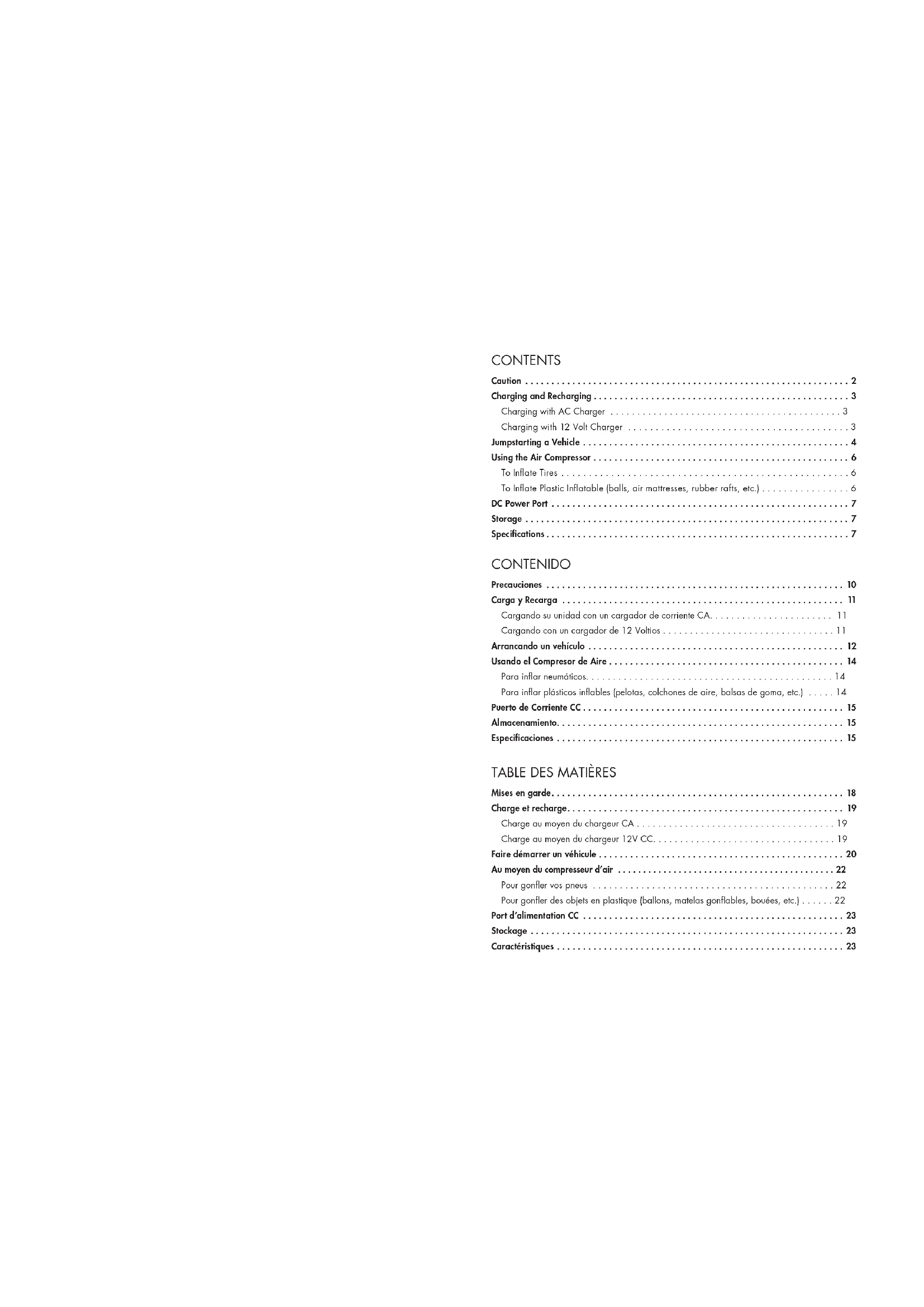
Charging and Recharging 3
Charging with AC Charger 3
Charging with 12 Volt Charger 3
Jumpstarting a Vehicle 4
Using the Air Compressor 6
To Inflate Tires 6
To Inflate Plastic Inflatable (balls, air mattresses, rubber rafts, etc.) 6
DC Power Port 7
Storage 7
Specifications....7
CONTENIDO
Precauciones 10
Carga y Recarga 11
Thank you for purchasing the 900 Amp Jumpstarter ^19 with Air Compressor by Wagan Tech ^20 . With normal care and proper treatment it will provide years of reliable service.
IMPORTANT! Please read all of the operating instructions carefully prior to use. It is important to understand all warnings, cautions, and instructions included in this instruction manual, your vehicle battery manufacturer manual, and other manuals for any device intended to be used with this unit. Retain these instructions for future reference.

text_image
DC socket power switch Safety power switch 12V DC socket Battery check button Shock-absorbing rubber base Battery status lights Work light Light power switch Charging jack Charging LED indicator Air hose 9004mp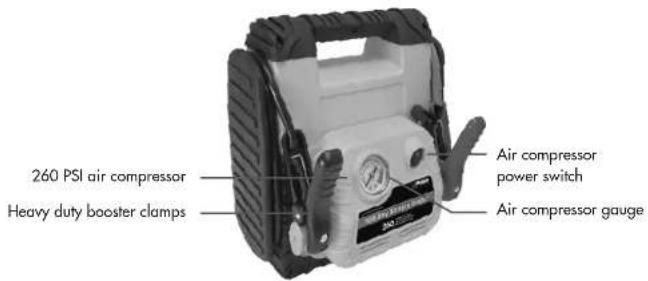
text_image
260 PSI air compressor Heavy duty booster clamps Air compressor power switch Air compressor gauge
www.wagan.com
CAUTION
• This product is NOT a toy. Keep out of the reach of children.
- Never work alone with this product. Make sure that someone is available to give assistance if needed.
- Do not operate this device while wearing vinyl clothing. Static electricity may be generated when vinyl clothing is rubbed.
- Remove any metallic jewelry, such as rings, bracelets, necklaces, and watches while working with a lead acid battery. It can produce a short-circuit that may cause severe burns.
- Wear complete eye and clothing protection. Do not touch eyes while working near or with battery.
- Keep battery terminals clean. Be careful to keep corrosion from coming in contact with eyes.
- Do not operate this unit in or around water. Water can damage the unit.
- Do not let the cords of the jumpstarter or attached appliances get wet.
- This product is not intended for use in the rain or temperatures above 130^ .
- Never charge or jump-start a frozen battery.
• To prevent short-circuits and arcing, never allow the metal ends/tips of clamps (positive & negative terminals) to touch each other or connect to the same piece of metal.
- Do not attempt to remove or replace the battery used in this device. When the battery has reached the end of its lifetime, take the entire unit to a battery recycling facility.
- Use only the provided chargers, cables, and clamps. Unauthorized parts may damage the unit.
• This product has no consumer serviceable parts.
- For proper and safe operation of the 12 Volt DC power accessory outlets, do not place anything into it except the plug of the accessory to be used.
©2012 Wagan Corporation. All Rights Reserved. Wagan Tech and wagan.com are trademarks used by Wagan Corporation.
CHARGING AND RECHARGING
WARNING: Do not overcharge this unit. Overcharging may result in damage to the unit. Prior to charging unit, read and understand all instructions for this unit.
- This product may arrive partially charged from the manufacturer. It is recommended to fully charge the unit immediately after purchase and before first use.
- The charging LED indicator will illuminate while charging. The light will stay lit while charging plug is plugged in. When charging is complete, press the "Battery Check" button and the "Battery Status" light will show the state of the battery charge. When charging is complete, remove the AC/DC adapter from the unit. Press the battery status button and the green LED light will be illuminated to indicate charging is complete.
- Do not charge the unit for more than 48 hours continuously.
- Do not charge the unit on a boat, boat ramp, or dock since the electrical cords and outlets used for charging could cause severe electrical shock if they get wet.
- It is recommended that the unit is in an upright position while charging.
Charging with AC Charger
- Insert AC charger plug into charging jack of the unit.
- Insert AC charger receptacle plug into AC receptacle.
-
Fully charge the unit.
-
First time charge: 38 hours continuously
• Recharge or between use: 34-36 hours continuously -
When charging is complete, unplug the AC charger receptacle plug then the AC charger from the charging jack on the unit.
Charging with 12 Volt Charger
- Insert DC charger plug into charging jack of the unit.
- Insert DC charger accessory plug into vehicle cigarette lighter socket.
- Fully charge the unit for 12-14 hours continuously while the engine is running.
- When charging is completed, unplug the DC charger accessory plug first and then the DC charger from the charging jack on the unit.

www.wagan.com
JUMPSTARTING A VEHICLE
WARNING: Vehicles equipped with on-board computers may be affected if the engine battery is jump-started. Read your vehicle owner's manual before attempting to start the vehicle to determine if external starting assistance can be used. Failure to follow these instructions may cause damage or explosion. Use safety glasses to protect eyes while jump-starting a battery.
- Turn off the vehicle ignition and all accessories (e.g. radios, lights, air conditioners, and cellular phones).
- Set the emergency brake and put vehicles with automatic transmission in park position.
- Determine the polarity of the vehicle's battery terminals. The positive (POS, P, +) battery terminal usually is larger in diameter than the negative (NEG, N, -) terminal. If you are unsure, you should refer to the vehicle owner's manual.
- Determine whether your vehicle uses a negative or positive grounded system: Negative ground system (negative battery terminal is grounded to chassis). Most vehicles use this system. Positive grounded battery terminal is grounded to chassis or any other part of the vehicle. IF YOU ARE UNSURE, YOU SHOULD REFER TO VEHICLE OWNER'S MANUAL.
- Remove clamps from the holders. Never allow clamps (positive & negative terminals) to touch together or contact the same piece of metal to prevent short-circuits and arcing.
- Follow instructions for a negative grounded system or positive grounded system as indicated below:
Negative Grounded System
a. Securely connect the positive (+) red clamp to the positive (POS, P, +) terminal of the vehicle battery or the remote positive (+) terminal if equipped.
b. Securely connect the negative (−) black clamp to the vehicle chassis, engine block, or a non-moving metal part of the vehicle which is verified to be grounded. Do not clamp directly to negative battery terminal, carburetor, fuel lines, or sheet metal body parts.
c. See jump-starting step 7 to continue.
Positive Grounded System
a. Securely connect the negative (−) black clamp to the negative (Neg, N, −) ungrounded terminal of the vehicle battery.
b. Securely connect the positive (+) red clamp to the vehicle chassis, engine block, or a non-moving metal part of the vehicle which is verified to be grounded. Do not clamp directly to positive battery terminal, carburetor, fuel lines, or sheet metal body parts.
c. See jump-starting step 7 to continue.
©2012 Wagan Corporation. All Rights Reserved. Wagan Tech and wagan.com are trademarks used by Wagan Corporation.
- Observe the color of the Reverse Polarity Protection Indicator that is located between the compressor and work light button.
- If the light is RED, DO NOT TURN ON THE JUMPER SAFETY SWITCH!
a. Cable clamps need to be reversed.
b. Disconnect the black clamp first then the red clamp.
c. Reconnect and observe the indicator again.
- If the light is GREEN, turn on the Jumper Safety Switch.
a. Allow 2-3 minutes of charging time. It is recommended to have a second person to assist holding the unit securely in place during the rest of the instructions.
b. Inside the vehicle, turn on the ignition switch and attempt to start the engine.
c. Crank a maximum of three seconds. If the engine does not start, wait three minutes before the next attempt.
d. After the engine starts, turn off the Jumper Safety Switch.
CAUTION: Excessive engine cranking can damage vehicle starter motor. If the engine turns, but fails to start after several attempts, other technical problems might be involved. Discontinue cranking the engine until the other problems have been determined and corrected.
-
When finished, stand as far away from the vehicle battery as possible and disconnect the clamps in reverse sequence to connecting procedure:
-
For negative grounded systems, first disconnect negative (black) then positive (red) clamps.
- For positive grounded systems, first disconnect positive (red) then negative (black) clamps.
USING THE AIR COMPRESSOR
WARNING: Check item to be inflated for manufacturer's recommended maximum inflation pressure. Avoid over inflation. Most tires are properly inflated between 24-35 PSI. Some truck and bicycle tires require 40 PSI or more.
To Inflate Tires
- Remove valve cap from air valve stem. Note: Make sure locking thumb lever is in up position. If necessary, use valve stem adapter.
- Insert stem connector to valve stem. Make sure connector is pushed into valve stem as far as possible.
- Press down the locking thumb lever to engage.
- Set the compressor on/off switch (located next to the pressure gauge) to "on" position by pressing down the section of switch marked "I". Note: In the event that the fire is completely flat, raise the vehicle using a recommended jack before inflating the tire.
- Monitor tire pressure on air pressure gauge. Note: It is recommended to use a separate air gauge to check the actual inflation pressure. When desired pressure is reached, turn off compressor, turn the locking thumb lever to up position, and remove stem connector from valve stem. Also remove valve stem adapter if applicable.
- Replace valve cap on valve stem.
To Inflate Plastic Inflatable (balls, air mattresses, rubber rafts, etc.)
- Check manufacturer's specifications on the item to be inflated for correct inflation pressure.
- Remove valve cap cover from valve stem.
- Insert proper valve stem adapter into stem connector as far as possible and turn the locking thumb lever to down position.
- Insert the other end of the valve stem adapter into inflatable air valve stem as far as possible.
- Set the compressor on/off switch (located next to the pressure gauge) to "1" position.
- Monitor air pressure on pressure gauge meter. When desired pressure is reached, turn off compressor, turn the locking thumb lever to up position, and remove stem connector from valve stem. Also remove valve stem adapter if applicable. Replace valve cap on valve stem.
DC POWER PORT
DC Power Port (accessory socket) is located on the left side of the unit. The port can power a DC load of up to 15 Amps. Overloading the port results in "tripping" a self-resetting circuit breaker. Removing the overload automatically restores power to the DC Power Port.
- Uncover the dust cover from the Power Port.
- Insert the 12V DC accessory plug into the Power Port.
- Set the DC socket power switch (located above the DC socket) on to the "I" position.
- Operate the appliance as usual.
- After use, turn the switch off, to the "O" position.
- Disconnect the accessory plug from the power port and store the accessory.
- Replace the power port's dust cover.
- Recharge the jump starter as soon as convenient.
STORAGE
This unit may be stored in any position. Make sure the clamps and air hose are securely tucked away in their original positions. Store in a cool, dry area. If the unit is not used for a prolonged period of time, recharge every 2 months in the winter and every month in the summer.
SPECIFICATIONS
| Power Supply Battery 18 AH sealed lead acid | |
| Power Supply DC Output 12 volts nominal | |
| Air Compressor 260 PSI | |
| AC Charger Input[Check the specifications listed on charger for actual volts.] | 110V / 120V220V / 230V / 240V120V-240V |
| Power Supply Charging Time | 38 hours for first-time charging with AC charger34-36 hours to recharge with AC charger12-14 hours to recharge with 12 volt DC charger |
| Jumper Cable Length | 29.5 inches/75 cm |
WAGAN Corp. Limited Warranty
The WAGAN Corp. warranty is limited to products sold only in the United States.
All Wagan Tech products must be registered within (30) days of purchase to activate its warranty. To register your product, please visit http://tinyurl.com/waganwarranty. Be sure to keep the original receipt as it will be required when returning a product under the warranty.
Warranty Duration: This product is warranted to the original purchaser for a period of one (1) year from the original purchase date, to be free of defects in material and workmanship. WAGAN Corporation disclaims any liability for consequential damages. In no event will WAGAN Corporation be responsible for any amount of damages beyond the amount paid for the product at retail.
Warranty Performance: During the above one (1) year warranty period, a product with a defect will be replaced with a comparable model when the product is returned to WAGAN Corporation with an original store receipt. The replacement product will be in warranty for the balance of the original one (1) year warranty period.
To return a defective item, please contact WAGAN Corporation at (800) 231-5806 to obtain a Returned Merchandise Authorization number (RMA#), and return instructions. Each item returned will require a separate RMA#. After you have received the RMA# and the return instructions from WAGAN Corporation, please follow the instructions and send the item with PREPAID SHIPPING, along with all of the required documentation, a complete explanation of the problem, your name, address and daytime phone number. WAGAN Corporation will, at its option, replace or repair the defective part.
A Returned Merchandise Authorization number (RMA#) is REQUIRED when sending in any defective item. WAGAN Corporation is not responsible for any item(s) returned without an official Returned Merchandise Authorization number. The item(s) must be returned with prepaid shipping. WAGAN Corporation is not responsible for any shipping charges incurred in returning the item(s) back to the company for repair or replacement. This warranty is void if the product has been damaged by accident, in shipment, unreasonable use, misuse, neglect, improper service, commercial use, repairs by unauthorized personnel or other causes not arising out of defects in materials or workmanship. This warranty does not extend to any units which have been used in violation of written instructions furnished.
Warranty Disclaimers: This warranty is in lieu of all warranties expressed or implied and no representative or person is authorized to assume any other liability in connection with the sale of our products. There shall be no claims for defects or failure of performance or product failure under any theory of tort, contract or commercial law including, but not limited to negligence, gross negligence, strict liability, breach of warranty and breach of contract.
©2008 WAGAN Corp. REV2012
Tel: +1.510.471.9221 U.S. & Canada Toll Free: 1.800.231.5806 customerservice@wagan.com www.wagan.com
©2012 Wagan Corporation. All Rights Reserved
Wagan Tech and wagan.com are trademarks used by Wagan Corporation