iOnBoost V10 TORQUE - Battery charger WAGAN - Free user manual and instructions
Find the device manual for free iOnBoost V10 TORQUE WAGAN in PDF.



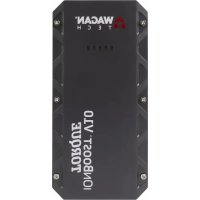
| Product type | Battery charger / Jump starter |
| Brand | WAGAN |
| Model | iOnBoost V10 TORQUE |
| Battery type | 4-cell lithium-ion polymer |
| Battery capacity | 45.0 Wh |
| Peak amps | 1 000 A |
| Starting amps | 500 A |
| Input voltage | 5 V, 2.0 A |
| Charging time | 7 heures |
| USB ports | 2 ports: 1 standard 5V/2A, 1 fast charge |
| DC port | 12 V, 5 A |
| LED flashlight | 3 modes: constant, strobe, SOS |
| Jumper cables | 10 AWG, 33.0 cm |
| Protections | Reverse polarity, short circuit, overload, overheat, excessive discharge, reverse charge |
| Operating temperature | 0°C to 60°C |
| Storage temperature | 0°C to 60°C |
| Maintenance | Recharge every 3 months if unused |
| Safety | Do not use in water, wear safety glasses, remove jewelry |
| Warranty | 1 year |
Frequently Asked Questions - iOnBoost V10 TORQUE WAGAN
User questions about iOnBoost V10 TORQUE WAGAN
0 question about this device. Answer the ones you know or ask your own.
Ask a new question about this device
Download the instructions for your Battery charger in PDF format for free! Find your manual iOnBoost V10 TORQUE - WAGAN and take your electronic device back in hand. On this page are published all the documents necessary for the use of your device. iOnBoost V10 TORQUE by WAGAN.
USER MANUAL iOnBoost V10 TORQUE WAGAN
We are constantly improving our products so specifications are subject to change without notice.
Visit our website for the latest product information
Important Information 1
General Warnings 1
Features 1
Specifications 2
Care & Maintenance 2
Product Diagram 3
Charging the iOnBoost 4
Jumpstarter 4
Troubleshooting 7
DC Power Port 8
Using the USB Ports. 8
LED Flashlight 8
Proper Disposal 8
Wagan Corp. Limited Warranty 9
CONTENIDO
Thank you for purchasing the iOnBoost™ V10 Torque by Wagan Tech®. With normal care and proper treatment, it will provide years of reliable service.
IMPORTANT INFORMATION
- Before using this unit, read and understand all instructions included in this manual as well as those published by your vehicle's battery manufacturer or any other device intended to be used with this unit. Failure to follow all listed instructions may result in electric shock, fire, and/or serious personal injury.
- Make sure the iOnBoost is fully charged before first use.
GENERALWARNINGS
- This appliance is NOT intended for use by persons with reduced physical, sensory, or mental capabilities.
- Children or persons lacking in experience and knowledge also should NOT operate this appliance unless he/she has been given supervision or instruction concerning the proper usage and warnings of the appliance by a person responsible for their safety.
- For proper and safe operation of any accessory outlet, do not place anything in it except the plug of the accessory to be used.
- Use only the charging adapters and jumpstarting clamps provided in this package. Unauthorized parts may cause serious damage or injury.
- Wear complete eye and clothing protection when jumpstarting a vehicle. Do not touch eyes while working with battery.
- Remove metal jewelry, such as rings, bracelets, necklaces, and watches while working with a vehicle battery. These items can produce a short-circuit that may cause severe burns.
- Do not operate this unit in or around water. Exposure to excessive moisture will damage the unit.
- Dropping, hitting, or otherwise applying excessive amounts of force to the iOnBoost may damage the unit. This could result in loss of operation, electrical fire, or other undesired outcome.
FEATURES
Jump Starter
1,000 peak Amps auto jump starter—ideal for cars, vans, SUVs, trucks, and more
- Powerful, rechargeable, 45.0 Wh 4-cell Lithium-ion Polymer battery
- Heavy duty booster clamps
USB Power Source
- 2 USB power ports (including one rapid-charge port) with 2.0 Amp output (each).
Safety Features
- Reverse polarity protection with alarm
- Short-circuit protection
Over-discharging protection - Reverse charging protection
Overheat protection
Overload protection
Other Features
12V DC port
- LED flashlight: solid, strobe, and SOS
- Battery status indicators
SPECIFICATIONS
| Battery type 4-cell Lithium-ion Polymer | |
| Battery capacity (watt-hours) 45.0 Wh | |
| Peak amps 1,000 A | |
| Cranking amps 500 A | |
| Jumper cables 10 AWG, 13-inch | |
| DC Accessory Outlet 12V (15V,5A) | |
| USB power port 1x 5v@2.0A, 1x rapid-charge port | |
| Flashlight LED with 3 lighting modes | |
| Operating temperatures 32°F–140°F | |
| Storage temperatures | 32°F–140°F |
| Input | 5V, 2.0A |
| Recharging time 7 hours |
CARE & MAINTENANCE
This unit may be stored in any position. Make sure the clamps are secure inside the booster cable storage covers and store at room temperature. If the iOnBoost is not used for a prolonged period of time, recharge every 3 months.
PRODUCT DIAGRAM
Actual contents may differ slightly from that pictured.

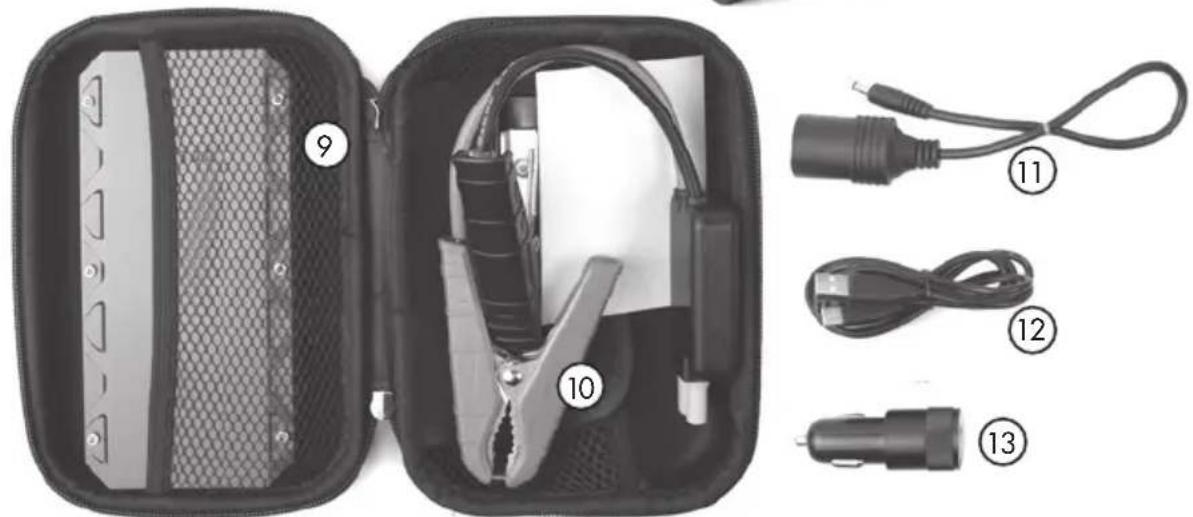
- Power button
- 12V DC power port
- USB-C charging jack
- Battery status indicator
- 5V, 2A USB port
- Rapid-charging USB port
-
Flashlight
-
Jumper terminal
- Storage case
- Jumper cables
- Female DC socket cable
- USB-C charging cable
- DC charging adapter
CHARGING THE IONBOOST
This product may arrive partially charged from the manufacturer. It is recommended to fully charge the unit immediately after purchase and before using for the first time. Prior to charging the unit, read and understand all instructions in this manual.
In order to prolong the life of the iOnBoost, be sure to fully recharge the unit after each use and every 3 months even if the iOnBoost has not been used.
- Insert the charging cable into the charging jack of the unit.
- Plug the other end of the cable into any USB power source, such as an AC wall adapter on the supplied DC charging adapter (engine must be operating if charging iOnBoost in car).
- Fully charge the unit (around 7 hours). Charging is complete when all battery status indicator lights illuminate solid.
- The battery status can be checked by tapping on the Power button once.
JUMPSTARTER
Read the instructions before using the iOnBoost!
JUMPSTARTWARNINGS
Failure to follow these instructions may cause damage or explosion.
NOTE: Cranking an engine produces an accumulation of explosive gas above and near the vehicle battery. Before any attempt to jumpstart a vehicle battery, make sure explosive gas is dispelled from the area. Use a cardboard or newspaper fan to wave the gases away from the battery for a few minutes. Do not use plastic or metal sheet—they can produce sparks and ignite the gas.
- Jumpstart cables connected to iOnBoost are ALWAYS live! Never allow the clamps to touch together or contact the same piece of metal.
- Do not attempt to jumpstart your vehicle when iOnBoost is below 80% charge (observe battery status indicator lights on the unit— 80% = 4 solid lights).
- Only use this jumpstarter with 12 Volt negative-grounded systems. Most US vehicles have negative (-) battery terminals connected to the vehicle frame. (Negative - Ground). Check the negative battery terminal connecting wire to make sure it also connects to the frame.
- Make sure the jumpstarter clamps get connected to correct polarity (red to positive battery terminal, black to vehicle frame for negative ground systems when jumpstarting).
- Use safety glasses to protect eyes while jumpstarting a battery.
- If the engine fails to start after two 3-second cranking attempts, discontinue jumpstart procedure. Excessive engine cranking can damage the vehicle's starter motor. Look for other problems that may need to be corrected or call for professional service.
- Disconnecting cable clamps is always done in reverse order from connection sequence (see Jumpstart Procedure below).
-
Vehicles equipped with on-board computers may be affected if the engine battery is jumpstarted. Read your vehicle owner's manual before attempting to start the vehicle to determine if external starting assistance can be used.
-
If the iOnBoost is overloaded while in the jumpstart mode, quickly disconnect the negative then positive clamps. All functions on the iOnBoost will not operate if the unit was overloaded. To recover from overload, let the unit rest for 10 minutes then plug it into a power source for a few minutes to reset the unit.
Jumpstart Procedure
- Turn off the vehicle ignition and all accessories (radios, lights, air conditioners), and disconnect electronic devices.
- Set the emergency brake and put vehicles with automatic transmission in park position.
- Determine the polarity of the vehicle's battery terminals. The positive (POS, P, +) battery terminal usually is red and the negative (NEG, N, -) terminal is usually black. If you are unsure, first refer to the vehicle owner's manual. Make sure the negative battery terminal is also connected to the vehicle frame.
- Insert the orange plug of the jumper cables into the iOnBoost's jumper terminal. When fully inserted, the red and green lights on the cable safety block should both flash alternately. Use only the jumpstarting clamps provided in this package. Unauthorized parts may cause serious damage or injury.
- Securely connect the positive (+) red clamp to the positive (POS, P, +) terminal of the vehicle battery or the remote positive (+) terminal if equipped.
- Securely connect the negative (-) black clamp to a non-moving, metal part of the engine or frame as far away from the vehicle battery as possible.
- When the clamps are properly connected to the battery, the green light on the cable safety block will illuminate (a three-second delay is normal). When the light illuminates steady green, it is safe to proceed in these instructions. If the light fails to illuminate steady green or if any red lights illuminate, consult the troubleshooting section of this manual.
- Place unit on a secure surface away from moving parts.
- Start vehicle engine. Stop if the vehicle does not start after 3 to 4 seconds of engine cranking. Wait 3 to 4 minutes, then try again. If engine does not start after second attempt, discontinue cranking and consult a professional.
- The internal safety timer will automatically disconnect the circuit after 90 seconds to prevent the vehicle battery from reverse charging the unit. Both the red and green lights will illuminate steady. If your vehicle still has not started, disconnect the cables and try the procedure again.
- When finished, disconnect the clamps in reverse sequence of connecting procedure—first disconnect negative (black), then positive (red) clamps. Do not let the clamps touch each other.
- Disconnect the jumper cable assembly from the unit.
- When convenient, completely charge the iOnBoost battery.
- Store the unit and charge adapters in a cool, dry environment, away from flammable materials. Remember to fully charge the unit every three months.
Brief Recap of Sequences for Connection and Disconnection
ORDER OF CONNECTION

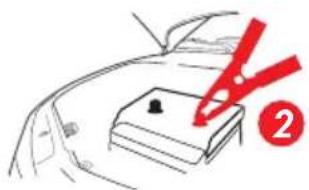
- Connect cables to iOnBoost. 3. Connect Grange step (red) clamp to positive battery terminal.

clamp to solid metal ground on engine or frame, away from battery).
ORDER OF DISCONNECTION

- Disconnect negative (black) clamp from frame.

- Disconnect positive (red) clamp from positive battery terminal.
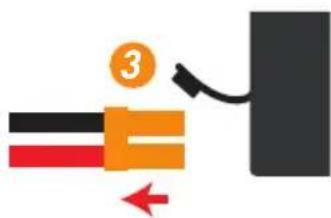
- Disconnect cables from iOnBoost.
TROUBLESHOOTING
Jumpstart Warning Lights
The iOnBoost is ready to jumpstart when the cables are connected and a steady green light illuminates on the cable safety block. The following chart displays the combinations of warning lights that occur when the iOnBoost fails to display the ready light:
| Warning lights | Type of warning Solution | |
| Flashing red and green lights | No vehicle battery detectedCables are not making a good connectionVehicle battery voltage too high for jumpstarting | Check cable connection.Check terminals for corrosion Check with a mechanic for other starting related issues. |
| Solid red and green lights | 90-second timer has expired; the smart cable has shut down | Disconnect cables from both the battery and the iOnBoost and follow connection procedure again. |
| Solid red light (no green) | iOnBoost charge is too low for jumpstarting | The iOnBoost needs to be recharged. |
| Solid red light with beep (no green) | Short-circuit Disconnect immediately and follow proper connection procedure again. | |
| Solid red light with pulsing beep (no green) | Reverse polarity Disconnect immediately and follow proper connection procedure again. | |
| Solid red light with slow beep (no green) | Reverse charge Disconnect the iOnBoost from the vehicle battery immediately. | |
| Solid red light with fast beep (no green) | Over-heating Disconnect and allow unit to cool for 10 minutes. | |
DC POWER PORT
For proper and safe operation of the DC power accessory outlet, do not place anything into it except the plug of the accessory to be used.
Overloading the port may result in "tripping" a self-resetting circuit breaker. Removing the overload automatically restores power to the DC Power Port.
- Insert the DC connection cable into the DC output port.
- After use, disconnect the DC connection cable.
- Recharge the iOnBoost as soon as convenient.
USING THE USB PORTS
If the charge in the iOnBoost is low, the USB port will shut off to prevent damage to the iOnBoost. Recharge the iOnBoost as soon as convenient.
- Connect the USB device to the iOnBoost with a user-supplied cable.
- Press the Power button to activate the USB ports.
- When your mobile device is fully charged, disconnect your device from the iOnBoost.
LED FLASHLIGHT
If the charge in the iOnBoost is low, the light will shut off to prevent damage to the iOnBoost. Recharge the iOnBoost as soon as convenient.
- Hold down the Power button for 3 seconds to turn on the light.
- Short press to cycle through the lighting modes: 1=strobe, 2=S.O.S., 3=off or long press to turn off from any mode.
- Recharge battery as soon as convenient.
PROPER DISPOSAL
- This product has no consumer serviceable parts.
- Do not attempt to remove or replace the battery used in this device. When the battery has reached the end of its lifetime, please take the entire unit to a battery recycling facility.
WAGAN CORP. LIMITED WARRANTY
The WAGAN Corporation warranty is limited to products sold only in the United States.
Warranty Duration:
Product is warranted to the original purchaser for a period of one (1) year from the original purchase date, to be free of defects in material and workmanship. WAGAN Corporation disclaims any liability for consequential damages. In no event will WAGAN Corporation be responsible for any amount of damages beyond the amount paid for the product at retail.
Warranty Performance:
During the warranty period, a product with a defect will be replaced with a comparable model when the product is returned to WAGAN Corporation with an original store receipt. WAGAN Corporation will, at its discretion, replace or repair the defective part. The replacement product will be warranted for the balance of the original warranty period. This warranty does not extend to any units which have been used in violation of written instructions furnished.
Warranty Disclaimers:
This warranty is in lieu of all warranties expressed or implied and no representative or person is authorized to assume any other liability in connection with the sale of our products. There shall be no claims for defects or failure of performance or product failure under any theory of tort, contract or commercial law including, but not limited to negligence, gross negligence, strict liability, breach of warranty, and breach of contract.
Returns:
WAGAN Corporation is not responsible for any item(s) returned without an official Return Authorization number (RA#). Please contact our customer service team by phone or email to obtain an RA#. You can also visit our website and chat with our team during our normal business hours. For more details and instructions on how to process a warranty claim, please read the "Returns" section under the "Contact" page on our website. WAGAN Corporation is not responsible for any shipping charges incurred in returning the item(s) back to the company for repair or replacement.
Register your product online at http://tinyurl.com/wagan-registration to be added to our email list. You will receive previews on our upcoming products, promotions, and events.
©2015
DIAGRAMA DEL PRODUCTO
Los contentsos reales peuvent diferir ligeramente de la figura.
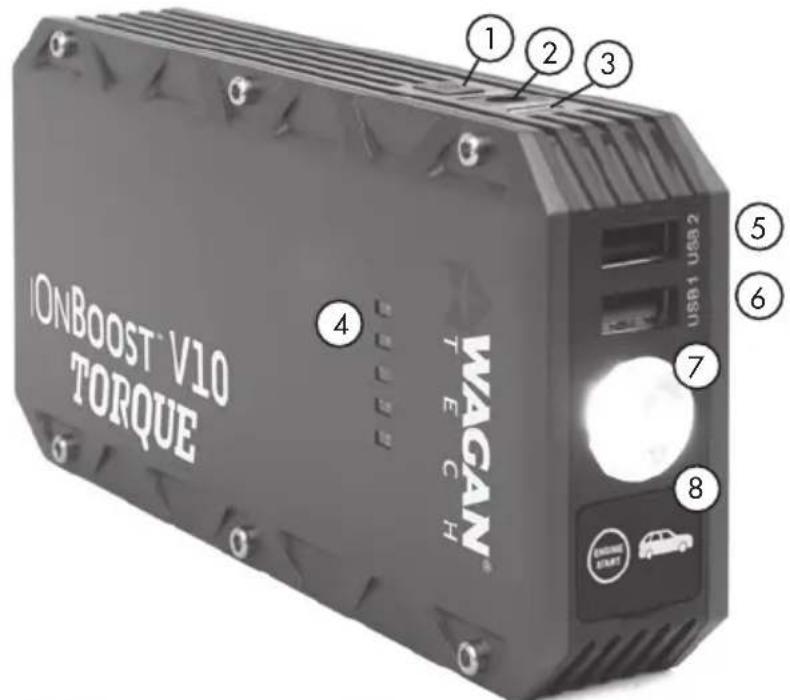
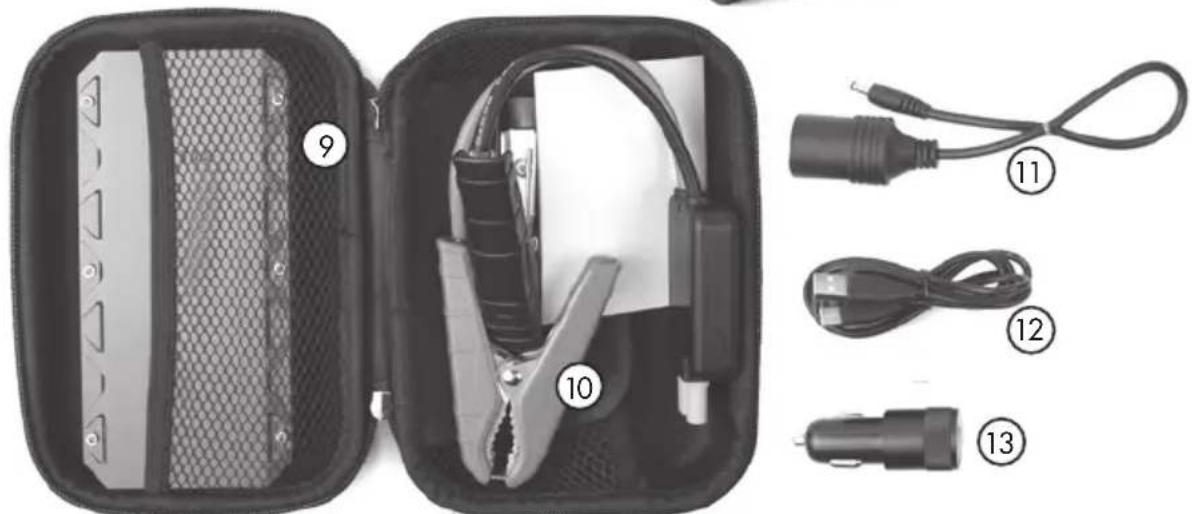
ILLUSTRATION DU PRODUIT
GARANTIE LIMITÉE DE WAGAN CORPORATION
Tel: +1.510.471.9221
U.S. & Canada Toll Free: +1.800.231.5806
customerservice@wagan.com
www.wagan.com
©2019 Wagan Corporation. All Rights Reserved
Wagan Tech and wagan.com are trademarks of Wagan Corporation