2463 - Earphones WAGAN - Free user manual and instructions
Find the device manual for free 2463 WAGAN in PDF.


User questions about 2463 WAGAN
0 question about this device. Answer the ones you know or ask your own.
Ask a new question about this device
Download the instructions for your Earphones in PDF format for free! Find your manual 2463 - WAGAN and take your electronic device back in hand. On this page are published all the documents necessary for the use of your device. 2463 by WAGAN.
USER MANUAL 2463 WAGAN
Wireless Bluetooth Headset

natural_image
Black and white photo of a handheld electronic device (no visible text or symbols)User's Manual
Ultra Compact Bluetooth Headset By Wagan Tech
Thank you for purchasing Ultra Compact Bluetooth Headset by Wagan Tech. With normal care and proper treatment it will provide years of reliable service. Please read all operating instructions carefully before use.
INTRODUCTION
The Bluetooth headset BH08 allows you freedom to make and receive calls while on the move or in the office, you can connect the headset to a compatible phone that supports Bluetooth wireless technology. Read this user guide carefully before using the headset. Read also the user guide for your phone, which provides important safety and maintenance information. Keep the headset out of reach of small children.
BLUETOOTH WIRELESS TECHNOLOGY
Bluetooth wireless technology makes it possible to connect compatible communication devices without using cables. A Bluetooth connection does not require that the phone and the headset be in line of sight, but both devices should be within 10 meters (30 feet) of each other, connections can be subject to interference from obstructions, such as walls or other electronic devices.
The headset is compliant with Bluetooth Specification 2.0 supporting the following profiles: Headset profiles 1.1 and Hands-Free Profiles 1.5 check with the manufactures of other devices to determine their compatibility with this device. There may be restrictions on using Bluetooth technology in some locations. Check with your local authorities or service provider.
OVERVIEW
The headset contains the following parts as shown in the figure:
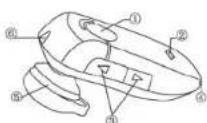
Answer/end key (1)
Indicator light(2)
Volume key(3)
Microphone
Earphone (5)
Charger connector (6)

www.wagan.com
Before you can start using the headset, you must charge the battery and pair the headset with a compatible phone. Note: Parts of the headset are magnetic, metallic materials may be attracted to the headset. Do not place credit cards or other magnetic storage media near the headset, because information stored on them may be erased.
CHARGER AND BATTERIES
Check the model number of any charger before using it with this device. The Bluetooth headset BH08 is intended for use with the chargers that is included in the package.
CHARGE THE BATTERY
This device has an internal, non-removable, rechargeable battery. Do not attempt to remove the battery from the device as you may damage the device. 1. Connect the charger cable to the headset. 2. Connect the charger to a wall outlet. The red indicator light is displayed during charging. If charging does not start, disconnect the charger, pug it again, and retry. Charging the battery fully may take up to 2 hours. 3. When the battery is fully charged, the red indicator light turns off. Disconnect the charger from the wall outlet and the headset. The fully charged battery has power for up to 3 hours of talk-time or up to 120 hours of standby time. However, the talk and standby times may vary when used with different mobile phones, products that use a Bluetooth connection, usage settings, usage styles, and environments. When the battery is running out of power, the red indicator light starts to flash.
SWITCH THE HEADSET ON OR OFF
To switch on, press and hold the power key for 3 seconds. The blue indicator light starts to flash. To switch off, press and hold the power key for 4 seconds until headset beeps 2 times and the red indicator light is displayed briefly.
Ultra Compact Bluetooth Headset By Wagan Tech
PAIR THE HEADSET WITH A COMPATIBLE PHONE
- Make sure your headset is turn off
- Push the answer key for 8 second until the blue and red light flashes alternately
- Activate the Bluetooth feature on the phone, and set the phone to search for Bluetooth devices. See the user guide of your phone for instructions.
- Select the headset (BH08) from the list of found devices.
- Enter the pass code 0000 to pair and connect the headset to your phone. In some phones you may need to make the connection separately after pairing. See the user guide of your phone for details. You only need to pair the headset with your phone once.
- If the pairing is successful, the headset's blue light will flash 3 times briefly for the first time follow by a single flash every 7 seconds. The headset's name appears in the phone menu where you can view the currently paired Bluetooth devices.
DISCONNECT THE HEADSET FROM THE PHONE
To disconnect the headset from your phone (for example, to connect the phone to another Bluetooth device), do one of the following:
- Switch off the headset.
- Disconnect the headset in the Bluetooth menu of your phone.
- Move the headset more than 10 meters (30 feet) away from the phone.
You do not need to delete the pairing with the headset to disconnect it.
RECONNECT THE PAIRED HEADSET TO YOUR PHONE
To connect the headset to your phone, switch on the headset, make the connection in the Bluetooth menu of your phone, or press and hold the answer/end key.
You can set your phone to connect with the headset automatically when the headset is switched on. See the user guide of your phone for details.
TROUBLESHOOTING
If you cannot connect the headset to your phone, do as follows:
- Ensure that the headset is charged, switched on, paired with and connected to your phone.
- Ensure that the Bluetooth feature is activated on your phone.
- Check that the headset is within 10 meter (30 feet) of your phone and that there are no obstructions between the headset and the phone, such as walls or other electronic devices.
BASIC USE
To make a call
Use your phone in the normal way when the headset is connected to your phone. If your phone supports redialing with this device, press the volume + key for 3 seconds while no call is in progress. If your phone supports voice dialing with this device, press the answer/end key when no call is in progress, and proceed as described in the user guide of your phone.
To answer a call
Press the answer/end key, or use the phone keys. If the automatic answer function is set on, the phone automatically answers the incoming call after one ring.
To end a call
Press the answer/end key, or use the phone keys.
Adjust the earphone volume
Press the volume key up to increase or down to decrease the volume during a call.
Ultra Compact Bluetooth Headset By Wagan Tech
BATTERY INFORMATION
Your device is powered by a rechargeable battery. The full performance of a new battery is achieved only after two or three complete charge and discharge cycles. The battery can be charged and discharged hundreds of times, but it will eventually wear out. Recharge your battery only with compatible chargers designated for this device.
- Unplug the charger from the electrical plug and the device when not in use.
- Do not leave a fully charged battery connected to a charger, since overcharging may shorten its lifetime. If left unused, a fully charged battery will lose its charge over time.
- Never use any charger that is damaged.
- Leaving the device in hot or cold places, such as in a closed car in summer or winter conditions, will reduce the capacity and lifetime of the battery.
- Always try to keep the battery between 59F and 77°F. A device with a hot or cold battery may not work temporarily, even when the battery is fully charged. Battery performance is particularly limited in temperatures well below freezing.
- Do not dispose of batteries in a fire as they may explode. Batteries may also explode if damaged. Dispose of batteries according to local regulations. Please recycle when possible. Do not dispose as household waste.
CARE AND MAINTENANCE
Your device is a product of superior design and craftsmanship and should be treated with care. The suggestions below will help you protect your warranty coverage.
- Keep all accessories and enhancements out of the reach of small children.
- Keep the device dry. Precipitation, humidity, and all types of liquids or moisture can contain minerals that will corrode electronic circuits. If your device does get wet, allow it to dry completely.
USER'S MANUAL — Please read before using this equipment.
- Do not use or store the device in dusty, dirty areas. Its moving parts and electronic components can be damaged.
- Do not store the device in hot areas. High temperatures can shorten the life of electronic devices, damage batteries, and warp or melt certain plastics.
- Do not store the device in cold areas. When the device returns to its normal temperature, moisture can form inside the device and damage electronic circuit boards.
- Do not drop, knock, or shake the device. Rough handling can break internal circuit boards and fine mechanics.
- Do not use harsh chemicals, cleaning solvents, or strong detergents to clean the device.
- Do not paint the device. Paint can clog the moving parts and prevent proper operation.
All of the above suggestions apply equally to your device, battery, charger, or any enhancement. If any device is not working properly, take it to the nearest authorized service facility.
Ultra Compact Bluetooth Headset By Wagan Tech
WAGAN Corp. Limited Warranty Registration Form
All WAGAN Corporation products are warranted to the original purchaser of this product. Warranty Duration: This product is warranted to the original purchaser for a period of one (1) Year from the original purchase date, to be free of defects in material and workmanship. WAGAN Corporation disclaims any liability for consequential damages. In no event will WAGAN Corporation he responsible for any amount of damages beyond the amount paid for the product at retail. In the event of a defective item, please ship the item, prepaid, with a complete explanation of the problem, your name, address and daytime phone number. WAGAN Corporation will, at its option, replaces or repair the defective part. This warranty is void if the product has been damaged by accident, in shipment, unreasonable use, misuse, neglect, improper service, commercial use, repairs by unauthorized personnel or other causes not arising out of defects in materials or workmanship. This warranty is effective only if the product is purchased and operated in the USA and Canada and does not extend to any units which have been used in violation of written instructions furnished.
Warranty Disclaimers: This warranty is in lieu of all warranties expressed or implied and no representative or person is authorized to assume any other liability in connection with the sale of our products. There shall be no claims for defects or failure of performance or product failure under any theory of tort, contract or commercial law including, but not limited to negligence, gross negligence, strict liability, breach of warranty and breach of contract.
Warranty Performance: During the above one (1) Year warranty period, a product with a defect will be replaced with a comparable model when the product is returned to WAGAN Corporation with an original store receipt. The replacement product will be in warranty for the balance of the one (1) Year warranty period.
• Please activate my limited warranty for WAGAN Corp.
- Enclosed copy of original sales receipt.
| Name | ||||||
| Mail Address | ||||||
| Add'l Address | ||||||
| City | State | |||||
| Item Purchased | ||||||
| Store Name | ||||||
| Date of Purchase | ||||||
| Signature | Date | |||||
All WAGAN Corporation Products must be registered within (30) days of purchased to activate this warranty.
Mail the complete registration form, along with a copy of the original receipt to:
Attn: Customer Service
WAGAN Corporation
3589 Yale Way, Fremont, CA 94538
Email: customerservice@wagan.com
Phone: (Toll Free) 1-800-231-5806 (Local) 1-510-490-9221
Hours of Operation: Monday through Friday 8:00 A.M. - 5:00 P.M. (P.S.T.)
Zip Code