the Grind Control BDC650 - Coffee machine BREVILLE - Free user manual and instructions
Find the device manual for free the Grind Control BDC650 BREVILLE in PDF.


| Product Type | Filter coffee machine with built-in grinder |
| Brand | Breville |
| Model | The Grind Control BDC650 |
| Color | Stainless steel (housing) / Black (details) |
| Water Tank Capacity | 1.8 L (12 cups) |
| Bean Hopper Capacity | 225 g (½ lb) |
| Materials | Stainless steel (carafe, burrs), BPA-free plastic (contact parts) |
| Power Supply Voltage | 110-120 V, 60 Hz (North America) |
| Grinder Type | Adjustable stainless steel conical burr grinder |
| Grind Settings | 1 to 8 (fine to coarse) + pre-ground |
| Strength Settings | 8 levels (1 to 8) |
| Brew Modes | Carafe (2-12 cups), Single Cup (7 cup sizes) |
| Auto Start Function | Yes, programmable |
| Display | Backlit LCD with time, settings and message display |
| Brew Pause | Yes, to temporarily remove carafe |
| Anti-Drip System | Yes |
| Carafe | Double-walled stainless steel thermal carafe, 12 cups |
| Compatible Filters | Included Gold Tone filter or 8-12 cup paper filters (flat bottom basket 8.25 cm) |
| Calibration Function | Yes, to adjust grind time based on coffee |
| Descaling Function | Yes, with alert message and automatic cycle |
| Energy Saving Mode | Yes, after 5 minutes of inactivity |
| Safety | Hopper, basket and door lock; auto shut-off; Assist® plug; hot surface |
| Cleaning | Basket, carafe, hopper dishwasher safe; regular cleaning of burrs and chute |
| Included Accessories | Gold Tone filter, cleaning brush, thermal carafe, bean scoop, drip tray |
Frequently Asked Questions - the Grind Control BDC650 BREVILLE
User questions about the Grind Control BDC650 BREVILLE
0 question about this device. Answer the ones you know or ask your own.
Ask a new question about this device
Download the instructions for your Coffee machine in PDF format for free! Find your manual the Grind Control BDC650 - BREVILLE and take your electronic device back in hand. On this page are published all the documents necessary for the use of your device. the Grind Control BDC650 by BREVILLE.
USER MANUAL the Grind Control BDC650 BREVILLE
Breville Consumer Support
USA
Mail: Breville USA
19400 S. Western Ave
Torrance CA
90501-1119
Phone: 1-866-273-8455
1-866-BREVILLE
Web: brevilleusasupport.com
Canada
Mail: Breville Canada
3595 Boulevard Cote-Vertu,
Saint-Laurent,
Québec H4R 1R2
Phone: 1-855-683-3535
Email: askus@breville.ca
www.breville.com
Breville is a registered trademark of Breville Pty. Ltd. A.B.N. 98 000 092 928.
Copyright Breville Pty. Ltd. 2016.
Due to continued product improvement, the products illustrated/photographed
in this book may vary slightly from the actual product.
BDC650 USC E20
Breville®
the Grind Control™
natural_image
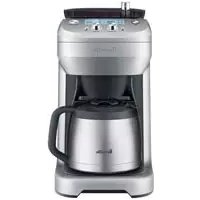
Exterior view of a Breville coffee maker with control knobs and a teapot (no visible text or symbols on the device itself)BDC650
CONGRATULATIONS
on the purchase of your Breville product
Register online for product support and exclusive offers.\*
USA Consumers: www.brevilleusa.com
Canadian Consumers: www.breville.ca
*Registering is not a substitute for proof of purchase when submitting a Warranty Claim.
CONTENTS
4 Breville recommends safety first
8 Know your Breville product
10 Operating your Breville product
12 Using the Grind Control™ - Carafe Mode
15 Using the Grind Control™
- Single Cup Mode
17 Programming the Clock & Auto Start
20 Advanced Features
21 Helpful Tips
23 Care & cleaning
27 Troubleshooting
34 French
BREVILLE RECOMMENDS SAFETY FIRST
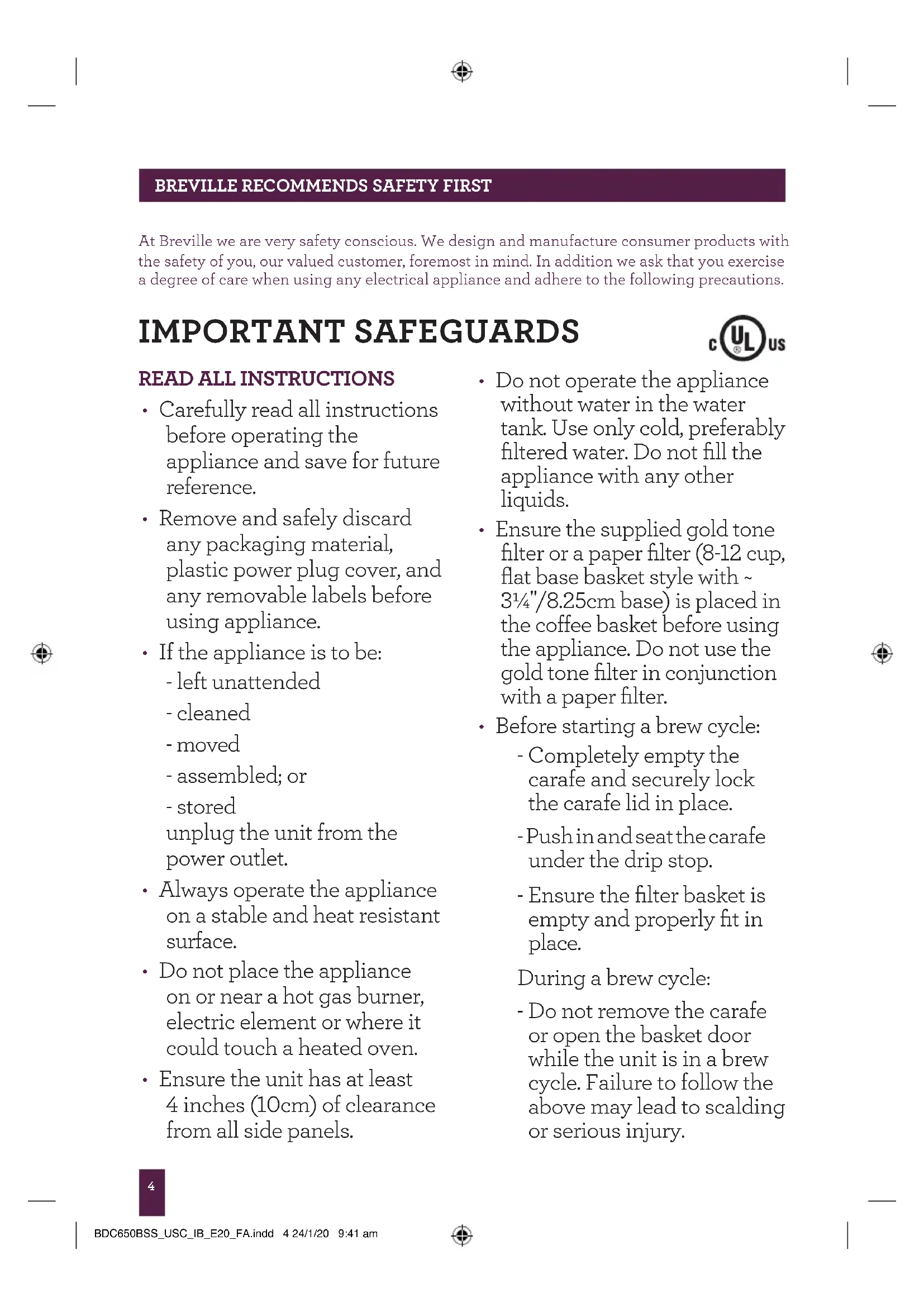
At Breville we are very safety conscious. We design and manufacture consumer products with the safety of you, our valued customer, foremost in mind. In addition we ask that you exercise a degree of care when using any electrical appliance and adhere to the following precautions.
IMPORTANT SAFEGUARDS

READ ALL INSTRUCTIONS
- Carefully read all instructions before operating the appliance and save for future reference.
- Remove and safely discard any packaging material, plastic power plug cover, and any removable labels before using appliance.
- If the appliance is to be:
- left unattended
- cleaned
- moved
-assembled;or
- stored
unplug the unit from the power outlet.
• Always operate the appliance on a stable and heat resistant surface.
- Do not place the appliance on or near a hot gas burner, electric element or where it could touch a heated oven.
- Ensure the unit has at least 4 inches (10cm) of clearance from all side panels.
- Do not operate the appliance without water in the water tank. Use only cold, preferably filtered water. Do not fill the appliance with any other liquids.
- Ensure the supplied gold tone filter or a paper filter (8-12 cup, flat base basket style with \~ 3 ^1/4 "/8.25cm base) is placed in the coffee basket before using the appliance. Do not use the gold tone filter in conjunction with a paper filter.
• Before starting a brew cycle:
- Completely empty the carafe and securely lock the carafe lid in place.
- Push in and seat the carafe under the drip stop.
- Ensure the filter basket is empty and properly fit in place.
During a brew cycle:
- Do not remove the carafe or open the basket door while the unit is in a brew cycle. Failure to follow the above may lead to scalding or serious injury.
BREVILLE RECOMMENDS SAFETY FIRST
- Some surfaces may be hot, use caution when touching or lifting the unit or accessories.
- Only lift the carafe from the carafe handle.
- The carafe is designed for use with this appliance only. It must never be used on a range top or in a microwave.
- Scalding may occur if the carafe lid is removed during the brewing cycle.
• Always ensure the carafe lid is securely locked in place onto the carafe before pouring. - Do not use the carafe with a cracked, loose, weakened or damaged handle.
- Do not touch hot surfaces. Use the handle for lifting and carrying the carafe.
- Do not set a hot carafe on a wet, cold or heat sensitive surface.
-
Do not operate the grinder without the bean hopper lid in position. Keep fingers, hands, hair, clothing and utensils away from the bean hopper during operation. Avoid contact with moving parts.
-
Check the grinder for presence of foreign objects before using.
- Use the grinder to grind roasted coffee beans only.
- Unplug from outlet when the appliance or display clock is not in use, and before cleaning and storing. Allow to cool before putting on or taking off parts, and before cleaning the appliance.
- Do not use harsh or abrasive materials when cleaning any part of this appliance such as steel wool or scoring pads.
- The use of attachments not sold or recommended by Breville may cause fire, electric shock or injuries.
BREVILLE RECOMMENDS SAFETY FIRST
IMPORTANT SAFEGUARDS FOR ALL ELECTRICAL APPLIANCES
- Fully unwind cord before use.
- To protect against electric shock, do not immerse cord, plug or appliance in water or any other liquid.
- Do not let the cord hang over the edge of a bench or table, touch hot surfaces, or become knotted.
- Do not leave the appliance unattended when in use.
• Children should be supervised to ensure they do not play with the appliance. - This appliance is recommended for household use only. Do not use this appliance for anything other than its intended use. Do not use in moving vehicles or boats. Do not use outdoors.
- It is recommended to regularly inspect the appliance. Do not use the appliance if the power supply cord, power plug, or appliance becomes damaged in anyway. Immediately stop using the unit and call Breville Consumer Service.
CAUTION
We recommend using cold, filtered water. We do not recommend the use of de-mineralized or distilled water as this may affect the taste of brewed coffee and how the coffee machine is designed to function.
FOR HOUSEHOLD USE ONLY SAVE THESE INSTRUCTIONS
BREVILLE RECOMMENDS SAFETY FIRST
SHORT CORD INSTRUCTIONS
Your Breville appliance is fitted with a short power cord to reduce the risk of personal injury or property damage resulting from pulling, tripping or becoming entangled with a longer cord. Longer detachable power cords or extension cords are available and may be used if care is exercised. If an extension cord is used, (1) the marked electrical rating of the cord set or extension cord should be at least as great as the electrical rating of the appliance, (2) the cord should be arranged so that it will not drape over the counter-top or table where it can be pulled on by children or tripped over unintentionally and (3) the extension cord must include a 3-prong grounding plug.
NOTE
This appliance has a three wire grounded plug. To reduce the risk of electric shock, this plug will fit in a polarized outlet only one way. If the plug does not fit properly into the outlet, contact a qualified electrician. Do not use an adaptor or modify the plug in any way. Do not connect the appliance to an external switch or device (such as a timer, monitor or remote circuit) that can be switched on and off.
BREVILLE ASSIST® PLUG
Your Breville appliance comes with a unique Assist® Plug, conveniently designed with a finger hole to easy removal from the power outlet.
CALIFORNIA PROPOSITION 65:
(Applicable to California residents only).
This product contains chemicals known to the State of California to cause cancer, birth defects or other reproductive harm.
KNOW YOUR BREVILLE PRODUCT
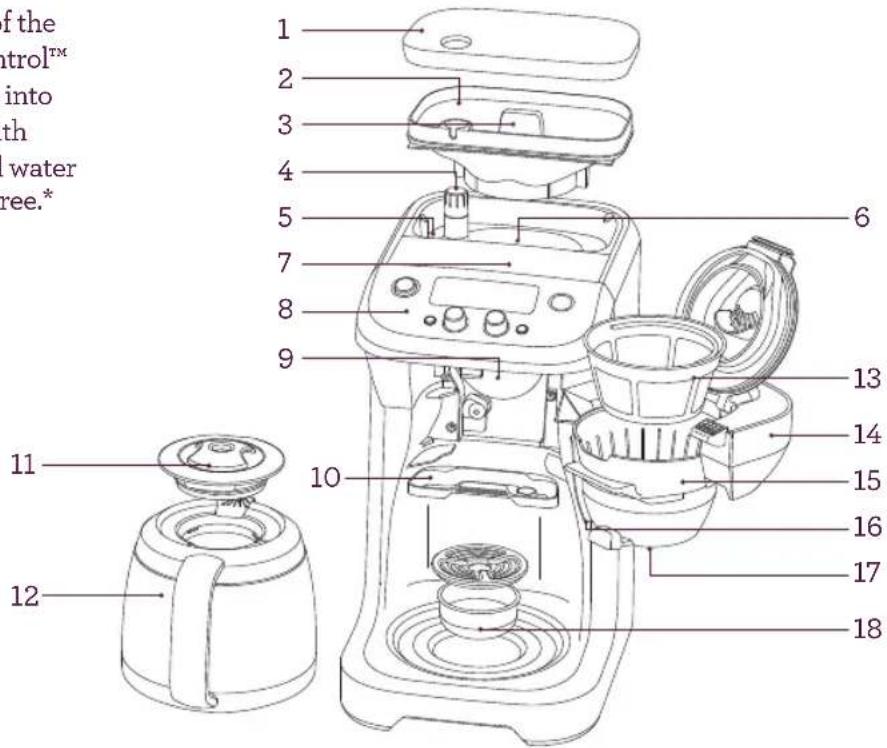
All parts of the Grind Control™ that come into contact with coffee and water are BPA Free.*
text_image
of the trol™ into th water ree.* 1 2 3 4 5 6 7 8 9 10 11 12 13 14 15 16 17 18- Bean Hopper Lid
- 0.5lb Bean Hopper
- Bean Hopper Locking System seals the base of the bean hopper for easy removal and transfer of coffee beans for storage.
- Grind Adjustment Knob, adjusts coarseness and/or fineness from one of the 6 settings.
- Cleaning Brush for cleaning of the grinding burrs and coffee grinds chute.
- Integrated Adjustable Burr Grinder grinds whole beans just prior to brewing for maximum flavor and aroma. Grinder can be turned off when using pre-ground coffee.
-
12-Cup (60oz) Water Tank with flip-top lid for convenient, front-access filling. Grille prevents large debris from entering the tank while the 'MAX' level float rises when the tank is full.
-
Intuitive simple to operate Control Panel with backlit LCD screen.
- Coffee Grinds Chute delivers ground coffee from the grinder to the coffee basket.
- Removable Grinds Catcher catches loose grinds.
- Carafe Lid.
- 12-Cup Double-Wall, Stainless Steel Thermal Carafe
- Removable Gold Tone Filter
- Soft Opening, Swing-Out Door with safety interlock system prevents operation if the coffee basket is not correctly assembled or the door is not properly closed.
- Removable Coffee Basket lifts out for easy filling and cleaning. Holds the included gold tone filter or paper filters.
KNOW YOUR BREVILLE PRODUCT
text_image
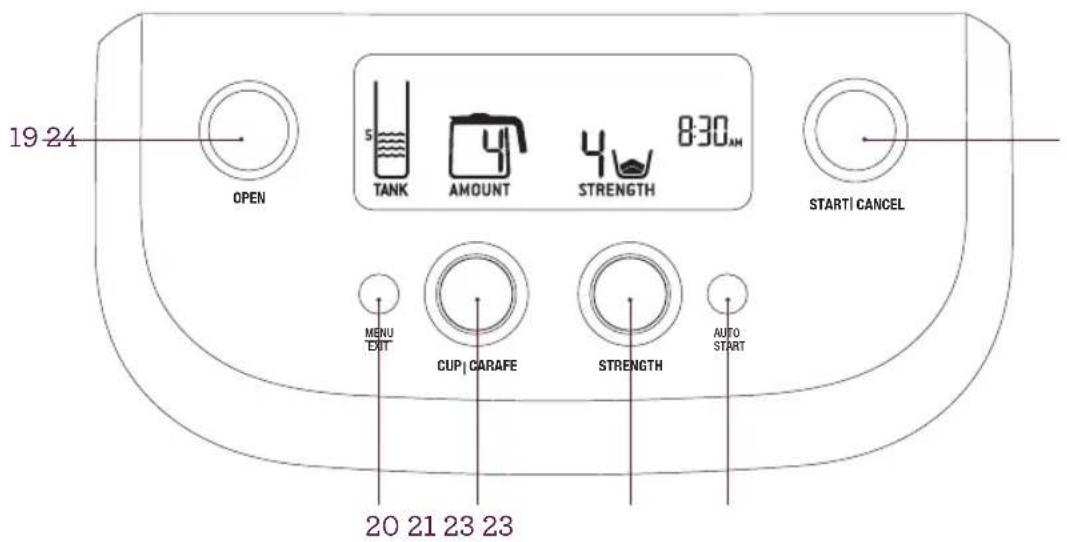
19 24 OPEN 5 TANK AMOUNT 4 STRENGTH 8:30 AM START | CANCEL MENU EXIT CUP | CARAFE STRENGTH AUTO START 20 21 23 23- Steam Baffle diverts water overflow if the coffee basket becomes blocked.
- Brew Pause Drip Stop temporarily ceases the flow of coffee when the carafe is removed so a cup can be poured mid-brew.
- Drip Tray can be removed for direct brewing into tall cups & travel mugs.
- OPEN button. Press to open the swing-out door.
- MENU | EXIT button
Access the Menu to allow you:
- Set the clock.
- Adjust the Alert volumes.
- Reset the machine.
- Enter the Calibration Mode.
-
Hold for 2 seconds to enter standby mode.
-
CUP | CARAFE button. Press to brew a single cup of coffee or a carafe.
- STRENGTH button. Rotate to select from one of the 8 strength settings, or Pre-ground.
- Auto Start button
Allows you turn the Auto Start feature On & Off & adjust Auto Start time.
- START | CANCEL button
Press to start or cancel the brew cycle.
OPERATING YOUR BREVILLE PRODUCT
FRESH IS BEST
To get the most out of your Grind Control™ coffee brewer we recommend using quality freshly roasted whole bean coffee & grind right before you brew. Coffee is at its peak flavor potential 5-20 days after roasting. Always buy coffee with a “Roasted On” date printed on the bag and avoid buying coffee with a “Best Before” or “Use By” date, as you never know when it was roasted. Coffee loses flavor and its aromatics once it’s ground, so grinding right before you brew is the key to great tasting coffee with superior flavor and aroma.
PRODUCT OVERVIEW
Your Grind Control™ coffee brewer is the first drip coffee maker with an adjustable built-in grinder and calibration mode.
The adjustable grinder features machined stainless steel burrs that allow you to adjust the coarseness or fineness to optimize flavor balance.
The calibration mode allows you adjust the amount of coffee delivered on any strength/cup size setting to suit coffee of varying grind size, origins, age and degree of roast, so you can achieve the maximum flavor potential from any coffee you choose.
The Grind Control ^™ also allows you to brew a single cup or travel mug in “cup” mode or from 2 to 12 cups in “carafe” mode.
BEFORE FIRST USE
Unpack all parts and accessories before removing and safely discarding all packaging material and promotional labels. Ensure the power cord is unplugged from the power outlet.
Wipe the exterior stainless steel housing with a soft, damp cloth. Wash the bean hopper and lid, coffee basket, gold tone filter and carafe in warm, soapy water and a soft cloth. Do not use abrasive cleansers, pads or cloths which can scratch the surface. Rinse and dry thoroughly.
INITIAL SET UP
1. Install the Bean Hopper
Position the hopper onto the machine. Turn the locking knob clockwise in the direction of the LOCK arrow until it clicks. Fill the hopper with fresh beans.
We recommend always keeping the hopper full (0.5lb maximum) to ensure there are sufficient beans. However, never over-pack the hopper as this may result in the grinder jamming. Replace the hopper lid.
NOTE
For easy removal, transfer and storage of beans, the hopper can be removed by turning the locking knob counterclockwise in the direction of the UNLOCK arrow. If you have removed the hopper, ensure it is securely reassembled back onto the machine. The safety interlock system will prevent operation if the hopper is incorrectly assembled. The LCD screen will flash 'LOCK BEAN HOPPER' until the issue is resolved.
OPERATING YOUR BREVILLE PRODUCT
2. Plugging in the Power Cord
Unwind the power cord completely and insert the power plug into a grounded 110-120V power outlet. The LCD screen will illuminate.
NOTE
The coffee machine will enter POWER SAVE mode after remaining idle for 5 minutes. Press any button to exit POWER SAVE mode and re-start the machine. Hold Menu/Exit button for 2 seconds to enter standby mode.
3. Install the Coffee Basket
For best results, we recommend pre-heating the coffee basket by running it under hot tap water. Dry the coffee basket thoroughly, taking particular care to completely dry the chute area. Line the coffee basket with either the provided gold tone filter or a paper filter.
Never use both at the same time.
a) Provided gold tone filter. When using the gold tone filter, be sure that the handle is positioned towards the hinge area of the coffee basket. Otherwise the handle may interfere with the flow of ground coffee into the gold tone filter.
b) Paper filter Use an 8-12 cup, flat base basket style paper filter with 3^1/4 /8.25cm base. Ensure that the paper filter is completely open and touching the side walls and bottom of the coffee basket.
Close the coffee basket lid. Press the OPEN button to open the swing-out door.
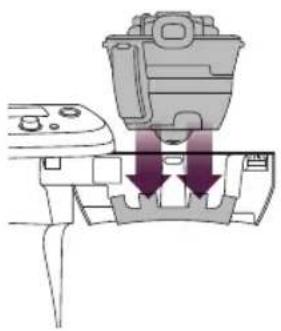
Attach the coffee basket to the swing-out door by ensuring the hinge area of the coffee basket is firmly seated in its most downward position on the two door hooks. Close the door until it clicks shut.
natural_image
Diagram of a mechanical device with two downward arrows indicating force or movement (no text or symbols present)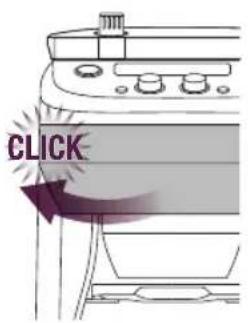
text_image
CLICK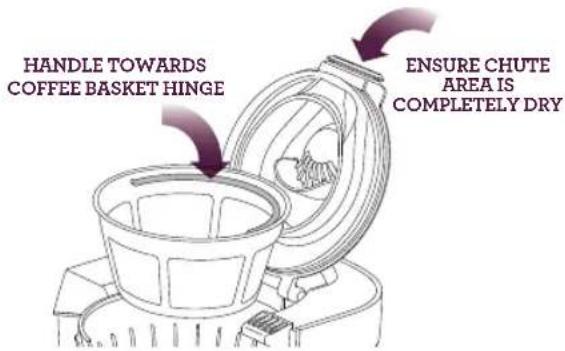
text_image
HANDLE TOWARDS COFFEE BASKET HINGE ENSURE CHUTE AREA IS COMPLETELY DRYOPERATING YOUR BREVILLE PRODUCT
USING THE GRIND CONTROL™ - CARAFE MODE
First Time Use Only
We recommend flushing the machine to remove any dust particles or residue from the manufacturing process. Follow the proceeding instructions, ensuring to completely fill the water tank. Step 1 (below), select '12 CUPS'. (Step 2, below) and the 'PRE-GROUND' coffee setting. (Step 4, page 13). However do not add any coffee to the coffee basket. Once the cycle is complete, discard the water from the carafe and repeat the cycle again for best results. The machine is now ready to use.
1. Fill the Water Tank
Press the flip-top lid to open. Pour the desired amount of cold, preferably filtered water into the tank using a jug or the provided carafe.
Never use Distilled, De-mineralized or highly filtered water as this will affect the electronics and the taste of your coffee.
If using the carafe, ensure the carafe is clean and the carafe lid is securely locked in place. The LCD screen will indicate the amount of water in the tank as it is filled. The machine will beep when full and the water level float will rise to indicate the maximum level. Do not exceed the 12 cup maximum. Doing so may cause the carafe to overflow or water spillage at the back of the machine. Close the flip-top lid.
NOTE
Always ensure your carafe is clean before brewing. Residual coffee will affect the taste of your next cup.
NOTE
Check the water level on the LCD screen before use. We recommend always keeping the water tank full. The water tank should be refilled with cold, preferably filtered water. Never fill with de-mineralized water or any other liquid.
NOTE
Never pour water into the bean hopper or grinding chamber area. Doing so can cause the grinder to clog. Only re-commence use when the grinding chamber and grinding burrs are completely dry. Refer to Troubleshooting, 'Moisture clogging grinder', page 26.
NOTE
Never fill the water tank once the coffee machine has started a brewing cycle. This will affect the volume dispensed into the carafe.
2. Pre-Warm the Carafe
A warm carafe will help maintain the coffee's optimal temperature and keep coffee hotter for longer. Remove the carafe lid by turning counter-clockwise then lifting upwards.
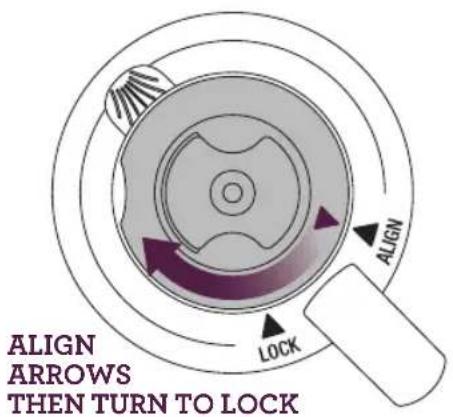
Fill the carafe with hot water and leave to stand for about 30 seconds then discard the water. To lock the carafe lid back into position, align the arrow on the carafe lid with the ALIGN arrow on the carafe. Turn clockwise until the arrow on the carafe lid aligns with the LOCK arrow on the carafe. This ensures that the lid is closed and in the proper position for brewing and pouring. Place the carafe into position under the drip stop outlet.
OPERATING YOUR BREVILLE PRODUCT
text_image
ALIGN ARROWS THEN TURN TO LOCKNOTE
Ensure the carafe is clean and completely empty and the lid is securely locked in place before placing under the drip stop outlet. Starting a brew cycle with water or coffee in the carafe will cause the carafe to over flow.
3. Select 'Carafe' Mode
Press the CUP|CARAFE button. The LCD screen will display a Carafe symbol and the current number of cups selected. Rotate the CUP | CARAFE dial to select the required number of cups to brew. You can choose less than the current tank level (2 cup minimum), while the maximum is the amount of water in the tank, up to 12 cups. If you select cups greater than the level in the water tank, the LCD will display FILL TANK and the water tank symbol will flash.
4. Select the Brew Strength or 'PRE-GROUND' Coffee Setting
There are 8 Strength settings. The LCD screen will display the current strength setting. Rotate the STRENGTH dial to select your required Strength. 1 is the weakest and 8 is the strongest. We recommend starting on setting 4 for a medium strength coffee. Adjust strength higher or lower to suit your taste.
NOTE
If using pre-ground coffee, rotate the STRENGTH dial to select the 'PRE-GROUND' coffee setting. This will disable the burr grinder. Add pre-ground coffee to the gold tone filter or a paper filter.
We recommend 1 level tablespoon of pre-ground coffee per 5oz/150ml cup of water. Adjust the amount according to your individual taste. The maximum capacity for pre-ground coffee is 12 level tablespoons. Exceeding this amount may cause overflow.
5. Start the Brew Cycle
Press the START | CANCEL button. The grinder will commence grinding the correct amount of coffee for the selected brew size and strength. If the 'PRE-GROUND' coffee setting has been selected, the grinder will be disabled.
NOTE
Steam may emit from the rear steam vent during grinding and brewing. This is normal.
OPERATING YOUR BREVILLE PRODUCT
The count-down timer will then begin.
The time displayed is an estimate only and will depend on the brew size and strength settings you have selected.
The LCD screen will display:
a) 'PRE-HEATING' as the water is heated to the optimal temperature. The preheating time will depend on the starting temperature of the water in the water tank.
PRE-HEATING
b) 'BREWING' as the coffee is dispensed into the carafe.
BREWING
To stop the cycle at any time, press the START | CANCEL button. You will hear a winding noise. This is normal.
CAUTION
Never open the swing-out door and remove the coffee basket while brewing. Hot water and coffee can cause injury.
The coffee basket and gold tone or paper filter may still be very hot after brewing. Use caution and allow to cool before removing.
Hot steam may rise when pouring. The bottom of the carafe is hot to touch for several minutes after brewing. Use caution and ensure not to set the carafe on a heat sensitive surface.
6. Using the Brew Pause Feature
The Brew Pause feature temporarily ceases the flow of coffee when the carafe is removed so a cup can be poured mid-brew. Do not remove the carafe for longer than 20 seconds or the coffee may overflow the coffee basket.
7. Empty the Coffee Basket
Once the brewing cycle is complete, the ready signal will sound and a winding noise will be heard. This is normal. The coffee machine will automatically shut-off and the LCD screen will flash 'EMPTY COFFEE FILTER' as a reminder to remove the coffee basket and discard the used grinds. Wash the coffee basket, taking particular care to rinse the chute area. Then dry the coffee basket and chute area thoroughly.
We also recommend checking the coffee grinds chute disc for any build-up of coffee grinds. This is the stainless steel disc that is visible when the swing-out door is opened.
A build-up of grinds on this disc can affect the performance of the machine. Wipe the disc clean then dry thoroughly.
OPERATING YOUR BREVILLE PRODUCT
8. Pour and Enjoy
Ensure the carafe lid is securely locked in position. There is no need to turn or adjust the lid before pouring. The lid automatically opens when pouring so as to keep coffee hot.
9. When Not In Use
The LCD screen will go dim after 5 minutes of none operation.
USING THE GRIND CONTROL™ - SINGLE CUP MODE
1. Fill the Water Tank
Press to open the flip-top lid. Pour the desired amount of cold, preferably filtered water into the tank using a jug or the carafe. Never use Distilled, De-mineralized or highly filtered water as this will affect the electronics and the taste of your coffee.
The LCD screen will indicate the amount of water in the tank as it is filled. The machine will beep when full and the water level float will rise to indicate the maximum level. Do not exceed the 12 cup maximum. Doing so may cause water spillage at the back of the machine. Close the flip-top lid.
NOTE
Check the water level on the LCD screen before use. We recommend always keeping the water tank full. The water tank should be refilled with cold, preferably filtered water. Do not fill with any other liquid.
NOTE
Never pour water into the bean hopper or grinding chamber area.
Doing so can cause the grinder to clog. Only re-commence use when the grinding chamber and grinding burrs are completely dry.
Refer to Troubleshooting, 'Moisture clogging grinder', page 26.
Never fill the water tank once the coffee machine has started a brewing cycle. This will affect the volume dispensed into the cup.
2. Pre-Warm the Cup or Travel Mug
A warm cup will help maintain the coffee's optimal temperature and keep coffee hotter for longer. Fill the cup with hot water for about 30 seconds then discard the water. Place the cup into position under the drip stop outlet.
TIP
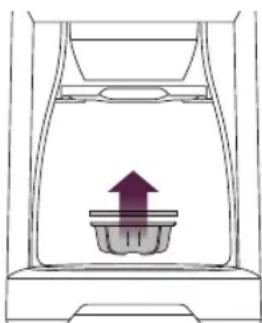
For taller cups and travel mugs, remove the drip tray at the base of the machine. Press the OPEN button to open the swing-out door. Insert the cup/mug into the drip tray cavity before closing the swing-out door. The maximum cup/mug dimensions are 7.5" height, 2^3/4 " diameter.
natural_image
Simple line drawing of a container with an upward arrow inside, no text or symbols present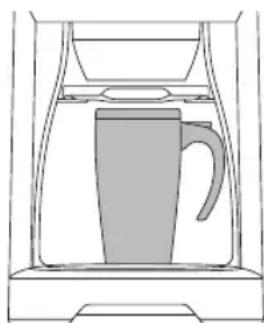
natural_image
Line drawing of a kettle inside a container (no text or symbols)REMOVE DRIP TRAY, OPEN DOOR, INSERT CUP, CLOSE DOOR.
OPERATING YOUR BREVILLE PRODUCT
3. Select 'Single Cup' Mode
Press the CUP|CARAFE dial until the LCD screen displays the CUP symbol and the current cup size selected in ounces. Rotate the CUP|CARAFE dial to select the required size.
There are 7 size options to accommodate for different amounts or milk, half-and-half and creamer. Always ensure your cup is an adequate size for the setting selected.
The amounts displayed on the LCD screen are approximate only. Actual amounts may vary depending on the type of filter used, the coffee grind size, roast, blend and freshness, or amount and type of pre-ground coffee used.
4. Select the Brew Strength or 'PRE-GROUND' Coffee Setting
There are 8 strength settings. The LCD screen will display the current strength setting. Rotate the STRENGTH dial to select your required strength. 1 is the weakest and 8 is the strongest. We recommend starting on setting 4 for a medium strength coffee. Adjust strength higher or lower to suit your taste.
NOTE
If using pre-ground coffee, select the 'PRE-GROUND' coffee setting. This will disable the grinder. Add pre-ground coffee to the gold tone filter or a paper filter. We recommend 1 level tablespoon of pre-ground coffee per 5oz/150ml cup of water. Adjust the amount according to your individual taste. The maximum capacity for pre-ground coffee is 12 level tablespoons. Exceeding this amount may cause overflow.
5. Start the Brew Cycle
Press the START | CANCEL button. The grinder will commence grinding the correct amount of coffee for the selected brew size and strength. If the 'PRE-GROUND' coffee setting has been selected, the grinder will be disabled.
NOTE
Steam may emit from the rear steam vent during grinding and brewing. This is normal.
The count-down timer will then begin. The time displayed is an estimate only and will depend on the amount and strength settings you have selected. The LCD screen will display:
a) 'PRE-HEATING' as the water is heated to the optimal temperature. The pre-heating time will depend on the starting temperature of the water in the water tank.
PRE-HEATING
7:15
b) 'INFUSING' as coffee and water are steeped together.
INFUSING
6:50
c) 'BREWING' as the coffee is dispensed into the cup.
OPERATING YOUR BREVILLE PRODUCT
BREWING
3:20
To stop the cycle at any time, press the START | CANCEL button. You will hear a winding noise. This is normal.

CAUTION
Never open the swing-out door and remove the coffee basket while brewing. Hot water and coffee can cause injury.
6. Empty the Coffee Basket
Once the brewing cycle is complete, the ready signal will sound and a winding noise will be heard. This is normal.
The coffee machine will automatically shut-off, however the LCD screen will flash 'EMPTY COFFEE FILTER' as a reminder to remove the coffee basket and discard the used grinds. Wash the coffee basket, taking particular care to rinse the chute area. Then dry the coffee basket and chute area thoroughly.
We also recommend checking the coffee grinds chute disc for any build-up of coffee grinds. This is the stainless steel disc that is visible when the swing-out door is opened. A build-up of grinds on this disc can affect the performance of the machine. Wipe the disc clean then dry thoroughly.
7. When Not In Use
LCD screen will dim after 5 minutes of none operation.

CAUTION
The coffee basket, gold tone or paper filter may still be very hot after brewing. Use caution and allow to cool before removing.
NOTE
If using the gold tone filter, you may notice the brewing cycle finish before the ready signal sounds. This is normal. The total brewing time displayed on the LCD screen is calculated using paper filters as coffee passes through paper filters slower.
PROGRAMMING THE CLOCK (OPTIONAL)
- Press the MENU|EXIT button.
- Press the STRENGTH dial. The LCD screen displays the current time, flashing.
7:30 SET CLOCK
- Rotate the STRENGTH dial to adjust the time.
- Press the STRENGTH button to set. The machine will beep to confirm.
- The LCD will return to the main screen when the clock is set.
OPERATING YOUR BREVILLE PRODUCT
PROGRAMMING AUTO START (OPTIONAL)
The Auto Start feature allows you to program the specific time when the coffee machine will automatically turn on and start the grinding and brewing cycle.
You must set the clock to use the Auto Start feature. Always remember to reset the clock for time changes, power outages and when you unplug the machine.
- Press the AUTO START button. The current Auto Start time will be displayed and flashing.
- Rotate the STRENGTH dial to adjust the time you want the brewer to start.
- Press the STRENGTH button to set the Auto Start time. The machine will beep to confirm.
NOTE
If you have not set the clock time, please follow the instructions below.
- The current clock time will flash on the LCD. Rotate the STRENGTH button to set the current clock time. Press the STRENGTH button to confirm.
-
The machine will now automatically start the brew cycle at the time you've set.
-
Make sure you have:
• Enough water in the tank.
- Selected the number of cups you wish to brew.
- Set the strength.
• Fill hopper with fresh beans.
- A fresh filter paper in the brew basket & the drawer is closed.
• A clean, empty carafe under the brew basket.
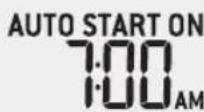
- If 'AUTO START ON' does not appear, then the Auto Start feature has not be activated.
- To cancel the Auto On after it's been set, press the AUTO START button once.
NOTE
The Auto Start feature must be selected each time you want to pre-schedule a brew. Press the AUTO START button and the programmed Auto Start time will display on the LCD screen. The Auto Start feature will not be activated unless there is adequate amount of water in the machine for the selected brew volume.
NOTE
Always remember to reset the clock and Auto Start time when there is a time change, power outage or after you unplug the machine.
OPERATING YOUR BREVILLE PRODUCT
CHANGING THE 'READY' SIGNAL VOLUME
The volume of the 'Ready' signal can be changed to suit your preference.
There are 3 options:
HI Lo OFF
- Press the MENU|EXIT button.
- Rotate the STRENGTH dial to SOUND.
- Press the STRENGTH dial to select SOUND.
- SOUND and the current setting will be displayed, flashing.
- Rotate the STRENGTH to select your setting.
- Press the STRENGTH dial to confirm. The machine will beep to confirm.
- LCD will return to the main screen.
MANUAL STANDBY MODE
Press and hold Exit/Menu button for 2 seconds to activate standby mode.

ADVANCED FEATURES
Your Grind Control™ coffee brewer is equipped with some advanced features that usually only need to be used occasionally. These are outlined below:
ADJUSTING THE GRINDER
Your Grind Control™ coffee brewer is fitted with Adjustable Stainless Steel burrs. These flat burrs deliver a coffee particle of optimum size for Drip Filter brewing. You may need to adjust the grind size to compensate for coffee of different origins, quality, age and degree of roast. Grind setting 3 should cover most coffees you purchase but there are circumstances that require the grind size to be adjusted.
We recommend you visually assess the grind size first. This can only be done by grinding some coffee and assessing the size. For smaller cup volumes (10oz) a finer grind will work best (setting 2-3) for larger cup volumes (12 cup carafe) a medium-coarse grind will work best (setting 3-5), but these are heavily dependent on many factors.
We suggest only making one adjustment at a time & determine its affects by brewing and tasting.
To adjust, turn the Grind Adjustment dial located through the bean hopper lid, in the direction of the arrow to effect a coarser or finer grind. The LCD will display your grind setting when you turn the dial. Turn the dial slowly until the Grind Size number is displayed.
NOTE
A grind size of between 2 and 4 should be suitable for most coffee origins & brew sizes. If using this range and your coffee is not tasting as expected, check the freshness of your beans. Also ensure the coffee basket, grinding chute and carafe are clean.
CALIBRATE FUNCTION
This function is used to adjust the grinder output times to compensate for coffee beans of different origins, age and degree of roast and grind size. To use this function you will require a set of precision scales with a resolution of 1 gram. When using this function the machine will require you to weigh the amount of output from the grinder after it runs for 10 secs.
We recommend you set the grind size you require first. This can only be done by grinding some coffee and visually assessing to the size. For smaller cup volumes (10 oz), a finer grind (2-3) works best; for larger cup volumes (12 cup carafe), a medium coarse grind (3-5) works best.
- Set the Grind Size.
- Ensure there is enough beans in the hopper.
- Ensure you have the Gold Tone filter or paper filter in the coffee basket.
- Ensure the coffee basket is fitted to the Swing Out door & the door is closed.
- Press the MENU|EXIT button.
- Rotate the STRENGTH Dial to Calibrate.
- Press the STRENGTH Dial to start the grinder.
- When the grinder has stopped, open the Swing Out door.
- Weigh the ground coffee.
- Rotate the STRENGTH Dial to match the weighed coffee amount.
- Press the STRENGTH Dial to accept.
The grinder output is now re-calibrated to match your coffee beans origin, age and degree of roast. You can now experiment with different strength settings & grind size adjustments until you achieve the taste you require.
HELPFUL TIPS
RESET FUNCTION
This is used to RESET the machine to the factory settings. These include the CLOCK, AUTO START ON time and the Grinder output times. If you have used the CALIBRATE function and the grinder output is unsuitable, use the RESET to restore the grinder output time to the factory settings.
- Press the MENU|EXIT button.
- Rotate the STRENGTH dial to RESET.
- Press the STRENGTH dial to select.
- YES will be displayed, flashing.
- Press the STRENGTH button to confirm
- The machine will beep to confirm the RESET.
CHANGING THE LCD DISPLAY BETWEEN ML TO OUNCES:
Hold both the Cup/Carafe button and the Strength button down at the same time. The LCD will now toggle between ml and ounce indicators.
WHOLE BEANS
- FRESH IS BEST! Freshly roasted, quality coffee is key to making great tasting coffee. Peak flavor potential is 5-20 days after roast. Always look for a “Roasted On” date on the bag. Avoid coffee with a “Best Before” or “Use By” date as you never know when it was roasted.
• Coffee flavor and strength is a personal preference. Vary the type of coffee beans and the strength setting to achieve the taste of your preference. -
Freshly ground beans are key to making coffee with more flavor and body. Pre-ground coffee will have lost most of its flavor and aromatics, so always grind right before you brew for superior taste.
-
Store coffee beans in a dark, cool and dry place. Vacuum seal if possible.
- Buy coffee beans in small batches to reduce the storage time and store no more than one week's supply at any time.
- Do not store beans in the bean hopper for a prolonged period.
- Clean the bean hopper and grinding burrs regularly.
PRE-GROUND COFFEE
• We recommend 1 level tablespoon of pre-ground coffee per 5oz/150ml cup of water. Adjust the amount according to your individual taste. The maximum capacity for pre-ground coffee is 12 level tablespoons. Exceeding this amount may cause the coffee basket to overflow.
- The grind will affect the rate at which the water flows through the coffee in the coffee basket and therefore the taste of the coffee. If the grind is too fine the water will not flow through the coffee and may clog or overflow the coffee basket. It may pass through the gold tone filter leaving sediment in the cup or carafe. The resulting coffee will be over extracted, too dark and bitter. If the grind is too coarse the water will flow through the coffee too quickly. This will result in an under-extracted coffee lacking in flavor.
- Always use “drip coffee grind” suitable for use with a drip coffee machine Never use “Espresso grind” as the finer grind size may cause the coffee basket to overflow.
HELPFUL TIPS
HOTTER COFFEE
- Pre-heat the carafe or cup for best results. A pre-heated carafe or cup will help maintain the coffee's optimal temperature and keep coffee hotter for longer. Fill with hot water for about 30 seconds then discard the water.
WATER QUALITY
- Fresh, good-tasting water is essential for a perfect cup. If your water contains excessive sediment, or has an 'off' taste or odor, we recommend using filtered water. Never use distilled or de-mineralized water as this will affect the electronics and the taste of your coffee.
ICED COFFEE
- Iced coffee is at its best when the coffee is brewed strong because the coffee is diluted by the melting ice cubes. We recommend selecting '9 CUPS' and number 8 strength setting. This makes approximately 1.5 quarts (1.5L) of brewed coffee, enough for 4-6 servings. Once the brewing cycle is complete, transfer the coffee to a heatproof pitcher and let cool to room temperature. Refrigerate until cold, at least 2 hours or overnight. Fill glasses with ice cubes. Pour the coffee into the glasses, filling them to within 1.5" (4cm) of the rim. Top each glass with cream, milk, syrups or sweeteners as desired.
- If using granulated sugar as a sweetener, add while the coffee is hot to encourage the sugar to completely dissolve.
- To avoid a diluted taste, you can also use regular strength coffee and serve it over coffee ice cubes. Prepare coffee ice cubes by pouring cool coffee into ice-cube trays and freezing.
CARE & CLEANING
Always turn the coffee machine off and remove the plug from the power outlet before cleaning.
CLEANING THE COFFEE BASKET AND GOLD TONE FILTER
After every use, press the OPEN button to open the swing-out door. Remove the coffee basket. Discard the ground coffee and paper filter. The coffee basket and gold tone filter can be rinsed under running water. Make sure to thoroughly rinse the chute area of the coffee basket and ensure the fine holes of the gold tone filter are clear. For a deeper clean, wash the coffee basket and gold tone filter in warm, soapy water with a soft bristled brush.
NOTE
The flap on the side of the coffee basket is the steam baffle which assists with water overflow if the coffee basket becomes blocked. The flap is hinged from the bottom for easy cleaning. Pull the flap downwards to clean, however always click it back into the upright position before use.

CAUTION
The coffee basket, gold tone or paper filter may still be very hot after brewing. Use caution and allow to cool before removing.
CLEANING THE CARAFE
After each use, empty the carafe. Do not let brewed coffee stand overnight as this can cause the carafe to stain. Rinse the carafe and carafe lid under running water. For a deeper clean, we recommend regularly washing the carafe in warm, soapy water with a soft bristled brush (one can be purchased from Breville if you do not have a suitable one). Do not use abrasive cleansers, pads or cloths which can scratch the surface. Rinse and dry thoroughly.
CLEANING THE BEAN HOPPER
Remove the hopper lid and turn the locking knob counter-clockwise in the direction of the UNLOCK arrow. The bean hopper and lid can be washed in warm, soapy water. Do not use abrasive cleansers, pads or cloths which can scratch the surface. Rinse and dry thoroughly.
NOTE
Do not clean any of the parts or any of the accessories in the dishwasher.
CLEANING THE GRINDING BURRS AND COFFEE GRINDS CHUTE
The LCD screen will display 'CLEAN COFFEE CHUTE' when the grinding burrs and coffee grinds chute need to be cleaned. We recommend doing this immediately to avoid clogging and overflowing of the coffee basket. Depending on frequency of use, you may choose to do this every 2-3 weeks.
- Unlock and remove the bean hopper.
- Open the swing-out door. The coffee grinds chute will rotate to the open position. You may hear a winding noise, this is normal.
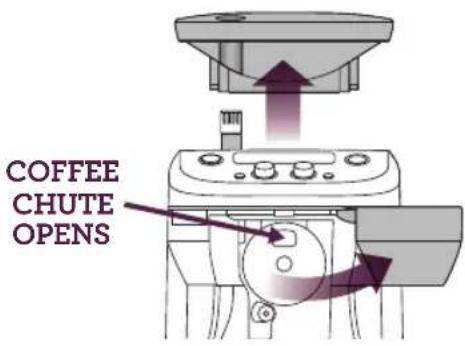
text_image
COFFEE CHUTE OPENS- Remove the plug from the power outlet.
- Remove any beans that remain in the grinding chamber and around the upper burr.
CARE & CLEANING
- Remove the upper burr by turning the handle clockwise.
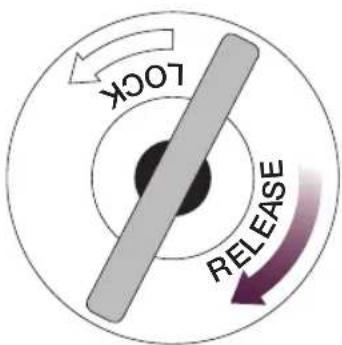
text_image
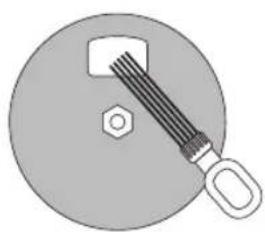
LOCK RELEASE- Using the provided cleaning brush, thoroughly remove any build-up of coffee grinds that have formed around the grinding burrs and coffee grinds chute. Ensure the grinds catcher is in place to catch the loose grinds.
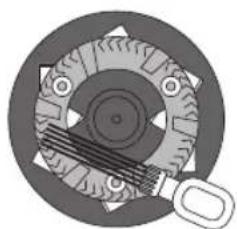
natural_image
Mechanical gear assembly diagram showing meshing gears and a handle (no text or labels)CLEAN THE GRINDING BURRS
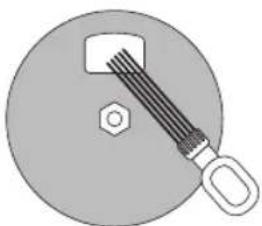
natural_image
Simple diagram of a bolt and nut on a circular surface (no text or symbols)CLEAN THE COFFEE GRINDS CHUTE
-
Wipe the coffee grinds chute disc (the entire stainless steel part) to remove any build-up of coffee grinds that have accumulated on the surface. Dry thoroughly.
-
Replace the upper burr by aligning the arrow on the upper burr with the 'ALIGN' mark in the grinding chamber. The upper burr should sit flush. Turn the handle counterclockwise until it clicks into position.
-
Replace the bean hopper and lock into position.
- Replace the coffee basket onto the swing-out door and close. The coffee grinds chute will rotate back to the closed position. You may hear a winding noise, this is normal.
- The LCD screen will no longer display 'CLEAN COFFEE CHUTE'. The machine is now ready to use.
CLEANING THE GRINDS CATCHER AND DRIP TRAY
Press the OPEN button to open the swing-out door. Remove the grinds catcher located under the coffee grinds chute and the 2-part drip tray at the base of the machine. Wash in warm, soapy water. Do not use abrasive cleansers, pads or cloths which can scratch the surface. Rinse and dry thoroughly.
CLEANING THE OUTER HOUSING
The outer housing and LCD screen can be cleaned with a soft, damp cloth. Apply cleanser to the cloth and not the LCD surface. Polish with a soft, dry cloth. Cleaning and drying with dry paper towels or abrasive cloths and cleaners may scratch the surface.
CARE & CLEANING
REMOVING CALCIUM BUILD-UP
Your coffee machine may experience build-up from calcium and minerals contained in your water. This 'scale' or mineral build-up will affect the machine's performance and coffee quality. It is critical that scale build-up be removed. How often you de-scale will depend on the hardness of your water and the frequency of use. For best results, Breville recommends de-scaling once per month in soft water environments and more frequently in hard water environments.
If there is an excessive mineral build-up, the Descale function "dESC" will scroll across the screen.
dESC
Follow the step-by-step instructions below. Allow approximately 30-40 minutes to complete the entire descale process.
1. Empty the Water Tank
- Press the CUP |CARAFE button and rotate Dial to select water volume as indicated in the water tank.
- Rotate the STRENGTH Dial to select PRE-GROUND setting. However do not add any coffee to the coffee basket.
- Ensure the carafe is empty and the lid is securely locked. Place the carafe into the position under the drip stop outlet.
- Press the START | CANCEL button.
- Once the cycle is complete, discard the water from the carafe. The water tank is now empty.
2. De-Scale the Machine
- Pour approximately 20oz of white vinegar into the water tank until the LCD screen displays '4 CUPS'. Then pour cold, preferably filtered water into the water tank until the LCD screen displays '12 CUPS'. There are now 4 cups of white vinegar and 8 cups of cold water in the water tank.
- Place the carafe into position under the drip stop outlet (Ensure the carafe is empty and the lid is securely locked).
- Press and hold the STRENGTH button for 5 seconds to begin the descaling process.
NOTE
You cannot stop the descaling process mid cycle. Force stop by unplugging the cord from the power outlet.
- When the descaling process is finished, the LCD screen will display READY.
READY
- Discard the water from the carafe and rinse thoroughly.
- Press MENU|EXIT to return to the main screen.
3. Rinse the Machine
- Fill water tank with cold (preferably filtered water) until the LCD screen displays '12 CUPS'.
- Rotate the CUP|CARAFE Dial to select 12 Cups.
CARE & CLEANING
- Rotate the STRENGTH Dial to select PRE-GROUND setting. However do not add any coffee to the coffee basket.
- Place the carafe into position under the drip stop outlet (Ensure the carafe is empty and the lid is securely locked).
- Press the START | CANCEL button.
- Once the cycle is complete, discard the water from the carafe.
- Repeat step 3. again or until the vinegar is gone. The machine is now ready to use.
TIP
You may choose to use a household de-scaling agent instead of vinegar and water. Look for one that is designed for use with drip coffee machine and follow the manufacturer's instructions promptly.
TROUBLESHOOTING
| PROBLEM POSSIBLE | CAUSES WHAT TO DO | |
| ‘LOCK BEAN HOPPER’ on LCD screen | Hopper not locked in place. | Turn the locking knob clockwise in the direction of the LOCK arrow until it clicks. |
| Unable to lock bean hopper | Coffee beans obstructing bean hopper locking device. | Remove bean hopper. Clear coffee beans from the grinding chamber and around the upper burr. Try re-locking the bean hopper. |
| ‘FILL TANK’ on LCD screen | Water tank is empty or not enough water to brew your selected volume. | Press open the flip-top water tank lid. Pour the desired amount of cold, preferably filter water. |
| ‘EMPTY COFFEE FILTER’ on LCD screen | Coffee basket not in place or not correctly assembled. | Check that the coffee basket lid is closed and the coffee basket is firmly seated on the two door hooks. |
| Swing-out door not closed properly. | Close the door until it clicks shut. | |
| Coffee basket not emptied of used grinds. | Remove the coffee basket and discard used grinds. Wash the coffee basket, taking particular care to rinse the chute area. Dry thoroughly (especially the chute area). Attach to the swing-out door. Close the door until it clicks shut. | |
| Grinder starts but operates with a loud noise. No coffee in the coffee basket. | Grinder is blocked with a foreign item. | Check the bean hopper for any foreign body. If there is none, refer to ‘Cleaning the Grinding Burrs and Coffee Grinds Chute’, page 23. |
| Moisture clogging grinder. | Clean and thoroughly dry the grinding burrs and coffee grinds chute. Refer to Cleaning the Grinding Burrs and Coffee Grinds Chute’, page 23. It is possible to use a hair dryer to blow air into the grinding chamber and dry the lower burr. Only re-commence use when the grinding chamber and grinding burrs are completely dry. |
TROUBLESHOOTING
| PROBLEM POSSIBLE | CAUSES WHAT TO DO | |
| Coffee grinds in coffee. | Using the gold tone filter. | The gold tone filter will allow some fine coffee grinds to fall into the coffee. This will appear as sediment in the cup or carafe. This is normal. Switch to using a paper filter (8-12 cup, flat base basket style with ~ 3 14 "/8.25cm base) if you wish to eliminate all grinds. |
| Coffee basket has not been properly cleaned. Residual grinds from previous use. | After each use, wash the coffee basket, taking particular care to rinse the chute area. Dry thoroughly (especially the chute area). Ensure there are no grinds in the coffee basket before lining the coffee basket with the gold tone or paper filter. | |
| Coffee basket overflows. | The coffee basket is clogged due to a number of reasons. | · If using pre-ground coffee, ensure it is a drip coffee grind and not too fine. Never use Espresso grind. · Check that the coffee basket is lined with only one paper filter. · Check that either the gold tone filter or the paper filter is used. Do not use both together. · Check that the gold tone filter mesh is clear and unclogged. · Clean the coffee grinds chute. Refer to ‘Cleaning the Grinding Burrs and Coffee Grinds Chute’, page 23. · Grinder is set too fine, adjust coarser. |
| Incorrect basket used. · Only use the gold tone filter provided as others may cause the machine to overflow. | ||
TROUBLESHOOTING
| PROBLEM POSSIBLE | CAUSES WHAT TO DO | |
| Safety Interlock System is preventing operation. ('EMPTY COFFEE FILTER' keeps flashing on the LCD screen). | The coffee basket is not in place.Swing-out door is not closed. | · Firmly seat the basket onto the two door hooks.· Close the door until it clicks shut. |
| I cannot select a certain carafe amount | The minimum carafe amount is 2 cups, while the maximum is the number of cups of water in the tank, up to 12 cups. | Press open the flip-top water tank lid. Pour the desired amount of cold, preferably filter water. |
| Coffee basket drips | Coffee basket has not been properly cleaned.Residual grinds from previous use. | After each use, wash the coffee basket, taking particular care to rinse the chute area. Dry thoroughly (especially the chute area). Ensure there are no grinds in the coffee basket before lining the coffee basket with the gold tone or paper filter. |
| Carafe overflows | Carafe was not completely empty before brewing. | Always ensure the carafe is completely empty before brewing. |
| Machine takes a long time to brew | The Grind ControlTM System will intelligently pre-heat and dose grinds for optimum temperature and taste. This may result in longer grinding, pre-heating and brewing times than what you are normally used to. |
TROUBLESHOOTING
| PROBLEM POSSIBLE | CAUSES WHAT TO DO | |
| Machine uses a lot of coffee | The Grind ControlTM System has been calibrated to dose the optimum water to coffee grinds ratio to achieve the best flavor profile. Depending on the strength setting selected, this may result in more coffee being ground than what you are normally used to. However the result will be a bolder, more full-flavored coffee. | If you would like to use less coffee beans, select a lower strength setting. |
| My cup does not fit under the drip stop outlet. | The maximum cup or travel mug dimensions are 7.5" height, 23⁄4" diameter. | Remove the drip tray at the base of the machine. Press the OPEN button to open the swing-out door. Insert the cup/mug into the drip tray cavity before closing the swing-out door. |
TROUBLESHOOTING
| PROBLEM POSSIBLE | CAUSES WHAT TO DO | |
| Amount brewed is too little / too much | There is excessive mineral build-up affecting the performance of the machine. | De-scale the machine. Refer to ‘Removing Calcium Build-Up’, page 25. |
| The volume calibrations need to be reset. | Recalibrate the machine by flushing it twice. Refer to ‘Using the Grind ControlTM - Carafe Mode. First Time Use Only’, page 12. | |
| The water tank was filled once the coffee machine had already started a brewing cycle. | Always fill the water tank before starting a brewing cycle. | |
| The programmed brew size are approximate only. Actual amounts may vary due to the type of filter used, the coffee bean size, roast, blend and freshness, or amount and type of pre-ground coffee used. These factors affect the amount of water retained by the coffee grounds. | ||
| ‘DE-SCALE’ on LCD screen | There is excessive mineral build-up affecting the performance of the machine. | Remove the ‘DE-SCALE’ icon by press and hold the Strength button for 5 seconds, then de-scale the machine. Refer to ‘Removing Calcium Build-Up’, page 25. |
| I want to empty the water tank | Select water amount indicated on the LCDSelect Pre-ground settingEnsure the Carafe is in placePress Start/CancelDiscard the water when finished |
TROUBLESHOOTING
| PROBLEM POSSIBLE | CAUSES WHAT TO DO | |
| Water is leaking from the back of the machine | Water tank is overfilled. Do not exceed the 12 cup maximum.The machine will beep when full and the water level float will rise to indicate the maximum level. | |
| Brewing cycle finishes before the ready signal | If using the gold tone filter, this is normal.The total brewing time displayed on the LCD screen is calculated using paper filters as coffee passes through paper filters slower. | |
| Steam when grinding and brewing | This is normal.It is the rear steam vent releasing steam. | |
| Total brewing time on LCD screen changes mid-cycle or is different each time | The total brewing time displayed at the start of the cycle is an estimate only and may change mid-cycle or vary each time depending on the starting temperature of the water in the water tank. | |
| ‘CLEAN COFFEE CHUTE’ on LCD screen | Grinding burrs and coffee grinds chute need to be cleaned. We recommend doing this immediately to avoid clogging and overflowing of the coffee basket. | · Thoroughly clean the coffee basket and gold tone filter to ensure they are clear and unclogged of any coffee grinds.· Check the bean hopper for any foreign body.· Refer to ‘Cleaning the Grinding Burrs and Coffee Grinds Chute’, page 23. |
TROUBLESHOOTING
| PROBLEM POSSIBLE | CAUSES WHAT TO DO | |
| Machine beeps and displays ‘1’ on the LCD screen | There is an issue with the coffee grinds chute disc. | Check the coffee grinds chute disc for any build-up of coffee grinds. This is the stainless steel disc that is visible when the swing-out door is opened. A build-up of grinds on this disc can affect the performance of the machine. Wipe the disc clean then dry thoroughly. If the problem persists, call Breville Consumer Service. |
| Machine beeps 20 times in fast succession and ‘2’ is displayed on the LCD screen | Call Breville Consumer Service. |


FÉLICITATIONS
VUE D'ENSEMBLE DU PRODUIT
natural_image
Diagram of a mechanical device with two purple arrows indicating downward motion (no text or symbols)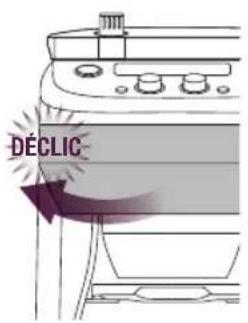
text_image
DÉCLICFONCTONNEMENT DE VOTRE PRODUIT BREVILLE
UTILISER LE GRIND CONTROL ^MC - MODE CARAFE
natural_image
Simple line drawing of a container with an upward arrow inside, no text or symbols present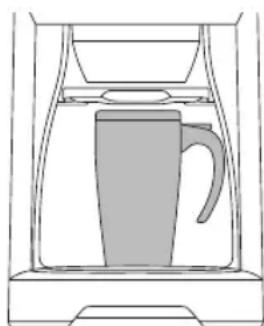
natural_image
Line drawing of a coffee maker with a handle inside a container (no text or symbols)RETIRER LE PLATEAU, OUVRIR LA PORTE, INSÉRER LA TASSE, REFERMER LA PORTE.
FONCTONNEMENT DE VOTRE PRODUIT BREVILLE
natural_image
Mechanical gear assembly diagram showing meshing gears and a handle (no text or labels)NETTOYER LES MEULES
natural_image
Simple diagram of a bolt and nut on a circular surface (no text or symbols)NETTOYER LA GOUL.OTTE