The Oracle Jet BES985 - Coffee machine BREVILLE - Free user manual and instructions
Find the device manual for free The Oracle Jet BES985 BREVILLE in PDF.


| Brand | Breville |
| Model | The Oracle Jet BES985 |
| Product type | Espresso machine with built-in grinder |
| Power supply | 120 V ~ 60 Hz |
| Power | 1780 W |
| Bean hopper capacity | 340 g |
| Grinder type | Hardened steel conical burrs |
| Heating system | ThermoJet |
| Temperature control | PID (electronic regulation) |
| Brew head | 58 mm, heated |
| Steam wand | Auto MilQ™ with temperature sensor |
| Display | 5-inch color touchscreen |
| Water filter | Replaceable, 3-month lifespan |
| Special features | Barista guide, cold brew, automatic queue |
| Warranty | 2-year limited |
Frequently Asked Questions - The Oracle Jet BES985 BREVILLE
User questions about The Oracle Jet BES985 BREVILLE
0 question about this device. Answer the ones you know or ask your own.
Ask a new question about this device
Download the instructions for your Coffee machine in PDF format for free! Find your manual The Oracle Jet BES985 - BREVILLE and take your electronic device back in hand. On this page are published all the documents necessary for the use of your device. The Oracle Jet BES985 by BREVILLE.
USER MANUAL The Oracle Jet BES985 BREVILLE
Instruction Book - BES985
natural_image
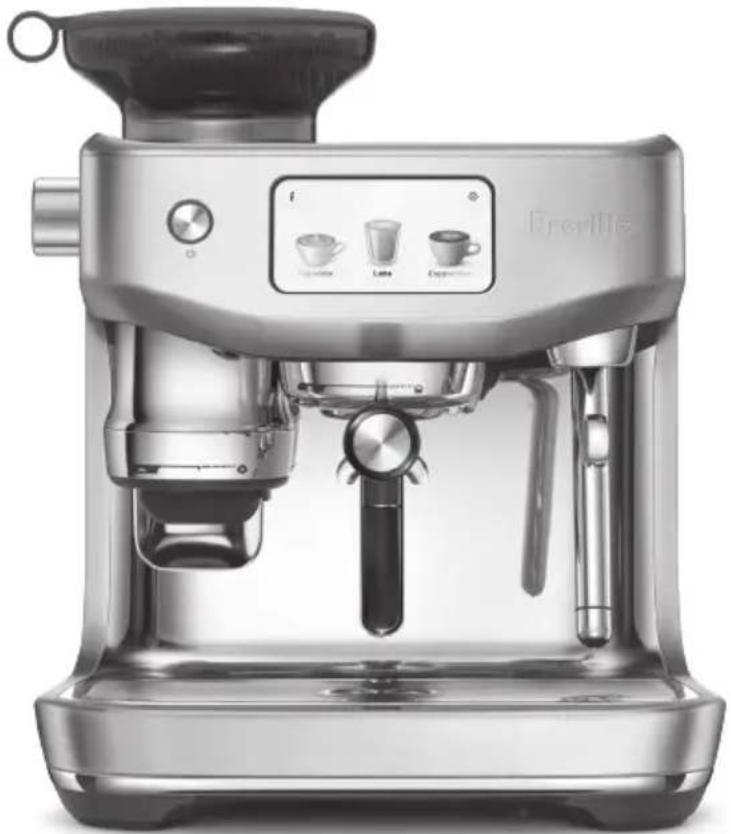
Exterior view of a modern Boville espresso machine (no text or symbols visible on the device body)EN
INSTRUCTION BOOK
FR-CA
MANUEL D'INSTRUCTIONS
ES-MX
2 Limited Product Warranty
2 Breville® Recommends Safety First
7 Components
8 Accessories
9 Features
10 Assembly
12 Care & Cleaning
15 Troubleshooting
LIMITED PRODUCT WARRANTY
2 YEAR LIMITED
Breville's warranty for this product covers the repair or replacement if it's found to be defective due to faulty materials, workmanship, or function within the warranty period.
All legal warranty rights under applicable national legislation will be respected and will not be impaired by our warranty. For details on length of warranty, to obtain a printed copy or to read full terms and conditions please scan the QR code or visit
QR149
www.breville.com. Alternatively, call the Breville Service Center (see back cover for contact details).
BREVILLE® RECOMMENDS SAFETY FIRST
At Breville® we are very safety conscious. We design and manufacture appliances with your safety foremost in mind. We also ask that you exercise a degree of care when using any electrical appliance and adhere to the following precautions.
IMPORTANT SAFEGUARDS

READ ALL INSTRUCTIONS BEFORE USE AND SAVE FOR FUTURE REFERENCE
- Remove and discard any packaging materials safely before use.
- Ensure the product is properly assembled before use and fully unwind the power cord before operating.
- Before using, please ensure that your electricity supply is the same as shown on the rating label on the underside of the appliance. If you have any concerns, please contact your local electricity company.
- The installation of a residual current safety switch is recommended to provide additional safety when using all electrical appliances.
Safety switches with a rated operating current not more than 30mA are recommended. Consult an electrician for professional advice.
- Regularly inspect the power cord, plug and appliance for any damage. If found to be damaged in any way, immediately cease use of the appliance, and return the entire appliance to the nearest authorized Breville Service Center for examination, replacement, or repair.
- Do not let the power cord hang over the edge of a counter or table. Do not let the power cord touch hot surfaces or become knotted.
- To unplug, grasp the plug and pull from the outlet. Never pull from the power cord.
- Do not touch hot surfaces. Always ensure the appliance has been allowed to cool; if the appliance is to be: left unattended, cleaned, moved, assembled, or stored, always switch off the espresso machine by pressing the POWER button to OFF, and unplug from the power outlet.
- Close supervision is necessary when any appliance is used by or near children. Children must be supervised to ensure that they do not play with the appliance.
- Do not leave the appliance unattended when in use.
Do not move the appliance while in operation.
- The appliance is not intended for use by persons (including children) with reduced physical, sensory or mental capabilities, or lack of experience and knowledge, unless they have been given supervision or instruction concerning use of the appliance by a person responsible for their safety. Cleaning and user maintenance shall not be made by children. Keep the appliance and its cord out of reach of children.
• To eliminate a choking hazard for young children, discard the protective cover fitted to the power plug safely. - Position the appliance on a stable, heat resistant, level, dry and clean surface away from the counter edge, and do not operate on or near a heat source such as a heated oven, a hot gas or electric burner.
- Do not operate the appliance in an enclosed space, or inside a cupboard.
- Do not use attachments other than those provided with the appliances. The use of attachments not sold or recommended by Breville may cause fire, electric shock, or injury.
- This appliance is for household use only. Do not use the appliance for anything other than its intended purpose.
Do not use in moving vehicles or boats. Do not use outdoors. Misuse may cause injury.
- Improper use of the appliance, incorrectly operated or unprofessionally repaired will void any warranty claim.
- The appliance is not intended to be operated by means of an external timer or separate remote-control system.
- Use caution when operating machine as metal surfaces are liable to get hot during use. Heating element is subject to residual heat after use.
- Do not open the programming port, this is exclusively for authorized service personnel only.
- Do not operate the grinder without the hopper lid in position. Keep fingers, hands, hair, clothing, and utensils away from the hopper during operation.
- Ensure the portafilter is firmly inserted and secured into the group head before starting an extraction. Never remove the portafilter during the extraction process. Failure to follow this instruction may lead to scalding by hot steam or hot coffee.
- Do not fill the water tank or front top fill with hot water or milk.
- Do not use the appliance without water in the water tank.
- Use caution after milk texturing, as the ‘Auto Purge’ function
may purge hot steam when steam wand is lowered.
- Wipe the outer surface with a soft dry cloth. Keep the appliance and accessories clean.
- Keep the appliance and accessories clean. Follow the cleaning instructions provided in this book. Servicing other than cleaning should be performed at an authorized Breville Service Center.
- Any alcohol based cocktail drinks are intended for use solely by the responsible adults of legal drinking age in their respective country and /or state and/ or province. Please use the recipes wisely and responsibly.

CAUTION
To prevent damage to the appliance, do not use alkaline cleaning agents. Use a clean soft cloth instead.

WARNING
To avoid the risk of injury, do not open the brew chamber during the brew process.
NOTICE TO CUSTOMERS REGARDING MEMORY STORAGE
Please note that in order to better serve our customers, internal memory storage has been embedded into your
appliance. This memory storage consists of a small chip to collect certain information about your appliance including the frequency of use of the appliance and the manner in which your appliance is being used. In the event your appliance is returned for service, the information collected from the chip enables us to quickly and efficiently service your appliance. The information collected also serves as a valuable resource in developing future appliances to better serve the needs of our consumers. The chip does not collect any information regarding the individuals who use the product or the household where the product is used. If you have any questions regarding the memory storage chip please contact us at privacy@breville.com
SPECIFIC INSTRUCTIONS FOR WATER FILTER
- Filter cartridge should be kept out of reach of children.
- Store filter cartridges in a dry place in the original packaging.
- Protect cartridges from heat and direct sunlight.
- Do not use damaged filter cartridges.
- Do not open filter cartridges.
- If you are absent for a prolonged period of time, empty the water tank and replace the cartridge.
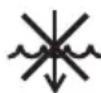
To protect against fire or electric shock, do not immerse the power cord, or plug or appliance in water by other liquid.
SHORT CORD INSTRUCTIONS
Your Breville appliance is fitted with a short power cord to reduce personal injury or property damage resulting from pulling, tripping or becoming entangled with a longer cord. Longer detachable power cords or extension cords are available and may be used if care is exercised. If an extension cord is used, (1) the marked electrical rating of the cord set or extension cord should be at least as great as the electrical rating of the appliance, (2) the cord should be arranged so that it will not drape over the counter-top or table where it can be pulled on by children or tripped over unintentionally and (3) the extension cord must include a 3-prong grounding plug.
FOR HOUSEHOLD USE ONLY SAVE THESE INSTRUCTIONS
WARNING
• INGESTION HAZARD: This product contains a button cell or coin battery.
- DEATH or serious injury can occur if ingested.
- A swallowed button cell or coin battery can cause Internal Chemical Burns in as little as 2 hours.
- KEEP new and used batteries OUT OF REACH of CHILDREN.
- Seek immediate medical attention if a battery is suspected to be swallowed or inserted inside any part of the body.

The battery included in this product is not user replaceable. Consumer shall never attempt to replace the battery. Compatible battery type is: CR2450. Nominal battery voltage is: +3.0V.
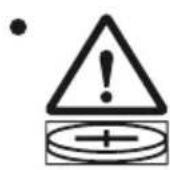
The logo on the product marking warns that this product contains a coin battery.
• Non-rechargeable batteries are not to be recharged.
- If you suspect someone or a child has ingested a coin battery, immediately call a local poison control center for treatment information.
• Even used batteries may cause severe injury or death.
- For service centers: If you ever need to service the coin battery in the product, remove and immediately recycle or dispose of used batteries according to local regulations and keep away from children. DO NOT dispose of batteries in household trash or incinerate.
- DO NOT force discharge, recharge, disassemble, heat above 140 °F (60 °C) or incinerate. Doing so may result in injury due to venting, leakage or explosion resulting in chemical burns.

COMPONENTS
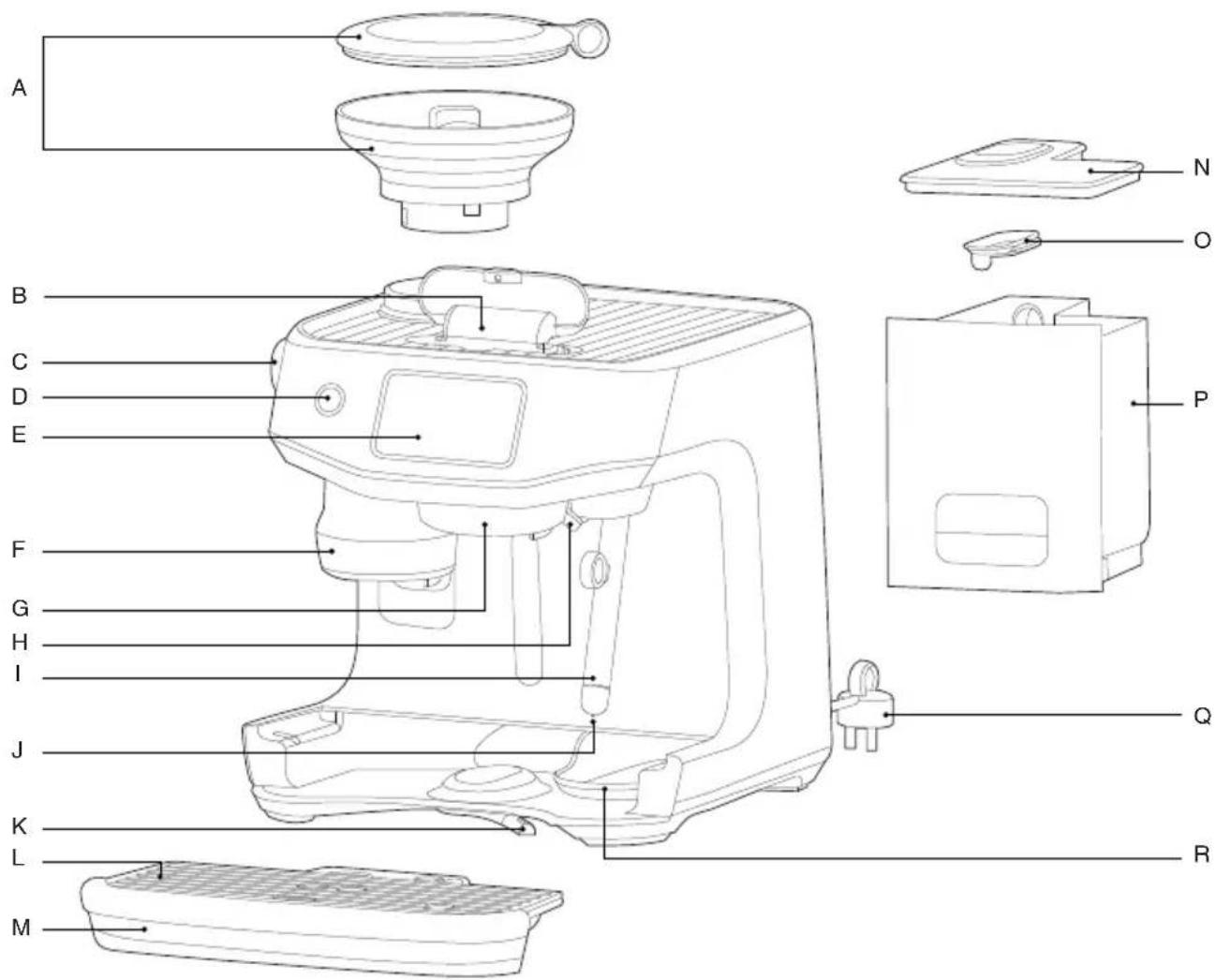
A. 340g bean hopper
B. Front top water fill
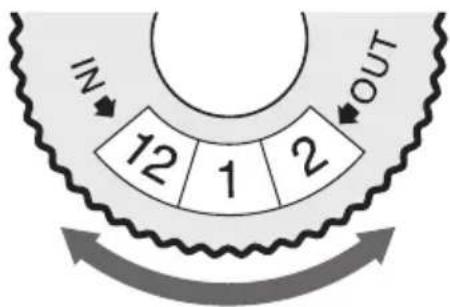
C. Grind size adjustment dial
D. Power button
E. 5 inch HD touch screen
F. Grind and tamp outlet
G. Heated 58mm group head
H. Dedicated hot water outlet
I. Auto MilQ™ steam wand
J. Milk temperature sensor
K. Front lever 3rd wheel
L. Drip tray grill
M. Drip tray
N. Water tank lid
O. Water tank mesh lid
P. Water tank
Q. Power cord with storage
R. Hidden tool storage tray
Rating Information
120 V \~ 60 Hz 1 780 W
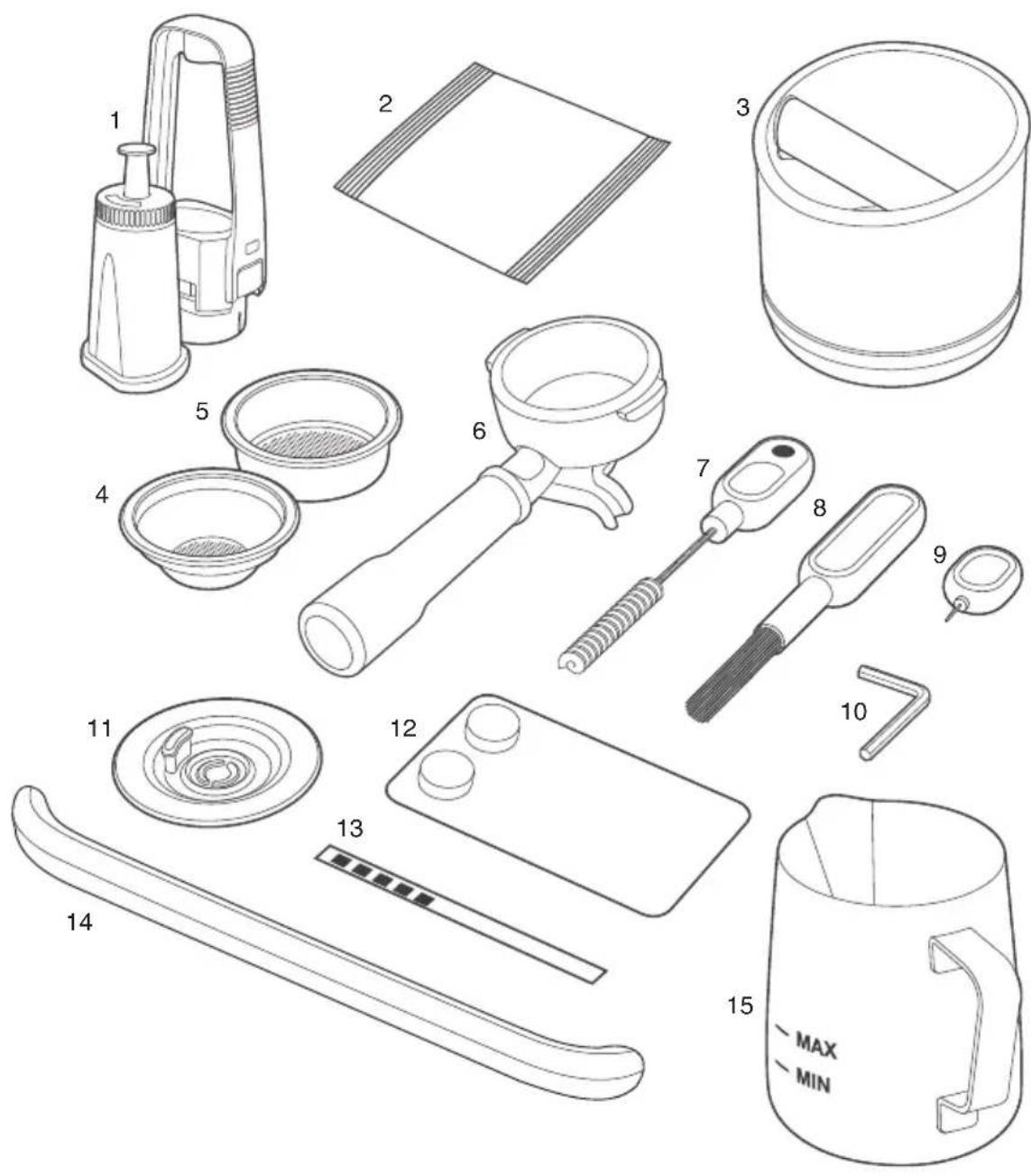
- Water filter and filter holder
- Descaling Powder
- Knock Box ^TM 10
- Single wall 1 cup filter basket
- Single wall 2 cup filter basket*
- 58 mm Stainless Steel Portafilter
- Grind outlet brush and tamp removal magnet
- Cleaning brush
-
Cleaning tool for steam wand tip
-
Hex Key
- Cleaning disc
- Cleaning tablets
- Water hardness strip
- Drip tray guard (included with machines in color only)
- Stainless steel milk jug
* Single wall 2 cup filter basket comes installed in the portafilter

FEATURES
THERMOJET HEATING SYSTEM
The state-of-the-art heating system is our fastest and most efficient heating system. Ready to go in seconds.
THERMOJET HEATED GROUP HEAD
Ensuring a stable and optimised extraction that meets professional level specifications. The heated group head can be customised in +/- 1 degree fahrenheit increments to suit your taste.
AUTO GRIND DOSE & TAMP
Fully-integrated hardened precision conical burr grinder automatically grinds, doses and tamps 22 grams of coffee straight into the 58mm professional style portafilter.
AUTO MILQ™
Silky smooth microfoam with settings for dairy, soy, almond and oat. Adjustable temperatures 113 °F (45°C) to 167 °F (75°C) and 8 texture levels.
BARISTA GUIDANCE
By automatically detecting an over or under extracted espresso shot, Barista Guidance helps you adjust the grind size to achieve a more ideal pour.
A dynamic screen that is 4 times richer and 20 times more powerful than before. You can swipe, select and enjoy in high definition.
COLD COFFEE
Cold Brew
Brewing at lower temperatures reduces acidic flavor notes that heat retains. This creates a smooth and mellow flavor profile that can be enjoyed on its own or form the base for your cold brew experiments!
Cold Espresso
Extract at lower temperature produces a full flavored crema topped espresso without the heavy tones. The cold espresso feature keeps the classic flavor while being softer and lighter in body.
AUTO QUEUE
Auto queue is a feature that allows to sequence the next function during selected milk based drinks:
- Brew coffee first and queue milk texturing.
- Texture milk first and queue coffee brewing.
PID TEMPERATURE CONTROL
Electronic temperature control delivers precise water temperature for optimum espresso flavor.
DEDICATED HOT WATERSPOUT
Dedicated hot water outlet for making americanos, teas, and pre-heating cups.
DOUBLE TAP
Double tap on the grind, brew or steam icons to automatically purge the system ready for your brew.

ASSEMBLY
BEFORE FIRST USE
Machine Preparation
Remove and discard all labels and packaging materials attached to your espresso machine.
Ensure you have removed all parts and accessories from the box before discarding the packaging.
Remove the water tank located at the back of the machine unlocking the latch and pulling the water tank from the latch handle.
Clean parts and accessories (water tank, portafilter, filter baskets, milk jug) using warm water and a gentle dish washing liquid. Rinse well then dry thoroughly.

NOTE
Machines with color, drip tray protection guard is included. DO NOT DISCARD.
INSTALLING THE WATER FILTER
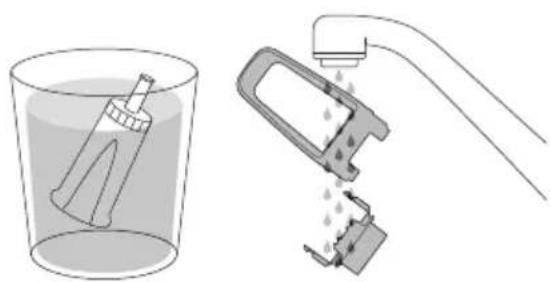
- Remove the water filter and water filter holder from the plastic bag.
- Soak the filter in cold water for 5 minutes.
- Rinse the filter holder with cold water.
natural_image
Illustration of a hand washing a tool into a beaker and a mechanical device with liquid, no text or symbols present.- Set a reminder for replacement. We recommend to replace filter every 3 months.
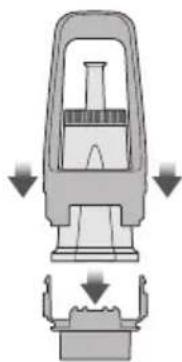
- Insert the filter into the two parts of the filter holder.
- To install the assembled filter holder into the water tank, align the base of the filter holder with the adapter inside the water tank. Push down to lock into place.
natural_image
Diagram of a mechanical device with downward arrows indicating force or movement (no text or symbols)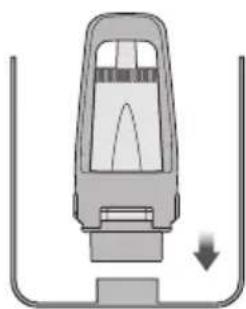
natural_image
Diagram of a car interior with a downward arrow indicating motion or force (no text or symbols)
NOTE
Replacing the water filter every three months will reduce the need to descale the machine. Filters can be purchased at www.breville.com

NOTE
Input the water hardness test strip result to the machine. If result is 4 or 5 bars when tested, we strongly recommend to change to an alternate water source. Filtered water will extend both the life of your built-in filter and descale intervals as well as provide superior taste. Ensure to test the water hardness of the alternative water source you've chosen and input into the machine accordingly. Avoid using overly filtered water, like RO water unless some mineral content is being added back to the final water. Never use distilled water, or water with no or low mineral content as this will affect the taste of coffee.

GUIDE AND SETTINGS
GUIDES
Startup Tutorial - Take you through the startup tutorial on how to make a coffee with the machine.
QR code links - Provides QR code links to areas such as Support, Machine Registration and Maintenance Products.
Understanding your Oracle Jet - Describes the key components of your coffee machine.
SETTINGS
Drink Settings
Barista Guidance - Switch on for grind size recommendations during your extractions.
Brew control settings - Switch between time or volumetric based brew output.
Temperature settings - Adjust the brew temperature.
Maintenance
Clean steam wand - Guides you through cleaning the steam wand to remove any blockage for better steaming performance.
Clean group head - Cleans the group head of oils and residue. Will require an Espresso cleaning tablet or powder.
Descal - Descaling prevents excess mineral and scale build-up. Will require descaling powder or solution.
Change water filter - To ensure machine has clean water to use.
Water hardness test - Configures the water hardness your machine is using. You will need an unused test strip.
Machine Settings
Theme - Switch between light or dark mode.
Sound - Adjusts the volume of the interface.
Screen brightness - Adjusts the brightness of the screen.
Light brightness - Adjust the brightness of the LED lights.
Units - Switch between imperial and metric units.
Country and Language - Select your region and preferred language on screen.
Time and Date - Set the time and date on the machine.
Wi-Fi - Connect to Wi-Fi to receive the latest software updates.
Demo mode - Looping video to to showcase key features of the machine.
About the machine - Shows the serial number and firmware version of the machine.
Reset factory settings - Use this function to reset all programmable values back to the factory settings and delete all custom drinks.

WARNING
Do not unplug the machine while it is performing this function.

CARE & CLEANING
Excess dirt and grime can get in the crevices of your touch screen impairing its functionality. Keep the touch screen dry and clean to ensure optimal functionality. Use a screen cleaning wipe or a dry soft cloth.
CLEANING CYCLE
There will be a message prompt when a cleaning cycle is required.
This is a backflushing cycle and is separate from descaling. There is also the option to start the cleaning cycle by choosing ‘Clean Cycle’ in ‘Settings’. The cleaning cycle cleans the shower screen and back-flushes the group head to remove the build up of coffee and oils.
Follow the instruction on the screen.
DESCALING
There will be a message prompt when a descale cycle is required.
Even with the provided water filter, it is recommended to descale if there is scale buildup in the water tank.
There is also the option to start the descale cycle by choosing 'Descale Cycle' in the 'Settings'.
Follow the instruction on the screen.
CLEANING THE STEAM WAND
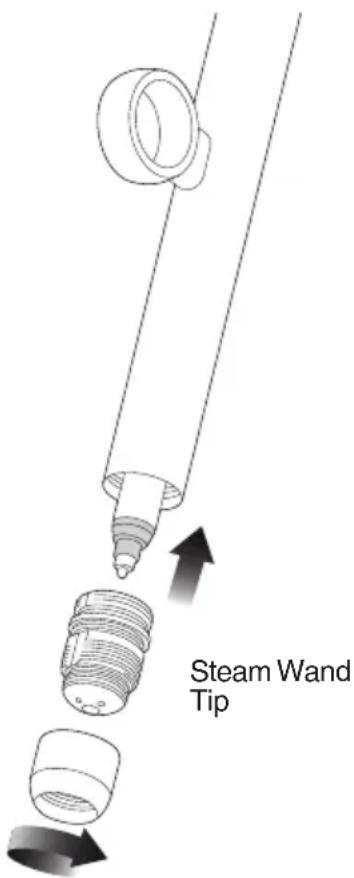
- The steam wand should always be cleaned after texturing milk. Wipe the steam wand with a damp cloth.
- If any of the holes in the tip of the steam wand become blocked, it may reduce frothing performance.
- Go to 'Settings' > 'Steam wand cleaning' and follow the guide on the screen.

NOTE
Ensure the steam wand tip is tightly fastened after cleaning.
CLEANING THE FILTER BASKET AND PORTAFILTER
- The filter basket and portafilter should be rinsed under hot water after each coffee making session to remove all residual coffee oils.
- If the holes in the filter basket become blocked, dissolve a cleaning tablet in hot water and soak filter basket and portafilter in solution for approx. 20 minutes. Rinse thoroughly.
CLEAR WATER BACKFLUSH
- After each coffee making session we recommend doing a clear water backflush before you turn off the machine. Empty drip tray. Insert the cleaning disc into the filter basket then insert the portafilter into the group head. Touch the brew icon button and allow pressure to build for 20 seconds, then tap the glass image to stop & release pressure.
- The group head interior and shower screen should be wiped with a damp cloth to remove any ground coffee particles.
- Periodically purge the machine. Place an empty filter basket and portafilter into the group head. Tap the brew icon on the screen and run a short flow of water to rinse out any residual coffee.
CLEANING THE DRIP TRAY & STORAGE TRAY
- The drip tray should be removed, emptied and cleaned at regular intervals, particularly when the drip tray is full.
- Remove the grill from the drip tray. Lift the coffee grind separator and dispose of any coffee grounds. Wash all parts in warm soapy water with a soft cloth. Rinse and dry thoroughly.
- The storage tray (located behind the drip tray) can be removed and cleaned with a soft, damp cloth. Do not use abrasive cleansers, pads or cloths which can scratch the surface.
CLEANING THE OUTER HOUSING
The outer housing can be cleaned with a soft, damp cloth. Polish with a soft, dry cloth. Do not use abrasive cleansers, pads or cloths which can scratch the surface.

NOTE
All parts should be cleaned by hand using warm water and a gentle dish washing liquid. Do not use abrasive cleansers, pads or cloths which can scratch the surface. Do not clean any of the parts or accessories in the dishwasher.
CLEANING CONICAL BURRS
Regular cleaning helps the burrs achieve consistent grinding results which is especially important when grinding for espresso.
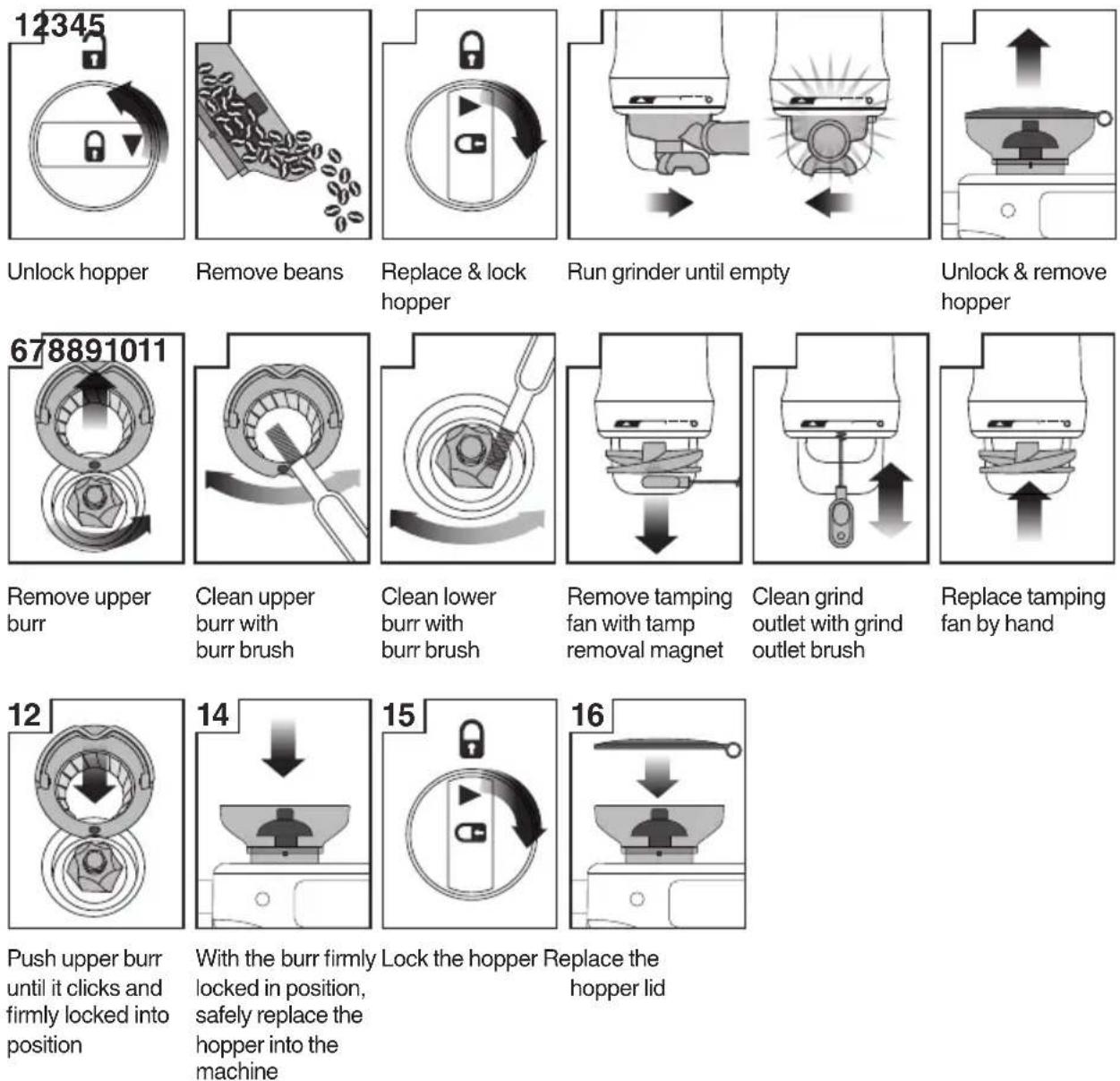

NOTE
This machine is designed only for whole roasted coffee beans. Avoid grinding unroasted green and under-roasted coffee beans. These are dense and not brittle enough to run through a burr grinder. This will damage or break burr grinders and even pose a safety risk.

TIP
It is recommend to use quality 100% Arabica beans with a 'Roasted On' date stamped on the bag, not a 'Best Before' or 'Use By' date. Coffee beans are best consumed between 5–20 days
after the 'Roasted On' date. Stale coffee may pour too quickly from the portafilter spouts and taste bitter and watery.

ADJUSTING TAMPING HEIGHT FROM THE GRIND COLLAR
Turn off and disconnect the machine from the power source. To adjust the tamping height, use the hex key provided. Pull the tamping fan down from the grind collar, and then pull down on the fan coupling inside the grind collar to remove it. Adjust the length of the coupling by loosening the fastener with the hex key and rotating the coupling to the desired length.

TROUBLESHOOTING
CONNECTING YOUR ORACLE JET
The Oracle Jet is a Wi-Fi-enabled machine that will support downloading the latest software version. If the machine is not connected to a Wi-Fi, the machine can still be operated in the same way as an espresso machine with no network connection.

NOTE
We are constantly working to improve the software that may lead to changes in functionality and setup steps. Please rely on the instructions in the latest version by upgrading the software to guide you through the setup process.
PROBLEM POSSIBLE CAUSE WHAT TO DO
| Grinder Motor starts but no ground coffee coming from grind outlet | No coffee beans in bean hopper.Grinder/bean hopper is blocked.Coffee bean may have become stuck in hopper. | Fill bean hopper with fresh coffee beans.Remove bean hopper. Inspect bean hopper & grinding burrs for blockage. Replace parts and try again. |
| Grinder Motor starts but operates with a loud ‘clicking’ noise | Grinder is blocked with foreign item or chute is blocked.Moisture clogging grinder. | Remove bean hopper, inspect burrs and remove any foreign objects.Clean the burrs and grind outlet.Leave burrs to dry thoroughly before re-assembling. It is possible to use a hair dryer to blow air into the burr area to quicken the drying process. |
| Grinder motor over heating | Switch off and unplug from the power outlet and rest the machine for 5 minutes. | |
| Unable to lock bean hopper into position | Coffee beans obstructing bean hopper locking device. | Remove bean hopper.Clear coffee beans from top of burrs.Re-lock bean hopper into position. |
| Portafilter overfills • Tamping fan was removed for cleaning and not replaced. | Check that the tamping fan is properly assembled, in position, and mounted correctly to the drive shaft. | |
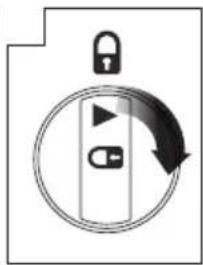
| Grinder Emergency stop | Rotate the portafilter to the left to stop the auto grind, dose & tamp function.Unplug power cord from power outlet. | |
| Grinder running continuously | No beans in hopper. Fill hopper with beans.Tamping fan has been removed. | Rotate the portafilter to the left to stop the auto grind, dose & tamp function.Check that the tamping fan is in position and mounted correctly to the drive shaft. |
PROBLEM POSSIBLE CAUSE WHAT TO DO
| Coffee is grinding very coarse, even at low grind settings and/or cannot put the burr back in place | • Upper burr many not be aligned and not inserted properly. | • Move the grind dial to a coarse setting (i.e. 45), this will make it easier to twist it counter clockwise to remove the upper burr holder. Clean grinds from both the upper and lower burrs. Ensure the dots on the upper burr are aligned before aligning it back to the dot on the lower burr by twisting it clockwise. Move the grind dial back to the original setting. |
| Espresso runs out around the edge of the portafilter | • Portafilter not inserted in the group head correctly. | • Ensure portafilter is rotated to the right until the handle is past the center and is securely locked in place. Rotating past the center will not damage the silicone seal. |
| and/or | • There are coffee grounds around the filter basket rim. | • Clean excess coffee from the rim of the filter basket after grinding to ensure a proper seal in group head. |
| Portafilter comes out of the group head during an extraction | • Filter basket rim is wet or underside of portafilter lugs are wet. Wet surfaces reduce the friction required to hold the portafilter in place whilst under pressure during an extraction. | • Always ensure filter basket and portafilter are dried thoroughly before filling with coffee, tamping and inserting into the group head. |
| Pumps continue to operate / Steam is very wet / Hot water outlet leaks | • Using highly filtered, demineralised or distilled water which is affecting how the machine is designed to function. | • We recommend using cold, filtered water. We do not recommend using water with no/low mineral content such as highly filtered, demineralised or distilled water. If the problem persists, contact Breville Consumer Support. |
| Water does not flow from the group head | • Water tank is empty. | • Fill tank. Prime the system by:1) Touching the ‘Brew’ button to run water through the group head for 30 seconds.2) Touching ‘Hot Water’ to run water through the hot water outlet for 30 seconds. |
| • Water tank not fully inserted & locked. | • Push water tank in fully and lock latch closed. | |
| • Over heated water pump due to back-to-back extraction. | • Switch off the machine and unplug from the power outlet and let the machine cool down. | |
| The machine is ‘On’ but won’t operate | • Switch off the machine, unplug from the power outlet, then plug the machine to the power outlet and turn the machine back on.• If problem persists, call Breville Consumer Support. |
PROBLEM POSSIBLE CAUSE WHAT TO DO
| Espresso only drips from the portafilter spouts, restricted flow | · Coffee is ground too finely. | · Adjust the grind size to a higher number to make the grind size slightly coarser.· You may have a blockage in scale. Please run the descale process. |
| Espresso flows out too quickly | · The coffee is ground too coarsely.· Coffee beans are stale. | · Adjust the grind size to a lower number to make the grind size slightly finer.· Use freshly roasted coffee beans with a ‘Roasted On’ date and consume between 5–20 days after that date. |
| No crema | · Coffee beans are stale. | · Use freshly roasted coffee beans with a ‘Roasted On’ date and consume between 5–20 days after that date. |
| Not enough milk texture | · Steam wand is blocked. · Refer to ‘Cleaning the Steam Wand’. · There may be a blockage due to scale build up. Please run the descale process. | |
| I cannot connect my machine to the Wi-Fi | · Wrong password entered for the SSID.· Check the router proximity, signal strength might be weak. | · Unplug and plug the machine into the powerpoint.· Retry entering Wi-Fi credentials again.· Install the router closer to the appliance for stronger signal strength. |
| It is taking a long time to connect to the cloud and taking a long time to initialize | · Router proximity issue. · Unplug and plug the machine into the powerpoint.· Reboot the router.· Retry entering the Wi-Fi credentials again.· If problem persists, call Breville Consumer Support. | |
| It is taking a long time to download the software update | · Wi-Fi signal strength is weak. | · Restart the coffee machine.· Move the Wi-Fi router closer to the coffee machine. |
| Software is downloaded but not installing | · Machine requires a reboot. | · Unplug and plug the machine into the powerpoint.· Perform a factory reset· If problem persists, call Breville Consumer Support. |
PROBLEM POSSIBLE CAUSE WHAT TO DO
| No Wi-Fi available• NO signal coverage, mobile phone or Wi-Fi router available. | • Connect your coffee machine to your mobile phone hot spot.• Connect your coffee machine to your Wi-Fi router (if available).NOTE: For optimal performance, it is highly recommended to have the machine connected to Wi-Fi for regular software updates.• It is possible to use the machine without Wi-Fi. If the software version persists on connecting to Wi-Fi, follow these steps on the connection screen:- Enter the "Select your network".- Select Other if there is no internet.- Click the arrow button to skip the Network selection.- Click the arrow button to skip the Password entry.- A "Connecting" error is likely to occur.Select Try again and repeat above steps. After the second failed attempt, click Update later to skip Wi-Fi setup. |
QR CODE LINKS
Extraction Guide
https://scan.breville.com/bes985/extraction
Clean Steam Wand
https://scan.breville.com/bes985/cleansteamwand
Tutorial
https://scan.breville.com/bes985/tutorials
Descale
https://scan.breville.com/bes985/descale
Texture Milk
https://scan.breville.com/bes985/descale

NOTES
the Oracle™ Jet
natural_image
Exterior view of a modern Boville espresso machine (no text or symbols visible on the device body)FR-CA MANUEL D'INSTRUCTIONS
Breville®

TABLE DES MATIÈRES
QR149
INSTRUCTIONS RELATIVES AU CORDON COURT
Electronic temperature control delivers precise water temperature for optimum espresso flavor.
DEDICATED HOT WATERSPOUT
Dedicated hot water outlet for making americanos, teas, and pre-heating cups.
RÉGULATEUR THERMIQUE PID
natural_image
Illustration of a hand washing a tooth into a beaker and a tool holder (no text or symbols)natural_image
Diagram of a mechanical device with downward arrows indicating force or movement (no text or symbols)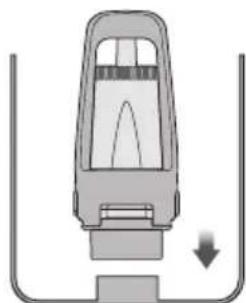
natural_image
Diagram of a vehicle head with a downward arrow indicating motion or force (no text or symbols)
REMARQUE
PROBLÈME CAUSES POSSIBLES CE QU'IL FAUT FAIRE
PROBLÈME CAUSES POSSIBLES CE QU'IL FAUT FAIRE
PROBLÈME CAUSES POSSIBLES CE QU'IL FAUT FAIRE
PROBLÈME CAUSES POSSIBLES CE QU'IL FAUT FAIRE
Guide d'extraction
https://scan.breville.com/bes985/extraction
https://scan.breville.com/bes985/cleansteamwand
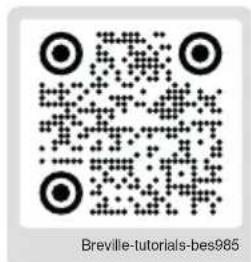
Tutoriel
https://scan.breville.com/bes985/tutorials
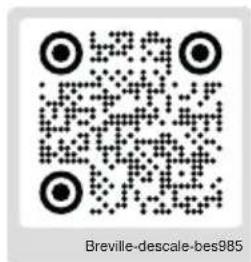
Détartrage
https://scan.breville.com/bes985/descale
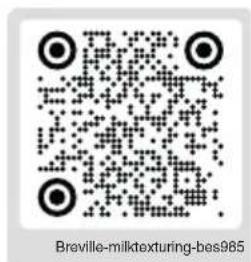
https://scan.breville.com/bes985/descale

REMARQUE
the Oracle™ Jet
natural_image
Exterior view of a modern Boville espresso machine (no text or symbols visible on the device body)ES-MX
QR149
natural_image
Illustration of a hand washing a water bottle into a beaker and a hand washing a cleaning tool (no text or symbols)natural_image
Diagram of a mechanical device with downward arrows indicating force or movement (no text or symbols)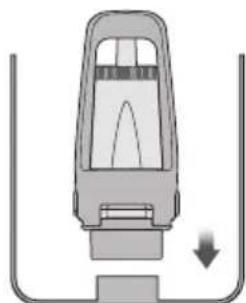
natural_image
Diagram of a vehicle head with a downward arrow indicating motion or force (no text or symbols)
NOTA
natural_image
Illustration of a conveyor belt filled with small round objects, emitting particles (no text or symbols)Retire los granos.
natural_image
Icon showing a lock and two pad keys inside a circular frame with an arrow indicating rotation (no text or symbols)natural_image
Diagram showing two mechanical components with arrows indicating motion or force direction (no text or symbols)natural_image
Diagram of a cooking pot with an upward arrow indicating motion (no text or symbols)natural_image
Mechanical assembly diagram showing two circular components with internal mechanisms and directional arrows (no text or symbols)natural_image
Mechanical component diagram showing a gear-like assembly with a tool inserted (no text or symbols)natural_image
Cross-sectional diagram of a mechanical component with concentric grooves and a tool inserted (no text or symbols)natural_image
Diagram of a mechanical component with a downward arrow indicating force or direction (no text or symbols)natural_image
Diagram of a hand holding a device with an upward arrow indicating motion (no text or symbols)natural_image
Pure diagram of a mechanical component with no text, numbers, or symbolsnatural_image
Mechanical assembly diagram showing a bearing and gear components (no text or labels)natural_image
Diagram showing a mechanical component with a downward arrow and label '14' (no readable text or symbols)natural_image
Diagram of a mechanical device with a lever and base component, no text or symbols presentReemplace la tapa de la tolva

NOTA
Guía de extracción
https://scan.breville.com/bes985/extraction
https://scan.breville.com/bes985/cleansteamwand
Tutorial
https://scan.breville.com/bes985/tutorials
Descalcificación
https://scan.breville.com/bes985/descale
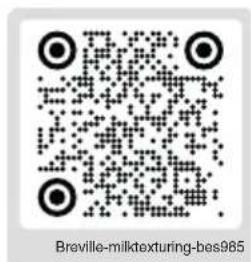
https://scan.breville.com/bes985/descale
Breville Service Center
USA Mail: Breville USA
19400 S. Western Ave, Torrance CA
90501-1119
Phone: 1-866-273-8455
1-866-BREVILLE
Web: breville.com/us/support
Canada Mail: Breville Canada
300 Town Centre Blvd,
Suite 201, Markham,
Ontario, L3R 5Z6, Canada
Phone: 1-855-683-3535
Web: breville.ca/support
Breville is a registered trademark of Breville Pty. Ltd. A.B.N. 98 000 092 928.
Copyright Breville Pty. Ltd. 2024.
- Due to continued product improvement, the products illustrated/photographed in this brochure may vary slightly from the actual product.