USER MANUAL the Luxe Brewer Thermal BDC465 BREVILLE
Instruction Book - BDC415 & BDC465
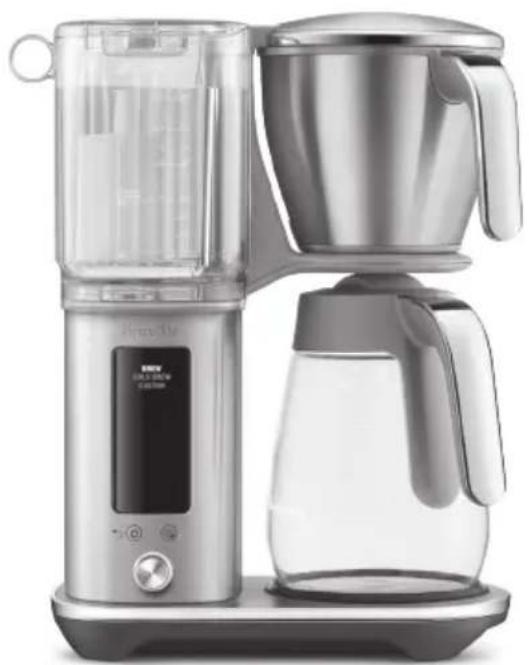
natural_image
Modern digital coffee maker with clear glass and digital display, no visible text or symbols on the device itself.
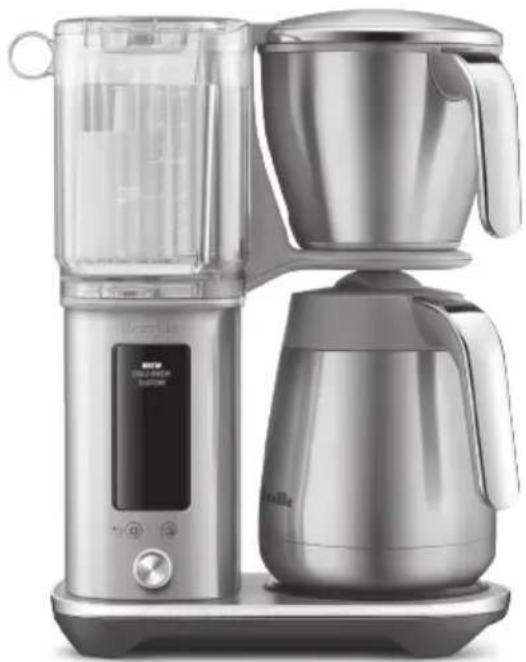
natural_image
Modern kitchen water heater with digital display and side-mounted kettle (no visible text or symbols)
BDC465BDC415
EN
INSTRUCTION BOOK
FR-CA
MANUEL D'INSTRUCTIONS
ES-MX
2 Limited product warranty
2 Breville® recommends safety first
7 Components
9 Features
9 Assembly
11 Operation
15 Settings
17 Tips
19 Care & Cleaning
21 Troubleshooting

LimitedProduct Warranty
Breville's warranty for this product covers the repair or replacement if it's found to be defective due to faulty materials, workmanship, or function within the warranty period. All legal warranty rights under applicable national legislation will be respected and will not be impaired by our warranty. For details on length of warranty, to obtain a printed copy or to read full terms

QR149
and conditions please
scan the QR code or visit
www.breville.com.
Alternatively, call the
Breville Service Center
(see back cover for
contact details).
BREVILLE® RECOMMENDS SAFETY FIRST
At Breville we are very safety conscious. We design and manufacture consumer products with the safety of you, our valued customer, foremost in mind. In addition we ask that you exercise a degree of care when using any electrical appliance and adhere to the following precautions.
IMPORTANT SAFEGUARDS

Read all instructions before use and save for future reference.
- Remove and safely discard any packaging material, plastic power plug cover, and any removable labels before using appliance.
- Ensure the product is properly assembled before use and fully unwind the power cord before operating.
-
If the appliance is to be left unattended, cleaned, moved, assembled or stored, unplug the unit from the power outlet.
• Always operate the appliance on a stable and heat resistant surface.
-
Do not place the appliance on or near a hot gas burner, electric burner or where it could touch a heated oven.
- Ensure the unit has at least 4 inches (10cm) of clearance from all side panels.
- Do not operate any appliance with a damaged cord or plug, or after the appliance malfunctioned, or has been damaged in any manner. Return the appliance to the nearest authorized service facility for examination, repair, or adjustment.
- The use of accessory attachments not recommended by the appliance manufacturer may result in fire, electric shock, or injury to persons.
- Do not operate the appliance without water in the water tank. Use only cold, preferably filtered water. Do not fill the appliance with any other liquids for brewing operations.

CAUTION
• We recommend using cold, filtered water. We do not recommend the use of de-mineralized or distilled or RO (Reverse Osmosis) water as this may affect the taste of brewed coffee.
-
Ensure the supplied mesh basket filter or a paper filter (8-12 cup, flat base basket style with 3^1/4 /8.25cm base) is placed in the coffee basket before using the appliance. Do not use the mesh basket filter in conjunction with a paper filter.
• Before starting a brew cycle:
-
Check that the carafe drip stop moves up and down freely.
- Completely empty the carafe and securely lock the carafe lid in place.
- Insert and seat the carafe under the drip stop.
- Ensure the filter basket is empty and properly fit in place.
- During a brew cycle:
- Do not remove the carafe or remove the filter basket while the unit is in a brew cycle. Failure to follow the above may lead to scalding or serious injury.
- Some surfaces may be hot, use caution when touching or lifting the unit or accessories.
- Use only carafe handle when lifting the carafe.
- The carafe is designed for use with this appliance only. It must never be used on a range top or in a microwave.
- Scalding may occur if the carafe lid or basket is removed during the brewing cycle.

CAUTION
- Risk of injury. Proper installation or removal of basket is required to reduce the risk of splashing of hot water.
• Always ensure the carafe lid is securely locked in place onto the carafe before pouring.
- Do not touch hot surfaces. Use handles or knobs.
- Do not use a cracked container or a container having a loose or weakened handle.
• Always wait until the machine has cooled before removing the brew basket.
- Do not set a hot carafe on a wet, cold or heat sensitive surface.
- Unplug from outlet when not in use and before cleaning. Allow to cool before putting on or taking off parts, and before cleaning the appliance.
- Proper installation of filter basket, shower-head seal and shower-head locking ring is required to reduce the risk of splashing of hot water.

CAUTION
• To prevent damage to the appliance do not use alkaline cleaning agents when cleaning, use a soft cloth and a mild detergent.
- Do not clean the container with cleansers.
- Do not use harsh or abrasive materials when cleaning any part of this appliance such as steel wool or scoring pads.
- The heating element surface is subject to residual heat after use.
• The appliance shall not be placed in a cabinet when in use.
- Improper use of the appliance, incorrectly operated, or unprofessionally repaired will void any warranty.
- Servicing other than cleaning should be performed by an authorized service representative or at an authorized Breville Service Center.
IMPORTANT SAFEGUARDS FOR ALL ELECTRICAL APPLIANCES
- Do not let the power cord hang over the edge of a counter or table. Do not let the power cord touch hot surfaces or become knotted.
• Children should be supervised to ensure they do not play with the appliance.
- Close supervision is necessary when the appliance is used by or near children.
- This appliance is not intended for use by persons (including children) with reduced physical, sensory or mental capabilities, or lack of experience and knowledge, unless they have been given supervision or instruction concerning use of the appliance by a person responsible for their safety.
- This appliance can be used by children aged from 8 years and above if they have been given supervision or instruction concerning use of the appliance in a safe way and if they understand the hazards involved. Cleaning and user maintenance shall not be made by children unless they are older than 8 and supervised. Keep the appliance and its cord
out of reach of children aged less than 8 years.
- This appliance is recommended for household use only. Do not use this appliance for anything other than its intended use. Do not use in moving vehicles or boats. Do not use outdoors.
SHORT CORD INSTRUCTIONS
Your Breville appliance is fitted with a short power cord to reduce the risk of personal injury or property damage resulting from pulling, tripping or becoming entangled with a longer cord. Longer detachable power cords or extension cords are available and may be used if care is exercised. If an extension cord is used, (1) the marked electrical rating of the cord set or extension cord should be at least as great as the electrical rating of the appliance, (2) the cord should be arranged so that it will not drape over the countertop or table where it can be pulled on by children or tripped over unintentionally and (3) the extension cord must include a 3-prong grounding plug.
It is recommended to regularly inspect the appliance. Do not use the appliance if the power supply cord, power plug, or appliance becomes damaged
in anyway. Immediately stop using the unit and call Breville Consumer Support.

NOTE
This appliance has a three wire grounded plug. To reduce the risk of electric shock, this plug will fit in a polarized outlet only one way. If the plug does not fit properly into the outlet, contact a qualified electrician. Do not use an adaptor or modify the plug in any way. Do not connect the appliance to an external switch or device (such as a timer, monitor or remote circuit) that can be switched on and off.
- The appliance is not intended to be operated by means of an external timer or separate remote-control system.
To protect against fire,
electric shock and injury to persons, do not immerse the power cord, power plug, or the appliance in water or any other liquid.
BREVILLE ASSIST® PLUG
Your Breville appliance comes with a unique Assist® Plug, conveniently designed with a finger hole to ease removal from the power outlet.
CALIFORNIA PROPOSITION 65:
(Applicable to California residents only).
This product contains chemicals known to the State of California to cause cancer, birth defects or other reproductive harm.
FOR HOUSEHOLD USE ONLY SAVE THESE INSTRUCTIONS
Components
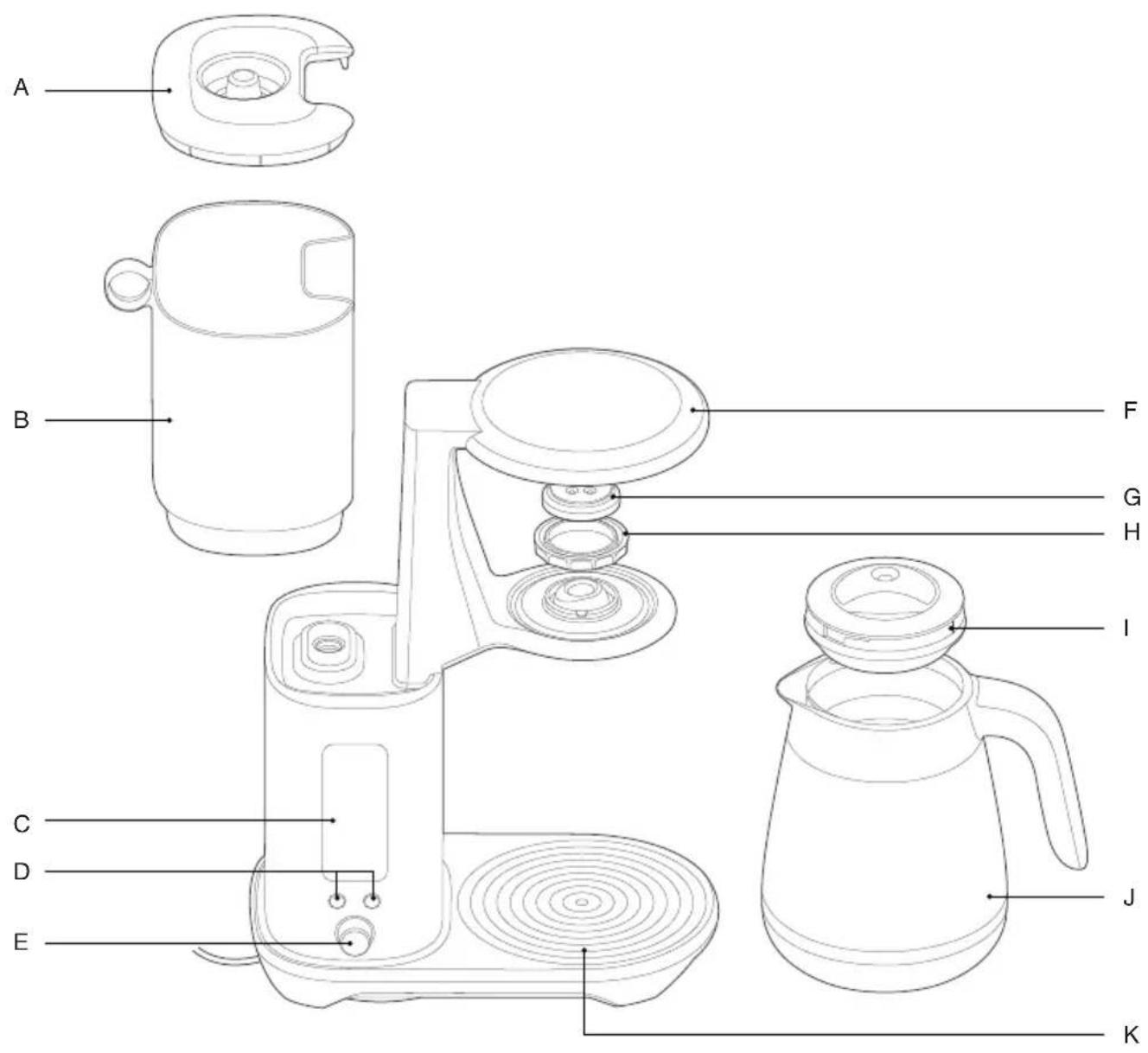
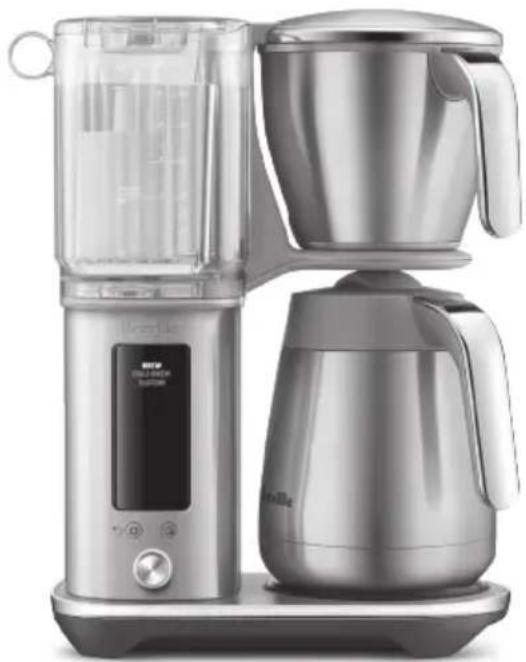
A. Water tank lid
B. Water tank
C. LCD display
D. ⚙️ Settings button
Delayed Auto Start button
E. SELECT dial
F. Showerhead
G. Showerhead screen
H. Showerhead ring
I. Carafe lid
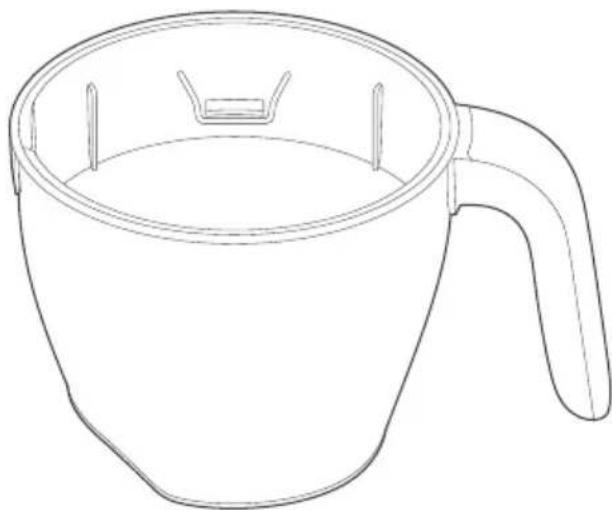
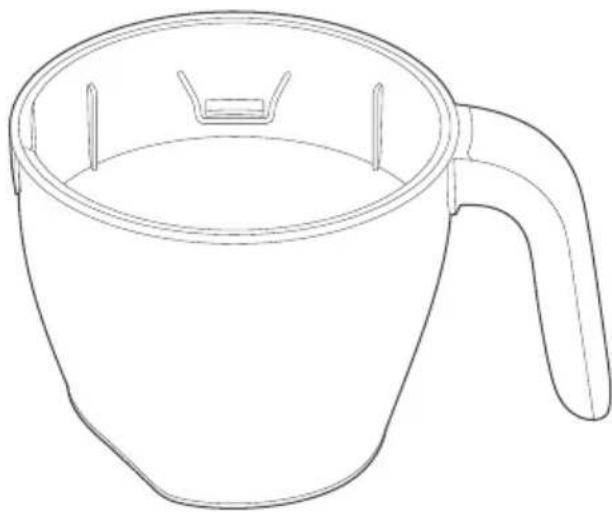
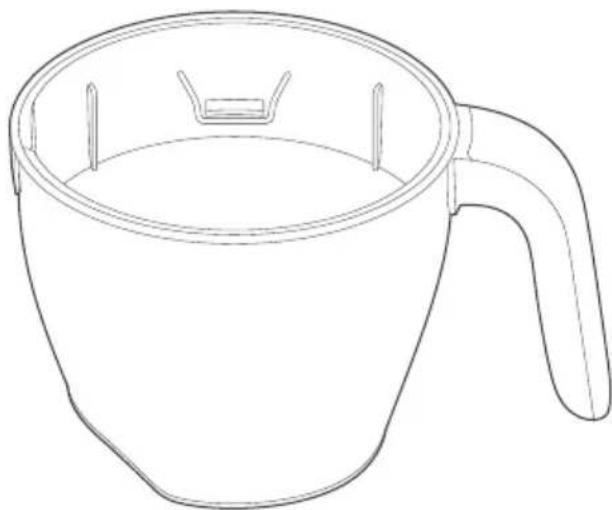
J. Carafe
K. Hot plate (BDC415 only)
BDC465 = 120 V \~ 60 Hz 1 650 W
BDC415 = 120 V \~ 60 Hz 1 700 W

Accessories
1
natural_image
Line drawing of a conical funnel with internal blades and a central handle (no text or symbols)
4

natural_image
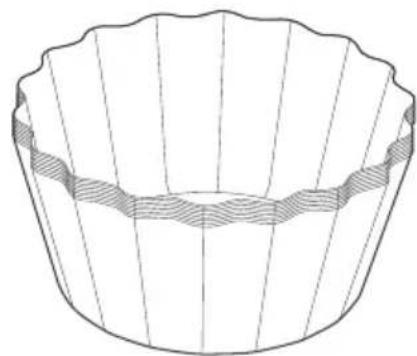
Line drawing of a cupcake with scalloped edges and a shaded band underneath (no text or symbols)
5
natural_image
Simple line drawing of a rectangular bar with five black square cutouts on one end (no text or symbols)
2
natural_image
Line drawing of a circular basin or pot with three legs and central side dividers (no text or symbols)
6
natural_image
Line drawing of a spoon with a circular handle (no text or symbols)
3
natural_image
Line drawing of a cup with handle and side slots (no text or symbols)
7
natural_image
Line drawing of a conical spray bottle with a pointed tip and flange (no text or symbols)
natural_image
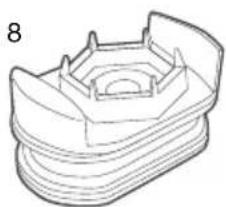
Line drawing of a 3D mechanical part with layered structure (no text or symbols)
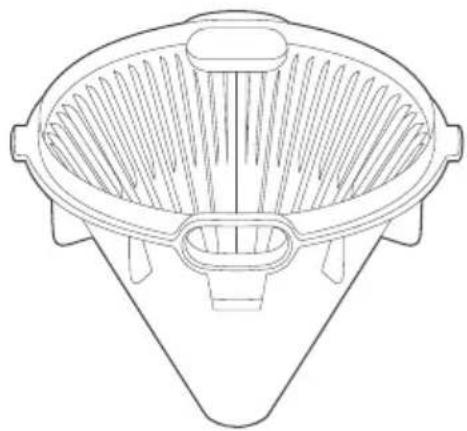
- Cone filter basket insert
- Mesh basket filter
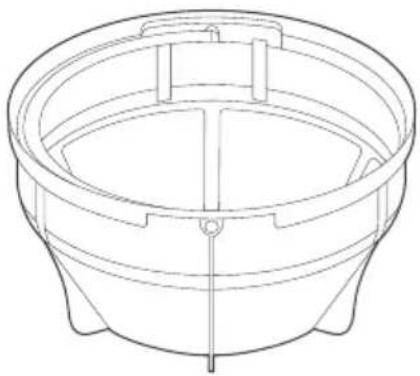
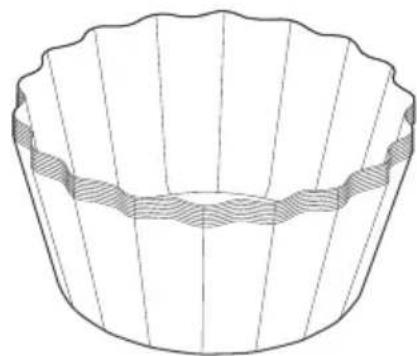
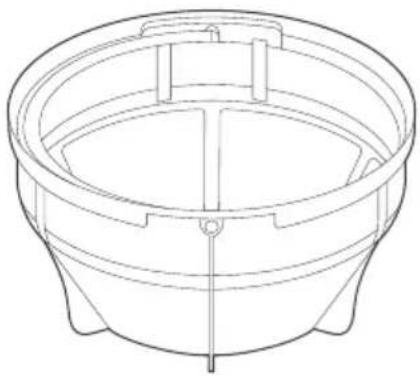
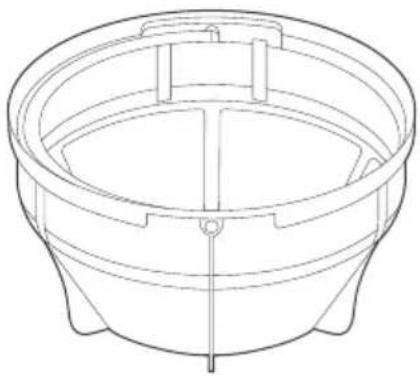
- Brew basket
-
Flat bottom basket filter paper pack (10 pieces)
-
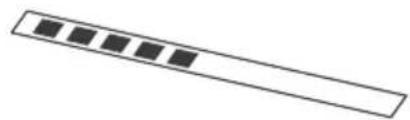
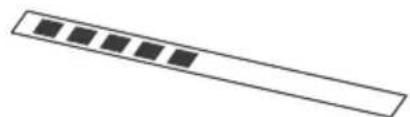
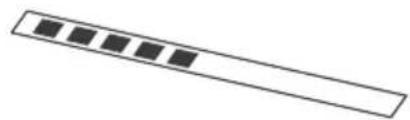
Water hardness strip
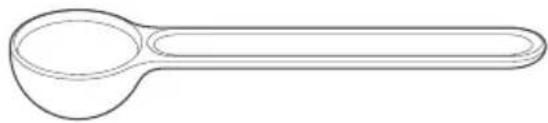
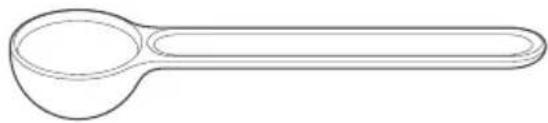
- Coffee measuring scoop
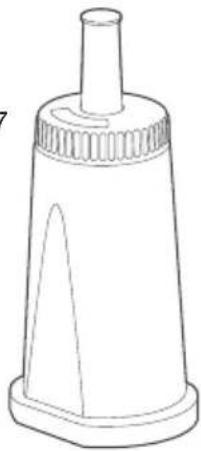
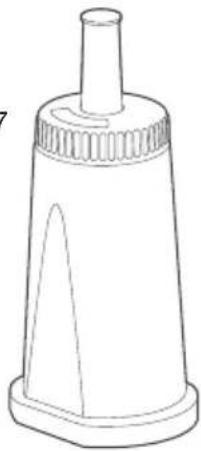
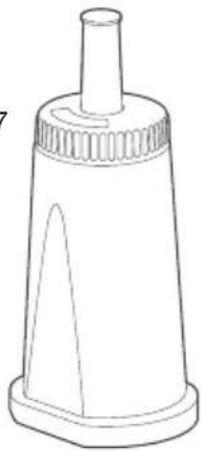
- Water filter
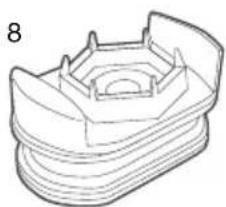
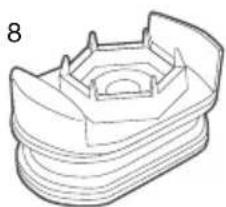
- Water filter adapter
Features
This Brewer has been designed to make any style of coffee of the highest quality.
BREW
Brew up to 12 cups (1.8L) rapidly as the brewer delivers water from the tank. For a bolder brew, increase the amount of ground coffee used.
COLD BREW
Brew up to 8 cups (1.2 ml) of cold brew coffee with the flexibility to adjust steeping time between 0-24 hours.
KEEP WARM
(only applicable for BDC415)
After brewing, the machine will keep the coffee warm.
CUSTOM
Brew up to 12 cups (1.8L) with precise control over brew, water temperature, bloom volume, bloom time, and water delivery speed.

DELAYED AUTO START
Set the machine to automatically start brewing at a preset time.

FILTER CHANGE
Changing the water filter depends on the water hardness that the machine is using. For water hardness level 1, it is recommended to change the filter after 160 cycles.

DESCALE
After regular use, hard water can cause mineral buildup in internal components, leading to reduced brewing flow, brew temperature, machine power, and coffee taste. It is recommended to descale regularly.

CLOCK
Adjust the clock time after turning on the machine.

SOUND
Once a setting is selected, the machine will beep to confirm the changes. Adjust the volume between LOW, Med, HIGH, and OFF.
Assembly
BEFORE FIRST USE

NOTE
Hot brew coffee is made by using hot water to ground coffee beans. Water temperature is important in the brewing process as it affects the rate of extraction. Extraction refers to the flavours and substances dissolved from the ground coffee. The hotter the water, the quicker it is to extract compounds, such as oil, acids, and caffeine.
Remove and discard all labels and packaging materials attached to the machine. Make sure to remove all parts and accessories from the box before discarding the packaging.
Take a soft cloth and firmly wipe the exterior stainless steel housing. Wash the lid, brew basket, cone filter basket insert, mesh basket filter, and carafe in warm, soapy water. Avoid using abrasive cleansers, pads, or cloths that can scratch the surface. Rinse and dry everything thoroughly. Lastly, firmly press the carafe drip stop to ensure it moves up and down freely.
WATER HARDNESS SETTING & FLUSHING
-
Ensure that the empty coffee basket and empty carafe (with assembled lid) are inserted into the machine.
-
Fill the water tank with fresh cold water up to the Carafe Max mark. Plug the machine into the power outlet.
-
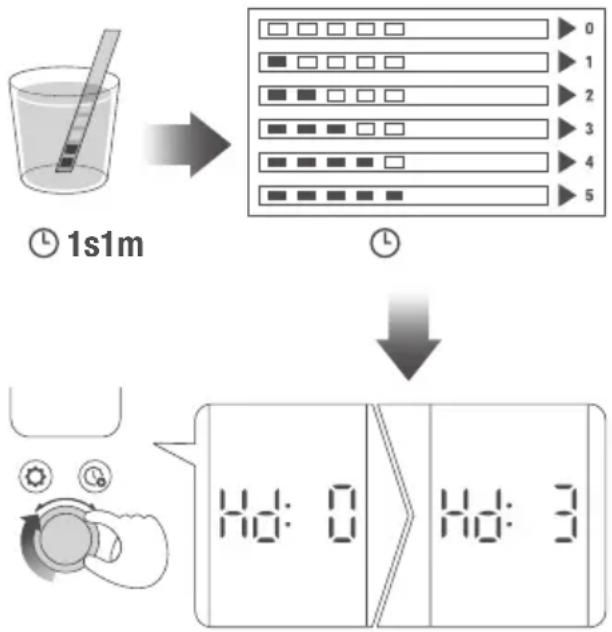
Upon turning on the machine, the display will show 'SET HARDNESS.' Dip the water hardness test strip into a cup of the same water from the tank for 1 second. Wait for one minute to determine the water hardness level. Rotate the SELECT dial to choose the water hardness level based on the number of bars shown on the strip, then press the dial. The machine will beep to confirm the changes.

NOTE
If the result on the strip shows 4 or 5 bars, switch to a different water source. Using filtered water will prolong the life of the water filter, extend descaling intervals, and improve the taste. Be sure to test the water hardness of the alternative water source and adjust the machine settings accordingly.
flowchart
graph TD
    A["1s1m"] --> B["Reading Screen"]
    B --> C["Reading Table with Numbers 0-5"]
    C --> D["Digital Display Generation"]
    D --> E["Display: 1s1m, 0, 1, 2, 3, 4, 5"]
- The machine will display 2:00 min. Press the dial once and the machine will instantaneously run a flush cycle. The machine will dispense all the water from the tank, through the system, and into the empty carafe. After flushing, the machine will beep once. Empty the basket and carafe.
SETTING THE TIME AND TEMPERATURE UNITS
After the flushing cycle, the machine will beep 3 times and the LCD will display the Time setting. The hour will blink first for setting. Use the SELECT dial to set the hour and press the dial to save the changes. Set the minutes by using the SELECT dial and press the dial to save the changes. Next, the LCD will display the temperature unit for setting. Use the SELECT dial to choose the temperature unit and press the dial to save the changes. The machine will beep once and display the brew modes, indicating that it's ready for brewing.
HEATING PLATE (applies only to BDC415)
After brewing, the heating plate will turn on to keep the coffee hot. The heater plate duration can be adjusted in the settings.

CAUTION
DO NOT touch the heating plate when in use, as it is very hot.

Operation
BREWING USING THE CARAFE
When using a carafe for brewing, make sure that the brew basket is clean and that the drip stop seal at the bottom of the basket is also clean and free of coffee particles.
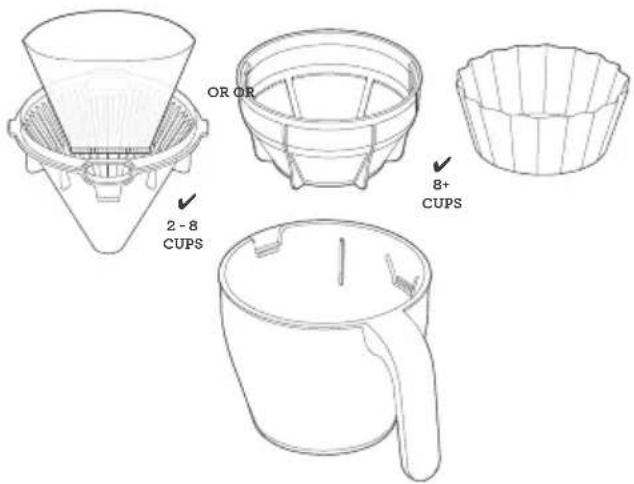
- Depending on the amount of coffee to brew, select the appropriate basket and filter. For brewing between 2 and 8 cups, use the cone-shaped filter basket insert with a paper filter (note: cone-shaped paper filter is not included). For brewing more than 8 cups, use a mesh basket filter or a flat bottom brew basket with a large paper filter.

CAUTION
Filling the basket without a mesh basket filter or filter paper may cause the basket to overflow during the brewing cycle.
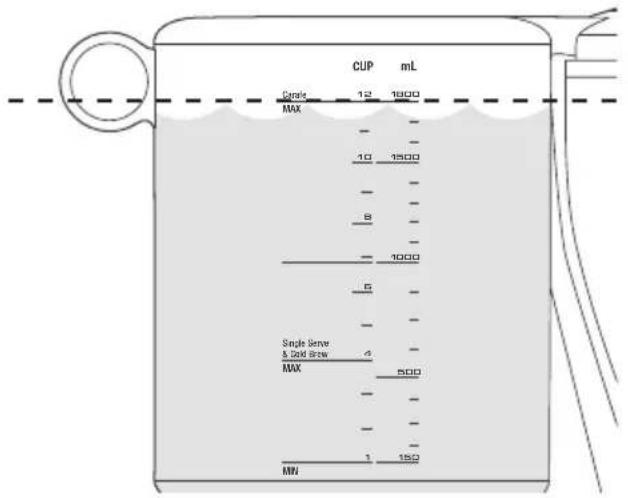
- Fill the water tank with fresh cold water up to the MAX marking on the water tank.

NOTE
This machine will brew all the water in the tank. Ensure the tank does not contain an excess amount of water.
-
For the very best tasting coffee, we recommend using freshly roasted whole bean coffee and grind with a burr grinder directly before you brew. The grind should be medium/coarse, never use coffee ground for espresso as your coffee basket may overflow.
-
Grind enough coffee beans for the volume you're making. For a full 1.8L carafe, we recommend 99g of coffee, approximately 12 level Breville measuring scoops. Roughly 1 scoop for every 150ml.
-
Insert the correct filter paper, cone or flat bottom, or mesh basket, into the brew basket, then, add your ground coffee. Insert the brew basket into the machine.

NOTES
- Never use both mesh basket filter and paper filter at the same time.
- Coffee with superior taste & clarity will come from using a paper filter.
- The mesh basket filter will allow some fine coffee grounds to brew into the coffee. This will appear as sediment in the cup or carafe. This is normal. Only use the mesh basket filter provided as others may cause the machine to overflow.
- Lock the carafe lid and place the carafe under the drip stop outlet.
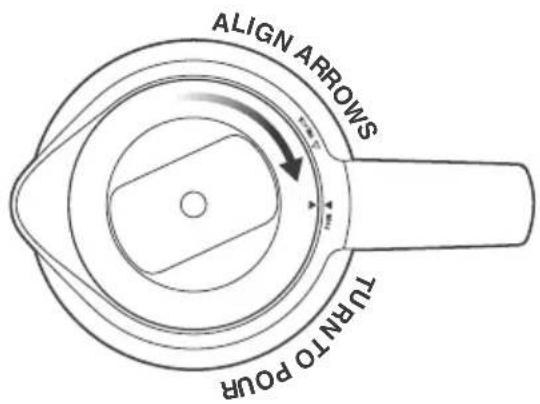

CAUTION
The carafe MUST be in place before you brew with water level higher than 'SINGLE CUP' line. Otherwise the coffee basket will overflow.

NOTES
- Always ensure your carafe is clean and empty before brewing. Residual coffee will affect the taste and liquid in the carafe will cause it to overflow.
- Always ensure your carafe is EMPTY before brewing to prevent overflow.
- Rotate the dial and select BREW from the LCD and press the dial once. The machine will display the progress of the brewing cycle.
- When the coffee is ready, the machine will beep once and will automatically switch to KEEP WARM mode.

NOTES
- A small amount of water remains in the tank after brewing. This is part of the normal operation.
- Never fill the water tank once the coffee machine has started a brewing cycle.
MODEL BDC415:
- The machine goes into standby mode if not used for 6 minutes. Power consumption on standby mode does not exceed 0,30 W.
MODEL BDC465:
- The machine goes into standby mode if not used for 5 minutes. Power consumption on standby mode does not exceed 0,30 W.
HOW TO MAKE COLD BREW
Cold brew coffee is brewed differently than traditional hot brew coffee. it uses cold water (not hot water). The brewer uses the 'full immersion' method of brewing cold brew which steeps the water and coffee together over an extended duration; typically 4 to 14 hours. This method creates an intense smooth coffee with little bitterness. Brew ratios are also different and much higher than normal. Breville recommends a brew ratio 2 to 3 times higher than average, approximately 3 Breville scoops to every 150 mL of water.
This Breville brewer will produce a maximum of 600 mL of Cold Brew. Due to the long duration (typically 4-14 hours) of the brewing process we recommend setting the machine up overnight so the Cold Brew will be ready in the morning.
- Fill the tank with your desired volume of water ensuring this is below the COLD BREW line or up to the COLD BREW MAX LINE (4 cups / 600 mL).

NOTES
If water in the water tank is more than 600 mL or above the COLD BREW MAX LINE, the Cold Brew selection will not be available in the screen menu.
- Remove the basket, and ensure both the cone insert and mesh basket filter are removed. Add a large paper filter and then add ground coffee at 2-3 times of regular ratio (approximately 12 scoops for 600 mL).
- Reinsert the basket into the machine.
- Remove the lid from the carafe.
- Insert the carafe without the lid. The lid must not be on the carafe during the brewing process, alternatively, use another vessel.
- Navigate to the COLD BREW setting and press the dial once. The machine will then begin brewing the water without the heating element. Once this is complete a countdown timer will display on the LCD indicating when the Cold Brew is finished. At this point the machine will automatically dispense the Cold Brew into the waiting carafe.

NOTES
- Brew Time for Cold Brew can easily be adjusted to your preference, anywhere between 30 min – 24hrs.
- DO NOT add ice to the tank. Cold, chilled water should be added.
- Ensure the carafe lid is removed for Cold Brew mode.
HOW TO BREW USING SINGLE CUP / SMALLER VOLUMES (LESS THAN 4 CUPS, 500-600 ML)
- The machine will recognize when the brewer has 500-600mL of water and will adjust the brew settings, automatically, to make the best possible tasting coffee. Fill your cup with fresh cold water and then pour it into the water tank, ensuring the water level stays below the single cup line.
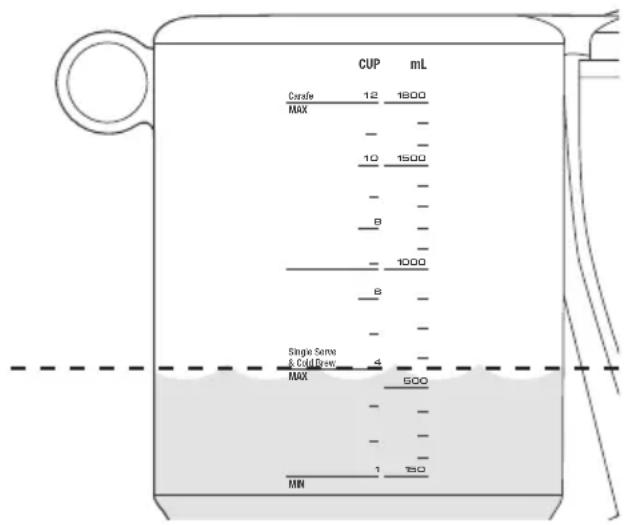

NOTE
DO NOT fill the water tank more than single cup line or the volume of the cup used to receive the coffee. It will overflow as the machine brews until the water tank becomes empty. Brewing smaller volume coffee starts at 500mL.
- The machine is designed to automatically adjust the brew settings when it detects 500-600mL of water in the tank to ensure the best tasting coffee. Fill your cup with fresh cold water and then pour it into the water tank, making sure the water level remains below the single cup line.
- Position your empty cup underneath the brew basket outlet.
- Grind the appropriate amount of whole bean coffee to match the water level in the tank. 1 level Breville scoop of ground coffee is suitable for 150ml of water.

NOTE
When brewing smaller volumes, use the cone filter basket insert to ensure proper contact between the brew water and the ground coffee.
- Place the cone filter basket into the brew basket using the alignment marks as a guide.
- Insert a cone-shaped paper filter into the cone filter basket, and then add the ground coffee.
-
Insert the brew basket into the machine.
-
Turn the dial to select BREW mode.
-
Press the dial to start brewing.
-
Once the coffee is ready, the machine will release steam and the LCD will display the brewing modes menu.

USING DELAYED AUTO START
Here are the steps for setting up the machine to automatically start brewing at a preset time:
- Fill the water tank with fresh cold water equal to the amount of coffee.
- Grind the correct amount of whole bean coffee. Use one Breville scoop of ground coffee for 150 mL of water.
- Select the appropriate filter basket and paper filter.
- Insert the filter basket into the brew basket, using the alignment marks as a guide.
- Put the paper filter into the filter basket, and add the ground coffee.

NOTE
Never use both mesh basket filter and paper filter at the same time.
- Insert the brew basket into the machine.
- Place the carafe with the lid into the machine.
- Press the 🔒 DELAYED AUTO START button. The LCD will display the blinking hours setting.
- Rotate the SELECT dial to set the desired time to start the brewing cycle, then press the dial to save the settings. The machine will beep once to confirm the changes.

NOTE
If the clock hasn't been set, the machine will keep blinking after pressing the DELAYED AUTO START button and won't beep to confirm changes using the SELECT dial. Make sure the clock is set before using the DELAYED AUTO START button function. The clock will reset every time the unit is unplugged.
- Rotate the SELECT dial to choose the brewing mode, and the machine will automatically start brewing at the set time.

NOTES
- The LCD will display the set time until the machine automatically starts brewing.
- Pressing the 🔒 DELAYED AUTO START button will cancel Auto Start.

Settings

NOTE
The LCD is on settings mode if the settings icon is visible on the top most part of the LCD.
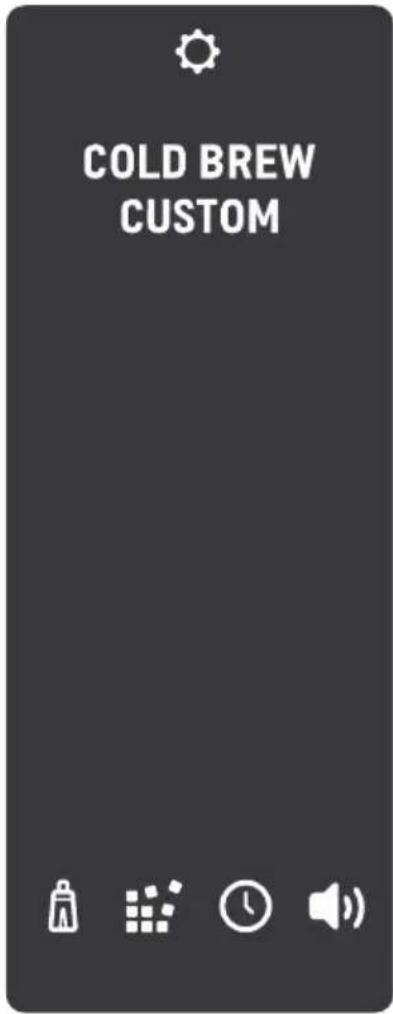
-
Press the settings button ⚙️
-
Rotate the dial to navigate through the menu on the LCD and press the dial once to select.
-
COLD BREW
- CUSTOM
• FILTER CHANGE
• DESCALE
- CLOCK SETTING
• BEEP VOLUME SETTING

NOTE
Press the settings button again to go back to the main menu.
SETTING COLD BREW
- When the COLD BREW is highlighted, press the dial once to select and begin customizing the COLD BREW option.
- The time in hour is blinking and ready to set by rotating the dial left to go less than 24 hours and rotate the dial to the right to set up to 24 hours and press the dial once to select and set the hour.
- The minute is blinking and ready to set by rotating the dial to the left to go less and rotate the dial to the right to set up to 59 min and press the dial once to select and set the minute.
- The time is set for cold brewing.
- The LCD will return to the main menu.
SETTING CUSTOM OPTION
When the CUSTOM is highlighted on the LCD, press the dial once to select and the custom options will be visible on the LCD.
Rotate the dial and press once to select the option to customize.
The following options can be customized:
BLOOM VOL: Adjust the amount of water dispensed before the blooming starts.
BLOOM TIME: Coffee bloom occurs when hot water hits the ground coffee.
Recommended bloom time is 30-60 seconds. During this time the brewing cycle pauses to allow coffee to naturally bloom. See 'TIPS' for more about Bloom Time.
BREW TEMP: Adjust the temperature of the brew water being delivered to the ground coffee. See "TIPS" for more about setting brew water temperature.
FLOW RATE: Adjust brewing time to control contact time by adjusting the water delivery speed. Choose between Slow, Medium (default), and Fast.

WATER FILTER
Rotate the dial to highlight the filter icon. When the filter icon is highlighted, press the dial once to select.

DESCALE
Rotate the dial to highlight the descale icon. When the descale icon is highlighted, press the dial once to select.
Refer to Care and Cleaning Section for descaling process.

SETTING THE CLOCK
Adjust the time displayed on the LCD.
Rotate the dial to highlight the clock icon. When the clock icon is highlighted, press the dial once to select.
- The hour will blink first for setting. Use the SELECT dial to set the hour by rotating the dial to the left or right and press the dial to save the hour.
- Next is to set the minutes, rotate the dial to the left or the right and and press the dial to save the changes.
- The LCD will return to the main menu.

SETTING THE SOUND VOLUME
Set the sound volume to LOW, MED, HIGH, or OFF.
Rotate the dial to highlight the sound icon. When the sound icon is highlighted, press the dial once to select.
- Rotate the dial to the left or the right and the LCD will display, MEd, HIGH, OFF or LOW.
- Press the dial once on your selected beep volume.
- The LCD will return to the main menu.

Tips
WHOLE BEANS
- FRESH IS BEST! Freshly roasted, quality coffee is key to making great tasting coffee. Peak flavour potential is 5-20 days after roast. Always look for a “Roasted On” date on the bag. Avoid coffee with a “Best Before” or “Use By” date as you never know when it was roasted.
- Coffee flavour and strength are a personal preference. Vary the type of coffee beans and the amount of ground coffee to achieve your preferred taste.
- Freshly ground beans are the key to making coffee with more flavour and body. Pre-ground coffee will have lost most of its flavour and aromatics, so always grind right before you brew for superior taste.
- Store coffee beans in a dark, cool and dry place. Vacuum seal if possible.
- Buy coffee beans in small batches to reduce the storage time and store no more than one week's supply at any time.
PRE-GROUND COFFEE
- Pre-ground coffee is convenient, but will never taste as good as coffee ground right before you brew. We recommend investing in a quality burr grinder so you can grind fresh whole bean coffee right before you brew and enjoy superior tasting coffee.
- The grind will affect the rate at which the water flows through the coffee in the coffee basket and therefore the taste of the coffee. If the grind is too fine the water will not flow through the coffee and may clog or overflow the coffee basket. It may pass through the mesh basket filter leaving sediment in the cup or carafe. The resulting coffee will be over extracted, too dark and bitter. If the grind is too coarse the water will flow through the coffee too quickly. This will result in an under-extracted coffee lacking in flavour.
- Always use “drip filter grind” suitable for use with a drip coffee machines. Never use “Espresso grind” as the finer grind size may cause the coffee basket to block and will be over-extracted.
COFFEE/WATER RATIO
We recommend 1 level Breville scoop of coffee grounds per 150ml cup of water. Adjust the amount according to your individual taste. The maximum capacity for pre-ground coffee is 12 level Breville scoops. Exceeding this amount may cause the coffee basket to overflow.
| Cups of coffee (150ml cup) | 1 2 3 4 5 6 7 8 9 10 11 12 |
| Spoons of coffee grinds | 1(8.25g) | 2(16.5g) | 3(24.75g) | 4(33g) | 5(41.25g) | 6(49.5g) | 7(57.75g) | 8(66g) | 9(74.25g) | 10(82.5g) | 11(90.75g) | 12(99g) |
| Water amount | 150ml 300ml 450ml 600ml 750ml 900ml 1.05L 1.2L 1.35L 1.5L 1.65L 1.8L |
BLOOMING
- When coffee is roasted, CO2 is trapped inside the bean. Coffee grounds release this CO2 when hot water hits them, and this is called "blooming". Your Brewer can automatically adjust bloom time by controlling the water flow. Blooming can have an impact on the aromas and flavours of the brewed cup. If the coffee is overly bitter shorten bloom time, and if it's sour make it a little longer.
PRE-HEATING
- Pre-heat the carafe or cup for best results. A pre-heated carafe or cup will help maintain the coffee's optimal temperature and keep coffee hotter for longer. Fill with hot water for about 30 seconds then discard the water.
WATER QUALITY
- Fresh, good-tasting water is essential for a perfect cup. If the water contains excessive sediment, or has an ‘off’ taste or odor, we recommend using filtered water.
Care & Cleaning
Always turn the coffee machine off and remove the plug from the power outlet before cleaning.
CLEANING THE OUTER HOUSING
The outer housing and LCD screen can be cleaned with a soft, damp cloth. Apply cleaner to the cloth and not the LCD surface. Polish with a soft, dry cloth. Cleaning and drying with dry paper towels or abrasive cloths and cleaners may scratch the surface.
CLEANING THE COFFEE BASKET AND MESH BASKET FILTER
Remove the coffee basket. Discard any ground coffee and filter paper. The coffee basket and mesh basket filter can be rinsed under running water. Ensure the fine holes of the mesh basket filter are clear. For a deeper clean, wash the coffee basket and mesh basket filter in warm, soapy water with a soft bristled brush.

CAUTION
The coffee basket, mesh basket or paper filter may still be very hot after brewing. Use caution and allow to cool before removing.
CLEANING THE CARAFE
After each use, empty the carafe. Do not let brewed coffee stand overnight as this can cause the carafe to stain. Rinse the carafe and carafe lid under warm running water. For a deeper clean, we recommend regularly washing the carafe in warm, soapy water using a soft bristled brush. Do not use abrasive cleansers, pads or cloths which can scratch the surface. Rinse and dry thoroughly.
CLEANING THE SHOWERHEAD
Simply wipe down the showerhead area periodically. However, if a more thorough clean is required, the Showerhead can be removed by unlocking the Showerhead Ring. Rotate clockwise then remove the Showerhead for cleaning. Once complete, reinstall the Showerhead.
DESCALING
After regular use, hard water can cause mineral build up in internal components, reducing the brewing flow, brewing temperature, power of the machine, and taste of the coffee. We recommend to descale regularly. When the LCD displays the descale icon and is flashing, the descaling cycle is needed.

NOTES
- Ensure that the water filter is removed from the water tank before descaling the machine.
-
It takes approximately 30 minutes to complete descaling cycle.
-
Empty the water tank. Prepare the descale agent in accordance with the manufacturer's instructions. Pour the descale solution into the empty water tank and make sure descale solution is up to 1000 mL descale line on the tank.
-
Place the empty basket and the carafe into position under the drip stop outlet. (Ensure the carafe is empty and the lid is securely locked).
-
Press the settings button on the machine, then rotate the dial to highlight the descale icon
. When the descale icon is highlighted, press the dial once to select this option. The LCD will display 30:00 min.
-
Press the dial once and the descale cycle will begin and the timer counting down is displayed on the LCD.
-
When the tank empties of the descale solution, the screen will flash FILL. Remove the tank from the machine and empty out any residual liquid and then re-fill the tank to the MAX line with fresh water to proceed with the rinse cycle.
-
When the descaling process is finished, the LCD screen will return to the main menu.

NOTE
Discard the water from the carafe and rinse thoroughly. Remove the water tank and completely remove the water from the tank and rinse thoroughly.

CAUTION
Water in the carafe may be hot, take caution and be careful when handling the carafe and discarding water from the carafe.
FACTORY RESET
To reset the machine to its factory settings, including water hardness setting. Hold the settings button and the Delayed Auto Start button together for 3 seconds. When SET HARDNESS is shown on the LCD, rotate the dial to the left or the right and press the select dial button to set the water hardness.
(Refer to WATER HARDNESS AND FLUSHING from the Assembly page)
PROBLEM POSSIBLE CAUSE WHAT TO DO
| Coffee too strong or weak | · Amount of coffee and water is not correct (1 spoon : 150ml cup). | · Check correct amount of coffee or water is used. |
| Coffee leaking from basket when removed | · The basket drip-stop seal doesn't cover the gap properly due to foreign material. | · Check that there is no obstruction in the basket drip-stop seal.Wash out the basket seal by turning the basket upside down, and pressing down and rinsing into the seal to clear any particles obstructing that area. |
| Coffee overflowing from the basket (CAUTION: If the basket has overflowed remove slowly and with caution) | · Carafe is not inserted.· Amount of coffee and water is not correct (1 spoon : 150ml cup).· Grind size is too fine.· Too much grinds in the basket.· No paper in the basket.· Putting paper into mesh basket filter. | · If you are brewing with carafe, check that the carafe is inserted.· Check that the correct amount of coffee and water is used for the operation.· Correct grind size/amount.· Use mesh basket filter without paper and other baskets with paper. |
| ‘FILL’ on LCD screen | · Water tank is empty or not enough water to brew the selected volume.· Sensors may be dirty. | · Open the lid and pour the desired amount of cold, preferably filtered water.· While the tank is empty wipe the sensor prisms in the tank with a cloth. |
| Delayed Auto Start does not function | · Delayed Auto Start does not repeat after it has been activated. | · Re-engage the Delayed Auto Start mode for each time that it needs to be used. |
| Shows ‘CLOCK’ when Delayed Auto Start is pressed | · Current time should be set before setting Delayed Auto Start. | · Set the current time before using Delayed Auto Start. |
| Clock does not remember time | · Clock is cleared every time the unit is unplugged. | · Keep the unit plugged. |
| DELAYED AUTO START starts at the wrong time | · Current time is not correct. | · Check that the current time is correct. |
| Carafe overfilling | · Carafe is not completely empty before brewing.· Amount of water is too much. | · Check that the carafe is empty before brewing.· Check that the MAX line on the water tank is not exceeded.· Ensure water runs freely through carafe lid. |
PROBLEM POSSIBLE CAUSE WHAT TO DO
| LCD shows 'FILL' when there is water in the tank | ·Check that the unit is not in direct sunlight or direct bright lighting. | ·Move unit away from the light source. |
| Brew doesn't start | ·There is no water in the water tank.·Each brewing mode has different water amount limits, and it does not brew when the amount is beyond the limit. | ·Check that the water tank is filled.·Check the water amount limits for each mode. |
| Showerhead falls out | ·The showerhead may loosen and fall out from time to time if not inserted or tightened correctly. | ·Please wash the showerhead ring and seal and re-insert. |
| Carafe drip stop stays down | ·The drip stop is stuck. ·Pull the drip stop back up.·Clean the drip stop for any foreign objects of coffee grinds or stains.·If the problem persists and drip stop does not return to top position please call Breville Consumer Support. |
| Unit produces excessive steam while brewing or runs for extended periods with only steam output | ·Brewing performance is affected by scale accumulated by hard water.·Brewing temperature profile is not properly set. | ·Descale the unit.·Call Breville Consumer Support if problem persists. |
| ‘DESCALE’ on LCD screen (flashing) | ·Brewing performance is affected by scale accumulated by hard water. | ·Descale the unit. |
| Unit shows "too hot" | ·Unit has been run too many times back to back and the components are overheated. | ·Let unit rest for at least 20mins before starting another cycle. |
| COLD BREW modes are disabled | ·If the water is more than 600ml, these modes are disabled. | ·Reduce the amount of water in the tank. |
PROBLEM POSSIBLE CAUSE WHAT TO DO
| Unit does not use the full amount of water in the water tank | ·There is a blockage in the system. ·Empty the tank, remove any blockage, and wipe, inspect and clean any obstruction and coffee/fibre/dirt build up from the mesh filter at the bottom of the water tank. ·Cool down and run FAST cycle with 1L. ·Descale the unit. ·Call Breville Consumer Support if problem persists. |
| Unit brewing slow | ·There is a blockage in the system. ·Empty the tank, remove any blockage, and wipe, inspect and clean any obstruction and coffee/fibre/dirt build up from the mesh filter at the bottom of the water tank. ·Cool down and run FAST cycle with 1L. ·Descale the unit. ·Call Breville Consumer Support if problem persists. |
| Uneven coffee bed | ·Showerhead may not be attached/secured properly. ·Check the attachment of the showerhead locking ring and shower head. ·Clean showerhead from any blockage or scale buildup. |
| A small amount of water remains in the tank after brewing | ·This is part of the normal operation. ·No user action required, continue normal use. |
Notes
the Luxe Brewer™
Glass & Thermal
natural_image
Modern digital coffee maker with clear glass and digital display, no visible text or symbols on the device itself.
natural_image
Modern kitchen water heater with digital display and side-mounted kettle (no visible text or symbols)
BDC465BDC415
FR-CA MANUEL D'INSTRUCTIONS
Breville®

Tabledes matières
natural_image
Line drawing of a conical funnel with internal blades and a central handle (no text or symbols)
4
natural_image
Line drawing of a cupcake with scalloped edges and a shaded band underneath (no text or symbols)
5
natural_image
Simple line drawing of a rectangular bar with five black squares aligned horizontally (no text or symbols)
2
natural_image
Line drawing of a circular basin or pot with three legs and central vent, no text or symbols present
6

natural_image
Line drawing of a spoon with a circular handle (no text or symbols)
3
natural_image
Line drawing of a cup with handle and side slots (no text or symbols)
7
natural_image
Line drawing of a conical spray bottle with a pointed tip and flange (no text or symbols)
natural_image
Line drawing of a 3D mechanical part with layered structure (no text or symbols)
flowchart
graph TD
    A["Beaker with straw"] --> B["Reading Screen"]
    B --> C["Reading Table with Numbers 0-5"]
    C --> D["Digital Display: 1s1m, 1s1m, 1s1m, 1s1m, 1s1m, 1s1m, 1s1m, 1s1m, 1s1m, 1s1m, 1s1m"]
    D --> E["Digital Display: 1s1m, 1s1m, 1s1m, 1s1m, 1s1m, 1s1m, 1s1m, 1s1m, 1s1m, 1s1m"]

ATTENTION
PROBLÈME CAUSES POSSIBLES CE QU'IL FAUT FAIRE
PROBLÈME CAUSES POSSIBLES CE QU'IL FAUT FAIRE
PROBLÈME CAUSES POSSIBLES CE QU'IL FAUT FAIRE
natural_image
Modern coffee maker with clear glass and digital display, no visible text or symbols on the device itself.
natural_image
Modern kitchen water heater with digital display and side-mounted kettle (no visible text or symbols)
BDC465BDC415
ES-MX MANUAL DE INSTRUCCIONES
Breville®
Contenido
QR149
QR o visite
www.breville.com.
Alternativamente, Ilame
natural_image
Line drawing of a conical funnel with internal blades and a central handle (no text or symbols)
4
natural_image
Line drawing of a cupcake with scalloped edges and a shaded band underneath (no text or symbols)
5
natural_image
Simple line drawing of a rectangular bar with five black square cutouts on one end (no text or symbols)
2
natural_image
Line drawing of a circular basin or pot with three legs and central side dividers (no text or symbols)
6
natural_image
Line drawing of a spoon with a circular handle (no text or symbols)
3
natural_image
Line drawing of a cup with handle and side slots (no text or symbols)
7
natural_image
Line drawing of a conical spray bottle with a pointed tip and flange (no text or symbols)
natural_image
Line drawing of a 3D mechanical part with layered structure (no text or symbols)
CÓMO PREPARAR COLD BREW
Breville Service Center
USA Mail: Breville USA
19400 S. Western Ave, Torrance CA
90501-1119
Phone: 1-866-273-8455
1-866-BREVILLE
Web: breville.com/us/support
Canada Mail: Breville Canada
300 Town Centre Blvd,
Suite 201, Markham,
Ontario, L3R 5Z6, Canada
Phone: 1-855-683-3535
Web: breville.ca/support
Breville is a registered trademark of Breville Pty. Ltd. A.B.N. 98 000 092 928.
Copyright Breville Pty. Ltd. 2025.
- Due to continued product improvement, the products illustrated/photographed in this brochure may vary slightly from the actual product.


