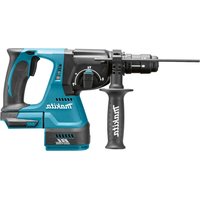
HR2631FJ - Drill MAKITA - Free user manual and instructions
Find the device manual for free HR2631FJ MAKITA in PDF.


User questions about HR2631FJ MAKITA
0 question about this device. Answer the ones you know or ask your own.
Ask a new question about this device
Download the instructions for your Drill in PDF format for free! Find your manual HR2631FJ - MAKITA and take your electronic device back in hand. On this page are published all the documents necessary for the use of your device. HR2631FJ by MAKITA.
USER MANUAL HR2631FJ MAKITA
GB Combination Hammer Instruction Manual
natural_image
Technical line drawing of a drill bit with handle and screwdriver (no text or symbols)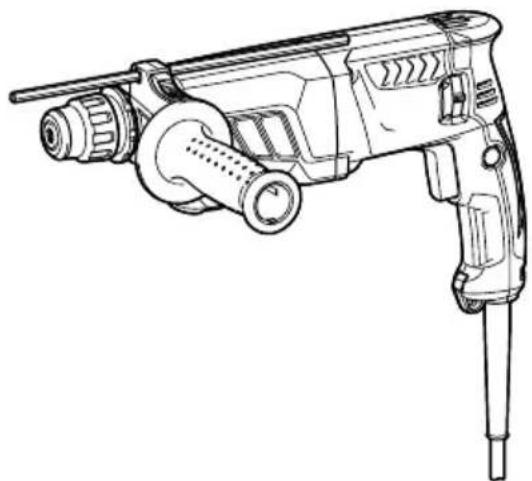
natural_image
Line drawing of a manual push-button tool (no text or symbols)

text_image
1 21
text_image
Technical diagram of a device's internal components with numbered labels pointing to specific parts.2
text_image
33
text_image
B A 44
text_image
A 4 B5
text_image
5 7 66
text_image
Technical diagram of a mechanical device with numbered parts and directional arrows indicating assembly or operation.7
text_image
10 118
text_image
129
text_image
1310
text_image
1411 12
text_image
16 15015362 015344
text_image
17 1813 14
text_image
19003150 015254
text_image
19 2015 16
text_image
Technical diagram of a mechanical assembly with labeled parts and a circular cross-section view015255 015345
natural_image
Mechanical assembly diagram showing a tool inserted into a component with a magnified inset highlighting internal components (no text or symbols)17 18
text_image
22 2 21015346
015347
text_image
23 2419 20
text_image
Technical diagram of a mechanical assembly with labeled component '2' and directional arrows indicating motion or flow.015348
015349
text_image
23 2421 22
text_image
25015350
010731
text_image
16 26 2523 24
text_image
19 20015351
015352
text_image
2725 26
text_image
28 29015353 011507
text_image
30 29 31 32 3327 28
text_image
32 29015256 012896
natural_image
Line drawing of a manual oil pump connected to a vacuum cleaner (no text or symbols present)29 30
natural_image
Line drawing of a hand holding a drill bit with a screwdriver, positioned against a 3D cube (no text or symbols)015354 015355
text_image
3431 32
natural_image
Line drawing of a hand using a drill bit to trigger sparks (no text or symbols)002449 015356
text_image
3533 34
natural_image
Illustration of hands using a drill bit to adjust a mechanical component (no text or symbols present)015357 015358
text_image
Technical diagram of a mechanical assembly with numbered components and directional arrow indicating motion or force35 36

text_image
Technical diagram of a mechanical assembly with numbered components and directional arrows indicating motion or assembly.015339
015340

text_image
37 9 3837 38
text_image
25015363
015359
ENGLISH (Original instructions)
| Explanation of general view | ||
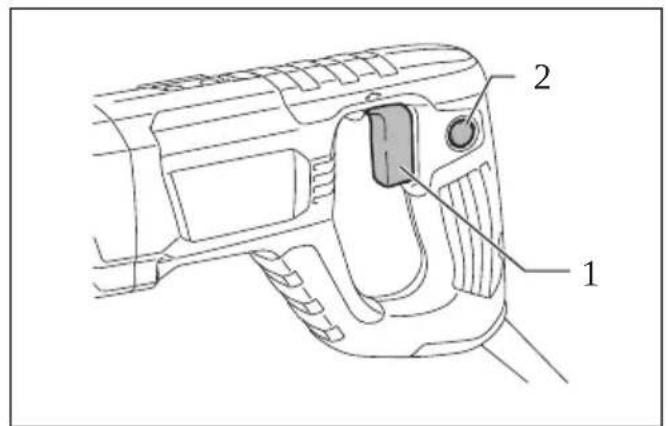
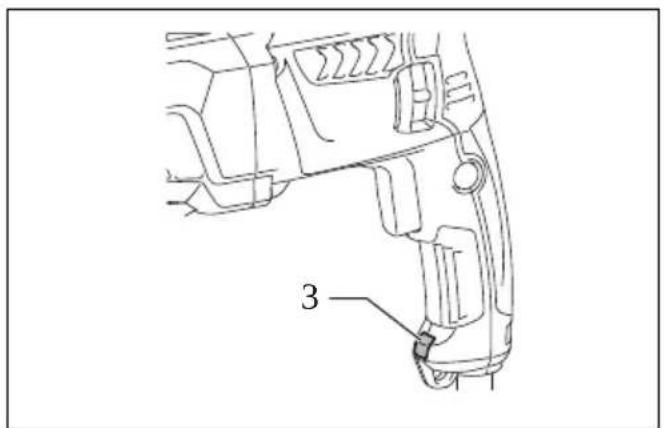
| 1 Switch trigger | 14 Hook | 27 Attachment at the foot of dust cup |
| 2 Lock button | 15 Protrusions | |
| 3 Lamp | 16 Grooves | 28 Bellows |
| 4 Reversing switch lever | 17 Bit shank | 29 Attachment |
| 5 Quick change chuck for SDS-plus | 18 Bit grease | 30 Inside periphery |
| 19 Bit | 31 Flat side | |
| 6 Change cover line | 20 Chuck cover | 32 Cap |
| 7 Change cover | 21 Grip base | 33 Groove |
| 8 Spindle | 22 Depth gauge | 34 Blow-out bulb |
| 9 Quick change drill chuck | 23 Toothed side of hex hole | 35 Drill chuck assembly (optional accessory) |
| 10 Rotation with hammering | marking on the grip base | |
| 11 Action mode changing knob | 24 Toothed side of the depth gauge | 36 Chuck key |
| 12 Rotation only | 25 Dust cup | 37 Sleeve |
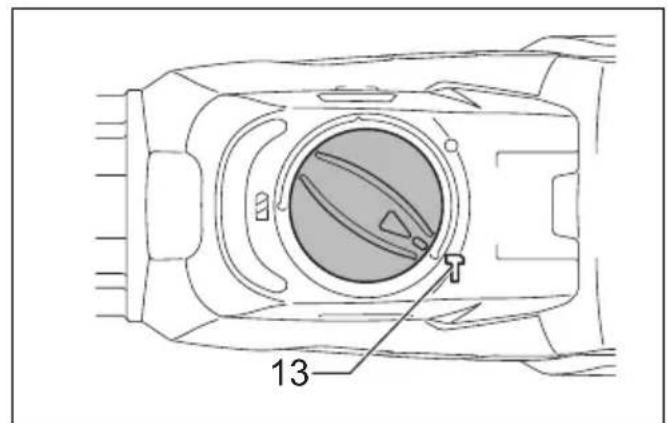
| 13 Hammering only | 26 symbol | 38 Ring |
SPECIFICATIONS
| Model HR2631F HR2631FT HR2641 HR2320T HR2630 HR2630T | |||||||
| Capacities | Concrete 26 mm 23 mm 26 mm | ||||||
| Core bit 68 mm | |||||||
| Diamond core bit (dry type) | 80 mm 70 mm 80 mm | ||||||
| Steel | 13 mm | ||||||
| Wood | 32 mm | ||||||
| No load speed 0 – 1,200 min-1 | 0 – 1,100 min-1 | 0 – 1,200 min-1 | |||||
| Blows per minute | 0 – 4,600 min-1 | 0 – 4,500 min-1 | 0 – 4,600 min-1 | ||||
| Overall length | 361 mm | 385 mm | 422 mm | 380 mm | 361 mm | 385 mm | |
| Net weight | 2.9 – 3.4 kg | 3.1 – 3.6 kg | 3.1 – 3.5 kg | 2.9 – 3.2 kg | 2.8 – 3.3 kg | 3.0 – 3.5 kg | |
| Safety class | ☐/II | ||||||
- Due to our continuing program of research and development, the specifications herein are subject to change without notice.
- Specifications may differ from country to country.
- The weight may differ depending on the attachment(s). The lightest and heaviest combination, according to EPTA-Procedure 01/2014, are shown in the table.
ENE042-1
GEA010-2
Intended use
The tool is intended for hammer drilling and drilling in brick, concrete and stone.
It is also suitable for drilling without impact in wood, metal, ceramic and plastic.
ENF002-2
Power supply
The tool should be connected only to a power supply of the same voltage as indicated on the nameplate, and can only be operated on single-phase AC supply. They are double-insulated and can, therefore, also be used from sockets without earth wire.
General power tool safety warnings
WARNING: Read all safety warnings, instructions, illustrations and specifications provided with this power tool. Failure to follow all instructions listed below may result in electric shock, fire and/or serious injury.
Save all warnings and instructions for future reference.
The term “power tool” in the warnings refers to your mains-operated (corded) power tool or battery-operated (cordless) power tool.
ROTARY HAMMER SAFETY WARNINGS
Safety instructions for all operations
- Wear ear protectors. Exposure to noise can cause hearing loss.
- Use auxiliary handle(s), if supplied with the tool. Loss of control can cause personal injury.
- Hold the power tool by insulated gripping surfaces, when performing an operation where the cutting accessory may contact hidden wiring or its own cord. Cutting accessory contacting a "live" wire may make exposed metal parts of the power tool "live" and could give the operator an electric shock.
Safety instructions when using long drill bits with rotary hammers
- Always start drilling at low speed and with the bit tip in contact with the workpiece. At higher speeds, the bit is likely to bend if allowed to rotate freely without contacting the workpiece, resulting in personal injury.
- Apply pressure only in direct line with the bit and do not apply excessive pressure. Bits can bend, causing breakage or loss of control, resulting in personal injury.
Additional safety warnings
- Wear a hard hat (safety helmet), safety glasses and/or face shield. Ordinary eye or sun glasses are NOT safety glasses. It is also highly recommended that you wear a dust mask and thickly padded gloves.
- Be sure the bit is secured in place before operation.
- Under normal operation, the tool is designed to produce vibration. The screws can come loose easily, causing a breakdown or accident. Check tightness of screws carefully before operation.
- In cold weather or when the tool has not been used for a long time, let the tool warm up for a while by operating it under no load. This will loosen up the lubrication. Without proper warm-up, hammering operation is difficult.
- Always be sure you have a firm footing. Be sure no one is below when using the tool in high locations.
- Hold the tool firmly with both hands.
- Keep hands away from moving parts.
- Do not leave the tool running. Operate the tool only when hand-held.
- Do not point the tool at any one in the area when operating. The bit could fly out and injure someone seriously.
- Do not touch the bit, parts close to the bit, or workpiece immediately after operation; they may be extremely hot and could burn your skin.
- Some material contains chemicals which may be toxic. Take caution to prevent dust inhalation and skin contact. Follow material supplier safety data.
- Do not touch the power plug with wet hands.
SAVE THESE INSTRUCTIONS.
WARNING:
DO NOT let comfort or familiarity with product (gained from repeated use) replace strict adherence to safety rules for the subject product. MISUSE or failure to follow the safety rules stated in this instruction manual may cause serious personal injury.
FUNCTIONAL DESCRIPTION
CAUTION:
- Always be sure that the tool is switched off and unplugged before adjusting or checking function on the tool.
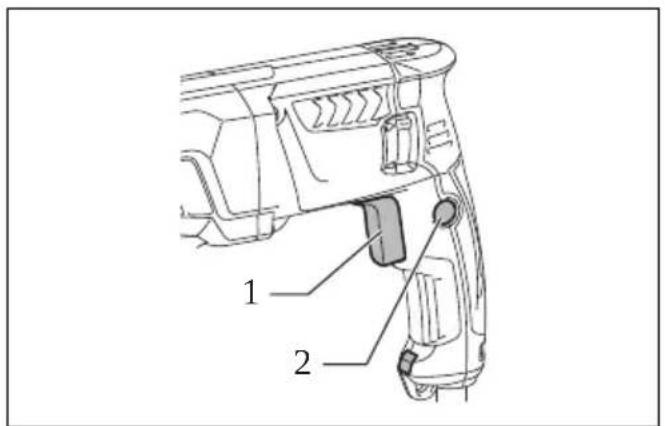
Switch action (Fig. 1 & 2)
CAUTION:
- Before plugging in the tool, always check to see that the switch trigger actuates properly and returns to the "OFF" position when released.
To start the tool, simply pull the switch trigger. Tool speed is increased by increasing pressure on the switch trigger. Release the switch trigger to stop. For continuous operation, pull the switch trigger, push in the lock button and then release the switch trigger. To stop the tool from the locked position, pull the switch trigger fully, then release it.
Lighting up the lamps (Fig. 3)
For Model HR2631F, HR2631FT
CAUTION:
- Do not look in the light or see the source of light directly.
To turn on the lamp, pull the trigger. Release the trigger to turn it off.
NOTE:
- Use a dry cloth to wipe the dirt off the lens of lamp. Be careful not to scratch the lens of lamp, or it may lower the illumination.
- Do not use thinner or gasoline to clean the lamp. Such solvents may damage it.
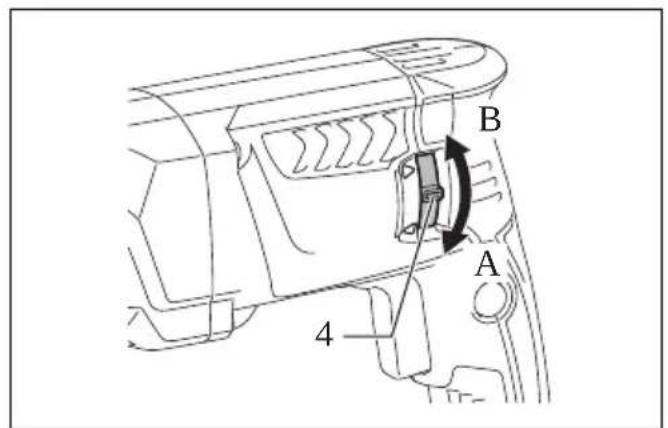
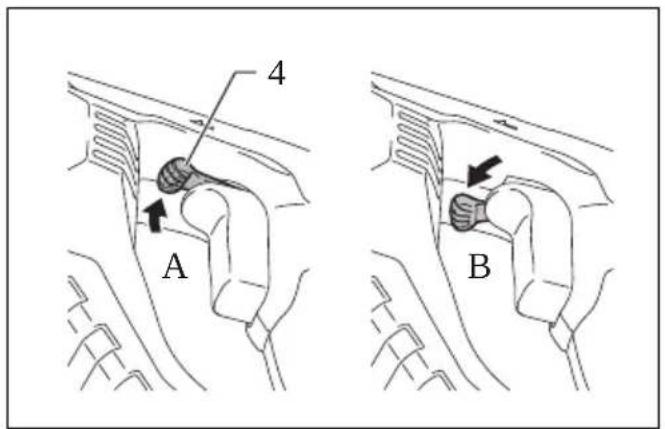
Reversing switch action (Fig. 4 & 5)
CAUTION:
- Always check the direction of rotation before operation.
- Use the reversing switch only after the tool comes to a complete stop. Changing the direction of rotation before the tool stops may damage the tool.
For Model HR2631F, HR2631FT, HR2320T, HR2630, HR2630T
CAUTION:
- If the switch trigger can not be depressed, check to see that the reversing switch is fully set to position ◀(A side) or ▶(B side).
This tool has a reversing switch to change the direction of rotation. Move the reversing switch lever to the △ position (A side) for clockwise rotation or to the ▷ position (B side) for counterclockwise rotation.
For Model HR2641
NOTE:
- When you operate the tool in counterclockwise rotation, the switch trigger is pulled only halfway and the tool runs at half speed. For counterclockwise rotation, you cannot push in the lock button.
This tool has a reversing switch to change the direction of rotation. Move the reversing switch lever to the △ position (A side) for clockwise rotation or the △ position (B side) for counterclockwise rotation.
Changing the quick change chuck for SDS-plus
For Model HR2631FT, HR2320T, HR2630T
The quick change chuck for SDS-plus can be easily exchanged for the quick change drill chuck.
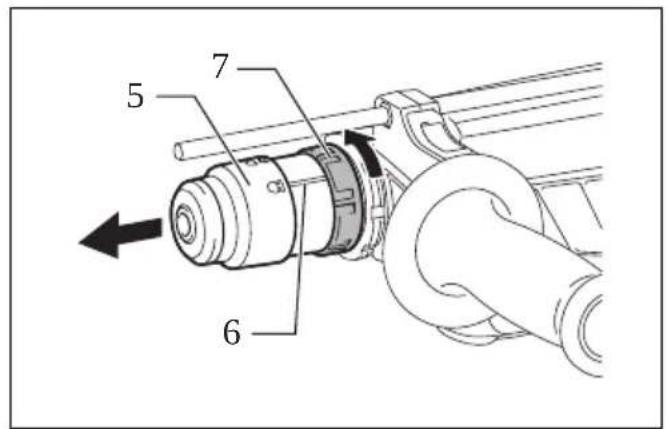
Removing the quick change chuck for SDS-plus (Fig. 6)
CAUTION:
- Before removing the quick change chuck for SDS-plus, always remove the bit.
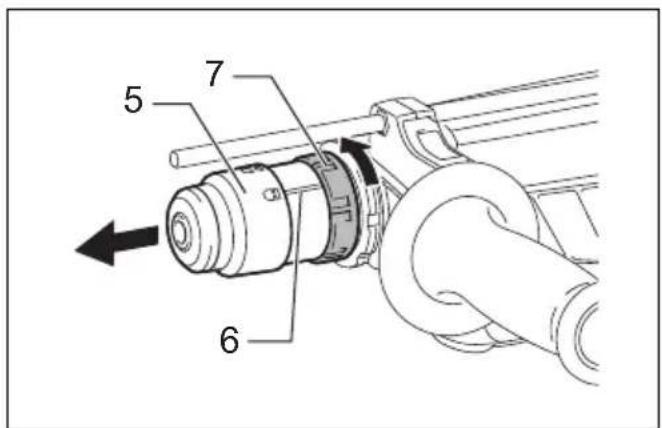
Grasp the change cover of the quick change chuck for SDS-plus and turn in the direction of the arrow until the change cover line moves from the symbol to the symbol. Pull forcefully in the direction of the arrow.
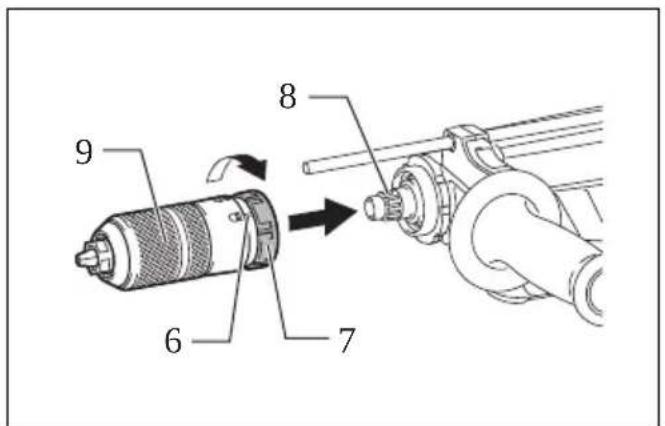
Attaching the quick change drill chuck (Fig. 7)
Check the line of the quick change drill chuck shows the symbol. Grasp the change cover of the quick change drill chuck and set the line to the symbol.
Place the quick change drill chuck on the spindle of the tool.
Grasp the change cover of the quick change drill chuck and turn the change cover line to the symbol until a click can clearly be heard.
Selecting action mode
CAUTION:
- Do not rotate the action mode changing knob when the tool is running. The tool will be damaged.
- To avoid rapid wear on the mode change mechanism, be sure that the action mode changing knob is always positively located in one of the three action mode positions.
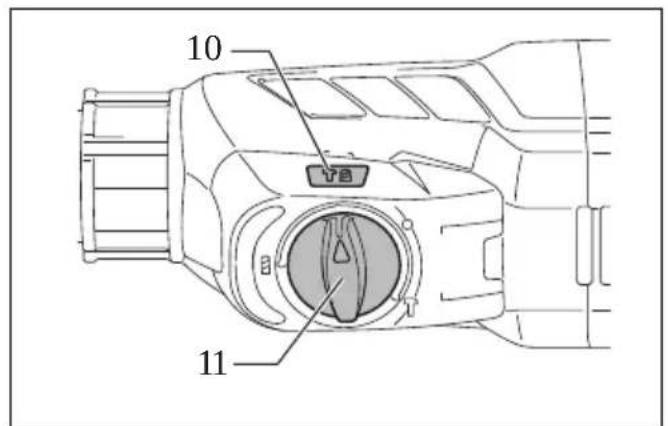
Rotation with hammering (Fig. 8)
For drilling in concrete, masonry, etc., rotate the action mode changing knob to the symbol. Use a tungsten-carbide tipped bit.
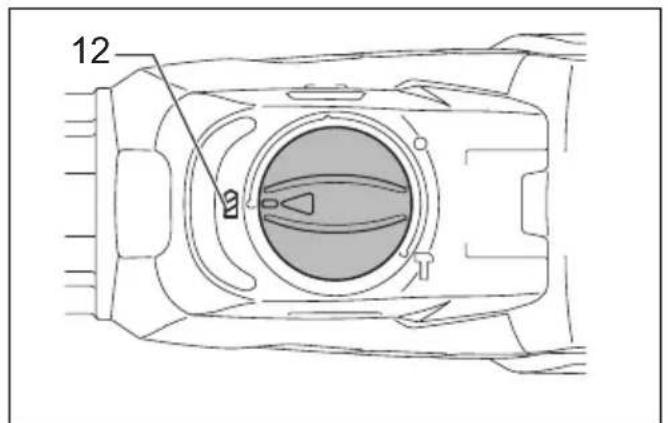
Rotation only (Fig. 9)
For drilling in wood, metal or plastic materials, rotate the action mode changing knob to the ⏻ symbol. Use a twist drill bit or wood bit.
Hammering only (Fig. 10)
For chipping, scaling or demolition operations, rotate the action mode changing knob to the ⏱ symbol. Use a bull point, cold chisel, scaling chisel, etc.
Torque limiter
CAUTION:
- As soon as the torque limiter actuates, switch off the tool immediately. This will help prevent premature wear of the tool.
- Bits such as hole saw, which tend to pinch or catch easily in the hole, are not appropriate for this tool. This is because they will cause the torque limiter to actuate too frequently.
The torque limiter will actuate when a certain torque level is reached. The motor will disengage from the output shaft. When this happens, the bit will stop turning.
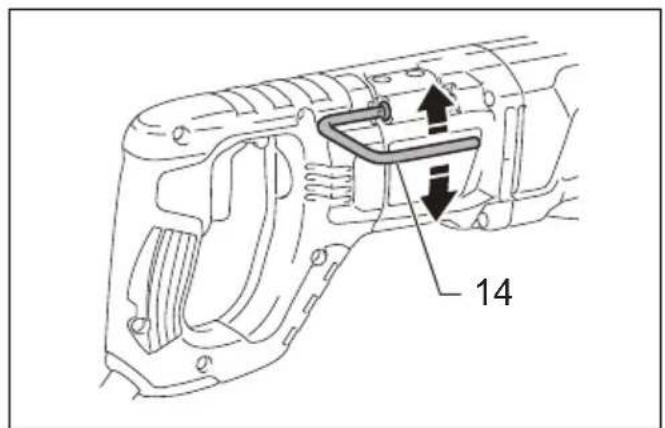
Hook (Fig. 11)
For Model HR2641
CAUTION:
- Never hook the tool at high location or on potentially unstable surface.
The hook is convenient for hanging the tool temporarily. To use the hook, simply lift up hook until it snaps into the open position.
When not in use, always lower hook until it snaps into the closed position.
ASSEMBLY
CAUTION:
• Always be sure that the tool is switched off and unplugged before carrying out any work on the tool.
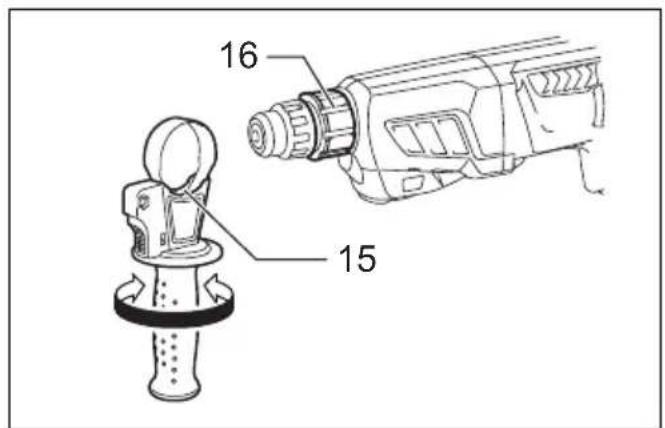
Side grip (auxiliary handle) (Fig. 12)
CAUTION:
• Always use the side grip to ensure operating safety.
Install the side grip so that the protrusions on the grip fit in between the grooves on the tool barrel. Then tighten the grip by turning clockwise at the desired position. It may be swung 360° so as to be secured at any position.
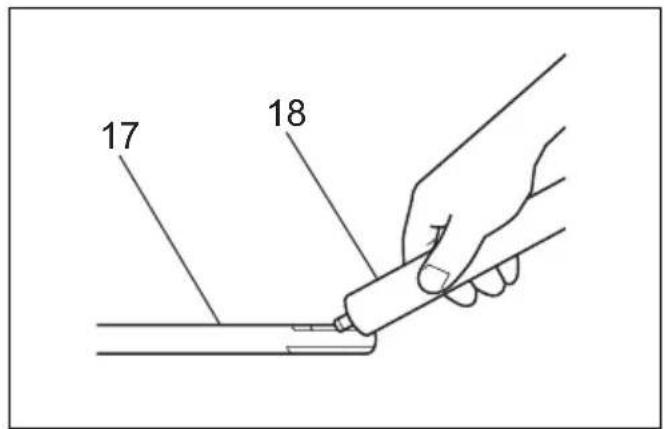
Bit grease
Coat the bit shank head beforehand with a small amount of bit grease (about 0.5 - 1 g).
This chuck lubrication assures smooth action and longer service life.
Installing or removing the bit
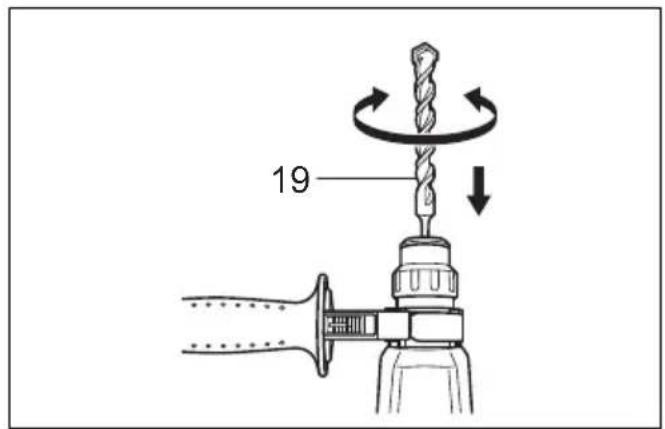
Clean the bit shank and apply bit grease before installing the bit. (Fig. 13)
Insert the bit into the tool. Turn the bit and push it in until it engages. (Fig. 14)
After installing, always make sure that the bit is securely held in place by trying to pull it out.
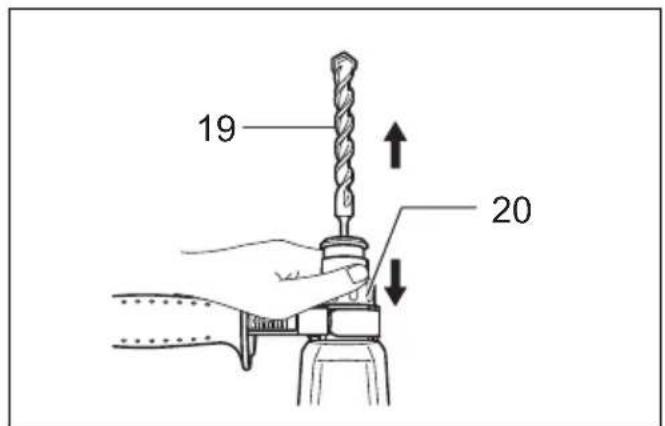
To remove the bit, pull the chuck cover down all the way and pull the bit out. (Fig. 15)
Bit angle (when chipping, scaling or demolishing)
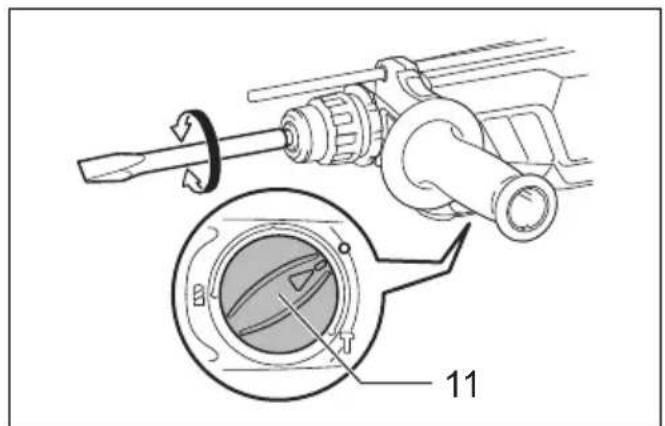
The bit can be secured at the desired angle. To change the bit angle, rotate the action mode changing knob to the O symbol. Turn the bit to the desired angle. (Fig. 16)
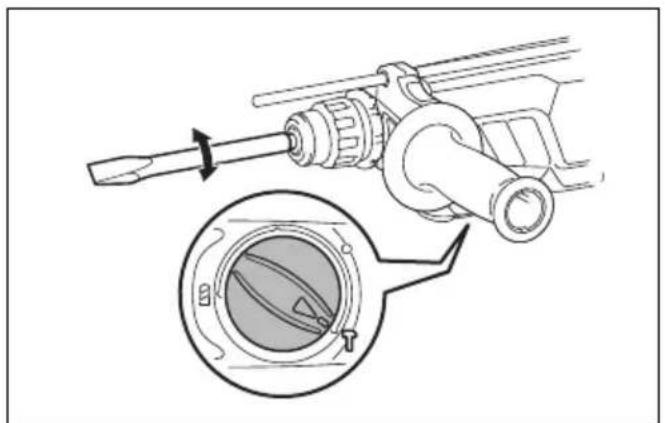
Rotate the action mode changing knob to the ⏱ symbol. (Fig. 17)
Then make sure that the bit is securely held in place by turning it slightly.
Depth gauge
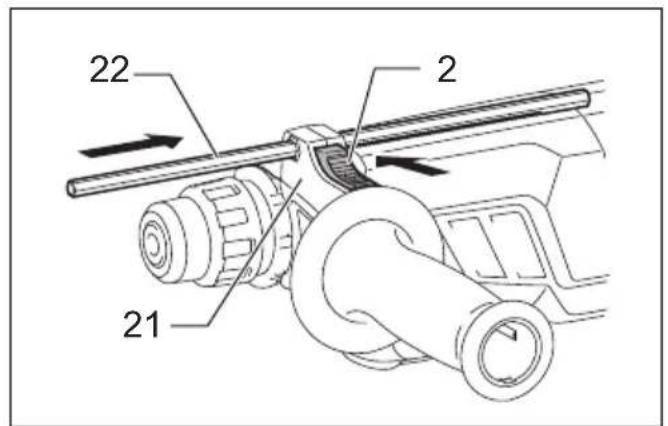
The depth gauge is convenient for drilling holes of uniform depth. (Fig. 18)
Press the lock button on the grip base in the direction of arrow shown in the figure and with the lock button being pressed insert the depth gauge into the hex. hole in the grip base. (Fig. 19)
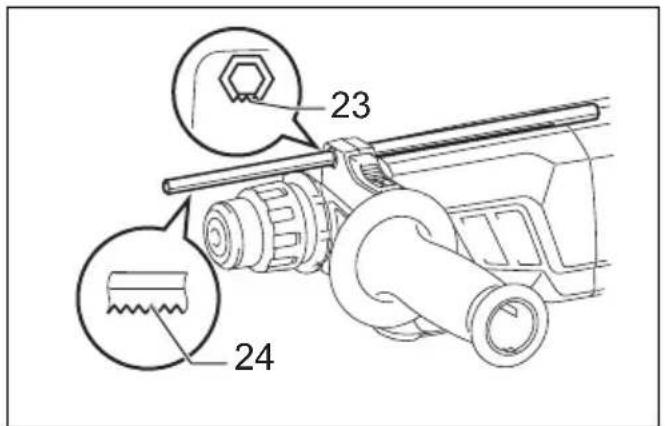
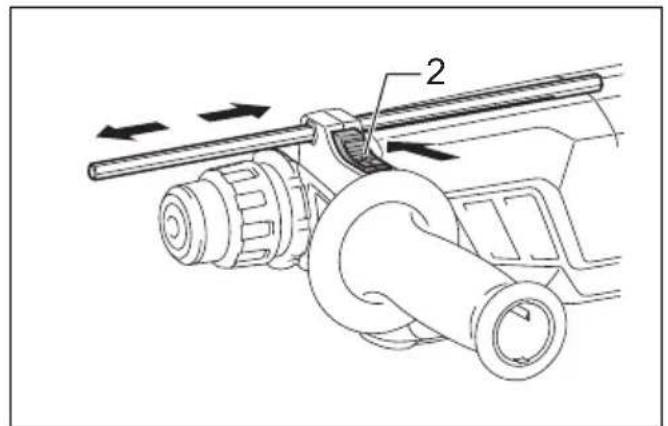
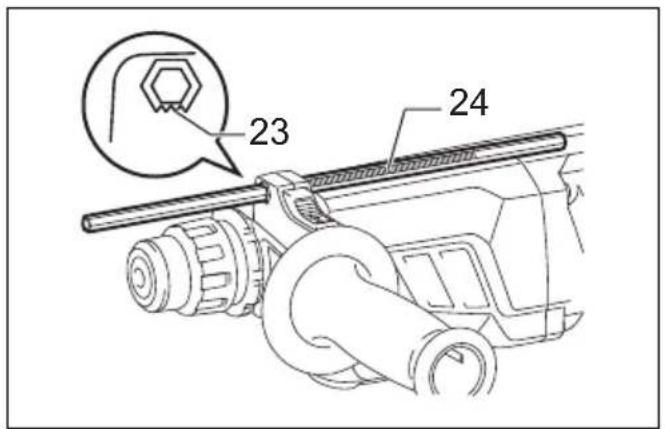
At this time, the depth gauge needs to be inserted so that its toothed side is directed to the toothed side of hex hole marking on the grip base as shown in the figure. (Fig. 20) Adjust the depth gauge to the desired depth by moving it back and forth while pressing the lock button. After the adjustment, release the lock button to lock the depth gauge. (Fig. 21)
NOTE:
- Inserting the depth gauge with its toothed side not directed to the toothed side of hex hole marking on the grip base as shown in the figure does not allow the depth gauge to be locked.
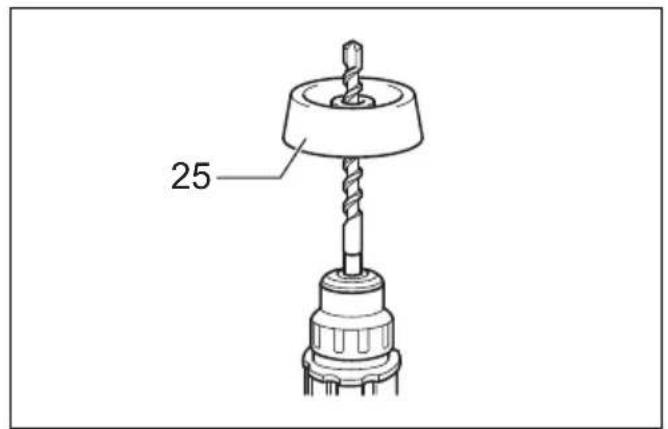
Dust cup (optional accessory) (Fig. 22)
Use the dust cup to prevent dust from falling over the tool and on yourself when performing overhead drilling operations. Attach the dust cup to the bit as shown in the figure. The size of bits which the dust cup can be attached to is as follows.
| Bit diameter | |
| Dust cup 5 6 mm – | 14.5 mm |
| Dust cup 9 12 mm – | 16 mm |
006406
There is another type of dust cup (optional accessory) which helps you prevent dust from falling over the tool and on yourself when performing overhead drilling operations.
Installing or removing the dust cup (optional accessory)
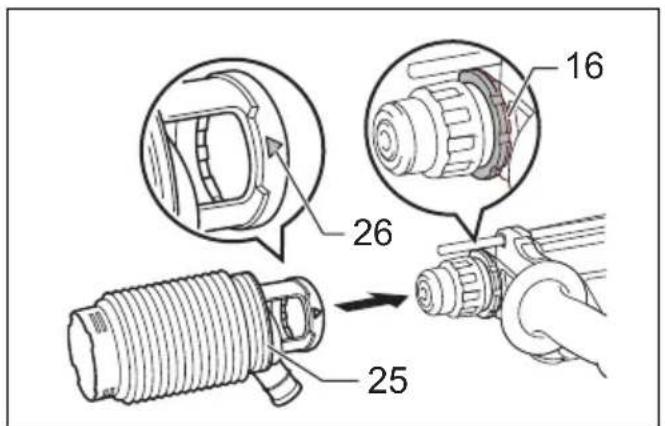
Before installing the dust cup, remove the bit from the tool if installed on the tool. Install the dust cup (optional accessory) on the tool so that the △symbol on the dust cup is aligned with the grooves in the tool. (Fig. 23)
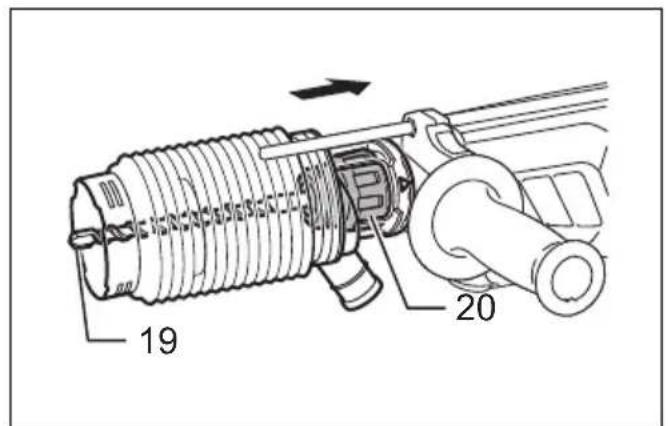
To remove the dust cup, pull the chuck cover in the direction as shown in the figure and with the chuck cover pulled take the bit out of the tool. (Fig. 24)
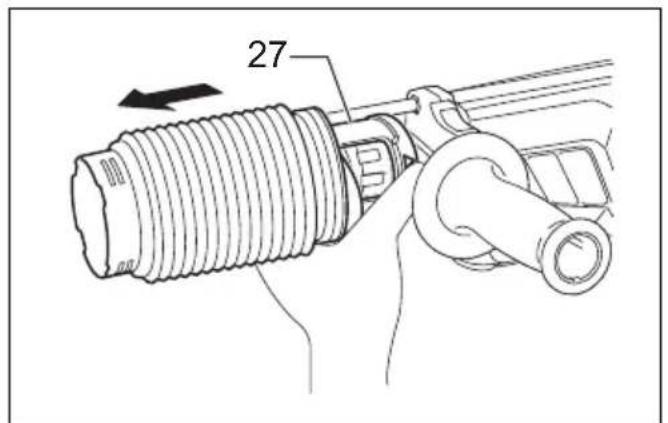
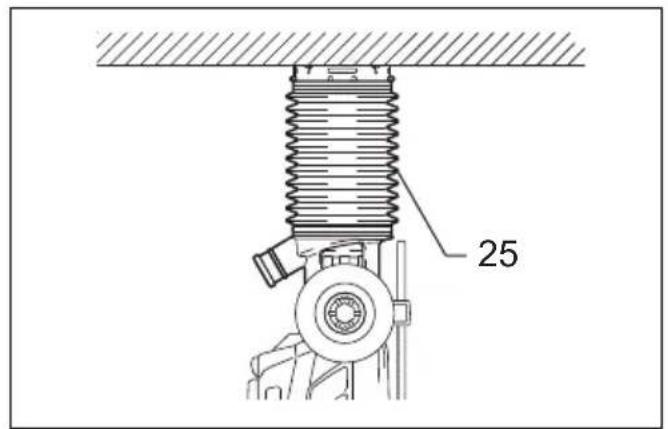
And then grab the attachment at the foot of dust cup and take it out. (Fig. 25)
NOTE:
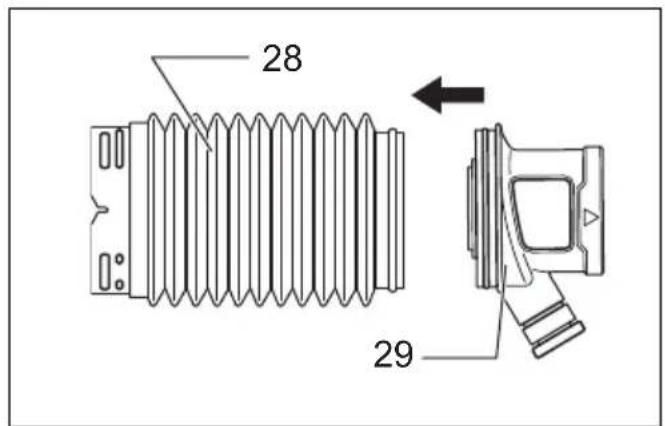
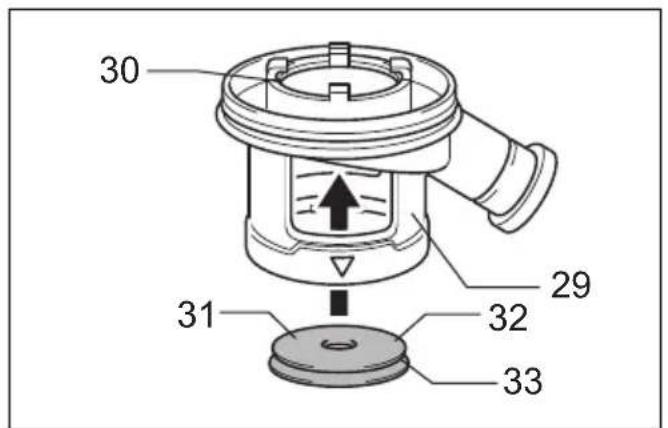
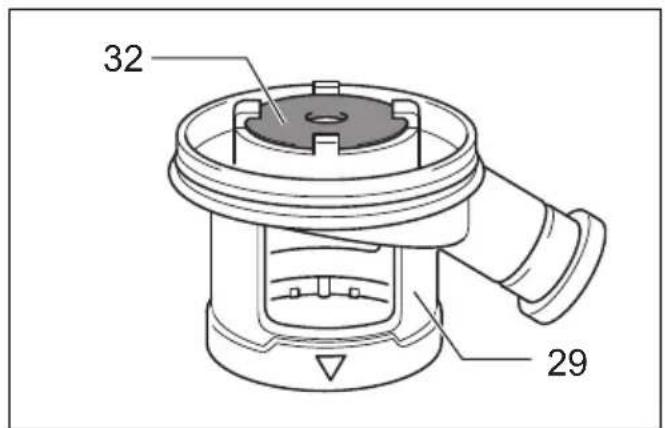
- When installing or removing the dust cup, the cap may come off the dust cup. At that time, proceed as follows. Remove the bellows from the attachment and fit the cap from the side shown in the figure with its flat side facing upward so that the groove in the cap fits in the inside periphery of the attachment. Finally, mount the bellows that has been removed. (Fig. 26, 27 & 28)
NOTE:
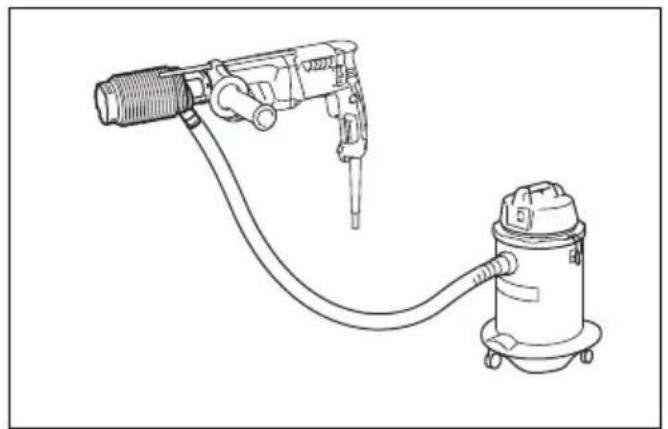
- If you connect a vacuum cleaner to your hammer, cleaner operations can be performed. Dust cap needs to be removed from the dust cup before the connection. (Fig. 29)
OPERATION

CAUTION:
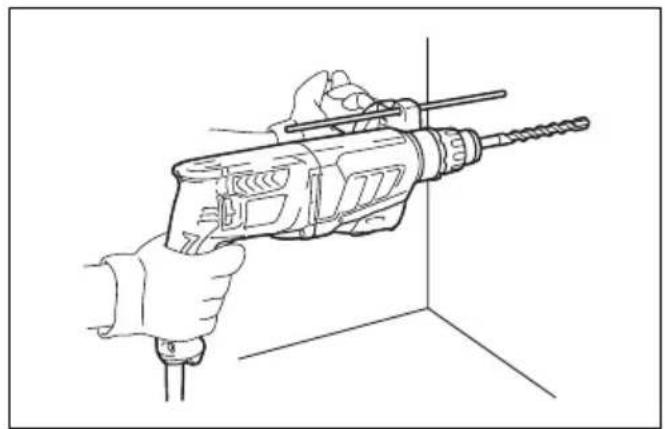
- Always use the side grip (auxiliary handle) and firmly hold the tool by both side grip and switch handle during operations.
Hammer drilling operation (Fig. 30)

CAUTION:
- There is tremendous and sudden twisting force exerted on the tool/bit at the time of hole break-through, when the hole becomes clogged with chips and particles, or when striking reinforcing rods embedded in the concrete. Always use the side grip (auxiliary handle) and firmly hold the tool by both side grip and switch handle during operations. Failure to do so may result in the loss of control of the tool and potentially severe injury.
Set the action mode changing knob to the symbol.
Position the bit at the desired location for the hole, then pull the switch trigger. Do not force the tool. Light pressure gives best results. Keep the tool in position and prevent it from slipping away from the hole.
Do not apply more pressure when the hole becomes clogged with chips or particles. Instead, run the tool at an idle, then remove the bit partially from the hole. By repeating this several times, the hole will be cleaned out and normal drilling may be resumed.
NOTE:
- Eccentricity in the bit rotation may occur while operating the tool with no load. The tool automatically centers itself during operation. This does not affect the drilling precision.
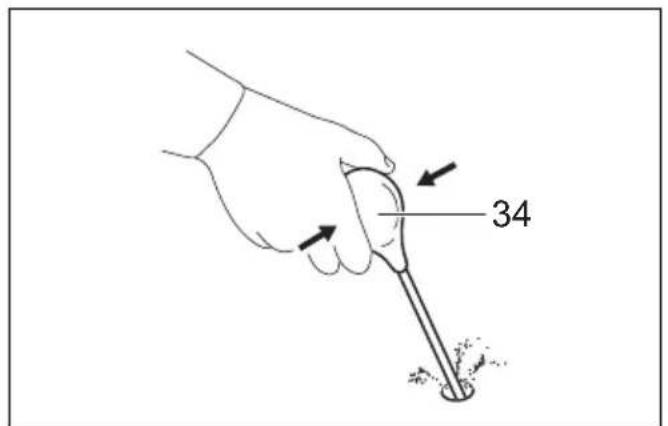
Blow-out bulb (optional accessory) (Fig. 31)
After drilling the hole, use the blow-out bulb to clean the dust out of the hole.
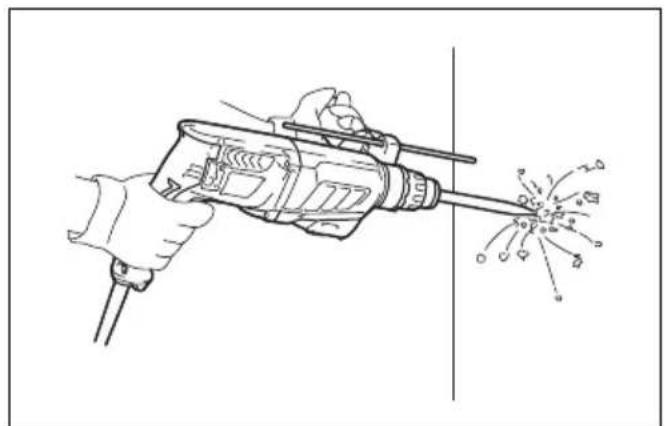
Chipping/Scaling/Demolition (Fig. 32)
Set the action mode changing knob to the 📋 symbol. Hold the tool firmly with both hands. Turn the tool on and apply slight pressure on the tool so that the tool will not bounce around, uncontrolled. Pressing very hard on the tool will not increase the efficiency.
Drilling in wood or metal

CAUTION:
- Never use "rotation with hammering" when the quick change drill chuck is installed on the tool. The quick change drill chuck may be damaged.
Also, the drill chuck will come off when reversing the tool.
- Pressing excessively on the tool will not speed up the drilling. In fact, this excessive pressure will only serve to damage the tip of your bit, decrease the tool performance and shorten the service life of the tool.
- There is a tremendous twisting force exerted on the tool/bit at the time of hole breakthrough. Hold the tool firmly and exert care when the bit begins to break through the workpiece.
- A stuck bit can be removed simply by setting the reversing switch to reverse rotation in order to back out. However, the tool may back out abruptly if you do not hold it firmly.
- Always secure small workpieces in a vise or similar hold-down device.
Set the action mode changing knob to the ⏻ symbol.
You can drill up to 13 mm diameter in metal and up to 32 mm diameter in wood.
For Model HR2631F, HR2641, HR2630
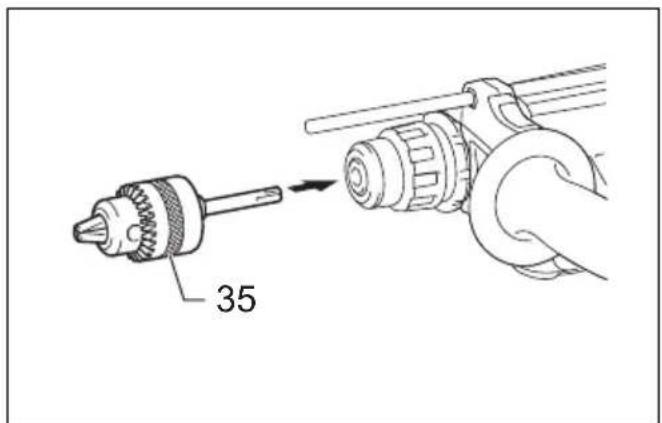
Use the drill chuck assembly (optional accessory). When installing it, refer to "Installing or removing the bit" described on the previous page. (Fig. 33)
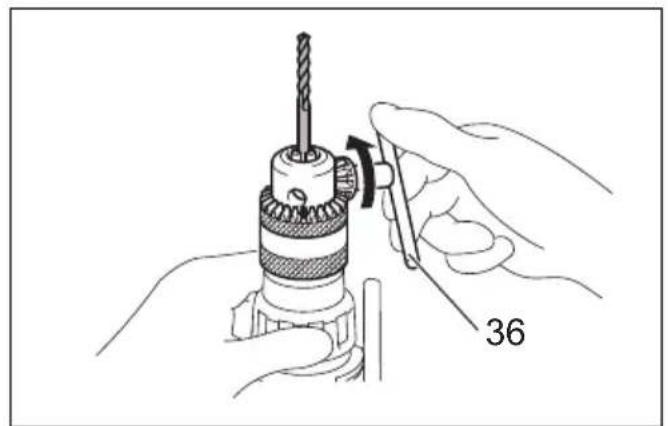
To install the bit, place it in the chuck as far as it will go. Tighten the chuck by hand. Place the chuck key in each of the three holes and tighten clockwise. Be sure to tighten all three chuck holes evenly.
To remove the bit, turn the chuck key counterclockwise in just one hole, then loosen the chuck by hand. (Fig. 34)
For Model HR2631FT, HR2320T, HR2630T
Use the quick change drill chuck as standard equipment. When installing it, refer to “changing the quick change chuck for SDS-plus” described on the previous page. (Fig. 35 & 36)
Hold the ring and turn the sleeve counterclockwise to open the chuck jaws. Place the bit in the chuck as far as it will go. Hold the ring firmly and turn the sleeve clockwise to tighten the chuck.
To remove the bit, hold the ring and turn the sleeve counterclockwise. (Fig. 37)
Diamond core drilling
CAUTION:
- If performing diamond core drilling operations using "rotation with hammering" action, the diamond core bit may be damaged.
When performing diamond core drilling operations, always set the change lever to the ⏻ position to use "rotation only" action.
Operation when using the dust cup (optional accessory) (Fig. 38)
Operate the tool with the dust cup against the ceiling surface.
NOTE:
- The dust cup (optional accessory) is intended only for drilling in the ceramic workpiece such as concrete and mortar. Do not use the tool with the dust cup when drilling in metal or similar. Using the dust cup for drilling in the metal may damage the dust cup due to the heat produced by small metal dust or similar.
- Empty the dust cup before removing a drill bit.
- When using the dust cup, make sure that the dust cap is mounted on it securely.
MAINTENANCE
CAUTION:
- Always be sure that the tool is switched off and unplugged before attempting to perform inspection or maintenance.
- Never use gasoline, benzine, thinner, alcohol or the like. Discoloration, deformation or cracks may result.
To maintain product SAFETY and RELIABILITY, repairs, carbon brush inspection and replacement, any other maintenance or adjustment should be performed by Makita Authorized Service Centers, always using Makita replacement parts.
OPTIONAL ACCESSORIES
CAUTION:
- These accessories or attachments are recommended for use with your Makita tool specified in this manual. The use of any other accessories or attachments might present a risk of injury to persons. Only use accessory or attachment for its stated purpose.
If you need any assistance for more details regarding these accessories, ask your local Makita Service Center.
• SDS-Plus Carbide-tipped bits
- Core bit
- Bull point
- Diamond core bit
- Cold chisel
- Scaling chisel
- Grooving chisel
- Drill chuck assembly
- Drill chuck S13
- Chuck adapter
- Chuck key S13
- Bit grease
- Side grip
- Depth gauge
- Blow-out bulb
- Dust cup
- Plastic carrying case
• Keyless drill chuck
NOTE
- Some items in the list may be included in the tool package as standard accessories. They may differ from country to country.
ENG905-1
Noise
The typical A-weighted noise level determined according to EN62841-2-6:
Model HR2631F
Sound pressure level ( L_pA ): 95 dB (A)
Sound power level ( L_WA ): 103 dB (A)
Uncertainty (K): 3 dB (A)
Model HR2631FT
Sound pressure level ( L_pA ): 94 dB (A)
Sound power level ( L_WA ): 102 dB (A)
Uncertainty (K): 3 dB (A)
Model HR2641, HR2320T, HR2630, HR2630T
Sound pressure level ( L_pA ): 93 dB (A)
Sound power level ( L_WA ): 101 dB (A)
Uncertainty (K): 3 dB (A)
ENG907-1
NOTE:
- The declared noise emission value(s) has been measured in accordance with a standard test method and may be used for comparing one tool with another.
- The declared noise emission value(s) may also be used in a preliminary assessment of exposure.
WARNING:
- Wear ear protection.
- The noise emission during actual use of the power tool can differ from the declared value(s) depending on the ways in which the tool is used especially what kind of workpiece is processed.
- Be sure to identify safety measures to protect the operator that are based on an estimation of exposure in the actual conditions of use (taking account of all parts of the operating cycle such as the times when the tool is switched off and when it is running idle in addition to the trigger time).
ENG900-1
Vibration
The vibration total value (tri-axial vector sum) determined according to EN62841-2-6:
Model HR2631F
Work mode: hammer drilling into concrete
Vibration emission ( a_b_HD ): 12.4 m/s ^2
Uncertainty (K): 1.5 m/s ^2
Work mode: chiselling function with side grip
Vibration emission ( a_h, Cheq ): 9.2 m/s ^2
Uncertainty (K): 1.5 m/s²
Model HR2631FT
Work mode: hammer drilling into concrete
Vibration emission ( a_h, HD ): 11.6 m/s ^2
Uncertainty (K): 1.5 m/s²
Work mode: chiselling function with side grip Vibration emission ( a_h,Cheq ): 9.8 m/s ^2 Uncertainty (K): 1.5 m/s ^2
Model HR2641
Work mode: hammer drilling into concrete Vibration emission ( a_h,HD ): 11.6 m/s ^2 Uncertainty (K): 1.5 m/s ^2
Work mode: chiselling function with side grip Vibration emission ( a_h,Cheq ): 8.1 m/s ^2 Uncertainty (K): 1.5 m/s ^2
Model HR2320T
Work mode: hammer drilling into concrete Vibration emission ( a_h,HD ): 15.9 m/s ^2 Uncertainty (K): 1.5 m/s ^2
Work mode: chiselling function with side grip Vibration emission ( a_h,Cheq ): 12.8 m/s ^2 Uncertainty (K): 1.5 m/s ^2
Model HR2630
Work mode: hammer drilling into concrete Vibration emission ( a_h,HD ): 15.4 m/s ^2 Uncertainty (K): 1.5 m/s ^2
Work mode: chiselling function with side grip Vibration emission ( a_h,Cheq ): 10.8 m/s ^2 Uncertainty (K): 1.5 m/s ^2
Model HR2630T
Work mode: hammer drilling into concrete Vibration emission ( a_h,HD ): 14.5 m/s ^2 Uncertainty (K): 1.5 m/s ^2
Work mode: chiselling function with side grip Vibration emission ( a_h,Cheq ): 10.9 m/s ^2 Uncertainty (K): 1.5 m/s ^2
ENG901-2
NOTE:
- The declared vibration total value(s) has been measured in accordance with a standard test method and may be used for comparing one tool with another.
- The declared vibration total value(s) may also be used in a preliminary assessment of exposure.

WARNING:
- The vibration emission during actual use of the power tool can differ from the declared value(s) depending on the ways in which the tool is used especially what kind of workpiece is processed.
- Be sure to identify safety measures to protect the operator that are based on an estimation of exposure in the actual conditions of use (taking account of all parts of the operating cycle such as the times when the tool is switched off and when it is running idle in addition to the trigger time).
DECLARATIONS OF CONFORMITY
For European countries only
The Declarations of conformity are included in Annex A to this instruction manual.
Descriptif
Rotation sans percussion (Fig. 9)
DÉCLARATIONS DE CONFORMITÉ
Modello HR2631F, HR2631FT
ATTENZIONE:
Voor model HR2631F, HR2631FT
LET OP:
OPTIONELE ACCESSOIRES
LET OP:
For model HR2631F, HR2631FT
FORSIGTIG:
For model HR2631F, HR2641, HR2630
Brug borpatronenheden (ekstraudstyr). Når De monterer den, skal De referere til “Montering og afmontering af boret” på foregående side. (Fig. 33)