Trail Sentry 119000 - Camera BUSHNELL - Free user manual and instructions
Find the device manual for free Trail Sentry 119000 BUSHNELL in PDF.


| Product Type | Digital trail camera |
| Brand | Bushnell |
| Model | Trail Sentry 119000 |
| Image Sensor | 1/3-inch VGA CMOS sensor, software interpolation to 1.3 MP |
| Still Image Resolution | 1280 x 960 pixels (SXGA), JPEG format |
| Video Resolution | 320 x 240 pixels, 1 fps, 15 seconds, AVI format |
| Lens | 42 mm focal length, f/3.5 aperture, 45° field of view |
| Flash | Incandescent flash, range 4.5 m |
| Motion Sensor (PIR) | Passive infrared sensor, range 13.7 m, angle 10° |
| Delay Between Shots | 30 seconds |
| Display | Monochrome LCD screen, auto-off after 3 minutes |
| Power | 4 D-type alkaline batteries |
| Battery Life | Approximately 30 days (depending on temperature, activity, flash) |
| Storage | SD card (not included), compatible up to 1 GB (MMC not recommended) |
| File Management | DCF version 1.0, folder DCIM/100MEDIA |
| Password Protection | Yes, 4-digit code (0000 to 9999, default 0000) |
| Mounting | Extra-wide strap with lock loop |
| Detection Indicator | Red LED on the front |
| Warranty | 2 years limited |
| Maintenance | Clean with a soft dry cloth; avoid water |
Frequently Asked Questions - Trail Sentry 119000 BUSHNELL
User questions about Trail Sentry 119000 BUSHNELL
0 question about this device. Answer the ones you know or ask your own.
Ask a new question about this device
Download the instructions for your Camera in PDF format for free! Find your manual Trail Sentry 119000 - BUSHNELL and take your electronic device back in hand. On this page are published all the documents necessary for the use of your device. Trail Sentry 119000 by BUSHNELL.
USER MANUAL Trail Sentry 119000 BUSHNELL
Digital Trail Camera
natural_image
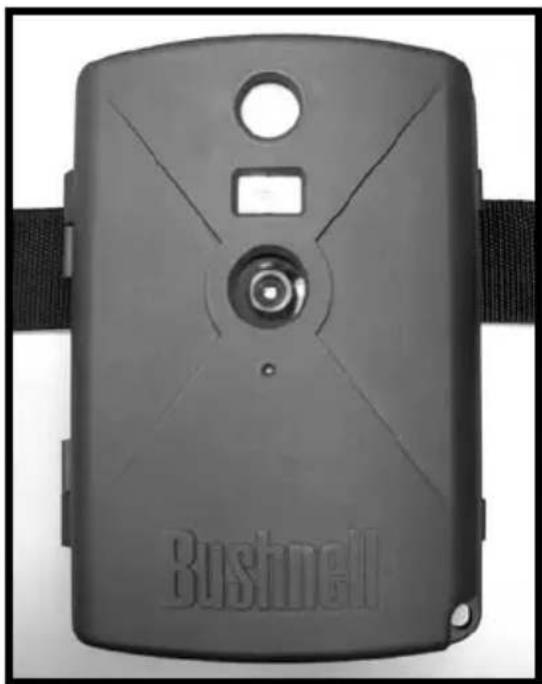
Black Bushnell camera module with black strap and circular lens (no text or symbols on body)Model 11-9000
Instruction Manual Manuel D'instructions Manual de Instrucciones Bedienungsanleitung Manuale di istruzioni Manual de Instruções
LIT #: 98-0637/07-05
CONTENTS
English ......4
Français ......17
Español 31
Deutsch 45
Italiano 59
Português .....7
3
Congratulations on your purchase of the Bushnell "Digital Trail Sentry™ Camera! This weatherproof, rugged trail camera is designed to record still images or movie clips of outdoor wildlife activity. This instruction manual will help you understand, setup, and use your Sentry to achieve the best possible results.
Bushnell Digital Trail Sentry Features
If you've been looking for a digital game scouting or surveillance camera that has all the essential features but without the unwanted frills, expense, or confusing operational menus of some less effective off-brand "game cams", the Bushnell Trail Sentry will end your search. With one of the most user friendly interfaces in the industry, this trail camera is easy to setup and use. The extra-wide strap ensures a secure mount to the tree, and a padlock loophole plus software password keeps out would-be thieves. The high resolution digital camera delivers crisp views of game in your area and stamps each image with date & time. The Sentry can capture 1.3MP (software interpolated) still images, or 15 second movie clips. All images, movies and events are recorded onto an SD card (not included) for convenient transfer to your home computer (or use the Bushnell 11-9500C Trail Scout Viewer to view, copy and delete images in the field). The camera will function day and night and sense game out to 45 feet. The oversized incandescent flash will reach out to 15 feet for nighttime images. A new photo is taken every 30 seconds for as long as motion/heat events are detected. The LCD display makes set up a breeze in the field. The Trail Sentry is rugged and weatherproof.
QUICK GUIDE: BUSHNELL TRAIL SENTRY 11-9000
-
Open the camera by releasing the latches on the right side of the camera. Install 4 "D" cell batteries (flat base of all batteries contacting springs), and insert an SD card (not included, use any capacity from 16MB to 1GB) in the slot to the right of the 5 buttons (upside down, brand name facing you). Press the card down until you hear it click into place.
-
Press and release the Power switch. The display will show four "dashes", then change to "HHHH" with a blinking key icon below it. This is a prompt to enter your password, which can be changed in the setup menu. The first time the camera is turned on, the password is the default. "0000". Press the Enter button four inches to enter four zeros, then press it again to confirm the display indicates "PASS" and the camera is ready to operate. If the wrong password is entered, the display will flash "ERROR" and the camera will not work.
-
If you are using the camera for the first time, you should set the date and time so your photos will be "stamped" correctly. Briefly press the Menu button-"DATE" will blink on the display. Press Enter to confirm you want to change the date, then the first two digits will flash, prompting you to enter the month. Use the Up/Down buttons to set the current month, then press Enter, and repeat to set the day of the month and press Enter again. The display will then change to let you set the year, with only the last two digits flashing ("20_"). Again use the Up/Down buttons to change the year if necessary, press enter, and set the time ("TIME" will flash, press enter and use Up/Down to set the hour and minute. The time display uses the 24 hr standard, so 2:00 PM is indicated as "+1400", etc.).
-
After the date and time have been set, and Enter is pressed, "EVENT" will blink on the display. Press Enter and the "camera" icons for still photos and movie clips will both blink. This allows you to choose which type of file will be recorded every 30 seconds for as long as motion and heat events are detected. Press Enter again, and only the still photo icon will blink. Pressing the UP and DOWN buttons will now let you alternate between blinking movie camera and still photo icons. Select the image file mode your prefer and press ENTER while that icon is blinking.

QUICK GUIDE: BUSHNELL TRAIL SENTRY 11-9000
- The "key" icon will blink next, press ENTER and enter any four digit password of your choice (to keep using the default "0000", just press ENTER 4 times) by using the UP/DOWN buttons to change each digit and using ENTER to step to the next digit. When finished, press ENTER if you want to return to the date/time setup menu, or press and hold the MENU button at any time to exit all setup menus and return to normal operation.
- In normal operating mode, the display will only show the still photo or movie clip icon in the lower left corner, an SD card icon on the lower right, and one or more digits that indicate how many photo or movie files have been stored on the card. To test the camera operation, wave your hand in front of the lens and PIR (passive infrared/motion) detector, while looking at the I.CD display. Every time an "event" is detected, the display will indicate "PIr", "EVNT", "rECD" in turn, and the event is recorded on the SD card as a new line in a text file, including the date and time of the event. As long as events are being detected, a new still photo or movie clip (as set in the menu) will be recorded every 30 seconds, indicated on the display by "PIr", "SnAP", then "SAVE". Note: for movie clips, the display will stay on "SnAP" for the 15 sec duration of each movie.
- Thread the strap through the slots on the back of the Sentry and attach the buckles, then strap it onto a suitable tree, making sure the strap is tight and the camera is aimed at the area you wish to observe. Turn on the camera (make sure a new or empty SD card has been inserted) and leave the area-there is a 60 second delay after power on before the first photo is taken. The flash will fire automatically at night for still photos, but not movies, so they will be dark unless the area is well lit by the moon or another light source. Batteries typically last 30 days or more, depending on how often the Sentry is activated, how often the flash fires, ambient temperature, etc..
- Pressing the Up/Down buttons during normal operation will switch the display between showing # of photos stored and # of events recorded. To look at your captured photos, make sure the power is off, and remove the SD card by pushing down lightly on the top edge of the card-it will pop up for removal. Use an SD card reader with any PC or Mac (or the Bushnell Trail Scout Viewer) to view, copy, or delete the photos (standard JPG files) and movies (AVI files) inside the "DCIM/100MEDIA" folder on the card. Double click on an individual file to see it, or open the files with the photo software of your choice. The event log is the TXT file, just double click to open and view with your default software for standard plain text files.
Digital Trail Sentry Specifications
| Image Sensor 1/4" CMOS VGA sensor with images enhanced to 1.3MP files via software interpolation | |
| Lens F/3.5, effective focal length 42mm. Sight range: 45 degrees | |
| Flash High power electronic Incandescent Flash. Range: 15 ft. | |
| PIR Sensor Low noise, high sensitivity passive infrared sensor. Range: 45 ft. | |
| Motion LED Indicator Yes | |
| Display Monochrome LCD. Auto-off: 3 min. 2-digit event and image display. | |
| File Format Still image IPG 1280x960 pixels (SXGA). Movie clips AVI 320x240 pixels per frame, 1 frame per second rate, 15 second length. DCF ver. 1.0 file management. | |
| Exposure Auto | |
| White Balance Auto | |
| Power Supply | 4 x "D" size alkaline batteries. |
| Battery Life Approximately 30 days (dependant on temperature, camera activity and flash usage) | |
| Card Compatibility Verified compatible with up to 1 GB capacity secure digital (SD)cards. The use of MMC cards is not recommended. | |
| User Password | Yes, available range: 0000 to 9999 (Default setting = 0000) |

Glossary
PIR—Passive Infrared Sensor. Senses motion like typical security motion detector. Requires infrared energy (heat) in addition to motion to trip sensor to assure detection of live animals.
Event—Any time that the PIR senses motion it counts it as an event. Events are recorded to the SD card in a text file. Events are recorded continuously during operation.
Image—A digital picture recorded on the SD Card when motion is sensed. Images are taken at the desired delay between images.
Image Delay—Time elapsed between photos while events are sensed and recorded. This is fixed at 30 second intervals in the Trail Sentry.
Camera Flash—Incandescent Flash used for night or low light photography. Automatically fires if required.
SD Card—Memory card used to store images and events. Compatible with up to IGB capacity SD card.
Battery Life—Time that camera will function in the field. Dependent on temperature, number of images and number of flashes during that time.
Setup—Using the display menu and buttons to set the date/time, still photo or movies, and password.
Security (2 methods)—One of the most important requirements of any trail camera. The Trail Sentry has 2 levels—padlock tab and software password.
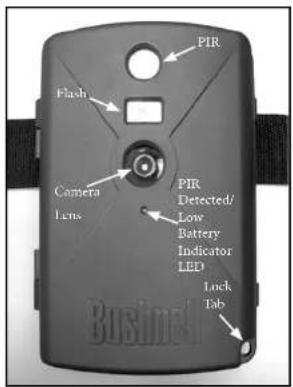
Front of Camera
Control Panel Inside Front
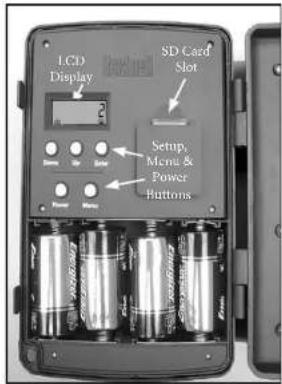
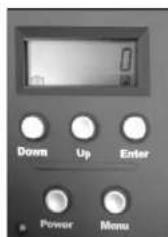
Button & Display Detail
Setup and Operation Guide
-
Open the Sentry by pulling out on the two latches on the right side. Install 4 "D" cell batteries (flat base of all batteries contacting springs), and insert an SD card (not included, use any capacity from 16MB to 1GB. Do not substitute MMC cards.) in the slot to the right of the 5 buttons as indicated on the slot cover (upside down, with the notched corner of the card on the left and metal contacts of the card facing the back of the slot). Press the card down until you hear it click into place. If the Sentry is turned on without a card in place, it may not turn off-reset it by pulling one of the batteries out partway, insert a new or empty SD card, and put the battery back in place. Only remove or insert cards with power off.
-
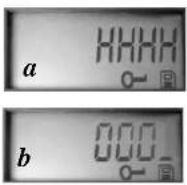
Press and release the Power switch. The display will show four "dashes", then change to "HHHH" with a blinking key icon below it (Fig a). This is a prompt to enter your password, which can be changed in the setup menu. The first time the camera is turned on, the password is the default, "0000". Press the Enter button four times to enter four zeros (b) (if you previously changed the password in the setup menu, use the UP/DOWN buttons to enter your password digits, pressing ENTER after each one), then press it again to confirm the display indicates "PASS" and the camera is ready to operate. If the wrong password is entered, the display will flash "ERRO" and the camera will not work or allow the password to be changed. After an incorrect password is entered for the third time, the Sentry will automatically turn off.
Setup Guide (cont.)
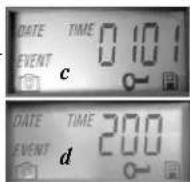
Power must be turned on again before beginning a new password entry cycle. 3. If you are using the camera for the first time, you should set the date and time so your photos will be "stamped" correctly. Briefly press the Menu button "DATE" will blink on the display. Press Enter to confirm you want to change the date, then the first two digits will flash, prompting you to enter the month (c). Use the Up/Down buttons to set the current month, then press Enter. Set the day of the month the same way, and press Enter again. The display will then change to let you set the year, with only the last two digits blinking ("20_ _") (d). Again use the Up/Down buttons to change the year if necessary, press enter, and set the time ("TIME" will flash, press enter and use Up/Down to set the hour and minute. The time display uses the 24 hr standard, so 2:00 PM is ind
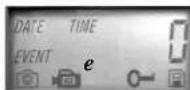
- After the date and time have been set, and Enter is pressed, "EVENT" will flash on the display. Press Enter and the "camera" icons for still photos and movie clips will both blink (e). This allows you to choose which type of file will be recorded every 30 seconds for as long as motion and heat events are detected. Press Enter again, and only the still photo icon will blink. Pressing the UP and DOWN buttons will now let you alternate between flashing movie camera and still photo icons. Select the image file mode you prefer (keep in my dark at night because the flash does not fire during movies) and press E blinking.
Setup Guide (cont.)
-
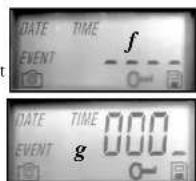
The "key" icon will flash next (f), press ENTER and enter any four digit password of your choice (to keep using the default "0000", just press ENTER 4 times) by using the UP/DOWN buttons to change each digit and using ENTER to step to the next digit (g). When finished, press ENTER if you want to return to the date/time setup menu, or press and hold the MENU button at any time to exit all setup menus and return to normal operation.
-
In normal operating mode, the display will only show the still photo or movie clip icon in the lower left corner, an SD card icon on the lower right, and one or more digits that indicate how many photo or movie files have been stored on the card. To test the camera operation, wave your hand in front of the lens and PIR (passive infrared/motion) detector, while looking at the LCD display. Every time an "event" is detected, the display will indicate "Plr", "EVNT", "rECd" in turn, and the event is recorded on the SD card as a new line in a text file, including the date and time of the event. As long as events are being detected, a new still photo or movie clip (as set in the menu) will be recorded every 30 seconds, indicated on the display by "Plr", "SnAP", then "SAVE". Note: for movie clips, the display will stay on "SnAP" for the 15 sec duration of each movie.
-
Thread the strap through the slots on the back of the Sentry and attach the buckles, then strap it onto a suitable tree, making sure the strap is tight and the camera is aimed at the area you wish to observe. The red LED lamp on the front of the camera can help you determine how large an area is 12
Setup Guide (cont.)
covered, as it will flash when an "event" is detected. Turn on the camera (make sure a new or empty SD card has been inserted) and leave the area-there is a 60 second delay after power on before the first photo is taken. The flash will fire automatically at night for still photos, but not movies, so they will be dark unless the area is well lit by the moon or another light source. Batteries typically last 30 days or more, depending on how often the Sentry is activated by events, how often the flash fires, ambient temperature, etc. The red LED lamp will stay on continually to indicate a low battery condition.
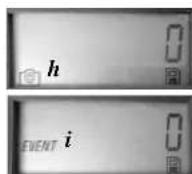
- Pressing the Up/Down buttons during normal operation will switch the display between showing # of photos stored (h) and # of events recorded
(i). To view your captured photos, make sure the power is off, and remove the SD card by pushing down lightly on the top edge of the card-it will pop up for removal. Insert it into an SD card reader (available at any computer, photo, or electronics dealer) connected via USB to your PC or Mac to view, copy, or delete the photos (standard JPG files) and movies (AVI files) inside the "DCIM/100MEDIA" folder on the card. Double click on an individual file to see it, or open the files using the photo software of your choice. The event log is the .TXT file, just double click to view with your default software that opens standard plain text files. If you do not have a computer, or would like to more easily view your photos in the field, we recommend the Bushnell Trail Scout Viewer. It is battery powered, and features 2 SD card slots, allowing you to easily copy photos to a larger capacity card, or delete unwanted photos, as well as view your Sentry photos on its large color LCD display. The Trail Scout Viewer also has a USB port, so it can function as a card reader for a computer as well.
ABOUT THE PIR SENSOR
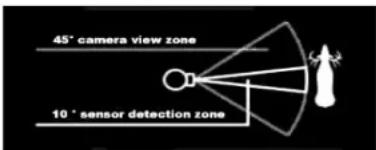
The sensor that triggers the trail camera is Passive Infra Red, or PIR. Infrared energy is essentially heat energy. The PIR detector operates by sensing a change in the infrared level in its detection zone. This zone is a cone in the center 10 degrees of the camera's field of view. The camera establishes an average long-term infrared level. When this level increased suddenly the PIR detector signals the camera to record a picture and/or an event. Because of this effect, the PIR detector will be more sensitive at night, when the average temperature is lower.
You can use the red LED indicator on the front of the camera to confirm the detection zone. When PIR is sensed, this "PIR detected" indicator will light. The camera's field of view is a 45 degree cone, centered on the PIR detection zone.
OTHER BUSHNELL DIGITAL TRAIL CAMERA MODELS
119600—Digital Trail Scout VGA
Great images and scouting technology at a great value. This camera will sense deer and other game as far out as 60 feet with its passive infrared sensor. Low-battery indicator lights when battery life drops below 25%. Motion LED lights when activity is detected by the sensor in regular imaging mode and during setup mode for aiming. Weatherproof. Comes complete with aircraft aluminum security cable, padlock, and tree bracket. Textured "bark-like" surface for maximum concealment.
119800—Digital Trail Scout 2.1MP
All the features of the Trail Scout VGA, but featuring superior image resolution and increased range. This camera senses deer as far out as 90 feet with its passive infrared sensor.
119900—Digital Trail Scout 2.1MP with Night Vision
With all the features of the 2.1MP Trail Scout plus Night Vision and laser aiming, this is the top of the line digital trail camera. This is the only game camera on the market to combine both incandescent camera flash and digital night vision technology. Choose your setting for regular camera flash or stealth-like LED flash. LED flash enables you to discretely image game in the night without a visible flash. There is no need to worry about your flash giving away your position in popular, busy hunting areas. This camera comes complete with laser aiming device for easy set up in the woods.
Note: a 32MB SD card is included with all the above Trail Scout models
TWO-Year LIMITED WARRANTY
Your Bushnell product is warranted to be free of defects in materials and workmanship for two years after the date of purchase. In the event of a defect under this warranty, we will, at our option, repair or replace the product, provided that you return the product postage prepaid. This warranty does not cover damages caused by misuse, improper handling, installation, or maintenance provided by someone other than a Bushnell Authorized Service Department.
Any return made under this warranty must be accompanied by the items listed below: 1) A check or money order in the amount of \$10,000 to cover the cost of postage and handling. 2) Name and address for product return. 3) An exploration of the defect. 4) Proof of Date Purchased. 5) Product should be well packed in a study outside shipping carton, to prevent damage in trade with return postage prepaid to the address listed below.
IN U.S.A. Send To: IN CANADA Send To:
Bushnell Performance Optics - Bushnell Performance Optics
Attn.: Repairs Attn.: Repairs
8:00 Marshall Drive 25A East Pearce Street, Unit 1
Lencsa, Kansas 66214 Richmond Hill, Ontario LAB 2M9
For products purchased outside the United States or Canada please contact your local dealer for applicable warranty information. In Europe you may also contact Bushnell at BUSHNELL Performance Optics GmbH
European Service Centre
MORSESTRASSE 4
D-50769 KOLN
GERMANY
Tel: -491012217095393
Fax: +49 (0) 221 709 939 8
This warranty gives you specific legal rights.
You may have other rights which vary from country to country.
©2004 Bushnell Performance Optics
FCC Note:
This equipment has been tested and found to comply with the limits for a Class II digital device, pursuant to Part 15 of the FCC Rules. These limits are designed to provide reasonable protection against harmful interference in a residential installation. This equipment generates, uses and can radiate radio frequency energy, and, if not installed and used in accordance with the instructions, may cause harmful interference to radio communications. However, there is no guarantee that interference will not occur in a particular installation. If this equipment does cause harmful interference to radio or television reception, which can be determined by turning the equipment off and on, the user is encouraged to try to correct the interference by one or more.
- Reorient or relocate the receiving antenna.
- Increase the saturation between the equipment and
RUSTICUL
- Connect the equipment into an outlet on a circuit
different from that to which the receiver is connected.
- Consult the dealer or an experienced radio-TV
technician for help.
Shielded interface cable must be used with the equipment in order to comply with the limits for a digital device pursuant to Subpart B of Part 15 of FCC Rules.
Specifications and designs are subject to change without any notice or obligation on the part of the manufacturer.
CE
Bushnell®
TRAILSENTRY
8510 Marshall Drive 25A East Pearce Street, Unit 1
Teneva, Kansas 66214 - Richmond Hill, Ontario 14th 2V19
European Service Centre
MORSESTIASSE
D 50769 KOLN
CERMANY
Tel: +49 (0) 221 709 939 3
Fax: +49 (0) 221 709 939 8
©2005 Bushnell Performance Optics
ACERCA DEL SENSOR PIR
8500 Marshall Drive 25A East Pearce Street, Unit
Lennox, Kansas 66214 Richmond Hill, Ontario L4B 2M9
European Service Centre
MORSESTTASSE
MORSESTRASSE D. 50769 KOUN
D° 20189 KOLN GERMANN
Tel: 149 (0) 221 709 939 3
Fax: +49 (0) 221 789 939 8
A##: Repairs A##: Repairs
501 Marshall Drive 25A East Pearce Street, Unit 1
enexa, Kansas 6h214 Richmond Hill, Ontario 14B 2M9
European Service Centre
MORSESTRASSE 4
D-50769 KOLN
GERMANS
Tel: 49 (0) 221 709 939 5
Fax: +49 (0) 221 709 939 8
8501 Marshall Drive 25A East Pearce Street, Unit 1
Lenexa, Kansas 16214 Richmond Hill, Ontario 14th 2019
European Service Centre
MORSESTRASSE
D-50769 KÖLN
GERMANY
Tél: +49 (0) 221 709 939 3
Fax: -49 (0) 221 709 939 8
©2005 Bushnell Performance Optics
Annotazioni FCC:
Câmara digital Trail
PORTUGUÊS
8500 Marshall Drive 25A East Peace Street, Unit 1
Lenexa, Kansas 66214 Richmond Hill, Ontario LAB 2M9
European Service Centre
MORSESTRA5SE4
D. 59769 KÖLN
GERMANY
Tel: +49 (0) 221 769 939 3
192-49(8)221709935
102.4510,2217053976