BC2000 - Baby monitors ELRO - Free user manual and instructions
Find the device manual for free BC2000 ELRO in PDF.



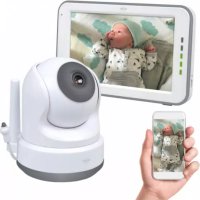
| Product type | Baby monitor |
| Brand | ELRO |
| Model | BC2000 |
| Camera dimensions | 80 mm diameter x 105 mm height |
| Camera weight | 190 g |
| Monitor dimensions | 159 x 95 x 15 mm |
| Monitor weight | 260 g |
| Power supply | DC 5V 1.5A adapter (camera: Micro USB, monitor: USB Type C) |
| Monitor screen | 5-inch (12.7 cm) TFT LCD, resolution 800 x 480 |
| Camera resolution | Full HD 1920 x 1080 |
| Night vision | Yes, range 5 meters, 0 Lux (IR LED) |
| Viewing angle | 88° diagonal (77° horizontal, 42° vertical) |
| Cry detection (VOX) | Yes, adjustable sensitivity (LOW/HIGH) |
| Temperature detection | Yes, alarm from 18 to 30 °C (64 to 86 °F) |
| Music | 8 built-in melodies |
| Recording | On Micro SD card (max 128 GB): camera in 1080p, monitor in 480p |
| Monitor battery | Lithium 3.7 V / 3600 mAh, battery life up to 5.5 hours in direct view |
| Wireless range | Up to 100 meters in open field (2.4 GHz) |
| Number of cameras | Up to 4 cameras (model BC2000-C optional) |
| Safety | Keep cables out of reach of children; do not open housings; indoor use only |
| Maintenance and cleaning | Clean with a dry cloth; do not use water |
| Spare parts and repairability | Adapters provided; battery not user-replaceable; SD card not included |
| General information | Manufacturer: ELRO Europe, www.elro.eu |
Frequently Asked Questions - BC2000 ELRO
User questions about BC2000 ELRO
0 question about this device. Answer the ones you know or ask your own.
Ask a new question about this device
Download the instructions for your Baby monitors in PDF format for free! Find your manual BC2000 - ELRO and take your electronic device back in hand. On this page are published all the documents necessary for the use of your device. BC2000 by ELRO.
USER MANUAL BC2000 ELRO
English Manual Page 2-10
Home is not a place, it's a feeling
EN - Content
- Introduction
- What's in the package
- Power up -3-
- Product overview
- Monitor status
- Setting menu
- Adding a new camera 7
7.1 Unpairing a camera - Specifications
- Safety and Compliance 8
- Simplified EU Declaration of Conformity 10
- Symbols 10
- Service and Contact 10
- Symbolen 19
- Service und Kontakt. - 19
We are constantly improving our products and service. Go to www.elro.eu to download the latest version of this manual!
Also check www.elro.eu for all relevant frequently asked questions and newest developments for this product. This will help you to better understand the product.
1. Introduction
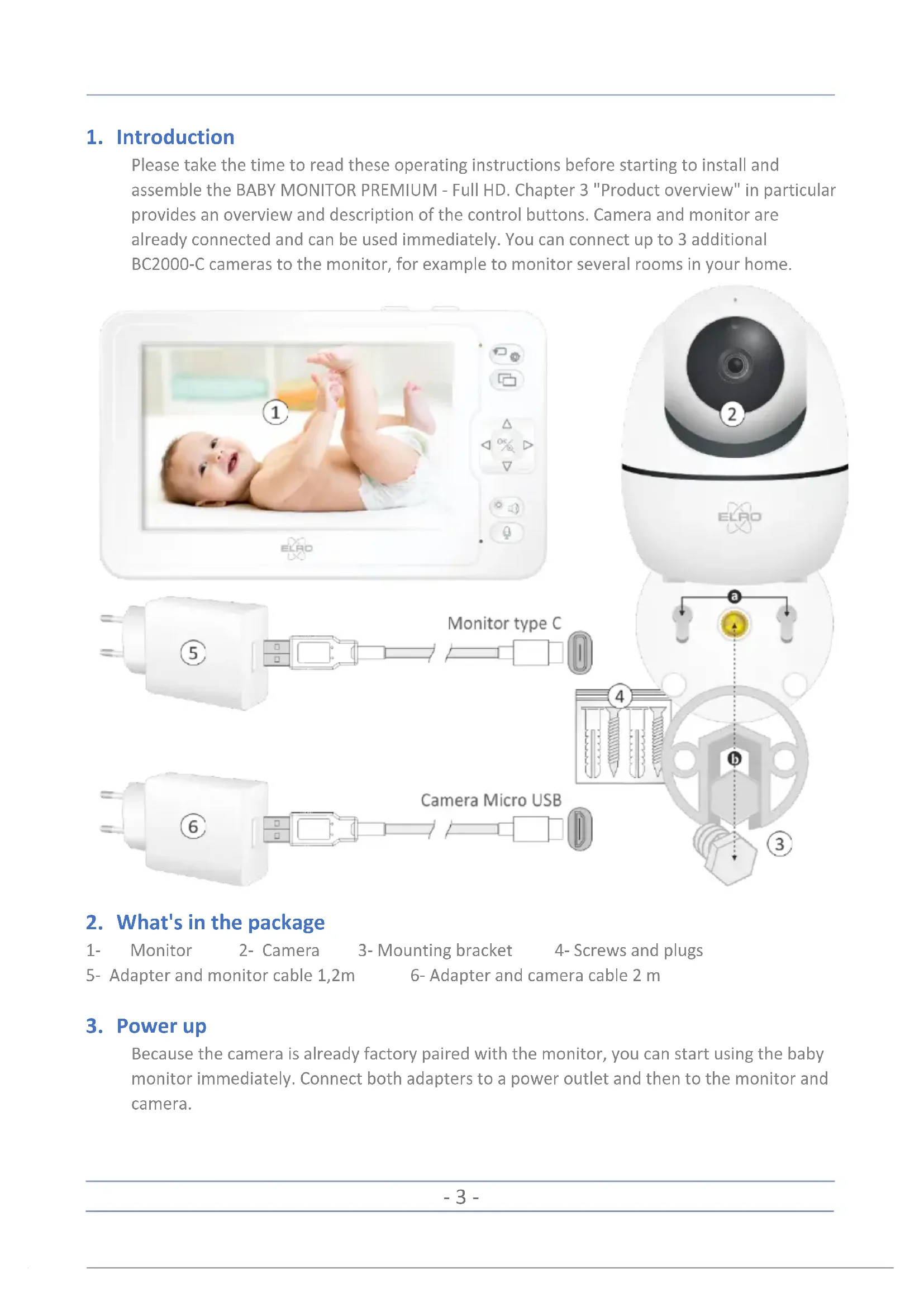
Please take the time to read these operating instructions before starting to install and assemble the BABY MONITOR PREMIUM - Full HD. Chapter 3 "Product overview" in particular provides an overview and description of the control buttons. Camera and monitor are already connected and can be used immediately. You can connect up to 3 additional BC2000-C cameras to the monitor, for example to monitor several rooms in your home.
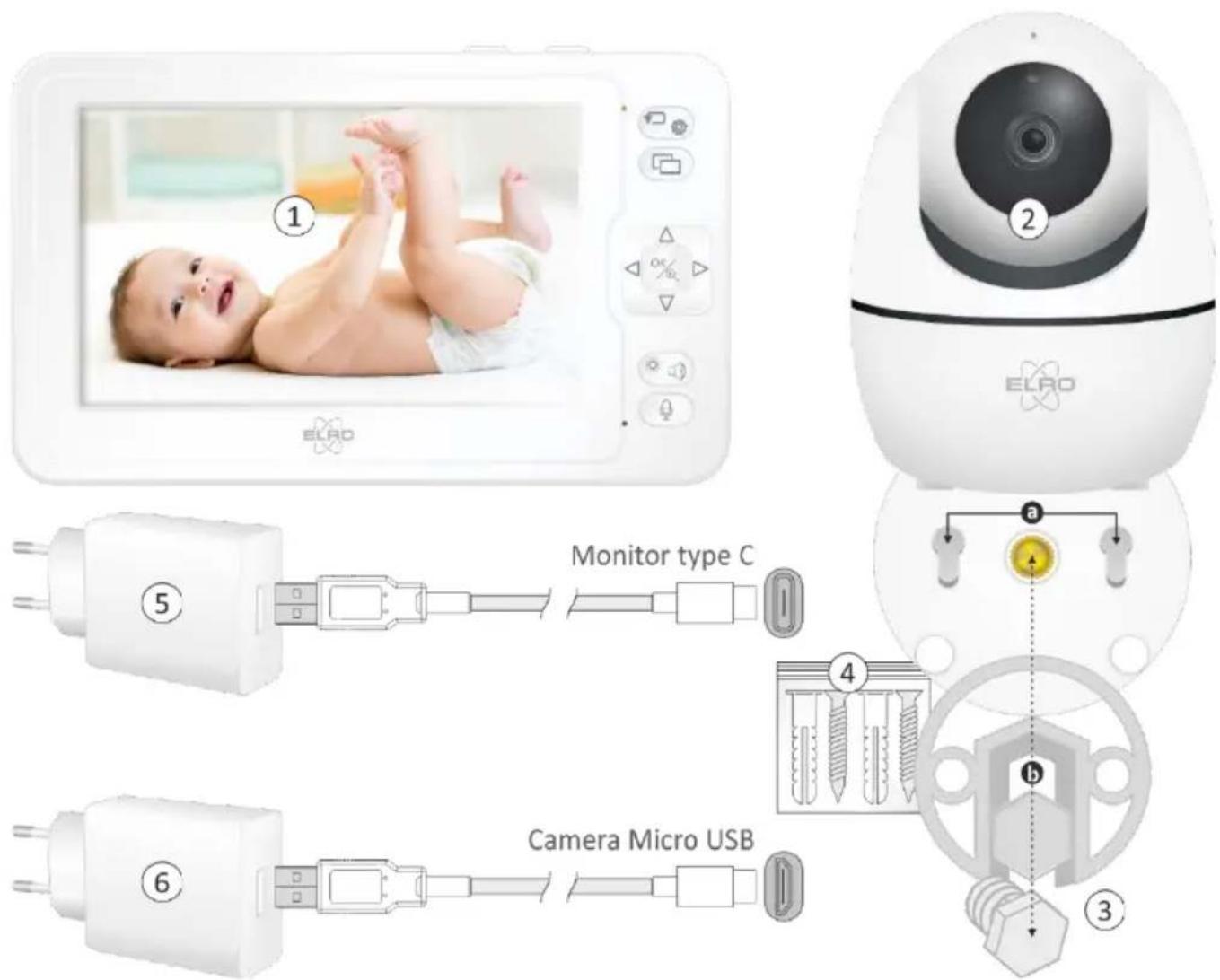
2. What's in the package
1-Monitor
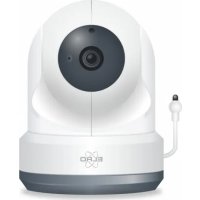
2- Camera
3-Mounting bracket
4-Screws and plugs
5-Adapter and monitor cable 1,2m
6-Adapter and camera cable 2 m
3. Power up
Because the camera is already factory paired with the monitor, you can start using the baby monitor immediately. Connect both adapters to a power outlet and then to the monitor and camera.
4. Product overview
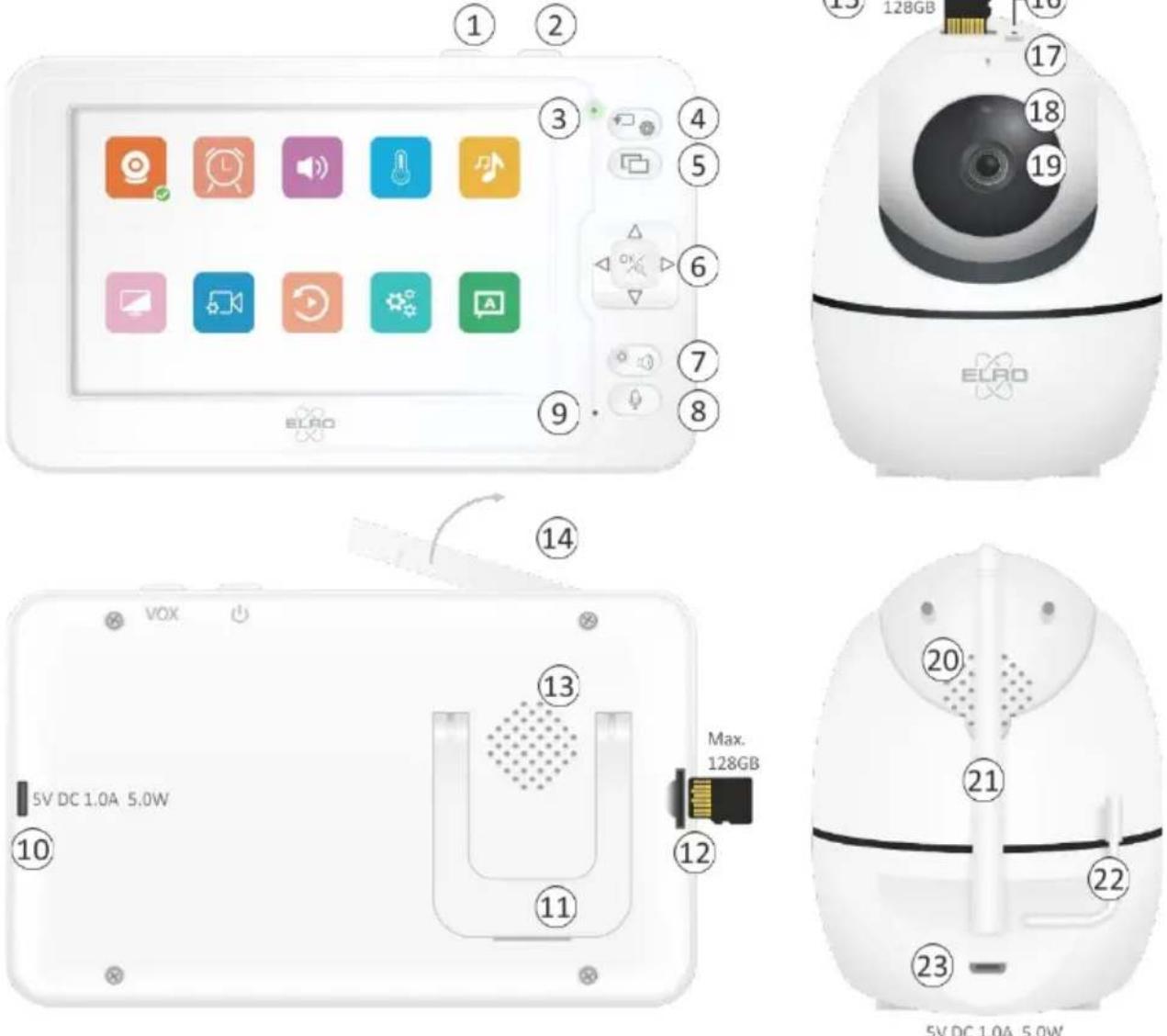
- Long press (5 seconds) to turn the monitor on or off, short press to turn the monitor "standby" or back on.
- VOX - Sound alarm, in the monitor the symbol of an ear will appear indicating that the sound alarm is on.
- Red when the adapter is connected and the battery is charging. Green when using the battery or when fully charged.
- Press to go to the settings menu, press again to return to the camera image.
- When using multiple cameras (max. 4), you can use this button to switch to the image of another.
- In monitor mode you can use the arrows to point the camera at a distance, the magnifying glass allows you to zoom in 1 time. In menu mode you can determine the direction and confirm your choice with the OK key.
- With this key you can correct the image from light to dark and also you can control the volume with this key.
- Press to communicate with your child or the person who is in the room with the camera.
-
Microphone of the monitor
-
Socket (Type C) for adapter 5V DC 1.0A / 5W
- Bracket for placing the monitor on a stable table/desk
- SD card max. 128GB. Recording resolution 800 × 480 pixels, look back at the monitor.
- Speaker of the monitor
- Antenna, fold out for maximum reception.
- SD card max 128GB. Recording resolution 1920 x 1080 pixels, view back via computer.
- Reset.
- Microphone of the camera.
- Light sensor; in dark with too little ambient light, the night vision leads turn on automatically, monitor switches to black/white.
- Camera lens
- Speaker of the camera
- Antenna
- Digital temperature sensor
- Socket (Micro USB) for adapter 5V DC 1.0A / 5W
5. Monitor status
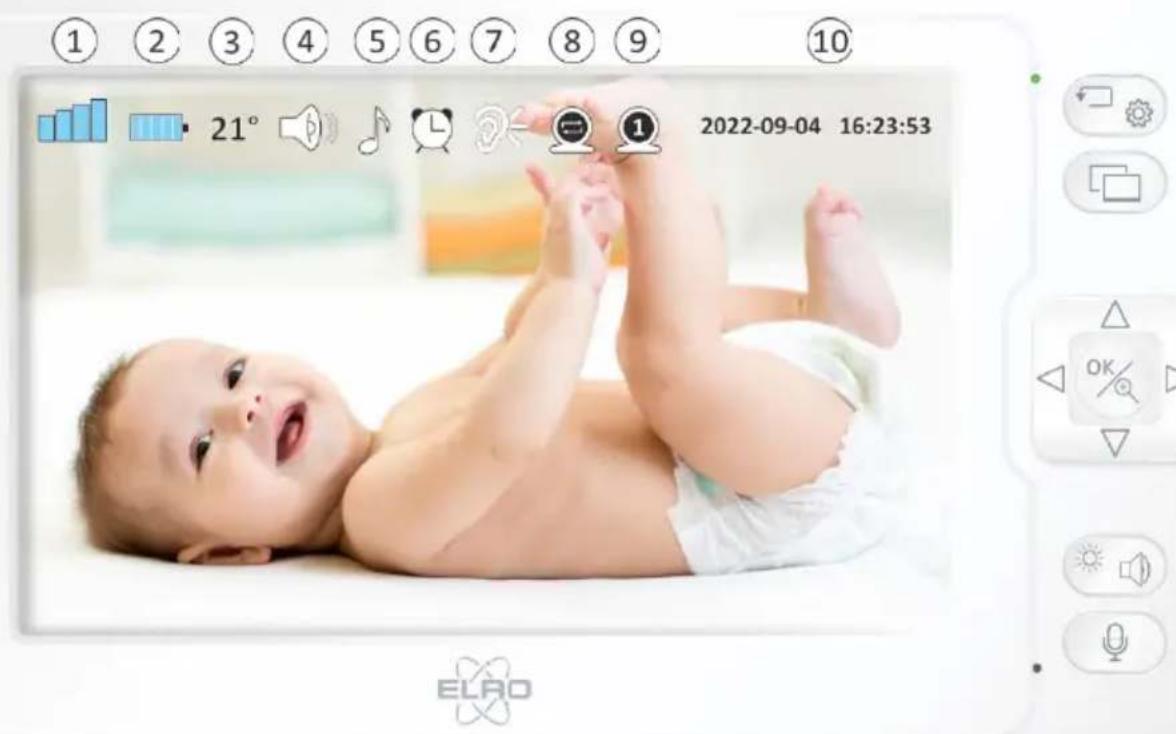
- Wireless transmission range
- Battery status
- Display temperature, measured in the baby room
- You can hear the sound of the baby room through the monitor
- The camera in the baby's room plays a set melody
- Feeding reminder is enabled
-
Audible alarm; activated when VOX is on
-
Auto switch from camera (10 sec.) to camera (10 sec.)
- Camera channel
- Time and date display.
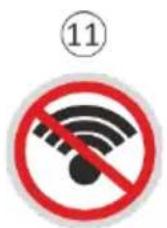
- No signal
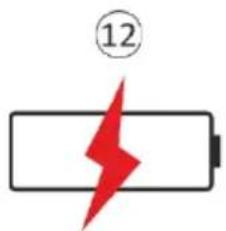
- Rechargeable battery is empty
- VOX alarm
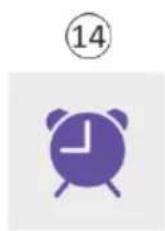
- Power on time reminder
- Temperature alarm


6. Setting menu
Go to the settings menu, use the arrows and the OK to determine your choice.

Cameras
3 additional cameras can be linked, using switch the monitor automatically switches from camera to camera.
Feeding
Here you can set an alarm with intervals that will alert you that the baby needs feeding.

Sound Alarm
Here you set the sensitivity of the VOX function. LOW is the least sensitive, the baby can make completely satisfied sounds without triggering the VOX alarm.

Temperature alarm
The alarm activates if the temperature in the room where the camera is located is below or above 18 - 30^ (64-86°F)

Music
Select from 8 melodies, repeat the selected melody is

To repeat all melodies (1 to 8) is
Display
Choose how long the image will be seen in the monitor, 1 min, 10 min, 30 min. The button turns the monitor back on.
Recording
An SD card (max 128GB) can be inserted into both the monitor and the camera.
- Recordings made on the monitor have a low resolution (480P) and can also be viewed on the monitor.
- Recordings made by the camera have a high resolution (1080P) and can be viewed via your PC or laptop.

Playback
Recordings made on the SD card in the monitor can be searched here and viewed again via the monitor.

System
Here you can set and view system settings. Including Date/Time, Reset, Advanced settings such Picture flip and view the software version.

Language
Here you can set the language of the menu.
7. Adding a new camera
Act as follows to add a second camera:
Make sure you are within 2 meters of the monitor.
- Connect the adapter to the second camera and a power outlet.
- Go via to the settings menu and choose Cameras
- Then choose the channel on which you want to pair the new camera.
Press the % button to start the pairing process.

7.1 Unpairing a camera
Disconnect the adapter from the camera to be removed, select the corresponding channel and press the OK key, the pairing will be disconnected and the camera channel will be empty again.
8. Specifications
| Camera | |
| Resolution | 1920 x 1080 |
| Minimum illumination | 0 Lux (with infrared led on) |
| Night Vision | 5 meter |
| Angle of view | Diagonal 88° Horizontal 77° Vertical 42° |
| Antenna | Yes - external |
| Audio | Microphone & Loudspeaker |
| Wireless frequency | 2.4GHz |
| VOX Cry detection | Yes |
| Temperature detection | 18-30 °C (64-86 °F) |
| Consumption | <5W |
| Power supply | Adapter DC 5V 1.5A | Cable 2 m | Micro USB |
| Dimensions | 80 mm diam x 105 mm height |
| Weight | 190g |
| Monitor | |
| LCD-screen | TFT |
| LCD size | 12,7 cm / 5" inch |
| Resolution | 800 x 480 |
| Built-in Battery | Lithium 3,7V | 3600mAh | 13.32Wh (5.5 hours of live viewing with a fully charged battery) |
| Power supply | Adapter DC 5V 1.5A | Cable 1,2 m | Type C |
| Audio | Microphone & Loudspeaker |
| Video input | Support up to 4 cameras |
| Video Storage | Micro SD Card (Max. 128GB - excluded) |
| Antenna | Yes - external |
| Dimensions | 159 x 95 x 15 mm |
| Weight | 260g |
9. Safety and Compliance
Choking hazard: Keep connecting cables and small parts out of the reach of children.
Do not place the camera and connecting cables within 1.5 meters of the cradle/playpen.
- Never use extension cables in combination with adapters, only use the supplied adapters.
Adults required during assembly/installation.
This product is not intended to replace proper supervision of children. You should regularly monitor your child's activities, as this product will not alert parents to silent activities of a child.
Please read and follow all instructions/warnings in this manual before using this product.
This product is not water resistant and is suitable for indoor use only. Clean the product only with a dry cloth.
This product is not intended for use as a medical monitor and its use should not replace adult supervision.
The camera detects normal sound levels within a range of 2 to 3 meters from a child. If the child moves outside this range, the camera may not be able to detect sounds from him or her.
It is essential that you check operation on initial installation and regularly thereafter.
- Check reception regularly. Test the monitor before use and after changing the location of the camera.
- The housing of camera and monitor should not be opened.
- To prevent overheating, keep the product and AC adapters away from direct sunlight and heat sources such as radiators, stoves, cooking appliances (e.g. stoves and ovens) and other devices that produce heat (e.g. amplifiers, televisions and stereos).
- Ensure proper ventilation of the product during use. Avoid contact with cushions and furniture that may block ventilation.
Use only the AC adapters supplied with the product, as other adapters may damage the product.
- Connect the adapters only to standard household current (100~240 volts AC).
- Position the AC adapters and avoid pinch points to avoid damage.
- Do not touch the exposed end of the AC adapter's power cord when it is connected to the wall outlet.
Images and sounds are transmitted by the product over the public airwaves and may be picked up by other devices.
Although the transmission distance is 100m or more (open space), it may vary depending on obstacles present between camera and monitor.
Note: If you are using the system to watch a young child, do not place the camera where the child can reach it.
- If the monitor is used only with the battery and it is low, it may affect the picture and/or sound. Connect the AC adapter, the battery will then be charged automatically.
- The transmission range of the wireless signal may become weaker if there are heavy obstacles such as a concrete, brick or metal wall between the camera and the monitor, or if there are several Wi-Fi routers and devices in your area.
- To avoid interference with the RF signal, keep your cell phone at least 1 meter away from the camera and monitor.
- Explosion hazard if battery is replaced with an incorrect type.
- Dispose of used batteries according to the instructions.
10. Simplified EU Declaration of Conformity
I, ELRO Europe, hereby declare that the radio equipment type BC2000 Baby monitor Premium conforms to Directive 2014/53/EU.
The full text of the EU Declaration of Conformity can be consulted at the following internet address: www.elro.eu/doc.
11. Symbols

The WEEE symbol means that this product and batteries must be disposed of separately from household waste. When this product reaches the end of its life, take it to a designated waste collection point nearby to ensure safe disposal or recycling. Protect the environment and human health and use natural resources responsibly!

By affixing the CE mark to a product, a manufacturer certifies that the product meets all legal requirements for CE marking and can be sold throughout the EEA.

Visit www.elro.eu for the warranty terms of this product.
12. Service and Contact
In order to ensure that we can provide the best and quickest service to our customers, we ask you to consider the following:
For questions about the installation, use or operation of this product:
- Visit www.elro.eu/faq to get a quick answer to your question. Here you will find answers to frequently asked questions, detailed installation videos and the latest version of this product's manual, among other things.
Can't figure it out via the website? Please leave a question via the product page or mail to info@elro.eu. We will help you as soon as possible.
For all other questions:
Please email info@elro.eu we will get back to you as soon as possible.
This product is produced by:
ELRO Europe
Postbus 9607 - Box E800
1006 GC Amsterdam
Nederland
www.elro.eu
DE Inhalt
Home is not a place, it's a feeling
- EN - Content
- Introduction
- What's in the package
- Power up
- Product overview
- Monitor status
- Setting menu
- Cameras
- Feeding
- Sound Alarm
- Temperature alarm
- Music
- Display
- Recording
- Playback
- System
- Language
- Adding a new camera
- Unpairing a camera
- Specifications
- Safety and Compliance
- Simplified EU Declaration of Conformity
- Symbols
- Service and Contact
- DE Inhalt
Brand : ELRO
Model : BC2000
Category : Baby monitors