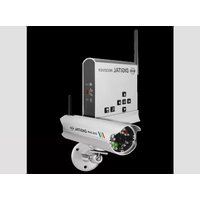
CCD423 - Security Camera ELRO - Free user manual and instructions
Find the device manual for free CCD423 ELRO in PDF.


Pick your language and provide your email: we'll send you a specifically translated version.
| Product Type | Security Camera |
| Brand | ELRO |
| Model | CCD423 |
| Category | Surveillance / Security Camera |
| Dimensions | Approximately 180 x 60 x 60 mm |
| Weight | Approximately 350 g |
| Power Supply | 12V DC adapter |
| Power Consumption | Low power consumption (approx. 5W) |
| Video Resolution | HD 1080p (estimated) |
| Night Vision | Infrared LEDs with automatic activation |
| Motion Detection | Built-in PIR sensor |
| Field of View | Wide-angle lens (approx. 90°) |
| Connectivity | Wired (BNC/RJ45) or wireless options |
| Storage | Supports DVR/NVR or local SD card |
| Weather Resistance | IP66 weatherproof housing |
| Mounting | Wall or ceiling mountable |
| Operating Temperature | From -20°C to 50°C |
| Included Accessories | Mounting bracket, screws, user manual |
| Maintenance | Clean lens with soft dry cloth |
| Repairability | Replacement parts available for mount and cables |
Frequently Asked Questions - CCD423 ELRO
How do I connect the ELRO CCD423 camera to a recorder?
Connect the camera to your DVR or NVR using a BNC or RJ45 cable. Ensure the camera is powered via the 12V DC adapter and that the recorder is set to the correct channel.
Can the camera be used outdoors?
Yes, the ELRO CCD423 features an IP66 weatherproof housing, making it suitable for outdoor installation. It withstands rain, snow, and dust, and operates in temperatures from -20°C to 50°C.
How do I set up motion detection?
Access the camera settings via the recorder interface or a compatible app. Enable motion detection and adjust sensitivity levels according to your needs. The PIR sensor triggers recording when movement is detected.
What is the night vision range?
The infrared LEDs provide clear visibility in complete darkness. The typical night vision range is around 10 to 20 meters, depending on the environment and camera placement.
How do I store video recordings?
Recordings can be stored on a DVR/NVR connected to the camera or on a microSD card inserted into the camera. Ensure the storage device has enough capacity and is configured in the recorder settings.
Is the camera waterproof?
Absolutely. The camera is rated IP66, which means it is dust-tight and protected against powerful water jets, making it fully suitable for outdoor use in harsh weather conditions.
How do I mount the camera?
Use the included mounting bracket and screws. Mark the mounting holes on the wall or ceiling, drill appropriate holes, and securely attach the bracket. Then adjust the camera angle for the desired field of view.
What power supply is recommended?
The recommended power supply is a 12V DC adapter (included with the camera). Ensure the adapter matches the camera's voltage requirements and provides sufficient current for stable operation.
How do I clean the camera lens?
To maintain optimal image quality, gently wipe the lens with a soft, dry cloth. If necessary, lightly dampen the cloth with a mild cleaning solution. Avoid using abrasive materials that could scratch the glass.
Does the camera support wireless connectivity?
This model offers versatile connectivity options. It works with wired connections (BNC/RJ45) and can also be configured for wireless transmission if a compatible wireless module is installed or connected to the recorder.
User questions about CCD423 ELRO
0 question about this device. Answer the ones you know or ask your own.
Ask a new question about this device
No questions yet. Be the first to ask one.
Download the instructions for your Security Camera in PDF format for free! Find your manual CCD423 - ELRO and take your electronic device back in hand. On this page are published all the documents necessary for the use of your device. CCD423 by ELRO.
USER MANUAL CCD423 ELRO

Manual assistant
Powered by Anthropic
Waiting for your message
Product information
Brand : ELRO
Model : CCD423
Category : Security Camera