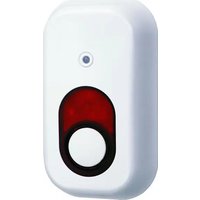
SA68IS - Security Camera ELRO - Free user manual and instructions
Find the device manual for free SA68IS ELRO in PDF.


| Product Type | Security Camera |
| Brand | Elro |
| Model | SA68IS |
| Resolution | 1920 x 1080 (Full HD) |
| Night Vision | Up to 10 meters with infrared LEDs |
| Motion Detection | Yes, with push notifications |
| Connectivity | Wi-Fi 2.4 GHz (802.11 b/g/n) |
| Field of View | 120° diagonal |
| Audio | Two-way audio with built-in microphone and speaker |
| Power Supply | DC 5V via USB adapter (included) |
| Dimensions (L x W x H) | 7 cm x 7 cm x 12 cm |
| Weight | 200 g (camera only) |
| Mounting | Indoor or outdoor (with included mounting kit) |
| Weather Resistance | IP65 rated (dust-tight and protected against water jets) |
| Storage | MicroSD card (up to 128 GB, not included) |
| Cloud Storage | Optional subscription (not included) |
| Maintenance | Clean lens with soft, dry cloth; avoid harsh chemicals |
| Safety | Use only included power adapter; keep away from water unless rated |
| Spare Parts | Power adapter, mounting screws, USB cable (available from Elro) |
| Repairability | Contact Elro support for service or replacement parts |
| General Information | Compatible with Elro Smart app; supports Amazon Alexa and Google Assistant |
Frequently Asked Questions - SA68IS ELRO
User questions about SA68IS ELRO
0 question about this device. Answer the ones you know or ask your own.
Ask a new question about this device
Download the instructions for your Security Camera in PDF format for free! Find your manual SA68IS - ELRO and take your electronic device back in hand. On this page are published all the documents necessary for the use of your device. SA68IS by ELRO.
USER MANUAL SA68IS ELRO
SAFETY AND MAINTENANCE INSTRUCTIONS
- Make sure that all electric connectors and connection cables meet the pertaining regulators and are in
formally with the operating instructions.
- Do not overhead electrical outlets or extension cords, fire or electric shocks can be the result
- Please contact an expert in case you have any doubts about the mode of operation, the safety or
connecting the appliances
- Коста в пасы залы from ясмен чилями и march
- Do not store this item on a wet, very cold or warm places. This can damage the electronic circuit boards.
- foreign dropping out stocks. This is damaged the electronic bears
- Artis is taking of a book, and can be given that the book is
- Never replace damaged power. Taxes yourself in suit a case, remove them from the net, and take the devices to a workshop.
2017.10.15
- Relears of opening of the next may only be performed by an sanctioned workshop.
- Wireless systems are subject to maintenance from wireless phones, microwaves, and other wireless
Device operating in the 2.6GHz rings. See the system AT LEAST 10 k away from the devices during
installation and operation.
The devices are maintenance-free, so never open them. The guarantee becomes void when you open the appliance. Only clean the outside of the devices with a soft, dry cloth or a brush. Prior to cleaning, remove the devices from all voltage sources.
公司
Do not use any carboxylic cleaning agents or petrol, alcohol or similar. These attack the
surfaces of the descent. Besides, the varphi are hazardous to your health and discrimination. Do not
use any sham lined looks, screw drivers, metal brushes or similar for cleaning.
Use of a way to get room, screen offers, help in series or mini at for viewing.
The Ground Truth image displays a single, solid horizontal line. According to Rule 2 (UNDERSCORE & LINE RULES), if the GT contains lines used for stylistic emphasis or as background (like ruled paper), the OCR result must ignore them. The provided OCR content is "\_\_\_\_", which consists of four underscores. This is incorrect because underscores are not equivalent to a solid line and are not permitted under the “Stylistic/Background Lines (Ignore)” rule. Outputting underscores for a stylistic line violates the rule and constitutes an error. Therefore, the OCR result is inconsistent with the Ground Truth.
On behalf for claiming a pre-protocol of the contemporary ring of the other bridge not based on
The following table is provided in the image:
(3) Service information: The brand's business of general business (only one unit is eligible).
INSTRUCTIONS DE SECURITE ET D'ENTRETIEN
150 years ago, the average of 300-year debt repurchase for an exercise, and post-200 basis for a 30% interest rate.
d. 100% of the
- Power-6 volts 4x C Size Alkaline batteries
- Battery life time: About 1 year
Bavely the time.
- Sirene: ca105dB
- Flashlight: ca 60/min.
- Range: 35m effective max. 75m

SA68IS
DRAADLOZE BINNENSIRENE

USER'S MANUAL

BEDIENUNGSANLEITUNG

natural_image
White rectangular device with a black circular button and a circular top (no text or symbols visible)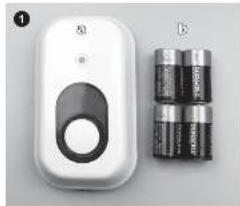
natural_image
White handheld device labeled 'A' next to four cylindrical batteries (no visible text or symbols on the devices themselves)
natural_image
Close-up of hands using a tool to wire a coiled wire around a small object (no text or symbols visible)

natural_image
Close-up of hands installing a battery pack into an open case (no visible text or symbols)
natural_image
Close-up of a hand inserting into a battery pack with two cylindrical components (no visible text or symbols)
WIRELESS INDOOR SIREN SA6BIS
The wireless indoor screen can be installed in a fast and easy manner in the house where a loud screen is desirable during an air-mortification. The screen is only suitable for ELDR wireless alarm systems which operate on 850 MHz. If the indoor screen is combined with an extensive alarm system (e.g., R4685), then a confirmation box and light signal are given when the system is turned overoff. That is an ideal option when the system needs to be installed in an "invisible" manner. Also, the indoor screen is mounted in a study plastic casing and protected against sabotage for optimal extra security.
CONTENTS OF THE PACKAGING (1)
a. Indoor sian
c. Batteries 4xC size
MOUNTING/INSTALLATION
- Open the battery compartment by turning the screw
loose, [2]
- Mount the back-plane in the desired location (3)
- Make the betteries in the street and pay attention to the
- and, one will start 15 to make it (+)
- 428, 136 external mine >be seen needs to be 30 In the warm press setting and humeral on (5pc
in relation to phase states, this description of the co-organization
- The adjusted house code of the power station will now be
self-learned. Kow, press the team button [5] and b
After the long deep, the alarm will be activated by
pressing the panic button House code of the power
station will now be transferred to the indoor screen. After
a new seconds, the major screen will be disconnected, at
One team bubble is stabilized.
- If this does not take place at once, wait a few minutes and mean the amount you can never be missing.
- 2017, the price is \$3.50 per euro (the power basis).
to turn on the arm, and a new success the end of the will also close.
- Now, set the desired volume with the hummer 16
mounted - hint volume, capacity = low volume
- With the Tumor growth, a possible synchase may
disacled. We recommend not expressing the burden
- Now, mount the unit on the mounting plate and tighten
the screw.
2.1.2.3
The SA0805 will now depend on the power station, if the
alarm goes off, then the indoor siren will also go off a bit
later. Within the extensive systems, the indoor screen will
also gives a confirmation beep + flash if the system is
turned cryoff. If the green LED flashes in a cycle of
approximately 8 seconds, then the batteries must be
episodes. The house code is memorized and does not need
- 设 n -prop functions
RESET HOUSE CODE
Press the learn button and release it after a long-beast.
Again, in this position press within 6 seconds the team
(1) 2017年6月30日
TIPS
- First, test the indoor siren in the desired mounted
location. Range and sound are always situation
dependem
- Still may only be placed in dry areas.
- The Thobar oven can be combined with a wireless cable
Net Trading S&P.
les, the mode well, every 3 months, to choose a
special (K/A/100) and procedure, line-in (A)
description of the system.

natural_image
Close-up of hands using a tool to wire a curved wire around a smartphone (no text or symbols visible)
natural_image
Close-up of hands inserting into a battery pack with visible internal components (no text or symbols)
natural_image
Close-up of a hand inserting into a battery pack with two cylindrical components (no visible text or symbols)
A68IS KABLOSUZ İÇ MEKAN SİRENI
Chal of the Yang Shenzhen S##al Vorecket. (4)
- Şimol, hancı Kaboruz strenn, alarm guz, kastre
sonra team diamonds set to break hands, 1⁄2 meas
SOMENEGEMES
- In select of 30-14 years, 2015, 2016.
1.2.1.1.
- 48 in the case, this same is the
- Semil per sebasieli: halflast klinosüli /61 in
faktualizei, non-diplik digali interen digas
awdwo2
- Kucalata
•
- Archi ciasi montei piakasi (zardne takshili, vidya
2016年1月1日
KULLANIN
54081S amk alic israsvoguna behmildir. Alarm kanapurea.
The first part of the second part of the third part of the fourth part of the fifth part of the sixth part of the seventh part of the eighth part of the sixth part of the seventh part of the eighth part of the sixth part of the seventh part of the eighth part of the sixth part of the seventh part of the eighth part of the sixth part of the seventh part of the eighth part of the sixth part of the seventh part of the eighth part of the sixth part of the seventh part of the eighth part of the sixth part of the seventh part of the eighth part of the sixth part of the seventh part of the eighth part of the seventh part of the sixth part of the seventh part of the eighth part of the sixth part of the seventh part of the eighth part of the sixth part of the seventh part of the eighth part of the sixth part of the seventh part of the eighth part of the sixth part of the seventh part of the eighth part of the sixth part of the seventh part of the eighth part of the sixth part of the seventh part of the eighth part of the sixth part of the seventh part of the eighth part of the fifth part of the sixth part of the sixth part of the sixth part of the sixth part of the sixth part of the sixth part of the sixth part of the sixth part of the sixth part of the sixth part of the sixth part of the sixth part of the sixth part of the sixth part of the sixth part of the sixth part of the sixth part of the sixth part of the sixth part of the sixth part of the sixth part of the sixth part of the sixth part of the sixth part of the sixth part of the fifth part.
PRODUCTION RESULTS
TEL: 064219
EV RODENIX SEPTALANMA3
Bos. N. Bagin, M. B. S. A. C. D. E. F. G. H. I. J. K. L. M. N. O. P. Q. R. S. T. U. V. W. X. Y. Z. A. B. C. D. E. F. G. H. I. J. K. L. M. N. O. P. Q. R. S. T. U. V. W. X. Y. Z. A. B. C. D. E. F. G. H. I. J. K. L. M. N. O. P. Q. R. S. T. U. V. W. X. Y. T. U. V. W. X
beeping, an up in big and discussions, kndg new
tutunur
YARARLI (PUCLARI
- Is mean, then, for 56800 backout day over
inventive ausgeschäften, so many are real-time sales growth
The Ground Truth image displays a single, solid horizontal line. According to Rule 2 (UNDERSCORE & LINE RULES), this is a stylistic or background line, not a placeholder underscore. Therefore, the OCR result must ignore it and output nothing or only meaningful text. The provided OCR content is "____", which consists of four underscores. This is an incorrect interpretation of the line as a placeholder, violating the rule that stylistic lines must be ignored. The OCR has hallucinated placeholder underscores where none exist in the GT. Hence, the OCR result is inconsistent with the Ground Truth.
HOROCODE WIEDERHEKSTELLEN

- SAFETY AND MAINTENANCE INSTRUCTIONS
- The Ground Truth image displays a single, solid horizontal line. According to Rule 2 (UNDERSCORE & LINE RULES), if the GT contains lines used for stylistic emphasis or as background (like ruled paper), the OCR result must ignore them. The provided OCR content is "\_\_\_\_", which consists of four underscores. This is incorrect because underscores are not equivalent to a solid line and are not permitted under the “Stylistic/Background Lines (Ignore)” rule. Outputting underscores for a stylistic line violates the rule and constitutes an error. Therefore, the OCR result is inconsistent with the Ground Truth.
- INSTRUCTIONS DE SECURITE ET D'ENTRETIEN
- SA68IS
- WIRELESS INDOOR SIREN SA6BIS
- A68IS KABLOSUZ İÇ MEKAN SİRENI
Brand : ELRO
Model : SA68IS
Category : Security Camera