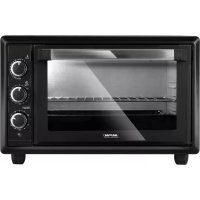
MPE28T - Oven MPM - Free user manual and instructions
Find the device manual for free MPE28T MPM in PDF.



| Product Type | Electric Oven |
| Brand | MPM |
| Model | MPE28T |
| Capacity | 28 liters |
| Power Supply | 220-240 V, 50 Hz |
| Temperature Range | 30°C to 250°C |
| Timer | 0 to 90 minutes, 'Stay on' function (continuous operation) |
| Cooking Modes | Lower heat, upper heat, upper + lower heat, convection |
| Interior Light | Yes, with separate switch |
| Door | Double glazing |
| Included Accessories | Grid and tray |
| Replacement Bulb Type | E14 or G9, 15 W, 220-240 V |
| Power Cord Length | 1.05 m |
| Maintenance and Cleaning | Clean with a damp cloth; tray and grid washable with soapy water, not dishwasher-safe |
| Safety | Hot surface – use gloves; do not immerse; keep a distance of 10 cm on the sides and 30 cm above |
Frequently Asked Questions - MPE28T MPM
User questions about MPE28T MPM
0 question about this device. Answer the ones you know or ask your own.
Ask a new question about this device
Download the instructions for your Oven in PDF format for free! Find your manual MPE28T - MPM and take your electronic device back in hand. On this page are published all the documents necessary for the use of your device. MPE28T by MPM.
USER MANUAL MPE28T MPM
EN We wish you satisfaction from using the product and invite you to check a wide range of other MPM appliances
natural_image
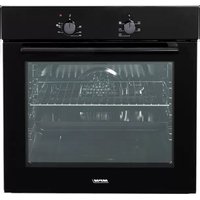
Black microwave oven with control knobs and a clear glass door (no visible text or symbols)C2 NAVOD K OBSUZE
BEZPEČNOSTNÍ POKYNY PŘI POUŽÍVÁNÍ
Read carefully this manual before using the appliance.
When placing the appliance it is necessary to keep at least 10 cm clearance on the sides and 30 cm clearance above the appliance.
Close supervision is necessary when using the appliance near children.
Do not touch the appliance with wet hands. Place the plug securely in the outlet.
Do not immerse the appliance, its cord and plug in water or any other liquids. After use, always remove the plug from the outlet.
Do not pull the plug by holding the power cord. To unplug the appliance, hold the plug, not the power cord.
Do not use the appliance if it is damaged, also if the power cord or plug is damaged. Return the appliance for repair to an authorized service centre.
During operation, the surface of the appliance is hot. Take special care during and after use. Open and close the door using door handle only.
Place and remove the tray and grill using a proper handle only.
To avoid the risk of damage, fire or injury, always use the attachments recommended by the manufacturer.
Do not put cardboard, paper, candles or other flammable materials onto the appliance and do not use it when the door are open. Do not place in the oven articles made of plastic, cardboard and other flammable and soluble objects.
Take special care when removing the tray and pouring hot fat.
Do not place heavy objects on the open door.
Do not leave the appliance switched on when unattended.
Do not splash water onto the window during or after use.
Do not place the appliance in vicinity of electric and gas cookers, and other heat sources, or in close proximity to electric fans, which may have effect on the temperature of the appliance.
The appliance shall be plugged to an outlet with a protective earth pin.
This appliance has been designed for domestic use only.
The appliance is not intended for use with external timers or separate remote control systems.
The appliance shall be placed on a surface which is resistant to high temperatures. Do not place on plastic, vinyl surfaces, varnished wood or other surfaces made of flammable materials.
This appliance is not intended for use by children under 8 years of age and individuals with reduced physical, sensory or mental capabilities, or lack of experience and knowledge, unless they have been given supervision or instruction concerning use of the appliance in a safe way and if they understand the hazards involved. Cleaning and user maintenance shall not be carried out by children without supervision.
Store the appliance and its cord out of reach of children under 8 years of age.
Children should be supervised to ensure that they do not play with the appliance.
The temperature of surfaces may be higher when the appliance is in use.
Do not use the appliance outdoors.
Do not connect the power plug with wet hands.
Do not move the appliance during operation.
Do not place the cord over sharp edges and keep it away from hot surfaces.
Keep your children safe: do not leave any parts of the packaging readily accessible (i.e. plastic bags, cardboard boxes, polystyrene inserts, etc.).
Use your appliance for cooking and heating your meal only. Do not use your appliance for unintended purposes (heating the room, for commercial purposes etc.). Ensure that the appliance is unplugged before replacing the lamp of your appliance to prevent a risk of electric shock.
Long term intense use of the appliance may require extra ventilation, for example, opening a window, or a better ventilation, such as increasing the mechanical ventilation level. Put curtains, tulles, paper or any flammable (ignitable) material away from the appliance before starting to use the appliance. Do not put ignitable or flammable materials on or in the appliance.
WARNING! Never let children play with plastic film or bags. Choking/ asphyxiation hazard!

NOTE! Hot surface!
DESCRIPTION OF THE APPLIANCE
- Oven cover
- Control panel
a. timer countdown knob
b. thermostat knob for baking temperature control
c. oven mode selection knob
d. oven operation indicator light
- Glass door handle
- Backlit interior of the 28-litre oven
- Lamp shade for the bulb backlighting the interior of the oven
- Grate
- Tray
-
Non-slip feet
-
Double glazed door
DESCRIPTION OF THE CONTROL PANEL
BAKING TIME CONTROL

The (2a) knob can be used to set the baking time in the oven between 0 and 90 minutes. As baking progresses the knob will be moving to the "O" position.
At any moment you can turn the knob to the "0" position forcing the oven to switch off.
The setting of the knob to the "Stay on" position causes the oven to switch off without counting the time.
TEMPERATURE REGULATION

With the knob (2b) you can set the baking temperature in the oven between 30^ C to 250^ C. After reaching the set temperature the oven's thermostat turns the heats on and off in order to maintain the set temperature.
OVEN MODE SELECTION KNOB

Function Select
The appropriate icons on the knob (2c) signal the selection of the heat and air flow. Remember, however, to declare the time and temperature beforehand ting only the oven mode will not start the process of baking.

Baking only with the bottom heat. This option can be applied to baking a pizza or dishes which require browning at the bottom.

Baking only with the top heat. Can be applied when the priority is baking of the top part of the dish.

Baking with both top and bottom heat. The dish is baked both on the top and bottom part.

Baking with the air flow function. Thanks to the air circulation the heat is equally distributed in the oven. It has application for baking of such dishes as cakes, pâtés, lashes in forms or on trays.

Forcing illumination of the oven interior without baking.
BEFORE FIRST USE
- Take out the oven from the box and remove all fillers, transport assisting materials and labels. Check the oven for any damages that might have occurred during transport. If you have any doubts contact the seller.
- The oven must be placed on a level, flat, stable and dry surface that is resistant to high temperature. Keep appropriate distance around the oven Do not put and do not start the oven inside cabinets, shelves or other pieces of furniture.
- Connect the oven to a grounded supply network and start it for 15 minutes on the highest temperature. This will help heat the oven and rid it of any factory smell. This heating process might generate slight smoke which will subside in further use.
- Disconnect the oven, wait until it cools off and clean it and its accessories using guidelines provided in the "CLEANING AND MAINTENANCE" section.
USING THE OVEN
- Place the dish on the tray (8) or on the rack (7) and slide them into the oven. When opening and closing the door (3) use the handle (4). Always put a tray under the wire rack – this will prevent the fat from leaking onto the bottom of the oven.
NOTE!!! Do not place in the oven any plastic or paper packaging, containers etc.
- Connect the device to the mains (grounded).
- Declare the appropriate baking time (2a), temperature (2b) and oven work mode (2c). The control lamp (2d) will signal the operation of the oven.
- Preheating of the oven is not needed. This will be useful when baking delicate dishes such as cakes or rare and medium-rare meats.
- It is recommended to use the baking tray in the case of smaller food product such as those which will cause grease and water to fall down during baking.
- After finishing the baking the countdown timer will give a sound signal - set the work mode knob (2c) and the thermostat knob (2b) to the (0) position. Disconnect the oven from the power source.
NOTE!!! To take out the product use kitchen gloves to avoid burns.
- After the oven cools off clean it immediately according to the guidelines in the chapter "CLEANING AND MAINTENANCE".
CLEANING AND MAINTENANCE
NOTE!!! Before starting the cleaning and maintenance disconnect the heater from the power network and wait until it cools off completely. Do not dip it in water or other liquids.
NOTE!!! Do not use abrasive substances or sharp tools to clean the oven, do not use aggressive detergents and solvents.
- External and internal surfaces of the oven should be cleaned with a moist wipe and then wiped dry.
- The tray and rack should be cleaned in warm water with a delicate detergent, rinsed and left to dry. Do not clean the oven accessories in dishwashers.
- If you need to exchange the Type G9 Lamp Type E14 Lamp

- disconnect the oven from power network and wait until it cools off

220-240 V, AC 15W

220-240 V, AC 15W

-unscrew the heat resistant light shade of the bulb (6)
- remove the damaged bulb from the oven; depending on the type of bulb used (E14 or G9 with a power 15W) follow the instructions in the picture on the right do not throw the damaged bulb into the rubbish bin, dispose of it at the electro-waste collection point
-install a new bulb
-screw in the heat resistant light shade of the bulb (6)
NOTE!!! Do not start the oven without the heat resistant light shade of the light bulb.
TECHNICAL DATA
The technical parameters are indicated on the product rating plate.
Volume: 281
Length of the power cord: 1.05 m

CAUTION! MPM agd S.A. reserves the right to make technical changes.
Proper disposal of the product (waste electrical and electronic equipment)

Marking on the product indicates that after the service-life of the product expires, it should not be disposed with other type of municipal waste. Used equipment may have a negative impact on the environment and health of people due to potentially containing hazardous substances, mixtures and components.
Mixing electric waste with other types of waste or disassembling those in an unprofessional manner may cause a release of substances that are hazardous to the environment and health. Used equipment should
be handed-over to a point for collection of electric waste. In order to obtain detailed information regarding the electric waste collection points, the user should contact the municipal point of electric waste collection or used equipment processing department.
BESCHRIJVING VAN HET APPARAAT
Legible signature of the buyer
- BEZPEČNOSTNÍ POKYNY PŘI POUŽÍVÁNÍ
- WARNING! Never let children play with plastic film or bags. Choking/ asphyxiation hazard!
- DESCRIPTION OF THE APPLIANCE
- DESCRIPTION OF THE CONTROL PANEL
- BAKING TIME CONTROL
- TEMPERATURE REGULATION
- OVEN MODE SELECTION KNOB
- BEFORE FIRST USE
- USING THE OVEN
- CLEANING AND MAINTENANCE
- TECHNICAL DATA
- Proper disposal of the product (waste electrical and electronic equipment)
- BESCHRIJVING VAN HET APPARAAT
Brand : MPM
Model : MPE28T
Category : Oven