PM-63-BOS-09B - Oven MPM - Free user manual and instructions
Find the device manual for free PM-63-BOS-09B MPM in PDF.


Pick your language and provide your email: we'll send you a specifically translated version.
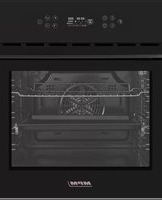
| Product Type | Electric Built-in Oven |
| Brand | MPM |
| Model | PM-63-BOS-09B |
| Dimensions (HxWxD) | 595 x 595 x 575 mm |
| Weight | Approximately 30 kg |
| Power Supply | 220-240 V, 50 Hz |
| Power Consumption | 2000-2500 W |
| Energy Class | A |
| Functions | Bake, Grill, Defrost, Fan-assisted, Convection |
| Temperature Range | 50°C - 250°C |
| Interior Capacity | 60 L |
| Interior Material | Stainless steel with easy-clean enamel |
| Features | Digital timer, interior light, cooling fan, child lock |
| Door Type | Cool touch glass, double glazed |
| Cleaning | Manual cleaning recommended; avoid abrasive cleaners |
| Safety | Automatic shut-off, overheat protection |
| Spare Parts Availability | Available through MPM customer service or authorized dealers |
| Repairability | Repairable by qualified technician; use genuine parts |
| Warranty | 2 years |
| Manufacturer | MPM |
Frequently Asked Questions - PM-63-BOS-09B MPM
How do I preheat the oven?
Turn the function dial to the desired mode (e.g., conventional or fan-assisted) and set the temperature with the thermostat knob. Wait until the thermostat light turns off, indicating the set temperature is reached.
What is the best way to clean the oven interior?
Use a damp cloth with mild detergent. For stubborn stains, apply a paste of baking soda and water. Avoid abrasive sponges or harsh chemicals to protect the enamel coating.
The oven is not heating up. What should I do?
Check that the appliance is properly plugged in and the circuit breaker hasn't tripped. Ensure the timer is set to a cooking duration or manual mode. If the problem persists, contact a qualified technician.
Can I use aluminum foil in the oven?
Yes, but do not cover the bottom or heating elements. Use foil only on racks to catch drips, and avoid blocking airflow for even cooking.
How do I set the timer?
Turn the timer knob to the desired time (up to 120 minutes). The oven will switch off automatically when the countdown ends. For continuous operation, set the knob to the manual position (often a symbol like a clock face).
Why is the oven door hot to touch?
The outer door may become warm during use due to the heated interior glass. This is normal. The oven is designed with a cool-touch front panel, but avoid prolonged contact. Keep children away.
What do the different cooking modes mean?
Conventional: top and bottom heat for general baking. Fan-assisted: even heat distribution for multiple racks. Grill: intense top heat for browning. Defrost: low temperature with fan for thawing.
How do I replace the oven light bulb?
Disconnect power, remove the glass cover by twisting anti-clockwise, then replace with a new bulb (usually 25W, 300°C resistant, type G9). Screw cover back on and reconnect.
Is the oven self-cleaning?
No, this model does not have a self-cleaning function. Manual cleaning is required. Use a damp cloth and mild detergent regularly to prevent build-up.
What should I do if the control knobs are stiff?
Apply a few drops of silicone lubricant to the shaft behind the knob. If the issue continues, contact customer support for replacement parts.
User questions about PM-63-BOS-09B MPM
0 question about this device. Answer the ones you know or ask your own.
Ask a new question about this device
No questions yet. Be the first to ask one.
Download the instructions for your Oven in PDF format for free! Find your manual PM-63-BOS-09B - MPM and take your electronic device back in hand. On this page are published all the documents necessary for the use of your device. PM-63-BOS-09B by MPM.
USER MANUAL PM-63-BOS-09B MPM
Manual assistant
Powered by Anthropic
Waiting for your message
Product information
Brand : MPM
Model : PM-63-BOS-09B
Category : Oven