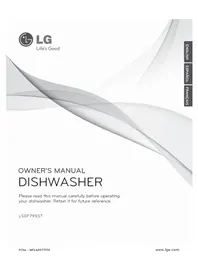
Studio LSDF795ST - Dishwasher LG - Free user manual and instructions
Find the device manual for free Studio LSDF795ST LG in PDF.


User questions about Studio LSDF795ST LG
0 question about this device. Answer the ones you know or ask your own.
Ask a new question about this device
Download the instructions for your Dishwasher in PDF format for free! Find your manual Studio LSDF795ST - LG and take your electronic device back in hand. On this page are published all the documents necessary for the use of your device. Studio LSDF795ST by LG.
USER MANUAL Studio LSDF795ST LG
Please read this manual carefully before operating your dishwasher. Retain it for future reference.
LSDF795ST
IMPORTANT SAFETY INSTRUCTIONS
Basic Safety Precautions 3,4
Electrical Safety 4
Before Using the Dishwasher 5
PARTS AND FEATURES
Features 6
Parts 7
Control Panel 8, 9
OPERATING INSTRUCTIONS
Quick Start 10
Selecting a Cycle 11
Loading the Lower Rack 13
Loading for Steam 13
Loading the Upper Rack 14
Loading the Silverware Basket 14
Height-Adjustable Upper Rack 15
Adding Detergent to the Dispenser 16
Adding Rinse Aid to the Dispenser 17
CARE AND CLEANING
Cleaning Metallic Parts 18
Cleaning the Lower Spray Arm 18
Cleaning the Upper Spray Arm 18
Cleaning the Top Spray Arm 19
Seasonal Maintenance and Storage 19
TROUBLESHOOTING
Before Calling for Service 20,21
SPECIFICATIONS
Specifications 22
WARRANTY
Product Registration Information 23, 24
THANK YOU!
Congratulations on your purchase and welcome to the LG family.
Your new LG Dishwasher combines quiet, efficient operation with advanced cleaning technology.
By following the operating and care instructions in this manual, your dishwasher will provide you with many years of reliable service.
READ ALL INSTRUCTIONS BEFORE USE
Your safety and the safety of others is very important.
We have provided many important safety messages in this manual and on your appliance. Always read and follow all safety messages.

This is the safety alert symbol.
This symbol alerts you to potential hazards that could eventually result in property damage or serious bodily harm, even death.
The safety alert symbol will be followed by either the word “WARNING” or “CAUTION,” then an important safety message. These words mean:

WARNING
This symbol indicates the possibility of serious bodily harm, even death.

CAUTION
This symbol indicates the possibility of injury or damage to property.
BASIC SAFETY PRECAUTIONS

WARNING To reduce the risk of fire, electric shock, or injury to persons when using this appliance, follow basic precautions, including the following:
- This manual contains very important information regarding the installation, use, and maintenance of your dishwasher.
- The manufacturer cannot be responsible for injuries or damage caused by failure to follow these safety and caution instructions.
- Read all instructions carefully before using the dishwasher.
- Use the dishwasher only for its intended function.
- Use only detergents or rinse agents recommended for use in a dishwasher. Keep all dishwasher detergents and additives out of the reach of children.
- This appliance is not intended for use by young children or unqualified persons.
- When loading items to be washed:
1) Load sharp items so that they are not likely to damage the door seal; and
2) Load sharp knives with the handles up to reduce the risk of injury when reaching into the dishwasher.
- Do not wash plastic items in the dishwasher unless they are labeled dishwasher-safe or the equivalent. For plastic items not so labeled, check the manufacturer's recommendations.
- Do not operate the dishwasher unless all enclosure panels are properly in place.
- Do not tamper with controls.
- Do not abuse, sit on, or stand on the door or dish racks of the dishwasher.
- To reduce the risk of injury, do not allow children to play in or around a dishwasher.
- Under certain conditions, hydrogen gas may be produced in a hot water system that has not been used for two weeks or more. HYDROGEN GAS IS EXPLOSIVE. If the hot water system has not been used for such a period of time, turn on all hot water faucets and let the water flow for several minutes. This will release any accumulated hydrogen gas. Since hydrogen gas is flammable, do not smoke or use an open flame during this time.
- Remove the door to the wash compartment when disposing of an old dishwasher.
READ ALL INSTRUCTIONS BEFORE USE
BASIC SAFETY PRECAUTIONS

WARNING
To reduce the risk of fire, electric shock, or injury to persons when using low basic precautions, including the following:
For a permanently connected dishwasher:
This appliance must be connected to a grounded metal, permanent wiring system or an equipment-grounding conductor must be run with the circuit conductors and connected to the equipment-grounding terminal or lead on the appliance. Consult with a qualified electrician.
Tip Hazard
Do not put excessive downward force on the open dishwasher door prior to installation, as this could cause damage to the unit or cause it to tip over. Do not use the dishwasher before installation has been completed in accordance with the Installation Instructions.
ELECTRICAL SAFETY

WARNING
Electrical Shock Hazard
Failure to follow these instructions can result in death, fire, or electrical shock.
- The dishwasher MUST be grounded. Connect the ground wire to the green ground connector in the terminal box.
- Do not use an extension cord with this appliance.
-
The dishwasher is designed to be used with standard household current (120 Volts AC, 60 Hz.). Before connecting the dishwasher, ensure that the outlet or cable is properly grounded and polarized by circuit breakers or fuses. Failure to provide adequate grounding of this appliance may cause electrical shock or malfunction of the appliance. Consult with a qualified electrician.
-
Do not install or store the dishwasher where it will be exposed to weather conditions. Failure to observe this precaution may result in electrical shock, fire, malfunction, and/or deformation of the dishwasher.
- Do not damage or place heavy items on the power cord of the appliance. Do not use the dishwasher if it has a damaged power cord. Power cord damage may cause fire and electrical shock. Consult with a qualified electrician.
- Do not grasp the power cord or touch the dishwasher controls with wet hands. Do not use the dishwasher if it has a damaged power cord or plug, and do not plug the dishwasher into a damaged outlet. Failure to observe these instructions may result in electrical shock.
- Disassembly or repair must be performed by experienced service persons. Improper disassembly or repair could lead to product failure or electrical shock.
READ ALL INSTRUCTIONS BEFORE USE
BEFORE USING THE DISHWASHER
Before using the dishwasher, please read the Important Safety Instructions.
Water supply temperature should be a minimum of 120^ F ( 49^ C) for better washing and reasonable cycle time.
For this reason, use the hot water supply only. It is also important that the dishwasher is loaded according to instructions for effective cleaning. When loading the dishwasher, make sure that insoluble items such as bones, toothpicks, and pieces of paper have been removed.
When loading the dishwasher, observe the following general guidelines:
- Place items with deep dish bottoms at an angle to help water run off and speed the drying process.
- Remove solid, burned-on scraps from dishes prior to loading in the dishwasher.
- Only load items that are dishwasher-safe.
NOTE: Do not load utensils that are not heat-resistant, have decorative metal trim, etc.
SAVE THESE INSTRUCTIONS
FEATURES
LARGE CAPACITY
LG dishwashers allow you to load very large items in both the upper and lower racks. The tall tub provides extra overall capacity and the clearance to accommodate large dishes. Extra large items (max. 14 in.) may be loaded in the lower rack by raising the upper rack.
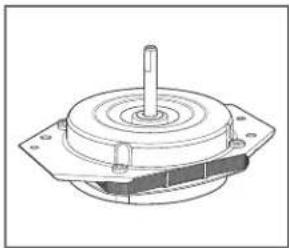
SLIM DIRECT MOTOR ^T
The new Slim Direct Motor™ is inverter-controlled. Wash power is controlled based on cycle selection. It also offers high energy efficiency to minimize energy use.
natural_image
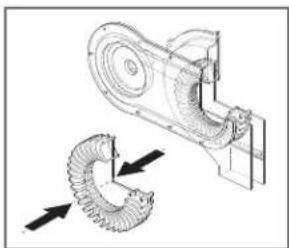
Technical line drawing of a mechanical component with a central shaft and mounting base (no text or symbols)This system effectively dries dishes without the
natural_image
Technical line drawing of a mechanical device with directional arrows indicating motion or force (no text or symbols)use of a heating element that would increase energy consumption.
VARIO SPRAY SYSTEM
Because the water spray alternates between the upper and lower racks, all of the power from the motor is directed to one rack at a time. This concentrates all the cleaning power of the motor on each rack in turn.
SOFT FOOD GRINDER AND SELF-CLEANING FILTER
For best wash results, your LG dishwasher has a built-in soft food grinder and a self-cleaning filter. The grinder grinds up soft food and residue into small particles that can be caught in the filter and washed down the drain. The self-cleaning
filter system continuously cleans the wash water as it circulates to separate any residue from the wash water. All dirt and residue is easily washed down the drain.
STEAM WASHING
Steam technology provides better cleaning performance than regular wash systems. Steam is the most energy efficient gentle care for your finest china and stemware.
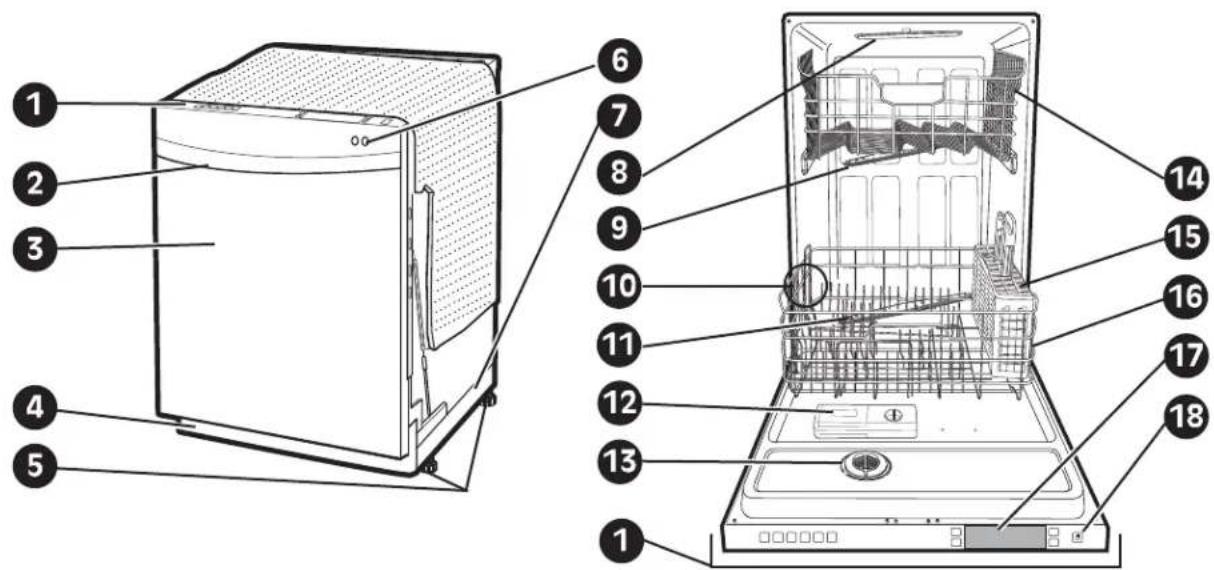
PARTS
text_image
Labeled diagram of a washing machine showing internal components and exterior view with numbered parts1 CONTROL PANEL
② DOOR HANDLE
3 FRONT COVER
4 LOWER COVER
5 LEVELING FEET
6 FRONT DISPLAY (SignaLight™)
Front Display
Process Indicator (SignaLight ^TM )
OPERATING
O CLEAN
The OPERATING lamp will twinkle during the washing, rinsing, and drying phases of dishwashing.
The CLEAN lamp will light for about 4 minutes to indicate the completion of the entire operation.
7 BASE
8 TOP SPRAY ARM
9 UPPER SPRAY ARM
10 STEAM NOZZLE
11 LOWER SPRAY ARM
12 DETERGENT AND RINSE AID DISPENSER
13 DRYING VENT COVER
14 UPPER RACK
15 SILVERWARE BASKET
16 LOWER RACK
17 TOP DISPLAY
18 POWER BUTTON
CONTROL PANEL


POWER SCRUB

NORMAL

DUAL INTENSITY

QUICK WASH

STEAM DELICATE

STEAM FRESH

① CYCLES
Press the cycle that corresponds to your desired wash cycle.
POWER SCRUB
This cycle is for very heavily soiled dishes.
NORMAL
This cycle is for normally soiled, everyday loads.
DUAL INTENSITY
This cycle washes the upper and lower racks at different spray intensities. The lower rack is washed with a strong spray for hard to clean items, while the upper rack is washed with a soft spray for more delicate items. This provides optimum cleaning performance for mixed loads, including fine china and stemware. Both the strong and soft spray lights will stay on to indicate the dishwasher is in the Dual Intensity cycle.
QUICK WASH
This is a shortened cycle that is perfect for recently used or lightly soiled loads.
STEAMDELICATE
This cycle adds the gentle power of steam to boost the cleaning power of the delicate cycle. The cycle is perfect for effectively cleaning delicate items like fine china or stemware.
STEAMFRESH
This cycle can be used to freshen up dishes that may have been stored or not used for a long time.
CHIME ON/OFF
To enable or disable the chime, press and hold the Quick Wash and Rinse buttons for 2 seconds.
RINSE ONLY
This cycle is a quick rinse for dishes that will not be washed immediately. No deter gent should be used.
To select the Rinse Only cycle, press the Power button; then press the Rinse button once without pressing any other cycle buttons.
NOTE: If a main cycle has been selected, the Rinse Only cycle will not be available without first shutting the power off.
② CANCEL
To cancel a running cycle, open the door and then press and hold the Dual Intensity and Quick Wash buttons together for 3 seconds. The drain pump will be activated and the cycle will be cancelled.
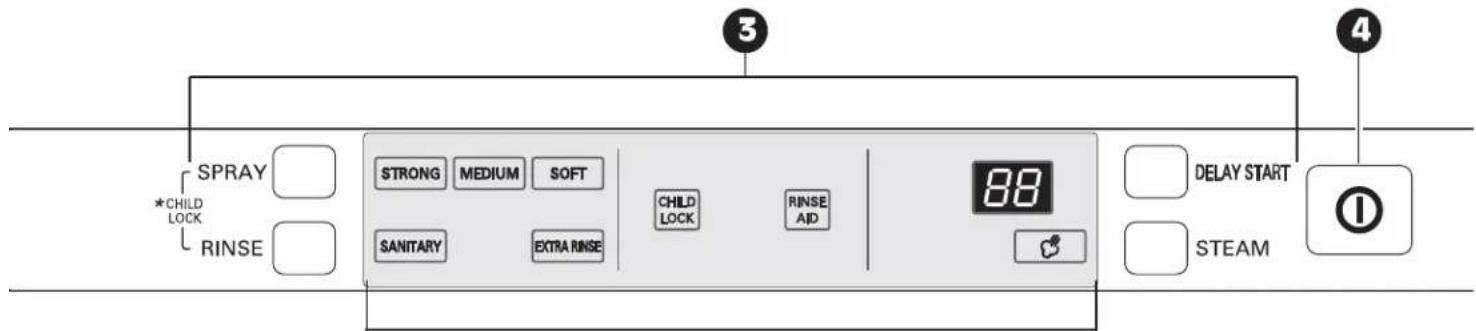
3 CYCLE OPTIONS AND DISPLAY
Press the desired cycle option buttons to select and set any of the dishwasher's options described below. The display will show the selected cycle times and cycle options.
SPRAY (INTENSITY)
Repeated pressing of the Spray button will select the desired spray. The strong, medium, or soft light will show in the top left portion of the display.
STRONG
MEDIUM
SOFT
RINSE
Repeated pressing of the Rinse button will select the desired Rinse option. The Sanitary, Extra Rinse, or Sanitary and Extra Rinse lights will show in the bottom left portion of the display.
SANITARY
EXTRA RINSE
- If you select the Sanitary feature, the Sanitary light will blink until the water is heated to the sanitary temperature level*. Once the sanitary temperature level is reached, the light will stay on to indicate that the sanitary temperature has been reached.
*NOTE: This high-temperature rinse sanitizes dishware and glassware in accorr dance with NSF/ANSI Standard 184 for residential dishwashers. Certified dishwashers are not intended for licensed food establishments. - When you select Extra Rinse, an additional rinse cycle is added.
- Rinse Only is a wash cycle described on this page.
CONTROL PANEL(continued)
text_image
SPRAY *CHILD LOCK RINSE STRONG MEDIUM SOFT SANITARY EXTRA RINSE CHILD LOCK RINSE AID 88 DELAY START STEAM ① ③ ④DISPLAY AREA
CHILD LOCK
CHILD LOCK
Lamp will turn on when Child Lock setting is on.
- To lock/unlock the buttons, press SPRAY and RINSE simultaneously for 3 seconds with the door open.
- Lock the control buttons during cycle operation to prevent settings from being changed.
RINSE AID
RINSE AID
Refill with rinse aid when the lamp turns on.
DIGITAL DISPLAY
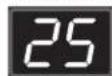
The Digital Display on the control panel shows the estimated cycle and option times in a two-digit display.
When the dishwasher is powered up, the display will be blank. When the cycle and options are selected, the display will show the total estimated time to complete those selections. During operation, the display shows the remaining estimated operating time.
NOTES
- The estimated time shown in the display does not include delay times for heating water, etc.
- If total time exceeds 99 minutes, the display shows times in whole hours. (2H, 3H, etc.)
- If Delay Wash is selected, the display shows the delay time in hours.
DELAY START
• To delay the start of a selected cycle, press the Delay Start button.
• Each time Delay Start is pressed will delay the start of the cycle by one additional hour.
- The delay start time can be set from 1 to 12 hours in one-hour increments.
STEAM
- Press the Steam button to add steam to a selected cycle.
- The Steam symbol light will stay on when the STEAM option has been selected.
- The symbol light will blink while steam is being injected into the dishwasher.
4 POWER
- Pressing the Power button turns on power to the controls.
• After the cycle is complete, the power automatically turns off for safety and economy. - If there is a power surge, power outage, or disruption of any kind, the power will be automatically turned off for safety, and the cycle will need to be restarted.
QUICK START
① LOAD THE DISHES
Scrape the dishes free of excess food, bones, and any other hard, non-soluble residue. Pull each rack out and load the dishes as described on pages 13 and 14.
② MEASURE THE DETERGENT
Using the guidelines on page 16, fill the detergent cup with the recommended amount of detergent and close the lid. If a prewash is desired, the recess on top of the lid should also be filled with detergent.
3 TURN ON THE DISHWASHER
To start the cycle, open the door and press the Power button. The control will default to the Normal cycle.
4 CHECK THE RINSE AID
The Rinse Aid indicator light will illuminate if the level of rinse aid in the dishwasher is low. Add rinse aid if the level is low to maintain the effectiveness of the dry cycle.
5 SELECT THE CYCLE AND OPTIONS
Select the cycle and options that best fit the load by referring to the chart on page 11. The display will show the estimated time for the cycle and options selected.
6 CLOSE THE DOOR
The dishwasher will start automatically, after a slight delay, when the door is closed and latched. During the cycle, the display will indicate the estimated time remaining for the cycle and options selected. If the door is opened during the cycle, the dishwasher will stop. When the door is closed, the cycle will resume from the point where it was stopped.
7 END OF CYCLE
When the cycle is completed, a chime will sound and the display will show "END." After a short time, the display and controls will shut off for safety and energy conservation.
CAUTION
Empty the lower rack first and then the upper rack. This will avoid water dripping from the upper rack onto dishes in the lower rack.
WARNING
In general, it is not advisable to open the door while the dishwasher is in operation. If the door is opened, a safety device stops the dishwasher. Care should be taken when opening the door immediately following the cycle, as steam may escape.
AUTO-OFF
The dishwasher will automatically turn off if a cycle is not selected or if the door is not closed within 10 minutes.
NOTE :
If small hard items such as bones, nut shells or plastic or glass pieces get into the pump, they can cause a grinding noise as the soft food disposer in the dishwasher attempts to grind up these hard objects. Some objects that might get into the pump could eventually be ground up and drained away. However, if a grinding noise is heard and it does not go away, call for service to have the objects removed from the pump. Some objects such as pieces of glass could cause damage to the pump if not removed promptly.
SELECTING A CYCLE
| CYCLE | Wash | Rinse | Dry | *Water Usage | **Cycle Time | |||
| Prewash | Main Wash | Rinse 1 | Rinse 2 | Heated Rinse | ||||
| Power Scrub | 131°-145°F55°-63°C | 154°F68°C | 5.5-9.2 gal.21-35 L | 121-176 Min. | ||||
| Normal | 95°-140°F35°-60°C | 149°-153°F65°-67°C | 2.6-6.9 gal.10-26 L | 97-124 Min. | ||||
| Dual Intensity | 154°F68°C | 149°F65°C | 5.5-6.9 gal.21-26 L | 138 Min. | ||||
| Quick Wash | 115°F46°C | 140°F60°C | 5.5 gal.21 L | 78 Min. | ||||
| Steam Delicate | 113°F45°C | 154°F68°C | 5.5-6.9 gal.21-26 L | 107 Min. | ||||
| Steam Fresh | 131°F55°C | 1.2-1.5 gal.4.5-5.5 L | 49 Min. | |||||
| Rinse Only | 1.3 gal.5 L | 15 Min. | ||||||
*Actual water consumption will vary depending on soil level.
**Actual cycle times may vary depending on soil levels and water temperature.
Power Scrub
This cycle is for very heavily soiled loads such as cookware.
Normal
Select this cycle for normally soiled, everyday loads.
Dual Intensity
This cycle allows the upper and lower racks to be washed at different spray intensities in the same cycle for a precise balance of cleaning performance and care of the dishes. See page 8.
Quick Wash
This is a shortened cycle that is perfect for recently used or lightly soiled loads.
Steam Delicate
This cycle adds the gentle power of steam to boost the cleaning power of the delicate cycle. The cycle is perfect for effectively cleaning delicate items like fine china or stemware.
Steam Fresh
This cycle can be used to freshen up dishes that may have been stored or not used for a long time.
Rinse Only
If you don't plan to wash a load of dishes immediately, use this cycle to remove excess soil and soften dried-on residue. To select Rinse Only, press Rinse button without selecting a main cycle. See page 8.
CAUTION
NON-DISHWASHER-SAFE ITEMS
The combination of high water temperature and dishwasher detergents may damage certain items. LG does not recommend washing the following items in the dishwasher:
- Hand-painted silver or gold-leaf dishes
- Wood- or bone-handled utensils
- Iron or other rust-prone utensils
- Plastic items that are not dishwasher-safe
When in doubt, check manufacturers' recommendations.
LOADING THE LOWER RACK
The extra tall tub allows loading of dishes, pans, or other utensils up to 14 inches high.
NOTE: Make sure large items do not interfere with the rotation of the spray arms, and do not prevent the detergent dispenser from opening.
The lower rack is recommended for dinner plates, soup bowls, dishes, pots, pans, lids, and grill trays. Plates should be positioned vertically and facing the center of the rack. Pots, pans, and large bowls must be turned so that the inside faces downward. The silverware basket
LOADING 10 PLACE SETTINGS, LOWER RACK

text_image
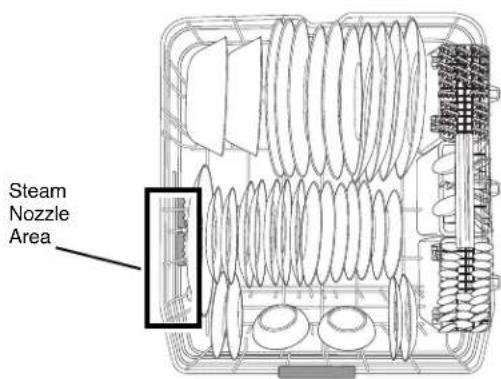
Steam Nozzle Areamay be used in either the lower or upper rack. The lower rack should not be used for small items like cups, wine glasses, or small plates. These items should be loaded in the upper rack. Load heavily soiled or stained dishes in the front left side of the lower rack with the dirty side facing out and down. This is the area the stream enters the dishwasher. The use of hot steam maximizes the dishwasher's cleaning performance.
LOADING 12 PLACE SETTINGS, LOWER RACK
text_image
Steam Nozzle AreaLOADING FOR STEAM
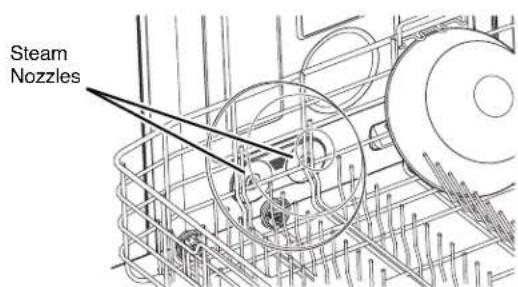
To maximize the benefits of steam for removing difficult or baked-on soils, load the target dishes on the lower rack to the left side. For best effect, load the dishes so they are facing down and to the left to benefit from both the direct steam spray and the lower spray arm wash action.
text_image
Steam NozzlesLOADING THE UPPER RACK
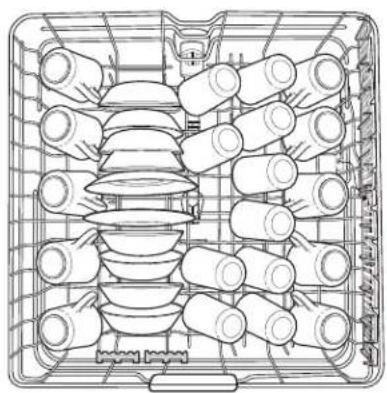
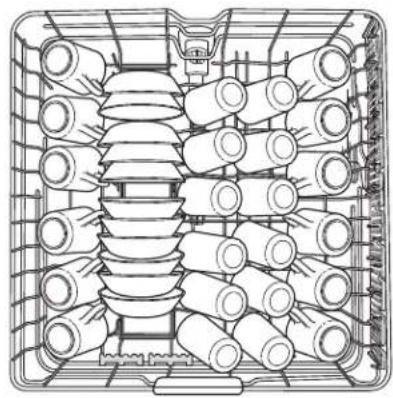
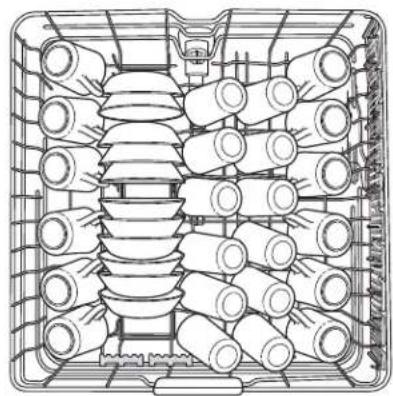
Use the upper rack for small or delicate items such as small plates, cups, saucers, glasses, and dishwasher-safe plastic items. Cups, glasses, and bowls must be positioned upside down. Extra cups or cooking utensils can be laid
LOADING 10 PLACE SETTINGS, UPPER RACK
natural_image
Top-down line drawing of a multi-tiered storage tray with cylindrical and plate components (no text or symbols)on the fold down cup racks, which may also provide support for long stemmed glasses. Make sure items do not interfere with the rotation of the spray arms above and below the upper rack.
LOADING 12 PLACE SETTINGS, UPPER RACK
natural_image
Technical line drawing of a mechanical component with multiple cylindrical components arranged in a grid (no text or symbols)LOADING THE SILVERWARE BASKET
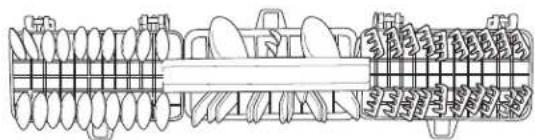
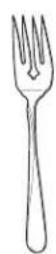
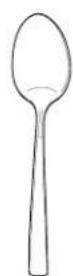
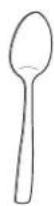
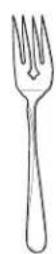
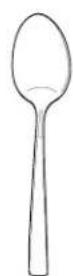
The silverware basket has separators to avoid scratching and tarnishing of delicate silverware. The basket can be separated into three modules that can be used individually in both the upper and lower racks. For small loads of silverware, modules can be removed, allowing extra space for other dishes.
WARNING
Be careful when loading and unloading sharp items. Load sharp knives with the handles up to reduce the risk of personal injury.
text_image
Technical diagram showing a mechanical assembly with multiple spring-like components and labeled parts in Chinese.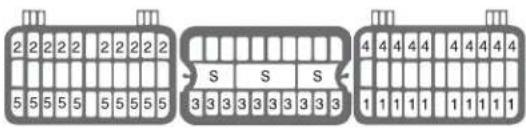
text_image
2 2 2 2 2 2 2 2 2 5 5 5 5 5 5 5 5 5 5 S S S 3 3 3 3 3 3 3 3 3 4 4 4 4 4 4 4 4 4 1 1 1 1 1 1 1 1 11
2
3

4

5
HEIGHT-ADJUSTABLE UPPER RACK
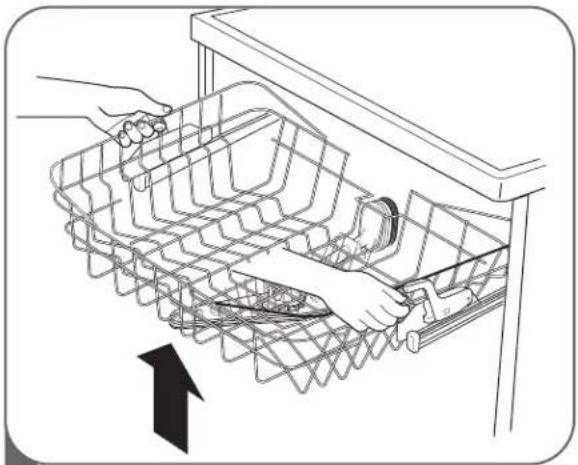
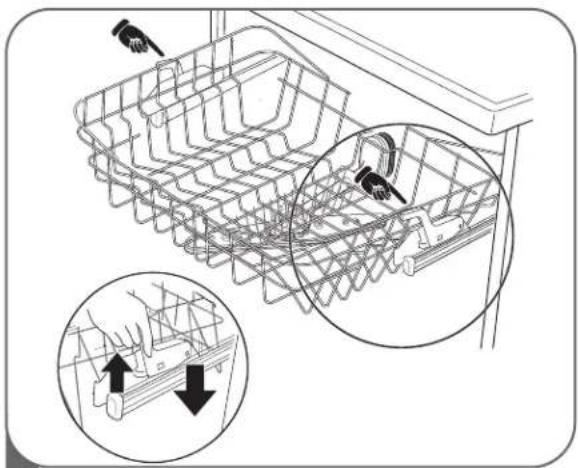
The upper rack adjusts up to allow you to place tall and oversized items up to 14 inches high in the lower rack. Or, you can adjust the upper rack down to allow placement of large dishes up to 12 inches high in the upper rack.
natural_image
Line drawing of a hand using a tool to adjust or install a grid-like device into a sink (no text or symbols present)1 To raise the rack:
Simply lift the rack at the center of each side (see illustration) until the rack locks into place in the upper position. It is not necessary to lift the lock levers to raise the rack.
NOTE: After adjusting, make sure that dishes in the upper and lower racks do not interfere with the rotation of the spray arm. Do not adjust the rack while it is loaded with dishes.
natural_image
Technical line drawing of a mechanical assembly with zoomed-in detail (no text or symbols)2 To lower the rack:
Hold the rack at the center of each side to support its weight; then lift the lever on each side to release the rack and lower it to the lower position.
ADDING DETERGENT TO THE DISPENSER
- Detergent must be put into the detergent compartment before starting any cycle except Rinse Only.
- If dishes are only moderately soiled, you may be able to use less detergent than recommended.
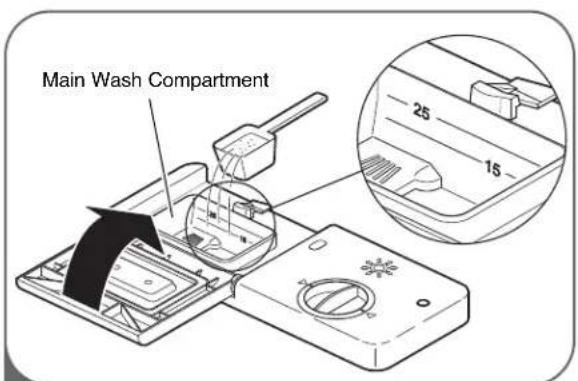
- The total capacity of the main detergent compartment is 1.4 oz (40 ml). The recommended usage marks in the dispenser are 0.5 oz (15 ml) and 0.9 oz (25 ml). Using excess detergent can leave a film on dishes and in the dishwasher resulting in poor wash performance.
• The amount of detergent needed depends on the cycle, load size, and soil level of dishes.
NOTE : Remove the label on the dispenser prior to running the dishwasher.
text_image
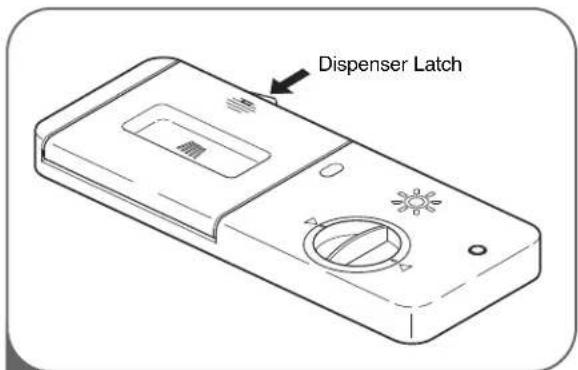
Dispenser Latch1 If the lid is closed, press the lever on the bottom side of the lid to open the dispenser.
text_image
Main Wash Compartment 25 152 Add dishwashing detergent to the main wash compartment until the level is between the 15 and 25 lines. Fill to 25 line for hard water or heavily soiled loads or to 15 line for soft water or lightly soiled loads. Adjust amount of detergent to best meet your cleaning needs and conditions.
Close the lid firmly until a click is heard.
NOTE: DO NOT add detergent when the Rinse Only cycle is selected.
text_image
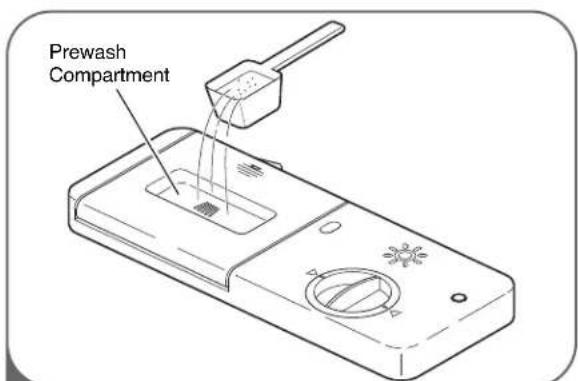
Prewash Compartment3 If a prewash is desired, fill the recessed prewash compartment area in the lid with detergent.
NOTE: Too much detergent can leave a film on dishes and in the dishwasher resulting in poor wash performance.
CAUTION
DETERGENT INFORMATION
Use only detergent intended for automatic dishwashers. Incorrect detergent may cause the dishwasher to fill with suds during operation. Excess sudsing may reduce wash performance and may cause the unit to leak. DO NOT use hand dishwashing detergent in this dishwasher.
ADDING RINSE AID TO THE DISPENSER
The use of rinse aid products is recommended to prevent spots on dishes from water droplets remaining after the completion of the wash cycle, and to enhance the performance of the dry cycle.
NOTE: Only use liquid rinse aid in this dishwasher.
natural_image
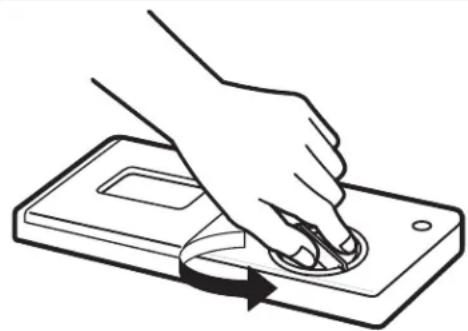
Line drawing of a hand pressing down on a device with a scroll wheel (no text or symbols)1 Rotate the round cap counterclockwise to remove it.
natural_image
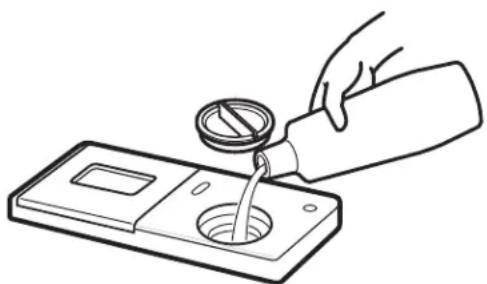
Line drawing of a hand pouring liquid from a bottle into a container (no text or symbols)2 Add a liquid rinse aid to the maximum fill level (max. 4.8 oz [145 ml]).
natural_image
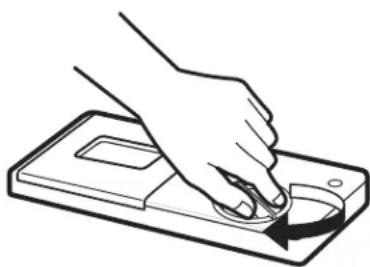
Line drawing of a hand pressing down on a device component (no text or symbols)3 Replace the cap and turn clockwise to lock. Rinse aid will be dispensed automatically during the final rinse cycle.
RINSE AID DISPENSER ADJUSTMENT
text_image
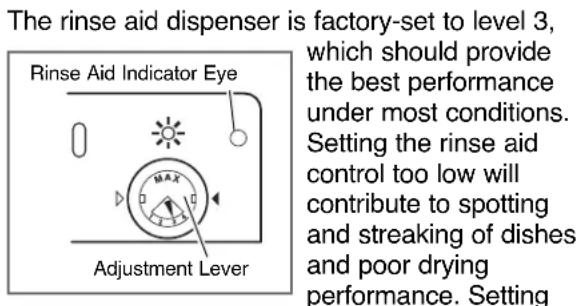
The rinse aid dispenser is factory-set to level 3, which should provide the best performance under most conditions. Setting the rinse aid control too low will contribute to spotting and streaking of dishes and poor drying performance. Settingthe control too high can cause foaming, which will cause poor wash performance.
To adjust the rinse aid dispenser setting, remove the cap and adjust the rinse aid lever to the desired setting.
REFILLING THE RINSE AID
The capacity of the rinse aid dispenser is 4.8 oz (145 ml). How often the dispenser will need to be refilled depends on how often dishes are washed and the rinse aid setting used.
If the rinse aid level is low, the Rinse Aid light on the control panel will illuminate.
NOTE :
The dispenser also has a round Rinse Aid Indicator Eye that is dark when the dispenser is full and light when it is empty.
For best results, it is important to periodically check and care for the spray arms.
WARNING
To prevent injury during care and maintenance/cleaning, wear gloves and/or protective clothing.
CLEANING METALLIC PARTS
Some exterior and interior parts can be cleaned with a damp cloth or sponge. A cloudy film may form on the surface of the stainless steel tub, especially with hard water.
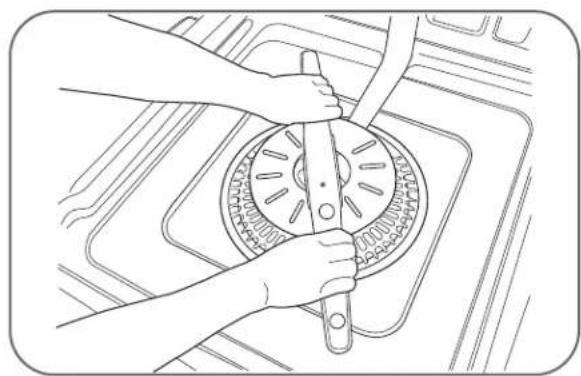
CLEANING THE LOWER SPRAY ARM
- Make sure that the water jet holes are not blocked by food particles.
- When cleaning is necessary, remove the lower spray arm by pulling up.
• After cleaning the lower spray arm, replace it by pushing down until it clips into place. Be sure the spray arm turns freely.
natural_image
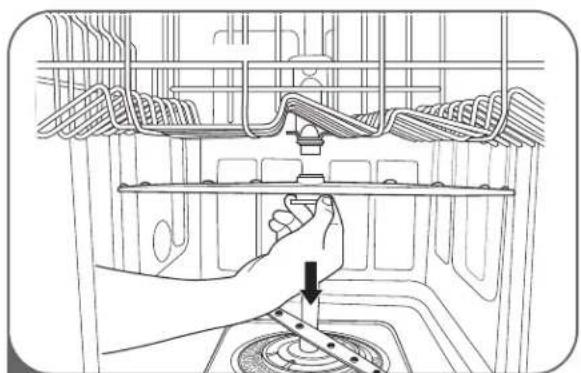
Line drawing of hands using a tool to clean or adjust a circular component (no text or symbols visible)CLEANING THE UPPER SPRAY ARM
natural_image
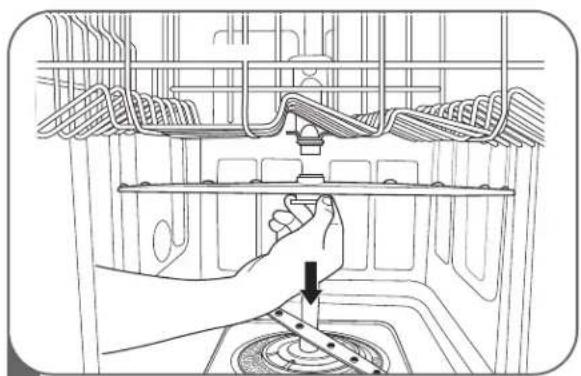
Line drawing of a hand adjusting a mechanical component inside a container (no text or symbols)1 Pull the upper rack forward. Make sure that the water jet holes are not blocked by food particles.
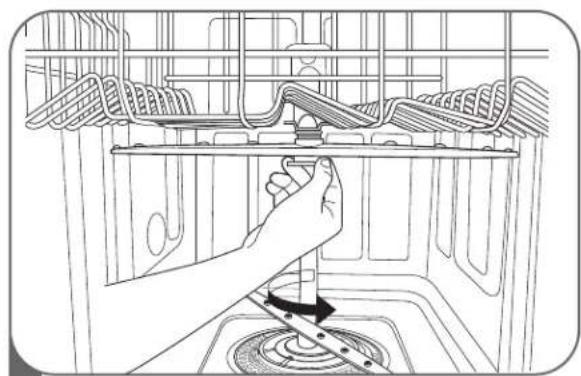
When cleaning is necessary, remove the upper spray arm by turning the nut on the bottom of the spray arm 1/8 turn counterclockwise and pulling down (see illustrations).
natural_image
Line drawing of a hand using a tool to adjust or install a mechanical component inside a kitchen appliance (no text or symbols)2 After cleaning the upper spray arm, press it up into place. Turn the nut 1/8 turn clockwise to make sure the nut locks back into place.
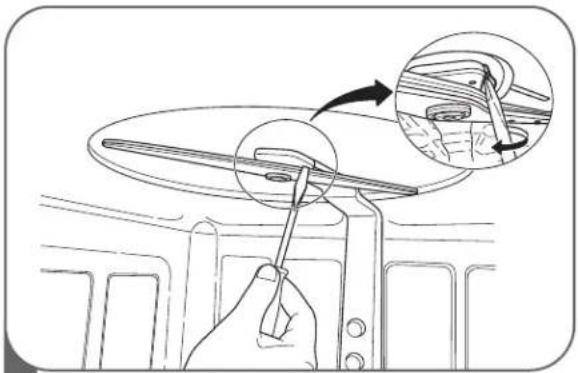
CLEANING THE TOP SPRAY ARM
natural_image
Diagram showing a hand using a tool to adjust or install a component on a car intake manifold, with an inset close-up highlighting the detail (no text or symbols present)1 Make sure that the water jet holes are not blocked by food particles.
When cleaning is necessary, use a screwdriver to release the retainer clip from the bracket that holds the top spray arm assembly to the tub.
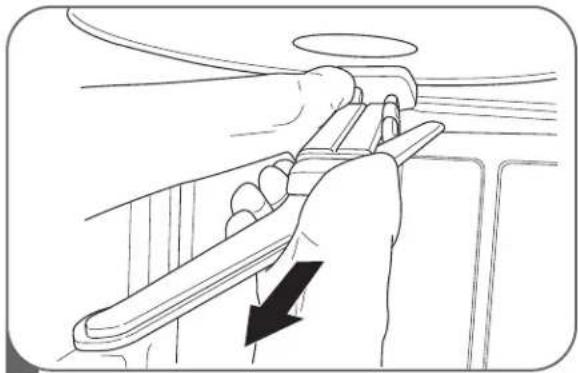
natural_image
Line drawing of a hand holding a tool with a black arrow indicating direction (no text or symbols)2 Then pull the spray arm out.
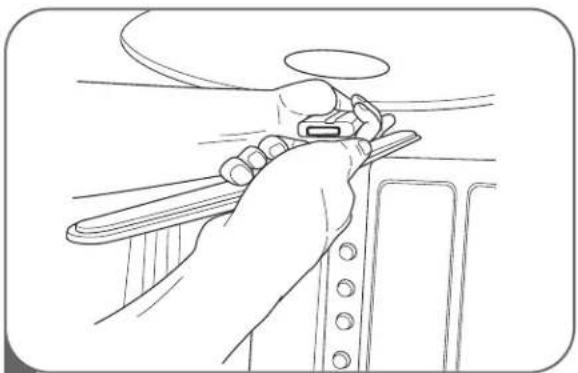
natural_image
Line drawing of a hand adjusting a seatbelt on a vehicle (no text or symbols)3 After cleaning the top spray arm, replace it. Slide it back into place and make sure the retainer clip engages.
- During the summer, if you will be absent for extended periods of time, it is recommended that you close the water valve and unplug the power cord, or turn off the circuit breaker.
- During winter, if you will be absent for extended periods of time and there is a possibility of freezing temperatures, it is recommended that you winterize the water supply lines and the dishwasher itself. Winterization must be performed by experienced service personnel.
BEFORE CALLING FOR SERVICE
| Problem Possible | Causes Solutions | |
| Dishwasher does not operate | Door is not completely closed. | Make sure the door is completely closed and latched. |
| Power supply or power cord is not connected. | Connect the power supply or cord properly. | |
| Fuse is blown or circuit breaker tripped. | Replace fuse or reset circuit breaker. | |
| Dishwasher operates too long | Unit is connected to cold water. | Check the water supply connection or water heater setting. (Heating cold water takes longer.) |
| Odor | Previous cycle was stopped before completion. | Operate the Quick Wash cycle with detergent without loading any dishes. |
| Water remains in tub after completion of cycle | Drain hose is kinked or clogged. | Adjust hose or clear blockage. |
| Spots and filming on dishes | Low water temperature. | Water supply should be at least 120°F for best wash performance. |
| Wrong amount of detergent used. | Use the recommended amount of detergent. | |
| Overloading. | Load the proper amount of dishes. | |
| Improper loading. | See the Using Your Dishwasher section. | |
| Insufficient water pressure. | Adjust water pressure to between 20 and 120 psi. | |
| Insufficient detergent. | Add the recommended amount of detergent. See Using Your Dishwasher section. | |
| Rinse aid dispenser empty. | Refill rinse aid dispenser. | |
| Extremely hard water.The best way to eliminate spots on your dishes is to install a whole house water softener in your home.If a water softener is already installed or you do not plan on installing one,try adding an “Extra Rinse” option as part of the wash cycle to help minimize this condition.To add an Extra Rinse to the cycle, select the wash cycle then press extra rinse.Note:When selecting the “Extra Rinse” cycle times and water usage will be increased from normal use.To remove hard water build up in tubRemove all dishes, silverware and silverware holder from the dishwasher. Only the racks should remain in the tub.Fill a measuring cup with white vinegar approximately 14~17ounces(400~500mL), place the measuring cup in the lower rack.Run a “Normal” cycle and select “Extra Rinse” and “Sanitary”, then close the door.DO NOT USE ANY DETERGENTNote:Make sure to let the dishwasher complete the entire cycle. The cleaning method should only be done as needed. | ||
If you have followed this troubleshooting guide and the problem persists, or if the problem you are experiencing is not listed here,
please call LGE Customer Service at 1-800-243-0000(US), 1-888-542-2623(Canada).
BEFORE CALLING FOR SERVICE (continued)
| Problem Possible | Causes Solutions | |
| Food soil remains on dishes | Improper cycle selection. | Select correct cycle based on soil level and type of dishware being washed. |
| Water temperature is too low. | Check water supply connection or water heater setting. | |
| Dishwashing detergent was not used. | Use recommended detergent. | |
| Low inlet water pressure. | Water pressure should be between 20 and 120 psi. | |
| Water jet holes on spray arms blocked. | Clean the spray arms. | |
| Improper loading of dishes. | Make sure dishes do not block spray arm rotation or interfere with detergent dispenser. | |
| Noise Some level of noise is normal during operation. | Detergent cover opening.Drain pump at the beginning of drain cycle. | |
| The dishwasher is not level. | ||
| Nozzle arm knocking against dishes. | ||
| Cloudiness on glassware | Combination of excessive detergent and soft water. | Use less detergent and use a rinse aid to minimize the problem. |
| Black or gray marks on dishes | Aluminum items rubbing dishes during cycle. | Reposition the dishes. |
| Yellow or brown film on inside surfaces of dishwasher | Coffee or tea stains. | Eliminate the stain by using a stain removal product. |
| Dishes don't dry | Rinse agent dispenser empty. | Check and refill the rinse agent dispenser if empty. |
| Lamps don't illuminate | Power is not connected. | Connect power supply. |
| Fuse is blown or circuit breaker tripped. | Replace fuse or reset circuit breaker. | |
| Sprays arms do not rotate smoothly | Holes of spray arms are blocked by food particles. | Clean the holes of spray arms. |
| Upper rack crooked | Rack is poorly adjusted. | See Using Your Dishwasher section. |
| IE Error | Water inlet problem. | Check for clogged, kinked or frozen water inlet hose.Check water supply. |
| OE Error | Drainage problem. | Check for clogged, kinked or frozen drain hose. |
| FE Error | Excessive water supplied. | Please call your Authorized Service Center or LGE Customer Service at 1-800-243-0000(US), 1-888-542-2623(Canada). |
| E1 Error | Water leakage problem. | |
| HE Error | Heater circuit failure. | |
| TE Error | Thermistor failure or very high inlet water temperature (over 194°F). | |
| The display shows PF | The dishwasher experienced a power failure. | This is not an error. The dishwasher will restart automatically after 10 seconds. |
If you have followed this troubleshooting guide and the problem persists, or if the problem you are experiencing is not listed here,
please call LGE Customer Service at 1-800-243-0000(US), 1-888-542-2623(Canada).
SPECIFICATIONS
• Power Supply: 120V, 60 Hz AC only, minimum 15A circuit breaker
• Water Pressure: 20–120 psi (140–830 kPa)
- Size (WxDxH): 23 3/4" x 24 5/8" x 33 1/2" (603 mm x 625 mm x 851 mm)
- Inlet Water Temperature: 120^ (49°C) minimum
• Product Weight : 97 lbs. (43.8 kg)
The appearance and specifications are subject to change without notice.
LG ELECTRONICS, INC. DISHWASHER LIMITED WARRANTY — USA

LG
Should your LG Dishwasher prove to be defective in material or workmanship under normal use during the warranty period listed below, effective from the date of original consumer purchase of the product, LG Electronics will replace the defective part(s). Replacement parts will meet intended fit and function of the original part. Replacement parts are warranted for the unexpired portion of the original warranty period. This limited warranty is good only to the original purchaser of the product and effective only when used in the United States of America.
| WARRANTY PERIOD:For the Period of: LG Will Replace: | |
| Two years from dateof original purchase | Any part of the Dishwasher which fails due to a defect in materials or workmanship. During this full two years warranty, LGE will also provide, free of charge, all labor and on-site service to replace the defective part. |
| Five years from dateof original purchase | Electronic control board and dishwasher rack which fails due to a defect in materials or workmanship.During this five-year parts warranty, you will be responsible for any labor or on-site service costs. |
| Ten years from dateof original purchase | Direct Drive motor which fails due to a defect in materials or workmanship.During this ten-year warranty, you will be responsible for any labor or on-site service costs. |
| Limited Lifetime | Stainless steel door liner and tub (as long as owned by the original purchaser) which fails due to a defect in materials or workmanship. During this limited lifetime parts warranty, you will be responsible for any labor or on-site service costs. |
| Replacement units and repair parts may be new or factory remanufactured. Replacement units and repair parts are warranted for the remaining portion of the original unit's warranty period. | |
No other warranty is applicable to this product. THIS WARRANTY IS IN LIEU OF ANY OTHER WARRANTY, EXPRESS OR IMPLIED, INCLUDING WITHOUT LIMITATION, ANY WARRANTY OF MERCHANTABILITY OR FITNESS FOR A PARTICULAR PURPOSE. TO THE EXTENT ANY IMPLIED WARRANTY IS REQUIRED BY LAW, IT IS LIMITED IN DURATION TO THE EXPRESS WARRANTY PERIOD ABOVE. NEITHER THE MANUFACTURER NOR ITS U.S. DISTRIBUTOR SHALL BE LIABLE FOR ANY INCIDENTAL, CONSEQUENTIAL, INDIRECT, SPECIAL, OR PUNITIVE DAMAGES OF ANY NATURE, INCLUDING WITHOUT LIMITATION, LOST REVENUES OR PROFITS, OR ANY OTHER DAMAGE WHETHER BASED IN CONTRACT, TORT, OR OTHERWISE. Some states and/or territories do not allow the exclusion or limitation of incidental or consequential damages or limitations on how long an implied warranty lasts, so the above exclusion or limitation may not apply to you. This warranty gives you, the original purchaser, specific legal rights and you may also have other rights that vary from state to state or territory to territory.
THIS LIMITED WARRANTY DOES NOT APPLY TO:
- Service calls to your home for delivery or pick-up, installation, instruction, replacement of house fuses, connection of house wiring or plumbing, or to correct unauthorized repairs.
- Failure of product to perform during power failures and interruptions or inadequate electrical service.
- Damage caused by transportation or handling.
- Damage caused to the product by accident, vermin, lightning, winds, fire, floods, or acts of God.
- Damages caused by leaky or broken water pipes, frozen water pipes, restricted drain lines, or inadequate or interrupted water supply.
- Damages caused by inadequate supply of air.
- Damages caused by operating the product in a corrosive atmosphere.
- Repairs when your LG product is used in other than normal, single-family household use or contrary to the instructions described in the product User's Guide.
TO CONTACT LG ELECTRONICS BY MAIL:
LG Customer Interactive Center
P. O. Box 240007
201 James Record Road
Huntsville, Alabama 35813
ATTN: CIC
- Damage resulting from accident, alteration, misuse, abuse, or improper installation, repair, or maintenance. Improper repair includes the use of parts not approved or specified by LG.
- Normal maintenance as described in the User's Guide, such as cleaning or replacing filters, cleaning coils, etc.
- Use of accessories or components that are not compatible with this product.
- Products with altered or removed serial numbers.
- Changes in the appearance of the product that do not affect product performance.
- Increases in utility costs and additional utility expenses.
The cost of repair or replacement under these excluded circumstances shall be borne by the consumer.
Product Registration Information
Model Number: ____
Serial Number: ____
You can find these numbers on a label on the side of the dishwasher.
Date of Purchase: ____
Dealer's Name:
LG ELECTRONICS CANADA, INC. LG DISHWASHER LIMITED WARRANTY - Canada
WARRANTY : Should your LG Dishwasher ("Product") fail due to a defect in material or workmanship under normal home use during the warranty period set forth below, LG Canada will at its option repair or replace the Product upon receipt of proof of original retail purchase. This warranty is valid only to the original retail purchaser of the product and applies only to a Product distributed in Canada by LG Canada or an authorized Canadian distributor thereof. The warranty only applies to Products located and used within Canada.
| WARRANTY PERIOD: (Note: If the original date of purchase can not be verified, the warranty will begin sixty (60) days from the date of manufacture.) | |||
| Dishwasher | Extended Component Warranty (Parts Only)(Consumer will be charged for Labor after One (1) year from the date of purchase) | ||
| Two (2) years from the date of original retail purchase | Two (2) years from the date of original retail purchase | Five(5) years from the date of original retail purchase | Ten (10) years from the date of original retail purchase |
| Parts | Labor | PCB, Rack, Stainless Steel Door Liner, Tub | DD motor |
| (internal/functional parts only) | |||
Replacement products and parts are warranted for the remaining portion of the original warranty period or ninety (90) days, whichever is greater.
- Replacement products and parts may be new or remanufactured.
- LG Authorized Service Center warranties their repair work for thirty (30) days.
LG CANADA'S SOLE LIABILITY IS LIMITED TO THE WARRANTY SET OUT ABOVE. EXCEPT AS EXPRESSLY PROVIDED ABOVE, LG CANADA MAKES NO AND HEREBY DISCLAIMS ALL OTHER WARRANTIES AND CONDITIONS RESPECTING THE PRODUCT, WHETHER EXPRESS OR IMPLIED, INCLUDING, BUT NOT LIMITED TO, ANY IMPLIED WARRANTY OR CONDITION OF MERCHANTABILITY OR FITNESS FOR A PARTICULAR PURPOSE, AND NO REPRESENTATIONS SHALL BE BINDING ON LG CANADA. LG CANADA DOES NOT AUTHORIZE ANY PERSON TO CREATE OR ASSUME FOR IT ANY OTHER WARRANTY OBLIGATION OR LIABILITY IN CONNECTION WITH THE PRODUCT. TO THE EXTENT THAT ANY WARRANTY OR CONDITION IS IMPLIED BY LAW, IT IS LIMITED TO THE EXPRESS WARRANTY PERIOD ABOVE. LG CANADA, THE MANUFACTURER OR DISTRIBUTOR SHALL NOT BE LIABLE FOR ANY INCIDENTAL, CONSEQUENTIAL, SPECIAL, DIRECT OR INDIRECT DAMAGES, LOSS OF GOODWILL, LOST PROFITS, PUNITIVE OR EXEMPLARY DAMAGES OR ANY OTHER DAMAGE, WHETHER ARISING DIRECTLY OR INDIRECTLY FROM ANY CONTRACTUAL BREACH, FUNDAMENTAL OR OTHERWISE, OR FROM ANY ACTS OR OMISSIONS, TORT, OR OTHERWISE.
This warranty gives you specific legal rights. You may have other rights which may vary from province to province depending on applicable provincial laws. Any term of this warranty that negates or varies any implied condition or warranty under provincial law is severable where it conflicts with provincial law without affecting the remainder of this warranty's terms.
THIS LIMITED WARRANTY DOES NOT COVER:
- Service trips to deliver, pick up, or install the product; instructing a customer on operation of the product; repair or replacement of fuses or correction of wiring, or correction of unauthorized repairs/installation.
- Failure of the product to perform during power failures and interruptions or inadequate electrical service.
- Damage caused by leaky or broken water pipes, frozen water pipes, restricted drain lines, inadequate or interrupted water supply or inadequate supply of air.
- Damage resulting from operating the Product in a corrosive atmosphere or contrary to the instructions outlined in the Product owner's manual.
- Damage to the Product caused by accidents, pests and vermin, lightning, wind, fire, floods, or acts of God.
- Damage resulting from the misuse, abuse, improper installation, repair, or maintenance of the Product. Improper repair includes use of parts not approved or specified by LG Canada.
- Damage or product failure caused by unauthorized modification or alteration, or use for other than its intended purpose, or resulting from any water leakage due to improper installation.
- Damage or Product failure caused by incorrect electrical current, voltage, commercial or industrial use, or use of accessories, components, or cleaning products that are not approved by LG Canada.
- Damage caused by transportation and handling, including scratches, dents, chips, and/or other damage to the finish of your product, unless such damage results from defects in materials or workmanship and is reported within one (1) week of delivery.
- Damage or missing items to any display, open box, discounted, or refurbished Product.
- Products with original serial numbers that have been removed, altered, or cannot be readily determined. Model and Serial numbers, along with original retail sales receipt, are required for warranty validation.
- Increases in utility costs and additional utility expenses.
- Replacement of light bulbs, filters, or any consumable parts.
- Repairs when your Product is used in other than normal and usual household use (including, without limitation, commercial use, in offices or recreational facilities) or contrary to the instructions outlined in the Product owner's manual.
- Costs associated with removal of the Product from your home for repairs.
- The removal and reinstallation of the Product if it is installed in an inaccessible location or is not installed in accordance with published installation instructions, including the Product owner's and installation manuals.
- Accessories to the Product such as door bins, drawers, handles, shelves, etc.. Also excluded are parts besides those that were originally included with the Product.
All costs associated with the above excluded circumstances shall be borne by the consumer.
For complete warranty details and customer assistance, please call or visit our website:
Call 1-888-542-2623 (24 hours a day, 365 days a year) and select the appropriate option from the menu, or visit our website at http://www.lg.ca
Write your warranty information below:
Product Registration Information:
Model:
Serial Number:
Date of Purchase:
MANUAL DE PROPIETARIO
LAVAPLATOS
text_image
Technical diagram of a device interior with labeled components and structural layoutMOTOR SLIM DIRECT ^T
natural_image
Technical line drawing of a mechanical component with a central shaft and mounting base (no text or symbols)SISTEMA DE SECADO HÍBRIDO
natural_image
Technical line drawing of a mechanical device with a coiled spring and directional arrows indicating motion (no text or symbols)natural_image
Diagram of a mechanical device with rotating components and directional arrows (no text or symbols)TRITURADOR DE ALIMENTOS BLANDOS Y FILTRO DE AUTO LIMPIEZA
natural_image
Technical line drawing of a mechanical assembly with no visible text or symbolsnatural_image
Line drawing of a mechanical assembly with gears and a tool (no text or symbols)text_image
Diagram of a refrigerator with numbered parts for identification and assembly reference.1 PANEL DE CONTROL
② MANIJA DE LA PUERTA
3 TAPA FRONTAL
4 TAPA INFERIOR
5 PATAS DE NIVELACIÓN
6 PANTALLA FRONTAL (SignaLight™)
Front Display
Process Indicator (SignaLight™)

OPERATING
(OPERACIÓN)

CLEAN
(LIMPIO)
natural_image
Top-down line drawing of a multi-tiered storage rack with cylindrical tanks and mesh grids (no text or symbols)natural_image
Technical line drawing of a multi-layered mechanical or electrical component with circular components and grid lines (no text or symbols)natural_image
Technical line drawing of a mechanical component with multiple springs and gears (no text or symbols)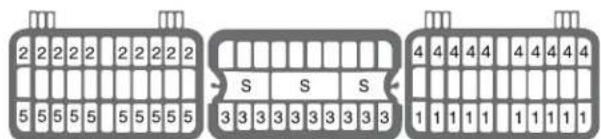
text_image
2 2 2 2 2 2 2 2 2 5 5 5 5 5 5 5 5 5 S S S 3 3 3 3 3 3 3 3 3 1 1 1 1 1 1 1 1 1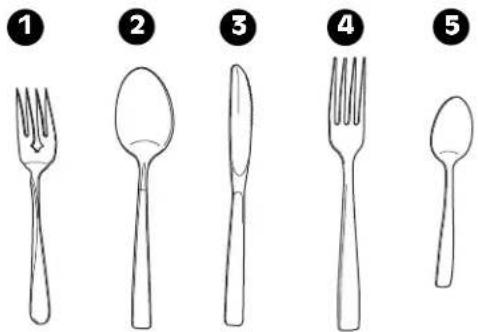
text_image
Illustration showing five different types of kitchen utensils: fork, spoon, knife, fork, and spoon, labeled with numbers 1 to 5.BANDEJA SUPERIOR DE ALTURA AJUSTABLE
natural_image
Line drawing of a hand using a tool to cut or install a grid-like structure with a black arrow indicating motion (no text or symbols)1 Para elevar la bandeja:
natural_image
Diagram of a mechanical device with two views showing internal components and directional arrows (no text or symbols)natural_image
Line drawing of a hand pressing down on a device with a scroll arrow (no text or symbols)natural_image
Line drawing of a hand pouring liquid from a bottle into a tray with a small inset (no text or symbols)natural_image
Line drawing of a hand pressing down on a mechanical component with a curved arrow indicating rotation (no text or symbols)natural_image
Line drawing of hands using a tool to clean or adjust a circular component (no text or symbols visible)natural_image
Line drawing of a hand adjusting a mechanical component inside a container (no text or symbols)natural_image
Line drawing of a hand adjusting a wall-mounted device inside a kitchen appliance (no text or symbols)natural_image
Line drawing of a hand using a tool to adjust or install a component on a vehicle intake manifold, with an inset showing the detail (no text or symbols present)natural_image
Line drawing of a hand holding a mechanical component with an arrow indicating direction (no text or symbols)natural_image
Line drawing of a hand holding a tool on a vehicle intake bracket (no text or symbols)LG Customer Interactive Center
P. O. Box 240007
201 James Record Road
Huntsville, Alabama 35813
ATTN: CIC
natural_image
Technical illustration of a mechanical device with a coiled spring and directional arrows indicating motion (no text or symbols)natural_image
Diagram of a mechanical device with rotating components and directional arrows (no text or labels)text_image
Diagram of a washing machine with numbered parts for identification and assembly reference.1 PANNEAU DE COMMANDES
2 POIGNÉE DE PORTE
3 COUVERCLE FRONTAL
4 COUVERCLE INFÉRIEUR
5 PIEDS DE MISE DE NIVEAU
6 ÉCRAN D'AFFICHAGE FRONTAL
Front Display
Process Indicator (SignaLight ^™ )

OPERATING
(OPÉRATION)

CLEAN
(PROPRE)
natural_image
Top-down line drawing of a grid-like container filled with cylindrical objects, no text or symbols presentCAPACITÉ 12 COUVERTS, PANIER SUPÉRIEUR
natural_image
Technical line drawing of a mechanical component with multiple cylindrical components arranged in a grid (no text or symbols)CHARGER LE PANIER À COUVERTS
natural_image
Technical line drawing of a mechanical component with multiple spring-like elements and a central shaft (no text or symbols)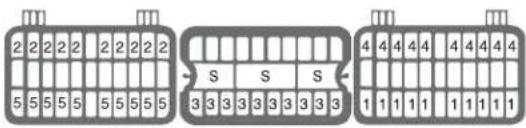
text_image
2 2 2 2 2 2 2 2 2 5 5 5 5 5 5 5 5 5 5 S S S 3 3 3 3 3 3 3 3 3 4 4 4 4 4 4 4 4 4 1 1 1 1 1 1 1 1 11
2
3

4

5
AJUSTER LA HAUTEUR DU PANIER SUPÉRIEUR
natural_image
Line drawing of hands using a tool to adjust or install a grid-like device (no text or symbols present)natural_image
Diagram showing a hand holding a tool inside a rack with an inset close-up of the handle (no text or symbols present)text_image
Compartment lavage normal 25 15text_image
Pré-lavage CompartmentINFORMATIONS RELATIVES AUDÉTERGENT
natural_image
Illustration of a hand pressing down on a device with a circular button, showing a rotational arrow (no text or symbols)natural_image
Line drawing of a hand pouring liquid from a bottle into a tray with a small bowl (no text or symbols)natural_image
Line drawing of a hand pressing down on a device component with a curved arrow indicating motion (no text or symbols)natural_image
Line drawing of hands using a tool to clean or adjust a circular component (no text or symbols visible)NETTOYER LE BRAS D'ASPERSION SUPÉRIEUR
natural_image
Line drawing of a hand adjusting a mechanical component inside a vehicle cabin (no text or symbols)natural_image
Line drawing of a hand adjusting a wall-mounted device inside a kitchen appliance (no text or symbols)natural_image
Line drawing of a hand using a tool to adjust or install a mechanical component, with an inset showing the detail of the component (no text or symbols present)natural_image
Line drawing of a hand holding a propeller with a black arrow indicating downward motion (no text or symbols)natural_image
Line drawing of a hand holding a belt buckle, no text or symbols present• Poids : 97 lbs. (43.8 kg)
Register your product Online!
www.lge.com