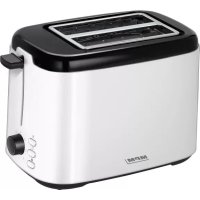
MTO07 - Toaster MPM - Free user manual and instructions
Find the device manual for free MTO07 MPM in PDF.



| Product type | Toaster |
| Brand | MPM |
| Model | MTO07 |
| Number of slots | 2 (suitable for bread of different lengths and thicknesses) |
| Browning setting | 7 levels (1 to 7) |
| Functions | Toasting, defrosting, reheating, emergency stop (STOP) |
| Bread centering system | Yes, for uniform toasting |
| Crumb tray | Yes, removable and retractable |
| Power cord length | 0.85 m |
| Max/min toasting time | 60 seconds / 250 seconds |
| Power supply | Grounded electrical outlet |
| Non-slip feet | Yes |
| Care and cleaning | Clean the housing with a damp cloth; empty the crumb tray regularly; do not immerse in water |
| Safety | Automatic shut-off, hot surfaces (caution: burns), do not use metal objects to dislodge bread |
| Intended use | Household use only |
Frequently Asked Questions - MTO07 MPM
User questions about MTO07 MPM
0 question about this device. Answer the ones you know or ask your own.
Ask a new question about this device
Download the instructions for your Toaster in PDF format for free! Find your manual MTO07 - MPM and take your electronic device back in hand. On this page are published all the documents necessary for the use of your device. MTO07 by MPM.
USER MANUAL MTO07 MPM
-Read the instructions carefully before use.
- Take special care when children are near the device!
-
Do not use the device for purposes other than those for which it was intended.
-
Do not immerse the device, cable or charger in water or other liquids!
-Do not leave the device unattended during operation. - Always unplug the device when not in use.
- Never use a damaged device, including one with a damaged cord or plug, in which case have it repaired at an authorised service centre.
- The use of accessories not recommended by the manufacturer may cause damage to the device, fire or personal injury.
- Do not use the device outdoors.
- Do not hang the cable on sharp edges or allow it to come into contact with hot surfaces.
- Do not place the device near electric or gas cookers, burners, ovens, etc.
- Do not touch the device's hot surface while it is working.
- Before cleaning, first unplug the device from the mains socket and wait until it has cooled down completely.
-
Since bread slices may ignite, do not use the device near curtains, shades or any flammable materials and substances.
-Use the device on a smooth and stable surface. -
The device should be connected to a mains socket outlet with a grounding pin.
-
This equipment may be used by children of at least 8 years of age and by persons of diminished physical, mental capacity and lack of experience and knowledge of the equipment if supervision or instruction is provided regarding the safe use of the equipment so that the hazards involved are understood. Unsupervised children should not perform cleaning and maintenance on the equipment.
-
Children should be supervised to ensure that they do not play with the equipment/device.
-
When disconnecting the power cord from the mains, only pull it by the plug, not the cord.
-
Do not use the toaster without the breadcrumb tray. Clean the tray regularly. Do not let too much breadcrumbs accumulate on the tray.
- Caution! The temperature of the device's surfaces may be higher during operation. Pay special attentions so as not to get burnt.
- Warning! Do not attempt to dislodge blocked toasts, slices of bread, pieces of bagels etc. with a knife or other utensils, because making a contact with the device's live elements may lead to fatal electric shock.
- Caution! The equipment is not designed to operate using external timers or a separate remote control.
- Keep the device and its cord out of reach of children under 8 years of age.
- Before touching the plug or the toaster, make sure your hands are dry.
The device is intended for domestic use only.
DEVICE DESCRIPTION
- Housing
- Timer knob (1-7)
- BREADCRUMB tray
- STOP button, for interrupting the operation
- Warm-up button
-
Defrosting button
-
Anti-slip feet
- Lever for lowering toasts
- Power cord winding location
- Toasting chamber, for various sizes of bread
- Bread centering system
BEFORE FIRST USE
- Before using the toaster for the first time, check the toasting chambers and make sure there are no packaging materials or other items inside.
- Use a soft, damp cloth with a gentle cleaning agent to wipe the toaster's external surfaces. After - wards, let the device to dry completely.
- Unpleasant odour or light smoke may appear when using the toaster for the first time. This is not a dangerous situation and does not mean the toaster is faulty. This is a normal occurrence for new devices. The odour should subside after several uses.
CAUTION! Before using the toaster for the first time, remove all protective film! The bread should be divided so that it easily fits in the toaster - do not insert excessively large pieces into the toaster, as it may cause injuries or electrical shock! Do not insert any items into the toaster!
THE TOASTER IS EQUIPPED WITH A BREAD CENTERING SYSTEM.
CAUTION! Next to the function buttons (5, 6) there are LEDs which light up when a corresponding function is selected. To activate a specific function, first press the lever and then a corresponding button. A LED located next to a button 4, light up when the lever is pulled 8 down.
TOASTING
- Connect the toaster's plug to the mains socket.
- Set the toasting control know 2 to a position from 1 to 5.
- Insert bread into the toaster and then pull the lever 8 down - toasting begins.
- When the pre-selected time has been reached, the toaster will switch off automatically. To stop the toasting process early, press button 4 - STOP, or disconnect the device from the mains.
THANKS TO THE BREAD CENTERING SYSTEMS, THE BREAD SLICES ARE UNIFORMLY TOASTED FROM BOTH SIDES.
DEFROSTING/WARMINGUP
- To defrost bread, put it in the toaster, turn the power adjustment knob 2 into a desired position, lower the lever 8 to put the bread inside the toaster and push the button 6 - defrosting. It is recommended to set the power adjustment knob 2 to level 5, when defrosting thick slices of bread.
- Once the defrosting cycle is over, set the power adjustment knob 2 to the desired position, lower the lever 8 and press button 5 - warming up.
NOTES
- do not insert crumbled bread that may be blocked inside the toaster.
- do not put grease on the bread for toasting.
- if the bread gets burnet, immediately deactivate the devices!
- to obtain extra toasted bread, repeat toasting.
CLEANING AND MAINTENANCE
- Before cleaning the device, pull the plug from the mains and wait until the device has cooled down.
- The toaster's housing may be cleaned with a damp cloth (add a little detergent, if needed).
- Do not use strong cleaning agents, such as acetone, alcohol or abrasive washing material.
- Remove bread crumbs from the tray regularly, by sliding the tray, located in the bottom part of the device. out If the toaster is used often, breadcrumbs should be removed at least once.
CAUTION! Make sure the tray is properly secured, after putting it back.
- Do not remove any blocked bread from the device with metal utensils, if it is connected to the mains. If this is needed, first disconnect the plug from the mains and wait until the toaster is cool. Make sure not to damage the device's internal components.
CAUTION! Do not submerge the device in water or other liquids.
TECHNICAL DATA
Technical specifications are given on the product nameplate.
Minimal toasting time: 60 seconds
Maximal toasting time 250 seconds
Length of mains cable: 0.85m

CAUTION! MPM agd S.A. reserves the right to technical changes.
Proper disposal of the product (waste electrical and electronic equipment)

Marking on the product indicates that after the service-life of the product expires, it should not be disposed with other type of municipal waste. Used equipment may have a negative impact on the environment and health of people due to potentially containing hazardous substances, mixtures and components.
Mixing electric waste with other types of waste or disassembling those in an unprofessional manner may cause a release of substances that are hazardous to the environment and health. Used equipment should
be handed-over to a point for collection of electric waste. In order to obtain detailed information regarding the electric waste collection points, the user should contact the municipal point of electric waste collection or used equipment processing department.
INSTRUCCIONES DE USO
BESCHRIJVING VAN HET APPARAAT

∴ m = 3/11 ;
- BceIa BbIHMaTe BnIky n3 po3eTKn, ecIn He IcNoIb3YeTe yCTpoIcTB0.
-3aπpeuεaetcηncnoJIb3OBaTb IOBpeKdEHHoe yCTPOIcTBO, B TOM YnCSNe C NOBpeKdEHHbIM ΦHypOM NII IN BnIKoI - B ΘOM Clyuae CdaIte yCTPOIcTBO B peMOHT B aBTOpN3OBaHHbI CepBnCHbI ΚeHTp.
TEXHINUCKNE XAPAKTEPNCTUKN
Texnueckne npaMeTpbl yka3aHbI Ha 3aBODCKo Ta6nueKe n3deJna.
MnHmAlbHoe BpeMa3aneKaHn: 60 cekyHn
MaKcImaJIbHoe BpeM 3aIeKaHnJ: 250 cekyHd
IHCTPYKl3 TEXHIKN B3NEKN DnBNI KOPNCTAHHn
-3aBxJn BnMaIte BnIky 3 pO3eTKN, KOJIH He KOpNCyETecb npilaIOM.
-He BnKOpNCToBvIte NOnKoJKeHn IpnlaI, HabITb JaKIo NOShKOJKeHO MepeXeBn Ka6eIb a6o BnIKy - y TaKOMy BnJaKDy BiDHeCITb IpnlaI Ha peMOHT Do aBTOpN3ObaHOrO cepBicHOrO ceHTpy.
-Викорисанна akcescyapib, He pekomehdoBaHnx Bnpo6hNkOM, Moxe np3BeCTn Do noшkoJxehnЯ prncTpOIO, noxeki a6o TpaBMn.
-He BnKOpncToBvIe npNcTpiHa BiDkPntOMy nobITpi.
-He BiShaIte KaBeIb Ha roCTpi KpaI Ta He IOnyScaIte NOrO KOH-TaKToY 3 rapAChMn NOBepxHЯMn.
-He cTbTe npilaI npuy 3 eIeKtpnHmN a6o ra3OBmN pIi -TaMn, KOHΦOpKaMn, dYXOBKaMn TToIo.
-He TopkaTecra rapaHxNIOBepXoHb npilaIy pIacPiCMAJyBaHHaTOCTiB.
- DEVICE DESCRIPTION
- BEFORE FIRST USE
- TOASTING
- DEFROSTING/WARMINGUP
- NOTES
- CLEANING AND MAINTENANCE
- CAUTION! MAKE SURE THE TRAY IS PROPERLY SECURED, AFTER PUTTING IT BACK
- TECHNICAL DATA
- PROPER DISPOSAL OF THE PRODUCT (WASTE ELECTRICAL AND ELECTRONIC EQUIPMENT)
- INSTRUCCIONES DE USO
- BESCHRIJVING VAN HET APPARAAT
- TEXHINUCKNE XAPAKTEPNCTUKN
- IHCTPYKL3 TEXHIKN B3NEKN DNBNI KOPNCTAHHN
Brand : MPM
Model : MTO07
Category : Toaster