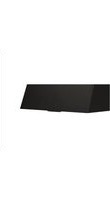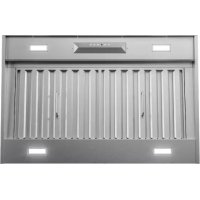
Monsoon II AK9358BS - Basket Zephyr - Free user manual and instructions
Find the device manual for free Monsoon II AK9358BS Zephyr in PDF.


User questions about Monsoon II AK9358BS Zephyr
0 question about this device. Answer the ones you know or ask your own.
Ask a new question about this device
Download the instructions for your Basket in PDF format for free! Find your manual Monsoon II AK9358BS - Zephyr and take your electronic device back in hand. On this page are published all the documents necessary for the use of your device. Monsoon II AK9358BS by Zephyr.
USER MANUAL Monsoon II AK9358BS Zephyr
EN Use, Care, and Installation Guide
natural_image
Technical line drawing of a mechanical component with a circular top and rectangular base (no text or symbols)Page
Safety Information 4-9
Types of Safety Warnings 4
General Safety 5-8
Operation 8
Electrical Requirements 8-9
Federal Communication Commission Interface Statement ...... 9
List of Materials 10
Installation Instructions 11-19
Ducting Calculation Sheet ......11
Mounting Height, Clearance, & Ducting 12-13
Ducting Options ....14
Hood Specifications ....15
Electrical Supply 16
Cable Lock 16
Preparation & Installation 17-19
Features & Controls 20-23
Touch Controls 20-21
RFRemoteControl....22-23
Maintenance 24-26
Hood & Filter Cleaning 24-25
LumiLight LED 26
ACT™ Conversion 27-29
Airflow Control Technology (ACT™) 27
Enabling ACT™ 28-29
Wiring Diagram 30
Troubleshooting....31-32
List of Parts & Accessories 33
Notes....34
Limited Warranty ....35
Product Registration 36
Your safety and the safety of others are very important.
We have provided many important safety messages in this manual for your appliance. Always read and obey all safety messages.

natural_image
Warning symbol: black square with white exclamation mark (no text or numbers)This is the Safety Alert Symbol. This symbol alerts you to potential hazards that can cause severe bodily injury or death. All safety messages will follow the Safety Alert Symbol and either the words "DANGER" "WARNING" or "CAUTION"

DANGER

Danger means that failure to heed this safety statement may result in severe injury or death.

WARNING

Warning means that failure to heed this safety statement may result in extensive product damage, serious personal injury, or death.

CAUTION

Caution means that failure to heed this safety statement may result in minor or moderate personal injury, property or equipment damage.
READ AND SAVE THESE INSTRUCTIONS
General Safety

WARNING

To reduce the risk of fire or electric shock, do not use this fan with any solid-state control device.

WARNING

WARNING - TO REDUCE THE RISK OF FIRE, ELECTRIC SHOCK, OR INJURY TO PERSONS, OBSERVE THE FOLLOWING:
a) Use this unit only in the manner intended by the manufacturer. If you have questions, contact the manufacturer.
b) Before servicing or cleaning unit, switch power off at service panel and lock the service disconnecting means to prevent power from being switched on accidentally. When the service disconnecting means cannot be locked, securely fasten a prominent warning device, such as a tag, to the service panel.

CAUTION

For General Ventilating Use Only. Do Not Use To Exhaust Hazardous Or Explosive Materials And Vapors. Take care when using cleaning agents or detergents. Suitable for use in household cooking area.
READ AND SAVE THESE INSTRUCTIONS

WARNING

WARNING - TO REDUCE THE RISK OF A RANGE TOP GREASE FIRE:
a) Never leave surface units unattended at high settings. Boilovers cause smoking and greasy spillovers that may ignite. Heat oils slowly on low or medium settings.
b) Always turn hood ON when cooking at high heat or when flambeing food. (i.e. Crepes Suzette, Cherries Jubilee, Peppercorn Beef Flambe').
c) Clean ventilating fans frequently. Grease should not be allowed to accumulate on fan or filter.
d) Use proper pan size. Always use cookware appropriate for the size of the surface element.

WARNING

WARNING - TO REDUCE THE RISK OF INJURY TO PERSONS IN THE EVENT OF A RANGE TOP GREASE FIRE, OBSERVE THE FOLLOWING ^a :
a) SMOTHER FLAMES with a close-fitting lid, cookie sheet, or metal tray, then turn off the burner. BE CAREFUL TO PREVENT BURNS. If the flames do not go out immediately, EVACUATE AND CALL THE FIRE DEPARTMENT.
b) NEVER PICK UP A FLAMING PAN – You may be burned.
c) DO NOT USE WATER, including wet dishcloths or towels – a violent steam explosion will result.
d) Use an extinguisher ONLY if:
1) You know you have a Class ABC extinguisher, and you already know how to operate it.
2) The fire is small and contained in the area where it started.
3) The fire department is being called.
4) You can fight the fire with your back to an exit
“Based on “Kitchen Firesafety Tips” published by NFPA.
READ AND SAVE THESE INSTRUCTIONS

WARNING

WARNING - TO REDUCE THE RISK OF FIRE, ELECTRIC SHOCK, OR INJURY TO PERSONS, OBSERVE THE FOLLOWING:
a) Installation work and electrical wiring must be done by qualified person(s) in accordance with all applicable codes and standards, including fire-rated construction.
b) Sufficient air is needed for proper combustion and exhausting of gases through the flue (chimney) of fuel burning equipment to prevent back drafting. Follow the heating equipment manufacturer's guideline and safety standards such as those published by the National Fire Protection Association (NFPA), and the American Society for Heating, Refrigeration and Air Conditioning Engineers (ASHRAE), and the local code authorities.
c) When cutting or drilling into wall or ceiling, do not damage electrical wiring and other hidden utilities.
d) Ducted fans must always be vented to the outdoors.
e) If this unit is to be installed over a tub or shower, it must be marked as appropriate for the application and be connected to a GFCI (Ground Fault Circuit Interrupter) - protected branch circuit.

WARNING

WARNING TO REDUCE THE RISK OF FIRE, USE ONLY METAL DUCTWORK.
READ AND SAVE THESE INSTRUCTIONS

CAUTION

To reduce risk of fire and to properly exhaust air outside, do not vent exhaust air into spaces within walls, ceilings, attics, crawl spaces, or garages.
Operation
▶ Always leave safety grilles and filters in place. Without these components, operating blowers could catch onto hair, fingers and loose clothing.
The manufacturer declines all responsibility in the event of failure to observe the instructions given here for installation, maintenance and suitable use of the product. The manufacturer further declines all responsibility for injury due to negligence and the warranty of the unit automatically expires due to improper maintenance.
NOTE: Please check www.zephyronline.com for revisions before doing any custom work.
Electrical Requirements
Important:
Observe all governing codes and ordinances.
It is the customer's responsibility to be aware of these below:
▶ To contact a qualified electrical installer.
To assure that the electrical installation is adequate and in conformance with National Electrical Code, ANSI/NFPA 70 latest edition* or CSA standards C22.1-94, Canadian Electrical Code, Part 1 and C22.2 No.0-M91 - latest edition** and all local codes and ordinances.
If codes permit and a separate ground wire is used, it is recommended that a qualified electrician determine that the ground path is adequate.
▶ Do not ground to a gas pipe.
▶ Check with a qualified electrician if you are not sure the range hood is properly grounded.
▶ Do not have a fuse in the neutral or ground circuit.
READ AND SAVE THESE INSTRUCTIONS
This appliance requires a 120V 60Hz electrical supply and connected to an individual properly grounded branch circuit protected by a 15 or 20 ampere circuit breaker or time delay fuse. Wiring must be 2 wire with ground. Please also refer to Electrical Diagram on product.
▶ A cable locking connector (not supplied) might also be required by local codes. Check with local requirements, purchase and install appropriate connector if necessary.
* National Fire Protection Association Batterymarch Park, Quincy, Massachusetts 02269
** CSA International 8501 East Pleasant Valley Road, Cleveland, Ohio 44131-5575
Federal Communication Commission Interface Statement
This equipment has been tested and found to comply with the limits for a Class B digital device, pursuant to Part 15 of the FCC Rules. These limits are designed to provide reasonable protection against harmful interference in a residential installation.
This equipment generates, uses and can radiate radio frequency energy and, if not installed and used in accordance with the instructions, may cause harmful interference to radio communications. However, there is no guarantee that interference will not occur in a particular installation. If this equipment does cause harmful interference to radio or television reception, which can be determined by turning the equipment off and on, the user is encouraged to try to correct the interference by one of the following measures:
▶ Reorient or relocate the receiving antenna.
▶ Increase the separation between the equipment and receiver.
▶ Connect the equipment into an outlet on a circuit different from that to which the receiver is connected.
▶ Consult the dealer or an experienced radio/TV technician for help.

WARNING

Prop. 65 Warning for California Residents: This product may contain chemicals known to the State of California to cause cancer, birth defects, or other reproductive harm.
Parts Supplied
| Quantity Part |
| 1 Insert hood body |
| 2 Baffle filters (AK9334BS & AK9340BS) |
| 3 Baffle filters (AK9346BS & AK9352BS) |
| 2 LumiLight LED, 6W (pre-installed) (AK9334BS & AK340BS) |
| 4 LumiLight LED, 6W (pre-installed) (AK9346BS & AK9352BS) |
| 1 Dual internal blower (pre-installed) |
| 1 10" round duct collar |
| 1 RF remote control (w/ battery & holder) |
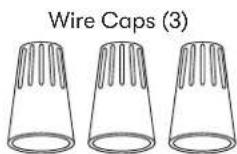
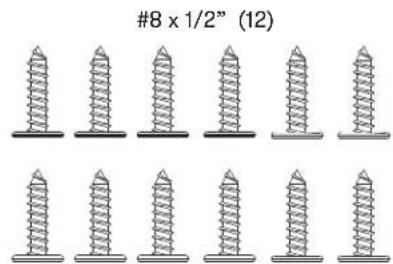
| 1 Hardware package |
text_image
#8 x 1/2" (12)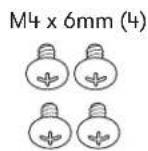
RF Remote Control (1) Remote Holder (1)
text_image
ZEPHYR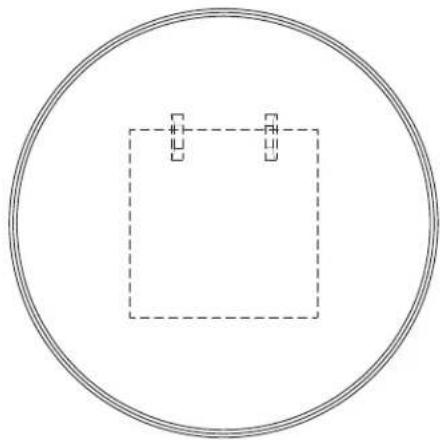
natural_image
Simple geometric diagram showing a square inscribed in a circle with two small squares and dashed lines, no text or symbols present.Parts Not Supplied
Ducting, conduit and all installation tools Cable locking connector (if required by local codes)
Ducting Calculation Sheet
| Duct pieces | Equivalent number length x used = | Total | |
 | 3-1/4"x 10" Rect., straight | 1 Ft. x( ) = | Ft. |
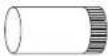 | 6",7",8",10" Round, straight | 1 Ft. x( ) = | Ft. |
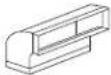 | 3-1/4"x 10" Rect.90° elbow | 15 Ft. x( ) = | Ft. |
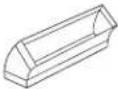 | 3-1/4"x 10" Rect.45° elbow | 9 Ft. x( ) = | Ft. |
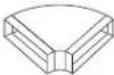 | 3-1/4"x 10" Rect.90° flat elbow | 24 Ft. x( ) = | Ft. |
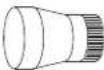 | 7" to 6" or 8" to 7" Round tapered reducer | 25 Ft. x( ) = | Ft. |
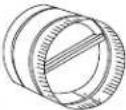 | 6",7",8" Round in-line damper | 15 Ft. x( ) = | Ft. |
 | 6",7",8",10" Round, 90° elbow | 15 Ft. x( ) = | Ft. |
 | 6",7",8",10" Round, 45° elbow | 9 Ft. x( ) = | Ft. |
| Subtotal column 1 = | Ft. | ||
| Duct pieces | Equivalent number length x used = | Total | |
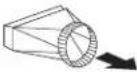 | 3-1/4"x 10"Rect. to6" round transition | 5 Ft. x( ) = | Ft. |
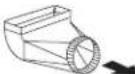 | 3-1/4"x 10"Rect. to6" round transition90° elbow | 20 Ft. x( ) = | Ft. |
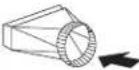 | 6" round to3-1/4"x 10"rect.transition | 1 Ft. x( ) = | Ft. |
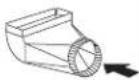 | 6" round to3-1/4"x 10"rect.transition90° elbow | 16 Ft. x( ) = | Ft. |
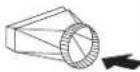 | 7" round to3 1/4" x 10"rect.transition | 8 Ft. x( ) = | Ft. |
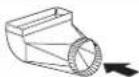 | 7" round to3-1/4" x 10"rect.transition90° elbow | 23 Ft. x( ) = | Ft. |
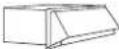 | 3-1/4"x 10"Rect.wall capwith damper | 30 Ft. x( ) = | Ft. |
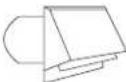 | 6", 7", 8", 10"Round, wallcap withdamper | 30 Ft. x( ) = | Ft. |
 | 6", 7", 8", 10"Roundroof cap | 30 Ft. x( ) = | Ft. |
| Subtotal column 2 =Subtotal column 1 =Total ductwork = | Ft. | ||
| Ft. | |||
| Ft. | |||
Maximum Duct Length: For satisfactory air movement, the total duct length should not exceed 150 equivalent feet.
Mounting Height, Clearance, & Ducting
text_image
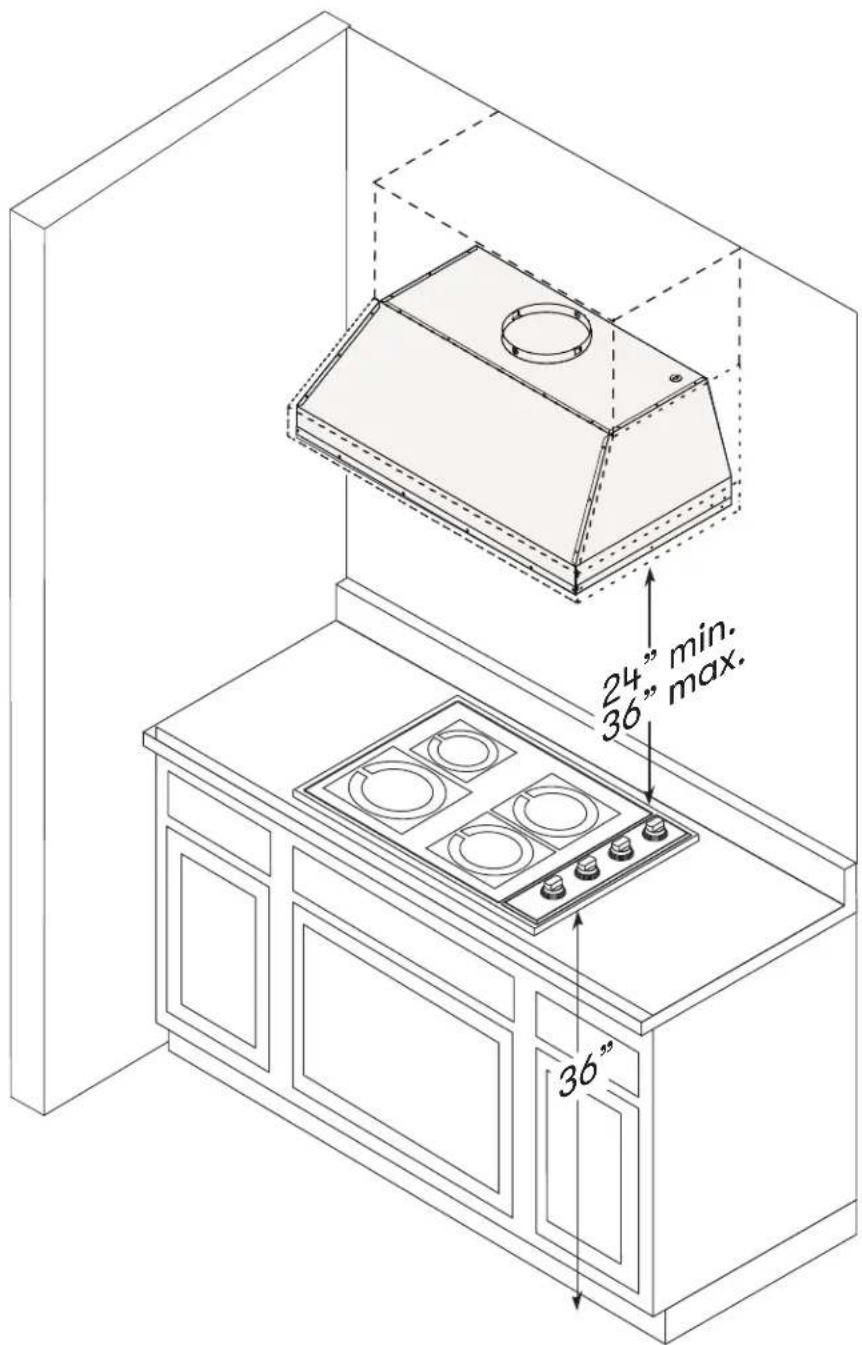
24" min. 36" max. 36"Mounting Height, Clearance, & Ducting
A minimum of 10" round duct must be used to maintain maximum air flow efficiency.
Always use rigid type metal ducts only. Flexible ducts could restrict air flow by up to 50%.
Also use calculation (on page 11) to compute total available duct run when using elbows, transitions and caps.
ALWAYS, when possible, reduce the number or transitions and turns. If long duct run is required, increase duct size.
If turns or transitions are required; install as far away from hood duct output and as far apart, between the two as possible.
Minimum mount height between range top to hood bottom should be no less than 24".
Maximum mount height should be no higher than 36".
It is important to install the hood at the proper mounting height. Hoods mounted too low could result in heat damage and fire hazard; while hoods mounted too high will be hard to reach and will lose its performance and efficiency.
If available, also refer range manufacturer's height clearance requirements and recommended hood mounting height above range.
For shipment and installation damages:
▶ Please fully inspect unit for damage before installation.
If the unit is damaged in shipment, return the unit to the store in which it was bought for repair or replacement.
If the unit is damaged by the customer, repair or replacement is the responsibility of the customer.
If the unit is damaged by the installer (if other than the customer), repair of replacement must be made by arrangement between customer and installer.
Ducting Options

WARNING

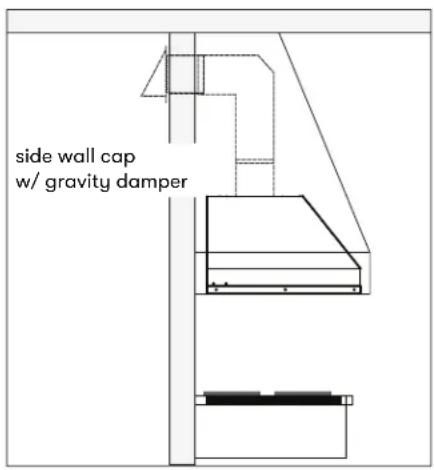
Fire Hazard: NEVER exhaust air or terminate ductwork into spaces between walls, crawl spaces, ceilings, attics, or garages. All exhaust must be ducted to the outside, unless using the recirculating option.
▶ Use single wall rigid metal ductwork only.
▶ Fasten all connections with sheet metal screws and tape all joints w/ certified Silver Tape or Duct Tape.
text_image
side wall cap w/ gravity damper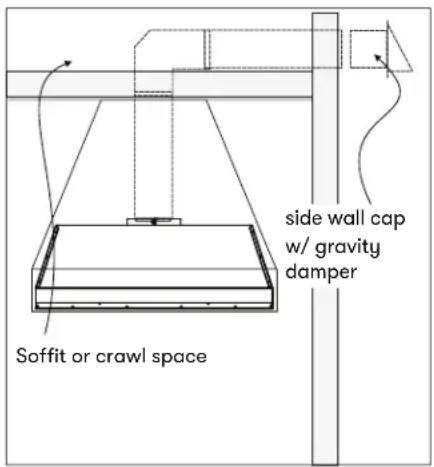
text_image
side wall cap w/ gravity damper Soffit or crawl space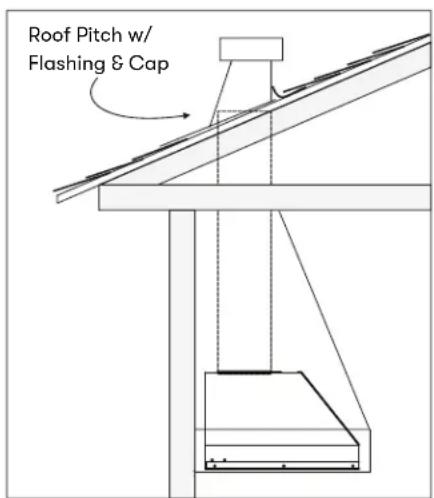
text_image
Roof Pitch w/ Flashing & CapHood Specifications
text_image
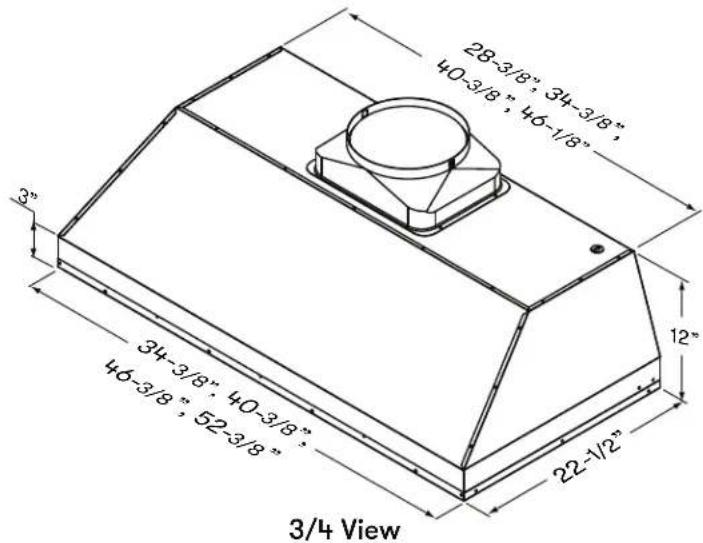
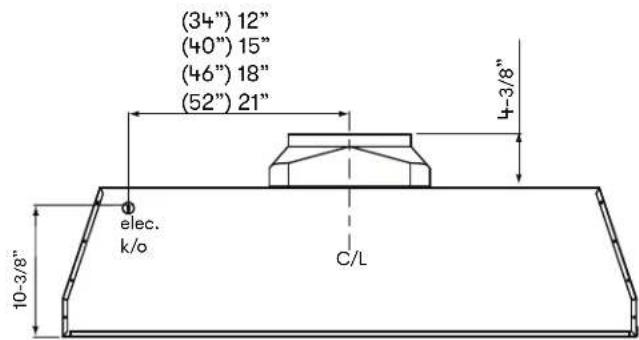
28-3/8" 34-3/8" 40-3/8" 46-1/8" 3" 34-3/8" 40-3/8" 46-3/8" 52-3/8" 22-1/2" 3/4 View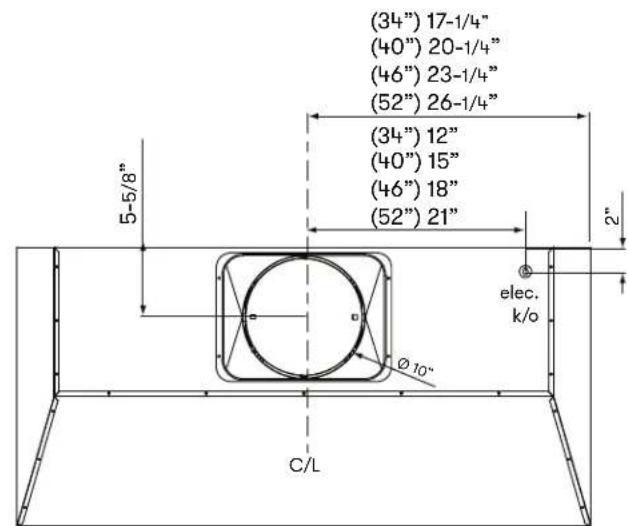
text_image
(34") 17-1/4" (40") 20-1/4" (46") 23-1/4" (52") 26-1/4" (34") 12" (40") 15" (46") 18" (52") 21" 5-5/8" 2" elec. k/o Ø10° C/LTop View
text_image
(34") 12" (40") 15" (46") 18" (52") 21" 4-3/8" elec. k/o C/L 10-3/8"Back View
Electrical Supply

WARNING

Electrical wiring must be done by qualified person(s) in accordance with all applicable codes and standards. Turn off electrical power at service entrance before wiring.
For personal safety, remove house fuse or open circuit breaker before beginning installation. Do not use extension cord or adapter plug with this appliance.
Follow national electrical codes or prevailing local codes and ordinances.
This appliance requires a 120V 60Hz electrical supply, and connected to an individual, properly grounded branch circuit, protected by a 15 or 20 ampere circuit breaker or time delay fuse. Wiring must be 2 wire w/ ground. Please also refer to the Electrical Diagram labeled on product.
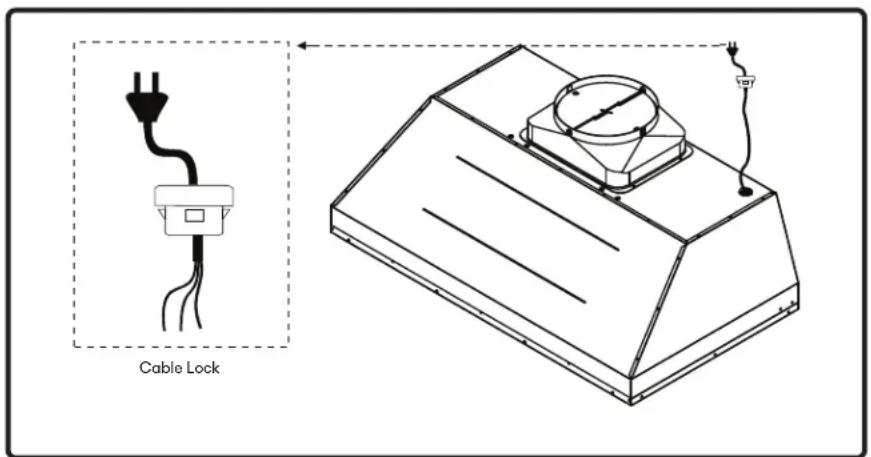
Cable Lock
A cable locking connector (not supplied) might be required by local codes. Check with local requirements and codes, purchase and install appropriate connector if necessary. (FIG. A)
text_image
Cable LockFIG. A
Preparation & Installation

text_image
CAUTIONAt least two installers are required due to the weight and size of the liner.
- Remove all packing materials and protective film prior to installation. Use caution during installation to prevent scratches or damage to the stainless steel.
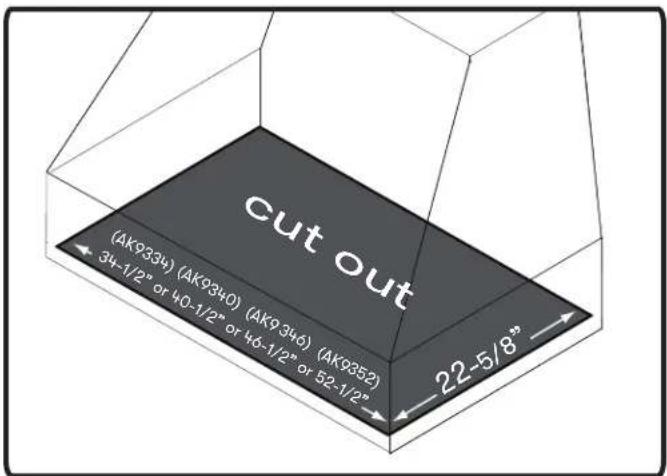
- Cut out an opening in the bottom of the cabinet by following the dimensions in FIG. B.
- Prepare liner for installation into cabinet by following the steps on page 18.
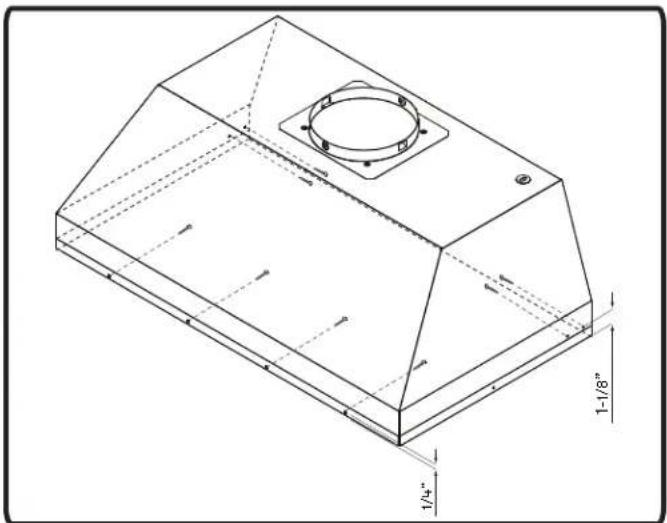
- Lift liner into bottom opening of cabinet and secure to interior of cabinet using (8) #8 x 1/2" stainless steel screws; (4) screws in the front and (4) screws in the sides. FIG. C.

text_image
WARNINGMake sure the surface you are securing the liner to is capable of holding the weight of AK93. Failure to do so may cause personal injury or damage to cooking surface or counter.
text_image
cut out (AK9334) (AK9340) (AK9346) (AK9352) 34-1/2" or 40-1/2" or 46-1/2" or 52-1/2" 22-5/8"FIG. B
natural_image
Technical line drawing of a 3D mechanical component with mounting holes and internal cavity (no text or symbols)FIG. C
- Finalize installation of electrical and duct work. Seal duct work with certified aluminum duct tape. Power on liner, check for leaks around duct tape and verify proper operation.
NOTE: If access to top of liner is not available after installation, electrical and duct work connection may need to be made prior to installing the liner.
- Re-install the previously removed bottom panel, side spacer panels (if applicable), grease tray, and baffle filters.
Preparation & Installation
natural_image
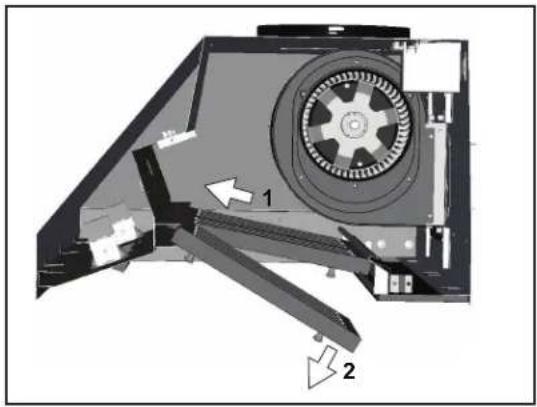
Technical diagram of a mechanical device with labeled parts (1 and 2), showing internal components and directional arrows (no text or symbols beyond labels)- Remove baffle filters by: 1) Pulling filter toward front of liner. 2) Pivoting rear of filter down.
text_image
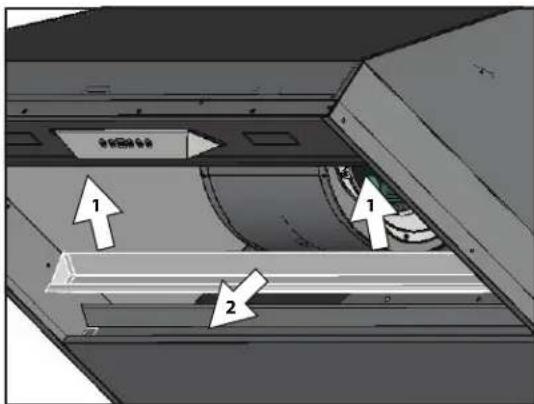
1 2 1 2- Remove grease tray by: 1) Pulling up on tray to release from bottom panel. 2) Lifting tray out of liner body.
natural_image
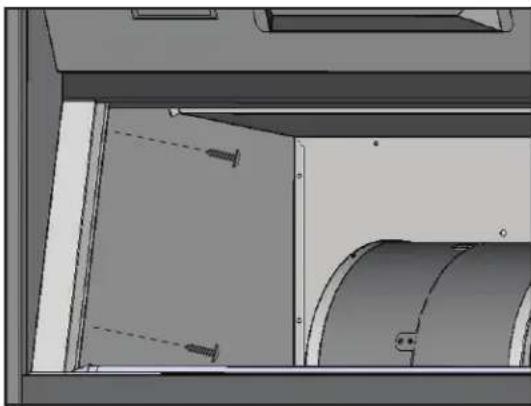
Interior view of a mechanical or industrial enclosure with cylindrical components and mounting brackets (no visible text or symbols)- Remove left and right side-spacer panels by removing (2) screws from behind each panel.
Preparation & Installation
text_image
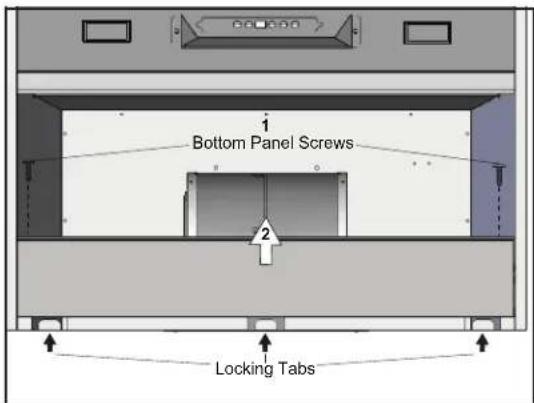
Bottom Panel Screws Locking Tabs- Remove bottom panel by: 1) Removing (2) screws from left and right sides of bottom panel. 2) Pulling bottom panel toward front of liner to release from locking tabs.
natural_image
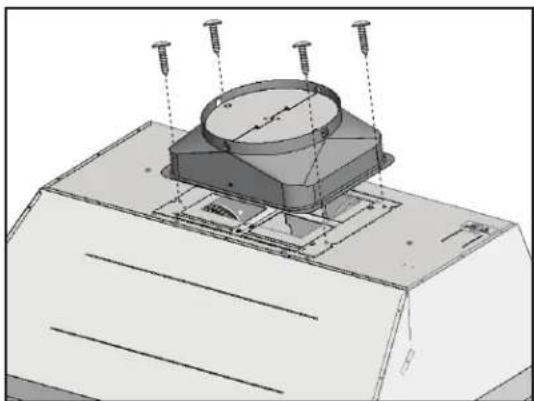
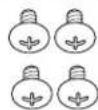
Technical diagram of a mechanical assembly with mounting base and cylindrical component (no text or symbols)- Secure 10" round ducting collar to top of insert by (4) M4 x 6mm screws.
natural_image
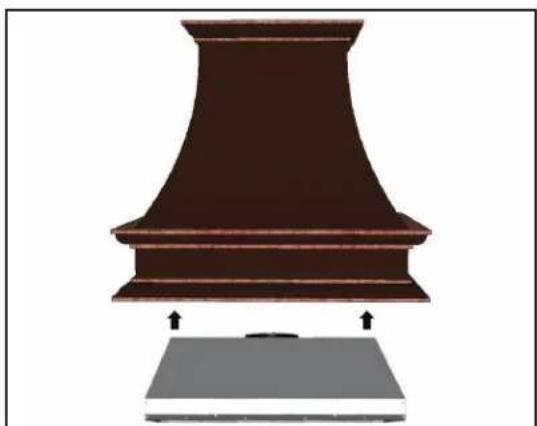
Illustration of a brown industrial chimney with a gray base, showing structural details and arrows indicating measurement or assembly (no text or symbols present)- Vertical ducting preparation is complete. Refer to page 18, step 4 to complete installation.
Touch Controls
text_image
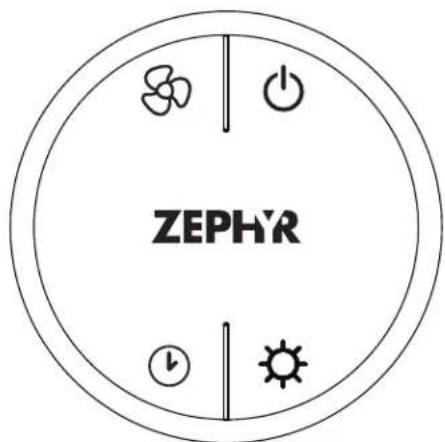
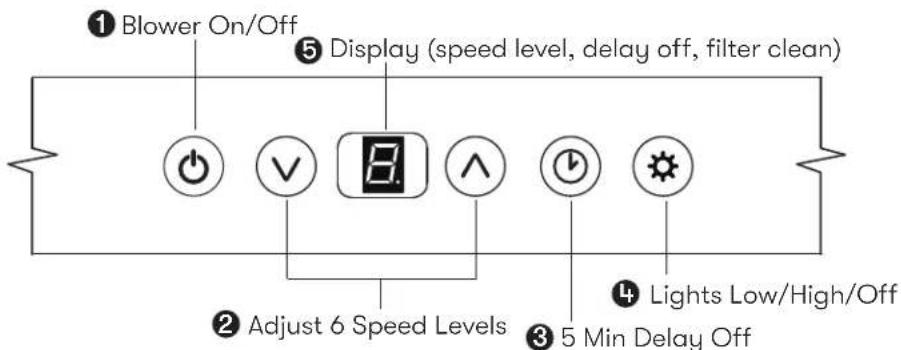
① Blower On/Off ⑤ Display (speed level, delay off, filter clean) ② Adjust 6 Speed Levels ③ 5 Min Delay Off ④ Lights Low/High/Off1. Blower On/Off
By pressing ⬆ the blower is switched on and off. When switched on, the blower starts up on speed level 1.
ACT Verification
- Airflow Control Technology (ACT) allows the installer to set the maximum blower CFM to align with local codes and regulations.
- To verify the maximum blower CFM:
- With hood off, hold the Ⓞ button for 3-4 seconds. If number 6 displays = default max. CFM, if number 3 displays = max. 590 CFM, and if number 2 displays = max. 390 CFM.
2. Speed Selection
- Press ⓥ to decrease fan speed. 6, 5, 4, 3, 2, 1.
- If fan is on Speed 1 and Ⓥ is pressed, the fan will power off.
- Press ⬆ to increase fan speed. Fan On, 1, 2, 3, 4, 5, 6.
- If hood is off and ⬆ is pressed, the fan will turn on speed 1.
ACT Enabled Speed Selections
- When ACT is enabled, the number of blower speeds will be reduced as follows:
- 590 CFM = Maximum 3 speeds
- 390 CFM = Maximum 2 speeds
3. Delay Off
This feature is used for programmed shut down of blower 5 minutes after the function is activated. Press once, a dot flashes Ⓥ in the lower right side of display 📄 indicating the function is on. The blower will completely shut down after 5 minutes.
4. Lights Low/High/Off
Switch lights on to low by pressing ⚙ once, press a second time for high and again to shut off lights.
5. Display Window
The display window indicates speed levels and features such as baffle filter clean reminder, delay off and clean air indicator.
Touch Controls
Baffle Filter Clean Reminder
A set of baffle filters are fitted by the factory, these baffle filters are intended to filter out residue from cooking. The filters need not be replaced on a regular basis but are required to be kept clean. The BaffleFilter Clean reminder function in the microprocessor will automatically indicate by a flashing F when the baffle filters need to be cleaned after every 60 hours of use. Filters can be cleaned by hand with non-abrasive soap or in a dishwasher. Heavily soiled filters should also be soaked in grease cutting detergent prior to cleaning.
Baffle Filter Clean Indicator
When flashes on the display, the baffle filters need be cleaned. This will occur after every 60 hours of use.
Reset the filter clean reminder timer after filters are cleaned and re-installed. With hood off, press and hold Ⓥ for approximately 5 seconds until ⏻ on display disappears □. The filter clean reminder function is now reset and a new 60 hours elapse cycle is initiated.
Clean Filters
display < F > flashes

To Reset
hold 5 sec. display from


Clean Air Function
Clean Air is a feature that turns on the blower on low speed every 4 hours for 10 minutes to remove stagnant air in the kitchen. The Clean Air function is disabled by default and must be enabled by the user.
Clean Air Indicator
While Clean Air is active, the display will alternate between A, 1, A, 1.
After 10 minutes of Clean Air operation, the blower will power off and the 4 hour timer will reset.
If the blower speed is changed while the Clean Air Function is in use, the cycle will be interrupted and the timer will reset after.
To Enable
hold 3 sec.

and

display < A > flashes

To Disable
hold 3 sec. display from to < >

and


RF Remote Control
FCC Caution
To assure continued compliance, any changes or modifications not expressly approved by the party responsible for compliance could void the user's authority to operate this equipment. (Example - use only shielded interface cables when connecting to computer or peripheral device. This device complies with Part 15 of the FCC Rules. Operation is subject to the following two conditions. (1) This device may not cause harmful interference, and (2) This device must accept any interference received, including interference that may cause undesired operation.
Synchronization
To create a unique link between your liner and remote control please follow these steps.
- With liner off, press and hold the "lights" button on the liner until the letter "F" shows on the display screen.
- Press the "lights" button on the remote, the lights on the liner will turn on and synchronization is complete.
RF Remote Control Functions
text_image
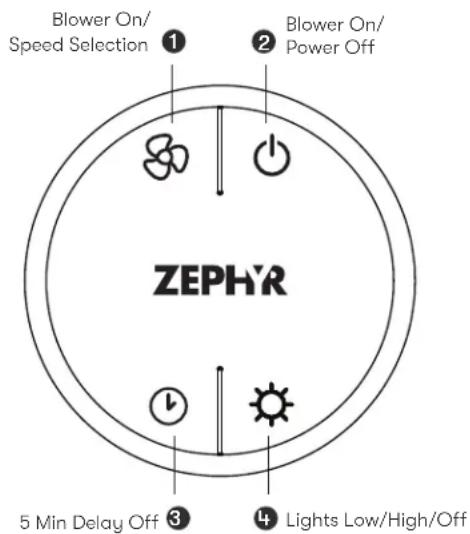
Blower On/ Speed Selection Blower On/ Power Off 1 2 ZEPHR 3 5 Min Delay Off 4 Lights Low/High/Off① Blower On / Speed Selection
Press 80 to power on blower and cycle through all six blower speeds.
② Blower On / Power Off
By pressing ⏻, the blowers will power on at the last speed setting. Press again and the entire hood will power off, including lights.
③ Delay Off
By pressing ⬆, the blower and lights will enter Delay Off mode. A dot will appear in the lower right corner of the hood display ⚡ indicating the function is on. The blower will change to speed 1 and shut down after 5 minutes.
4 Lights Low/High/Off
Switch lights to Low by pressing ⚙ once, again to High and again to switch Off.
RF Remote Control
RF Remote Features
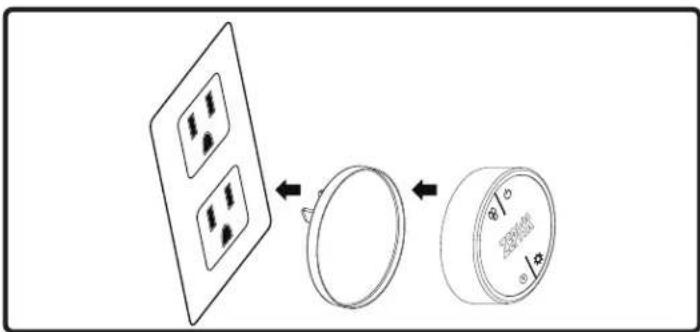
The RF remote control is equipped with a magnet on the back for easy storage. The remote may be placed on any magnetic surface such as a refrigerator or the Zephyr remote holder, FIG. D. The remote holder can be inserted into a standard electrical outlet for easy storage. Note: The remote holder does not charge the RF remote.
Maximum remote control communication distance is 15 feet from the liner.
text_image
Diagram showing a device with four circular components and a separate circular component with internal markings, likely illustrating a mechanical or electrical assembly.FIG. D
RF Remote Maintenance
Clean the remote control using non abrasive detergents.
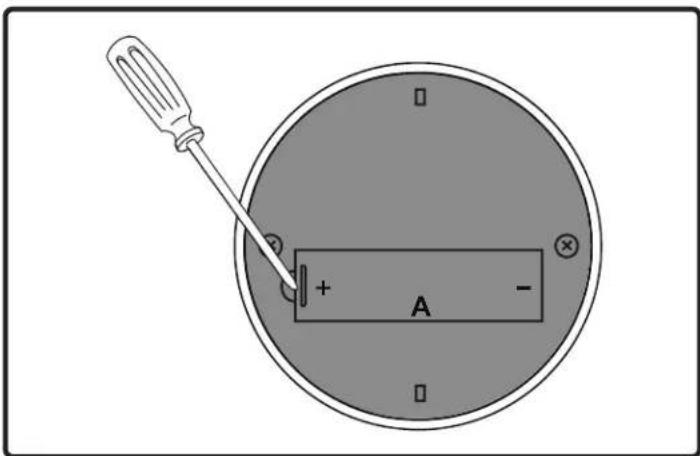
Follow instructions below for replacing battery. Using a small flat head screwdriver, raise the cover of the battery door (A) in order to access the battery compartment. FIG. E.
Remove the battery and replace with battery type A23 12V. Negative end of battery should face the spring inside the remote.
Re-install battery door and recycle old battery.
text_image
Diagram showing a screwdriver inserted into a circular device with labeled terminals and polarity indicatorsFIG. E
Hood & Filter Cleaning
Surface Maintenance
▶ Do not use corrosive detergents, abrasive detergents or oven cleaners.
▶ Do not use any product containing chlorine bleach or any product containing chloride.
▶ Do not use steel wool or abrasive scrubbing pads which will scratch and damage surface.
Cleaning Stainless Steel
Clean periodically with warm soapy water and clean cotton cloth or micro fiber cloth. Always rub in the direction of the stainless steel grain. To remove heavier grease build up use a liquid degreaser detergent.
After cleaning use a non-abrasive stainless steel polish/cleaners, to polish and buff out the stainless luster and grain. Always scrub lightly, with clean cotton cloth or micro fiber cloth and buff in the direction of the stainless steel grain.
Cleaning the Baffle Filters
The filters are intended to trap residue and grease from cooking. Although the filters should never need replacing, they are required to be cleaned every 30 days or more often depending on cooking habits.
Filters may be placed in dishwasher at low heat or soaked in hot soapy water Dry filters and re-install before using hood.
Cleaning the Grease Tray
The grease tray is intended to catch residue and grease that may drip from the baffle filters. The grease tray should be cleaned when baffle filters are cleaned. Clean the grease tray by soaking in hot soapy water and gently scrubbing any residue off with a soft terry cloth. Dry grease tray and re-install before using hood.
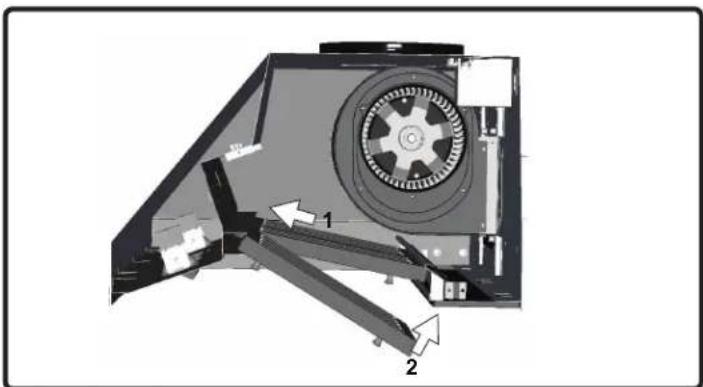
Installing the Baffle Filters, FIG. F:
- Place filter into top groove of the liner as shown and pull towards front of liner using handles.
- Pivot back of filter upwards so it is angled in the liner.
- Push filter into channel on back of liner to lock into place.
natural_image
Technical diagram of a mechanical device with labeled parts (1 and 2), showing internal components without any readable text or symbols.FIG. F
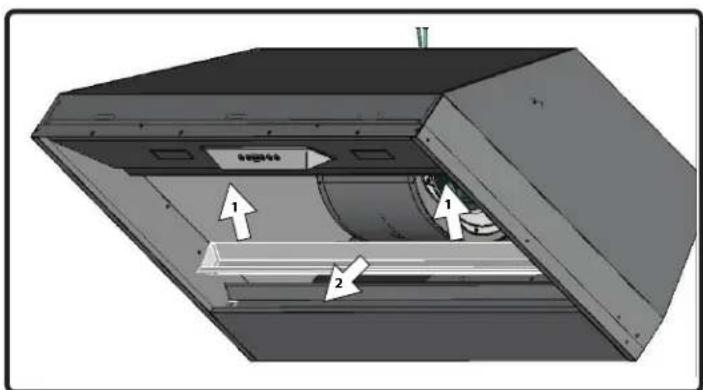
Removing the Grease Tray
Grease tray has a hooked lip that attaches to bottom panel top edge.
Remove grease tray by:
- Pull up on tray to release from bottom panel. FIG. G1
- Pull tray out of liner body. FIG. G2
text_image
Technical diagram of a mechanical device with numbered components and directional arrows indicating flow or movement.FIG. G
LumiLight LED
In the unlikely event that your LumiLight LED fails, please contact Zephyr to order replacement parts.
See the list of parts and accessories page for part numbers and contact information.
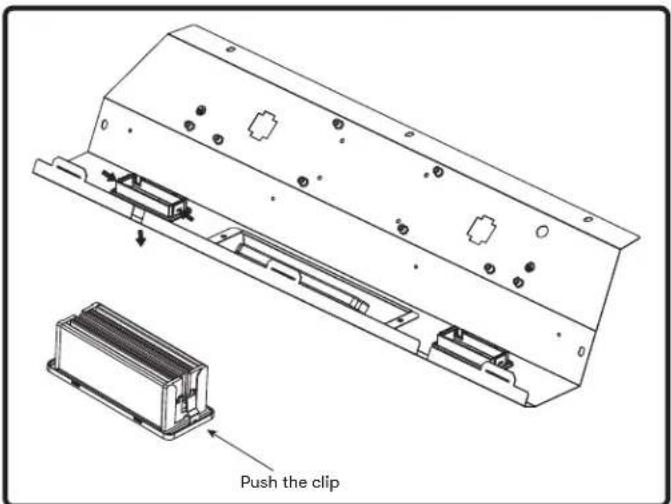
LED Removal (FIG. H):
- Remove baffle filters.
- Remove light panel by five screws.
- Disconnect LED light quick connector.
- Push in the two side clips on the ends of the LED light.
- Push LED light through the light panel opening.
text_image
Push the clipFIG. H
Airflow Control Technology (ACT™)
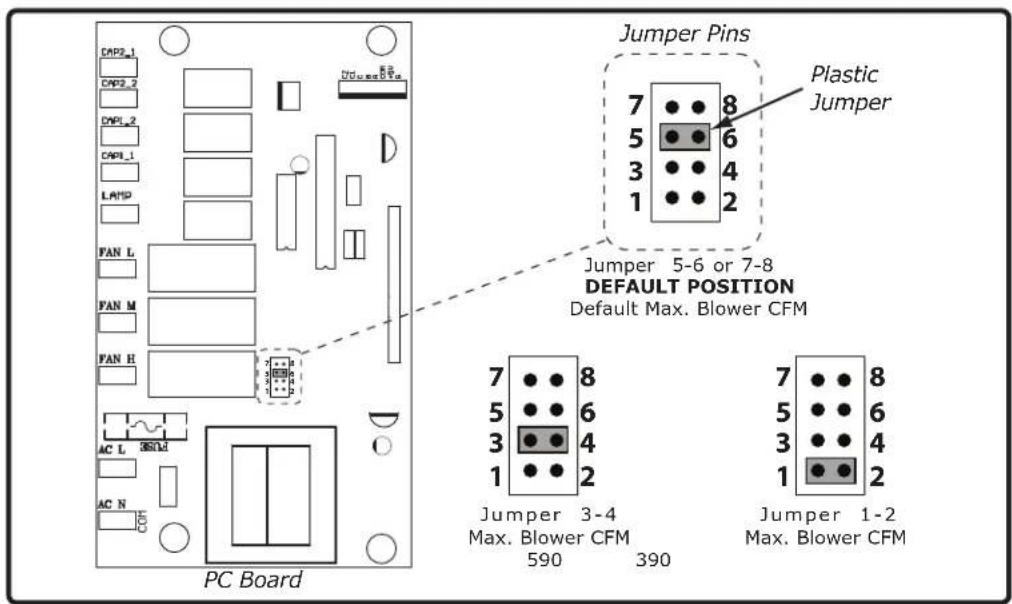
Some local codes limit the maximum amount of CFM a range hood can move. ACT ^™ allows you to control the maximum blower CFM of select Zephyr Ventilation range hoods without the need for expensive make up air kits. ACT ^™ enables the installer to easily set the maximum blower speed to one of two most commonly specified CFM levels, 590 or 390 CFM. The usage of ACT ^™ may not be necessary for your installation. Please check your local codes for CFM restrictions.
By default, the maximum blower CFM is set to 1200.

CAUTION

Hood must be disconnected from the main power prior to performing the conversion instructions listed below. Failure to do so could result in personal injury or damage to the product.

CAUTION

After re-positioning the jumper and powering on the hood, the CFM cannot be changed again.
Enabling ACT™
To enable ACT™:
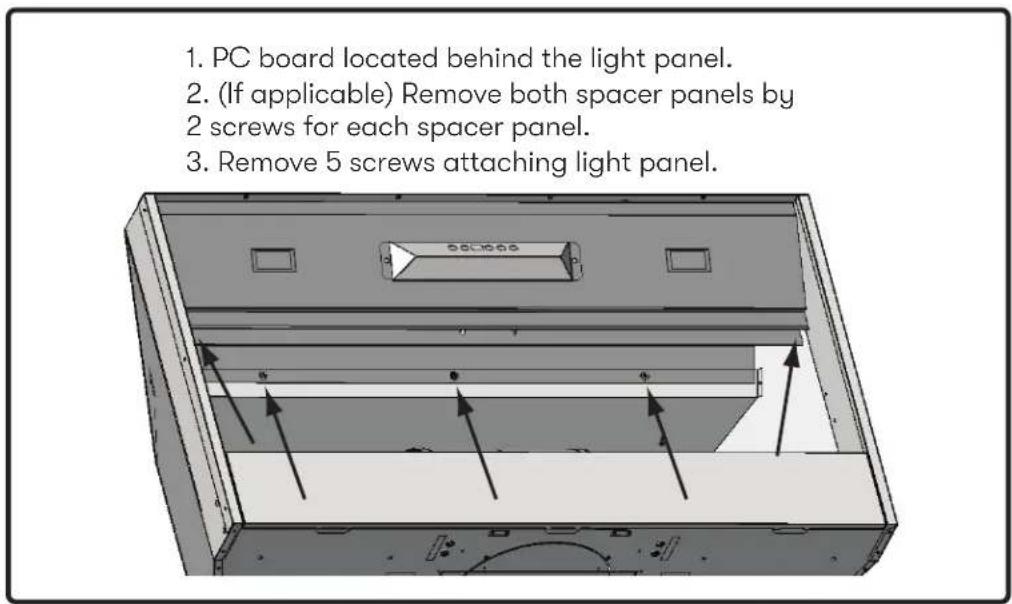
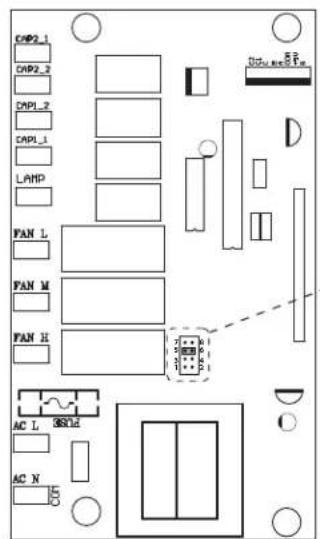
- Before hood installation, gain access to PC board by following the steps shown on FIG. I.
- Change plastic jumper positioning as shown in FIG. J to set the desired maximum blower CFM.
- Re-install PC board and continue with hood installation.
- Remove the appropriate foil CFM sticker included with the hood literature and place inside the hood body below the wiring diagram or in another clearly visible location.
To verify if your installer enabled ACT™:
- With hood off, press and hold the power button for three seconds. If the number 6 displays = default max. CFM, if the number 3 displays = max. 590 CFM, and if the number 2 displays = max. 390 CFM.
- When ACT ^™ is enabled, the number of blower speeds will be reduced. 590 CFM = max. 3 speeds and 390 CFM = max. 2 speeds.
- There should also be a foil label located inside the hood body near the wiring diagram that indicates the blower CFM.
Enabling ACT™
text_image
1. PC board located behind the light panel. 2. (If applicable) Remove both spacer panels by 2 screws for each spacer panel. 3. Remove 5 screws attaching light panel.FIG. I
text_image
Jumper Pins Plastic Jumper Jumper 5-6 or 7-8 DEFAULT POSITION Default Max. Blower CFM 7 8 5 6 3 4 1 2 Jumper 3-4 Max. Blower CFM 590 390 Jumper 1-2 Max. Blower CFM PC BoardFIG. J
text_image
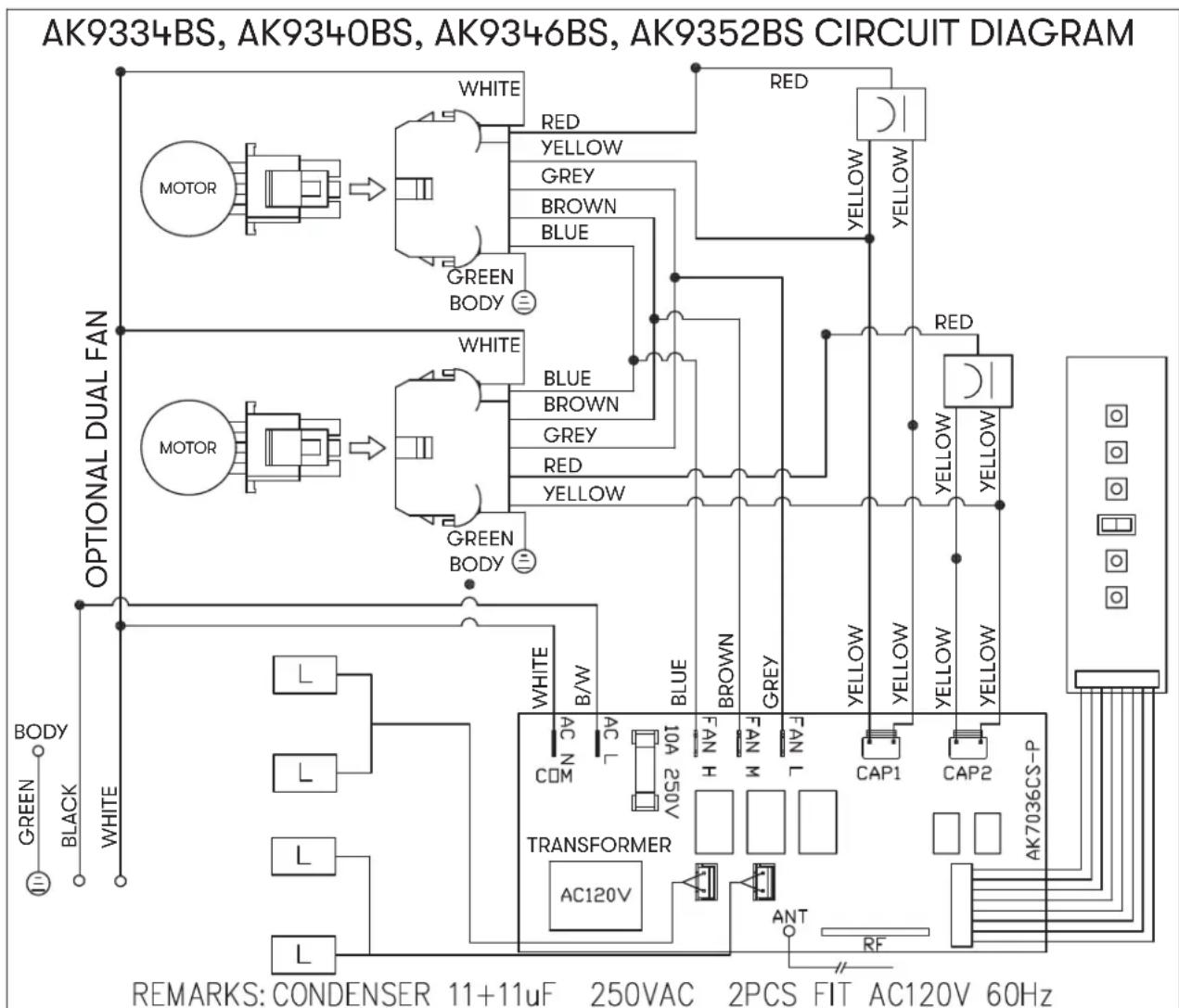
AK9334BS, AK9340BS, AK9346BS, AK9352BS CIRCUIT DIAGRAM WHITE RED YELLOW GREY BROWN BLUE GREEN BODY OPTIONAL DUAL FAN WHITE RED YELLOW MOTOR MOTOR GREEN BODY WHITE BLUE BROWN GREY RED YELLOW MOTOR MOTOR GREEN BODY WHITE AC N COM AC L 10A 250V TRANSFORMER AC120V BLUE FAN H FAN M FAN L CAP1 CAP2 AK703CS-P ANT RF REMARKS: CONDENSER 11+11uF 250VAC 2PCS FIT AC120V 60HzACT 590 CFM - Fan Max. 556W @ 4.6A
ACT 390 CFM - Fan Max. 381W @ 3.4A
Possible Problem Possible Cause Solutions
| After installation, the unit doesn't work. | The power source is not turned ON. Make sure the circuit breaker and the unit's power is ON. | |||
| The power line and the cable locking connector is not connecting properly. | Check the power connection with the unit is connected properly. | |||
| The switch board or control board wirings are disconnected. | Make sure the wirings at the switch board and control board are connected properly. | |||
| The switch board or control board is defective. | Change the switch board or control board. | |||
| The wires on control board are loose. Make sure the wires on the control board are connected properly. | ||||
| Light works, but blower is not turning. | The blower wire is not connected. Make sure the blower wire is plugged into the molex connector. | |||
| The thermally protected system detects if the blower is too hot to operate and shuts the blower down. | The blower will function properly after the thermally protected system cool down. | |||
| Damaged capacitor. Change the capacitor. | ||||
| Blower molex plug pin is not making contact. | Disconnect the blower molex plug, check pins inside plug to see if pin is pushed inside the plug too far. Reset pin if needed. | |||
| The blower is defective, possibly seized. | Change the blower. | |||
| The unit is vibrating. The | blower is not secured in place. Tighten the blower in place. | |||
| Damaged blower wheel. Replace the blower. | ||||
| The hood is not secured in place. Check the installation of the hood. | ||||
| The unit is whistling. A filter is not in the correct position. Adjust the filters until the whistling stops. | ||||
| The duct pipe connections are not sealed or connected properly. | Check the duct pipe connections to be sure all connections are sealed properly. | |||
| The blower is working, but the lights are not. | The LED light connector is disconnected. | Connect the LED light connector. | ||
| Defective LED light. Change the LED light. | ||||
| The switch board or control board is defective. | Change the switch board or control board. | |||
| Possible Problem Possible Cause Solutions | ||||
| The hood is not venting out properly. | Using the wrong size of ducting. Change the ducting to the correct size | |||
| The hood might be hanging to high from the cook top. | Adjust the distance between the cook top and the bottom of the hood within 24" and 36" range. | |||
| The wind from the opened windows or opened doors in the surrounding area are affecting the ventilation of the hood. | Close all the windows and doors to eliminate the outside wind flow. | |||
| Blockage in the duct opening or ductwork. | Remove all the blocking from the duct work or duct opening. | |||
| The unit turns on by itself. | A spot light is shining directly onto the switch controls. | The switch controls are light sensitive. A direct light source onto the switch controls may disrupt switch functions. | ||
| Filter is vibrating Filter is | loose. Adjust or change the filter. | |||
| Spring clip is broken on the filter. Change the spring clip. | ||||
| RF Remote control does not work. | Battery is dead. Replace battery with type A23 12v. | |||
| Poor communication with the liner. Remote control must be within 15 ft of liner. | ||||
| RF Remote lost communication with the liner. | Reset liner and remote by switching power off at the circuit breaker for 5 minutes. Place remote on counter top near the liner and switch the circuit breaker back on. | |||
| Description Part Number | |
| Replacement Parts | |
| LumiLight LED, 6W Z0B0047 | |
| Baffle Filter, large (each) 50210013 | |
| Baffle Filter, small (each) 50210017 | |
| RF Remote Control 14000005 | |
To order parts, visit us online at http://store.zephyronline.com or call us at 1.888.880.8368.
TO OBTAIN SERVICE UNDER WARRANTY OR FOR ANY SERVICE RELATED QUESTIONS, please call: 1-888-880-8368
Zephyr Ventilation, LLC (referred to herein as "we" or "us") warrants to the original consumer purchaser (referred to herein as "you" or "your") of Zephyr products (the "Products") that such Products will be free from defects in materials or workmanship as follows:
Three Year Limited Warranty for Parts: For three years from the date of your original purchase of the Products, we will provide, free of charge, Products or parts (including LED light bulbs, if applicable) to replace those that failed due to manufacturing defects subject to the exclusions and limitations below. We may choose, in our sole discretion, to repair or replace parts before we elect to replace the Products.
One Year Limited Warranty for Labor: For one year from the date of your original purchase of the Products, we will provide, free of charge, the labor cost associated with repairing the Products or parts to replace those that failed due to manufacturing defects subject to the exclusions and limitations below. After the first year from the date of your original purchase, you are responsible for all labor costs associated with this warranty.
Warranty Exclusions: This warranty covers only repair or replacement, at our option, of defective Products or parts and does not cover any other costs related to the Products including but not limited to: (a) normal maintenance and service required for the Products and consumable parts such as fluorescent, incandescent or halogen light bulbs, mesh and charcoal filters and fuses; (b) any Products or parts which have been subject to freight damage, misuse, negligence, accident, faulty installation or installation contrary to recommended installation instructions, improper maintenance or repair (other than by us); (c) commercial or government use of the Products or use otherwise inconsistent with its intended purpose; (d) natural wear of the finish of the Products or wear caused by improper maintenance, use of corrosive and abrasive cleaning products, pads, and oven cleaner products; (e) chips, dents or cracks caused by abuse or misuse of the Products; (f) service trips to your home to teach you how to use the Products; (g) damage to the Products caused by accident, fire, floods, acts of God; or (h) Custom installations or alterations that impact serviceability of the Products. If you are outside our service area, additional charges may apply for shipping costs for warranty repair at our designated service locations and for the travel cost to have a service technician come to your home to repair, remove or reinstall the Products. After the first year from the date of your original purchase, you are also responsible for all labor costs associated with this warranty. All Products must be installed by a qualified professional installer to be eligible for warranty repairs or service.
Limitations of Warranty. OUR OBLIGATION TO REPAIR OR REPLACE, AT OUR OPTION, SHALL BE YOUR SOLE AND EXCLUSIVE REMEDY UNDER THIS WARRANTY. WE SHALL NOT BE LIABLE FOR INCIDENTAL, CONSEQUENTIAL OR SPECIAL DAMAGES ARISING OUT OF OR IN CONNECTION WITH THE USE OR PERFORMANCE OF THE PRODUCTS. THE EXPRESS WARRANTIES IN THE PRECEDING SECTION ARE EXCLUSIVE AND IN LIEU OF ALL OTHER EXPRESS WARRANTIES. WE HEREBY DISCLAIM AND EXCLUDE ALL OTHER EXPRESS WARRANTIES FOR THE PRODUCTS, AND DISCLAIM AND EXCLUDE ALL WARRANTIES IMPLIED BY LAW, INCLUDING THOSE OF MERCHANTABILITY AND FITNESS FOR A PARTICULAR PURPOSE. Some states or provinces do not allow limitations on the duration of an implied warranty or the exclusion or limitation of incidental or consequential damages, so the above limitations or exclusions may not apply to you. To the extent that applicable law prohibits the exclusion of implied warranties, the duration of any applicable implied warranty is limited to the same three-year and one-year periods described above if permitted by applicable law. Any oral or written description of the Products is for the sole purpose of identifying the Products and shall not be construed as an express warranty. Prior to using, implementing or permitting use of the Products, you shall determine the suitability of the Products for the intended use, and you shall assume all risk and liability whatsoever in connection with such determination. We reserve the right to use functionally equivalent refurbished or reconditioned parts or Products as warranty replacements or as part of warranty service. This warranty is not transferable from the original purchaser and only applies to the consumer residence where the Product was originally installed located in the United States and Canada. This warranty is not extended to resellers.
To Obtain Service Under Limited Warranty: To qualify for warranty service, you must: (a) notify us at the address or telephone number stated below within 60 days of the discovery of the defect; (b) give the model number and serial number; and (c) describe the nature of any defect in the Product or part. At the time of the request for warranty service, you must present evidence of your proof of purchase and proof of the original purchase date. If we determine that the warranty exclusions listed above apply or if you fail to provide the necessary documentation to obtain service, you will be responsible for all shipping, travel, labor and other costs related to the services. This warranty is not extended or restarted upon warranty repair or replacements.
Please check our website for any additional Product information, www.zephyronline.com.
Zephyr Ventilation Service Department, 2277 Harbor Bay Parkway, Alameda, CA 94502 1-888-880-8368
MAY20.0401
Congratulations on the purchase of your Zephyr product! Please take a moment to register your new Zephyr product at www.zephyronline.com/registration
IT'S IMPORTANT
Prompt registration helps in more ways than one.
- Ensures warranty coverage should you need service.
- Ownership verification for insurance purposes.
- Notification of product changes or recalls.

text_image
STOPZephyr Ventilation | 2277 Harbor Bay Pkwy. | Alameda, CA 94502 | 1.888.880.8368
Monsoon II
AK9334BS, AK9340BS, AK9346BS, AK9352BS
EN Use, Care, and Installation Guide
natural_image
Technical line drawing of a mechanical component with a circular top and rectangular base (no text or symbols)natural_image
Warning symbol: black square with white exclamation mark (no text or numbers)* National Fire Protection Association Batterymarch Park, Quincy, Massachusetts 02269
** CSA International 8501 East Pleasant Valley Road, Cleveland, Ohio 44131-5575
natural_image
Grid of ten identical screw illustrations with triangular heads, no text or symbols present(4) M4 x 6 mm
natural_image
Simple geometric diagram showing a circle with a smaller square containing two small squares and dashed lines (no text or symbols)Pièces non fournies
natural_image
Technical line drawing of a 3D mechanical component with mounting holes and dimension annotations (no readable text or symbols)FIG. C
natural_image
Technical diagram of a mechanical device with labeled parts (1 and 2), showing internal components and directional arrows (no text or symbols beyond labels)natural_image
Interior view of a mechanical or industrial enclosure with cylindrical components and mounting brackets (no visible text or symbols)natural_image
Technical diagram of a mechanical assembly with mounting holes and a central circular component (no text or symbols)natural_image
Illustration of a brown industrial chimney with a gray base, showing structural details and arrows indicating measurement or assembly (no text or symbols)text_image
Diagram showing a device with four circular components and a magnified view of a circular component labeled '20000'.FIG. D
text_image
Diagram showing a screwdriver inserted into a circular device with labeled terminals and polarity indicatorsFIG. E
natural_image
3D mechanical assembly diagram showing internal components with numbered callouts (1 and 2), no readable text or symbols.FIG. F
natural_image
3D technical diagram of a mechanical housing or enclosure with internal components and directional arrows indicating movement (no text or symbols)FIG. I
text_image
CNP2_1 CNP2_2 DMP1_2 DMP1_1 LAMP FAN_L FAN_M FAN_H AC_L SS/LE AC_N DCPU_5 P_TZephyr Ventilation Service Department, 2277 Harbor Bay Parkway, Alameda, CA 94502 1-888-880-8368
MAY20.0501