UVC9420SLSS - Basket GE - Free user manual and instructions
Find the device manual for free UVC9420SLSS GE in PDF.



| Product Type | Built-in hood (custom insert) |
| Brand | GE |
| Model | UVC9420SLSS |
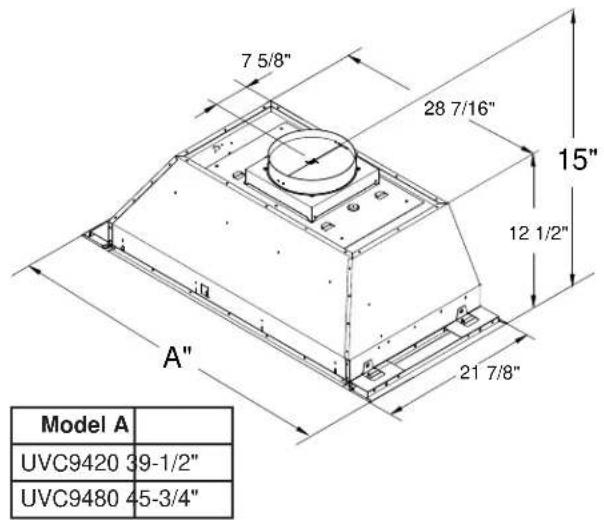
| Dimensions (W x D x H) | 100.3 x 55.6 x 38.1 cm (39-1/2 x 21-7/8 x 15 in) |
| Approximate Weight | 45 kg (100 lb) |
| Power Supply | 120 V, 60 Hz, 15 A (dedicated circuit) |
| Venting Type | Round duct 8 in (20.3 cm) to the outside |
| Fan Speeds | Low, Medium, High, Boost (10 min) – QuietBoost™ technology |
| Lighting | LED with dimmer (On/Night/Off), GU10 bulbs |
| Connectivity | Wi-Fi, Chef Connect (Bluetooth), optional remote (UXRC1) |
| Smart Features | Heat sensor (auto-activation), delayed shut-off, cooktop synchronization |
| Filters | Metal baffles with removable drip trays – dishwasher safe |
| Surface Care | Stainless steel: mild non-abrasive cleaner, wipe in the direction of the grain |
| Bulb Replacement | GU10 dimmable type – turn to unlock |
| Safety | Grounding required; automatic shut-off in case of overheating; use only metal ductwork |
| Installation | Built-in a custom enclosure; height 76-91 cm (30-36 in) above the cooking surface |
| Sound Level | Quiet thanks to QuietBoost™ technology |
| Available Spare Parts | Filters, bulbs, remote, recirculation kits, duct covers |
| After-Sales Service | Limited one-year warranty; GE Appliances technical service (800.561.3344) |
Frequently Asked Questions - UVC9420SLSS GE
User questions about UVC9420SLSS GE
0 question about this device. Answer the ones you know or ask your own.
Ask a new question about this device
Download the instructions for your Basket in PDF format for free! Find your manual UVC9420SLSS - GE and take your electronic device back in hand. On this page are published all the documents necessary for the use of your device. UVC9420SLSS by GE.
USER MANUAL UVC9420SLSS GE
Custom INSERT HOODS With QuietBoost™ Blower
SAFETY INFORMATION .... 3
USING THE HOOD
Controls 5
Chef Connect 6
Wi-Fi Connect 6
CARE AND CLEANING
Filters....7
Surfaces 8
Lights 8
INSTALLATION INSTRUCTIONS..9
TROUBLESHOOTING TIPS ..... 23
LIMITED WARRANTY....26
ACCESSORIES 27
CONSUMER SUPPORT ...... 28
Write the model and serial numbers here:
Model # ____
Serial # ____
You can find them on a label on the inside of the hood.
OWNER'S MANUAL & INSTALLATION INSTRUCTIONS
UVC9420
UVC9480
FRANÇAIS
THANK YOU FOR MAKING GE APPLIANCES A PART OF YOUR HOME.
Whether you grew up with GE Appliances, or this is your first, we're happy to have you in the family.
We take pride in the craftsmanship, innovation and design that goes into every GE Appliances product, and we think you will too. Among other things, registration of your appliance ensures that we can deliver important product information and warranty details when you need them.
Register your GE appliance now online. Helpful websites and phone numbers are available in the Consumer Support section of this Owner's Manual. You may also mail in the pre-printed registration card included in the packing material.

GE APPLIANCES
IMPORTANT SAFETY INFORMATION READ ALL INSTRUCTIONS BEFORE USING
WARNING
TO REDUCE THE RISK OF FIRE,
ELECTRIC SHOCK OR INJURY TO PERSONS, OBSERVE THE FOLLOWING:
A. Use this unit only in the manner intended by the manufacturer. If you have questions, contact the manufacturer.
B. Before servicing or cleaning unit, switch power off at service panel and lock the service disconnecting means to prevent power from being switched on accidentally. When the service disconnecting means cannot be locked, securely fasten a prominent warning device, such as a tag, to the service panel.
C. Do not use this unit with any solid-state speed control device.
D. This unit must be grounded.
CAUTION
FOR GENERAL VENTILATING USE ONLY. DO NOT USE TO EXHAUST HAZARDOUS OR EXPLOSIVE MATERIALS AND VAPORS.
CAUTION
TO REDUCE RISK OF FIRE AND TO PROPERLY EXHAUST AIR, BE SURE TO DUCT AIR OUTSIDE. DO NOT VENT EXHAUST AIR INTO SPACES WITHIN WALLS OR CEILINGS OR INTO ATTICS, CRAWL SPACES OR GARAGES.
WARNING
TO REDUCE THE RISK OF INJURY
TO PERSONS IN THE EVENT OF A RANGE TOP GREASE FIRE, OBSERVE THE FOLLOWING\*:
A. SMOTHER FLAMES with a close-fitting lid, cookie sheet or metal tray, then turn off the burner. BE CAREFUL TO PREVENT BURNS. If the flames do not go out immediately, EVACUATE AND CALL THE FIRE DEPARTMENT.
B. NEVER PICK UP A FLAMING PAN—You may be burned.
C. DO NOT USE WATER, including wet dishcloths or towels—a violent steam explosion will result.
D. Use an extinguisher ONLY if:
- You know you have a Class ABC extinguisher, and you already know how to operate it.
- The fire is small and contained in the area where it started.
- The fire department is being called.
- You can fight the fire with your back to an exit.
* Based on "Kitchen Fire Safety" published by NFPA.
READ AND SAVE THESE INSTRUCTIONS
IMPORTANT SAFETY INFORMATION READ ALL INSTRUCTIONS BEFORE USING
WARNING
TO REDUCE THE RISK OF A REASE FIRE:
A. Never leave surface units unattended at high settings. Boilovers cause smoking and greasy spillovers that may ignite. Heat oils slowly on medium settings.
B. Always turn hood ON when cooking at high heat or when flambéing food (i.e. Crepes Suzette, Cherries Jubilee, Peppercorn Beef Flambé).
C. Clean ventilating fans frequently. Grease should not be allowed to accumulate on fan or filter.
D. Use proper pan size. Always use cookware appropriate for the size of the surface element.
WARNING
TO REDUCE THE RISK OF FIRE, CK OR INJURY TO PERSONS, FOLLOWING:
A. Installation work and electrical wiring must be done by qualified person(s) in accordance with all applicable codes and standards, including fire-rated construction.
B. Sufficient air is needed for proper combustion and exhausting of gases through the flue (chimney) of fuel burning equipment to prevent back drafting. Follow the heating equipment manufacturer's guidelines and safety standards such as those published by the National Fire Protection Association (NFPA), the American Society for Heating, Refrigeration and Air Conditioning Engineers (ASHRAE) and the local code authorities
C. When cutting or drilling into wall or ceiling, do not damage electrical wiring and other hidden utilities.
D. Ducted fans must always be vented to the outdoors.
E. When applicable, install any makeup (replacement) air system in accordance with local building code requirements. Visit GEAppliances.com for available makeup air solutions.
F. Turn off breaker to adjacent rooms while working.
WARNING
TO REDUCE THE RISK OF FIRE, TAL DUCTWORK.
■ Do not attempt to repair or replace any part of your hood unless it is specifically recommended in this manual. All other servicing should be referred to a qualified technician.
WARNING
Disconnect all electrical power at breaker or fuse box before installing.
WARNING
USE ONLY WITH RANGE HOOD
CORD CONNECTION KITS THAT HAVE BEEN INVESTIGATED AND FOUND ACCEPTABLE FOR USE WITH THIS MODEL RANGE HOOD.
PROPER DISPOSAL OF YOUR APPLIANCE
Dispose of or recycle your appliance in accordance with Federal and Local Regulations. Contact your local authorities for the environmentally safe disposal or recycling of your appliance.
How to Remove Packaging Tape
To assure no damage is done to the finish of the product, the safest way to remove the adhesive from packaging tape on new appliances is an application of a household liquid dishwashing detergent. Apply with a soft cloth and allow to soak.
NOTE: The adhesive must be removed from all parts.
NOTE: For further cleaning instructions/suggestions, please refer to the Care and Cleaning section.
Consider recycling options for your appliance packaging material.
READ AND SAVE THESE INSTRUCTIONS
Controls
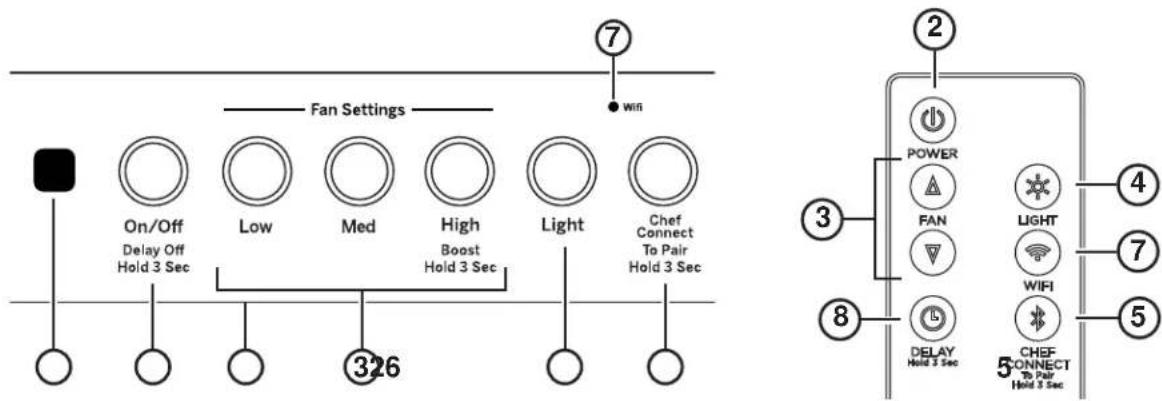
Remote Control
- Rangehood Control Panel: The control panel is located on the front of the canopy. The position and function of each control button are noted below.
- Fan On/Off Button: On/Off switch for the fan. The fan can be operated by pressing any of the fan setting buttons. Hold for 3 seconds to activate Delay Off feature, which automatically turns the fan off after 15 minutes.
- Fan Setting Button: Speed control for the fan. Fan speed is powered by QuietBoost™ Technology. This unique technology is designed to minimize ventilation noise and enhance motor efficiency for a peacefully-quiet, odor-free kitchen. Press LOW for LOW speed, MED for MEDIUM speed, and HIGH for HIGH speed. Press and hold the HIGH button for 3 seconds to activate the BOOST speed that will run for 10 minutes. On Remote, press Up to increase fan speed, press Down to decrease fan speed, including Boost.
-
Light Button: On/Dim/Off switch for the LED lights. Press the Light button to turn the lights on, again to set the lights to dim setting, and again to turn the lights off.
-
Chef Connect: This is a Bluetooth® pairing feature for use with other compatible Chef Connect enabled products on a cooktop or range. When the device is paired, the light and fan will turn ON at the Default Sync Settings upon receiving a command from the range or cooktop. It will remain ON at that setting until the user changes it. To pair devices, hold down the Chef Connect button for 3 seconds. To turn it back off, hold the button down for another 3 seconds, see the Chef Connect section for details.
- IR Sensor: Remote control receiver when used with Remote Control Kit (UXRC1).
- Wi-Fi: Hold down the Light and Chef Connect buttons for 3 seconds to activate the Wi-Fi. The Wi-Fi light turns on when connected, see the Wi-Fi Connect section for details. On Remote, press Wi-Fi to toggle Wi-Fi function.
- Delay Off (Remote only): Press and hold Delay Off to toggle Delay Off function.
Heat Sensor
Your hood is equipped with a HEAT SENSOR thermostat. This thermostat is a device that will turn on or speed up the blower if it senses excessive heat above the cooking surface.
■ If blower is Off - it turns blower On to Med speed.
■ If blower is On at a lower speed setting - it turns blower up to Med speed.
When the temperature level drops to normal, the blower will return to its original setting.
Chef Connect
Chef Connect Operation Bluetooth® Connection
To pair with another device:
To start the pairing process on the hood, press and hold the Chef Connect button for 3 seconds. The backlight for the Low-Med-High-Light-Chef Connect buttons will flash in that sequence until the hood is paired with the range or other device. If the pairing is successful, all five backlights (Low, Med, High, Light, Chef Connect) will flash simultaneously three times and then turn off and the backlight for the Chef Connect button will turn on.
It will time out after 2 minutes if the pairing is not completed, after which the pairing sequence will need to be restarted.
To cancel pairing:
To cancel the pairing, hold the Chef Connect button down for 3 seconds and then turn off the hood.
Default Sync Settings:
The factory default setting for the light will be the brightest.
The factory default setting for the fan sync will be OFF.
The user can change the Default Sync Settings by pressing and holding the Low button for 3 seconds. This will enter the Default Settings Mode. Once in this mode, the backlights for all buttons (Low, Med, High, Light, Chef Connect) will blink On/Off indefinitely and the fan and light will switch to the current Default Sync Setting, so the user knows what the current default value is. At this time, set the light and fan to the desired default levels. Once the user is satisfied with the selection, press and hold the On/Off button for 3 seconds. This will exit this mode. At that time the backlights will stop blinking and the state of the fan and light will change back to their prior state before entering the Default Settings Mode.
Wi-Fi Connect
Connecting your Wi-Fi Connect Enabled hood (on some models)
Your GE Appliances hood is designed to provide you with two-way communication between your appliance and smart device. By using the GE Appliances Wi-Fi Connect features, you will be able to control essential hood operations such as fan speed, light functions, timer/clock function, delay off and filter reset using your smartphone or tablet.*
What you will need
Your GE Appliances hood uses your existing home Wi-Fi network to communicate between the appliance and your smart device. In order to setup your GE Appliances hood, you will need to gather some information:
- Each GE Appliances hood has a connected appliance information label that includes an Appliance Network Name and Password. These are the two important details that you will need to connect to the appliance. The label is located on the side of the unit behind the filters.
Connected Appliance Information
| FCC ID: ZKJ-WCATA005 | Network:********** |
| IC: 10229A-WCATA001 | Password:********** |
| MAC ID:********** |
Sample Label
- Have your smart phone or tablet ready with the ability to access the internet and download apps.
- You will need to know the password of your home Wi-Fi router. Have this password ready while you are setting up your GE Appliances hood.
Connect your GE Appliances hood
- On your smart phone or tablet visit GEAppliances.com/connect to learn more about connected appliance features and to download the appropriate app.
- Follow the app onscreen instructions to connect your GE Appliances hood.
- Once the process is complete, the connection light located on your GE Appliances hood display will stay on solid and the app will confirm you are connected.
- If the connection light does not turn on or is blinking, follow the instructions on the app to reconnect. If issues continue please call 800.220.6899 and ask for assistance regarding hood wireless connectivity.
To connect additional smart devices, repeat steps 1 and 2. Note that any changes or modifications to the remote enable device installed on this hood that are not expressly approved by the manufacturer could void the user's authority to operate the equipment.
Filters
Be sure the circuit breaker is off and all surfaces are cool before cleaning or servicing any part of the vent hood. The metal baffles channel grease released by foods on the cooktop into the drip trays. The baffles also help prevent flaming foods on the cooktop from damaging the inside of the hood.
The baffles must ALWAYS be in place when the hood is in use. The grease baffles and drip trays are dishwasher-safe and should be cleaned every month, depending on usage of the hood.
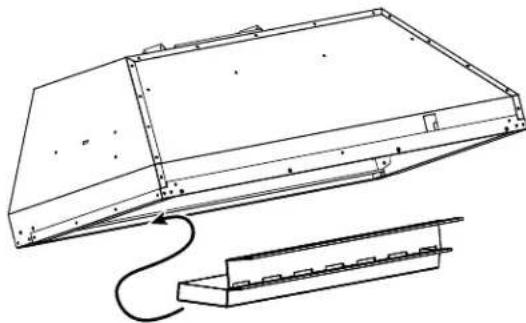
Grease Drip Tray
To install:
Place and seat the drip trays into the designated hood track. Slide them left or right until all trays are side-by-side in place in the track.
To remove:
Carefully, use the grease tray lip to lift the tray upwards and out. The tray will be free of the designated hood track.
To clean:
Swish the drip tray in hot soapy water and rinse in clean water or wash it in the dishwasher. Do not use abrasive cleaners.
NOTE: Some discoloration of the filter may occur in the dishwasher.
natural_image
Technical line drawing of a mechanical component with a curved connection and a separate bracket (no text or symbols)Drip Tray Replacement
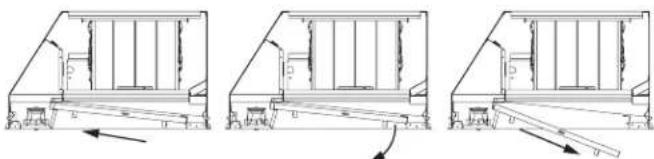
Baffle Metal Grease Filter
To install:
Insert the top of the baffle into the track behind the control panel. The arrows on the side of the baffle should be pointing towards the front of the unit. Slide the baffle up and push the bottom end back until it firmly seats into place.
To remove:
Use front knob to pull filter forward, towards the control panel. The bottom of the filter becomes free of the grease drip tray. Use back knob to pull the baffle away from the track behind the control panel.
It is important for baffles to be placed correctly with arrows on the side pointing towards the front of the unit to channel grease to the drip trays and avoid grease accumulation in the baffles.
To clean:
Swish the filter in hot soapy water and rinse in clean water or wash it in the dishwasher. Do not use abrasive cleansers.
NOTE: Some discoloration of the filter may occur in the dishwasher.
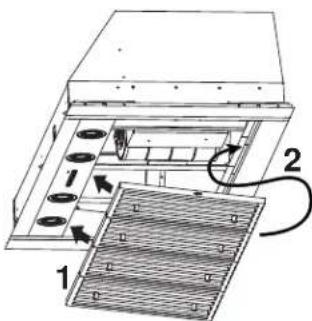
Baffle Replacement
natural_image
Three technical line drawings of a structural frame with supports and a roller, showing progressive assembly (no text or symbols)Baffle Removal
Surfaces
Stainless Steel Surfaces
Do not use a steel wool pad; it will scratch the surface.
To clean the stainless steel surface, use warm sudsy water or a stainless steel cleaner or polish. Always wipe the surface in the direction of the brush line. Follow the cleaner instructions for cleaning the stainless steel surface. Cleaners with oxalic acid such as Bar Keepers
Friend Soft Cleanser™ will
remove surface rust, tarnish, and small blemishes. To receive a coupon for a trial sample of Bar Keepers Friend Soft Cleanser™ follow the link below or scan the QR Code.
barkeepersfriend.com/ge

Use only a liquid cleanser free of grit and rub in the direction of the brush lines with a damp soft sponge.
To inquire about purchasing stainless steel appliance cleaner or polish, or to find the location of a dealer nearest you, please call our toll-free number:
National Parts Center 800.626.2002
GEApplianceParts.com
In Canada, call 800.661.1616 or visit geappliances.ca
Lights
CAUTION
Allow lights to cool before touching.
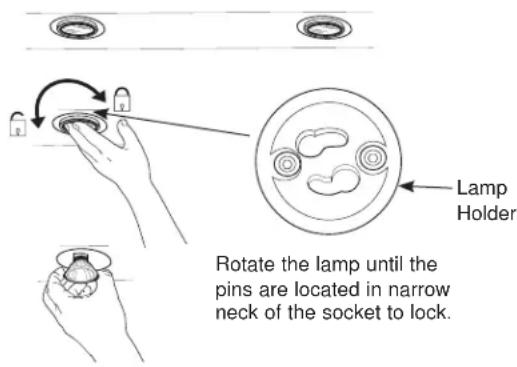
- Before attempting to replace the lights, make sure that the light switch is turned off.
- Rotate light counterclockwise to unlock and pull out. Wearing latex gloves may offer a better grip.
- Replace with new light of same type, making sure pins are inserted properly into the sockets of the lamp holder and turn clockwise to lock.
All lamps need to be GU10 compatible.
Installation Instructions
Custom Insert Hood
UVC9420, UVC9480

If you have questions, call GE Appliances at 800.GE.CARES (800.432.2737) or visit our website at: GEAppliances.com. In Canada, visit GEAppliances.ca or call 800.561.3344.
BEFORE YOU BEGIN
Read these instructions completely and carefully.
- IMPORTANT — Save these instructions for local inspector's use.
- IMPORTANT — Observe all governing codes and ordinances.
■ Note to Installer – Be sure to leave these instructions with the Consumer.
■ Note to Consumer – Keep these instructions for future reference.
■ Skill level – Installation of this vent hood requires basic mechanical and electrical skills.
■ Completion time – Approximately 1 to 3 hours
■ Proper installation is the responsibility of the installer.
■ Product failure due to improper installation is not covered under the Warranty.
CAUTION
Due to the weight and size of these
vent hoods and to reduce the risk of personal injury or damage to the product, TWO PEOPLE ARE REQUIRED FOR PROPER INSTALLATION.
FOR YOUR SAFETY
WARNING
Before beginning the installation, switch power off at service panel and lock the service disconnecting means to prevent power from being switched on accidentally. When the service disconnecting means cannot be locked, securely fasten a prominent warning device, such as a tag, to the service panel.
WARNING
TO REDUCE THE RISK OF FIRE, ELECTRIC SHOCK OR INJURY TO PERSONS, OBSERVE THE FOLLOWING:
A. Installation work and electrical wiring must be done by qualified person(s) in accordance with all applicable codes and standards, including fire-rated construction.
B. Sufficient air is needed for proper combustion and exhausting of gases through the flue (chimney) of fuel burning equipment to prevent back drafting. Follow the heating equipment manufacturer's guidelines and safety standards such as those published by the National Fire Protection Association (NFPA), the American Society for Heating, Refrigeration and Air Conditioning Engineers (ASHRAE) and the local code authorities.
C. When cutting or drilling into wall or ceiling, do not damage electrical wiring and other hidden utilities.
D. Ducted fans must always be vented to the outdoors.
E. Turn off breaker to adjacent rooms while working.
WARNING
TO REDUCE THE RISK OF FIRE, USE ONLY METAL DUCT WORK.
WARNING
Disconnect all electrical power at the main circuit breaker or fuse box before installing.
Installation Preparation
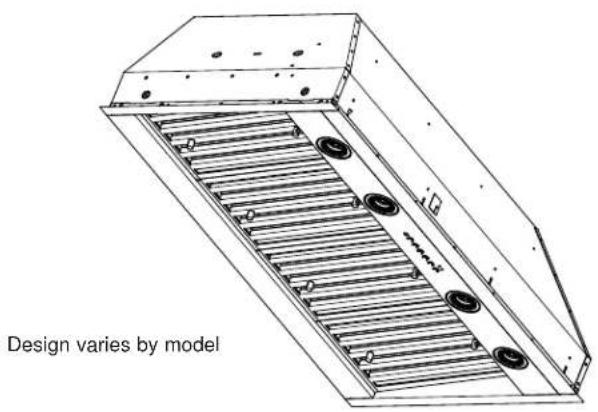
PRODUCT DIMENSIONS
ADVANCE PLANNING
Duct Install Planning
This hood is designed to be vented vertically through the ceiling. Use a 10" round duct. Use locally supplied elbows to vent horizontally through the rear wall.
■ Use metal ductwork only.
■ Determine the exact location of the vent hood.
■ Plan the route for venting exhaust to the outdoors. To maximize the ventilation performance of the vent system:
- Minimize the duct run length and number of transitions and elbows.
- Maintain a constant duct size.
- Seal all joints with duct tape to prevent any leaks.
NOTE: Flexible vent is not recommended. Flexible vent creates back pressure and air turbulence that greatly reduces performance.
■ Maximum equivalent duct length for 100 CFM: 150 foot for vent hoods.
■ Install a wall cap or roof cap with damper at the exterior opening. Purchase the wall or roof cap and any transition and length of duct needed in advance.
Vent system can terminate either through the roof or the wall. To vent through a wall, a 90° elbow is needed and installed immediately above the hood.
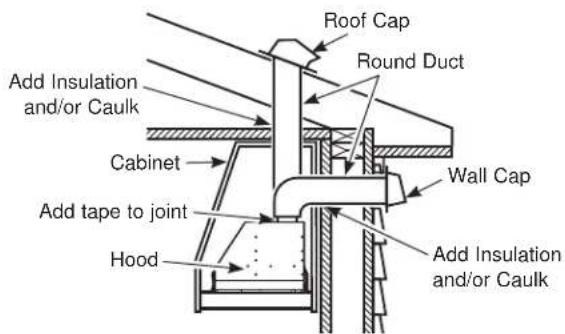
Wall and Ceiling Framing for Adequate Support
This vent hood is heavy and the cabinet structure needs to support the weight of the loaded insert sleeve. Adequate structural support must be provided in all types of installations.
■ Installation will be easier if the vent hood is installed before the cooktop.
INSTALLATION CLEARANCES
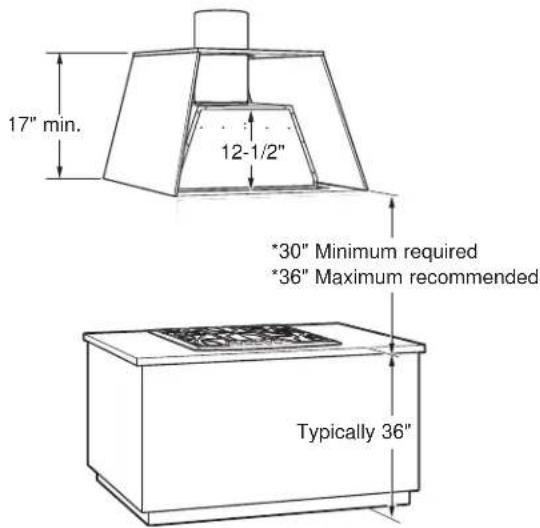
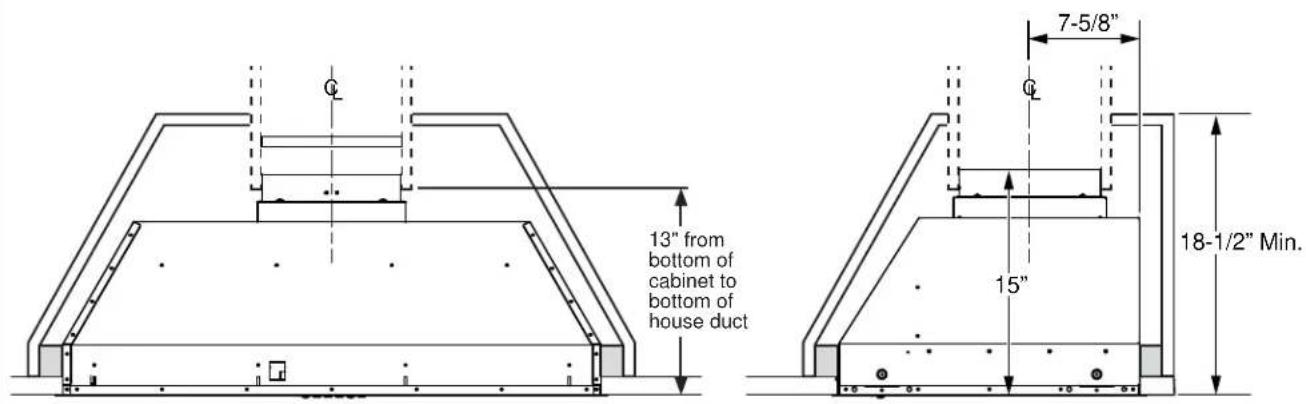
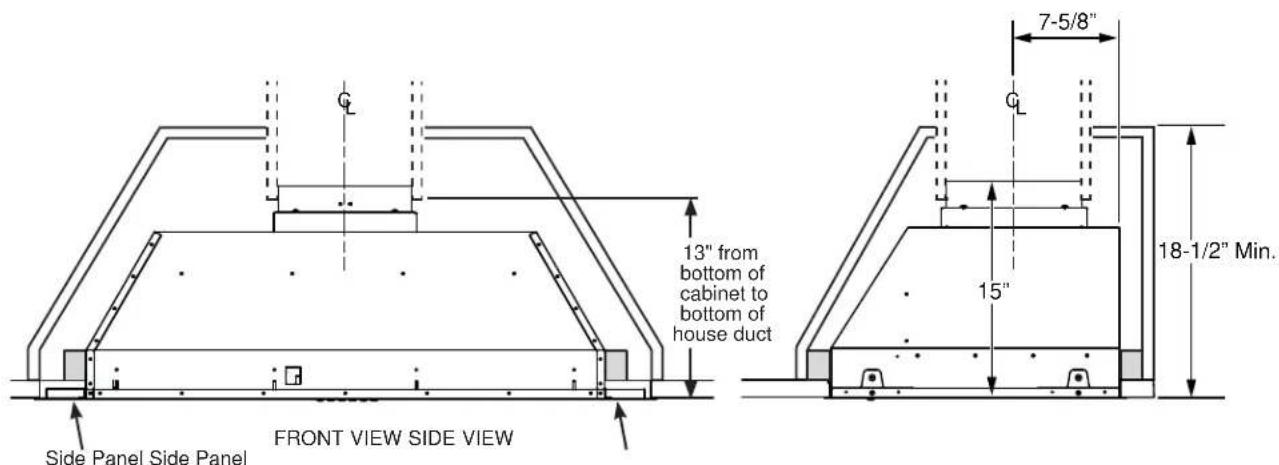
This vent hood must be installed between the 30" required minimum and 36" recommended maximum above the cooking surface.
■ Always refer to the cooktop or range installation instructions for product-specific clearances.
NOTE: Installation height should be measured from the cooking surface to the bottom edge of the cabinet surface.
NOTE: UL requires any combustible surface to be a minimum of 30" above the cooking surface. Lower combustible surfaces may be covered to meet requirements.
■ The custom cabinet internal height must be 17" minimum for vertical venting.
■ This hood must be vented to the outdoors.
■ This hood may be mounted in a wall cabinet or installed over an island.
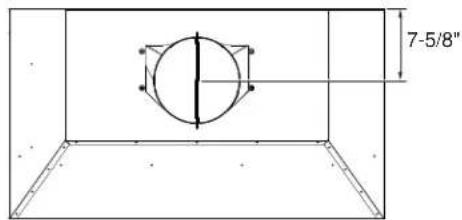
NOTE: The exhaust duct on the hood is closer to the rear of the hood. It is important to plan for the alignment to the connection point of the hood.
CABINET STRUCTURE
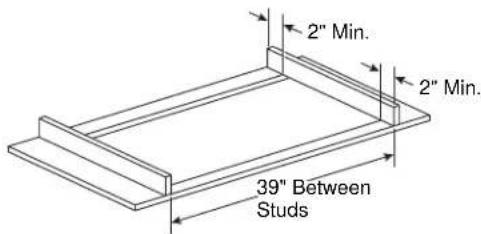
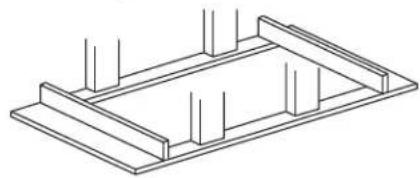
- It is required two 2 x 4 horizontal studs separated by 39" as part of the cabinet. They must be firmly secured to the cabinet structure.
■ The cabinet bottom must be made from a wooden surface 34 " minimum thickness.
natural_image
Isometric line drawing of a structural frame with vertical supports (no text or symbols)WARNING
Make sure the studs and cabinet
bottom surface are firmly secured and able to withstand 100 pounds.
CUSTOM CABINET FRAME
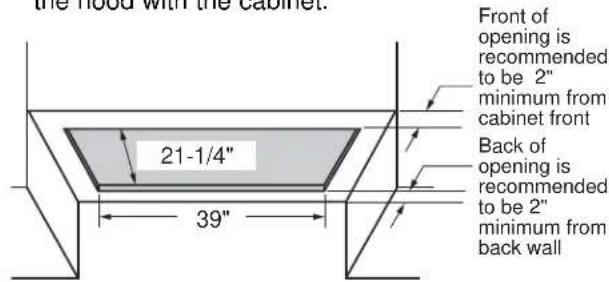
■ The custom canopy or cabinet must have a rectangular opening to accommodate the custom hood insert by itself. This opening has the same size for both a wall installation or an island installation. Ensure parallelism and levelness of the cabinet so that it doesn't affect flushness of the hood with the cabinet.
CABINET PREPARATION
FRONT VIEW SIDE VIEW
CABINET STRUCTURE
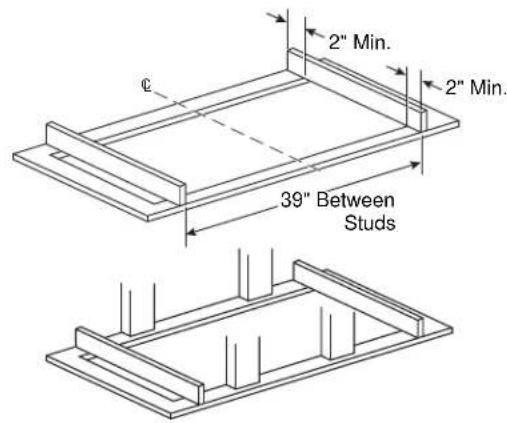
- It is required two 2 x 4 horizontal studs separated by 39" as part of the cabinet. They must be firmly secured to the cabinet structure.
■ The cabinet bottom must be made from a wooden surface 34 " minimum thickness.
WARNING
Make sure the studs and cabinet
bottom surface are firmly secured and able to withstand 100 pounds.
CUSTOM CABINET FRAME
■ The custom canopy or cabinet must have a rectangular opening to accommodate the custom hood insert by itself. This opening has the same size for both a wall installation or an island installation. Ensure parallelism and levelness of the cabinet so that it doesn't affect flushness of the hood with the cabinet.
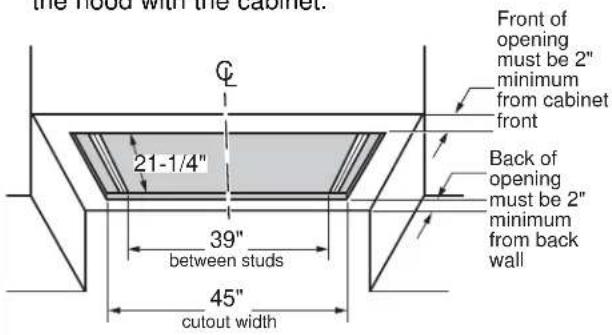
CABINET PREPARATION
Installation Preparation
TOOLS AND MATERIALS REQUIRED (NOT SUPPLIED)
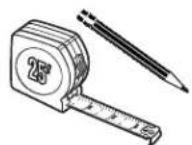
Pencil and tape measure

Aluminized duct tape
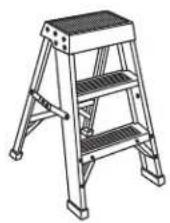
Step ladder
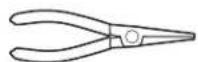
Needle-nose pliers
natural_image
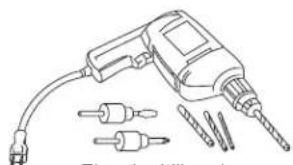
Line drawing of a drill bit with multiple screwdrivers and a power plug (no text or symbols)Electric drill and appropriate bits

Level
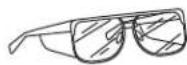
Safety glasses
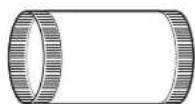
10" ducting and caps as needed
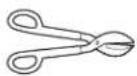
Tin snips
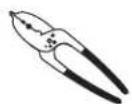
Wire cutter/ stripper
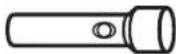
Flashlight
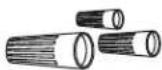
UL listed wire nuts

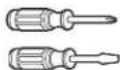
Phillips and flat-blade screwdrivers
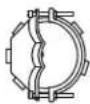
Strain relief for junction box
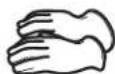
Gloves
PARTS PROVIDED
Locate the parts packed with the hood.
NOTE: The hardware bag may contain extra pieces to accommodate a variety of installation methods for various models.
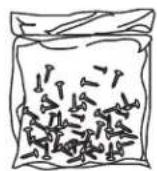
Hardware Bag
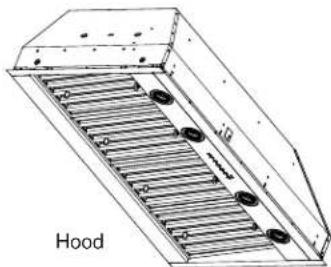
natural_image
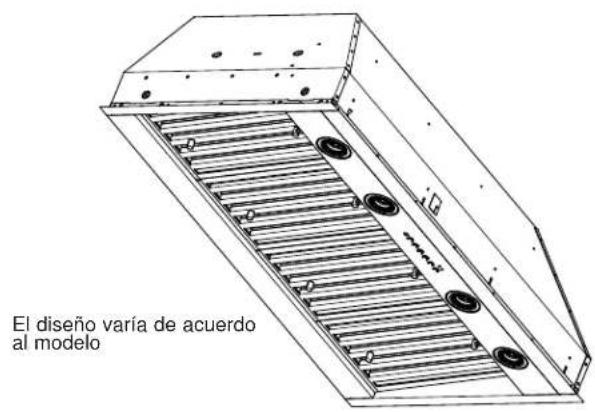
Technical line drawing of a hood structure with ribbed material and mounting holes (no text or symbols)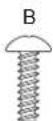
Philips Head Machine Screw
1/8" X 3/8"
(QTY: 8)
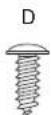
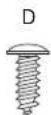
Phillips Head
Wood Screws
1/8" X 1/2"
(QTY: 2)
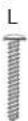
Phillips Head
Wood Screws
3/16" x 1" (QTY: 8)
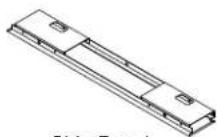
Side Panel
UVC9480 only (QTY: 2)
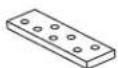
Remote Control (QTY: 1)
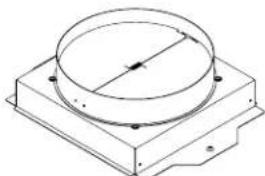
natural_image
Technical line drawing of a circular component mounted on a rectangular base (no text or symbols)Damper Assembly
PLAN THE INSTALLATION
CAUTION
To reduce risk of fire and to properly exhaust air, be sure to duct the air outside – Do not vent exhaust air into spaces within walls or ceilings or into attics, crawl spaces, or garages.
WARNING
PERSONAL INJURY HAZARD
It is recommended that 2 people are used to install the range hood. Failure to properly lift rangehood could result in damage to the product or personal injury.
REMOVE THE PACKAGING
CAUTION
Wear gloves to protect against
sharp edges.
■ Remove the hardware bag, literature package and other boxed parts.
■ Remove and properly discard the protective plastic wrapping and other packaging materials.
■ Consider recycling options for your appliance packaging material.
POWER SUPPLY
IMPORTANT – (Please read carefully)
WARNING
FOR PERSONAL SAFETY, THIS APPLIANCE MUST BE PROPERLY GROUNDED.
Remove house fuse or open circuit breaker before beginning installation.
Do not use an extension cord or adapter plug with this appliance. Follow National Electrical Codes or prevailing local codes and ordinances.
Electrical supply
These vent hoods must be supplied with 120V, 60Hz, and connected to an individual, properly grounded branch circuit, and protected by a 15 or 20 amp circuit breaker or time delay fuse.
■ Wiring must be 2 wire with ground.
■ If the electrical supply does not meet the above requirements, call a licensed electrician before proceeding.
■ Route house wiring as close to the installation location as possible in the ceiling or wall.
■ Connect the wiring to the house wiring in accordance with local codes.
Grounding instructions
The grounding conductor must be connected to a ground metal, permanent wiring system, or an equipment-grounding terminal or lead on the hood.
WARNING
The improper connection of the
equipment-grounding conductor can result in a risk of electric shock. Check with a qualified electrician or service representative if you are in doubt whether the appliance is properly grounded.
PREPARE THE HOOD FOR INSTALLATION
NOTE: For transportation purposes the motor assembly is secured by 2 brackets. They must be removed prior to installation and discarded.
■ Place insert hood canopy on padded, yet stable, surface below cutout (can use flattened carton to pad surface).
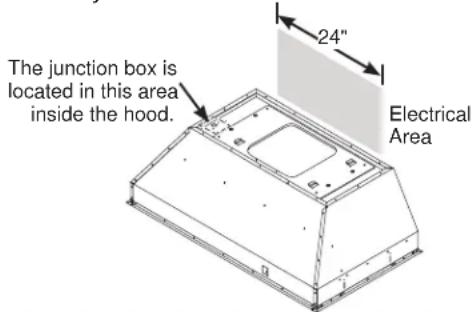
■ Remove the junction box cover. The junction box is located inside the top left side of the hood.
■ Save the junction box cover and screws. They will be needed at installation.
■ Remove the 12 screws from the brackets over the motor assembly to remove the brackets.
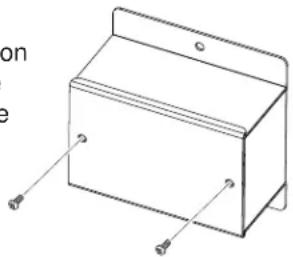
natural_image
Line drawing of a rectangular box with mounting holes and a side panel, no text or symbols present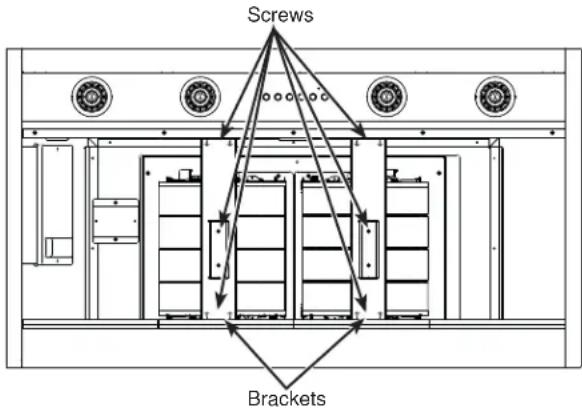
PREPARE HOUSE ELECTRICAL WIRING
The custom cabinet must allow spacing for house wiring to reach junction box located in diagram below. If unit is installed over an island, the wiring must come from ceiling. If power cord is needed, accessory is available.
STEP 1 REMOVE MOTOR ASSEMBLY FROM HOOD CANOPY
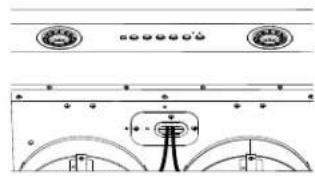
- Remove the metal lid by removing the 3 screws and allowing access to connectors.
natural_image
Pure diagram of a mechanical or electrical component with no text, numbers, or symbols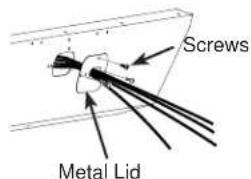
- Disconnect 2 motor cable connectors and 2 capacitor connectors.
- Remove the 4 screws that attach the motor assembly to the hood canopy. Save the screws for installation.
- Remove the motor assembly from the hood canopy by sliding it to release it from the mounting tabs.
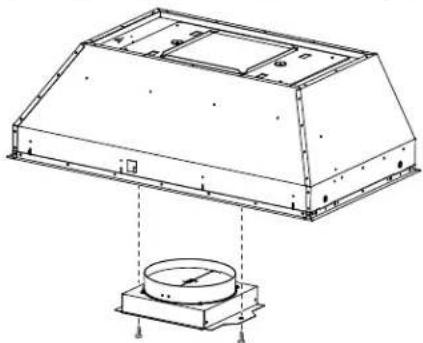
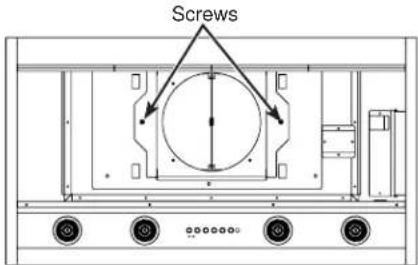
- Install the damper into the bottom of the exhaust fan opening using 2 screws provided (D).
natural_image
Technical line drawing of a mechanical enclosure with a circular base and mounting feet (no text or symbols)a. Check to make sure the damper opens freely. b. Tighten the 2 screws (D).
STEP 2 CONNECT ELECTRICAL CABLES
Verify that power is turned off at the source.
WARNING
If house wiring is not 2-wire with a ground wire, an electrician will need to convert existing wiring to meet these specs. When house wiring is aluminum, be sure to use U.L.-approved anti-oxidant compound and aluminum-to-copper connectors.
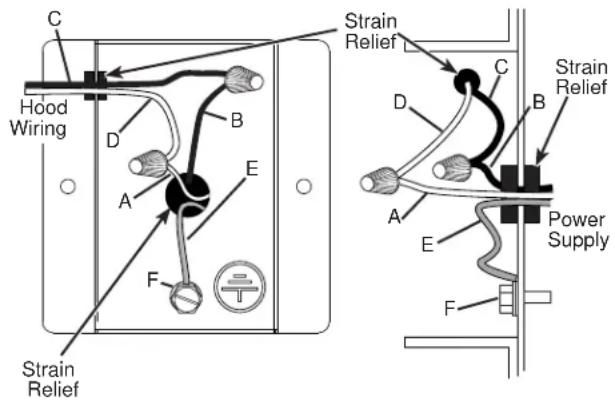
- Pull power supply wires through wall of insert canopy and attach the strain relief. Thread the house wire through the junction box before the canopy is inserted in the cabinet cutout.
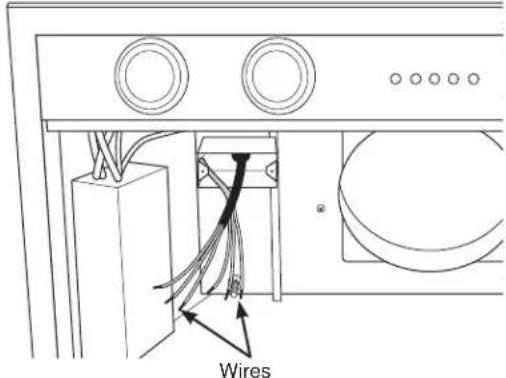
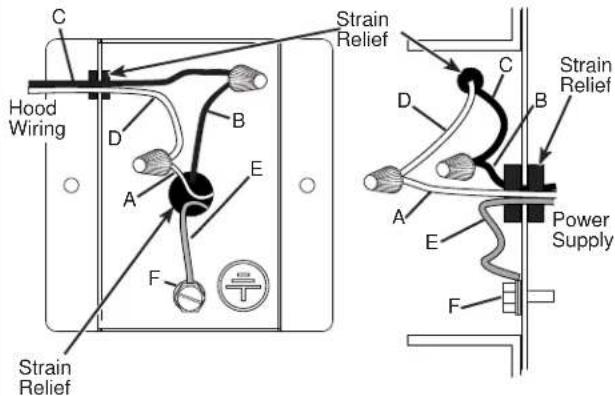
- Attach the white lead of the power supply (A) to the white lead of the range hood (D) with a wire nut. Attach the black lead of the power supply (B) to the black lead of the range hood (C) with a wire nut. Connect the power supply ground wire lead (E) to the ground screw (F).
STEP 3 INSTALL HOOD CANOPY TO THE CABINET
- Confirm the damper is in place in the hood exhaust opening, see previous page for instructions.
- Tuck the house wiring out of the way.
- Push the hood canopy straight up through the cutout opening until the temporary locking clips engage. The locking clips are designed to hold the insert sleeve in place until it is secured with screws.
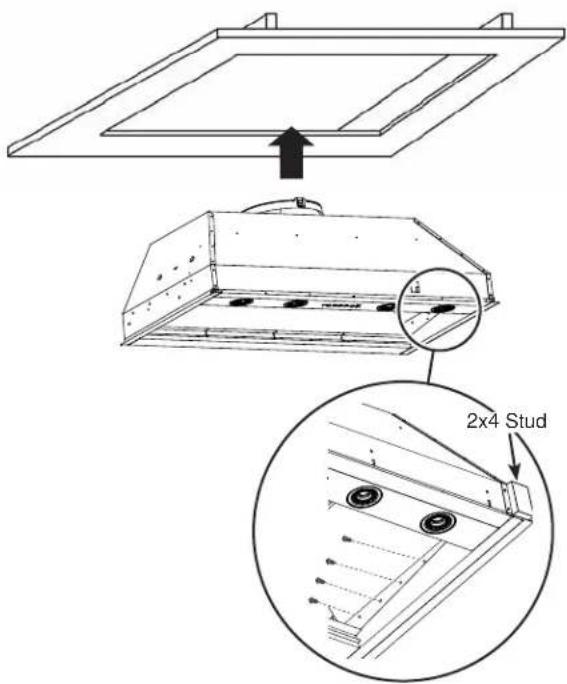
- Once the hood canopy is in place, seal the duct to the damper with duct tape. (DO NOT USE SCREWS).
STEP 1 REMOVE MOTOR ASSEMBLY FROM HOOD CANOPY
- Remove the metal lid by removing the 3 screws and allowing access to connectors.
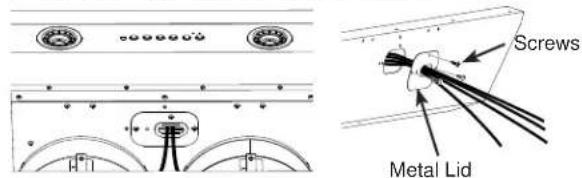
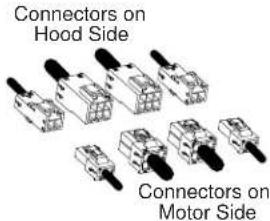
- Disconnect 2 motor cable connectors and 2 capacitor connectors.
- Remove the 4 screws that attach the motor assembly to the hood canopy. Save the screws for installation.
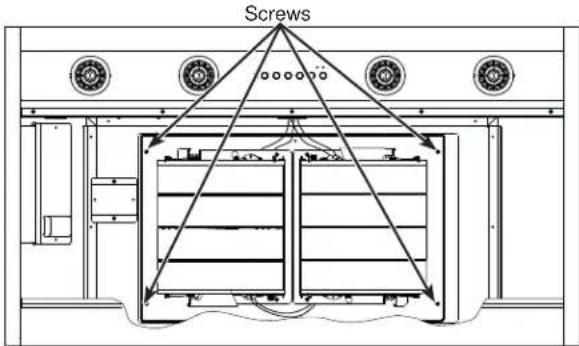
- Remove the motor assembly from the hood canopy by sliding it to release it from the mounting tabs.
STEP 2 DAMPER AND SIDE PANEL INSTALLATION
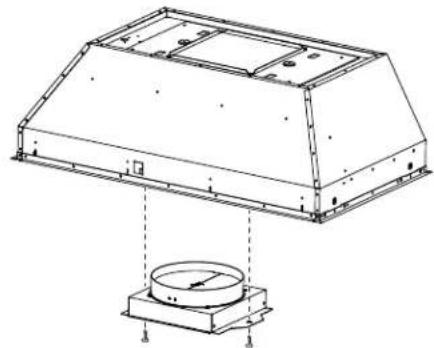
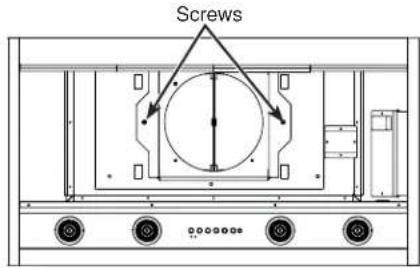
- Install the damper into the bottom of the exhaust fan opening using 2 screws provided (D).
natural_image
Technical line drawing of a mechanical component with mounting base and circular base (no text or symbols)a. Check to make sure the damper opens freely. b. Tighten the 2 screws (D).
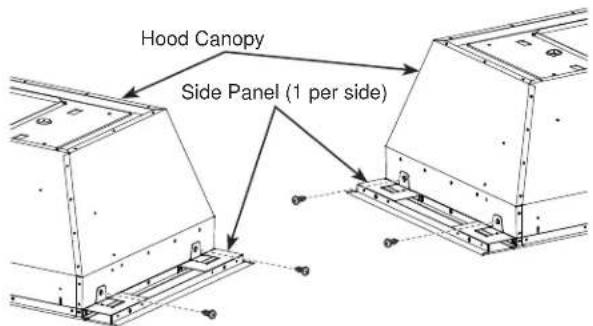
- Install the right and left side panels to the hood canopy using the 4 screws (B) provided.
STEP 3
CONNECT ELECTRICAL
CABLES
Verify that power is turned off at the source.
WARNING
If house wiring is not 2-wire with
a ground wire, an electrician will need to convert existing wiring to meet these specs. When house wiring is aluminum, be sure to use U.L.-approved anti-oxidant compound and aluminum-to-copper connectors.
- Pull power supply wires through wall of insert canopy and attach the strain relief. Thread the house wire through the junction box before the canopy is inserted in the cabinet cutout.
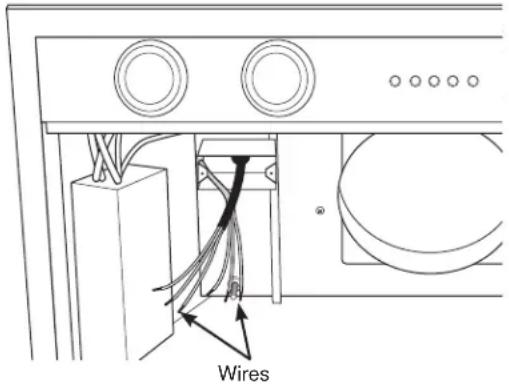
- Attach the white lead of the power supply (A) to the white lead of the range hood (D) with a wire nut. Attach the black lead of the power supply (B) to the black lead of the range hood (C) with a wire nut. Connect the power supply ground wire lead (E) to the ground screw (F).
STEP 4
INSTALL HOOD CANOPY
TO THE CABINET
- Confirm the damper is in place in the hood exhaust opening, see previous page for instructions.
- Confirm the side panels are mounted (see previous instructions).
- Tuck the house wiring out of the way.
- Push the hood canopy straight up through the cutout opening until the temporary locking clips engage. The locking clips are designed to hold the insert sleeve in place until it is secured with screws.
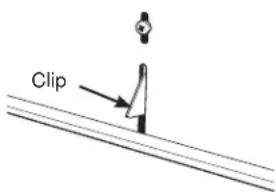
NOTE: The locking clips are not designed to support all of the weight of the insert sleeve. Do not leave the insert sleeve unattended until screws have been installed.
5. Fasten the 8 screws (L), 4 on each side, toward the left and right sides to the side studs of the cabinet structure. It is recommended to start with one corner and fasten screws diagonally to ensure unit flushness with cabinet.
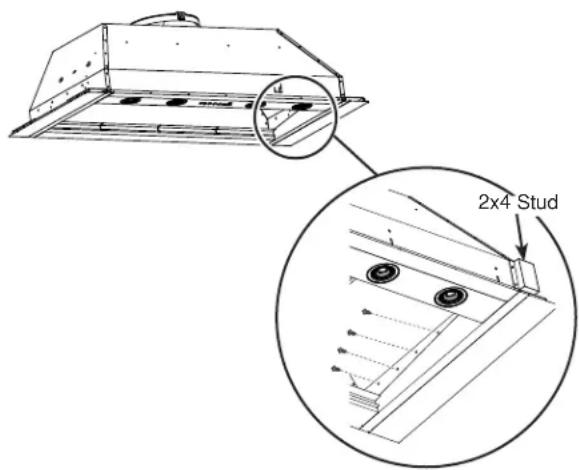
- Once the hood canopy is in place, seal the duct to the hood canopy with duct tape (DO NOT USE SCREWS).
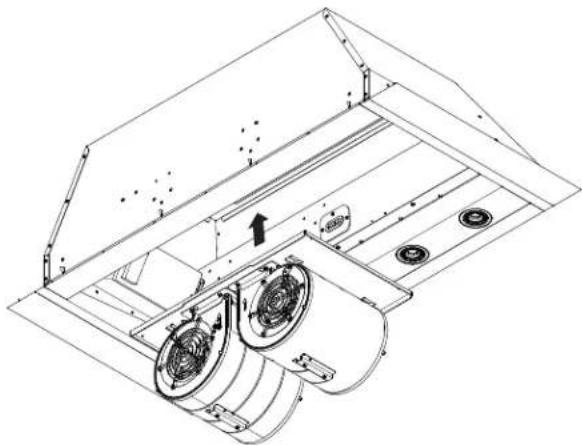
STEP 5 INSTALL BLOWER MOTOR ASSEMBLY - UVC-9420 AND 9480 METHOD 1
- Lift the motor assembly on the insert canopy.
natural_image
Technical line drawing of a mechanical ventilation system with fans and vent vials (no text or symbols)- Insert the blower motor assembly tabs in the hood slots and slide it, making sure the 4 tabs are engaged.
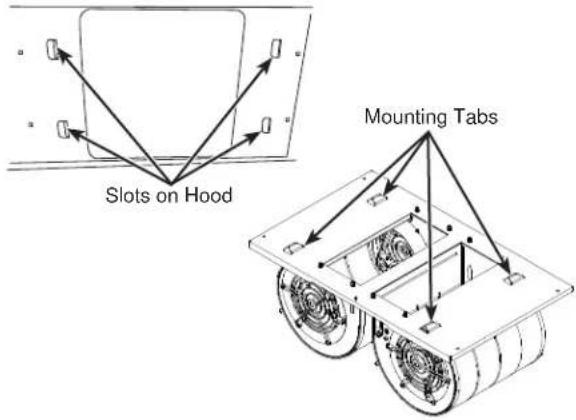
- Tighten the 4 screws (removed earlier) - see Remove Motor Assembly from Hood Canopy section. Make sure the blower motor is secured firmly to the hood canopy.
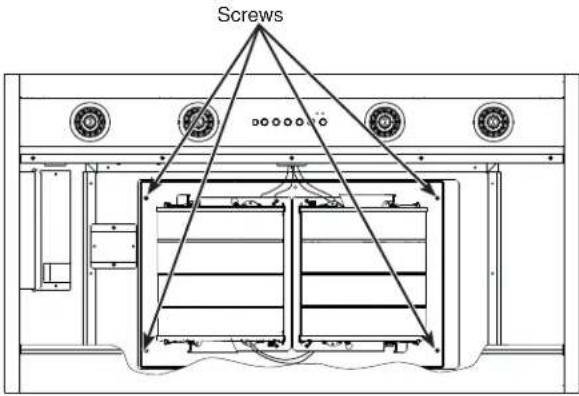
- Reconnect the 4 cables of the motor to the ones on the hood side and insert them into the protected area under the control panel.
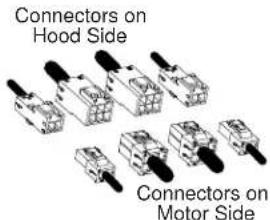
- Mount the metal lid and tighten the 3 screws to secure the lid on the hood body.
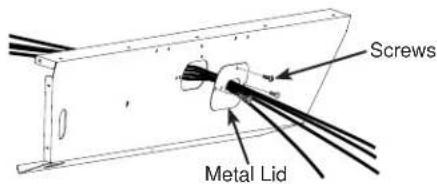
STEP 5 INSTALL BLOWER MOTOR ASSEMBLY - UVC 9420 AND 9480 METHOD 2 (ALTERNATIVE)
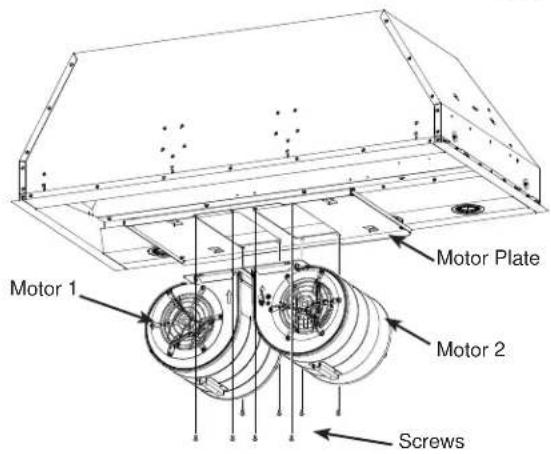
The motors can also be installed separately to help manage the weight of the 2 motors.
- See see Remove Motor Assembly from Hood Canopy section to disassemble the motor assembly from the canopy.
- With the motor assembly out of the canopy, remove the 4 screws from each motor. The motors are separate from the motor plate.
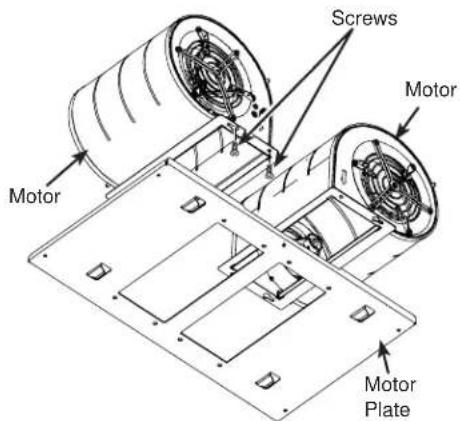
- Mount the hood into the cabinet as shown in previous instructions. Mount the motor plate, inserting it in the hood slots. Slide it, making sure the 4 tabs are engaged.
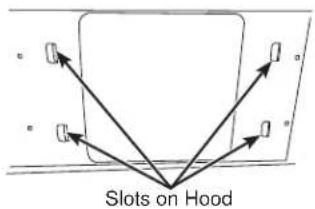
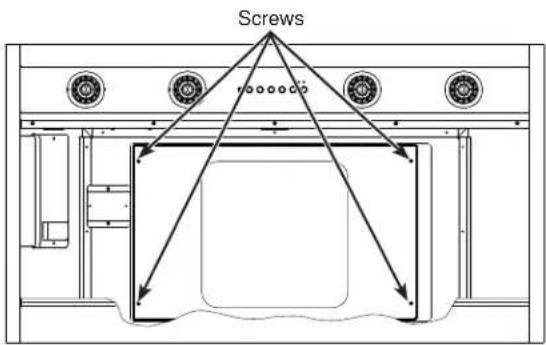
- Reinstall the 4 screws removed earlier. See Remove Motor Assembly from Hood Canopy section. Make sure the plate is secured firmly to the hood canopy.
- Lift and attach each motor using 4 screws per motor making sure they are firmly attached to the motor plate.
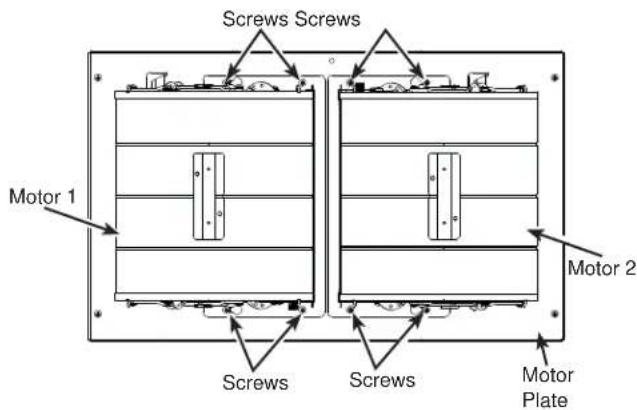
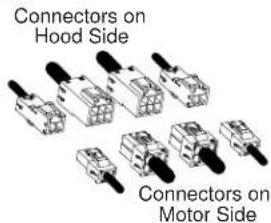
- With both motors installed on canopy, reconnect the 4 cables of the motor to the ones on the hood side and insert them into the protected area under the control panel.
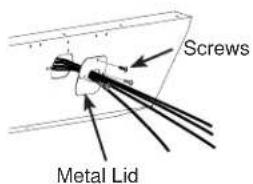
- Mount the metal lid and tighten the 3 screws to secure the lid on the hood body.
STEP 6 FINALIZE INSTALLATION
- Insert filters, see the Filters section.
- Check operation of the lights and blower. Refer to Using the Hood sections for operating instructions.
Troubleshooting tips ... Before you call for service
Save time and money! Review the charts on the following pages first and you may not need to call for service.
| Problem Possible Cause What To Do | ||
| Fan/Light does not operate when button is turned ON | A house fuse may be blown or a circuit breaker tripped. | Replace fuse or reset circuit breaker. |
| Loud or abnormal airflow noise | Wrong duct size used in installation. This | hood requires 8" ducting to perform optimally. Using smaller duct pipe will cause reduced venting. Minimize the duct run length and number of transitions and elbows. GE Appliances service technicians cannot correct this issue if installed improperly. |
| Fan fails to circulate air or moves air slower than normal and/or fan is making loud or abnormal airflow noise | Obstructions in duct work. Make sure nothing is blocking the vent. Make sure your wall or roof cap has a blade or door. | |
| Damper blade on wall or roof cap may not be open. | Make sure damper swings freely. Damper blades may flip over and will not fully open when this happens. Adjust to original position. | |
| Metal grease filter and charcoal filter (if present) may be dirty. | Clean the metal grease filter and replace charcoal filter (if present). See Care and Cleaning of the Vent Hood. | |
| Insufficient makeup (replacement) air Sufficient makeup (replacement) air is required for exhausting appliances to operate to rating. Check with local building codes, which may require or strongly advise the use of makeup air. Visit GEAppliances.com for available makeup air solutions. | ||
| Early light failure Light wattage is too high. Replace with correct wattage. | ||
| Fan automatically turns on and can not be turned off. | This is normal. The sensor feature will automatically turn the fan on if cooking temperature becomes too hot. The fan will then turn off when temperatures cool to an appropriate level. | |
| Fan keeps going off and on | The motor is probably overheating and turning itself off. This can be harmful to the motor. | Check to be sure the filters are clean. If off and on cycling continues, call for service. |
| Lights not functioning Wrong bulbs are used. Must use GU10 compatible dimmable bulbs. | Visit GEAppliances.com for replacement bulbs. | |
| No grease captured in the drip trays | No grease captured in the drip trays InstaI the baffles properly making sure the arrows on the sides of the baffles are pointing towards the front of the unit so that the grease openings on the bottom of the baffles are inserted in the drip trays, see the Filters section. | |
| Hood will not work remotely | Router issues, no wireless signal, etc. For assistance with hood wireless network connectivity, please call 800.220.6899. | |
| Hood is not connected. | ||
GE Appliances Vented Range Hood Limited Warranty
GEAppliances.com
All warranty service is provided by our Factory Service Centers, or an authorized Customer Care® technician. To schedule service online, visit us at geappliances.com/service_and_support/, or call GE Appliances at 800.GE.CARES (800.432.2737). In Canada, visit GEAppliances.ca/en/support/service-request or call 800.561.3344. Please have your serial number and your model number available when calling for service.
Servicing your appliance may require the use of the onboard data port for diagnostics. This gives a GE Appliances factory service technician the ability to quickly diagnose any issues with your appliance and helps GE Appliances improve its products by providing GE Appliances with information on your appliance. If you do not want your appliance data to be sent to GE Appliances, please advise your technician not to submit the data to GE Appliances at the time of service.
For the period of GE Appliances will replace
| One yearFrom the date of the original purchase | Any part of the cooking product which fails due to a defect in materials or workmanship. During this limited one-year warranty, GE Appliances will provide, free of charge, all labor and related service costs to replace the defective part. |
What GE Appliances will not cover:
■ Service trips to your home to teach you how to use the product.
■ Improper installation, delivery, or maintenance.
■ Failure of the product if it is abused, misused, modified, or used for other than the intended purpose or used commercially.
■ Replacement of house fuses or resetting of circuit breakers.
■ Damage to the product caused by accident, fire, floods, or acts of God.
■ Damage to finish, such as surface rust, tarnish, or small blemishes not reported within 48 hours of delivery.
■ Incidental or consequential damage caused by possible defects with this appliance.
■ Damage caused after delivery.
■ Product not accessible to provide required service.
■ Service to repair or replace light bulbs, except for LED lamps.
EXCLUSION OF IMPLIED WARRANTIES
Your sole and exclusive remedy is product repair as provided in this Limited Warranty. Any implied warranties, including the implied warranties of merchantability or fitness for a particular purpose, are limited to one year or the shortest period allowed by law.
This limited warranty is extended to the original purchaser and any succeeding owner for products purchased for home use within the USA. If the product is located in an area where service by a GE Appliances Authorized Servicer is not available, you may be responsible for a trip charge or you may be required to bring the product to an Authorized GE Appliances Service location for service. In Alaska, the limited warranty excludes the cost of shipping or service calls to your home. Some states do not allow the exclusion or limitation of incidental or consequential damages. This limited warranty gives you specific legal rights, and you may also have other rights which vary from state to state. To know what your legal rights are, consult your local or state consumer affairs office or your state's Attorney General.
In Canada: This warranty is extended to the original purchaser and any succeeding owner for products purchased in Canada for home use within Canada. If the product is located in an area where service by a GE Authorized Servicer is not available, you may be responsible for a trip charge or you may be required to bring the product to an Authorized GE Service location. Some provinces do not allow the exclusion or limitation of incidental or consequential damages. This warranty gives you specific legal rights, and you may also have other rights which vary from province to province. To know what your legal rights are, consult your local or provincial consumer affairs office.
Garante: GE Appliances, a Haier company Louisville, KY 40225 Burlington, ON, L7R 5B6
Extended Warranties: Purchase a GE Appliances extended warranty and learn about special discounts that are available while your warranty is still in effect. You can purchase it online anytime at
In US: geappliances.com/service_and_support/shop-for-extended-service-plans.htm In Canada: geappliances.ca/en/support/purchase-extended-warranty
or call 800.626.2224 (Canada 866.277.9842) during normal business hours. GE Appliances Service will still be there after your warranty expires..
Looking For Something More?
GE Appliances offers a variety of accessories to improve your cooking and maintenance experiences!
Refer to the Consumer Support page for phone numbers and website information.
The following products and more are available:
Parts
| Power Cord Kit |
| Make-up Air Kit |
| Charcoal Filter |
| Recirculation Kit |
| Remote Control |
Cleaning Supplies
| CitruShineTM Stainless Steel Wipes |
| Stainless Steel Appliance Cleaner |
| Bar Keepers Friend Soft CleanserTM |
Consumer Support
GE Appliances Website
Have a question or need assistance with your appliance? Try the GE Appliances Website 24 hours a day, any day of the year! You can also shop for more great GE Appliances products and take advantage of all our on-line support services designed for your convenience. In the US: GEAppliances.com. In Canada: GEAppliances.ca.
Register Your Appliance
Register your new appliance on-line at your convenience! Timely product registration will allow for enhanced communication and prompt service under the terms of your warranty, should the need arise. You may also mail in the pre-printed registration card included in the packing material. In the US: GEAppliances.com/register. In Canada: Prodsupport.mabe.ca/crm/Products/ProductRegistration.aspx
Schedule Service
Expert GE Appliances repair service is only one step away from your door. Get on-line and schedule your service at your convenience any day of the year. In the US: GEAppliances.com/service or call 800.432.2737 during normal business hours. In Canada: GEAppliances.com/en/support/service-request
Extended Warranties
Purchase a GE Appliances extended warranty and learn about special discounts that are available while your warranty is still in effect. You can purchase it on-line anytime. GE Appliances Services will still be there after your warranty expires. In the US: GEAppliances.com/extended-warranty or call 800.626.2224 during normal business hours. In Canada: GEAppliances.com/en/support/purchase-extended-warranty
Remote Connectivity
For assistance with wireless network connectivity (for models with remote enable), visit our website at GEAppliances.com/connected-home-smart-appliances/ or call 800.220.6899 in the US.
Parts and Accessories
Individuals qualified to service their own appliances can have parts or accessories sent directly to their homes (VISA, MasterCard and Discover cards are accepted). Order on-line today 24 hours every day. In the US: GEApplianceparts.com or by phone at 877.959.8688 during normal business hours. In Canada: GEAppliances.com/en/products/parts-filters-accessories
Instructions contained in this manual cover procedures to be performed by any user. Other servicing generally should be referred to qualified service personnel. Caution must be exercised, since improper servicing may cause unsafe operation.
Contact Us
If you are not satisfied with the service you receive from GE Appliances, contact us on our Website with all the details including your phone number, or write to: In the US: General Manager, Customer Relations | GE Appliances, Appliance Park | Louisville, KY 40225 GEAppliances.com/contact In Canada : Director, Consumer Relations, Mabe Canada Inc. | Suite 310, 1 Factory Lane | Moncton, N.B. E1C 9M3 GEAppliances.ca/en/contact-us
CONSIGNES DE SÉCURITÉ ..... 3
UTILISATION DE LA HOTTE
Commandes 5
Chef Connect 6
Connexion WI-FI 6
ENTRETIEN ET NETTOYAGE
Filtres 7
Surfaces 8
Ampoules 8
INSTRUCTIONS
D'INSTALLATION....9
TRUCS DE DÉPANNAGE....23
GARANTIE LIMITÉEY 24
ACCESSOIRES 25
SOUTIEN AU
CONSOMMATEUR....26
Connected Appliance Information
FCC ID: ZKJ-WCATA005
Network: ********
IC: 10229A-WCATA001
Password: ********
MAC ID: ********
Exemple d'étiquette
natural_image
Technical line drawing of a mechanical component with a curved connection and a separate bracket (no text or symbols)natural_image
Three technical line drawings showing structural components with arrows indicating motion, no text or symbols present.DIMENSIONS DU PRODUIT
natural_image
Line drawing of a handheld electric drill with three screwdriver holders (no text or symbols)natural_image
Technical line drawing of a hot air duct with ribbed material and circular components (no text or symbols)natural_image
Technical line drawing of a circular component mounted on a square base (no text or symbols)Registre
PLANIFIEZ L'INSTALLATION
ATTENTION
natural_image
Line drawing of a rectangular box with mounting holes and a side panel (no text or symbols)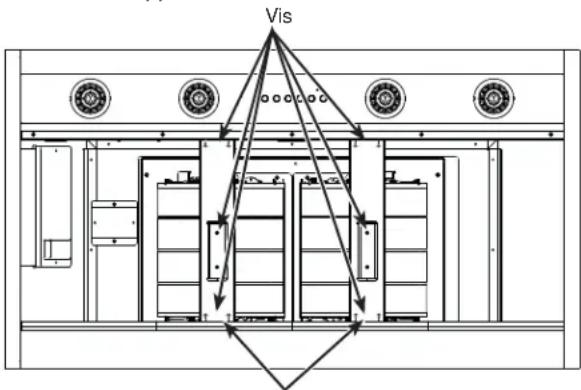
Supports
PRÉPARATION DU CÂBLAGE DOMESTIQUE
natural_image
Pure technical diagram of a mechanical assembly with no text, numbers, or symbolsnatural_image
Technical line drawing of a mechanical housing component with mounting brackets and a circular base (no text or symbols)a. b.
natural_image
Technical line drawing of a kitchen appliance with circular fixtures and a central mechanical component (no text or symbols)natural_image
Technical line drawing of a mechanical component with mounting base and circular base (no text or symbols)natural_image
Technical line drawing of a mechanical ventilation system with fans and doors (no text or symbols)Garante: GE Appliances, a Haier company Louisville, KY 40225 Burlington, ON, L7R 5B6
Au Canada : Prodsupport.mabe.ca/crm/Products/ProductRegistration.aspx
Au Canada : GEAppliances.ca/en/support/service-request ou composez le 800.561.3344
Prolongation de garantie
Connected Appliance Information
FCC ID: ZKJ-WCATA005
Network: ********
IC: 10229A-WCATA001
Password: *****
MAC ID: ********
Ejemplo de Etiqueta
natural_image
Technical line drawing of a mechanical component with a curved connection and a separate plate assembly (no text or symbols)Retiro del Deflector
Superficies
Superficies de acero inoxidable
DIMENSIONES DEL PRODUCTO
natural_image
Line drawing of a power tool with multiple drill bits and a terminal plug (no text or symbols)natural_image
Technical line drawing of a campan structure with ribbed internal layers and circular components (no text or symbols)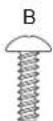
Tornillos para Máquina con Cabeza Phillips 1/8" X 3/8" (QTY: 8)
Tornillos de Madera con Cabeza Phillips 1/8" X 1/2" (QTY: 2)
natural_image
Technical line drawing of a circular component mounted on a rectangular base (no text or symbols)Ensamble del Regulador
PLAN DE INSTALACIÓN
PRECAUCIÓN
natural_image
Line drawing of a rectangular box with mounting holes and a side label (no text or symbols on the object itself)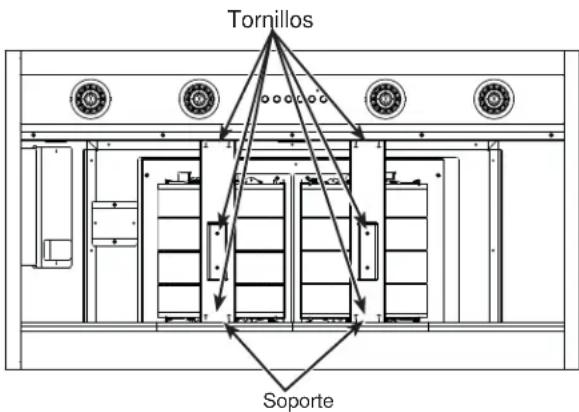
natural_image
Pure technical diagram of a mechanical assembly with no text, numbers, or symbols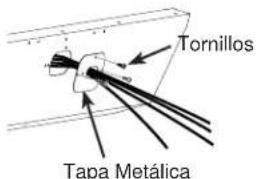
natural_image
Technical line drawing of a mechanical enclosure with a circular component underneath (no text or symbols)natural_image
Technical line drawing of a mechanical housing component with mounting base (no text or symbols)natural_image
Technical line drawing of a mechanical ventilation system with fan and vent components (no text or symbols)natural_image
Pure diagram of a vehicle or vehicle with arrows pointing to a rectangular frame (no text or symbols)Louisville, KY 40225 Burlington, ON, L7R 5B6