
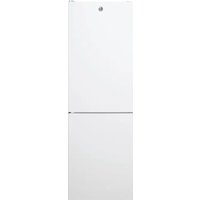
HOCE7620CX - Refrigerator HOOVER - Free user manual and instructions
Find the device manual for free HOCE7620CX HOOVER in PDF.
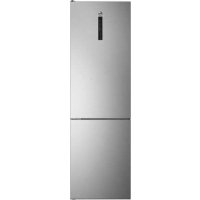



| Brand | Hoover |
| Model | HOCE7620CX |
| Type | Combined refrigerator with freezer compartment |
| Refrigerator temperature | 2°C to 8°C (adjustable in 1°C increments) |
| Freezer temperature | -16°C to -24°C (adjustable in 1°C increments) |
| Functions | Super cool, Super freeze, Eco mode, Holiday mode, Demo mode |
| Connectivity | Built-in Wi-Fi, hOn app |
| Defrost | Automatic |
| Door reversibility | Yes |
| Control panel | Touch LED display |
| Adjustable humidity | Yes (slider in vegetable drawer) |
| Door alarm | Yes (beeps after 3 minutes of opening) |
| Dimensions (space required) | Width min. 920 mm, Depth min. 1137 mm |
| Power supply | 220-240 V, 50 Hz |
| Control type | Electronic |
Frequently Asked Questions - HOCE7620CX HOOVER
User questions about HOCE7620CX HOOVER
0 question about this device. Answer the ones you know or ask your own.
Ask a new question about this device
Download the instructions for your Refrigerator in PDF format for free! Find your manual HOCE7620CX - HOOVER and take your electronic device back in hand. On this page are published all the documents necessary for the use of your device. HOCE7620CX by HOOVER.
USER MANUAL HOCE7620CX HOOVER
Discover extra contents and
create your inventory list


EN 1 BG 11 CS 22 DA 33 DE 43 EL 54 ES 66 FI 75 FR 86 HR 96 HU 106 IT 116 NL 126 NO 136 PL 146 PT 156 RO 166 RU 177 SK 188 SL 198 SR 208 SV 218 UK 228 AR 238
Summary
PRODUCT DESCRIPTION 2
Space requirements 2
USE 3
Use 3 Customized temperature 4 Super Cool function 4 Super Freeze function 5 Eco mode 5 Holiday function 5 Defrosting 5 Demo mode 6 Error Codes 6 WI-FI USE 7 Step 1 7 Step 2 7 Step 3 7 Wi-Fi Use 8 DOOR REVERSIBILITY 9
TROUBLESHOOTING
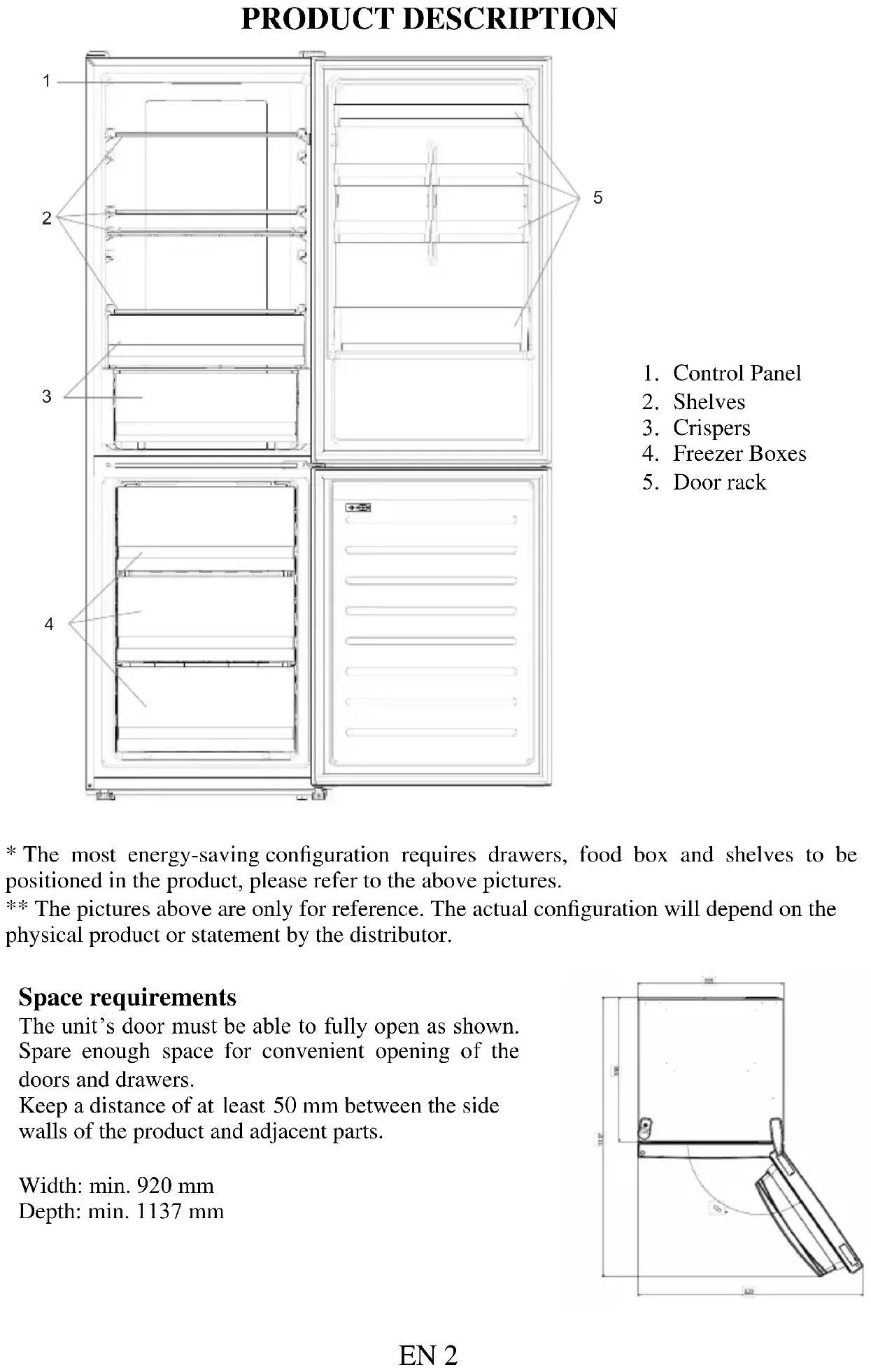
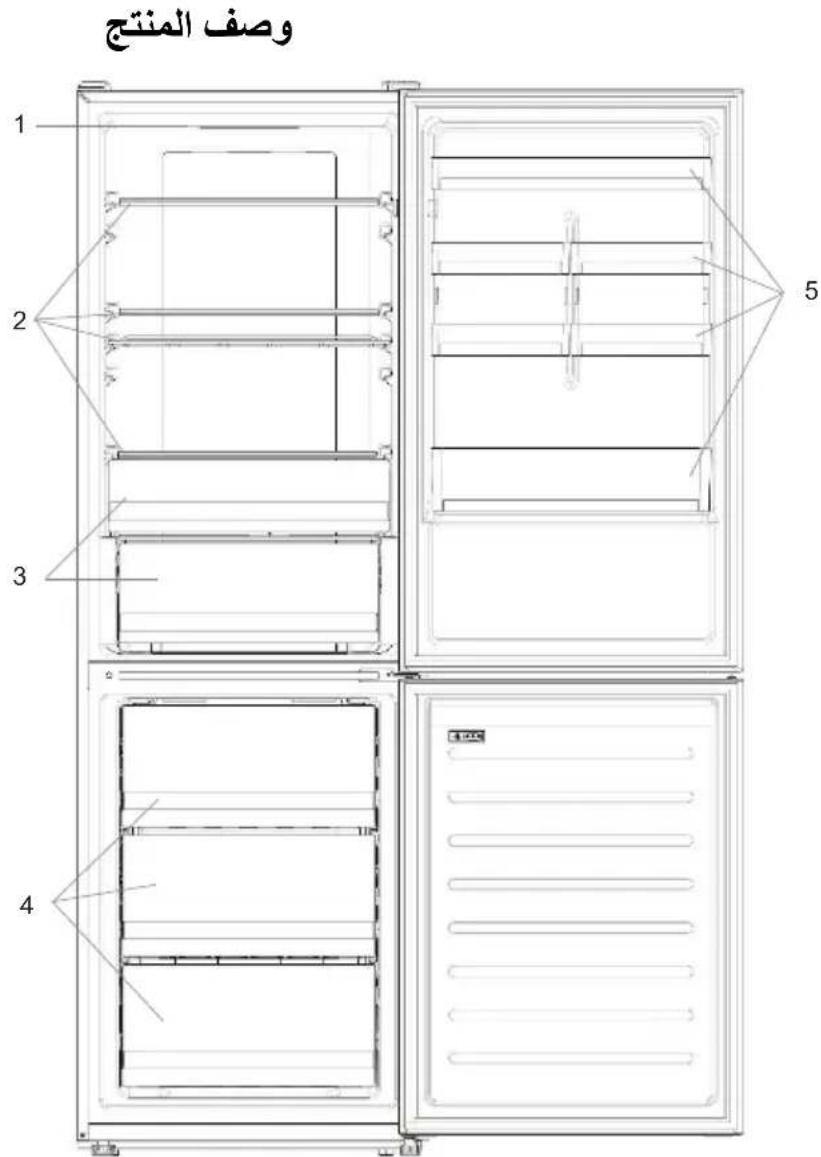
PRODUCT DESCRIPTION
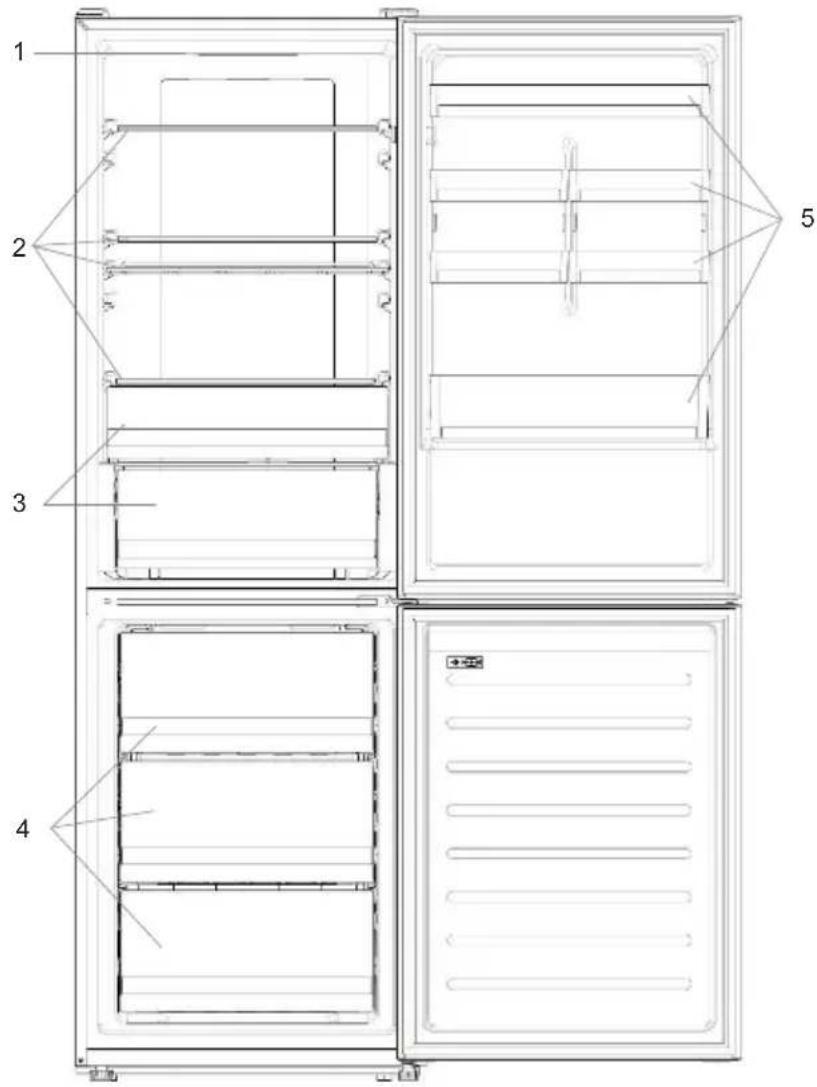
- Control Panel
- Shelves
- Crispers
- Freezer Boxes
- Door rack
- The most energy-saving configuration requires drawers, food box and shelves to be positioned in the product, please refer to the above pictures. ** The pictures above are only for reference. The actual configuration will depend on the physical product or statement by the distributor.
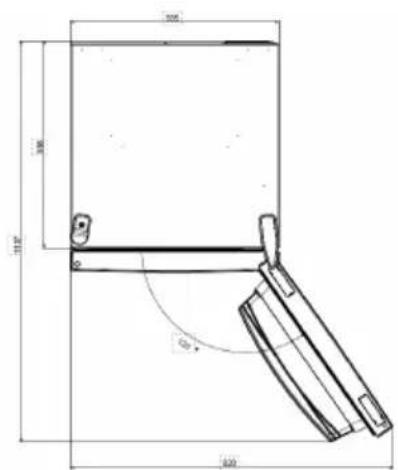
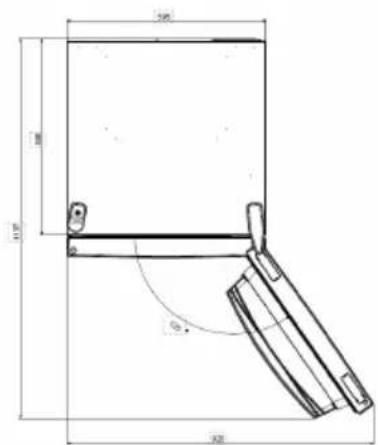
Space requirements
The unit's door must be able to fully open as shown. Spare enough space for convenient opening of the doors and drawers.
Keep a distance of at least 50 mm between the side walls of the product and adjacent parts.
Width: min. 920 mm
Depth: min. 1137 mm
USE
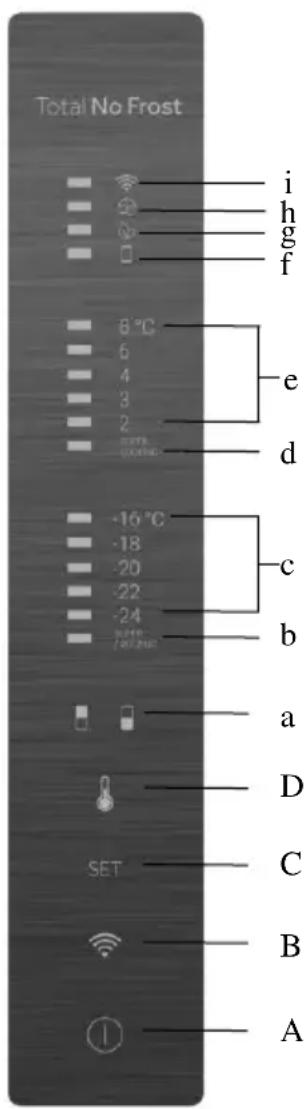
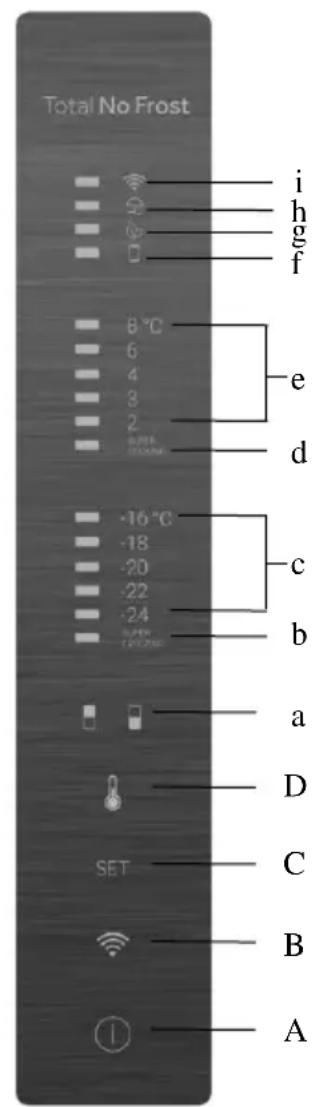
A. ON/OFF key, used to switch on/off the appliance B. Wi-Fi key, used to switch on/off the Wi-Fi C. Mode key, used to select the desired function D. TEMP key, used to select the fridge and freezer temperature
a. Fridge/freezer area icon, shows which compartment of the appliance is selected b. Super Freeze icon, shows if the Super Freeze function is activated c. Freezer temperature levels, show which is the selected temperature in the freezer d. Super Cool icon, shows if the Super Cool function is activated e. Fridge temperature levels, show which is the selected temperature f. Customized temperature icon, shows if the temperature has been selected by app g. Eco mode icon, shows whether the eco mode is activated h. Holiday function icon, shows whether the holiday function is activated i. Wi-Fi icon, shows whether the Wi-Fi is working and the appliance is connected
Use
- Plug in the appliance, it automatically turns on. The temperature will automatically set at 4°C in the fridge and -18°C in the freezer.
- To change the temperature, press the TEMP key for 5 seconds, an acoustic signal is made and the icon of the selected compartment (fridge or freezer) as well as all the temperature LEDs of the corresponding compartment turn on for 2s, after 2s the selection of the compartment is confirmed. With the selected compartment icon on, quick press the TEMP key to change the temperature. When the setting increases, the corresponding LED light will turn on. An acoustic signal is made every time the TEMP key is pressed and the temperature is changed, after 5 seconds the selection is confirmed. After 30s without operation the fridge/freezer icon area turns off, while the LEDs of the selected temperatures stay on. When the TEMP key is touched again, the icon of the last selected area (fridge or freezer) turns on. In case of power loss, the last cooling level set will be restored
- To restore the default setting, long press the Temp key button and click the ON/OFF key button 5 times (within 5 seconds).
- Under normal operating conditions (in spring and autumn), it is recommended to set the temperature at 4°C. In summer, when the ambient temperature is high, it is recommended to set the temperature at 6~8°C to guarantee the fridge and freezer temperatures and reduce the refrigerator's continuous running time. In winter, when the ambient temperature is low, it is recommended to set the temperature at 3~4°C to avoid frequent start/stop of the refrigerator.
Customized temperature
From the app, it is possible to customize the temperature for both the fridge and freezer. The temperature can be set with 1°C sensitivity. It is possible to select a temperature from 2°C to 8°C in the fridge, and from -16°C to -24°C in the freezer.
When the temperature is selected by the app, the customized temperature icon turns on, while all the temperature LED lights of the affected compartment are turned off (i.e., if the refrigerator temperature is selected from the app, LEDs from 2°C to 8°C are turned off. If the freezer temperature is selected from the app, LEDs from -16°C to -24°C are turned off). If only a single area (freezer or fridge) has the customized temperature, the temperature selection of the other area is not changed and the LED light of the selected temperature of that area remains on. An acoustic signal is made every time the temperature is changed.
Super Cool function
It is suggested to switch on the Super Cool function if a large quantity of food is to be stored (for example after a purchase). The Super Cool function accelerates the cooling of fresh food and protects already stored goods from undesirable warming. When the function is activated, the temperature of the fridge is automatically set to 2°C. How to use the Super Cool function:
- The function can be activated by long pressing the TEMP key to select the fridge compartment, then quickly pressing the TEMP key until the Super Cool icon LED turns on, or it can be turned on from the app. When the function is activated, the Super Cool LED is always ON.
- To exit the Super Cool function, press the TEMP key or turn it off from the app.
- The Super Cool function automatically ends when the function has lasted for more than 30 hours.
- When the Super Cool ends, the icon on the control panel switches off and the previously set cooling level is restored.
Note: Super Cool and Super Freeze functions cannot be activated simultaneously.
Super Freeze function
The Super Freeze function accelerates the freezing of fresh food and protects already stored goods from undesirable warming. If a large amount of food is to be frozen, it is recommended to set the Super Freeze function on 24 hours before use. When the function is activated, the temperature is automatically set to -24°C.
How to use the Super Freeze function:
- The function can be launched by long pressing the TEMP key to select the freezer compartment, then quickly pressing the TEMP key until the Super Freeze icon LED turns on, or it can be turned on from the app. When the function is activated, the Super Freeze LED is always ON.
- To exit the Super Freeze function, press the TEMP key or turn it off from the app.
- The Super Freeze function automatically ends when the function has lasted for more than 50 hours.
- When the Super Freeze ends, the icon on the control panel switches off and the previously set freezing level is restored.
Note: Super Cool and Super Freeze functions cannot be activated simultaneously.
Eco mode
The Eco mode can be activated to optimize the performance of the appliance, while ensuring the best food storage. The Eco mode will automatically set the temperature at 5°C in the fridge and at -18°C in the freezer.
How to use the Eco mode:
- The function can be activated from the control panel by pressing the "mode" key until the Eco mode icon turns on (an acoustic signal confirms the selection), or by selecting the function from the app. When the function is activated, the Eco mode icon is always ON.
- To exit the Eco mode, turn it off from the app or choose another function from the control panel.
- When the Eco mode ends, the icon on the control panel is switched off and the previously set cooling levels are restored.
Holiday function
The Holiday function can be used to reduce the energy consumption of the appliance when it is not used regularly. When the function is on, the LED lights are off (even if the door is open) and the fridge is turned off, whereas the freezer will keep working normally.
How to use the Holiday function:
- The function can be activated from the control panel by pressing the "mode" key until the Holiday icon turns on (an acoustic signal confirms the selection), or by selecting the function from the app. When the function is activated, the Holiday icon is always ON.
- To exit the Holiday function, turn it off from the app or choose another function from the control panel.
- When the Holiday function ends, the icon on the control panel is switched off and the previously set cooling levels are restored.
Defrosting
The defrosting of the refrigerator and freezer compartments is done automatically: no manual operation is needed.
Slider
Near the vegetable basket there is a slider that allows you to adjust the humidity inside it: moving it to the right decreases the humidity, moving it to the left increases the humidity.
Demo mode
To enter the demo mode, with the display unlocked, keep pressed the SET key and press the WiFi key 5 times within 5 seconds. To exit the demo mode, perform the same operation or power off the refrigerator.
Error Codes
- Communication error
If the lights in the freezer corresponding to -16°C, -18°C, -20°C, -22°C, and -24°C turn on sequentially, it means there has been a communication error between the main control board and the display board. Please, contact the technical assistance to help solve the problem.
Fan
If the lights in the freezer corresponding to -16°C, -20°C, -22°C, and -24°C flash simultaneously, it means the fan is not working properly. Please, contact the technical assistance to help solve the problem.
WI-FI USE
Step 1
Download the hOn app on the stores


Step 2
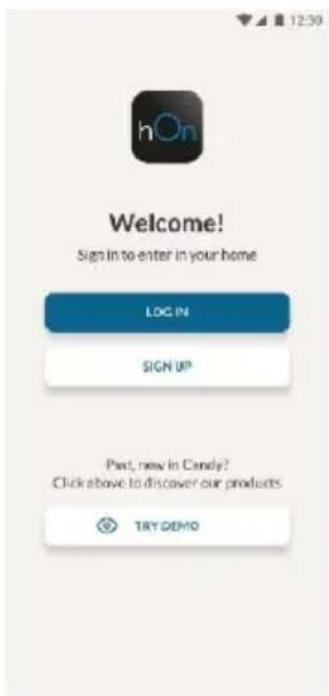
- Create your account on the hOn App or log in if you already have an account

Step 3
- Follow pairing instructions in the hOn App
Wi-Fi Use
If the Wi-Fi has not been configured yet, when the refrigerator turns on, it will automatically enter the configuration mode and keep this status for 30 minutes. The Wi-Fi icon blinks and product enrollment can start.
- Follow the instructions in the app to configure the Wi-Fi (see above).
- Once the Wi-Fi is configured and the connection is established, the Wi-Fi icon is on and fixed. After 30 minutes without performing any operation, the Wi-Fi will automatically exit the configuration mode.
- If the Wi-Fi has already been configured, it will automatically reconnect according to the configuration information.
To reset the Wi-Fi, press the Wi-Fi key and the SET key for 2 seconds.
To turn off the Wi-Fi, press the Wi-Fi key for 3 seconds.
Radio module - Technical data
| Frequency rate (OFR) | 2400 MHz-2843.5 MHz |
| Channel frequencies | 2412...2472 MHz(step size 5 MHz) |
| Maximum power(EIRP) | 100 mW |
The radio equipment type is in compliance with Directive 2014/53/EU.
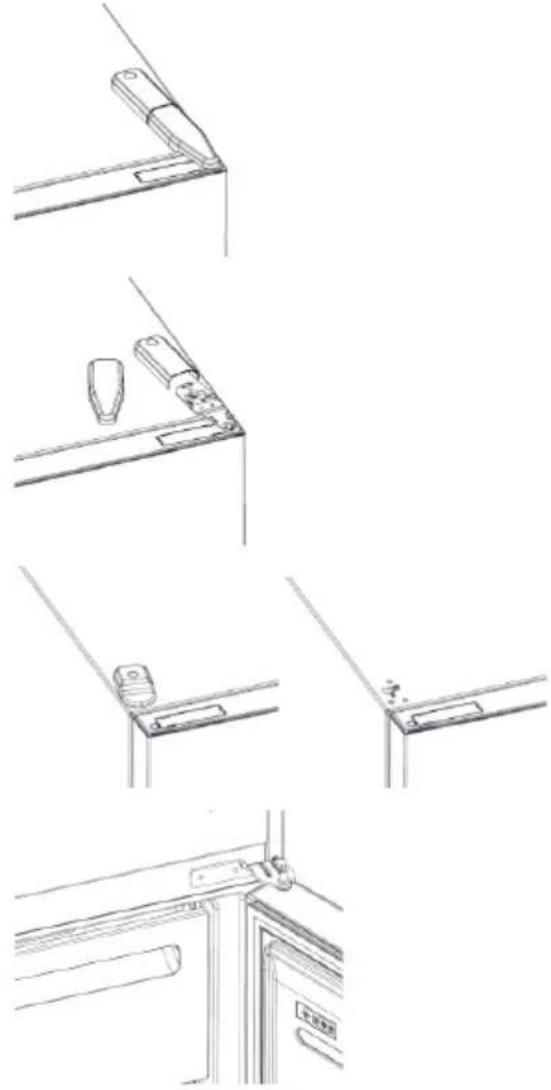
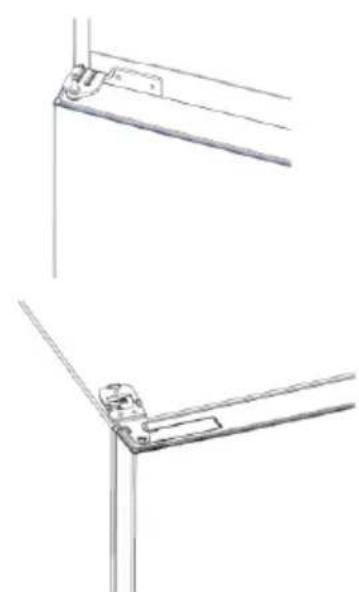
DOOR REVERSIBILITY
Tools needed: Electric screwdriver
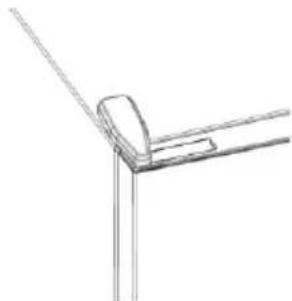
- Remove the top hinge cover.
- Unscrew the top hinge.
- Remove the top hinge cover (left).
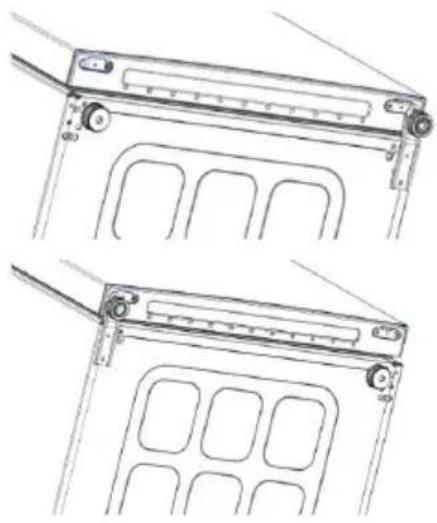
- Remove the middle hinge.
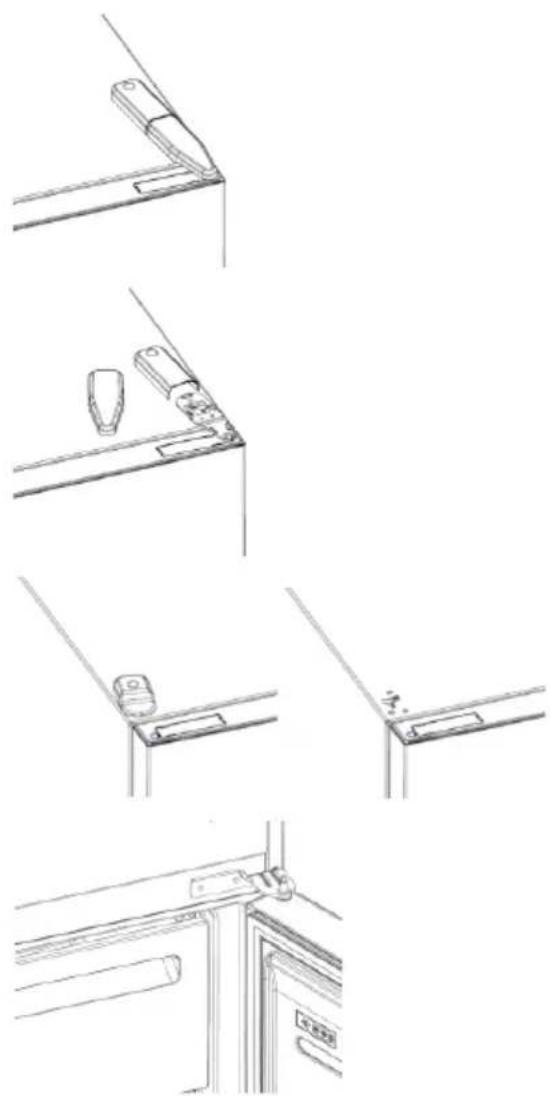
- Remove the lower hinge.
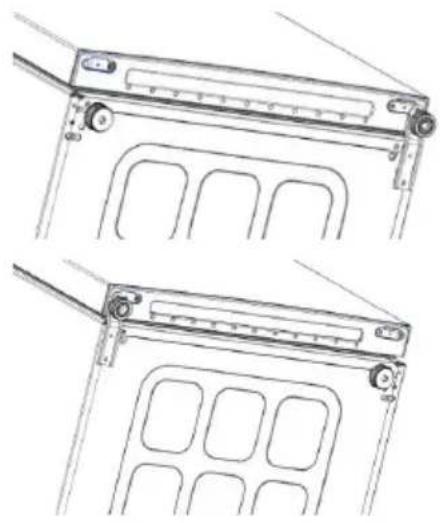
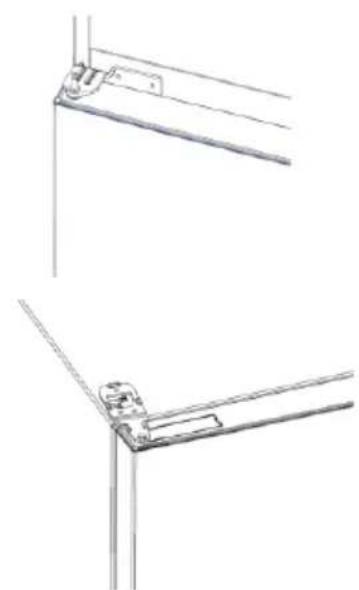
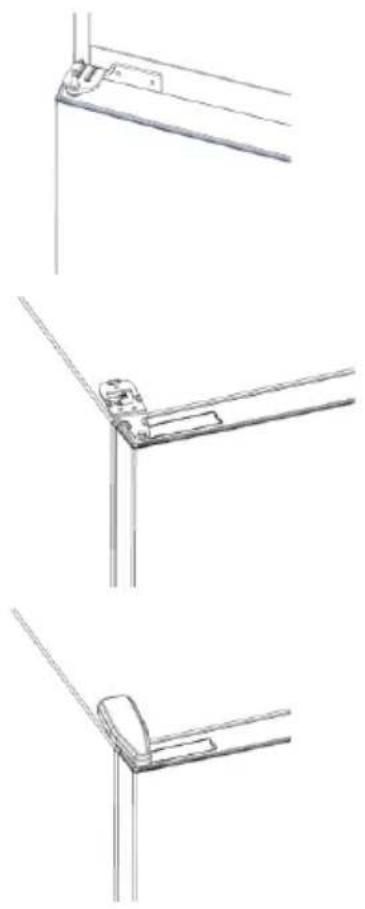
- Mount hinge foot
- Mount middle hinge
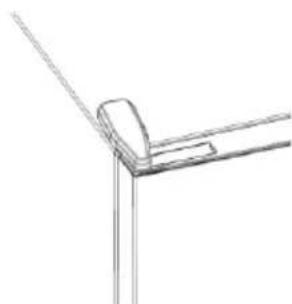
- Mount the upper hinge plate
- Mount the upper hinge cover
TROUBLESHOOTING
| The inside light bulb does not turn on. | ·No electricity. | ·The power cable is not properly plugged in. ·Check if the appliance is switched off (see Temperature Adjustment). ·Check the power socket is working correctly (e.g. with another electric device). |
| ·Holiday Mode is activated. | ·Deactivate Holiday mode. | |
| The internal temperature of the refrigerator and/or freezer is not cold enough. | ·The doors are not closed. | ·Check that the door and gaskets close properly. |
| ·The doors are frequently opened. | ·Avoid opening the doors unnecessarily for some time. | |
| ·Incorrect temperature setting. | ·Check the temperature setting and, if possible, set a lower temperature (see Temperature Adjustment). | |
| ·The refrigerator and/or freezer are too full. | ·Wait for the temperature of the refrigerator/ freezer to stabilise. ·Avoid filling the refrigerator and freezer excessively. | |
| ·The surrounding temperature is too low. | ·Move the unit to a warmer place or heat the current room. | |
| ·Warm items have been stored. | ·Always allow items to cool before storing them. | |
| The food in the refrigerator freezes. | ·Incorrect temperature setting. | ·Check the temperature setting and, if possible, increase the temperature. |
| ·Food in contact with the back wall. | ·Keep the food away from the refrigerator's back wall. | |
| The bottom of the refrigerator compartment is wet or water droplets are present. | ·The drain hose could be clogged. | ·Clean the drain hose with a stick or similar item to allow the water to drain. |
| Presence of drops of water or frost on the rear wall of the refrigerator. | ·Depending on the function, drops of water or frost form on the rear wall of the refrigerator during operation. | ·It is not a defect. |
| ·Warm items have been stored. | ·Always allow items to cool before storing them. | |
| ·There are open food containers or liquids. | ·Always cover food and liquids. | |
| ·The doors are not closed. | ·Check that the door and gaskets close properly. | |
| ·The doors are frequently opened. | ·Avoid opening the doors unnecessarily for some time. | |
| Presence of water in the vegetable drawer. | ·Lack of air circulation. | ·Verify that your appliance is not too full. |
| ·Vegetables and fruit with too much moisture. | ·Wrap the fruit and vegetables in plastic materials, e.g. cling film, bags or containers. | |
| The motor runs continuously. | ·The doors are not closed. | ·Make sure the doors are closed and check the seals close properly. |
| ·The doors are opened frequently. | ·Avoid opening the doors unnecessarily for some time. | |
| ·Ambient temperature is very high. | ·Verify that the ambient temperature is in the range set out in the specifications on the appliance tag. ·Set the display screen/thermostat to a warmer temperature. | |
| ·The appliance has been off (no power) for some time. | ·It normally takes the appliance 8-12h to cool completely. | |
| The frozen food is thawing. | ·Surrounding temperature is too low. | ·Move the unit to a warmer place or heat the current room. |
| ·The freezer door is not closed. | ·Make sure the door is closed and that the gasket is sealing properly. | |
| Fridge door alarm. | ·Fridge door alarm (acoustic beep) activates whenever the door is left open for more than 3 minutes. | ·Avoid leaving the door open when not needed. The beep ceases when the door is closed. |
| The appliance makes noises such as gurgling, buzzing, clicking, creaking. | ·No breakdowns. An engine is running, e.g. refrigeration unit, fan. The refrigerant flows into the pipes. Motor, switches and solenoid valves are switched on or off. | ·No action needed. |
| ·The appliance is not located on level ground. | ·Adjust the feel to level the appliance. | |
| ·The appliance touches an object around it. | ·Remove objects around the appliance. | |
| The appliance does not cool, the temperature and lighting indicators are on. | ·Demo mode is activated. | ·Deactivate DEMO mode. |
| Strong ice and frost in the freezer compartment. | ·The items were not adequately packaged. | ·Always pack the items well. |
| ·A door/drawer of the appliance is not tightly closed. | ·Close the door/drawer. | |
| ·The door/drawer has been opened too frequently or for too long. | ·Do not open the door/drawer too frequently. | |
| ·The door/drawer gasket is dirty, worn, cracked or mismatched. | ·Clean the door/drawer gasket or replace it with a new one. | |
| ·Something on the inside prevents the door/drawer from closing properly. | ·Reposition the shelves, door racks or internal containers to allow the door/drawer to close. | |
| The sides of the appliance are warm. | ·This is normal. |
Mode
Description of the device 12
Space requirements 13
USE 14
Use 14
Personalized temperature 15
Download on the App Store

EXPLORE IT ON AppGallery
Page 2
Create your profile in the app or log in if you already have one
Follow the instructions in the app to connect the device.
Using Wi-Fi
If Wi-Fi is not configured when the refrigerator is turned on, it will automatically enter configuration mode and remain in this state for 30 minutes. The "Wi-Fi" icon will be displayed and you can register the product.
Follow the instructions in the app to configure Wi-Fi (see above). Once Wi-Fi is configured and the connection is established, the Wi-Fi icon is on and active. After 30 minutes, without any action, Wi-Fi will automatically exit configuration mode. If Wi-Fi is already configured, it will automatically connect using the configuration settings.
To reset the Wi-Fi connection, press the "Wi-Fi" button and the "SET" button for 2 seconds.
To turn off the Wi-Fi connection, press the "Wi-Fi" button for 3 seconds.
Radio module - Technical data
Download on the App Store

EXPLORE IT ON AppGallery
Step 2
Download on the App Store

EXPLORE IT ON AppGallery
View 2
USING THE WI-FI NETWORK. 102
Step 1 102
Step 2 102
Step 3 102
Using the Wi-Fi network 103
DOOR REVERSIBILITY 104
TROUBLESHOOTING
PRODUCT DESCRIPTION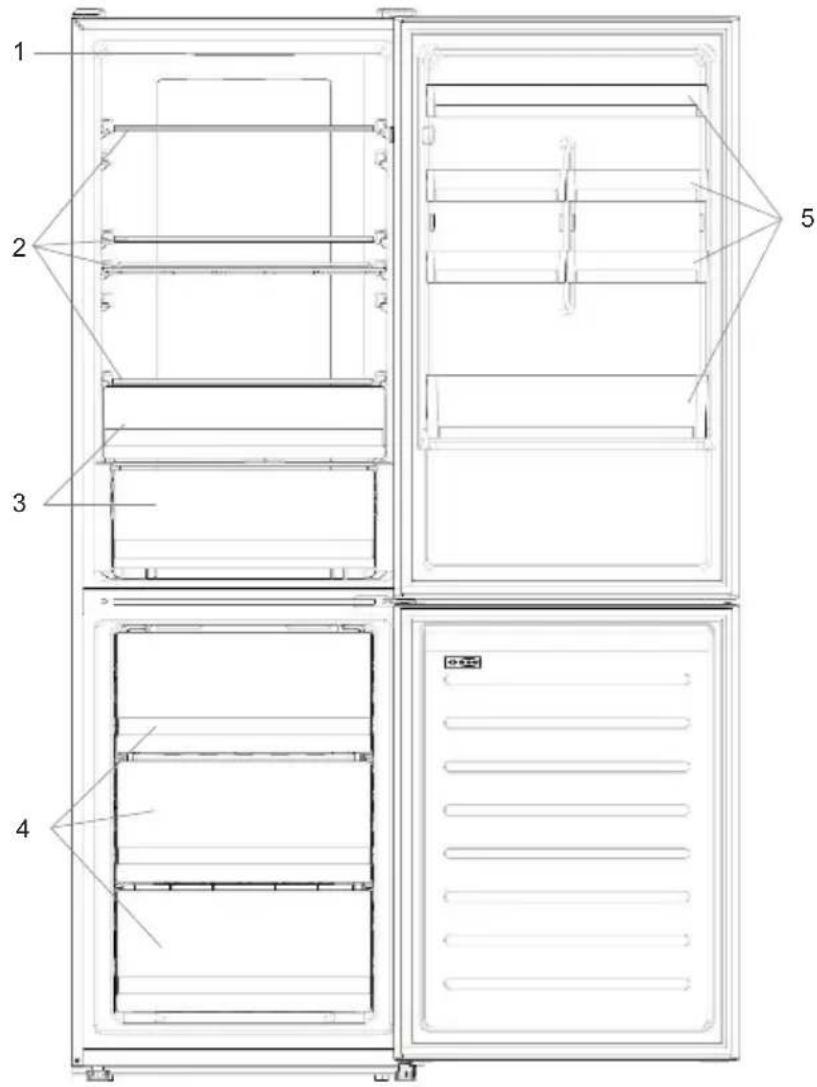
- Control panel
- Shelves
- Crisper drawer
- Freezer compartments
- Door shelves
For the configuration with the greatest energy savings, place drawers, food box and shelves inside the product as shown in the images above. * The images above are for reference only. The actual configuration depends on the physical product or the distributor's statement.
Space requirements
Initial temperature setting
The temperature can be set for both the refrigerator compartment and the freezer compartment. The temperature can be set in steps of 1°C. For the refrigerator compartment, you can choose a temperature from 2°C to 8°C, and for the freezer compartment, from -16 ° C to -24 ° C.
If the temperature is selected in the app, the manual temperature setting is disabled, and all temperature indicators of the corresponding compartment turn off (i.e., if the temperature of the refrigerator compartment is selected in the app, the indicators from 2° to 8° turn off). If the temperature of the freezer compartment is selected in the app, the indicators from -16 ° to -24 ° turn off).
If the temperature is manually set for only one zone (freezer or refrigerator), the selected temperature of the other zone does not change, and the temperature indicator of the selected zone remains on. An acoustic signal is emitted each time the temperature is changed.
Super Cool function
It is recommended to use the Super Cool function if you need to store a large quantity of products (for example, after shopping). The Super Cool function accelerates the cooling of fresh products and protects already stored goods from unwanted warming. When this function is activated, the temperature of the refrigerator compartment is automatically set to 2 ° C.
How to use the Super Cool function:
This function can be activated by a long press of the TEMP button and selecting the refrigerator compartment, followed by a quick press of the TEMP button until the Super Cool indicator lights up; or this function can be activated in the app. When the function is activated, the Super Cool indicator will be constantly on. - To turn off the Super Cool function, press the TEMP button; or turn off this function from the app. - The Super Cool function automatically turns off after more than 30 hours after its activation. When the Super Cool function turns off, the set control level is deactivated, and the previously set cooling level is restored.
Note. The Super Cool and Super Freeze functions cannot be activated simultaneously.
Super Freeze function
The super freeze function accelerates the freezing of fresh products and protects already stored products in the freezer from unwanted warming. If it is necessary to freeze a large quantity of products, it is recommended to activate the Super Freeze function 24 hours before placing them. When the function is activated, the temperature is automatically set to -24°C.
How to use the Super Freeze function:
The Super Freeze function can be activated by pressing the TEMP button repeatedly until the Super Freeze indicator lights up, or by activating it in the app. When Super Freeze is activated, the Super Freeze indicator will remain lit. To turn off the Super Freeze function, press the TEMP button or turn it off in the app. The Super Freeze function automatically turns off after more than 50 hours from activation. When Super Freeze turns off, the temperature control zone turns off and the previously set freezing level is restored.
Note: The Super Cool and Super Freeze functions cannot be activated simultaneously.
Eco Mode
Eco Mode can be activated to optimize the appliance's performance while ensuring good food storage conditions. Eco Mode automatically sets the temperature to 5°C in the refrigerator compartment and -18°C in the freezer compartment.
How to use Eco Mode:
- The function can be activated from the control panel by pressing the "mode" button until the Eco mode indicator lights up (an audible signal confirms the selection), or by selecting the function in the app. When the function is activated, the Eco mode indicator is always on.
- To exit Eco Mode, turn it off in the app or select another function on the control panel. When Eco Mode turns off, the indicator on the control panel turns off, and the previously set cooling levels are restored.
Holiday Function
The Holiday function can be used to reduce the energy consumption of the appliance when it is not used regularly. When this function is activated, the indicators go off (even if the door is open), and the refrigerator compartment will be turned off, while the freezer compartment will operate normally.
How to use the Holiday function:
- The function can be activated from the control panel by pressing the "mode" button until the Holiday indicator lights up (an audible signal confirms the selection), or by selecting the function in the app. When the function is activated, the Holiday indicator is always on.
- To turn off the Holiday function, turn it off in the app or select another function on the control panel. When the Holiday function turns off, the indicator on the control panel turns off, and the previously set cooling levels are restored.
Defrosting
Defrosting of the refrigerator compartment and the freezer compartment is carried out automatically: manual control is not required.
Slider
The fruit and vegetable drawer has a slider that allows you to adjust the humidity inside it: moving it to the right decreases humidity, moving it to the left increases humidity.
Demonstration mode
To enter demonstration mode with the display unlocked, hold down the SET button and press the Wi-Fi button 5 times within 5 seconds. To exit demonstration mode, perform the same operation or turn off the refrigerator.
Error codes
Data exchange error: The light indicators (-16°C; -18°C; -20°C; -22°C; -24°C) in the freezer compartment turn on sequentially; this means that a data exchange error has occurred between the main board and the display board. Contact technical support for assistance in solving the problem - fan
Light indicators (-16°C; -20°C; -22°C; -24°C) in the freezer compartment
flash simultaneously if the fan is not working properly. Contact technical support for assistance in solving the problem.
USING WI-FI
Step 1
- Download the hOn app


GET IT ON
Google Play

Download on the
App Store

EXPLORE IT ON
AppGallery
War 2
Create an account in the app. Log in to the system if you already have an account.
War 3
Follow the instructions for setting up the app.
Using Wi-Fi
If Wi-Fi is not yet configured, when the refrigerator is turned on, it will automatically switch to configuration mode and remain in this status for another 30 minutes. The Wi-Fi icon will blink, and the device will start registering.
Follow the instructions in the app to set up Wi-Fi (see above). - After setting up Wi-Fi and establishing a connection, the Wi-Fi icon will turn on and stay lit. - After 30 minutes without any action, the Wi-Fi function will automatically exit configuration mode. If Wi-Fi is already configured, it will automatically connect according to the configuration data.
To reset the Wi-Fi settings, press the Wi-Fi button and the SET button for 2 seconds.
To disable the Wi-Fi function, press the Wi-Fi button for 3 seconds.
Radio module - technical characteristics
| Частota (OFR) | 2400 MHz-2843.5 MHz |
| ЧастOTы Каналa | 2412...2472 MHz(размершага5 MHz) |
| Мakсимальпая мошиноctы(EIRP) | 100 mW |
The device complies with Directive 2014/53/EU.
DOOR REVERSAL
Required tools: electric screwdriver
- Remove the upper door hinge cover
- Open the upper door hinge
- Remove the upper door hinge cover (left)
- Remove the middle door hinge
- Remove the lower door hinge
- Install the hinge support 7. Install the middle door hinge
- Install the upper door hinge plate
- Install the upper door hinge covers
| Виутreneя лamnotаь не вклочаетс. | • OTCYCTBVE anektpucaCTBa. | • Кабгьп пantaима посторICAL no. Посьгьп Ндьхони и рисьб([См. Perigноздз). |
| • Рожим Holiday ak'timbирobан. | • Отоючite peşим Holiday. | |
| Виутreneя Tempepatурахоюленька и (или) морозленьй камеры недостатуч нзкая. | • Деврь He Зakры. | • Убог�дьсч.ЧТ.Dавець и улготен�ся зашил, дірөнш'm obбалд. |
| • Деврь чаго оTKpbbyaTc. | • He оTKpbayäт'deprрьб зэп Бобхдмocstы в түүлүйс. Темрарын Tempepatуы. | |
| • Нрравиньнай садтояк Tempepatуы. | • Поровь Temash'tay Tempepatуы, олбхдмocstы. Здмocstы Sempoху Tempepatуы (см. Periyunpoху Tempepatуы). | |
| • Холодьноки (или) морозленьая камеры недостатуч нзкая. | • Поровь Temash'tay Tempepatуы, олбхдмocstы. Здмocstы Sempoху Tempepatуы. Камерын Tempepatуы. Темрарын Temash'tay Tempepatуы. | |
| • Tempepatурахужaoош chdь Chmukom нзкая. | • Поровь Temash'tay Temash'tay bOlee Tengme Meztо klinн harpeite Tekquee Semoшени. | |
| • №хашие nomeeшп Temelapуы. | • Поровь Temash'tay Tempepatуы, oлбхдмocstы. Здмocstity Tempepatуы. Камерын Temash'tay Temapkty. | |
| Днохлodьног камеры мokрoe ил псухтувот калл Всдь. | • Слинов Шаанг мokotch 6btyb zacopen. | • Осоктite садногшлшоцн cnomoшь nanooshin mlnn ananoruyho псрmedу,чтбуoda stekala. |
| Налоче калль BODы ил Изморozи на 3adнeн CTENKHe XOLODINHNA. | • B ZabICMOCSTN OT Функши BO Vpemя раobot нэ Задн CTENKHe XOLODINHNA OBpazyOTC Калль BODы ил Изморozь. | • Это He DeФСТ. |
| • №хашие nomeeшп Temelapуы Chdь Chdь Ppomoztby. | • Поровь Nomeeшп Naхален eOBZaTeIbNo Dabai're pordykT Ostby. | |
| • Ectы OTKpbTyb KoHTeHepRы Дду ПИшeБыx прordутбОил Ил XIDKoSTN. | • Bocda naopbayirne prordykts nytsaHryn Hxqipocst. | |
| • Деврь He ZAKPbItb. | •Убог�дьсч.ЧТ.Davець and ylrdne CSEHIM XOANQHbN. Камерын Temash'tay Temapkty. | |
| • Деврь чаго оTKpbbyaTc. | • He оTKpbayä TDApRus bOswDxMocstы в түүлүйс. Темрарын Temash'tay Temapkty. | |
| Налоче BODы в яшkeдд овошe. | • OTCYCTBVE ZILKUPLIIaNGO BoDzya. | •Убог�дьсч.ЧТ.PpOIPoPpHcHn HpOePpHn |
| • Oвоши и Фруktы CO StIshKOM BoIbShIM KolnichestBOM BnAgi. | • OБрпн'tо Фчтч и Oвоши пл actiknoBbMm MaTopriHAMM, Hapri ПпшeВОил ППМH, KIN NOMeSCTte IV S NaXeTы bIbSko KOnToHep | |
| Двигател paobotaert Nepeperlbuho. | • Деврь He ZAKPbItb. | •Убог�дьсч.ЧТ.Davець and ylrdne CSEHIM. |
| • Деврь чаго оTKpbbyaTc. | • He оTKpbayä TDApRus bOswDxMocstы в түүлүйс. Темрарын Temash'tay Temapkty. | |
| • Tempepatурахужaoош chdь Chdь Ovch Бысогь. | •Убог�дьсч.ЧТ.Davець and ylrdne CSEHIM. Темрарын Temash'tay Temapkty. | |
| • Рожорь bIb NpKIOUHEn (He bIbNo PInTHa) B TceHEne HekOTOpRo BOpemeni. | •Овунчо рordу trpabety8-B-12 cazz8,чтбупногstb0tob. | |
| Замороженны рpondуксы ottenBAWOT. | • Okryuaoiəgtematapyrta StIshKOM HnI3KAR | • Поровь Temash'tay TycTbTBO WbOSoe Tengme Meztо klinn harpeite Tekquee Semoшени. |
| • Деврц Морozilньк кamрь He ZAKPbIta. | •Убог�дьсч.ЧТ.Davець and ylrdne CSEHIM. | |
| Синалзаша оTKpbTuOДррцу хOLODINHNA. | • Синалзаша оTKpbTuOДррцу XOLODINHbN (Зыково снIHAN) ChpabatbAeT BCSKIM paz, KoIda ChdZaDZaOCTaTOKpbTuOZbOSteB 60Bee 3 MM | • He octabTЯгп.TDApRus OTOpRus TCKpbTuO, KOrDa B ATOM He NOE6xOIMC 3B6KOBov cHITAN ppekpaiaaTcR, KOrDa Dberza 3akpbaiaTcR. |
| Приорь Издeт takide Аукук, кak 6blykaKaHb Жужжakанe, челkanь, чрл. | • Н�алзаша оTKpbTuOДррцу XOLODINHbN (Зыково снIHAN) ChpabatbAeT BCSKIM paz, KoIda ChdZaDZaOCTaTOKpbTuOZbOSteB 60Bee 3 MM | • Н�алздeтвсьн He TpebEyet. |
| • Рожорь He paskoJIoKeHnHa NaobHn NobovHocstn. | •Оретулгий Нokim,чтбу duBoHobHbHpB. | |
| • Рожорь рindakaaTcK KAKOMy-TO prpdmetу Радom C HIM. | •Удалite prpdmetы bokpyr prindobp. | |
| Приорь He oxlaKjaDaTc, Иndinkatopby Tempepatуы bI csebeilekh BcIPOUeHb. | • Демон��цhiоньн дррим IM псрим IM | •Однл钓чite DEMOHCTPALIOCHHь ржим. |
| Синьна нальдь и Изморозь в морозilьнб Камеpe. | • Рождь Ть He bIbNi Hadnexaasimобazom унakobanb. | •Сerb'da tsatеллho улakobayairre prordykts. |
| • Деврц/YaIrk Prindobр He ZAKPbItb ПOTNO. | •Зakerоite Деру/yaIrk. | |
| • Деврц/YaIrk OTOpRbAnCb CSIIKOM ChAtOу нэ StIshKOM bOlsbOe BpeM. | • He оTKpbayä TDApRus/YaIrk CSIIKOM ChAtOу. | |
| • UyIotNHeMe DREbU/YaIaKIGaZarpIaHNo, ИЗИОБЕНО,NotPeCKaONCb KIлeHecTBeTb TpebOaHIM. | •Однл钓чite YIitOngHe DREbU/YaIrk CSIIKOM Ilin ZAMenHte.YIeHbIM | |
| •Чт-TO BNYTUR He IOIbOJIaRc TReDze/YaIrk | • Поровь Temash'tay YIolK, Давець OTOpRus YIeHbIN BNYTpeHnne Кontштew Туб'da ReDuz/YaIrk | |
| Бokовь STEcheniya prindobу Teppie. | •ЭтоHopmaIbNo. |
Closing
PRODUCT DESCRIPTION 189
Space requirements 189
USE. 190
Use 190
Adjusted temperature 191
Super Cool function. 191
Super Freeze function. 192
Eco mode. 192
Holiday function. 192
Defrosting 192
Fast cooling mode. 193
Error codes 193
USING WI-FI 194
Step 1 194
Step 2 194
Step 3 194
Download on the App Store

EXPLORE IT ON AppGallery
Step 2
USING THE WI-FI NETWORK
Step 1
Download on the App Store

EXPLORE IT ON AppGallery
Step 2
- Create your account in the hOn app or log in if you already have an account
Step 3
PRODUCT DESCRIPTION 219
CONNECTING TO WI-FI 234
Step 1 234
Step 2 234
Step 3 234
Connecting to Wi-Fi 235
REPLACING THE DOOR 236
TROUBLESHOOTING IMBALANCES
ONIC PUNIADY
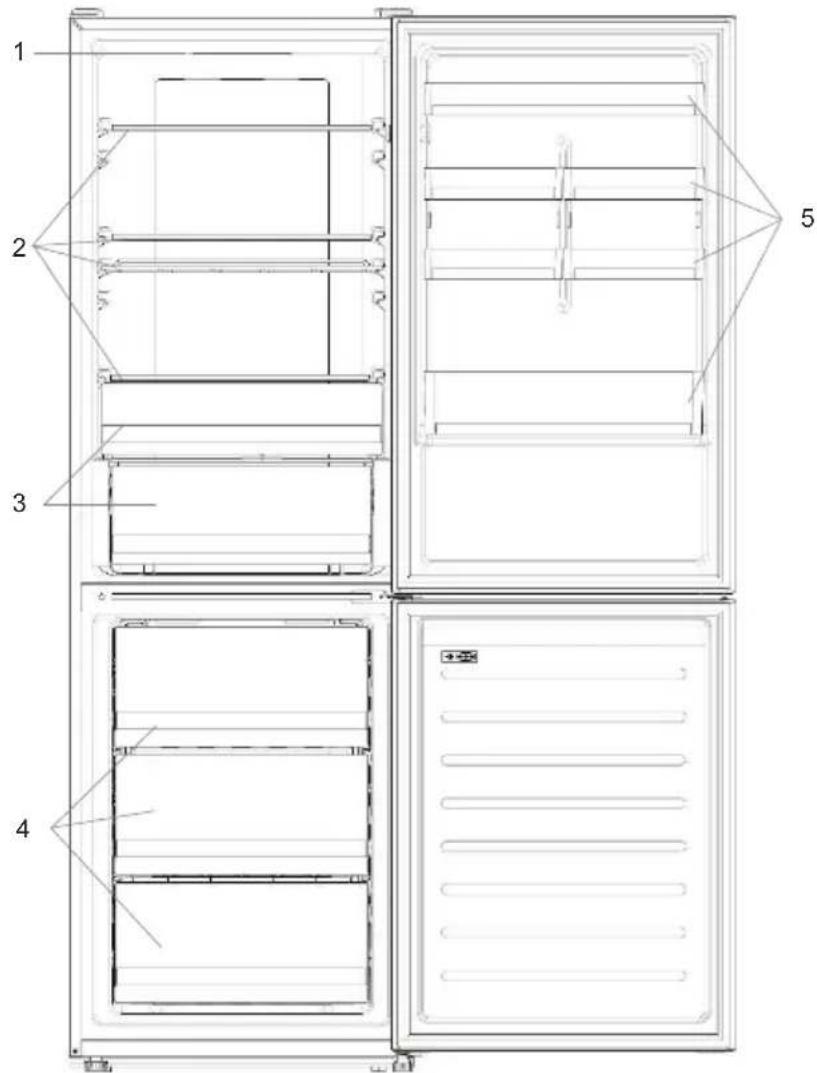
1. Control panel 2. Shelves 3. Fruit and vegetable drawer 4. Freezer drawer 5. Door shelves
*Maximum energy saving mode is activated when the appliance is fully loaded with food and drinks; see figure. ** The figure is for reference only. The actual configuration of the device depends on the model or the specific distributor.
To use the Holiday function:
- The function can be activated from the control panel by pressing the "mode" button until the Holiday function pictogram turns on (a sound signal confirms the selection); or you can select the function in the menu. When the function is activated, the Holiday pictogram will always be on.
- To turn off the Holiday function, press and hold the button until you select the function again for control.
- After turning on the Holiday function, the pictogram on the control panel turns off, and the previously set cooling levels are restored.
Defrosting
Defrosting of the refrigerator and freezer compartments is carried out automatically; manual control is not needed.
Demonstration mode
To activate the demonstration mode with an unlocked display, press and hold the SET button and press the Wi-Fi button 5 times within 5 seconds. To exit the demonstration mode, perform the same actions or turn off the refrigerator.
Error code
- The temperature indicators (-16°C; -18°C; -20°C; -22°C; -24°C) in the freezer compartment light up sequentially; this indicates that an error has occurred between the main control board and the display board. Contact the technical support service to get help in solving the problem.
- Fan
The light indicators (-16°C; -20°C; -22°C; -24°C) in the freezer compartment light up alternately if the fan does not work properly. Contact the technical support service to get help in solving the problem.
Using Wi-Fi
Step 1
Safety precautions


GETITON GooglePlay

Download on the App Store

EXPLORE IT ON AppGallery
Step 2
Create a new account or log into the system if you already have an account
Step 3
Radio equipment - Technical
| Частota (OFR) | 2400 MHz-2843.5 MHz |
| Частоти каналу | 2412...2472 MHz(pondулиху 5 MHz) |
| Мakсималha потужнист(b(EIRP) | 100 mW |
Complies with the essential requirements of Directive 2014/53/EU.
REPLACING THE BATTERY
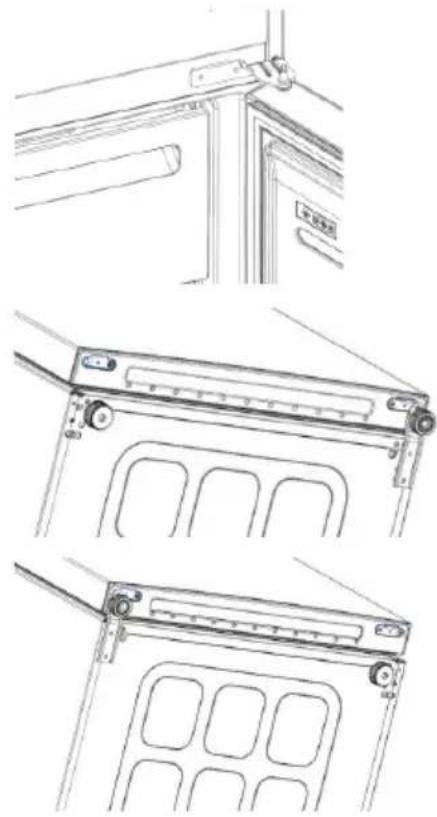
Required tools: Electric screwdriver
- Remove the cover of the top hinge
- Unscrew the top hinge
- Remove the cover of the top hinge (left)
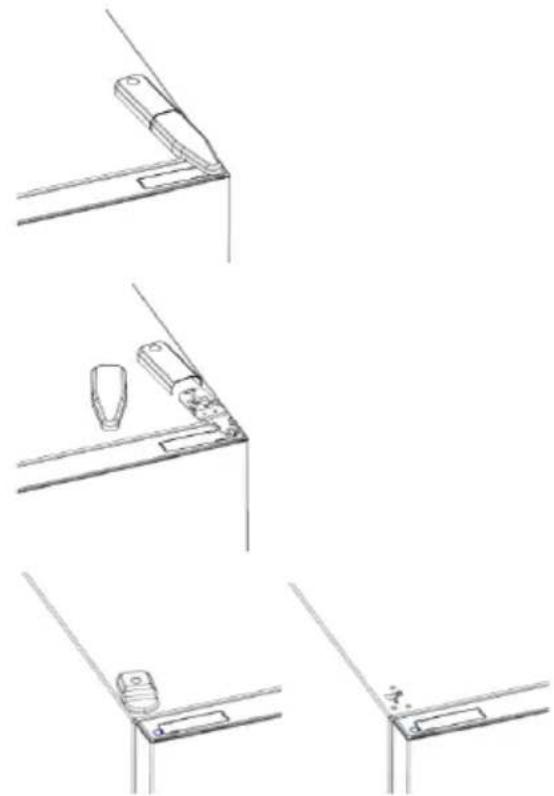
- Remove the middle hinge
- Remove the lower hinge
- Install the hinge support
- Install the middle hinge
- Install the upper hinge plate
- Install the upper hinge cover
INSTRUCTIONS FOR USE
| Виутришия яамнооча не вимка承受я | • Hemae enektrokxbuynehra. | • КубыхшаловнисторICALnyнокушихучим. |
| • Pechim Holiday akimboboahno. | • ПлесьгеловнисторICALnyнокушихучим. | |
| Виутришия tempepatурахонодинькота/aabo морозильно камери Нedoстпьо Ньka. | • Дерцая не зашиени. | • ПлесьгеловнисторICALnyнокушихучим. |
| • Дерцая ч过剩о bIDсиюпьс. | • Дерий ч过剩о bIDсиюпьс. | |
| • Ирравлие надаштувань Tempepatур. | • ПлесьгеловнисторICALnyнокушихучим. | |
| • Холодунник ta/aabo морозильно камери Зановенii. | • Дουемы сters сбадиць Tempepatурхл олдмьноку рыхл. • Рамери Chaym • Унайы Татдиронунсковеденияхл. • Камери | |
| • Tempepatураhalншього сегадobиць заар Ньka. | • ПлесьгеловнисторICALnyнокушихучим. | |
| • Плесьгелов Контакую tizaidho STKIO. | • Дерий ч过剩о bIDсиюпьс. | |
| • Ha 3берigань поладени тетлл поюк'tу харувань. | • ПлесьгеловнисторICALnyноку服务中心. • Дерий ч过剩о bIDсиюпьс. | |
| Пюдукту вхлодундиньсяхларота | • Неравлие надаштувань Tempepatур. | • ПлесьгеловнисторICALnyноку服务中心. • Дерий ч过剩о bIDсиюпьс. |
| • Дерцая ч过剩о bIDсиюпьс. | • Дерий ч过剩о bIDсиюпьс. | |
| Днохлдуншью камери ВОЕ оно prисушиki kpanliti boodin. | • Злесьншь лшалг може buyt zuhnti. | • Осichtь thamnien shanr nangikko abo noqibnimg premedetom, шобodaстicakana. |
| Наимьость краель boodи abiо hamopoc наз задистпь oxлодиньпika. | • Злесьншь лшалг може buyt zuhnti холодундиньсяхларота халодундиньсяхларота халодунд boodin халодунд boodin халодунд boodin халодунд boodin халодунд boodin халодунд boodin халодунд boodin халодунд boodin халодунд boodin халодунд boodin халодунд boodIN халодунд boodIN халодунд boodIN халодунд boodIN халодунд boodIN халодунд boodIN халодунд boodIN халодунд boodIN халодунд boodIN халодунд boodIN халодунд boodin халодунд boodIN халодунд boodIN халодунд boodIN халодунд boodIN халодунд boodIN халодунд boodIN халодунд boodIN халодунд boodIN халодунд boodin халодунд boodin халодунд boodIN халодунд boodIN халодунд boodIN халодунд boodIN халодунд boodIN халодунд boodIN халодунд boodIN халодунд boodin халодунд boodIN халодунд boodin халодунд boodIN халодунд boodIN халодунд boodIN халодунд boodIN халодунд boodIN халодунд boodIN халодунд boodIN халодунд boodin халодунд boodin халодунд boodin халодунд boodIN халодунд boodIN халодунд boodIN халодунд boodIN халодунд boodIN халодунд boodIN халодунд boodin халодунд boodIN халодунд boodIN халодунд boodin халодунд boodIN халодунд boodIN халодунд boodIN халодунд boodIN халодунд boodIN халодунд boodIN халодунд boodin халодунд boodIN халодунд boodin халодунд boodin халодунд boodIN халодунд boodIN халодунд boodIN халодунд boodIN халодунд boodIN халодунд boodIN халодунд boodin халодунд boodin халодунд boodIN халодунд boodin халодунд boodIN халодунд boodIN халодунд boodIN халодунд boodIN халодунд boodIN халодунд boodIN халодунд boodin халодунд boodin халодунд boodin халодунд boodin халодунд boodIN халодунд boodIN халодунд boodIN халодунд boodIN халодунд boodIN халодунд boodin халодунд boodIN халодунд boodIN халодунд boodIN халодунд boodin халодунд boodIN халодунд boodIN халодунд boodIN халодунд boodIN халодунд boodIN халодунд boodin халодунд boodIN халодунд boodIN халодунд boodin халодунд boodin халодунд boodIN халодунд boodIN халодунд boodIN халодунд boodIN халодунд boodIN халодунд boodin халодунд boodIN халодунд boodin халодунд boodIN халодунд boodin халодунд boodIN халодунд boodIN халодунд boodIN халодунд boodIN халодунд boodIN халодунд boodin халодунд boodIN халодунд boodin халодунд boodin халодунд boodin халодунд boodIN халодунд boodIN халодунд boodIN халодунд boodIN халодунд boodIN халодунд boodin халодунд boodin халодунд boodIN халодунд boodIN халодунд boodin халодунд boodIN халодунд boodIN халодунд boodIN халодунд boodIN халодунд boodIN халодунд boodin халодунд boodin халодунд boodIN халодунд boodin халодунд boodin халодунд boodIN халодунд boodIN халодунд boodIN халодунд boodIN халодунд boodIN халодунд boodin халодунд boodin халодунд boodin халодунд boodIN халодунд boodin халодунд boodIN халодунд boodIN халодунд boodIN халодунд boodIN халодунд boodIN халодунд boodin халодунд boodin халодунд boodin халодунд boodin халодунд boodin халодунд boodIN халодунд boodIN халодунд boodIN халодунд boodIN халодунд boodin халодунд boodIN халодунд boodIN халодунд boodIN халодунд boodIN халодунд boodin халодунд boodIN халодунд boodIN халодунд boodIN халодунд boodin халодунд boodin халодунд boodIN халодунд boodIN халодунд boodIN халодунд boodIN халодунд boodin халодунд boodIN халодунд boodIN халодунд boodin халодунд boodIN халодунд boodin халодунд boodIN халодунд boodIN халодунд boodIN халодунд boodIN халодунд boodin халодунд boodIN халодунд boodIN халодунд boodin халодунд boodin халодунд boodin халодунд boodIN халодунд boodIN халодунд boodIN халодунд boodIN халодунд boodin халодунд boodIN халодунд boodin халодунд boodIN халодунд boodIN халодунд boodin халодунд boodIN халодунд boodIN халодунд boodIN халодунд boodIN халодунд boodin халодунд boodIN халодунд boodin халодунд boodIN халодунд boodin халодунд boodin халодунд boodIN халодунд boodIN халодунд boodIN халодунд boodIN халодунд boodin халодунд boodIN халодунд boodin халодунд boodin халодунд boodIN халодунд boodin халодунд boodIN халодунд boodIN халодунд boodIN халодунд boodIN халодунд boodin халодунд boodIN халодунд boodin халодунд boodin халодунд boodin халодунд boodin халодунд boodIN халодунд boodIN халодунд boodIN халодунд boodIN халодунд boodin халодунд boodin халодунд boodIN халодунд boodIN халодунд boodIN халодунд boodin халодунд boodIN халодунд boodIN халодунд boodIN халодунд boodIN халодунд boodin халодунд boodin халодунд boodIN халодунд boodIN халодунд boodin халодунд boodin халодунд boodIN халодунд boodIN халодунд boodIN халодунд boodIN халодунд boodin халодунд boodin халодунд boodIN халодунд boodin халодунд boodIN халодунд boodin халодунд boodIN халодунд boodIN халодунд boodIN халодунд boodIN халодунд boodin халодунд boodin халодунд boodIN халодунд boodin халодунд boodin халодунд boodin халодунд boodIN халодунд boodIN халодунд boodIN халодунд boodIN халодунд boodin халодунд boodin халодунд boodin халодунд boodIN халодунд boodIN халодунд boodin халодунд boodIN халодунд boodIN халодунд boodIN халодунд boodIN халодунд boodin халодунд boodin халодунд boodin халодунд boodIN халодунд boodin халодунд boodin халодунд boodIN халодунд boodIN халодунд boodIN халодунд boodIN халодунд boodin халодунд boodin халодунд boodin халодунд boodin халодунд boodIN халодунд boodin халодунд boodIN халодунд boodIN халодунд boodIN халодунд boodIN халодунд boodin халодунд boodin халодунд boodin халодунд boodin халодунд boodin халодунд boodin халодунд boodIN халодунд boodIN халодунд boodIN халодунд boodin халодунд boodIN халодунд boodIN халодунд boodIN халодунд boodin халодунд boodIN халодунд boodin халодунд boodIN халодунд boodIN халодунд boodIN халодунд boodin халодунд boodIN халодунд boodIN халодунд boodIN халодунд boodin халодунд boodin халодунд boodin халодунд boodIN халодунд boodIN халодунд boodIN халодунд boodin халодунд boodIN халодунд boodIN халодунд boodin халодунд boodIN халодунд boodIN халодунд boodin халодунд boodIN халодунд boodIN халодунд boodIN халодунд boodin халодунд boodIN халодунд boodIN халодунд boodin халодунд boodIN халодунд boodin халодунд boodin халодунд boodIN халодунд boodIN халодунд boodIN халодунд boodin халодунд boodIN халодунд boodIN халодунд boodin халодунд boodin халодунд boodIN халодунд boodin халодунд boodIN халодунд boodIN халодунд boodIN халодунд boodin халодунд boodIN халодунд boodIN халодунд boodin халодунд boodin халодунд boodin халодунд boodin халодунд boodIN халодунд boodIN халодунд boodIN халодунд boodin халодунд boodIN халодунд boodin халодунд boodIN халодунд boodIN халодунд boodin халодунд boodin халодунд boodIN халодунд boodIN халодунд boodIN халодунд boodin халодунд boodIN халодунд boodin халодунд boodIN халодунд boodin халодунд boodIN халодунд boodin халодунд boodIN халодунд boodIN халодунд boodIN халодунд boodin халодунд boodIN халодунд boodin халодунд boodIN халодунд boodin халодунд boodin халодунд boodin халодунд boodIN халодунд boodIN халодунд boodIN халодунд boodin халодунд boodIN халодунд boodin халодунд boodin халодунд boodIN халодунд boodIN халодунд boodin халодунд boodIN халодунд boodIN халодунд boodIN халодунд boodin халодунд boodIN халодунд boodin халодунд boodin халодунд boodIN халодунд boodin халодунд boodin халодунд boodIN халодунд boodIN халодунд boodIN халодунд boodin халодунд boodIN халодунд boodin халодунд boodin халодунд boodin халодунд boodIN халодунд boodin халодунд boodIN халодунд boodIN халодунд boodIN халодунд boodin халодунд boodIN халодунд boodin халодунд boodin халодунд boodin халодунд boodin халодунд boodin халодунд boodIN халодунд boodIN халодунд boodIN халодунд boodin халодунд boodin халодунд boodIN халодунд boodIN халодунд boodIN халодунд boodin халодунд boodin халодунд boodIN халодунд boodIN халодунд boodin халодунд boodIN халодунд boodin халодунд boodIN халодунд boodIN халодунд boodIN халодунд boodin халодунд boodin халодунд boodIN халодунд boodIN халодунд boodin халодунд boodin халодунд boodin халодунд boodIN халодунд boodIN халодунд boodIN халодунд boodin халодунд boodin халодунд boodIN халодунд boodin халодунд boodIN халодунд boodIN халодунд boodin халодунд boodIN халодунд boodIN халодунд boodIN халодунд boodin халодунд boodin халодунд boodIN халодунд boodin халодунд boodIN халодунд boodin халодунд boodin халодунд boodIN халодунд boodIN халодунд boodIN халодунд boodin халодунд boodin халодунд boodIN халодунд boodin халодунд boodin халодунд boodIN халодунд boodin халодунд boodIN халодунд boodIN халодунд boodIN халодунд boodin халодунд boodin халодунд boodIN халодунд boodin халодунд boodin халодунд boodin халодунд boodin халодунд boodIN халодунд boodIN халодунд boodIN халодунд boodin халодунд boodin халодунд boodin халодунд boodIN халодунд boodIN халодунд boodin халодунд boodin халодунд boodIN халодунд boodIN халодунд boodIN халодунд boodin халодунд boodin халодунд boodin халодунд boodIN халодунд boodin халодунд boodIN халодунд boodin халодунд boodIN халодунд boodIN халодунд boodIN халодунд boodin халодунд boodin халодунд boodin халодунд boodIN халодунд boodin халодунд boodin халодунд boodin халодунд boodIN халодунд boodIN халодун徳 хало徳 хало徳 хало徳 хало徳 хало徳 хало徳 хало徳 хало徳 хало徳 хало徳 хало徳 хало徳 хало徳 хало徳 хало徳 хало徳 хало徳 xlaaln xlaaln xlaaln xlaaln xlaaln xlaaln xlaaln xlaaln xlaaln xlaaln xlaaln xlaaln xlaaln xlaaln xlaaln xlaaln xlaaln xlaaln xlaaln xlaaln xlaalN xlaaln xlaaln xlaaln xlaaln xlaaln xlaaln xlaaln xlaaln xlaaln xlaaln xlaaln xlaaln xlaaln xlaaln xlaaln xlaaln xlaaln xlaaln xlaaln xlaalr xlaalr xlaalr xlaalr xlaalr xlaalr xlaalr xlaalr xlaalr xlaalr xlaalr xlaalr xlaalr xlaalr xlaalr xlaalr xlaalr xlaalr xlaalr xlaalr xlaal r xlaalr xlaalr xlaalr xlaalr xlaalr xlaalr xlaalr xlaalr xlaalr xlaalr xlaalr xlaalr xlaalr xlaalr xlaalr xlaalr xlaalr xlaalr xlaalr xlaalrl xlaalr xlaalr xlaalr xlaalr xlaalr xlaalr xlaalr xlaalr xlaalr xlaalr xlaalr xlaalr xlaalr xlaalr xlaalr xlaalr xlaalr xlaalr xlaalr xlaalrr xlaalr xlaalr xlaalr xlaalr xlaalr xlaalr xlaalr xlaalr xlaalr xlaalr xlaalr xlaalr xlaalr xlaalr xlaalr xlaalr xlaalr xlaalr xlaalr xlaalRr xlaalr xlaalr xlaalr xlaalr xlaalr xlaalr xlaalr xlaalr xlaalr xlaalr xlaalr xlaalr xlaalr xlaalr xlaalr xlaalr xlaalr xlaalr xlaalr xlaALr xlaalr xlaalr xlaalr xlaalr xlaalr xlaalr xlaalr xlaalr xlaalr xlaalr xlaalr xlaalr xlaalr xlaalr xlaalr xlaalr xlaalr xlaalr xlaalr xlaaRr xlaalr xlaalr xlaalr xlaalr xlaalr xlaalr xlaalr xlaalr xlaalr xlaalr xlaalr xlaalr xlaalr xlaalr xlaalr xlaalr xlaalr xlaalr xlaalr xLAralr xlaalr xlaalr xlaalr xlaalr xlaalr xlaalr xlaalr xlaalr xlaalr xlaalr xlaalr xlaalr xlaalr xlaalr xlaalr xlaalr xlaalr xlaalr xlaalr xla alr xlaalr xlaalr xlaalr xlaalr xlaalr xlaalr xlaalr xlaalr xlaalr xlaalr xlaalr xlaalr xlaalr xlaalr xlaalr xlaalr xlaalr xlaalr xlaalr xlaallr xlaalr xlaalr xlaalr xlaalr xlaalr xlaalr xlaalr xlaalr xlaalr xlaalr xlaalr xlaalr xlaalr xlaalr xlaalr xlaalr xlaalr xlaalr xlaalr xlaai r xlaalr xlaalr xlaalr xlaalr xlaalr xlaalr xlaalr xlaalr xlaalr xlaalr xlaalr xlaalr xlaalr xlaalr xlaalr xlaalr xlaalr xlaalr xlaalr xlaALRr xlaalr xlaalr xlaalr xlaalr xlaalr xlaalr xlaalr xlaalr xlaalr xlaalr xlaalr xlaalr xlaalr xlaalr xlaalr xlaalr xlaalr xlaalr xlaalr x laalr xlaalr xlaalr xlaalr xlaalr xlaalr xlaalr xlaalr xlaalr xlaalr xlaalr xlaalr xlaalr xlaalr xlaalr xlaalr xlaalr xlaalr xlaalr xlaalr x laALRr xlaalr xlaalr xlaalr xlaalr xlaalr xlaalr xlaalr xlaalr xlaalr xlaalr xlaalr xlaalr xlaalr xlaalr xlaalr xlaalr xlaalr xlaalr xlaalr XLAralr XLAralr XLAralr XLAralr XLAralr XLAralr XLAralr XLAralr XLAralr XLAralr XLAralr XLAralr XLAralr XLAralr XLAralr XLAralr XLAralr XLAralr XLAralr XLAralr XLAeralr XLAralr XLAralr XLAralr XLAralr XLAralr XLAralr XLAralr XLAralr XLAralr XLAralr XLAralr XLAralr XLAralr XLAralr XLAralr XLAralr XLAralr XLAralr XLAralr XLAalr XLAalr XLAalr XLAalr XLAalr XLAalr XLAalr XLAalr XLAalr XLAalr XLAalr XLAalr XLAalr XLAalr XLAalr XLAalr XLAalr XLAalr XLAalr XLAalr XLA alr XLA alr XLA alr XLA alr XLA alr XLA alr XLA alr XLA alr XLA alr XLA alr XLA alr XLA alr XLA alr XLA alr XLA alr XLA alr XLA alr XLA alr XLA alr XLA alr XLAalr XLA alr XLA alr XLA alr XLA alr XLA alr XLA alr XLA alr XLA alr XLA alr XLA alr XLA alr XLA alr XLA alr XLA alr XLA alr XLA alr XLA alr XLA alr XLAalr XLAalr XLA alr XLA alr XLA alr XLA alr XLA alr XLA alr XLA alr XLA alr XLA alr XLA alr XLA alr XLA alr XLA alr XLA alr XLA alr XLA alr XLA alr XLAalr XLA alr XLAalr XLA alr XLA alr XLA alr XLA alr XLA alr XLA alr XLA alr XLA alr XLA alr XLA alr XLA alr XLA alr XLA alr XLA alr XLA alr XLA alr XLA alr XLA allr XLA alr XLA alr XLA alr XLA alr XLA alr XLA alr XLA alr XLA alr XLA alr XLA alr XLA alr XLA alr XLA alr XLA alr XLA alr XLA alr XLA alr XLA alr XLA alr XLA allr XLA alr XLA allr XLA alr XLA alr XLA alr XLA alr XLA alr XLA alr XLA alr XLA alr XLA alr XLA alr XLA alr XLA alr XLA alr XLA alr XLA alr XLA alr XLA alr XLA allr XLA alr XLA aIralr XLA alr XLA alr XLA alr XLA alr XLA alr XLA alr XLA alr XLA alr XLA alr XLA alr XLA alr XLA alr XLA alr XLA alr XLA alr XLA alr XLA alr XLA alr XLA alr XLA aIralr XLA alr XLA alr XLA alr XLA alr XLA alr XLA alr XLA alr XLA alr XLA alr XLA alr XLA alr XLA alr XLA alr XLA alr XLA alr XLA alr XLA alr YdaRr YdaRr YdaRr YdaRr YdaRr YdaRr YdaRr YdaRr YdaRr YdaRr YdaRr YdaRr YdaRr YdaRr YdaRr YdaRr YdaRr YdaRr YdaRr YdaRr Yda Rr YdaRr YdaRr YdaRr YdaRr YdaRr YdaRr YdaRr YdaRr YdaRr YdaRr YdaRr YdaRr YdaRr YdaRr YdaRr YdaRr YdaRr YdaRr YdaRr YdaRIr YdaRIr YdaRIr YdaRIr YdaRIr YdaRIr YdaRIr YdaRIr YdaRIr YdaRIr YdaRIr YdaRIr YdaRIr YdaRIr YdaRIr YdaRIr YdaRIr YdaRIr YdaRIr YdaRIr YdaIRr YdaIRr YdaIRr YdaIRr YdaIRr YdaIRr YdaIRr YdaIRr YdaIRr YdaIRr YdaIRr YdaIRr YdaIRr YdaIRr YdaIRr YdaIRr YdaIRr YdaIRr YdaIRr YdaIRr Yda IRr YdaIRr YdaIRr YdaIRr YdaIRr YdaIRr YdaIRr YdaIRr YdaIRr YdaIRr YdaIRr YdaIRr YdaIRr YdaIRr YdaIRr YdaIRr YdaIRr YdaIRr YdaIRr YdaIRr YdaIKRr YdaIRRr YdaIKRr YdaIKRr YdaIKRr YdaIKRr YdaIKRr YdaIKRr |
233 233 234 234 235 235 "Super Cool 236. "Super Freeze 236. "ECO 237 237 238 238 238. 239 WI-FI 236 1 239 2. 239 3 240. Wi-Fi 241
1
5aill 1 2 3 4 .5
11 11
aalwaii ciibio
Super Freeze aagjg jy Jn Super Freeze aagj Super Freeze aagj g Jn Super Freeze aagj Super all jy Jn Jn Jn Jn Jn Jn Jn Jn Jn Jn Jn Jn Jn Jn Jn Jn Jn Jn Jn Jn Jn Jn Jn Jn Jn Jn Jn Jn Jn Jn Jn Jn Jn Jn Jn Jn Jn Jn Jn Jn Jn Jn Jn Jn Jn Jn Jn Jn Jn Jn J n Jn J n J n J n J n J n J n J n J n J n J n J n J n J n J n J n J n J n J n J n J n J n J n J n J n J n J n J n
.A .B .C .D
jlll jlll lillil 1111 jlll jlll
4
j-18.
15 15
4 26 4 18 6 26 3 26 26 26 26 26 26 26 26 26 26 26 26 26 26 26 26 26 26 26 26 26 26 26 26 26 26 26 26 26 26 26 26 26 26
.
aaiiaai
1 1 1 1 1 1 1 1 1 1 1 1 1 1 1 1 1 1 1 1 1 1 1 1 1 1 1 1 1 1 1 1 1 1 1 1 1 1 1 1 1 1 1
L 1000000000000000000000000000000000000000000000000000000000000000000000000000000000
1.
"Super Cool
Joo. (el jll Jlll l) plaln no s y S k a k j n j Supcr Cool 1g SuperCool g h SuperCool
Super Cool
bll aLLI brrnrrrrrrrrrrrrrrrrrrrrrrrrrrrrrrrrrrrrrrrrrrrrrrrrrrrrrrrrrrrrrrrrrrrrrrrrrrrrr rr r r r r r r r r r r r r r r r r r r r r r r r r r r r r r r r r r r r r r r r r r r r r r
.
Super Cool LED
Super Cool
•
aclu 30 jia jyjai yjai Super Cool
•
Sper Cool 1
•
a a
Super Freeze Super Cool
J 12 J 12 J 16] J 16]
aagall
WI-FI
- hOn


Jbbl bI Jg 1hOn
3
- SUMMARY
- PRODUCT DESCRIPTION
- USE
- SPACE REQUIREMENTS
- CUSTOMIZED TEMPERATURE
- SUPER COOL FUNCTION
- SUPER FREEZE FUNCTION
- ECO MODE
- HOLIDAY FUNCTION
- DEFROSTING
- SLIDER
- DEMO MODE
- ERROR CODES
- WI-FI USE
- STEP
- RADIO MODULE - TECHNICAL DATA
- DOOR REVERSIBILITY
- MODE
- PAGE
- USING WI-FI
- VIEW
- INITIAL TEMPERATURE SETTING
- DEMONSTRATION MODE
- WAR
- DOOR REVERSAL
- CLOSING
- USING THE WI-FI NETWORK
- ONIC PUNIADY
- ERROR CODE
- RADIO EQUIPMENT - TECHNICAL
- REPLACING THE BATTERY
- AAIIAAI
- SUPER COOL
Brand : HOOVER
Model : HOCE7620CX
Category : Refrigerator