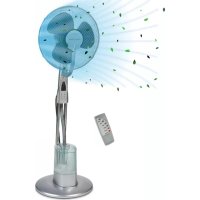
PCVL 3111 B - Fan ProfiCare - Free user manual and instructions
Find the device manual for free PCVL 3111 B ProfiCare in PDF.



| Product Type | Pedestal fan with humidifier |
| Brand | ProfiCare |
| Model | PCVL 3111 B |
| Power supply | 220-240 V~, 50 Hz |
| Power consumption | 85 W |
| Net weight | Approx. 3.60 kg |
| Protection class | I |
| Recommended area | Up to 70 m² |
| Water tank capacity | Approx. 3 liters |
| Speed levels | 3 (LO, MI, HI) |
| Ventilation modes | Natural (NAT), Sleep (SLE), Normal (NOR) |
| Oscillation | Yes, approx. 60° |
| Timer | Up to 7.5 h (30 min increments) |
| Mist function (humidifier) | 3 levels (LO, MI, HI) |
| Remote control | Yes, range approx. 8 m |
| Remote control batteries | 2 x AAA 1.5 V |
| Fan tilt | Approx. 10° |
| Protective grille | Removable |
| Housing material | Plastic |
| Color | Black |
| Included accessories | Remote control, screws, nuts, tubes, base, grilles |
| Tank maintenance | Clean every 3 days, descale with white vinegar |
Frequently Asked Questions - PCVL 3111 B ProfiCare
User questions about PCVL 3111 B ProfiCare
0 question about this device. Answer the ones you know or ask your own.
Ask a new question about this device
Download the instructions for your Fan in PDF format for free! Find your manual PCVL 3111 B - ProfiCare and take your electronic device back in hand. On this page are published all the documents necessary for the use of your device. PCVL 3111 B by ProfiCare.
USER MANUAL PCVL 3111 B ProfiCare
natural_image
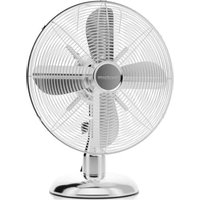
Modern office fan with three blades and a glass base, no visible text or symbolsÜbersicht Montage
Humidificateur (Fig. e–f)......29
Utilisation....29
(Piles non fournies.)
Thank you for choosing our product. We hope you will enjoy using the appliance.
Symbols in this Instruction Manual
Important information for your safety is specially marked. It is essential to comply with these instructions in order to avoid accidents and prevent damage to the appliance:

WARNING:
This warns you of dangers to your health and indicates possible injury risks.

CAUTION:
This refers to possible hazards to the appliance or other objects.

NOTE:
This highlights tips and information.
Contents
Overview of the Components....3
Assembly Overview....4
General Notes......50
Special Safety Precautions for this Appliance....51
Handling of Batteries....53
Unpacking the Appliance....53
Overview of the Components/Scope of Delivery......53
Notes for Use....53
Electrical Connection 53
Fitting Batteries into the Remote Control....54
Remote Control Range 54
Position....54
Assembly Instructions....54
Base Unit (Fig. a–c) 54
Fan (Fig. d)....54
Humidifier (Fig. e - f)....54
Operation 55
Fill with Water....55
Basic Settings 55
ON/OFF Switch ON/OFF 55
SPEED Speed....55
TIMER Timer 55
MODE Wind Change Functions....56
OSC Oscillation 56
MOIST Mist....56
Refill Water....56
Shutting Off 56
Cleaning 56
Housing 56
Water Tank 56
Humidifier Base....57
Decalcification....57
Troubleshooting....57
Technical Data....57
Disposal 57
Battery Disposal 57
Meaning of the "Dustbin" Symbol 57
General Notes
Read the operating instructions carefully before putting the appliance into operation and keep the instructions including the warranty, the receipt and, if possible, the box with the internal packing. If you give this appliance to other people, please also pass on the operating instructions.
- The appliance is designed exclusively for private use and for the envisaged purpose. This appliance is not fit for commercial use.
- Do not use it outdoors. Keep it away from sources of heat, direct sunlight, humidity (never dip it into any liquid) and sharp edges. Do not use the appliance with wet hands. If the appliance is humid or wet, unplug it immediately.
- When cleaning or putting it away, switch off the appliance and always pull out the plug from the socket (pull the plug itself, not the lead) if the appliance is not being used and remove the attached accessories.
- Do not leave the appliance unattended for hours at a time. Do not leave your home whilst the appliance is in operation.
- The appliance and the mains lead have to be checked regularly for signs of damage. If damage is found the appliance must not be used.
- Use only original spare parts.
- In order to ensure your children's safety, please keep all packaging (plastic bags, boxes, polystyrene etc.) out of their reach.

WARNING:
Do not allow small children to play with the plastic foil.
There is a danger of suffocation!
Special Safety Precautions for this Appliance

Clean the water tank every 3 days.

WARNING:
- Micro-organisms that may be present in the water or in the environment where the appliance is used or stored, can grow in the water reservoir and be blown in the air causing very serious health risks when the water is not renewed and the tank is not cleaned properly every 3 days.
- Unplug the appliance during filling and cleaning.

CAUTION:
- The integrated humidifier works by ultrasound. This sound may be disturbing to pets.
- Do not place the appliance directly next to heating appliances or electrical appliances.
-
Do not scratch the ultrasound probe.
-
Be aware that high humidity levels may encourage the growth of biological organisms in the environment.
- Do not permit the area around the humidifier to become damp or wet. If dampness occurs, turn the output of the humidifier down. If the humidifier output volume cannot be turned down, use the humidifier intermittently. Do not allow absorbent materials, such as carpeting, curtains, drapes, or tablecloths, to become damp.
-
Empty the tank and refill every third day. Before refilling, clean it with fresh tap water. Remove any scale, deposits, or film that has formed on the sides of the tank or on interior surfaces, and wipe all surfaces dry.
-
Never leave water in the reservoir when the appliance is not in use.
- Empty and clean the humidifier before storage. Clean the humidifier before next use.
- Never stick fingers or other objects through the protection grid.
- Watch out for long hair! It can be caught in the fan owing to the air turbulence!
- Use the appliance only with the protection grids on!
- If you need to remove the fan guard, first switch off the appliance and disconnect the mains plug.
- Select a stable base to avoid the tipping of the fan during use!
- Do not place the appliance immediately next to stoves or other sources of heat.
- Do not repair the appliance by yourself. Always contact an authorized technician. If the supply cord is damaged, it must be replaced by the manufacturer, its service agent or similarly qualified persons in order to avoid a hazard.
- This appliance can be used by children aged from 8 years and above and persons with reduced physical, sensory or mental capabilities or lack of experience and knowledge if they have been given supervision or instruction concerning use of the appliance in a safe way and understand the hazards involved.
• Children shall not play with the appliance. - Cleaning and user maintenance shall not be made by children without supervision.
- Do not immerse the appliance into water for cleaning. Please follow the instructions as stipulated in the chapter “Cleaning”.
Handling of Batteries

Do not charge!

Do not disassemble!

Insert correctly!

Keep away from children!

Do not short circuit!

Danger of explosion!
Do not expose batteries to intense heat, such as sunlight, fire or similar.
- Batteries can leak battery acid. If the appliance is not in use for a long period of time, remove the batteries.
- In case of battery leakage, make sure not to rub the liquid into your eyes or mucous membranes. In case of contact, wash your hands and rinse your eyes with clear water. Seek medical attention if any discomfort persists.
- Different battery types or new and used batteries must not be used together.
- Batteries are not to be disposed of together with domestic wastes. Dispose of the used batteries at the relevant collection bin or at your dealer's.
Unpacking the Appliance
- Remove the appliance from the package.
- Remove all packaging material such as films, filler, cable holders and cardboard.
- Check the delivery contents for completeness.
- Should the package contents be incomplete or damages be found, do not take the appliance into operation. Take it immediately back to the dealer.
i NOTE:
Dust or production residues can be located on the appliance. We recommend to clean the appliance as described under "Cleaning".
Overview of the Components / Scope of Delivery
Page 3
1 Hook
2 Fastening hooks
3 Propeller
4 Protection grid
5 Mounting screw M2,5*8 mm with nut
6 Switch housing
7 Stand tubes
8 Tube with tank cap
9 Water tank
10 Humidifier base
11 Stand with cover
Page 4: Assembly Overview
12 M5*18 mm screws (4 ×)
13 Base (Base plate)
14 Metal plate with mounting holes (1 ×)
15 M5 nuts (4 ×)
16 Cover of the stand (2 ×)
17 M6*10 mm screws with nuts
18 Motor
19 Rear protection grid
20 Nut for rear protection grid
21 Attachment screw for propeller
22 Front protection grid
Not Shown:
- Remote control
- ST4*25 mm screw for fastening the humidifier to the stand
- M6 nuts to fasten the motor to the stand tubes (2 ×)
Notes for Use
The appliance is designed for rooms with dimensions of up to 60 - 70 m². This depends on ceiling height, climate etc. You can use this appliance to increase the air humidity in a dry environment. This offers the following benefits:
- It ensures a healthy room climate and thus your well-being.
- A relative humidity ranging from 45 % to 65 % can provide for pleasant air humidity.
- We recommend using this air humidifier at temperatures between 5^ and 40^ and low humidity.
- It prevents the raising of dust and is therefore ideally suited for allergy sufferers.
- Your skin is supplied with moisture.
- It protects your furniture from drying out and prevents a forming of gaps in parquet or wood floors.
- Electrostatic charge in the air is suppressed.
- The appliance works best if doors and windows are kept closed when used in mist mode.
i NOTE:
Do not forget to air on a regular basis.
Electrical Connection
-
Before inserting the plug into the socket. Make sure that the mains voltage to be used matches that of the appliance. You can find this information on the nameplate.
-
Connect the appliance to a duly installed protective contact socket. The indicator lamp POWER shows that the power supply is connected.
Fitting Batteries into the Remote Control (Batteries not supplied.)
- Open the lid of the battery compartment on the rear of the remote control.
- Insert 2 MICRO batteries of type R03 "AAA" 1.5 V.
- Please ensure the correct polarity. Details can be found in the battery compartment.
- Close the battery compartment.
Remote Control Range
The remote control has a range of ca. 8 metres. If this range becomes shorter, the batteries must be changed.
• To use the remote control, point it at the sensor on the front of the switch housing.
- Make sure there are no obstacles between the remote control and the sensor.
- The angle of the remote control to the remote control sensor should not exceed 30^ to the right, left, up, and down.
Position
• The ideal position is a non-slip, flat surface.
- Do not place the appliance onto wood, to avoid deformation due to moisture.
- Watch out for electrical devices close by. They must not get wet.
- Keep a distance of 2 metres from electrical equipment and delicate furniture to protect these from moisture.
Assembly Instructions
The appliance must be fully assembled before use! We recommend that you refer to the figures „Overview of the Components“ and „Assembly overview“ when assembling.
Base Unit (Fig. a - c)
- Screw the tubes (7) onto the stand (13). Use the four screws (12), the metal plate (14), and the four nuts (15).
- Attach the cover of the stand (16) to the stand tubes.

NOTE:
The nuts and screws (17) are pre-installed on the rear of the switch housing.
- Check if the screws (17) possibly have been screwed into deeply. In this case, turn the screws back a little. Do not screw them out all the way!

NOTE:
If a screw or a bolt should have dropped off, proceed as follows:

NOTE:
- Hold the pre-assembled unit (motor (18), switch housing (6), and humidifier base (10)) so that the motor points down.
- Insert one nut (M6) each into the shaft at the side of the recesses for the tubes.
-
Screw the two screws (17) on the rear of the switch housing lightly into the nuts.
-
Set the pre-assembled unit for a depth of approximately 3 cm onto the stand tubes.

NOTE:
The humidifier cable must be routed between the two tubes.
Secure the pre-assembled unit to the stand tubes by tightening the two screws (17).
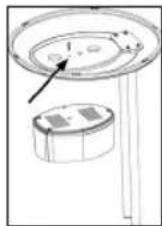
- Fasten the base of the humidifier (10) with the large screw (ST4*25 mm) to the base of the stand. For this, insert the screw from below through the stand and its cover into the small outer bore (Fig. on the right).
Fan (Fig. d)
- Remove the pre-installed nut (20) from the motor (18). Keep it close to hand.
- Align the rear protection grid (19) with the motor recesses (18).

NOTE:
The handle must point upwards.
- Tighten the nut (20) for the rear protection grid clockwise.
- Attach the propeller (3). When doing so, use the guide pin on the motor shaft.
- Tighten the screw (21) for the propeller anti-clockwise.
- Remove the pre-fitted screw and nut (5) from the front protection grid (22). Keep it close to hand.
- Open the fastening hooks (2) at the front protection grid.
- Attach the front protection grid by engaging the groove of the hook (1) with the rear protection grid.

NOTE:
The holes for the screw (5) in the front and rear protection grid must be aligned.
- Secure the protection grid with the screw and the nut (5).
- Close the four fastening hooks (2).
Humidifier (Fig. e - f)
The tube already may have been installed on the switch housing. In this case, continue the assembly from item 18.
- Feed the tube (8) from front to back between the two stand tubes (7). Then insert the tube from the bottom upwards through the opening on the underside of the switch housing (6).

NOTE:
The end of the tube with the tank cap must be positioned at the front above the humidifier.
- Insert the tube from the back to the front through the opening on the top of the switch housing.
- Pull the tube tight so that it lies flat against the back of the switch housing.

NOTE:
The two ends of the tube should have approximately the same length.
- Connect the top end of the tube to the tube connector on the protection grid (22).

NOTE:
The tube above the switch housing must not "sag". Water which accumulates in the tube prevents the formation of the mist. If necessary, push back the top section of the tube.
- Place the water tank (9) onto the base of the humidifier (10).
- Fit the tank cap on the bottom end of the tube onto the water tank. The recess on the tank cap must fit into the groove on the opening to the water tank.

NOTE:
- The tank cap on the end of the tube can be turned.
- The water tank must be fitted securely to the base so that mist cannot escape between the water tank and the base. If necessary tighten the lower section of the tube.
Operation
Fill with Water

CAUTION:
Do not fill the water tank with water from clothes dryers and water with additives (such as scented oils, perfume, softeners, or other chemicals). Doing so may damage the appliance.

NOTE:
- Only use distilled or boiled, cold tap water without additives.
- Replace the water every 3 days, even if it has not yet been used.
-
If the appliance has not used for long periods, remove the water from the water tank and from the base of the humidifier.
-
Pull the end of the tube with the tank cap out of the water tank.
-
Lift the tank from the base of the humidifier and turn it over. The filling hole is located on the bottom of the tank.
-
Turn the tank cap and fill the water up to ca. 1 centimetre below the rim. The tank holds around 3 litres.
- Close the cap again and place the tank back onto the base.
- Place the end of the tube with the tank cap onto the water tank.

NOTE:
Take note of the recess on the tank cap (see assembly instruction, item 21).
Basic Settings
Set the blower inclination angle before starting the appliance. You can adjust the inclination angle by tipping the blower casing with both hands.

NOTE:
• The inclination angle amounts to approx. 10^ .
- The tube above the switch housing must not "sag" due to the inclination of the blower. Water which collects in the tube prevents the formation of mist.
You can operate the appliance using the remote control as well as the buttons on the switch housing. The functions are identical.

NOTE:
The LED's on the switch housing indicate the settings.
ON/OFF Switch ON/OFF
Use the ON/OFF button to switch the appliance on or off.

NOTE:
- When switching on for the first time after you have connected the mains plug to the mains outlet, the fan works in NOR (normal) mode with a low speed (LO).
- After switching off and on again using the ON/OFF button, the appliance continues working in the last set mode.
SPEED Speed
Press the SPEED button to select one of the three different speeds:
- LO low
- MI medium
• HI high
TIMER Timer
If you want the timer to switch the appliance off, press the TIMER button.

NOTE:
Every press of the TIMER button increases the operating time by 30 minutes.
Maximum shut-off time: 7.5 hours.
MODE Wind Change Functions
The appliance has the two special functions: NAT (NATURE) and SLE (SLEEP). The speed of the fan buries between the functions.
Press the MODE button to switch these functions on.
NAT Natural Mode
- If the HI (high speed) setting is selected, the speed alternates between high – medium – low – off.
- If you have selected MI (medium speed), the speed alternates between medium – low – off.
- In the LO (low speed) setting, the speed alternates between low-off.
SLE Sleep Mode
- If HI speed is set: The fan works in the first 30 minutes as in "Natural Mode" at the HI speed setting. In the subsequent 30 minutes the fan works as in "Natural Mode" at the set MI speed. For the remaining time the fan works as in "Natural Mode" at the speed setting LO.
- If MI speed is set: The fan works for the first 30 minutes as in "Natural Mode" at the speed setting MI. For the remaining time the fan works as in "Natural Mode" at the speed setting LO.
- If LO speed is set: Switching between low speed and shut-off of the fan as in "Natural Mode".
NOR Normal
- Select the NOR (NORMAL) function to return to normal operation.
OSC Oscillation
- If you select the OSC function the appliance oscillates automatically through a range of approx. 60 degrees.
- In order to switch the function of, press the OSC button again.
MOIST Mist
The humidifier can be switched on and off regardless of the fan mode.
Press the MOIST button to select the intensity of the mist:
- LO low
- MI medium
• HI high
To deactivate the function, press the MOIST button again.
Refill Water
- Switch off the appliance.
- Disconnect the plug from the mains.
- If necessary, pour the remaining water out of the tank.
- Proceed as described under "Fill with Water".
Shutting Off
- Switch off the appliance.
- Disconnect the plug from the mains.
- Empty the water tank and the base of the humidifier if you do not plan to use the appliance for a lengthy period.
Cleaning

WARNING:
• Always remove the mains plug before cleaning the appliance.
- If you need to remove the protection grid: Always switch the appliance of and remove the mains plug.
- Under no circumstances should you immerse the appliance in water for cleaning purposes. Otherwise this might result in an electric shock or fire.

CAUTION:
- Do not use a wire brush or any abrasive items.
- Do not use any acidic or abrasive detergents.
Housing
- Clean the outside of the appliance with a dry cloth without any additives.
- If the appliance is very dirty wet a cloth with water and then wipe the appliance dry once you have finished.
Water Tank
- Rinse the tank with clean water.
- Allow the tank to dry before closing it again.
Humidifier Base
- The area where the water tank is set up should be cleaned every 3 days.
- Wipe the area with a damp cloth.
- If necessary, use a few drops of white vinegar and let it act for ca. 5 minutes.
- Then wipe the area clean again.
- Stubborn dirt can be loosened with a nylon brush.
Decalcification
The frequency of the decalcifying operation depends on the hardness of the water and on how often the appliance is used.
- If the tank is very dirty, add ca. 100 ml of white vinegar to the cleaning water.
- Leave the solution in the tank for ca. 10 minutes.
- Rinse out the water tank with clean water.
Troubleshooting
| Problem Possible Cause Solution | ||
| Appliance does not work. No power | supply Check the mains outlet. | |
| Defective electronics Seek advice from a dealer or service centre. | ||
| The POWER LED and one of the MOIST LED's (LO / MI / HI) are lit, but no mist is being produced. | The water tank is empty. Fill the water tank. | |
| Not enough mist is being produced. | Water has collected in the tube underneath the switch housing | Push the top section of the tube back so that the water cannot accumulate. |
| The humidifier is dirty. Clean the humidifier. | ||
| The water is dirty. Change the water. | ||
| Mist or water escapes between the water tank and the humidifier base. | The bottom section of the tube is too short. | Pull back the bottom section of the tube so that the water tank fits securely on the base. |
| There is a bad smell. | The water is too old or dirty. | Change the water and clean the humidifier. |
Technical Data
Model: PC-VL 3111 LB
Power supply: 220–240 V\~, 50 Hz
Power consumption: 85 W
Protection class: I
Net weight: .... approx. 3.60 kg
The right to make technical and design modifications in the course of continuous product development remains reserved.
This appliance has been tested according to all applicable, current CE directives and built according to the latest safety regulations.
Disposal
Battery Disposal
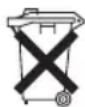
As a consumer you are obliged by law to return old batteries / accumulators.
Remove the battery (batteries) from the remote control before disposing of the appliance.

CAUTION:
Batteries / rechargeable batteries must not be disposed of with household waste!
• Take spent batteries to the appropriate collection point or to a dealer.
- Your town or local authority can provide information about public collection points.
Meaning of the "Dustbin" Symbol
Protect our environment: do not dispose of electrical equipment in the domestic waste.
Please return any electrical equipment that you will no longer use to the collection points provided for their disposal.
This helps avoid the potential effects of incorrect disposal on the environment and human health.
This will contribute to the recycling and other forms of re-utilisation of electrical and electronic equipment.
Information concerning where the equipment can be disposed of can be obtained from your local authority. Your dealer and contractual partner is also obliged to take back the old appliance free of charge.
Instrukcja obsługi
Wentylator (Rys. d) 62
CTC Clatronic Sp. z o.o
Ul. Brzeska 1
45-960 Opole
Usuwanie
Usuwanie baterii
- Übersicht Montage
- Symbols in this Instruction Manual
- WARNING:
- CAUTION:
- NOTE:
- Contents
- General Notes
- Special Safety Precautions for this Appliance
- Handling of Batteries
- Danger of explosion!
- Unpacking the Appliance
- i NOTE:
- Overview of the Components / Scope of Delivery
- Page 3
- Page 4: Assembly Overview
- Not Shown:
- Notes for Use
- Electrical Connection
- Fitting Batteries into the Remote Control (Batteries not supplied.)
- Remote Control Range
- Position
- Assembly Instructions
- Base Unit (Fig. a - c)
- Fan (Fig. d)
- Humidifier (Fig. e - f)
- Operation
- Fill with Water
- Basic Settings
- ON/OFF Switch ON/OFF
- SPEED Speed
- TIMER Timer
- MODE Wind Change Functions
- NAT Natural Mode
- SLE Sleep Mode
- NOR Normal
- OSC Oscillation
- MOIST Mist
- Refill Water
- Shutting Off
- Cleaning
- Housing
- Water Tank
- Humidifier Base
- Decalcification
- Technical Data
- Disposal
- Battery Disposal
- Meaning of the "Dustbin" Symbol
- Instrukcja obsługi
- Usuwanie
- Usuwanie baterii
Brand : ProfiCare
Model : PCVL 3111 B
Category : Fan