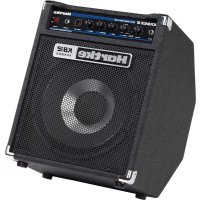
Kickback KB12 - Receiver Hartke - Free user manual and instructions
Find the device manual for free Kickback KB12 Hartke in PDF.



| Product type | Bass guitar combo amplifier |
| Brand | Hartke |
| Model | Kickback KB12 (HS1200) |
| Output power | 120 W RMS into 8 ohms |
| Built-in speaker | 31 cm (12 inches) / 8 ohms |
| Dimensions (approx.) | 55 × 45 × 35 cm (H × W × D) |
| Weight (approx.) | 22 kg |
| Power supply | 115 V or 230 V (selectable), 50/60 Hz |
| Fuse | 3 A / 250 V, slow-blow |
| Equalization | 3-band: Low (100 Hz), Mid (300 Hz), High (5 kHz), ±15 dB |
| Shape function | Contour filter with variable frequency (80 Hz to 1 kHz) |
| Instrument input | 1/4" TS jack, max. input voltage 15 V |
| Headphone output | 1/4" stereo jack, automatically mutes speaker |
| Direct Out | Balanced XLR male, mic level (pre-EQ) |
| External speaker output | 1/4" mono jack, recommended impedance 8 ohms |
| Signal-to-noise ratio | 85 dB (A-weighted) |
| Frequency response | 5 Hz – 60 kHz (Pre output) |
| Construction | Tilting baffle (KickBack™ position), metal grille, carpet covering |
| Maintenance and cleaning | Use a dry, soft cloth. Avoid moisture and abrasive products. |
| Safety | Do not block rear ventilation. Disconnect before servicing. Use only 8 ohm speaker if external. |
| Spare parts / repairability | Replaceable fuse. For any repairs, contact Hartke customer service (1-800-372-6766) and obtain a return authorization number. |
Frequently Asked Questions - Kickback KB12 Hartke
User questions about Kickback KB12 Hartke
0 question about this device. Answer the ones you know or ask your own.
Ask a new question about this device
Download the instructions for your Receiver in PDF format for free! Find your manual Kickback KB12 - Hartke and take your electronic device back in hand. On this page are published all the documents necessary for the use of your device. Kickback KB12 by Hartke.
USER MANUAL Kickback KB12 Hartke
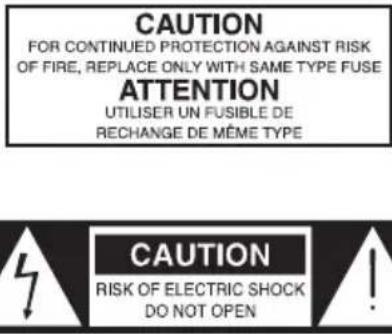
Caution: To reduce the hazard of electrical shock, do not remove cover or back.
No user serviceable parts inside. Please refer all servicing to qualified personnel.
WARNING
DO NOT EXPOSE THIS EQUIPMENT
TO RAIN OR MOISTURE
AVIS
RISQUE DE CHOC ELECTRONIQUE
NE PAS OUVIR
WARNING: To reduce the risk of fire or electric shock, do not expose this unit to rain or moisture.
The lightning flash with an arrowhead symbol within an equilateral triangle, is intended to alert the user to the presence of uninsulated "dangerous voltage" within the products enclosure that may be of sufficient magnitude to constitute a risk of electric shock to persons.
The exclamation point within an equilateral triangle is intended to alert the user to the presence of important operating and maintenance (servicing) instructions in the literature accompanying the product.
Important Safety Instructions
-
Please read all instructions before operating the unit.
-
Keep these instructions for future reference.
-
Please heed all safety warnings.
-
Follow manufacturers instructions.
-
Do not use this unit near water or moisture.
-
Clean only with a damp cloth.
-
Do not block any of the ventilation openings. Install in accordance with the manufacturers instructions.
-
Do not install near any heat sources such as radiators, heat registers, stoves, or other apparatus (including amplifiers) that produce heat.
-
Do not defeat the safety purpose of the polarized or grounding-type plug. A polarized plug has two blades with one wider than the other. A grounding type plug has two blades and a third grounding prong. The wide blade or third prong is provided for your safety. When the provided plug does not fit your outlet, consult an electrician for replacement of the obsolete outlet.
-
Protect the power cord from being walked on and pinched particularly at plugs, convenience receptacles and at the point at which they exit from the unit.
-
Unplug this unit during lightning storms or when unused for long periods of time.
-
Refer all servicing to qualified personnel. Servicing is required when the unit has been damaged in any way, such as power supply cord or plug damage, or if liquid has been spilled or objects have fallen into the unit, the unit has been exposed to rain or moisture, does not operate normally, or has been dropped.
Table of Contents
ENGLISH
Introduction. 4
Kickback Features 5
Guided Tour - Front Panel 6
Guided Tour - Rear Panel. 8
Setting Up and Using Your Kickback Amplifier 9
Using Equalization. 11-13
The Effect of the Shape Control 14
Specifications 59
FRANÇAIS
Introduction. 15
Kickback Features 27
Printed December, 2009 v1.0
Samson Technologies Corp.
45 Gilpin Avenue
Hauppauge, New York 11788-8816
Phone: 1-800-3-SAMSON (1-800-372-6766)
Fax: 631-784-2201
www.samsontech.com
Introduction
Congratulations on your purchase of the Hartke HS1200 KickBack™ Combo Bass Amplifier! Although we designed this amp for easy operation, we suggest you take some time out first to go through these pages so you can fully understand how we've implemented a number of unique features. Your Kickback™ combo features the Hartke HS1200 amplifier, with 120 watts of clean power along with a matched 8-ohm 12" bass speaker, or 8-ohm 15" bass speaker. The specially designed cabinet which can be used either flat on the floor or in its "KickBack" position for increased high-end clarity and directionality. Optimized for use with electric bass instruments, you'll find the HS1200 to be the perfect system for use in small venues (such as club dates); in addition, its dedicated headphone output makes it an excellent practice amp. In these pages, you'll find a detailed description of the many features of the HS1200 KickBack™ Bass Amplifier, as well as a guided tour through its front and rear panels, step-by-step instructions for setting up and using the unit, additional information about equalization and the use of a unique Shape control, and full specifications. You'll also find a warranty card enclosed—please don't forget to fill it out and mail it so that you can receive online technical support and so we can send you updated information about this and other Hartke and Samson products in the future.
SPECIAL NOTE: Should your HS1200 ever require servicing, a Return Authorization (RA) number is necessary. Without this number, the unit will not be accepted. Please call Samson at 1-800-372-6766 for a Return Authorization number prior to shipping. Please retain the original packing materials and, if possible, return the unit in its original carton and packing materials.
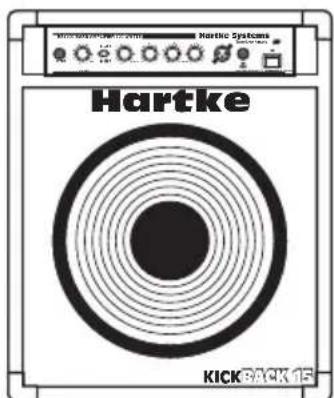
The HS1200 offers advanced design in state-of-the-art bass amplification at an extremely affordable price. Here are some of its main features
Power to spare-a full 120 watts into 8 ohms.
- Bipolar design for clean, crisp sound—as well as our Transient Attack® circuitry, which ensures that every nuance of your bass performance is reproduced faithfully.
- Three bands of high-quality equalization, allowing you to create a broad range of tonal colors for your bass instrument.
- A unique contour filtering system called "Shape." This activates an equalization curve specially designed to enhance the sound of the electric bass. In addition, a Shape control enables you to continuously sweep a filter through various frequency areas in order to customize the effect of the Shape curve to the specific tonal characteristics of your particular bass instrument.
- A separate headphone output which automatically mutes the speaker output, allowing the HS1200 to be used as a high-quality practice amp. In addition, a front-panel Direct Out enables the HS1200 to be easily interfaced with external sound reinforcement or recording mixing consoles.
- A feedback-type input that accommodates a broad range of input levels (up to 15 volts), so that you can use the HS1200 with pretty much any kind of bass, from passive models to those with active circuitry.
- Included is a matched Hartke 12'' 8-ohm, or 8-ohm 15'' , speaker mounted in a specially designed "KickBack™" cabinet. When used in the "KickBack™" position, the HS1200 acts like an onstage " wedge" monitor, adding high frequency clarity and directionality to the sound.
Rugged construction, metal screen speaker cover and carpeted exterior serve to make the HS1200 eminently road-worthy.
Guided Tour - Front Panel
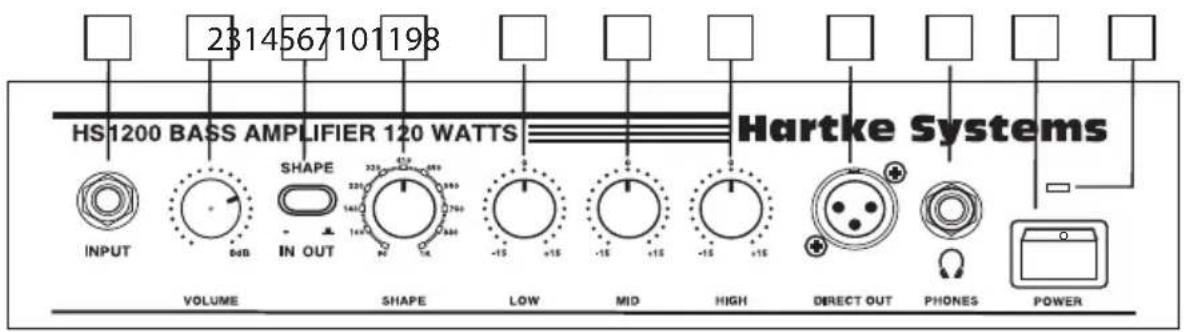
-
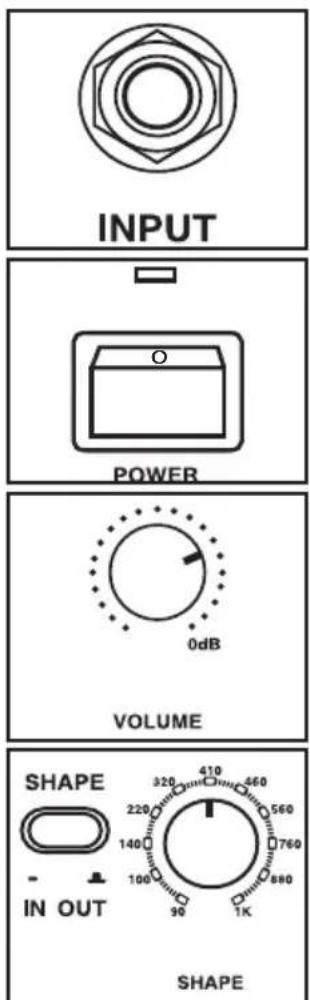
Input jack - Connect your bass guitar to the HS1200 here. This standard 1/4'' unbalanced jack provides a wide range high impedance input and is specially designed to handle a broad range of bass pickup signals up to 15 volts (allowing you to use any kind of bass, including those models that contain active circuitry).
-
Volume control - This is the overall volume control. For best signal-to-noise ratio, keep the output of your bass at or near maximum and adjust the HS1200 Volume to the desired level.
-
Shape switch - When pressed in, the HS1200 activates a special equalization curve that is designed to enhance the sound of your bass instrument. When out, Shape is inactive. For more information, see the "Effect of the Shape Control" section on page 14 in this manual.
-
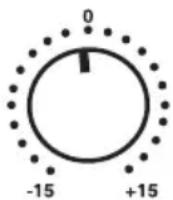
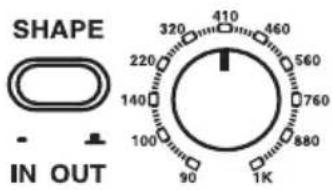
Shape control - When the Shape switch (see #3 above) is pressed in, this control is active. It applies a 20 dB filter to the specified frequency area so that you can customize the effect of the Shape curve to best complement your particular bass instrument. Moving the Shape control clockwise causes the notch filter to be applied to higher frequencies while moving it counterclockwise causes it to be applied to lower frequencies. At the fully clockwise position, the filter is applied to the 1kHz frequency area; at the fully counterclockwise position, the filter is applied to the 80Hz frequency area. For more information, see the "Effect of the Shape Control" section on page 14 in this manual.
-
Low EQ control - This control provides approximately 15 db of cut or boost at 100 Hz, with a peak (bell) curve. When the knob is at the 12 o'clock ("0") position, there is no boost or attenuation (that is, flat response). As it is turned clockwise from the "0" position, the frequency area is boosted; as it is turned counterclockwise from the "0" position, the frequency area is attenuated. For more information, see the "About Equalization" section on page 11 in this manual.
-
Mid EQ control - This control provides approximately 15 db of cut or boost at 300 Hz, with a peak (bell) curve. When the knob is at the 12 o'clock ("0") position, there is no boost or attenuation (that is, flat response). As it is turned clockwise from the "0" position, the frequency area is boosted; as it is turned counterclockwise from the "0" position, the frequency area is attenuated. For more information, see the "About Equalization" section on page 11 in this manual.
Guided Tour - Front Panel
- High EQ control - This shelving control provides approximately 15 db of cut or boost at 5kHz . When the knob is at the 12 o'clock ("0") position, there is no boost or attenuation (that is, flat response). As it is turned clockwise from the "0" position, the frequency area is boosted; as it is turned counterclockwise from the "0" position, the frequency area is attenuated. For more information, see the "About Equalization" section on page 11 in this manual.
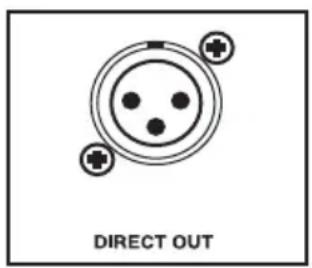
- Direct output - This standard male XLR connector provides a miclevel pre-EQ (and pre-Volume) balanced low-impedance output from the HS1200. You'll usually use this to connect the HS1200 signal to a Direct Injection (DI) box or to an XLR mic input when interfacing with external sound reinforcement or recording mixing consoles. The signal from this output adds approximately 6 dB of gain to the input level.
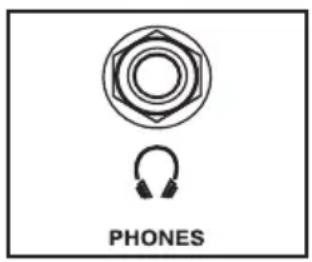
- Headphones jack - Connect any standard stereo headphone (600 ohms or less) to this standard 1/4'' stereo jack. When a plug is inserted into the headphone jack, the HS1200 speaker output is muted, enabling you to use the unit as a practice amplifier. The level of the signal sent to the headphones is determined by the setting of the Volume knob—when set to the point where a connected speaker would clip, the headphones will clip.
- Power switch - Use this to power the HS1200 on or off.
- Power LED - Lights whenever the HS1200 is powered on.
WARNING: Because the HS1200 is capable of generating extremely high headphone signal levels, always start with the Volume knob at minimum and then slowly turn it up. In particular, a clicking sound is an indication of distortion and possible damage to the headphones (and/or your hearing!); don't let things get to that point!
Guided Tour - Rear Panel
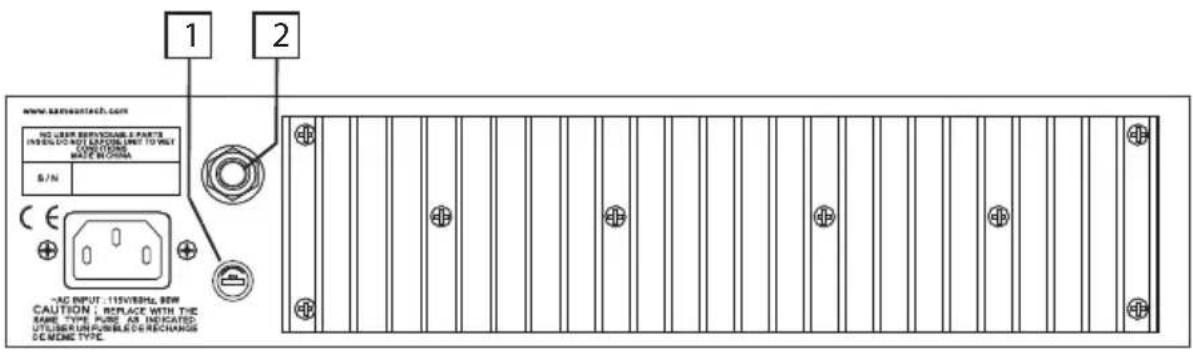
- Fuse holder - Insert a 3 amp, 250 volt fuse here for 115 volt operation. We recommend the use of slow-blow fuses.
- Speaker output - The internal speaker is normally connected to this standard unbalanced 1/4'' jack; if desired, external 8 ohm speakers can be substituted, though this is not recommended.
WARNING: Because of the high power levels and low frequency content of the signal generated by the HS1200, we recommend the use of the provided internal speaker only. If you do wish to connect an external speaker, use only appropriately rated 8 ohm speaker cabinets that are specifically designed for bass instruments.
Setting Up and Using Your Kickback Amplifier
Setting up your Hartke Systems HS1200 KickBack™ Bass Amplifier is a simple procedure, which takes only a few minutes:
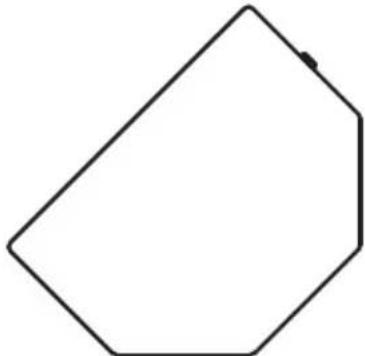
- Remove all packing materials (save them in case of need for future service) and decide where the amplifier is to be physically placed. To avoid potential overheating problems, make sure that the rear panel is unobstructed and that there is good ventilation around the entire unit. The HS1200 may be used flat on the floor or in its "KickBackTM" position (for increased high frequency clarity and directionality), as shown in the illustration below:
- The HS1200 is shipped with a rear panel connector between the speaker output (see #2 on page 6 of this manual) and the built-in speaker input; check to make sure this is in place; if not, plug it in. If you are using an external speaker cabinet, make a connection between it and the 1/4'' unbalanced Speaker output connector on the rear panel. Any appropriately rated external bass cabinet with an impedance load of 8 ohms can be used, though we recommend the use of the specially designed internal speaker. It is never a good idea to power up any amplifier that is not connected to a loudspeaker.
- Next, connect the 3-pin AC plug into any grounded AC socket. Don't turn the HS1200 on just yet, though.
- Use a standard music instrument cable to connect your bass to the Input jack on the front panel. On the front panel of the HS1200, turn the Volume control to its minimum (fully counterclockwise) position, set all three EQ controls to their "0" (12 o'clock) position, and start with the Shape switch out (that is, off).
- Press the front panel Power switch in order to turn on the HS1200; the LED above it will light up.
Setting Up and Using Your Hartke Kickback Amplifier
- Set the output of your bass to maximum and then, while playing, slowly turn the HS1200 Volume control up until the desired level is achieved. If you hear distortion even at low amplifier Volume settings, back off the output of your bass (or check for a faulty cable).
- Press in the Shape switch and turn the Shape knob both clockwise and counterclockwise to hear the effect of the Shape curve and filter on the sound of your bass. Leave the Shape knob at the point where it best complements your particular instrument and playing style.
- Adjust the three equalization controls to taste (when you get a great setting that complements your instrument and playing style, it's a good idea to write it down for future use).
- Test the headphone output by turning the Volume control to its minimum (fully counterclockwise) position and then connect a standard stereo headphone to the front-panel Headphones jack. While playing your bass, slowly turn the Volume control up—you should hear sound from the headphones and none from the connected speaker. We recommend the use of large size headphones (those with large transducers) for optimum bass reproduction.
- If you need to connect the HS1200 to a live sound reinforcement or recording mixing console, plug a standard female XLR jack into the front-panel Direct Out output and connect it to a Direct Injection (DI) box or to an XLR mic-level input on the mixer. (See #8 on page 6 in this manual for more information on the use of the HS1200 Direct Out).
If you encounter difficulty with any aspect of setting up or using your HS1200, you can call Samson Technical Support (1-800-372-6766) between 9 AM and 5 PM EST.
Using Equalization
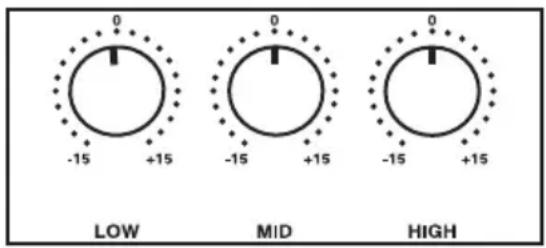
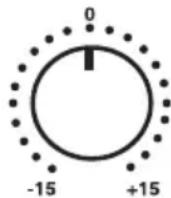
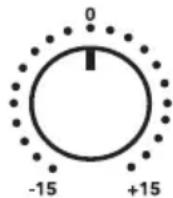
The Hartke Systems Transient Attack® HS1200 Bass Amplifier gives you enormous control over shaping the sound of your bass, using a process called equalization. To understand how this works, it's important to know that every naturally occurring sound consists of a broad range of pitches, or frequencies, combined together in a unique way. This blend is what gives every sound its distinctive tonal color. EQ controls allow you to alter a sound by boosting or attenuating specific frequency areas—they operate much like the bass and treble controls on your hi-fi amp, but with much greater precision. The HS1200 provides you with three bands of equalization. Each EQ knob (labeled Low, Mid, and High, respectively) affects a different frequency area (100 Hz, 300 Hz, and 5 kHz, respectively) and provides approximately 15 db of boost and attenuation.
LOW
MID
HIGH
We carefully selected these frequency areas because they have maximum impact on bass signals. For example, the Low (100 Hz) control affects the very lowest audible frequencies (in fact, most humans cannot hear below 20 Hz), while the High (5 kHz) control affects the "twang" of a bass string. When an EQ knob is in its center detented position ("0"), it is having no effect. When it is moved right of center, the particular frequency area is being boosted; when it is moved left of center, the frequency area is being attenuated. Turning all EQ controls up the same amount will have virtually the same effect as simply turning up the Volume; conversely, turning them all down the same amount will have virtually the same effect as turning down the Volume. Both approaches are pointless (after all, that's why we gave you a Volume control!)
Using Equalization
In many instances, the best way to deal with equalization is to think in terms of which frequency areas you need to attenuate, as opposed to which ones you need to boost. Be aware that boosting a frequency area also has the effect of boosting the overall signal; specifically, too much Low EQ boost can actually cause overload distortion or even harm a connected speaker.
The specific EQ you will apply to your bass signal is very much dependent upon your particular instrument and personal taste and playing style. However, here are a few general suggestions:
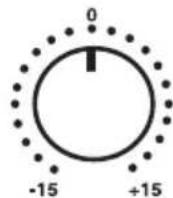
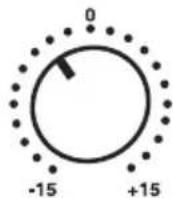
- For that super-deep reggae or Motown sound, boost the Low EQ slightly while attenuating the High control (leave the Mid control flat or slightly attenuated):

LOW
MID
HIGH
- To remove boxiness and make your instrument sound more "hi-fi," try attenuating the Mid frequency control while leaving the Low and High settings flat: Using Equalization
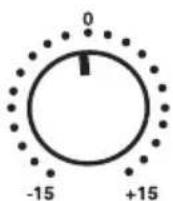
LOW
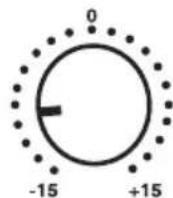
MID
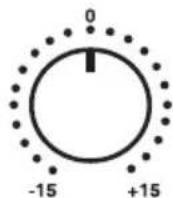
HIGH
Using Equalization
- For a twangy, cutting sound, try boosting the High and Mid frequencies (putting new roundwound strings on your bass will help a lot also!):
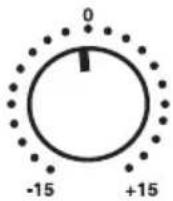
LOW
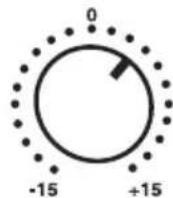
MID
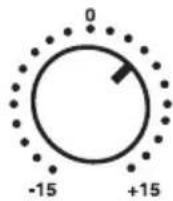
HIGH
Whenever you get a really good EQ setting for a particular instrument or song, write it down (you'd be amazed how easy it is to forget these things!).
As you experiment with the EQ controls of the HS1200, don't forget that your bass also provides EQ controls in the form of its tonal settings—this can be particularly effective in instruments that have active circuitry. Also, try various EQ settings with and without the Shape switch in and with the Shape control (which imposes a filter) at different settings.
For more information, see the "Effect of the Shape Control" section on the next page.
Finally, bear in mind that the physical position of the HS1200 will also affect its frequency response; when in its normal flat on the floor position (that is, with the speaker facing directly forward), there may be increased bass response due to the reinforcing of low frequency components by the floor itself. In contrast, when using the HS1200 in its "KickBackTM" position (where the HS1200 acts much like a " wedge" stage monitor), you'll hear increased highs due to the directionality of high frequency components.
The Effect of the Shape Control
SHAPE
The HS1200's unique Shape control enables the sound of your bass instrument to be enhanced at the touch of a button. When the front panel Shape switch is pressed in, a special equalization curve is activated that is designed to improve the sound of most electric bass instruments. This curve provides moderate boost at certain frequency areas and deep attenuation at other frequency areas. Furthermore, the front panel Shape control adds a filter to a selected frequency area within the Shape curve. As the Shape knob is turned clockwise, the filter is imposed on higher frequency areas; as it is turned counterclockwise, the filter is imposed on lower frequency areas. At the fully clockwise position, the filter is applied to the 1 kHz frequency area; at the fully counterclockwise position, the filter is applied to the 80 Hz frequency area.
Even when Shape is activated, the front-panel EQ controls remain operational. When all three EQ controls are set to their "0" (flat) position, they add no boost or attenuation to the preset Shape curve. However, when any EQ controls are turned left or right of their 12 o'clock ("0") position, their boost or attenuation effect is superimposed upon the preset Shape curve. In this way, you can customize the sound of the HS1200 further still to complement your particular bass instrument and playing style.
Note that, when the Shape switch is out, the EQ controls operate on the "flat" signal coming from your bass (that is, there is no preset equalization curve imposed).
Introduction
- Rated Output Power 135 W 120 W
(@1 kHz, 8 ohm)
- Rated Input Level (@ 1 kHz) -30.1 dBu -30 dBu
- Total Harmonic Distortion 0.03% 1%
(@ 120 W, with 30 kHz LPF)
- Signal To Noise Ratio 85 dB 80 dB
(with 30kHz LPF)
- Frequency Response
(EQ flat, +0.5/-3 dB)
Pre Output 5 Hz - 60 kHz 20 Hz - 50 kHz
Speaker Output 3 5 Hz - 52 kHz 50 Hz - 50 kHz
- Maximum Gain
Input to Pre Output 45.05 dB 44 dB ±3 dB
Input to Speaker Output 62.1 dB 62 dB ±3 dB
- Equalizer
Low (100Hz)± 15dB± 15dB± 2dB
Mid
High
- Shape Effect
(Shape control, Min. to Max.)
- Noise Level
(@ Speaker Output with 30 kHz LPF, EQ flat)
Volume Level Min.
Volume Level Max.
- Headphone Level (600 ohm load)
- Idle Current Measurement
- DC Offset Voltage
(300 Hz) ±15 dB ±15 dB ±2 dB
(5kHz) ±15 dB ±15 dB ±2 dB
22-23dB >20dB
-60dBu-54dBu
-44.5 dBu
493 mW 500 ±30 mW
4.4 mV / Max. 10 mV / .47 W 0.47 W
12mV0± 50mV
(a 1kHz 8 Ohms)
(Control Shape, Min. a Max.)
- Nivel de ruido
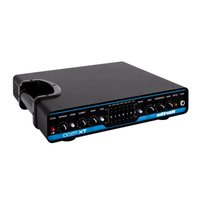


Brand : Hartke
Model : Kickback KB12
Category : Receiver