LPTDX402E - Controller Lite-Puter - Free user manual and instructions
Find the device manual for free LPTDX402E Lite-Puter in PDF.


User questions about LPTDX402E Lite-Puter
0 question about this device. Answer the ones you know or ask your own.
Ask a new question about this device
Download the instructions for your Controller in PDF format for free! Find your manual LPTDX402E - Lite-Puter and take your electronic device back in hand. On this page are published all the documents necessary for the use of your device. LPTDX402E by Lite-Puter.
USER MANUAL LPTDX402E Lite-Puter
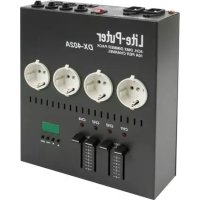
LPTDX402E - 4-CHANNEL DIMMER PACK
1. Introduction




Thank you for buying the LPTDX402E ! Please read the manual carefully before bringing this device into service.
The LPTDX402E is DMX-controlled and features 4 channels with LED indication and a chaser function.
Make sure that the device was not damaged in transit. If the device is damaged, you should contact your dealer and postpone installation of this device.
2. Safety Instructions

Be very careful when installing the device : touching live wires can cause life-threatening electroshocks.

Do not touch the device during operation as the housing heats up

Protect this device against rain and moisture

Unplug the supply cable before you open the housing
- A qualified technician should install and service this device.
- Damage caused by disregarding certain guidelines in this manual is not covered by the warranty and the dealer will not accept responsibility for the ensuing defects or problems.
- Do not switch the device on immediately if it has been exposed to changes in temperature. Protect the device against damage by leaving it switched off until it has reached room temperature.
- It is essential that the device be earthed. A qualified technician must carry out the electric connection.
- Make sure that the available voltage does not exceed the voltage stated in the specifications of this manual.
- Do not crimp the power cord and protect it against damage from sharp edges. Ask an authorised dealer to replace the cord if necessary.
- Always disconnect the device from the mains when it is not in use or when you wish to clean it. Only handle the power cord by the plug. Never pull out the plug by tugging the power cord.
- Do not look directly into the light source as sensitive people may go into epileptic seizure if they do.
- Note that damage caused by user modifications to the device is not covered by the warranty. Keep the device away from children and unauthorised users.
3. General Guidelines
- This device is a light controller for professional use on stages, in discos, theatres, etc. This device should only be operated with an alternating current of max. 230Vac/50Hz and is designed for indoor use only.
- Do not shake the device. Avoid brute force when installing or operating the device.
- Select a location where the device will be protected against extreme heat, moisture and dust.
- Do not use or transport the device under temperatures < 5^ or >35^ .
- Familiarise yourself with the functions of the device before actually using it. Do not permit operation by unqualified people. Any damage that may occur, will probably be due to unprofessional use of the device.
- Use the original packaging if the device is to be transported.
- Note that all modifications of the device are forbidden for safety reasons.
- Do not remove the serial number sticker from the device as doing so will void the warranty. Only use the device for its intended purpose. All other uses may lead to short-circuits, burns, electroshocks, lamp explosion, crash, etc. Using the device in an unauthorised way will void the warranty.
4. Features
• max. 10A per channel for a total of 40A
- DMX512-signal
- 2 signal inputs/outputs, either with a 3-pin XLR connector or a RJ11 telephone jack
- LED display
- soft-start function protects the load and prolongs the life of the bulbs
• automatic frequency tracking
• C3 dimming curve (professional device)
- adjustable DMX start address
• channel dimming test
• digitised analogue dimming with advanced C3 dimming curve
- manually operated fader
- suitable for rack and truss mounting (clamp included) & can also be placed on a table
5. Specifications
Power AC 100-120V, AC 200-240V, 45-63Hz
Output max. 10A / channel, total 40A
Signal Input/Output DMX512 / 1990
Signal Connector 3-pin XLR, 6P4C, RJ11 telephone jack
Dimensions 220 x 220 x 70 (W x H x D)
Mounting truss, rack, desktop operation
Weight 2.5kg
6. Front Panel Description
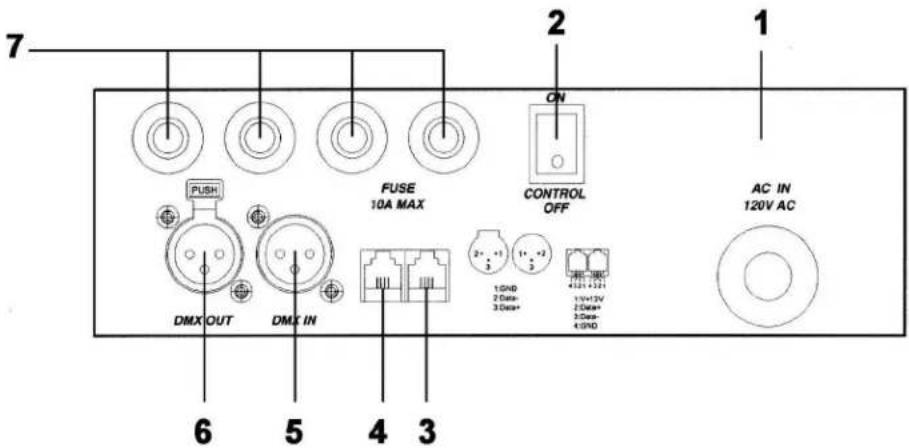
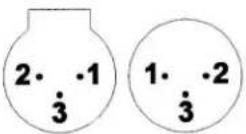
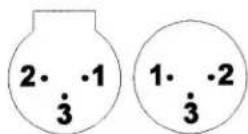
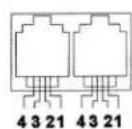
- GND
- DATA-
- DATA+
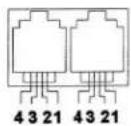
- V + 12V
- DATA+
- DATA-
-
GND
-
AC power input
- AC power switch
- DMX signal input (6P4C phone jack)
- DMX signal output (6P4C phone jack)
- DMX signal input (3-pin plug)
- DMX signal output (3-pin plug)
- Circuit breaker, 10A max.
7. Wiring
CAUTION : Make sure all wires and connectors meet both the usual standards and the legal requirements.
8. Operation
a) Standard DMX512 Signal
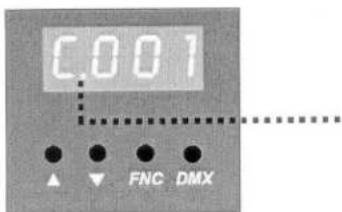
This point flashes when the DMX signal is being received
b) Setting the DMX Start Address
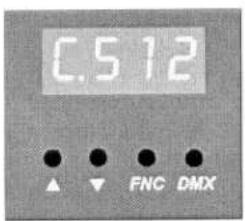
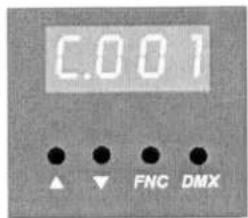
Hold the DMX button and press ▲ or ▼ to find the start address (channels 1 through 512)
c) Channel Testing
Start by selecting the channel you wish to test.
e.g. test channel 4 at full-on :
Press FNC four times (see figure to the right). FNC is used to select the next channel.
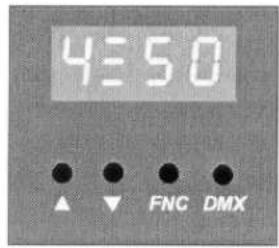
Adjust the dimming level with ▲ or ▼.
Hold ▲ until the display reads as follows (see figure to the right) : FL = 100%
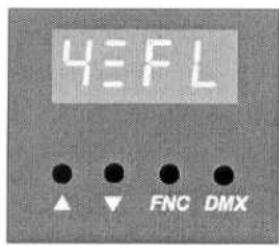
Press the DMX key to cancel the setting. The DMX address is displayed automatically if no other key is pressed for 10 minutes.
d) Manual Fader Dimming
Adjust e.g. the VR fader of CH2 to dim channel 2 directly.
e) How to Return to the DMX Address Display
Press the DMX key at any given time. The display will automatically return to the DMX address display if no other key is pressed for 10 minutes.
9. Cleaning and Maintenance
- All screws should be tightened and free of corrosion.
- The housing, mounting supports and connections should not be modified or tampered with e.g. do not drill extra holes in mounting supports, do not change the location of the connections, ...
- The electric power supply cables should be undamaged. Have this device installed by a qualified technician.
10. Caution
- Disconnect the device from the mains prior to maintenance.
- Use a moist cloth to clean the device and avoid the use of alcohol or solvents for cleaning purposes.
- This device does not contain any user-serviceable parts. Replace a blown fuse with an identical one.
- Spare parts should be ordered with your local dealer.
The information in this manual is subject to change without prior notice.
LPTDX402E - 4-KANAALS DIMMERPACK
1. Inleiding
- GND
- DATA-
- DATA+
-
V + 12V
-
DATA+
-
DATA-
-
GND
-
AC voedingsaansluiting
- AC voedingsschakelaar
- DMX signaalingang (6P4C telefoonjack)
- DMX signaaluitgang (6P4C telefoonjack)
- DMX signaalingang (3-pins plug)
- DMX signaaluitgang (3-pins plug)
- Stroomonderbreker, 10A max.