VS5031 - Fan Concept - Free user manual and instructions
Find the device manual for free VS5031 Concept in PDF.


| Product type | Pedestal fan |
| Brand | Concept |
| Model | VS5031 |
| Power supply | 220-240 V ~ 50 Hz, 35 W |
| Number of speeds | 12 (1 = low, 12 = high) |
| Timer | From 0.5 h to 12 h (in 0.5 h increments up to 10 h, then 1 h increments) |
| Oscillation | Yes, can be activated/deactivated via button |
| Remote control | Yes, included |
| Noise level | < 61 dB(A) |
| Protection class | Double insulation |
| Adjustable height | Yes, via telescopic rod |
| Adjustable tilt | Yes, by notches (audible click) |
| Protection grilles | Front and rear, removable |
| Use | Indoor only |
| Warranty | 24 months |
| Care and cleaning | Unplug before cleaning; use a slightly damp sponge; do not immerse or use abrasive products |
| Safety | Do not use without grilles, do not insert objects, do not use near water, supervise children |
| Spare parts and repairability | Repairs only by authorized service center (contact: servis@my-concept.cz) |
Frequently Asked Questions - VS5031 Concept
User questions about VS5031 Concept
0 question about this device. Answer the ones you know or ask your own.
Ask a new question about this device
Download the instructions for your Fan in PDF format for free! Find your manual VS5031 - Concept and take your electronic device back in hand. On this page are published all the documents necessary for the use of your device. VS5031 by Concept.
USER MANUAL VS5031 Concept
natural_image
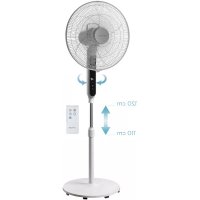
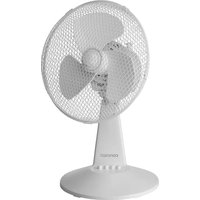
Exterior view of a standard standing fan with visible grille and base (no text or symbols on the fan itself)
concept
CZ
Poděkování
Thank you for purchasing a Concept product. We hope you will be satisfied with our product throughout its service life.
Please study the entire Operating Manual carefully before you start using the product. Keep the manual in a safe place for future reference. Make sure other people using the product are familiar with these instructions.
| Technical parameters | |
| Voltage 220–240 V ~ 50 Hz | |
| Power input 35 W | |
| Noise level <61 dB(A) | |

Double or reinforced insulation
IMPORTANT SAFETY PRECAUTIONS
- Do not use the unit differently than described in this manual.
- Remove all packing and marketing material from the unit before you use it for the first time.
- Verify that the mains voltage corresponds with the values indicated on the unit label.
- Place the unit on a stable surface, away from other sources of heat.
- Do not leave the unit unattended while it is turned on or plugged into the power supply socket.
- When plugging and unplugging the unit into and from the socket, the mode selector must be in the 0 (off) position.
- Never hold the power cord when disconnecting the unit from the socket; grasp and pull the plug, not the cord.
- Do not allow children or legally incapacitated people to handle the unit; the appliance must be used out of reach of such persons.
- Any physically challenged persons, persons with reduced sensory perception or insufficient mental capacity, or persons who have not been familiarized with the operation may only use the unit under the supervision of a responsible, instructed person.
• Exercise utmost caution when using the unit while children are nearby. - Prevent the unit from being used as a toy.
- Never insert fingers, pencils, or any other items through the mesh protection of the fan.
- Never use the fan with the protective mesh removed.
- Do not expose children or ill people to direct air flow.
- Do not cover the unit.
EN
concept
concept
EN
- Do not hang anything above or in front of the unit.
- The unit may be operated in the upright position only.
- Do not use the unit near a shower, bathtub, sink, or swimming pool.
- Do not use the unit in a wet or dusty environment.
- Do not use the unit in an environment where explosive gases or flammable substances (solvents, varnishes, adhesives, etc) are present.
- Pull the power cord out of the socket before assembly or disassembly of the unit.
- Switch the unit off and pull the plug from the socket prior to cleaning and after use of the unit.
- Keep the unit clean; prevent foreign bodies from entering the mesh openings. These could cause serious injury, short circuit, damage or fire of the unit.
- Do not use abrasive or chemically aggressive substances to clean the unit.
- Never use the unit if the power supply cord or plug is damaged. Have any defects immediately repaired by an authorized service center.
- Do not use the unit if it does not operate properly, or if it has been dropped, damaged or exposed to liquid. Take the unit to an authorized service center for testing and repair.
- The unit is not designed for outdoor use.
- The unit is intended for household use only; it is not designed for commercial application.
- Do not touch the unit if your hands are wet.
- Do not immerse the power cord, plug, or unit in water or any other liquid.
- Do not attempt to repair the unit by yourself. Contact an authorized service center for repair.
- This appliance may be used by children 8 years of age and older and by persons with physical or mental impairments or by inexperienced persons if they are properly supervised or have been informed about how to use of the product in a safe manner and understand the potential dangers. Children must not play with the appliance. This appliance may be cleaned by children 8 years of age and older if they are properly supervised. Keep this appliance and the power cord out of reach of children younger than 8 years of age.
Failure to follow the manufacturer's instructions may lead to refusal of warranty repair.
PRODUCT DESCRIPTION
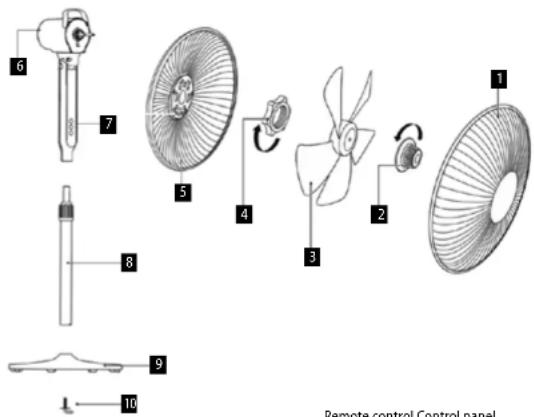
- Front wire mesh
- Nut
- Fan
- Mesh attachment nut
- Rear wire mesh
- Unit body
- Control panel
- Telescopic connecting rod
- Humidifier base
- Rectangular screw
DESCRIPTION OF CONTROLS
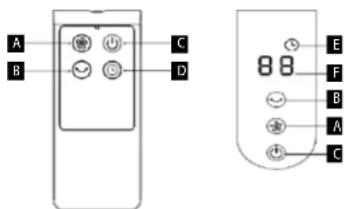
A Power switch
B Oscillation button
C On/Off switch
D Timer
E Timer signalling
F Display

VS5031VS5031
EN
concept
concept
EN
ASSEMBLY
ATTENTION!
Pull the power cord out of the socket before assembling or disassembling the unit. The fan may only be used with the front and rear protective mesh attached (1), (5).
- Attach the telescopic rod (8) to the base (9).
- Place the appliance body on the base rod and tighten with a screw.
- Position the rear protective mesh (5) onto the drive unit so that the pins on the unit correspond with the holes in the mesh. Use the attachment nut (4) to secure the assembly.
- Slide the fan (3) onto the motor shaft by positioning the grooves in the fan hub against the shaft tongues.
- Turn the nut (2) counter-clockwise to fasten the fan.
- Position the front wire mesh so that the mesh edges fit into the grooves on the inside of the ring.
- Tighten the fastening ring with the screw.
OPERATING INSTRUCTIONS
Prior to using the unit verify the power cord is intact.
-
Place the appliance on the floor to prevent it from tipping over.
-
Unfold the power cord completely.
-
Set the desired fan angle. You will hear individual stage clicks when setting.
-
Set the desired fan height by loosening the base nut and extending the telescopic rod.
-
Connect the appliance plug to the mains.
-
Switch (C) switches the appliance on.
-
Use the power switch (A) to select the desired fan power (1 = lowest power - 12 = highest power).
-
Press the oscillation button (B) to turn the oscillation on/off.
-
Use the timer button (D) to set the desired ventilation time. From 0.5 to 10 hours at intervals of 0.5 h. From 10 to 12 hours at intervals of 1 h. When the timer function is on, the icon (E) appears on the display to indicate the active timer.
-
Switch (C) switches the appliance off.
-
After use, unplug the appliance from the mains.
CLEANING AND MAINTENANCE
ATTENTION!
Always disconnect the power cord from the socket before cleaning the unit!
The surface of the unit may only be cleaned with a wet cloth. Do not use any detergents or hard objects as they may damage the surface of the unit!
The front and rear wire mesh should be cleaned frequently to ensure proper operation of the unit.
Never clean the unit under running water; do not rinse or immerse it in water!
The fan disassembly procedure follows the reverse order of the assembly.
SERVICING
Any extensive maintenance or repair requiring access to the inner parts of the product must be performed by an expert service centre.
ENVIRONMENTAL PROTECTION
- Packaging materials and obsolete appliances should be recycled.
• The transport box may be disposed of as sorted waste.
• Polyethylene bags shall be handed over for recycling.
Appliance recycling at the end of its service life:

A symbol on the product or its packaging indicates that this product should not go into household waste. It must be taken to the collection point of an electric and electronic equipment recycling facility. By making sure this product is disposed of properly, you will help prevent the negative effects on the environment and human health that would otherwise result from inappropriate disposal of this product. You can learn more about recycling this product from your local authorities, a household waste disposal service or in the shop where you bought this product.

This product meets all the basic EU regulation requirements that relate to it.
Changes to the text, design and technical specifications may occur without prior notice and we reserve the right to make these changes.
36
VS5031VS5031
The manufacturer (or Importer) is responsible for ensuring the product complies with the requirements of applicable legal regulations as well as those of the relevant technical standards. Moreover, they are responsible for ensuring the product has the properties the manufacturer described in documents related to the goods or those reasonably expected by the customer with regard to the nature of the goods or based on advertising produced by the manufacturer, and further they are responsible for ensuring the product is fit for the purpose proposed by the manufacturer or that a product of the same type is normally used for.
The quality warranty term is 24 months from product takeover by the customer.
The warranty does not apply to wear and tear caused by regular use. The customer shall not be entitled to any warranty claims if, prior to taking the product over, they knew the product contained a defect or if the defect is attributable to the customer.
The warranty specifically does not apply:
- if the product installation, operation and service conditions stipulated in the product operating manual have not been adhered to,
• to malfunctions caused due to mechanical, heat or chemical damage, short circuit, over voltage or incorrect installation.
• to malfunctions caused by an inexpert third-party intervention,
• to malfunctions caused by natural disaster,
• to malfunctions caused by insufficient or inappropriate maintenance in violation of the operating manual, including malfunctions caused by water and other sediments.
• to changes in colour of the heating surface or to scratching of the surface caused as a result of using the products in an unusual manner,
• to appearance and functional changes caused by exposure to sunlight, thermal radiation of water and other sediments, - if the service life of certain product parts expires, e.g. for accumulators, bulbs, etc.
The warranty does not apply to any products and services provided along with the product (gifts, promotional articles, etc.).
Filing a complaint
A complaint against a product defect must be filed as soon as identified, yet no later than before the end of the warranty term.
The customer must file a product complaint with the dealer from which they have purchased the product, or with any authorised service centre, a list of which is included in the product package, or available at www.my-concept.com.
While filing a product complaint, the product must be duly cleaned and securely packed so as to prevent any damage during its transport to an authorised service centre, where relevant, unless the product is delivered in person.
The customer must submit proof of having concluded a purchase contract for the product by producing the receipt.
While filing their complaint, the customer must indicate the noted defect and identify the preferred complaint application method.
Complaints processing
As long as the noted defect may be removed, the user has the right to have the defect duly removed free of charge on a timely basis.
Where such a procedure is not reasonable with regard to the nature of the defect, the user may require to be supplied a new defect-free product (replacement), or, where the defect applies to a part of the product only, replacement of the part concerned. However, if replacement of the product or any part thereof is not proportionate with regard to the nature of the defect, especially if the defect can be removed without undue delay, the customer has the right to have the defect removed free of charge.
If the noted defect is not removable, or if the customer becomes entitled to replacement of the product or a part thereof, yet the replacement is not possible, for example due to the product having been sold out, the customer has the right to return the product (withdrawal from the contract).
The customer shall have the right to a new product (replacement) or to replacement of a part of the product even if the defect can be removed, provided they cannot properly use the product due to repeated occurrence of the defect or due to a high number of such defects. In such a case, the customer also has the right to return the product (by withdrawing from the contract).
If the product is not returned (the customer does not withdraw from the contract), or if the customer does not apply the right to a new defect-free product (replacement), to replacement of a part thereof or to repair of the product, they may request a reasonable discount. The customer also has a right to a reasonable discount if a new defect-free product cannot be supplied to them, or if a product part cannot be replaced or the product repaired unless the situation is remedied within a reasonable time limit, or if remedying the situation would create major discomfort on the part of the customer.
The seller, authorised service centre or a staff member authorised by them must decide about each complaint immediately or within three business days in complicated cases. This term does not include a reasonable period of time, depending on the type of product concerned,
required for the defect to be assessed by an expert. A complaint, including defect removal, must be dealt with without any undue delay, yet no later than within 30 calendar days of the complaint filing date, unless the seller and the customer agree on a later deadline.
On returning the product (withdrawing from the contract) the customer must return any accessories and documents supplied along with the product.
The customer does not have the right to keep the defective parts and components of the product replaced as part of a repair of the product.
This shall be without prejudice to any other rights the customer may have in relation to the purchase of the product.
Remark: Complaints against products damaged in transport are governed by the carrier's complaints procedure.
Manufacturer
Jindrich Valenta - Concept
Company ID No. 13216660
email: servis@my-concept.cz
www: www.my-concept.com
Product data
| Model: | |
| Production number: | |
| Date of purchase: Seal and signature of vendor: | |
concept concept
DEGARANTIEBEDINGUNGEN
Garantie
FR CONDITIONS DE GARANTIE
Garantie
CONCEPT POLSKA sp. z o.o.
Ostrowskiego 30, 53-238 Wroclaw Tel.: +48 713 390 444, Fax: 713 390 414 www.my-concept.pl

esbr Kft.
2481 Velence, Nyar u. 2/A Tel.: +36 70 881 0167, email: info@esbr.hu

Verners VT Ltd.
Piedrujas iela 5a, Riga, Latvia Tel. + 371 67021021, fakss + 371 67021000 e-pasts: info@verners.lv, www.verners.lv

Horvat elektronika d.o.o.
Dravska 8, HR-40305 Pušćine servis@horvat-elektronika.hr Hotline: +385 040 895 500
- concept
- Poděkování
- IMPORTANT SAFETY PRECAUTIONS
- EN
- PRODUCT DESCRIPTION
- DESCRIPTION OF CONTROLS
- ASSEMBLY
- ATTENTION!
- OPERATING INSTRUCTIONS
- CLEANING AND MAINTENANCE
- SERVICING
- ENVIRONMENTAL PROTECTION
- Appliance recycling at the end of its service life:
- Filing a complaint
- Complaints processing
- Manufacturer
- concept concept
- DEGARANTIEBEDINGUNGEN
- Garantie
- FR CONDITIONS DE GARANTIE
- CONCEPT POLSKA sp. z o.o.
- esbr Kft.
- Verners VT Ltd.
- Horvat elektronika d.o.o.
Brand : Concept
Model : VS5031
Category : Fan