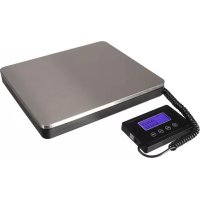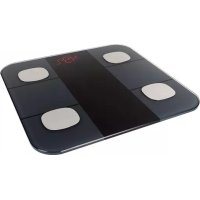
VTBAL206 - Scale Perel - Free user manual and instructions
Find the device manual for free VTBAL206 Perel in PDF.



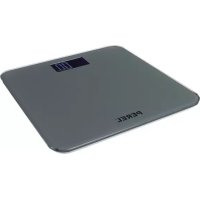
| Product type | Connected impedance scale |
| Brand | Perel |
| Model | VTBAL206 |
| Power supply | 3 AAA/R03 1.5 V batteries (included) |
| Maximum capacity | 180 kg / 400 lb |
| Graduation | 100 g / 0.2 lb |
| Weight units | kg / lb / st |
| Display | LED display (63 x 27 mm) |
| Material | Tempered glass |
| Net weight | 1480 g |
| Operating frequency | 2,402 - 2,480 MHz |
| Max RF output power | -1.84 dBm |
| Compatibility | iOS 8.0 or higher / Android 6.0 or higher |
| Connectivity | Bluetooth (via Tuya Smart app) |
| Main functions | Weight, BMI, body fat, muscle mass, bone mass, BMR |
| Safety | Do not disassemble; use on a flat, stable surface; do not immerse |
| Care and cleaning | Clean with a damp cloth; do not use harsh chemicals |
| Batteries included | Yes (3 AAA batteries) |
Frequently Asked Questions - VTBAL206 Perel
User questions about VTBAL206 Perel
0 question about this device. Answer the ones you know or ask your own.
Ask a new question about this device
Download the instructions for your Scale in PDF format for free! Find your manual VTBAL206 - Perel and take your electronic device back in hand. On this page are published all the documents necessary for the use of your device. VTBAL206 by Perel.
USER MANUAL VTBAL206 Perel
natural_image
Digital balance scale with black front panel and digital display showing 49.7 (no text or symbols on device body)USER MANUAL 2
HANDLEIDING 9
MODE D'EMPLOI 16
MANUAL DEL USUARIO 23
To all residents of the European Union
Important environmental information about this product
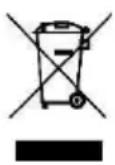
This symbol on the device or the package indicates that disposal of the device after its lifecycle could harm the environment. Do not dispose of the unit (or batteries) as unsorted municipal waste; it should be taken to a specialized company for recycling. This device should be returned to your distributor or to a local recycling service. Respect the local environmental rules.
If in doubt, contact your local waste disposal authorities.
Thank you for choosing Perel! Please read the manual thoroughly before bringing this device into service. If the device was damaged in transit, do not install or use it and contact your dealer.
2. Safety Instructions

Read and understand this manual and all safety signs before using this appliance.
- This device can be used by children aged from 8 years and above, and persons with reduced physical, sensory or mental capabilities or lack of experience and knowledge if they have been given supervision or instruction concerning the use of the device in a safe way and understand the hazards involved. Children shall not play with the device. Cleaning and user maintenance shall not be made by children without supervision.
- Protect this device from heat sources such as radiators, heat registers, stoves, or other appliances (including amplifiers) that produce heat.
- Do not remove the cover under any conditions. There are no user-serviceable parts inside. Never operate this device when its cover is removed.
- Familiarise yourself with the functions of the device before actually using it.
3. General Guidelines
- Refer to the Velleman ^® Service and Quality Warranty on the last pages of this manual.
- All modifications of the device are forbidden for safety reasons. Damage caused by user modifications to the device is not covered by the warranty.
- Only use the device for its intended purpose. Using the device in an unauthorised way will void the warranty.
- Damage caused by disregard of certain guidelines in this manual is not covered by the warranty and the dealer will not accept responsibility for any ensuing defects or problems.
- Nor Velleman nv nor its dealers can be held responsible for any damage (extraordinary, incidental or indirect) – of any nature (financial, physical...) arising from the possession, use or failure of this product.
- Keep this manual for future reference.
4. Batteries
WARNING

Do not puncture batteries or throw them in fire as they may explode. Do not attempt to recharge non-rechargeable batteries. Dispose of batteries in accordance with local regulations. Keep batteries away from children.
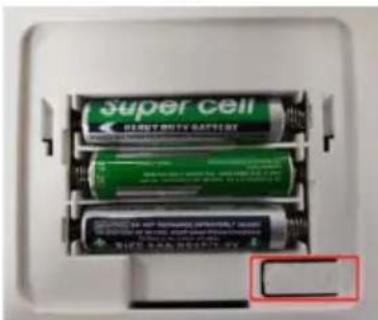
- Locate the battery compartment on the bottom of the appliance.
- Open the battery compartment and insert the batteries according to the correct polarity.
- Close the battery compartment.
REMARK

- Replace the batteries as soon as the display turns dark.
- Remove the batteries after use.
5. Operation
General Operation
- Place the scale on a solid, level and non-slippery surface.
- Carefully step onto the scale, making sure your bare feet touch the metal parts. Stand still until the display freezes the weight.
- Step off the scale. The scale will switch off automatically.
Using the Tuya Smart App
To use the Tuya Smart app, you will need either
- iOS ® 8.0 or higher
○ Android ® 6.0 or higher
- Search the Tuya Smart app in the app store.
- Download and install the app on your mobile device. The app icon will appear after the installation is completed.
- Switch on the Bluetooth ^ function (and GPS for Android) on your mobile device.

Register
Belgium
Jewal

-
Register with your mobile phone number.
-
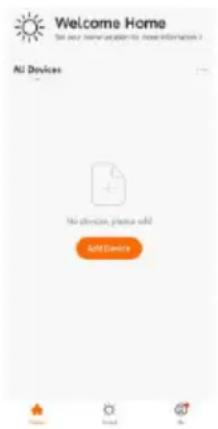
Load the main page on the Tuya Smart app and add the device.
text_image
Welcome Home Get your home app at home information 2 All Devices No device, please add Add Device- Go to Body Fat Scale (Bluetooth ^ ) or perform an auto scan.
text_image
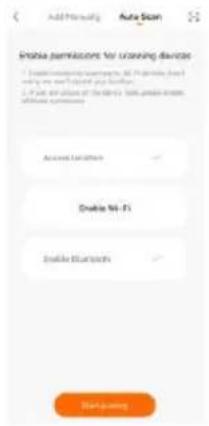
Enable permissions for accessing devices 1. Install permission requests all 90% of users will use the new IP address or your connection. 2. Use any options of the device to access these permissions. Access Location Enable Wi-Fi Enable Bluetooth Configuring- Make sure the scale is switched on during the Bluetooth® search. Do not perform any operation during this time.
text_image
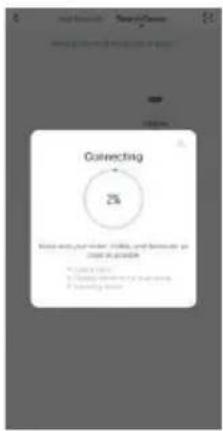
Connecting 2% Base with your order, order, and former on order in order * 10% or more * 5% or more * 3% or more- Select the user to set up the personal data. Note that entering wrong data may result in measurements being inaccurate.
text_image
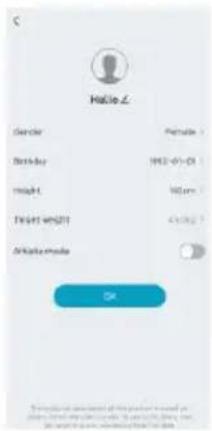
Hello Gender Female Birthday 1932-01-04 Height 100 cm Weight 4 x 100 g Email: OK Thank you account of your partner's own phone. You may be able to access your phone. You will access your email. You are your email to the phone.- To add a user, click Me → User Management, then click + to add a member. To switch a user, click the user icon in the upper left corner. Each account can support up to 10 users.
text_image
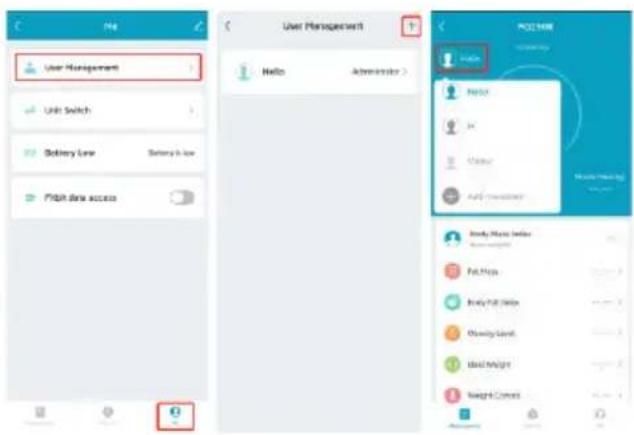
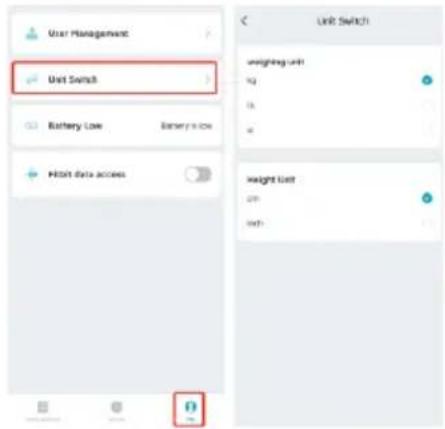
User Management Unit Switch Battery Low Battery Low PWM Data access User Management Hello Administrator POSTROOM Monitor View Close Add to destination Ready Mode Index Default Mode Full Mode Ready Full Mode Obesity Level Well Weight Weight Correct- To select the weighing unit, click Unit Switch, select the weighing unit and confirm.
text_image
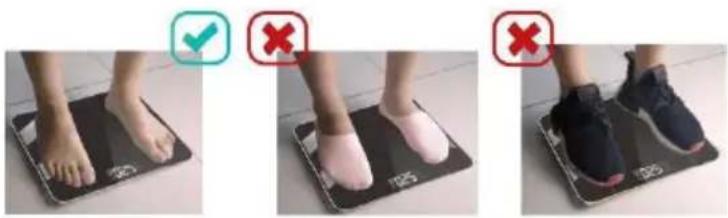
User Management Unit Switch Battery Low Battery Price Holt data access Unit Switch Weighting Unit kg kg kg Weight User 20% 40%- Lightly tap your foot on the scale to activate the display. Wait until the display shows 0.0. Step on the scale with bare feet. Stepping on the scale with socks or shoes will not get complete data.
text_image
Three-step photo sequence showing foot and shoe balance on a scale, with checkmarks indicating correct and incorrect actions.- Wait until the display freezes and data has been transferred to your smartphone.
text_image
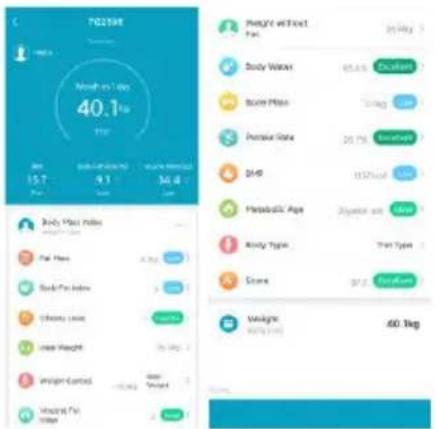
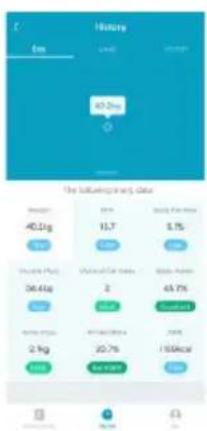
702594 Weight on Tumor 40.1kg Pain 15.7 9.1 34.4 Body Mass Index Fat Mass Body Fat Index Obesity Loss Urea Weight Weight Control Abdominal Pain Weight with Fats Body Weight 65.6% Skin Mass 10.8g Prostate Gains 20.7% 24-45 10.2% of total Hyperbolic Age 20 years old Koody Type Thin Type Crane 87.8% Total Weight 60.0kg- Click Record to see your long-term recorded data on body weight, BMI, BMR, muscle and bone mass, etc. Tuya supports day, week and month reports.
text_image
History Eco 42.2kg 50% The following entry data Price 40.2kg 15.7 5.7% Income Plus 36.4kg 2 65.7% Income Plus 2 kg 20.7% 155%cal Eco.com6. Troubleshooting
The scale will not switch on.
- Make sure the batteries are inserted correctly.
- Replace used batteries with fresh ones.
Bluetooth® will not connect.
• Make sure your appliance is powered correctly and the batteries are fresh.
- Enable the Bluetooth ^ function on your mobile device. For Android ^ phones, it is required to activate the location permission due to system configuration.
- Keep the distance between the appliance and your mobile phone within 5 m to ensure the connection.
- If Bluetooth ^ connection fails, press and hold the unit button on the back of the scale until CRL is displayed.
natural_image
Two stacked batteries with green and red labels, one highlighted by a red rectangle (no readable text or symbols)No body fat data measured when weighing.
- Step on the scale barefoot and make sure both of your feet are dry.
- Wait for the display to freeze and the data transmission.
- The Bluetooth ^ function is not activated or is paired with another scale.
The scale is producing inconsistent weights.
- Make sure to install the scale on a flat and stable surface.
- Check the sensors and clean them with a dry cloth.
The app displays the incorrect fat-muscle ratio.
• Personal parameters are incorrect. Enter the correct gender, age and height.
How to recalibrate the scale after moving it or replacing the batteries?
- Step on the scale to switch it on. Wait for the display to show 0.0 kg/lb./st.
How to change the weighing unit?
- Press the unit button on the back of the scale. The app should now display the selected weighing unit.
7. Care and Maintenance
- Occasionally wipe with a damp cloth to keep it looking new. Do not use harsh chemicals, cleaning solvents or strong detergents.
- Do not immerse the device in any liquid.
8. Technical Specifications
power supply 3 x 1.5 V AAA/R03 batteries (incl.)
frequency 2.402-2.480 MHz
max. RF output power....-1.84 dBm
material ......tempered glass
capacity max. 180 kg/400 lb.
graduation....100 g/0.2 lb.
units ...... kg/lb./st.
display......LED display
display dimensions 63 x 27 mm
weight 1480 g
compatibility iOS® 8.0 or higher/Android® 6.0 or higher
Use this device with original accessories only. Velleman nv cannot be held responsible in the event of damage or injury resulting from (incorrect) use of this device. For more info concerning this product and the latest version of this manual, please visit our website www.velleman.eu. The information in this manual is subject to change without prior notice.
© COPYRIGHT NOTICE
The copyright to this manual is owned by Velleman nv. All worldwide rights reserved. No part of this manual may be copied, reproduced, translated or reduced to any electronic medium or otherwise without the prior written consent of the copyright holder.
HANDLEIDING
1. Inleiding
text_image
Welcome Home Get your home app at home information 2 All Devices No device, please add Add Devicetext_image
Enable permissions for accessing devices 1. Install permission requests all 90% of users will use the new IP address or your connection. 2. Use any options of the device to access these permissions. Access Location Enable Wi-Fi Enable Bluetooth Configuringtext_image
Connecting 2% Base with your order, order, and former on order in order * 10% or more * 5% or more * 3% or moretext_image
Hello Gender Female Birthday 1932-01-04 Height 100 cm Weight 4 x 100 g Email: OK Thank you account of your partner's own phone. You may be able to access your phone. You will access your email. You are your email to the phone.text_image
User Management Unit Switch Battery Low Battery Low PWM Data access User Management Hello Administrator POSTROOM Monitor View Close Add to destination Ready Mode Index Ready Mode Index Ready Mode Index Chronic Level Load Weight Weight Correcttext_image
User Management Unit Switch Battery Low Battery Price Holt data access Unit Switch Weighting Unit kg kg kg Weight User 20% 40%text_image
Three-step photo sequence showing foot and shoe balance on a mat, with checkmarks indicating correct and incorrect actions.text_image
7Q2598 Month vs 1 day 40.1% Age 35.7 Body Mass Index Fat Mass Sick-Fe Index Chemo Index Urea Weight Weight-Control Vitamin Fx Index Weight without Fat 65.6% Excellent Strong Fat 20.7% Excellent 24.4 Positive Fat 20.0% Negative Normal Fat Normal Fat Healthy Type: Non-Term Score: 57.2% Negative 60.0%text_image
History Price 42.2% Daily Price The following summary data Volume 40.2kg 15.7 Daily Volume 5.1% Volume (M) 36.4kg 2 Daily Active 65.7% Active Active 2.8kg Daily Active 20.7% Daily Active 150kcal Daily Active Daily Active6. Probleemoplossing
natural_image
Close-up of two batteries with green and red labels, one partially open showing a red-out arrow (no readable text or symbols)text_image
Welcome Home Get your home access to home information 2 AI Devices Add device, please add Add Devicetext_image
Enable permissions for accessing devices 1. Install permission requests all 90% of users will use the new IP address or your connection. 2. Use any options of the device to access these permissions. Access Location Enable Wi-Fi Enable Bluetooth Configuringtext_image
Connecting 2% Base with your order, order, and former on order in order * 10% or more * 5% or more * 3% or moretext_image
Hello Gender Female Birthday 1932-01-04 Height 100 cm Weight 4 x 100 g Email: OK Thank you account of your partner's own phone. You may be able to access your phone to your email. You may be able to access your phone to your email.text_image
User Management Unit Switch Battery Low Battery Low PWM Data access User Management Hello Administrator POSTROOM Monitor View Close Add to destination Ready Mode Index Default Full Mode Ready Full Mode Obesity Level Well Weight Weight Correcttext_image
User Management Unit Switch Battery Low Battery Price Holt data access Unit Switch Weighting Unit kg kg kg Weight User 20% 40%text_image
Three-step photo sequence showing foot and shoe balance on a mat, with checkmarks indicating correct and incorrect actions.text_image
7Q2598 Month vs 1 day 40.1% Day 15.7 Well 34 d Body Mass Index Fat Mass Bone Mass Index Chronic Mass Urea Weight Weight-Control Vitamin Fx Weight Weight without Fat Body Water 65.6% Sore Ploss 20.7% Prostate Gole 24:40 Metabolic Age 20-year-old Anxiety Type... Score 57.2% Vitamin 60 Bagtext_image
History Price 42.2% Daily Change The following summary data Volume 40.2kg 15.7 5.1% Volume (M) 36.4kg 2 65.7% Daily Change 2 kg 20.7% 150kcal Current Current Price Current Price Current Price Current Price Current Price Current Price Current Price Current Price Current Price Current Price Current Price Current Price Current Price Current Price Current Price Current Price Current Price Current Price Current Price Current Price Current Price Current Price Current Price Current Price Current Price Current Price Current Price Current Price Current Price Current Price Current Price Current Price Current Price Current Pricenatural_image
Interior view of a battery pack with two stacked batteries, one labeled 'Super Cell' and the other showing internal components (no readable text beyond label)text_image
Welcome Home Get your home to access the home information > AI Devices No downloads please click Add Updatestext_image
Enable permissions for accessing devices 1. Install permission requests all 90% of users will use the new IP address or your connection. 2. Use any options of the device to access these permissions. Access Location Enable Wi-Fi Enable Bluetooth Configuringtext_image
Connecting 2% Base with your order, order, and former on order in order * 10% or more * 5% or more * 3% or moretext_image
Hello Gender Female Birthday 1932-01-04 Height 100 cm Weight 4 x 0 kg Email: Hello OK Thank you account of your partner's own phone. You may be able to access your phone to your email. You may be able to access your phone to your email.text_image
User Management Unit Switch Battery Low Battery Low PWM Data access User Management Hello Administrator POSTROOM Monitor View Close Add to destination Ready Mode Index Default Mode Full Mode Ready Full Mode Obesity Level Well Weight Weight Correcttext_image
User Management Unit Switch Battery Low Battery Price Host data access Unit Switch Weighting Unit kg kg kg Weight User 20% 20%text_image
Three-step photo sequence showing foot and shoe balance on a digital scale, with checkmarks indicating correct and incorrect actions.text_image
PG594 Weight at 1 Day 40.1 Kg BMI 13.7 Body Mass Index Fat Mass Body Fat Index Obesity Index Good Weight Weight Controls Vaccinated Fat Index Weight at 1 Day Fat Body Water 95.6% (Excellent) Bone Mass 100 mg (Low) Prothole Index 20.7% (Excellent) ≥40 Hematocolic Age 2 years old Healthy Type Tilt Type Score 87.0 (Excellent) Valign 60.0 kgother
The following is on day 1: | Category | Value | |---|---| | Weight | 40.5g | | Intake | 1.7 | | Daily Rate | 3.5% | | Daily Consumption | 24.4kg | | Daily Energy Consumption | 8 | | Daily Food Consumption | 69.7% | | Daily Protein (g) | 2.1kg | | Daily Protein (g) / Daily Protein (g) | 22.7% | | Daily Protein (g) / Daily Protein (g) / Daily Protein (g) | 150kcal | | Daily Protein (g) / Daily Protein (g) / Daily Protein (g) / Daily Protein (g) | 150kcal | The following is on day 1: | Category | Value | |---|---| | Weight | 40.5g | | Intake | 1.7 | | Daily Rate | 3.5% | | Daily Consumption | 24.4kg | | Daily Energy Consumption | 8 | | Daily Protein (g) | 2.1kg | | Daily Protein (g) / Daily Protein (g) | 22.7% | | Daily Protein (g) / Daily Protein (g) / Daily Protein (g) | 150kcal | | Daily Protein (g) / Daily Protein (g) / Daily Protein (g) | 150kcal |natural_image
Close-up of two batteries with green and black casing, one partially open showing a red-out label (no readable text or symbols)text_image
Register Belgium Mailtext_image
Welcome Home Get your email/cataler for confirmation 2 AI Devices: No update, press add Add/Removetext_image
Enable permissions for accessing devices 1. Install permission requests all 90% of users will use the new IP address or your connection. 2. Use any options of the device to access these permissions. Access Location Enable Wi-Fi Enable Bluetooth Configuringtext_image
Connecting 2% Base with your order, order, and former on order in order * 10% or more * 5% or more * 3% or moretext_image
Hello Gender Female Birthday 1932-01-04 Height 100 cm Weight 4 x 100 g Email: OK Thank you account of your partner's own phone. You may be able to access your phone. You will access your email. You are your email to your phone.text_image
User Management Unit Switch Battery Low Battery Low PWM Data access User Management Hello Administrator POSTROOM Monitor View Close Add to destination Ready Mode Index Default Mode Full Mode Ready Full Mode Obesity Level Well Weight Weight Correcttext_image
User Management Unit Switch Battery Low Battery access Habit data access Unit Switch Weight Unit kg lb w Weight Lett 20% 40%text_image
Three-step photo sequence showing foot and shoe balance on a mat, with checkmarks indicating correct and incorrect states.text_image
PG2501 Weight > 40.1% 40.1% BMI 13.7 9.1 Weight > 40.1% 40.1% Body Max Index Fat Index Stock Time Index Sensitivity index Good Weight Emigration Control Vaccinated Index Weight > 40.1% 40.1% Body Water 85.6% Skin Ploss Long Prostate Index 20.7% Localities 24-45 HIV/AIDS Metabolic Age Symptom test Healthy Type Tilt Type Score 87.0 Standard Error Valign* 60 Tagtext_image
Hotkey Day 42.5g Daily The following is on day Weight 40.1kg Price 1.7 % of total $44.4kg Usage by: 2 Spool Change 63.7% 2 Kg 30.7% 150Kcal Outlook6. Problemlösung
natural_image
Close-up of two batteries with green and black casing, one partially open showing a red-out button (no text or symbols visible)text_image
Welcome Home Get your home app at home information 2 All Devices No device, please add Add Devicetext_image
Enable permissions for accessing devices 1. Install permission requests all 90% of users will use the new IP address or your connection. 2. Use any options of the device to access these permissions. Access Location Enable Wi-Fi Enable Bluetooth Configuringtext_image
Connecting 2% Base with your order, order, and former on order in order * 10% or more * 5% or more * 3% or moretext_image
Hello Gender Female Birthday 1932-01-04 Height 100 cm Weight 4 x 100 g Email: OK Thank you account of your partner's own phone. You may be able to access your phone. You will access your email. You are your email to your phone.text_image
User Management Unit Switch Battery Low Battery Low PWM Data access User Management Hello Administrator POSTROOM Monitor View Close Add to destination Ready Mode Index Default Mode Full Mode Ready Full Mode Obesity Level Well Weight Weight Correcttext_image
User Management Unit Switch Battery Low Battery Low Habit data access Unit Switch Weight Unit kg kg kg Weight Unit m mtext_image
Three-step photo sequence showing foot and shoe balance on a scale, with checkmarks indicating correct and incorrect conditions.text_image
TQ2598 Month vs 1 day 40.1% Age 15.7 Body Mass Index Fat Mass Body Fat Index Chronic Loss Loss Weight Weight Control Weight Tilt Weight Weight Height without Fat Body Water 65.6% Sore Ploss 20.7% Proximal Gole 63.2% D40 20mm x 20mm Metabolic Age Any Type... Score 57.2% for All Vasigine 60.0kgtext_image
History Price 42.2% Daily Price The following summary data Volume 40.2kg 15.7 3.1% Volume (M) 36.4kg 2 65.7% Activity Rate 2.9g 20.7% 150kcal Current Current Current Current Currentnatural_image
Close-up of two batteries with green and black casing, one partially open showing a red-out arrow (no text or symbols visible)text_image
Welcome Home Get your home to access the home information > AI Devices No downloads please click Add Updatestext_image
Enable permissions for accessing devices 1. Install permission requests all 90% of users will use the new IP address or your connection. 2. Use any options of the device to access these permissions. Access Location Enable Wi-Fi Enable Bluetooth Configuringtext_image
Connecting 2% Base with your order, order, and former on order in order * 10% or more * 5% or more * 3% or moretext_image
Hello Gender Female Birthday 1932-01-04 Height 100 cm Weight 4 x 100 g Email: OK Thank you account of your partner's own phone. You may be able to access your phone. You will access your email. You are your email to the phone.text_image
User Management Unit Switch Battery Low Battery Low PWM Data access User Management Hello Administrator POSTROOM Monitor View Close Add to destination Ready Mode Index Default Mode Full Mode Ready Full Mode Obesity Level Well Weight Weight Correcttext_image
User Management Unit Switch Battery Low Battery Price Holt data access Unit Switch Weighting Unit kg kg kg Weight User 20% 40%text_image
Three-step photo sequence showing foot and shoe balance on a scale, with checkmarks indicating correct and incorrect actions.text_image
702594 Weight on Tumor 40.1kg Pain 15.7 9.1 34.4 Body Mass Index Fat Mass Body Fat Index Obesity Loss Urea Weight Weight Control Abdominal Pain Weight with Fats Body Weight 65.6% Skin Mass 10.8g Prostate Gains 20.7% 24-45 10.2% of total Hyperbolic Age 20 years old Koody Type Thin Type Crane 87.8% Total Weight 60.0kgtext_image
History Eco 42.2kg 50% The following entry data Price 40.2kg 15.7 5.7% Income Plus 36.4kg 2 65.7% Income Plus 2 kg 20.7% 155%cal Eco.comnatural_image
Close-up of two batteries with green and black casing, one partially open showing a red-out arrow (no text or symbols visible)Velleman® Service and Quality Warranty
Since its foundation in 1972, Velleman® acquired extensive experience in the electronics world and currently distributes its products in over 85 countries.
All our products fulfil strict quality requirements and legal stipulations in the EU. In order to ensure the quality, our products regularly go through an extra quality check, both by an internal quality department and by specialized external organisations. If, all precautionary measures notwithstanding, problems should occur, please make appeal to our warranty (see guarantee conditions).
General Warranty Conditions Concerning Consumer Products (for EU):
- All consumer products are subject to a 24-month warranty on production flaws and defective material as from the original date of purchase.
- Velleman® can decide to replace an article with an equivalent article, or to refund the retail value totally or partially when the complaint is valid and a free repair or replacement of the article is impossible, or if the expenses are out of proportion.
You will be delivered a replacing article or a refund at the value of 100% of the purchase price in case of a flaw occurred in the first year after the date of purchase and delivery, or a replacing article at 50% of the purchase price or a refund at the value of 50% of the retail value in case of a flaw occurred in the second year after the date of purchase and delivery.
- Not covered by warranty:
- all direct or indirect damage caused after delivery to the article (e.g. by oxidation, shocks, falls, dust, dirt, humidity...), and by the article, as well as its contents (e.g. data loss), compensation for loss of profits;
- consumable goods, parts or accessories that are subject to an aging process during normal use, such as batteries (rechargeable, non-rechargeable, built-in or replaceable), lamps, rubber parts, drive belts... (unlimited list);
- flaws resulting from fire, water damage, lightning, accident, natural disaster, etc....;
- flaws caused deliberately, negligently or resulting from improper handling, negligent maintenance, abusive use or use contrary to the manufacturer's instructions;
- damage caused by a commercial, professional or collective use of the article (the warranty validity will be reduced to six (6) months when the article is used professionally);
- damage resulting from an inappropriate packing and shipping of the article;
- all damage caused by modification, repair or alteration performed by a third party without written permission by Velleman®.
- Articles to be repaired must be delivered to your Velleman® dealer, solidly packed (preferably in the original packaging), and be completed with the original receipt of purchase and a clear flaw description.
- Hint: In order to save on cost and time, please reread the manual and check if the flaw is caused by obvious causes prior to presenting the article for repair. Note that returning a non-defective article can also involve handling costs.
• Repairs occurring after warranty expiration are subject to shipping costs.
- The above conditions are without prejudice to all commercial warranties.
The above enumeration is subject to modification according to the article (see article's manual).