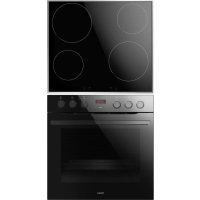
EHIX 933 133 S - Other kitchen appliances AMICA - Free user manual and instructions
Find the device manual for free EHIX 933 133 S AMICA in PDF.



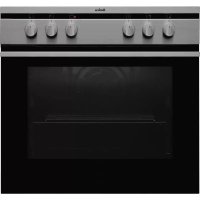
| Product type | Built-in cooker |
| Brand | Amica |
| Model | EHIX 933 133 S |
| Dimensions (W x H x D) | 59.5 x 59.5 x 57.5 cm |
| Power supply | 400V 3N~50Hz / 400V 2N~50Hz |
| Maximum nominal power | 10.9 kW |
| Hob type | Induction |
| Number of cooking zones | 4 |
| Cooking zone diameters | Front left ∅210 mm, rear left ∅160 mm, rear right ∅210 mm, front right ∅160 mm |
| Booster function | Yes |
| Child safety | Yes, control lock |
| Residual heat indicator | Yes, "H" symbol |
| Oven type | Electric with forced air circulation |
| Oven functions | Fan forced, grill, convection, defrost, rapid heat, ECO |
| Electronic programmer | Yes, with display and touch controls |
| Oven lighting | Halogen bulb G9, 25W, 230V |
| Cleaning | Steam cleaning |
| Oven door | Removable, inner glass removable |
| Oven rails | Side rails, some models with telescopic |
| Cooking levels in the oven | Multiple levels (racks) |
| Control type | Rotary knobs and touch sensors |
Frequently Asked Questions - EHIX 933 133 S AMICA
User questions about EHIX 933 133 S AMICA
0 question about this device. Answer the ones you know or ask your own.
Ask a new question about this device
Download the instructions for your Other kitchen appliances in PDF format for free! Find your manual EHIX 933 133 S - AMICA and take your electronic device back in hand. On this page are published all the documents necessary for the use of your device. EHIX 933 133 S by AMICA.
USER MANUAL EHIX 933 133 S AMICA
natural_image
Line drawing of a standard electric oven with four burners and top eaves (no text or symbols)2226I(G)2.39eETsDpHbS / EHIX 933 133 S
natural_image
Simple black-and-white line drawing of a tree with cloud-like canopy and two wavy lines at base (no text or symbols)Sie tun:
natural_image
Simple line drawing of a square frame with rounded corners and a small circular top (no text or symbols)Backblech*

natural_image
Line drawing of a rectangular metal grate or filter structure with parallel slats (no text or symbols)natural_image
Line drawing of a square container or tray with no text or symbolsBratblech*
Backblechträger
natural_image
Technical line drawing of a door with internal compartments and ventilation slots (no text or symbols)natural_image
Pure technical line drawing of a 3D mechanical part with no text or symbols
natural_image
Pure 3D geometric lines forming a stepped rectangular shape (no text or symbols)
natural_image
3D diagram of a corner bracket with shaded areas, no text or symbols present
natural_image
Diagram showing a circular object rolling down a wooden beam, with an inset view labeled '4' (no text or symbols on the diagram itself)natural_image
Diagram showing two steps of folding a rectangular object, with arrows indicating downward movement (no text or symbols present)natural_image
Top-down schematic of a rectangular device with internal grid pattern and directional arrows (no text or symbols)Abb. A
Achtung!
Abb. B


natural_image
Diagram of a cylindrical device with a rotating arrow and base, no text or symbols presentWichtig!
natural_image
Simple line drawing of a cooking pot with arrows indicating flow or movement (no text or symbols)natural_image
Five identical cooking pots with crossed-out black X marks, arranged horizontally (no text or symbols)natural_image
Diagram showing a cooking pot with three circular kitchen utensils below, no text or symbols present.3456
natural_image
Simple diagram with four circles arranged horizontally inside a rectangle (no text or symbols)flowchart
graph TD
    A["Start"] --> B{Condition}
    B -->|Yes| C["Close-up of circular device"]
    B -->|No| D["Adjustment to circular device"]
    C --> E["Order 0: Eco-Eco"]
    D --> F["Order 1: Air-Eco-Eco"]
    E --> G["Order 2: Air-Eco-Eco"]
    F --> H["Order 3: Air-Eco-Eco"]
    G --> I["Order 4: Air-Eco-Eco"]
    H --> J["Order 5: Air-Eco-Eco"]
    I --> K["Order 6: Air-Eco-Eco"]
    J --> L["Order 7: Air-Eco-Eco"]
    K --> M["Order 8: Air-Eco-Eco"]
    L --> N["Order 9: Air-Eco-Eco"]
    M --> O["Order 10: Air-Eco-Eco"]
    N --> P["Order 11: Air-Eco-Eco"]
    O --> Q["Order 12: Air-Eco-Eco"]
    P --> R["Order 13: Air-Eco-Eco"]
    Q --> S["Order 14: Air-Eco-Eco"]
    R --> T["Order 15: Air-Eco-Eco"]
    S --> U["Order 16: Air-Eco-Eco"]
    T --> V["Order 17: Air-Eco-Eco"]
    U --> W["Order 18: Air-Eco-Eco"]
    V --> X["Order 19: Air-Eco-Eco"]
    W --> Y["Order 20: Air-Eco-Eco"]
    X --> Z["Order 21: Air-Eco-Eco"]
    Y --> AA["Order 22: Air-Eco-Eco"]
    Z --> AB["Order 23: Air-Eco-Eco"]
natural_image
Pure geometric lines forming a V-shape on a gray background (no text or symbols)
natural_image
Technical diagram of a microwave oven with internal grid pattern and control knob (no text or symbols)natural_image
Three diagrams showing mechanical or electrical components with directional arrows, no text or symbols present.natural_image
Diagram showing three stages of battery charging mechanism with arrows indicating direction (no text or symbols)natural_image
Technical line drawing of a mechanical assembly with an inset showing a close-up of a component (no text or symbols present)natural_image
Technical line drawing of a mechanical assembly with a separate component (no text or symbols)natural_image
Simple black-and-white line drawing of a tree with cloud-like canopy and two wavy lines at base (no text or symbols)natural_image
Simple line drawing of a recycling symbol (three chasing arrows), no text or labels present.natural_image
Simple line drawing of a square frame with rounded corners and a small circular top (no text or symbols)Plat à pain*

natural_image
Line drawing of a rectangular metal grate or filter structure with evenly spaced slats (no text or symbols)natural_image
Line drawing of a rectangular tray or container with no text or symbolsPlat à rôtissage*
natural_image
Technical line drawing of a door with internal structure and ventilation slots (no text or symbols)natural_image
Pure technical line drawing of a 3D mechanical part with no text or symbols
natural_image
Pure geometric line drawing of a 3D rectangular prism with no text, numbers, or symbols
natural_image
3D diagram of a mechanical part with layered structure (no text or symbols)
natural_image
Diagram showing a spiral-patterned object inside a mechanical or architectural component, with no visible text or symbols.
natural_image
Diagram showing two views of a rectangular frame with arrows indicating downward motion (no text or symbols)natural_image
Top-down schematic of a rectangular device with internal grid pattern and directional arrows (no text or symbols)fig. A
Attention!
fig. B


natural_image
Simple line drawing of a cooking pot with arrows indicating flow or movement (no text or symbols)natural_image
Five identical cooking pots with crossed-out black X marks, arranged horizontally on a base (no text or symbols)natural_image
Simple diagram with four circles and three vertical lines, labeled with numbers 3, 4, 5, 6 at the bottom (no text or symbols within the diagram itself)
natural_image
Simple diagram with four circles arranged horizontally within a rectangular border (no text or symbols)Attention!
natural_image
Pure geometric lines forming a V-shape on a gray background (no text or symbols)natural_image
Technical diagram of a microwave oven with internal grid pattern and control knob (no text or symbols)Lampe du four
natural_image
Three diagrams showing mechanical or electrical components with arrows indicating motion, no text or symbols present.natural_image
Three sequential diagrams showing a battery moving through cylindrical tanks, with arrows indicating direction of movement (no text or symbols)natural_image
Technical line drawing of a mechanical assembly with an inset showing a worker on a platform (no text or symbols present)natural_image
Technical line drawing of a mechanical assembly with a rectangular component and a cylindrical component, no text or symbols present.NETTOYAGE ET ENTRETIEN DE LA CUISINIÈRE
The cooker is exceptionally easy to use and extremely efficient. After reading the instruction manual, operating the cooker will be easy.
Before being packaged and leaving the manufacturer, the cooker was thoroughly checked with regard to safety and functionality.
Before using the appliance, please read the instruction manual carefully.
By following these instructions carefully you will be able to avoid any problems in using the appliance.
It is important to keep the instruction manual and store it in a safe place so that it can be consulted at any time.
It is necessary to follow the instructions in the manual carefully in order to avoid possible accidents.
Caution!
Do not use the cooker until you have read this instruction manual.
The cooker is intended for household use only.
The manufacturer reserves the right to introduce changes which do not affect the operation of the appliance.
Information about the product concerning Regulation (EU) No 65/2014 and Regulation (EU) No 66/2014, can be found on the last pages of the user manual or in other printed documents provided with the product.
Warning. The appliance and its accessible parts become hot during use. Care should be taken to avoid touching heating elements. Children less than 8 years of age shall be kept away unless continuously supervised.
This appliance can be used by children aged from 8 years and above and persons with reduced physical, sensory or mental capabilities or lack of experience and knowledge if they have been given supervision or instruction concerning use of the appliance in a safe way and understand the hazards involved. Children shall not play with the appliance. Cleaning and user maintenance shall not be made by children without supervision.
Warning: Unattended cooking on a hob with fat or oil can be dangerous and may result in fire.
NEVER try to extinguish a fire with water, but switch off the appliance and then cover flame e.g. with a lid or a fire blanket.
Warning. Danger of fire: do not store items on the cooking surfaces.
Warning. If the surface is cracked, switch off the appliance to avoid the possibility of electric shock.
Metallic objects, such as knives, forks, spoons and lids should not be placed on the hob surface since they can get hot.
After use, switch off the hob element by its control and do not rely on the pan detector.
During use the appliance becomes hot. Care should be taken to avoid touching heating elements inside the oven. Accessible parts may become hot during use. Young children should be kept away.
Warning. Do not use rough cleaning products or sharp metal objects to clean the glass in the doors as they may scratch the surface resulting in glass breaking.
Warning: Ensure that the appliance is switched off before replacing the lamp to avoid the possibility of electric shock.
You should not use steam cleaning devices to clean the appliance.
Danger of burns! Hot steam may escape when you open the oven door. Be careful when you open the oven door during or after cooking. Do NOT lean over the door when you open it. Please note that depending on the temperature the steam can be invisible.
● Always keep children away from the cooker.
While in operation direct contact with the cooker may cause burns!
- Ensure that small items of household equipment, including connection leads, do not touch the hot oven or the hob as the insulation material of this equipment is usually not resistant to high temperatures.
- Do not leave the cooker unattended when frying. Oils and fats may catch fire due to overheating or boiling over.
- Do not allow the hob to get soiled and prevent liquids from boiling over onto the surface of the hob. This refers in particular to sugar which can react with the ceramic hob and cause irreversible damage. Any spillages should be cleaned up as they happen.
- Do not place pans with a wet bottom on the warmed up heating zones as this can cause irreversible changes to the hob (irremovable stains).
- Use pans that are specified by the manufacturer as designed for use with a ceramic hob.
- If any defects, deep scratches, cracks or chips appear on the ceramic hob, stop using the cooker immediately and contact the service centre.
- Do not switch on the hob until a pan has been placed on it.
- Do not use pans with sharp edges that may cause damage to the ceramic hob.
- Do not look directly at the halogen heating zones (not covered by a pan) when they are warming up.
- Do not put pans weighing over 15 kg on the opened door of the oven and pans over 25 kg on the hob.
- Do not use harsh cleaning agents or sharp metal objects to clean the door as they can scratch the surface, which could then result in the glass cracking.
- Do not use the cooker in the event of a technical fault. Any faults must be fixed by an appropriately qualified and authorised person.
- In the event of any incident caused by a technical fault, disconnect the power and report the fault to the service centre to be repaired.
- Never allow children to remain unattended near the cooktop nor to play with the control panel.
- People with life function support implants (such as a heart pacemaker, an insulin pump, or a hearing aid) must make sure that the operation of these devices is not disturbed by the induction plate (induction plate frequency range is 20 to 50 kHz).
- The appliance has been designed only for cooking. Any other use (for example for heating) does not comply with its operating profile and may cause danger.

natural_image
Simple black-and-white line drawing of a tree with cloud-like canopy and two wavy lines at base (no text or symbols)Using energy in a responsible way not only saves money but also helps the environment. So let's save energy! And this is how you can do it:
- Use proper pans for cooking.
Pans with thick, flat bases can save up to 1/3 on electric energy. Remember to cover pans if possible otherwise you will use four times as much energy!
- Match the size of the saucepan to the surface of the heating zone.
A saucepan should never be smaller than a heating zone.
- Ensure heating zones and pan bases are clean.
Soils can prevent heat transfer – and repeatedly burnt-on spillages can often only be removed by products which cause damage to the environment.
- Do not uncover the pan too often (a watched pot never boils!).
Do not open the oven door unnecessarily often.
Switch off the oven in good time and make use of residual heat.
For long cooking times, switch off heating zones 5 to 10 minutes before finishing cooking. This saves up to 20% on energy.
Only use the oven when cooking larger dishes.
Meat of up to 1 kg can be prepared more economically in a pan on the cooker hob.
● Make use of residual heat from the oven.
If the cooking time is greater than 40 minutes switch off the oven 10 minutes before the end time.
Important! When using the timer, set appropriately shorter cooking times according to the dish being prepared.
●Only grill with the ultrafan after closing the oven door.
●Make sure the oven door is properly closed.
Heat can leak through spillages on the door seals. Clean up any spillages immediately.
- Do not install the cooker in the direct vicinity of refrigerators/freezers.
Otherwise energy consumption increases unnecessarily.

natural_image
Simple line drawing of a recycling symbol (three chasing arrows), no text or labels present.During transportation, protective packaging was used to protect the appliance against any damage. After unpacking, please dispose of all elements of packaging in a way that will not cause damage to the environment.
All materials used for packaging the appliance are environmentally friendly; they are 100% recyclable and are marked with the appropriate symbol.
Caution! During unpacking, the packaging materials (polythene bags, polystyrene pieces, etc.) should be kept out of reach of children.

Old appliances should not simply be disposed of with normal household waste, but should be delivered to a collection and recycling centre for electric and electronic equipment. A symbol shown on the product, the instruction manual or the packaging shows that it is suitable for recycling.
Materials used inside the appliance are recyclable and are labelled with information concerning this. By recycling materials or other parts from used devices you are making a significant contribution to the protection of our environment.
Information on appropriate disposal centres for used devices can be provided by your local authority.
DESCRIPTION OF THE APPLIANCE

1 Temperature control knob
2 Oven function selection knob
3, 4, 5, 6 Heating zone control knobs
7 Temperatureregulatorsignal light L
8 Cooker operation signal light R
9 Oven door handle
10 Ceramic hob
11 Electronic programmer
Cooker fittings:
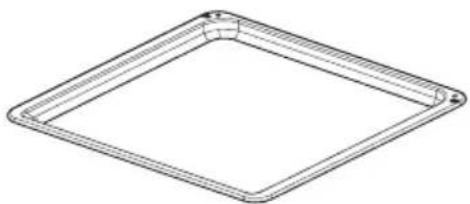
natural_image
Line drawing of a square frame with rounded corners and a small circular cutout at the top (no text or symbols)Baking tray*

natural_image
Isometric line drawing of a rectangular plate with horizontal slats (no text or symbols)Grill grate (drying rack)

natural_image
Line drawing of a square tray or container with no text or symbolsRoasting tray*

*optional
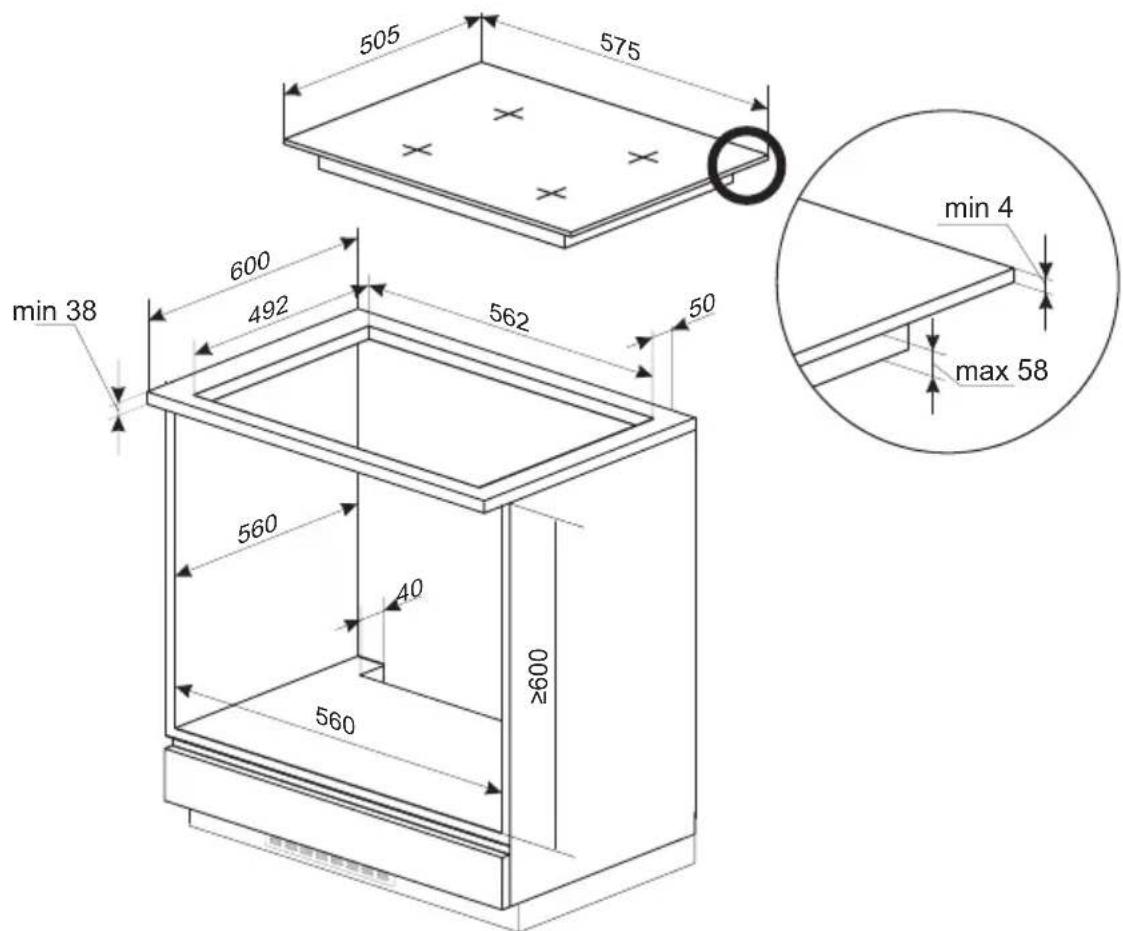
Making the worktop recess
- The kitchen area should be dry and aired and equipped with efficient ventilation. When installing the cooker, easy access to all control elements should be ensured.
This is a Y-type design built-in cooker, which means that its back wall and one side wall can be placed next to a high piece of furniture or a wall.
- Worktop thickness should be 28 - 40 mm, while its width at least 600 mm. The worktop must be flat and level. Edge of the worktop near the wall must be sealed to prevent ingress of water or other liquids.
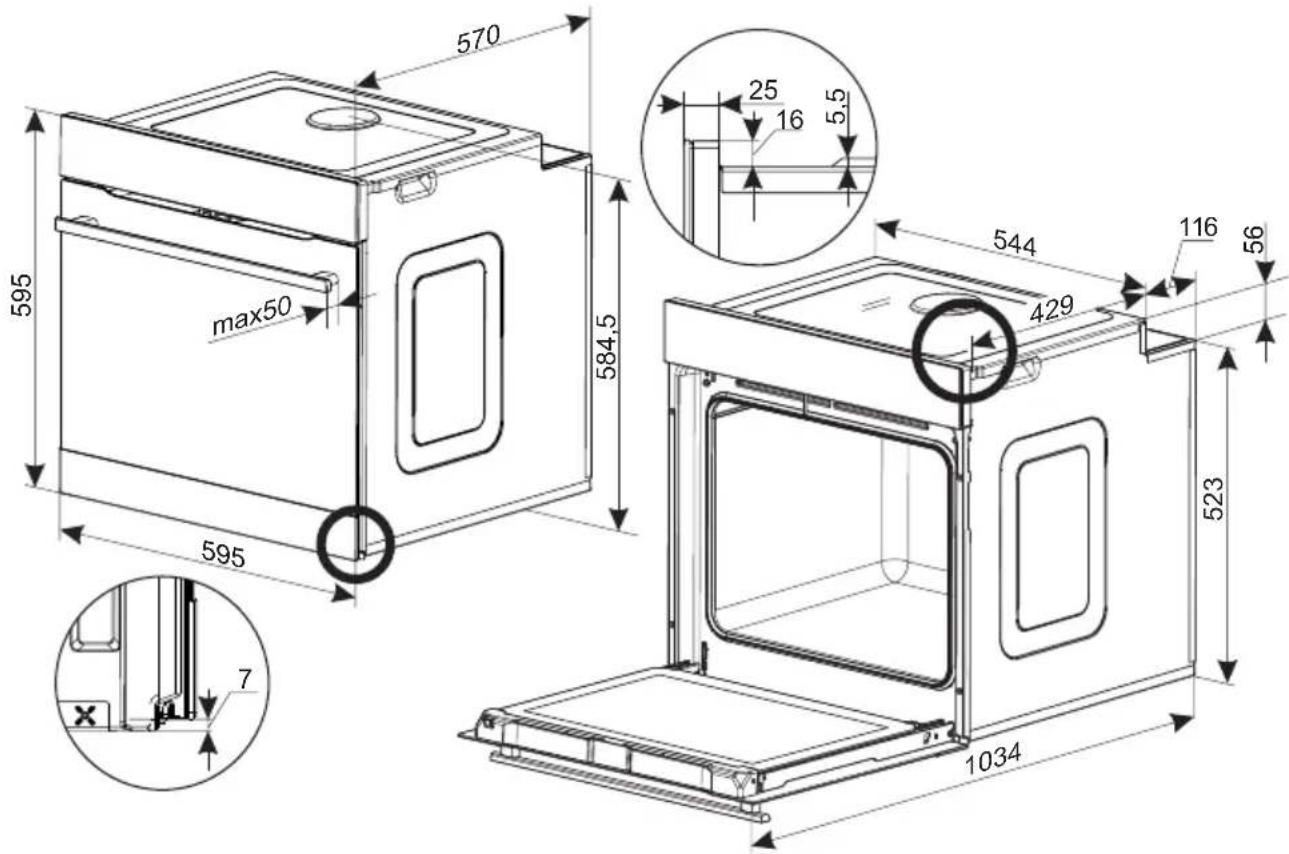
- There should be sufficient spacing around the opening, in particular, at least 50 mm distance to the wall and 60 mm distance to the front edge of worktop.
- Worktop must be made of materials, including veneer and adhesives, resistant to a temperature of 100irc C. Otherwise, veneer could come off or surface of the worktop become deformed.
- Edge of the opening should be sealed with suitable materials to prevent ingress of water.
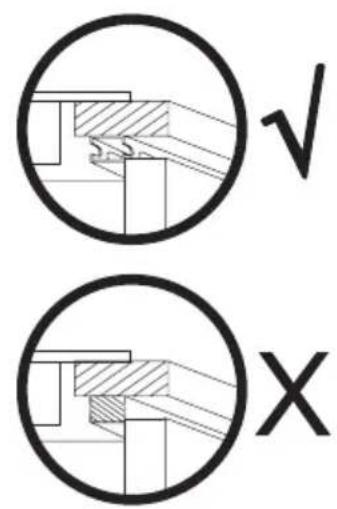
- Worktop opening must cut to dimensions as shown on figure.
- In the back section of the protection plate a notch should be made with a width of at least 80 mm.
Assembly of the gasket
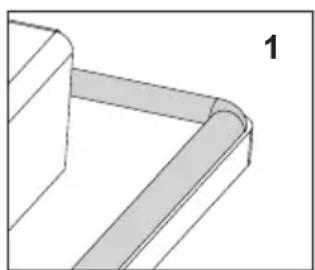
Depending on the model, the seal is already installed at the factory (fig.1)
If the seal has not been fitted at the factory, proceed as follows:
Before installing the hob in the cut-out worktop, the gasket is to be attached to the back of the hob (pic. 2)
To do this, first peel off the protective film from the self-adhesive seal and glue the gasket as close as possible to the outer edge of the hob (fig. 3,4).
natural_image
Pure 3D geometric diagram of a corner bracket with no text or symbols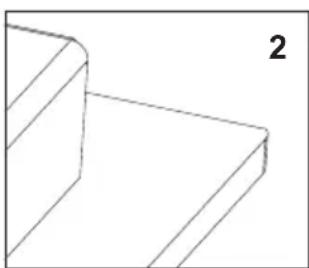
natural_image
Pure 3D geometric lines forming a stepped rectangular shape (no text or symbols)
natural_image
3D diagram of a corner bracket with shaded areas, no text or symbols present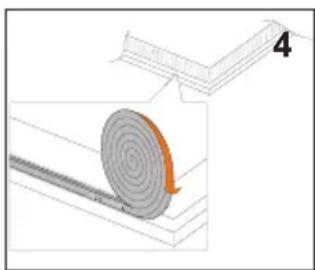
natural_image
Diagram showing a spiral-patterned object rolling down a rectangular structure, with no visible text or symbols.
Do not install the appliance without the foam gasket.
Then turn the hob over insert it into the cut-out of the furniture. Align the positioning symmetrically so that the distances between the hob and the countertop is the same on all sides. (fig. 5)

natural_image
Diagram showing two views of a rectangular frame with downward arrows indicating compression or disassembly (no text or symbols)Assembly of the oven:
● Make an opening with the dimensions given in the diagram for the oven to be fitted.
● Make sure the mains plug is disconnected and then connect the oven to the mains supply.
- Partially insert the oven into the prepared opening and connect the oven to the hob figure B
- The appliance must be earthed. Connect the earth lead of the hob (yellow-green) with the earth terminal of the oven (marked ⭕ which is located near the connection box
- Insert the oven completely into the opening without allowing the four screws in the places shown in the diagram to fall out figure A.

natural_image
Diagram of a rectangular device with a central circular pattern and four arrows pointing outward (no text or symbols)figure A
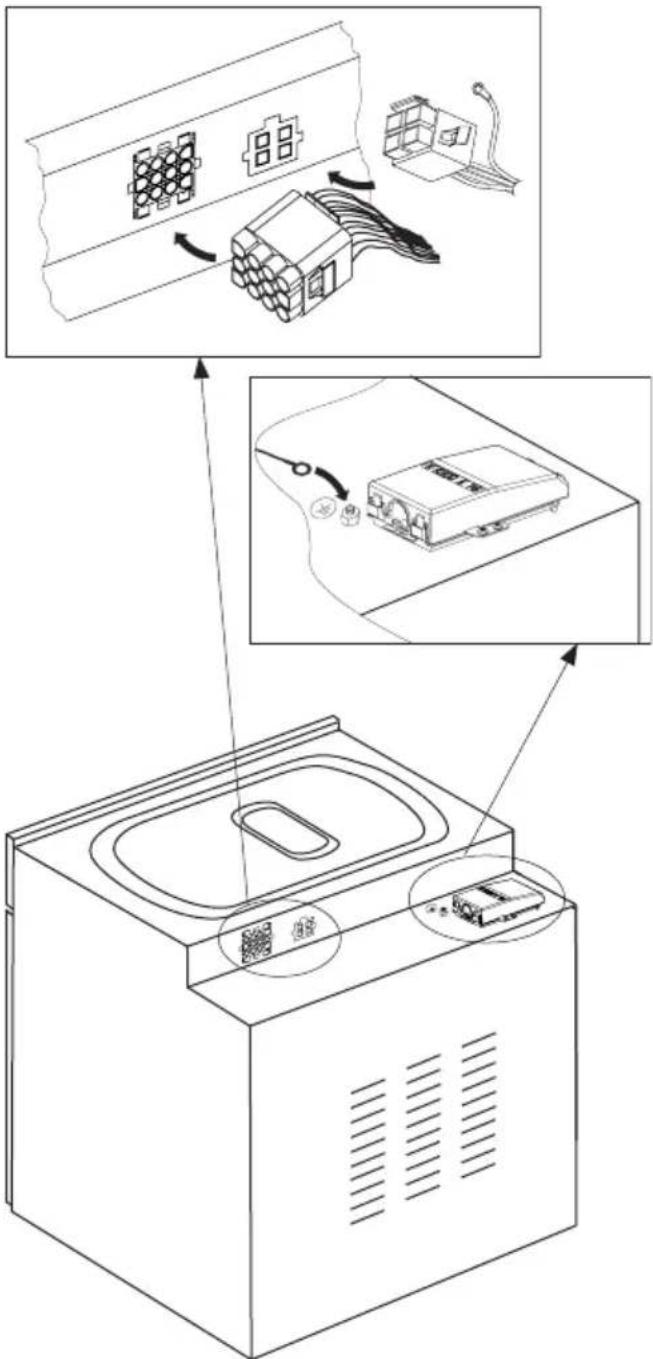
figure B


Electrical connection
Warning!
All electrical work should be carried out by a suitably qualified and authorised electrician. No alterations or wilful changes in the electricity supply should be carried out.
Fitting guidelines
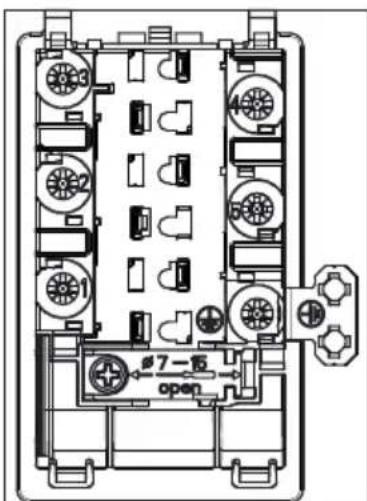
The cooker is manufactured to work with three-phase alternating current (400V 3N\~50Hz). The voltage rating of the cooker heating elements is 230V. The appliance can be configured for two phase power supply (400V 2N\~50 Hz) by bridging the appropriate terminals according to wiring diagram. The connection diagram is also found on the cover of the connection box. Remember that the connection wire should match the connection type and the power rating of the cooker.
The connection cable must be secured in a strain-relief clamp.
Warning!
Remember to connect the safety circuit to the connection box terminal marked with ⏚The electricity supply for the cooker must have a safety switch which enables the power to be cut off in case of emergency. The distance between the working contacts of the safety switch must be at least 3 mm.
Before connecting the cooker to the power supply it is important to read the information on the data plate and the connection diagram.

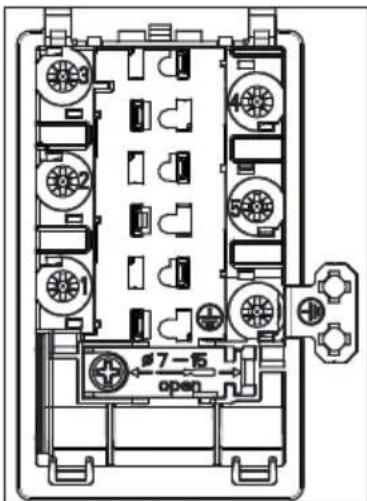
Connection diagram
Caution! Voltage of heating elements 230V
Caution! In the event of any connection the safety wire must be connected to the ⏚E terminal.
| Recommended type of connection lead | ||||
| 1 | For 400 V 2N~50Hz two-phase connection with a neutral conductor, terminals 2-3 are bridged and terminals 4-5 are bridged, individual phase conductors are connected to terminals 1 and 2-3 respectively, neutral conductor is connected to bridged terminals 4-5, and the protective earth conductor is connected to the earthing terminal | 2N~ |  | H05VV-F4G4 4x 4 mm2 |
| 2 | For 400 V 3N~50Hz three-phase connection with a neutral conductor, terminals 4-5 are bridged, individual phase conductors are connected to terminals 1, 2, and 3 respectively, neutral conductor is connected to bridged terminals 4-5, and the protective earth conductor is connected to the earthing terminal | 3N~ |  | H05VV-F5G1,5 5x 1,5 mm2 |
| L1, L2, L3 - phase conductors; N - neutral conductor; PE - protective earth (grounding) conductorThe arrows in the above diagrams indicate where you need to connect the individual cable conductors. | ||||
Before using the oven for the first time
- Remove packaging, clean the interior of the oven,
● Take out and wash the oven fittings with warm water and a little washing-up liquid, - Switch on the ventilation in the room or open a window,
- Gently press the knob and turn it right to position or (see section: electronic programmer operation and oven control),
- Heat up the oven (to a temperature of 250irc C for approximately 30 minutes), remove any stains and wash the interior carefully.
The oven is equipped with a retractable knobs. In order to select a function do the following:
- Gently press and release a knob which will pop out,
- Turn the oven functions selection knob to the desired function.
Symbols printed around the knob indicate available oven functions.
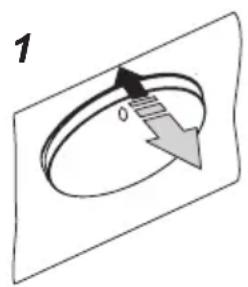
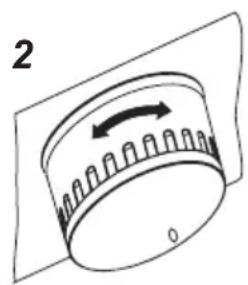
natural_image
Diagram of a cylindrical device with an arrow indicating rotation, no text or symbols presentImportant!
In ovens equipped with the electronic programmer Ts, the time "0.00" will start flashing in the display field upon connection to the power supply.
The programmer should be set with the current time. (See Electronic programmer). If the current time is not set operation of the oven is impossible.
The electronic programmer Ts is equipped with electronic sensors which are switched on by touching or pressing the sensor surface for at least one second.
Each sensor reaction is confirmed by the beep. Keep the sensor surface clean at all times.
Important!
To clean the oven, only use a cloth well rang out with warm water to which a little washing-up liquid has been added.
Electronic timer\*

MENU — select the mode of operation
— higher setting sensor
< — lower setting sensor
— appliance on indicator
— Kitchen timer
— Duration
Setting the time
When the appliance is plugged into the electrical mains supply, or when power is restored after power outage, the digital display will show flashing 0.00.
- Touch and hold MENU ((or simultaneously touch < / > ) until you will see 📋 on the display and the dot below the symbol is flashing,
- Touch < / > within 7 seconds to set the current time.
To store the new time setting, wait approximately 7 seconds after time has been set. The dot below the symbol will stop flashing.
You can adjust the time later. To do this touch < / > simultaneously and adjust the current time while the dot below the symbol is flashing.
Note:
The oven can be turned on when you see the symbol on the display.
*optional
Kitchen Timer
You can active the Kitchen Timer at any time, regardless of the status of other functions. The Kitchen Timer can be set from 1 minute up to 23 hours and 59 minutes.
To set the Kitchen Timer:
- Touch MENU, then the display will show blinking 🔒
- Use the < / > , sensors to set the Kitchen Timer. The display will show the set time and Kitchen Timer symbol ⚠ Once the set time elapses, alarm sounds and the 🔊 icon flashes,
- Touch and hold MENU or simultaneously touch and hold < / > to mute the alarm, the will be off and the display will show the current time.
Note!
If no button is touched, alarm will turn off automatically after approximately 7 minutes.
Timed operation
To set the appliance to switch off after a specific duration:
- Set the operation mode knob and the temperature control knob to your preferred settings.
- Touch MENU repeatedly until the display shows dur (duration) briefly and the symbol will be flashing,
- Set the desired duration from 1 minute to 10 hours using the
</> sensors.
The set duration will be memorised after about 7 seconds. The display will show the current time and the symbol.
Once the Duration has elapsed the oven will turn off automatically. You will hear an alarm and the symbol will be flashing.
- Set the oven function selector knob and the temperature selector knob in off position.,
- Touch and hold MENU or simultaneously touch and hold < / > to mute the alarm, the will be off and the display will show the current time.
Cancel settings
Timer and Timed operation settings may be cancelled at any time.
Cancel Timed operation settings:
- Simultaneously touch and hold the < /> sensors.
Cancel timer settings:
- Touch the MENU sensor to select the Kitchen Timer,
- simultaneously touch the < / > sensors
Change the beep tone
You can change the beep tones as follows:
- Simultaneously touch the < / > , sensors
- Touch MENU repeatedly to select the ton (tone). The display will be flashing:
- Use the < / > sensors to select your preferred tone:
Use > to select the setting 1 to 3
Use < to select the setting 3 to 1
Adjust display brightness
You can adjust display brightness 1 to 9, where 1 is the darkest and 9 is the brightest. The brightness setting applies to an inactive control panel, i.e. when no controls are touched for 7 seconds.
You can adjust display brightness as follows:
- Simultaneously touch the < / > sensors,
- Touch MENU repeatedly to select the bri (brightness) setting — the settings can be accessed in sequence ton (tone) and bri (brightness).
- Use the < / > sensors to select your preferred brightness:
Use > to select the setting 1 to 9
Use < to select the setting 9 to 1
Note:
The display is at its brightest setting when active, i.e. a control was touched within the last 7 seconds.
Night Mode
The display is dimmed during the night hours 22:00 — 06:00.
Induction cooking zone operation principle

natural_image
Simple line drawing of a steam locomotive inside a container with cooling fins (no text or symbols)Electric oscillator powers a coil placed inside the appliance. This coil produces a magnetic field, which induces eddy currents in the cookware.
These eddy currents induced by the magnetic field cause the cookware to heat up.
This requires the use of pots and pans whose base is ferromagnetic, in other words susceptible to magnetic fields.
Overall, induction technology is characterized by two advantages:
- the heat is only emitted by the cookware and its use is maximised,
- there is no thermal inertia, since the cooking starts immediately when the pot is placed on the hob and ends once it is removed.
Certain sounds can be heard during normal use of the induction hob, which do not affect its correct operation.
- Low-frequency humming. This noise arises when the cookware is empty and stops when water is poured or food is placed in the cookware.
- High-frequency whizz. This noise arises in cookware made of multiple layers of different materials at maximum heat setting. The noise intensifies when using two or more cooking zones at maximum heat setting. The noise will stop or reduce when heat setting is reduced.
- Creaking noise. This noise arises in cookware made of multiple layers of different materials. The noise intensity depends on how the food is cooked.
- Buzzing. Buzzing can be heard when electronics cooling fan operates.
The noises that can be heard during the normal appliance operation are the result of the cooling fan operation, cooking method, cookware dimensions, cookware material and the heat setting. These noises are normal and do not indicate a fault.
The protective device:
If the hob has been installed correctly and is used properly, any protective devices are rarely required.
Fan: protects and cools controls and power components. It can operate at two different speeds and is activated automatically. Fan runs until the electronic system has sufficiently cooled down regardless of the appliance or the cooking zones being turned on or off.
Temperature sensor: Temperature of electronic circuits is continuously monitored by a temperature sensor. If temperature is raised beyond a safe level, this protection system will reduce cooking zone heat setting or shut down the cooking zones adjacent to the overheated electronic circuits.
Pan detection: allows the hob to detect pans placed on a cooking zone. Small objects placed on the cooking zone (eg, spoon, knife, ring ...) will not be recognised as pans and the hob will not operate.

Pan detector
Pan detector is installed in induction hobs. Pan detector starts heating automatically when a pan is detected on a cooking zone and stops heating when it is removed. This helps save electricity.
- When an suitable pan is placed on a cooking zone, the display shows the heat setting.
- Induction requires the use of suitable cookware with ferromagnetic base (see Table).

If a pan is not placed on a cooking zone or the pan is unsuitable, the symbol is displayed. The cooking zone will not operate. If a pan is not detected within 1 minutes, the cooking zone will be switched off.
Switch off the cooking zone using the touch control sensor field rather than by removing the pan.

Pan detector does not operate as the on/off sensor.
The induction hob is equipped with electronic touch control sensor fields, which are operated by touching the marked area with a finger.
Each time a sensor field is touched, an acoustic signal can be heard.

When switching the appliance on or off or changing the heat setting, attention should be paid that only one sensor field at a time is touched. When two or more sensor fields are touched at the same time (except timer and child lock), the appliance ignores the control signals and may trigger a fault indication if sensor fields are touched for a long time.
When you finish cooking switch off the cooking zone using touch control sensor fields and do not rely solely on the pan detector.
The high-quality cookware is an essential condition for efficient induction cooking.

Select cookware for induction cooking

natural_image
Five identical cooking pots with crossed-out black X marks, arranged horizontally (no text or symbols)Cookware characteristics.
- Always use high quality cookware, with perfectly flat base. This prevents the formation of local hot spots, where food might stick. Pots and pans with thick steel walls provide superior heat distribution.
- Make sure that cookware base is dry: when filling a pot or when using a pot taken out of the refrigerator make sure its base is completely dry before placing it on the cooking zone. This is to avoid soiling the surface of the hob.
- Lid prevents heat from escaping and thus reduces heating time and lowers energy consumption.
- To determine if cookware is suitable, make sure that its base attracts a magnet.
- Cookware base has to be flat for optimal temperature control by the induction module.
- The concave base or deep embossed logo of the manufacturer interfere with the temperature induction control module and can cause overheating of the pot or pan.
- Do not use damaged cookware such as cookware with deformed base due to excessive heat.
- When you use large ferromagnetic base cookware, whose diameter is less than the total diameter of the cookware, only the ferromagnetic base heats up. This results in a situ-
ation where it is not possible to uniformly distribute the heat in the cookware. If the ferromagnetic area is reduced due to inclusion of aluminium parts then the effective heated area can be reduced. Problems with the detection of the cookware could arise or cookware may not be detected at all. To achieve optimum cooking results, the diameter of the ferromagnetic base should match that of the cooking zone. If cookware is not detected in a given cooking zone, it is advisable to try it in a smaller cooking zone.

natural_image
Diagram showing a cooking pot with three circular components below, no text or symbols presentFor induction cooking us only ferromagnetic base materials such as:
- enamelled steel
- cast iron
- special stainless steel cookware designed for induction cooking.
| Marking of kitchen cookware |  | Check for marking indicating that the cookware is suitable for induction cooking. |
| Use magnetic cookware (enamelled steel, ferrite stainless steel, cast iron). The easiest way to determine if your cookware is suitable is to perform the „magnet test”. Find a generic magnet and check if it sticks to the base of the cookware. | ||
| Stainless Steel Cookware | is not detected | |
| With the exception of the ferromagnetic steel cookware | ||
| Aluminium Cookware is not detected | ||
| Cast iron High efficiency | ||
| Caution: cookware can scratch the hob surface | ||
| Enamelled steel High efficiency | ||
| Cookware with a flat, thick and smooth base is recommended | ||
| Glass Cookware is not detected | ||
| Porcelain Cookware is not detected | ||
| Cookware with copper base | Cookware is not detected | |
The smallest useful diameter of cookware for a cooking zone:
| Cooking zone diameter The minimum diameter of the bottom of an enamelled steel cookware | |
| (mm) (mm) | |
| 160 - 180 | 110 |
| 180 - 200 | |
| 210 - 220 | 125 |
| 220 x 190 | |
| 260 - 280 | |
The minimum diameter of cookware made of materials other than enamelled steel may vary.

[3] Front left cooking zone
∅ 210 mm 2,0 kW / 3,0 kW
[4] Back left cooking zone
∅ 160 mm 1,2 kW / 1,4 kW
[5] Back right cooking zone ∅ 210 mm 2,0 kW / 3,0 kW
[6] Front right cooking zone ∅ 160 mm 1,2 kW / 1,4 kW
When the induction hob is switched off then all the cooking zones are disconnected and the indicators are off.

natural_image
Simple diagram with four circles arranged horizontally within a rectangular border (no text or symbols)The cooking zones have variable heating power. The heating power can be adjusted by turning the dial left or right.
| Heating power | Use |
| 0 Switched off Use of residual heat. | |
| 1-2 Heating up hot meals.Slow cooking of smaller portions | |
| 3 Slow cooking on low power | |
| 4-5 Long preparation of larger portions and frying larger portions | |
| 6 Frying, roasting | |
| 7-8 Frying | |
| 9 Starting to prepare dishes, frying | |
| A Automatic parboiling function | |
| P Booster function (extra boost energy for quicker cooking). | |
Switching on the induction hob
- Switch on the cooking zone using the dial on the control panel.
● The symbols by the knobs indicate which dial operates each cooking zone.
● The desired heating power can be set immediately (1-9). - The set heating power is also shown on the hob's display.
The indicator lights go out automatically 10 seconds after all the cooking zones are switched off.
The child lock function
You can disable any of the cooking zones by activating the child lock function. This protects your children.
Activating the child lock function.
- The child lock function can be activated when all knobs are set to "0" position.
- Simultaneously turn both knobs [3] and [6] to the left and hold for 3 seconds. All the indicators show the "L" symbol. The child lock function has been activated.
- Turning any of the hob's knob causes all the indicators to show the "L".
Deactivate child lock.
- Simultaneously turn both control knobs [3] and [6] to the right to position "P" and hold both knobs at this position for 1 second and then turn both knobs back to "0". The child lock "L" symbol will disappear from displays and child lock will deactivate.

Important!
After disconnecting from the mains, the child lock function is activated.
The residual heat indicator

The hob is also equipped with a residual heat indicator “H” Even if a cooking zone is not directly heated, it takes in heat from the base of a pot or pan. As long as the “H” symbol is lit, any residual heat can be used for heating a pot or pan or melting fat. When the indication goes out, you can touch the cooking zone, bearing in mind that it still does not have the ambient temperature.
Important!
When there is no power, the residual heat indicator does not light up.
Automatic parboiling function
All four cooking zones are fitted with a special function which allows each of them to start on full heating power regardless of the power currently set. After a certain time the heating power returns to that which is set (from 1 to 8) To use this function, choose the level which is to be used to heat the dish, or to which the power is to return.
The auto parboiling function is useful when...
● dishes are cold at the start of cooking and need intensive heating, so that they can then be cooked on low power so that they do not need to be constantly watched (e.g. beef ragout).
The auto parboiling function is not useful when...
● baking or steaming a dish which needs to be stirred, mixed or have water added;
- you are boiling pasta or dumplings in a large amount of water;
- you are preparing dishes which require long cooking in a pressure cooker.
Activating the auto parboiling function:
- Set the dial to „A”, then turn it back to the required power. The indicator will alternate between showing the „A” symbol and the chosen power level. After the increased power cooking (e.g. 5) is finished, the cooking zone returns to the power level shown on the display
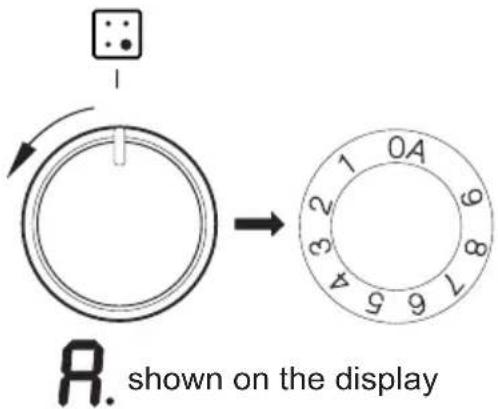

Instructions:
- If the knob is in the "0" position immediately after selecting the auto parboiling function (i.e. no cooking power level has been set), the auto parboiling function switches off after three seconds.
- Removing a pan from a cooking zone and replacing it on the same cooking zone within ten minutes does not cancel the set auto parboiling function.
The cooking zone is switched on at full power for a time depending on the heat setting selected, and is then switched back to the heat setting set.
| Cooking heat level | Time automatic paraboiling function is active (seconds) |
| 1 | 48 |
| 2 | 72 |
| 3 136 | |
| 4 208 | |
| 5 264 | |
| 6 432 | |
| 7 120 | |
| 8 192 | |
| 9 | - |
Booster function "P"
The Booster Function increases the nominal power of the 210 mm cooking zone from 2000W to 3000W,
∅ 160 mm cooking zone from 1200W to 1400W.
Turn the knob to "P" position and hold it there for 3 seconds. Cooking zone display will show the letter "P".
To deactivate the Booster function turn the knob to another position or simply lift the pot off the cooking zone.
For 210 mm cooking zone, operation of the Booster function is limited to 5 minutes. Once the Booster function is automatically deactivated, the cooking zone continues to operate at its nominal power. The Booster function can be reactivated, provided the appliance electronic circuits and induction coils are not overheated.
When the pot is lifted from the cooking zone when the Booster function is in operation, it remains active and the count-down continues.
When the appliance electronic circuits or induction coils overheat when the Booster function is in operation, it is automatically deactivated. The cooking zone continues to operate at its nominal power.
Two cooking zones arranged vertically form a pair.
If activating Booster function causes the overall power limit of a pair to be exceeded, the heat setting of the other cooking zone in a pair will be automatically reduced.
Limiting the operating time
In order to increase efficiency, the induction hob is fitted with a operating time limiter for each of the cooking zones. The maximum operating time is set according to the last heating power level selected. If you do not change the heating power level for a long time (see table) then the associated cooking zone is automatically switched off and the residual heat indicator is activated. However, we you switch on and operate individual cooking zones at any time in accordance with the operating instructions.
| Cooking heat level | Maximum operating time (min) |
| 1 480 | |
| 2 480 | |
| 3 300 | |
| 4 300 | |
| 5 300 | |
| 6 | 90 |
| 7 | 90 |
| 8 | 90 |
| 9 | 90 |
| P | 10 |
In order to conserve electricity, after 30 minutes heating setting "9" will be automatically reduced to the heat setting "8", but cook time will not change.
Oven functions and operation.
Oven with automatic air circulation (including a fan and top and bottom heaters)
The oven can be warmed up using the bottom and top heaters, as well as the grill. Operation of the oven is controlled by the oven function knob – to set a required function you should turn the knob to the selected position, as well as the temperature regulator knob – to set a required function you should turn the knob to the selected position.
The oven is equipped with a retractable knobs. In order to select a function do the following:
- Gently press and release a knob which will pop out,
- Turn the oven functions selection knob to the desired function.
Symbols printed around the knob indicate available oven functions.

flowchart
graph TD
    A["Start"] --> B{Temperature Check}
    B -->|Yes| C["Step 1: 0°C"]
    B -->|No| D["Step 2: 250°C"]
    C --> E["End"]
    D --> F["End"]
The oven can be switched off by setting both of these knobs to the position “●”/“0”.
Caution!
When selecting any heating function (switching a heater on etc.) the oven will only be switched on after the temperature has been set by the temperature regulator knob.
0 Oven is off

Rapid Preheating
Top and bottom heater, roaster and fan on. Use to preheat the oven.

Defrosting
Only fan is on and all heaters are off.

Fan and combined grill on
When the knob is turned to this position, the oven activates the combined grill and fan function. In practice, this function allows the grilling process to be speeded up and an improvement in the taste of the dish. You should only use the grill with the oven door shut.

Enhanced roaster (super roaster)
In this setting both roaster and top heater are on. This increases temperature in the top part of the oven's interior, which makes it suitable for browning and roasting of larger portions of food.

Roaster on.
Roasting is used for cooking of small portions of meat: steaks, schnitzel, fish, toasts, Frankfurter sausages, (thickness of roasted dish should not exceed 2-3 cm and should be turned over during roasting).

Bottom heater on
When the knob is set to this position the oven is heated using only the bottom heater. Baking of cakes from the bottom until done (moist cakes with fruit stuffing).

Top and bottom heaters on
Set the knob in this position for conventional baking. This setting is ideal for baking cakes, meat, fish, bread and pizza (it is necessary to preheat the oven and use a baking tray) on one oven level.

Top heater, bottom heater and fan are on.
This knob setting is most suitable for baking cakes. Convection baking (recommended for baking).
When the functions have been selected but the temperature knob is set to zero only the fan will be on. With this function you can cool the dish or the oven chamber.

Independent oven lighting
Set the knob in this position to light up the oven interior.

ECO Heating
This is an optimised heating function designed to save energy when preparing food. At this knob position, the oven lighting is off.
Switching on the oven is indicated by two signal lights, R, L, turning on. The R light turned on means the oven is working. If the L light goes out, it means the oven has reached the set temperature. If a recipe recommends placing dishes in a warmed-up oven, this should be not done before the L light goes out for the first time. When baking, the L light will temporarily come on and go out (to maintain the temperature inside the oven). The R signal light may also turn on at the knob position of “oven chamber lighting”.
Use of the grill
The grilling process operates through infrared rays emitted onto the dish by the incandescent grill heater.
In order to switch on the grill you need to:
- Set the oven knob to the position marked grill,
- Heat the oven for approx. 5 minutes (with the oven door shut).
- Insert a tray with a dish onto the appropriate cooking level; and if you are grilling on the grate insert a tray for dripping on the level immediately below (under the grate).
- Close the oven door.
For grilling with the function grill and combined grill the temperature must be set to 220irc C, but for the function fan and grill it must be set to a maximum of 190irc C.
Warning!
When using function grill it is recommended that the oven door is closed. When the grill is in use accessible parts can become hot.
It is best to keep children away from the oven.
Baking
- we recommend using the baking trays which were provided with your cooker;
- it is also possible to bake in cake tins and trays bought elsewhere which should be put on the drying rack; for baking it is better to use black trays which conduct heat better and shorten the baking time;
● shapes and trays with bright or shiny surfaces are not recommended when using the conventional heating method (top and bottom heaters), use of such tins can result in undercooking the base of cakes; - when using the ultra-fan function it is not necessary to initially heat up the oven chamber, for other types of heating you should warm up the oven chamber before the cake is inserted;
- before the cake is taken out of the oven, check if it is ready using a wooden stick (if the cake is ready the stick should come out dry and clean after being inserted into the cake);
● after switching off the oven it is advisable to leave the cake inside for about 5 min.; - temperatures for baking with the ultra-fan function are usually around 20 – 30 degrees lower than in normal baking (using top and bottom heaters);
● the baking parameters given in Table are approximate and can be corrected based on your own experience and cooking preferences; - if information given in recipe books is significantly different from the values included in this instruction manual, please apply the instructions from the manual.
Roasting meat
- cook meat weighing over 1 kg in the oven, but smaller pieces should be cooked on the gas burners.
- use heatproof ovenware for roasting, with handles that are also resistant to high temperatures;
- when roasting on the drying rack or the grate we recommend that you place a baking tray with a small amount of water on the lowest level of the oven;
- it is advisable to turn the meat over at least once during the roasting time and during roasting you should also baste the meat with its juices or with hot salty water – do not pour cold water over the meat.
ECO Heating
- ECO Heating an optimised heating function designed to save energy when preparing food.
- You cannot reduce the cooking time by setting a higher temperature; preheating the oven is not recommended.
- Do not change the temperature setting and do not open the oven door during cooking.
Recommended setting for ECO Heating
| Type of dish | Oven functions | Temperature (°C) | Level Time | in minutes |
| Sponge cake | Eco | 180 - 200 2 - 3 | 50 - 70 | |
| Yeast cake/ Pound cake | Eco | 180 - 200 2 50 | - 70 | |
| Fish | Eco | 190 - 210 2 - 3 | 45 - 60 | |
| Beef | Eco | 200 - 220 2 90 | - 120 | |
| Pork | Eco | 200 - 220 2 90 | - 160 | |
| Chicken | Eco | 180 - 200 2 80 | - 100 |
Oven with automatic air circulation (including a fan and top and bottom heaters)
| Type of dish | Type of heating | Temperature (°C) | Level Time (min.) | |
| Sponge cake 160 - 200 2 - 3 30 - 50 | ||||
| Sponge cake 150 3 25 - 35 | ||||
| Yeast cake/ Pound cake | 160 - 170 1) | 3 25 - 40 | 2) | |
| Yeast cake/ Pound cake | 155 - 170 1) | 3 25 - 40 | 2) | |
| Pizza 220 - 240 | 1) | 2 15 - 25 | ||
| Fish 210 - 220 2 45 - 60 | ||||
| Fish 190 2 - 3 60 - 70 | ||||
| Sausages 220 4 14 - 18 | ||||
| Beef 225 - 250 2 120 - 150 | ||||
| Pork 160 - 230 2 | 90 - 120 | |||
| Chicken | 180 - 190 | 2 70 - 90 | ||
| Chicken | 160 - 180 2 45 - 60 | |||
| Vegetables | 190 - 210 2 40 - 50 | |||
| Vegetables | 170 - 190 3 40 - 50 | |||
The times are apply to dish that is placed into a cold oven. For the preheated oven, the times should be reduced by about 5-10 minutes.
1) Preheat
2) Baking smaller items
Note: The figures given in Tables are approximate and can be adapted based on your own experience and cooking preferences.
Baking
| Type of dish Accessory Level Type | of heating | Temperature (°C) | Baking time (min.) | ||
| Small cakes | Baking tray 4 | 160 |  | 1) | 28 - 32 |
| Baking tray 3 | 155 |  | 1) | 23 - 26 | |
| Baking tray 3 | 150 |  | 1) | 26 - 30 | |
| Baking tray Roasting tray | 2 + 42 - baking tray or roasting tray4 - baking tray |  | 150 1) | 27 - 30 | |
| Shortbread | Baking tray 3 | 150 - 160 |  | 1) | 30 - 40 |
| Baking tray 3 | 150 - 170 |  | 1) | 25 - 35 | |
| Baking tray 3 | 150 - 170 |  | 1) | 25 - 35 | |
| Baking tray Roasting tray | 2 + 42 - baking tray or roasting tray4 - baking tray |  | 160 - 175 1) | 25 - 35 | |
| Fatless sponge cake | Wire rack + black baking tin diameter 26cm | 2 170 - 180 |  | 1) | 38 - 46 |
| Apple pie | Wire rack + 2 black baking tins diameter 20cm | 2 black baking tins placed after the diagonal, back right, front left |  | 180 - 200 1) | 50 - 65 |
1) Preheat, do not use Rapid preheat function about 5 minutes
TEST DISHES. According to standard EN 60350-1.
Grilling
| Type of dish A | Accessory Level Type | of heating | Temperature (°C) | Time (min.) | |
| White bread toast | Wire rack 4 220 |  | 1) | 3 - 7 | |
| Beef burgers | Wire rack + roasting tray (to gather drops) | 4 - wire rack 3 - roasting tray |  | 220 1) | 1st side 13 - 18 2nd side 10 - 15 |
1) Preheat for 8 minutes, do not use Rapid preheat function.
Roasting
| Type of dish | Accessory Level | Type | of heating | Temperature (°C) | Time (min.) |
| Whole chicken | Wire rack + roasting tray (to gather drops) | 2 - wire rack1 - roasting tray |  | 180 - 190 70 | - 90 |
| Wire rack + roasting tray (to gather drops) | 2 - wire rack1 - roasting tray |  | 180 - 190 80 | - 100 |
The times are apply to dish that is placed into a cold oven. For the preheated oven, the times should be reduced by about 5-10 minutes.
By ensuring proper cleaning and maintenance of your cooker you can have a significant influence on the continuing fault-free operation of your appliance.
Before you start cleaning, the cooker must be switched off and you should ensure that all knobs are set to the “●”/“0” position. Do not start cleaning until the cooker has completely cooled.
Ceramic hob
- The hob should be cleaned regularly after each use. If possible, it is recommended that the hob is washed while still warm (after the heating zone indicator goes off). Do not allow the hob to get heavily stained; particularly from burnt-on spillages from boiled over liquids.
- When cleaning do not use cleaning agents with a strong abrasive effect, such as e.g. scouring powders containing an abrasive, abrasive compounds, abrasive stones, pumice stones, wire brushes and so on. They may scratch the hob surface, causing irreversible damage.
- Large spillages that are firmly stuck to the hob can be removed by a special scraper; but be careful not to damage the ceramic hob frame when doing this.

natural_image
Pure geometric lines forming a V-shape on a gray background (no text or symbols)Scraper for cleaning the hob
Caution! The sharp blade should always be protected by adjusting the cover (just push it with your thumb). Injuries are possible so be careful when using this instrument – keep out of reach of children.
- Appropriate light cleaning or washing products are recommended, such as e.g. any kind of liquids or emulsions for fat removal. If the recommended products are not available, it is advisable to use a solution of warm water with a little washing-up liquid or cleaning products for stainless steel sinks.
Oven
- Steam Cleaning function:
- The oven should be cleaned after every use. When cleaning the oven the lighting should be switched on to enable you to see the surfaces better.
- The oven chamber should only be washed with warm water and a small amount of washing-up liquid.
- After cleaning the oven chamber wipe it dry.
-pour 250ml of water (1 glass) into a bowl placed in the oven on the first level from the bottom,
- close the oven door,
- set the temperature knob to 50irc C, and the function knob to the bottom heater position ☐
- heat the oven chamber for approximately 30 minutes,
- open the oven door, wipe the chamber inside with a cloth or sponge and wash using warm water with washing-up liquid.,
- After cleaning the oven chamber wipe it dry.
Caution!
Do not use cleaning products containing abrasive materials for the cleaning and maintenance of the glass front panel.
Replacing the halogen bulb in the oven
Before replacing the halogen bulb, make sure the appliance is disconnected from the electric mains to avoid a possible electric shock.
- Set all control knobs to the position “●”/“0” and disconnect the mains plug,
- Unscrew and wash the lamp cover and then wipe it dry.
-
Pull the halogen bulb out using a cloth or paper. If necessary, replace the halogen bulb with a new one.
-
voltage 230V
- power 25W
-
G9
-
Replace the halogen bulb in its socket.
- Screw in the lamp cover.
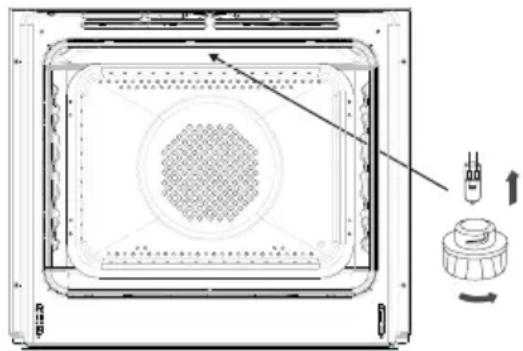
natural_image
Technical line drawing of a microwave oven with internal grid pattern and control knob (no text or symbols)Oven lighting
Note! Make sure not to touch the halogen directly with your fingers.
CLEANING AND MAINTENANCE
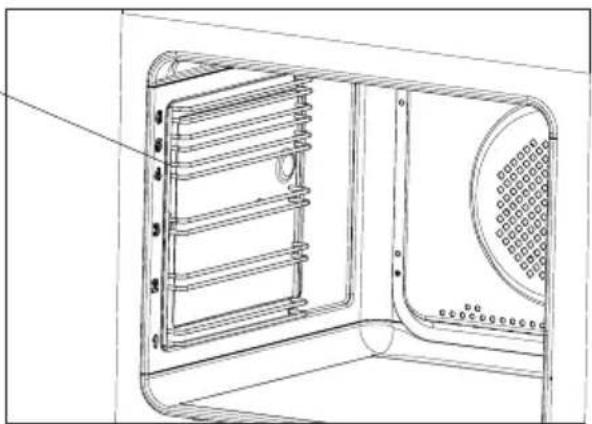
- Ovens in cookers marked with the letter D are equipped with easily removable wire shelf supports. To remove them for washing, pull the front catch, then tilt the support and remove from the rear catch.


Removing wire shelf supports
- Ovens in cookers marked with the letters Dp have stainless steel sliding telescopic runners attached to the wire shelf supports. The telescopic runners should be removed and cleaned together with the wire shelf supports. Before you put the baking tray on the telescopic runners, they should be pulled out (if the oven is hot, pull out the telescopic runners by hooking the back edge of the baking tray on the bumpers in the front part of the telescopic runners) and then insert them together with the tray.
Important!
Do not wash telescopic runners in a dishwasher.


Installing wire shelf supports

natural_image
Three-step diagram showing mechanical assembly with arrows indicating motion (no text or symbols)Removing telescopic runners
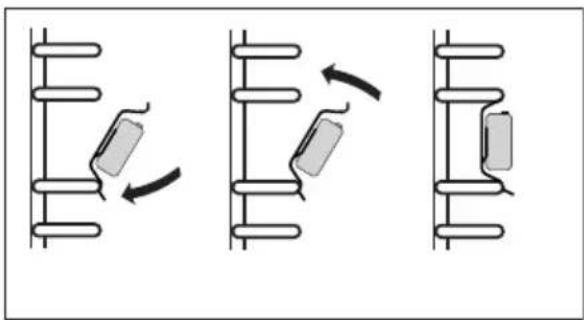
natural_image
Three sequential diagrams showing mechanical or electrical components with arrows indicating motion (no text or symbols)Installing telescopic runners
Door removal
In order to obtain easier access to the oven chamber for cleaning, it is possible to remove the door. To do this, tilt the safety catch part of the hinge upwards (fig. A). Close the door lightly, lift and pull it out towards you. In order to fit the door back on to the cooker, do the inverse. When fitting, ensure that the notch of the hinge is correctly placed on the protrusion of the hinge holder. After the door is fitted to the oven, the safety catch should be carefully lowered down again. If the safety catch is not set it may cause damage to the hinge when closing the door.

natural_image
Technical line drawing of a mechanical assembly with an inset showing a close-up of a component (no text or symbols present)Tilting the hinge safety catches
Removing the inner panel
- Pull the upper door slat loose. (fig. B, C)


natural_image
Technical line drawing of a mechanical assembly with a rectangular plate and a separate cylindrical component (no text or symbols)- Pull the inner glass panel from its seat (in the lower section of the door). Remove the inner panel (fig. D).
- Clean the panel with warm water with some cleaning agent added.
Carry out the same in reverse order to reassemble the inner glass panel. Its smooth surface shall be pointed upwards.
Important! Do not force the upper strip in on both sides of the door at the same time. In order to correctly fit the top door strip, first put the left end of the strip on the door and then press the right end in until you hear a "click". Then press the left end in until you hear a "click".

Removal of the internal glass panel
Regular inspections
Besides keeping the cooker clean, you should:
- carry out periodic inspections of the control elements and cooking units of the cooker. After the guarantee has expired you should have a technical inspection of the cooker carried out at a service centre at least once every two years,
- fix any operational faults,
● carry out periodical maintenance of the cooking units of the cooker.
Caution!
All repairs and regulatory activities should be carried out by the appropriate service centre or by an appropriately authorised fitter.
In the event of an emergency, you should:
- switch off all working units of the cooker
- disconnect the mains plug
- call the service centre
- some minor faults can be fixed by referring to the instructions given in the table below. Before calling the customer support centre or the service centre check the following points that are presented in the table.
| PROBLEM REASON ACTION | ||
| 1. The appliance does not work. | Break in power supply. Check the household fuse box; if there is a blown fuse replace it with a new one. | |
| 2. The programmer display is flashing “0.00”. | The appliance was disconnected from the mains or there was a temporary power cut. | Set the current time (see ‘Use of the programmer’). |
| 3. The oven lighting does not work. | The bulb is loose or damaged. | Tighten up or replace the blown bulb (see ‘Cleaning and Maintenance’). |
Voltage rating 400V 3N\~50Hz / 400V 2N\~50Hz
Power rating max. 10,9 kW
Cooker dimensions H/W/D 59,5 x 59,5 x 57,5 cm
The product meets the requirements of European standards EN 60335-1; EN60335-2-6.
The data on the energy labels of electric ovens is given according to standard EN 60350-1 / IEC 60350-1. These values are defined with a standard workload a with the functions active: bottom and top heaters (conventional heating) and fan assisted heating (forced air heating), if these functions are available.
The energy efficiency class was assigned depending on the function available in the product in accordance with the priority below:
| Forced air circulation ECO (ring heater + fan) | [c8z6] |
| Forced air circulation ECO (bottom heater + top + roaster + fan) |  |
| Conventional mode ECO (bottom heater + top) | [cz3x] |
During energy consumption test, remove the telescopic runners (if the product is fitted with any).
Certificate of compliance CE
The Manufacturer hereby declares that this product complies with the general requirements pursuant to the following European Directives:
● The Low Voltage Directive 2014/35/EC,
● Electromagnetic Compatibility Directive 2014/30/EC,
• ErP Directive 2009/125/EC,
and therefore the product has been marked with the CE symbol and the Declaration of Conformity has been issued to the manufacturer and is available to the competent authorities regulating the market.
natural_image
Simple black-and-white line drawing of a cloud with two wavy lines at the base (no text or symbols)natural_image
Simple line drawing of a recycling symbol (three chasing arrows), no text or labels present.natural_image
Simple line drawing of a square frame with rounded corners and a small circular top (no text or symbols)natural_image
Isometric line drawing of a rectangular metal sheet with parallel grooves (no text or symbols)natural_image
Line drawing of a square container or tray with no text or symbolsnatural_image
Pure technical line drawing of a 3D mechanical part with no text or symbols
natural_image
Pure geometric line drawing of a 3D rectangular prism with no text, numbers, or symbols
natural_image
3D diagram of a corner bracket with shaded areas, no text or symbols present
natural_image
Diagram showing a spiral-patterned object rolling down a rectangular structure, with no visible text or symbols.
natural_image
Diagram showing two steps of folding a rectangular object, with arrows indicating direction (no text or symbols)natural_image
Top-down schematic of a rectangular device with internal grid pattern and directional arrows (no text or symbols)Fig. A

Fig. B


natural_image
Diagram of a cylindrical device with a rotating arrow and base plate, no text or symbols presentAttentie!
natural_image
Simple line drawing of a cooking pot on a tray with no text or symbolsnatural_image
Five identical cooking pots with crossed-out black X marks, arranged horizontally (no text or symbols)natural_image
Diagram showing a cooking pot connected to three circular kitchen utensils (no text or labels)3456
[3] Kookzone linksvoor
∅ 210 mm 2,0 kW / 3,0 kW
[4] Kookzone linksachter
∅ 160 mm 1,2 kW / 1,4 kW
[5] Kookzone rechtsachter ∅ 210 mm 2,0 kW / 3,0 kW
[6] Kookzone rechtsvoor
∅ 160 mm 1,2 kW / 1,4 kW
natural_image
Simple diagram with five circles arranged horizontally within a rectangular border (no text or symbols)Attentie!
natural_image
Pure geometric lines forming a V-shape on a gray background (no text or symbols)natural_image
Technical diagram of a microwave oven with internal grid pattern and control knob (no text or symbols)Ovenverlichting
natural_image
Three diagrams showing mechanical or electrical components with directional arrows, no text or symbols present.natural_image
Three sequential diagrams showing a battery moving between two cylindrical tanks, with arrows indicating direction of movement (no text or symbols)natural_image
Technical line drawing of a mechanical assembly with an inset showing a close-up of a component (no text or symbols present)Wegnemen van de deur
natural_image
Technical line drawing of a mechanical assembly with a rectangular component and a separate cylindrical component (no text or symbols)The Ground Truth image displays a single, solid horizontal line. According to Rule 2 (UNDERSCORE & LINE RULES), this is a stylistic or background line, not a placeholder underscore. Therefore, the OCR result must ignore it and output nothing or only meaningful text. The provided OCR content is "____", which consists of four underscores. This is an incorrect interpretation of the line as a placeholder, violating the rule that stylistic lines must be ignored. The OCR has hallucinated underscores where none should exist based on the GT's visual context. Hence, the OCR result is inconsistent with the Ground Truth.
- Achtung!
- Wichtig!
- Attention!
- NETTOYAGE ET ENTRETIEN DE LA CUISINIÈRE
- Caution!
- - Use proper pans for cooking.
- - Match the size of the saucepan to the surface of the heating zone.
- - Ensure heating zones and pan bases are clean.
- - Do not uncover the pan too often (a watched pot never boils!).
- Switch off the oven in good time and make use of residual heat.
- Only use the oven when cooking larger dishes.
- ● Make use of residual heat from the oven.
- ●Only grill with the ultrafan after closing the oven door.
- ●Make sure the oven door is properly closed.
- - Do not install the cooker in the direct vicinity of refrigerators/freezers.
- DESCRIPTION OF THE APPLIANCE
- Making the worktop recess
- Assembly of the gasket
- Do not install the appliance without the foam gasket.
- Assembly of the oven:
- Electrical connection
- Warning!
- Fitting guidelines
- Connection diagram
- Before using the oven for the first time
- Important!
- Electronic timer\*
- Setting the time
- Note:
- Kitchen Timer
- Note!
- Timed operation
- Cancel settings
- Change the beep tone
- Adjust display brightness
- Night Mode
- Induction cooking zone operation principle
- The protective device:
- Pan detector
- Pan detector does not operate as the on/off sensor.
- Select cookware for induction cooking
- Cookware characteristics.
- Switching on the induction hob
- The child lock function
- The residual heat indicator
- Automatic parboiling function
- Booster function "P"
- Limiting the operating time
- Oven functions and operation.
- Oven with automatic air circulation (including a fan and top and bottom heaters)
- Rapid Preheating
- Defrosting
- Fan and combined grill on
- Enhanced roaster (super roaster)
- Roaster on.
- Bottom heater on
- Top and bottom heaters on
- Top heater, bottom heater and fan are on.
- Independent oven lighting
- ECO Heating
- Use of the grill
- Baking
- Roasting meat
- TEST DISHES. According to standard EN 60350-1.
- Ceramic hob
- Oven
- - Steam Cleaning function:
- Replacing the halogen bulb in the oven
- Before replacing the halogen bulb, make sure the appliance is disconnected from the electric mains to avoid a possible electric shock.
- CLEANING AND MAINTENANCE
- Door removal
- Removing the inner panel
- Regular inspections
- Certificate of compliance CE
- Attentie!
Brand : AMICA
Model : EHIX 933 133 S
Category : Other kitchen appliances