EasyManual
SMART1310 - Heating Perel - Free user manual and instructions
Find the device manual for free SMART1310 Perel in PDF.



User questions about SMART1310 Perel
0 question about this device. Answer the ones you know or ask your own.
Ask a new question about this device
Download the instructions for your Heating in PDF format for free! Find your manual SMART1310 - Perel and take your electronic device back in hand. On this page are published all the documents necessary for the use of your device. SMART1310 by Perel.
USER MANUAL SMART1310 Perel
To all residents of the European Union Important environmental information about this product This symbol on the device or the package indicates that disposal of the device after its lifecycle could harm the environment. Do not dispose of the unit (or batteries) as unsorted municipal waste; it should be taken to a specialized company for recycling. This device should be returned to your distributor or to a local recycling service. Respect the local environmental rules. If in doubt, contact your local waste disposal authorities.
Thank you for choosing Perel! Please read the manual thoroughly before bringing this device into service. If the device was damaged in transit, do not install or use it and contact your dealer.
Read and understand this manual and all safety signs before using this appliance.
Warning: In order to avoid overheating, do not cover the heater.
For household use only.
CAUTION – Some parts of this product can become very hot and cause burns. Particular attention has to be given where children and vulnerable people are present.
- Children of less than 3 years should be kept away unless continuously supervised. Children aged from 3 years and less than 8 years shall only switch on/off the appliance provided that it has been placed or installed in its intended normal operating position and they have been given supervision or instruction concerning use of the appliance in a safe way and understand the hazards involved. Children aged from 3 years and less than 8 years shall not plug in, regulate and clean the appliance or perform user maintenance.
- This appliance can be used by children aged from 8 years and above, and persons with reduced physical, sensory or mental capabilities or lack of experience and knowledge if they have been given supervision or instruction concerning the use of the appliance in a safe way and understand the hazards involved. Children shall not play with the appliance. Cleaning and user maintenance shall not be made by children without supervision.SMART1310
- If the external flexible cable or cord of this appliance is damaged, it shall be exclusively replaced by the manufacturer or his service agent or a similar qualified person in order to avoid a hazard.
- Do not use this appliance in the immediate surroundings of a bath, a shower or a swimming pool.
- The appliance must not be located immediately below a socket outlet.
- Some parts of this product can become very hot and cause burns. Do not touch the appliance when in use or shortly after use. Do not rest the power cable on the appliance when hot.
- This appliance must not be supplied through an external switching device, such as a timer, or connected to a circuit that is regularly switched on and off by the utility.
- The use of an extension lead or multi-plug adaptor is not advised when connecting this appliance to the mains. Connection through these devices could lead to a risk of overloading, overheating and even fire at the extension lead or adaptor due to inadequate connection quality.
- Install the appliance in a vertical position and at a distance of minimum 0.5 m away from furniture and other objects. Never operate the appliance near inflammable or explosive materials or gases.
- Do not use the appliance in rooms when these are occupied by persons not capable of leaving the room on their own, unless constant supervision is provided.
- The first time you use the appliance, a little smoke and smell due to the protective substances applied to the heating element before transport may be given off. This is normal and should not be considered a fault.
- Refer to the Velleman
Service and Quality Warranty on the last pages of this manual.
- All modifications of the device are forbidden for safety reasons. Damage caused by user modifications to the device is not covered by the warranty.
- Only use the device for its intended purpose. Using the device in an unauthorised way will void the warranty.
- Damage caused by disregard of certain guidelines in this manual is not covered by the warranty and the dealer will not accept responsibility for any ensuing defects or problems.
- Nor Velleman Group nv nor its dealers can be held responsible for any damage (extraordinary, incidental or indirect) – of any nature (financial, physical…) arising from the possession, use or failure of this product.
4. Technical Specifications
Information requirements for electric local space heaters Model identifier(s): Item Symbol Value Unit
Item Unit Heat output
Type of heat input, for electric storage local space heaters only (select one) Nominal heat output
manual heat charge control, with integrated thermostat
Minimum heat output (indicative)
manual heat charge control with room and/or outdoor temperature feedback
Maximum continuous heat output
electronic heat charge control with room and/or outdoor temperature feedback
Auxiliary electricity consumption
Type of heat output/room temperature control (select one) At minimum heat output
single-stage heat output and no room temperature control
two or more manual stages, no room temperature control
with mechanic thermostat room temperature control
with electronic room temperature control
electronic room temperature control plus day timer yes
electronic room temperature control plus week timer
Other control options (multiple selections possible)
room temperature control, with presence detection
room temperature control, with open window detection
with distance control option
with adaptive start control
with working time limitation yes
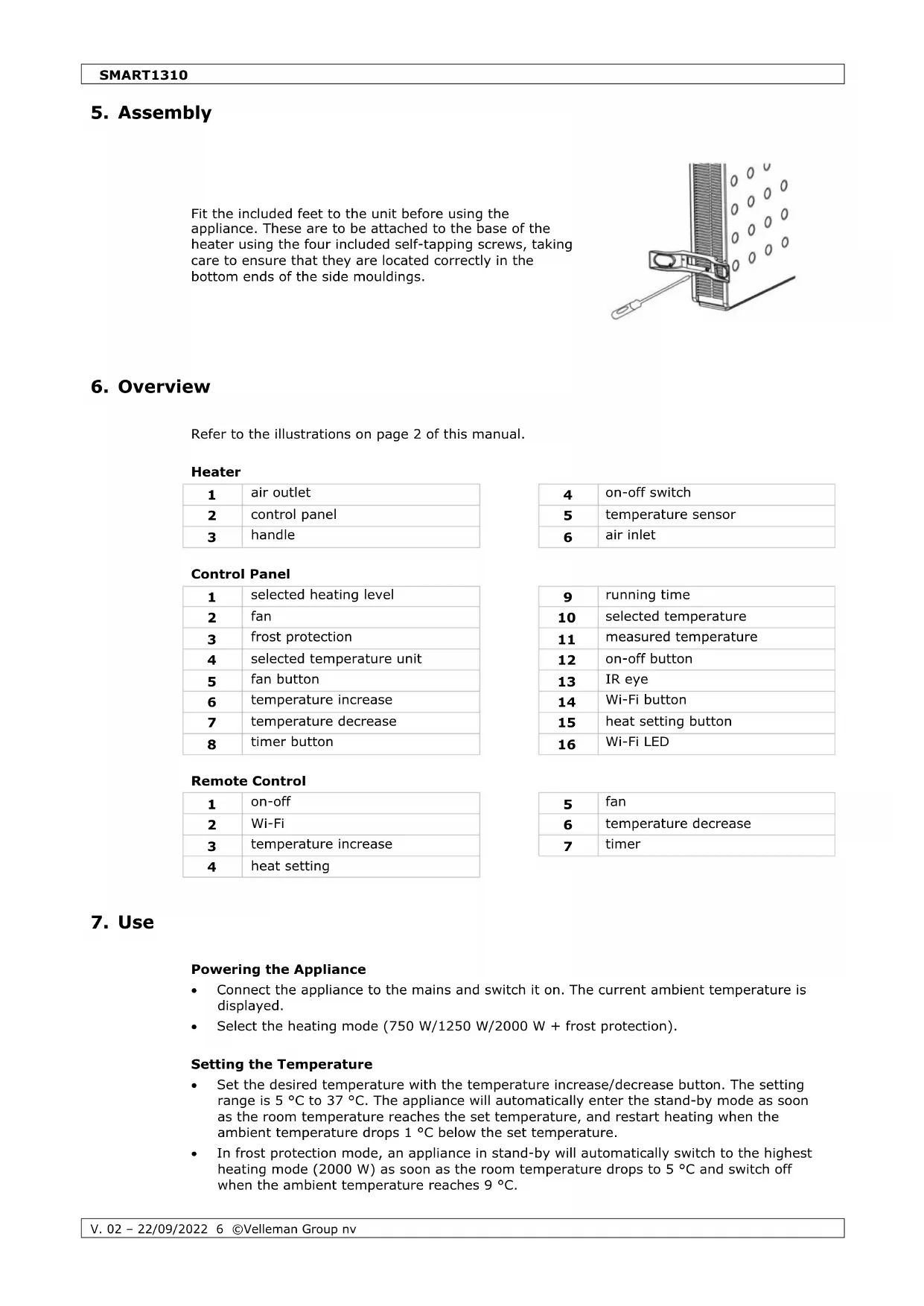
Fit the included feet to the unit before using the appliance. These are to be attached to the base of the heater using the four included self-tapping screws, taking care to ensure that they are located correctly in the bottom ends of the side mouldings.
Refer to the illustrations on page 2 of this manual.
selected heating level
selected temperature
measured temperature
selected temperature unit
temperature increase
temperature increase
- Connect the appliance to the mains and switch it on. The current ambient temperature is displayed.
- Select the heating mode (750 W/1250 W/2000 W + frost protection).
Setting the Temperature
- Set the desired temperature with the temperature increase/decrease button. The setting range is 5 °C to 37 °C. The appliance will automatically enter the stand-by mode as soon as the room temperature reaches the set temperature, and restart heating when the ambient temperature drops 1 °C below the set temperature.
- In frost protection mode, an appliance in stand-by will automatically switch to the highest heating mode (2000 W) as soon as the room temperature drops to 5 °C and switch off when the ambient temperature reaches 9 °C.SMART1310
- Set the timer (increments of 1 hour) with the timer button. The timer will automatically count down; the appliance will automatically enter stand-by mode after the countdown has finished.
- Activate and de-activate the fan with the fan button. The fan will disperse the heat better across the room.
- This heater features an internal memory and will memorize the last set temperature before switch-off.
- Download the Tuya Smart app from your chosen app store or by scanning the appropriate QR code below.
- Switch on the appliance.
- Press and hold the Wi-Fi button on the remote control or control panel for 3 seconds. The Wi-Fi LED will flash quickly to indicate the appliance is connected.
- You can disconnect the appliance from the Wi-Fi by simply switching off the appliance, or by pressing and holding the Wi-Fi button on the remote control or control panel for 5 seconds.
2. Read the privacy policy
3. Enter your e-mail address
4. A verification code will be
sent. Enter the code into the app.
The Tuya Smart app is designed so it can work with multiple compatible smart devices in your home. When a new appliance is added, it is assigned to one of the rooms you have created.
2. Enter your home name.
3. Set a geographic location
4. To add a new room,
select your room and click the Add Another Room button (see below).
5. To remove a room,
uncheck the undesired room.
6. Confirm by clicking the
Setting Your Location Adding a Room
Move the orange home pointer with your finger. Press the Confirm button when the pointer is at the approximate location. Enter the name of the room and press the Done button to confirm.SMART1310
Connecting the Heater
Set the appliance in stand-by mode with the Wi-Fi LED blinking. Also, ensure your phone is connected to the Wi-Fi network.
1. Open the app and click +
or the Add Device button to add the appliance.
2. Select the heater in the
4. Make sure the Wi-Fi LED
on the heater is blinking. Click the Confirm button.
5. Enter your Wi-Fi password
6. The appliance will now
pair (please retry if this was unsuccessful).
Controlling the Appliance through the App
1. Voice Control: Press to give vocal instructions.
2. Heater Name: Press to enter the Device screen
3. Home: Press to return to the home screen.
4. Smart Scene: Allows you to set up
5. Profile: Modify your personal settings.
6. Add Device: Add an appliance and set it up.SMART1310
1. Back: Return to the home screen.
2. Desired Temperature: Target
3. Decrease Temperature: Range 5 to
4. Power: Switch the unit on/off.
5. Mode: Select the preset mode.
6. Level: Select the heat setting.
9. Increase Temperature: Range 5 to
10. Current Mode: Selected heater mode.
Smart Scenes allows you to customize the operation of your heater. Below is an example.
2. Add a scene by clicking +.
3. Enter the scene name. Click on +
4. Select an action and set the values.
Once all functions have been added, press the Save button.SMART1310
Set an action, which will be automatically triggered. Below is an example.
1. Click the Smart tab at the
bottom of the screen.
Automatic Action button to add an action.
4. Set up an action, similarly to a
Smart Scene above. Set a trigger condition and add an action.
5. Select the trigger condition (multiple triggers are
Once all functions have been added, press the Save button.
Home Management Manage your Tuya account. Message Center View notifications from connected appliances. Help Center Provides assistance. More Services Allows your appliance to be integrated to other appliances.SMART1310
1. Check whether the appliance and Wi-Fi connection mode are switched on.
2. Make sure to enter the correct Wi-Fi password (case sensitive).
3. Ensure your phone is connected to the Wi-Fi network. The network signal (2.4 GHz) should
10. Care and Maintenance
- Before cleaning, switch of the appliance, disconnect from the mains and allow to cool completely.
- Occasionally wipe with a damp cloth to keep it looking new. Do not use harsh chemicals, cleaning solvents or strong detergents.
- Never immerse the appliance in water or any other liquid. Protect it from splashes and spraying liquid.
- Store the appliance in its original package in a cool and dry place.
RED Declaration of Conformity
Hereby, Velleman Group nv declares that the radio equipment type SMART1310 is in compliance with Directive 2014/53/EU.
The full text of the EU declaration of conformity is available at the following internet address: www.velleman.eu.
Use this device with original accessories only. Velleman Group nv cannot be held responsible in the event of damage or injury resulting from (incorrect) use of this device. For more info concerning this product and the latest version of this manual, please visit our website www.velleman.eu. The information in this manual is subject to change without prior notice.
© COPYRIGHT NOTICE The copyright to this manual is owned by Velleman Group nv. All worldwide rights reserved. No part of this manual may be copied, reproduced, translated or reduced to any electronic medium or otherwise without the prior written consent of the copyright holder.SMART1310
2. Selecteer de convector in
6. De convector is nu
'Add Automatic Action'.
A Velleman Group nv detém os direitos de autor deste manual do utilizador. Todos os direitos mundiais reservados. É estritamente proibido reproduzir, traduzir, copiar, editar e gravar este manual do utilizador ou partes deste sem prévia autorização escrita por parte da detentora dos direitos.Velleman® Service and Quality Warranty Since its foundation in 1972, Velleman® acquired extensive experience in the electronics world and currently distributes its products in over 85 countries. All our products fulfil strict quality requirements and legal stipulations in the EU. In order to ensure the quality, our products regularly go through an extra quality check, both by an internal quality department and by specialized external organisations. If, all precautionary measures notwithstanding, problems should occur, please make appeal to our warranty (see guarantee conditions). General Warranty Conditions Concerning Consumer Products (for EU):
- All consumer products are subject to a 24-month warranty on production flaws and defective material as from the original date of purchase.
- Velleman® can decide to replace an article with an equivalent article, or to refund the retail value totally or partially when the complaint is valid and a free repair or replacement of the article is impossible, or if the expenses are out of proportion. You will be delivered a replacing article or a refund at the value of 100% of the purchase price in case of a flaw occurred in the first year after the date of purchase and delivery, or a replacing article at 50% of the purchase price or a refund at the value of 50% of the retail value in case of a flaw occurred in the second year after the date of purchase and delivery.
- Not covered by warranty: - all direct or indirect damage caused after delivery to the article (e.g. by oxidation, shocks, falls, dust, dirt, humidity...), and by the article, as well as its contents (e.g. data loss), compensation for loss of profits; - consumable goods, parts or accessories that are subject to an aging process during normal use, such as batteries (rechargeable, non- rechargeable, built-in or replaceable), lamps, rubber parts, drive belts... (unlimited list); - flaws resulting from fire, water damage, lightning, accident, natural disaster, etc.…; - flaws caused deliberately, negligently or resulting from improper handling, negligent maintenance, abusive use or use contrary to the manufacturer’s instructions; - damage caused by a commercial, professional or collective use of the article (the warranty validity will be reduced to six (6) months when the article is used professionally); - damage resulting from an inappropriate packing and shipping of the article; - all damage caused by modification, repair or alteration performed by a third party without written permission by Velleman®.
- Articles to be repaired must be delivered to your Velleman® dealer, solidly packed (preferably in the original packaging), and be completed with the original receipt of purchase and a clear flaw description.
- Hint: In order to save on cost and time, please reread the manual and check if the flaw is caused by obvious causes prior to presenting the article for repair. Note that returning a non-defective article can also involve handling costs.
- Repairs occurring after warranty expiration are subject to shipping costs.
- The above conditions are without prejudice to all commercial warranties. The above enumeration is subject to modification according to the article (see article’s manual).