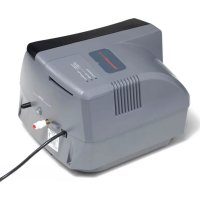
HE300A1005 - Humidifier HONEYWELL - Free user manual and instructions
Find the device manual for free HE300A1005 HONEYWELL in PDF.


User questions about HE300A1005 HONEYWELL
0 question about this device. Answer the ones you know or ask your own.
Ask a new question about this device
Download the instructions for your Humidifier in PDF format for free! Find your manual HE300A1005 - HONEYWELL and take your electronic device back in hand. On this page are published all the documents necessary for the use of your device. HE300A1005 by HONEYWELL.
USER MANUAL HE300A1005 HONEYWELL
natural_image
3D rendered mechanical component with a tapered end and flange (no text or symbols visible)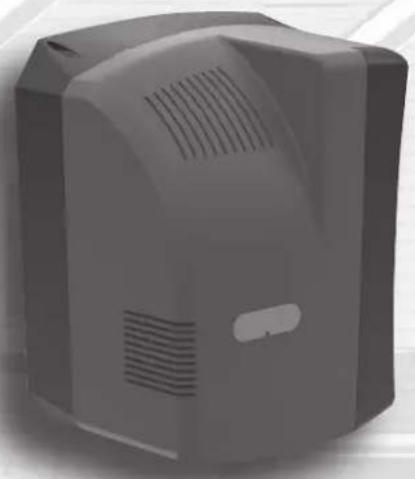
natural_image
3D rendering of a gray industrial device with ventilation slots and a button (no text or symbols visible)Read before installing
SPECIFICATIONS
Models: HE100A1000, HE100C1001, HE150A1005, HE150C1014, HE200A1000, HE200C1001, HE250A1005, HE250C1014, HE300A1005
Humidifier
INTRODUCTION
Safety Definitions and Precautions 2
Welcome 3
How is the humidifier different from other
flow-through humidifiers?......3
How should I get started?......3
How does the humidifier work? 4
YOUR NEW HUMIDIFIER
Which humidifier model do I have?......5
How is my humidifier installed?......6
What humidifier parts do I need to know?......7
What should I expect from my humidifier? . . . . . . 8
EVERYDAY OPERATION
How do I operate the humidifier? .....9
How do I use the humidity control? .....9
What should my humidity setpoint be?......9
What is a frost setting? 9
Humidifier lights and button....10
CLEANING AND MAINTENANCE
Replace the humidifier pad 11
What should I do at the end of the season?.....12
Troubleshooting....13
WARRANTY
5-Year Limited Warranty....14

NEED HELP? For assistance with this product please visit Resideo.com
Read and save these instructions.
Safety Definitions and Precautions
Must be installed by a trained, experienced technician.
Read these instructions carefully. Failure to follow these instructions can damage the product or cause a hazardous condition.
Please read this manual completely. It is important that you understand how the humidifier works, and how to safely perform the require-d maintenance procedures. Read and understand all safety-related labels found on and posted near the humidifier. These labels provide additional instructions and important safety information.
Safety Definitions
These safety terms identify information you must read.

CAUTION: Indicates a hazardous situation which, if not avoided, could cause bodily injury or property damage.

WARNING: Indicates a hazardous situation which, if not avoided, could result in death or serious injury.
Safety Precautions

WARNING: Electrocution Hazard.
The humidifier uses 120 volts AC, which can cause death or serious injury. Take precautions when servicing the humidifier or when removing the cover. If in doubt, unplug the humidifier or disconnect HVAC equipment power before servicing.

CAUTION: Heavy Equipment and Water Hazard.
Improper installation or misuse can cause death, blindness, and damage to home and HVAC equipment. Be sure you know how to turn the humidifier off.

CAUTION: Condensation, Fire, and Freezing Water Hazard.
Can cause failure of fan or limit control, or result in water damage to home.
Welcome!
Congratulations on your new humidifier.
The Humidifier provides the comfort of humidified air, with easier maintenance than traditional humidifiers.
We are sure the humidifier will be a welcome addition to your home.
- How is the humidifier different from other flow-through humidifiers?
All Models:
- The humidifier operates automatically, just like a thermostat, to keep your home's humidity at the desired level.
- The humidifier is easier to maintain: just change the pad once a year. The pad is easily accessible and does not require tools to change it.
- The humidifier can deliver humidity when it's needed, not just when the heat is on. This allows you to achieve ideal humidity levels in your home year-round.
Advanced Models:
- The humidifier wastes less water than other flow-through humidifiers.
- How should I get started? Your humidifier must be installed by an HVAC professional. If the humidifier has just been installed, it should either be running and humidifying your home, or waiting for a humidity call from the humidity control.
Once the humidifier is running, all you have to do is use the humidity control to change the humidity to your desired comfort.
☐ Please read this manual completely for tips on getting the most out of your humidifier.
☐ Read your humidity control manual and make sure you know how to operate your system.
☐ If you have questions, now or later, please refer to this manual or ask your installer.
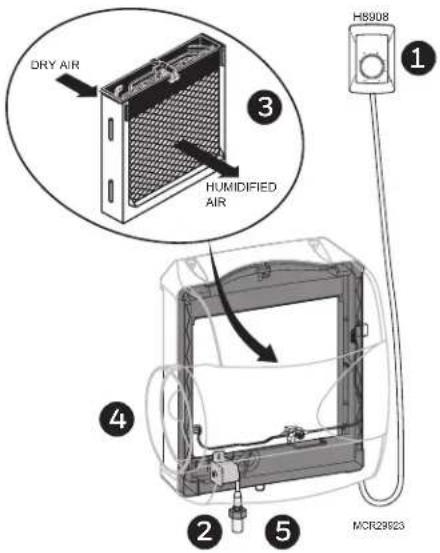
How does the humidifier work?
text_image
DRY AIR HUMIDIFIED AIR H8908 1 3 4 2 5 MCR29923- A call for humidity comes from the humidity control provided with the humidifier. The humidity control is connected to the humidifier with wires.
- The solenoid turns on, allowing water to run through the humidifier pad.
- Air from your HVAC system flows through the pad, picking up moisture from the humidifier pad.
- Your HVAC system fan delivers the humidified air throughout your home.
- When humidity in your home reaches the selpoint, the humidity call ends and the solenoid turns off the water flowing across the pad.
Which humidifier model do I have?
The humidifier is available in five models with different sizes and/or features:
HE100 Delivers up to 12 gallons of humidity into your home. Suitable for homes up to 16,000 cubic feet in size.
HE150 Delivers up to 12 gallons of humidity into your home. Suitable for homes up to 16,000 cubic feet in size. Includes automatic damper, status, maintenance, service LEDs, and advanced operation.
HE200 Delivers up to 17 gallons of humidity into your home. Suitable for homes up to 20,000 cubic feet in size.
HE250 Delivers up to 17 gallons of humidity into your home. Suitable for homes up to 20,000 cubic feet in size. Includes automatic damper, status, maintenance, service LEDs, and advanced operation.
HE300 Delivers up to 18 gallons of humidity into your home. Suitable for homes up to 24,000 cubic feet in size. Includes automatic damper, status, maintenance, service LEDs, and advanced operation.
Some activities in your home may create longer operating times for the humidifier. Vented fireplaces, high exhaust from fans, or driers can reduce humidity in your home and make the humidifier work harder.
Your professional installer or salesperson will have considered these and other factors when choosing the best humidifier model for your unique situation.
text_image
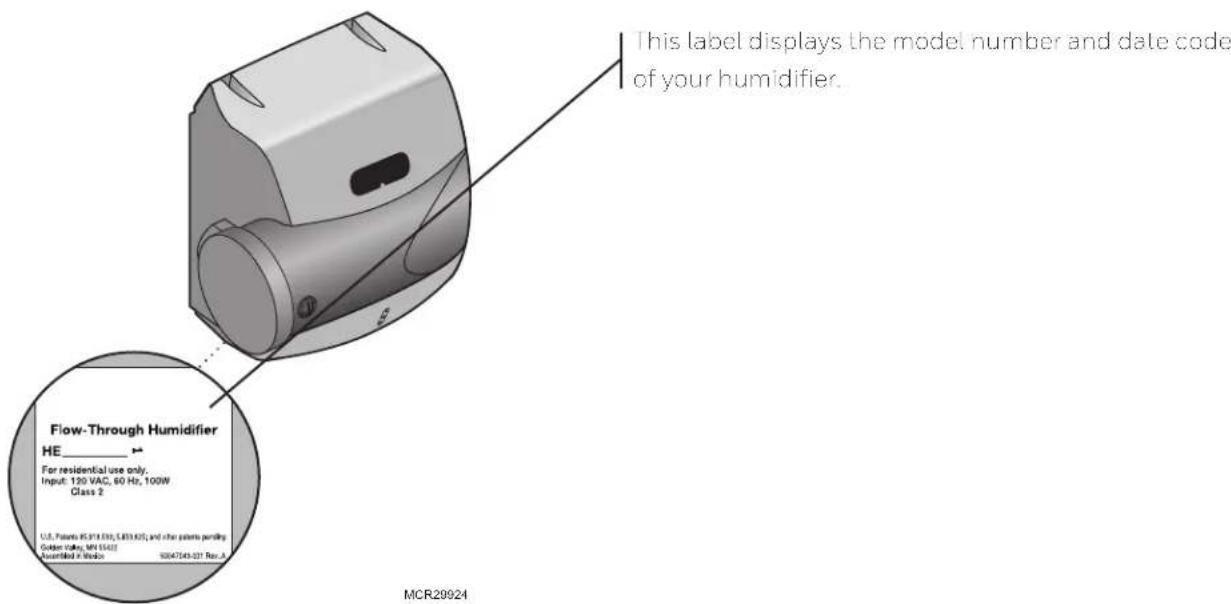
This label displays the model number and date code of your humidifier. Flow-Through Humidifier HE ____ For residential use only. Input: 120 VAC, 60 Hz, 100W Class 2 U.S. Patients (5314.03), (483.62); and other patients pending Golden Valley, MN 5543 Assembled in Video S0047543-021 Rev. A MCR29924How is my humidifier installed?
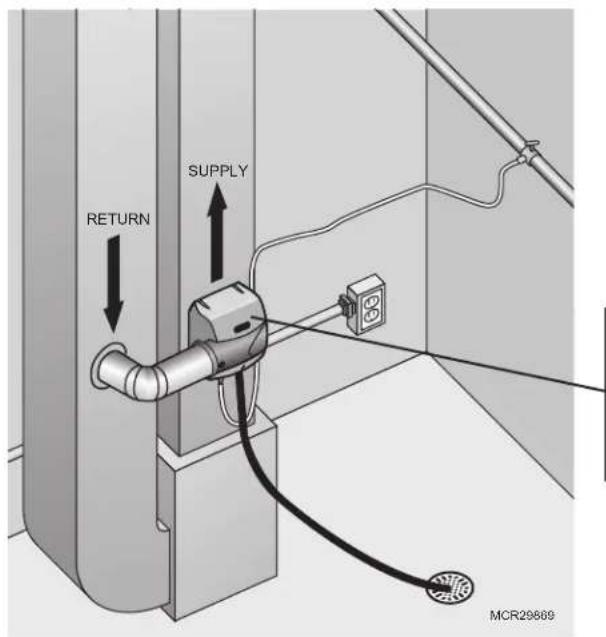
Your HVAC professional installer will install the humidifier in a proper location in your home, on either the Return or Supply duct of your HVAC system.
text_image
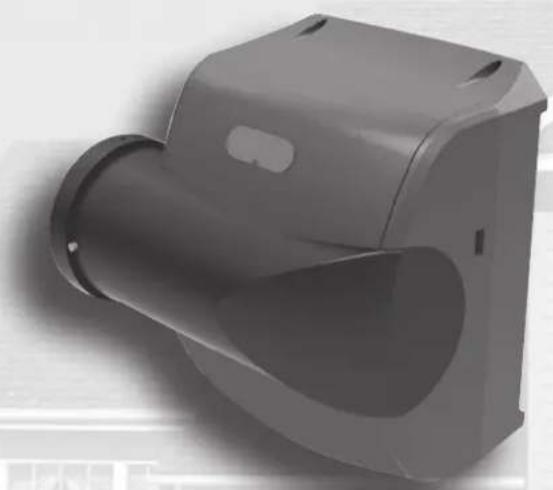
RETURN SUPPLY MCR29669The humidifier bypass model is installed directly onto the Supply (hot) or Return (cool) air duct of your HVAC system. Air flows through the humidifier pad in the humidifier into the duct for distribution throughout your home.
text_image
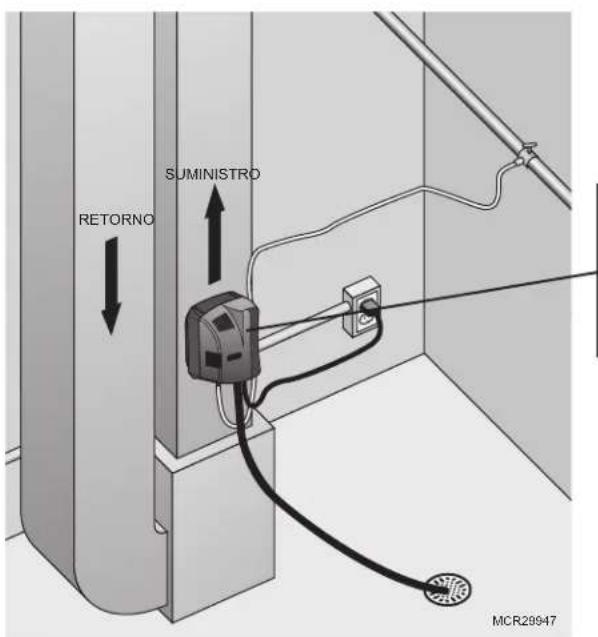
SUMINISTRO RETORNO MCR29947The humidifier fan model is commonly installed directly onto the Supply (hot) air duct of your HVAC system. The humidifier's fan draws air through the humidifier pad in the humidifier and back into the duct for distribution throughout your home.
The fan model can be installed on the Return (cool) air duct, if the location permits. If a return-side installation is used, it is highly recommended to plumb warm water since humidity is produced by evaporation.
What humidifier parts do I need to know?
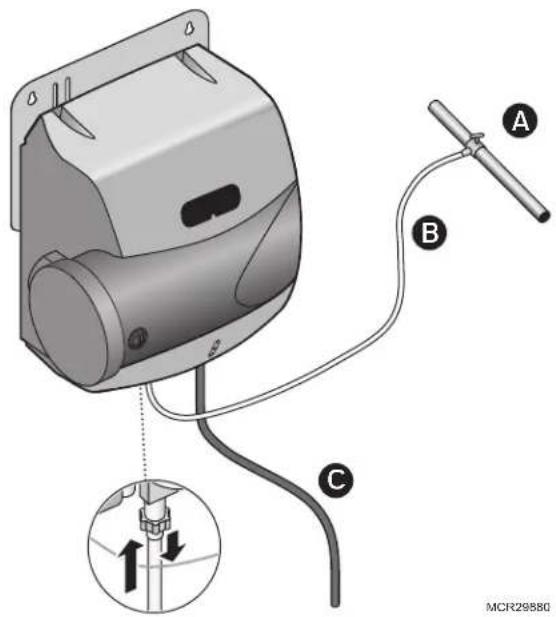
Your humidifier installation includes the following parts and components that you should be familiar with:
text_image
Diagram of a mechanical device with labeled parts A, B, and C, showing wiring connections and a magnified view of a component.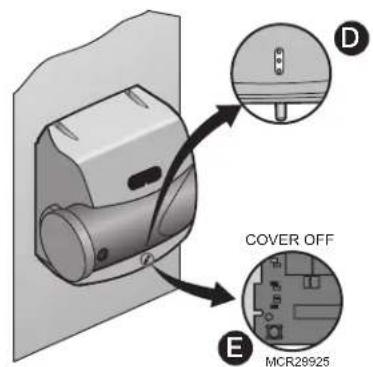
text_image
COVER OFF MCR28925A. Water Connection with Shutoff Valve
Provides the connection from your home water supply to the humidifier. Your installer may have used the saddle valve that came with the humidifier, or may have chosen a different type of connection. This connection must include a shutoff valve for you to turn off water supply to the humidifier, if necessary.
B. Water Supply Line
This 1/4-inch line brings water to the humidifier from the water connection. Your installer may have used plastic or copper supply line.
C. Water Drain Line
This 1/2-inch hose drains water from the humidifier to a drain in your home.
D. LEDs (HE150/HE250/HE300 only)
The three lights indicate the humidifier's operational status and when service is required. See "Humidifier lights and button" on page 10.
E. RESET Button (HE150/HE250/HE300 only)
The RESET button is the only user button located on the humidifier. Use the RESET button to manually reset the humidifier when the Change Pad or Service LEDs are on. See "Humidifier lights and button" on page 10.
Power
The Fan model is plugged into a 120 volt AC household electrical outlet. Unplug the power cord to turn off power.
The Bypass models are wired to a 15VA transformer. To turn off power to these models, trip the circuit to the junction box the transformer is connected to.
What should I expect from my humidifier?
Resideo wants to make sure you know what to expect from your humidifier. Feel free to discuss these items with your installer:
- Achieving Humidity Setpoint. It may take up to a week of continuous operation to achieve the humidity setpoint, especially if the home is dry when the humidifier is installed. This also depends on such factors as weather, size of home, furnishings in the home, and insulation.
- Ideal Humidity. Home building industry experts cite 35% relative humidity as ideal for comfort and safeguarding the home during the typical dry season. Adjust your humidity control to your comfort or until there is condensation on the windows. Lower the setpoint if condensation appears.
- Unit Not Humidifying. If the humidifier is not running but the humidity is below the setpoint, the humidity control may have a frost protection setting to prevent window condensation from appearing. See "What is a frost setting?" on the next page.
- Home Ventilation. Excessive ventilation sends moist air outside and replaces it with dry air. If the home is drafty or has mechanical ventilators installed, it may be hard to maintain the humidity setpoint. If installing a ventilator, use a solution that retains moisture. An Energy Recovery Ventilator (ERV) is recommended.
- Cleaning Requirements. The humidifier pad should be changed at least once a year. The water trays of the humidifier should be cleaned at that time. See Cleaning and Maintenance section for details.
- Energy Consumption. You may notice a slight increase in overall energy consumption when operating any humidifier. However, humidified air feels warmer than dry air. This allows you to lower the temperature setting on the thermostat. Every degree lower on the thermostat can save up to 3% on heating costs.
How do I operate the humidifier?
Once the humidifier is installed and running, operation is automatic. Use the humidity control provided to make any changes to the setpoint.
If you have questions about how to operate the humidifier, ask your installer.
- How do I use the humidity control? When humidity in the home is lower than the humidity control's setpoint, the control will call for humidity. Some controls will also monitor outdoor conditions to ensure indoor humidity does not condense on windows and walls.
- What should my humidity setpoint be? The outdoor air temperature affects how much humidity can be retained by the air in your home. Use this table as a starting point. Then adjust the humidity control to your own comfort or until condensation appears on the windows, at which point you should lower the setpoint.
| Outdoor Recommended Relative Temperature Humidity Setting | |
| -20°F (-29°C) | 15% |
| -10°F (-2-3°C) | 20% |
| 0°F (-18°C) | 25% |
| 10°F (-12°C) | 30% |
| 20°F (-7°C) | 35% |
| >20°F (-1°C) | 35% |
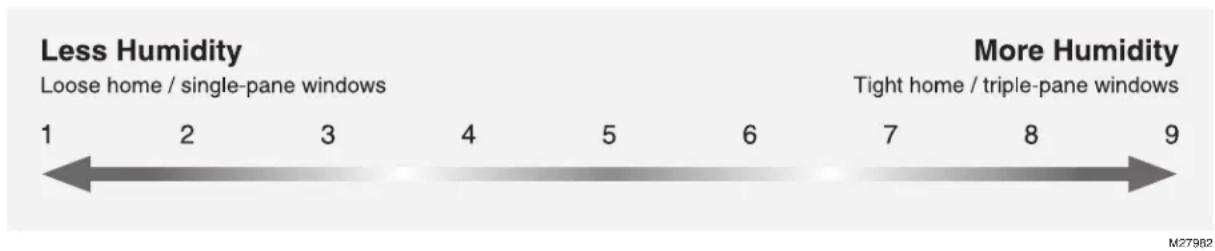
- What is a frost setting? Some humidity controls (such as Prestige, VisionPRO IAQ, and TrueIAQ) contain a Window Frost Protection feature that limits humidity output based on outdoor conditions. For example, on colder days, the air in your home can hold less humidity. The humidity control automatically lowers the humidity setpoint accordingly, to prevent frost from appearing on the inside of your windows.
Lower the frost setting by one value each morning that you see frost or condensation on windows. Allow 24 hours for the new setting to take effect before re-adjusting. Once you have this set to a comfortable level without condensation, you will not need to adjust further. You can adjust your humidity setpoint without worrying about condensation.
text_image
Less Humidity Loose home / single-pane windows 1 2 3 4 5 6 7 8 9 More Humidity Tight home / triple-pane windows M27962Manual humidity controls (such as the H8908) do not have built-in frost settings. They require you to adjust the humidity setpoint when the outdoor temperature changes. Use higher humidity setpoints when the temperature is warmer, and lower setpoints when the temperature is cooler.
Humidifier lights and button (HE150/HE250/HE300 only)
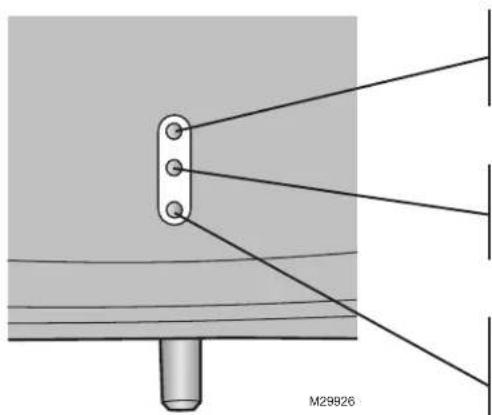
The three lights provide feedback on humidifier operation.
natural_image
Technical diagram showing a mechanical assembly with a central rod and three mounting holes, connected by wires to a vertical panel (no text or symbols present)Humidifying
When this light is on, it indicates the humidifier is running.
Service
When this light is on, it indicates an operational fault has occurred. Call an HVAC professional for repair.
Change Pad
When this light is on, it indicates that it is time to change the humidifier pad. The light should not be reset without changing the pad. Resetting the Change Pad light without changing the pad could compromise the humidifier. See "Replace the humidifier pad" on the next page.
natural_image
Floor plan diagram of a computer mouse with labeled MCR28927 (no text or symbols beyond label)Humidifier Model Replacement Pad Part Number
| HE300 | HC26E1004 |
| HE250 | |
| HE200 | |
| HE150 | HC22E1003 |
| HE100 |
RESET
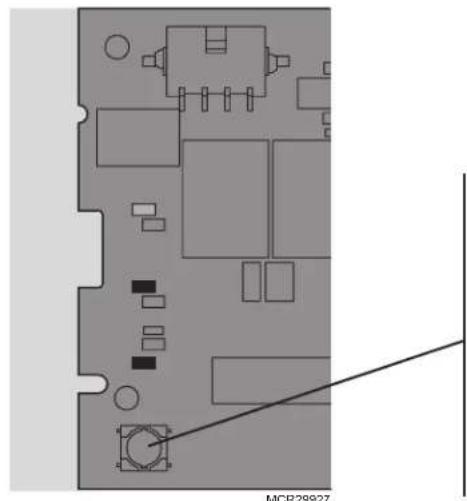
The RESET button is under the cover. This button resets the timer that tracks when the humidifier pad needs changing. When you change the pad, press the RESET button.
The RESET button also clears a Service light. If the Service light comes back on after you press the RESET button, call an HVAC professional for repair.
Replace the humidifier pad
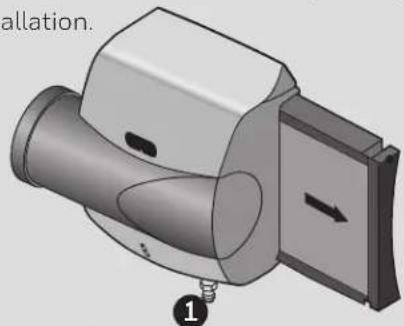
The humidifier pad should be replaced at least once per year or whenever the Replace Pad light comes on. This is critical for optimal performance of the unit. This can be done at the beginning or the end of the dry season. The humidifier design makes this annual replacement quick and easy, providing one-step access to
Bypass:
1a. Pad can be replaced from the side by gripping the black handle and pulling out, or from the front by removing the humidifier's top cover and rocking the pad forward and out. Humidifier pad might remove from other side of the humidifier, depending on installation.
natural_image
3D mechanical component diagram showing a cylindrical assembly with a side panel and mounting base (no text or symbols)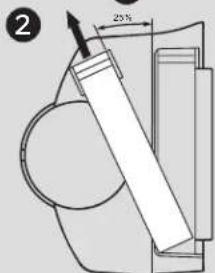
text_image
2 25%MCR29885
Fan:
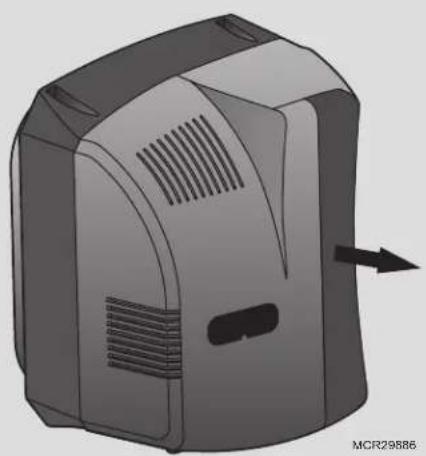
1b. Pad can be replaced from the front by gripping the black handle and pulling out.
natural_image
3D rendering of a computer monitor with ventilation slots and an arrow indicating left side (no text or symbols on the device itself)the pad.
- Remove tray on top of the pad, and wipe free any sediment present within the tray.
- Replace the old pad with the new, making sure pad is oriented correctly (see pad box). Wipe free any sediment present inside the pad frame.
Humidifier Model Replacement Pad Part Number
| HE300 | HC26E1004 |
| HE250 | |
| HE200 | |
| HE150 | HC22E1003 |
| HE100 |
- Reseat the tray on top of the pad with the arrows inside the tray pointing into the duct. Then reinsert the frame into the humidifier.
What should I do at the end of the season?
At the end of the humidifying season:
- Turn the humidistat to Off.
- Shut off the water valve on the water supply line to the humidifier.
On Basic models HE100 and HE200:
- Turn the Damper Position knob on the bypass outlet so that it is perpendicular to the bypass outlet.
- Remember to turn the Damper Position knob on the bypass outlet back to its original (open) position at the beginning of the next dry season.
Troubleshooting
What if I am having a problem with the humidifier?
If you have difficulty with the humidifier, please try the following suggestions. Most problems can be corrected quickly and easily.
Problem What To Look For What To Do
| Low humidity Furnace blower not operating | 1. Reset circuit breaker or check for blown fuse.2. Check that the furnace power is on.3. Check the humidity control setting.4. Call a professional heating contractor | |
| High humidity Condensation on walls | 1. Turn off humidity control and water until condensation is completely evaporated. | |
| Replace Pad light is blinking (HE150/HE250/HE300) | This is the yearly maintenance reminder to replace the pad inside the humidifier | 1. Replace the pad for your humidifier model.2. See "Replace the humidifier pad" section for details.3. Once pad is replaced, press the RESET button under the wire cover. |
| Service light is on (HE150/HE250) | The damper inside the bypass has failed to open completely or the air proving switch sensed a lack of air movement | 1. Press the RESET button under the wire cover.2. If fault persists, call an HVAC professional. |
| Service light is on (HE300) | The fan motor has failed or the air proving switch sensed a lack of air movement | 1. Press the RESET button under the wire cover.2. If fault persists, call an HVAC professional. |
5-Year Limited Warranty
Resideo warrants this product, excluding battery, to be free from defects in workmanship or materials, under normal use and service, for a period of five (5) years from the date of first purchase by the original purchaser. If at any time during the warranty period the product is determined to be defective due to workmanship or materials, Resideo shall repair or replace it (at Resideo's option).
If the product is defective,
(i) return it, with a bill of sale or other dated proof of purchase, to the place from which you purchased it; or
(ii) call Resideo Customer Care at 1-800-633-3991. Customer Care will make the determination whether the product should be returned to the following address: Resideo Return Goods, 1985 Douglas Dr. N., Golden Valley, MN 55422, or whether a replacement product can be sent to you.
This warranty does not cover removal or reinstallation costs. This warranty shall not apply if it is shown by Resideo that the defect was caused by damage which occurred while the product was in the possession of a consumer.
Resideo's sole responsibility shall be to repair or replace the product within the terms stated above. RESIDEO SHALL NOT BE LIABLE FOR ANY LOSS OR DAMAGE OF ANY KIND, INCLUDING ANY INCIDENTAL OR CONSEQUENTIAL DAMAGES RESULTING, DIRECTLY OR INDIRECTLY, FROM ANY BREACH OF ANY WARRANTY, EXPRESS OR IMPLIED, OR ANY OTHER FAILURE OF THIS PRODUCT.
Some states do not allow the exclusion or limitation of incidental or consequential damages, so this limitation may not apply to you.
THIS WARRANTY IS THE ONLY EXPRESS WARRANTY RESIDEO MAKES ON THIS PRODUCT. THE DURATION OF ANY IMPLIED WARRANTIES, INCLUDING THE WARRANTIES OF MERCHANTABILITY AND FITNESS FOR A PARTICULAR PURPOSE, IS HEREBY LIMITED TO THE FIVE YEAR DURATION OF THIS WARRANTY. Some states do not allow limitations on how long an implied warranty lasts, so the above limitation may not apply to you.
This warranty gives you specific legal rights, and you may have other rights which vary from state to state. If you have any questions concerning this warranty, please write Resideo Customer Care, 1985 Douglas Dr, Golden Valley, MN 55422 or call 1-800-633-3991.
Humidificateur
GUIDE DE FONCTIONNEMENT POUR LE PROPRIÉTAIRE
natural_image
3D rendered mechanical component with curved and rectangular features (no text or symbols visible)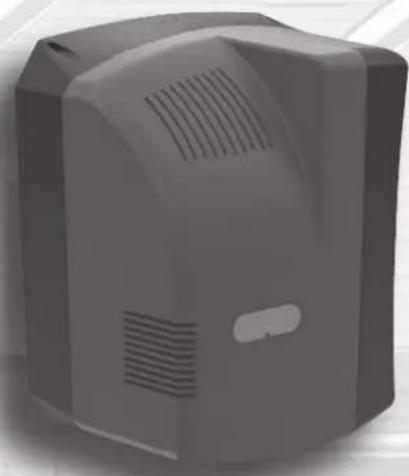
natural_image
3D rendering of a gray industrial device with ventilation slots and a handle (no text or symbols visible)text_image
RETOUR D'ALIMENTATION MFCR29609text_image
Diagram of a motor or pump assembly with labeled parts A, B, and C, showing wiring connections and a mechanical component inset.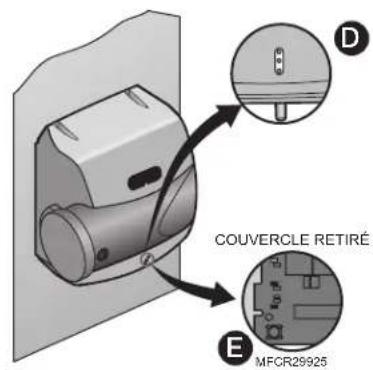
text_image
COUVERCLE RETIRÉ MFCR29925natural_image
3D mechanical component diagram showing a cylindrical housing with internal channels and a side panel, labeled with numbers 1 and 2 (no text or symbols on the main structure)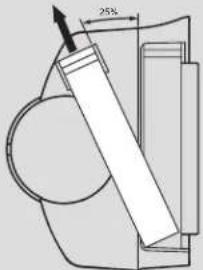
text_image
25°MCR29885
Ventilateur :
natural_image
3D rendering of a computer monitor with ventilation slots and an arrow indicating left vent (no text or symbols on the device itself)natural_image
3D rendered mechanical component with curved and flanged sections (no text or symbols visible)
natural_image
Exterior view of a gray industrial device with ventilation slots and a handle (no text or symbols visible)Leer antes de instalar
ESPECIFICACIONES
Modelos: HE100A1000, HE100C1001, HE150A1005, HE150C1014, HE200A1000, HE200C1001, HE250A1005, HE250C1014, HE300A1005
text_image
Diagram of a device with labeled parts A, B, and C, showing wiring connections and a mechanical component with directional arrows.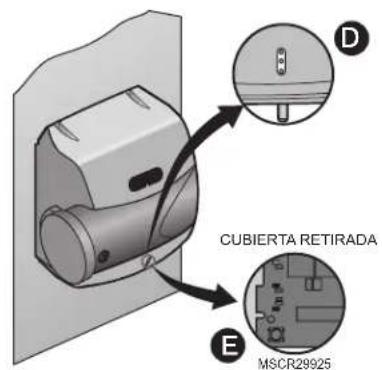
text_image
CUBIERTA RETIRADA MSCR29925natural_image
Technical diagram showing a mechanical assembly with three bolts and connecting rods, labeled M29926 (no text or symbols on the diagram itself)Humidificación
natural_image
Floor plan diagram of a computer mouse with labeled MCR28927 (no text or symbols beyond label)natural_image
3D mechanical component diagram showing a cylindrical housing with a side panel and mounting base (no text or symbols)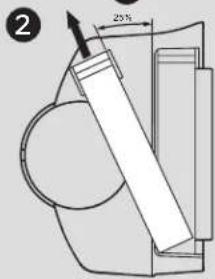
text_image
25%MCR29885
Ventilador:
natural_image
3D rendering of a computer monitor case with ventilation slots and an arrow indicating left side (no text or symbols on the device itself)Resideo Technologies, Inc
1985 Douglas Drive North, Golden Valley, MN 55422
1 800 633 3991
© 2020 Resideo Technologies, Inc. All rights reserved.
The Honeywell Home trademark is used under license from Honeywell International, Inc. This product is manufactured by Resideo Technologies, Inc. and its affiliates.