
VCP 7230 WET - Vacuum Cleaner GRUNDIG - Free user manual and instructions
Find the device manual for free VCP 7230 WET GRUNDIG in PDF.



| Product type | Cordless vacuum cleaner |
| Brand | Grundig |
| Model | VCP 7230 WET |
| Power supply | Mains and rechargeable battery |
| Rated power | 350 W |
| Input voltage | 100-240 V ~ 50-60 Hz |
| Adapter output voltage | 32 V, 0.45 A |
| Battery type | Lithium-ion rechargeable |
| Runtime (min mode) | 45 minutes |
| Runtime (medium mode) | 20 minutes |
| Runtime (max mode) | 10 minutes |
| Charging time | 4 to 6 hours |
| Functions | Dry vacuuming and hard floor washing (with water tank) |
| Adjustable speeds | Yes (low, medium, high) |
| Main brush type | Electric turbo brush |
| Included accessories | Crevice tool, Brush nozzle, Mini turbo brush for pets, Water tank with 2 cloths, Carpet roller, Charging station, Adapter, Screws and wall plugs |
| LED indicator | Battery level (percentage and icon), speed mode, alerts (missing pre-filter, obstruction) |
| Filtration | Pre-filter and plastic filter (do not wash) |
| Maintenance | Clean dust container after each use, clean filter periodically, clean brush |
| Safety | Automatic shut-off at end of battery, obstruction detection, protection against liquid suction (except via water tank) |
| Usage | Hard floors, rugs, carpets, furniture, curtains |
| Wall charging station | Yes, minimum height 112 cm |
Frequently Asked Questions - VCP 7230 WET GRUNDIG
User questions about VCP 7230 WET GRUNDIG
0 question about this device. Answer the ones you know or ask your own.
Ask a new question about this device
Download the instructions for your Vacuum Cleaner in PDF format for free! Find your manual VCP 7230 WET - GRUNDIG and take your electronic device back in hand. On this page are published all the documents necessary for the use of your device. VCP 7230 WET by GRUNDIG.
USER MANUAL VCP 7230 WET GRUNDIG
2 In 1 Cordless Stick Vacuum Cleaner
User Manual

natural_image
Two abstract geometric patterns: a woven bamboo design and a square with circular cutouts (no text or symbols)VCP 6230 PET - VCP 7230 WET
DE - EN - NO - SV - HR - FR - IT - RU
natural_image
Simple line drawing of a cartoon character holding a small object, no text or symbols presentnatural_image
Line drawing of a person using an electrical power outlet with wires and switches (no text or symbols)natural_image
Technical line drawing of a mechanical component with directional arrows indicating movement (no text or symbols)natural_image
Diagram of a vacuum cleaner with arrows indicating motion or assembly (no text or symbols)natural_image
Illustration of a robotic arm with sensors and a tool, showing motion arrows (no text or symbols)natural_image
Technical line drawing of a mechanical device with an arrow indicating direction (no text or symbols)natural_image
Diagram of a vertical mechanical device with an arrow indicating direction, no text or symbols presentnatural_image
Technical line drawing of a mechanical component with a handle and circular body (no text or symbols)natural_image
Technical line drawing of a mechanical device with an inset close-up showing a component detail (no text or symbols)natural_image
Technical line drawing of a mechanical device with an inset close-up showing a circular component (no text or symbols)natural_image
Technical line drawing of a mechanical component with a circular housing and mounting holes (no text or symbols)
natural_image
Technical line drawing of a mechanical lever assembly with no visible text or symbolsnatural_image
Technical line drawing of a mechanical device with an arrow indicating assembly or motion (no text or symbols present)natural_image
Mechanical device diagram showing a disassembly or assembly process with an arrow indicating the step (no text or symbols present)natural_image
Technical illustration of a mechanical device with an arrow indicating assembly or transformation (no text or symbols present)natural_image
Technical line drawing of a mechanical device with a bucket and housing (no text or symbols)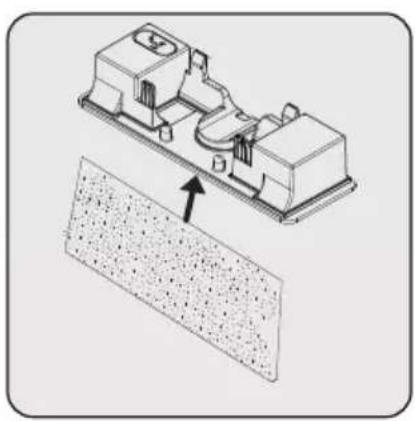
natural_image
Technical illustration of a mechanical assembly with a textured base and directional arrow (no text or symbols)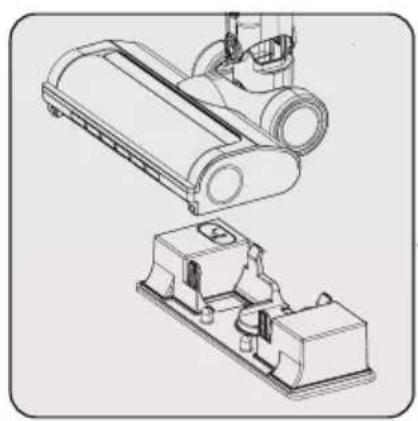
natural_image
Technical line drawing of a mechanical device with no visible text or symbolsnatural_image
Illustration of a hand cleaning a mechanical component with a cloth (no text or symbols)natural_image
Technical line drawing of a mechanical component (no text or symbols)natural_image
Line drawing of a blender with a magnified inset showing the blade and handle mechanism (no text or symbols)natural_image
Technical line drawing of a mechanical device with an upward arrow indicating motion or assembly (no text or symbols present)natural_image
Diagram of a mechanical device with arrows indicating motion or assembly (no text or symbols)natural_image
Diagram showing a mechanical component with a downward arrow indicating process (no text or symbols present)natural_image
Technical line drawing of a mechanical component with internal structure and highlighted section (no text or symbols)
natural_image
Technical line drawing of a mechanical device with no visible text or symbolsnatural_image
Technical line drawing of a mechanical device with a close-up inset showing a button (no text or symbols)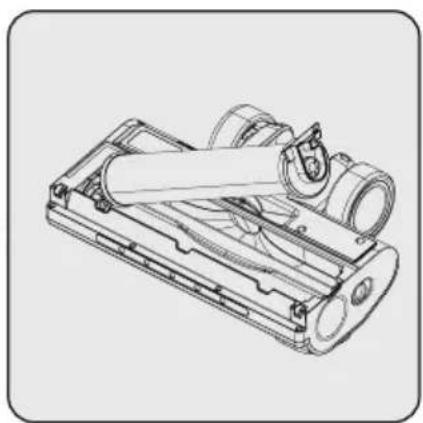
natural_image
Technical line drawing of a mechanical device with cylindrical components and mounting brackets (no text or symbols)
natural_image
Technical line drawing of a mechanical device with cylindrical components and internal tubing (no text or symbols)Please read this guide first!
Dear Customer,
Thank you for choosing a Grundig product. We would like you to achieve the optimal efficiency from this high quality product which has been manufactured with state of art technology. Please make sure you read and understand this guide and supplementary documentation fully before use and keep it as a reference. Include this guide with the unit if you hand it over to someone else. Observe all warnings and information herein and follow the instructions.
Symbols and their meanings
These symbols are used throughout this guide:

Important information and useful hints about usage.

WARNING: Warnings against dangerous situations concerning the security of life and property.

Electric shock protection rating
1 Important safety and environmental instructions
This section contains safety instructions to prevent hazards that can result in injury or property damage.
Any warranty is void if these instructions are not followed.
1.1 General safety
• This appliance complies with international safety standards.
- This device can be used by children over 8 years of age, people with physical, sensory or mental challenges or people with lack of experience or knowledge; as long as control is ensured or information is provided regarding the hazards. Children must not play with the appliance. Cleaning and user maintenance shall not be carried out by unattended children.
- Do not use the appliance if the power cord or the appliance is damaged. Contact authorized service.
- Your mains power supply shall match the information shown on the rating plate label of the appliance.
- Do not use the appliance with an extension cord.
- To prevent damage to the power cord, prevent it from being pinched, crimped or rubbed against sharp edges.
- Do not touch the plug of the appliance with damp or wet hands while the appliance is plugged in.
- Do not pull on the cord while unplugging the appliance.
- Do not vacuum flammable materials and ensure that the cigarette ashes are cooled down before vacuuming them.
- Do not vacuum water and other fluids.
- Protect the appliance against precipitation, humidity and heat sources.
- Do not use the appliance in or near explosive or flammable environments and substances.
- Unplug the appliance before cleaning and maintenance.
- Do not immerse the appliance or its power cord in water for cleaning.
1 Important safety and environmental instructions
- Do not disassemble the appliance. - Use only original parts or parts recommended by the manufacturer.
- To prevent blockage of the filter or damage to the motor, do not vacuum cement, plaster or fragments of compressed paper.
- Use the appliance with the adapter delivered with the appliance only.
- Do not use the appliance without filters, it may get damaged.
- If you keep the packaging materials, keep them out of the reach of children.
- This appliance is not intended to be used by persons, including children, with physical, sensory and mental disabilities or those who have not adequate experience and knowledge regarding its use, unless they are under the supervision of a person responsible for their safety or they are informed about the operation of the appliance.
• Children shall be supervised to prevent them from playing with the appliance.
- Unplug the adaptor and remove the battery pack before any cleaning or maintenance procedure.
- To avoid any risk of hazard, a damaged adaptor shall be replaced by the manufacturer, the authorized representative of the manufacturer or a similarly qualified technician.
- Keep your fingers, hair and loose clothes away from moving parts or clearances while vacuuming.
- Batteries shall be removed from the appliance before discarding the appliance.
- Disconnect the appliance from power supply before removing the battery.
- Please discard used batteries in accordance with local laws and regulations.
- The batteries included in this appliance may only be replaced with qualified persons.
• Appliance is not intended to be operated for commercial purposes. This appliance is not designed for commercial use, it
1 Important safety and environmental instructions
is intended for home use and in applications as follows:
- In the staff kitchens of the stores, offices and other working environments
- In farm houses;
- By customers in hotels, motels or other accommodation facilities
- In hostels or similar environments.
- WARNING: Use the HCX1501-3200450E removable supply unit delivered with the appliance to charge to the battery.
- This appliance shall not be operated by children and people with limited physical, sensory and cognitive skills or people with lack of experience and knowledge unless they are under supervision or they are provided with the relevant instructions.
• Children shall be supervised to prevent them from playing with the appliance.
1.2 Compliance with the WEEE Directive and disposal of the waste product
This product complies with EU WEEE Directive (2012/19/EU). This product bears a classification symbol for waste electrical and electronic equipment (WEEE). This symbol indicates that this product shall not be disposed with other household wastes at the end of its service life. Used device must be returned to official collection point for recycling of electrical and electronic devices. To find these collection systems please contact to your local authorities or retailer where the product was purchased. Each household performs important role in recovering and recycling of old appliance. Appropriate disposal of used appliance helps prevent potential negative consequences for the environment and human health.
1.3 Packaging information

Packaging materials of the product are manufactured from recyclable materials in accordance with our National Environment Regulations. Do not dispose of the packaging materials together with the domestic or other wastes. Take them to the packaging material collection points designated by the local authorities.
1.4 Information on waste batteries
This symbol on the packaging of the packaging related with rechargeable batteries indicates that the rechargeable battery shall not be disposed of with domestic waste. A chemical symbol may accompany this symbol on some rechargeable batteries.
And mercury (Hg) and lead (Pb) symbols may also be added if the rechargeable batteries contain more than %0.0005 mercury and more than %0.004 lead content.
Rechargeable batteries shall not be disposed of with household waste even if they do not contain heavy metals. Always discard the used batteries as per local environmental legislation. Investigate the waste disposal regulations in effect in your area of residence.
1 Important safety and environmental instructions
1.5 What to do for energy saving
- When using your appliance, adjust the speed settings according to the surface, in order to save energy.
- Normally, lower speeds are used when cleaning hard surfaces, curtains and sofas, while high speeds are used in for cleaning carpets.
1.6 Compliance with RoHS Directive
The product you have purchased complies with EU RoHS Directive (2011/65/EU). It does not contain harmful and prohibited materials specified in the Directive.
2 Overview

2.1 Controls and components
- LED screen
- Speed level adjustment button
- Battery pack release button
- On/off button
- Handle
- Dust container
- Tube release button
- Tube
- Electrical turbo brush release button
- Electrical turbo brush
- Charging adaptor
- Appliance release button
- Charging dock
- Combination tool
- Crevice
- Mini turbo pet brush
- Lid for filling the water tank (VCP 7230 WET)
- Mop attachment; Water Tank (VCP 7230 WET)
- Mopping cloth (x2 pcs) (VCP 7230 WET)
- Carpet roller (VCP 7230 WET)
- Screw (4 pcs)
- Dowel (4 pcs)
2.2 Technical data
| VCP 6230 PET-VCP 7230 WET | |
| Nominal input power 350 V | |
| Input 100 - 240 V~ 50-60 Hz 0,5 A | |
| Output | 32 V =0.45 A |
| Charging time 4-6 hours | |
| Runtime at max. power 10 mins | |
| Runtime at mid power 20 mins | |
| Runtime at min. power 45 mins | |
The rights to make technical and design changes are reserved.
The values provided with the appliance or its accompanying documents are laboratory readings in accordance with the respective standards. These values may differ depending on the use and ambient conditions.
2 Overview
External Power Supply Parameter
| VCP 6230 PET-VCP 7230 WET | |
| Manufacturer: Guangdong Huachuangxing Power Supply Co.,Ltd | |
| Model ID: HCX1501-3200450E | |
| Input Voltage: 100-240V~ | |
| Input Frequency: 50-60Hz | |
| Input Current: 0.5A | |
| Output Voltage 32.0V | |
| Output Current 0.45A | |
| Output Power: 14.4W | |
| Average active efficiency: 85.5% | |
| Efficiency at low load (10%): 83.33% | |
| Power consumption under no load: | 0.041W |
3 Installation
3.1 Intended use
This appliance is intended for household use and it is not suitable for industrial use.
3.2 Installation of the charging dock
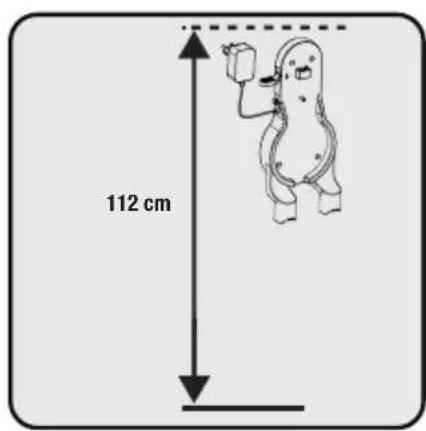
Position the charging dock at a height of minimum 112 cm from the ground.
natural_image
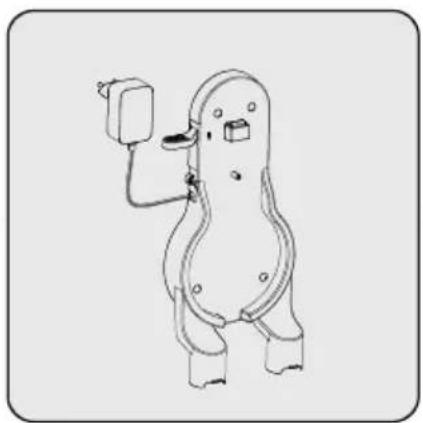
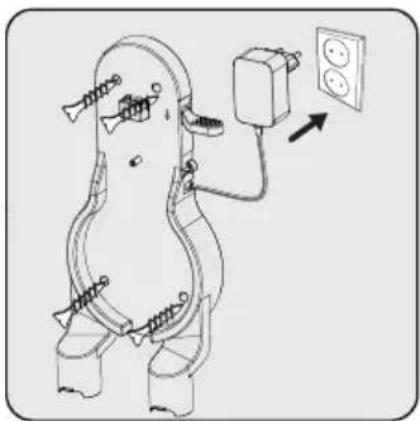
Simple line drawing of a cartoon character holding a small object, no text or symbols present1- Fix four dowels on the wall
2- Place four screws into their locations on the charging dock and mount on the dowels on the wall.

natural_image
Line drawing of a mechanical or electrical device with two outlets and wiring, no text or symbols presentPlug the charging adaptor to the socket.
3.3 Installation of the body and the brush
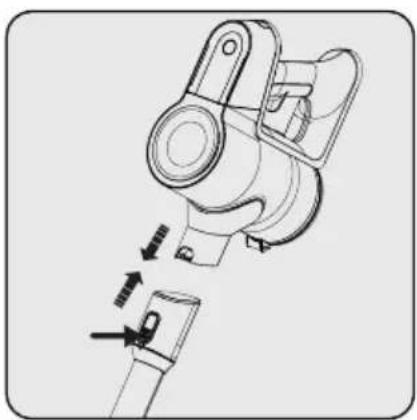
natural_image
Technical line drawing of a mechanical component with directional arrows indicating movement (no text or symbols)Push the tube in the direction of arrow towards the body by pushing on the tube release button.
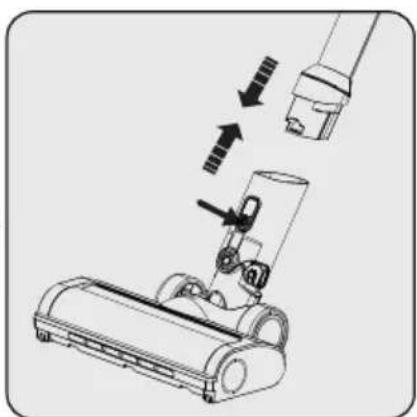
natural_image
Diagram of a vacuum cleaner with mechanical components and airflow arrows (no text or symbols)Press the electric turbo brush release button on the electric turbo brush and push it in the direction of arrow towards the tube.

natural_image
Illustration of a robotic arm with directional arrows indicating movement or force (no text or symbols present)Attach crevice attachment and combination tool to the charging dock.
4.1 Charging the appliance
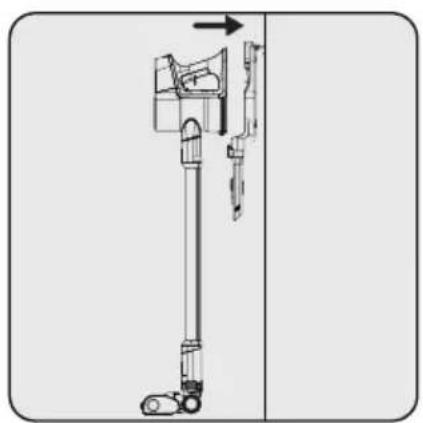
natural_image
Technical line drawing of a mechanical device with an arrow indicating direction (no text or symbols)Place the appliance on the charging dock.
After placing dust container on the charging dock, push the appliance towards the charging dock.

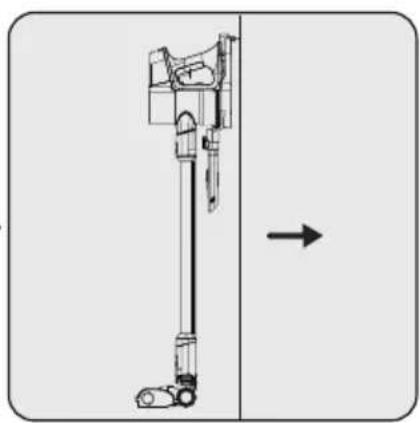
natural_image
Diagram of a vertical mechanical device with an arrow indicating direction (no text or symbols present)Plug the charging adaptor to the socket.

natural_image
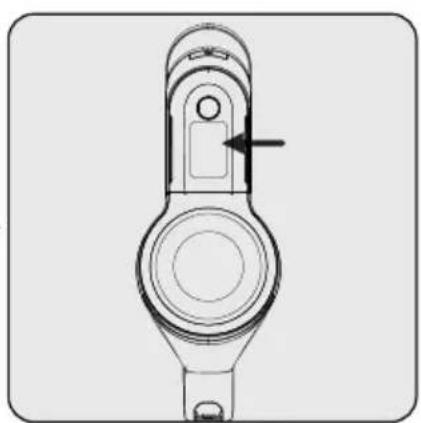
Technical line drawing of a mechanical component with a circular base and central hole, showing no text or symbols.When you place appliance to the charging dock, it starts to charge and the battery charge percentage shall be displayed on the screen. Percentage (%) are increased as the appliance is charged.

It takes up to 4 to 6 hours to charge the appliance completely. The appliance shall not be operated while charging.

If the appliance is placed on the charging dock while it is being operated, it shall be stopped automatically.
4.2 Usage
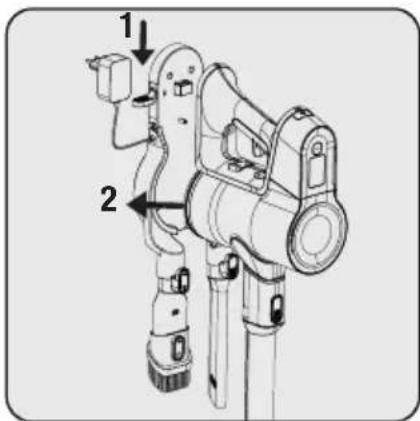
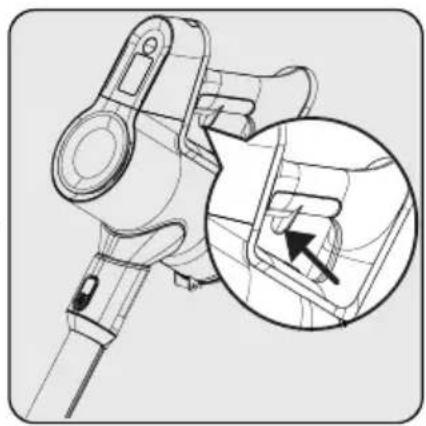
1- Push the appliance release button on the charging dock downward and pull the appliance towards yourself at the same time.
2- Remove the appliance from the charging dock.


natural_image
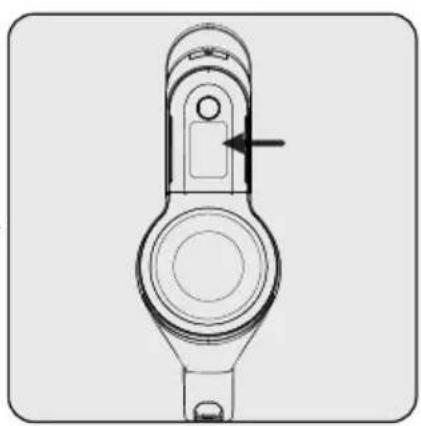
Technical line drawing of a mechanical component with an inset magnified detail showing a detail (no text or symbols)Press the on/off button to operate the appliance. The appliance starts operating with the minimum power when the on/off button is pressed.


natural_image
Technical line drawing of a mechanical device with an inset close-up showing a circular component (no text or symbols)To adjust the speed level, push the button. On the screen, which suction mode is being used will be shown as min, mid and high. By pressing the button, the speed level can be adjusted.
4 Operation

The appliance may be placed for charging before the complete discharging of the battery. The appliance may be kept continuously as charging on the charging dock until the next operation.

natural_image
Technical line drawing of a mechanical component with a circular housing and a central hole (no text or symbols)
Pay attention to the battery level percentage during operation. Battery level percentage should be tracked during usage when it is empty, the appliance stops operating automatically.
natural_image
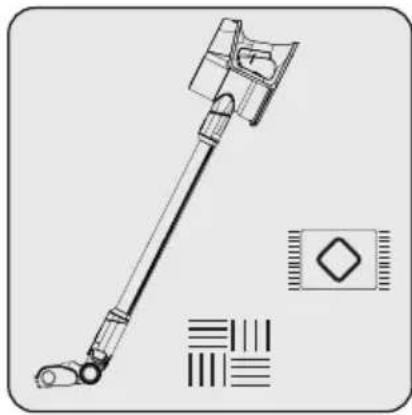
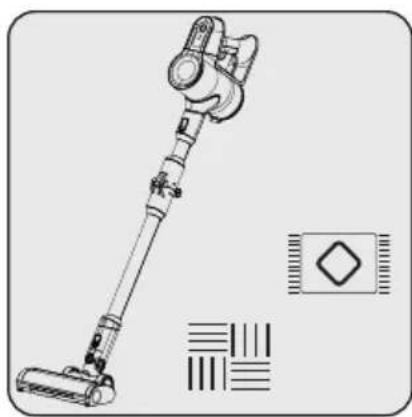
Technical line drawing of a mechanical lever assembly with no visible text or symbolsThis appliance is suitable for use on carpets and hard floors.
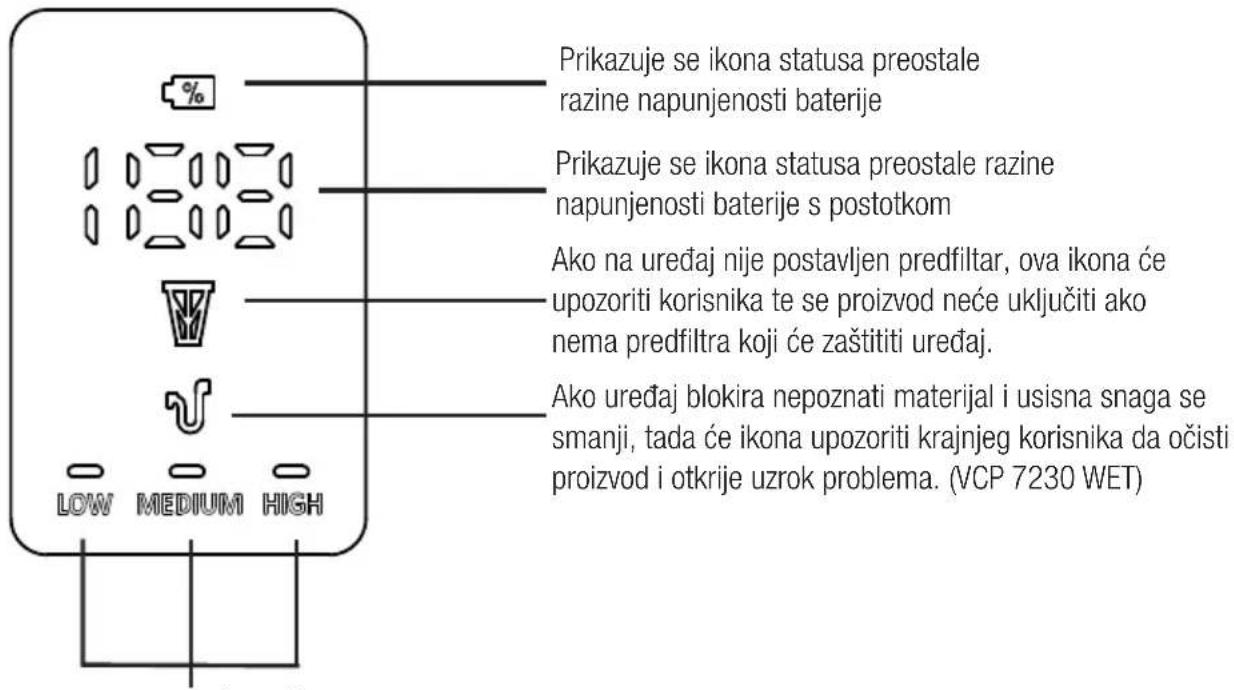
4 Operation
4.3 LED screen indicators

Those icons will show the suction mode which is being used.
4.3 Accessories

natural_image
Technical line drawing of a mechanical device with an arrow indicating assembly or motion (no text or symbols present)Crevice: Suitable for vacuuming the rear of the furnitures, hard to reach areas and narrow areas.

natural_image
Mechanical assembly diagram showing a device being inserted into a housing (no text or symbols visible)Combination tool: Suitable for vacuuming curtains, sofas, waxed furniture and delicate and fragile objects.
natural_image
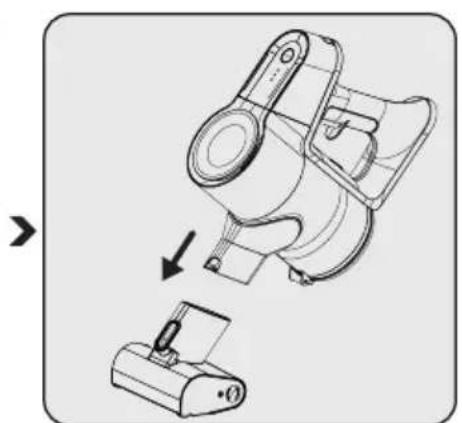
Technical illustration of a mechanical device with an arrow indicating assembly or transformation (no text or symbols present)Mini turbo pet brush: Suitable for vacuuming floorings, stair steps, car interiors, sofas and seat, etc. It is also used for vacuuming pet hair on such surfaces.
4 Operation
(VCP 7230 WET)

natural_image
Technical line drawing of a mechanical device with a bucket and housing (no text or symbols)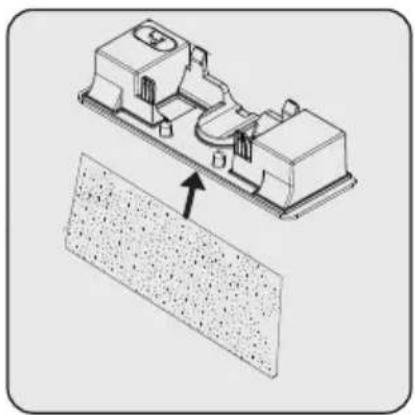
natural_image
Technical illustration of a mechanical assembly with a textured surface and an arrow indicating direction (no text or symbols)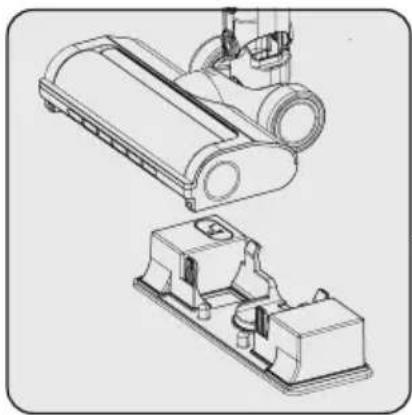
natural_image
Technical line drawing of a mechanical assembly with two views (top and side), no visible text or symbolsMop Attachment: Suitable for hard floor mopping process. Fill the water tank with potable water.
Attach mopping cloth to the bottom of water tank.
Attach mop attachment to the bottom of electrical turbo brush.

WARNING: Do not use the mop attachment on a carpet.

WARNING: Do not put bleach or detergent in the water tank.

WARNING: Remove the mop attachment after usage is completed.

WARNING: Remove the mop attachment immediately after the mopping operation is completed to prevent damage to your wooden floors.

WARNING: Clean the water tank after each use.

Mopping cloths can be washed in washing machine.

Do not lift or tilt the nozzle, as water may spray out of the water tank.
5 Cleaning and maintenance
Turn off and unplug the appliance before cleaning.

WARNING: Never use gasoline, solvent, abrasive cleaners, metal objects or hard brushes to clean the appliance.

WARNING: Deformation may occur on the filters within time as a result of usage. It shall be replaced with a new one to prevent loss of performance. Contact with the customer services to buy a new one.
5.1 Cleaning the Dust container and Filters

WARNING: Do not wash the filters.

We recommend you to clean the dust container after each operation.

natural_image
Illustration of a hand cleaning a mechanical component with a cloth (no text or symbols)Wipe the surface of the body with a wet cloth.


natural_image
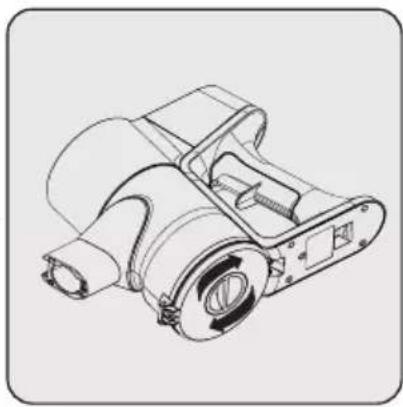
Technical line drawing of a mechanical component with no visible text or symbolsIn order to operate the product at high performance for a long time, it may be necessary to clean the filter by rotating the mechanism under the dust container. It will help to clean the filter easily.

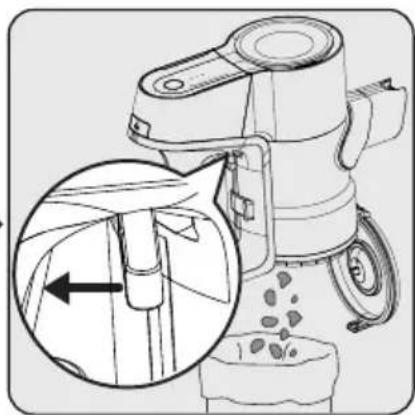
natural_image
Line drawing of a blender with an arrow indicating the process, showing internal components and powder residue (no text or symbols)Pull the emptying dust container trigger to the last point. Dust container lid will be opened. Empty all the dust it contains.
5 Cleaning and maintenance

For a detailed cleaning of filters, remove the dust container by pushing the button to the left side.

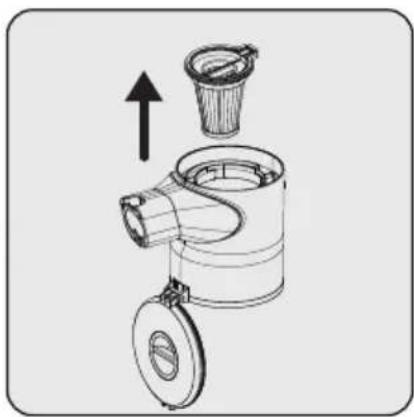
natural_image
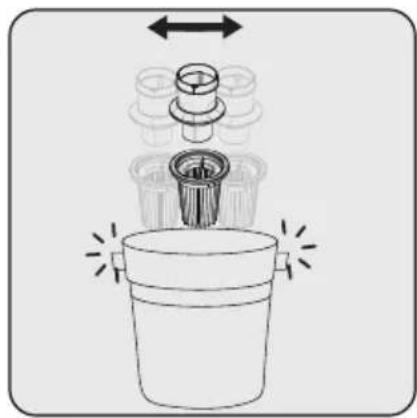
Technical line drawing of a mechanical device with an upward arrow indicating motion or assembly (no text or symbols present)Separate pre-filter and plastic filter from each other.


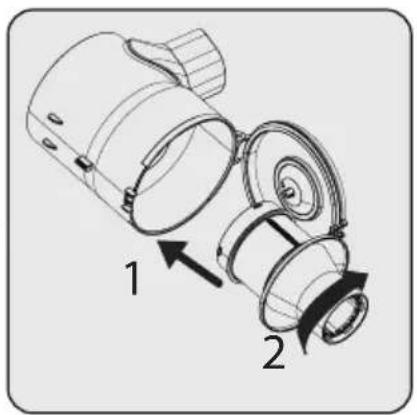
To take out the plastic filter, first rotate the plastic filter counter clockwise (1), then pull out the filter (2).
natural_image
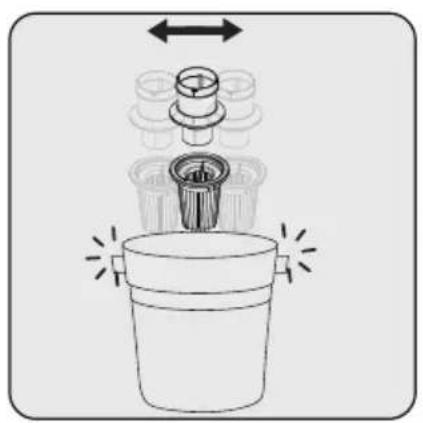
Diagram of a mechanical device with a cylindrical component inserted into a container, showing motion arrows (no text or symbols)Remove the dust on the pre-filter and the plastic filter by tapping it on a hard surface such as a waste bin or by using a brush.

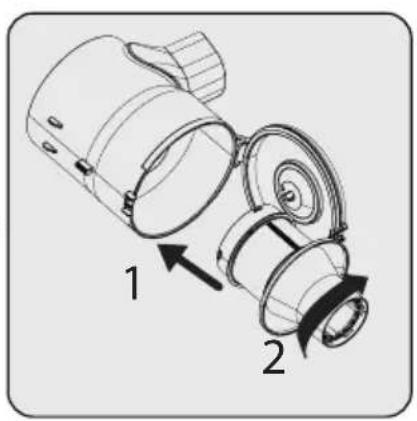
To insert the plastic filter, firstly place the plastic filter (1), then rotate it clockwise to lock it (2).
natural_image
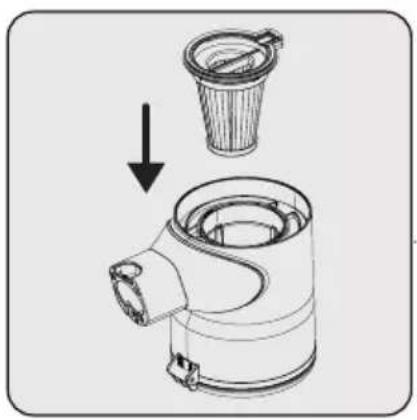
Technical illustration of a mechanical component with an arrow indicating assembly or transformation (no text or symbols present)Attach pre-filter to the plastic filter back.
5 Cleaning and maintenance

natural_image
Technical line drawing of a mechanical component with internal structure and highlighted circular detail (no text or symbols)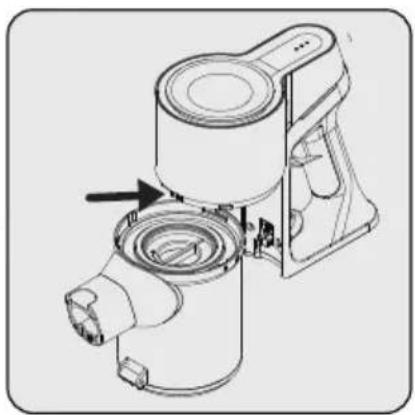
natural_image
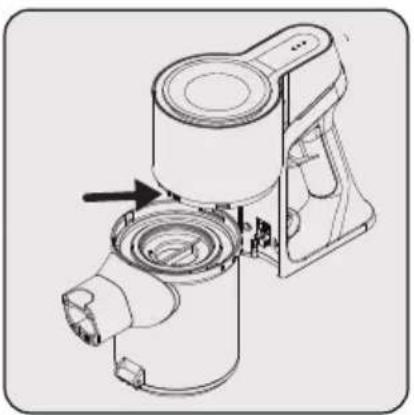
Technical line drawing of a mechanical device with no visible text or symbolsWhile placing the pre-filter, make sure that arrows on the pre-filter and the body are aligned.
Fix the connector of dustbin to the holes on the body, then fix the dustbin until you hear the click sound.
5.2 Cleaning of the brush

WARNING: Do not wash the turbo brush and the main roller.

natural_image
Technical line drawing of a vacuum cleaner with a close-up inset showing the button mechanism (no text or symbols)
natural_image
Technical line drawing of a mechanical device with cylindrical components and mounting flanges (no text or symbols)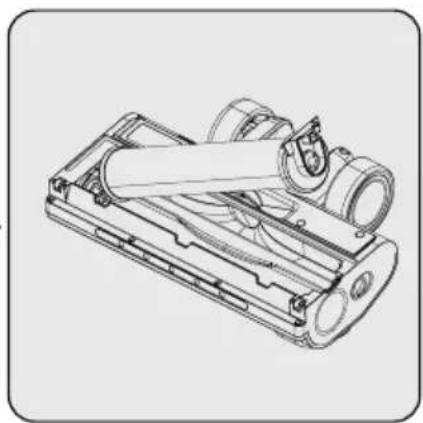
natural_image
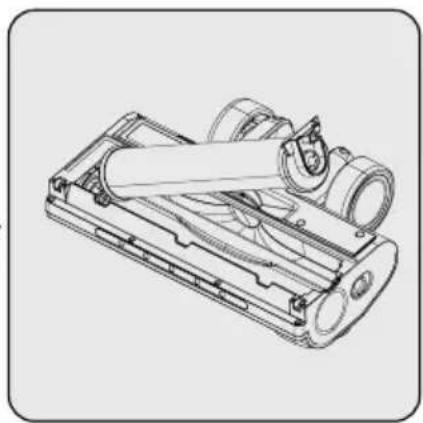
Technical line drawing of a mechanical device with internal components (no text or symbols)Push the roller release button to the left side.
Remove the dust on it by tapping it lightly to a hard surface or remove the dust with a brush. If any hair, etc. is tangled, remove it by cutting it off.
Fix the roller back to its place by pushing.

Carpet roller can be fixed as shown above to main electrical brush for high cleaning performance on carpet. (VCP 7230 WET)
5 Cleaning and maintenance
5.3 Storage
- If you do not intend to use the appliance for a long time, store it carefully.
- Unplug the appliance.
- Ensure that the appliance is kept out of reach of children.
- If you shall not be using the battery for a long period of time, please keep it in a cool and dry place at half charged condition. Do not charge or discharge completely.
- Store the battery on a non-conducting material, and do not allow the battery to contact metal directly. This shall damage the battery.
5.4 Transport and shipping
- During transport and shipping, carry the appliance with its original packaging. The packaging of the appliance will protect the appliance against physical damage.
- Do not put heavy objects on the appliance or its packaging. Otherwise the appliance may be damaged.
- If the appliance is dropped, the appliance may not operate or permanent damage may occur.
6 Troubleshooting (VCP 6230 PET)
| COMMON PROBLEM POSSIBLE REASON SOLUTION | ||
| No response after the battery pack display flashes three times during charging | The wrong charger is used, it does not match this model of vacuum cleaner | Check if the charger is used incorrectly, use the correct matching charger |
| The light on the battery pack display flashes for 10 seconds and then turns off while charging | The battery pack overheats, triggering the overheat protection mechanism | Cancel charging, let the battery pack cool down and continue charging |
| When charging, the battery pack is completely unresponsive when plugged in | The charger, battery pack or internal circuit of the vacuum cleaner is damaged, causing the charging function to fail | Please contact customer service |
| Unable to work The battery pack is out of power need to be charged | ||
| Cannot turn on, and the red warning light on the battery pack display flashes | 1. Missing installation of Hypa 2. The magnet on Hypa is missing | 1. Install the Hypa in the correct position of the dust cup before starting the machine. 2. Install the magnet in the Hypa magnet slot (other small magnets can be used to replace the original magnet), and then install it in the dust cup correctly; 3. Replace New Hypa with magnets and fitted correctly into the dust cup. |
| During use, after the battery pack light flashes for 10 seconds, the machine will automatically shut down | The battery pack overheats, triggering the overheat protection mechanism | The operation of the machine needs to be interrupted, and the machine should be left to cool down before continuing to use it. |
| No machine response after pressing the power button | The battery pack or the internal circuit and parts of the vacuum cleaner are damaged, resulting in functional failure | Please contact customer service |
| The machine works normally, but suddenly the battery pack display light flashes, the floor brush does not work, and the handset still works normally | In the floor brush assembly, the roller brush is stuck by garbage and cannot be rotated, which triggers the floor brush protection mechanism | Clean up the garbage adhering to the roller brush before continuing to use |
| After the machine is turned on, the red air pressure warning light on the battery pack display flashes | The air inlet of the dust cup is blocked by garbage, or there is too much garbage stuck to the filter of the dust cup, or too much garbage adhered to the Hypa | Clean up the garbage in the dust cup assembly before continuing to use |
| After the machine is turned on, the sub-machine works normally, but the floor brush assembly does not work | The internal wiring of the aluminum tube or the internal wiring of the floor brush assembly is damaged | Please contact customer service |
6 Troubleshooting (VCP 7230 WET)
| COMMON PROBLEM POSSIBLE REASON SOLUTION | ||
| No response after the battery pack display flashes three times during charging | The wrong charger is used, it does not match this model of vacuum cleaner | Check if the charger is used incorrectly, use the correct matching charger |
| The light on the battery pack display flashes for 10 seconds and then turns off while charging | The battery pack overheats, triggering the overheat protection mechanism | Cancel charging, let the battery pack cool down and continue charging |
| When charging, the battery pack is completely unresponsive when plugged in | The charger, battery pack or internal circuit of the vacuum cleaner is damaged, causing the charging function to fail | After excluding the above situation, please contact customer service |
| Unable to work The battery pack is out of power need to be charged | ||
| Cannot turn on, and the red warning light on the battery pack display flashes | 1. Missing installation of Hypa 2. The magnet on Hypa is missing | 1. Install the Hypa in the correct position of the dust cup before starting the machine. 2. Install the magnet in the Hypa magnet slot (other small magnets can be used to replace the original magnet), and then install it in the dust cup correctly; 3. Replace New Hypa with magnets and fitted correctly into the dust cup. |
| During use, after the battery pack light flashes for 10 seconds, the machine will automatically shut down | The battery pack overheats, triggering the overheat protection mechanism | The operation of the machine needs to be interrupted, and the machine should be left to cool down before continuing to use it. |
| No machine response after pressing the power button | The battery pack or the internal circuit and parts of the vacuum cleaner are damaged, resulting in functional failure | After excluding the above situation, please contact customer service |
| The machine works normally, but suddenly the battery pack display light flashes, the floor brush does not work, and the handset still works normally | In the floor brush assembly, the roller brush is stuck by garbage and cannot be rotated, which triggers the floor brush protection mechanism | Clean up the garbage adhering to the roller brush before continuing to use |
| After the machine is turned on, the red air pressure warning light on the battery pack display flashes | The air inlet of the dust cup is blocked by garbage, or there is too much garbage stuck to the filter of the dust cup, or too much garbage adhered to the Hypa | Clean up the garbage in the dust cup assembly before continuing to use |
| After the machine is turned on, the sub-machine works normally, but the floor brush assembly does not work | The internal wiring of the aluminum tube or the internal wiring of the floor brush assembly is damaged | Please contact customer service |
6 Troubleshooting (VCP 7230 WET)
| No water in the tank | Without pressing the water tank air valve, there is no air pressure in the water tank to squeeze the water out | Press the air valve to get water out |
2.1 Kontroller og komponenter
natural_image
Simple line drawing of a cartoon character holding a small object, no text or symbols presentnatural_image
Line drawing of a person using an electrical outlet with a wall-mounted switch (no text or symbols)natural_image
Mechanical assembly diagram showing a valve mechanism with directional arrows indicating movement (no text or labels)natural_image
Diagram of a vacuum cleaner with arrows indicating motion or assembly (no text or symbols)natural_image
Diagram of a robotic arm with directional arrows indicating movement or force (no text or symbols present)natural_image
Technical line drawing of a mechanical device with an arrow indicating direction (no text or symbols)natural_image
Diagram of a vertical mechanical device with an arrow indicating direction, no text or symbols presentnatural_image
Technical line drawing of a mechanical component with an arrow indicating a specific part (no text or symbols present)natural_image
Technical line drawing of a mechanical device with an inset magnified view showing a component detail (no text or symbols)natural_image
Technical line drawing of a mechanical device with an inset circular detail showing a knob (no text or symbols)natural_image
Technical line drawing of a mechanical component with a circular housing and mounting holes (no text or symbols)
natural_image
Technical line drawing of a mechanical lever assembly with no visible text or symbolsnatural_image
Technical line drawing of a mechanical device with an arrow indicating motion (no text or symbols)natural_image
Mechanical assembly diagram showing a device being inserted into a housing (no text or symbols visible)natural_image
Technical illustration of a mechanical device with an arrow indicating assembly or transformation (no text or symbols present)natural_image
Technical line drawing of a mechanical device with a bucket and housing (no text or symbols)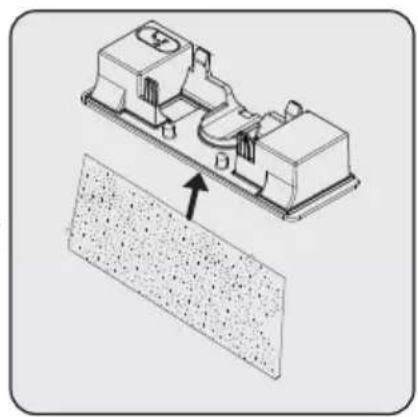
natural_image
Technical illustration of a mechanical assembly with an arrow pointing to a textured surface (no text or symbols)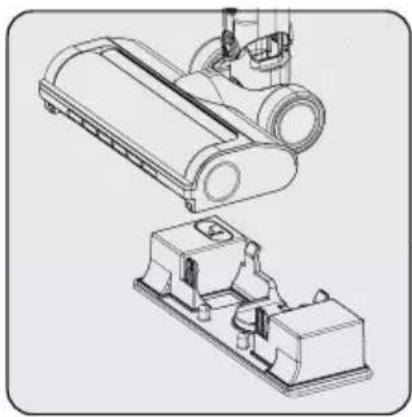
natural_image
Technical line drawing of a mechanical device with two views (top and side), no visible text or symbolsnatural_image
Illustration of a hand cleaning a mechanical component with a cloth (no text or symbols)natural_image
Technical line drawing of a mechanical component with no visible text or symbolsnatural_image
Line drawing of a blender with an inset showing the blade being inserted (no text or symbols)natural_image
Technical line drawing of a mechanical device with two labeled parts (1 and 2), showing internal components and a magnified inset view.natural_image
Technical line drawing of a mechanical device with an upward arrow indicating motion or assembly (no text or symbols present)natural_image
Diagram of a mechanical device with a cylindrical component inserted into a bucket, showing motion arrows (no text or symbols)natural_image
Technical illustration of a mechanical component with an arrow indicating assembly or transformation (no text or symbols present)Fest forfilteret på plastfilteret.

natural_image
Technical illustration of a mechanical assembly with internal components and a magnified circular detail (no text or symbols)Mens du plasserer forfilteret, sørg for at pilene på forfilteret og huset er på linje.

natural_image
Technical line drawing of a mechanical component with no visible text or symbolsnatural_image
Technical line drawing of a mechanical device with a circular button and connector (no text or symbols)natural_image
Technical line drawing of a mechanical device with cylindrical components and mounting brackets (no text or symbols)Fjern støvet på den ved å banke den lett på en hard overflate eller fjerne støvet med en børste. Hvis här eller lignende er floket, kan du fjerne den ved å klippe den av.


natural_image
Technical line drawing of a mechanical device with cylindrical components and internal tubing (no text or symbols)natural_image
Simple line drawing of a cartoon character holding a small object, no text or symbols presentnatural_image
Line drawing of a person using an electrical outlet with a switch (no text or symbols)natural_image
Technical line drawing of a mechanical component with directional arrows indicating movement (no text or symbols)natural_image
Diagram of a vacuum cleaner with mechanical components and airflow arrows (no text or symbols)natural_image
Diagram of a robotic arm with directional arrows indicating movement or force (no text or symbols present)natural_image
Technical line drawing of a mechanical device with an arrow indicating direction (no text or symbols)natural_image
Technical line drawing of a vertical mechanical device with an arrow indicating direction (no text or symbols)Anslut laddningsadaptern i elutta- get.

natural_image
Technical line drawing of a mechanical component with a circular housing and a handle, showing no text or symbols.natural_image
Technical line drawing of a mechanical device with an inset close-up showing a component detail (no text or symbols)natural_image
Technical line drawing of a mechanical component with an inset circular detail showing a circular feature (no text or symbols)natural_image
Technical line drawing of a mechanical pulley or lever component (no text or symbols)
natural_image
Technical line drawing of a mechanical lever assembly with no visible text or symbolsnatural_image
Technical line drawing of a mechanical device with an arrow indicating motion (no text or symbols)natural_image
Mechanical assembly diagram showing a robotic arm with a close-up of its internal components (no text or symbols)natural_image
Technical illustration of a mechanical device with an arrow indicating assembly or transformation (no text or symbols present)natural_image
Technical line drawing of a mechanical device with a bucket and housing (no text or symbols)
natural_image
Technical illustration of a mechanical assembly with an arrow pointing to a textured surface (no text or symbols)
natural_image
Technical line drawing of a mechanical device with two views, showing internal components (no text or symbols)natural_image
Illustration of a hand cleaning a mechanical component with a cloth (no text or symbols)natural_image
Technical line drawing of a mechanical component with no visible text or symbolsnatural_image
Line drawing of a blender with an arrow indicating a process, showing internal components and powder residue (no text or symbols)natural_image
Technical line drawing of a mechanical device with labeled parts (1 and 2), showing internal components and a magnified inset view.natural_image
Technical line drawing of a mechanical device with an upward arrow indicating motion or assembly (no text or symbols present)natural_image
Diagram of a mechanical device with a cylindrical component and two arrows indicating motion (no text or symbols)natural_image
Diagram showing a mechanical component with a downward arrow indicating a process or assembly (no text or symbols present)natural_image
Technical line drawing of a mechanical component with internal structure and highlighted section (no text or symbols)natural_image
Technical line drawing of a mechanical device with no visible text or symbolsnatural_image
Technical diagram of a vacuum cleaner with a close-up circular button highlighting the left side (no text or symbols present)natural_image
Technical line drawing of a mechanical device with cylindrical components and mounting brackets (no text or symbols)natural_image
Technical line drawing of a mechanical device with internal components and no visible text or symbolsnatural_image
Simple line drawing of a cartoon character holding a small object, no text or symbols present1- Pričvrstite četiri tipla na zid 2- Postavite četiri vijka na njihova mjesta na stanicu za punjenje i monitrajte tiple na zid.
natural_image
Line drawing of a person using an electrical power outlet with wires and switches (no text or symbols)natural_image
Technical line drawing of a mechanical component with directional arrows indicating movement (no text or symbols)natural_image
Diagram of a vacuum cleaner with mechanical components and airflow arrows (no text or symbols)natural_image
Diagram of a robotic arm with directional arrows indicating movement or force (no text or symbols present)Pričvrstite cjevasti nastavak i kombinirani alat na stanicu za punjenje.
4 Rukovanje
natural_image
Technical line drawing of a mechanical device with an arrow indicating direction (no text or symbols)natural_image
Diagram of a vertical device with an arrow indicating direction, no text or symbols presentnatural_image
Technical line drawing of a mechanical component with a circular base and central hole, showing no text or symbols.1- Gurnite gumb za otpušanje uređaja na stanici za punjenje prema dolje, a istovremeno povucite uređaj prema sebi.
2- Uređaj uklonite sa stanice za punjenje.

natural_image
Technical line drawing of a mechanical device with an inset close-up showing a component detail (no text or symbols)Pritisnite gumb uključeno/isključeno za rukovanje uređajem. Uređaj počinje s radom s minimalnom snagom kada se pritisne gumb uključivanja/isključivanja.


natural_image
Technical line drawing of a mechanical component with an inset circular detail showing a circular feature (no text or symbols)Za podešavanje razine brzine pritisnite gumb. Na zaslonu načina jačine usisa koji se koristi prikazat će se minimalna, srednja i maksimalna jačina usisa. Pritiskom na gumb možete podesiti razinu brzine.
4 Rukovanje

Uređaj možete staviti na punjenje prije nego se baterija potpuno isprazni. Uređaj se može držati na stanici za punjenje i neprekidno se puniti do iduće upotrebe.

natural_image
Technical line drawing of a mechanical component with a circular housing and mounting holes (no text or symbols)
Tijekom rada pripazite na razinu napunjenosti baterije. Postotak napunjenosti baterije treba se pratiti tijekom upotrebe, jer kad se baterija isprazni uređaj automatski prestaje s radom.
natural_image
Line drawing of a vacuum cleaner with attached circuit symbols (no text or labels)Ovaj uređaj prikladan je za uporabu na tepisima i drvenim podnim oblogama.
4 Rukovanje
4.3 Pokazatelji LED zaslona
natural_image
Technical line drawing of a mechanical device with an arrow indicating assembly or motion (no text or symbols present)natural_image
Technical line drawing of a mechanical device with an arrow indicating assembly or disassembly (no text or symbols present)natural_image
Technical illustration of a mechanical device with a base and adjustment arrow (no text or symbols)Mini turbo četka za dlake kućnih ljubimaca: Prikladna je za usisavanje podnih obloga, stepenica, unutrašnjosti automobila, kauča i sofa, itd. Koristi se i za usisavanje dlaka kućnih ljubimaca na takvim površinama.
4 Rukovanje
(VCP 7230 WET)

natural_image
Technical line drawing of a mechanical device with a bucket and housing (no text or symbols)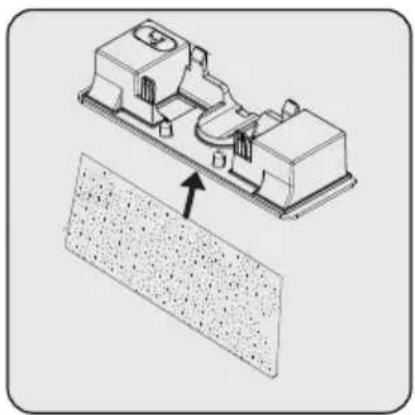
natural_image
Technical illustration of a mechanical assembly with an arrow pointing to a textured surface (no text or symbols present)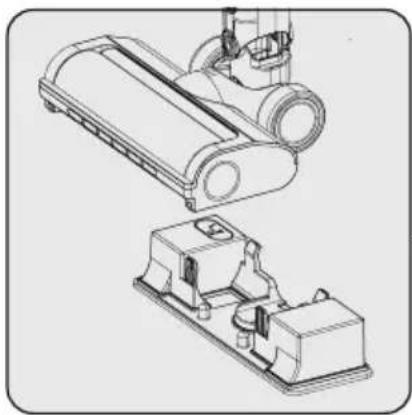
natural_image
Technical line drawing of a mechanical assembly with two views (top and side), no visible text or symbolsPričvrstite krpu za brisanje poda na dnu spremnika za vodu.
Pričvrstite nastavak s krpom za brisanje poda na dno električne turbo četke.
Nastavak s krpom za brisanje poda: Prikladno za brisanje tvrdih podnih obloga. Spremnik za vodu napunite pitkom vodom.
 | UPOZORENJE: Na tepihu ne koristite nastavak s krpom za brisanje poda. |
 | UPOZORENJE: U spremnik za vodu ne stavljajte izbjeljivač ili deterdžent. |
 | UPOZORENJE: Kada završite s upotrebom uklonite nastavak s krpom za brisanje poda. |
 | UPOZORENJE: Nastavak s krpom za brisanje poda uklonite odmah nakon što se završi brisanje poda i tako spriječite oštećenje drvenih podnih obloga. |
 | UPOZORENJE: Nakon svake uporabe očistite spremnik za vodu. |
 | Krpe za brisanje poda mogu se prati u perilici rublja. |
 | UPOZORENJE: Ne podižite niti naginjite papučicu, jer voda može prskati iz spremnika za vodu |
natural_image
Illustration of a hand cleaning a mechanical component with a cloth (no text or symbols)natural_image
Technical line drawing of a mechanical component (no text or symbols)natural_image
Line drawing of a blender with an inset showing the blade being inserted (no text or symbols)natural_image
Technical line drawing of a mechanical device with labeled parts (1 and 2), showing internal components and a magnified inset view.Za pojedinosti o čišćenju filtra, uklonite spremnik za prašinu. guranjem gumba na lijevoj strani.


natural_image
Technical line drawing of a mechanical device with an upward arrow indicating motion or assembly (no text or symbols present)Odvojite predfilter i plastični filter. Da


biste izvadili plastični filtar, najprije ga okrenite u smjeru suprotnom od kazaljke na satu (1), a zatim izvucite filtar (2).
natural_image
Diagram of a mechanical device with a cylindrical component inserted into a bucket, showing motion arrows (no text or symbols)Uklonite prašinu laganim lupkanjem o tvrdu površinu poput kante za smeće ili pomoću četke.

natural_image
Technical illustration of a mechanical component with an arrow indicating assembly or disassembly (no text or symbols present)Pričvrstite natrag predfilter na plastični filter.

natural_image
Technical illustration of a mechanical assembly with internal components and motion arrows (no text or symbols)Dok postavljate predfilter, provjerite jesu li strelice na predfilteru i kućištu poravnate.


natural_image
Technical line drawing of a mechanical device with no visible text or symbolsPričvrstite priključak spremnika za prašinu na otvore kućišta, zatim pričvrstite spremnik za prašinu dok ne čujete zvuk „klik“.
natural_image
Technical line drawing of a mechanical device with a circular button and connector (no text or symbols)natural_image
Technical line drawing of a mechanical device with cylindrical components and mounting brackets (no text or symbols)Uklonite prašinu s nje laganim lupkanjem o tvrdu površinu ili prašinu uklonite četkom. Ako su se zapetljale dlake, odrežite ih.

natural_image
Technical line drawing of a mechanical device with cylindrical components and internal tubing (no text or symbols)Guranjem ponovno pričvrstite okruglu četku na njeno mjesto.

Valjak za tepih može se pričvrstiti kao što je gore prikazano na glavnu električnu četku za visoku učinkovitost čišćenja na tepihu. (VCP 7230 WET)
5.3 Pohrana
Cher/Chère client(e),
natural_image
Simple line drawing of a cartoon character holding a small object (no text or symbols)natural_image
Line drawing of a person using an electrical power outlet with wires and switches (no text or symbols)natural_image
Technical line drawing of a mechanical component with directional arrows indicating movement (no text or symbols)natural_image
Diagram of a vacuum cleaner with arrows indicating motion or assembly (no text or symbols present)natural_image
Diagram of a robotic arm with sensors and a tool, showing motion arrows (no text or symbols)natural_image
Technical line drawing of a mechanical device with an arrow indicating direction (no text or symbols)natural_image
Diagram of a vertical mechanical device with an arrow indicating direction, no text or symbols presentnatural_image
Technical line drawing of a mechanical component with a handle and circular body (no text or symbols)natural_image
Technical line drawing of a mechanical device with an inset close-up showing a component detail (no text or symbols)natural_image
Technical line drawing of a mechanical device with an inset close-up showing a circular component (no text or symbols)natural_image
Technical line drawing of a mechanical pulley or lever component (no text or symbols)
natural_image
Technical line drawing of a mechanical lever assembly with no visible text or symbolsnatural_image
Technical line drawing of a mechanical device with an arrow indicating assembly or motion (no text or symbols present)natural_image
Mechanical assembly diagram showing a device being inserted into a housing (no text or symbols visible)natural_image
Technical illustration of a mechanical device with an arrow indicating assembly or transformation (no text or symbols present)natural_image
Technical line drawing of a mechanical device with a bucket and housing (no text or symbols)
natural_image
Technical illustration of a mechanical assembly with an arrow pointing to a textured surface (no text or symbols present)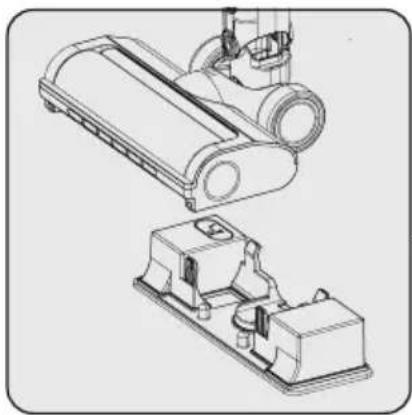
natural_image
Technical line drawing of a mechanical assembly with two views (top and side), no visible text or symbolsnatural_image
Illustration of a hand cleaning a mechanical component with a cloth (no text or symbols)natural_image
Technical line drawing of a mechanical component (no text or symbols)natural_image
Line drawing of a vacuum cleaner with an inset showing the blade and blade assembly (no text or symbols)natural_image
Technical line drawing of a mechanical device with an upward arrow indicating motion or assembly (no text or symbols present)natural_image
Diagram of a mechanical device with a cylindrical component inserted into a container, showing motion arrows (no text or symbols)natural_image
Technical illustration of a mechanical component with an arrow indicating assembly or disassembly (no text or symbols present)natural_image
Technical illustration of a mechanical component with internal structure and highlighted section (no text or symbols)
natural_image
Technical line drawing of a mechanical component with no visible text or symbolsnatural_image
Technical line drawing of a mechanical device with a close-up circular inset showing a button (no text or symbols)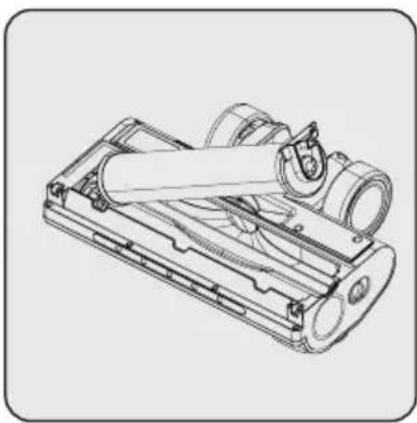
natural_image
Technical line drawing of a mechanical device with cylindrical components and internal tubing (no text or symbols)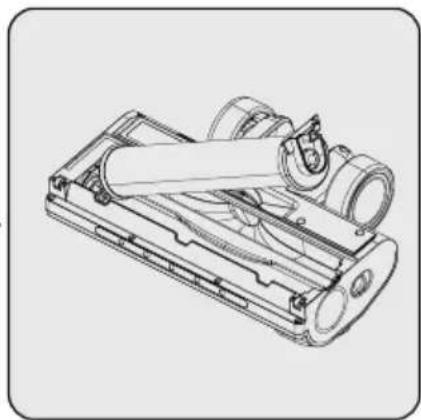
natural_image
Technical line drawing of a mechanical device with internal components and no visible text or symbolsnatural_image
Simple line drawing of a cartoon character holding a small object, no text or symbols presentnatural_image
Line drawing of an electrical circuit with a power outlet and wiring (no text or symbols)natural_image
Technical line drawing of a mechanical component with directional arrows indicating movement (no text or symbols)natural_image
Diagram of a vacuum cleaner with arrows indicating motion or assembly (no text or symbols)natural_image
Diagram of a robotic arm with directional arrows indicating movement or force (no text or symbols present)natural_image
Technical line drawing of a mechanical device with an arrow indicating direction (no text or symbols)natural_image
Diagram of a vertical device with an arrow indicating direction, no text or symbols presentnatural_image
Technical line drawing of a mechanical component with a circular housing and a handle (no text or symbols)natural_image
Technical line drawing of a mechanical component with an inset magnified detail showing a detail (no text or symbols)natural_image
Technical line drawing of a mechanical component with an inset showing a circular detail (no text or symbols)natural_image
Technical line drawing of a mechanical component with a circular housing and mounting holes (no text or symbols)
natural_image
Technical line drawing of a mechanical lever assembly with no visible text or symbolsnatural_image
Technical line drawing of a mechanical device with an arrow indicating assembly or motion (no text or symbols present)natural_image
Mechanical assembly diagram showing a device being inserted into a housing (no text or symbols visible)natural_image
Technical illustration of a mechanical device with an arrow indicating assembly or transformation (no text or symbols present)natural_image
Technical line drawing of a mechanical device with a bucket and housing (no text or symbols)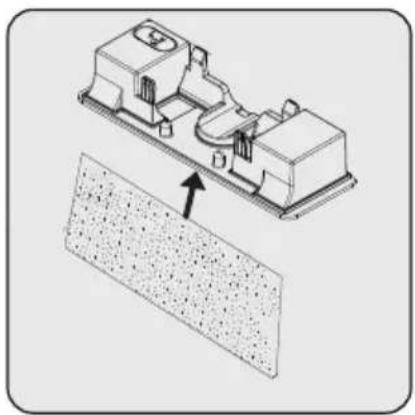
natural_image
Technical illustration of a mechanical assembly with an arrow pointing to a textured surface (no text or symbols)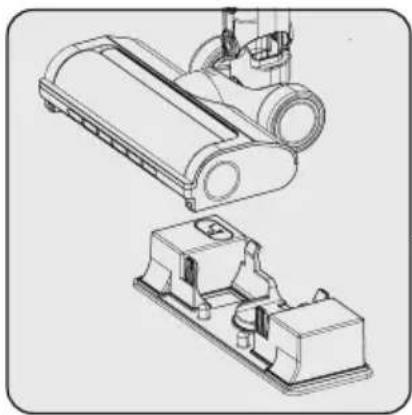
natural_image
Technical line drawing of a mechanical assembly with two views (top and side), no visible text or symbolsnatural_image
Illustration of a hand cleaning a mechanical component with a cloth (no text or symbols)Pulire la superficie del corpo con un panno umido.

natural_image
Technical line drawing of a mechanical component with no visible text or symbolsnatural_image
Line drawing of a blender with an arrow indicating a process, showing internal components and powder (no text or symbols)natural_image
Technical line drawing of a mechanical device with an upward arrow indicating motion or assembly (no text or symbols present)natural_image
Diagram of a mechanical device with a cylindrical component inserted into a container, showing motion arrows (no text or symbols)natural_image
Technical illustration of a mechanical component with a downward arrow indicating assembly or disassembly (no text or symbols present)natural_image
Technical line drawing of a mechanical component with internal structure and highlighted section (no text or symbols)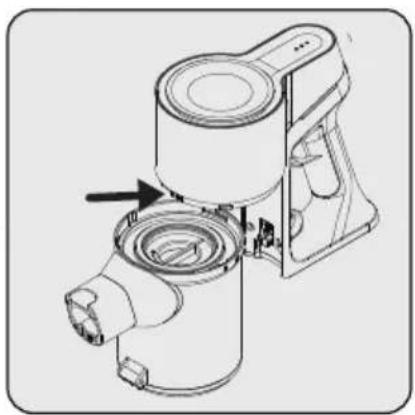
natural_image
Technical line drawing of a mechanical component with no visible text or symbolsnatural_image
Technical line drawing of a mechanical device with a close-up inset showing a circular button (no text or symbols)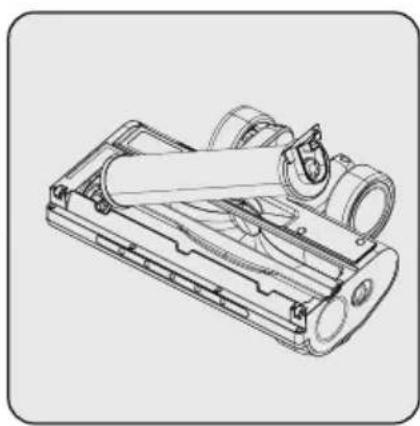
natural_image
Technical line drawing of a mechanical device with rollers and housing (no text or symbols)
natural_image
Technical line drawing of a mechanical device with internal components (no text or symbols)natural_image
Two abstract geometric patterns: a woven bamboo design and a square with circular cutouts (no text or symbols)VCP 6230 PET - VCP 7230 WET
RU
natural_image
Simple line drawing of a cartoon character holding a device (no text or symbols)natural_image
Illustration of a person using an electrical power outlet with wires and switches (no text or symbols)natural_image
Technical line drawing of a mechanical component with directional arrows indicating movement (no text or symbols)natural_image
Diagram of a vacuum cleaner with arrows indicating motion, showing mechanical components and airflow direction (no text or symbols)natural_image
Diagram of a robotic arm with sensors and directional arrows indicating movement (no text or labels)natural_image
Technical line drawing of a mechanical device with an arrow indicating direction (no text or symbols)natural_image
Technical line drawing of a vertical mechanical device with an arrow indicating direction (no text or symbols)natural_image
Technical line drawing of a mechanical component with a highlighted section (no text or symbols)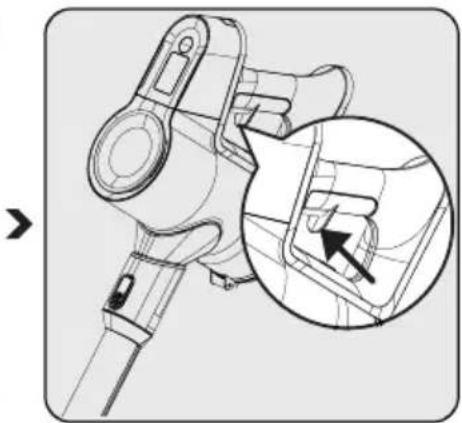
natural_image
Technical line drawing of a mechanical component with an inset magnified detail showing a detail (no text or symbols)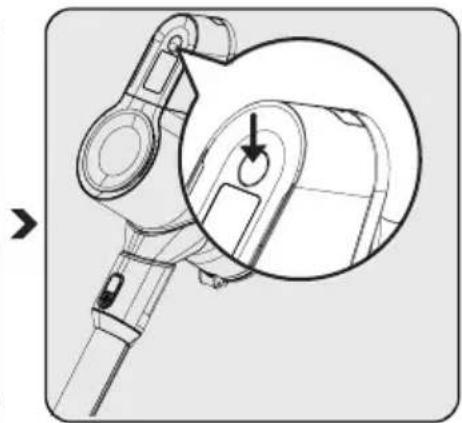
natural_image
Technical line drawing of a mechanical device with an inset close-up showing a circular component (no text or symbols)natural_image
Technical line drawing of a mechanical component with a central knob and arrow indicator (no text or symbols)
natural_image
Technical line drawing of a mechanical lever assembly with no visible text or symbolsnatural_image
Technical line drawing of a mechanical device with an arrow indicating assembly or motion (no text or symbols present)
natural_image
Mechanical assembly diagram showing a robotic arm with a highlighted component and directional arrow (no text or symbols)
natural_image
Technical illustration of a mechanical device with an arrow indicating assembly or transformation (no text or symbols present)Щелевая насадка:
natural_image
Technical line drawing of a mechanical assembly with a bucket and housing (no text or symbols)
natural_image
Technical illustration of a mechanical assembly with a textured surface and an arrow indicating direction (no text or symbols)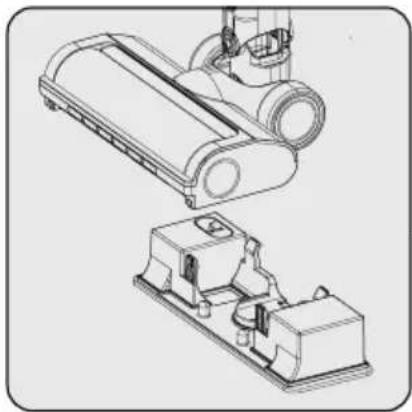
natural_image
Technical line drawing of a mechanical device with two views: top shows a cylindrical component, bottom shows a base device (no text or symbols)natural_image
Illustration of a hand cleaning a mechanical component with a cloth (no text or symbols)natural_image
Technical line drawing of a mechanical component (no text or symbols)natural_image
Line drawing of a blender with a magnified inset showing the blade and handle (no text or symbols)natural_image
Technical illustration of a mechanical device with an upward arrow indicating motion or assembly (no text or symbols present)natural_image
Diagram of a mechanical device with a central component and surrounding components, no text or symbols present.natural_image
Technical line drawing of a mechanical device with two labeled parts (1 and 2), showing internal components without any text or symbols.natural_image
Technical illustration of a mechanical component with an arrow indicating assembly or transformation (no text or symbols present)natural_image
Technical illustration of a mechanical component with internal structure and highlighted section (no text or symbols)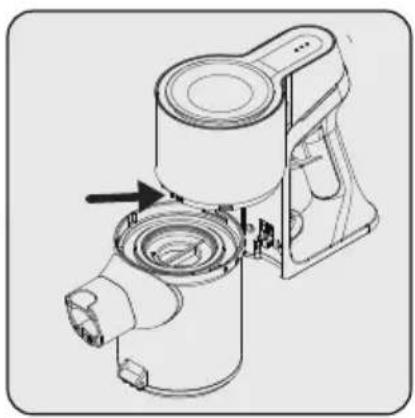
natural_image
Technical line drawing of a mechanical device with no visible text or symbolsnatural_image
Technical line drawing of a mechanical device with a close-up circular inset showing a button (no text or symbols)
natural_image
Technical line drawing of a mechanical device with cylindrical components and mounting brackets (no text or symbols)
natural_image
Technical line drawing of a mechanical device with cylindrical components and internal components (no text or symbols)


- In 1 Cordless Stick Vacuum Cleaner
- Please read this guide first!
- Symbols and their meanings
- Important safety and environmental instructions
- General safety
- Compliance with the WEEE Directive and disposal of the waste product
- Packaging information
- Information on waste batteries
- What to do for energy saving
- Compliance with RoHS Directive
- Overview
- Controls and components
- Technical data
- Installation
- Intended use
- Installation of the charging dock
- Installation of the body and the brush
- Charging the appliance
- Usage
- Operation
- LED screen indicators
- Accessories
- Cleaning and maintenance
- Cleaning the Dust container and Filters
- Cleaning of the brush
- Storage
- Transport and shipping
- Troubleshooting (VCP 6230 PET)
- Troubleshooting (VCP 7230 WET)
- Kontroller og komponenter
- Rukovanje
- Pokazatelji LED zaslona
- Pohrana
- Щелевая насадка:
Brand : GRUNDIG
Model : VCP 7230 WET
Category : Vacuum Cleaner