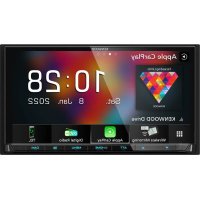
DMX8021DABS - GPS Navigation System KENWOOD - Free user manual and instructions
Find the device manual for free DMX8021DABS KENWOOD in PDF.


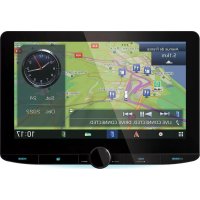
| Product type | GPS navigation system with audio/video receiver |
| Brand | Kenwood |
| Model | DMX8021DABS |
| Dimensions (without sleeve) | 178 × 100 × 85 mm |
| Dimensions (with sleeve) | 182 × 112 × 85 mm |
| Weight | 1.5 kg |
| Power supply | 12 V DC (car battery) |
| Screen size | 6.95 inches (TFT touchscreen) |
| Screen resolution | 800 × 480 pixels (1,152,000 pixels) |
| Bluetooth | Version 5.0, profiles HFP, A2DP, AVRCP, PBAP, SPP |
| Navigation | GPS and GLONASS (GPS antenna included) |
| Apple CarPlay compatible | Yes (wired and wireless) |
| Android Auto compatible | Yes (wired and wireless) |
| Digital radio (DAB+) | Yes (Band III) |
| FM/AM radio | Yes (FM: 87.5-108 MHz, AM: MW/LW) |
| HDMI input | Yes (type D) |
| USB port | USB Type-C, up to 3.0 A |
| Supported audio formats | MP3, WMA, AAC, FLAC, WAV, Vorbis (up to 192 kHz/24 bits) |
| Supported video formats | MPEG-1, MPEG-2, H.264, MPEG-4, WMV, MKV |
| Audio output power | 50 W × 4 (max) |
| Camera input | Up to 3 cameras (front, rear, side) |
| Maintenance and cleaning | Soft dry cloth; mild cleaning product for stubborn stains |
| Security | Security code (4-8 digits), short-circuit protection circuit |
| Spare parts and repairability | Optional accessories: KCA-iP103, KCA-HD200, DRV-N520, CX-DAB1; contact Kenwood dealer for repair |
| General information | Manufactured by JVCKENWOOD Corporation, Japan; compliant with EU directives 2014/53/EU and RoHS |
Frequently Asked Questions - DMX8021DABS KENWOOD
User questions about DMX8021DABS KENWOOD
0 question about this device. Answer the ones you know or ask your own.
Ask a new question about this device
Download the instructions for your GPS Navigation System in PDF format for free! Find your manual DMX8021DABS - KENWOOD and take your electronic device back in hand. On this page are published all the documents necessary for the use of your device. DMX8021DABS by KENWOOD.
USER MANUAL DMX8021DABS KENWOOD
Software License on This duct
The software embedded in this product comprises a number of independent software components, each of which is copyrighted by JVCKENWOOD Corporation or by a third party. This product uses software components that are based on an End-User License Agreement (hereinafter called "EULA") stipulated by JVCKENWOOD Corporation and by third parties. The EULA dictates the availability of the source codes of free-software components as a prerequisite to distributing them in executable form under the terms of the GNU General Public License or the Lesser General Public License (hereinafter called "GPL/LGPL"). To get information about the software components that are subject to the terms of the GPL/LGPL, please visit the following Website:
Website URL https://www2.jvckenwood.com/gpl/
Queries concerning the contents of the source code or the like will not be accepted.
Please note that software components based on a EULA that is not subject to the terms of the GPL/LGPL or those that have been developed or created by JVCKENWOOD Corporation will be excluded from the scope of source code disclosure.
Because licenses to use software components distributed under the GPL/LGPL are offered to the customers for free of charge, no warranty is granted to the customers, whether explicitly or implicitly, to the extent of the applicable laws. Unless otherwise stipulated by the applicable laws or agreed upon in writing, the copyright holders or those who are entitled to modify and redistribute the software components are not held responsible for any and all damages resulting from their use or from inability to use them. For more information about the terms of use of the software components, required items of compliance and so on, please refer to the GPL/LGPL.
Customers wishing themselves to use a software component that is subject to the GPL/LGPL embedded in this product are encouraged to read the terms of the corresponding license before use. Because each individual license
is prescribed by a third party other than JVCKENWOOD Corporation, the original (English) of the license is presented.
EULA

Software License Agreement
JVCKENWOOD Corporation (hereinafter called "Licensor") holds either the copyright to the embedded software or the right to sublicense it. This agreement establishes the conditions under which the customer uses this "Licensed Software."
The customer shall agree to the terms of this license agreement before proceeding to use Licensed Software.
This agreement is deemed to have taken effect when the customer (hereinafter called "User") has used a product implementation of Licensed Software.
The Licensed Software may contain software Licensor has been licensed to use by third parties directly or indirectly. Some third parties may have terms of use prescribed for their customers, apart from this Software License Agreement. This agreement does not apply to such software. Be sure to consult "Important Notice on Software" as presented separately.
Article 1 (General)
Licensor grants to User a non-exclusive, non-assignable right of use Licensed Software within the country where the User purchases the Product (hereinafter the "Country") (except for the exception provided for in Paragraph 1, Article 3).
Article 2 (Right of Use)
- The rise of use granted under this agreement is the right to use Licensed Software in this product.
- User may not duplicate, copy, modify, add to, translate or otherwise alter, or loan licensed Software and the associated literature in whole or in part.
- Use of Licensed Software is limited to a private extent, and Licensed Software may not be distributed, licensed or sublicensed for any purposes whatsoever, including commercial use.
- User shall use Licensed Software as per the instruction manual or instructions given in the help file and may not use or duplicate data in violations of the regulations of the Copyright
Law or other governing laws by using Licensed Software in whole or in part.
Article 3 (Terms of License)
- In assigning this product, User may not retain the original copy of the embedded Licensed Software (including associated literature, updates and upgrades) and any duplicates and associated literature with regard to the license to use Licensed Software. User may transfer Licensed Software only to the condition of binding the assignee to abide by the terms of this Software License Agreement.
- User may not reverse-engineer, disassemble, decompile or otherwise analyze the source code of Licensed Software.
Article 4 (Rights to Licensed Software)
All rights to Licensed Software and the associated literature, including copyrights, shall reside with Licensor or the original right holder who has granted the Right of Use and right to sublicense to Licensor (hereinafter referred to as "Original Right Holder"), and User does not have any rights other than Right of Use granted hereunder with regard to Licensed Software and the associated literature.
Article 5 (Exemption Granted to Licensor)
- Licensor and Original Right Holder do not assume any responsibility for damages caused to User or third parties resulting from the exercise by User of the license granted hereunder, unless otherwise provided by any law to the contrary.
- Licensor does not warrant Licensed Software to be merchantable, compatible and fit for specific purposes.
Article 6 (Responsibility for Third Parties)
If disputes over the infringement of third parties' intellectual property rights, such as copyrights and patent rights, arise out of the use of Licensed Software by User, User shall resolve these disputes at User's own expenses while keep Licensor and Original Right Holder harmless.
Article 7 (Secrecy Obligation)
User shall keep confidential Licensed Software provided hereunder, information contained in the associated literature or the like and those provisions of this agreement not yet in public knowledge and may not disclose or leak these to third parties without prior written consent from Licensor.
Article 8 (Cancellation of the Agreement)
Licensor reserves the right to cancel this agreement forthwith and claim compensation from User for the damages caused by such cancellation when User:
(1) Breaches any of the provisions of this agreement, or
(2) Has received a petition for seizure, provisional seizure, provisional disposition or any other kind of compulsory execution.
Article 9 (Destruction of Licensed Software)
If this agreement is terminated under the provision of the foregoing paragraph, User shall destroy Licensed Software, along with all associated literature and its duplicates, within two (2) weeks from the date of termination.
Article 10 (Copyright Protection)
- Copyrights and all other intellectual property rights relating to Licensed Software shall reside with Licensor and Original Right Holder and in no circumstances with User.
- User shall abide by the laws relating to copyrights and intellectual property rights in using Licensed Software.
Article 11 (Export Control)
- Licensed Software and the associated literature or the like may not be exported to places outside the Country (including transmission outside the Country over the Internet or the like).
- User agrees that Licensed Software is subject to export controls imposed by the Country and the United States of America.
- User agrees to comply with all the international and domestic laws that apply to this software (U.S. Export Administration Regulations and regulations established by the U.S., the Country and their governmental agencies regarding usage by end users and export destinations).
Article 12 (Miscellaneous)
- Even if this agreement is invalidated in part by law, all other provisions shall remain in effect.
- Licensor and User shall consult each other in good faith to resolve any matters not provided for in this agreement or questions arising from the interpretation of this agreement.
- Licensor and User agree that this agreement is governed by the law of Japan and that all disputes involving claims and obligations that may arise out of this agreement will be settled by arbitration at the Tokyo District Court as the court of first instance.
Table des matières
[Language]
REMARQUE
natural_image
Hand cursor icon pointing at a button (no text or symbols)●Toucher longuement
natural_image
Hand icon with finger pressing a circular button (no text or symbols)Feuilleter
REMARQUE
natural_image
Row of five app icons including weather, sun, photo, colorful photo, and plus sign (no text or symbols)
[Photo Frame Scroll]
3 Touchez [Wireless Mirroring]. (p. 13)
Apple CarPlay is connected
REMARQUE

natural_image
Diagram of a device being inserted into a connector, showing internal components and cable connection (no text or labels)REMARQUE
REMARQUE
REMARQUE
REMARQUE
■[Announcement Select]
[Select All]
■ [TEL (HFP) 1], [TEL (HFP) 2]
[√ AII]
La lecture commence.
REMARQUE
■[Add number from phonebook]
[√ All]
[Bluetooth HF/Audio]
[Camera Assignment Settings]
[Rear Camera Interruption]
■ [Rear Camera for Car interface]
[Parking Guidelines]
[Front Camera Interruption] 4
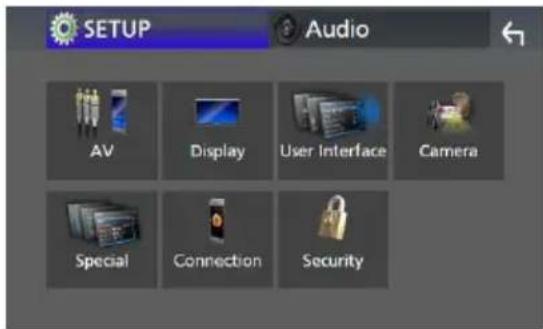
2 Touchez [Screen Adjustment].
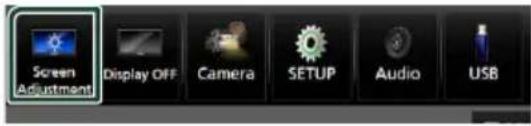
■ [Backlight] / [Contrast] / [Black] / [Brightness] / [Colour] / [Tint]
![KENWOOD DMX8021DABS - [Front Camera Interruption] 4 - 2](/content/2026/04/614917/images/b625c91a758c01710473d0760b03d3b920c65b8e8e0284a7e90faf5bc405a183.jpg)
■ [Steering Remote Controller]
■[Beep for Parking distance control]*
[Parking Distance Display 1 *
[Parking Distance Position] 1*
[Wallpaper Customize]
[User]
■ [Incoming Call Volume (Ring)]
In Call Volume (Talking)
■[Speech Quality Adjust]
■[ iPod Bluetooth Connection]
[Android Auto Auto Launch]
■[Reset Android Auto Wireless Connection]
[Speaker]
REMARQUE
[HPF FREQ]
■ [FREQ] (passe Haut)
[Fader / Balance]
Décalage du volume
[Initialise]
[Bass Boost]
3 Touchez [Position/DTA].
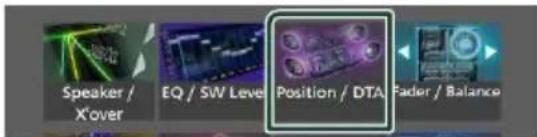
- Configurer la position d'écoute (p.68)
- Configurer le focus avant (p.68)
Contrôle de l'audio

Position d'écoute
REMARQUE
■[Sound Image LR (Front)]
■[Sound Image LR (Rear)]
[Audio SETUP Memory]
[Audio SETUP Recall]
natural_image
Diagram of a battery pack with internal components and directional arrows indicating movement (no text or symbols)natural_image
Technical line drawing of an electronic device chassis with labeled components (no readable text or symbols)Ventilateur
natural_image
Diagram of a mechanical component with labeled section (1) and identifier (x1), no readable text or symbols present.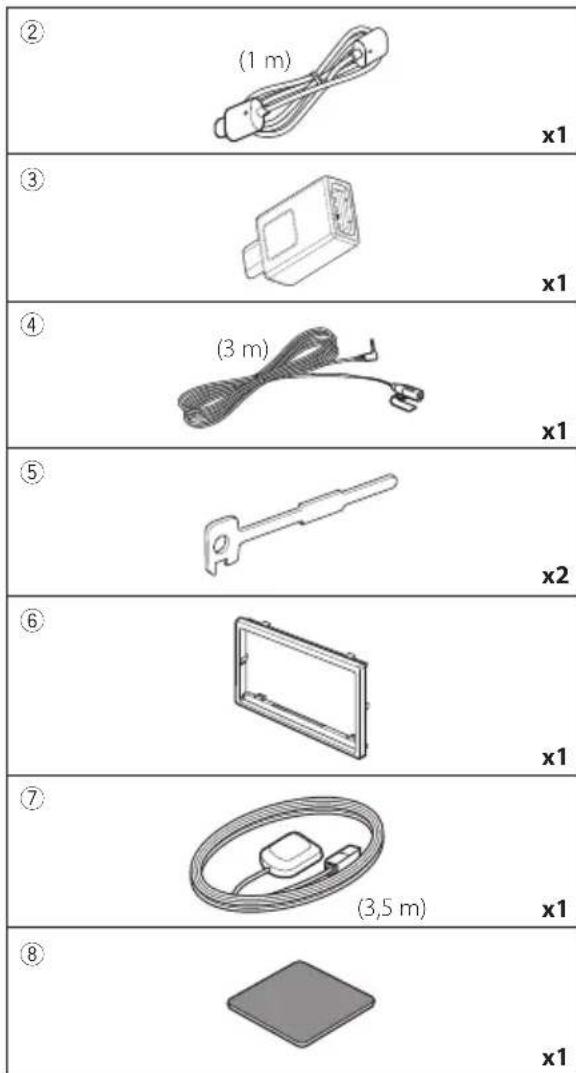
natural_image
Diagram showing a box being placed into a rectangular frame, with an arrow indicating the direction of movement (no text or symbols present)![KENWOOD DMX8021DABS - [Audio SETUP Recall] - 2](/content/2026/04/614917/images/316bc543fb1264b86f5a0da3b231eb812e19f4211ef5ba1ec3ac85aece0845d9.jpg)
Antenne GPS
REMARQUE
natural_image
Diagram showing light rays interacting with a rectangular object, with an arrow indicating direction (no text or symbols present)
natural_image
Technical line drawing of a mechanical assembly with no visible text or symbolsnatural_image
Illustration of hands using a tool to adjust or install a rectangular object (no text or symbols visible)REMARQUE
natural_image
Line drawing of a hand holding a rectangular electronic component (no text or symbols)![Smartphone Android[2] Câble USB de type A [2] Accessoire ② (1,0 m) Borne USB [1] Accessoire ③ Câble USB de type C [2]](/content/2026/04/614917/images/3e4693a3a75acec50787863fde31191d76a6a1b253e66e32d61ef11b14e95d26.jpg)
6-3/16 × 3-3/16 pouces
Système d'affichage
: Panneau LCD TN
Système de lecture
11ac (80 MHz): 8 dBm ± 2 dB
5 GHz/MIMO
: 11n (20 MHz)/11ac (20 MHz): 11 dBm ± 2 dB/
11n (40 MHz)/11ac (40 MHz): 11 dBm ± 2 dB/
11ac (80 MHz): 11 dBm ± 2 dB
■Section Bluetooth
Technologie
: Bluetooth Version 5.0
Fréquence
: 2,402 - 2,480 GHz
Puissance de sortie
LW:153-279 kHz (9 kHz)
MW:531-1611 kHz (9 kHz)
• Windows Media is a registered trademark or trademark of Microsoft Corporation in the United States and/or other countries.
This product is protected by certain intellectual property rights of Microsoft. Use or distribution of such technology outside of this product is prohibited without a license from Microsoft.
- This software is based in part on the work of the independent JPEG Group.
- Use of the Made for Apple badge means that an accessory has been designed to connect specifically to the Apple product(s) identified in the badge and has been certified by the developer to meet Apple performance standards. Apple is not responsible for the operation of this device or its compliance with safety and regulatory standards. Please note that the use of this accessory with an Apple product may affect wireless performance.
- Apple, iPhone, iPod, iPod touch, and Lightning are trademarks of Apple Inc., registered in the U.S. and other countries.
- Apple, Siri, Apple CarPlay, Apple Music and Apple CarPlay logo are trademarks of Apple Inc., registered in the U.S. and other countries.
- App Store is a service mark of Apple Inc., registered in the U.S. and other countries.
- IOS is a trademark or registered trademark of Cisco in the U.S. and other countries and is used under license.
• INRIX is a registered trademark of INRIX, Inc.
- Google, Android, Google Play and Android Auto are trademarks of Google LLC.
- To use Android Auto on your car display, you'll need an Android Auto compatible vehicle or aftermarket stereo, an Android phone running Android 6 or higher, and the Android Auto app.
- Wi-Fi is a registered trademark of Wi-Fi Alliance .
- The Wi-Fi CERTIFIED™ Logo is a certification mark of Wi-Fi Alliance®.
- Linux® is the registered trademark of Linus Torvalds in the U.S. and other countries.
- The terms HDMI, HDMI High-Definition Multimedia Interface, and the HDMI Logo are trademarks or registered trademarks of HDMI Licensing Administrator, Inc.
- This product includes FontAvenue® fonts licenced by NEC Corporation.FontAvenue is a registered trademark of NEC Corporation.

FontAvenue
- This product includes "Ubiquitous QuickBoot™" technology developed by Ubiquitous AI Corporation. Ubiquitous QuickBoot™ is a trademark of Ubiquitous AI Corporation. Copyright© 2021 Ubiquitous AI Corporation All rights reserved.

- THIS PRODUCT IS LICENSED UNDER THE AVC PATENT PORTFOLIO LICENSE FOR THE PERSONAL USE OF A CONSUMER OR OTHER USES IN WHICH IT DOES NOT RECEIVE REMUNERATION TO (j)ENCODE VIDEO IN COMPLIANCE WITH THE AVC STANDARD ("AVC VIDEO") AND/OR (jj)DECODE AVC VIDEO THAT WAS ENCODED BY A CONSUMER ENGAGED IN A PERSONAL ACTIVITY AND/OR WAS OBTAINED FROM A VIDEO PROVIDER LICENSED TO PROVIDE AVC VIDEO. NO LICENSE IS GRANTED OR SHALL BE IMPLIED FOR ANY OTHER USE. ADDITIONAL INFORMATION MAY BE OBTAINED FROM MPEG LA, L.L.C. SEE HTTP://WWW.MPEGLA.COM
- THIS PRODUCT IS LICENSED UNDER THE MPEG-4 VISUAL PATENT PORTFOLIO LICENSE FOR THE PERSONAL AND NON-COMMERCIAL USE OF A CONSUMER FOR (j) ENCODING VIDEO IN COMPLIANCE WITH THE MPEG-4 VISUAL STANDARD ("MPEG-4 VIDEO") AND/OR (jj) DECODING MPEG-4 VIDEO THAT WAS ENCODED BY A CONSUMER ENGAGED IN A PERSONAL AND NON-COMMERCIAL ACTIVITY AND/OR WAS OBTAINED FROM A VIDEO PROVIDER LICENSED BY MPEG LA TO PROVIDE MPEG-4 VIDEO. NO LICENSE IS GRANTED OR SHALL BE IMPLIED FOR ANY OTHER USE. ADDITIONAL INFORMATION INCLUDING THAT RELATING TO PROMOTIONAL, INTERNAL AND COMMERCIAL USES AND LICENSING MAY BE OBTAINED FROM MPEG LA, LLC. SEE HTTP://WWW.MPEGLA.COM.
- THIS PRODUCT IS LICENSED UNDER THE VC-1 PATENT PORTFOLIO LICENSE FOR THE PERSONAL AND NON-COMMERCIAL USE OF A CONSUMER TO (i) ENCODE VIDEO IN COMPLIANCE WITH THE VC-1 STANDARD ("VC-1 VIDEO") AND/OR (ii) DECODE VC-1 VIDEO THAT WAS ENCODED BY A CONSUMER ENGAGED IN A PERSONAL AND NON-COMMERCIAL ACTIVITY AND/OR WAS OBTAINED FROM A VIDEO PROVIDER LICENSED TO PROVIDE VC-1 VIDEO. NO LICENSE IS GRANTED OR SHALL BE IMPLIED FOR ANY OTHER USE. ADDITIONAL INFORMATION MAY BE OBTAINED FROM MPEG LA, L.L.C. SEE HTTP://WWW.MPEGLA.COM
- libFLAC
Copyright (C) 2000-2009 Josh Coalson Copyright (C) 2011-2013 Xiph.Org Foundation Redistribution and use in source and binary forms, with or without modification, are permitted provided that the following conditions are met:
- Redistributions of source code must retain the above copyright notice, this list of conditions and the following disclaimer. - Redistributions in binary form must reproduce the above copyright notice, this list of conditions and the following disclaimer in the documentation and/or other materials provided with the distribution.
– Neither the name of the Xiph.org Foundation nor the names of its contributors may be used to endorse or promote products derived from this software without specific prior written permission.
THIS SOFTWARE IS PROVIDED BY THE COPYRIGHT HOLDERS AND CONTRIBUTORS ``AS IS'' AND ANY EXPRESS OR IMPLIED WARRANTIES, INCLUDING, BUT NOT LIMITED TO, THE IMPLIED WARRANTIES OF MERCHANTABILITY AND FITNESS FOR A PARTICULAR PURPOSE ARE DISCLAIMED. IN NO EVENT SHALL THE FOUNDATION OR CONTRIBUTORS BE LIABLE FOR ANY DIRECT, INDIRECT, INCIDENTAL, SPECIAL, EXEMPLARY, OR CONSEQUENTIAL DAMAGES (INCLUDING, BUT NOT LIMITED TO, PROCUREMENT OF SUBSTITUTE GOODS OR SERVICES; LOSS OF USE, DATA, OR PROFITS; OR BUSINESS INTERRUPTION) HOWEVER CAUSED AND ON ANY THEORY OF LIABILITY, WHETHER IN CONTRACT, STRICT LIABILITY, OR TORT (INCLUDING NEGLIGENCE OR OTHERWISE) ARISING IN ANY WAY OUT OF THE USE OF THIS SOFTWARE, EVEN IF ADVISED OF THE POSSIBILITY OF SUCH DAMAGE.
- libvorbis
Copyright (c) 2002-2008 Xiph.org Foundation Redistribution and use in source and binary forms, with or without modification, are permitted provided that the following conditions are met:
– Redistributions of source code must retain the above copyright notice, this list of conditions and the following disclaimer.
- Redistributions in binary form must reproduce the above copyright notice, this list of conditions and the following disclaimer in the documentation and/or other materials provided with the distribution.
- Neither the name of the Xiph.org Foundation nor the names of its contributors may be used to endorse or promote products derived from this software without specific prior written permission.
THIS SOFTWARE IS PROVIDED BY THE COPYRIGHT HOLDERS AND CONTRIBUTORS ``AS IS'' AND ANY EXPRESS OR IMPLIED WARRANTIES, INCLUDING, BUT NOT LIMITED TO, THE IMPLIED WARRANTIES OF MERCHANTABILITY AND FITNESS FOR A PARTICULAR PURPOSE ARE DISCLAIMED. IN NO EVENT SHALL THE FOUNDATION OR CONTRIBUTORS BE LIABLE FOR ANY
DIRECT, INDIRECT, INCIDENTAL, SPECIAL, EXEMPLARY, OR CONSEQUENTIAL DAMAGES (INCLUDING, BUT NOT LIMITED TO, PROCUREMENT OF SUBSTITUTE GOODS OR SERVICES; LOSS OF USE, DATA, OR PROFITS; OR BUSINESS INTERRUPTION) HOWEVER CAUSED AND ON ANY THEORY OF LIABILITY, WHETHER IN CONTRACT, STRICT LIABILITY, OR TORT (INCLUDING NEGLIGENCE OR OTHERWISE) ARISING IN ANY WAY OUT OF THE USE OF THIS SOFTWARE, EVEN IF ADVISED OF THE POSSIBILITY OF SUCH DAMAGE.
- libogg
Copyright (c) 2002, Xiph.org Foundation Redistribution and use in source and binary forms, with or without modification, are permitted provided that the following conditions are met:
– Redistributions of source code must retain the above copyright notice, this list of conditions and the following disclaimer.
– Redistributions in binary form must reproduce the above copyright notice, this list of conditions and the following disclaimer in the documentation and/or other materials provided with the distribution.
- Neither the name of the Xiph.org Foundation nor the names of its contributors may be used to endorse or promote products derived from this software without specific prior written permission.
THIS SOFTWARE IS PROVIDED BY THE COPYRIGHT HOLDERS AND CONTRIBUTORS ``AS IS'' AND ANY EXPRESS OR IMPLIED WARRANTIES, INCLUDING, BUT NOT LIMITED TO, THE IMPLIED WARRANTIES OF MERCHANTABILITY AND FITNESS FOR A PARTICULAR PURPOSE ARE DISCLAIMED. IN NO EVENT SHALL THE FOUNDATION OR CONTRIBUTORS BE LIABLE FOR ANY DIRECT, INDIRECT, INCIDENTAL, SPECIAL, EXEMPLARY, OR CONSEQUENTIAL DAMAGES (INCLUDING, BUT NOT LIMITED TO, PROCUREMENT OF SUBSTITUTE GOODS OR SERVICES; LOSS OF USE, DATA, OR PROFITS; OR BUSINESS INTERRUPTION) HOWEVER CAUSED AND ON ANY THEORY OF LIABILITY, WHETHER IN CONTRACT, STRICT LIABILITY, OR TORT (INCLUDING NEGLIGENCE OR OTHERWISE) ARISING IN ANY WAY OUT OF THE USE OF THIS SOFTWARE, EVEN IF ADVISED OF THE POSSIBILITY OF SUCH DAMAGE.
Annexes
natural_image
Two identical diagrams of a trash bin with crossed arms and no text or symbolsCE
Hereby, JVCKENWOOD declares that the radio equipment DMX8021DABS is in compliance with Directive 2014/53/EU. The full text of the EU declaration of conformity is available at the following internet address:
Français
- Software License on This duct
- EULA
- Software License Agreement
- Article 1 (General)
- Article 2 (Right of Use)
- Article 3 (Terms of License)
- Article 4 (Rights to Licensed Software)
- Article 5 (Exemption Granted to Licensor)
- Article 6 (Responsibility for Third Parties)
- Article 7 (Secrecy Obligation)
- Article 8 (Cancellation of the Agreement)
- Article 9 (Destruction of Licensed Software)
- Article 10 (Copyright Protection)
- Article 11 (Export Control)
- Article 12 (Miscellaneous)
- Table des matières
- [Language]
- REMARQUE
- ●Toucher longuement
- Feuilleter
- [Photo Frame Scroll]
- Apple CarPlay is connected
- ■[Announcement Select]
- [Select All]
- ■[Add number from phonebook]
- [√ All]
- [Bluetooth HF/Audio]
- [Camera Assignment Settings]
- [Rear Camera Interruption]
- ■ [Rear Camera for Car interface]
- [Parking Guidelines]
- [Front Camera Interruption] 4
- [Wallpaper Customize]
- [User]
- [Android Auto Auto Launch]
- ■[Reset Android Auto Wireless Connection]
- [Speaker]
- [HPF FREQ]
- ■ [FREQ] (passe Haut)
- Décalage du volume
- [Initialise]
- [Bass Boost]
- Touchez [Position/DTA].
- Contrôle de l'audio
- Position d'écoute
- ■[Sound Image LR (Front)]
- ■[Sound Image LR (Rear)]
- [Audio SETUP Memory]
- [Audio SETUP Recall]
- Antenne GPS
- Système d'affichage
- Système de lecture
- GHz/MIMO
- ■Section Bluetooth
- Technologie
- Fréquence
- Puissance de sortie
- FontAvenue
- Annexes
- CE
- Français
Brand : KENWOOD
Model : DMX8021DABS
Category : GPS Navigation System