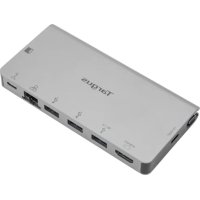
DOCK419 - Other computer accessories TARGUS - Free user manual and instructions
Find the device manual for free DOCK419 TARGUS in PDF.


| Product Type | USB-C Docking Station |
| Brand | Targus |
| Model | DOCK419 |
| Connectivity | USB-C (Thunderbolt 3 compatible) |
| Power Supply | USB-C Power Delivery up to 100 W (power adapter not included) |
| HDMI Resolution | Up to 4K @ 30 Hz |
| VGA Resolution | Up to 1920 x 1200 @ 60 Hz |
| USB-A Ports | 2 USB 3.2 Gen 1 ports (1 with BC1.2 charging at 1.5 A) |
| Downstream USB-C Port | 1 USB 3.2 Gen 1 port with pass-through power delivery |
| Ethernet Port | Gigabit Ethernet (10/100/1000 Mbps) |
| Compatible Operating Systems | Windows 10, macOS 10.14+, Chrome OS |
| Approximate Dimensions | 130 x 80 x 30 mm |
| Approximate Weight | 150 g |
| Warranty | 2 years (limited) |
| Maintenance | Clean with a soft, dry cloth |
| Security | Overcurrent protection on each USB-C port |
| Package Contents | Docking station, user guide |
| Special Features | Simultaneous HDMI and VGA support (same image, up to 1080p) |
Frequently Asked Questions - DOCK419 TARGUS
User questions about DOCK419 TARGUS
0 question about this device. Answer the ones you know or ask your own.
Ask a new question about this device
Download the instructions for your Other computer accessories in PDF format for free! Find your manual DOCK419 - TARGUS and take your electronic device back in hand. On this page are published all the documents necessary for the use of your device. DOCK419 by TARGUS.
USER MANUAL DOCK419 TARGUS
2 Year Limited Warranty: We pride ourselves on the quality of our products. For complete warranty details and a list of our worldwide offices, please visit www.targus.com. Targus product warranty does not cover any device or product that is not manufactured by Targus (including, but not limited to, laptops, smartphones, devices, or any other product that may be used in connection with the Targus product). Australian customers: For complete warranty details see warranty statement enclosed.
Targus is a registered trademark of Targus International LLC in the U.S. and in certain other countries. Microsoft, Windows, and Windows Vista are registered trademarks or trademarks of Microsoft Corporation in the United States and/or other countries. Mac is a trademark of Apple Inc., registered in the U.S. and other countries. All logos and registered trademarks are the property of their respective owners. ©2019 Targus, 1211 North Miller Street, Anaheim, CA 92806. All rights reserved.
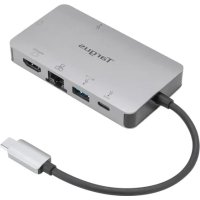
USB-C Single Video 4K HDMI/VGA Docking Station with 100W Power Delivery
Product name: Portable USB-C Dock with HDMI/VGA/GbE PD Pass-thru
Model no.: DOCK419
Sku no.: DOCK419USZ
Targus USB-C Single Video 4K HDMI/VGA Docking Station
with 100W Power Delivery
Introduction
Thank you for your purchase of the Targus USB-C Single Video 4K HDMI/VGA Docking Station with 100W Power Delivery.
Contents
• Targus USB-C Single Video 4K HDMI/VGA Docking Station with 100W Power Delivery
- User Guide
System Requirements
Hardware
• USB-C host (Thunderbolt 3 host compatible)
Operating System
- Microsoft Windows 10
• Mac OS 10.14+ - Chrome OS
Connecting the Dock to Your Computer
This portable dock is a plug and play device. It will automatically operate when the USB-C connector is attached to a computer/laptop equipped with a USB-C port.
Targus USB-C Single Video 4K HDMI/VGA Docking Station
with 100W Power Delivery
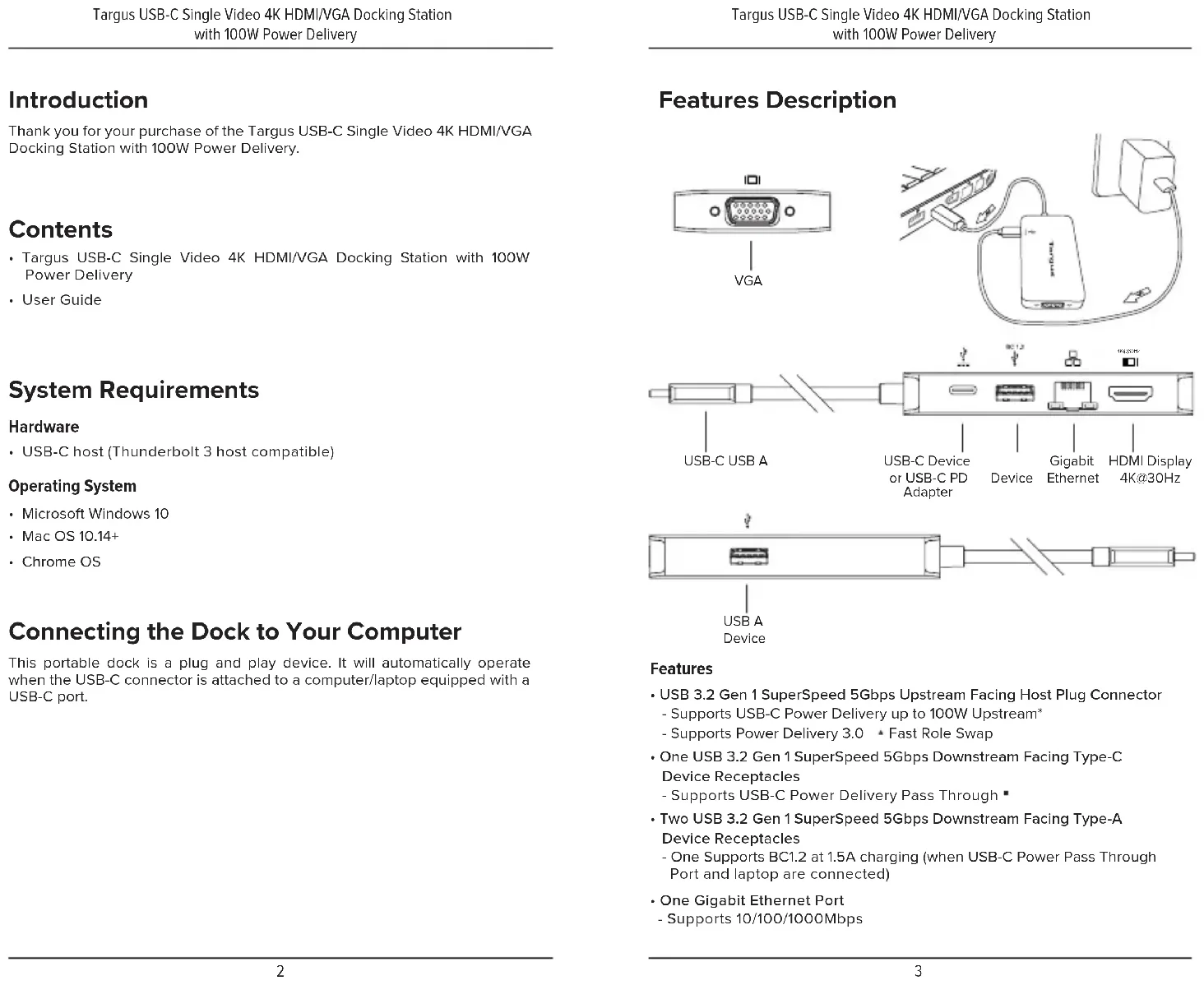
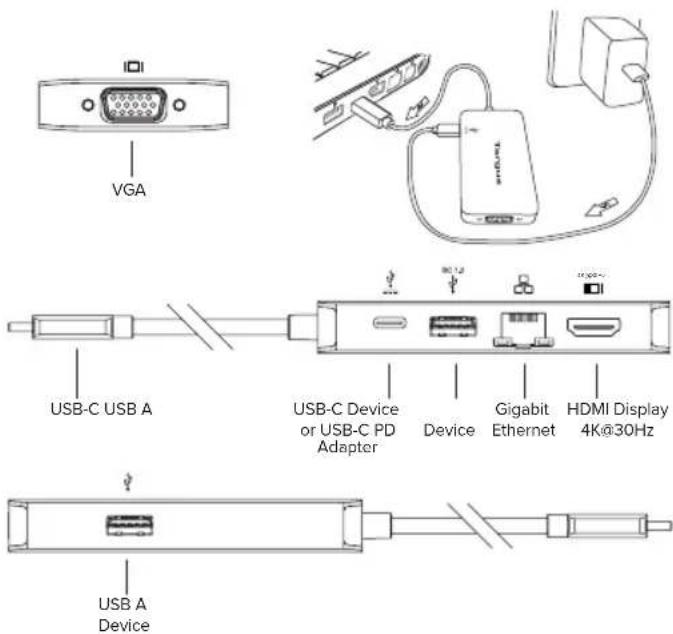
Features Description
text_image
VGA USB-C USB A USB-C Device or USB-C PD Adapter Device Gigabit Ethernet HDMI Display 4K@30Hz USB A DeviceFeatures
- USB 3.2 Gen 1 SuperSpeed 5Gbps Upstream Facing Host Plug Connector - Supports USB-C Power Delivery up to 100W Upstream*
- Supports Power Delivery 3.0 * Fast Role Swap
• One USB 3.2 Gen 1 SuperSpeed 5Gbps Downstream Facing Type-C Device Receptacles - Supports USB-C Power Delivery Pass Through
- Two USB 3.2 Gen 1 SuperSpeed 5Gbps Downstream Facing Type-A Device Receptacles
- One Supports BC1.2 at 1.5A charging (when USB-C Power Pass Through Port and laptop are connected)
• One Gigabit Ethernet Port - Supports 10/100/1000Mbps
Targus USB-C Single Video 4K HDMI/VGA Docking Station with 100W Power Delivery
- One HDMI Port
- Supports HDMI resolution up to 4K@30Hz
- Supports USB-C DP Alt. Mode†
- One VGA Port
- Supports VGA Resolution up to 1920x1200@60Hz
- Supports USB-C DP Alt. Mode ^†
*USB-C PD power adapter is not included
* Requires compatible PD3.0 laptops
* Certain HP USB-C Laptops with 12V PD charging profile may not be supported.
^ Requires compatible USB-C DP Alt Mode laptop
Note: Supports HDMI and VGA to Display Same Image Simultaneously with Resolution up to 1080P.
Troubleshooting
Device Not Working
- Make sure that the device is fully inserted into the correct port on the portable dock.
- Plug the device into a different port on the USB dock. If it still doesn't work, test the device by connecting it directly to your computer.
- Make sure that the device appears in Device Manager.
- Disconnect all devices from the dock and reconnect them, one at a time. Check that each device works before plugging in the next one.
• Each laptop USB Type-C port is equipped with over-current protection. When a USB device draws more current than the USB Type-C port can supply, the port will shut down.
To re-enable the port, unplug the device and go to Device Manager or to the message in the system tray and choose the Reset option. You can then plug the device back into the USB port. If a shut down reoccurs, check the power requirements of the device.
Verifying Devices are Installed
You can view the devices installed on the portable dock from the Device Manager window in System Properties.
Right-click My Computer, Properties, then click the Hardware tab, and then the Device Manager button.
Targus USB-C Single Video 4K HDMI/VGA Docking Station with 100W Power Delivery
Technical Support
For technical questions, please visit:
US Internet: http://targus.com/us/support
Canada Internet: http://www.targus.com/ca/support
Australia Internet: http://www.targus.com/au/support
Email: infoaust@targus.com, Telephone: 1800-641-645
New Zealand Telephone: 0800-633-222
Latin America Email: soporte@targus.com
Product Registration
Targus recommends that you register your Targus accessory shortly after purchasing it. Go to: http://targus.com/us/product_registration
You will need to provide your full name, email address, country of residence and product information.
Regulatory Compliance
This device complies with Part 15 of the FCC Rules. Operation is subject to the following two conditions: (1) This device may not cause harmful interference, and (2) This device must accept any interference received, including interference that may cause undesired operation.
Two Year Warranty
We pride ourselves on the quality of our products. For complete warranty details and a list of our worldwide offices, please visit www.targus.com. Targus product warranty does not cover any device or product that is not manufactured by Targus (including, but not limited to, laptops, smartphones, devices, or any other product that may be used in connection with the Targus product). Australian customers: For complete warranty details see warranty statement enclosed.
Targus is a registered trademark of Targus International LLC in the U.S. and in certain other countries. Microsoft, Windows, and Windows Vista are registered trademarks or trademarks of Microsoft Corporation in the United States and/or other countries. Mac is a trademark of Apple Inc., registered in the U.S. and other countries. All logos and registered trademarks are the property of their respective owners. ©2019 Targus, 1211 North Miller Street, Anaheim, CA 92806. All rights reserved.
Targus USB-C Single Video 4K HDMI/VGA Docking Station
with 100W Power Deliveryry
FCC Statement Tested to Comply
This device complies with Part 15 of the FCC Rules. Operation is subject to the following two conditions: This device may not cause harmful interference, and
This device must accept any interference received, including interference that may cause undesired operation.
Warning: Changes or modifications not expressly approved by the party responsible for compliance could void the user's authority to operate the equipment.
NOTE: This equipment has been tested and found to comply with the limits for a Class B digital device, pursuant to Part 15 of the FCC Rules. These limits are designed to provide reasonable protection against harmful interference in a residential installation.
This equipment generates, uses, and can radiate radio frequency energy and, if not installed and used in accordance with the instructions, may cause harmful interference to radio communications. However, there is no guarantee that interference will not occur in a particular installation. If this equipment does cause harmful interference to radio or television reception, which can be determined by turning the equipment off and on, the user is encouraged to try to correct the interference by one or more of the following measures:
- Reorient or relocate the receiving antenna.
- Increase the separation between the equipment and receiver.
- Connect the equipment into an outlet on a circuit different from that to which the receiver is connected.
- Consult the dealer or an experienced radio/TV technician for help.
Targus USB-C Single Video 4K HDMI/VGA Docking Station
with 100W Power Delivery
Australian and New Zealand consumers only
Thank you for your purchase. Targus warrants to the original purchaser that its products are free from defects in materials and workmanship, during the specified warranty period, and lasts as long as the original purchaser owns the product. The warranty period is stated on the packaging or in the documentation provided with this Targus product. Targus' Limited Product Warranty excludes damage caused by accident, neglect, abuse, misuse, improper care, normal wear and tear, ownership transfer, or alteration. The limited warranty also excludes any product that is not manufactured by Targus (including, without limitation, laptops, smartphones, devices, tablets, or any other non-Targus item) that is used in connection with the Targus product.
In the event that the Targus product has a defect in materials or workmanship Targus will, after receiving a warranty claim and inspecting the product, at its discretion, do one of the following: repair, replace, or refund with the same or a similar product (or part) of no lesser quality and ship it to the original purchaser at Targus' expense. As part of this inspection, proof of purchase will be required. There is no charge for inspection. To make a warranty claim, please contact Targus Australia or New Zealand (see details below), or return the product to the place of purchase. The original purchaser must bear the cost of the delivery to Targus.
Under Australian and/or New Zealand Consumer Laws, in addition to any warranty Targus gives, our products come with guarantees that cannot be excluded. You are entitled to a replacement or refund for a major failure and compensation for any other reasonably foreseeable loss or damage. You are entitled to have the products repaired or replaced if they fail to be of acceptable quality and the failure does not amount to a major failure.
For any warranty question, contact Targus Australia Pty. Ltd. (i) by mail at Suite 2, Level 8, 5 Rider Boulevard, Rhodes NSW 2138, by phone AUS 1800 641 645 or NZ 0800 633 222 or by Email: infoaust@targus.com. For additional information, check out our website at targus.com/au/warranty.
Declaration of Conformity
Hereby, Targus declares that this device is in compliance with the essential requirements and other relevant provisions of Directive 2011/65/EU.
Targus USB-C Single Video 4K HDMI/VGA Docking Station
with 100W Power Delivery
Supplier's Declaration of Conformity
Per FCC Part 2 Section 2.1077(a)

Manufacturer/
Responsible Party
Address
Targus International LLC
1211 North Miller Street,
Anaheim, CA 92806 USA
Tel 1-714-765-5555
Fax: 1-714-765-5599
Internet: www.targus.com
Hereby declares that the Product
Trade name: Targus
Product name: Portable USB-C Dock with HDMI/VGA/GbE PD Pass-thru
Model number: DOCK419
Conforms to the following specifications
FCC CFR Title 47 Part 15 Subpart B and ANSI C63.4-2014 standard limits
The test data & results are referred to the test report Number:(WTX19X10070654E)
Supplementary Information:
This device complies with part 15 of the FCC Rules. Operation is subject to the following two conditions: (1) This device may not cause harmful interference, and (2) this device must accept any interference received, including interference that may cause undesired operation.
Director, Targus International LLC
Function Title
CF Ngoh
Name
24/Oct/2019
Date

Signed for and on behalf of Targus