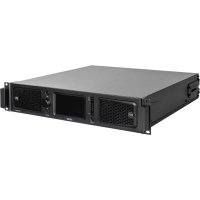
XPS 16K - Receiver RCF - Free user manual and instructions
Find the device manual for free XPS 16K RCF in PDF.



| Product type | Active subwoofer |
| Brand | RCF |
| Model | XPS 16K |
| Power supply | Mains via PowerCON TRUE1 TOP connector, 100-240 V~ 50/60 Hz |
| Max power consumption | 1600 W (100-120 V) / 3300 W (200-240 V) |
| Audio inputs | 2 x Combo XLR-Jack (balanced/unbalanced) |
| Audio outputs | 2 x XLR male Link, 1 x XLR male Xover |
| Built-in DSP processor | Yes – stereo crossover, 8-band equalizer, matrix, delays, presets |
| Remote control | Bluetooth LE via LiveRemote app (iOS/Android) |
| Touchscreen | 2.4-inch capacitive |
| Enclosure | Wood with scratch-resistant polyurethane coating |
| Protections | Electronic: overload, short-circuit, thermal |
| Insulation class | Class I – mandatory grounding |
| Maintenance and cleaning | Dry cloth, do not use solvents or abrasive products |
| Repairability | Entrust exclusively to an RCF authorized service center |
Frequently Asked Questions - XPS 16K RCF
User questions about XPS 16K RCF
0 question about this device. Answer the ones you know or ask your own.
Ask a new question about this device
Download the instructions for your Receiver in PDF format for free! Find your manual XPS 16K - RCF and take your electronic device back in hand. On this page are published all the documents necessary for the use of your device. XPS 16K by RCF.
USER MANUAL XPS 16K RCF
SUB 18-AX DIMENSION ....44
SPECIFICATION 45
1. SAFETY PRECAUTIONS AND GENERAL INFORMATION
The symbols used in this document give notice of important operating instructions and warnings which must be strictly followed.
 | CAUTION | Important operating instructions: explains hazards that could damage a product, including data loss |
 | WARNING | Important advice concerning the use of dangerous voltages and the potential risk of electric shock, personal injury or death. |
 | IMPORTANT NOTES | Helpful and relevant information about the topic |
 | SUPPORTS, TROLLEYS AND CARTS | Information about the use of supports, trolleys and carts. Reminds to move with extreme caution and never tilt. |
 | WASTE DISPOSAL | This symbol indicates that this product should not be disposed with your household waste, according to the WEEE directive (2012/19/EU) and your national law. |

IMPORTANT NOTES
This manual contains important information about the correct and safe use of the device. Before connecting and using this product, please read this instruction manual carefully and keep it on hand for future reference. The manual is to be considered an integral part of this product and must accompany it when it changes ownership as a reference for correct installation and use as well as for the safety precautions. RCF S.p.A. will not assume any responsibility for the incorrect installation and / or use of this product.
SAFETY PRECAUTIONS
- All the precautions, in particular the safety ones, must be read with special attention, as they provide important information.
2. Power supply from mains
a. The mains voltage is sufficiently high to involve a risk of electrocution; install and connect this product before plugging it in.
b. Before powering up, make sure that all the connections have been made correctly and the voltage of your mains corresponds to the voltage shown on the rating plate on the unit, if not, please contact your RCF dealer.
c. The metallic parts of the unit are earthed through the power cable. An apparatus with CLASS I construction shall be connected to a mains socket outlet with a protective earthing connection.
d. Protect the power cable from damage; make sure it is positioned in a way that it cannot be stepped on or crushed by objects.
e. To prevent the risk of electric shock, never open this product: there are no parts inside that the user needs to access.
f. Be careful: in the case of a product supplied by manufacturer only with POWERCON connectors and without a power cord, jointly to POWERCON connectors type NAC3FCA (power-in) and NAC3FCB (power-out), the following power cords compliant to national standard shall be used:
- EU: cord type H05VV-F 3G 3x2.5 mm2 - Standard IEC 60227-1
- JP: cord type VCTF 3x2 mm2; 15Amp/120V\~ - Standard JIS C3306
-
US: cord type SJT/SJTO 3x14 AWG; 15Amp/125V\~ - Standard ANSI/UL 62
-
Make sure that no objects or liquids can get into this product, as this may cause a short circuit. This apparatus shall not be exposed to dripping or splashing. No objects filled with liquid, such as vases, shall be placed on this apparatus. No naked sources (such as lighted candles) should be placed on this apparatus.
-
Never attempt to carry out any operations, modifications or repairs that are not expressly described in this manual.
Contact your authorized service centre or qualified personnel should any of the following occur: -
The product does not function (or functions in an anomalous way).
-
The power cable has been damaged.
-
Objects or liquids have got in the unit.
-
The product has been subject to a heavy impact.
-
If this product is not used for a long period, disconnect the power cable.
- If this product begins emitting any strange odours or smoke, switch it off immediately and disconnect the power cable.
- Do not connect this product to any equipment or accessories not foreseen.
For suspended installation, only use the dedicated anchoring points and do not try to hang this product by using elements that are unsuitable or not specific for this purpose. Also check the suitability of the support surface to which the product is anchored (wall, ceiling, structure, etc.), and the components used for attachment (screw anchors, screws, brackets not supplied by RCF etc.), which must guarantee the security of the system / installation over time, also considering, for example, the mechanical vibrations normally generated by transducers.
To prevent the risk of falling equipment, do not stack multiple units of this product unless this possibility is specified in the user manual.
- RCF S.p.A. strongly recommends this product is only installed by professional qualified installers (or specialised firms) who can ensure correct installation and certify it according to the regulations in force.
The entire audio system must comply with the current standards and regulations regarding electrical systems.
- Supports, trolleys and carts.

The equipment should be only used on supports, trolleys and carts, where necessary, that are recommended by the manufacturer. The equipment / support / trolley / cart assembly must be moved with extreme caution. Sudden stops, excessive pushing force and uneven floors may cause the assembly to overturn. Never tilt the assembly.
-
There are numerous mechanical and electrical factors to be considered when installing a professional audio system (in addition to those which are strictly acoustic, such as sound pressure, angles of coverage, frequency response, etc.).
-
Hearing loss.
Exposure to high sound levels can cause permanent hearing loss. The acoustic pressure level that leads to hearing loss is different from person to person and depends on the duration of exposure. To prevent potentially dangerous exposure to high levels of acoustic pressure, anyone who is exposed to these levels should use adequate protection devices. When a transducer capable of producing high sound levels is being used, it is therefore necessary to wear ear plugs or protective earphones. See the manual technical specifications to know the maximum sound pressure level.
OPERATING PRECAUTIONS
- Place this product far from any heat sources and always ensure an adequate air circulation around it.
- Do not overload this product for a long time.
- Never force the control elements (keys, knobs,etc.).
- Do not use solvents, alcohol, benzene or other volatile substances for cleaning the external parts of this product.

IMPORTANT NOTES
To prevent the occurrence of noise on line signal cables, use screened cables only and avoid putting them close to:
- Equipment that produces high-intensity electromagnetic fields
- Power cables
- Loudspeaker lines
1. SAFETY PRECAUTIONS AND GENERAL INFORMATION


WARNING! CAUTION! To prevent the risk of fire or electric
shock, never expose this product to rain or humidity.

WARNING! To prevent electric shock hazard, do not connect to
mains power supply while grille is removed

WARNING! to reduce the risk of electric shock, do not disassemble
this product unless you are qualified. Refer servicing to qualified service personnel.
CORRECT DISPOSAL OF THIS PRODUCT

This product should be handed over to an authorized collection site for recycling waste electrical and electronic equipment (EEE). Improper handling of this type of waste could have a possible negative impact on the environment and human health due to tially hazardous substances
that are generally associated with EEE. At the same time, your cooperation in the correct disposal of thisproduct will contribute to the effective usage of natural resources. For more information about where you can drop off your waste equipment for recycling, please contact your local city office, waste authority or your household waste disposal service.
CARE AND MAINTENANCE
To ensure a long-life service, this product should be used following these advices:
- If the product is intended to be set up outdoors, be sure it is under cover and protected to rain and moisture.
- If the product needs to be used in a cold environment, slowly warm up the voice coils by sending a low-level signal for about 15 minutes before sending high-power signals.
- Always use a dry cloth to clean the exterior surfaces of the speaker and always do it when the power is turned off.

CAUTION: to avoid damaging the exterior finishes do not use
cleaning solvents or abrasives.


WARNING! CAUTION! For powered speakers, do cleaning
only when the power is turned off.
RCF S.p.A. reserves the right to make changes without prior notice to rectify any errors and / or omissions.
Always refer to the latest version of the manual on www.rcf.it.
2. DESCRIPTION
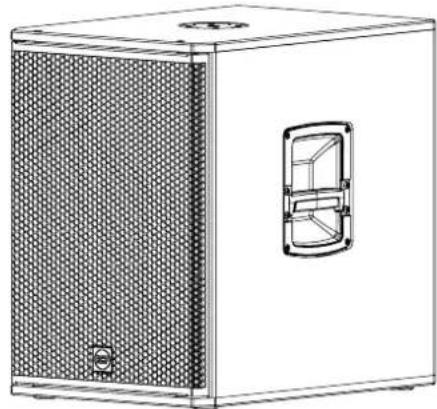
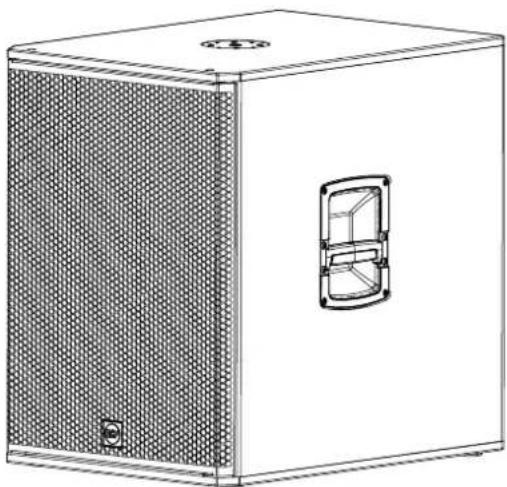
SUB 15-AX, SUB 18-AX
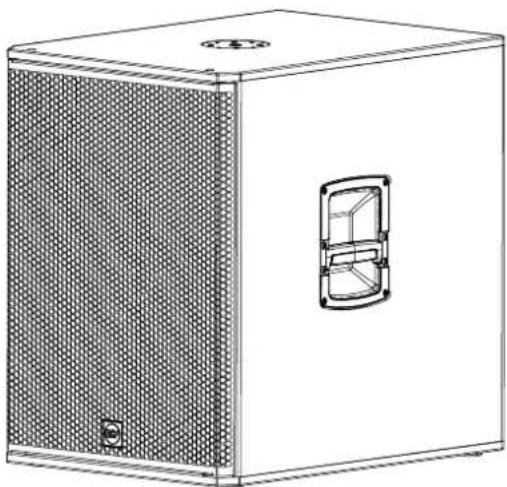
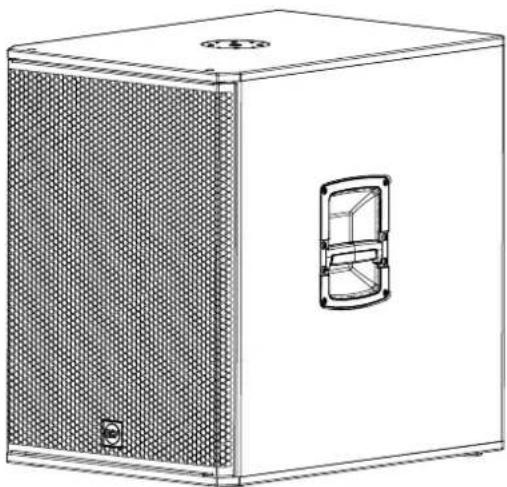
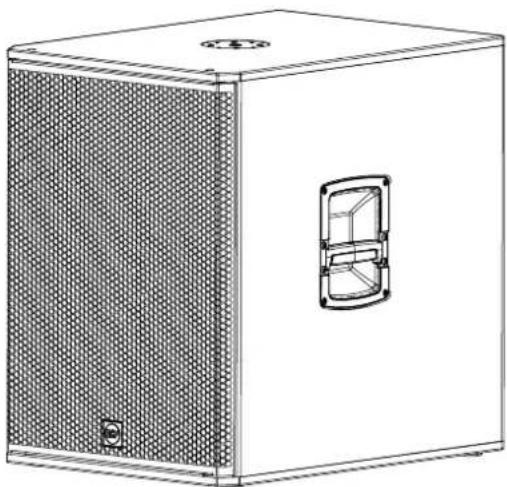
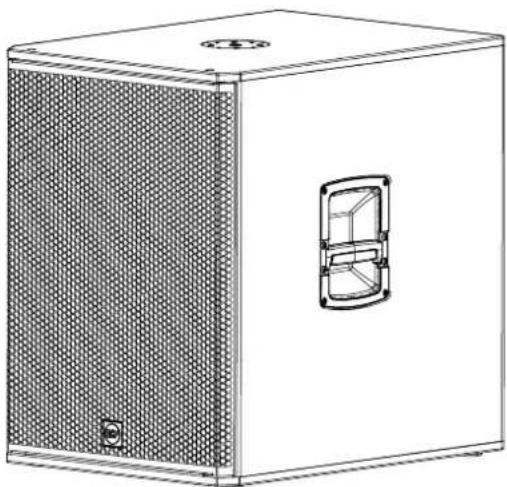
The SUBs 15-AX and 18-AX are portable 15" and 18" high-power active subwoofers for live sound applications with plenty of processing power, a color touch panel, and remote control via Bluetooth®. The combination of state-of-the-art transducers with a powerful Class-D amplifier delivers sound pressure levels respectively up to 133 dB and 135 dB with exceptional headroom, perfect for mid-sized venues and portable applications. Designed as the ideal complement for 10", 12" or 15" woofer-size loudspeakers.
SUB 15-AX and SUB 18-AX centralize speaker management inside the subwoofer, providing stereo crossovers, 8-band EQs, routing, delays, and recallable crossover presets. The rugged all-wood cabinet with scratch-resistant polyurea coating makes them durable, easy to carry and install securely, also in cardioid configurations.
natural_image
Line drawing of a white rectangular electronic device with a mesh panel and a side vent (no text or symbols)SUB 15-AX
2200 Watt Frequency Response: 35 Hz ÷ 120 Hz 15" Woofer, 3.0" v.c 31,4 Kg / 69,22 lbs
natural_image
Line drawing of a white rectangular box with a mesh panel on the left side and a small inset door on the right (no text or symbols)SUB 18-AX
2200 Watt Frequency Response: 35 Hz ÷ 120 Hz 18" Woofer, 4.0" v.c 43,8 Kg / 96,56 lbs
3. REAR PANEL FEATURES AND CONTROLS
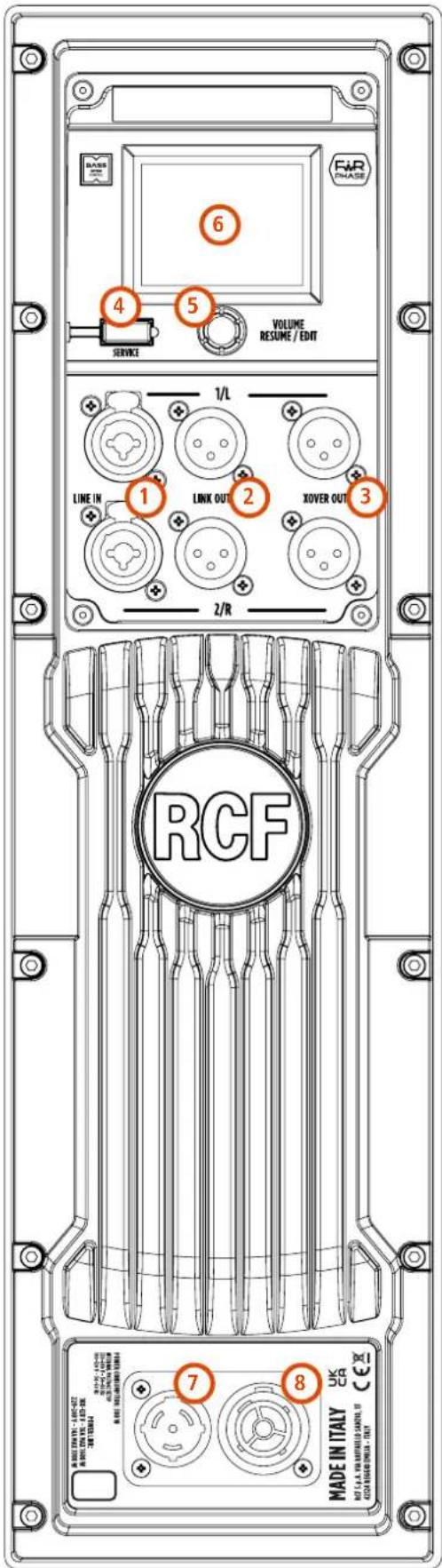
1 LINE IN COMBO XLR-JACK INPUTS (BAL/UNBAL) Two COMBO connectors. Balanced XLR or TRS JACK at line level. More details are available on SUB 15/18-AX Reference Guide.
2 LINK OUT MALE XLR SIGNAL OUTPUT Balanced XLR male outputs. Direct physical connection with inputs 1 and 2. This outputs allow the connection of additional speakers by feeding them with the same signal present on inputs 1 and 2.
3 XOVER MALE XLR SIGNAL OUTPUT Balanced XLR male output. These outputs allow feeding a pair of RCF satellite speakers by selecting the presets from the available preset list, via the touch screen and encoder or via the RCF LiveRemote App.
4 SERVICE Micro-USB port used exclusively for firmware updates.
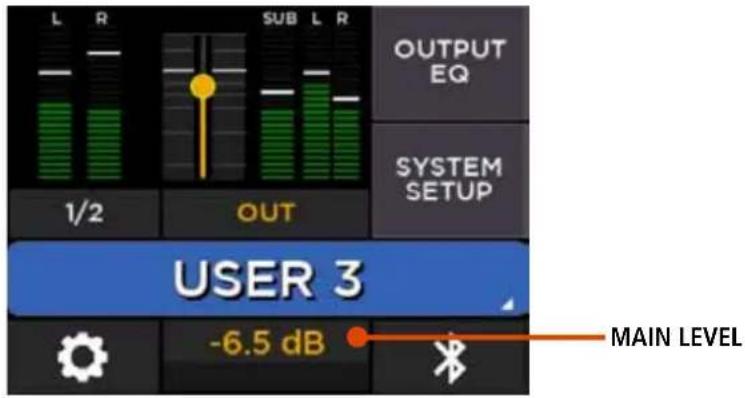
5 VOLUME - RESUME / EDIT ENCODER When the touch screen is in standby status or displays the Home page, the encoder controls the speaker volume. When in standby, pressing the encoder reactivates the touch-screen, showing the Home page. At this point, the encoder is assigned to the general volume and you have the option of varying other parameters and selecting them via the touch display.
6 DISPLAY The 2.4" display with capacitive touch, combined with the encoder, allows you to access and control all speaker functions. A parameter is selected by touching it on the touch screen and modified by rotating the encoder. More information is available on SUB 15/18-AX Reference Guide downloadable on the product page on the RCF website.
7 POWERCON INPUT SOCKET PowerCON TRUE1 TOP IP-Rated mains connection.
8 POWERCON OUTPUT SOCKET It sends the AC power to another speaker.
Power link: 100-120V\~ max 1600W | 200-240V\~MAX 3300W.


WARNING! CAUTION! Loudspeaker connections should be made by qualified and experienced personnel having the technical low or enough specific instructions (to ensure that connections are correctly) in order to prevent any electrical danger.
To prevent any risk of electric shock, do not connect loudspeakers when the amplifier is switched on.
Before turning the system on, check all connections and make sure there are no accidental short circuits.
The entire sound system shall be designed and installed in compliance with the current local laws and regulations regarding electrical systems.
text_image
BASE 6 4 5 VOLUME RESUME / EDIT SERVICE 1/L LINE IN 1 LINK OUT 2 XOVER OUT 3 2/R RCF 7 8 MADE IN ITALY UK RCA 1.0.1.0000000000000000000000000000000000000000000000000000000000000000000000000000000000000000000000000SUB 15/18-AX Home Screen on display
text_image
L R SUB L R OUTPUT EQ 1/2 OUT SYSTEM SETUP USER 3 -6.5 dB MAIN LEVELThe MAIN level is controlled by the rotary encoder, and its level is shown in dB in the low/center section of the screen. To set the MAIN level simply rotate the encoder. Please notice that there is no input level control.
For a detailed description of all editable parameters, refer to the Reference Guide available on the product page on www.rcf.it website.
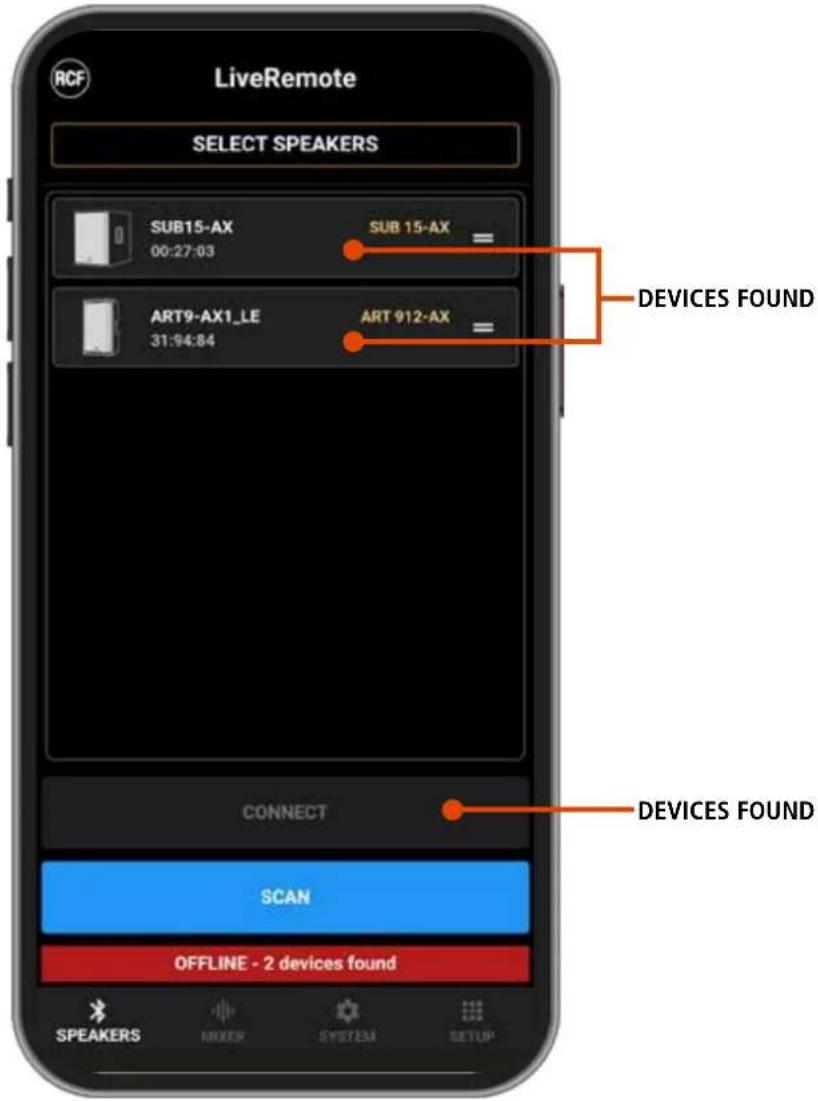
All functions of the SUB 15/18-AX can be remotely controlled via Bluetooth LE with LiveRemote, the companion app for iOS and Android. This app discovers several RCF products with a compatible Bluetooth interface. Connection to the desired SUB 15/18-AX product is done directly from the app within the SPEAKERS tab. You can perform a SCAN which lists all devices within range; this action usually requires a maximum of 10 seconds.
text_image
LiveRemote SELECT SPEAKERS SUB15-AX 00:27:03 SUB 15-AX ART9-AX1_LE 31:94:84 ART 912-AX CONNECT SCAN OFFLINE - 2 devices found SPEAKERS MIXER SYSTEM1 SETUP DEVICES FOUND DEVICES FOUNDYou can select the desired speakers without waiting for the SCAN to complete; after selection, you can press CONNECT and complete the connection process.
4. DISPLAY
text_image
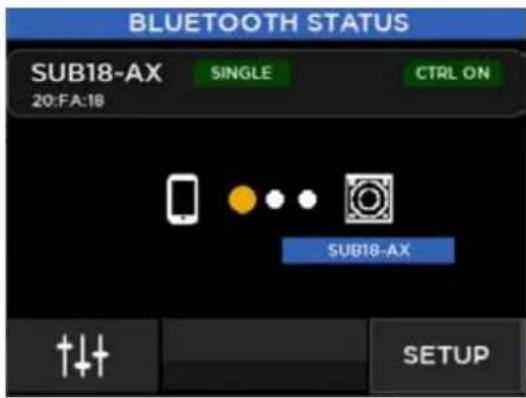
BLUETOOTH STATUS SUB18-AX 20:FA:18 SINGLE CTRL ON SUB18-AX T↓↑ SETUPOn the SUB 15/18-AX touch screen, pressing the lower right button shows the Bluetooth Status page, which presents the connection state and the current speaker name. No action is required on this page to complete the connection process.
5. CONNECTIONS
The connectors must be wired according to the standards specified by the AES (Audio Engineering Society).
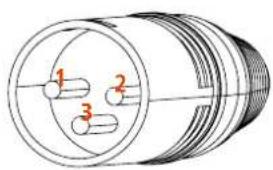
MALE XLR CONNECTOR
Balanced wiring
text_image
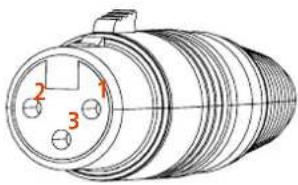
1 2 3FEMALE XLR CONNECTOR
Balanced wiring
text_image
Technical diagram of a cylindrical mechanical component with numbered parts labeled 1, 2, and 3.PIN 1 = GROUND (SHIELD)
PIN 2 = HOT (+)
PIN 3 = COLD (-)
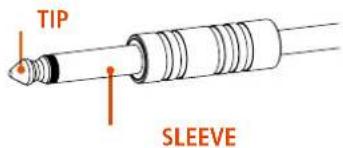
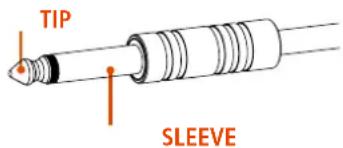
TRS CONNECTOR
Unbalanced mono wiring
text_image
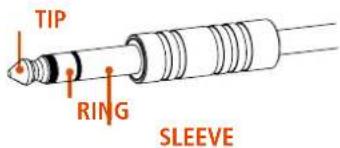
TIP SLEEVETRS CONNECTOR
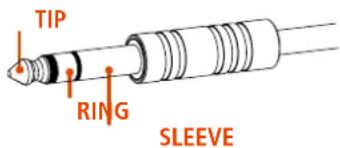
Balanced mono wiring
text_image
TIP RING SLEEVESLEEVE = GROUND (SHIELD)
TIP = HOT (+)
RING = COLD (-)
On the rear panel you will find all the controls, signal and power inputs. At first verify the voltage label applied to the rear panel (115 Volt or 230 Volt). The label indicates the right voltage. If you read a wrong voltage on the label or if you can't find the label at all, please call your vendor or authorized RCF SERVICE CENTRE before connecting the speaker. This fast check will avoid any damage.
In case of need of changing the voltage please call your vendor or authorized RCF SERVICE CENTRE. This operation requires the replacement of the fuse value and is reserved to an RCF SERVICE CENTRE.
You can now connect the power supply cable and the signal cable. Before turning on the speaker make sure the volume control is at the minimum level (even on the mixer output). It is important that the mixer is already ON before turning on the speaker. This will avoid damages to the speaker and noisy "bumps" due to turning on parts on the audio chain. It is a good practice to always turn on the speakers at last and turning them off immediately after their use. You can now turn ON the speaker and adjust the volume control to a proper level.
PROTECTIONS
RCF Sub Series active speakers are equipped with a complete system of protection circuits. The circuit is acting very gently on audio signal, controlling level and maintaining distortion at acceptable level.
VOLTAGE SETUP (RESERVED TO THE RCF SERVICE CENTRE)
200-240 Volt, 50 Hz (FUSE VALUE T6.3 A L 250V)
100-120 Volt, 60 Hz (FUSE VALUE T6.3 A L 250V)
6. TROUBLESHOOTING
Make sure the speaker is switched on and connected to an active AC power
THE SPEAKER IS CONNECTED TO AN ACTIVE AC POWER BUT DOESN'T TURN ON
Make sure the power cable is intact and connected correctly.
Check if the signal source is sending correctly and if the signal cables are not damaged.
THE SOUND IS DISTORTED AND THE OVERLOAD LED BLINKS FREQUENTLY
Turn down the output level of the mixer.
THE SOUND IS VERY LOW AND HISSING
The source gain or the output level of the mixer might be too low.
THE SOUND IS HISSING EVEN AT PROPER GAIN AND VOLUME
The source might send a low quality or noisy signal
HUMMING OR BUZZING NOISE
Check out the AC grounding and all the equipments connected to the mixer input including cables and connectors.

WARNING! to reduce the risk of electric shock, do not disassemble this product unless you are qualified. Refer servicing lified service personnel.
1. AVVERTENZE PER LA SICUREZZA E INFORMAZIONI GENERALI
SUB 15-AX, SUB 18-AX
natural_image
Line drawing of a white rectangular electronic device with a mesh panel and a side door (no text or symbols)SUB 15-AX
2200 Watt
Frequency Response: 35 Hz ÷ 120 Hz
15" Woofer, 3.0" v.c
31,4 Kg / 69,22 lbs
natural_image
Line drawing of a white rectangular box with a mesh panel on the left and a side window on the right (no text or symbols)SUB 18-AX
2200 Watt
Frequency Response: 35 Hz ÷ 120 Hz
18" Woofer, 4.0" v.c
43,8 Kg / 96,56 lbs
3. PANNELLO POSTERIORE - FUNZIONI E CONTROLLI
上
text_image
L R SUB L R OUTPUT EQ 1/2 OUT SYSTEM SETUP USER 3 -6.5 dB VOLUME GENERALEnatural_image
Technical line drawing of a cylindrical mechanical component with three labeled ports (no text or symbols present)PIN 1 = TERRA (GROUND; SHIELD)
PIN 2 = LATO CALDO (HOT; +)
PIN 3 = LATO FREDDO (COLD; -)
CONNETTORE JACK TS
Connessione mono sbilanciata
text_image
TIP SLEEVECONNETTORE JACK TRS
Connessione mono bilanciata
text_image
TIP RING SLEEVESLEEVE = GROUND (SHIELD)
TIP = HOT (+)
RING = COLD (-)
PRIMA DI CONNETTERE IL DIFFUSORE
- Supports, chariots et diables.
ÉLIMINATION CORRECTE DE CE PRODUIT

SUB 15-AX, SUB 18-AX
natural_image
Line drawing of a white rectangular electronic device with a mesh panel and a side vent (no text or symbols)SUB 15-AX
2200 Watt
Frequency Response: 35 Hz ÷ 120 Hz
15" Woofer, 3.0" v.c
31,4 Kg / 69,22 lbs
natural_image
Line drawing of a white rectangular box with a mesh panel on the left side and a small inset door on the right (no text or symbols)SUB 18-AX
2200 Watt
Frequency Response: 35 Hz ÷ 120 Hz
18" Woofer, 4.0" v.c
43,8 Kg / 96,56 lbs
3. FONCTIONS ET CONTRÔLES DU PANNEAU ARRIÈRE
text_image
6 4 5 SERVICE VOLUME RESUME / EDIT 1/L LINE IN 1 LINK OUT 2 XOVER OUT 3 2/R RCF 7 8 MADE IN ITALY UK OF UNITED BY: CASH FUNDING BANK OF ITALY CASH FUNDING BANK OF ITALYtext_image
L R SUB L R OUTPUT EQ 1/2 OUT SYSTEM SETUP USER 3 -6.5 dB NIVEAU GÉNÉRALnatural_image
Technical line drawing of a cylindrical mechanical component with three labeled ports (no text or symbols present)BROCHE 1 = TERRE (MASSE)
BROCHE 2 = CHAUD (+)
SUB 15-AX, SUB 18-AX
natural_image
Line drawing of a white rectangular device with a mesh panel and a side vent (no text or symbols)SUB 15-AX
2200 Watt Frequency Response: 35 Hz ÷ 120 Hz 15" Woofer, 3.0" v.c 31,4 Kg / 69,22 lbs
natural_image
Line drawing of a white rectangular box with a mesh panel on the left side and a small inset door on the right (no text or symbols)SUB 18-AX
2200 Watt Frequency Response: 35 Hz ÷ 120 Hz 18" Woofer, 4.0" v.c 43,8 Kg / 96,56 lbs
3. FUNKTIONEN UND BEDIENELEMENTE RÜCKSEITE
natural_image
Technical line drawing of a cylindrical mechanical component with three labeled ports (no text or symbols present)text_image
TIP RING SLEEVEPIN 1 = GROUND (SHIELD)
PIN 2 = HOT (+)
PIN 3 = COLD (-)
SLEEVE = GROUND (SHIELD)
TIP = HOT (+)
RING = COLD (-)
VOR DEM ANSCHLIESSEN DES LAUTSPRECHERS
SUB 15-AX, SUB 18-AX
natural_image
Line drawing of a white rectangular electronic device with a mesh panel and a side vent (no text or symbols)SUB 15-AX
2200 Watt
Frequency Response: 35 Hz ÷ 120 Hz
15" Woofer, 3.0" v.c
31,4 Kg / 69,22 lbs
natural_image
Line drawing of a white rectangular box with a mesh panel on the left side and a small inset door on the right (no text or symbols)SUB 18-AX
2200 Watt
Frequency Response: 35 Hz ÷ 120 Hz
18" Woofer, 4.0" v.c
43,8 Kg / 96,56 lbs
3. PANEL TRASERO Y CONTROLES
text_image
L R SUB L R OUTPUT EQ 1/2 OUT SYSTEM SETUP USER 3 -6.5 dB NIVEL GENERALnatural_image
Technical line drawing of a cylindrical mechanical component with three labeled pins (1, 2, 3), no text or symbols present.PIN 1 = TIERRA (BLINDAJE)
PIN 2 = SEÑAL +
PIN 3 = SEÑAL -
text_image
PUNTA AN LLO MALLAMALLA = TIERRA (BLINDAJE)
PUNTA = SEÑAL (+)
ANILLO = SEÑAL (-)
| Acoustical specifications Frequency Response:Max SPL @ 1m: | 35 Hz ÷ 120 Hz133 dB | 35 Hz ÷ 120 Hz135 dB | |
| Transducers Woofer: | 15", 3.0" v.c | 18", 4.0" v.c | |
| Input/Output section Input signal: | bal/unbal | bal/unbal | |
| Input connectors: | Combo XLR/Jack | ||
| Output connectors: | XLR | ||
| Input sensitivity: | -2 dBu/+4 dBu | ||
| Processor section Protections: | Thermal | Thermal | |
| Limiter: | Soft Limiter | ||
| Controls: | Encoder for Volume control and data entry. Touch Screen for parameter management and monitor. | ||
| Power section Total Power: | 2200 W Peak, 1100 W RMS | 2200 W Peak, 1100 W RMS | |
| Cooling: | Convection | ||
| Connections: | Powercon TRUEI TOP IN/OUT | ||
| Standard compliance Safety agency: | CE compliant | CE compliant | |
| Physical specifications Cabinet/Case Material: | Plywood | Plywood | |
| Handles: | 1 handle per side | ||
| Pole mount/Cap: | Yes | ||
| Grille: | Steel | ||
| Size Height: | 590 mm / 23.23 inches | 693 mm / 27.28 inches | |
| Width: | 420 mm / 16.54 inches | ||
| Depth: | 590 mm / 23.23 inches | ||
| Weight: | 31,4 Kg / 69,22 lbs | ||