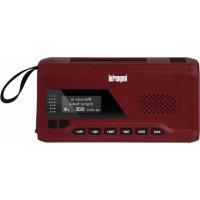
DABMAN OR 2 - Radio Imperial - Free user manual and instructions
Find the device manual for free DABMAN OR 2 Imperial in PDF.



| Product type | DAB+/FM/Bluetooth digital radio |
| Brand | Imperial |
| Model | DABMAN OR 2 |
| Dimensions | 52 x 152 x 77 mm |
| Weight | 300 g |
| Power supply | USB-C 5V 2A ; rechargeable internal battery (solar, crank, USB) |
| Battery life | Approx. 6 minutes after 3-5 minutes of cranking ; full recharge ≈ 3 h |
| Reception modes | DAB+, FM (87.5-108 MHz), Bluetooth 5.0 |
| Speaker | 2 W |
| Main functions | DAB+/FM radio, Bluetooth streaming, flashlight, SOS siren, USB charger for mobile phones |
| Additional functions | Automatic station search, favorites list (30 FM), sleep timer, DRC settings |
| Display | Screen with date/time, brightness adjustment |
| Connectivity | USB-C (charging), Bluetooth 5.0 (range 10 m) |
| Protection rating | IPX5 |
| Operating temperature | -10 °C to +55 °C |
| Maintenance and cleaning | Clean with a dry, soft cloth; do not use liquids or solvents |
| Safety | Do not open the casing; keep out of reach of children; avoid exposure to water (except IPX5 resistance) |
| Spare parts and repairability | Contact TELESTAR customer service; no spare parts provided |
| General information | Manual available in several languages; customer service: +49 2676 95 20 101 |
Frequently Asked Questions - DABMAN OR 2 Imperial
User questions about DABMAN OR 2 Imperial
0 question about this device. Answer the ones you know or ask your own.
Ask a new question about this device
Download the instructions for your Radio in PDF format for free! Find your manual DABMAN OR 2 - Imperial and take your electronic device back in hand. On this page are published all the documents necessary for the use of your device. DABMAN OR 2 by Imperial.
USER MANUAL DABMAN OR 2 Imperial
EN 62368-1 :2020+A11 :2020
EN 62479:2010
EN 301 489-1 V2.2.3 (2019-11)
EN 301 489-3 V2.3.0 (2022-07)
EN 61000-3-3:2013+A2:2021
EN 61000-3-2:2019+A1:2021
EN 303 345-1 V1.1.1(2019-06)
EN 303 345-4 V1.1.1(2021-06)
EN 303345 V1.1.1(2021-06)
EN 55032:2015+A11:2020
EN 55035:2017+A1:2021 EN 50564:2011
ERP 801/2013
ERP 1275/2008
2.SAFETYINSTRUCTIONS 35
2.1 Explanation of symbols 35
2.2.Intended Use 37
2.3. Safety instructions 38
2.4. Operational safety 39
2.5. Connecting the device. 40
2.6. Protecting the device against damages 40
2.7.Risk of injury 41
2.8.Notes on the radio interface. 41
2.9.Cleaning the device 42
2.10. Actions in case of malfunction 42
3.DELIVERYCONTENTS 43
4. OVERVIEW OF THE CONTROLS 44
5. OPERATION AND FUNCTIONS 45
5.1. General operating instructions 45
5.2.First start-up 45
5.3. Standby mode 45
5.4. Select reception mode 46
5.5.DAB+ digital radio mode 46
5.5.1. DAB+ station search 46
5.5.2. channel list 47
5.5.3. Saving / recalling a favorite station 47
5.5.4.DAB ^+ settings. 48
5.6.FM radio mode 48
5.6.1.FM station search 49
5.6.2.Call up saved stations from the station list 49
5.6.3. Saving / recalling a favorite station 49

1. TABLE OF CONTENTS
5.6.4. Set FM frequency manually 50
5.6.5.FM settings 50
5.7.Wireless music streaming (Bluetooth) 50
5.8. System Settings 51
E
5.8.1. time 51
5.8.2.lighting 51
5.8.3.sleep timer 51
5.8.4. language 52
5.8.5.Factory reset. 52
5.8.6.software version 52
5.9.SOS emergency call function 52
5.10. flashlight 53
5.11. Internal battery charging options 53
5.11.1.solar panel. 53
5.11.2. hand crank. 53
5.11.3. Via USB 54
5.12.Status LEDs 54
6.TROUBLESHOOTING 55
7.DISPOSAL INFORMATION. 56
7.1.Disposing of the packaging 56
7.2. Device disposal 56
8. TECHNICAL DATA 57
9. SERVICE & SUPPORT 58
10. DECLARATION OF CONFORMITY 59
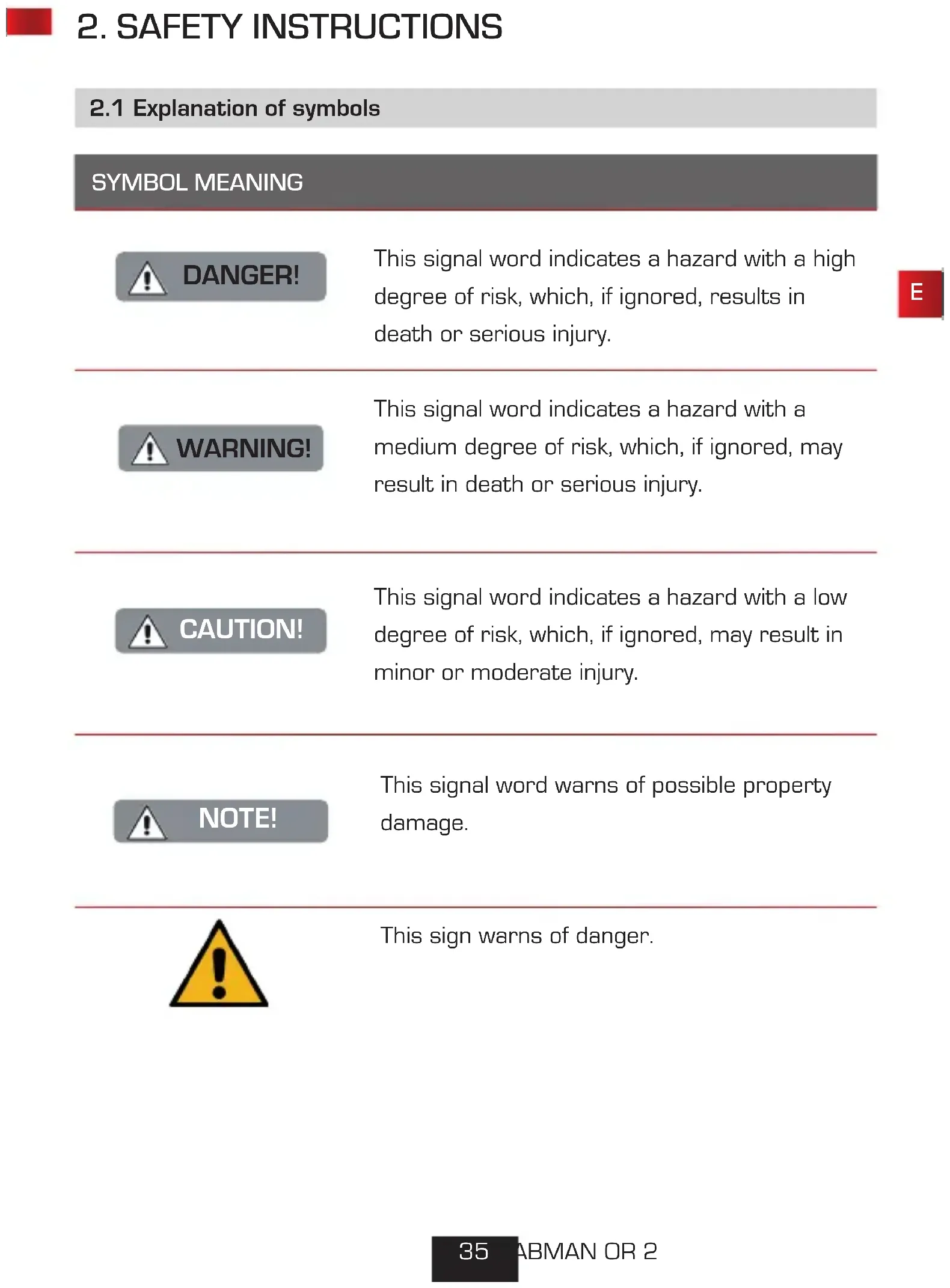
2. SAFETY INSTRUCTIONS
2.1 Explanation of symbols
SYMBOL MEANING

DANGER!
This signal word indicates a hazard with a high degree of risk, which, if ignored, results in death or serious injury.

WARNING!
This signal word indicates a hazard with a medium degree of risk, which, if ignored, may result in death or serious injury.

CAUTION!
This signal word indicates a hazard with a low degree of risk, which, if ignored, may result in minor or moderate injury.

NOTE!
This signal word warns of possible property damage.

This sign warns of danger.
2.1 Explanation of symbols
SYMBOL MEANING


Protection class II
Electrical devices with protection class II have a reinforced or double insulation equal to the rated insulation voltage between active and touchable parts
(VDE 0100 part 410, 412.1). They usually have no connection to the protective conductor. Even if they have electrically conductive surfaces, they are protected by a reinforced or double insulation from contact with other live parts

The products marked with this symbol meet the requirements of the directives of the European Community.
2.2. Intended Use
The device serves as a receiver for DAB+ FM radio signals, for charging mobile devices such as smartphones or tablets with a charging voltage of 5V and a maximum charging current of 2A, and as a flashlight. Any other operation or use of the device is considered improper and can lead to personal injury or damage to property
Do not use the device for any other purpose.
The device is only intended for private use and not for commercial use.
We assume that the person operating this device has general knowledge of how to use electronic entertainment devices.
There is no liability in the event of improper use.
Only use spare parts and accessories supplied or approved by us.
Do not modify the device and do not use any accessories or spare parts not explicitly approved or supplied by us.
Do not use the device in potentially explosive areas.
These include e.g. fuel storage areas, tank facilities, or areas where solvents are stored or processed.
Do not operate the device in areas with particle-contaminated air (e.g. flour or wood dust)
Do not expose the device to extreme conditions, e.g. extremely high or low temperatures, open fire.
2.3. Safety instructions

NOTE!
E
Risk of injury!
Risk of injury to children and persons with reduced physical, sensory, or mental abilities (e.g. partially disabled, elderly persons with limited physical and mental abilities), or lack of experience and knowledge.
Please keep the device only in places that are inaccessible to children.
This device may be used by children over the age of 8 and by persons with reduced physical, sensory or mental abilities or lack of experience and/or knowledge, if they are supervised or have been instructed in the safe use of the device and have understood the resulting hazards.
Never let children use the device unattended.
Do not store the used packaging materials (bags, polystyrene pieces, etc.) within the reach of children.
Children are not allowed to play with the packaging.
2.4. Operational safety

DANGER!
Risk of injury!
Risk of injury due to electric shock from live parts.
There is a risk of electric shock or fire due to an unintentional short circuit.
Please check the device for damages before every use.
If you notice any visible damage or if the device has visible damages, please stop operating it.
If you notice a technical or mechanical problem, please contact TELESTAR Service.
Use only the supplied power supply unit!
Never open the casing of the device.
In the event of a malfunction, disconnect the radio from the power source.
If you move the device from a cold to a warm environment, moisture may develop inside the device.
In such a case, wait for approximately one hour before using it.
In case of prolonged periods of absence or thunder storm, unplug the device from the wall socket.
If foreign bodies or liquids enter the device, immediately disconnect the power supply unit from the wall socket. Have the device inspected by a qualified person before using it again.
Otherwise, you run the risk of an electric shock.

2.5. Connecting the device
Only connect the device to a professionally installed, earthed and electrically fused wall socket.
Make sure that the power source (wall socket) is easily accessible.
Do not bend or squeeze the cable connections.
Before operating the device, check that the voltage indicated on the device matches the local mains voltage.
2.6. Protecting the device against damages

NOTE!
Unfavorable environmental conditions such as humidity, excessive heat, or lack of ventilation can damage the device.
Use the device only in dry rooms.
Avoid the direct proximity of: heat sources, such as radiators, open flames, e.g. candles, devices with strong magnetic fields, e.g. speakers.
Ensure that there is sufficient distance to other objects and that the device is not covered to always guarantee sufficient ventilation.
Avoid direct sunlight and places with excessive dust.
Make sure that contact with moisture, water, and splashing water is avoided and that there are no liquid filled items - e.g. vases - placed near the device. Do not place any heavy objects on the device.
Make sure that there are no open sources of fire (e.g. lighted candles) near the device.
2.7. Risk of injury

WARNING!
Excessive sound pressure can cause hearing damage or loss. Listening in close proximity to the speakers at increased volume for a long period of time may cause harm to the user. Please check the volume from a sufficient distance from the device. Set the volume to a low level and only increase the volume to a level that is comfortable for you.
2.8. Notes on the radio interface
The device generates an electro-magnetic field.
Please pay attention to any indications in your surroundings that may prohibit or restrict the use of electronic devices.
This may be the case in hospitals, petrol stations and patrol depots or airports, for example. If there are such warning signs, promptly unplug the device from the power source. The components contained in the device generate electro-magnetic energy and magnetic fields. These may inhibit medical devices such as a cardiac pacemaker or defibrillator. Therefore, please maintain sufficient and safe distance between the radio and medical devices.
Should you have reason to believe that the radio has caused a disruption of a medical device, immediately switch off and unplug the radio from the power source.
2.9. Cleaning the device
Before cleaning, unplug the device from the wall socket.
Use a dry, soft cloth to clean the device. Please do not use liquids to clean the device.
Do not use solvents and cleaning agents as they may damage the surface and/or inscriptions of the device.
2.10. Actions in case of malfunction
If the device malfunctions, press Reset button and wait for a few seconds. Reconnect the device to the power supply. It may be necessary to reset to the factory settings. If this does not work, please contact your dealer or contact TELESTAR Digital GmbH directly.
3. DELIVERY CONTENTS
Please remove all parts from the packaging and completely remove all pak
kaging materials. If one or more of the
specified parts are missing, please contact:
TELESTAR Service Center,
Am Weiher 14,
56766 Ulmen
e-mail: service@telestar.de
Number Item
1 DABMAN OR 2 radio
1 User manual
1 USB charging cable
4. OVERVIEW OF THE CONTROLS

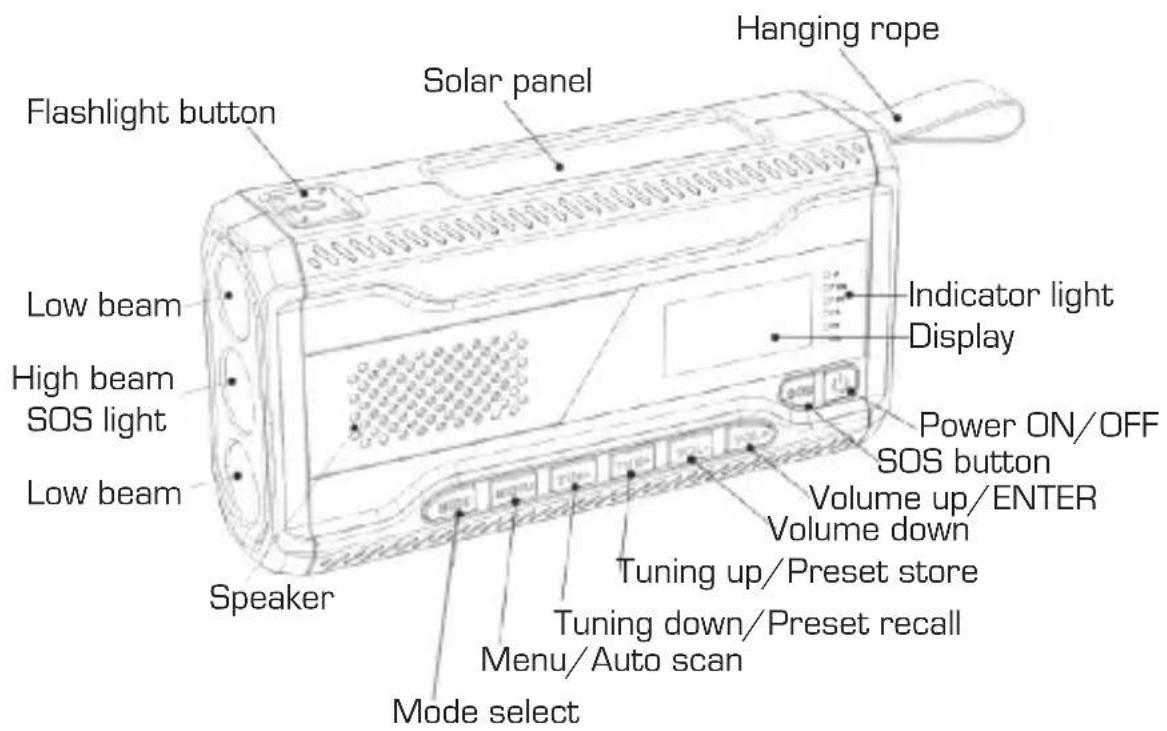
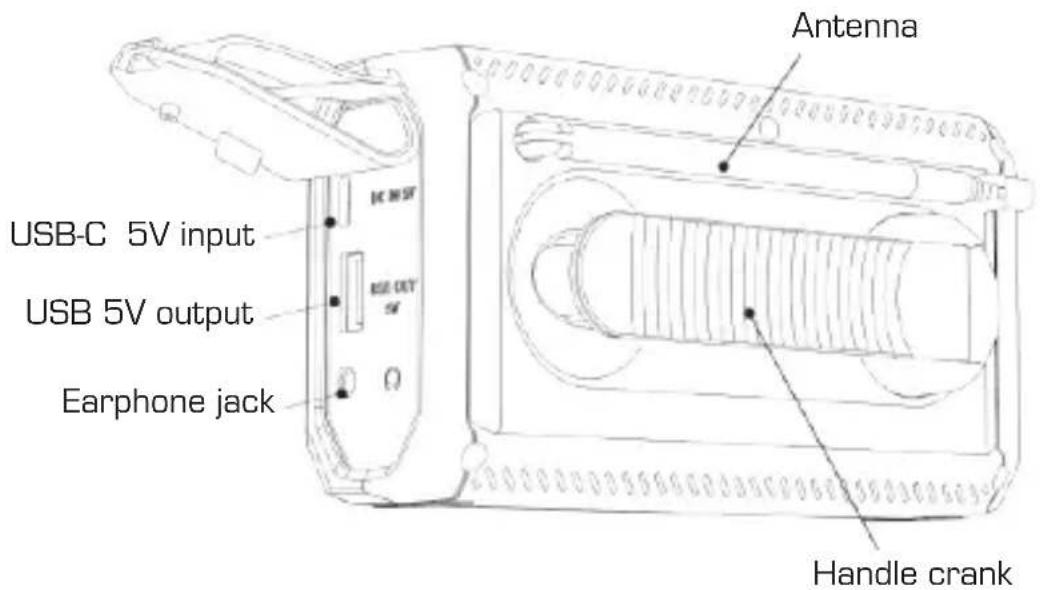

5. OPERATION AND FUNCTIONS
5.1. General operating instructions
Press the MENU button to bring up the menu on the display.
The individual menu items can be selected using the VOL+/ VOL- buttons be called.
Confirm your selection with the VOL+ button.
5.2.First start-up
Pull out the antenna. Hold down the button.
The device turns on. The display is activated.
Briefly press the button again.
After switching on for the first time, the radio starts a DAB+ station search and saves all receivable DAB+ radio stations.
5.3. standby mode
To turn off the radio, briefly press the button.
The device switches to standby. The display shows the date and time.
To activate the radio again, briefly press the
Power button.
To turn off the radio completely and save battery, long press the button again in standby mode.

5. OPERATION AND FUNCTIONS

5.4. Select reception mode
Select a desired reception mode with the MODE button.
You can set the following modes:
- DAB+ digital radio
- FM/FM analogue radio
-Bluetooth
5.5. DAB+ digital radio mode
Use this mode to listen to digital radio stations.
Use the TUN+ / TUN - button to scroll through the available stations. To access more features, open the menu by pressing the MENU button.
Use the TUN+ / TUN - buttons to navigate through the menu and confirm your selection with the VOL+ button.
To exit the menu, press the MENU button again.
5.5.1. DAB+ station search
To carry out a full channel search, press and hold the MENU button for approx. 2 seconds. The radio starts a DAB+ station search and saves all receivable DAB+ radio stations.
5. OPERATION AND FUNCTIONS
5.5.2. channel list
After the search is complete, you can call up all currently available stations using the TUN + /TUN- buttons.
Confirm a selection with the VOL+ button.
5.5.3. Saving / recalling a favorite station
E
Save favorite stations
Use the TUN+/TUN- buttons to select a DAB+ station you want to save to the favorites list. Press and hold the TUN+ button for about 2 seconds.
The station is now selected as a favorite station.
Use the TUN+/TUN- buttons to select the position on which the station is to be saved. Press the VOL+ button.
The station is now saved as a favorite station.
Call up favorite channels
Press and hold the TUN - button for 2 seconds.
The favorites list appears with all saved favorite stations.
Use the TUN+/TUN- buttons to select a favorite station from the list and confirm your selection with the VOL+ button.

5. OPERATION AND FUNCTIONS
5.5.4. DAB+ settings
Open the DAB+ settings menu by pressing the MENU button.
Inactive transmitters:
Remove unavailable channels from the channel list.
DRC:
Adjust the dynamic range compression level to reduce the difference in volume between loud and quiet passages.
Manually:
Here you can set the DAB frequency manually.
Full scan:
Selecting this menu item starts a new DAB+ station search.
5.6. FM radio mode
Use this mode to listen to analogue radio stations.
Press the MODE button repeatedly until FM appears on the display.
In FM radio mode, press the TUN+ / TUN - buttons,
to change the FM frequency. The frequency is changed in 0.05 MHz steps via TUN+ upwards, via TUN - downwards.
5. OPERATION AND FUNCTIONS
5.6.1. FM station search
To carry out a full channel search, press and hold the MENU button for approx. 2 seconds. All radio stations found are saved in the station list. The device can store 30 FM radio stations.
5.6.2. Call up saved stations from the station list
Press and hold the TUN button for 2 seconds.
The station list appears with all the saved radio stations.
Call up a desired radio station using the TUN+/TUN- buttons and confirm your selection with VOL+
5.6.3. Saving / recalling a favorite station
Save radio stations
If you add a currently playing FM station to the station list
want to record, press and hold the TUN+ button for 2 seconds.
The station is now selected. Use the TUN+/TUN- buttons to select the position where the radio station is to be saved. Press the VOL+ button. The station is now saved as a favorite station.
Call up radio stations from the favorites list
Press and hold the TUN - button for 2 seconds.
The favorites list appears with all saved favorite stations.
Use the TUN+/TUN- buttons to select a favorite station from the list and confirm your selection with the VOL+ button.
5. OPERATION AND FUNCTIONS

5.6.4. Set FM frequency manually
In FM radio mode, press the TUN+ / TUN - buttons,
to change the FM frequency. The frequency is changed in 0.05 MHz steps
via TUN+ upwards, via TUN - downwards.
5.6.5. FM settings
Open the FM settings menu by pressing the MENU button. The FM menu includes the following options:
Scan settings:
Limit the full scan to strong stations
Audio settings:
Only allow mono stations to improve reception
5.7. Wireless music streaming (Bluetooth)
A Bluetooth-enabled mobile phone can be used for wireless music playback (e.g. Spotify).
To do this, you must activate the "Bluetooth" mode by pressing the Press mode button.
Then search for on your mobile phone "DABMAN OR 2". You can find further details on how to operate your mobile phone in the operating instructions for your device.
5. OPERATION AND FUNCTIONS
5.8. System Settings
Briefly press the menu button to enter the menu.
Use the TUN+/TUN- buttons to navigate through the menu.
Confirm a menu selection with the VOL+ button.
Switch to the System menu item.
Here you can make the following settings.
5.8.1. time
Use this entry to set the time/date, change the time or date format, or configure automatic time setting via FM/DAB.
The radio automatically sets the date and time when the radio is receiving a DAB+ station.
5.8.2. lighting
Select the desired display brightness (low / medium / high).
5.8.3. sleep timer
Use this menu to set a sleep timer. The device switches off after a previously set period of time via the sleep timer switched off automatically.
5. OPERATION AND FUNCTIONS

5.8.4. language
Choose one of the following menu languages:
English, German, Italian, French, Norwegian, Spanish, Dutch, Swedish.
5.8.5. Factory reset
In this menu item you can reset the device to the delivery status
reset to default. The device then restarts.
Danger! All settings and favorites will be deleted during this process!
5.8.6. software version
The current software version of the radio is displayed here.
5.9. SOS emergency call function
In an emergency, use this feature to alert those around you.
To activate, long press the SOS button on the radio.
The radio will sound a loud siren and light up the signal light (centre).
The siren is loud!
Prolonged listening at close range can cause hearing damage. Try moving the radio away when using the emergency function. Using the emergency function quickly drains the battery.
5. OPERATION AND FUNCTIONS
5.10. flashlight
To turn on the flashlight, press the light button on top of the radios.
[High light intensity, middle light]
Press the light button again.
[Low light intensity, upper and lower light]
Press the light button again.
(all lights active)
Pressing again turns off all lights.
5.11. Internal battery charging options
5.11.1. solar panel
To charge the radio, place the radio's solar panel in direct sunlight. The panel can be tilted for optimal alignment. Make sure that no part of the solar module is shaded.
Even small shadows can drastically reduce panel performance. Artificial light sources usually do not provide enough energy to charge the radio.
5.11.2. hand crank
To charge the radio, turn the hand crank in any direction. For optimal loading, turn the crank at 130-150 revolutions per minute.
After rotating 3-5 minutes, the radio can be operated for about 6 minutes.
5. OPERATION AND FUNCTIONS

5.11.3. Via USB
Use a USB charging source to charge the battery.
To do this, please use the USB charging cable included in the scope of delivery and connect this cable to the USB-C input of the radio.
5.12.Status LEDs
The status LEDs contain the following status information
[Top down]:
Battery charge indicator:
Flashes red when the built-in battery is being charged via the hand crank.
Signal display:
Lights up green when radio programs can be received.
Battery charge indicator 25%
Blinking construction: battery is being charged. Charge level below 25% .
Solid blue: Battery charged at 25% or more.
Battery charge indicator 50%
Blinking construction: battery is being charged. Charge level below 50% .
Solid blue: Battery charged at 50% or more.
Battery charge indicator 75%
Blinking construction: battery is being charged. Charge level below 75% .
Solid blue: Battery charged at 75% or more.
Battery charge indicator 200%
Blinking construction: battery is being charged. Charge level below 100% .
Steady blue: Battery fully charged
Problem Solutuion
The device does not switch on.
Make sure the radio is charged, by connecting it to a power source and charging for at least 30 minutes.
If the radio is charged but still does not switch on, press the reset button under the charge cover with a small object.
No sound or low volume Is the radio muted? Use the VOL+ up button to increase the volume.
No signal or hissing in DAB/FM mode.
Re-position the radio or change the antenna. Check that the antenna is fully extended.
Some buttons/functions can no longer be used
Reset the radio to factory settings.

7. DISPOSAL INFORMATION
7.1. Disposing of the packaging

The packaging consists exclusively of materials that may be recycled. Please dispose of this according to the 'Dual system'.
7.2. Device disposal
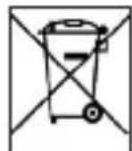
The symbol on the right of a crossed-out waste bin on wheels indicates that this device is subject to Directive 2012 / 19 / EU.
This directive specifies that this device may not be disposed of in normal household waste at the end of its service life but must be taken to specific collection centres, recycling centres or waste disposal companies.
This type of disposal is free of charge. Protect the environment and ensure a proper disposal.
Further information is available at your local waste collection company or your city or municipal office.

8. TECHNICAL DATA
| Model number IMPERIAL DABMAN OR 2 |
| Description DAB+/DAB/UKW/Bluetooth |
| Speaker power 2W |
| FM 87,5 - 108 MHz |
| DAB/DAB+ 174 - 240 MHz (Band III) |
| Bluetooth Version 5.0 / Distance ca. 10 m |
| Charging input USB-C 5 V 2 A |
| Charging output 5 V 2 A |
| Charging time approximately : 3hours |
| Waterproof IPX 5 |
| Operating temperature [-10 °C] - [+55 °C] |
| Dimensions 52 x 152 x 77 mm |
| Weight 300g |

9. SERVICE & SUPPORT

Dear customer!
Thank you for choosing one of our products. Our product meets the legal requirements and has been manufactured under constant quality control.
The technical data correspond to the current status at the time of printing.
Subject to changes. The warranty period for the DABMAN OR 2 corresponds to the statutory provisions at the time of purchase.
We also offer a HOTLINE telephone service with professional support.
Professional specialists are ready to offer their assistance in our service area. Here you can ask any questions you may have about TELESTAR products and get suggestions on troubleshooting.Our technicians are availab- le Monday- Friday from 08:00 - 16:45 at the following phone number:
02676 / 95 20 101 or by email at: service@telestar.de
If the Service Hotline cannot help you, please send your DABMAN OR 2 to the following address, preferably in its original packaging, but definitely packed safely for transport:
TELESTAR-DIGITALGmbH
Service Center
All technical data and functions described in
these operating instructions are correct at the time of printing and are subject to change without prior notice.
We assume no liability for misprints or errors.
Copying and reproduction only permitted with the express permission of TELESTAR-DIGITAL GmbH. © TELESTAR 2022


TELESTAR
digital tv, multimedia & more
EN 62368-1 :2020+A11 :2020
EN 301 489-1 V2.2.3 (2019-11)
EN 61000-3-3:2013+A2:2021
EN 303 345-1 V1.1.1(2019-06)
EN 303345 V1.1.1(2021-06)
EN 55035:2017+A1:2021
ERP 1275/2008
EN 62479:2010
EN 301 489-3 V2.3.0 (2022-07)
EN 61000-3-2:2019+A1:2021
EN 303 345-4 V1.1.1(2021-06)
EN 55032:2015+A11:2020
ERP 801/2013
TELESTAR Service Center,
Am Weiher 14,
56766 Ulmen
Courriel:service@telestar.de
Acceder aux stations favorites
Chere cliente, cher client,
EN 62368-1 :2020+A11 :2020
EN 62479:2010
EN 301 489-1 V2.2.3 (2019-11)
EN 301 489-3 V2.3.0 (2022-07)
EN 61000-3-3:2013+A2:2021
EN 61000-3-2:2019+A1:2021
EN 303 345-1 V1.1.1(2019-06)
EN 303 345-4 V1.1.1(2021-06)
EN 303345 V1.1.1(2021-06)
EN 55032:2015+A11:2020
EN 55035:2017+A1:2021 EN 50564:2011
ERP 1275/2008
ERP 801/2013
TELESTAR Service Center,
Am Weiher 14,
56766 Ulmen
E-mail: service@telestar.de
In这对于 me, la mancha ha sido un great pleasure. In this case, I have had the opportunity to enjoy a few days of splendid food and drink.
Geen signal of ruis in DAB/FM-modus
- TABLE OF CONTENTS
- E
- SAFETY INSTRUCTIONS
- Explanation of symbols
- SYMBOL MEANING
- DANGER!
- WARNING!
- CAUTION!
- NOTE!
- Intended Use
- Safety instructions
- Risk of injury!
- Operational safety
- Connecting the device
- Protecting the device against damages
- Risk of injury
- Notes on the radio interface
- Cleaning the device
- Actions in case of malfunction
- DELIVERY CONTENTS
- OVERVIEW OF THE CONTROLS
- OPERATION AND FUNCTIONS
- General operating instructions
- 5.2.First start-up
- standby mode
- Select reception mode
- DAB+ digital radio mode
- DAB+ station search
- channel list
- Saving / recalling a favorite station
- Save favorite stations
- Call up favorite channels
- DAB+ settings
- Inactive transmitters:
- DRC:
- Manually:
- Full scan:
- FM radio mode
- FM station search
- Call up saved stations from the station list
- Saving / recalling a favorite station
- Save radio stations
- Call up radio stations from the favorites list
- Set FM frequency manually
- FM settings
- Scan settings:
- Audio settings:
- Wireless music streaming (Bluetooth)
- System Settings
- time
- lighting
- sleep timer
- language
- Factory reset
- software version
- SOS emergency call function
- flashlight
- Internal battery charging options
- solar panel
- hand crank
- Via USB
- 5.12.Status LEDs
- Problem Solutuion
- DISPOSAL INFORMATION
- Disposing of the packaging
- Device disposal
- TECHNICAL DATA
- SERVICE & SUPPORT
- TELESTAR
- Acceder aux stations favorites
Brand : Imperial
Model : DABMAN OR 2
Category : Radio